joplin-plugin-explorer 1.6.8 → 1.7.0
This diff represents the content of publicly available package versions that have been released to one of the supported registries. The information contained in this diff is provided for informational purposes only and reflects changes between package versions as they appear in their respective public registries.
- package/README.md +80 -77
- package/package.json +25 -25
- package/publish/index.js +1 -1
- package/publish/manifest.json +46 -46
- package/publish/plugin.jpl +0 -0
- package/publish/webview/chrome.css +21 -0
- package/publish/webview/panel.css +23 -9
- package/publish/webview/panel.js +1 -1
package/README.md
CHANGED
|
@@ -1,77 +1,80 @@
|
|
|
1
|
-
# Joplin Explorer
|
|
2
|
-
|
|
3
|
-
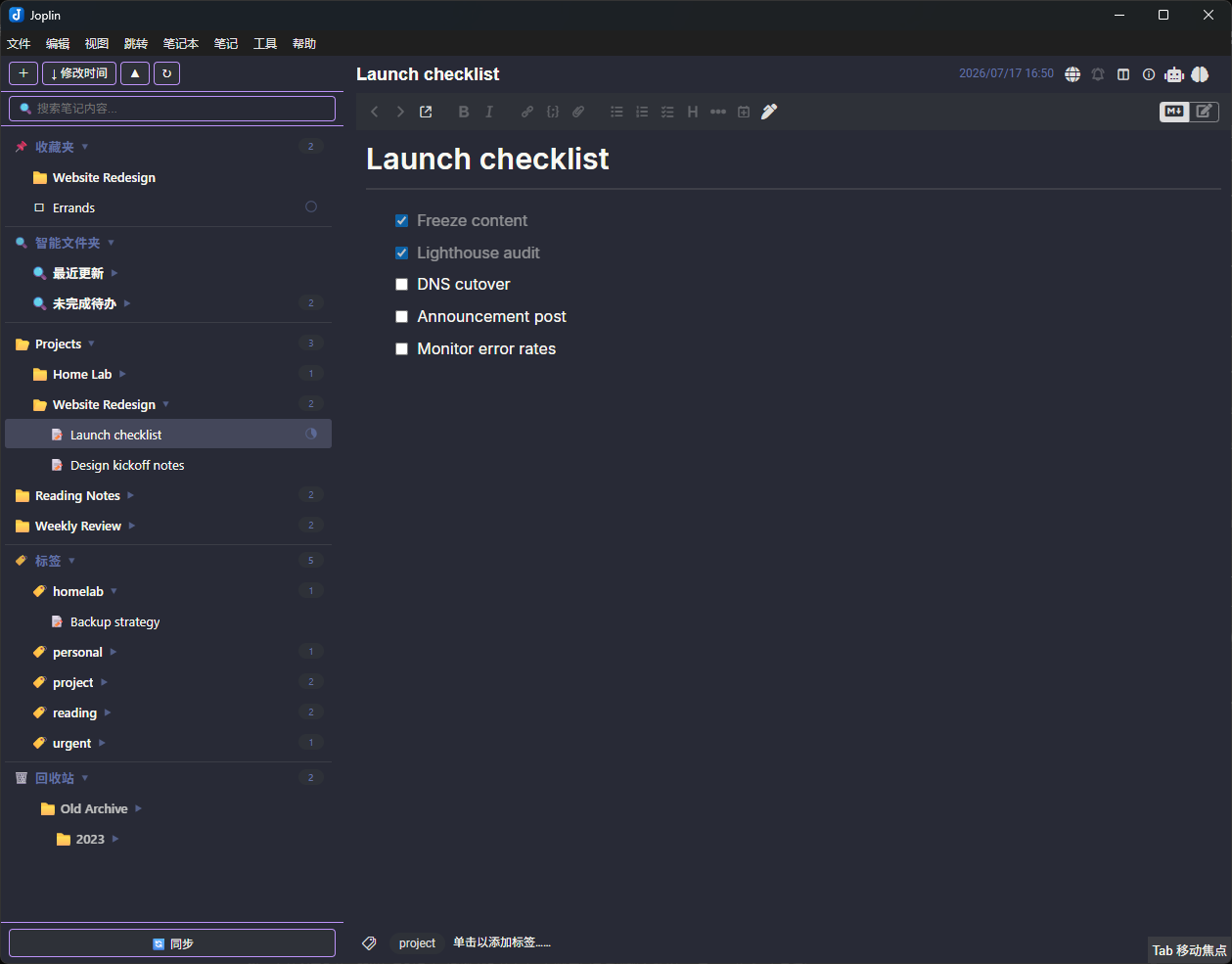
A unified sidebar plugin for [Joplin](https://joplinapp.org/) that displays notebooks and notes together in a single tree view — like a file explorer.
|
|
4
|
-
|
|
5
|
-
[中文说明](README-CN.md)
|
|
6
|
-
|
|
7
|
-
|
|
8
|
-
|
|
9
|
-
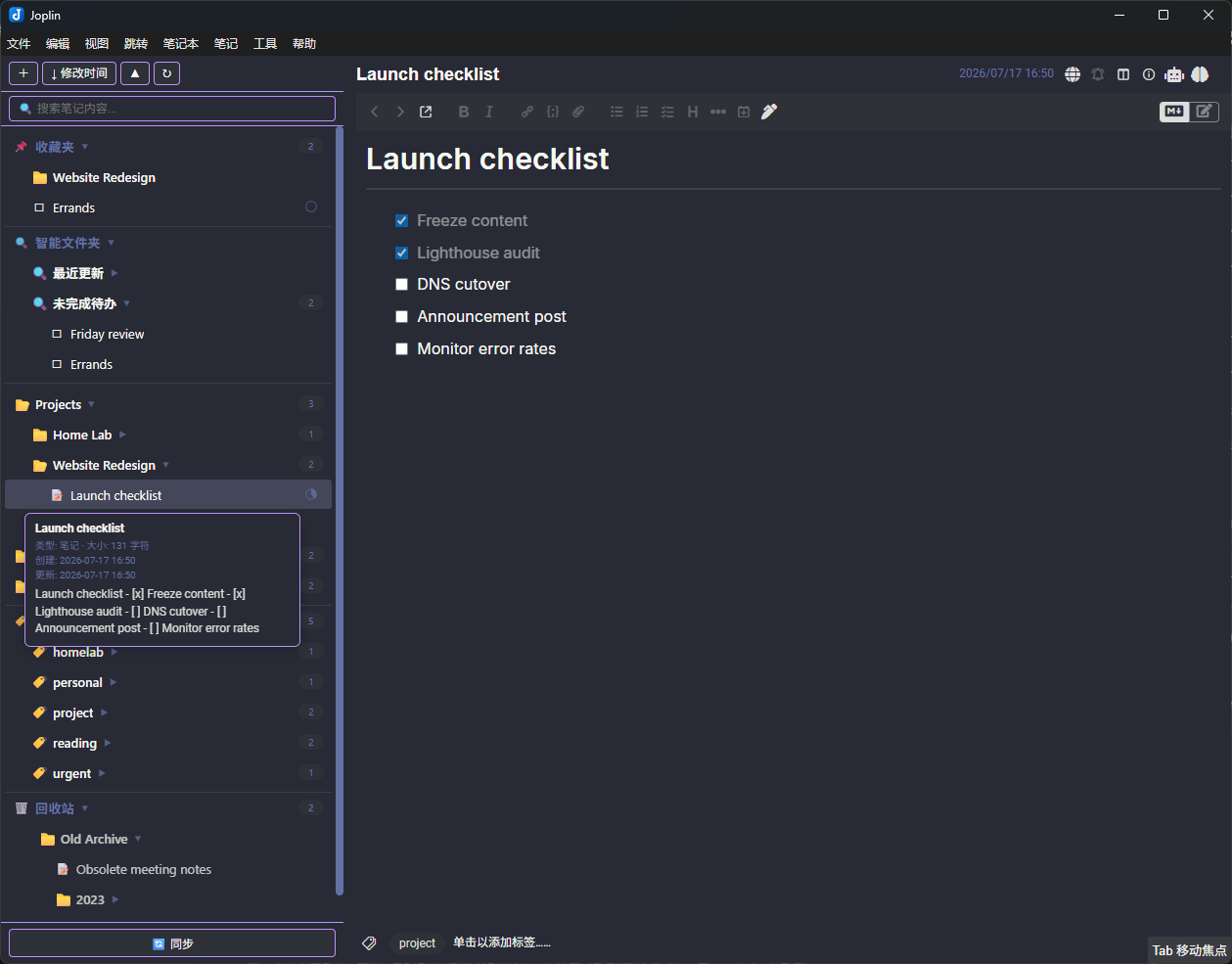
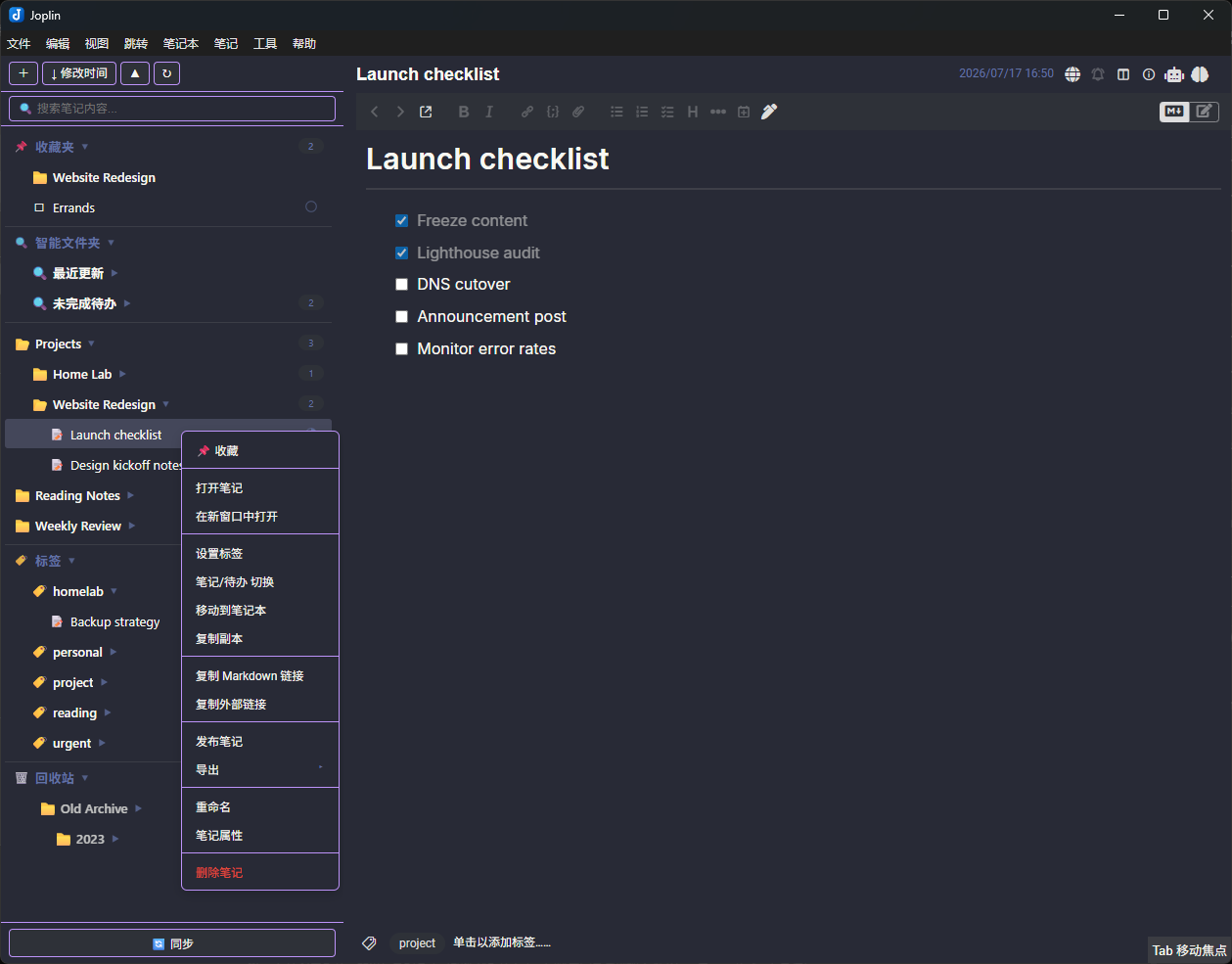
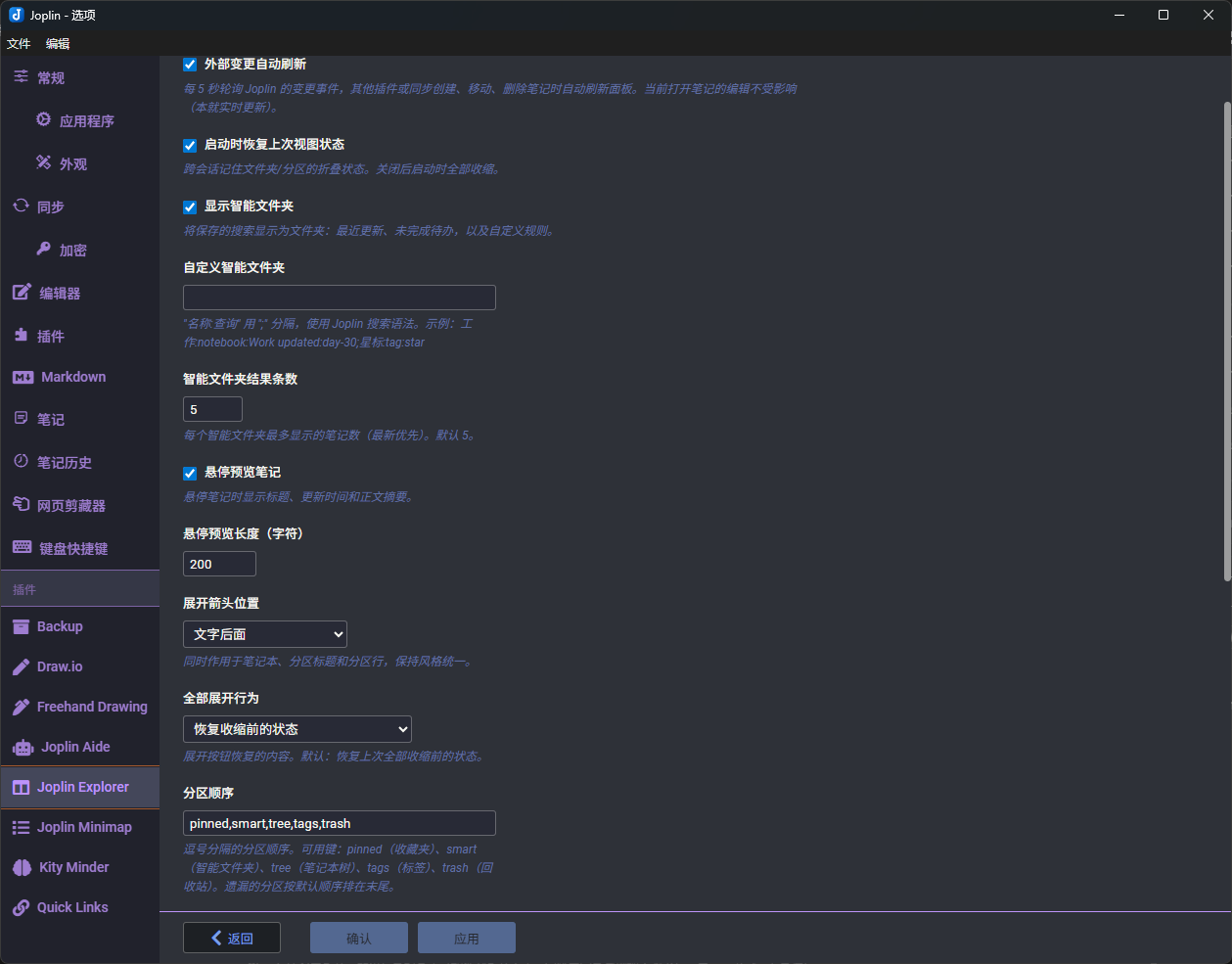
| Hover preview | Context menu | Settings |
|
|
10
|
-
| :---: | :---: | :---: |
|
|
11
|
-
|  |  |  |
|
|
12
|
-
|
|
13
|
-
## Features
|
|
14
|
-
|
|
15
|
-
- **Unified Tree View** — Notebooks and notes displayed in one collapsible panel
|
|
16
|
-
- **Custom Icons** — Shows emoji icons set in notebook settings; customize folder and pinned section icons via settings (emoji / image URL / data URI / local file path)
|
|
17
|
-
- **Toggle Arrow Visibility** — Hide expand/collapse arrows for a cleaner look
|
|
18
|
-
- **Live Updates** — Notes refresh in-place when their title or todo state changes
|
|
19
|
-
- **Favorites (Pin)** — Pin notes and notebooks to a collapsible section at the top of the tree; drag items to the pinned section to pin, drag within to reorder; persists across restarts
|
|
20
|
-
- **Enhanced Search** — Search notes, notebooks, and tags simultaneously with keyword highlighting; results grouped in collapsible sections; local title substring matching for partial queries (e.g. "8121R" finds "KY8121R")
|
|
21
|
-
- **Sort** — Toggle between sorting by update time or title (ascending/descending)
|
|
22
|
-
- **Context Menus**
|
|
23
|
-
- Notebooks: pin/unpin, new note, new to-do, new sub-notebook, rename, export, delete
|
|
24
|
-
- Notes: pin/unpin, open, open in new window, copy Markdown link, duplicate, switch note/to-do type, toggle completed, rename, view properties, delete
|
|
25
|
-
- **Drag & Drop** — Move notes between notebooks, reorganize folder hierarchy; drag to empty area to create a new notebook; drag to pinned section to pin
|
|
26
|
-
- **
|
|
27
|
-
- **
|
|
28
|
-
- **
|
|
29
|
-
- **
|
|
30
|
-
- **
|
|
31
|
-
|
|
32
|
-
|
|
33
|
-
|
|
34
|
-
|
|
35
|
-
|
|
36
|
-
|
|
37
|
-
|
|
38
|
-
|
|
39
|
-
|
|
40
|
-
|
|
41
|
-
|
|
42
|
-
|
|
43
|
-
|
|
44
|
-
|
|
45
|
-
|
|
46
|
-
|
|
47
|
-
|
|
48
|
-
- **
|
|
49
|
-
- **
|
|
50
|
-
-
|
|
51
|
-
-
|
|
52
|
-
-
|
|
53
|
-
|
|
54
|
-
|
|
55
|
-
|
|
56
|
-
|
|
57
|
-
|
|
58
|
-
|
|
59
|
-
|
|
60
|
-
#
|
|
61
|
-
npm
|
|
62
|
-
|
|
63
|
-
#
|
|
64
|
-
npm run
|
|
65
|
-
|
|
66
|
-
|
|
67
|
-
|
|
68
|
-
|
|
69
|
-
|
|
70
|
-
|
|
71
|
-
|
|
72
|
-
|
|
73
|
-
|
|
74
|
-
|
|
75
|
-
|
|
76
|
-
|
|
77
|
-
|
|
1
|
+
# Joplin Explorer
|
|
2
|
+
|
|
3
|
+
A unified sidebar plugin for [Joplin](https://joplinapp.org/) that displays notebooks and notes together in a single tree view — like a file explorer.
|
|
4
|
+
|
|
5
|
+
[中文说明](README-CN.md)
|
|
6
|
+
|
|
7
|
+

|
|
8
|
+
|
|
9
|
+
| Hover preview | Context menu | Settings |
|
|
10
|
+
| :---: | :---: | :---: |
|
|
11
|
+
|  |  |  |
|
|
12
|
+
|
|
13
|
+
## Features
|
|
14
|
+
|
|
15
|
+
- **Unified Tree View** — Notebooks and notes displayed in one collapsible panel
|
|
16
|
+
- **Custom Icons** — Shows emoji icons set in notebook settings; customize folder and pinned section icons via settings (emoji / image URL / data URI / local file path)
|
|
17
|
+
- **Toggle Arrow Visibility** — Hide expand/collapse arrows for a cleaner look
|
|
18
|
+
- **Live Updates** — Notes refresh in-place when their title or todo state changes
|
|
19
|
+
- **Favorites (Pin)** — Pin notes and notebooks to a collapsible section at the top of the tree; drag items to the pinned section to pin, drag within to reorder; persists across restarts
|
|
20
|
+
- **Enhanced Search** — Search notes, notebooks, and tags simultaneously with keyword highlighting; results grouped in collapsible sections; local title substring matching for partial queries (e.g. "8121R" finds "KY8121R")
|
|
21
|
+
- **Sort** — Toggle between sorting by update time or title (ascending/descending)
|
|
22
|
+
- **Context Menus**
|
|
23
|
+
- Notebooks: pin/unpin, new note, new to-do, new sub-notebook, rename, export, delete
|
|
24
|
+
- Notes: pin/unpin, open, open in new window, copy Markdown link, duplicate, switch note/to-do type, toggle completed, rename, view properties, delete
|
|
25
|
+
- **Drag & Drop** — Move notes between notebooks, reorganize folder hierarchy; drag to empty area to create a new notebook; drag to pinned section to pin
|
|
26
|
+
- **Sidebar Toggle** — A toolbar button, a **View** menu entry and an assignable keyboard shortcut hide and show the panel, so you can reclaim the width without disabling the plugin
|
|
27
|
+
- **Row Density** — Row font size and row height are adjustable (Advanced settings), for fitting more of a large tree on screen
|
|
28
|
+
- **Sync Button** — Trigger synchronization with status feedback (syncing → done); becomes **Cancel** while a sync is running
|
|
29
|
+
- **Auto Expand** — Automatically expands to the currently selected note on startup
|
|
30
|
+
- **Collapse All** — One-click collapse all notebooks
|
|
31
|
+
- **Scroll Position** — Preserved when navigating between notes
|
|
32
|
+
- **i18n** — Supports English, Simplified Chinese, Traditional Chinese, Japanese, and Russian (follows Joplin's locale setting)
|
|
33
|
+
|
|
34
|
+
## Install
|
|
35
|
+
|
|
36
|
+
### From File
|
|
37
|
+
|
|
38
|
+
1. Download `joplin-explorer.jpl` from the [latest release](https://github.com/lim0513/joplin-explorer/releases/latest)
|
|
39
|
+
2. In Joplin, go to **Tools → Options → Plugins**
|
|
40
|
+
3. Click the gear icon and select **Install from file**
|
|
41
|
+
4. Choose the downloaded `.jpl` file
|
|
42
|
+
5. Restart Joplin
|
|
43
|
+
|
|
44
|
+
## Usage
|
|
45
|
+
|
|
46
|
+
After installation, the Explorer panel appears on the side of the editor. You can:
|
|
47
|
+
|
|
48
|
+
- **Click** a notebook to expand/collapse it
|
|
49
|
+
- **Click** a note to open it
|
|
50
|
+
- **Right-click** for context menu actions (including pin/unpin)
|
|
51
|
+
- **Drag** notes or notebooks to reorganize; drag to the bottom zone to create a new notebook; drag to the pinned section to pin
|
|
52
|
+
- Use the **toolbar** at the top for quick actions (new notebook/note/to-do, sort, collapse all)
|
|
53
|
+
- Use the **search bar** to search notes, notebooks, and tags
|
|
54
|
+
- Click **Sync** at the bottom to trigger synchronization, or click it again while syncing to cancel
|
|
55
|
+
- Toggle the whole panel with the toolbar button, **View → Toggle Explorer sidebar**, or a shortcut you assign in Joplin's keyboard settings
|
|
56
|
+
|
|
57
|
+
## Development
|
|
58
|
+
|
|
59
|
+
```bash
|
|
60
|
+
# Install dependencies
|
|
61
|
+
npm install
|
|
62
|
+
|
|
63
|
+
# Build
|
|
64
|
+
npm run dist
|
|
65
|
+
|
|
66
|
+
# Watch mode
|
|
67
|
+
npm run dev
|
|
68
|
+
```
|
|
69
|
+
|
|
70
|
+
The built plugin is output to the `publish/` directory. To test locally, set `plugins.devPluginPaths` in Joplin's settings to point to the `publish/` directory.
|
|
71
|
+
|
|
72
|
+
## Acknowledgements
|
|
73
|
+
|
|
74
|
+
Special thanks to [@CJeffyB](https://github.com/CJeffyB), whose steady stream of thoughtful bug reports and feature ideas shaped much of v1.5–v1.6 — and who generously bought the project a coffee on Ko-fi. ☕
|
|
75
|
+
|
|
76
|
+
Thanks also to [@bwat47](https://github.com/bwat47) for PR [#30](https://github.com/lim0513/joplin-explorer/pull/30) and several sharp-eyed reports.
|
|
77
|
+
|
|
78
|
+
## License
|
|
79
|
+
|
|
80
|
+
MIT
|
package/package.json
CHANGED
|
@@ -1,25 +1,25 @@
|
|
|
1
|
-
{
|
|
2
|
-
"name": "joplin-plugin-explorer",
|
|
3
|
-
"version": "1.
|
|
4
|
-
"description": "A unified sidebar that displays notebooks and notes together in a single tree view",
|
|
5
|
-
"author": "lim0513",
|
|
6
|
-
"homepage": "https://github.com/lim0513/joplin-explorer",
|
|
7
|
-
"repository": {
|
|
8
|
-
"type": "git",
|
|
9
|
-
"url": "https://github.com/lim0513/joplin-explorer.git"
|
|
10
|
-
},
|
|
11
|
-
"scripts": {
|
|
12
|
-
"dist": "webpack --env production && node scripts/pack-jpl.js",
|
|
13
|
-
"dev": "webpack --watch"
|
|
14
|
-
},
|
|
15
|
-
"keywords": ["joplin-plugin", "joplin", "sidebar", "explorer", "tree-view", "notebooks"],
|
|
16
|
-
"license": "MIT",
|
|
17
|
-
"devDependencies": {
|
|
18
|
-
"copy-webpack-plugin": "^11.0.0",
|
|
19
|
-
"ts-loader": "^9.5.1",
|
|
20
|
-
"typescript": "^5.3.3",
|
|
21
|
-
"webpack": "^5.89.0",
|
|
22
|
-
"webpack-cli": "^5.1.4"
|
|
23
|
-
},
|
|
24
|
-
"files": ["publish"]
|
|
25
|
-
}
|
|
1
|
+
{
|
|
2
|
+
"name": "joplin-plugin-explorer",
|
|
3
|
+
"version": "1.7.0",
|
|
4
|
+
"description": "A unified sidebar that displays notebooks and notes together in a single tree view",
|
|
5
|
+
"author": "lim0513",
|
|
6
|
+
"homepage": "https://github.com/lim0513/joplin-explorer",
|
|
7
|
+
"repository": {
|
|
8
|
+
"type": "git",
|
|
9
|
+
"url": "https://github.com/lim0513/joplin-explorer.git"
|
|
10
|
+
},
|
|
11
|
+
"scripts": {
|
|
12
|
+
"dist": "webpack --env production && node scripts/pack-jpl.js",
|
|
13
|
+
"dev": "webpack --watch"
|
|
14
|
+
},
|
|
15
|
+
"keywords": ["joplin-plugin", "joplin", "sidebar", "explorer", "tree-view", "notebooks"],
|
|
16
|
+
"license": "MIT",
|
|
17
|
+
"devDependencies": {
|
|
18
|
+
"copy-webpack-plugin": "^11.0.0",
|
|
19
|
+
"ts-loader": "^9.5.1",
|
|
20
|
+
"typescript": "^5.3.3",
|
|
21
|
+
"webpack": "^5.89.0",
|
|
22
|
+
"webpack-cli": "^5.1.4"
|
|
23
|
+
},
|
|
24
|
+
"files": ["publish"]
|
|
25
|
+
}
|