jev-devtools 0.1.1 → 0.1.2
This diff represents the content of publicly available package versions that have been released to one of the supported registries. The information contained in this diff is provided for informational purposes only and reflects changes between package versions as they appear in their respective public registries.
package/README.md
CHANGED
|
@@ -10,7 +10,22 @@ A React drawer and Node adapter for inspecting TypeSafe Jev requests with animat
|
|
|
10
10
|
|
|
11
11
|
|
|
12
12
|
|
|
13
|
-
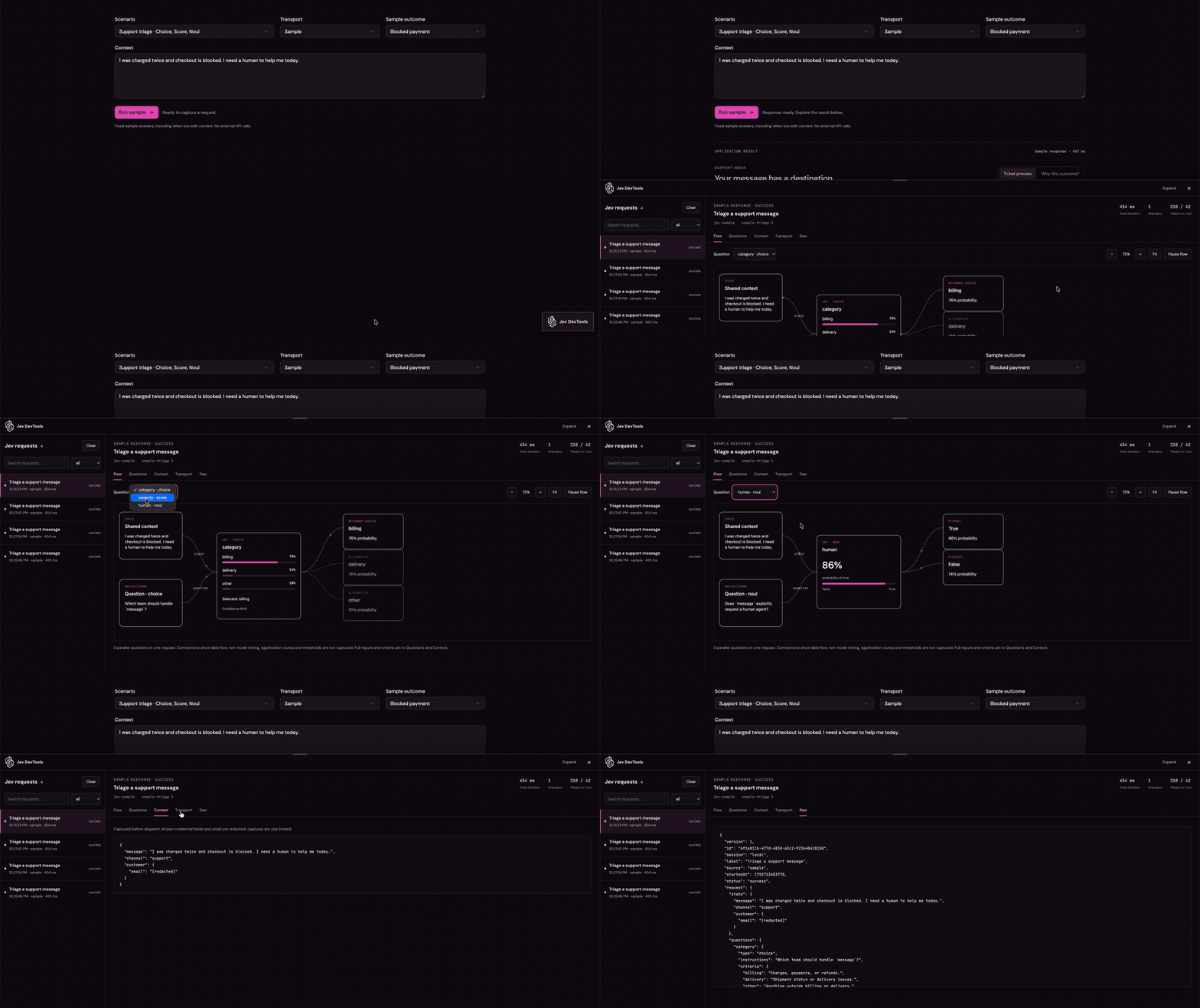
The full sample recording loops above.
|
|
13
|
+
The full sample recording loops above.
|
|
14
|
+
|
|
15
|
+
## Set up with your coding agent
|
|
16
|
+
|
|
17
|
+
In your application's coding-agent chat, paste:
|
|
18
|
+
|
|
19
|
+
```text
|
|
20
|
+
Set up jev-devtools in this React app. Read and follow:
|
|
21
|
+
https://raw.githubusercontent.com/diegoag64/jev-devtools/main/packages/jev-devtools/skills/setup-jev-devtools/SKILL.md
|
|
22
|
+
Choose the recipe for this app's framework, wire the server capture and root
|
|
23
|
+
drawer, and verify with a labeled sample request. Preserve existing app behavior.
|
|
24
|
+
```
|
|
25
|
+
|
|
26
|
+
After installing, the version-matched instructions are available locally at `node_modules/jev-devtools/skills/setup-jev-devtools/SKILL.md` with all references included. In a workspace, read the package installed for the consuming app. Agents can follow these files without web access. Tools with skill support can install/copy the entire `setup-jev-devtools` folder into their supported skills location; npm does not register it automatically.
|
|
27
|
+
|
|
28
|
+
The [setup skill](https://github.com/diegoag64/jev-devtools/blob/main/packages/jev-devtools/skills/setup-jev-devtools/SKILL.md) covers React/Node/Vite and Next.js App Router, with no-key sample verification and troubleshooting. A Node backend is required for live calls; browser-only apps can use a local Vite sample server. [Agent documentation index](https://raw.githubusercontent.com/diegoag64/jev-devtools/main/llms.txt).
|
|
14
29
|
|
|
15
30
|
## Install
|
|
16
31
|
|
|
@@ -27,7 +42,7 @@ To try unpublished local changes instead:
|
|
|
27
42
|
npm ci
|
|
28
43
|
npm run pack:devtools
|
|
29
44
|
# From the consuming app:
|
|
30
|
-
npm install /absolute/path/to/jev-devtools-0.1.
|
|
45
|
+
npm install /absolute/path/to/jev-devtools-0.1.2.tgz
|
|
31
46
|
```
|
|
32
47
|
|
|
33
48
|
Mount once:
|
package/package.json
CHANGED
|
@@ -1,6 +1,6 @@
|
|
|
1
1
|
{
|
|
2
2
|
"name": "jev-devtools",
|
|
3
|
-
"version": "0.1.
|
|
3
|
+
"version": "0.1.2",
|
|
4
4
|
"type": "module",
|
|
5
5
|
"engines": {
|
|
6
6
|
"node": ">=22.12"
|
|
@@ -24,7 +24,8 @@
|
|
|
24
24
|
"lib",
|
|
25
25
|
"README.md",
|
|
26
26
|
"LICENSE",
|
|
27
|
-
"THIRD_PARTY_NOTICES.txt"
|
|
27
|
+
"THIRD_PARTY_NOTICES.txt",
|
|
28
|
+
"skills"
|
|
28
29
|
],
|
|
29
30
|
"sideEffects": [
|
|
30
31
|
"**/*.css"
|
|
@@ -0,0 +1,35 @@
|
|
|
1
|
+
---
|
|
2
|
+
name: setup-jev-devtools
|
|
3
|
+
description: Install and verify Jev DevTools in an existing React application with a Node backend or Next.js App Router. Use when asked to add the Jev request inspector, wire capture, or troubleshoot its setup.
|
|
4
|
+
---
|
|
5
|
+
|
|
6
|
+
# Set up Jev DevTools
|
|
7
|
+
|
|
8
|
+
Complete the integration in the user's application: one React drawer, one shared Node adapter, and application calls through that adapter's TypeSafe client. Installing or mounting the drawer alone does not capture requests.
|
|
9
|
+
|
|
10
|
+
## Choose the integration
|
|
11
|
+
|
|
12
|
+
Inspect the app's package manager/lockfile, React and Node versions, root component, server entry point, existing TypeSafe client construction, and development URL. Preserve existing configuration, authentication, routes, providers, and client options. Follow the host project's instructions; this package's contributor workflow does not apply to consumer apps.
|
|
13
|
+
|
|
14
|
+
- **Next.js App Router:** read [references/nextjs.md](references/nextjs.md).
|
|
15
|
+
- **React with a Node backend, including Vite:** read [references/react-node.md](references/react-node.md). A browser-only app needs a Node server for Jev; the Vite development-server option is local only.
|
|
16
|
+
- **Other Node frameworks:** use the Web Request/Response or middleware API described in the React/Node reference and verify that framework's routing. Do not assume the Next.js recipe applies to Pages Router. Edge runtimes and cross-process/serverless history aggregation are unsupported.
|
|
17
|
+
|
|
18
|
+
Install `jev-devtools` using the app's existing package manager (npm: `npm install jev-devtools`; pnpm: `pnpm add jev-devtools`; Yarn: `yarn add jev-devtools`). Install in the workspace(s) that actually import it. It is a regular dependency when application modules import it, even though capture/display are development-only. React 18/19 and Node 22.12+ are required. Do not replace the app's framework or upgrade unrelated dependencies to force compatibility.
|
|
19
|
+
|
|
20
|
+
## Integration invariants
|
|
21
|
+
|
|
22
|
+
- Use only public imports: `jev-devtools`, `jev-devtools/styles.css`, and server-only `jev-devtools/server`. No provider, TanStack, Tailwind, or shadcn installation is needed.
|
|
23
|
+
- Mount `<JevDevtools />` once with an explicit development flag and import the CSS. Server capture must also be explicitly enabled for development; both default to off.
|
|
24
|
+
- Create a shared adapter; the inspector routes and application client must use it in the same Node realm/process. Replace existing `new TypeSafeClient(options)` construction with `inspector.createClient(options)` while preserving keys, transport options, retries, and call semantics. Keep existing `systemOne(...)` inputs and application behavior.
|
|
25
|
+
- Browser and server `endpoint` paths must agree (default `/api/jev-devtools`). Route the base path and its subpaths. The server `origin` must exactly match the browser scheme, hostname, and port. A browser endpoint is a same-origin path, not an absolute backend URL.
|
|
26
|
+
- Keep keys in server environment variables, never `VITE_*` or `NEXT_PUBLIC_*`. Use the host's environment loader and an ignored local env file. If a key is unavailable, complete setup and use the clearly labeled sample verification in [references/verify.md](references/verify.md); report that live inference remains unverified.
|
|
27
|
+
- Preserve authentication and project redaction. Shared/non-loopback access requires a real `authorize(request)` check; do not bypass it with `() => true`. Keep local defaults unless shared access is requested. Separate processes require a different architecture, not extra adapter instances.
|
|
28
|
+
|
|
29
|
+
## Finish and verify
|
|
30
|
+
|
|
31
|
+
Read [references/verify.md](references/verify.md). Build/typecheck the consumer, check configuration and SSE, and demonstrate a captured sample or authorized existing request. Verify the disabled production behavior. Explain any unverified step instead of calling a build alone a working integration.
|
|
32
|
+
|
|
33
|
+
Summarize changed files, the development URL, how to open the drawer, which client calls are captured, and whether verification used samples or live inference. Installing this tool does not authorize deployment, publishing, or paid inference.
|
|
34
|
+
|
|
35
|
+
These references are bundled with the installed package. Prefer them and its `.d.ts` files over newer online docs when integrating an older version. No agent automatically discovers this file just because npm installed it; explicitly read it or install this whole skill folder in the coding tool's supported skills location.
|
|
@@ -0,0 +1,75 @@
|
|
|
1
|
+
# Next.js App Router
|
|
2
|
+
|
|
3
|
+
Use Node runtime, React 18/19, and an existing App Router app. Respect `src/` layout and existing aliases. The independent example is verified with Next.js 16.4.2 / React 19; adapt older versions only after checking their supported configuration. This recipe does not cover Pages Router or Edge.
|
|
4
|
+
|
|
5
|
+
## Dependency and configuration
|
|
6
|
+
|
|
7
|
+
Install `jev-devtools` and `server-only` with the app's package manager. Merge into the existing Next config; preserve its wrappers, options, and external packages:
|
|
8
|
+
|
|
9
|
+
```js
|
|
10
|
+
serverExternalPackages: ['@typesafe-ai/sdk'],
|
|
11
|
+
```
|
|
12
|
+
|
|
13
|
+
Externalize the SDK only, not `jev-devtools`: the React entry must use Next's React instance. See [Next's serverExternalPackages reference](https://nextjs.org/docs/app/api-reference/config/next-config-js/serverExternalPackages).
|
|
14
|
+
|
|
15
|
+
## Shared server adapter
|
|
16
|
+
|
|
17
|
+
```ts
|
|
18
|
+
// server/jev.ts, or src/server/jev.ts
|
|
19
|
+
import 'server-only';
|
|
20
|
+
import { getJevDevtools } from 'jev-devtools/server';
|
|
21
|
+
|
|
22
|
+
export const inspector = getJevDevtools('your-app-name', () => ({
|
|
23
|
+
enabled: process.env.NODE_ENV === 'development',
|
|
24
|
+
origin: process.env.JEV_DEVTOOLS_ORIGIN || 'http://localhost:3000',
|
|
25
|
+
}));
|
|
26
|
+
|
|
27
|
+
export const jev = inspector.createClient({
|
|
28
|
+
apiKey: process.env.TYPESAFE_API_KEY,
|
|
29
|
+
// Preserve existing SDK options, e.g. timeout, retries, and custom fetch.
|
|
30
|
+
});
|
|
31
|
+
```
|
|
32
|
+
|
|
33
|
+
Use one stable, app-specific key. The first options factory wins; restart after changing origin, authorization, redaction, or other settings. Do not dispose on each request or hot reload. The helper shares memory within one Node realm, not separate workers/serverless instances.
|
|
34
|
+
|
|
35
|
+
Set the exact browser origin and API key in the existing server environment (normally an ignored `.env.local`). Never use `NEXT_PUBLIC_` for credentials. SDK client construction requires a key even when capture is disabled. When no key is available, use the sample client in [verify.md](verify.md) for verification instead of constructing a live client with an undefined key.
|
|
36
|
+
|
|
37
|
+
Import this `jev` in existing Route Handlers, Server Actions, and Server Components that call `systemOne(...)`. Keep their inputs and behavior; calls using other clients are not captured.
|
|
38
|
+
|
|
39
|
+
## Inspector route
|
|
40
|
+
|
|
41
|
+
```ts
|
|
42
|
+
// app/api/jev-devtools/[[...path]]/route.ts
|
|
43
|
+
// This relative import also works with src/app and src/server.
|
|
44
|
+
import { inspector } from '../../../../server/jev';
|
|
45
|
+
|
|
46
|
+
export const runtime = 'nodejs';
|
|
47
|
+
export const dynamic = 'force-dynamic';
|
|
48
|
+
export const GET = (request: Request) => inspector.handleNodeRoute(request);
|
|
49
|
+
export const DELETE = (request: Request) => inspector.handleNodeRoute(request);
|
|
50
|
+
```
|
|
51
|
+
|
|
52
|
+
Use the **optional** catch-all `[[...path]]`, which covers config at the base path as well as `/events` and `/clear`. Keep streams out of caches/proxy buffering. Match Host to the configured origin; `localhost` and `127.0.0.1` differ. For Next `basePath` or a custom endpoint, align server `endpoint`, client `endpoint`, and the externally visible route path.
|
|
53
|
+
|
|
54
|
+
## Root client boundary and CSS
|
|
55
|
+
|
|
56
|
+
```tsx
|
|
57
|
+
// app/devtools.tsx
|
|
58
|
+
'use client';
|
|
59
|
+
import { JevDevtools } from 'jev-devtools';
|
|
60
|
+
|
|
61
|
+
export function Devtools() {
|
|
62
|
+
return <JevDevtools
|
|
63
|
+
enabled={process.env.NODE_ENV === 'development'}
|
|
64
|
+
defaultOpen={false}
|
|
65
|
+
/>;
|
|
66
|
+
}
|
|
67
|
+
```
|
|
68
|
+
|
|
69
|
+
In the **existing** root layout, import `jev-devtools/styles.css`, import `Devtools`, and add `<Devtools />` inside `<body>` alongside the existing children/providers. Keep the layout a Server Component; do not mark the entire layout `use client`. Ensure segments doing Jev work run on Node, not Edge. The drawer renders no SSR markup and connects after mounting in development.
|
|
70
|
+
|
|
71
|
+
## Verify
|
|
72
|
+
|
|
73
|
+
Follow [verify.md](verify.md): a real captured sample, SSE and clear, build/typecheck, and disabled production endpoints. Check that a call from the app's actual server entry point reaches the shared drawer. Cached results/static rendering do not generate a new SDK call on every visit; repeated development renders may generate more than one. Record only what was observed.
|
|
74
|
+
|
|
75
|
+
For a runnable, sample-only implementation with Route Handlers, Server Actions, and Server Components, see [examples/nextjs-app](https://github.com/diegoag64/jev-devtools/tree/main/examples/nextjs-app). Shared authentication/session scoping and further limitations are in the [Next.js guide](https://github.com/diegoag64/jev-devtools/blob/main/docs/nextjs.md).
|
|
@@ -0,0 +1,95 @@
|
|
|
1
|
+
# React with a Node server
|
|
2
|
+
|
|
3
|
+
## Mount the drawer
|
|
4
|
+
|
|
5
|
+
Add to the existing root without replacing providers or routing:
|
|
6
|
+
|
|
7
|
+
```tsx
|
|
8
|
+
import { JevDevtools } from 'jev-devtools';
|
|
9
|
+
import 'jev-devtools/styles.css';
|
|
10
|
+
|
|
11
|
+
// Inside the existing root JSX, alongside the app:
|
|
12
|
+
<JevDevtools enabled={import.meta.env.DEV} defaultOpen={false} />
|
|
13
|
+
```
|
|
14
|
+
|
|
15
|
+
`import.meta.env.DEV` is Vite-specific. For another bundler use its existing development flag. The component is SSR-safe; no provider or client prop is required. `endpoint` defaults to `/api/jev-devtools`. CSS is scoped to the inspector.
|
|
16
|
+
|
|
17
|
+
## Existing Express/Connect backend
|
|
18
|
+
|
|
19
|
+
Create a server-only module and import the same exports in the server bootstrap and all inference handlers:
|
|
20
|
+
|
|
21
|
+
```ts
|
|
22
|
+
// server/jev.ts (adapt the location to the app)
|
|
23
|
+
import { createJevDevtools } from 'jev-devtools/server';
|
|
24
|
+
|
|
25
|
+
export const inspector = createJevDevtools({
|
|
26
|
+
enabled: process.env.NODE_ENV === 'development',
|
|
27
|
+
origin: process.env.JEV_DEVTOOLS_ORIGIN || 'http://localhost:5173',
|
|
28
|
+
});
|
|
29
|
+
export const jev = inspector.createClient({
|
|
30
|
+
apiKey: process.env.TYPESAFE_API_KEY,
|
|
31
|
+
// Preserve the existing SDK client's other options here.
|
|
32
|
+
});
|
|
33
|
+
```
|
|
34
|
+
|
|
35
|
+
Ensure the backend's dev command actually sets `NODE_ENV=development`; plain Node does not do so automatically. Load server env files using the app's existing loader before this module runs. The SDK still requires a key when capture is disabled. Do not import this module from React/browser code.
|
|
36
|
+
|
|
37
|
+
```ts
|
|
38
|
+
// In the existing Node server bootstrap:
|
|
39
|
+
import { inspector } from './jev';
|
|
40
|
+
app.use(inspector.middleware);
|
|
41
|
+
// Existing inference handlers import jev from './jev' and call systemOne as before.
|
|
42
|
+
```
|
|
43
|
+
|
|
44
|
+
Mount at the application root, before fallback routes. Do not mount with `app.use('/api/jev-devtools', ...)`: Express strips the prefix the adapter needs. Dispose the adapter during server shutdown, not after each request. If the framework reloads server modules, use `getJevDevtools('your-app', () => options)` instead and restart after options change.
|
|
45
|
+
|
|
46
|
+
### Separate Vite frontend and backend ports
|
|
47
|
+
|
|
48
|
+
For a browser at `http://localhost:5173` and backend at `http://127.0.0.1:3001`, merge this into the existing Vite config:
|
|
49
|
+
|
|
50
|
+
```ts
|
|
51
|
+
server: {
|
|
52
|
+
port: 5173,
|
|
53
|
+
strictPort: true,
|
|
54
|
+
proxy: {
|
|
55
|
+
'/api/jev-devtools': {
|
|
56
|
+
target: 'http://127.0.0.1:3001',
|
|
57
|
+
changeOrigin: false,
|
|
58
|
+
},
|
|
59
|
+
// Preserve the app's existing proxy for its own inference endpoint.
|
|
60
|
+
},
|
|
61
|
+
}
|
|
62
|
+
```
|
|
63
|
+
|
|
64
|
+
Set the adapter origin to the **frontend** origin. Preserve Host and the complete path; no prefix rewrite. Do not buffer or cache `/events`. A broader existing `/api` proxy may suffice if it obeys these rules. The React component must still use the relative same-origin endpoint. See [Vite proxy options](https://vite.dev/config/server-options.html#server-proxy).
|
|
65
|
+
|
|
66
|
+
## Vite app without a backend: local sample setup
|
|
67
|
+
|
|
68
|
+
A static React app cannot hold a Jev API key. To demonstrate local capture without creating a production backend, add a development-only Vite plugin. Keep existing plugins and configure `server: { host: '127.0.0.1', port: 5173, strictPort: true }`; open that exact origin. This plugin is not a production API.
|
|
69
|
+
|
|
70
|
+
```ts
|
|
71
|
+
// Add this object to the plugins array in vite.config.ts.
|
|
72
|
+
// Import createJevDevtools from 'jev-devtools/server' in that config only.
|
|
73
|
+
{
|
|
74
|
+
name: 'local-jev-inspector',
|
|
75
|
+
apply: 'serve',
|
|
76
|
+
configureServer(server) {
|
|
77
|
+
const inspector = createJevDevtools({
|
|
78
|
+
enabled: true,
|
|
79
|
+
origin: 'http://127.0.0.1:5173',
|
|
80
|
+
});
|
|
81
|
+
server.middlewares.use(inspector.middleware);
|
|
82
|
+
server.httpServer?.once('close', () => inspector.dispose());
|
|
83
|
+
// Register the sample client and handler described in verify.md here.
|
|
84
|
+
// Any live application handler must share this same inspector instance.
|
|
85
|
+
},
|
|
86
|
+
}
|
|
87
|
+
```
|
|
88
|
+
|
|
89
|
+
Use the sample recipe in [verify.md](verify.md) for a temporary request endpoint. If the user needs persistent application APIs, use their intended Node backend instead; do not silently turn a dev plugin into production infrastructure. Vite does not automatically load `.env.local` into `process.env` while evaluating its config: for live development use the existing server environment strategy or Vite's server-side `loadEnv`, without exposing the key via `define` or client-prefixed variables.
|
|
90
|
+
|
|
91
|
+
## Other Node frameworks
|
|
92
|
+
|
|
93
|
+
`inspector.handle(request: Request)` returns a Web Response including SSE. Route GET for the base path and `/events`, plus DELETE for `/clear`, to that same adapter. Preserve streaming/cancellation rather than converting the response to JSON. `handleNodeRoute(request)` is for Node framework requests with internal URLs; it validates the actual Host against the configured origin before normalizing the URL. It does not trust forwarded host headers.
|
|
94
|
+
|
|
95
|
+
Custom endpoints/base paths must match in browser props, server options, framework routes, and the external URL. For multiple users, `getSession(request)` defines a trusted server-side scope; wrap application requests with `inspector.run(request, callback)` using the same session resolver as the inspector endpoints. This wrapper scopes recording; it does not authenticate the application's inference route. Read the [access-control guide](https://github.com/diegoag64/jev-devtools/blob/main/docs/integration.md#history-and-access) before adapting to shared access.
|
|
@@ -0,0 +1,81 @@
|
|
|
1
|
+
# Verify the consumer integration
|
|
2
|
+
|
|
3
|
+
Use the host app's typecheck/build commands. Do not run the Jev DevTools monorepo scripts inside a consumer app. A passing build does not establish that capture is connected.
|
|
4
|
+
|
|
5
|
+
## Sample request without a key
|
|
6
|
+
|
|
7
|
+
Use this server-only fixture when live inference is not authorized or no key is configured. It exercises the real SDK and recorder with fixed sample data and no external inference call. Create it from the **same inspector** that serves the endpoints. Keep it visibly sample-only; never substitute it for the user's production inference path.
|
|
8
|
+
|
|
9
|
+
```ts
|
|
10
|
+
const sampleJev = inspector.createClient({
|
|
11
|
+
apiKey: 'sample-only',
|
|
12
|
+
logLevel: 'off',
|
|
13
|
+
fetch: async () => Response.json({
|
|
14
|
+
model: 'jev-sample',
|
|
15
|
+
answers: {
|
|
16
|
+
category: {
|
|
17
|
+
type: 'choice',
|
|
18
|
+
choice: 'billing',
|
|
19
|
+
probabilities: { billing: 0.8, other: 0.2 },
|
|
20
|
+
confidence: 0.7,
|
|
21
|
+
},
|
|
22
|
+
},
|
|
23
|
+
}),
|
|
24
|
+
}, { label: 'Setup verification', source: 'sample' });
|
|
25
|
+
|
|
26
|
+
async function runSample() {
|
|
27
|
+
return sampleJev.systemOne({
|
|
28
|
+
state: { message: 'I was charged twice.' },
|
|
29
|
+
questions: {
|
|
30
|
+
category: {
|
|
31
|
+
type: 'choice',
|
|
32
|
+
instructions: 'Which team should handle this message?',
|
|
33
|
+
criteria: { billing: 'Payment issues', other: 'Everything else' },
|
|
34
|
+
},
|
|
35
|
+
},
|
|
36
|
+
});
|
|
37
|
+
}
|
|
38
|
+
```
|
|
39
|
+
|
|
40
|
+
For a Vite/Connect dev plugin, register a temporary local handler after mounting the inspector:
|
|
41
|
+
|
|
42
|
+
```ts
|
|
43
|
+
server.middlewares.use(async (req, res, next) => {
|
|
44
|
+
if (req.url !== '/__jev-setup-sample' || req.method !== 'POST') return next();
|
|
45
|
+
try {
|
|
46
|
+
await runSample();
|
|
47
|
+
res.writeHead(200, { 'content-type': 'application/json' }).end('{"ok":true}');
|
|
48
|
+
} catch {
|
|
49
|
+
res.writeHead(500).end('Sample failed');
|
|
50
|
+
}
|
|
51
|
+
});
|
|
52
|
+
```
|
|
53
|
+
|
|
54
|
+
For Next, expose `runSample` from the server module and call it from a temporary development-only Node Route Handler (return 404 outside development). For an existing backend, use a temporary development-only handler or its existing test harness. Do not execute the sample in a separate CLI process and expect it to appear in the running server's memory. Remove temporary sample routes/UI after verification unless the user wants a demo; existing live flows must remain live.
|
|
55
|
+
|
|
56
|
+
## Observable checks
|
|
57
|
+
|
|
58
|
+
1. Start the app in development at the configured origin. GET `/api/jev-devtools` must return 200 JSON `{ "version": 1, "enabled": true }`, not the app's HTML fallback. Use the custom endpoint if configured.
|
|
59
|
+
2. GET `/api/jev-devtools/events` should return `text/event-stream` with `event: snapshot`. The connection intentionally stays open. Use a bounded stream read and close it afterwards.
|
|
60
|
+
3. Trigger the sample **in that running server**. Its next snapshot should contain the label `Setup verification`, source `sample`, context, question, returned choice `billing`, and probabilities. In the browser, open the bottom-right Jev DevTools launcher and inspect Flow, Questions, and Context. A configured endpoint with an empty history is not proof of capture.
|
|
61
|
+
4. Use Clear and confirm the sample disappears. A scripted DELETE to `/api/jev-devtools/clear` must include the exact `Origin` header (and app authorization/session cookies when configured). Don't clear unrelated user history without consent; use a fresh local verification session when needed.
|
|
62
|
+
5. Run the app's production build/typecheck. With development flags off, inspector endpoints return 404 and the drawer makes no requests. Existing application SDK calls should continue normally. Vite dev plugins are absent from static production output; the host backend must independently disable its adapter. This is runtime opt-in, not a guarantee that every bundler eliminates all inspector files.
|
|
63
|
+
6. Confirm server SDK imports and credentials never enter browser bundles. Use the app's build analysis or module inspection if available. Don't infer this solely from a successful build.
|
|
64
|
+
|
|
65
|
+
Report HTTP/capture checks separately from visual browser checks, and sample verification separately from live inference. If browser tools or a server runtime are unavailable, say which checks remain undone.
|
|
66
|
+
|
|
67
|
+
## Troubleshooting
|
|
68
|
+
|
|
69
|
+
| Symptom | Check |
|
|
70
|
+
| --- | --- |
|
|
71
|
+
| No launcher | Mount once, import CSS, and explicitly enable in development. It intentionally renders nothing on the server. |
|
|
72
|
+
| Disconnected or HTML instead of config | Ensure base path **and** subpaths reach the adapter before the SPA fallback; check proxy and Next optional catch-all. |
|
|
73
|
+
| 403 | Match scheme/hostname/port and Host exactly; preserve proxy Host, verify Origin and authorization. Don't disable guards. |
|
|
74
|
+
| Connected but empty | Use the adapter's instrumented client, same adapter/key/process and session. Direct SDK clients are not intercepted. |
|
|
75
|
+
| Clear fails | Browser/server endpoint agreement, same-origin DELETE, exact Origin, authorization and session. |
|
|
76
|
+
| Missing key | SDK needs a server key even with recording off; use the labeled sample transport for offline verification. |
|
|
77
|
+
| Next reload loses or ignores settings | Use a stable `getJevDevtools` key; restart after option changes. Don't dispose during hot reload. |
|
|
78
|
+
| Server import/build errors | Keep `/server` outside client modules. In Next externalize the SDK only. Use a supported Node runtime. |
|
|
79
|
+
| Production 404 | Expected when disabled; app inference remains independent. |
|
|
80
|
+
|
|
81
|
+
Capture is bounded to 50 calls in memory by default. Built-in redaction has limits; arbitrary secrets in prose are not detected. Diagrams show captured inputs/outputs, not hidden model reasoning or application routing decisions.
|