itform 0.0.1
This diff represents the content of publicly available package versions that have been released to one of the supported registries. The information contained in this diff is provided for informational purposes only and reflects changes between package versions as they appear in their respective public registries.
- package/README.md +185 -0
- package/lib/itform.common.js +86448 -0
- package/lib/itform.css +1 -0
- package/lib/itform.umd.js +86458 -0
- package/lib/itform.umd.min.js +43 -0
- package/license.txt +8 -0
- package/package.json +69 -0
package/README.md
ADDED
|
@@ -0,0 +1,185 @@
|
|
|
1
|
+
# Variant Form
|
|
2
|
+
|
|
3
|
+
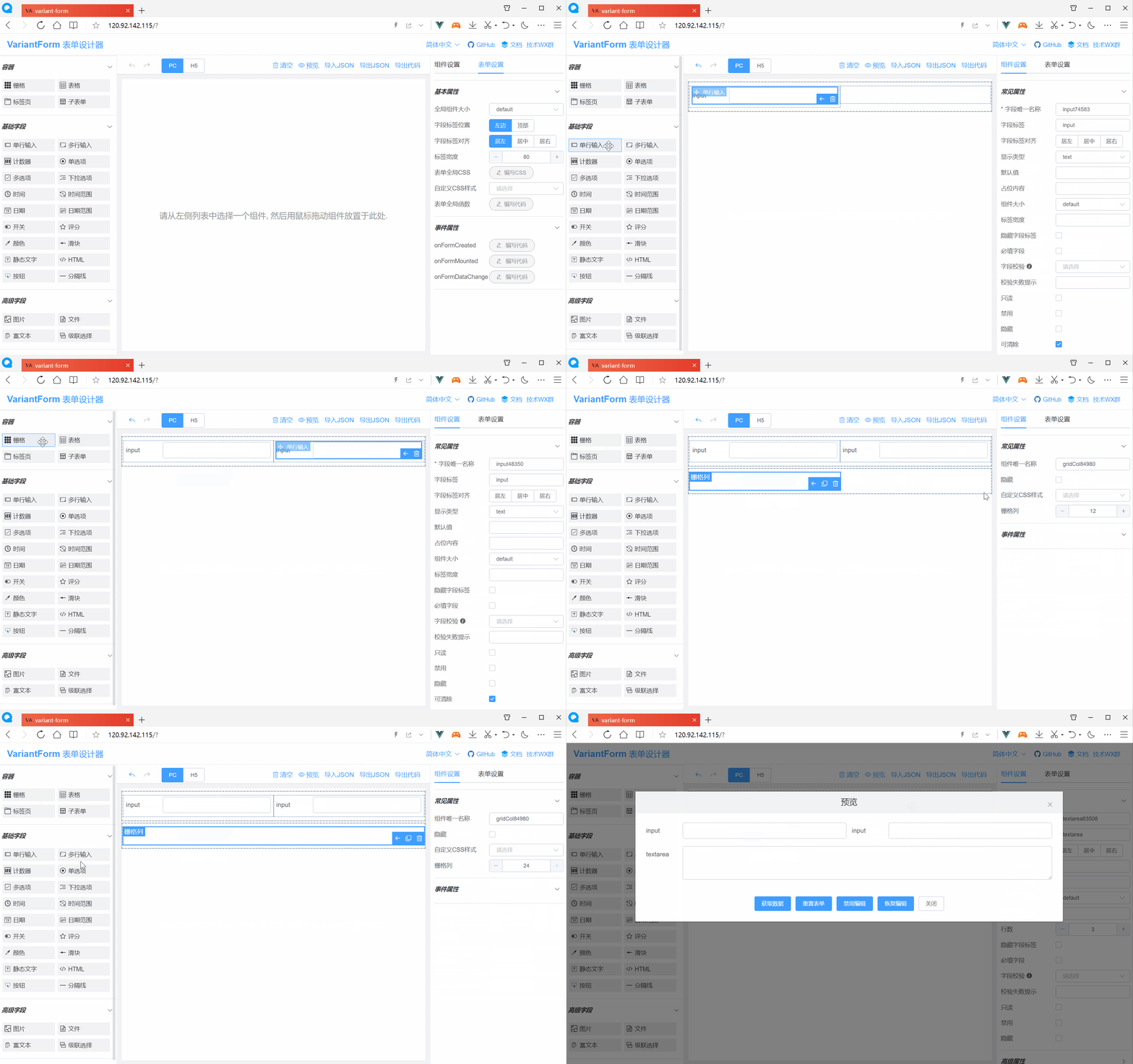
#### 一款高效的 Vue 低代码表单,可视化设计,一键生成源码,享受更多摸鱼时间。
|
|
4
|
+
|
|
5
|
+
|
|
6
|
+
|
|
7
|
+
<br/>
|
|
8
|
+
|
|
9
|
+
### 功能一览
|
|
10
|
+
|
|
11
|
+
```
|
|
12
|
+
> 拖拽式可视化表单设计;
|
|
13
|
+
> 支持PC、Pad、H5三种布局;
|
|
14
|
+
> 支持运行时动态加载表单;
|
|
15
|
+
> 支持表单复杂交互控制;
|
|
16
|
+
> 支持自定义CSS样式;
|
|
17
|
+
> 支持自定义校验逻辑;
|
|
18
|
+
> 支持国际化多语言;
|
|
19
|
+
> 兼容IE 11浏览器;
|
|
20
|
+
> 可导出Vue组件、HTML源码;
|
|
21
|
+
> 可导出Vue的SFC单文件组件;
|
|
22
|
+
> 支持开发自定义组件;
|
|
23
|
+
> 支持响应式自适应布局;
|
|
24
|
+
> 支持VS Code插件;
|
|
25
|
+
> 更多功能等你探究...;
|
|
26
|
+
```
|
|
27
|
+
|
|
28
|
+
### 安装依赖
|
|
29
|
+
|
|
30
|
+
```
|
|
31
|
+
npm install --registry=https://registry.npmmirror.com
|
|
32
|
+
```
|
|
33
|
+
|
|
34
|
+
### 开发调试
|
|
35
|
+
|
|
36
|
+
```
|
|
37
|
+
npm run serve
|
|
38
|
+
```
|
|
39
|
+
|
|
40
|
+
### 生产打包
|
|
41
|
+
|
|
42
|
+
```
|
|
43
|
+
npm run build
|
|
44
|
+
```
|
|
45
|
+
|
|
46
|
+
### 表单设计器 + 表单渲染器打包
|
|
47
|
+
|
|
48
|
+
```
|
|
49
|
+
npm run lib
|
|
50
|
+
```
|
|
51
|
+
|
|
52
|
+
### 表单渲染器打包
|
|
53
|
+
|
|
54
|
+
```
|
|
55
|
+
npm run lib-render
|
|
56
|
+
```
|
|
57
|
+
|
|
58
|
+
### 浏览器兼容性
|
|
59
|
+
|
|
60
|
+
`Chrome(及同内核的浏览器如QQ浏览器、360浏览器等等),Edge, Firefox,Safari,IE 11`
|
|
61
|
+
|
|
62
|
+
<br/>
|
|
63
|
+
|
|
64
|
+
### 跟 Vue 项目集成
|
|
65
|
+
|
|
66
|
+
<br/>
|
|
67
|
+
|
|
68
|
+
#### 1. 安装包
|
|
69
|
+
|
|
70
|
+
```bash
|
|
71
|
+
npm i itform
|
|
72
|
+
```
|
|
73
|
+
|
|
74
|
+
或
|
|
75
|
+
|
|
76
|
+
```bash
|
|
77
|
+
yarn add itform
|
|
78
|
+
```
|
|
79
|
+
|
|
80
|
+
<br/>
|
|
81
|
+
|
|
82
|
+
#### 2. 引入并全局注册 VForm 组件
|
|
83
|
+
|
|
84
|
+
```javascript
|
|
85
|
+
import Vue from "vue";
|
|
86
|
+
import App from "./App.vue";
|
|
87
|
+
|
|
88
|
+
import ElementUI from "element-ui"; //引入element-ui库
|
|
89
|
+
import itform from "itform"; //引入VForm库
|
|
90
|
+
|
|
91
|
+
import "element-ui/lib/theme-chalk/index.css"; //引入element-ui样式
|
|
92
|
+
import "itform/lib/itform.css"; //引入VForm样式
|
|
93
|
+
|
|
94
|
+
Vue.config.productionTip = false;
|
|
95
|
+
|
|
96
|
+
Vue.use(ElementUI); //全局注册element-ui
|
|
97
|
+
Vue.use(itform); //全局注册VForm(同时注册了v-form-designer和v-form-render组件)
|
|
98
|
+
|
|
99
|
+
new Vue({
|
|
100
|
+
render: (h) => h(App),
|
|
101
|
+
}).$mount("#app");
|
|
102
|
+
```
|
|
103
|
+
|
|
104
|
+
<br/>
|
|
105
|
+
|
|
106
|
+
#### 3. 在 Vue 模板中使用表单设计器组件
|
|
107
|
+
|
|
108
|
+
```html
|
|
109
|
+
<template>
|
|
110
|
+
<v-form-designer></v-form-designer>
|
|
111
|
+
</template>
|
|
112
|
+
|
|
113
|
+
<script>
|
|
114
|
+
export default {
|
|
115
|
+
data() {
|
|
116
|
+
return {};
|
|
117
|
+
},
|
|
118
|
+
};
|
|
119
|
+
</script>
|
|
120
|
+
|
|
121
|
+
<style lang="scss">
|
|
122
|
+
body {
|
|
123
|
+
margin: 0; /* 如果页面出现垂直滚动条,则加入此行CSS以消除之 */
|
|
124
|
+
}
|
|
125
|
+
</style>
|
|
126
|
+
```
|
|
127
|
+
|
|
128
|
+
<br/>
|
|
129
|
+
|
|
130
|
+
#### 4. 在 Vue 模板中使用表单渲染器组件
|
|
131
|
+
|
|
132
|
+
```html
|
|
133
|
+
<template>
|
|
134
|
+
<div>
|
|
135
|
+
<v-form-render
|
|
136
|
+
:form-json="formJson"
|
|
137
|
+
:form-data="formData"
|
|
138
|
+
:option-data="optionData"
|
|
139
|
+
ref="vFormRef"
|
|
140
|
+
>
|
|
141
|
+
</v-form-render>
|
|
142
|
+
<el-button type="primary" @click="submitForm">Submit</el-button>
|
|
143
|
+
</div>
|
|
144
|
+
</template>
|
|
145
|
+
<script>
|
|
146
|
+
export default {
|
|
147
|
+
data() {
|
|
148
|
+
return {
|
|
149
|
+
formJson: {
|
|
150
|
+
widgetList: [],
|
|
151
|
+
formConfig: {
|
|
152
|
+
labelWidth: 80,
|
|
153
|
+
labelPosition: "left",
|
|
154
|
+
size: "",
|
|
155
|
+
labelAlign: "label-left-align",
|
|
156
|
+
cssCode: "",
|
|
157
|
+
customClass: "",
|
|
158
|
+
functions: "",
|
|
159
|
+
layoutType: "PC",
|
|
160
|
+
onFormCreated: "",
|
|
161
|
+
onFormMounted: "",
|
|
162
|
+
onFormDataChange: "",
|
|
163
|
+
},
|
|
164
|
+
},
|
|
165
|
+
formData: {},
|
|
166
|
+
optionData: {},
|
|
167
|
+
};
|
|
168
|
+
},
|
|
169
|
+
methods: {
|
|
170
|
+
submitForm() {
|
|
171
|
+
this.$refs.vFormRef
|
|
172
|
+
.getFormData()
|
|
173
|
+
.then((formData) => {
|
|
174
|
+
// Form Validation OK
|
|
175
|
+
alert(JSON.stringify(formData));
|
|
176
|
+
})
|
|
177
|
+
.catch((error) => {
|
|
178
|
+
// Form Validation failed
|
|
179
|
+
this.$message.error(error);
|
|
180
|
+
});
|
|
181
|
+
},
|
|
182
|
+
},
|
|
183
|
+
};
|
|
184
|
+
</script>
|
|
185
|
+
```
|