it-tools-mcp 3.0.13 → 3.0.15
This diff represents the content of publicly available package versions that have been released to one of the supported registries. The information contained in this diff is provided for informational purposes only and reflects changes between package versions as they appear in their respective public registries.
- package/README.dockerhub.md +5 -3
- package/README.md +4 -4
- package/build/tools/idGenerators.js +14 -5
- package/build/tools/network.js +38 -16
- package/package.json +1 -1
package/README.dockerhub.md
CHANGED
|
@@ -10,7 +10,7 @@ A comprehensive Model Context Protocol (MCP) server that provides access to **86
|
|
|
10
10
|
|
|
11
11
|
Add to your VS Code `settings.json`:
|
|
12
12
|
|
|
13
|
-
|
|
13
|
+
### Node
|
|
14
14
|
|
|
15
15
|
```json
|
|
16
16
|
{
|
|
@@ -29,7 +29,7 @@ Add to your VS Code `settings.json`:
|
|
|
29
29
|
}
|
|
30
30
|
```
|
|
31
31
|
|
|
32
|
-
|
|
32
|
+
#### Docker
|
|
33
33
|
|
|
34
34
|
```json
|
|
35
35
|
{
|
|
@@ -61,12 +61,14 @@ See the complete list of all 86 tools with detailed parameters on [GitHub](https
|
|
|
61
61
|
## 📸 Examples in Action
|
|
62
62
|
|
|
63
63
|
### Password Hash Generation
|
|
64
|
+
|
|
64
65
|
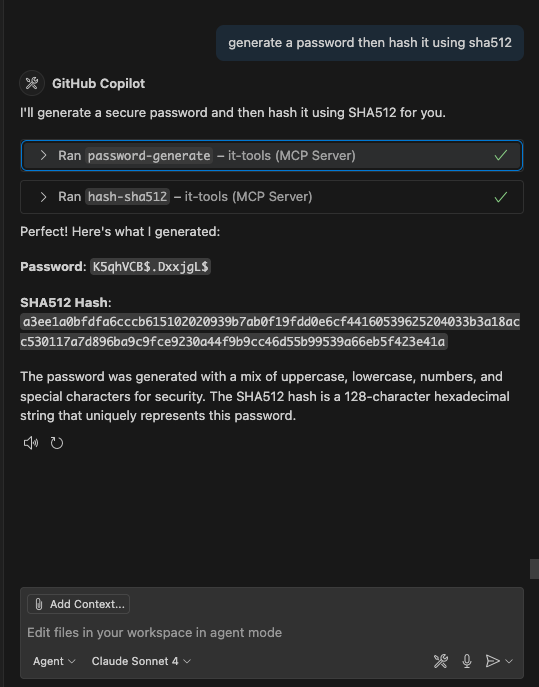
|
|
65
66
|
|
|
66
67
|
### ASCII Art Text Generation
|
|
68
|
+
|
|
67
69
|
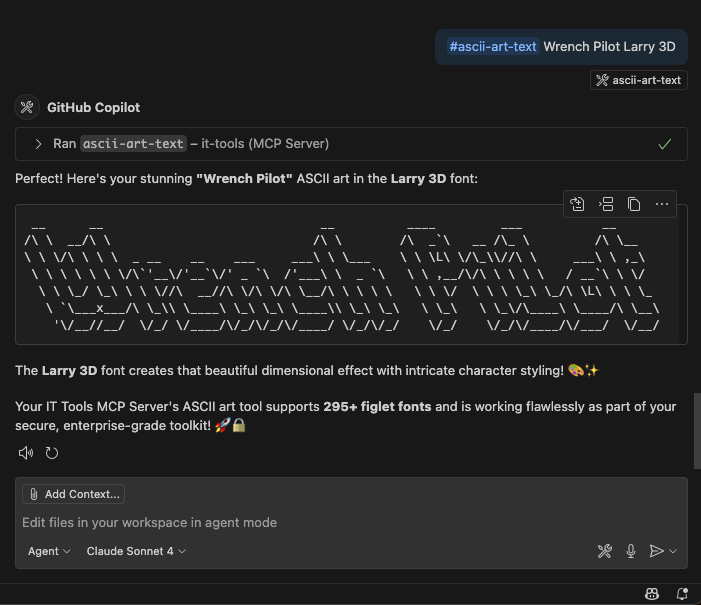
|
|
68
70
|
|
|
69
|
-
|
|
71
|
+
#### Examples of using the IT Tools MCP server with VS Code Copilot Chat
|
|
70
72
|
|
|
71
73
|
## 🏗️ Architecture
|
|
72
74
|
|
package/README.md
CHANGED
|
@@ -14,7 +14,7 @@ A comprehensive Model Context Protocol (MCP) server that provides access to 86 I
|
|
|
14
14
|
|
|
15
15
|
Add to your VS Code `settings.json`:
|
|
16
16
|
|
|
17
|
-
|
|
17
|
+
#### Node
|
|
18
18
|
|
|
19
19
|
```json
|
|
20
20
|
{
|
|
@@ -33,7 +33,7 @@ Add to your VS Code `settings.json`:
|
|
|
33
33
|
}
|
|
34
34
|
```
|
|
35
35
|
|
|
36
|
-
|
|
36
|
+
#### Docker
|
|
37
37
|
|
|
38
38
|
```json
|
|
39
39
|
{
|
|
@@ -101,7 +101,7 @@ This MCP server provides **86 tools** across **8 categories**:
|
|
|
101
101
|
|
|
102
102
|

|
|
103
103
|
|
|
104
|
-
|
|
104
|
+
Examples of using the IT Tools MCP server with VS Code Copilot Chat for secure password hashing and creative ASCII art generation.
|
|
105
105
|
|
|
106
106
|
## Available Tools
|
|
107
107
|
|
|
@@ -176,7 +176,7 @@ This MCP server provides **86 tools** across **8 categories**:
|
|
|
176
176
|
| `ipv6-ula-generator` | Generate IPv6 ULA | `globalId?: string` |
|
|
177
177
|
| `url-parse` | Parse URL components | `url: string` |
|
|
178
178
|
| `random-port` | Generate random ports | `count?: number`, `min?: number`, `max?: number`, `exclude?: number[]` |
|
|
179
|
-
| `mac-address-generate` | Generate MAC address | `prefix?: string`, `separator?: ':'
|
|
179
|
+
| `mac-address-generate` | Generate MAC address | `prefix?: string`, `separator?: ':' \| '-'` |
|
|
180
180
|
| `phone-format` | Parse and format phone numbers | `phoneNumber: string`, `countryCode?: string` |
|
|
181
181
|
| `iban-validate` | Validate IBAN | `iban: string` |
|
|
182
182
|
| **Math & Calculations** | | |
|
|
@@ -78,18 +78,18 @@ For production use, please use a proper ULID library.`,
|
|
|
78
78
|
console.log(`[DEBUG] QR code generated successfully`);
|
|
79
79
|
// Extract just the base64 data (remove the data:image/png;base64, prefix)
|
|
80
80
|
const base64Data = dataUrl.split(',')[1];
|
|
81
|
+
const markdown = ``;
|
|
81
82
|
return {
|
|
82
83
|
content: [
|
|
83
84
|
{
|
|
84
85
|
type: "text",
|
|
85
86
|
text: `📱 QR Code for: "${text}"
|
|
86
|
-
|
|
87
|
-
📊 Data encoded: "${text}" (${text.length} characters)
|
|
87
|
+
\n📊 Data encoded: "${text}" (${text.length} characters)
|
|
88
88
|
🎯 Error correction: Medium (M)
|
|
89
89
|
📐 Image size: ${Math.max(256, size * 128)}x${Math.max(256, size * 128)} pixels
|
|
90
|
-
|
|
91
|
-
|
|
92
|
-
|
|
90
|
+
\n✅ This QR code can be scanned with any QR code reader app
|
|
91
|
+
💡 Generated using the 'qrcode' npm library!
|
|
92
|
+
\n---\n**Markdown for inline display:**\n${markdown}`,
|
|
93
93
|
},
|
|
94
94
|
{
|
|
95
95
|
type: "image",
|
|
@@ -110,6 +110,15 @@ For production use, please use a proper ULID library.`,
|
|
|
110
110
|
],
|
|
111
111
|
};
|
|
112
112
|
}
|
|
113
|
+
// Fallback return in case of unexpected behavior
|
|
114
|
+
return {
|
|
115
|
+
content: [
|
|
116
|
+
{
|
|
117
|
+
type: "text",
|
|
118
|
+
text: "Unknown error: No response generated by qr-generate.",
|
|
119
|
+
},
|
|
120
|
+
],
|
|
121
|
+
};
|
|
113
122
|
});
|
|
114
123
|
// SVG placeholder generator
|
|
115
124
|
server.tool("svg-placeholder-generator", "Generate SVG placeholder images", {
|
package/build/tools/network.js
CHANGED
|
@@ -642,26 +642,48 @@ Common issues:
|
|
|
642
642
|
});
|
|
643
643
|
});
|
|
644
644
|
});
|
|
645
|
-
// telnet Tool (using
|
|
645
|
+
// telnet Tool (using net for raw TCP connectivity)
|
|
646
646
|
server.tool("telnet", "Test TCP connectivity to a host and port", {
|
|
647
647
|
target: z.string().describe("Host to connect to"),
|
|
648
648
|
port: z.number().describe("Port number")
|
|
649
649
|
}, async ({ target, port }) => {
|
|
650
|
-
|
|
651
|
-
|
|
652
|
-
|
|
653
|
-
|
|
654
|
-
|
|
655
|
-
|
|
656
|
-
|
|
657
|
-
|
|
658
|
-
|
|
659
|
-
|
|
660
|
-
|
|
661
|
-
|
|
662
|
-
|
|
663
|
-
|
|
664
|
-
|
|
650
|
+
return new Promise(async (resolve) => {
|
|
651
|
+
try {
|
|
652
|
+
const net = (await import('net')).default;
|
|
653
|
+
const socket = new net.Socket();
|
|
654
|
+
let connected = false;
|
|
655
|
+
let banner = '';
|
|
656
|
+
socket.setTimeout(2000);
|
|
657
|
+
socket.connect(port, target, () => {
|
|
658
|
+
connected = true;
|
|
659
|
+
});
|
|
660
|
+
socket.on('data', (data) => {
|
|
661
|
+
banner += data.toString();
|
|
662
|
+
// If we get a banner, close immediately
|
|
663
|
+
socket.end();
|
|
664
|
+
});
|
|
665
|
+
socket.on('timeout', () => {
|
|
666
|
+
socket.destroy();
|
|
667
|
+
if (!connected) {
|
|
668
|
+
resolve({ content: [{ type: "text", text: `Telnet failed: Connection timed out` }] });
|
|
669
|
+
}
|
|
670
|
+
else {
|
|
671
|
+
resolve({ content: [{ type: "text", text: `Telnet to ${target}:${port} succeeded.${banner ? '\nBanner: ' + banner.trim() : ''}` }] });
|
|
672
|
+
}
|
|
673
|
+
});
|
|
674
|
+
socket.on('error', (err) => {
|
|
675
|
+
resolve({ content: [{ type: "text", text: `Telnet failed: ${err.message}` }] });
|
|
676
|
+
});
|
|
677
|
+
socket.on('close', (hadError) => {
|
|
678
|
+
if (connected) {
|
|
679
|
+
resolve({ content: [{ type: "text", text: `Telnet to ${target}:${port} succeeded.${banner ? '\nBanner: ' + banner.trim() : ''}` }] });
|
|
680
|
+
}
|
|
681
|
+
});
|
|
682
|
+
}
|
|
683
|
+
catch (error) {
|
|
684
|
+
resolve({ content: [{ type: "text", text: `Telnet failed: ${error instanceof Error ? error.message : error}` }] });
|
|
685
|
+
}
|
|
686
|
+
});
|
|
665
687
|
});
|
|
666
688
|
// dig Tool (using dns.resolve)
|
|
667
689
|
server.tool("dig", "Perform DNS lookup with dig command", {
|