it-tools-mcp 3.0.0
This diff represents the content of publicly available package versions that have been released to one of the supported registries. The information contained in this diff is provided for informational purposes only and reflects changes between package versions as they appear in their respective public registries.
- package/LICENSE +21 -0
- package/README.dockerhub.md +98 -0
- package/README.md +263 -0
- package/build/index.js +75 -0
- package/build/security.js +201 -0
- package/build/tools/color.js +67 -0
- package/build/tools/crypto.js +445 -0
- package/build/tools/dataFormat.js +517 -0
- package/build/tools/development.js +267 -0
- package/build/tools/encoding.js +240 -0
- package/build/tools/idGenerators.js +176 -0
- package/build/tools/math.js +306 -0
- package/build/tools/network.js +578 -0
- package/build/tools/text.js +678 -0
- package/build/tools/utility.js +407 -0
- package/package.json +94 -0
package/LICENSE
ADDED
|
@@ -0,0 +1,21 @@
|
|
|
1
|
+
MIT License
|
|
2
|
+
|
|
3
|
+
Copyright (c) 2025 wrenchpilot
|
|
4
|
+
|
|
5
|
+
Permission is hereby granted, free of charge, to any person obtaining a copy
|
|
6
|
+
of this software and associated documentation files (the "Software"), to deal
|
|
7
|
+
in the Software without restriction, including without limitation the rights
|
|
8
|
+
to use, copy, modify, merge, publish, distribute, sublicense, and/or sell
|
|
9
|
+
copies of the Software, and to permit persons to whom the Software is
|
|
10
|
+
furnished to do so, subject to the following conditions:
|
|
11
|
+
|
|
12
|
+
The above copyright notice and this permission notice shall be included in all
|
|
13
|
+
copies or substantial portions of the Software.
|
|
14
|
+
|
|
15
|
+
THE SOFTWARE IS PROVIDED "AS IS", WITHOUT WARRANTY OF ANY KIND, EXPRESS OR
|
|
16
|
+
IMPLIED, INCLUDING BUT NOT LIMITED TO THE WARRANTIES OF MERCHANTABILITY,
|
|
17
|
+
FITNESS FOR A PARTICULAR PURPOSE AND NONINFRINGEMENT. IN NO EVENT SHALL THE
|
|
18
|
+
AUTHORS OR COPYRIGHT HOLDERS BE LIABLE FOR ANY CLAIM, DAMAGES OR OTHER
|
|
19
|
+
LIABILITY, WHETHER IN AN ACTION OF CONTRACT, TORT OR OTHERWISE, ARISING FROM,
|
|
20
|
+
OUT OF OR IN CONNECTION WITH THE SOFTWARE OR THE USE OR OTHER DEALINGS IN THE
|
|
21
|
+
SOFTWARE.
|
|
@@ -0,0 +1,98 @@
|
|
|
1
|
+
# IT Tools MCP Server
|
|
2
|
+
|
|
3
|
+
[](https://hub.docker.com/r/wrenchpilot/it-tools-mcp)
|
|
4
|
+
[](https://hub.docker.com/r/wrenchpilot/it-tools-mcp)
|
|
5
|
+
[](https://github.com/wrenchpilot/it-tools-mcp/actions)
|
|
6
|
+
|
|
7
|
+
A comprehensive Model Context Protocol (MCP) server that provides access to **75 IT tools and utilities** commonly used by developers, system administrators, and IT professionals. This server exposes a complete set of tools for encoding/decoding, text manipulation, hashing, network utilities, and many other common development and IT tasks.
|
|
8
|
+
|
|
9
|
+
## Using with VS Code
|
|
10
|
+
|
|
11
|
+
Add to your VS Code `settings.json`:
|
|
12
|
+
|
|
13
|
+
```json
|
|
14
|
+
{
|
|
15
|
+
"mcp": {
|
|
16
|
+
"servers": {
|
|
17
|
+
"it-tools": {
|
|
18
|
+
"command": "docker",
|
|
19
|
+
"args": [
|
|
20
|
+
"run",
|
|
21
|
+
"-i",
|
|
22
|
+
"--rm",
|
|
23
|
+
"--init",
|
|
24
|
+
"--security-opt", "no-new-privileges:true",
|
|
25
|
+
"--cap-drop", "ALL",
|
|
26
|
+
"--read-only",
|
|
27
|
+
"--user", "1001:1001",
|
|
28
|
+
"--memory=256m",
|
|
29
|
+
"--cpus=0.5",
|
|
30
|
+
"--name", "it-tools-mcp",
|
|
31
|
+
"wrenchpilot/it-tools-mcp:latest"
|
|
32
|
+
]
|
|
33
|
+
}
|
|
34
|
+
}
|
|
35
|
+
}
|
|
36
|
+
```
|
|
37
|
+
|
|
38
|
+
See the complete list of all 75 tools with detailed parameters on [GitHub](https://github.com/wrenchpilot/it-tools-mcp#available-tools)
|
|
39
|
+
|
|
40
|
+
## 📸 Examples in Action
|
|
41
|
+
|
|
42
|
+
### Password Hash Generation
|
|
43
|
+
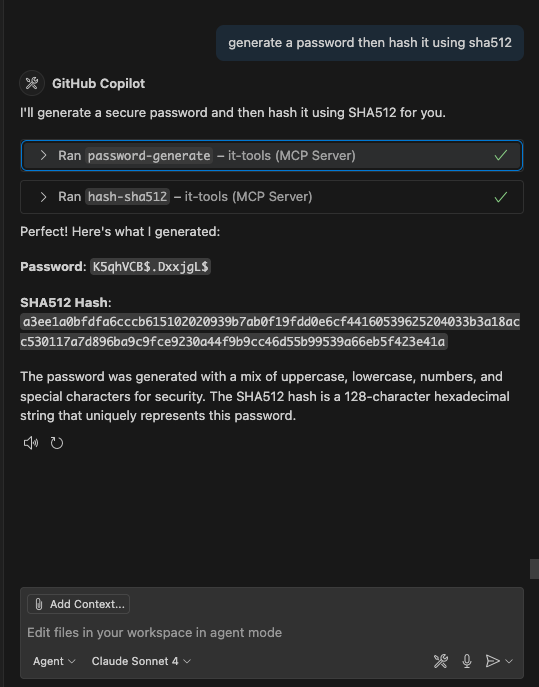
|
|
44
|
+
|
|
45
|
+
### ASCII Art Text Generation
|
|
46
|
+
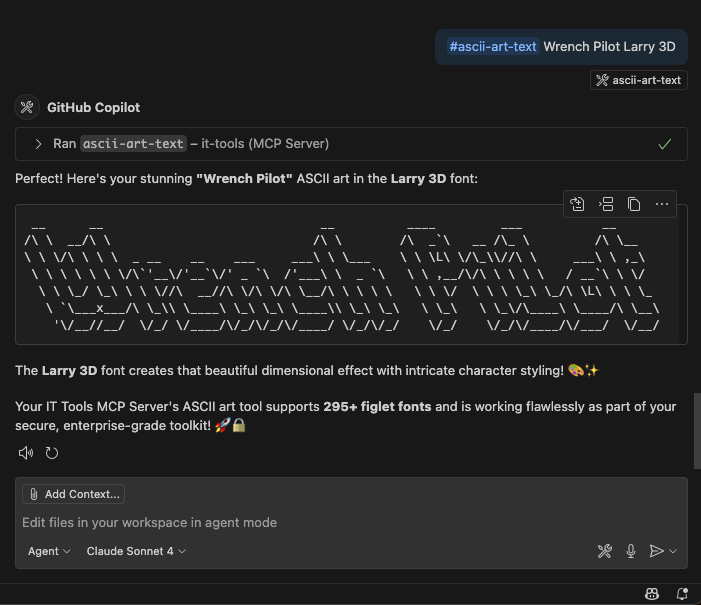
|
|
47
|
+
|
|
48
|
+
*Examples of using the IT Tools MCP server with VS Code Copilot Chat*
|
|
49
|
+
|
|
50
|
+
## 🏗️ Architecture
|
|
51
|
+
|
|
52
|
+
Built with **TypeScript**, **Zod** validation, and **MCP SDK** for robust, type-safe operation.
|
|
53
|
+
|
|
54
|
+
### 🤖 AI-Assisted Development
|
|
55
|
+
|
|
56
|
+
This project was developed using **VS Code**, **Copilot Chat Agent**, **Playwright MCP**, and the **Claude Sonnet 4 Model**, showcasing modern AI-assisted software development:
|
|
57
|
+
|
|
58
|
+
- 🔧 **All 75 tools** designed and implemented with AI assistance
|
|
59
|
+
- 📦 **Complete Docker setup** with GitHub Actions CI/CD pipeline
|
|
60
|
+
- 🔍 **Schema optimization** with systematic validation cleanup
|
|
61
|
+
- 📚 **Comprehensive documentation** and tool catalogs
|
|
62
|
+
|
|
63
|
+
### Project Structure
|
|
64
|
+
|
|
65
|
+
```text
|
|
66
|
+
src/
|
|
67
|
+
├── index.ts # Main MCP server
|
|
68
|
+
└── tools/ # Tool modules by category
|
|
69
|
+
├── encoding.ts # Base64, URL, HTML encoding
|
|
70
|
+
├── crypto.ts # Hashing, JWT, passwords
|
|
71
|
+
├── dataFormat.ts # JSON, XML, YAML processing
|
|
72
|
+
├── text.ts # Text manipulation tools
|
|
73
|
+
├── network.ts # Network utilities
|
|
74
|
+
├── math.ts # Mathematical operations
|
|
75
|
+
├── idGenerators.ts # UUID, ULID, QR codes
|
|
76
|
+
└── utility.ts # Color, MIME, HTTP tools
|
|
77
|
+
```
|
|
78
|
+
|
|
79
|
+
### Adding New Tools
|
|
80
|
+
|
|
81
|
+
1. Choose/create a tool module in `src/tools/`
|
|
82
|
+
2. Define tool with input schema using Zod
|
|
83
|
+
3. Register in `src/index.ts`
|
|
84
|
+
4. Rebuild with `npm run build`
|
|
85
|
+
|
|
86
|
+
## 🤝 Contributing
|
|
87
|
+
|
|
88
|
+
Contributions welcome! Please submit a Pull Request on [GitHub](https://github.com/wrenchpilot/it-tools-mcp).
|
|
89
|
+
|
|
90
|
+
## 📄 License
|
|
91
|
+
|
|
92
|
+
MIT License - see [LICENSE](https://github.com/wrenchpilot/it-tools-mcp/blob/master/LICENSE) for details.
|
|
93
|
+
|
|
94
|
+
## 🔗 Links
|
|
95
|
+
|
|
96
|
+
- **GitHub Repository**: [wrenchpilot/it-tools-mcp](https://github.com/wrenchpilot/it-tools-mcp)
|
|
97
|
+
- **Complete Documentation**: [GitHub README](https://github.com/wrenchpilot/it-tools-mcp#readme)
|
|
98
|
+
- **Inspired by**: [IT Tools](https://github.com/CorentinTh/it-tools) - online tools for developers
|
package/README.md
ADDED
|
@@ -0,0 +1,263 @@
|
|
|
1
|
+
# IT Tools MCP Server
|
|
2
|
+
|
|
3
|
+
[](https://hub.docker.com/r/wrenchpilot/it-tools-mcp)
|
|
4
|
+
[](https://hub.docker.com/r/wrenchpilot/it-tools-mcp)
|
|
5
|
+
[](https://github.com/wrenchpilot/it-tools-mcp/actions)
|
|
6
|
+
|
|
7
|
+
> **📝 Note**: A condensed version of this README is automatically synced to [Docker Hub](https://hub.docker.com/r/wrenchpilot/it-tools-mcp) due to character limits.
|
|
8
|
+
|
|
9
|
+
A comprehensive Model Context Protocol (MCP) server that provides access to 75 IT tools and utilities commonly used by developers, system administrators, and IT professionals. This server exposes a complete set of tools for encoding/decoding, text manipulation, hashing, network utilities, and many other common development and IT tasks.
|
|
10
|
+
|
|
11
|
+
## 📦 Installation & Setup
|
|
12
|
+
|
|
13
|
+
### Using with VS Code
|
|
14
|
+
|
|
15
|
+
Add to your VS Code `settings.json`:
|
|
16
|
+
|
|
17
|
+
```json
|
|
18
|
+
{
|
|
19
|
+
"mcp": {
|
|
20
|
+
"servers": {
|
|
21
|
+
"it-tools": {
|
|
22
|
+
"command": "docker",
|
|
23
|
+
"args": [
|
|
24
|
+
"run",
|
|
25
|
+
"-i",
|
|
26
|
+
"--rm",
|
|
27
|
+
"--init",
|
|
28
|
+
"--security-opt", "no-new-privileges:true",
|
|
29
|
+
"--cap-drop", "ALL",
|
|
30
|
+
"--read-only",
|
|
31
|
+
"--user", "1001:1001",
|
|
32
|
+
"--memory=256m",
|
|
33
|
+
"--cpus=0.5",
|
|
34
|
+
"--name", "it-tools-mcp",
|
|
35
|
+
"wrenchpilot/it-tools-mcp:latest"
|
|
36
|
+
]
|
|
37
|
+
}
|
|
38
|
+
}
|
|
39
|
+
}
|
|
40
|
+
```
|
|
41
|
+
|
|
42
|
+
#### Interactive Mode
|
|
43
|
+
|
|
44
|
+
```bash
|
|
45
|
+
docker run -it --rm wrenchpilot/it-tools-mcp:latest
|
|
46
|
+
```
|
|
47
|
+
|
|
48
|
+
#### Programmatic Usage
|
|
49
|
+
|
|
50
|
+
```bash
|
|
51
|
+
# Generate a UUID
|
|
52
|
+
echo '{"jsonrpc":"2.0","id":1,"method":"tools/call","params":{"name":"uuid-generate","arguments":{}}}' | \
|
|
53
|
+
docker run -i --rm wrenchpilot/it-tools-mcp:latest
|
|
54
|
+
|
|
55
|
+
# Encode text to Base64
|
|
56
|
+
echo '{"jsonrpc":"2.0","id":2,"method":"tools/call","params":{"name":"base64-encode","arguments":{"text":"Hello World"}}}' | \
|
|
57
|
+
docker run -i --rm wrenchpilot/it-tools-mcp:latest
|
|
58
|
+
```
|
|
59
|
+
|
|
60
|
+
## 🛠️ Tool Categories
|
|
61
|
+
|
|
62
|
+
This MCP server provides **75 tools** across **8 categories**:
|
|
63
|
+
|
|
64
|
+
- **🔧 Encoding & Decoding** (9 tools): Base64, URL, HTML entities, text-to-binary, Unicode
|
|
65
|
+
- **📝 Data Format** (11 tools): JSON, XML, YAML, SQL, TOML, Markdown ↔ HTML conversion
|
|
66
|
+
- **🔐 Security & Crypto** (12 tools): Hashing (MD5, SHA1-512), HMAC, JWT, bcrypt, passwords, tokens
|
|
67
|
+
- **✨ Text Processing** (16 tools): Case conversion, stats, diff, ASCII art, NATO alphabet, slugify
|
|
68
|
+
- **🌐 Network & Web** (8 tools): IPv4/IPv6 subnets, URL parsing, MAC addresses, phone formatting
|
|
69
|
+
- **🔢 Math & Calculations** (6 tools): Expression evaluation, base conversion, temperature, percentages
|
|
70
|
+
- **🆔 ID & Code Generators** (4 tools): UUID, ULID, QR codes, SVG placeholders
|
|
71
|
+
- **🔧 Development & Utilities** (9 tools): Regex testing, cron expressions, color conversion, MIME types
|
|
72
|
+
|
|
73
|
+
## 📸 Screenshot Examples
|
|
74
|
+
|
|
75
|
+
### Password Hash Generation Example
|
|
76
|
+
|
|
77
|
+

|
|
78
|
+
|
|
79
|
+
### ASCII Art Text Generation Example
|
|
80
|
+
|
|
81
|
+

|
|
82
|
+
|
|
83
|
+
*Examples of using the IT Tools MCP server with VS Code Copilot Chat for secure password hashing and creative ASCII art generation*
|
|
84
|
+
|
|
85
|
+
## Available Tools
|
|
86
|
+
|
|
87
|
+
| Tool | Description | Parameters |
|
|
88
|
+
| --------------------------- | -------------------------------------- | --------------------------------------------------------------------------------------------------------------------------------------------------------------------------------------------------------- |
|
|
89
|
+
| **Encoding & Decoding** | | |
|
|
90
|
+
| `base64-encode` | Encode text to Base64 | `text: string` |
|
|
91
|
+
| `base64-decode` | Decode Base64 text | `text: string` |
|
|
92
|
+
| `url-encode` | URL encode text | `text: string` |
|
|
93
|
+
| `url-decode` | URL decode text | `text: string` |
|
|
94
|
+
| `html-encode` | Encode HTML entities | `text: string` |
|
|
95
|
+
| `html-decode` | Decode HTML entities | `text: string` |
|
|
96
|
+
| `html-entities-extended` | Extended HTML entity encoding/decoding | `text: string`, `operation: 'encode' \| 'decode'` |
|
|
97
|
+
| `text-to-binary` | Convert text to binary and vice versa | `input: string`, `operation: 'encode' \| 'decode'` |
|
|
98
|
+
| `text-to-unicode` | Convert text to Unicode and vice versa | `input: string`, `operation: 'encode' \| 'decode'` |
|
|
99
|
+
| **Data Format** | | |
|
|
100
|
+
| `json-format` | Format and validate JSON | `json: string`, `indent?: number` |
|
|
101
|
+
| `json-minify` | Minify JSON | `json: string` |
|
|
102
|
+
| `json-to-csv` | Convert JSON to CSV | `json: string`, `delimiter?: string` |
|
|
103
|
+
| `json-to-toml` | Convert JSON to TOML | `json: string` |
|
|
104
|
+
| `json-diff` | Compare JSON objects | `json1: string`, `json2: string` |
|
|
105
|
+
| `xml-format` | Format XML | `xml: string`, `indent?: number` |
|
|
106
|
+
| `yaml-format` | Format YAML | `yaml: string` |
|
|
107
|
+
| `sql-format` | Format SQL | `sql: string` |
|
|
108
|
+
| `toml-to-json` | Convert TOML to JSON | `toml: string` |
|
|
109
|
+
| `markdown-to-html` | Convert Markdown to HTML | `markdown: string` |
|
|
110
|
+
| `html-to-markdown` | Convert HTML to Markdown | `html: string` |
|
|
111
|
+
| **Security & Crypto** | | |
|
|
112
|
+
| `hash-md5` | Generate MD5 hash | `text: string` |
|
|
113
|
+
| `hash-sha1` | Generate SHA1 hash | `text: string` |
|
|
114
|
+
| `hash-sha256` | Generate SHA256 hash | `text: string` |
|
|
115
|
+
| `hash-sha512` | Generate SHA512 hash | `text: string` |
|
|
116
|
+
| `hmac-generator` | Generate HMAC | `message: string`, `key: string`, `algorithm?: 'sha1' \| 'sha256' \| 'sha512'` |
|
|
117
|
+
| `jwt-decode` | Decode JWT token | `token: string` |
|
|
118
|
+
| `basic-auth-generator` | Generate Basic Auth header | `username: string`, `password: string` |
|
|
119
|
+
| `bcrypt-hash` | Generate/verify bcrypt hash | `password: string`, `rounds?: number`, `hash?: string` |
|
|
120
|
+
| `bip39-generate` | Generate BIP39 mnemonic | `wordCount?: '12' \| '15' \| '18' \| '21' \| '24'` |
|
|
121
|
+
| `password-generate` | Generate secure password | `length?: number`, `includeUppercase?: boolean`, `includeLowercase?: boolean`, `includeNumbers?: boolean`, `includeSymbols?: boolean` |
|
|
122
|
+
| `token-generator` | Generate secure token | `length?: number`, `charset?: 'alphanumeric' \| 'hex' \| 'base64' \| 'custom'`, `customChars?: string` |
|
|
123
|
+
| `otp-code-generator` | Generate TOTP codes | `secret: string`, `digits?: number`, `period?: number` |
|
|
124
|
+
| **Text Processing** | | |
|
|
125
|
+
| `text-uppercase` | Convert to uppercase | `text: string` |
|
|
126
|
+
| `text-lowercase` | Convert to lowercase | `text: string` |
|
|
127
|
+
| `text-capitalize` | Capitalize words | `text: string` |
|
|
128
|
+
| `text-camelcase` | Convert to camelCase | `text: string` |
|
|
129
|
+
| `text-pascalcase` | Convert to PascalCase | `text: string` |
|
|
130
|
+
| `text-kebabcase` | Convert to kebab-case | `text: string` |
|
|
131
|
+
| `text-snakecase` | Convert to snake_case | `text: string` |
|
|
132
|
+
| `text-stats` | Get text statistics | `text: string` |
|
|
133
|
+
| `text-diff` | Compare texts | `text1: string`, `text2: string` |
|
|
134
|
+
| `ascii-art-text` | Generate ASCII art | `text: string`, `font?: string` (supports 295+ figlet fonts) |
|
|
135
|
+
| `text-to-nato-alphabet` | Convert to NATO alphabet | `text: string` |
|
|
136
|
+
| `string-obfuscator` | Obfuscate text | `text: string`, `method?: 'html-entities' \| 'unicode' \| 'base64'` |
|
|
137
|
+
| `slugify-string` | Convert to URL slug | `text: string`, `separator?: string`, `lowercase?: boolean` |
|
|
138
|
+
| `lorem-ipsum-generator` | Generate Lorem Ipsum | `type?: 'words' \| 'sentences' \| 'paragraphs'`, `count?: number` |
|
|
139
|
+
| `numeronym-generator` | Generate numeronyms | `text: string` |
|
|
140
|
+
| `emoji-search` | Search emojis | `query: string` |
|
|
141
|
+
| **Network & Web** | | |
|
|
142
|
+
| `ip-subnet-calculator` | Calculate IPv4 subnet | `ip: string`, `cidr: number` |
|
|
143
|
+
| `ipv4-subnet-calc` | Enhanced IPv4 subnet calc | `cidr: string` |
|
|
144
|
+
| `ipv6-ula-generator` | Generate IPv6 ULA | `globalId?: string` |
|
|
145
|
+
| `url-parse` | Parse URL components | `url: string` |
|
|
146
|
+
| `random-port` | Generate random ports | `count?: number`, `min?: number`, `max?: number`, `exclude?: number[]` |
|
|
147
|
+
| `mac-address-generate` | Generate MAC address | `prefix?: string`, `separator?: ':' \| '-'` |
|
|
148
|
+
| `phone-format` | Format phone numbers | `phoneNumber: string`, `countryCode?: string` |
|
|
149
|
+
| `iban-validate` | Validate IBAN | `iban: string` |
|
|
150
|
+
| **Math & Calculations** | | |
|
|
151
|
+
| `math-evaluate` | Evaluate expressions | `expression: string` |
|
|
152
|
+
| `number-base-converter` | Convert number bases | `number: string`, `fromBase: number`, `toBase: number` |
|
|
153
|
+
| `roman-numeral-converter` | Convert Roman numerals | `input: string` |
|
|
154
|
+
| `temperature-converter` | Convert temperatures | `temperature: number`, `from: 'celsius' \| 'fahrenheit' \| 'kelvin'`, `to: 'celsius' \| 'fahrenheit' \| 'kelvin'` |
|
|
155
|
+
| `percentage-calculator` | Calculate percentages | `operation: 'percentage-of' \| 'what-percentage' \| 'percentage-change'`, `value1: number`, `value2: number` |
|
|
156
|
+
| `unix-timestamp-converter` | Convert timestamps | `input: string` |
|
|
157
|
+
| **ID & Code Generators** | | |
|
|
158
|
+
| `uuid-generate` | Generate UUID v4 | None |
|
|
159
|
+
| `ulid-generate` | Generate ULID | None |
|
|
160
|
+
| `qr-generate` | Generate QR codes for any content | `text: string`, `size?: number` - Supports URLs, WiFi (WIFI:T:WPA;S:network;P:password;;), contact info, etc. |
|
|
161
|
+
| `svg-placeholder-generator` | Generate SVG placeholder | `width?: number`, `height?: number`, `text?: string`, `backgroundColor?: string`, `textColor?: string` |
|
|
162
|
+
| **Development Tools** | | |
|
|
163
|
+
| `regex-tester` | Test regular expressions | `pattern: string`, `text: string`, `flags?: string` |
|
|
164
|
+
| `crontab-generate` | Generate cron expressions | `minute?: string`, `hour?: string`, `dayOfMonth?: string`, `month?: string`, `dayOfWeek?: string` |
|
|
165
|
+
| `list-converter` | Convert list formats | `list: string`, `inputFormat: 'comma' \| 'semicolon' \| 'newline' \| 'space' \| 'pipe'`, `outputFormat: 'comma' \| 'semicolon' \| 'newline' \| 'space' \| 'pipe' \| 'json' \| 'quoted'`, `trim?: boolean` |
|
|
166
|
+
| **Utility Tools** | | |
|
|
167
|
+
| `color-hex-to-rgb` | Convert HEX to RGB | `hex: string` |
|
|
168
|
+
| `color-rgb-to-hex` | Convert RGB to HEX | `r: number`, `g: number`, `b: number` |
|
|
169
|
+
| `email-normalizer` | Normalize email addresses | `email: string` |
|
|
170
|
+
| `mime-types` | Look up MIME types | `input: string`, `lookupType?: 'extension-to-mime' \| 'mime-to-extension'` |
|
|
171
|
+
| `device-info` | Get system information | None |
|
|
172
|
+
| `http-status-codes` | HTTP status reference | `code?: number` |
|
|
173
|
+
|
|
174
|
+
## 📱 QR Code Usage Examples
|
|
175
|
+
|
|
176
|
+
The `qr-generate` tool supports various content types. Here are common usage patterns:
|
|
177
|
+
|
|
178
|
+
### WiFi Networks
|
|
179
|
+
|
|
180
|
+
```text
|
|
181
|
+
text: "WIFI:T:WPA;S:MyNetwork;P:password123;;"
|
|
182
|
+
text: "WIFI:T:WPA;S:GuestNet;P:welcome123;H:true;;" (hidden network)
|
|
183
|
+
text: "WIFI:T:;S:OpenNetwork;P:;;" (open network)
|
|
184
|
+
```
|
|
185
|
+
|
|
186
|
+
### Contact Information (MECARD format)
|
|
187
|
+
|
|
188
|
+
```text
|
|
189
|
+
text: "MECARD:N:John Doe;TEL:+1234567890;EMAIL:john@example.com;;"
|
|
190
|
+
```
|
|
191
|
+
|
|
192
|
+
### URLs and Links
|
|
193
|
+
|
|
194
|
+
```text
|
|
195
|
+
text: "https://example.com"
|
|
196
|
+
text: "mailto:someone@example.com?subject=Hello&body=Message"
|
|
197
|
+
text: "SMS:+1234567890:Hello from QR code!"
|
|
198
|
+
```
|
|
199
|
+
|
|
200
|
+
### Plain Text
|
|
201
|
+
|
|
202
|
+
```text
|
|
203
|
+
text: "Any text content you want to encode"
|
|
204
|
+
```
|
|
205
|
+
|
|
206
|
+
## 🏗️ Architecture & Development
|
|
207
|
+
|
|
208
|
+
Built with **TypeScript**, **Zod** validation, and **MCP SDK** for robust, type-safe operation.
|
|
209
|
+
|
|
210
|
+
### 🤖 AI-Assisted Development
|
|
211
|
+
|
|
212
|
+
This project was developed using **VS Code**, **Copilot Chat Agent**, **Playwright MCP**, and the **Claude Sonnet 4 Model**, demonstrating the power of AI-assisted software development:
|
|
213
|
+
|
|
214
|
+
- **Intelligent Code Generation**: Claude Sonnet analyzed requirements and generated comprehensive tool implementations
|
|
215
|
+
- **Schema Validation**: Automatically identified and resolved JSON schema validation issues across 75 tools
|
|
216
|
+
- **Docker Optimization**: Created production-ready Docker workflows and multi-stage builds
|
|
217
|
+
- **Documentation**: Generated comprehensive README with examples and tool reference tables
|
|
218
|
+
- **Testing**: Implemented robust error handling and validation throughout the codebase
|
|
219
|
+
|
|
220
|
+
**Key AI Contributions:**
|
|
221
|
+
|
|
222
|
+
- 🔧 **Tool Implementation**: All 75 tools designed and implemented with AI assistance
|
|
223
|
+
- 📦 **Docker Setup**: Complete containerization with GitHub Actions CI/CD pipeline
|
|
224
|
+
- 🔍 **Schema Cleanup**: Systematic removal of unsupported Zod keywords from all tool definitions
|
|
225
|
+
- 📚 **Documentation**: Comprehensive README with usage examples and tool catalogs
|
|
226
|
+
- 🚀 **Production Ready**: Docker Hub publishing, badges, and professional deployment setup
|
|
227
|
+
|
|
228
|
+
This showcases how AI can accelerate development while maintaining code quality, proper architecture, and comprehensive testing.
|
|
229
|
+
|
|
230
|
+
### Adding New Tools
|
|
231
|
+
|
|
232
|
+
1. Choose/create a tool module in `src/tools/`
|
|
233
|
+
2. Define tool with input schema using Zod
|
|
234
|
+
3. Register in `src/index.ts`
|
|
235
|
+
4. Rebuild with `npm run build`
|
|
236
|
+
|
|
237
|
+
### Project Structure
|
|
238
|
+
|
|
239
|
+
```text
|
|
240
|
+
src/
|
|
241
|
+
├── index.ts # Main MCP server
|
|
242
|
+
└── tools/ # Tool modules by category
|
|
243
|
+
├── encoding.ts # Base64, URL, HTML encoding
|
|
244
|
+
├── crypto.ts # Hashing, JWT, passwords
|
|
245
|
+
├── dataFormat.ts # JSON, XML, YAML processing
|
|
246
|
+
├── text.ts # Text manipulation tools
|
|
247
|
+
├── network.ts # Network utilities
|
|
248
|
+
├── math.ts # Mathematical operations
|
|
249
|
+
├── idGenerators.ts # UUID, ULID, QR codes
|
|
250
|
+
└── utility.ts # Color, MIME, HTTP tools
|
|
251
|
+
```
|
|
252
|
+
|
|
253
|
+
## 🤝 Contributing
|
|
254
|
+
|
|
255
|
+
Contributions welcome! Please submit a Pull Request.
|
|
256
|
+
|
|
257
|
+
## 📄 License
|
|
258
|
+
|
|
259
|
+
MIT License - see [LICENSE](LICENSE) for details.
|
|
260
|
+
|
|
261
|
+
## 🔗 Related
|
|
262
|
+
|
|
263
|
+
Inspired by [IT Tools](https://github.com/CorentinTh/it-tools) - online tools for developers.
|
package/build/index.js
ADDED
|
@@ -0,0 +1,75 @@
|
|
|
1
|
+
#!/usr/bin/env node
|
|
2
|
+
import { McpServer } from "@modelcontextprotocol/sdk/server/mcp.js";
|
|
3
|
+
import { StdioServerTransport } from "@modelcontextprotocol/sdk/server/stdio.js";
|
|
4
|
+
import { getResourceUsage } from "./security.js";
|
|
5
|
+
// Import tool modules
|
|
6
|
+
import { registerEncodingTools } from "./tools/encoding.js";
|
|
7
|
+
import { registerCryptoTools } from "./tools/crypto.js";
|
|
8
|
+
import { registerDataFormatTools } from "./tools/dataFormat.js";
|
|
9
|
+
import { registerTextTools } from "./tools/text.js";
|
|
10
|
+
import { registerIdGeneratorTools } from "./tools/idGenerators.js";
|
|
11
|
+
import { registerNetworkTools } from "./tools/network.js";
|
|
12
|
+
import { registerMathTools } from "./tools/math.js";
|
|
13
|
+
import { registerUtilityTools } from "./tools/utility.js";
|
|
14
|
+
import { registerDevelopmentTools } from "./tools/development.js";
|
|
15
|
+
import { registerColorTools } from "./tools/color.js";
|
|
16
|
+
// Create server instance
|
|
17
|
+
const server = new McpServer({
|
|
18
|
+
name: "it-tools-mcp",
|
|
19
|
+
version: "3.0.0",
|
|
20
|
+
capabilities: {
|
|
21
|
+
resources: {},
|
|
22
|
+
tools: {},
|
|
23
|
+
},
|
|
24
|
+
});
|
|
25
|
+
// Register all tool modules
|
|
26
|
+
registerEncodingTools(server);
|
|
27
|
+
registerCryptoTools(server);
|
|
28
|
+
registerDataFormatTools(server);
|
|
29
|
+
registerTextTools(server);
|
|
30
|
+
registerIdGeneratorTools(server);
|
|
31
|
+
registerNetworkTools(server);
|
|
32
|
+
registerMathTools(server);
|
|
33
|
+
registerUtilityTools(server);
|
|
34
|
+
registerDevelopmentTools(server);
|
|
35
|
+
registerColorTools(server);
|
|
36
|
+
// Add resource monitoring tool
|
|
37
|
+
server.tool("system-info", "Get system resource usage and server information", {}, async () => {
|
|
38
|
+
const usage = getResourceUsage();
|
|
39
|
+
return {
|
|
40
|
+
content: [
|
|
41
|
+
{
|
|
42
|
+
type: "text",
|
|
43
|
+
text: JSON.stringify({
|
|
44
|
+
server: "IT Tools MCP Server",
|
|
45
|
+
version: "3.0.0",
|
|
46
|
+
uptime: `${Math.floor(usage.uptimeSeconds)} seconds`,
|
|
47
|
+
memory: usage.memory,
|
|
48
|
+
timestamp: new Date().toISOString(),
|
|
49
|
+
}, null, 2),
|
|
50
|
+
},
|
|
51
|
+
],
|
|
52
|
+
};
|
|
53
|
+
});
|
|
54
|
+
// Run the server
|
|
55
|
+
async function main() {
|
|
56
|
+
const transport = new StdioServerTransport();
|
|
57
|
+
await server.connect(transport);
|
|
58
|
+
// Log startup with resource info
|
|
59
|
+
console.error("IT Tools MCP Server running on stdio");
|
|
60
|
+
console.error("Resource usage:", JSON.stringify(getResourceUsage(), null, 2));
|
|
61
|
+
// Only start periodic monitoring in production, not in tests
|
|
62
|
+
if (process.env.NODE_ENV !== 'test') {
|
|
63
|
+
// Periodic resource monitoring (every 5 minutes)
|
|
64
|
+
setInterval(() => {
|
|
65
|
+
const usage = getResourceUsage();
|
|
66
|
+
if (usage.memory.heapUsedBytes > 200 * 1024 * 1024) { // Alert if using more than 200MB
|
|
67
|
+
console.error("High memory usage detected:", usage.memory);
|
|
68
|
+
}
|
|
69
|
+
}, 5 * 60 * 1000);
|
|
70
|
+
}
|
|
71
|
+
}
|
|
72
|
+
main().catch((error) => {
|
|
73
|
+
console.error("Fatal error in main():", error);
|
|
74
|
+
process.exit(1);
|
|
75
|
+
});
|