iobroker.zendure-solarflow 1.3.1-alpha.5 → 1.4.0-alpha.0
This diff represents the content of publicly available package versions that have been released to one of the supported registries. The information contained in this diff is provided for informational purposes only and reflects changes between package versions as they appear in their respective public registries.
- package/README.md +12 -11
- package/admin/build/index.js +54 -47
- package/admin/build/index.js.map +3 -3
- package/build/helpers/createSolarFlowStates.js +48 -6
- package/build/helpers/createSolarFlowStates.js.map +2 -2
- package/build/models/IPackData.js.map +1 -1
- package/build/models/ISolarFlowMqttProperties.js +17 -0
- package/build/models/ISolarFlowMqttProperties.js.map +7 -0
- package/build/services/calculationService.js +33 -5
- package/build/services/calculationService.js.map +2 -2
- package/build/services/mqttService.js +30 -6
- package/build/services/mqttService.js.map +2 -2
- package/io-package.json +13 -91
- package/package.json +1 -1
package/README.md
CHANGED
|
@@ -19,21 +19,20 @@ You can read more about the API here: https://github.com/Zendure/developer-devic
|
|
|
19
19
|
## Features
|
|
20
20
|
|
|
21
21
|
- Get all telemetry data from your Solarflow devices, also those not visible in the offical app - like battery voltage
|
|
22
|
-
- Control your Solarflow HUB like in the offical app. Most of the settings are available.
|
|
22
|
+
- Control your Solarflow HUB like in the offical app. Most of the settings are available.
|
|
23
23
|
- Control the output limit - you are not limited to use a Shelly Pro EM to realize a zero feed-in. You can also design more complex scenarios via script or blockly in ioBroker.
|
|
24
|
-
- Stop input if one battery drops into low voltage (battery protect).
|
|
24
|
+
- Stop input if one battery drops into low voltage (battery protect). Works only when setting the output limit via the adapter
|
|
25
25
|
- Control more than one Solarflow at the same time!
|
|
26
26
|
- Get more precise calculations!
|
|
27
|
+
- Works with all Zendure SolarFlow devices: HUB1200 (tested), HUB2000 and AIO (both untested)!
|
|
27
28
|
|
|
28
29
|
## Notes
|
|
29
30
|
|
|
30
|
-
1.
|
|
31
|
+
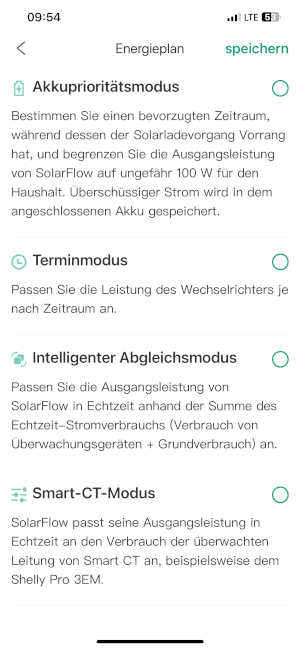
1. Please deactivate/uncheck all modes in the Zendure App, otherwise it is not possible to set the output limit!
|
|
31
32
|
|
|
32
|
-
|
|
33
|
+
|
|
33
34
|
|
|
34
|
-
|
|
35
|
-
|
|
36
|
-
3. You will be logged out of the official iOS or Android App after logging in with the ioBroker adapter. This is a normal behavior. As a workaround you can create an second Zendure account with another e-mail and grant access to your Solarflow HUB to this account. Then use the second account for ioBroker / the Zendure Solarflow adapter.
|
|
35
|
+
2. You will be logged out of the official iOS or Android App after logging in with the ioBroker adapter. This is a normal behavior. As a workaround you can create an second Zendure account with another e-mail and grant access to your Solarflow HUB to this account. Then use the second account for ioBroker / the Zendure Solarflow adapter.
|
|
37
36
|
|
|
38
37
|
## Credits
|
|
39
38
|
|
|
@@ -47,11 +46,13 @@ If you find the adapter useful for you and want to support my work, feel free to
|
|
|
47
46
|
[](https://www.paypal.com/paypalme/PeterFrommert)
|
|
48
47
|
|
|
49
48
|
## Changelog
|
|
50
|
-
### 1.
|
|
49
|
+
### 1.4.0-alpha.0 (2024-04-03)
|
|
51
50
|
|
|
52
|
-
-
|
|
53
|
-
-
|
|
54
|
-
-
|
|
51
|
+
- Add calculation states for solar input 1 & 2
|
|
52
|
+
- Add states for wifiState, hubState, pvBrand and inverseMaxPower
|
|
53
|
+
- Rename missleading title for input field 'Username' in settings to 'E-Mail'
|
|
54
|
+
- Fix energyWh, energyWhMax and SOC in calculations if "Low Voltage Check" is not used, it will set the calculation soc to 0 if minSoc (discharge limit) is reached
|
|
55
|
+
- Fix password input in settings
|
|
55
56
|
|
|
56
57
|
### 1.3.0 (2024-03-26)
|
|
57
58
|
|