iobroker.alias-workbench 0.8.1 → 0.8.2
This diff represents the content of publicly available package versions that have been released to one of the supported registries. The information contained in this diff is provided for informational purposes only and reflects changes between package versions as they appear in their respective public registries.
- package/README.md +266 -217
- package/admin/alias-workbench.png +0 -0
- package/admin/alias-workbench.svg +13 -0
- package/admin/css/werkbank.css +69 -0
- package/admin/i18n/de.json +15 -1
- package/admin/i18n/en.json +15 -1
- package/admin/js/baum.js +12 -2
- package/admin/js/detail.js +119 -7
- package/admin/js/entwurf.js +93 -5
- package/admin/js/ergebnis.js +15 -2
- package/admin/js/erkennung.js +87 -0
- package/admin/js/quellentausch.js +16 -0
- package/admin/js/schreiben.js +30 -5
- package/admin/js/vorlagen.js +13 -4
- package/admin/js/zielleiste.js +70 -2
- package/admin/js/zuordnung.js +15 -0
- package/admin/js/zustandsliste.js +71 -16
- package/admin/tab.html +11 -0
- package/io-package.json +14 -1
- package/package.json +1 -1
package/README.md
CHANGED
|
@@ -4,9 +4,11 @@
|
|
|
4
4
|
|
|
5
5
|
Creates aliases the comfortable way — devices that vis, Alexa and the device
|
|
6
6
|
adapter understand. Templates do the work: shipped ones for HomeMatic and
|
|
7
|
-
Tasmota, your own for everything else.
|
|
7
|
+
Tasmota, your own for everything else. For Tasmota it also checks the
|
|
8
|
+
path to the device: missing command points, publishing switched off, delayed
|
|
9
|
+
feedback.
|
|
8
10
|
|
|
9
|
-
*(
|
|
11
|
+
*(Diese Anleitung auf Deutsch: [README_de.md](README_de.md).)*
|
|
10
12
|
|
|
11
13
|
---
|
|
12
14
|
|
|
@@ -25,6 +27,10 @@ all four while you are building, not hours later in the log.
|
|
|
25
27
|
|
|
26
28
|
## What it does
|
|
27
29
|
|
|
30
|
+
|
|
31
|
+
|
|
32
|
+
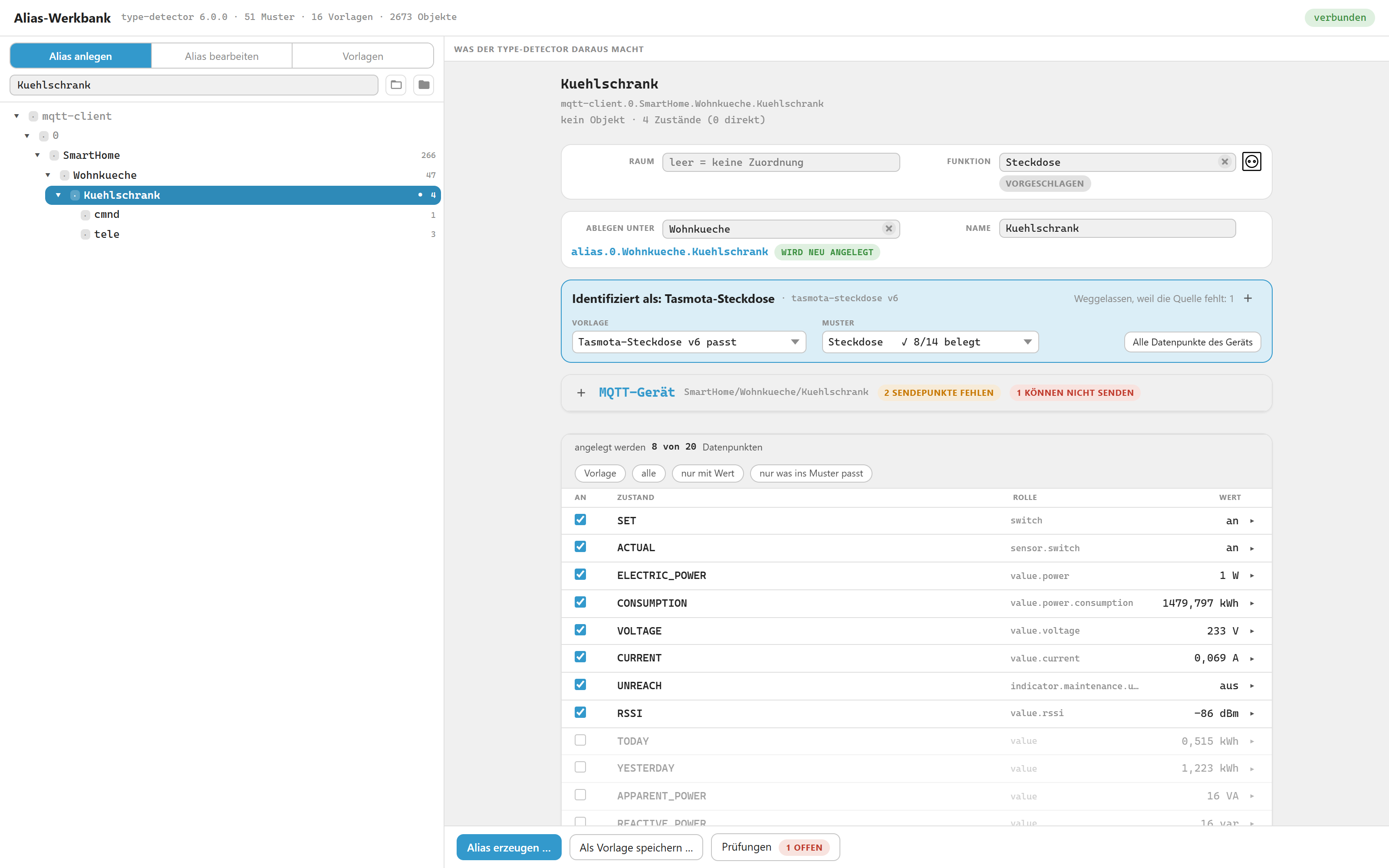
*A Tasmota socket picked in the tree: what the detector makes of it, which template won, and every datapoint with the value it returns right now.*
|
|
33
|
+
|
|
28
34
|
**Live detector report.** The real `@iobroker/type-detector` runs against a
|
|
29
35
|
draft of your alias while you edit it. Change a role and the report changes with
|
|
30
36
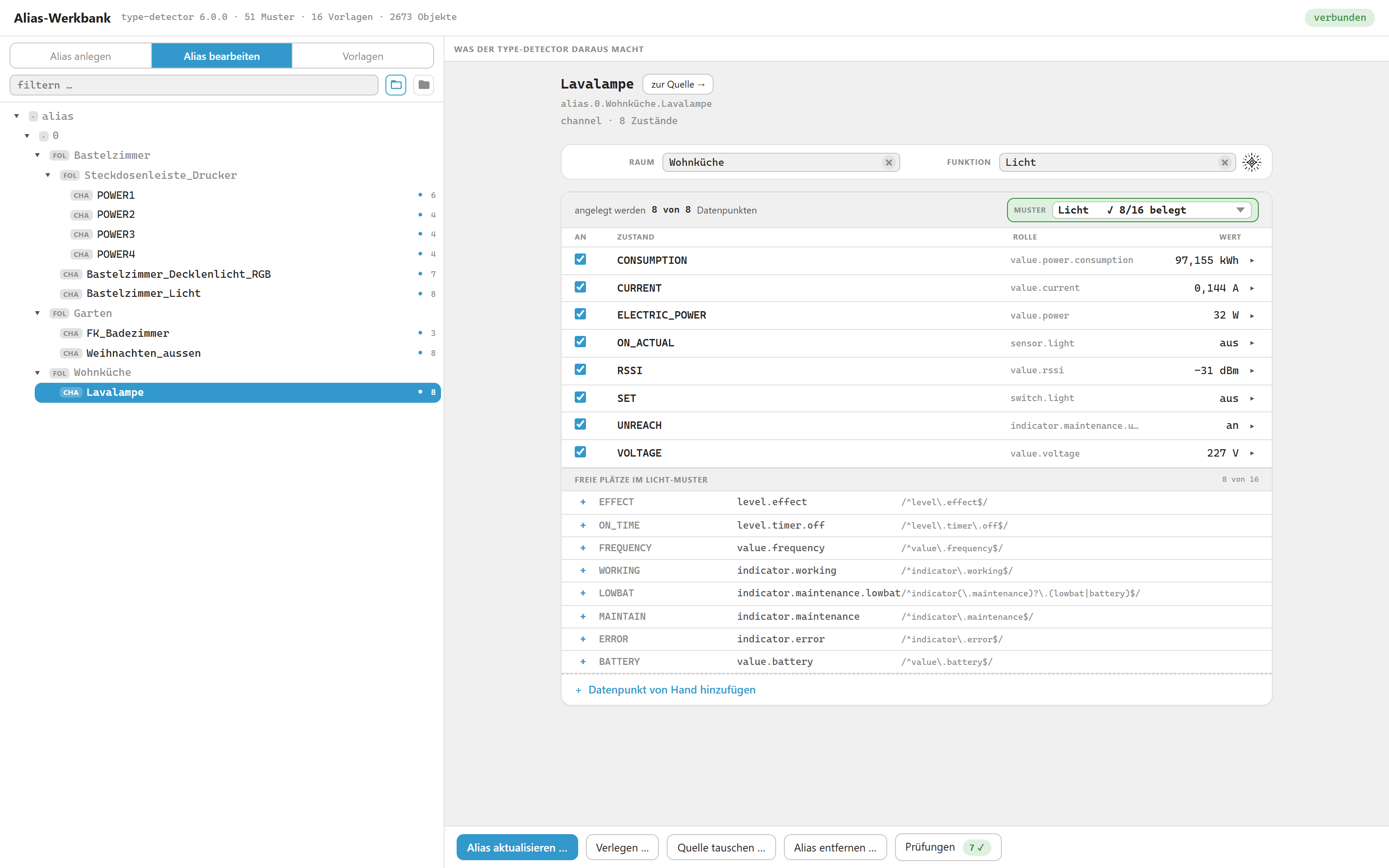
|
it — you see immediately whether you built a device or a pile of loose values,
|
|
@@ -34,6 +40,10 @@ which pattern slots are filled and which are still free.
|
|
|
34
40
|
*right now*, next to the raw value of the source. A formula that yields
|
|
35
41
|
`undefined` or throws is visible before anything is written.
|
|
36
42
|
|
|
43
|
+
|
|
44
|
+
|
|
45
|
+
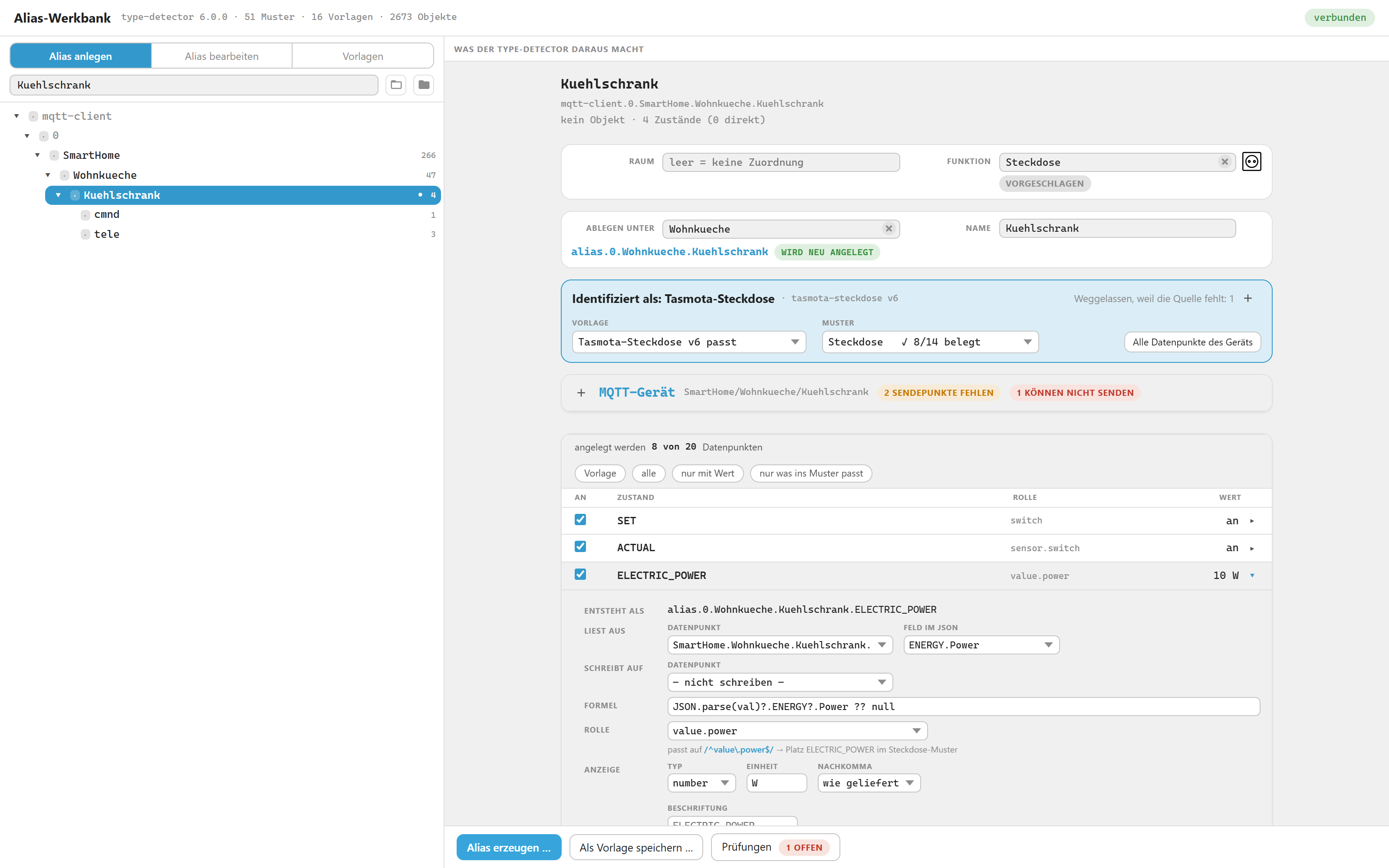
*One row opened: where it reads from, which JSON field, the read function, the role — and the pattern slot that role fills.*
|
|
46
|
+
|
|
37
47
|
**Templates.** A template describes how a device source becomes a finished alias
|
|
38
48
|
device. Templates are plain JSON files, one per template — see
|
|
39
49
|
[Template format](#template-format). Sixteen ship with the adapter: four for
|
|
@@ -47,6 +57,26 @@ runs the new template against every device in the system and shows which ones it
|
|
|
47
57
|
matches, which template wins there, and which devices would change hands. See
|
|
48
58
|
[Saving your own templates](#saving-your-own-templates).
|
|
49
59
|
|
|
60
|
+
**Tasmota and MQTT.** A Tasmota device arrives through the MQTT adapter as a set
|
|
61
|
+
of raw topics: `cmnd/`, `stat/`, `tele/` — no device, just datapoints. The
|
|
62
|
+
workbench does not only build the alias from them, it also checks the path to the
|
|
63
|
+
device:
|
|
64
|
+
|
|
65
|
+
- **Missing command points.** A `cmnd.POWER` that does not exist is created at
|
|
66
|
+
the press of a button — with the right topic and a fitting role.
|
|
67
|
+
- **Mute points.** They exist, but they are not allowed to send: `publish` is
|
|
68
|
+
off. An alias switching through them does nothing, and nothing about it shows.
|
|
69
|
+
The workbench points that out and enables it on request.
|
|
70
|
+
- **Delayed feedback.** Without `SetOption59`, Tasmota reports a change only
|
|
71
|
+
with the next telemetry — the alias shows the old value for minutes. The
|
|
72
|
+
workbench asks the device and turns the setting on.
|
|
73
|
+
- **Asking for commands.** When the command list of a device is unknown, it asks
|
|
74
|
+
the device (Status 11). A plain query that switches nothing and changes
|
|
75
|
+
nothing.
|
|
76
|
+
|
|
77
|
+
Bind your Tasmota devices this way and you need no separate adapter for the
|
|
78
|
+
device structure: MQTT delivers the data, the workbench turns it into devices.
|
|
79
|
+
|
|
50
80
|
**Devices with several outputs.** A power strip or valve manifold has
|
|
51
81
|
`POWER1`, `POWER2`, … Since a `socket` pattern has exactly one `SET`, each
|
|
52
82
|
output becomes its own channel, grouped under one folder. The output numbers are
|
|
@@ -64,6 +94,10 @@ draft and lets the detector decide again. It only ever runs on that button, neve
|
|
|
64
94
|
during normal detection, every guessed row is marked, and while any guess is
|
|
65
95
|
undecided the write buttons stay locked. Not deciding is no longer a silent yes.
|
|
66
96
|
|
|
97
|
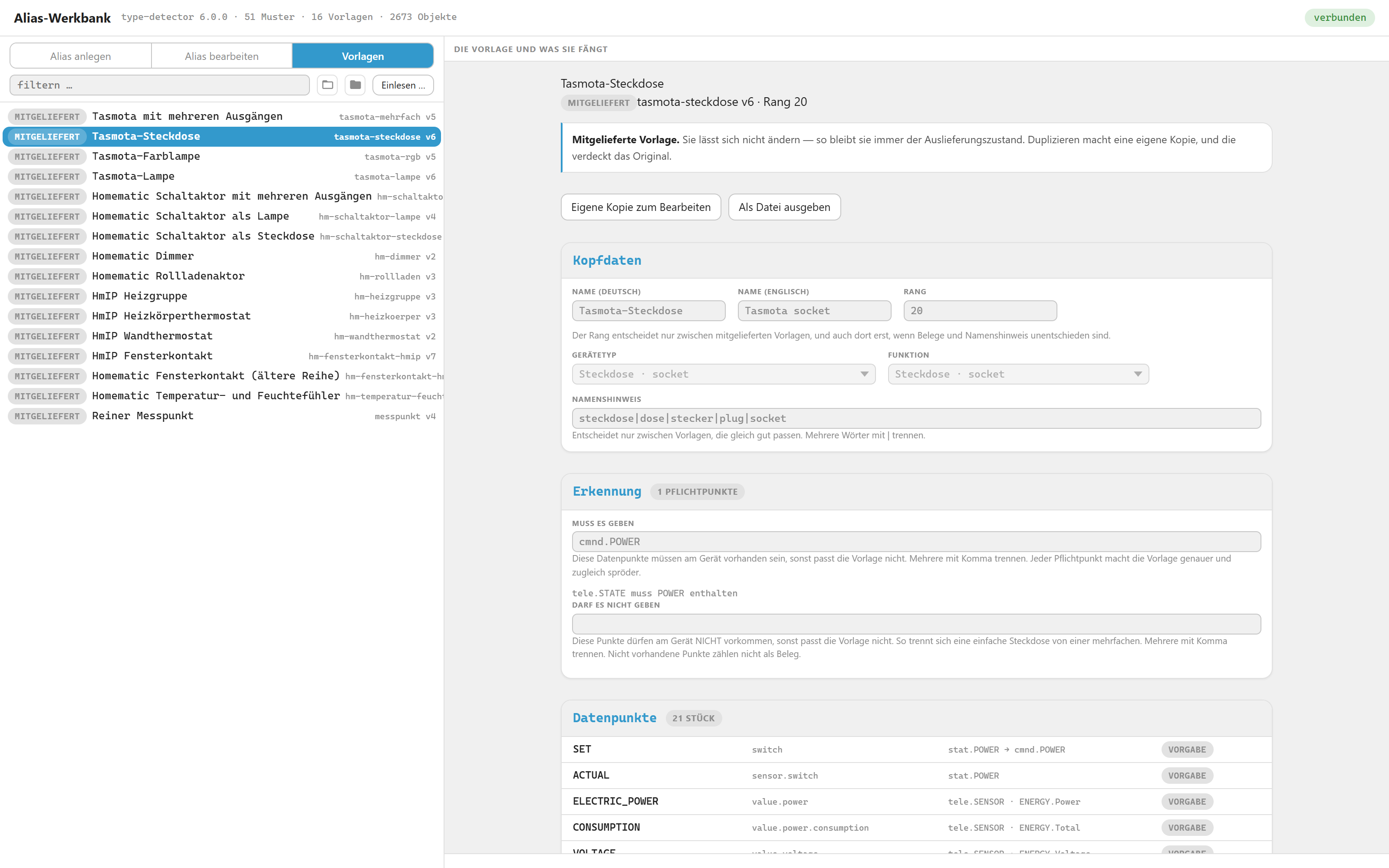
+
|
|
98
|
+
|
|
99
|
+
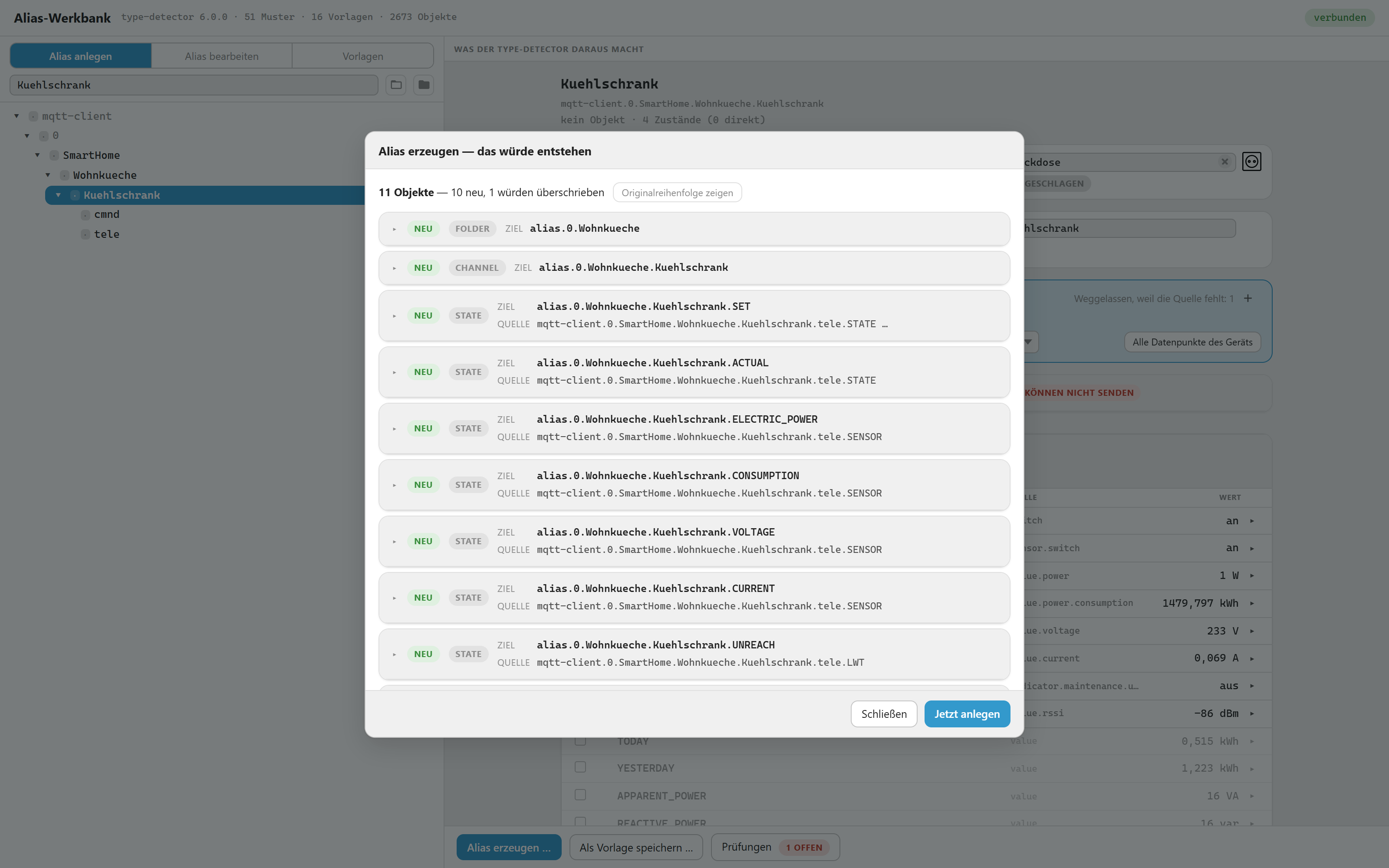
*The dry run before anything is written: eleven objects, ten new, one would be overwritten — each with its target and its source.*
|
|
100
|
+
|
|
67
101
|
**Nothing is written without a dry run.** The dry run lists every object that
|
|
68
102
|
would be created, changed or removed, as full JSON. For anything that changes it
|
|
69
103
|
puts **before and after side by side**, line against line, so you can see *what*
|
|
@@ -75,18 +109,34 @@ object fixes it.
|
|
|
75
109
|
|
|
76
110
|
## Status
|
|
77
111
|
|
|
112
|
+
|
|
113
|
+
|
|
114
|
+
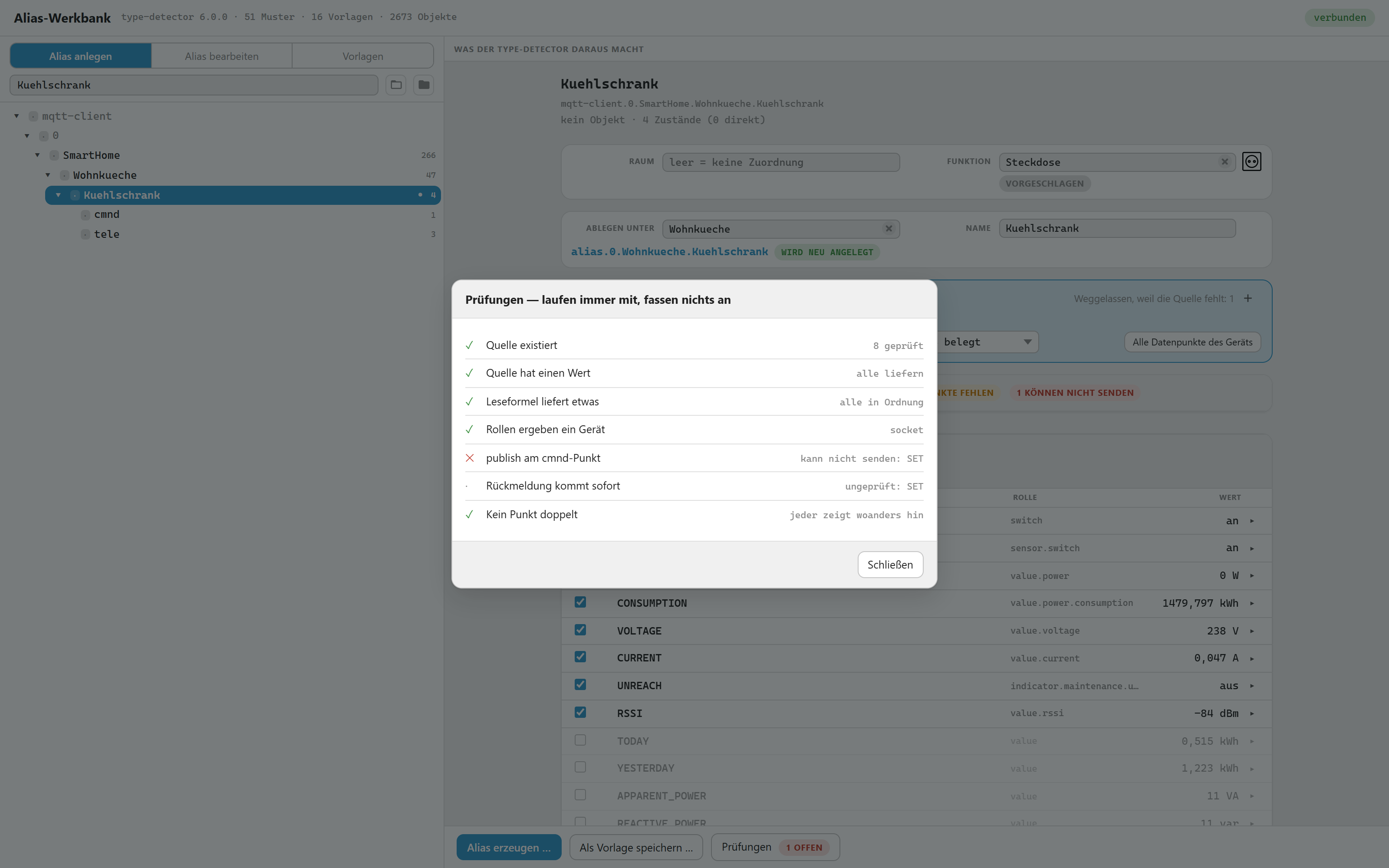
*The checks run alongside and touch nothing. Here one of them fails: the alias would look finished, but its switch could not send — publishing is off on the MQTT command point.*
|
|
115
|
+
|
|
116
|
+
|
|
78
117
|
Early. Usable, but not finished.
|
|
79
118
|
|
|
80
119
|
- Works as an admin tab; the adapter itself runs no process (`mode: none`).
|
|
81
120
|
The instance exists only to carry the settings.
|
|
82
|
-
- German and English, 550 keys each
|
|
83
|
-
|
|
121
|
+
- Interface in German and English, 550 keys each; the settings page in
|
|
122
|
+
eleven languages
|
|
84
123
|
- 16 bundled templates: eleven Homematic, four Tasmota, one plain measuring point
|
|
85
124
|
- **Missing:** "who uses this alias" — vis views, Alexa and Google names cannot
|
|
86
125
|
be searched from here, so a rename warns you instead of pretending to be
|
|
87
126
|
complete. Exporting a template to a file and reading it back works but is
|
|
88
127
|
the least tested path.
|
|
89
128
|
|
|
129
|
+
## Installation
|
|
130
|
+
|
|
131
|
+
Open the ioBroker admin, go to **Adapters**, look for **Alias Workbench** and
|
|
132
|
+
create an instance. Then reload the admin and pick **Alias Workbench** in the
|
|
133
|
+
left menu.
|
|
134
|
+
|
|
135
|
+
The adapter has not been accepted into the ioBroker repository yet, so it does
|
|
136
|
+
not show up in that list for the moment. Until it does, install it from npm:
|
|
137
|
+
under **Adapters** press **install from custom URL** (the octocat button), tab
|
|
138
|
+
**From npm**, and enter `iobroker.alias-workbench`.
|
|
139
|
+
|
|
90
140
|
## Why the tree shows devices that do not exist
|
|
91
141
|
|
|
92
142
|
With MQTT, ioBroker only creates objects for the datapoints themselves. A topic
|
|
@@ -101,151 +151,122 @@ That gap is what the alias fills: `alias.0.…Gartenpumpe` is a real channel wit
|
|
|
101
151
|
proper roles beneath it. The workbench therefore lets you pick such a
|
|
102
152
|
non-existent node in the tree and build a device out of it.
|
|
103
153
|
|
|
104
|
-
##
|
|
105
|
-
|
|
106
|
-
```
|
|
107
|
-
source (e.g. mqtt-client.0.…)
|
|
108
|
-
↓ a template is matched and applied
|
|
109
|
-
draft in memory → object image → type-detector → report
|
|
110
|
-
↓ dry run
|
|
111
|
-
alias.0.<folder>.<device> channel + states with common.alias
|
|
112
|
-
```
|
|
154
|
+
## What an existing alias contributes
|
|
113
155
|
|
|
114
|
-
|
|
115
|
-
of the draft, which is why the report reacts instantly and why nothing can break
|
|
116
|
-
while you experiment.
|
|
156
|
+
|
|
117
157
|
|
|
118
|
-
|
|
119
|
-
esbuild. It is never copied into the source tree — a frozen copy that drifts
|
|
120
|
-
from the library was the main weakness of the existing alias manager.
|
|
158
|
+
*An alias that already exists. Its own roles and formulas win over the template, the free slots of the light pattern are listed below, and the three management buttons appear only in this mode.*
|
|
121
159
|
|
|
122
|
-
### How the tab itself is built
|
|
123
160
|
|
|
124
|
-
|
|
125
|
-
|
|
126
|
-
|
|
161
|
+
Pick a source that already has an alias, and the alias wins. Role, type, unit,
|
|
162
|
+
value list, caption, formulas, both sources and the ticks come from what is
|
|
163
|
+
stored — in **both** views, "create alias" and "edit alias".
|
|
127
164
|
|
|
128
|
-
|
|
129
|
-
|
|
130
|
-
|
|
165
|
+
Before that, the same row carried a different role depending on which tab you
|
|
166
|
+
were in, and refreshing did something different in each. Now refreshing changes
|
|
167
|
+
nothing by itself.
|
|
131
168
|
|
|
132
|
-
|
|
133
|
-
|
|
134
|
-
|
|
169
|
+
Where the template wants something else, the row says so — *"Template:
|
|
170
|
+
sensor.window"* — and a button above the list offers to apply it. That is a
|
|
171
|
+
click, never a side effect. The caption is exempt: the display name belongs to
|
|
172
|
+
whoever typed it.
|
|
135
173
|
|
|
136
|
-
|
|
137
|
-
npm install --no-save acorn@8
|
|
138
|
-
node ../werkzeug/freie-namen.js admin/js node_modules/acorn/dist/acorn.js
|
|
174
|
+
## Swapping a source
|
|
139
175
|
|
|
140
|
-
|
|
141
|
-
|
|
176
|
+
A device breaks and gets replaced. The alias should stay exactly as it is —
|
|
177
|
+
same id, same recording, same room and function — and only point somewhere
|
|
178
|
+
else. **Swap source…** does that, and it changes only `common.alias.id` per
|
|
179
|
+
datapoint plus `native.quelle` on the channel.
|
|
142
180
|
|
|
143
|
-
|
|
144
|
-
|
|
145
|
-
a source whose value was not loaded yet.
|
|
181
|
+
Each datapoint is matched in three steps, and the dialog says which one was
|
|
182
|
+
used:
|
|
146
183
|
|
|
147
|
-
|
|
184
|
+
1. **same relative path** below the new device — `…ABC.1.STATE` → `…XYZ.1.STATE`
|
|
185
|
+
2. **through the template row** — finds `LOWBAT` on a device that spells it
|
|
186
|
+
`LOWBAT` where the old one said `LOW_BAT`
|
|
187
|
+
3. **guessed** from name or role — deliberately weak, and marked **guessed** so
|
|
188
|
+
you check it
|
|
148
189
|
|
|
149
|
-
|
|
190
|
+
Rows with no match at all turn red and offer a checkbox: *remove this point
|
|
191
|
+
when swapping*. Leave it unticked and the point stays, still pointing at the
|
|
192
|
+
old source — allowed, but visible.
|
|
150
193
|
|
|
151
|
-
|
|
152
|
-
|
|
153
|
-
|
|
154
|
-
|
|
155
|
-
|
|
156
|
-
"name": { "en": "Tasmota socket", "de": "Tasmota-Steckdose" },
|
|
157
|
-
"geraetetyp": "socket",
|
|
194
|
+
Two things the dialog is careful about. It names the old source even when the
|
|
195
|
+
device is **gone** — that is the normal case for "device broken". And it warns
|
|
196
|
+
where the new source measures differently: *"Watch out: ACTUAL: value range
|
|
197
|
+
0..100 → 0..255"*. The alias keeps its formulas; if the new device counts
|
|
198
|
+
differently, the numbers are wrong afterwards and nothing else would tell you.
|
|
158
199
|
|
|
159
|
-
|
|
160
|
-
"erforderlich": ["stat.POWER", "cmnd.POWER"],
|
|
161
|
-
"inhalt": { "tele.SENSOR": "ENERGY" },
|
|
162
|
-
"namenshinweis": "steckdose|dose|plug|socket"
|
|
163
|
-
},
|
|
200
|
+
## Room and function
|
|
164
201
|
|
|
165
|
-
|
|
166
|
-
|
|
167
|
-
|
|
168
|
-
"schreibformel": "val ? \"ON\" : \"OFF\"" },
|
|
202
|
+
Both live in `enum.rooms.*` / `enum.functions.*`, not on the object — so this
|
|
203
|
+
is the one place where the workbench writes outside `alias.`. Nothing else
|
|
204
|
+
outside that namespace is ever touched.
|
|
169
205
|
|
|
170
|
-
|
|
171
|
-
|
|
206
|
+
The proposal comes from, in order: the room already on the source or one of its
|
|
207
|
+
channels, the device name (`FK_Max_Spielzimmer` → `Max_Spielzimmer`), the
|
|
208
|
+
target folder. The function comes from the template's `funktion` field, or from
|
|
209
|
+
the detected type when the template has none.
|
|
172
210
|
|
|
173
|
-
|
|
174
|
-
|
|
175
|
-
|
|
176
|
-
|
|
177
|
-
|
|
178
|
-
```
|
|
211
|
+
The admin ships 62 function and 58 room templates, each with a picture. The
|
|
212
|
+
workbench does not copy them; it reads them out of the admin's own bundle at
|
|
213
|
+
runtime, so there are never two lists ageing apart. If that fails, the field
|
|
214
|
+
quietly shows only what exists — and says so in the last row, rather than
|
|
215
|
+
looking empty for no reason.
|
|
179
216
|
|
|
180
|
-
|
|
181
|
-
|
|
182
|
-
|
|
183
|
-
|
|
184
|
-
|
|
185
|
-
|
|
186
|
-
| `rang` | last tie-breaker, so the same device is always detected the same way |
|
|
187
|
-
| `optional` | the state is skipped when its source or JSON field is missing |
|
|
188
|
-
| `vorgabeAus` | proposed but unchecked — see **What a template ticks by default** below |
|
|
189
|
-
| `feld` | builds the read function `JSON.parse(val).<field>` |
|
|
190
|
-
| `mehrfach` + `%N%` | one device per output; the numbers are read from what exists |
|
|
191
|
-
| `werteliste` | value list for the datapoint — slots like EFFECT are not detected without one |
|
|
192
|
-
| `absolut` | `lesen` is a full object id, not relative to the device — the same object for every device |
|
|
193
|
-
| `beschriftung` | the datapoint's display name, if it should differ from its slot name |
|
|
194
|
-
| `nachkommastellen` | decimals for the value display |
|
|
217
|
+
**The picture is shown before it is written.** Next to each of the two fields
|
|
218
|
+
stands the picture of the chosen enum: solid when one is already stored, faded
|
|
219
|
+
with a small **new** corner when the workbench would add one on writing, and
|
|
220
|
+
nothing at all when the catalogue does not know the name or the switch is off.
|
|
221
|
+
So the settings page is visible in the row itself, instead of having to be
|
|
222
|
+
guessed from a dry run.
|
|
195
223
|
|
|
196
|
-
|
|
197
|
-
the single one has no `stat.POWER2`. An absent datapoint deliberately does **not**
|
|
198
|
-
count as evidence — otherwise a list of invented exclusions could inflate a
|
|
199
|
-
template's score.
|
|
224
|
+
## Settings
|
|
200
225
|
|
|
201
|
-
|
|
202
|
-
|
|
203
|
-
|
|
226
|
+
The instance has no process; its settings only decide how the workbench writes.
|
|
227
|
+
Four switches, all on by default — and if `native` is missing entirely, the same
|
|
228
|
+
defaults apply rather than everything counting as off:
|
|
204
229
|
|
|
205
|
-
|
|
230
|
+
| Switch | What it does |
|
|
231
|
+
|---|---|
|
|
232
|
+
| `ikonRaeume` | add a missing picture to a **room** |
|
|
233
|
+
| `ikonFunktionen` | the same for a **function** |
|
|
234
|
+
| `ikonErsetzen` | also replace an entry that is not a picture. ioBroker's default rooms carry `icon: "Bedroom"` — a bare word that renders as a broken box |
|
|
235
|
+
| `vorlagenVomAdmin` | offer the admin's room and function templates at all |
|
|
206
236
|
|
|
207
|
-
|
|
208
|
-
criterion. That only decides *where* the point ends up — inside the device or
|
|
209
|
-
in a separate info device. It says nothing about whether anyone needs it. The
|
|
210
|
-
`thermostat` pattern has 24 slots, `socket` has 14; everything that could ever
|
|
211
|
-
sit in such a device is listed there, down to frequency and apparent power.
|
|
237
|
+
The tab reads them **once on load**. After saving, reload the tab.
|
|
212
238
|
|
|
213
|
-
|
|
214
|
-
notice when something is wrong.** Setpoint, actual value, and the signals that
|
|
215
|
-
announce a failure — `LOWBAT`, `UNREACH`.
|
|
239
|
+
## What the shipped templates cover
|
|
216
240
|
|
|
217
|
-
|
|
218
|
-
|
|
241
|
+
Sixteen templates come with the adapter. Four Tasmota, one plain measuring
|
|
242
|
+
point — and eleven for Homematic, where the interesting part is not that a
|
|
243
|
+
template matches but that the **right** one does. The devices look alike in the
|
|
244
|
+
data; what separates them is one datapoint each:
|
|
219
245
|
|
|
220
|
-
|
|
221
|
-
|
|
222
|
-
|
|
223
|
-
|
|
246
|
+
| Told apart by | Which is which |
|
|
247
|
+
|---|---|
|
|
248
|
+
| `1.WORKING` | switch actuator, not a window contact — both have `1.STATE` |
|
|
249
|
+
| `2.STATE` | multi-channel actuator; the single-channel template refuses when it is present |
|
|
250
|
+
| `1.LEVEL_REAL` vs `1.STOP` | dimmer vs shutter — both have `1.LEVEL` |
|
|
251
|
+
| `1.ERROR` | classic window contact vs HmIP, which computes a boolean from a number |
|
|
252
|
+
| `0.SABOTAGE` | required for the HmIP contact. Without it, `1.STATE` + `0.LOW_BAT` matched twelve devices, eight of them actuators |
|
|
253
|
+
| `1.LEVEL` / `1.HUMIDITY` / `4.SECTION` | radiator valve vs wall thermostat vs heating group |
|
|
254
|
+
| `1.TEMPERATURE` vs `1.ACTUAL_TEMPERATURE` | a plain sensor vs something that also sets a value |
|
|
224
255
|
|
|
225
|
-
|
|
226
|
-
|
|
227
|
-
CONNECTED RSSI ON_TIME BATTERY value.battery unit %
|
|
228
|
-
metering ELECTRIC_POWER CURRENT VOLTAGE CONSUMPTION
|
|
229
|
-
FREQUENCY SPEED POWER value.voltage unit V
|
|
230
|
-
```
|
|
256
|
+
The CCU's own receivers — `HM-RCV-50`, `HmIP-RCV-50`, `RPI-RF-MOD` — match
|
|
257
|
+
nothing on purpose. Fifty bare `LEVEL` channels are not a device.
|
|
231
258
|
|
|
232
|
-
|
|
233
|
-
|
|
234
|
-
metering group at all, which is why it has no voltage slot — and `BATTERY`,
|
|
235
|
-
the slot it does have, means a percentage. Writing volts into either is
|
|
236
|
-
wrong, so the point is offered and left off.
|
|
259
|
+
When a template is rejected, the picker says why: *"1.LEVEL missing"*, not
|
|
260
|
+
*"does not fit"*. A reason you cannot act on is not a reason.
|
|
237
261
|
|
|
238
|
-
|
|
262
|
+
### Role knowledge beside the rows
|
|
239
263
|
|
|
240
|
-
|
|
241
|
-
|
|
242
|
-
|
|
243
|
-
|
|
244
|
-
|
|
245
|
-
|
|
246
|
-
is rarely worth it, and the template's `hinweis` has to say so. And check
|
|
247
|
-
what a slot **means** before using it — a matching name is not a matching
|
|
248
|
-
purpose, as the voltage case above shows.
|
|
264
|
+
A template can carry `weiterePunkte`: roles for datapoints that get no row of
|
|
265
|
+
their own. Without it, "all datapoints of the device" showed *no role* on most
|
|
266
|
+
lines, because hm-rpc simply leaves the field empty. A `*.NAME` wildcard applies
|
|
267
|
+
per channel, so `2.LEVEL` and `3.RAMP_TIME` are covered without listing every
|
|
268
|
+
channel. It changes nothing about which template wins — only raw rows are
|
|
269
|
+
enriched.
|
|
249
270
|
|
|
250
271
|
## Saving your own templates
|
|
251
272
|
|
|
@@ -328,127 +349,131 @@ datapoints. That is deliberate — more evidence should win — and it only affe
|
|
|
328
349
|
devices you have not built yet: a finished alias records the template it came
|
|
329
350
|
from and keeps it.
|
|
330
351
|
|
|
331
|
-
## What
|
|
332
|
-
|
|
333
|
-
Sixteen templates come with the adapter. Four Tasmota, one plain measuring
|
|
334
|
-
point — and eleven for Homematic, where the interesting part is not that a
|
|
335
|
-
template matches but that the **right** one does. The devices look alike in the
|
|
336
|
-
data; what separates them is one datapoint each:
|
|
337
|
-
|
|
338
|
-
| Told apart by | Which is which |
|
|
339
|
-
|---|---|
|
|
340
|
-
| `1.WORKING` | switch actuator, not a window contact — both have `1.STATE` |
|
|
341
|
-
| `2.STATE` | multi-channel actuator; the single-channel template refuses when it is present |
|
|
342
|
-
| `1.LEVEL_REAL` vs `1.STOP` | dimmer vs shutter — both have `1.LEVEL` |
|
|
343
|
-
| `1.ERROR` | classic window contact vs HmIP, which computes a boolean from a number |
|
|
344
|
-
| `0.SABOTAGE` | required for the HmIP contact. Without it, `1.STATE` + `0.LOW_BAT` matched twelve devices, eight of them actuators |
|
|
345
|
-
| `1.LEVEL` / `1.HUMIDITY` / `4.SECTION` | radiator valve vs wall thermostat vs heating group |
|
|
346
|
-
| `1.TEMPERATURE` vs `1.ACTUAL_TEMPERATURE` | a plain sensor vs something that also sets a value |
|
|
347
|
-
|
|
348
|
-
The CCU's own receivers — `HM-RCV-50`, `HmIP-RCV-50`, `RPI-RF-MOD` — match
|
|
349
|
-
nothing on purpose. Fifty bare `LEVEL` channels are not a device.
|
|
352
|
+
## What a template ticks by default
|
|
350
353
|
|
|
351
|
-
|
|
352
|
-
|
|
354
|
+
Whether a datapoint has a slot in the type-detector pattern is **not** the
|
|
355
|
+
criterion. That only decides *where* the point ends up — inside the device or
|
|
356
|
+
in a separate info device. It says nothing about whether anyone needs it. The
|
|
357
|
+
`thermostat` pattern has 24 slots, `socket` has 14; everything that could ever
|
|
358
|
+
sit in such a device is listed there, down to frequency and apparent power.
|
|
353
359
|
|
|
354
|
-
|
|
360
|
+
The criterion is purpose: **tick what you need to operate the device and to
|
|
361
|
+
notice when something is wrong.** Setpoint, actual value, and the signals that
|
|
362
|
+
announce a failure — `LOWBAT`, `UNREACH`.
|
|
355
363
|
|
|
356
|
-
|
|
357
|
-
|
|
358
|
-
lines, because hm-rpc simply leaves the field empty. A `*.NAME` wildcard applies
|
|
359
|
-
per channel, so `2.LEVEL` and `3.RAMP_TIME` are covered without listing every
|
|
360
|
-
channel. It changes nothing about which template wins — only raw rows are
|
|
361
|
-
enriched.
|
|
364
|
+
Left unticked: diagnostics. Signal strength, uptime, ramp times, inhibit
|
|
365
|
+
flags. You tick those when you are chasing a problem.
|
|
362
366
|
|
|
363
|
-
|
|
367
|
+
Battery **voltage** looks like it belongs in the first group — it falls
|
|
368
|
+
visibly over weeks while `LOW_BAT` only flips once the change is already due.
|
|
369
|
+
It stays unticked anyway, because the detector has nowhere to put it. Patterns
|
|
370
|
+
are assembled from two shared groups:
|
|
364
371
|
|
|
365
|
-
|
|
366
|
-
|
|
367
|
-
|
|
372
|
+
```
|
|
373
|
+
maintenance WORKING UNREACH LOWBAT MAINTAIN ERROR DIRECTION
|
|
374
|
+
CONNECTED RSSI ON_TIME BATTERY value.battery unit %
|
|
375
|
+
metering ELECTRIC_POWER CURRENT VOLTAGE CONSUMPTION
|
|
376
|
+
FREQUENCY SPEED POWER value.voltage unit V
|
|
377
|
+
```
|
|
368
378
|
|
|
369
|
-
|
|
370
|
-
|
|
371
|
-
|
|
379
|
+
`VOLTAGE` sits between current and consumption: it is the **mains voltage of a
|
|
380
|
+
metering device**, not a sensor's cell voltage. A window contact has no
|
|
381
|
+
metering group at all, which is why it has no voltage slot — and `BATTERY`,
|
|
382
|
+
the slot it does have, means a percentage. Writing volts into either is
|
|
383
|
+
wrong, so the point is offered and left off.
|
|
372
384
|
|
|
373
|
-
|
|
374
|
-
sensor.window"* — and a button above the list offers to apply it. That is a
|
|
375
|
-
click, never a side effect. The caption is exempt: the display name belongs to
|
|
376
|
-
whoever typed it.
|
|
385
|
+
Two things override that:
|
|
377
386
|
|
|
378
|
-
|
|
387
|
+
- A point that reads the **same source** as an already-ticked one is never
|
|
388
|
+
ticked. Otherwise the same value sits in the alias twice and the seventh
|
|
389
|
+
check reports it, rightly. Homematic switch actuators have no separate
|
|
390
|
+
feedback value — `1.STATE` is both — so their `ON_ACTUAL` stays off.
|
|
391
|
+
- Where the purpose says tick but the pattern has **no slot**, weigh it: the
|
|
392
|
+
point lands in an info device next to the real one. For a single value that
|
|
393
|
+
is rarely worth it, and the template's `hinweis` has to say so. And check
|
|
394
|
+
what a slot **means** before using it — a matching name is not a matching
|
|
395
|
+
purpose, as the voltage case above shows.
|
|
379
396
|
|
|
380
|
-
|
|
381
|
-
same id, same recording, same room and function — and only point somewhere
|
|
382
|
-
else. **Swap source…** does that, and it changes only `common.alias.id` per
|
|
383
|
-
datapoint plus `native.quelle` on the channel.
|
|
397
|
+
## Template format
|
|
384
398
|
|
|
385
|
-
|
|
386
|
-
used:
|
|
399
|
+
|
|
387
400
|
|
|
388
|
-
|
|
389
|
-
2. **through the template row** — finds `LOWBAT` on a device that spells it
|
|
390
|
-
`LOWBAT` where the old one said `LOW_BAT`
|
|
391
|
-
3. **guessed** from name or role — deliberately weak, and marked **guessed** so
|
|
392
|
-
you check it
|
|
401
|
+
*A shipped template, read-only: header, what must and must not exist for it to match, and its datapoints. "Own copy" makes it editable.*
|
|
393
402
|
|
|
394
|
-
Rows with no match at all turn red and offer a checkbox: *remove this point
|
|
395
|
-
when swapping*. Leave it unticked and the point stays, still pointing at the
|
|
396
|
-
old source — allowed, but visible.
|
|
397
403
|
|
|
398
|
-
|
|
399
|
-
device is **gone** — that is the normal case for "device broken". And it warns
|
|
400
|
-
where the new source measures differently: *"Watch out: ACTUAL: value range
|
|
401
|
-
0..100 → 0..255"*. The alias keeps its formulas; if the new device counts
|
|
402
|
-
differently, the numbers are wrong afterwards and nothing else would tell you.
|
|
404
|
+
One JSON file per template under `admin/vorlagen/`. Example:
|
|
403
405
|
|
|
404
|
-
|
|
406
|
+
```jsonc
|
|
407
|
+
{
|
|
408
|
+
"id": "tasmota-steckdose",
|
|
409
|
+
"version": 1,
|
|
410
|
+
"rang": 20,
|
|
411
|
+
"name": { "en": "Tasmota socket", "de": "Tasmota-Steckdose" },
|
|
412
|
+
"geraetetyp": "socket",
|
|
405
413
|
|
|
406
|
-
|
|
407
|
-
|
|
408
|
-
|
|
414
|
+
"erkennung": {
|
|
415
|
+
"erforderlich": ["stat.POWER", "cmnd.POWER"],
|
|
416
|
+
"inhalt": { "tele.SENSOR": "ENERGY" },
|
|
417
|
+
"namenshinweis": "steckdose|dose|plug|socket"
|
|
418
|
+
},
|
|
409
419
|
|
|
410
|
-
|
|
411
|
-
|
|
412
|
-
|
|
413
|
-
|
|
420
|
+
"zustaende": [
|
|
421
|
+
{ "name": "SET", "rolle": "switch", "typ": "boolean",
|
|
422
|
+
"lesen": "stat.POWER", "schreiben": "cmnd.POWER",
|
|
423
|
+
"schreibformel": "val ? \"ON\" : \"OFF\"" },
|
|
414
424
|
|
|
415
|
-
|
|
416
|
-
|
|
417
|
-
runtime, so there are never two lists ageing apart. If that fails, the field
|
|
418
|
-
quietly shows only what exists — and says so in the last row, rather than
|
|
419
|
-
looking empty for no reason.
|
|
425
|
+
{ "name": "ELECTRIC_POWER", "rolle": "value.power", "einheit": "W",
|
|
426
|
+
"lesen": "tele.SENSOR", "feld": "ENERGY.Power", "optional": true },
|
|
420
427
|
|
|
421
|
-
|
|
422
|
-
|
|
423
|
-
|
|
424
|
-
|
|
425
|
-
|
|
426
|
-
|
|
428
|
+
{ "name": "TODAY", "rolle": "value", "einheit": "kWh",
|
|
429
|
+
"lesen": "tele.SENSOR", "feld": "ENERGY.Today",
|
|
430
|
+
"optional": true, "vorgabeAus": true }
|
|
431
|
+
]
|
|
432
|
+
}
|
|
433
|
+
```
|
|
427
434
|
|
|
428
|
-
|
|
435
|
+
| Key | Meaning |
|
|
436
|
+
|---|---|
|
|
437
|
+
| `erkennung.erforderlich` | these datapoints must exist, otherwise the template does not match |
|
|
438
|
+
| `erkennung.inhalt` | the named datapoint must contain this field in its JSON |
|
|
439
|
+
| `erkennung.verboten` | these datapoints must **not** exist, otherwise the template does not match |
|
|
440
|
+
| `erkennung.namenshinweis` | only breaks ties between templates that fit equally well |
|
|
441
|
+
| `rang` | last tie-breaker, so the same device is always detected the same way |
|
|
442
|
+
| `optional` | the state is skipped when its source or JSON field is missing |
|
|
443
|
+
| `vorgabeAus` | proposed but unchecked — see **What a template ticks by default** below |
|
|
444
|
+
| `feld` | builds the read function `JSON.parse(val).<field>` |
|
|
445
|
+
| `mehrfach` + `%N%` | one device per output; the numbers are read from what exists |
|
|
446
|
+
| `werteliste` | value list for the datapoint — slots like EFFECT are not detected without one |
|
|
447
|
+
| `absolut` | `lesen` is a full object id, not relative to the device — the same object for every device |
|
|
448
|
+
| `beschriftung` | the datapoint's display name, if it should differ from its slot name |
|
|
449
|
+
| `nachkommastellen` | decimals for the value display |
|
|
429
450
|
|
|
430
|
-
|
|
431
|
-
|
|
432
|
-
|
|
451
|
+
`verboten` is what genuinely separates a single socket from a multi-output one:
|
|
452
|
+
the single one has no `stat.POWER2`. An absent datapoint deliberately does **not**
|
|
453
|
+
count as evidence — otherwise a list of invented exclusions could inflate a
|
|
454
|
+
template's score.
|
|
433
455
|
|
|
434
|
-
|
|
435
|
-
|
|
436
|
-
|
|
437
|
-
| `ikonFunktionen` | the same for a **function** |
|
|
438
|
-
| `ikonErsetzen` | also replace an entry that is not a picture. ioBroker's default rooms carry `icon: "Bedroom"` — a bare word that renders as a broken box |
|
|
439
|
-
| `vorlagenVomAdmin` | offer the admin's room and function templates at all |
|
|
456
|
+
Datapoint names are matched case-insensitively as a fallback, because MQTT keeps
|
|
457
|
+
whatever casing was published — the same device family sends `cmnd.POWER` on one
|
|
458
|
+
unit and `cmnd.power` on the next.
|
|
440
459
|
|
|
441
|
-
|
|
460
|
+
## Under the hood
|
|
442
461
|
|
|
443
|
-
|
|
462
|
+
```
|
|
463
|
+
source (e.g. mqtt-client.0.…)
|
|
464
|
+
↓ a template is matched and applied
|
|
465
|
+
draft in memory → object image → type-detector → report
|
|
466
|
+
↓ dry run
|
|
467
|
+
alias.0.<folder>.<device> channel + states with common.alias
|
|
468
|
+
```
|
|
444
469
|
|
|
445
|
-
|
|
446
|
-
|
|
447
|
-
|
|
470
|
+
The draft never touches the object database. The detector runs against an image
|
|
471
|
+
of the draft, which is why the report reacts instantly and why nothing can break
|
|
472
|
+
while you experiment.
|
|
448
473
|
|
|
449
|
-
The
|
|
450
|
-
|
|
451
|
-
|
|
474
|
+
The type-detector is a real npm dependency, bundled for the browser with
|
|
475
|
+
esbuild. It is never copied into the source tree — a frozen copy that drifts
|
|
476
|
+
from the library was the main weakness of the existing alias manager.
|
|
452
477
|
|
|
453
478
|
## Development
|
|
454
479
|
|
|
@@ -467,6 +492,13 @@ entry in `SPRACHEN` in `admin/js/sprache.js` — nothing else. Watch for strings
|
|
|
467
492
|
written straight into `admin/tab.html`: they are replaced at runtime, and one
|
|
468
493
|
that nobody wired up stays German forever without anyone noticing.
|
|
469
494
|
|
|
495
|
+
The tab is **29 ES modules** under `admin/js/`, loaded by the browser as
|
|
496
|
+
modules — there is no build step for them, and styling lives in one file,
|
|
497
|
+
`admin/css/werkbank.css`. Because a module boundary can be crossed wrongly in
|
|
498
|
+
ways the browser only notices while running, `npm test` checks before every
|
|
499
|
+
commit that everything still bundles, that every identifier is declared or
|
|
500
|
+
imported, and that both language files carry the same keys.
|
|
501
|
+
|
|
470
502
|
## Background
|
|
471
503
|
|
|
472
504
|
- [@iobroker/type-detector](https://github.com/ioBroker/ioBroker.type-detector) —
|
|
@@ -478,6 +510,23 @@ that nobody wired up stays German forever without anyone noticing.
|
|
|
478
510
|
|
|
479
511
|
## Changelog
|
|
480
512
|
|
|
513
|
+
### 0.8.2
|
|
514
|
+
* A source that already has an alias now says so when the target points elsewhere: "This source already has alias.0.… — that one stays where it is", with a button "move it instead …" that opens the move dialog prefilled. Nothing is forbidden — two aliases on one source remain possible, they are no longer silent
|
|
515
|
+
* The same line appears in the dry run, right above what cannot be written
|
|
516
|
+
* The offer to take the typed folder as the room now also appears on a device that already has an alias — the very case where the room is meant to come along
|
|
517
|
+
* Escape in the target bar's folder and name fields now discards what was typed and puts the old value back; before, the folder field only closed its list and both kept the typed text, which was then taken over on leaving the field
|
|
518
|
+
* Tooling: the identifier check script now resolves a relative acorn path against the working directory
|
|
519
|
+
* A line whose role the workbench adapted on a pattern or template switch now says so: "differs from the stored alias", with the stored value spelled out below the field and a button to take it back
|
|
520
|
+
* A line that takes its name from an existing alias no longer shows a false "no place in the … pattern" mark for one draw
|
|
521
|
+
* Switching to a template that finds no source at all now works instead of failing silently — the field no longer shows a template that is not in use
|
|
522
|
+
* Swap source: the name of the current source is shown next to its id
|
|
523
|
+
* Datapoints without a slot in the pattern get a tinted row; the explanation stands once above the list instead of in every row
|
|
524
|
+
* Switching the selection while changes are pending — in the tree, through "to the source →", or in the folder overview — now asks first instead of discarding them silently
|
|
525
|
+
* Where the template wants something else, the affected field is tinted in the opened row, the template value is spelled out below it, and a button takes over that one value
|
|
526
|
+
* The role list now also offers the other spellings a slot accepts (indicator.lowbat next to indicator.maintenance.lowbat), minus the deprecated ones
|
|
527
|
+
* New adapter icon: two offset cards — behind the raw datapoints, in front the finished alias, sorted and named
|
|
528
|
+
|
|
529
|
+
|
|
481
530
|
### 0.8.1
|
|
482
531
|
* Published through npm trusted publishing (OIDC); releases are signed with provenance
|
|
483
532
|
|
|
Binary file
|