intlayer 6.0.2 → 6.1.0
This diff represents the content of publicly available package versions that have been released to one of the supported registries. The information contained in this diff is provided for informational purposes only and reflects changes between package versions as they appear in their respective public registries.
- package/README.md +229 -288
- package/package.json +14 -13
package/README.md
CHANGED
|
@@ -1,90 +1,86 @@
|
|
|
1
|
-
<
|
|
2
|
-
<a href="https://intlayer.org">
|
|
3
|
-
<img src="https://raw.githubusercontent.com/aymericzip/intlayer/
|
|
1
|
+
<p align="center">
|
|
2
|
+
<a href="https://intlayer.org" rel="">
|
|
3
|
+
<img src="https://raw.githubusercontent.com/aymericzip/intlayer/main/docs/assets/cover.png" width="60%" alt="Intlayer Logo" />
|
|
4
4
|
</a>
|
|
5
|
-
</
|
|
5
|
+
</p>
|
|
6
|
+
|
|
7
|
+
<h1 align="center">
|
|
8
|
+
<strong> Intlayer : an Open-source, per-component i18n toolkit with AI-powered translation & CMS.</strong>
|
|
9
|
+
</h1>
|
|
10
|
+
|
|
11
|
+
<br />
|
|
12
|
+
|
|
13
|
+
<p align="center">
|
|
14
|
+
<a href="https://intlayer.org/doc/concept/content" rel="">Docs</a> •
|
|
15
|
+
<a href="https://intlayer.org/doc/environment/nextjs" rel="">Next.js</a> •
|
|
16
|
+
<a href="https://intlayer.org/doc/environment/vite-and-react" rel="">React + Vite</a> •
|
|
17
|
+
<a href="https://intlayer.org/doc/concept/cms" rel="">CMS</a> •
|
|
18
|
+
<a href="https://discord.gg/7uxamYVeCk" rel="noopener noreferrer nofollow">Discord</a>
|
|
19
|
+
</p>
|
|
20
|
+
<p align="center" style="margin-top:15px;">
|
|
21
|
+
<a href="https://www.npmjs.com/package/intlayer" target="_blank" rel="noopener noreferrer nofollow"><img src="https://img.shields.io/npm/v/intlayer?style=for-the-badge&labelColor=FFFFFF&color=000000&logoColor=FFFFFF" alt="npm version" height="24"/></a>
|
|
22
|
+
<a href="https://github.com/aymericzip/intlayer/stargazers" target="_blank" rel="noopener noreferrer nofollow"><img src="https://img.shields.io/github/stars/aymericzip/intlayer?style=for-the-badge&labelColor=000000&color=FFFFFF&logo=github&logoColor=FFD700" alt="GitHub Stars" height="24"/></a>
|
|
23
|
+
<a href="https://www.npmjs.org/package/intlayer" target="_blank" rel="noopener noreferrer nofollow"><img src="https://img.shields.io/npm/dm/intlayer?style=for-the-badge&labelColor=000000&color=FFFFFF&logoColor=000000" alt="monthly downloads" height="24"/></a>
|
|
24
|
+
<a href="https://github.com/aymericzip/intlayer/blob/main/LICENSE" target="_blank" rel="noopener noreferrer nofollow"><img src="https://img.shields.io/github/license/aymericzip/intlayer?style=for-the-badge&labelColor=000000&color=FFFFFF&logoColor=000000" alt="license"/></a>
|
|
25
|
+
<a href="https://github.com/aymericzip/intlayer/commits/main" target="_blank" rel="noopener noreferrer nofollow"><img src="https://img.shields.io/github/last-commit/aymericzip/intlayer?style=for-the-badge&labelColor=000000&color=FFFFFF&logoColor=000000" alt="last commit"/>
|
|
26
|
+
</a>
|
|
27
|
+
</p>
|
|
6
28
|
|
|
7
|
-
|
|
8
|
-
<a href="https://www.npmjs.com/package/intlayer" target="blank"><img
|
|
9
|
-
align="center"
|
|
10
|
-
alt="npm"
|
|
11
|
-
src="https://img.shields.io/npm/v/intlayer.svg?labelColor=49516F&color=8994BC&style=for-the-badge"
|
|
12
|
-
height="30" /></a>
|
|
13
|
-
<a href="https://npmjs.org/package/intlayer" target="blank"><img
|
|
14
|
-
align="center"
|
|
15
|
-
src="https://img.shields.io/npm/dm/intlayer?labelColor=49516F&color=8994BC&style=for-the-badge"
|
|
16
|
-
alt="monthly downloads"
|
|
17
|
-
height="30"
|
|
18
|
-
/></a>
|
|
19
|
-
<a href="https://npmjs.org/package/intlayer" target="blank"><img
|
|
20
|
-
align="center"
|
|
21
|
-
src="https://img.shields.io/npm/types/intlayer?label=types%20included&labelColor=49516F&color=8994BC&style=for-the-badge"
|
|
22
|
-
alt="types included"
|
|
23
|
-
height="30"
|
|
24
|
-
/></a>
|
|
25
|
-
</div>
|
|
29
|
+

|
|
26
30
|
|
|
27
|
-
<
|
|
28
|
-
|
|
29
|
-
|
|
30
|
-
<a href="https://discord.gg/528mBV4N" target="blank"><img align="center"
|
|
31
|
-
src="https://img.shields.io/badge/discord-5865F2.svg?style=for-the-badge&logo=discord&logoColor=white"
|
|
32
|
-
alt="Intlayer Discord" height="30"/></a>
|
|
33
|
-
<a href="https://www.linkedin.com/company/intlayerorg" target="blank"><img align="center"
|
|
34
|
-
src="https://img.shields.io/badge/linkedin-%231DA1F2.svg?style=for-the-badge&logo=linkedin&logoColor=white"
|
|
35
|
-
alt="Intlayer LinkedIn" height="30"/></a>
|
|
36
|
-
<a href="https://www.facebook.com/intlayer" target="blank"><img align="center"
|
|
37
|
-
src="https://img.shields.io/badge/facebook-4267B2.svg?style=for-the-badge&logo=facebook&logoColor=white"
|
|
38
|
-
alt="Intlayer Facebook" height="30"/></a>
|
|
39
|
-
<a href="https://www.instagram.com/intlayer/" target="blank"><img align="center"
|
|
40
|
-
src="https://img.shields.io/badge/instagram-%23E4405F.svg?style=for-the-badge&logo=Instagram&logoColor=white"
|
|
41
|
-
alt="Intlayer Instagram" height="30"/></a>
|
|
42
|
-
<a href="https://x.com/Intlayer183096" target="blank"><img align="center"
|
|
43
|
-
src="https://img.shields.io/badge/x-1DA1F2.svg?style=for-the-badge&logo=x&logoColor=white"
|
|
44
|
-
alt="Intlayer X" height="30"/></a>
|
|
45
|
-
<a href="https://www.youtube.com/@intlayer" target="blank"><img align="center"
|
|
46
|
-
src="https://img.shields.io/badge/youtube-FF0000.svg?style=for-the-badge&logo=youtube&logoColor=white"
|
|
47
|
-
alt="Intlayer YouTube" height="30"/></a>
|
|
48
|
-
<a href="https://www.tiktok.com/@intlayer" target="blank"><img align="center"
|
|
49
|
-
src="https://img.shields.io/badge/tiktok-000000.svg?style=for-the-badge&logo=tiktok&logoColor=white"
|
|
50
|
-
alt="Intlayer TikTok" height="30"/></a>
|
|
51
|
-
<br>
|
|
52
|
-
</p>
|
|
53
|
-
</div>
|
|
31
|
+
<a href="https://intlayer.org/doc/concept/content" rel="">
|
|
32
|
+
<img src="https://img.shields.io/badge/Get_Started-FFFFFF?style=for-the-badge&logo=rocket&logoColor=black" />
|
|
33
|
+
</a>
|
|
54
34
|
|
|
55
|
-
|
|
35
|
+
## What is Intlayer?
|
|
56
36
|
|
|
57
|
-
|
|
37
|
+
Most i18n libraries are either too complex, too rigid, or not built for modern frameworks.
|
|
58
38
|
|
|
59
|
-
|
|
39
|
+
Intlayer is a **modern i18n solution** for web and mobile apps.
|
|
40
|
+
It’s framework-agnostic, **AI-powered**, and includes a free **CMS & visual editor**.
|
|
60
41
|
|
|
61
|
-
|
|
42
|
+
With **per-locale content files**, **TypeScript autocompletion**, **tree-shakable dictionaries**, and **CI/CD integration**, Intlayer makes internationalization **faster, cleaner, and smarter**.
|
|
62
43
|
|
|
63
|
-
|
|
64
|
-
- **Type-Safe Environment**: Leverage TypeScript to ensure all your content definitions are precise and error-free.
|
|
65
|
-
- **Integrated Content Files**: Keep your translations close to their respective components, enhancing maintainability and clarity.
|
|
44
|
+
## Keys benefits of Intlayer:
|
|
66
45
|
|
|
67
|
-
|
|
46
|
+
| Feature | Description |
|
|
47
|
+
| --------------------------------------------------------------------------------------------------------------------------------------------------- | ---------------------------------------------------------------------------------------------------------------------------------------------------------------------------------------------------------------------------------------------------------------------------------------------------------------------------------------------------------------------------------------------- |
|
|
48
|
+
| <img src="https://github.com/aymericzip/intlayer/blob/main/docs/assets/frameworks.png?raw=true" alt="Feature" width="700"> | **Cross-Frameworks Support**<br><br>Intlayer is compatible with all major frameworks and libraries, including Next.js, React, Vite, Vue.js, Nuxt, Preact, Express, and more. |
|
|
49
|
+
| <img src="https://github.com/aymericzip/intlayer/blob/main/docs/assets/javascript_content_management.png?raw=true" alt="Feature" width="700"> | **JavaScript-Powered Content Management**<br><br>Harness the flexibility of JavaScript to define and manage your content efficiently. <br><br> - [Content declaration](https://intlayer.org/doc/concept/content) |
|
|
50
|
+
| <img src="https://github.com/aymericzip/intlayer/blob/main/docs/assets/per_locale_content_declaration_file.png?raw=true" alt="Feature" width="700"> | **Per-Locale Content Declaration File**<br><br>Speed up your development by declaring your content once, before auto generation.<br><br> - [Per-Locale Content Declaration File](https://intlayer.org/doc/concept/per-locale-file) |
|
|
51
|
+
| <img src="https://github.com/aymericzip/intlayer/blob/main/docs/assets/autocompletion.png?raw=true" alt="Feature" width="700"> | **Type-Safe Environment**<br><br>Leverage TypeScript to ensure your content definitions and code are error-free, while also benefiting from IDE autocompletion.<br><br> - [TypeScript configuration](https://intlayer.org/doc/environment/vite-and-react#configure-typescript) |
|
|
52
|
+
| <img src="https://github.com/aymericzip/intlayer/blob/main/docs/assets/config_file.png?raw=true" alt="Feature" width="700"> | **Simplified Setup**<br><br>Get up and running quickly with minimal configuration. Adjust settings for internationalization, routing, AI, build, and content handling with ease. <br><br> - [Explore Next.js integration](https://intlayer.org/doc/environment/nextjs) |
|
|
53
|
+
| <img src="https://github.com/aymericzip/intlayer/blob/main/docs/assets/content_retrieval.png?raw=true" alt="Feature" width="700"> | **Simplified Content Retrieval**<br><br>No need to call your `t` function for each piece of content. Retrieve all your content directly using a single hook.<br><br> - [React integration](https://intlayer.org/doc/environment/create-react-app) |
|
|
54
|
+
| <img src="https://github.com/aymericzip/intlayer/blob/main/docs/assets/server_component.png?raw=true" alt="Feature" width="700"> | **Consistent Server Component Implementation**<br><br>Perfectly suited for Next.js server components, use the same implementation for both client and server components, no need to pass your `t` function across each server component. <br><br> - [Server Components](https://intlayer.org/doc/environment/nextjs#step-7-utilize-content-in-your-code) |
|
|
55
|
+
| <img src="https://github.com/aymericzip/intlayer/blob/main/docs/assets/file_tree.png?raw=true" alt="Feature" width="700"> | **Organized Codebase**<br><br>Keep your codebase more organized: 1 component = 1 dictionary in the same folder. Translations close to their respective components, enhance maintainability and clarity. <br><br> - [How Intlayer works](https://intlayer.org/doc/concept/how-works-intlayer) |
|
|
56
|
+
| <img src="https://github.com/aymericzip/intlayer/blob/main/docs/assets/url_routing.png?raw=true" alt="Feature" width="700"> | **Enhanced Routing**<br><br>Full support of app routing, adapting seamlessly to complex application structures, for Next.js, React, Vite, Vue.js, etc.<br><br> - [Explore Next.js integration](https://intlayer.org/doc/environment/nextjs) |
|
|
57
|
+
| <img src="https://github.com/aymericzip/intlayer/blob/main/docs/assets/markdown.png?raw=true" alt="Feature" width="700"> | **Markdown Support**<br><br>Import and interpret, locale files and remote Markdown for multilingual content like privacy policies, documentation, etc. Interpret and make Markdown metadata accessible in your code.<br><br> - [Content files](https://intlayer.org/doc/concept/content/file) |
|
|
58
|
+
| <img src="https://github.com/aymericzip/intlayer/blob/main/docs/assets/visual_editor.png?raw=true" alt="Feature" width="700"> | **Free Visual Editor & CMS**<br><br>A free visual editor and CMS are available for content writers, removing the need for a localization platform. Keep your content synchronized using Git, or externalize it totally or partially with the CMS.<br><br> - [Intlayer Editor](https://intlayer.org/doc/concept/editor) <br> - [Intlayer CMS](https://intlayer.org/doc/concept/cms) |
|
|
59
|
+
| <img src="https://github.com/aymericzip/intlayer/blob/main/docs/assets/bundle.png?raw=true" alt="Feature" width="700"> | **Tree-shakable Content**<br><br>Tree-shakable content, reducing the size of the final bundle. Loads content per component, excluding any unused content from your bundle. Supports lazy loading to enhance app loading efficiency. <br><br> - [App build optimization](https://intlayer.org/doc/concept/how-works-intlayer#app-build-optimization) |
|
|
60
|
+
| <img src="https://github.com/aymericzip/intlayer/blob/main/docs/assets/static_rendering.png?raw=true" alt="Feature" width="700"> | **Static Rendering**<br><br>Doesn't block Static Rendering. <br><br> - [Next.js integration](https://intlayer.org/doc/environment/nextjs) |
|
|
61
|
+
| <img src="https://github.com/aymericzip/intlayer/blob/main/docs/assets/AI_translation.png?raw=true" alt="Feature" width="700"> | **AI-Powered Translation**<br><br>Transform your website into 231 languages with just one click using Intlayer's advanced AI-powered translation tools using your own AI provider / API key. <br><br> - [CI/CD integration](https://intlayer.org/doc/concept/ci-cd) <br> - [Intlayer CLI](https://intlayer.org/doc/concept/cli) <br> - [Auto fill](https://intlayer.org/doc/concept/auto-fill) |
|
|
62
|
+
| <img src="https://github.com/aymericzip/intlayer/blob/main/docs/assets/mcp.png?raw=true" alt="Feature" width="700"> | **MCP Server Integration**<br><br>Provides an MCP (Model Context Protocol) server for IDE automation, enabling seamless content management and i18n workflows directly within your development environment. <br><br> - [MCP Server](https://github.com/aymericzip/intlayer/blob/main/docs/docs/en/mcp_server.md) |
|
|
63
|
+
| <img src="https://github.com/aymericzip/intlayer/blob/main/docs/assets/vscode_extension.png?raw=true" alt="Feature" width="700"> | **VSCode Extension**<br><br>Intlayer provides a VSCode extension to help you manage your content and translations, builting your dictionaries, translating your content, and more. <br><br> - [VSCode Extension](https://intlayer.org/doc/vs-code-extension) |
|
|
64
|
+
| <img src="https://github.com/aymericzip/intlayer/blob/main/docs/assets/interoperability.png?raw=true" alt="Feature" width="700"> | **Interoperability**<br><br>Allow interoperability with react-i18next, next-i18next, next-intl, and react-intl. <br><br> - [Intlayer and react-intl](https://intlayer.org/blog/intlayer-with-react-intl) <br> - [Intlayer and next-intl](https://intlayer.org/blog/intlayer-with-next-intl) <br> - [Intlayer and next-i18next](https://intlayer.org/blog/intlayer-with-next-i18next) |
|
|
68
65
|
|
|
69
|
-
|
|
66
|
+
---
|
|
70
67
|
|
|
71
|
-
|
|
72
|
-
npm install intlayer
|
|
73
|
-
```
|
|
68
|
+
## 📦 Installation
|
|
74
69
|
|
|
75
|
-
|
|
76
|
-
pnpm add intlayer
|
|
77
|
-
```
|
|
70
|
+
Start your journey with Intlayer today and experience a smoother, more powerful approach to internationalization.
|
|
78
71
|
|
|
79
|
-
|
|
80
|
-
|
|
81
|
-
|
|
72
|
+
<a href="https://intlayer.org/doc/concept/content" rel="">
|
|
73
|
+
<img src="https://img.shields.io/badge/Get_Started-FFFFFF?style=for-the-badge&logo=rocket&logoColor=black" />
|
|
74
|
+
</a>
|
|
82
75
|
|
|
83
|
-
|
|
76
|
+
```bash
|
|
77
|
+
npm install intlayer react-intlayer
|
|
78
|
+
```
|
|
84
79
|
|
|
85
|
-
|
|
80
|
+
⚡ Quick Start (Next.js)
|
|
86
81
|
|
|
87
|
-
```
|
|
82
|
+
```ts
|
|
83
|
+
// intlayer.config.ts
|
|
88
84
|
import { Locales, type IntlayerConfig } from "intlayer";
|
|
89
85
|
|
|
90
86
|
const config: IntlayerConfig = {
|
|
@@ -97,239 +93,184 @@ const config: IntlayerConfig = {
|
|
|
97
93
|
export default config;
|
|
98
94
|
```
|
|
99
95
|
|
|
100
|
-
|
|
101
|
-
|
|
102
|
-
## Example of usage
|
|
103
|
-
|
|
104
|
-
With Intlayer, you can declare your content in a structured way anywhere in your codebase.
|
|
105
|
-
|
|
106
|
-
By default, Intlayer scans for files with the extension `.content.{json,ts,tsx,js,jsx,mjs,mjx,cjs,cjx}`.
|
|
107
|
-
|
|
108
|
-
> can modify the default extension by setting the `contentDir` property in the [configuration file](https://intlayer.org/doc/concept/configuration).
|
|
109
|
-
|
|
110
|
-
```bash codeFormat="typescript"
|
|
111
|
-
.
|
|
112
|
-
├── intlayer.config.ts
|
|
113
|
-
└── src
|
|
114
|
-
├── ClientComponent
|
|
115
|
-
│ ├── index.content.ts
|
|
116
|
-
│ └── index.tsx
|
|
117
|
-
└── ServerComponent
|
|
118
|
-
├── index.content.ts
|
|
119
|
-
└── index.tsx
|
|
120
|
-
```
|
|
121
|
-
|
|
122
|
-
### Declare your content
|
|
123
|
-
|
|
124
|
-
Here’s an example of content declaration:
|
|
125
|
-
|
|
126
|
-
```tsx fileName="src/ClientComponent/index.content.ts" codeFormat="typescript"
|
|
96
|
+
```ts
|
|
97
|
+
// app/home.content.ts
|
|
127
98
|
import { t, type Dictionary } from "intlayer";
|
|
128
99
|
|
|
129
|
-
const
|
|
130
|
-
key: "
|
|
100
|
+
const content = {
|
|
101
|
+
key: "home",
|
|
131
102
|
content: {
|
|
132
|
-
|
|
133
|
-
en: "
|
|
134
|
-
|
|
135
|
-
|
|
136
|
-
}),
|
|
137
|
-
numberOfCar: enu({
|
|
138
|
-
"<-1": "Less than minus one car",
|
|
139
|
-
"-1": "Minus one car",
|
|
140
|
-
"0": "No cars",
|
|
141
|
-
"1": "One car",
|
|
142
|
-
">5": "Some cars",
|
|
143
|
-
">19": "Many cars",
|
|
103
|
+
title: t({
|
|
104
|
+
en: "Home",
|
|
105
|
+
fr: "Accueil",
|
|
106
|
+
es: "Inicio",
|
|
144
107
|
}),
|
|
145
108
|
},
|
|
146
109
|
} satisfies Dictionary;
|
|
147
110
|
|
|
148
|
-
export default
|
|
111
|
+
export default content;
|
|
149
112
|
```
|
|
150
113
|
|
|
151
|
-
|
|
152
|
-
|
|
153
|
-
|
|
154
|
-
|
|
155
|
-
```bash packageManager="npm"
|
|
156
|
-
npx intlayer dictionaries build
|
|
157
|
-
```
|
|
158
|
-
|
|
159
|
-
```bash packageManager="yarn"
|
|
160
|
-
yarn intlayer build
|
|
161
|
-
```
|
|
162
|
-
|
|
163
|
-
```bash packageManager="pnpm"
|
|
164
|
-
pnpm intlayer build
|
|
165
|
-
```
|
|
114
|
+
```tsx
|
|
115
|
+
// app/page.tsx
|
|
116
|
+
import { useIntlayer } from "react-intlayer";
|
|
166
117
|
|
|
167
|
-
|
|
118
|
+
const HomePage = () => {
|
|
119
|
+
const { title } = useIntlayer("home");
|
|
168
120
|
|
|
169
|
-
|
|
170
|
-
|
|
171
|
-
```bash
|
|
172
|
-
.
|
|
173
|
-
└── .intlayer
|
|
174
|
-
├── dictionary # Contain the dictionary of your content
|
|
175
|
-
│ ├── client-component.json
|
|
176
|
-
│ └── server-component.json
|
|
177
|
-
├── main # Contain the entry point of your dictionary to be used in your application
|
|
178
|
-
│ ├── dictionary.cjs
|
|
179
|
-
│ └── dictionary.mjs
|
|
180
|
-
└── types # Contain the auto-generated type definitions of your dictionary
|
|
181
|
-
├── intlayer.d.ts # Contain the auto-generated type definitions of Intlayer
|
|
182
|
-
├── client-component.d.ts
|
|
183
|
-
└── server-component.d.ts
|
|
184
|
-
```
|
|
185
|
-
|
|
186
|
-
### Build i18next resources
|
|
187
|
-
|
|
188
|
-
Intlayer can be configured to build dictionaries for [i18next](https://www.i18next.com/). For that you need to add the following configuration to your `intlayer.config.ts` file:
|
|
189
|
-
|
|
190
|
-
```typescript fileName="intlayer.config.ts" codeFormat="typescript"
|
|
191
|
-
import { Locales, type IntlayerConfig } from "intlayer";
|
|
192
|
-
|
|
193
|
-
const config: IntlayerConfig = {
|
|
194
|
-
/* ... */
|
|
195
|
-
content: {
|
|
196
|
-
// Tells Intlayer to generate message files for i18next
|
|
197
|
-
dictionaryOutput: ["i18next"],
|
|
198
|
-
|
|
199
|
-
// The directory where Intlayer will write your message JSON files
|
|
200
|
-
i18nextResourcesDir: "./i18next/resources",
|
|
201
|
-
},
|
|
121
|
+
return <h1>{title}</h1>;
|
|
202
122
|
};
|
|
203
123
|
```
|
|
204
124
|
|
|
205
|
-
|
|
206
|
-
|
|
207
|
-
|
|
208
|
-
|
|
209
|
-
|
|
210
|
-
|
|
211
|
-
|
|
212
|
-
|
|
213
|
-
|
|
214
|
-
|
|
215
|
-
|
|
216
|
-
|
|
217
|
-
|
|
218
|
-
|
|
219
|
-
|
|
220
|
-
|
|
221
|
-
|
|
222
|
-
|
|
223
|
-
|
|
224
|
-
|
|
225
|
-
|
|
226
|
-
|
|
227
|
-
|
|
228
|
-
|
|
229
|
-
|
|
230
|
-
"
|
|
231
|
-
"
|
|
232
|
-
"
|
|
233
|
-
|
|
234
|
-
|
|
235
|
-
|
|
236
|
-
|
|
237
|
-
|
|
238
|
-
|
|
239
|
-
|
|
240
|
-
|
|
241
|
-
|
|
242
|
-
|
|
243
|
-
|
|
244
|
-
|
|
245
|
-
|
|
246
|
-
|
|
247
|
-
|
|
248
|
-
|
|
249
|
-
|
|
250
|
-
|
|
251
|
-
|
|
252
|
-
|
|
253
|
-
|
|
254
|
-
|
|
255
|
-
>
|
|
256
|
-
|
|
257
|
-
|
|
258
|
-
|
|
259
|
-
|
|
260
|
-
.
|
|
261
|
-
|
|
262
|
-
|
|
263
|
-
|
|
264
|
-
|
|
265
|
-
|
|
266
|
-
|
|
267
|
-
|
|
268
|
-
|
|
269
|
-
|
|
270
|
-
|
|
271
|
-
|
|
272
|
-
|
|
273
|
-
|
|
274
|
-
|
|
275
|
-
|
|
276
|
-
|
|
277
|
-
|
|
278
|
-
|
|
279
|
-
|
|
280
|
-
|
|
281
|
-
|
|
282
|
-
|
|
283
|
-
|
|
284
|
-
|
|
285
|
-
|
|
286
|
-
|
|
287
|
-
|
|
288
|
-
|
|
289
|
-
|
|
290
|
-
|
|
291
|
-
|
|
292
|
-
|
|
293
|
-
|
|
294
|
-
|
|
295
|
-
|
|
296
|
-
|
|
297
|
-
|
|
298
|
-
|
|
299
|
-
|
|
300
|
-
|
|
301
|
-
|
|
302
|
-
|
|
303
|
-
|
|
304
|
-
|
|
305
|
-
|
|
306
|
-
|
|
307
|
-
|
|
308
|
-
|
|
309
|
-
|
|
310
|
-
|
|
311
|
-
|
|
312
|
-
|
|
313
|
-
|
|
314
|
-
|
|
125
|
+
<a href="https://intlayer.org/doc/environment/nextjs"> Get the full guide → </a>
|
|
126
|
+
|
|
127
|
+
## 🎥 Live tutorial on YouTube
|
|
128
|
+
|
|
129
|
+
[](https://youtu.be/e_PPG7PTqGU?si=GyU_KpVhr61razRw)
|
|
130
|
+
|
|
131
|
+
<a href="https://intlayer.org/doc/concept/content" rel="">
|
|
132
|
+
<img src="https://img.shields.io/badge/Get_Started-FFFFFF?style=for-the-badge&logo=rocket&logoColor=black" />
|
|
133
|
+
</a>
|
|
134
|
+
|
|
135
|
+
## Table of Contents
|
|
136
|
+
|
|
137
|
+
Explore our comprehensive documentation to get started with Intlayer and learn how to integrate it into your projects.
|
|
138
|
+
|
|
139
|
+
<details open>
|
|
140
|
+
<summary style="font-size:16px; font-weight:bold;">📘 Get Started</summary>
|
|
141
|
+
<ul>
|
|
142
|
+
<li><a href="https://intlayer.org/doc/why" rel=''>Why Intlayer?</a></li>
|
|
143
|
+
<li><a href="https://intlayer.org/doc" rel=''>Introduction</a></li>
|
|
144
|
+
</ul>
|
|
145
|
+
</details>
|
|
146
|
+
|
|
147
|
+
<details>
|
|
148
|
+
<summary style="font-size:16px; font-weight:bold;">⚙️ Concept</summary>
|
|
149
|
+
<ul>
|
|
150
|
+
<li><a href="https://intlayer.org/doc/concept/how-works-intlayer" rel=''>How Intlayer Works</a></li>
|
|
151
|
+
<li><a href="https://intlayer.org/doc/concept/configuration" rel=''>Configuration</a></li>
|
|
152
|
+
<li><a href="https://intlayer.org/doc/concept/cli" rel=''>Intlayer CLI</a></li>
|
|
153
|
+
<li><a href="https://intlayer.org/doc/concept/editor" rel=''>Intlayer Editor</a></li>
|
|
154
|
+
<li><a href="https://intlayer.org/doc/concept/cms" rel=''>Intlayer CMS</a></li>
|
|
155
|
+
<li><a href="https://intlayer.org/doc/concept/content" rel=''>Dictionary</a>
|
|
156
|
+
<ul>
|
|
157
|
+
<li><a href="https://intlayer.org/doc/concept/content/per-locale-file" rel=''>Per-Locale Content Declaration File</a></li>
|
|
158
|
+
<li><a href="https://intlayer.org/doc/concept/content/translation" rel=''>Translation</a></li>
|
|
159
|
+
<li><a href="https://intlayer.org/doc/concept/content/enumeration" rel=''>Enumeration</a></li>
|
|
160
|
+
<li><a href="https://intlayer.org/doc/concept/content/condition" rel=''>Condition</a></li>
|
|
161
|
+
<li><a href="https://intlayer.org/doc/concept/content/nesting" rel=''>Nesting</a></li>
|
|
162
|
+
<li><a href="https://intlayer.org/doc/concept/content/markdown" rel=''>Markdown</a></li>
|
|
163
|
+
<li><a href="https://intlayer.org/doc/concept/content/function-fetching" rel=''>Function Fetching</a></li>
|
|
164
|
+
<li><a href="https://intlayer.org/doc/concept/content/insertion" rel=''>Insertion</a></li>
|
|
165
|
+
<li><a href="https://intlayer.org/doc/concept/content/file" rel=''>File</a></li>
|
|
166
|
+
</ul>
|
|
167
|
+
</li>
|
|
168
|
+
</ul>
|
|
169
|
+
</details>
|
|
170
|
+
|
|
171
|
+
<details open>
|
|
172
|
+
<summary style="font-size:16px; font-weight:bold;">🌐 Environment</summary>
|
|
173
|
+
<ul>
|
|
174
|
+
<li><a href="https://intlayer.org/doc/environment/nextjs" rel=''>Intlayer with Next.js 15</a>
|
|
175
|
+
<ul>
|
|
176
|
+
<li><a href="https://intlayer.org/doc/environment/nextjs/14" rel=''>Next.js 14 (App Router)</a></li>
|
|
177
|
+
<li><a href="https://intlayer.org/doc/environment/nextjs/next-with-Page-Router" rel=''>Next.js Page Router</a></li>
|
|
178
|
+
</ul>
|
|
179
|
+
</li>
|
|
180
|
+
<li><a href="https://intlayer.org/doc/environment/create-react-app" rel=''>React CRA</a></li>
|
|
181
|
+
<li><a href="https://intlayer.org/doc/environment/vite-and-react" rel=''>Vite + React</a>
|
|
182
|
+
<ul>
|
|
183
|
+
<li><a href="https://intlayer.org/doc/environment/vite-and-react/react-router-v7" rel=''>React-router-v7</a></li>
|
|
184
|
+
<li><a href="https://intlayer.org/doc/environment/vite-and-react/tanstack-start" rel=''>Tanstack start</a></li>
|
|
185
|
+
</ul>
|
|
186
|
+
</li>
|
|
187
|
+
<li><a href="https://intlayer.org/doc/environment/react-native-and-expo" rel=''>React Native</a></li>
|
|
188
|
+
<li><a href="https://intlayer.org/doc/environment/lynx-and-react" rel=''>Lynx + React</a></li>
|
|
189
|
+
<li><a href="https://intlayer.org/doc/environment/vite-and-svelte" rel=''>Vite + Svelte</a></li>
|
|
190
|
+
<li><a href="https://intlayer.org/doc/environment/vite-and-preact" rel=''>Vite + Preact</a></li>
|
|
191
|
+
<li><a href="https://intlayer.org/doc/environment/vite-and-vue" rel=''>Vite + Vue</a></li>
|
|
192
|
+
<li><a href="https://intlayer.org/doc/environment/vite-and-nuxt" rel=''>Vite + Nuxt</a></li>
|
|
193
|
+
<li><a href="https://intlayer.org/doc/environment/vite-and-solid" rel=''>Vite + Solid</a></li>
|
|
194
|
+
<li><a href="https://intlayer.org/doc/environment/angular" rel=''>Angular</a></li>
|
|
195
|
+
<li><a href="https://intlayer.org/doc/environment/express" rel=''>Express</a></li>
|
|
196
|
+
<li><a href="https://intlayer.org/doc/environment/nest" rel=''>NestJS</a></li>
|
|
197
|
+
</ul>
|
|
198
|
+
</details>
|
|
199
|
+
|
|
200
|
+
<details>
|
|
201
|
+
<summary style="font-size:16px; font-weight:bold;">📰 Blog</summary>
|
|
202
|
+
<ul>
|
|
203
|
+
<li><a href="https://github.com/aymericzip/intlayer/blob/main/docs/blog/en/what_is_internationalization.md" rel=''>What is i18n</a></li>
|
|
204
|
+
<li><a href="https://intlayer.org/blog/SEO-and-i18n" rel=''>i18n and SEO</a></li>
|
|
205
|
+
<li><a href="https://intlayer.org/blog/intlayer-with-next-i18next" rel=''>Intlayer and i18next</a></li>
|
|
206
|
+
<li><a href="https://intlayer.org/blog/intlayer-with-react-i18next" rel=''>Intlayer and react-intl</a></li>
|
|
207
|
+
<li><a href="https://intlayer.org/blog/intlayer-with-next-intl" rel=''>Intlayer and next-intl</a></li>
|
|
208
|
+
</ul>
|
|
209
|
+
</details>
|
|
210
|
+
|
|
211
|
+
## 🌐 Readme in other languages
|
|
212
|
+
|
|
213
|
+
<p align="center">
|
|
214
|
+
<a href="https://github.com/aymericzip/intlayer/blob/main/readme.md">English</a> •
|
|
215
|
+
<a href="https://github.com/aymericzip/intlayer/blob/main/docs/docs/zh/readme.md">简体中文</a> •
|
|
216
|
+
<a href="https://github.com/aymericzip/intlayer/blob/main/docs/docs/ru/readme.md">Русский</a> •
|
|
217
|
+
<a href="https://github.com/aymericzip/intlayer/blob/main/docs/docs/ja/readme.md">日本語</a> •
|
|
218
|
+
<a href="https://github.com/aymericzip/intlayer/blob/main/docs/docs/fr/readme.md">Français</a> •
|
|
219
|
+
<a href="https://github.com/aymericzip/intlayer/blob/main/docs/docs/ko/readme.md">한국어</a> •
|
|
220
|
+
<a href="https://github.com/aymericzip/intlayer/blob/main/docs/docs/es/readme.md">Español</a> •
|
|
221
|
+
<a href="https://github.com/aymericzip/intlayer/blob/main/docs/docs/de/readme.md">Deutsch</a> •
|
|
222
|
+
<a href="https://github.com/aymericzip/intlayer/blob/main/docs/docs/ar/readme.md">العربية</a> •
|
|
223
|
+
<a href="https://github.com/aymericzip/intlayer/blob/main/docs/docs/it/readme.md">Italiano</a> •
|
|
224
|
+
<a href="https://github.com/aymericzip/intlayer/blob/main/docs/docs/en-GB/readme.md">English (UK)</a> •
|
|
225
|
+
<a href="https://github.com/aymericzip/intlayer/blob/main/docs/docs/pt/readme.md">Português</a> •
|
|
226
|
+
<a href="https://github.com/aymericzip/intlayer/blob/main/docs/docs/hi/readme.md">हिन्दी</a> •
|
|
227
|
+
<a href="https://github.com/aymericzip/intlayer/blob/main/docs/docs/tr/readme.md">Türkçe</a>
|
|
228
|
+
</p>
|
|
229
|
+
|
|
230
|
+
## 🤝 Community
|
|
231
|
+
|
|
232
|
+
Intlayer is built with and for the community and we’d love your input!
|
|
233
|
+
|
|
234
|
+
- Have a suggestion? [Open an issue](https://github.com/aymericzip/intlayer/issues)
|
|
235
|
+
- Found a bug or improvement? [Submit a PR](https://github.com/aymericzip/intlayer/pulls)
|
|
236
|
+
- Need help or want to connect? [Join our Discord](https://discord.gg/7uxamYVeCk)
|
|
237
|
+
|
|
238
|
+
You can also follow us on :
|
|
239
|
+
|
|
240
|
+
<div>
|
|
241
|
+
<br/>
|
|
242
|
+
<p align="center">
|
|
243
|
+
<a href="https://discord.gg/528mBV4N" target="blank" rel='noopener noreferrer nofollow'><img align="center"
|
|
244
|
+
src="https://img.shields.io/badge/discord-5865F2.svg?style=for-the-badge&logo=discord&logoColor=white"
|
|
245
|
+
alt="Intlayer Discord" height="30"/></a>
|
|
246
|
+
<a href="https://www.linkedin.com/company/intlayerorg" target="blank" rel='noopener noreferrer nofollow'><img align="center"
|
|
247
|
+
src="https://img.shields.io/badge/linkedin-%231DA1F2.svg?style=for-the-badge&logo=linkedin&logoColor=white"
|
|
248
|
+
alt="Intlayer LinkedIn" height="30"/></a>
|
|
249
|
+
<a href="https://www.facebook.com/intlayer" target="blank" rel='noopener noreferrer nofollow'><img align="center"
|
|
250
|
+
src="https://img.shields.io/badge/facebook-4267B2.svg?style=for-the-badge&logo=facebook&logoColor=white"
|
|
251
|
+
alt="Intlayer Facebook" height="30"/></a>
|
|
252
|
+
<a href="https://www.instagram.com/intlayer/" target="blank" rel='noopener noreferrer nofollow'><img align="center"
|
|
253
|
+
src="https://img.shields.io/badge/instagram-%23E4405F.svg?style=for-the-badge&logo=Instagram&logoColor=white"
|
|
254
|
+
alt="Intlayer Instagram" height="30"/></a>
|
|
255
|
+
<a href="https://x.com/Intlayer183096" target="blank" rel='noopener noreferrer nofollow'><img align="center"
|
|
256
|
+
src="https://img.shields.io/badge/x-1DA1F2.svg?style=for-the-badge&logo=x&logoColor=white"
|
|
257
|
+
alt="Intlayer X" height="30"/></a>
|
|
258
|
+
<a href="https://www.youtube.com/@intlayer" target="blank" rel='noopener noreferrer nofollow'><img align="center"
|
|
259
|
+
src="https://img.shields.io/badge/youtube-FF0000.svg?style=for-the-badge&logo=youtube&logoColor=white"
|
|
260
|
+
alt="Intlayer YouTube" height="30"/></a>
|
|
261
|
+
<a href="https://www.tiktok.com/@intlayer" target="blank" rel='noopener noreferrer nofollow'><img align="center"
|
|
262
|
+
src="https://img.shields.io/badge/tiktok-000000.svg?style=for-the-badge&logo=tiktok&logoColor=white"
|
|
263
|
+
alt="Intlayer TikTok" height="30"/></a>
|
|
264
|
+
<br>
|
|
265
|
+
</p>
|
|
266
|
+
</div>
|
|
315
267
|
|
|
316
|
-
|
|
268
|
+
### Contribution
|
|
317
269
|
|
|
318
|
-
|
|
319
|
-
- [`getTranslation()`](https://intlayer.org/doc/packages/intlayer/getTranslation)
|
|
320
|
-
- [`getEnumeration()`](https://intlayer.org/doc/packages/intlayer/getEnumeration)
|
|
321
|
-
- [`getLocaleName()`](https://intlayer.org/doc/packages/intlayer/getLocaleName)
|
|
322
|
-
- [`getLocaleLang()`](https://intlayer.org/doc/packages/intlayer/getLocaleLang)
|
|
323
|
-
- [`getHTMLTextDir()`](https://intlayer.org/doc/packages/intlayer/getHTMLTextDir)
|
|
324
|
-
- [`getPathWithoutLocale()`](https://intlayer.org/doc/packages/intlayer/getPathWithoutLocale)
|
|
325
|
-
- [`getMultilingualUrls()`](https://intlayer.org/doc/packages/intlayer/getMultilingualUrls)
|
|
326
|
-
- [`getLocalizedUrl()`](https://intlayer.org/doc/packages/intlayer/getLocalizedUrl)
|
|
327
|
-
- [`getPathWithoutLocale()`](https://intlayer.org/doc/packages/intlayer/getPathWithoutLocale)
|
|
270
|
+
For more detailed guidelines on contributing to this project, please refer to the [`CONTRIBUTING.md`](https://github.com/aymericzip/intlayer/blob/main/CONTRIBUTING.md) file. It contains essential information on our development process, commit message conventions, and release procedures. Your contributions are valuable to us, and we appreciate your efforts in making this project better!
|
|
328
271
|
|
|
329
|
-
|
|
272
|
+
### Thank You for the Support
|
|
330
273
|
|
|
331
|
-
|
|
332
|
-
- [Intlayer Documentation](https://intlayer.org/doc)
|
|
333
|
-
- [Intlayer GitHub](https://github.com/aymericzip/intlayer)
|
|
274
|
+
If you like Intlayer, give us a ⭐ on GitHub. It helps others discover the project! [See why GitHub Stars matter](https://github.com/aymericzip/intlayer/blob/main/CONTRIBUTING.md#why-github-stars-matter-).
|
|
334
275
|
|
|
335
|
-
|
|
276
|
+
[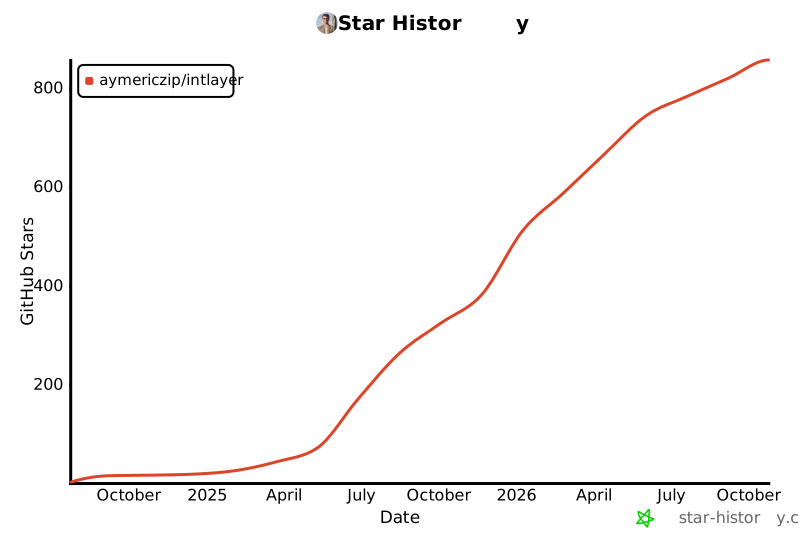](https://star-history.com/#aymericzip/intlayer&Date)
|
package/package.json
CHANGED
|
@@ -1,6 +1,6 @@
|
|
|
1
1
|
{
|
|
2
2
|
"name": "intlayer",
|
|
3
|
-
"version": "6.0
|
|
3
|
+
"version": "6.1.0",
|
|
4
4
|
"private": false,
|
|
5
5
|
"description": "Manage internationalization i18n in a simple way, through TypeScript, declaration file, declare your multilingual content every where in your code.",
|
|
6
6
|
"keywords": [
|
|
@@ -64,32 +64,32 @@
|
|
|
64
64
|
"./package.json"
|
|
65
65
|
],
|
|
66
66
|
"dependencies": {
|
|
67
|
-
"@intlayer/
|
|
68
|
-
"@intlayer/core": "6.0
|
|
69
|
-
"@intlayer/
|
|
67
|
+
"@intlayer/cli": "6.1.0",
|
|
68
|
+
"@intlayer/core": "6.1.0",
|
|
69
|
+
"@intlayer/config": "6.1.0"
|
|
70
70
|
},
|
|
71
71
|
"devDependencies": {
|
|
72
72
|
"@changesets/changelog-github": "0.5.1",
|
|
73
|
-
"@changesets/cli": "2.29.
|
|
74
|
-
"@types/node": "^24.2
|
|
75
|
-
"@typescript-eslint/parser": "^8.
|
|
76
|
-
"concurrently": "^9.1
|
|
77
|
-
"eslint": "^9.
|
|
73
|
+
"@changesets/cli": "2.29.7",
|
|
74
|
+
"@types/node": "^24.5.2",
|
|
75
|
+
"@typescript-eslint/parser": "^8.44.1",
|
|
76
|
+
"concurrently": "^9.2.1",
|
|
77
|
+
"eslint": "^9.36.0",
|
|
78
78
|
"prettier": "^3.6.2",
|
|
79
79
|
"rimraf": "^6.0.1",
|
|
80
80
|
"tsc-alias": "^1.8.16",
|
|
81
81
|
"tsup": "^8.5.0",
|
|
82
82
|
"typescript": "^5.9.2",
|
|
83
83
|
"vitest": "^3.2.4",
|
|
84
|
-
"@utils/ts-config": "1.0.4",
|
|
85
84
|
"@utils/eslint-config": "1.0.4",
|
|
85
|
+
"@utils/ts-config": "1.0.4",
|
|
86
86
|
"@utils/ts-config-types": "1.0.4",
|
|
87
87
|
"@utils/tsup-config": "1.0.4"
|
|
88
88
|
},
|
|
89
89
|
"peerDependencies": {
|
|
90
|
-
"@intlayer/
|
|
91
|
-
"@intlayer/
|
|
92
|
-
"@intlayer/
|
|
90
|
+
"@intlayer/config": "6.1.0",
|
|
91
|
+
"@intlayer/cli": "6.1.0",
|
|
92
|
+
"@intlayer/core": "6.1.0"
|
|
93
93
|
},
|
|
94
94
|
"engines": {
|
|
95
95
|
"node": ">=14.18"
|
|
@@ -108,6 +108,7 @@
|
|
|
108
108
|
"lint:fix": "eslint . --cache --fix",
|
|
109
109
|
"prettier": "prettier . --check",
|
|
110
110
|
"prettier:fix": "prettier . --write",
|
|
111
|
+
"prepublish": "cp -f ../../README.md ./README.md",
|
|
111
112
|
"test": "vitest run",
|
|
112
113
|
"test:watch": "vitest",
|
|
113
114
|
"typecheck": "tsup --project ./tsconfig.json --noEmit"
|