inkmap-mcp 0.3.8 → 0.3.11
This diff represents the content of publicly available package versions that have been released to one of the supported registries. The information contained in this diff is provided for informational purposes only and reflects changes between package versions as they appear in their respective public registries.
- package/README.md +40 -89
- package/dist/bundles/antigravity/assets/logo.svg +60 -18
- package/dist/bundles/antigravity/rules/AGENTS.md +8 -0
- package/dist/bundles/antigravity/sidecars/inkmap/bridge.js +157 -131
- package/dist/bundles/antigravity/sidecars/inkmap/main.mjs +1308 -503
- package/dist/bundles/codex/inkmap-codex/.codex-plugin/plugin.json +1 -1
- package/dist/bundles/codex/inkmap-codex/assets/icon.png +0 -0
- package/dist/bundles/codex/inkmap-codex/plugin.json +1 -1
- package/dist/bundles/harness/README.md +15 -15
- package/dist/bundles/harness/README.zh.md +29 -15
- package/dist/bundles/harness/client.js +14 -3
- package/dist/bundles/harness/host.js +705 -354
- package/dist/bundles/harness/icon.svg +60 -18
- package/dist/bundles/harness/package.json +1 -1
- package/dist/bundles/vscode/dist/extension.js +861 -473
- package/dist/bundles/vscode/images/icon.png +0 -0
- package/dist/bundles/vscode/package.json +6 -1
- package/dist/bundles/vscode/package.nls.json +3 -2
- package/dist/bundles/vscode/package.nls.zh-cn.json +3 -2
- package/dist/cli.cjs +1735 -958
- package/dist/codex.html +739 -686
- package/dist/web/app.js +39897 -39606
- package/dist/web/index.html +9 -4
- package/package.json +1 -1
- package/server.json +4 -4
- package/dist/bundles/antigravity/sidecars/inkmap/select.mjs +0 -74
- package/dist/web/app.css +0 -11
|
@@ -1,6 +1,6 @@
|
|
|
1
1
|
{
|
|
2
2
|
"name": "inkmap-codex",
|
|
3
|
-
"version": "0.3.
|
|
3
|
+
"version": "0.3.11",
|
|
4
4
|
"description": "Interactive two-way Markdown mind map (markmap), Mermaid flowchart & XMind outline editor | 双向编辑 Markdown 思维导图、脑图、流程图与大纲",
|
|
5
5
|
"homepage": "https://zhiyuanv.com/software.html",
|
|
6
6
|
"repository": "https://github.com/zhiyuanvision-lang/InkMap",
|
|
Binary file
|
|
@@ -1,7 +1,7 @@
|
|
|
1
1
|
{
|
|
2
2
|
"$schema": "https://agent-plugins.org/schemas/1.0.0/plugin.schema.json",
|
|
3
3
|
"name": "inkmap-codex",
|
|
4
|
-
"version": "0.3.
|
|
4
|
+
"version": "0.3.11",
|
|
5
5
|
"description": "Interactive two-way Markdown mind map (markmap), Mermaid flowchart & XMind outline editor | 双向编辑 Markdown 思维导图、脑图、流程图与大纲",
|
|
6
6
|
"homepage": "https://zhiyuanv.com/software.html",
|
|
7
7
|
"repository": "https://github.com/zhiyuanvision-lang/InkMap",
|
|
@@ -1,20 +1,20 @@
|
|
|
1
|
-
# Inkmap — Markdown
|
|
1
|
+
# Inkmap — Two-Way Markdown Mindmap & Mermaid Editor for DeepSeek Harness
|
|
2
2
|
|
|
3
|
-
Render and edit local Markdown (`.md` / `.markmap.md`) files as interactive mind maps (Markmap) and Mermaid flowcharts directly inside the **DeepSeek Harness right sidebar**.
|
|
3
|
+
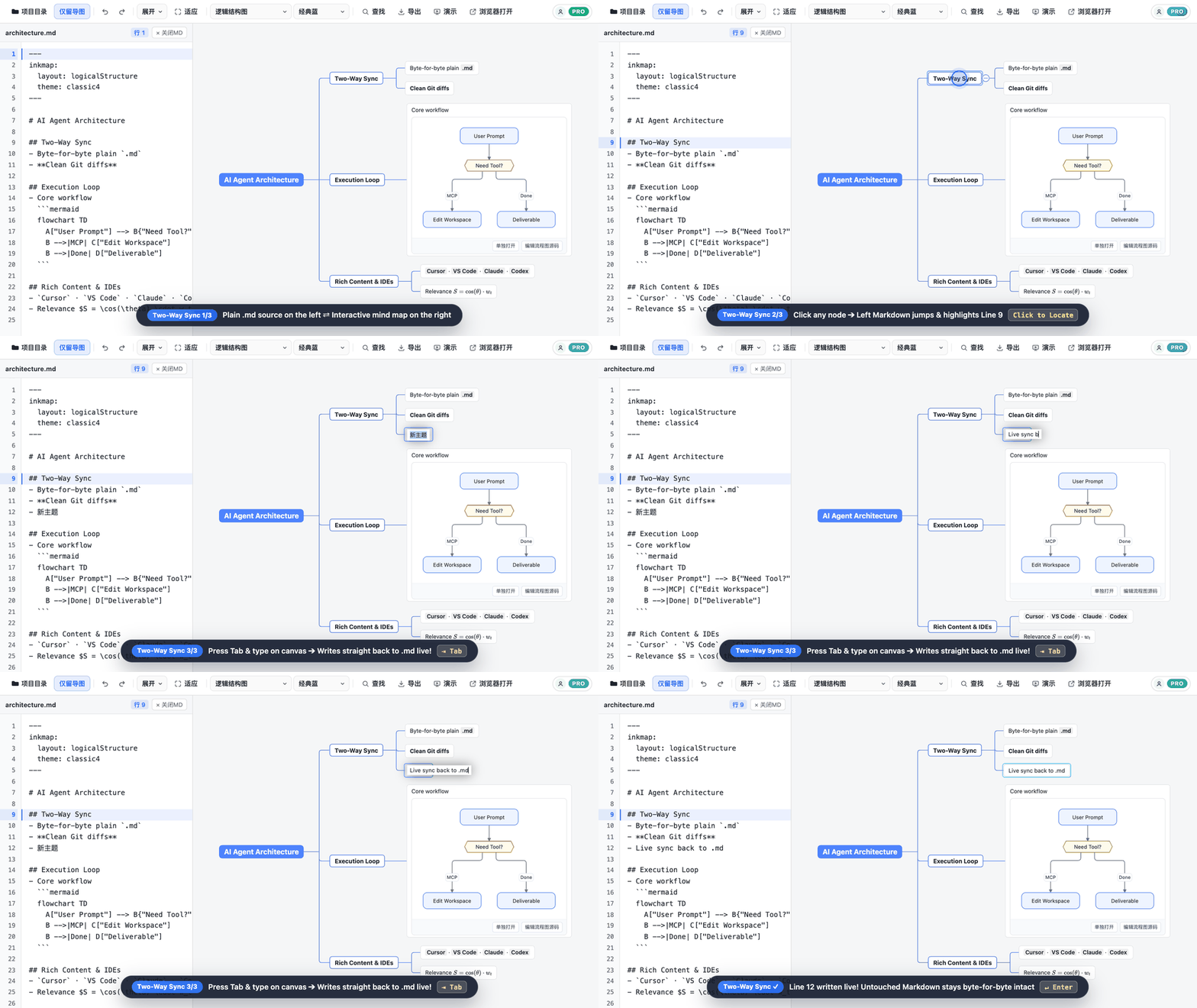
Render and edit local Markdown (`.md` / `.markmap.md`) files as interactive two-way mind maps (Markmap alternative) and Mermaid flowcharts directly inside the **DeepSeek Harness right sidebar**.
|
|
4
4
|
|
|
5
|
-
|
|
5
|
+
|
|
6
6
|
|
|
7
|
-
|
|
8
|
-
- **Real-time two-way Markdown sync**: Add, edit, reorder, or drag-and-drop nodes on the canvas and changes are written back to your local `.md` file immediately while preserving unmodified lines.
|
|
9
|
-
- **Full mind map keyboard shortcuts**: `Tab` (insert child), `Enter` (insert sibling), `Shift+Tab` (insert parent), `⌘↑` / `⌘↓` (move node), `⌘E` (edit node Markdown), `⌘S` (save immediately), and `Backspace` (delete).
|
|
10
|
-
- **Mermaid diagrams, LaTeX math & tables**: Native inline rendering of Mermaid flowcharts/sequence/state diagrams, KaTeX math formulas, and Markdown tables.
|
|
11
|
-
- **9 layouts, 4 themes & PNG/SVG export**: Switch between logical structure, mind map, org chart, catalog, timeline, and fishbone layouts with dark mode and high-resolution export.
|
|
7
|
+
## Quick Start
|
|
12
8
|
|
|
13
|
-
|
|
9
|
+
1. **Open in Right Sidebar**: Preview any `.md` file in DeepSeek Harness and click **Inkmap** in the top-right preview toolbar.
|
|
10
|
+
2. **Full-Screen 3-Column Browser IDE**: Click **Open in Browser** in the Inkmap toolbar for a full-screen Project Tree + Markdown + Mind Map workspace.
|
|
11
|
+
3. **Live Browser Playground**: https://www.zhiyuanv.com/inkmap.html?lang=en
|
|
14
12
|
|
|
15
|
-
|
|
16
|
-
|
|
17
|
-
|
|
18
|
-
|
|
19
|
-
|
|
20
|
-
|
|
13
|
+
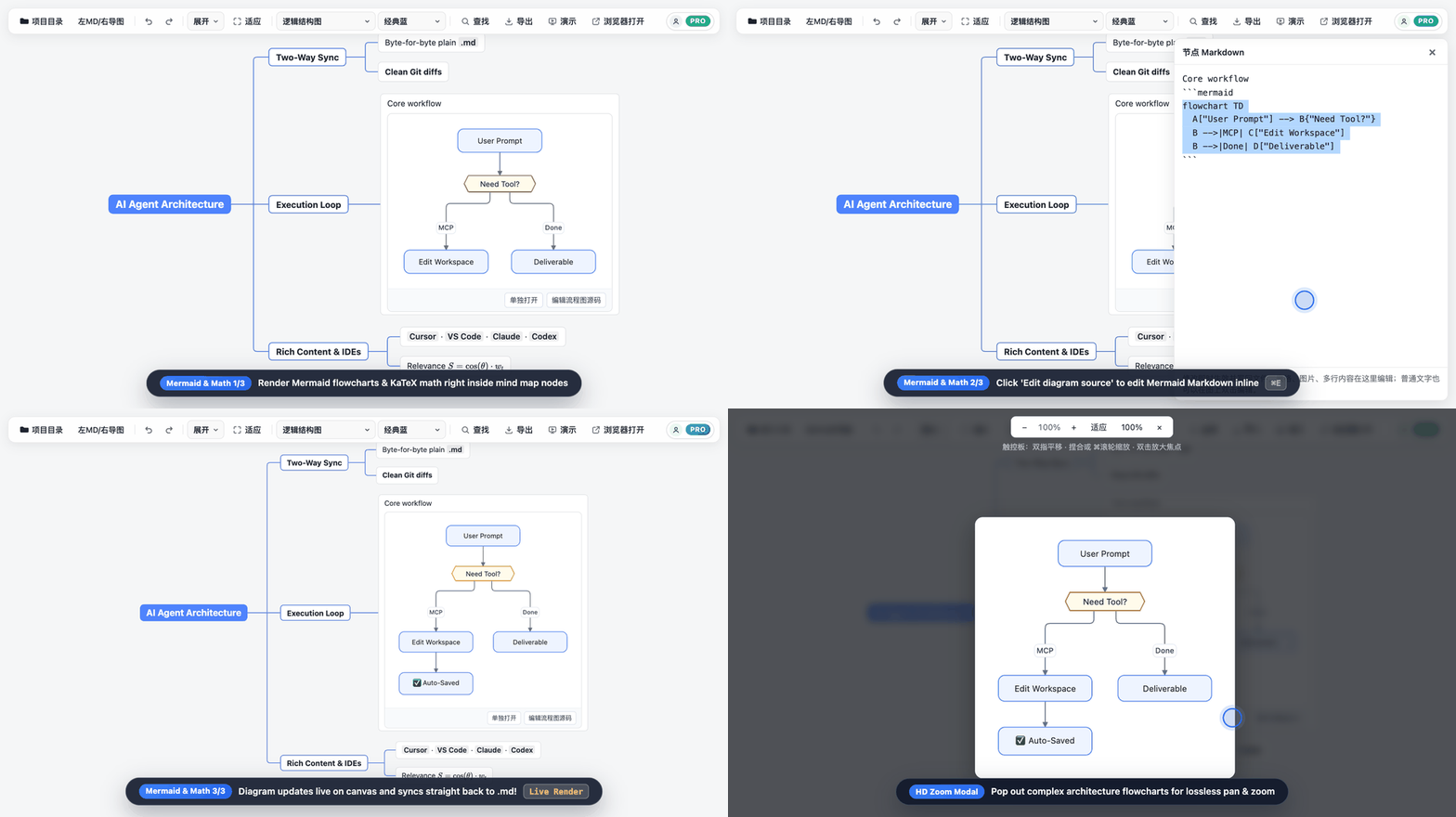
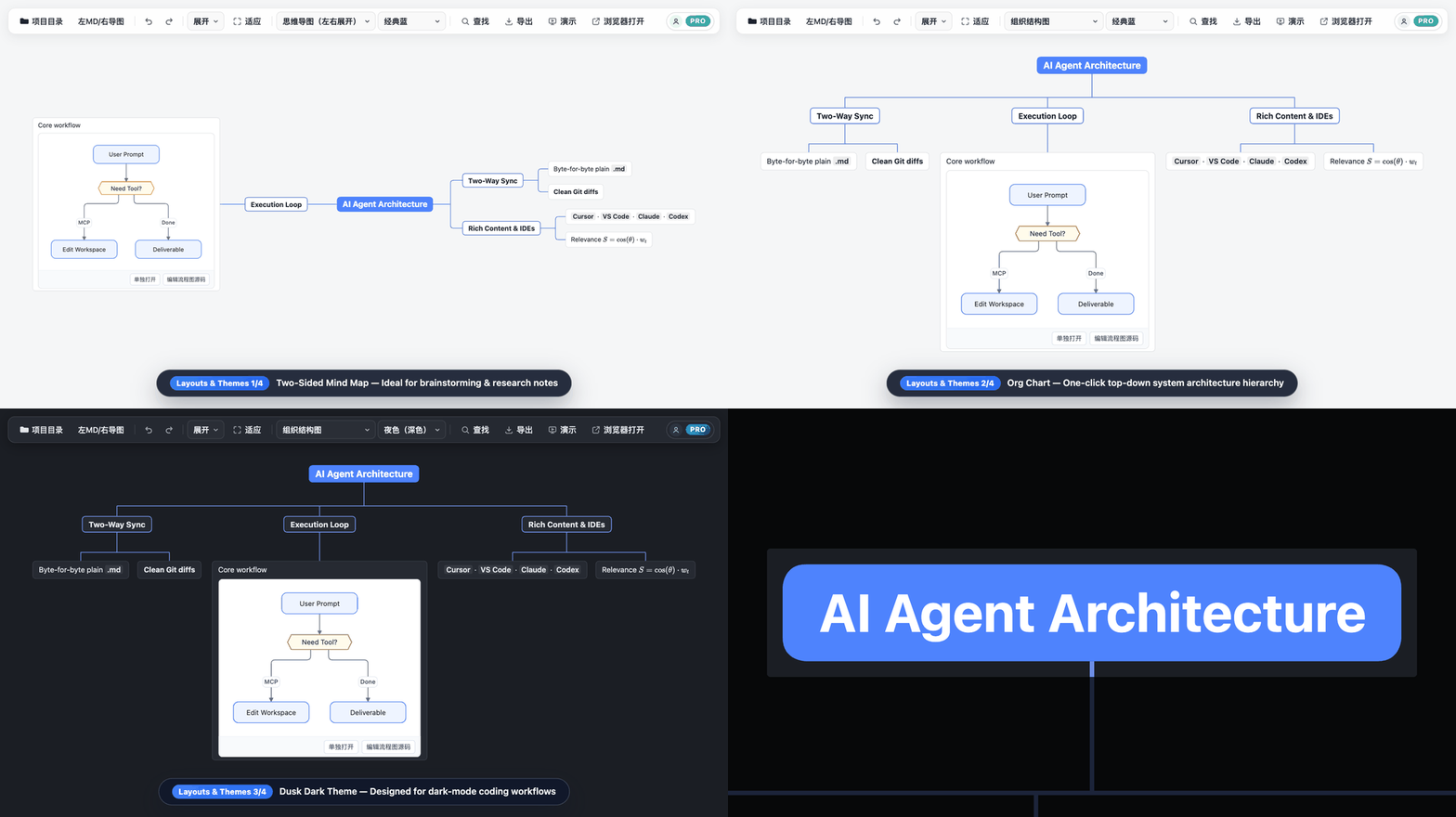
## Inline Mermaid Diagrams, 9 Layouts & Presentation Mode
|
|
14
|
+
|
|
15
|
+
|
|
16
|
+
|
|
17
|
+
|
|
18
|
+
|
|
19
|
+
- **Shortcuts**: `Tab` (child), `Enter` (sibling), `Shift+Tab` (parent), `⌘↑/↓` (move), `⌘E` (edit Markdown/Mermaid source), `⌘F` (find & replace), `⌘S` (save).
|
|
20
|
+
- **Website**: https://www.zhiyuanv.com/software.html?lang=en
|
|
@@ -1,20 +1,34 @@
|
|
|
1
|
-
# Inkmap 思维导图(DeepSeek Harness
|
|
1
|
+
# Inkmap 思维导图(DeepSeek Harness 原生双向脑图与流程图工作台)
|
|
2
2
|
|
|
3
|
-
将工作区内的本地 Markdown (`.md` / `.markmap.md`) 文件直接在 **DeepSeek Harness 右侧分栏**
|
|
3
|
+
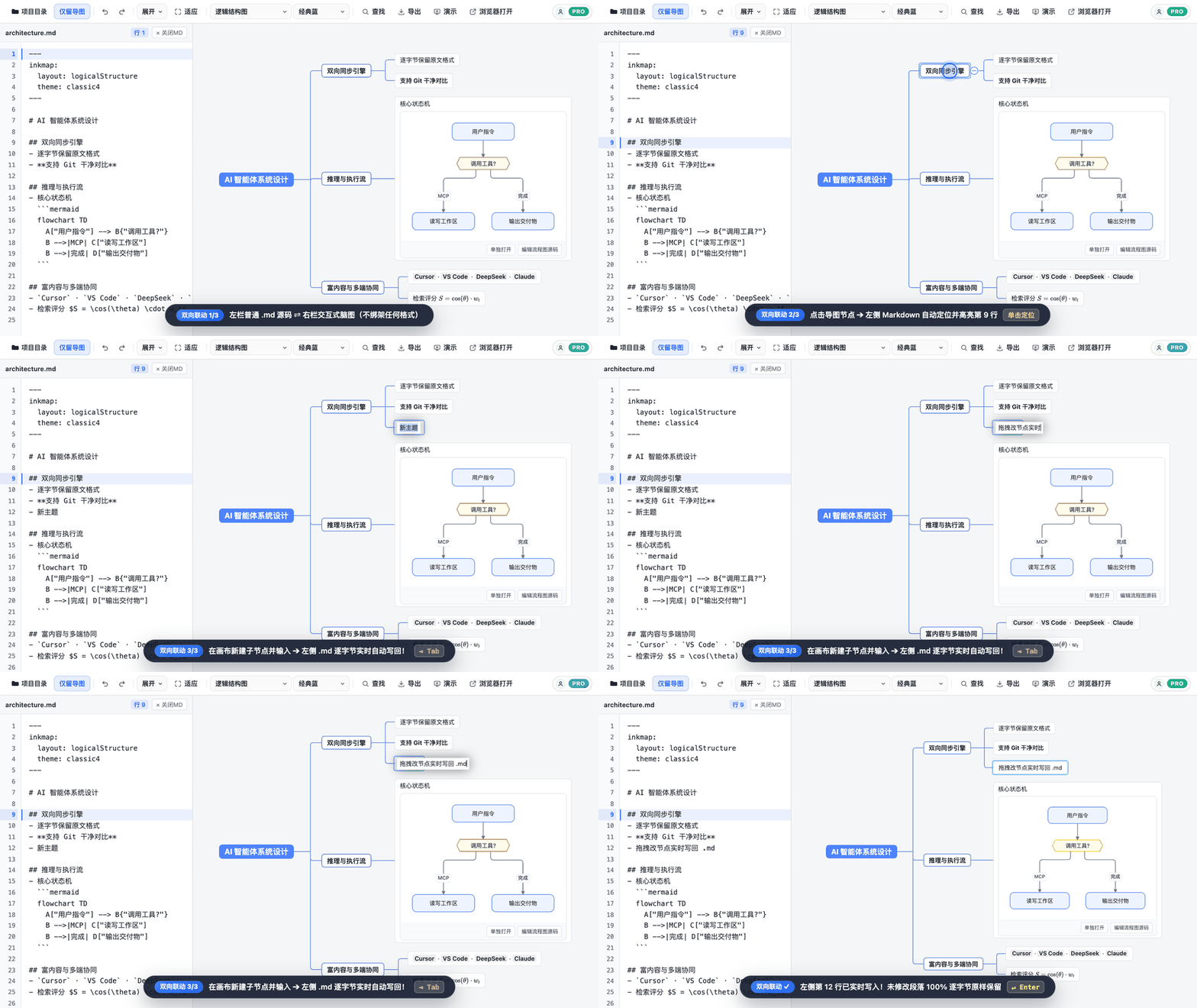
将工作区内的本地 Markdown (`.md` / `.markmap.md`) 文件直接在 **DeepSeek Harness 右侧分栏** 渲染为可交互、可双向拖拽编辑的思维导图(Markmap 增强替代)与 Mermaid 流程图。修改导图毫秒级逐字节写回原文件,未改动段落 100% 原样保留。
|
|
4
4
|
|
|
5
|
-
|
|
5
|
+
|
|
6
6
|
|
|
7
|
-
|
|
8
|
-
- **Markdown ⇄ 思维导图双向实时同步**:在思维导图中增删改查或拖拽重组节点,底层 `.md` 源文件毫秒级自动写回,未修改段落原样保留。
|
|
9
|
-
- **全套思维导图快捷键**:支持 `Tab`(添加子节点)、`Enter`(添加同级节点)、`Shift+Tab`(添加父节点)、`⌘↑` / `⌘↓`(上下移动节点)、`⌘E`(编辑节点 Markdown)、`⌘S`(立即保存)、`Backspace`(删除节点)及双击内联编辑。
|
|
10
|
-
- **Mermaid 流程图 + LaTeX 数学公式 + Markdown 表格**:节点内原生渲染复杂流程图、状态图、时序图、数学公式与多列表格,支持独立弹窗无损缩放与源码实时编辑。
|
|
11
|
-
- **9 种专业结构与 4 套主题配色**:逻辑结构图、左右思维导图、组织结构图、目录组织图、时间轴、鱼骨图及深色护眼主题,支持一键导出高清 PNG 与矢量 SVG。
|
|
7
|
+
## 🚀 3 秒上手使用指南
|
|
12
8
|
|
|
13
|
-
|
|
9
|
+
1. **右侧栏一键打开**:在 DeepSeek Harness 中预览任意 `.md` 文件时,点击右上角预览工具栏的 **「Inkmap」** 按钮,即可在右侧并排打开可编辑思维导图。
|
|
10
|
+
2. **全屏三栏工作台**:需要同时对照项目目录树与源码精修时,点击导图工具栏右上角的 **「浏览器打开」** 即可一键展开全屏三栏 IDE 工作台。
|
|
11
|
+
3. **在线免安装体验台**:https://www.zhiyuanv.com/inkmap.html
|
|
14
12
|
|
|
15
|
-
|
|
16
|
-
|
|
17
|
-
|
|
18
|
-
|
|
19
|
-
|
|
20
|
-
|
|
13
|
+
## ✨ 核心特性动态展示
|
|
14
|
+
|
|
15
|
+
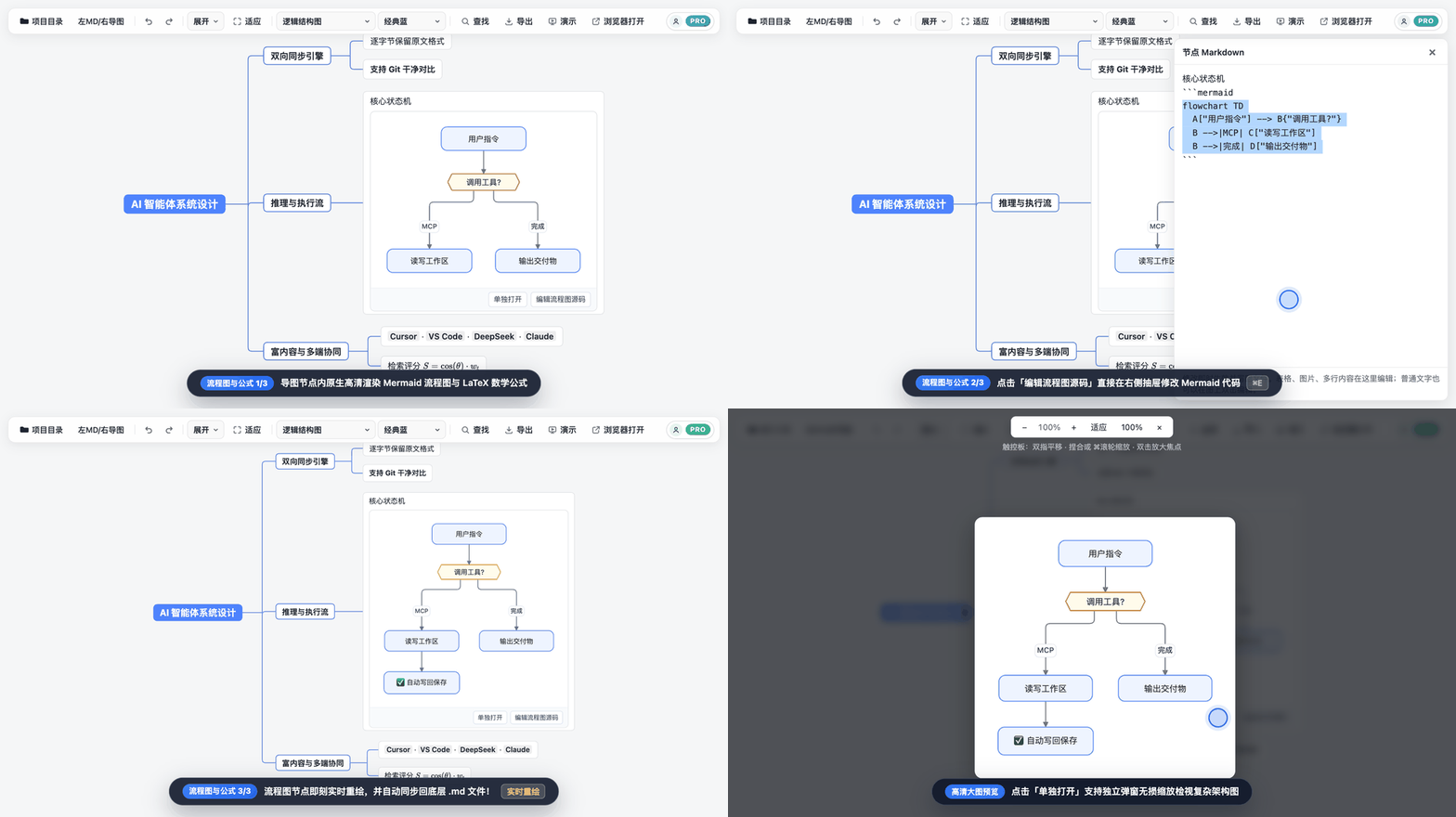
### 1. 节点内嵌 Mermaid 流程图 + LaTeX 公式 + 表格实时编辑
|
|
16
|
+
在节点下放置 ` ```mermaid ` 代码块,支持直接在导图节点内高清渲染流程图、时序图、状态图,点击 **「编辑流程图源码」**(`⌘E`)即可实时修改重绘,支持独立弹窗无损缩放:
|
|
17
|
+
|
|
18
|
+
|
|
19
|
+
|
|
20
|
+
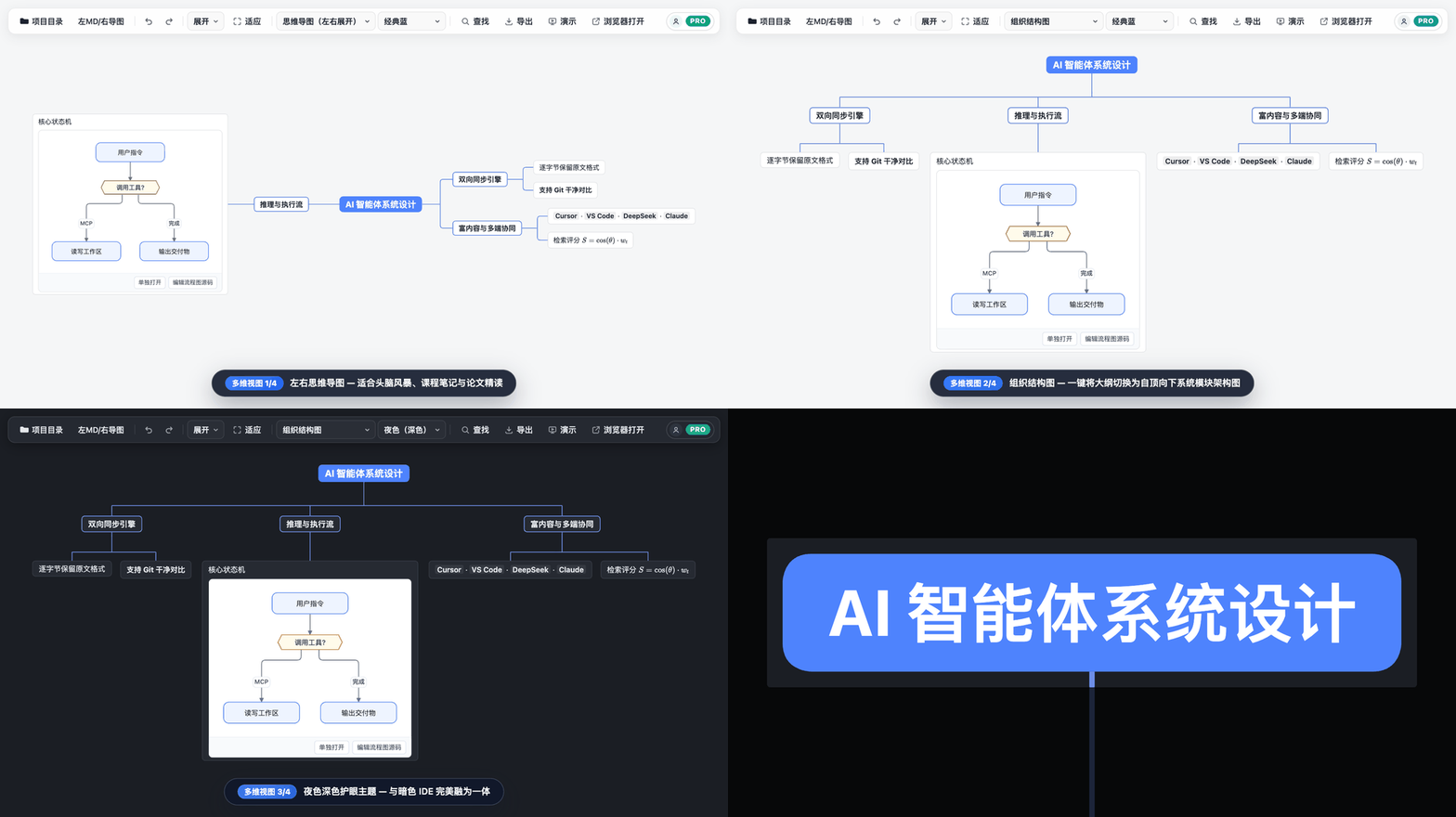
### 2. 9 种专业结构 · 夜色护眼主题 · 全屏逐节点放映
|
|
21
|
+
一键切换逻辑结构图、左右思维导图、组织结构图、目录组织图、时间轴、鱼骨图及夜色深色主题;点击 **「演示」** 直接当 PPT 逐节点聚焦汇报,支持导出高清 PNG、矢量 SVG 与离线交互 HTML:
|
|
22
|
+
|
|
23
|
+
|
|
24
|
+
|
|
25
|
+
## ⌨️ 常用快捷键速查
|
|
26
|
+
|
|
27
|
+
| 操作 | 快捷键 / 方式 | 操作 | 快捷键 / 方式 |
|
|
28
|
+
| :--- | :--- | :--- | :--- |
|
|
29
|
+
| **新增子节点** | `Tab` | **编辑流程图 / 公式 / 表格源码** | 双击节点 或 `⌘E` (`Ctrl+E`) |
|
|
30
|
+
| **新增同级节点** | `Enter` | **上下调整节点顺序** | `⌘↑` / `⌘↓` (`Alt+↑` / `Alt+↓`) |
|
|
31
|
+
| **新增父级节点** | `Shift + Tab` | **全图查找与批量替换** | `⌘F` (`Ctrl+F`) |
|
|
32
|
+
| **删除 / 拖拽重组** | `Backspace` / 鼠标拖拽 | **立即保存 / 撤销重做** | `⌘S` / `⌘Z` / `⇧⌘Z` |
|
|
33
|
+
|
|
34
|
+
- **官方网站与全平台支持**:https://www.zhiyuanv.com/software.html
|
|
@@ -68,10 +68,10 @@ var inject = ["slots", "sidebarRight", "sidebarRightTabs"];
|
|
|
68
68
|
var zh = () => {
|
|
69
69
|
const docLang = typeof document !== "undefined" ? document.documentElement?.lang || "" : "";
|
|
70
70
|
const navLang = typeof navigator !== "undefined" ? navigator.language || "" : "";
|
|
71
|
-
if (/^zh
|
|
71
|
+
if (/^zh(?:[-_.]|$)/i.test(docLang || navLang)) return true;
|
|
72
72
|
try {
|
|
73
73
|
const opts = Intl.DateTimeFormat().resolvedOptions();
|
|
74
|
-
if (/^zh
|
|
74
|
+
if (/^zh(?:[-_.]|$)/i.test(opts.locale || "")) return true;
|
|
75
75
|
if (/^(Asia\/(Shanghai|Chongqing|Chungking|Harbin|Urumqi|Beijing)|PRC)$/i.test(opts.timeZone || "")) return true;
|
|
76
76
|
} catch {
|
|
77
77
|
}
|
|
@@ -80,6 +80,7 @@ var zh = () => {
|
|
|
80
80
|
var label = () => zh() ? "\u7528 Inkmap \u6253\u5F00" : "Open in Inkmap";
|
|
81
81
|
var desktop = () => location.protocol === "dsh-app:" && location.hostname === "app";
|
|
82
82
|
var actionClass = "inkmap-harness-open";
|
|
83
|
+
var LEASE_RENEW_MS = 5 * 6e4;
|
|
83
84
|
var request = (method, body) => fetch(route, {
|
|
84
85
|
method,
|
|
85
86
|
headers: { "content-type": "application/json" },
|
|
@@ -99,11 +100,17 @@ function apply(ctx) {
|
|
|
99
100
|
}
|
|
100
101
|
return data;
|
|
101
102
|
});
|
|
103
|
+
const renewal = setInterval(() => {
|
|
104
|
+
void opened.then(({ lease }) => request("POST", { action: "renew", lease })).catch(() => {
|
|
105
|
+
});
|
|
106
|
+
}, LEASE_RENEW_MS);
|
|
102
107
|
void opened.catch(() => {
|
|
108
|
+
clearInterval(renewal);
|
|
103
109
|
tab.signal.removeEventListener("abort", release);
|
|
104
110
|
sessions.delete(tab.signal);
|
|
105
111
|
});
|
|
106
112
|
function release() {
|
|
113
|
+
clearInterval(renewal);
|
|
107
114
|
tab.signal.removeEventListener("abort", release);
|
|
108
115
|
sessions.delete(tab.signal);
|
|
109
116
|
void opened.then(({ lease }) => request("DELETE", { lease })).catch(() => {
|
|
@@ -168,7 +175,11 @@ function apply(ctx) {
|
|
|
168
175
|
try {
|
|
169
176
|
const mode = data.mode === "buy" ? "buy" : "restore";
|
|
170
177
|
const action = mode === "buy" ? "buy" : "sign-in";
|
|
171
|
-
const response = await request("POST", {
|
|
178
|
+
const response = await request("POST", {
|
|
179
|
+
lease: view.lease,
|
|
180
|
+
action,
|
|
181
|
+
...typeof data.locale === "string" && { locale: data.locale }
|
|
182
|
+
});
|
|
172
183
|
if (!response.ok) throw new Error("Inkmap sign-in is unavailable");
|
|
173
184
|
const url = billingFlowUrl((await response.json()).url, YUNFAN_BILLING_ORIGIN, mode);
|
|
174
185
|
if (!mounted || tab.signal.aborted) return;
|