hexo-theme-stellar 1.41.0 → 1.42.0
This diff represents the content of publicly available package versions that have been released to one of the supported registries. The information contained in this diff is provided for informational purposes only and reflects changes between package versions as they appear in their respective public registries.
- package/.claude/skills/stellar-theme-dev/SKILL.md +1 -2
- package/CHANGELOG.md +49 -0
- package/CONTRIBUTING.md +2 -1
- package/README.md +50 -21
- package/README_EN.md +113 -0
- package/_config.yml +8 -3
- package/_data/icons.yml +0 -2
- package/layout/_partial/cover/index.ejs +0 -3
- package/layout/_partial/main/navbar/article_banner.ejs +30 -27
- package/layout/_partial/main/pin_slider.ejs +59 -28
- package/layout/_partial/main/post_list/latest_post_card.ejs +25 -0
- package/layout/_partial/main/post_list/post_card.ejs +16 -64
- package/layout/_partial/main/post_list/topic_card.ejs +26 -5
- package/layout/_partial/scripts/bootstrap.ejs +35 -0
- package/layout/_partial/scripts/defines.ejs +2 -1
- package/layout/_partial/scripts.ejs +9 -0
- package/layout/_partial/widgets/toc.ejs +2 -2
- package/layout/_plugins/adaptive_text.ejs +11 -0
- package/layout/_plugins/copycode.ejs +2 -2
- package/layout/_plugins/mermaid.ejs +1 -1
- package/layout/_plugins/scrollreveal.ejs +22 -16
- package/layout/_plugins/swiper.ejs +1 -1
- package/layout/index.ejs +10 -2
- package/layout/index_topic.ejs +4 -4
- package/package.json +3 -3
- package/scripts/generators/stellar-icons.js +1 -1
- package/scripts/helpers/subtitle.js +8 -0
- package/scripts/lib/subtitle.js +24 -0
- package/scripts/tags/lib/banner.js +4 -3
- package/source/css/_common/cover-overlay.styl +111 -0
- package/source/css/_common/title.styl +17 -0
- package/source/css/_components/layout.styl +9 -13
- package/source/css/_components/list.styl +135 -64
- package/source/css/_components/main.styl +2 -2
- package/source/css/_components/pages/archives.styl +4 -1
- package/source/css/_components/pages/article-story.styl +1 -10
- package/source/css/_components/partial/article-banner.styl +61 -37
- package/source/css/_components/partial/article-tags.styl +4 -1
- package/source/css/_components/partial/bread-nav.styl +7 -14
- package/source/css/_components/partial/navbar.styl +1 -1
- package/source/css/_components/partial/post-panel.styl +76 -0
- package/source/css/_components/pin-slider.styl +38 -41
- package/source/css/_components/sidebar/footer.styl +1 -1
- package/source/css/_components/sidebar/logo.styl +2 -2
- package/source/css/_components/sidebar/search.styl +1 -1
- package/source/css/_components/sidebar/sidebar.styl +7 -7
- package/source/css/_components/tag-plugins/banner.styl +53 -11
- package/source/css/_components/tag-plugins/friends_posts.styl +5 -86
- package/source/css/_components/tag-plugins/gallery.styl +3 -0
- package/source/css/_components/tag-plugins/read/paper.styl +3 -3
- package/source/css/_components/tag-plugins/read/reel.styl +4 -4
- package/source/css/_components/tag-plugins/timeline.styl +4 -0
- package/source/css/_components/widgets/timeline.styl +2 -2
- package/source/css/_components/widgets/toc.styl +12 -6
- package/source/css/_components/widgets/widgets.styl +8 -7
- package/source/css/_custom.styl +8 -9
- package/source/css/_plugins/lazyload.styl +1 -0
- package/source/js/color.js +325 -0
- package/source/js/main.js +2 -2
- package/source/js/plugins/adaptive-text.js +146 -0
- package/source/js/services/friends_and_posts.js +1 -1
- package/source/js/services/timeline.js +1 -1
- package/source/js/services/weibo.js +1 -1
- package/source/js/services.js +1 -1
- package/source/js/utils.js +14 -1
- package/layout/_partial/cover/post_cover.ejs +0 -37
|
@@ -24,8 +24,6 @@ description: 主题仓库(hexo-theme-stellar)开发全流程:方案 →
|
|
|
24
24
|
|
|
25
25
|
### 3. 验证
|
|
26
26
|
|
|
27
|
-
- UI 方面(样式、模板、前端交互等)改动量不大时无需验证,除非用户明确要求。
|
|
28
|
-
|
|
29
27
|
命令按需执行:
|
|
30
28
|
|
|
31
29
|
- `scripts/` 有改动 → 必须在主工程(xaoxuu.com)执行 `npm run g` 全量验证(已含 `hexo clean && hexo generate && npx gulp minify`);`npm run s` 是按需渲染,不能替代。
|
|
@@ -46,5 +44,6 @@ description: 主题仓库(hexo-theme-stellar)开发全流程:方案 →
|
|
|
46
44
|
### 5. 发版
|
|
47
45
|
|
|
48
46
|
- 由用户触发时执行:分析自上一 tag 起的 commit 确定版本号 → 在 `CHANGELOG.md` 写入对应非空章节(H2 版本号 + H3 分类)→ 向用户确认版本号与变更摘要 → `npm run release:dry -- <version>` 预演 → 正式发版。
|
|
47
|
+
- 发版前核对:`npm run check` 内含提交登记完整性检查,自上一 tag 起涉及主题代码/配置/行为变化的非合并提交须在 `docs/knowledge/VERIFICATION.md`「提交登记(发版前核对)」表登记短 SHA(纯文档 / CI 改动无需登记);缺失先补登记再发版。
|
|
49
48
|
- 详见 `docs/guides/release-process.md` 与 `AGENTS.md`「发版规范」(§8)。
|
|
50
49
|
- 完成条件:版本号与变更摘要已获用户确认;dry-run 通过后完成正式发版。
|
package/CHANGELOG.md
CHANGED
|
@@ -1,5 +1,54 @@
|
|
|
1
1
|
# Changelog
|
|
2
2
|
|
|
3
|
+
## 1.42.0
|
|
4
|
+
|
|
5
|
+
> 发布日期:2026-08-16
|
|
6
|
+
|
|
7
|
+
### 新功能
|
|
8
|
+
- 文章卡片新增 `article.card_style`(`hero` / `classic`):hero 全图文字封面卡片(有 cover 时标题 + 单行小字,文字区固定底部),classic 普通卡片;hero 与置顶轮播统一小字取值 `subtitle()`(`subtitle` > `description` > excerpt 前 50 字)
|
|
9
|
+
- 背景图/背景色上方文字颜色自适应(`plugins.adaptive_text`,默认开启):`theme` / `contrast` / `split` 三种模式,按背景平均色计算并写入 `--text-banner` / `--text-banner-theme`,接入文章封面、专栏最新文章卡片、置顶轮播、页顶横幅与 `{% banner %}` 标签
|
|
10
|
+
- 专栏列表页重构为上下布局:标题 + 描述 + 全宽最新文章卡片 + 其他文章列表,抽出 `.post-panel` 公共组件(友链文章订阅同步复用)
|
|
11
|
+
|
|
12
|
+
### 修复
|
|
13
|
+
- 标签行负边距导致移动端页面横向溢出(#688)
|
|
14
|
+
- albums/posters 在 Firefox/Safari 标题竖排与遮罩消失问题(#689)
|
|
15
|
+
- Babel 转译将 `sidebar` 全局改名导致侧边栏失效
|
|
16
|
+
- 作者归档页横幅下块贴顶;页面顶部横幅黑色蒙版始终显示并贴边
|
|
17
|
+
- Safari 下顶部横幅与列表封面方角漏出(`isolation: isolate` + `translateZ(0)` + clip-path 兜底)
|
|
18
|
+
- banner 导航激活项 blur 导致 hover 圆角丢失
|
|
19
|
+
- TOC 回到顶部/参与讨论图标改为内联并修复占位符布局
|
|
20
|
+
- 轮播区/文章封面/页顶横幅/`{% banner %}` 图片角落跟随连续曲率圆角配置
|
|
21
|
+
- timeline 页脚评论图标尺寸与文字对齐
|
|
22
|
+
|
|
23
|
+
### 样式
|
|
24
|
+
- 文章卡片标签 `#` 前缀替换为 hashtag 图标
|
|
25
|
+
- banner hover 动画对齐封面(背景图缩放 1.05 + 变暗),封面渐变模糊层增加黑色蒙版
|
|
26
|
+
- 统一封面、轮播、页顶横幅与 banner 标签背景图覆盖层观感(`cover-overlay()`)
|
|
27
|
+
- 左栏「所有项目」返回胶囊默认背景复用目录树激活光照效果
|
|
28
|
+
- 间距令牌重构为 `--gap-base` / `--gap-page`:组件内部间距固定 16px,页面级留白随断点分档(16/32px),侧边栏贴边时四周间距一致
|
|
29
|
+
- 右栏在侧边栏基础宽度上单独加宽(新增 `--rightbar-width-extra`,默认 32px)
|
|
30
|
+
- 右栏 `.l_right .widgets` 桌面端 padding 归零,折叠抽屉保留 16px 0
|
|
31
|
+
- 折叠抽屉位移改为跟随自身宽度(`calc(100% + inset*2)`),修复右栏加宽后收拢仍露边
|
|
32
|
+
|
|
33
|
+
### 重构
|
|
34
|
+
- 移除已失效的 auto_banner(Unsplash 自动横幅)与 `poster` 配置
|
|
35
|
+
- 页面横幅上块重构为显式两行结构(面包屑 + 阅读时长/AI 标签 + 日期行)
|
|
36
|
+
- 评论数图标统一使用 `default:tocomment`,移除 `weibo:comment`
|
|
37
|
+
|
|
38
|
+
### 其他
|
|
39
|
+
- 移除知识库合并版 `知识库全量.md`,知识库以领域页面为唯一事实源
|
|
40
|
+
- 新增 AI 规范引用一致性检查(check-spec-refs)与发版前提交登记完整性检查(随 `npm run check` 执行)
|
|
41
|
+
|
|
42
|
+
### 升级注意(配置变更与破坏性改动)
|
|
43
|
+
- 移除 `article.auto_banner`(Unsplash 自动横幅已失效)与文章 front-matter `poster`(`headline` / `topic` / `caption`);`poster.color` / `banner_info.color` 显式文字颜色不再生效,由自适应文字颜色接管
|
|
44
|
+
- 新增 `article.card_style`(`hero` 默认 / `classic`):未显式设置的站点保持 hero 卡片样式
|
|
45
|
+
- 新增 `plugins.adaptive_text`(默认 `enable: true`):页面存在 `[data-text-adaptive]` 元素时才按需加载,文字颜色默认随背景自适应
|
|
46
|
+
- 删除间距令牌 `--gap-margin` / `--gap-padding` / `--gap-max`,替换为 `--gap-base`(组件内部间距)与 `--gap-page`(页面级留白);引用旧令牌的自定义 CSS 需迁移
|
|
47
|
+
- `weibo:comment` 图标已移除,评论数图标统一使用 `default:tocomment`;自定义中引用了 `weibo:comment` 的站点请改用 `default:tocomment`
|
|
48
|
+
- 知识库合并版 `知识库全量.md` 移除(RAG 可直接索引领域页面)
|
|
49
|
+
|
|
50
|
+
Full Changelog: [1.41.0...main](https://github.com/xaoxuu/hexo-theme-stellar/compare/1.41.0...main)
|
|
51
|
+
|
|
3
52
|
## 1.41.0
|
|
4
53
|
|
|
5
54
|
> 发布日期:2026-08-15
|
package/CONTRIBUTING.md
CHANGED
|
@@ -68,7 +68,7 @@ git submodule add https://github.com/<your-name>/hexo-theme-stellar.git themes/s
|
|
|
68
68
|
|
|
69
69
|
## 编码规范摘要
|
|
70
70
|
|
|
71
|
-
完整规范见 `AGENTS.md` §
|
|
71
|
+
完整规范见 `AGENTS.md` §4,核心要求:
|
|
72
72
|
|
|
73
73
|
- **EJS 模板**:`<%- %>` 输出非转义 HTML;变量声明用 `var`(IE8 兼容);2 空格缩进;HTML 属性双引号;复杂逻辑提取到 `helpers/`
|
|
74
74
|
- **Node 脚本**:CommonJS(`require()` / `module.exports`);文件头 `/* global hexo */` + `'use strict';`;2 空格缩进、双引号、分号结尾
|
|
@@ -128,6 +128,7 @@ CI 会在 PR 上强制执行以下检查,全部通过后才可合并:
|
|
|
128
128
|
| Unit tests | node:test 单测 |
|
|
129
129
|
| Conventional Commits | 提交信息符合规范 |
|
|
130
130
|
| Skill mirror sync | `.agents/` 与 `.claude/` 技能镜像一致 |
|
|
131
|
+
| Spec refs | AGENTS.md 章节引用与关键措辞一致性 |
|
|
131
132
|
| Integration build | 官方 demo 全量构建(hexo generate)+ Gulp minify |
|
|
132
133
|
| Knowledge base verify | `docs/knowledge/tools/verify.py` 硬事实核查 |
|
|
133
134
|
|
package/README.md
CHANGED
|
@@ -1,39 +1,60 @@
|
|
|
1
1
|
# Stellar - 每个人的独立博客
|
|
2
2
|
|
|
3
|
+
[简体中文](README.md) · [English](README_EN.md)
|
|
4
|
+
|
|
3
5
|
[](https://www.npmjs.com/package/hexo-theme-stellar)
|
|
4
6
|
[](https://github.com/xaoxuu/hexo-theme-stellar/blob/main/LICENSE)
|
|
5
7
|
[](https://github.com/xaoxuu/hexo-theme-stellar)
|
|
6
8
|
[](https://www.npmjs.com/package/hexo-theme-stellar)
|
|
7
9
|
[](https://github.com/xaoxuu/hexo-theme-stellar/releases)
|
|
8
10
|
|
|
9
|
-
Stellar
|
|
11
|
+
Stellar 是一个「博客 + 知识库一体」的 Hexo 主题:简约商务美学之下,内置博客、Wiki、专栏、笔记四大内容系统与丰富的标签、动态数据组件,开箱即用。
|
|
10
12
|
|
|
11
|
-
|
|
13
|
+
可以只把它当作一个轻博客主题使用——安装启用即可写文章;Wiki 知识库、专栏、笔记与动态数据组件都按需启用,随着你的内容需求自然生长。
|
|
12
14
|
|
|
13
|
-
|
|
14
|
-
- 内置 Wiki 系统,既可以展示多个项目文档,也可以作为个人知识库。
|
|
15
|
-
- 内置专栏系统,支持沉浸式阅读专栏系列文章。
|
|
16
|
-
- 内置笔记系统,方便地梳理和归档笔记。
|
|
17
|
-
- 内置大量灵活而强大的标签组件,互相之间可以自由混搭嵌套。
|
|
18
|
-
- 内置多种动态数据组件,让静态博客的内容更新不再依赖重新部署:
|
|
19
|
-
- 动态时间线:像发朋友圈一样发布短文,也可以订阅他人的时间线。
|
|
20
|
-
- 自动化友链:自动检测友链状态、打标签、订阅友链文章。
|
|
21
|
-
- 远程 Markdown 渲染:例如直接渲染项目仓库的 README,避免重复维护。
|
|
22
|
-
- 模块化设计,内置多种高复用性的小组件,可以自由搭配布局。
|
|
23
|
-
- 图片懒加载时按原图比例预留占位,不会出现高度跳变,体验更佳。
|
|
24
|
-
- 支持一站多作者,可以为不同文章指定不同作者,每位作者都有专属主页。
|
|
25
|
-
- 社区文化:可以订阅「探索号」时间线数据源,获取社区用户的宝贵经验分享。
|
|
15
|
+
## 为什么选择 Stellar
|
|
26
16
|
|
|
27
|
-
|
|
17
|
+
### 四大内容系统,一体化整合
|
|
28
18
|
|
|
29
|
-
|
|
19
|
+
- **博客系统**:支持技术 / 生活两种文章布局,分类、标签、分页与相关文章一应俱全;只想写博客时,它就是一个开箱即用的轻博客。
|
|
20
|
+
- **Wiki 文档系统**:既可以展示多个项目文档,也可以作为个人知识库,项目树、小节与层级导航开箱即用。
|
|
21
|
+
- **专栏系统**:系列文章集中管理,提供沉浸式的连续阅读体验。
|
|
22
|
+
- **笔记本系统**:三层架构与标签树导航,方便地梳理、归档和检索笔记。
|
|
23
|
+
|
|
24
|
+
四套系统与动态数据组件一体化整合,无需拼装多个插件。
|
|
25
|
+
|
|
26
|
+
### 富表达标签组件
|
|
27
|
+
|
|
28
|
+
内置大量灵活而强大的标签组件——提示框、折叠、标签页、时间线、图库、图标、表情、高亮、OKR、聊天、表格等,互相之间可以自由混搭嵌套,让内容表达不再受 Markdown 语法限制。详见[标签组件文档](https://xaoxuu.com/wiki/stellar/tag-plugins/)。
|
|
29
|
+
|
|
30
|
+
### 动态数据组件
|
|
31
|
+
|
|
32
|
+
静态博客也能拥有动态能力,内容更新无需重新部署:
|
|
33
|
+
|
|
34
|
+
- **动态时间线**:像发朋友圈一样发布短文,也可以订阅他人的时间线。
|
|
35
|
+
- **自动化友链**:自动检测友链状态、打标签、订阅友链文章。
|
|
36
|
+
- **远程 Markdown 渲染**:例如直接渲染项目仓库的 README,避免重复维护。
|
|
37
|
+
- **GitHub 仓库 / 贡献者卡片、评分、投票、最新评论**等数据组件,按需加载,不拖慢首屏。
|
|
38
|
+
- **社区文化**:可以订阅「探索号」时间线数据源,获取社区用户的宝贵经验分享。
|
|
39
|
+
|
|
40
|
+
### 体验与性能
|
|
41
|
+
|
|
42
|
+
- **模块化设计**:内置多种高复用性小组件,左右侧边栏自由搭配,布局随心。
|
|
43
|
+
- **设计令牌驱动的样式系统**:统一的设计语言、深色模式与移动端响应式适配。
|
|
44
|
+
- **图片懒加载**按原图比例预留占位,不会出现高度跳变,体验更佳。
|
|
45
|
+
- 可选插件按需启用:代码高亮与复制、KaTeX / MathJax 数学渲染、Mermaid 图表、Fancybox 灯箱、Swiper 轮播等。
|
|
46
|
+
- **本地搜索**:内置索引生成器,结果按章节展示,点击直达锚点并高亮关键词。
|
|
47
|
+
- **SEO 完备**:JSON-LD 结构化数据、Open Graph、canonical 与克隆站检测,保护原创内容。
|
|
48
|
+
- **一站多作者**:可以为不同文章指定不同作者,每位作者都有专属主页。
|
|
49
|
+
|
|
50
|
+
以上功能都可以在[文档](https://xaoxuu.com/wiki/stellar/)中找到详细的使用方法。
|
|
30
51
|
|
|
31
52
|
## 示例与展示
|
|
32
53
|
|
|
33
|
-
- 示例源码:[hexo-theme-stellar-examples](https://github.com/xaoxuu/hexo-theme-stellar-examples/)(`blog` 博客场景、`docs`
|
|
34
|
-
- 展示墙:[使用 Stellar 主题的博客](https://xaoxuu.com/wiki/stellar/examples/)
|
|
54
|
+
- 示例源码:[hexo-theme-stellar-examples](https://github.com/xaoxuu/hexo-theme-stellar-examples/)(`blog` 博客场景、`docs` 文档场景),可直接 fork 起步
|
|
55
|
+
- 展示墙:[使用 Stellar 主题的博客](https://xaoxuu.com/wiki/stellar/examples/)
|
|
35
56
|
|
|
36
|
-
|
|
57
|
+
[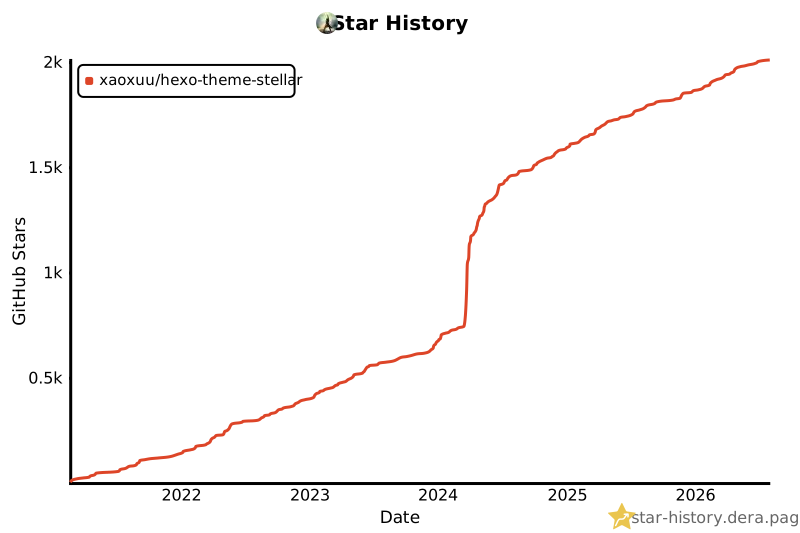](https://star-history.dera.page/#xaoxuu/hexo-theme-stellar&type=date&legend=top-left)
|
|
37
58
|
|
|
38
59
|
## 快速开始
|
|
39
60
|
|
|
@@ -62,6 +83,10 @@ npm install hexo-theme-stellar
|
|
|
62
83
|
theme: stellar
|
|
63
84
|
```
|
|
64
85
|
|
|
86
|
+
### 从轻博客开始
|
|
87
|
+
|
|
88
|
+
配置完成后即可发布文章。Wiki、专栏、笔记本与动态数据组件按需启用,文档中均有详细说明;也可以直接参考示例仓库的 `blog` 场景快速搭建。
|
|
89
|
+
|
|
65
90
|
## 使用文档
|
|
66
91
|
|
|
67
92
|
完整文档请见:https://xaoxuu.com/wiki/stellar/
|
|
@@ -70,7 +95,7 @@ theme: stellar
|
|
|
70
95
|
|
|
71
96
|
- 更新日志:[CHANGELOG.md](https://github.com/xaoxuu/hexo-theme-stellar/blob/main/CHANGELOG.md) · [Releases](https://github.com/xaoxuu/hexo-theme-stellar/releases)
|
|
72
97
|
|
|
73
|
-
|
|
98
|
+
### 常用文档
|
|
74
99
|
|
|
75
100
|
- [标签组件](https://xaoxuu.com/wiki/stellar/tag-plugins/)
|
|
76
101
|
- [主题配置](https://xaoxuu.com/wiki/stellar/theme-settings/)
|
|
@@ -82,3 +107,7 @@ theme: stellar
|
|
|
82
107
|
- 提交 Issues:https://github.com/xaoxuu/hexo-theme-stellar/issues/
|
|
83
108
|
- 参与讨论:https://github.com/xaoxuu/hexo-theme-stellar/discussions/
|
|
84
109
|
- 贡献指南:[CONTRIBUTING.md](CONTRIBUTING.md) · [Wiki 贡献页](https://xaoxuu.com/wiki/stellar/contributors/)
|
|
110
|
+
|
|
111
|
+
## 开源许可
|
|
112
|
+
|
|
113
|
+
本项目采用 [MIT License](LICENSE),Copyright (c) 2021 xaoxuu,永久开源、完全免费。
|
package/README_EN.md
ADDED
|
@@ -0,0 +1,113 @@
|
|
|
1
|
+
# Stellar - Your Own Independent Blog
|
|
2
|
+
|
|
3
|
+
[English](README_EN.md) · [简体中文](README.md)
|
|
4
|
+
|
|
5
|
+
[](https://www.npmjs.com/package/hexo-theme-stellar)
|
|
6
|
+
[](https://github.com/xaoxuu/hexo-theme-stellar/blob/main/LICENSE)
|
|
7
|
+
[](https://github.com/xaoxuu/hexo-theme-stellar)
|
|
8
|
+
[](https://www.npmjs.com/package/hexo-theme-stellar)
|
|
9
|
+
[](https://github.com/xaoxuu/hexo-theme-stellar/releases)
|
|
10
|
+
|
|
11
|
+
Stellar is a Hexo theme that unifies blogging and knowledge base in one place. Beneath its clean, business-style aesthetics lie four built-in content systems — Blog, Wiki, Topic, and Notebook — plus a rich collection of tag plugins and dynamic data widgets, ready to use out of the box for every kind of expression.
|
|
12
|
+
|
|
13
|
+
You can also use it as a lightweight blog theme from day one: install, enable, and start writing. Wiki, Topic, Notebook, and dynamic data widgets are all enabled on demand, growing naturally with your content needs.
|
|
14
|
+
|
|
15
|
+
## Why Stellar
|
|
16
|
+
|
|
17
|
+
### Four Content Systems, Integrated in One
|
|
18
|
+
|
|
19
|
+
- **Blog**: Two article layouts (tech / story) offer different reading experiences, with categories, tags, pagination, and related posts — use it as a lightweight blog right away if that's all you need.
|
|
20
|
+
- **Wiki**: Showcase multiple project documentations or use it as your personal knowledge base, with project trees, sections, and hierarchical navigation.
|
|
21
|
+
- **Topic**: Manage series of articles with an immersive, continuous reading experience.
|
|
22
|
+
- **Notebook**: A three-layer architecture with a tag tree to organize, archive, and retrieve notes with ease.
|
|
23
|
+
|
|
24
|
+
All four systems and dynamic widgets are integrated out of the box — no need to assemble multiple plugins.
|
|
25
|
+
|
|
26
|
+
### Expressive Tag Plugins
|
|
27
|
+
|
|
28
|
+
A large set of flexible and powerful tag plugins — notes, folding, tabs, timelines, galleries, icons, emoji, highlights, OKR, chat, tables, and more — that can be freely mixed and nested, freeing your content from the limits of plain Markdown. See the [tag plugins documentation](https://xaoxuu.com/wiki/stellar/tag-plugins/).
|
|
29
|
+
|
|
30
|
+
### Dynamic Data Widgets
|
|
31
|
+
|
|
32
|
+
Static blogs with dynamic capabilities — update content without redeploying:
|
|
33
|
+
|
|
34
|
+
- **Dynamic timeline**: Post short updates like a social feed, or subscribe to others' timelines.
|
|
35
|
+
- **Automated friend links**: Automatically detect link status, tag links, and subscribe to friends' posts.
|
|
36
|
+
- **Remote Markdown rendering**: Render a project repository's README directly, avoiding duplicate maintenance.
|
|
37
|
+
- **GitHub repository / contributor cards, ratings, votes, latest comments**, and other data widgets — loaded on demand without slowing down the first screen.
|
|
38
|
+
- **Community culture**: Subscribe to the "Explorer" timeline data source to learn from the community.
|
|
39
|
+
|
|
40
|
+
### Experience & Performance
|
|
41
|
+
|
|
42
|
+
- **Modular design**: Highly reusable widgets with freely configurable left/right sidebars.
|
|
43
|
+
- **Design-token-driven styling**: A unified design language, dark mode, and responsive mobile adaptation.
|
|
44
|
+
- **Lazy-loaded images** reserve space by original aspect ratio, preventing layout jumps.
|
|
45
|
+
- Optional plugins enabled on demand: code highlighting & copy, KaTeX / MathJax, Mermaid diagrams, Fancybox lightbox, Swiper carousel, and more.
|
|
46
|
+
- **Local search**: A built-in index generator, with results grouped by section, jumping to anchors and highlighting keywords.
|
|
47
|
+
- **Complete SEO**: JSON-LD structured data, Open Graph, canonical URLs, and clone-site detection to protect original content.
|
|
48
|
+
- **Multi-author support**: Assign different authors to different posts, each with their own dedicated homepage.
|
|
49
|
+
|
|
50
|
+
Detailed usage for all of the above can be found in the [documentation](https://xaoxuu.com/wiki/stellar/).
|
|
51
|
+
|
|
52
|
+
## Examples & Showcase
|
|
53
|
+
|
|
54
|
+
- Example source: [hexo-theme-stellar-examples](https://github.com/xaoxuu/hexo-theme-stellar-examples/) (`blog` blog scenario, `docs` documentation scenario) — ready to fork and start
|
|
55
|
+
- Showcase: [Blogs using Stellar](https://xaoxuu.com/wiki/stellar/examples/)
|
|
56
|
+
|
|
57
|
+
[](https://star-history.dera.page/#xaoxuu/hexo-theme-stellar&type=date&legend=top-left)
|
|
58
|
+
|
|
59
|
+
## Quick Start
|
|
60
|
+
|
|
61
|
+
### Requirements
|
|
62
|
+
|
|
63
|
+
```yaml
|
|
64
|
+
Hexo: 6.3.0 ~ latest (verified up to 8.1.2)
|
|
65
|
+
hexo-cli: 4.3.0 ~ latest
|
|
66
|
+
node: >= 22 # LTS recommended
|
|
67
|
+
npm: >= 10
|
|
68
|
+
```
|
|
69
|
+
|
|
70
|
+
### Install
|
|
71
|
+
|
|
72
|
+
In the root directory of your blog:
|
|
73
|
+
|
|
74
|
+
```bash
|
|
75
|
+
npm install hexo-theme-stellar
|
|
76
|
+
```
|
|
77
|
+
|
|
78
|
+
### Configure
|
|
79
|
+
|
|
80
|
+
Edit `_config.yml` and enable the theme:
|
|
81
|
+
|
|
82
|
+
```yaml
|
|
83
|
+
theme: stellar
|
|
84
|
+
```
|
|
85
|
+
|
|
86
|
+
### Start Light
|
|
87
|
+
|
|
88
|
+
Once configured, you can publish posts immediately. Wiki, Topic, Notebook, and dynamic widgets can be enabled on demand and are documented in detail; alternatively, start from the `blog` scenario in the example repository for a quick setup.
|
|
89
|
+
|
|
90
|
+
## Documentation
|
|
91
|
+
|
|
92
|
+
Full documentation: https://xaoxuu.com/wiki/stellar/ (currently available in Chinese)
|
|
93
|
+
|
|
94
|
+
> AI documentation: https://deepwiki.com/xaoxuu/hexo-theme-stellar/
|
|
95
|
+
|
|
96
|
+
- Changelog: [CHANGELOG.md](https://github.com/xaoxuu/hexo-theme-stellar/blob/main/CHANGELOG.md) · [Releases](https://github.com/xaoxuu/hexo-theme-stellar/releases)
|
|
97
|
+
|
|
98
|
+
### Common Topics
|
|
99
|
+
|
|
100
|
+
- [Tag Plugins](https://xaoxuu.com/wiki/stellar/tag-plugins/)
|
|
101
|
+
- [Theme Settings](https://xaoxuu.com/wiki/stellar/theme-settings/)
|
|
102
|
+
- [Wiki System](https://xaoxuu.com/wiki/stellar/wiki-settings/)
|
|
103
|
+
- [Topic & Notebook](https://xaoxuu.com/wiki/stellar/topic/)
|
|
104
|
+
|
|
105
|
+
## Feedback
|
|
106
|
+
|
|
107
|
+
- Issues: https://github.com/xaoxuu/hexo-theme-stellar/issues/
|
|
108
|
+
- Discussions: https://github.com/xaoxuu/hexo-theme-stellar/discussions/
|
|
109
|
+
- Contributing: [CONTRIBUTING.md](CONTRIBUTING.md) · [Wiki contributors page](https://xaoxuu.com/wiki/stellar/contributors/)
|
|
110
|
+
|
|
111
|
+
## License
|
|
112
|
+
|
|
113
|
+
This project is licensed under the [MIT License](LICENSE), Copyright (c) 2021 xaoxuu. Permanently open source and completely free.
|
package/_config.yml
CHANGED
|
@@ -1,6 +1,6 @@
|
|
|
1
1
|
######## Stellar info ########
|
|
2
2
|
stellar:
|
|
3
|
-
version: '1.
|
|
3
|
+
version: '1.42.0'
|
|
4
4
|
homepage: 'https://xaoxuu.com/wiki/stellar/'
|
|
5
5
|
repo: 'https://github.com/xaoxuu/hexo-theme-stellar'
|
|
6
6
|
main_css: /css/main.css
|
|
@@ -188,10 +188,10 @@ article:
|
|
|
188
188
|
indent: # true / false
|
|
189
189
|
# 封面图宽高比
|
|
190
190
|
cover_ratio: 2
|
|
191
|
+
# 文章卡片样式:hero = 全图文字封面卡片(有 cover 时标题 + 一行小字,文字区固定底部),classic = 普通卡片(封面/标题/摘要/meta)
|
|
192
|
+
card_style: hero
|
|
191
193
|
# 文章内横幅宽高比
|
|
192
194
|
banner_ratio: 2.5
|
|
193
|
-
# 如果没有指定横幅,是否根据 tags 作为关键词搜索横幅图片?
|
|
194
|
-
auto_banner: false # search from https://source.unsplash.com/
|
|
195
195
|
# 如果没有指定 excerpt 和 description,将自动取多长的内容作为文章摘要?
|
|
196
196
|
auto_excerpt: 128
|
|
197
197
|
# 分类颜色
|
|
@@ -669,6 +669,11 @@ plugins:
|
|
|
669
669
|
default_text: 'Copy'
|
|
670
670
|
success_text: 'Copied'
|
|
671
671
|
toast: 复制成功
|
|
672
|
+
|
|
673
|
+
# 文字自适应颜色:背景图/背景色上方的文字随背景亮度自适应
|
|
674
|
+
# 页面存在 [data-text-adaptive] 元素时才按需加载(theme:背景图平均色 lighten/darken;contrast:黑白对比)
|
|
675
|
+
adaptive_text:
|
|
676
|
+
enable: true
|
|
672
677
|
|
|
673
678
|
# 赫蹏 (Heti) - 专为中文网页内容设计的排版样式增强
|
|
674
679
|
# https://github.com/sivan/heti
|
package/_data/icons.yml
CHANGED
|
@@ -173,8 +173,6 @@ rating:star: <svg xmlns="http://www.w3.org/2000/svg" width="1em" height="1em" vi
|
|
|
173
173
|
weibo:repeat: <svg xmlns="http://www.w3.org/2000/svg" width="32" height="32" viewBox="0 0 24 24"><!-- Icon from Solar by 480 Design - https://creativecommons.org/licenses/by/4.0/ --><path fill="currentColor" fill-rule="evenodd" d="M8.46967 2.46967C8.76256 2.17678 9.23744 2.17678 9.53033 2.46967L11.5303 4.46967C11.7448 4.68417 11.809 5.00676 11.6929 5.28701C11.5768 5.56727 11.3033 5.75 11 5.75H9C5.54822 5.75 2.75 8.54822 2.75 12C2.75 15.4517 5.54846 18.25 9.00028 18.25H9.5C9.91421 18.25 10.25 18.5858 10.25 19C10.25 19.4142 9.91421 19.75 9.5 19.75H9.00028C4.72011 19.75 1.25 16.2802 1.25 12C1.25 7.71979 4.71979 4.25 9 4.25H9.18934L8.46967 3.53033C8.17678 3.23744 8.17678 2.76256 8.46967 2.46967ZM13.75 5C13.75 4.58579 14.0858 4.25 14.5 4.25H15C19.2802 4.25 22.75 7.71979 22.75 12C22.75 16.2802 19.2802 19.75 15 19.75H14.8107L15.5303 20.4697C15.8232 20.7626 15.8232 21.2374 15.5303 21.5303C15.2374 21.8232 14.7626 21.8232 14.4697 21.5303L12.4697 19.5303C12.2552 19.3158 12.191 18.9932 12.3071 18.713C12.4232 18.4327 12.6967 18.25 13 18.25H15C18.4518 18.25 21.25 15.4518 21.25 12C21.25 8.54822 18.4518 5.75 15 5.75H14.5C14.0858 5.75 13.75 5.41421 13.75 5Z" clip-rule="evenodd"/></svg>
|
|
174
174
|
# 微博点赞(weibo.js,替代 emoji,客户端注册表)
|
|
175
175
|
weibo:like: <svg xmlns="http://www.w3.org/2000/svg" width="32" height="32" viewBox="0 0 24 24"><!-- Icon from Solar by 480 Design - https://creativecommons.org/licenses/by/4.0/ --><g fill="currentColor"><path d="M20.2699 16.265L20.9754 12.1852C21.1516 11.1662 20.368 10.2342 19.335 10.2342H14.1539C13.6404 10.2342 13.2494 9.77328 13.3325 9.26598L13.9952 5.22142C14.1028 4.56435 14.0721 3.892 13.9049 3.24752C13.7664 2.71364 13.3545 2.28495 12.8128 2.11093L12.6678 2.06435C12.3404 1.95918 11.9831 1.98365 11.6744 2.13239C11.3347 2.29611 11.0861 2.59473 10.994 2.94989L10.5183 4.78374C10.3669 5.36723 10.1465 5.93045 9.86218 6.46262C9.44683 7.24017 8.80465 7.86246 8.13711 8.43769L6.69838 9.67749C6.29272 10.0271 6.07968 10.5506 6.12584 11.0844L6.93801 20.4771C7.0125 21.3386 7.7328 22 8.59658 22H13.2452C16.7265 22 19.6975 19.5744 20.2699 16.265Z"/><path fill-rule="evenodd" d="M2.96767 9.48508C3.36893 9.46777 3.71261 9.76963 3.74721 10.1698L4.71881 21.4063C4.78122 22.1281 4.21268 22.7502 3.48671 22.7502C2.80289 22.7502 2.25 22.1954 2.25 21.5129V10.2344C2.25 9.83275 2.5664 9.5024 2.96767 9.48508Z" clip-rule="evenodd"/></g></svg>
|
|
176
|
-
# weibo / timeline 评论数(weibo.js / timeline.js 共用,客户端注册表)
|
|
177
|
-
weibo:comment: <svg xmlns="http://www.w3.org/2000/svg" width="32" height="32" viewBox="0 0 24 24"><!-- Icon from Solar by 480 Design - https://creativecommons.org/licenses/by/4.0/ --><g fill="currentColor"><path d="M21.9749 13.8143C20.4809 14.5732 18.7904 15.0009 17 15.0009C10.9249 15.0009 6 10.0761 6 4.00092C6 3.37164 6.05284 2.7547 6.15433 2.1543C5.43913 2.25971 4.87728 2.43759 4.38751 2.73772C3.71473 3.15 3.14908 3.71565 2.7368 4.38843C2 5.59078 2 7.22749 2 10.5009V11.5009C2 13.8306 2 14.9955 2.3806 15.9143C2.88807 17.1395 3.86144 18.1129 5.08658 18.6203C5.74689 18.8938 6.53422 18.9707 7.78958 18.9924C8.63992 19.007 9.06509 19.0144 9.40279 19.2108C9.74049 19.4072 9.95073 19.7624 10.3712 20.4728L10.9133 21.3886C11.3965 22.2049 12.6035 22.2049 13.0867 21.3886L13.6288 20.4728C14.0492 19.7624 14.2595 19.4072 14.5972 19.2108C14.9349 19.0144 15.36 19.007 16.2104 18.9924C17.4658 18.9707 18.2531 18.8938 18.9134 18.6203C20.1386 18.1129 21.1119 17.1395 21.6194 15.9143C21.8463 15.3666 21.9379 14.7315 21.9749 13.8143Z"/><path fill-rule="evenodd" d="M13.0867 21.3886L13.6288 20.4728C14.0492 19.7624 14.2595 19.4072 14.5972 19.2108C14.9349 19.0144 15.36 19.007 16.2104 18.9924C17.4658 18.9707 18.2531 18.8938 18.9134 18.6203C20.1386 18.1129 21.1119 17.1395 21.6194 15.9143C21.8463 15.3666 21.9379 14.7315 21.9749 13.8143C20.4809 14.5732 18.7904 15.0009 17 15.0009C10.9249 15.0009 6 10.0761 6 4.00092C6 3.37164 6.05284 2.7547 6.15433 2.1543C5.43913 2.25971 4.87728 2.43759 4.38751 2.73772C3.71473 3.15 3.14908 3.71565 2.7368 4.38843C2 5.59078 2 7.22749 2 10.5009V11.5009C2 13.8306 2 14.9955 2.3806 15.9143C2.88807 17.1395 3.86144 18.1129 5.08658 18.6203C5.74689 18.8938 6.53422 18.9707 7.78958 18.9924C8.63992 19.007 9.06509 19.0144 9.40279 19.2108C9.74049 19.4072 9.95073 19.7624 10.3712 20.4728L10.9133 21.3886C11.3965 22.2049 12.6035 22.2049 13.0867 21.3886Z" clip-rule="evenodd"/><path d="M13.5 2H10.5C8.56 2 7.19487 2 6.15433 2.15337C6.05284 2.75378 6 3.37072 6 4C6 10.0751 10.9249 15 17 15C18.7904 15 20.4809 14.5722 21.9749 13.8134C22 13.1919 22 12.441 22 11.5V10.5C22 7.22657 22 5.58985 21.2632 4.38751C20.8509 3.71473 20.2853 3.14908 19.6125 2.7368C18.4101 2 16.7734 2 13.5 2Z" opacity=".5"/></g></svg>
|
|
178
176
|
|
|
179
177
|
# ================ 标签插件 · {% chat %} — 浏览器来源标识(链接卡片) ================
|
|
180
178
|
# Google 浏览器
|
|
@@ -19,17 +19,18 @@ if (banner.subtitle == null) {
|
|
|
19
19
|
banner.subtitle = page.subtitle
|
|
20
20
|
}
|
|
21
21
|
|
|
22
|
-
|
|
22
|
+
// 上块:第一行(左侧面包屑 + 右侧阅读时长 / AI 标签)+ 第二行(日期信息,靠左)
|
|
23
|
+
function layoutTop() {
|
|
23
24
|
if (page.breadcrumb === false) {
|
|
24
|
-
return
|
|
25
|
+
return ''
|
|
25
26
|
}
|
|
26
27
|
var el = ''
|
|
27
|
-
// 1
|
|
28
|
+
// 1.上块容器
|
|
28
29
|
el += `<div class="top bread-nav footnote">`
|
|
29
|
-
// 2
|
|
30
|
-
el += `<div class="
|
|
31
|
-
//
|
|
32
|
-
el += `<div class="
|
|
30
|
+
// 2.第一行
|
|
31
|
+
el += `<div class="top-row">`
|
|
32
|
+
// 2.1 左:面包屑导航
|
|
33
|
+
el += `<div class="left" id="breadcrumb">`
|
|
33
34
|
// 首页
|
|
34
35
|
el += `<a class="cap breadcrumb" href="${pretty_url(config.root)}">${__("btn.home")}</a>`
|
|
35
36
|
if (theme.wiki.tree[page.wiki]) {
|
|
@@ -41,30 +42,30 @@ function layoutBreadcrumb() {
|
|
|
41
42
|
} else {
|
|
42
43
|
el += partial('breadcrumb/page')
|
|
43
44
|
}
|
|
44
|
-
|
|
45
|
-
|
|
45
|
+
el += `</div>`
|
|
46
|
+
// 2.2 右:字数和预计阅读时长 + AI 成分标签(仅在有内容时渲染)
|
|
47
|
+
var rightHtml = ''
|
|
48
|
+
// 字数和预计阅读时长,置于第一行右侧(#302)
|
|
46
49
|
if (page.layout == 'post' && theme.article.reading_time) {
|
|
47
50
|
var _wc = word_count(page)
|
|
48
51
|
if (_wc > 0) {
|
|
49
|
-
|
|
52
|
+
rightHtml += `<span class="cap reading">${__("meta.word_count", _wc)} · ${__("meta.reading_time", reading_time(page))}</span>`
|
|
50
53
|
}
|
|
51
54
|
}
|
|
52
|
-
|
|
53
|
-
// AI 成分标签:置于面包屑行最右(阅读时长右侧);
|
|
55
|
+
// AI 成分标签:置于第一行最右(阅读时长右侧);
|
|
54
56
|
// banner 含图片时不用配置色,继承默认文字色(--text-banner)
|
|
55
57
|
const bannerHasImage = banner.url && banner.url.length > 0
|
|
56
|
-
|
|
57
|
-
|
|
58
|
-
|
|
59
|
-
el += ai_label(page.ai_label, 'cap right', bannerHasImage)
|
|
58
|
+
rightHtml += ai_label(page.ai_label, 'cap', bannerHasImage)
|
|
59
|
+
if (rightHtml.length > 0) {
|
|
60
|
+
el += `<div class="right">${rightHtml}</div>`
|
|
60
61
|
}
|
|
61
|
-
// end
|
|
62
|
+
// end 2.第一行
|
|
62
63
|
el += `</div>`
|
|
63
|
-
// 3
|
|
64
|
+
// 3.第二行:日期信息,靠左
|
|
65
|
+
el += `<div class="meta-row">`
|
|
64
66
|
el += partial('dateinfo')
|
|
65
|
-
// end 2.left
|
|
66
67
|
el += `</div>`
|
|
67
|
-
// end 1
|
|
68
|
+
// end 1.上块
|
|
68
69
|
el += `</div>`
|
|
69
70
|
return el
|
|
70
71
|
}
|
|
@@ -118,26 +119,28 @@ function layoutBottom() {
|
|
|
118
119
|
|
|
119
120
|
function layoutDiv() {
|
|
120
121
|
const bottom = layoutBottom()
|
|
121
|
-
|
|
122
|
+
const top = layoutTop()
|
|
123
|
+
if (top.length == 0 && bottom.length == 0) {
|
|
122
124
|
return ``
|
|
123
125
|
}
|
|
124
|
-
const top = layoutBreadcrumb()
|
|
125
126
|
var bannerStyle = ``
|
|
126
|
-
var
|
|
127
|
+
var adaptiveAttr = ``
|
|
128
|
+
var maskHtml = ``
|
|
127
129
|
var el = ``
|
|
128
130
|
if (banner.url?.length > 0) {
|
|
129
131
|
bannerStyle += ` style="--bg-url:url('${banner.url.replace(/'/g, '%27')}')"`
|
|
132
|
+
// 背景图上方文字颜色自适应
|
|
133
|
+
adaptiveAttr = ` data-text-adaptive="split"`
|
|
130
134
|
}
|
|
131
135
|
el += `<div class="article-banner-wrap${scrollreveal(' ')}">`
|
|
132
136
|
el += `<div class="article banner top"${bannerStyle}>`
|
|
133
137
|
if (banner.url?.length > 0) {
|
|
134
138
|
el += `<img class="lazy bg" data-src="${banner.url}">`
|
|
135
|
-
|
|
136
|
-
contentStyle += ' style="--text-banner:' + banner.color + '"'
|
|
137
|
-
}
|
|
139
|
+
maskHtml = `<div class="banner-mask banner-mask-top" aria-hidden="true"></div><div class="banner-mask banner-mask-bottom" aria-hidden="true"></div>`
|
|
138
140
|
}
|
|
139
141
|
el += `
|
|
140
|
-
<div class="content"${
|
|
142
|
+
<div class="content"${adaptiveAttr}>
|
|
143
|
+
${maskHtml}
|
|
141
144
|
${top}
|
|
142
145
|
${bottom}
|
|
143
146
|
</div>
|
|
@@ -49,25 +49,13 @@ pinItems.sort(function(a, b) {
|
|
|
49
49
|
return pinWeight(b) - pinWeight(a)
|
|
50
50
|
})
|
|
51
51
|
|
|
52
|
-
// 文章幻灯片:固定「标题 +
|
|
53
|
-
// 标题:
|
|
54
|
-
// 样式与
|
|
55
|
-
function postSubtitle(post) {
|
|
56
|
-
if (post.poster != null && post.poster.caption != null && post.poster.caption.length > 0) {
|
|
57
|
-
return post.poster.caption
|
|
58
|
-
}
|
|
59
|
-
if (post.description != null && post.description.length > 0) {
|
|
60
|
-
return post.description
|
|
61
|
-
}
|
|
62
|
-
var text = post.excerpt || post.content || ''
|
|
63
|
-
text = strip_html(text).replace(/\s+/g, ' ').trim()
|
|
64
|
-
return text.length > 0 ? truncate(text, {length: 50}) : ''
|
|
65
|
-
}
|
|
66
|
-
|
|
52
|
+
// 文章幻灯片:固定「标题 + 一行小字」结构。
|
|
53
|
+
// 标题:post.title;小字由 subtitle() helper 统一取值(subtitle > description > excerpt 前 50 字)。
|
|
54
|
+
// 样式与 hero 卡片 cover-info 一致;无封面时为纯白卡片(文字按普通文章颜色)。
|
|
67
55
|
function postSlide(post) {
|
|
68
56
|
var noCover = !(post.cover != null && post.cover.length > 0)
|
|
69
|
-
var headline =
|
|
70
|
-
var
|
|
57
|
+
var headline = post.title
|
|
58
|
+
var sub = subtitle(post)
|
|
71
59
|
var el = ''
|
|
72
60
|
el += '<a class="pin-slide post-slide' + (noCover ? ' no-cover' : '') + '" href="' + escape_html(pretty_url(post.link || post.path)) + '"'
|
|
73
61
|
if (!noCover) {
|
|
@@ -77,10 +65,11 @@ function postSlide(post) {
|
|
|
77
65
|
if (!noCover) {
|
|
78
66
|
el += '<img class="pin-slide-bg" src="' + escape_html(post.cover) + '" alt=""/>'
|
|
79
67
|
}
|
|
80
|
-
|
|
68
|
+
// 有封面时文字颜色自适应(大字 contrast、小字 theme);无封面保持普通文章文字颜色
|
|
69
|
+
el += '<div class="pin-slide-text"' + (noCover ? '' : ' data-text-adaptive="split"') + '>'
|
|
81
70
|
el += '<div class="pin-slide-headline">' + escape_html(headline) + '</div>'
|
|
82
|
-
if (
|
|
83
|
-
el += '<div class="pin-slide-caption">' + escape_html(
|
|
71
|
+
if (sub.length > 0) {
|
|
72
|
+
el += '<div class="pin-slide-caption">' + escape_html(sub) + '</div>'
|
|
84
73
|
}
|
|
85
74
|
el += '</div>'
|
|
86
75
|
el += '</a>'
|
|
@@ -100,10 +89,9 @@ function wikiSlide(proj) {
|
|
|
100
89
|
var title = proj.title || proj.name || proj.id
|
|
101
90
|
var excerpt = proj.description || ''
|
|
102
91
|
var el = ''
|
|
103
|
-
el += '<a class="pin-slide" href="' + escape_html(pretty_url(proj.homepage?.path || '/')) + '">'
|
|
92
|
+
el += '<a class="pin-slide" href="' + escape_html(pretty_url(proj.homepage?.path || '/')) + '" style="--pin-cover-url:url(\'' + escape_html(img.replace(/'/g, '%27')) + '\')">'
|
|
104
93
|
el += '<img class="pin-slide-bg" src="' + escape_html(img) + '" alt=""/>'
|
|
105
|
-
el += '<div class="pin-slide-
|
|
106
|
-
el += '<div class="pin-slide-info">'
|
|
94
|
+
el += '<div class="pin-slide-info" data-text-adaptive="split">'
|
|
107
95
|
el += '<div class="pin-slide-caps">' + projectChips(proj.tags) + '</div>'
|
|
108
96
|
el += '<div class="pin-slide-title">' + escape_html(title) + '</div>'
|
|
109
97
|
if (excerpt.length > 0) {
|
|
@@ -145,12 +133,13 @@ if (pinItems.length > 0) {
|
|
|
145
133
|
<%- el %>
|
|
146
134
|
<script>
|
|
147
135
|
function initWhenReady() {
|
|
148
|
-
if (typeof
|
|
149
|
-
|
|
136
|
+
if (typeof stellar === 'object' && typeof stellar.initPlugin === 'function') {
|
|
137
|
+
stellar.initPlugin(initPinSlider, 'pin-slider');
|
|
150
138
|
} else {
|
|
151
|
-
|
|
152
|
-
|
|
153
|
-
|
|
139
|
+
// pin_slider 内联脚本渲染在 scripts/bootstrap 之前,等待 DOMContentLoaded 后注册
|
|
140
|
+
document.addEventListener('DOMContentLoaded', function () {
|
|
141
|
+
if (typeof stellar === 'object' && typeof stellar.initPlugin === 'function') {
|
|
142
|
+
stellar.initPlugin(initPinSlider, 'pin-slider');
|
|
154
143
|
}
|
|
155
144
|
});
|
|
156
145
|
}
|
|
@@ -163,6 +152,10 @@ function initPinSlider() {
|
|
|
163
152
|
var slides = slider.querySelectorAll('.pin-slide');
|
|
164
153
|
var count = slides.length;
|
|
165
154
|
if (!track || count <= 1) {
|
|
155
|
+
// 单张幻灯片:直接把封面同步到 .pin-slider 自身背景(跟随 corner-shape)
|
|
156
|
+
if (slides[0]) {
|
|
157
|
+
slider.style.setProperty('--pin-cover-url', slides[0].style.getPropertyValue('--pin-cover-url') || '');
|
|
158
|
+
}
|
|
166
159
|
slider.style.visibility = 'visible';
|
|
167
160
|
return;
|
|
168
161
|
}
|
|
@@ -185,6 +178,11 @@ function initPinSlider() {
|
|
|
185
178
|
function goTo(n) {
|
|
186
179
|
index = (n + count) % count;
|
|
187
180
|
track.style.transform = 'translateX(-' + (index * 100) + '%)';
|
|
181
|
+
// 背景图由 .pin-slider 自身背景承载(跟随 corner-shape),随当前 slide 同步
|
|
182
|
+
var active = slides[index];
|
|
183
|
+
if (active) {
|
|
184
|
+
slider.style.setProperty('--pin-cover-url', active.style.getPropertyValue('--pin-cover-url') || '');
|
|
185
|
+
}
|
|
188
186
|
var dots = slider.querySelector('.pin-slider-dots');
|
|
189
187
|
var items = dots ? dots.children : [];
|
|
190
188
|
for (var i = 0; i < count; i++) {
|
|
@@ -198,9 +196,39 @@ function initPinSlider() {
|
|
|
198
196
|
}
|
|
199
197
|
}
|
|
200
198
|
savePinIndex(group, contentKey, index, count);
|
|
199
|
+
updateNavColor();
|
|
201
200
|
}
|
|
202
201
|
function next() { goTo(index + 1); }
|
|
203
202
|
function prev() { goTo(index - 1); }
|
|
203
|
+
|
|
204
|
+
// 左右箭头颜色随当前幻灯片封面自适应(contrast:深色背景白箭头、浅色背景深箭头)
|
|
205
|
+
var navColorRetries = 0;
|
|
206
|
+
function updateNavColor() {
|
|
207
|
+
var navs = slider.querySelectorAll('.pin-slider-nav');
|
|
208
|
+
if (navs.length === 0) return;
|
|
209
|
+
if (!window.stellar || !window.stellar.color || !window.resolveAdaptiveBackdrop) {
|
|
210
|
+
// 懒加载的 color.js / 插件尚未就绪时重试
|
|
211
|
+
if (navColorRetries < 25) {
|
|
212
|
+
navColorRetries++;
|
|
213
|
+
setTimeout(updateNavColor, 200);
|
|
214
|
+
}
|
|
215
|
+
return;
|
|
216
|
+
}
|
|
217
|
+
var slide = slides[index];
|
|
218
|
+
if (!slide) return;
|
|
219
|
+
var cover = slide.style.getPropertyValue('--pin-cover-url');
|
|
220
|
+
if (!cover) return;
|
|
221
|
+
var m = cover.match(/url\((['"]?)(.*?)\1\)/i);
|
|
222
|
+
if (!m) return;
|
|
223
|
+
stellar.color.getAverageColor(m[2], { background: window.resolveAdaptiveBackdrop(slide) }).then(function (rgb) {
|
|
224
|
+
if (!rgb) return;
|
|
225
|
+
var color = stellar.color.adaptiveTextColor(rgb, { style: 'contrast' });
|
|
226
|
+
for (var i = 0; i < navs.length; i++) {
|
|
227
|
+
navs[i].style.setProperty('--text-banner', color);
|
|
228
|
+
}
|
|
229
|
+
});
|
|
230
|
+
}
|
|
231
|
+
window.refreshPinNavColor = updateNavColor;
|
|
204
232
|
function start() {
|
|
205
233
|
if (reduced) return;
|
|
206
234
|
slider.classList.remove('paused');
|
|
@@ -294,6 +322,9 @@ function initPinSlider() {
|
|
|
294
322
|
navNext.removeEventListener('click', next);
|
|
295
323
|
}
|
|
296
324
|
document.removeEventListener('visibilitychange', onVis);
|
|
325
|
+
if (window.refreshPinNavColor === updateNavColor) {
|
|
326
|
+
window.refreshPinNavColor = null;
|
|
327
|
+
}
|
|
297
328
|
};
|
|
298
329
|
}
|
|
299
330
|
function restorePinIndex(group, contentKey, count) {
|