hexo-auto-toc 1.0.3 → 1.0.5
This diff represents the content of publicly available package versions that have been released to one of the supported registries. The information contained in this diff is provided for informational purposes only and reflects changes between package versions as they appear in their respective public registries.
- package/README.md +21 -3
- package/index.js +70 -29
- package/package.json +10 -1
package/README.md
CHANGED
|
@@ -2,7 +2,11 @@
|
|
|
2
2
|
|
|
3
3
|
# hexo-auto-toc
|
|
4
4
|
|
|
5
|
-
Automatically generates a responsive table of contents that fixes to the side of the article page or above the articles, depending on the user's device.
|
|
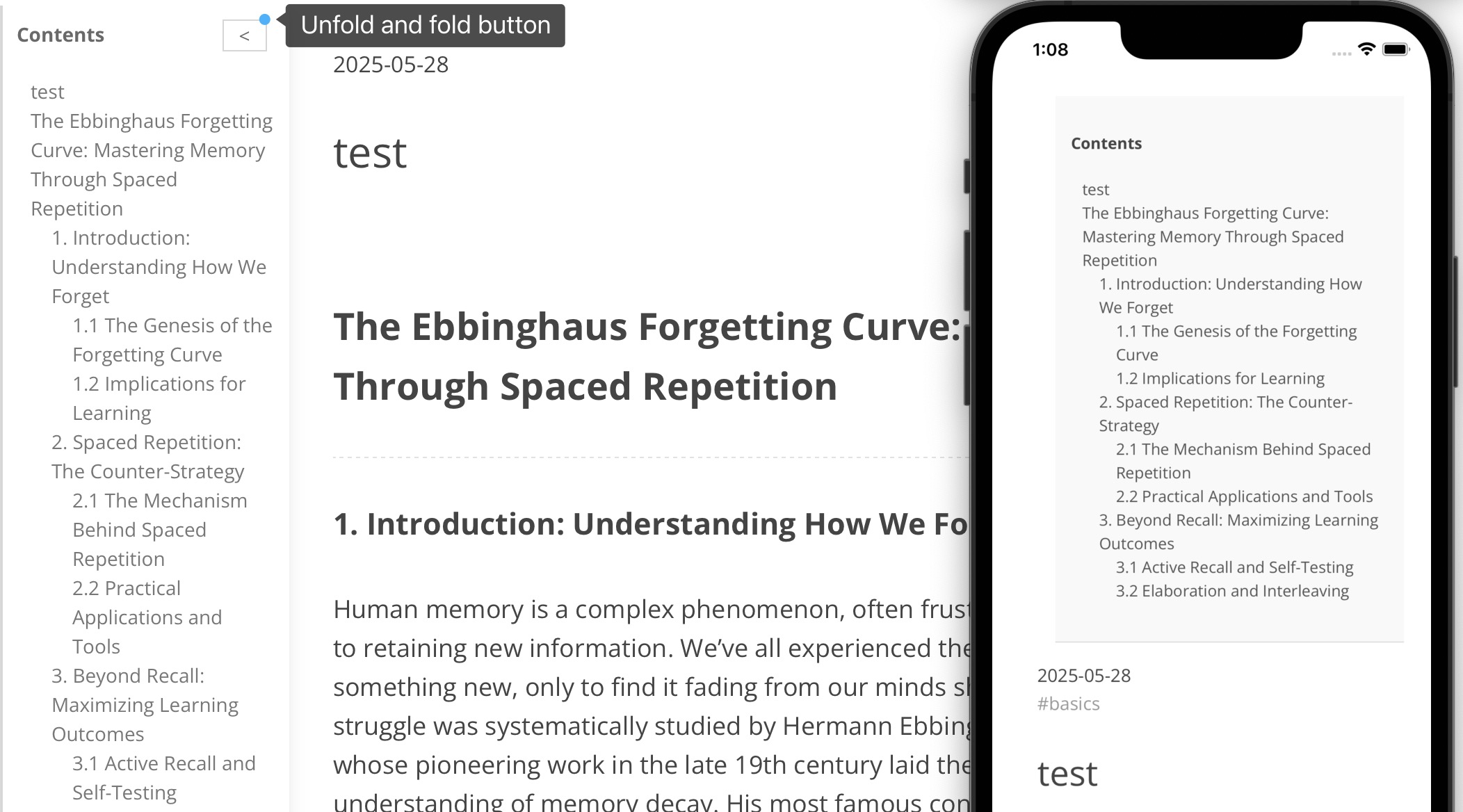
5
|
+
Automatically generates a responsive table of contents that fixes to the side of the article page or above the articles, depending on the user's device. It can also automatically choose to be on the left or on the right.
|
|
6
|
+
|
|
7
|
+
- Requirement 必须具备
|
|
8
|
+
|
|
9
|
+
`npm install cheerio --save`
|
|
6
10
|
|
|
7
11
|
- Getting Started
|
|
8
12
|
|
|
@@ -13,7 +17,7 @@ npm install hexo-auto-toc
|
|
|
13
17
|
```
|
|
14
18
|
|
|
15
19
|
2. The plugin will automatically parse all content within the `<article>` tag and generate a table of contents.
|
|
16
|
-
If your article page structure does not wrap the content inside an `<article>` element, you
|
|
20
|
+
If your article page structure does not wrap the content inside an `<article>` element, contents in`<body>` will be parsed. Or you can add `<article>` manually — typically in the `index.html` file under your `blog` folder, but this is not necessary.
|
|
17
21
|
3. check the effects: `hexo clean&&hexo g&&hexo s`
|
|
18
22
|
|
|
19
23
|
- 使用
|
|
@@ -24,13 +28,27 @@ npm install hexo-auto-toc
|
|
|
24
28
|
npm install hexo-auto-toc
|
|
25
29
|
```
|
|
26
30
|
|
|
27
|
-
2. 插件会自动对`<article>`包含下的所有内容进行解析,自动生成目录。如果你的文章页面结构中内容没被`<article
|
|
31
|
+
2. 插件会自动对`<article>`包含下的所有内容进行解析,自动生成目录。如果你的文章页面结构中内容没被`<article>`包裹,将会解析`<body>`下的所有内容;你可以自行添加`<article>`(即blog文件夹下的index.html),但不是必须的。
|
|
28
32
|
2. 查看效果 `hexo clean&&hexo g&&hexo s`
|
|
29
33
|
|
|
30
34
|
- 效果 Example
|
|
31
35
|
|
|
32
36
|
|
|
33
37
|
|
|
38
|
+
- 更新
|
|
39
|
+
|
|
40
|
+
6.17
|
|
41
|
+
|
|
42
|
+
更普适多种主题
|
|
43
|
+
|
|
44
|
+
优化正则表达式匹配
|
|
45
|
+
|
|
46
|
+
加入cheerio解析html 避免正则表达式弊端
|
|
47
|
+
|
|
48
|
+
优化toc模块位置,如果有nav则放在nav标签下方
|
|
49
|
+
|
|
50
|
+
优化toc放置左/右,自动选择放在哪边
|
|
51
|
+
|
|
34
52
|
# Recommendations
|
|
35
53
|
|
|
36
54
|
- hexo-everyday-calendar:This is a practical calendar plugin for hexo bloggers, like contribution statistics on GitHub.
|
package/index.js
CHANGED
|
@@ -1,25 +1,42 @@
|
|
|
1
1
|
'use strict';
|
|
2
|
-
|
|
2
|
+
/*
|
|
3
|
+
6.17
|
|
4
|
+
更普适多种主题
|
|
5
|
+
优化正则表达式匹配
|
|
6
|
+
加入cheerio解析html 避免正则表达式弊端
|
|
7
|
+
优化toc模块位置,如果有nav则放在nav标签下方
|
|
8
|
+
优化toc放置左/右,自动选择放在哪边
|
|
9
|
+
*/
|
|
10
|
+
const cheerio = require('cheerio');//用来nodejs端解析html
|
|
3
11
|
hexo.extend.filter.register('after_render:html', function (html) {
|
|
4
12
|
// 用正则找文章内容的容器(这里默认文章内容在class="site-body"的div里)
|
|
5
13
|
// 如果你的主题不是这个类名,需要调整选择器
|
|
6
14
|
/*
|
|
7
15
|
[\s\S] 匹配任何字符(空白或非空白)
|
|
8
16
|
*/
|
|
9
|
-
const contentMatch = html.match(/<article([\s\S]*?)<\/article>/);
|
|
10
|
-
console.log('contentMatch',contentMatch.length)
|
|
11
|
-
if (!contentMatch) return html; // 找不到文章内容就跳过
|
|
12
17
|
|
|
18
|
+
const $ = cheerio.load(html);
|
|
19
|
+
// 使用 CSS 选择器选择 `<body>` 元素
|
|
20
|
+
const $body = $('body');
|
|
21
|
+
|
|
22
|
+
let contentMatch = html.match(/<article\b([^>]*)>([\s\S]*?)<\/article>/i);
|
|
23
|
+
//单词边界/b [非^字符]*个
|
|
24
|
+
if(!contentMatch)contentMatch = $body.html()
|
|
25
|
+
console.log('contentMatch',contentMatch?.length)
|
|
26
|
+
if (!contentMatch) return html; // 找不到文章内容就跳过
|
|
27
|
+
|
|
28
|
+
//nodejs环境无document const nav = document.getElementsByTagName('nav')[0];
|
|
29
|
+
//querySelector is just for one element
|
|
30
|
+
|
|
13
31
|
// 给文章内容,后面插入一个目录容器div(空的)
|
|
14
32
|
// 目录的html和js在下面会动态生成
|
|
15
33
|
const tocDiv = `
|
|
16
34
|
<div id="fixed-toc-container" style="
|
|
17
|
-
|
|
18
35
|
position: fixed;
|
|
19
36
|
top: 0vh;
|
|
20
37
|
left: 0px;
|
|
21
|
-
width:
|
|
22
|
-
max-height:
|
|
38
|
+
width: 15rem;
|
|
39
|
+
max-height: 95vh;
|
|
23
40
|
overflow-y: auto;
|
|
24
41
|
overflow-x: auto;
|
|
25
42
|
padding: 10px;
|
|
@@ -28,7 +45,7 @@ hexo.extend.filter.register('after_render:html', function (html) {
|
|
|
28
45
|
line-height: 1.5;
|
|
29
46
|
background: #fff;
|
|
30
47
|
opacity:0.8;
|
|
31
|
-
z-index:
|
|
48
|
+
z-index: 9999;
|
|
32
49
|
box-shadow:
|
|
33
50
|
0 2px 4px rgba(0, 0, 0, 0.05), /* 第一层:近处柔和 */
|
|
34
51
|
0 8px 16px rgba(0, 0, 0, 0.08); /* 第二层:远处扩散 */
|
|
@@ -46,26 +63,38 @@ hexo.extend.filter.register('after_render:html', function (html) {
|
|
|
46
63
|
</div>
|
|
47
64
|
|
|
48
65
|
<script>
|
|
49
|
-
|
|
50
|
-
const
|
|
51
|
-
|
|
52
|
-
|
|
53
|
-
|
|
54
|
-
|
|
55
|
-
|
|
56
|
-
|
|
57
|
-
|
|
58
|
-
|
|
59
|
-
|
|
60
|
-
|
|
61
|
-
|
|
62
|
-
|
|
63
|
-
|
|
64
|
-
|
|
65
|
-
|
|
66
|
+
document.addEventListener('DOMContentLoaded', function () {
|
|
67
|
+
const nav = document.querySelector('nav');
|
|
68
|
+
if (nav) {
|
|
69
|
+
const navBottom = nav.getBoundingClientRect().bottom;//浏览器JS API
|
|
70
|
+
console.log('nav bottom:', navBottom);
|
|
71
|
+
// 设置toc元素 top = nav bottom
|
|
72
|
+
const toc = document.querySelector('#fixed-toc-container');
|
|
73
|
+
if (toc) {
|
|
74
|
+
toc.style.top = navBottom + 'px';
|
|
75
|
+
}
|
|
76
|
+
}
|
|
77
|
+
});
|
|
78
|
+
|
|
79
|
+
const myDiv = document.getElementById('toggle_btn');
|
|
80
|
+
var tocList=document.getElementById("fixed-toc-list");
|
|
81
|
+
var tocContainer=document.getElementById("fixed-toc-container");
|
|
82
|
+
function handleClickBtn() {
|
|
83
|
+
console.log('Div 被点击了!');
|
|
84
|
+
if(myDiv.textContent==='<'){
|
|
85
|
+
myDiv.textContent ='>'
|
|
86
|
+
tocList.style.display='none'
|
|
87
|
+
tocContainer.style.width='11rem'
|
|
88
|
+
}else{
|
|
89
|
+
myDiv.textContent ='<'
|
|
90
|
+
tocList.style.display='block'
|
|
91
|
+
tocContainer.style.width='15rem'
|
|
92
|
+
}
|
|
93
|
+
|
|
94
|
+
}
|
|
66
95
|
|
|
67
96
|
|
|
68
|
-
myDiv.addEventListener('click', handleClickBtn);// 绑定点击事件
|
|
97
|
+
myDiv.addEventListener('click', handleClickBtn);// 绑定点击事件
|
|
69
98
|
|
|
70
99
|
|
|
71
100
|
(function() {
|
|
@@ -82,13 +111,25 @@ myDiv.addEventListener('click', handleClickBtn);// 绑定点击事件
|
|
|
82
111
|
if (toc) toc.style.display = 'none';
|
|
83
112
|
return;
|
|
84
113
|
}
|
|
85
|
-
var content = document.querySelector('
|
|
114
|
+
var content = document.querySelector('body');
|
|
86
115
|
//var tocList = document.getElementById('fixed-toc-list');
|
|
87
116
|
if (!content || !tocList) {
|
|
88
117
|
document.getElementById('fixed-toc-container').style.display = 'none';
|
|
89
118
|
return;
|
|
90
119
|
}
|
|
91
120
|
var headings = content.querySelectorAll('h1, h2, h3, h4');
|
|
121
|
+
if(headings){
|
|
122
|
+
const h1Element=headings[0];
|
|
123
|
+
const rect = h1Element.getBoundingClientRect();
|
|
124
|
+
if(rect.left<150){
|
|
125
|
+
tocContainer.style.right='0px';
|
|
126
|
+
tocContainer.style.left = 'auto'; // 移除内联的 left 样式
|
|
127
|
+
//不是设置right:0 就替换left:0 需要移除
|
|
128
|
+
console.log('to right')
|
|
129
|
+
}
|
|
130
|
+
console.log(rect.left,'150')
|
|
131
|
+
}
|
|
132
|
+
|
|
92
133
|
if (headings.length === 0) {
|
|
93
134
|
document.getElementById('fixed-toc-container').style.display = 'none';
|
|
94
135
|
return;
|
|
@@ -118,7 +159,7 @@ myDiv.addEventListener('click', handleClickBtn);// 绑定点击事件
|
|
|
118
159
|
|
|
119
160
|
// 把目录div插入到</body>标签前面
|
|
120
161
|
html = html.replace(/<\/body>/, tocDiv + '</body>');
|
|
121
|
-
|
|
162
|
+
|
|
122
163
|
return html;
|
|
123
164
|
});
|
|
124
165
|
|
|
@@ -150,7 +191,7 @@ hexo.extend.injector.register('body_end', () => {//生成静态页面时
|
|
|
150
191
|
toc.style.borderBottom = '1px solid #ddd';
|
|
151
192
|
toc.style.background = '#f9f9f9';
|
|
152
193
|
toc.style.opacity = '1';
|
|
153
|
-
toc.style.zIndex = '';
|
|
194
|
+
toc.style.zIndex = '9999';
|
|
154
195
|
toc.style.boxShadow = 'none';
|
|
155
196
|
toc.style.margin = '1rem';
|
|
156
197
|
toc.style.paddingTop= '2rem';
|
package/package.json
CHANGED
|
@@ -1,6 +1,6 @@
|
|
|
1
1
|
{
|
|
2
2
|
"name": "hexo-auto-toc",
|
|
3
|
-
"version": "1.0.
|
|
3
|
+
"version": "1.0.5",
|
|
4
4
|
"description": "Automatically generates a responsive table of contents that fixes to the side of the article page or above the articles, depending on the user's device.",
|
|
5
5
|
"keywords": [
|
|
6
6
|
"toc",
|
|
@@ -10,6 +10,9 @@
|
|
|
10
10
|
"contents",
|
|
11
11
|
"article"
|
|
12
12
|
],
|
|
13
|
+
"dependencies": {
|
|
14
|
+
"cheerio": "^1.0.0-rc.12"
|
|
15
|
+
},
|
|
13
16
|
"homepage": "https://github.com/70v-Yoyo/hexo-auto-toc#readme",
|
|
14
17
|
"bugs": {
|
|
15
18
|
"url": "https://github.com/70v-Yoyo/hexo-auto-toc/issues"
|
|
@@ -24,5 +27,11 @@
|
|
|
24
27
|
"main": "index.js",
|
|
25
28
|
"scripts": {
|
|
26
29
|
"test": "echo \"Error: no test specified\" && exit 1"
|
|
30
|
+
},
|
|
31
|
+
"peerDependencies": {
|
|
32
|
+
"hexo": "^7.0.0"
|
|
33
|
+
},
|
|
34
|
+
"devDependencies": {
|
|
35
|
+
"hexo": "^7.0.0"
|
|
27
36
|
}
|
|
28
37
|
}
|