hexo-auto-toc 1.0.11 → 2.0.0
This diff represents the content of publicly available package versions that have been released to one of the supported registries. The information contained in this diff is provided for informational purposes only and reflects changes between package versions as they appear in their respective public registries.
- package/README.md +4 -38
- package/index.js +198 -192
- package/package.json +9 -2
package/README.md
CHANGED
|
@@ -12,9 +12,9 @@ Automatically generates a responsive table of contents that fixes to the side of
|
|
|
12
12
|
npm install hexo-auto-toc
|
|
13
13
|
```
|
|
14
14
|
|
|
15
|
-
Requirement cheerio:auto install it
|
|
15
|
+
Requirement cheerio:auto install it replacing `npm install cheerio --save`
|
|
16
16
|
|
|
17
|
-
2. The plugin will automatically parse all content
|
|
17
|
+
2. The plugin will automatically parse all content and generate a table of contents.
|
|
18
18
|
If your article page structure does not wrap the content inside an `<article>` element, contents in`<body>` will be parsed. Or you can add `<article>` manually — typically in the `index.html` file under your `blog` folder, but this is not necessary.
|
|
19
19
|
3. check the effects: `hexo clean&&hexo g&&hexo s`
|
|
20
20
|
|
|
@@ -26,47 +26,13 @@ Requirement cheerio:auto install it replaces `npm install cheerio --save`
|
|
|
26
26
|
npm install hexo-auto-toc
|
|
27
27
|
```
|
|
28
28
|
|
|
29
|
-
2.
|
|
29
|
+
2. 插件会自动对网页包含内容进行解析,自动生成目录。如果你的文章页面结构中内容没被`<article>`包裹,将会解析`<body>`下的所有内容;你可以自行添加`<article>`(即blog文件夹下的index.html),但不是必须的。
|
|
30
30
|
2. 查看效果 `hexo clean&&hexo g&&hexo s`
|
|
31
31
|
|
|
32
|
-
-
|
|
32
|
+
- Example
|
|
33
33
|
|
|
34
34
|
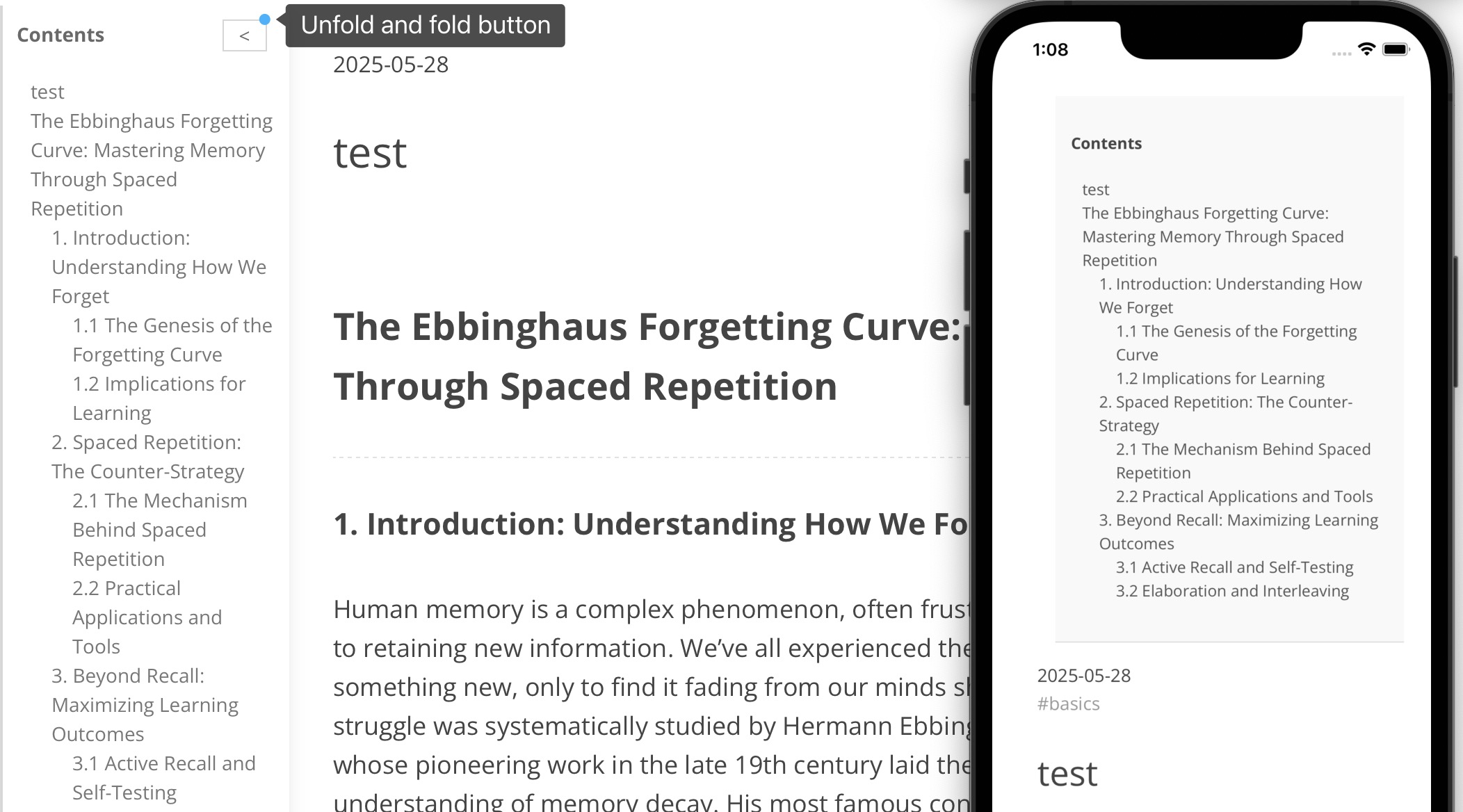
|
|
35
35
|
|
|
36
|
-
- 更新
|
|
37
|
-
|
|
38
|
-
6.17
|
|
39
|
-
|
|
40
|
-
更普适多种主题
|
|
41
|
-
|
|
42
|
-
优化正则表达式匹配
|
|
43
|
-
|
|
44
|
-
加入cheerio解析html 避免正则表达式弊端
|
|
45
|
-
|
|
46
|
-
优化toc模块位置,如果有nav则放在nav标签下方
|
|
47
|
-
|
|
48
|
-
优化toc放置左/右,自动选择放在哪边
|
|
49
|
-
|
|
50
|
-
- New Updates
|
|
51
|
-
|
|
52
|
-
- version 1.0.6
|
|
53
|
-
|
|
54
|
-
Except index page, other pages have TOC if they have kinds of headers.
|
|
55
|
-
|
|
56
|
-
- version 1.0.5
|
|
57
|
-
|
|
58
|
-
Greater compatibility: Works with a wider variety of themes.
|
|
59
|
-
|
|
60
|
-
Performance Boost: Optimized the regular expressions for better matching.
|
|
61
|
-
|
|
62
|
-
Reliable Parsing: Integrated the Cheerio library to parse HTML, avoiding the drawbacks and errors common with regular expressions.
|
|
63
|
-
|
|
64
|
-
Smarter Positioning: Improved the Table of Contents (TOC) module's location; it will now be placed directly after the element if one is present.
|
|
65
|
-
|
|
66
|
-
Automatic Layout: Enhanced the left/right placement of the TOC, allowing it to automatically choose the best side.
|
|
67
|
-
|
|
68
|
-
7.9 长度优化
|
|
69
|
-
|
|
70
36
|
# Recommendations
|
|
71
37
|
|
|
72
38
|
- hexo-everyday-calendar:This is a practical calendar plugin for hexo bloggers, like contribution statistics on GitHub.
|
package/index.js
CHANGED
|
@@ -1,209 +1,215 @@
|
|
|
1
1
|
'use strict';
|
|
2
2
|
/*
|
|
3
|
-
6.17
|
|
4
3
|
更普适多种主题
|
|
5
|
-
|
|
6
|
-
|
|
4
|
+
完全删除正则表达式匹配,不与DOM解析混用;cheerio解析html 避免正则表达式弊端
|
|
5
|
+
完全删除HTML解析,仅用DOM操作
|
|
7
6
|
优化toc模块位置,如果有nav则放在nav标签下方
|
|
8
7
|
优化toc放置左/右,自动选择放在哪边
|
|
8
|
+
nodejs环境,无DOM对象
|
|
9
9
|
*/
|
|
10
10
|
const cheerio = require('cheerio');//用来nodejs端解析html
|
|
11
|
-
hexo.extend.filter.register('after_render:html', function (html) {
|
|
12
|
-
//
|
|
13
|
-
|
|
14
|
-
|
|
15
|
-
|
|
16
|
-
|
|
17
|
-
|
|
18
|
-
|
|
19
|
-
|
|
20
|
-
const $
|
|
21
|
-
|
|
22
|
-
|
|
23
|
-
|
|
24
|
-
if(!
|
|
25
|
-
console.log('contentMatch',contentMatch?.length)
|
|
26
|
-
if (!contentMatch) return html; // 找不到文章内容就跳过
|
|
27
|
-
|
|
28
|
-
//nodejs环境无document const nav = document.getElementsByTagName('nav')[0];
|
|
29
|
-
//querySelector is just for one element
|
|
11
|
+
hexo.extend.filter.register('after_render:html', function (html,data) {
|
|
12
|
+
// 只处理这种页面
|
|
13
|
+
if (!data.page || !data.page.content) {
|
|
14
|
+
return html;
|
|
15
|
+
}
|
|
16
|
+
const $ = cheerio.load(html, {
|
|
17
|
+
xmlMode: false,//性能优化1:少做严格校验
|
|
18
|
+
decodeEntities: true,//性能优化2:解码,如& → &,避免UI层再做解码
|
|
19
|
+
});
|
|
20
|
+
const $article = $('article').first();
|
|
21
|
+
if (!$article.length) return html;
|
|
22
|
+
|
|
23
|
+
const headings = $article.find('h1, h2, h3, h4').toArray();
|
|
24
|
+
if (!headings.length||headings.length < 2) return html;
|
|
30
25
|
|
|
31
|
-
//
|
|
32
|
-
//
|
|
33
|
-
|
|
34
|
-
|
|
35
|
-
|
|
36
|
-
|
|
37
|
-
|
|
38
|
-
|
|
39
|
-
|
|
40
|
-
|
|
41
|
-
|
|
42
|
-
|
|
43
|
-
|
|
44
|
-
|
|
45
|
-
|
|
46
|
-
|
|
47
|
-
|
|
48
|
-
|
|
49
|
-
|
|
50
|
-
|
|
51
|
-
|
|
52
|
-
|
|
53
|
-
|
|
54
|
-
<div id="
|
|
55
|
-
|
|
56
|
-
|
|
57
|
-
|
|
58
|
-
|
|
59
|
-
|
|
60
|
-
|
|
61
|
-
|
|
62
|
-
|
|
26
|
+
// =========================
|
|
27
|
+
// 1. 构建 TOC 数据(纯服务端)
|
|
28
|
+
// =========================
|
|
29
|
+
const tocItems = headings.map((el, i) => {
|
|
30
|
+
const $el = $(el);
|
|
31
|
+
const level = parseInt(el.tagName[1], 10);
|
|
32
|
+
|
|
33
|
+
if (!$el.attr('id')) {
|
|
34
|
+
$el.attr('id', `heading-${i}`);
|
|
35
|
+
}
|
|
36
|
+
|
|
37
|
+
return {
|
|
38
|
+
id: $el.attr('id'),
|
|
39
|
+
text: $el.text(),
|
|
40
|
+
level,
|
|
41
|
+
};
|
|
42
|
+
});
|
|
43
|
+
|
|
44
|
+
// =========================
|
|
45
|
+
// 2. TOC HTML(只结构,不写逻辑)
|
|
46
|
+
// =========================
|
|
47
|
+
const tocHtmlDesktop = `
|
|
48
|
+
<div id="toc-desktop" class="collapsed">
|
|
49
|
+
<div id="toc-toggle">></div>
|
|
50
|
+
<div id="toc-title">Contents</div>
|
|
51
|
+
<ul id="toc-list">
|
|
52
|
+
${tocItems.map(i => `
|
|
53
|
+
<li class="toc-item toc-lv-${i.level}">
|
|
54
|
+
<a href="#${i.id}">${i.text}</a>
|
|
55
|
+
</li>
|
|
56
|
+
`).join('')}
|
|
57
|
+
</ul>
|
|
63
58
|
</div>
|
|
59
|
+
`;
|
|
60
|
+
const tocHtmlMobile = `
|
|
61
|
+
<div id="toc-mobile">
|
|
62
|
+
<div id="toc-title">Contents</div>
|
|
63
|
+
<ul id="toc-list-mobile">
|
|
64
|
+
${tocItems.map(i => `
|
|
65
|
+
<li class="toc-lv-${i.level}">
|
|
66
|
+
<a href="#${i.id}">${i.text}</a>
|
|
67
|
+
</li>
|
|
68
|
+
`).join('')}
|
|
69
|
+
</ul>
|
|
70
|
+
</div>
|
|
71
|
+
`;
|
|
72
|
+
|
|
73
|
+
// =========================
|
|
74
|
+
// 3. 插入策略(完全 CSS/DOM 控制)
|
|
75
|
+
// =========================
|
|
76
|
+
const $header = $('header').first();
|
|
77
|
+
if ($header.length) {
|
|
78
|
+
$header.after(tocHtmlDesktop);
|
|
79
|
+
$header.after(tocHtmlMobile);
|
|
80
|
+
} else {
|
|
81
|
+
$('body').prepend(tocHtmlDesktop);
|
|
82
|
+
$('body').prepend(tocHtmlMobile);
|
|
83
|
+
}
|
|
64
84
|
|
|
85
|
+
// =========================
|
|
86
|
+
// 4. 注入最小 runtime script
|
|
87
|
+
// =========================
|
|
88
|
+
$('body').append(`
|
|
65
89
|
<script>
|
|
66
|
-
|
|
67
|
-
|
|
68
|
-
|
|
69
|
-
|
|
70
|
-
|
|
71
|
-
|
|
72
|
-
|
|
73
|
-
|
|
74
|
-
toc.style.top = navBottom + 'px';
|
|
75
|
-
toc.style.maxHeight=window.innerHeight - navBottom.getBoundingClientRect().bottom;
|
|
76
|
-
}
|
|
77
|
-
}
|
|
90
|
+
(function () {
|
|
91
|
+
const tocDesktop = document.getElementById('toc-desktop');
|
|
92
|
+
const tocMobile = document.getElementById('toc-mobile');
|
|
93
|
+
const toc = tocDesktop || tocMobile;
|
|
94
|
+
if (!toc) return;
|
|
95
|
+
const toggle = document.getElementById('toc-toggle');
|
|
96
|
+
toggle.addEventListener('click', function () {
|
|
97
|
+
tocDesktop.classList.toggle('collapsed');//有则删 无则加
|
|
78
98
|
});
|
|
79
|
-
|
|
80
|
-
const myDiv = document.getElementById('toggle_btn');
|
|
81
|
-
var tocList=document.getElementById("fixed-toc-list");
|
|
82
|
-
var tocContainer=document.getElementById("fixed-toc-container");
|
|
83
|
-
function handleClickBtn() {
|
|
84
|
-
console.log('Div 被点击了!');
|
|
85
|
-
if(myDiv.textContent==='<'){
|
|
86
|
-
myDiv.textContent ='>'
|
|
87
|
-
tocList.style.display='none'
|
|
88
|
-
tocContainer.style.width='11rem'
|
|
89
|
-
}else{
|
|
90
|
-
myDiv.textContent ='<'
|
|
91
|
-
tocList.style.display='block'
|
|
92
|
-
tocContainer.style.width='15rem'
|
|
93
|
-
}
|
|
94
|
-
|
|
95
|
-
}
|
|
96
|
-
|
|
97
|
-
|
|
98
|
-
myDiv.addEventListener('click', handleClickBtn);// 绑定点击事件
|
|
99
|
-
|
|
100
|
-
|
|
101
|
-
(function() {
|
|
102
|
-
const Patternstr = "\/*\\\\\d{4}\/\\\\\d{2}\/\\\\\d{2}\/\.*"; //本身是字符串插入,所以对符号要转义
|
|
103
|
-
//"^\//*"->"/"
|
|
104
|
-
//"\/.*"->".*"
|
|
105
|
-
//JS引擎中"\"转义
|
|
106
|
-
//正则表达式引擎也是"\"转义
|
|
107
|
-
const dataPattern = new RegExp(Patternstr);
|
|
108
|
-
const path = window.location.pathname;
|
|
109
|
-
console.log(dataPattern.toString(),path,dataPattern.test(path));//控制台在渲染时省略了反斜杠的可视表示。
|
|
110
|
-
if (!dataPattern.test(path)&&(path==='/'||path==='index.html')) {
|
|
111
|
-
console.log('no toc')
|
|
112
|
-
let toc = document.getElementById('fixed-toc-container');
|
|
113
|
-
if (toc) toc.style.display = 'none';
|
|
114
|
-
return;
|
|
115
|
-
}
|
|
116
|
-
var content = document.querySelector('body');
|
|
117
|
-
console.log('content',content)
|
|
118
|
-
//var tocList = document.getElementById('fixed-toc-list');
|
|
119
|
-
if (!content || !tocList) {
|
|
120
|
-
document.getElementById('fixed-toc-container').style.display = 'none';
|
|
121
|
-
return;
|
|
122
|
-
}
|
|
123
|
-
var headings = content.querySelectorAll('h1, h2, h3, h4');
|
|
124
|
-
console.log('headings',headings)
|
|
125
|
-
if(headings){
|
|
126
|
-
const h1Element=headings[0];
|
|
127
|
-
const rect = h1Element.getBoundingClientRect();
|
|
128
|
-
if(rect.left<150){
|
|
129
|
-
tocContainer.style.right='0px';
|
|
130
|
-
tocContainer.style.left = 'auto'; // 移除内联的 left 样式
|
|
131
|
-
//不是设置right:0 就替换left:0 需要移除
|
|
132
|
-
console.log('to right')
|
|
133
|
-
}
|
|
134
|
-
console.log(rect.left,'150')
|
|
135
|
-
}
|
|
136
|
-
|
|
137
|
-
if (headings.length === 0) {
|
|
138
|
-
document.getElementById('fixed-toc-container').style.display = 'none';
|
|
139
|
-
return;
|
|
140
|
-
}
|
|
141
|
-
headings.forEach(function(heading, i) {
|
|
142
|
-
if (!heading.id) {
|
|
143
|
-
heading.id = 'heading-' + i;
|
|
144
|
-
}
|
|
145
|
-
});
|
|
146
|
-
headings.forEach(function(heading) {
|
|
147
|
-
var level = parseInt(heading.tagName.substring(1));
|
|
148
|
-
var li = document.createElement('li');
|
|
149
|
-
li.style.marginLeft = (level - 1) * 15 + 'px';
|
|
150
|
-
var a = document.createElement('a');
|
|
151
|
-
a.href = '#' + heading.id;
|
|
152
|
-
a.textContent = heading.textContent;
|
|
153
|
-
a.style.color = '#555';
|
|
154
|
-
a.style.textDecoration = 'none';
|
|
155
|
-
a.onmouseover = function() { a.style.textDecoration = 'underline'; };
|
|
156
|
-
a.onmouseout = function() { a.style.textDecoration = 'none'; };
|
|
157
|
-
li.appendChild(a);
|
|
158
|
-
tocList.appendChild(li);
|
|
159
|
-
});
|
|
160
|
-
})();
|
|
99
|
+
})();
|
|
161
100
|
</script>
|
|
162
|
-
|
|
101
|
+
`);
|
|
102
|
+
return $.html();
|
|
103
|
+
});
|
|
104
|
+
hexo.extend.injector.register('head_end', () => {
|
|
105
|
+
return `
|
|
106
|
+
<style>
|
|
107
|
+
#toc-list a{
|
|
108
|
+
text-decoration: none;
|
|
109
|
+
color:#333 !important;
|
|
110
|
+
}
|
|
111
|
+
#toc-desktop ul{
|
|
112
|
+
list-style: none;
|
|
113
|
+
padding-left: 3px;
|
|
114
|
+
}
|
|
115
|
+
|
|
116
|
+
/* 展开状态 */
|
|
117
|
+
#toc-desktop {
|
|
118
|
+
position: fixed;
|
|
119
|
+
right: 0;
|
|
120
|
+
top: 0;
|
|
121
|
+
height: 100vh;
|
|
122
|
+
width: 260px;
|
|
123
|
+
|
|
124
|
+
padding: 10px;
|
|
125
|
+
|
|
126
|
+
background: #fff;
|
|
127
|
+
border-left: 1px solid #ddd;
|
|
128
|
+
|
|
129
|
+
/* 关键:动画 */
|
|
130
|
+
transition: transform 0.25s ease;
|
|
131
|
+
will-change: transform;
|
|
163
132
|
|
|
164
|
-
|
|
165
|
-
|
|
133
|
+
color:#333;
|
|
134
|
+
font-size:1rem;
|
|
135
|
+
z-index: 9999;
|
|
136
|
+
|
|
137
|
+
display: flex;
|
|
138
|
+
flex-direction: column;
|
|
139
|
+
transform: translateX(0);
|
|
140
|
+
}
|
|
141
|
+
|
|
142
|
+
/* 收起状态:只露出 toggle */
|
|
143
|
+
#toc-desktop.collapsed {
|
|
144
|
+
transform: translateX(calc(100%));
|
|
145
|
+
}
|
|
146
|
+
|
|
147
|
+
/* toggle 固定在可见边缘 */
|
|
148
|
+
#toc-toggle {
|
|
149
|
+
position: absolute;
|
|
150
|
+
left: -30px;
|
|
151
|
+
top: 50%;
|
|
152
|
+
width: 80px;
|
|
153
|
+
height: 80px;
|
|
154
|
+
transform: translateY(-50%);
|
|
155
|
+
cursor: pointer;
|
|
156
|
+
user-select: none;
|
|
157
|
+
background: #fff;
|
|
158
|
+
border-left: 2px solid #ddd;
|
|
159
|
+
color: #333;
|
|
160
|
+
border-radius: 20%;
|
|
161
|
+
z-index:-1;
|
|
162
|
+
font-size: 25px;
|
|
163
|
+
font-weight: bold;
|
|
164
|
+
|
|
165
|
+
display: flex;
|
|
166
|
+
align-items: center;
|
|
167
|
+
justify-content: left;
|
|
166
168
|
|
|
167
|
-
|
|
168
|
-
}
|
|
169
|
+
padding:5px;
|
|
170
|
+
}
|
|
171
|
+
|
|
172
|
+
#toc-list {
|
|
173
|
+
flex: 1;
|
|
174
|
+
overflow-y: auto;/* 关键:滚动 */
|
|
175
|
+
overflow-x: hidden;
|
|
176
|
+
margin-left:5%;
|
|
177
|
+
}
|
|
178
|
+
#toc-mobile {
|
|
179
|
+
display: none;
|
|
180
|
+
}
|
|
181
|
+
|
|
182
|
+
/* indentation */
|
|
183
|
+
.toc-lv-2 { margin-left: 12px; }
|
|
184
|
+
.toc-lv-3 { margin-left: 24px; }
|
|
185
|
+
.toc-lv-4 { margin-left: 36px; }
|
|
186
|
+
|
|
187
|
+
#toc-title{
|
|
188
|
+
font-weight: bold;
|
|
189
|
+
font-size: 1.2rem;
|
|
190
|
+
margin:10px auto;
|
|
191
|
+
}
|
|
192
|
+
@media (max-width: 1024px) {
|
|
193
|
+
#toc-desktop {
|
|
194
|
+
display: none;
|
|
195
|
+
}
|
|
196
|
+
|
|
197
|
+
#toc-mobile {
|
|
198
|
+
display: block;
|
|
199
|
+
width: 100%;
|
|
200
|
+
height: auto;
|
|
201
|
+
padding: 5%;
|
|
202
|
+
border-bottom: 1px solid #eee;
|
|
203
|
+
background: #fafafa;
|
|
204
|
+
}
|
|
205
|
+
#toc-mobile li{
|
|
206
|
+
white-space: nowrap;
|
|
207
|
+
overflow: hidden;
|
|
208
|
+
text-overflow: ellipsis;
|
|
209
|
+
}
|
|
210
|
+
}
|
|
211
|
+
</style>
|
|
212
|
+
|
|
169
213
|
|
|
170
|
-
hexo.extend.injector.register('body_end', () => {//生成静态页面时
|
|
171
|
-
return `
|
|
172
|
-
<script>
|
|
173
|
-
(function() {
|
|
174
|
-
function moveElementIfSmallScreen() {
|
|
175
|
-
const toc = document.getElementById('fixed-toc-container');
|
|
176
|
-
const article = document.querySelector("article");
|
|
177
|
-
const toggleBtn = document.getElementById('toggle_btn');
|
|
178
|
-
if (!toc || !article) return;
|
|
179
|
-
if (window.innerWidth < 1024 && article.firstElementChild !== toc) {
|
|
180
|
-
console.log('small screen!!')
|
|
181
|
-
|
|
182
|
-
article.insertBefore(toc, article.firstChild);//移动节点,而非复制
|
|
183
|
-
|
|
184
|
-
toggleBtn.style.display='none';
|
|
185
|
-
// 替换样式:取消 fixed,设置适合正文的样式
|
|
186
|
-
toc.style.position = 'relative';
|
|
187
|
-
toc.style.top = '';
|
|
188
|
-
toc.style.left = '';
|
|
189
|
-
toc.style.width = '100%';
|
|
190
|
-
toc.style.maxHeight = 'none';
|
|
191
|
-
toc.style.overflowY = 'visible';
|
|
192
|
-
toc.style.overflowX = 'visible';
|
|
193
|
-
toc.style.padding = '1em';
|
|
194
|
-
toc.style.borderLeft = 'none';
|
|
195
|
-
toc.style.borderBottom = '1px solid #ddd';
|
|
196
|
-
toc.style.background = '#f9f9f9';
|
|
197
|
-
toc.style.opacity = '1';
|
|
198
|
-
toc.style.zIndex = '9999';
|
|
199
|
-
toc.style.boxShadow = 'none';
|
|
200
|
-
toc.style.margin = '1rem';
|
|
201
|
-
toc.style.paddingTop= '2rem';
|
|
202
|
-
}
|
|
203
|
-
}
|
|
204
|
-
window.addEventListener("DOMContentLoaded", moveElementIfSmallScreen);
|
|
205
|
-
window.addEventListener("resize", moveElementIfSmallScreen);
|
|
206
|
-
})();
|
|
207
|
-
</script>
|
|
208
214
|
`;
|
|
209
|
-
}
|
|
215
|
+
});
|
package/package.json
CHANGED
|
@@ -1,6 +1,6 @@
|
|
|
1
1
|
{
|
|
2
2
|
"name": "hexo-auto-toc",
|
|
3
|
-
"version": "
|
|
3
|
+
"version": "2.0.0",
|
|
4
4
|
"description": "Automatically generates a responsive table of contents that fixes to the side of the article page or above the articles, depending on the user's device.",
|
|
5
5
|
"keywords": [
|
|
6
6
|
"toc",
|
|
@@ -31,7 +31,14 @@
|
|
|
31
31
|
"peerDependencies": {
|
|
32
32
|
"hexo": "^7.0.0"
|
|
33
33
|
},
|
|
34
|
-
"devDependencies": {
|
|
34
|
+
"devDependencies": {
|
|
35
|
+
"commitizen": "^4.3.2",
|
|
36
|
+
"cz-git": "^1.13.1",
|
|
35
37
|
"hexo": "^7.0.0"
|
|
38
|
+
},
|
|
39
|
+
"config": {
|
|
40
|
+
"commitizen": {
|
|
41
|
+
"path": "cz-git"
|
|
42
|
+
}
|
|
36
43
|
}
|
|
37
44
|
}
|