herdr-secret 0.1.2 → 0.2.0
This diff represents the content of publicly available package versions that have been released to one of the supported registries. The information contained in this diff is provided for informational purposes only and reflects changes between package versions as they appear in their respective public registries.
- package/README.md +24 -15
- package/cli.js +41 -11
- package/engine/agents/SKILL.md +68 -0
- package/engine/agents/instructions.md +8 -0
- package/engine/bin/herdr-secret +8 -0
- package/engine/bin/herdr-secret.cmd +12 -0
- package/engine/bin/herdr_secret.py +1713 -0
- package/engine/herdr-plugin.toml +67 -0
- package/engine/mods/herdr-secret/main.js +221 -0
- package/engine/mods/herdr-secret/mod.json +1 -0
- package/package.json +6 -3
package/README.md
CHANGED
|
@@ -6,9 +6,10 @@
|
|
|
6
6
|
|
|
7
7
|
Let your coding agents ask you for credentials without the value ever entering their chat.
|
|
8
8
|
|
|
9
|
-
|
|
10
|
-
|
|
11
|
-
|
|
9
|
+
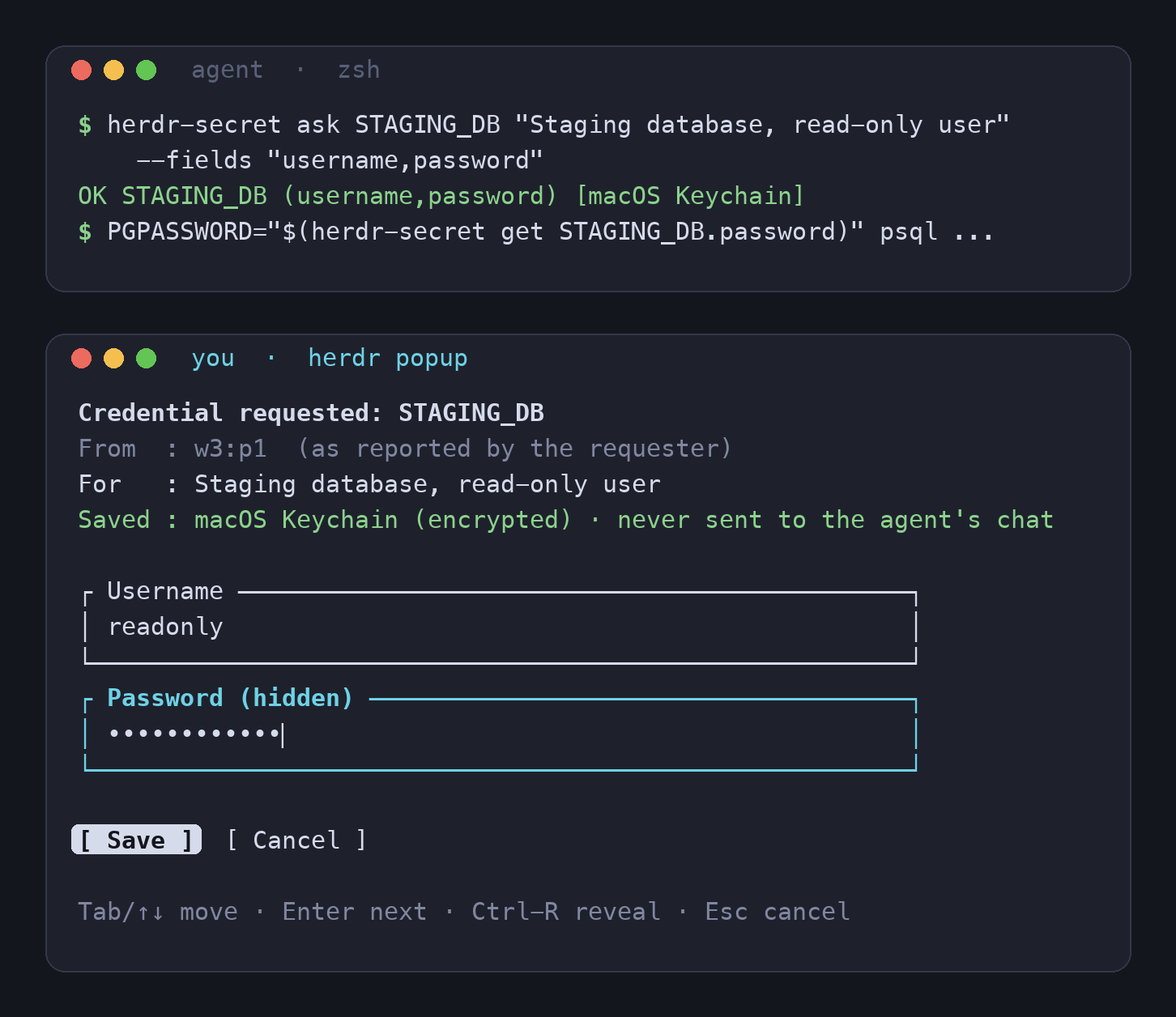
For [herdr](https://herdr.dev): the terminal app (the TUI) and Herdr.app, the desktop app. An
|
|
10
|
+
agent runs `herdr-secret ask`, a form pops up (a herdr popup, or a dialog in the Herdr.app
|
|
11
|
+
window), you type the value there, and it goes straight into your operating system's credential
|
|
12
|
+
store. The agent only gets back whether you answered.
|
|
12
13
|
|
|
13
14
|
|
|
14
15
|
|
|
@@ -18,9 +19,16 @@ The agent only gets back whether you answered.
|
|
|
18
19
|
npx herdr-secret@latest
|
|
19
20
|
```
|
|
20
21
|
|
|
21
|
-
Works on macOS, Linux and Windows.
|
|
22
|
-
|
|
23
|
-
|
|
22
|
+
Works on macOS, Linux and Windows. What it installs depends on what you have:
|
|
23
|
+
|
|
24
|
+
- **herdr (the TUI):** the herdr plugin, from
|
|
25
|
+
[GitHub](https://github.com/mazemaker/herdr-secret). herdr shows what it will run and asks first.
|
|
26
|
+
- **Herdr.app:** the `herdr-secret` command (into `~/.local/share/herdr-secret/engine`) and the
|
|
27
|
+
herdr-secret mod for Herdr.app (into `~/.config/herdr-app/mods/herdr-secret`), which Herdr.app
|
|
28
|
+
then checks.
|
|
29
|
+
- **Both:** the plugin and the mod.
|
|
30
|
+
|
|
31
|
+
Then setup walks you through the rest:
|
|
24
32
|
|
|
25
33
|
- checks that your credential store works,
|
|
26
34
|
- puts the `herdr-secret` command on your PATH,
|
|
@@ -37,20 +45,21 @@ first), then walks you through setup:
|
|
|
37
45
|
- **Linux:** Secret Service (GNOME Keyring, KWallet). Without one, setup asks before falling
|
|
38
46
|
back to 0600 files.
|
|
39
47
|
|
|
40
|
-
Values never pass through a command line or a log
|
|
41
|
-
agent cannot read it.
|
|
48
|
+
Values never pass through a command line or a log. In herdr the popup is not a herdr pane, so an
|
|
49
|
+
agent cannot read it; in Herdr.app the dialog is drawn by the app, not in a terminal.
|
|
42
50
|
|
|
43
51
|
## Trust
|
|
44
52
|
|
|
45
|
-
- No dependencies and no install scripts.
|
|
46
|
-
Python and hands over
|
|
47
|
-
|
|
48
|
-
|
|
49
|
-
|
|
53
|
+
- No dependencies and no install scripts. The package is a small script (`cli.js`) that finds
|
|
54
|
+
herdr and Python and hands over, plus `engine/`: the same Python program, agent instructions
|
|
55
|
+
and Herdr.app mod as the GitHub repository, used only when the herdr TUI is not installed.
|
|
56
|
+
- `cli.js` runs exactly two programs, `herdr` and `python3` (`py` on Windows), without a shell,
|
|
57
|
+
and makes no network requests. With the herdr TUI, the plugin download is done by
|
|
58
|
+
`herdr plugin install`, which shows you what it will run first.
|
|
50
59
|
- Published from GitHub Actions with npm provenance: the attestation on each version names the
|
|
51
60
|
commit and workflow run that built it.
|
|
52
61
|
- [What it protects and what it doesn't](https://github.com/mazemaker/herdr-secret#what-this-does-and-doesnt-protect),
|
|
53
62
|
and [how to report a security problem](https://github.com/mazemaker/herdr-secret/blob/main/SECURITY.md).
|
|
54
63
|
|
|
55
|
-
Requires herdr 0.9.5
|
|
56
|
-
MIT licensed.
|
|
64
|
+
Requires the herdr TUI 0.9.5+ or Herdr.app, Python 3.8+ (herdr-secret runs on it), and Node 18+
|
|
65
|
+
for this installer. MIT licensed.
|
package/cli.js
CHANGED
|
@@ -1,16 +1,21 @@
|
|
|
1
1
|
#!/usr/bin/env node
|
|
2
2
|
// herdr-secret from npm.
|
|
3
|
-
// npx herdr-secret@latest install (or update)
|
|
3
|
+
// npx herdr-secret@latest install (or update) herdr-secret, then run its setup
|
|
4
4
|
// npx herdr-secret uninstall undo setup and optionally remove the plugin
|
|
5
|
-
// npx herdr-secret ask|get|list|rm the
|
|
6
|
-
//
|
|
7
|
-
// will run before anything does.
|
|
5
|
+
// npx herdr-secret ask|get|list|rm the herdr-secret command itself, once it is installed
|
|
6
|
+
// With the herdr TUI, the plugin comes from GitHub through `herdr plugin install`, so herdr shows
|
|
7
|
+
// what it will run before anything does. With only Herdr.app there is no plugin manager: setup
|
|
8
|
+
// runs from the engine/ folder in this package (the same files as the repository) and installs
|
|
9
|
+
// that and the Herdr.app mod. This file only finds herdr and Python and hands over.
|
|
8
10
|
'use strict';
|
|
9
11
|
const { spawnSync } = require('child_process');
|
|
12
|
+
const fs = require('fs');
|
|
13
|
+
const os = require('os');
|
|
10
14
|
const path = require('path');
|
|
11
15
|
|
|
12
16
|
const REPO = 'mazemaker/herdr-secret';
|
|
13
17
|
const ID = 'mazemaker.secret';
|
|
18
|
+
const ENGINE = path.join(__dirname, 'engine', 'bin', 'herdr_secret.py');
|
|
14
19
|
const isWin = process.platform === 'win32';
|
|
15
20
|
|
|
16
21
|
// The wizard and the form handle Ctrl-C themselves; don't let Node exit underneath them.
|
|
@@ -32,6 +37,19 @@ function run(cmd, args) {
|
|
|
32
37
|
return r.status === null ? 1 : r.status;
|
|
33
38
|
}
|
|
34
39
|
|
|
40
|
+
function onPath(name) {
|
|
41
|
+
const exts = isWin ? ['', ...(process.env.PATHEXT || '.EXE;.CMD;.BAT').split(';')] : [''];
|
|
42
|
+
return (process.env.PATH || '').split(path.delimiter)
|
|
43
|
+
.some((dir) => dir && exts.some((x) => fs.existsSync(path.join(dir, name + x))));
|
|
44
|
+
}
|
|
45
|
+
|
|
46
|
+
// Herdr.app: its herdr-app command, or the home folder it writes when it first starts.
|
|
47
|
+
// Found without running herdr-app.
|
|
48
|
+
function hasHerdrApp() {
|
|
49
|
+
const home = process.env.HERDR_APP_HOME || path.join(os.homedir(), '.config', 'herdr-app');
|
|
50
|
+
return onPath('herdr-app') || fs.existsSync(home);
|
|
51
|
+
}
|
|
52
|
+
|
|
35
53
|
function findPython() {
|
|
36
54
|
const candidates = isWin ? [['py', '-3'], ['python']] : [['python3']];
|
|
37
55
|
for (const [cmd, ...pre] of candidates) {
|
|
@@ -55,10 +73,13 @@ function plugin() {
|
|
|
55
73
|
|
|
56
74
|
const USAGE = `herdr-secret (npm)
|
|
57
75
|
|
|
58
|
-
npx herdr-secret@latest install or update
|
|
76
|
+
npx herdr-secret@latest install or update herdr-secret, then run setup
|
|
59
77
|
npx herdr-secret setup [--yes] run setup again
|
|
60
78
|
npx herdr-secret uninstall undo setup, optionally remove the plugin
|
|
61
|
-
npx herdr-secret ask|get|list|rm the
|
|
79
|
+
npx herdr-secret ask|get|list|rm the herdr-secret command (see herdr-secret help)
|
|
80
|
+
|
|
81
|
+
With the herdr TUI it installs the herdr plugin. With Herdr.app it installs the
|
|
82
|
+
herdr-secret command and the Herdr.app mod. With both, it does both.
|
|
62
83
|
|
|
63
84
|
Documentation: npm home herdr-secret`;
|
|
64
85
|
|
|
@@ -67,14 +88,22 @@ function main(argv) {
|
|
|
67
88
|
console.log(USAGE);
|
|
68
89
|
return 0;
|
|
69
90
|
}
|
|
70
|
-
|
|
91
|
+
const tui = Boolean(capture('herdr', ['--version']));
|
|
92
|
+
if (!tui && !hasHerdrApp()) fail('herdr (the TUI) or Herdr.app is required. Install one first, then run this again.');
|
|
71
93
|
const py = findPython();
|
|
94
|
+
const python = (script, args) => run(py[0], [...py.slice(1), '-I', script, ...args]);
|
|
95
|
+
const packaged = fs.existsSync(ENGINE) ? ENGINE : null;
|
|
72
96
|
const [cmd, ...rest] = argv;
|
|
73
|
-
let p = plugin();
|
|
97
|
+
let p = tui ? plugin() : null;
|
|
74
98
|
|
|
75
99
|
const flagsOnly = !cmd || cmd.startsWith('-'); // `npx herdr-secret --yes` means setup --yes
|
|
76
100
|
if (flagsOnly || cmd === 'install' || cmd === 'setup') {
|
|
77
101
|
const flags = flagsOnly ? argv : rest;
|
|
102
|
+
if (!tui) {
|
|
103
|
+
// Herdr.app only: setup copies this package's engine to a lasting place and adds the mod.
|
|
104
|
+
if (!packaged) fail('this copy of the package has no engine folder. Run: npx herdr-secret@latest');
|
|
105
|
+
return python(packaged, ['setup', ...flags]);
|
|
106
|
+
}
|
|
78
107
|
if (!p) {
|
|
79
108
|
const code = run('herdr', ['plugin', 'install', REPO]);
|
|
80
109
|
if (code !== 0) process.exit(code);
|
|
@@ -84,11 +113,12 @@ function main(argv) {
|
|
|
84
113
|
}
|
|
85
114
|
p = plugin();
|
|
86
115
|
if (!p || !p.plugin_root) fail(`herdr did not report the plugin folder; run: herdr plugin action invoke ${ID}.setup`);
|
|
87
|
-
return
|
|
116
|
+
return python(path.join(p.plugin_root, 'bin', 'herdr_secret.py'), ['setup', ...flags]);
|
|
88
117
|
}
|
|
89
118
|
|
|
90
|
-
|
|
91
|
-
|
|
119
|
+
const script = p && p.plugin_root ? path.join(p.plugin_root, 'bin', 'herdr_secret.py') : packaged;
|
|
120
|
+
if (!script) fail('herdr-secret is not installed yet. Run: npx herdr-secret@latest');
|
|
121
|
+
return python(script, argv);
|
|
92
122
|
}
|
|
93
123
|
|
|
94
124
|
process.exit(main(process.argv.slice(2)));
|
|
@@ -0,0 +1,68 @@
|
|
|
1
|
+
---
|
|
2
|
+
name: herdr-secret
|
|
3
|
+
description: Use whenever you need a password, API key, token, login, connection string or any other credential from the user. Ask for it through a herdr popup or Herdr.app dialog instead of having the user paste it into the chat, then use it without ever printing it.
|
|
4
|
+
---
|
|
5
|
+
|
|
6
|
+
# Getting credentials with herdr-secret
|
|
7
|
+
|
|
8
|
+
Never ask the user to paste a credential into the conversation, and never ask them to put one
|
|
9
|
+
in a file for you to read. Ask through `herdr-secret`: the user types the value into a form (a
|
|
10
|
+
herdr popup, or a dialog in Herdr.app), it goes straight into the OS credential store, and you
|
|
11
|
+
only get a status line.
|
|
12
|
+
|
|
13
|
+
## Before asking
|
|
14
|
+
|
|
15
|
+
Check whether it is already stored:
|
|
16
|
+
|
|
17
|
+
```sh
|
|
18
|
+
herdr-secret list
|
|
19
|
+
```
|
|
20
|
+
|
|
21
|
+
Reuse an existing name instead of asking again.
|
|
22
|
+
|
|
23
|
+
## Ask
|
|
24
|
+
|
|
25
|
+
```sh
|
|
26
|
+
herdr-secret ask NAME "what it is for" [--fields "username,password"] [--timeout 300]
|
|
27
|
+
```
|
|
28
|
+
|
|
29
|
+
- `NAME`: letters, digits, `_ . -`, starting with a letter or digit. Make it say what the value
|
|
30
|
+
is: `STAGING_DB`, `CLOUDFLARE_DEPLOY_TOKEN`.
|
|
31
|
+
- The description is shown to the user. Say exactly what the value is for and where it will be
|
|
32
|
+
used, so they can judge whether to give it.
|
|
33
|
+
- `--fields` asks for several values in one form. Each is stored as `NAME.<field>`. Without it,
|
|
34
|
+
one hidden value is stored as `NAME`. Fields named `user`, `username`, `email`, `login`,
|
|
35
|
+
`host` or `url` are visible while typing; others are masked.
|
|
36
|
+
- You get one line back: `OK NAME ... [store]`, `CANCELLED NAME`, `TIMEOUT NAME` or
|
|
37
|
+
`FAILED NAME`. On CANCELLED or TIMEOUT, tell the user and stop. Do not ask again in a loop.
|
|
38
|
+
- The command waits until the user answers. Run it in the foreground.
|
|
39
|
+
|
|
40
|
+
## Use
|
|
41
|
+
|
|
42
|
+
The value must never appear in your output, in a log, or on a command line (other processes
|
|
43
|
+
can read command lines).
|
|
44
|
+
|
|
45
|
+
```sh
|
|
46
|
+
herdr-secret get NAME | some-command-that-reads-stdin
|
|
47
|
+
VAR="$(herdr-secret get NAME)" some-command # environment of one command only
|
|
48
|
+
herdr-secret get NAME | ssh host 'sudo tee /etc/app/token >/dev/null'
|
|
49
|
+
herdr-secret get API_TOKEN | sed 's/^/Authorization: Bearer /' | curl -sS -H @- https://api.example.com/
|
|
50
|
+
```
|
|
51
|
+
|
|
52
|
+
- `herdr-secret get` refuses to print to a terminal. Do not work around that with `cat`,
|
|
53
|
+
`echo`, `tee` to the screen, or by writing the value to a file you then read.
|
|
54
|
+
- Do not pass a value as a command-line argument (`--password=...`).
|
|
55
|
+
- Check results by exit status or by the target's response, not by printing the value.
|
|
56
|
+
|
|
57
|
+
## Other commands
|
|
58
|
+
|
|
59
|
+
```sh
|
|
60
|
+
herdr-secret rm NAME # deletes NAME and every NAME.<field>
|
|
61
|
+
```
|
|
62
|
+
|
|
63
|
+
## When it is not available
|
|
64
|
+
|
|
65
|
+
If `herdr-secret` is not on PATH, or you are running neither inside herdr (`HERDR_PANE_ID` is
|
|
66
|
+
set there) nor in a Herdr.app terminal (`HC_TERMINAL_SOCKET` is set there), say so and ask the
|
|
67
|
+
user how they want to provide the credential. If `ask` answers `FAILED` with a reason, tell the
|
|
68
|
+
user the reason. Do not quietly fall back to asking them to paste it.
|
|
@@ -0,0 +1,8 @@
|
|
|
1
|
+
## Credentials
|
|
2
|
+
|
|
3
|
+
Never ask me to paste a password, token, API key or other credential into the chat, and never ask
|
|
4
|
+
me to put one in a file for you to read. Run `herdr-secret ask NAME "what it is for"` (add
|
|
5
|
+
`--fields "username,password"` for several values). I fill it in a herdr popup or a Herdr.app
|
|
6
|
+
dialog and you get back only `OK`, `CANCELLED`, `TIMEOUT` or `FAILED`. Use a stored value with
|
|
7
|
+
`herdr-secret get NAME | <command>` or `VAR="$(herdr-secret get NAME)" <command>`, never print it
|
|
8
|
+
or put it on a command line, and check `herdr-secret list` before asking again.
|
|
@@ -0,0 +1,8 @@
|
|
|
1
|
+
#!/bin/sh
|
|
2
|
+
# Unix launcher for herdr_secret.py (Windows uses herdr-secret.cmd). Follows symlinks.
|
|
3
|
+
self="$0"
|
|
4
|
+
while [ -L "$self" ]; do
|
|
5
|
+
link=$(readlink "$self")
|
|
6
|
+
case "$link" in /*) self="$link" ;; *) self="$(dirname "$self")/$link" ;; esac
|
|
7
|
+
done
|
|
8
|
+
exec python3 -I "$(dirname "$self")/herdr_secret.py" "$@"
|
|
@@ -0,0 +1,12 @@
|
|
|
1
|
+
@echo off
|
|
2
|
+
rem Windows launcher for herdr_secret.py: prefers the py launcher, falls back to python.
|
|
3
|
+
setlocal
|
|
4
|
+
rem Never run a py.exe or python.bat planted in the current directory.
|
|
5
|
+
set NoDefaultCurrentDirectoryInExePath=1
|
|
6
|
+
where py >nul 2>nul
|
|
7
|
+
if %errorlevel%==0 (
|
|
8
|
+
py -3 -I "%~dp0herdr_secret.py" %*
|
|
9
|
+
) else (
|
|
10
|
+
python -I "%~dp0herdr_secret.py" %*
|
|
11
|
+
)
|
|
12
|
+
exit /b %errorlevel%
|