heartcode 0.1.27 → 0.1.30
This diff represents the content of publicly available package versions that have been released to one of the supported registries. The information contained in this diff is provided for informational purposes only and reflects changes between package versions as they appear in their respective public registries.
- package/CHANGELOG.md +78 -0
- package/README.md +73 -29
- package/SKILL.md +31 -11
- package/bin/heartcode.js +20 -2
- package/package.json +1 -1
- package/prompts/agent.md +110 -20
- package/src/agent.js +426 -70
- package/src/client.js +14 -3
- package/src/config.js +1 -1
- package/src/guided.js +7 -2
- package/src/headless.js +8 -3
- package/src/memory.js +6 -2
- package/src/research.js +142 -0
- package/src/sessions.js +4 -1
- package/src/settings.html +212 -57
- package/src/settings.js +38 -0
- package/src/telegram.js +81 -0
- package/src/tools.js +133 -48
- package/src/ui.js +2 -1
- package/src/web.js +81 -10
package/CHANGELOG.md
CHANGED
|
@@ -2,6 +2,84 @@
|
|
|
2
2
|
|
|
3
3
|
What changed in each version of HeartCode, newest first.
|
|
4
4
|
|
|
5
|
+
## 0.1.30 (2026-11-01)
|
|
6
|
+
|
|
7
|
+
- Settings page: the sidebar is 7 items in 4 groups split by lines (Models · General, Notifications ·
|
|
8
|
+
Skills, MCP servers, System prompt · Advanced); merged pages have tabs (Your list / Providers,
|
|
9
|
+
Settings / Status bar, Logs / Files) and every old address still opens its tab. General is one
|
|
10
|
+
calm column of cards (permissions three across, colors four across, rows with the control on the
|
|
11
|
+
right), and voice input is a form (this machine or a provider, model, language) instead of JSON.
|
|
12
|
+
"Testing…" and warnings are amber, not the green that means "works".
|
|
13
|
+
- Headless (`heart -p`) output keeps Claude Code's shape for MCP tools: the `init` event lists each
|
|
14
|
+
as `mcp__<server>__<tool>`, and an MCP call's `tool_use` is named so, with the tool's own
|
|
15
|
+
arguments (it went out as HeartCode's one `mcp` tool since 0.1.28, which programs reading the
|
|
16
|
+
stream, like Nibedita, don't know).
|
|
17
|
+
- `--no-memory` now also keeps web pages out of the project (no `.heartcode/research/`), and helpers
|
|
18
|
+
follow it.
|
|
19
|
+
- SKILL.md brought up to date: no helper step limit, how the model reaches MCP tools, a model with
|
|
20
|
+
room before summarizing, and what a run leaves (research, notes, the wrap-up) and the extra
|
|
21
|
+
requests it makes (the review).
|
|
22
|
+
|
|
23
|
+
## 0.1.29 (2026-11-01)
|
|
24
|
+
|
|
25
|
+
- Telegram notifications: a message on your phone when a task finishes (the task, how long it took,
|
|
26
|
+
the answer), fails (the error), or HeartCode waits for you (a question or a permission). Set up on
|
|
27
|
+
the settings page's new Notifications page: make a bot with @BotFather, paste its token, press
|
|
28
|
+
Start in the bot, and HeartCode finds your chat and says hello. Each kind can be switched off; a
|
|
29
|
+
test button; Disconnect forgets the token. The token is never shown whole or logged; a message
|
|
30
|
+
that can't be sent never holds up the work.
|
|
31
|
+
A token saved before Start was pressed in the bot no longer leaves notifications silently off:
|
|
32
|
+
the chat is found (and saved) the first time one is sent.
|
|
33
|
+
|
|
34
|
+
## 0.1.28 (2026-11-01)
|
|
35
|
+
|
|
36
|
+
- When a conversation outgrows the current model's context window and you have other models selected,
|
|
37
|
+
HeartCode now moves to a model with room instead of compacting — nothing is summarized away when a
|
|
38
|
+
roomier model is available. It scans your model list in order, so it picks your highest-priority
|
|
39
|
+
model that can hold the whole conversation; if none of your models has more room, it compacts as
|
|
40
|
+
before (uses what's available). With a single pinned model, nothing changes.
|
|
41
|
+
- Learning that actually keeps what it learns, per project:
|
|
42
|
+
- Every web page HeartCode reads is saved whole as Markdown in `.heartcode/research/` (one file
|
|
43
|
+
per page, its address as the name, a header with the URL, title, date and what it was looking
|
|
44
|
+
for; real Markdown tables; the folder ignores itself in git). Helpers' pages are saved too.
|
|
45
|
+
- `web_fetch` takes `look_for`: a long page comes as its outline plus the parts that match, with
|
|
46
|
+
line numbers into the saved file — not just the first 10,000 characters.
|
|
47
|
+
- `web_search` offers matching pages this project already has first (with the date each was read);
|
|
48
|
+
`fresh: true` searches the web anyway. Matching notes and saved pages come with each message.
|
|
49
|
+
- When a task that read the web, ran commands or made files ends, a wrap-up step saves what's
|
|
50
|
+
worth knowing as notes (project or global), keeps each page it read (with what it was used for)
|
|
51
|
+
or deletes it as junk, and removes throwaway files and empty folders the task made.
|
|
52
|
+
- Lessons learned from fixes now go to the project when they only hold there (they all went
|
|
53
|
+
global before); note names are cut at a word's end; saving a note that repeats one says so.
|
|
54
|
+
- Less in every request:
|
|
55
|
+
- MCP tools are listed by name with one line each (one `mcp` tool), not each tool's whole schema:
|
|
56
|
+
~13,400 → ~1,800 tokens for two browser servers. A call whose arguments don't fit gets the
|
|
57
|
+
tool's arguments back with what's wrong (and "did you mean"), and isn't run. The 100-tool cap is gone.
|
|
58
|
+
- Every sizable tool result is saved to a file when it comes (`~/.heart/outputs/`, kept with the
|
|
59
|
+
chat, deleted with it); past 8 long results, all but the newest 4 become a pointer to their file.
|
|
60
|
+
- The UI guide left the system prompt: it comes with a message about a UI, or with the first UI
|
|
61
|
+
file written.
|
|
62
|
+
- Older conversations' MCP calls (made by their own `mcp__server__tool` names) are rewritten as
|
|
63
|
+
`mcp` calls when resumed.
|
|
64
|
+
- Done means done:
|
|
65
|
+
- The first file change of a message waits for a plan (the todo list, each step with how it'll be checked).
|
|
66
|
+
- Saying it's done after changing files without running anything since: sent back to check it.
|
|
67
|
+
Naming files as made that don't exist: sent back.
|
|
68
|
+
- Before a task with changes ends, another of your models (or the same one, fresh) reviews it
|
|
69
|
+
against your request, plan, changes and what was run: YES, or NO with what's wrong, which goes
|
|
70
|
+
back to be fixed.
|
|
71
|
+
- Nothing stops a task but Esc: going round in circles (the same call five times, ten repeated
|
|
72
|
+
calls, eight failing commands, replies that loop) hands over to the next model in your list, or
|
|
73
|
+
warns and goes on; a server that keeps failing is waited out, not given up on. Reminders about
|
|
74
|
+
unfinished work repeat as long as the model makes progress (no count). The page check clicks
|
|
75
|
+
every control and looks again whenever pages changed (no 30-button, 2-page or 3-look caps).
|
|
76
|
+
- Fixed: tool outputs saved in the same millisecond overwrote each other; HeartCode's own research
|
|
77
|
+
files showed up as a command's file changes (and in /rewind).
|
|
78
|
+
- Helpers' replies are shown in full under their name (only the title showed before), printed whole
|
|
79
|
+
when each finishes so helpers working side by side don't interleave.
|
|
80
|
+
- Helpers (the agent tool) no longer stop at 25 steps — like the main session, they run until the job
|
|
81
|
+
is done (Esc stops them; --max-turns still applies if you set it).
|
|
82
|
+
|
|
5
83
|
## 0.1.27 (2026-10-31)
|
|
6
84
|
|
|
7
85
|
- A built-in computer-use MCP server (@zavora-ai/computer-use-mcp), off by default: switch it on in
|
package/README.md
CHANGED
|
@@ -1,3 +1,5 @@
|
|
|
1
|
+
|
|
2
|
+
|
|
1
3
|
# HeartCode
|
|
2
4
|
|
|
3
5
|
A coding agent for your terminal that works with any OpenAI-compatible model.
|
|
@@ -7,28 +9,52 @@ behind your back: only Node.js (20 or newer) and HeartCode's own code. What you
|
|
|
7
9
|
what you can read.
|
|
8
10
|
|
|
9
11
|
<!-- image: HeartCode in the terminal, answering a message -->
|
|
10
|
-

|
|
11
13
|
|
|
12
14
|
## Why I made it
|
|
13
15
|
|
|
14
16
|
Not to compete with other coding CLIs. I made it for my own use, because none of the ones I
|
|
15
|
-
tried did what I needed
|
|
16
|
-
|
|
17
|
-
- **
|
|
18
|
-
|
|
19
|
-
|
|
20
|
-
|
|
21
|
-
|
|
22
|
-
- **
|
|
23
|
-
|
|
24
|
-
|
|
25
|
-
|
|
26
|
-
- **
|
|
27
|
-
|
|
28
|
-
- **
|
|
29
|
-
|
|
17
|
+
tried did what I needed:
|
|
18
|
+
|
|
19
|
+
- **No dependencies, so no supply-chain attack.** Coding CLIs run with your files, your keys and
|
|
20
|
+
your shell. Most pull in hundreds of npm packages, and any one of them, or any package those
|
|
21
|
+
depend on, can be hijacked and ship malware in an update. HeartCode has none: no
|
|
22
|
+
`node_modules`, no install scripts, only Node.js and HeartCode's own code. There's nothing for
|
|
23
|
+
anyone else to poison, and you can read everything you run.
|
|
24
|
+
- **None of the other CLIs I've used did these**, so HeartCode does:
|
|
25
|
+
- **Rotates through your models on its own, across providers.** Give it a list (free ones
|
|
26
|
+
included). When one hits a rate limit, goes down or fails, the next answers, from another
|
|
27
|
+
provider first, and the work goes on. A ↻ in the status bar shows when a fallback is answering.
|
|
28
|
+
- **Moves to a bigger model instead of forgetting.** When the conversation outgrows a model's
|
|
29
|
+
context window, it switches to one of your models with room before it summarizes anything away.
|
|
30
|
+
- **Researches before it builds.** It assumes what it remembers is out of date and reads the
|
|
31
|
+
current official docs first, not blogs or memory.
|
|
32
|
+
- **Learns, per project, and keeps it.** Every web page it reads is kept whole in
|
|
33
|
+
`.heartcode/research/`. When a task ends it saves what's worth knowing as notes
|
|
34
|
+
(`.heartcode/memory/`), drops the junk and removes throwaway files. A mistake it fixes becomes a
|
|
35
|
+
lesson it won't repeat. The next task starts from what's known instead of searching again.
|
|
36
|
+
- **Checks its work before calling it done**: a plan first, a run after every change, and another
|
|
37
|
+
model reviewing the result against what you asked. Going round in circles hands the work to
|
|
38
|
+
your next model; only you (Esc) stop it.
|
|
39
|
+
- **Gets good work out of weak and local models.** Models that can't call tools are guided step
|
|
40
|
+
by step. Edits by line number save a model that can't repeat text exactly. Each model's
|
|
41
|
+
abilities come from [models.dev](https://models.dev), so nothing is spent finding out.
|
|
42
|
+
- **Sends only what's needed.** MCP tools go as names until one is used, old tool output becomes a
|
|
43
|
+
pointer to its saved file, and guides arrive when the task needs them.
|
|
44
|
+
- **Tells you on Telegram** when a task finishes, fails or waits for you, so you can walk away.
|
|
45
|
+
- **Never sends `max_tokens`**, so no provider cuts a reply short by a limit you didn't choose.
|
|
46
|
+
|
|
47
|
+
### And the rest you'd expect
|
|
48
|
+
|
|
49
|
+
- **Any OpenAI-compatible provider**, several at once: OpenRouter, Groq, NVIDIA, Gemini, Ollama,
|
|
50
|
+
LM Studio, your own proxy…
|
|
51
|
+
- **Set up in a web page** on your own machine (`/settings`), not by editing config files.
|
|
52
|
+
- **Usable by other tools and AI agents**: `heart -p` runs one task headless, like `claude -p`
|
|
53
|
+
(see [SKILL.md](SKILL.md)).
|
|
54
|
+
- **Logs each request and its reply** in a file of its own when you switch logging on, so you can
|
|
55
|
+
see what went wrong.
|
|
30
56
|
- **Takes skills, MCP servers and hooks** in Claude Code's formats; `/import` brings yours over.
|
|
31
|
-
- **
|
|
57
|
+
- **Tabs** (`Alt+T`), each with its own conversation, and git worktrees for work kept apart.
|
|
32
58
|
|
|
33
59
|
## How I set it up and use it
|
|
34
60
|
|
|
@@ -62,34 +88,52 @@ heart
|
|
|
62
88
|
### 3. Open the settings page
|
|
63
89
|
|
|
64
90
|
Type `/settings`. The settings page opens in your browser. It runs on your machine only
|
|
65
|
-
(127.0.0.1, with a secret key in its link).
|
|
91
|
+
(127.0.0.1, with a secret key in its link). A running HeartCode picks up what you change right
|
|
92
|
+
away.
|
|
66
93
|
|
|
67
94
|
<!-- image: the settings page -->
|
|
68
|
-

|
|
96
|
+
|
|
97
|
+
The sidebar, in four groups:
|
|
98
|
+
|
|
99
|
+
- **Models**: *Your list* (the models HeartCode uses, in order) and *Providers* (where they
|
|
100
|
+
come from).
|
|
101
|
+
- **General**: *Settings* (what it may do without asking, terminal colors, features, thinking
|
|
102
|
+
effort, voice input, and which outside tools are ready) and *Status bar* (drag and drop what the
|
|
103
|
+
bottom lines show, with a live preview). **Notifications**: Telegram.
|
|
104
|
+
- **Skills**, **MCP servers** and **System prompt**: what HeartCode can do and how it's told.
|
|
105
|
+
- **Advanced**: *Logs* (requests and runs) and *Files* (the rest of the settings, as files).
|
|
69
106
|
|
|
70
|
-
### 4.
|
|
107
|
+
### 4. Add a provider and pick models
|
|
108
|
+
|
|
109
|
+
On **Models → Providers**:
|
|
110
|
+
|
|
111
|
+

|
|
71
112
|
|
|
72
113
|
1. **Add a provider**: its name, base URL and API key. Pick one of the presets to fill in the URL.
|
|
73
114
|
2. **Choose the models to use**: click a model to add it to your list. I use the free models.
|
|
74
115
|
|
|
75
|
-
### 5.
|
|
116
|
+
### 5. Put your list in order
|
|
117
|
+
|
|
118
|
+
On **Models → Your list**:
|
|
76
119
|
|
|
77
120
|
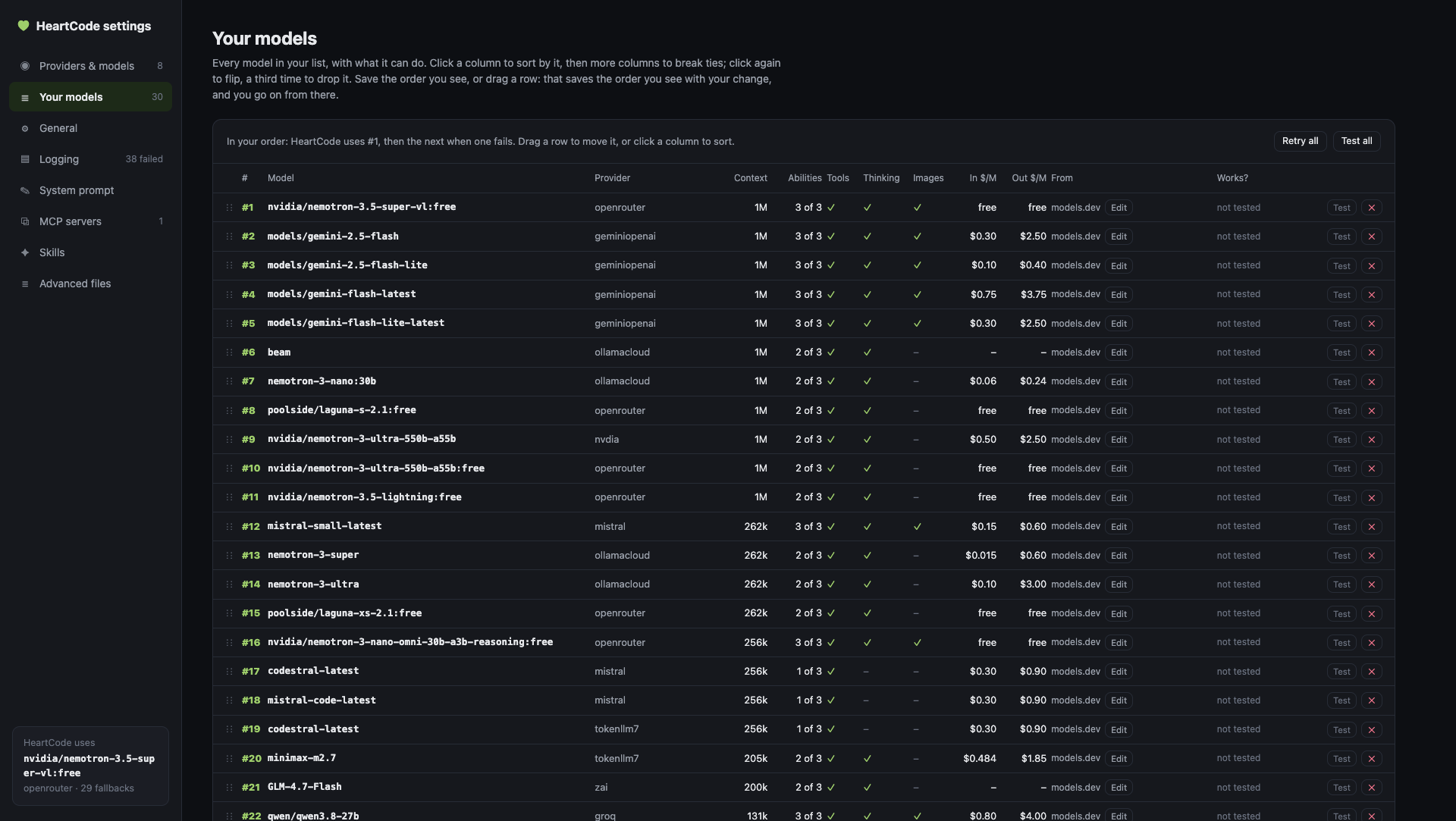
1. **Sort them by context and abilities.** Click the *Abilities* column, then *Context*: the
|
|
78
121
|
models that can do the most, with the biggest context window, come first. Click
|
|
79
|
-
**
|
|
122
|
+
**Save order** to keep it.
|
|
80
123
|
2. **Rearrange a bit more.** Drag a row to move it. #1 is the one HeartCode uses; the others are
|
|
81
124
|
its fallbacks, tried in order.
|
|
125
|
+
3. **Test them** (optional): **Test all** sends each a short message and shows which really answer.
|
|
82
126
|
|
|
83
127
|
If a model says *not found* in models.dev, **Retry** looks it up again, or **Set up** tells
|
|
84
128
|
HeartCode what it can do.
|
|
85
129
|
|
|
86
|
-
|
|
87
|
-
|
|
88
|
-
|
|
89
|
-
### 6. Turn on logging (optional)
|
|
130
|
+
### 6. Optional: notifications and logs
|
|
90
131
|
|
|
91
|
-
|
|
92
|
-
|
|
132
|
+
- **Notifications**: a Telegram message when a task finishes, fails or waits for you. Make a bot
|
|
133
|
+
with [@BotFather](https://t.me/BotFather), paste its token, press Start in the bot, and
|
|
134
|
+
HeartCode finds your chat.
|
|
135
|
+
- **Advanced → Logs**: a log of each run, and each request with its reply, in files of their own.
|
|
136
|
+
Logs older than 30 days are deleted (you can change that).
|
|
93
137
|
|
|
94
138
|
### 7. Back to HeartCode
|
|
95
139
|
|
|
@@ -101,7 +145,7 @@ Your changes are already in.
|
|
|
101
145
|
**Turn off** is selected: press Enter. The page stops and HeartCode is yours again.
|
|
102
146
|
|
|
103
147
|
<!-- image: the "settings page is on" dialog -->
|
|
104
|
-

|
|
105
149
|
|
|
106
150
|
### 9. Send "Hi" as a test
|
|
107
151
|
|
package/SKILL.md
CHANGED
|
@@ -71,9 +71,10 @@ all refused the request outright, else after `--max-retries` (10) whole rounds o
|
|
|
71
71
|
model (`-m <model>`) waits out rate limits and outages, up to `--max-retries` tries, and stops at
|
|
72
72
|
any other error. A provider that refuses a part of the request HeartCode can do without (the
|
|
73
73
|
model's thinking sent back, keys in the tools' schemas, images) gets it again without that part,
|
|
74
|
-
and that is remembered for the model for a day.
|
|
75
|
-
|
|
76
|
-
|
|
74
|
+
and that is remembered for the model for a day. When a conversation takes 85% of the window of the
|
|
75
|
+
model answering (room is kept for the reply), a model of the list with room for all of it takes
|
|
76
|
+
over (the first such one in the list's order); only when none has room is it summarized. When the
|
|
77
|
+
list moves on to a model with a smaller window, it's summarized for that model before it's sent.
|
|
77
78
|
Each request is fitted to the model it goes to: one that can't see gets a note in place of each
|
|
78
79
|
image, one that can't call tools gets the tool calls as text.
|
|
79
80
|
|
|
@@ -142,7 +143,8 @@ Tool names: HeartCode's own (`read_file`, `edit_file`, `write_file`, `run_comman
|
|
|
142
143
|
`list_files`, `web_fetch`, `web_search`…) or Claude Code's (`Read`, `Edit`, `Write`, `Bash`,
|
|
143
144
|
`Grep`, `Glob`, `WebFetch`, `WebSearch`). `--disallowedTools Bash` takes one away. MCP servers'
|
|
144
145
|
tools are named as in Claude Code: `mcp__<server>__<tool>`; `mcp__<server>` means all of one
|
|
145
|
-
server's tools, `mcp` all of them.
|
|
146
|
+
server's tools, `mcp` all of them. (The model itself reaches them through one `mcp` tool that lists
|
|
147
|
+
each by name; in the output they keep their own names, below.)
|
|
146
148
|
|
|
147
149
|
## Choose the model
|
|
148
150
|
|
|
@@ -163,8 +165,8 @@ The model in use knows the user's other models (what each can do, how often it f
|
|
|
163
165
|
session) and works with them through its `agent` tool: it asks a model that can for what it
|
|
164
166
|
can't do itself (a model that can't see asks one that can about a screenshot: "which tiles show a
|
|
165
167
|
chair?"), several at once when there are many images or parts, and a helper that fails is handed to
|
|
166
|
-
the next capable model until one does the job. A helper
|
|
167
|
-
|
|
168
|
+
the next capable model until one does the job. A helper works until its job is done (no step
|
|
169
|
+
limit; `--max-turns` applies to it too). Their tokens are in `usage`, and each model's in
|
|
168
170
|
`modelUsage`.
|
|
169
171
|
|
|
170
172
|
## Setting up a model
|
|
@@ -189,12 +191,28 @@ answers. A run that fails with a wrong key or an unknown model: ask the user to
|
|
|
189
191
|
| Flag | |
|
|
190
192
|
|---|---|
|
|
191
193
|
| `--append-system-prompt "<text>"` | your instructions for this run, at the end of the system prompt. HeartCode's own part then says less (no role of its own, no "stay in the project folder", no way of finishing of its own) and tells the model to follow yours where they differ; its `manage` tool is left out, and nothing from the run's messages is saved to its memory |
|
|
192
|
-
| `--mcp-config <file or JSON>` | more MCP servers (repeatable); `--strict-mcp-config`: only those.
|
|
194
|
+
| `--mcp-config <file or JSON>` | more MCP servers (repeatable); `--strict-mcp-config`: only those. The model sees every server's tools by name, one line each, and gets a tool's arguments when it uses it (a call that doesn't fit them comes back with what's wrong, not run). What a server says about using its tools goes in the system prompt |
|
|
193
195
|
| `--skills-dir <folder>` | more skills (repeatable) |
|
|
194
|
-
| `--no-memory` |
|
|
196
|
+
| `--no-memory` | nothing read or kept: no memory notes, no web pages saved in the project, no wrap-up at the end (see "What a run leaves") |
|
|
195
197
|
|
|
196
198
|
A project's own `HEARTCODE.md` (or `AGENTS.md`, `CLAUDE.md`) is read like instructions.
|
|
197
199
|
|
|
200
|
+
## What a run leaves, and the extra requests
|
|
201
|
+
|
|
202
|
+
Unless you pass `--no-memory`, a run keeps what it learns in the project it works in:
|
|
203
|
+
`.heartcode/research/` (every web page it read, whole, as Markdown; that folder ignores itself in
|
|
204
|
+
git) and `.heartcode/memory/` (notes). Notes and pages that match a task come with it next time,
|
|
205
|
+
so later runs research less. After a task that read the web, ran commands or made files, a
|
|
206
|
+
wrap-up request saves notes, keeps or deletes the pages it read, and removes throwaway files and
|
|
207
|
+
empty folders the task made (a test script, a debug log).
|
|
208
|
+
|
|
209
|
+
Before a task that changed files ends, another of the user's models (the same one when only one is
|
|
210
|
+
used) reviews the work against the request in a request of its own; a NO sends it back to fix.
|
|
211
|
+
The first file change of a task waits for the model's plan (its todo list). Changing files and
|
|
212
|
+
then saying it's done without running anything since sends it back to check. Nothing stops a
|
|
213
|
+
task but `--max-turns`, `--max-retries` or an interrupt: a model going round in circles hands the
|
|
214
|
+
work to the next model in the list. These requests are in `usage` and `modelUsage` too.
|
|
215
|
+
|
|
198
216
|
## Long tasks: a stream of events
|
|
199
217
|
|
|
200
218
|
```sh
|
|
@@ -204,9 +222,11 @@ heart -p --input-format stream-json --output-format stream-json
|
|
|
204
222
|
Stdin: one message per line, `{"type":"user","message":{"role":"user","content":"…"}}`.
|
|
205
223
|
Stop the running one with `{"type":"control_request","request_id":"1","request":{"subtype":"interrupt"}}`;
|
|
206
224
|
any other control request gets a `control_response` with `subtype: "error"` (not supported).
|
|
207
|
-
Stdout: one JSON event per line, `system`/`init` (its `tools` include the MCP servers' tools,
|
|
208
|
-
`mcp_servers` says which are `connected`), then `assistant` (text, thinking, `tool_use`),
|
|
209
|
-
`user` (`tool_result`), and a `result` after each message. It runs until stdin closes.
|
|
225
|
+
Stdout: one JSON event per line, `system`/`init` (its `tools` include the MCP servers' tools, each
|
|
226
|
+
`mcp__<server>__<tool>`, and `mcp_servers` says which are `connected`), then `assistant` (text, thinking, `tool_use`),
|
|
227
|
+
`user` (`tool_result`), and a `result` after each message. It runs until stdin closes. An MCP
|
|
228
|
+
call's `tool_use` is named as in Claude Code, `mcp__<server>__<tool>`, with the tool's own
|
|
229
|
+
arguments as `input`.
|
|
210
230
|
|
|
211
231
|
A helper's steps (the `agent` tool: another of the user's models, or the same one, doing a job;
|
|
212
232
|
several can run at once) come as `assistant` and `user` lines too, as Claude Code sends a
|
package/bin/heartcode.js
CHANGED
|
@@ -9,6 +9,7 @@ import { Session, transcript } from '../src/agent.js'
|
|
|
9
9
|
import { treeItems, codePlan, move, leaving, leftText, leftFiles } from '../src/tree.js'
|
|
10
10
|
import { UI, c, PERMISSIONS, duration, copyText, rank, setTheme, themeCodes, renderDiff, diffLines, DEFAULT_KEYS, loadKeys, width } from '../src/ui.js'
|
|
11
11
|
import { listFiles, runCommand, clip } from '../src/tools.js'
|
|
12
|
+
import { notify } from '../src/telegram.js'
|
|
12
13
|
import { log, LOG_FILE, LOG_DIR, requestLog, useRequestLog, useLogs, pruneLogs, logDays } from '../src/log.js'
|
|
13
14
|
import { prompt, usePromptsFrom, reloadPrompts } from '../src/prompts.js'
|
|
14
15
|
import { newChat, saveChat, listChats, loadChat, restoreFiles, ago, forkChat, exportChat } from '../src/sessions.js'
|
|
@@ -757,6 +758,17 @@ class App {
|
|
|
757
758
|
Object.assign(this.s, { mcp: this.mcp, memory: this.memory, skills: this.skills, director: this.director })
|
|
758
759
|
this.s.team = () => this.team() // your other models: a job this one can't do goes to one of them
|
|
759
760
|
this.s.engineFor = (t) => this.engine(t.provider, t.model, ui, undefined, { quiet: true })
|
|
761
|
+
// A model's context window, read from its saved profile (no probe, no network): so the agent can
|
|
762
|
+
// see, before compacting, whether another model in the list has room for the whole conversation.
|
|
763
|
+
this.s.windowOf = (t) => {
|
|
764
|
+
try {
|
|
765
|
+
const cl = this.client(t.provider, t.model)
|
|
766
|
+
const profile = loadProfile(cl) || profileFrom(cl, limitsOf(t.provider, cl.baseUrl, t.model))
|
|
767
|
+
return strategy(profile, cfg).context || 0
|
|
768
|
+
} catch {
|
|
769
|
+
return 0
|
|
770
|
+
}
|
|
771
|
+
}
|
|
760
772
|
this.s.failures = this.failures
|
|
761
773
|
if (this.allowTools?.length) this.s.allowTools = toolNames(this.allowTools) // headless --allowedTools
|
|
762
774
|
if (this.denyTools?.length) this.s.denyTools = toolNames(this.denyTools)
|
|
@@ -1506,16 +1518,21 @@ async function runTask(app, task, ctl) {
|
|
|
1506
1518
|
try {
|
|
1507
1519
|
const s = await app.session()
|
|
1508
1520
|
if (!s) return false
|
|
1521
|
+
let answer
|
|
1509
1522
|
try {
|
|
1510
|
-
await s.run(task, ctl?.signal)
|
|
1523
|
+
answer = await s.run(task, ctl?.signal)
|
|
1511
1524
|
} finally {
|
|
1512
1525
|
app.save()
|
|
1513
1526
|
}
|
|
1527
|
+
notify(app.cfg, 'done', `✅ Done · ${path.basename(app.root)} · ${duration(ui.worked())}\n${clip(task.split('\n')[0], 200)}\n\n${clip(String(answer ?? '').trim(), 3500)}`)
|
|
1514
1528
|
} catch (e) {
|
|
1515
1529
|
ui.stopSpin()
|
|
1516
1530
|
log('error', e.name === 'AbortError' || ctl?.signal.aborted ? 'task interrupted by the user' : e.stack)
|
|
1517
1531
|
if (e.name === 'AbortError' || ctl?.signal.aborted) ui.print(c.yellow('\ninterrupted'))
|
|
1518
|
-
else
|
|
1532
|
+
else {
|
|
1533
|
+
ui.print(c.red(`\nerror: ${e.message}`))
|
|
1534
|
+
notify(app.cfg, 'failed', `❌ Failed · ${path.basename(app.root)}\n${clip(task.split('\n')[0], 200)}\n\n${clip(e.message, 1500)}`)
|
|
1535
|
+
}
|
|
1519
1536
|
return false
|
|
1520
1537
|
}
|
|
1521
1538
|
return true
|
|
@@ -1528,6 +1545,7 @@ async function repl(app, f = {}) {
|
|
|
1528
1545
|
let ctl = null
|
|
1529
1546
|
ui.onEscape = () => ctl?.abort()
|
|
1530
1547
|
ui.onBtw = (q) => app.btw(q, true) // /btw typed while it works
|
|
1548
|
+
ui.onWaiting = (question) => notify(cfg, 'waiting', `⏳ Waiting for you · ${path.basename(app.root)}\n${clip(question.replace(/\x1b\[[0-9;]*m/g, '').replace(/\s*›\s*$/, '').replace(/^\?\s*/, '').trim(), 1000)}`) // a question or a permission while it works (Telegram)
|
|
1531
1549
|
ui.isCommand = (l) => app.isCommand(l)
|
|
1532
1550
|
loadPrices().then(() => ui.render?.()) // models.dev: what each model can do, for the model lists
|
|
1533
1551
|
ui.voiceConfig = () => ({ voice: cfg.voice, providers: cfg.providers })
|
package/package.json
CHANGED
package/prompts/agent.md
CHANGED
|
@@ -28,32 +28,25 @@ Language servers used in this project before: {{servers}}.{{/if}}
|
|
|
28
28
|
Everything else (more features, clever code) comes after these two.
|
|
29
29
|
|
|
30
30
|
## Before you start: research, then plan
|
|
31
|
-
1. First
|
|
31
|
+
1. First use what's already known here. Notes and pages saved for this project that match your message come with it, and web_search offers matching saved pages before it searches. Read those first (read_file / the memory tool); search the web only for what's missing or may have changed since (check the date).
|
|
32
32
|
2. What you know is out of date: it stopped long before today. Before you build anything (an app, a feature, a setup, a library, a command you haven't run here), research it — the kind of thing it is and the tools you'll make it with, never the names in the request: those are what you're making (asked for an app called "Nimbus": research that kind of app, not "Nimbus"). Get everything the task needs to be done right, however much that is:
|
|
33
33
|
- always the official source first — the tool's or library's own docs, site or repository — never a blog, a listicle or memory; web_search to find that official page (this year's, not your training years'), then web_fetch and read it, not just the snippet;
|
|
34
34
|
- assume what you remember is stale and relearn it from that page: the current way to do it, the real API, the exact setup steps;
|
|
35
35
|
- check each one's latest version (`npm view <pkg> version`, `pip index versions <pkg>`, …) and use the latest stable.
|
|
36
36
|
Then follow those official docs — not what you remember: it changes between major versions.
|
|
37
|
-
3.
|
|
38
|
-
4. Then plan the whole job before the first change: the end result in one line, then every step
|
|
37
|
+
3. What you research is kept: every page you web_fetch is saved whole in the project's research folder (give look_for to get the parts you need), and when the task ends HeartCode saves notes from it and drops what wasn't useful. Still save a project note yourself (memory tool, scope "project") when you work out something a later task here will need — how to build, run or test it, a decision and why, a setup that cost time.
|
|
38
|
+
4. Then plan the whole job before the first change: the end result in one line, then every step — each with how you'll check it works — in your todo list (a small, obvious change: one item; a question the code answers: no plan needed). HeartCode holds back your first change until there's a plan.
|
|
39
39
|
5. Something you're still not sure of after the research — what the user means (it can be read two ways that give different results) or a choice that's theirs: ask before you build, every question in one numbered message (ask_user). Then do the whole job.
|
|
40
40
|
|
|
41
41
|
## Before you say you're done: prove it works
|
|
42
42
|
Whatever you made — not only web — run it and see it work with your own eyes before you finish. "It should work" and "no syntax error" are not proof. Match the check to what it is:
|
|
43
|
-
- A web page or app: HeartCode opens it in a real browser, reads the console and shows you screenshots — fix every JavaScript error and every visual problem it reports (
|
|
43
|
+
- A web page or app: HeartCode opens it in a real browser, reads the console and shows you screenshots — fix every JavaScript error and every visual problem it reports (HeartCode sends you its UI guide when you work on one).
|
|
44
44
|
- A command-line tool or script: run it with real input, including an empty/edge case, and read the output. Run it the way a user would.
|
|
45
45
|
- A server or API: start it, call its endpoints (curl), check the status and the body; then stop it.
|
|
46
46
|
- A library or module: write a tiny throwaway snippet that imports and uses it, run that, then remove it.
|
|
47
47
|
- Anything with tests: run them. Something non-trivial with none: add one small check and run it.
|
|
48
48
|
Hit a real bug: fix the cause, run it again, and keep looping — build, run, read the error, fix — until it works end to end with nothing broken. This is the same for everything you make, in any language; running it and reading what it actually does is the one true check. HeartCode watches what you run: a command that fails and then passes, or an error it catches, is remembered as a rule so the mistake isn't made again. What you ship must look right (where it's seen) and work right (always).
|
|
49
49
|
|
|
50
|
-
## Building or changing a UI (a page, a screen, a component people look at)
|
|
51
|
-
It must look excellent — clean, modern, consistent, as good as the best products of its kind — whichever model you are. What you remember of design is dated and generic, so find the best of now:
|
|
52
|
-
1. Research it specifically — the kind of screen, not the product's name. Work out exactly what this is and who uses it ("an analytics dashboard for a small SaaS", "a settings page", "a mobile checkout"). Search for that exact thing at its best this year, several ways: the best-designed real products of this kind, design galleries and showcases of it, the examples, templates and blocks of the UI library you'll use. Skip listicles and SEO blogs; read the two or three strongest sources with web_fetch, and look at them with the browser tools when you can. Choose the current, most recommended UI library for this stack and read its docs (latest version). The project already has a look (its styles, its component library): follow it, don't replace it.
|
|
53
|
-
2. Before any code, write a design brief in your todo list: what you follow and why (from the research), the layout, the library's components you'll use, a spacing scale, a type scale, the colors (one accent; light and dark), every state (hover, focus, empty, loading, error), phone width. Then make your own checklist from the brief and the research: specific to this UI, things you can check in a screenshot.
|
|
54
|
-
3. Build it with the library's components, not hand-made look-alikes.
|
|
55
|
-
4. Look at it, then fix it. Open it in the browser (the browser tools), take screenshots at desktop and phone width (light and dark if it has both), and check them against your checklist point by point: alignment, spacing, sizes, contrast, overflow, anything that looks off or default. You can't see images: give the screenshots to a model that can (the agent tool, "images"), with your checklist to check point by point. Fix what's found and look again, until every point passes — at most about three rounds; then say what's left, if anything.
|
|
56
|
-
|
|
57
50
|
## Finding your way (in this order; stop as soon as you have what the task needs)
|
|
58
51
|
1. The project root above: what kind of project it is, its languages, and what's missing (no .git/: not under git; no README, no .gitignore). "(ignored)": .gitignore leaves it out — don't look inside unless the task is about it.
|
|
59
52
|
2. Folders and files: list_files with a path to go into the folders that matter, then search for the names and words from the task, then read_file what you found. A small change or a question about the code ends here.
|
|
@@ -119,8 +112,8 @@ How to use the MCP servers' tools, in their own words:
|
|
|
119
112
|
|
|
120
113
|
## output-old
|
|
121
114
|
|
|
122
|
-
<!-- Replaces an older tool result (all but the newest few long ones)
|
|
123
|
-
[older output
|
|
115
|
+
<!-- Replaces an older tool result (all but the newest few long ones) once there are many. {{call}}: what the call was ("run_command npm test"); {{total}}: its length; {{file}}: where all of it is (may be empty). The first lines follow it. -->
|
|
116
|
+
[older output of {{call}}, {{total}} characters{{#if file}} — all of it is in {{file}}: read_file it (start_line/end_line) or search in it if you need it again{{/if}}. Its first lines:]
|
|
124
117
|
|
|
125
118
|
## empty-reply
|
|
126
119
|
|
|
@@ -208,8 +201,8 @@ Run a shell command in the project folder; returns the exit code and output.
|
|
|
208
201
|
## tool-mcp
|
|
209
202
|
|
|
210
203
|
<!-- The one tool for all MCP servers (only sent when servers are configured). {{servers}}: "name: description" lines. -->
|
|
211
|
-
Use
|
|
212
|
-
Servers:
|
|
204
|
+
Use a tool of an MCP server: server, tool (its name below) and arguments (an object). To see a tool's arguments first, call tool "describe" with arguments {"name": "<tool>"}; a call whose arguments don't fit gets the tool's arguments back with what's wrong, and isn't run. Tool "search" with {"query": "…"} finds tools by what they do.
|
|
205
|
+
Servers and their tools:
|
|
213
206
|
{{servers}}
|
|
214
207
|
|
|
215
208
|
## tool-skill
|
|
@@ -225,11 +218,11 @@ Keep a todo list for a task with several steps: send the whole list each time (c
|
|
|
225
218
|
|
|
226
219
|
## tool-web_search
|
|
227
220
|
|
|
228
|
-
Search the web. Returns titles, URLs and snippets; read a page with web_fetch.
|
|
221
|
+
Search the web. Returns titles, URLs and snippets; read a page with web_fetch. When this project already has saved pages that match, you get those first (with the date each was read): use them, or search again with fresh: true to search the web anyway (for something that changes, like a latest version).
|
|
229
222
|
|
|
230
223
|
## tool-web_fetch
|
|
231
224
|
|
|
232
|
-
Fetch a web page (or any http/https URL) as
|
|
225
|
+
Fetch a web page (or any http/https URL) as Markdown. The whole page is saved in the project's research folder (the result says where). Give look_for — what you need from the page, in a few words — and a long page comes as its outline plus the parts that match; read any other part from the saved file with read_file (start_line/end_line). A short page comes whole.
|
|
233
226
|
|
|
234
227
|
## tool-ask_user
|
|
235
228
|
|
|
@@ -303,12 +296,12 @@ To act on what's in them, ask a model that can see: the agent tool with these in
|
|
|
303
296
|
<!-- Added to a helper agent's system prompt. -->
|
|
304
297
|
You are a helper agent. The main agent gave you one job; your final reply goes back to it, not to the user.
|
|
305
298
|
Do the whole job, then reply with exactly what it needs: findings with file paths and line numbers, what you changed, or what failed and why. Complete but brief.
|
|
306
|
-
Rules: do only this job, nothing extra. Never guess — look it up (don't know something current, search the web). Don't quit on the first failure; try another way. Check what you report is true before you say it. A question you can answer from what you know or were given: answer it at once, no searching.
|
|
299
|
+
Rules: do only this job, nothing extra. Never guess — look it up (don't know something current, search the web). Don't quit on the first failure; try another way. Check what you report is true before you say it. A question you can answer from what you know or were given: answer it at once, no searching.
|
|
307
300
|
|
|
308
301
|
## research-first
|
|
309
302
|
|
|
310
303
|
<!-- Added to each of the user's messages (not a helper's job, nor --append-system-prompt runs): small models follow the user's message far more than the system prompt. {{today}}: the date. -->
|
|
311
|
-
(First, if this asks you to build or set up anything: go to the official sources before you write a line — your memory is older than today ({{today}}), so don't trust it. For every tool, library or API you'll use, web_search for its official page (its own docs/site/repo, not a blog or listicle), web_fetch and read it, check the latest version, and relearn the current way from there — then build on what the source says, not what you remember. Research the kind of thing it is, not the names in this message (they're what you're making). Then plan the steps in your todo list and do all of it, putting stability and good UI/UX first. A UI: also find the best real examples of this exact kind of screen, and look at what you built (
|
|
304
|
+
(First, if this asks you to build or set up anything: go to the official sources before you write a line — your memory is older than today ({{today}}), so don't trust it. For every tool, library or API you'll use, web_search for its official page (its own docs/site/repo, not a blog or listicle), web_fetch and read it, check the latest version, and relearn the current way from there — then build on what the source says, not what you remember. Research the kind of thing it is, not the names in this message (they're what you're making). Then plan the steps in your todo list and do all of it, putting stability and good UI/UX first. A UI: also find the best real examples of this exact kind of screen, and look at what you built (follow the UI guide). A change to this project's own code, or a question the code answers: just do it.)
|
|
312
305
|
|
|
313
306
|
## plan-mode
|
|
314
307
|
|
|
@@ -337,6 +330,50 @@ The plan is approved: go ahead with it now.
|
|
|
337
330
|
{{items}}
|
|
338
331
|
Carry on with them. If one is no longer needed or can't be done, update the list and say why.)
|
|
339
332
|
|
|
333
|
+
## plan-first
|
|
334
|
+
|
|
335
|
+
<!-- The result of the first file change in a message when there's no plan yet: the change is not made. -->
|
|
336
|
+
Not changed yet: plan first. Write your plan with the todo tool — the end result in one line, then every step, each with how you'll check it works ("… — check: run npm test", "… — check: open it, no console errors"). A single small change: one item is enough. Then make this change again.
|
|
337
|
+
|
|
338
|
+
## unchecked
|
|
339
|
+
|
|
340
|
+
<!-- Sent when the model says it's done after changing files ({{files}}) but hasn't run or tested anything since the last change. -->
|
|
341
|
+
(Not done yet: you changed {{files}} and haven't run anything since the last change, so it isn't proven to work. Check it the way the user will use it — run it, test it, open it, call it — read what it actually does, fix what's wrong, and only then reply with what you did.)
|
|
342
|
+
|
|
343
|
+
## missing-files
|
|
344
|
+
|
|
345
|
+
<!-- Sent when the final answer names files as made that aren't in the project. {{files}}: the paths. -->
|
|
346
|
+
(Your answer names {{files}}, but they aren't in the project. Make them, or correct your answer to say what really exists.)
|
|
347
|
+
|
|
348
|
+
## review
|
|
349
|
+
|
|
350
|
+
<!-- A second look before a task is called done, in a request of its own (another model when there is one). {{request}}: the user's messages; {{plan}}: the todo list; {{answer}}: the agent's final reply; {{changes}}: the diffs; {{ran}}: commands run (newest last) with how they ended. -->
|
|
351
|
+
You check a coding agent's work before it's handed to the user. Judge it against what the user asked, strictly: is it complete (every part, every item of "all"/"every"), correct (it would work: no bug, no wrong API, nothing left as a placeholder or TODO), and checked (what was run shows it working)? Don't judge style or taste, only whether it does what was asked.
|
|
352
|
+
|
|
353
|
+
The user asked:
|
|
354
|
+
{{request}}
|
|
355
|
+
|
|
356
|
+
The agent's plan:
|
|
357
|
+
{{plan}}
|
|
358
|
+
|
|
359
|
+
The agent's answer:
|
|
360
|
+
{{answer}}
|
|
361
|
+
|
|
362
|
+
What it changed:
|
|
363
|
+
{{changes}}
|
|
364
|
+
|
|
365
|
+
What it ran:
|
|
366
|
+
{{ran}}
|
|
367
|
+
|
|
368
|
+
The FIRST word of your reply must be YES (done right) or NO. If NO: then a numbered list of what's wrong or missing — each concrete (where, what, and what's needed). Nothing else.
|
|
369
|
+
|
|
370
|
+
## review-failed
|
|
371
|
+
|
|
372
|
+
<!-- Sent when the review says the work isn't right. {{model}}: who reviewed; {{issues}}: its list. -->
|
|
373
|
+
(Not done yet: a review of your work ({{model}}, looking with fresh eyes at the request, your changes and what you ran) found this:
|
|
374
|
+
{{issues}}
|
|
375
|
+
Check each point. Fix the real ones and verify the fix; if a point is wrong, check it to be sure, then say why in your answer.)
|
|
376
|
+
|
|
340
377
|
## stopped-early
|
|
341
378
|
|
|
342
379
|
<!-- Sent when the model named a next step but stopped without doing it (no tool call followed). -->
|
|
@@ -426,7 +463,10 @@ Use it; calling it again gives the same.)
|
|
|
426
463
|
## lesson
|
|
427
464
|
|
|
428
465
|
<!-- Turning a mistake that was caught and fixed into one reusable rule to save in memory. {{error}}: what went wrong. -->
|
|
429
|
-
While building, this mistake was caught and then fixed: "{{error}}".
|
|
466
|
+
While building, this mistake was caught and then fixed: "{{error}}". Answer in exactly two lines:
|
|
467
|
+
1. ONE short sentence: the reusable rule that avoids it next time — name the technology, say what to do (not just what went wrong), concrete.
|
|
468
|
+
2. "scope: project" if the rule only holds for this project (its own paths, devices, pinned versions, setup), else "scope: global" (true in any project using that technology).
|
|
469
|
+
Nothing else.
|
|
430
470
|
|
|
431
471
|
## look-at-ui
|
|
432
472
|
|
|
@@ -499,6 +539,56 @@ The notes:
|
|
|
499
539
|
From memory (a "lesson" is a rule HeartCode learned from a past mistake — follow it so the mistake isn't repeated):
|
|
500
540
|
{{notes}}
|
|
501
541
|
|
|
542
|
+
## ui-guide
|
|
543
|
+
|
|
544
|
+
<!-- Sent once per conversation, with the user's message when it's about a UI, or with the result of the first UI file the model writes (not in the system prompt: most tasks don't need it). -->
|
|
545
|
+
UI guide — building or changing a UI (a page, a screen, a component people look at):
|
|
546
|
+
It must look excellent — clean, modern, consistent, as good as the best products of its kind — whichever model you are. What you remember of design is dated and generic, so find the best of now:
|
|
547
|
+
1. Research it specifically — the kind of screen, not the product's name. Work out exactly what this is and who uses it ("an analytics dashboard for a small SaaS", "a settings page", "a mobile checkout"). Search for that exact thing at its best this year, several ways: the best-designed real products of this kind, design galleries and showcases of it, the examples, templates and blocks of the UI library you'll use. Skip listicles and SEO blogs; read the two or three strongest sources with web_fetch, and look at them with the browser tools when you can. Choose the current, most recommended UI library for this stack and read its docs (latest version). The project already has a look (its styles, its component library): follow it, don't replace it.
|
|
548
|
+
2. Before any code, write a design brief in your todo list: what you follow and why (from the research), the layout, the library's components you'll use, a spacing scale, a type scale, the colors (one accent; light and dark), every state (hover, focus, empty, loading, error), phone width. Then make your own checklist from the brief and the research: specific to this UI, things you can check in a screenshot.
|
|
549
|
+
3. Build it with the library's components, not hand-made look-alikes.
|
|
550
|
+
4. Look at it, then fix it. Open it in the browser (the browser tools), take screenshots at desktop and phone width (light and dark if it has both), and check them against your checklist point by point: alignment, spacing, sizes, contrast, overflow, anything that looks off or default. You can't see images: give the screenshots to a model that can (the agent tool, "images"), with your checklist to check point by point. Fix what's found and look again, until every point passes — at most about three rounds; then say what's left, if anything.
|
|
551
|
+
|
|
552
|
+
## research-known
|
|
553
|
+
|
|
554
|
+
<!-- Added to the user's message: pages already read for this project that match it (titles only; the model opens a file when it needs the detail). {{pages}}: "- title — url (read date) → file" lines. -->
|
|
555
|
+
Already researched for this project (whole pages, saved; read_file one when you need its detail — check the date for things that change):
|
|
556
|
+
{{pages}}
|
|
557
|
+
|
|
558
|
+
## research-saved
|
|
559
|
+
|
|
560
|
+
<!-- web_search's result when the project already has saved pages that match the query. {{query}}: the search; {{pages}}: "- title — url (read date; used for: …) → file" lines. -->
|
|
561
|
+
This project already has pages saved that match "{{query}}":
|
|
562
|
+
{{pages}}
|
|
563
|
+
Read the one you need with read_file (it's the whole page). If they're not what you need, or it may have changed since (a latest version, a new release), call web_search again with fresh: true.
|
|
564
|
+
|
|
565
|
+
## wrapup
|
|
566
|
+
|
|
567
|
+
<!-- The system prompt of the step after a task that researched, fixed or made something: it keeps what's worth keeping and cleans up the rest. -->
|
|
568
|
+
You keep a coding agent's knowledge of a project, after a task it just finished. You get the task, its answer, the web pages and searches it read, the lessons and notes that exist already, and the new files it made. Using only the tools:
|
|
569
|
+
1. Save what's worth knowing next time with the memory tool: facts a later task here would otherwise research again — the current API or setup of a library and its official source URL, how this project builds/runs/tests, a decision and why, a gotcha that cost time. One fact per note, short, the source URL in it. scope "project" for anything about this project (its stack, versions, paths, devices, commands); "global" only for what holds in every project. A note that says the same as one that exists: update that one (write with its name) instead of adding another; one that's now wrong: replace it.
|
|
570
|
+
2. Each page and search read: research with verdict "used" (and used_for: what it was used for, a few words) if it held something the task used or a later task may need; "junk" if not (off-topic, an error page, spam, a search that found nothing useful) — junk is deleted.
|
|
571
|
+
3. Each new file (or empty folder, ending in /) listed: scratch with verdict "delete" only if it was a throwaway the task made to try or check something (a test script, a debug log, a screenshot) and the user didn't ask for it; "keep" otherwise. When unsure: keep.
|
|
572
|
+
Then reply with one line: what you saved and cleaned up. Nothing worth saving: reply NONE.
|
|
573
|
+
|
|
574
|
+
## wrapup-task
|
|
575
|
+
|
|
576
|
+
<!-- The wrap-up step's request. {{task}}: the user's message; {{answer}}: the agent's final reply; {{pages}}, {{files}}, {{notes}}: lists (may be "(none)"). -->
|
|
577
|
+
The task:
|
|
578
|
+
{{task}}
|
|
579
|
+
|
|
580
|
+
The agent's answer:
|
|
581
|
+
{{answer}}
|
|
582
|
+
|
|
583
|
+
Pages and searches it read (research):
|
|
584
|
+
{{pages}}
|
|
585
|
+
|
|
586
|
+
New files it made (scratch):
|
|
587
|
+
{{files}}
|
|
588
|
+
|
|
589
|
+
Notes that already exist and may be related:
|
|
590
|
+
{{notes}}
|
|
591
|
+
|
|
502
592
|
## director
|
|
503
593
|
|
|
504
594
|
<!-- Added to the main chat's system prompt in director mode (the settings page turns it off). -->
|