heartcode 0.1.25 → 0.1.30
This diff represents the content of publicly available package versions that have been released to one of the supported registries. The information contained in this diff is provided for informational purposes only and reflects changes between package versions as they appear in their respective public registries.
- package/CHANGELOG.md +159 -0
- package/README.md +73 -29
- package/SKILL.md +31 -11
- package/bin/heartcode.js +203 -68
- package/package.json +1 -1
- package/prompts/agent.md +126 -21
- package/prompts/guided.md +1 -0
- package/src/agent.js +439 -70
- package/src/capabilities.js +48 -0
- package/src/client.js +14 -3
- package/src/config.js +1 -1
- package/src/edit.js +39 -9
- package/src/guided.js +7 -2
- package/src/headless.js +8 -3
- package/src/importer.js +99 -0
- package/src/mcp.js +21 -3
- package/src/memory.js +6 -2
- package/src/oauth.js +3 -0
- package/src/research.js +142 -0
- package/src/sessions.js +4 -1
- package/src/settings.html +495 -63
- package/src/settings.js +115 -5
- package/src/tabs.js +2 -2
- package/src/telegram.js +81 -0
- package/src/tools.js +189 -55
- package/src/ui.js +35 -10
- package/src/web.js +81 -10
package/CHANGELOG.md
CHANGED
|
@@ -2,6 +2,165 @@
|
|
|
2
2
|
|
|
3
3
|
What changed in each version of HeartCode, newest first.
|
|
4
4
|
|
|
5
|
+
## 0.1.30 (2026-11-01)
|
|
6
|
+
|
|
7
|
+
- Settings page: the sidebar is 7 items in 4 groups split by lines (Models · General, Notifications ·
|
|
8
|
+
Skills, MCP servers, System prompt · Advanced); merged pages have tabs (Your list / Providers,
|
|
9
|
+
Settings / Status bar, Logs / Files) and every old address still opens its tab. General is one
|
|
10
|
+
calm column of cards (permissions three across, colors four across, rows with the control on the
|
|
11
|
+
right), and voice input is a form (this machine or a provider, model, language) instead of JSON.
|
|
12
|
+
"Testing…" and warnings are amber, not the green that means "works".
|
|
13
|
+
- Headless (`heart -p`) output keeps Claude Code's shape for MCP tools: the `init` event lists each
|
|
14
|
+
as `mcp__<server>__<tool>`, and an MCP call's `tool_use` is named so, with the tool's own
|
|
15
|
+
arguments (it went out as HeartCode's one `mcp` tool since 0.1.28, which programs reading the
|
|
16
|
+
stream, like Nibedita, don't know).
|
|
17
|
+
- `--no-memory` now also keeps web pages out of the project (no `.heartcode/research/`), and helpers
|
|
18
|
+
follow it.
|
|
19
|
+
- SKILL.md brought up to date: no helper step limit, how the model reaches MCP tools, a model with
|
|
20
|
+
room before summarizing, and what a run leaves (research, notes, the wrap-up) and the extra
|
|
21
|
+
requests it makes (the review).
|
|
22
|
+
|
|
23
|
+
## 0.1.29 (2026-11-01)
|
|
24
|
+
|
|
25
|
+
- Telegram notifications: a message on your phone when a task finishes (the task, how long it took,
|
|
26
|
+
the answer), fails (the error), or HeartCode waits for you (a question or a permission). Set up on
|
|
27
|
+
the settings page's new Notifications page: make a bot with @BotFather, paste its token, press
|
|
28
|
+
Start in the bot, and HeartCode finds your chat and says hello. Each kind can be switched off; a
|
|
29
|
+
test button; Disconnect forgets the token. The token is never shown whole or logged; a message
|
|
30
|
+
that can't be sent never holds up the work.
|
|
31
|
+
A token saved before Start was pressed in the bot no longer leaves notifications silently off:
|
|
32
|
+
the chat is found (and saved) the first time one is sent.
|
|
33
|
+
|
|
34
|
+
## 0.1.28 (2026-11-01)
|
|
35
|
+
|
|
36
|
+
- When a conversation outgrows the current model's context window and you have other models selected,
|
|
37
|
+
HeartCode now moves to a model with room instead of compacting — nothing is summarized away when a
|
|
38
|
+
roomier model is available. It scans your model list in order, so it picks your highest-priority
|
|
39
|
+
model that can hold the whole conversation; if none of your models has more room, it compacts as
|
|
40
|
+
before (uses what's available). With a single pinned model, nothing changes.
|
|
41
|
+
- Learning that actually keeps what it learns, per project:
|
|
42
|
+
- Every web page HeartCode reads is saved whole as Markdown in `.heartcode/research/` (one file
|
|
43
|
+
per page, its address as the name, a header with the URL, title, date and what it was looking
|
|
44
|
+
for; real Markdown tables; the folder ignores itself in git). Helpers' pages are saved too.
|
|
45
|
+
- `web_fetch` takes `look_for`: a long page comes as its outline plus the parts that match, with
|
|
46
|
+
line numbers into the saved file — not just the first 10,000 characters.
|
|
47
|
+
- `web_search` offers matching pages this project already has first (with the date each was read);
|
|
48
|
+
`fresh: true` searches the web anyway. Matching notes and saved pages come with each message.
|
|
49
|
+
- When a task that read the web, ran commands or made files ends, a wrap-up step saves what's
|
|
50
|
+
worth knowing as notes (project or global), keeps each page it read (with what it was used for)
|
|
51
|
+
or deletes it as junk, and removes throwaway files and empty folders the task made.
|
|
52
|
+
- Lessons learned from fixes now go to the project when they only hold there (they all went
|
|
53
|
+
global before); note names are cut at a word's end; saving a note that repeats one says so.
|
|
54
|
+
- Less in every request:
|
|
55
|
+
- MCP tools are listed by name with one line each (one `mcp` tool), not each tool's whole schema:
|
|
56
|
+
~13,400 → ~1,800 tokens for two browser servers. A call whose arguments don't fit gets the
|
|
57
|
+
tool's arguments back with what's wrong (and "did you mean"), and isn't run. The 100-tool cap is gone.
|
|
58
|
+
- Every sizable tool result is saved to a file when it comes (`~/.heart/outputs/`, kept with the
|
|
59
|
+
chat, deleted with it); past 8 long results, all but the newest 4 become a pointer to their file.
|
|
60
|
+
- The UI guide left the system prompt: it comes with a message about a UI, or with the first UI
|
|
61
|
+
file written.
|
|
62
|
+
- Older conversations' MCP calls (made by their own `mcp__server__tool` names) are rewritten as
|
|
63
|
+
`mcp` calls when resumed.
|
|
64
|
+
- Done means done:
|
|
65
|
+
- The first file change of a message waits for a plan (the todo list, each step with how it'll be checked).
|
|
66
|
+
- Saying it's done after changing files without running anything since: sent back to check it.
|
|
67
|
+
Naming files as made that don't exist: sent back.
|
|
68
|
+
- Before a task with changes ends, another of your models (or the same one, fresh) reviews it
|
|
69
|
+
against your request, plan, changes and what was run: YES, or NO with what's wrong, which goes
|
|
70
|
+
back to be fixed.
|
|
71
|
+
- Nothing stops a task but Esc: going round in circles (the same call five times, ten repeated
|
|
72
|
+
calls, eight failing commands, replies that loop) hands over to the next model in your list, or
|
|
73
|
+
warns and goes on; a server that keeps failing is waited out, not given up on. Reminders about
|
|
74
|
+
unfinished work repeat as long as the model makes progress (no count). The page check clicks
|
|
75
|
+
every control and looks again whenever pages changed (no 30-button, 2-page or 3-look caps).
|
|
76
|
+
- Fixed: tool outputs saved in the same millisecond overwrote each other; HeartCode's own research
|
|
77
|
+
files showed up as a command's file changes (and in /rewind).
|
|
78
|
+
- Helpers' replies are shown in full under their name (only the title showed before), printed whole
|
|
79
|
+
when each finishes so helpers working side by side don't interleave.
|
|
80
|
+
- Helpers (the agent tool) no longer stop at 25 steps — like the main session, they run until the job
|
|
81
|
+
is done (Esc stops them; --max-turns still applies if you set it).
|
|
82
|
+
|
|
83
|
+
## 0.1.27 (2026-10-31)
|
|
84
|
+
|
|
85
|
+
- A built-in computer-use MCP server (@zavora-ai/computer-use-mcp), off by default: switch it on in
|
|
86
|
+
/settings → MCP servers (or see it with /mcp) to let a capable vision model control your desktop —
|
|
87
|
+
screenshots, mouse, keyboard, clipboard. It's off by default because it controls your whole machine
|
|
88
|
+
and needs the OS's screen/accessibility permission and a model that's good at computer use.
|
|
89
|
+
- /mcp now lists installed-but-off servers too (marked "off"), not only the running ones.
|
|
90
|
+
|
|
91
|
+
- Features that need an outside tool now say so. The settings page's General tab has an "External
|
|
92
|
+
tools" card that lists each such feature (voice input, browser preview/UI review, installing skills
|
|
93
|
+
from GitHub), ticks the ready ones, and grays out the rest with what to install — just the name of
|
|
94
|
+
what's needed, since how to install it differs by OS. /doctor shows the same in the CLI.
|
|
95
|
+
|
|
96
|
+
- MCP servers now show whether they need signing in. In the CLI, /mcp lists every server with its
|
|
97
|
+
status: "local · no sign-in", "signed in", or "sign-in needed". In the settings page, each remote
|
|
98
|
+
server on the MCP page shows a "signed in" / "sign-in needed" badge and a Sign in button (it opens
|
|
99
|
+
your browser; available when the page was opened from HeartCode with /settings). Local servers show
|
|
100
|
+
no sign-in, since they don't need it.
|
|
101
|
+
|
|
102
|
+
- The settings page's Skills page can install a skill from a GitHub repo or URL (owner/repo, a repo
|
|
103
|
+
link, or a link to a SKILL.md) — the /install_skill command, now a button and input. Skills show
|
|
104
|
+
with the /skill: prefix throughout the page.
|
|
105
|
+
- The settings page can import from other coding CLIs (the /import command): "Import from other tools"
|
|
106
|
+
on the Skills page lists the skills, commands, MCP servers, instructions and memory found in Claude
|
|
107
|
+
Code, Cursor, Gemini CLI and Codex, grouped with checkboxes, and brings in what you tick.
|
|
108
|
+
|
|
109
|
+
- /install_skill <github repo or SKILL.md url> installs a skill straight from GitHub (or any URL) —
|
|
110
|
+
"user/repo", a repo link, a .git URL, or a link to a SKILL.md. It clones (or downloads a tarball)
|
|
111
|
+
and installs every skill it finds; add --project to keep it to this folder. Run it as /skill:<name>.
|
|
112
|
+
- /help now lists the keyboard shortcuts (voice, tabs, the message queue, scrolling, permissions,
|
|
113
|
+
stop), read from your effective keybindings.
|
|
114
|
+
|
|
115
|
+
- Skills are now typed as /skill:name, so they're easy to tell apart from HeartCode's own commands
|
|
116
|
+
(and can't clash with them). The command menu and /help show the /skill: form; typing a bare
|
|
117
|
+
/name of a skill points you to /skill:name. Built-in commands (/help, /settings, …) are unchanged.
|
|
118
|
+
- The settings page (/settings) has a visual Status bar editor: drag items into each line, drop some
|
|
119
|
+
on the right to push them to the edge, add or remove lines, turn the whole bar off, and see a live
|
|
120
|
+
preview — no editing config.json by hand. Saved changes apply to a running HeartCode right away.
|
|
121
|
+
- Before building, HeartCode now checks what the project already has and reuses it (DRY), keeps code
|
|
122
|
+
clean with self-explaining names, and adds comments only where something is genuinely non-obvious.
|
|
123
|
+
- Research is remembered per project: HeartCode checks the project's memory before searching, and
|
|
124
|
+
saves what it learns (a library's API, setup, a design direction, with the source) as a project
|
|
125
|
+
note, so later sessions reuse it instead of searching again.
|
|
126
|
+
- Esc no longer stops a running task on a single stray tap: it asks for a second Esc within 2.5s
|
|
127
|
+
first. Flushing the queue (Alt+S / Alt+A) still stops at once.
|
|
128
|
+
- When the model describes a next step but stops without doing it, HeartCode nudges it once to finish
|
|
129
|
+
the work (alongside the existing nudge for unfinished todo items).
|
|
130
|
+
- The status bar is configurable. "statusBar" in config.json is a list of lines; each line is a list
|
|
131
|
+
of item names (all left-aligned) or { "left": [...], "right": [...] } to push some to the right
|
|
132
|
+
edge. Item names: provider, model, mode, thinking, images, ctx, tps, cost, autocompact, worktree,
|
|
133
|
+
permissions. "statusBar": false hides the whole bar. Left out, it keeps the default two-line
|
|
134
|
+
layout. Changes to config.json apply live. Example:
|
|
135
|
+
"statusBar": [["provider", "model"], { "left": ["ctx", "tps"], "right": ["permissions"] }]
|
|
136
|
+
- Text you type while the model is answering keeps its cursor: when the answer finishes, the cursor
|
|
137
|
+
stays where it was in what you'd typed, instead of jumping to the start of the line.
|
|
138
|
+
- The built-in keyboard shortcuts moved off Ctrl, which collided with the shell and line editing
|
|
139
|
+
(Ctrl+N/P history, Ctrl+T transpose, Ctrl+Q flow-control, Ctrl+\ quit), onto Alt/Option: tabs are
|
|
140
|
+
Alt+T (new), Alt+W (close), Alt+N/Alt+P (switch, and Alt+1…9 to jump); the message queue is Alt+S
|
|
141
|
+
(send first), Alt+A (send all), Alt+M (change when-done). Ctrl+PgUp/PgDn still cycle tabs for
|
|
142
|
+
terminals without an Option-as-Meta key. Scrolling (Shift+↑↓, Alt+↑↓) is unchanged. On macOS
|
|
143
|
+
Terminal.app, Alt shortcuts need "Use Option as Meta key" on (Settings → Profiles → Keyboard);
|
|
144
|
+
keybindings.json can remap any of them.
|
|
145
|
+
- Voice input without the /voice command: when voice is set up, press Space while the input box is
|
|
146
|
+
empty and it starts listening straight away (Space again to pause, Enter to finish, Esc to cancel).
|
|
147
|
+
The shortcut is shown in the header hint ("Space talk (voice)"). With text already in the box, or
|
|
148
|
+
when voice isn't set up, Space types a space as before.
|
|
149
|
+
|
|
150
|
+
## 0.1.26 (2026-10-31)
|
|
151
|
+
|
|
152
|
+
- edit_file can now change a file by line number: give start_line (and end_line for a range) with the
|
|
153
|
+
new replace text and no search is needed — so a weak model that can't reproduce the file's exact
|
|
154
|
+
bytes can still edit it, and a line edit can't mis-match. "replace": "" with a range deletes those
|
|
155
|
+
lines. Text-based search still works exactly as before.
|
|
156
|
+
- A failed edit_file (the SEARCH text not matching) no longer sends the model in circles. The error
|
|
157
|
+
now shows a line-by-line diff of what it sent (✗) against what the file actually has (✓) at the
|
|
158
|
+
right place — found by how alike the lines are, not loose word overlap — so a one-character or
|
|
159
|
+
whitespace mistake is obvious. If the same file misses twice in a row, the error includes the file
|
|
160
|
+
itself with line numbers (the whole thing if short, else the lines around the target) and steers
|
|
161
|
+
the model to edit by line number (start_line/end_line), copy an exact block, or use write_file —
|
|
162
|
+
so it can't keep guessing. The count clears once an edit to that file lands.
|
|
163
|
+
|
|
5
164
|
## 0.1.25 (2026-10-31)
|
|
6
165
|
|
|
7
166
|
- The model(s) you choose for a folder with /select_model are remembered per folder, in
|
package/README.md
CHANGED
|
@@ -1,3 +1,5 @@
|
|
|
1
|
+
|
|
2
|
+
|
|
1
3
|
# HeartCode
|
|
2
4
|
|
|
3
5
|
A coding agent for your terminal that works with any OpenAI-compatible model.
|
|
@@ -7,28 +9,52 @@ behind your back: only Node.js (20 or newer) and HeartCode's own code. What you
|
|
|
7
9
|
what you can read.
|
|
8
10
|
|
|
9
11
|
<!-- image: HeartCode in the terminal, answering a message -->
|
|
10
|
-

|
|
11
13
|
|
|
12
14
|
## Why I made it
|
|
13
15
|
|
|
14
16
|
Not to compete with other coding CLIs. I made it for my own use, because none of the ones I
|
|
15
|
-
tried did what I needed
|
|
16
|
-
|
|
17
|
-
- **
|
|
18
|
-
|
|
19
|
-
|
|
20
|
-
|
|
21
|
-
|
|
22
|
-
- **
|
|
23
|
-
|
|
24
|
-
|
|
25
|
-
|
|
26
|
-
- **
|
|
27
|
-
|
|
28
|
-
- **
|
|
29
|
-
|
|
17
|
+
tried did what I needed:
|
|
18
|
+
|
|
19
|
+
- **No dependencies, so no supply-chain attack.** Coding CLIs run with your files, your keys and
|
|
20
|
+
your shell. Most pull in hundreds of npm packages, and any one of them, or any package those
|
|
21
|
+
depend on, can be hijacked and ship malware in an update. HeartCode has none: no
|
|
22
|
+
`node_modules`, no install scripts, only Node.js and HeartCode's own code. There's nothing for
|
|
23
|
+
anyone else to poison, and you can read everything you run.
|
|
24
|
+
- **None of the other CLIs I've used did these**, so HeartCode does:
|
|
25
|
+
- **Rotates through your models on its own, across providers.** Give it a list (free ones
|
|
26
|
+
included). When one hits a rate limit, goes down or fails, the next answers, from another
|
|
27
|
+
provider first, and the work goes on. A ↻ in the status bar shows when a fallback is answering.
|
|
28
|
+
- **Moves to a bigger model instead of forgetting.** When the conversation outgrows a model's
|
|
29
|
+
context window, it switches to one of your models with room before it summarizes anything away.
|
|
30
|
+
- **Researches before it builds.** It assumes what it remembers is out of date and reads the
|
|
31
|
+
current official docs first, not blogs or memory.
|
|
32
|
+
- **Learns, per project, and keeps it.** Every web page it reads is kept whole in
|
|
33
|
+
`.heartcode/research/`. When a task ends it saves what's worth knowing as notes
|
|
34
|
+
(`.heartcode/memory/`), drops the junk and removes throwaway files. A mistake it fixes becomes a
|
|
35
|
+
lesson it won't repeat. The next task starts from what's known instead of searching again.
|
|
36
|
+
- **Checks its work before calling it done**: a plan first, a run after every change, and another
|
|
37
|
+
model reviewing the result against what you asked. Going round in circles hands the work to
|
|
38
|
+
your next model; only you (Esc) stop it.
|
|
39
|
+
- **Gets good work out of weak and local models.** Models that can't call tools are guided step
|
|
40
|
+
by step. Edits by line number save a model that can't repeat text exactly. Each model's
|
|
41
|
+
abilities come from [models.dev](https://models.dev), so nothing is spent finding out.
|
|
42
|
+
- **Sends only what's needed.** MCP tools go as names until one is used, old tool output becomes a
|
|
43
|
+
pointer to its saved file, and guides arrive when the task needs them.
|
|
44
|
+
- **Tells you on Telegram** when a task finishes, fails or waits for you, so you can walk away.
|
|
45
|
+
- **Never sends `max_tokens`**, so no provider cuts a reply short by a limit you didn't choose.
|
|
46
|
+
|
|
47
|
+
### And the rest you'd expect
|
|
48
|
+
|
|
49
|
+
- **Any OpenAI-compatible provider**, several at once: OpenRouter, Groq, NVIDIA, Gemini, Ollama,
|
|
50
|
+
LM Studio, your own proxy…
|
|
51
|
+
- **Set up in a web page** on your own machine (`/settings`), not by editing config files.
|
|
52
|
+
- **Usable by other tools and AI agents**: `heart -p` runs one task headless, like `claude -p`
|
|
53
|
+
(see [SKILL.md](SKILL.md)).
|
|
54
|
+
- **Logs each request and its reply** in a file of its own when you switch logging on, so you can
|
|
55
|
+
see what went wrong.
|
|
30
56
|
- **Takes skills, MCP servers and hooks** in Claude Code's formats; `/import` brings yours over.
|
|
31
|
-
- **
|
|
57
|
+
- **Tabs** (`Alt+T`), each with its own conversation, and git worktrees for work kept apart.
|
|
32
58
|
|
|
33
59
|
## How I set it up and use it
|
|
34
60
|
|
|
@@ -62,34 +88,52 @@ heart
|
|
|
62
88
|
### 3. Open the settings page
|
|
63
89
|
|
|
64
90
|
Type `/settings`. The settings page opens in your browser. It runs on your machine only
|
|
65
|
-
(127.0.0.1, with a secret key in its link).
|
|
91
|
+
(127.0.0.1, with a secret key in its link). A running HeartCode picks up what you change right
|
|
92
|
+
away.
|
|
66
93
|
|
|
67
94
|
<!-- image: the settings page -->
|
|
68
|
-

|
|
96
|
+
|
|
97
|
+
The sidebar, in four groups:
|
|
98
|
+
|
|
99
|
+
- **Models**: *Your list* (the models HeartCode uses, in order) and *Providers* (where they
|
|
100
|
+
come from).
|
|
101
|
+
- **General**: *Settings* (what it may do without asking, terminal colors, features, thinking
|
|
102
|
+
effort, voice input, and which outside tools are ready) and *Status bar* (drag and drop what the
|
|
103
|
+
bottom lines show, with a live preview). **Notifications**: Telegram.
|
|
104
|
+
- **Skills**, **MCP servers** and **System prompt**: what HeartCode can do and how it's told.
|
|
105
|
+
- **Advanced**: *Logs* (requests and runs) and *Files* (the rest of the settings, as files).
|
|
69
106
|
|
|
70
|
-
### 4.
|
|
107
|
+
### 4. Add a provider and pick models
|
|
108
|
+
|
|
109
|
+
On **Models → Providers**:
|
|
110
|
+
|
|
111
|
+

|
|
71
112
|
|
|
72
113
|
1. **Add a provider**: its name, base URL and API key. Pick one of the presets to fill in the URL.
|
|
73
114
|
2. **Choose the models to use**: click a model to add it to your list. I use the free models.
|
|
74
115
|
|
|
75
|
-
### 5.
|
|
116
|
+
### 5. Put your list in order
|
|
117
|
+
|
|
118
|
+
On **Models → Your list**:
|
|
76
119
|
|
|
77
120
|
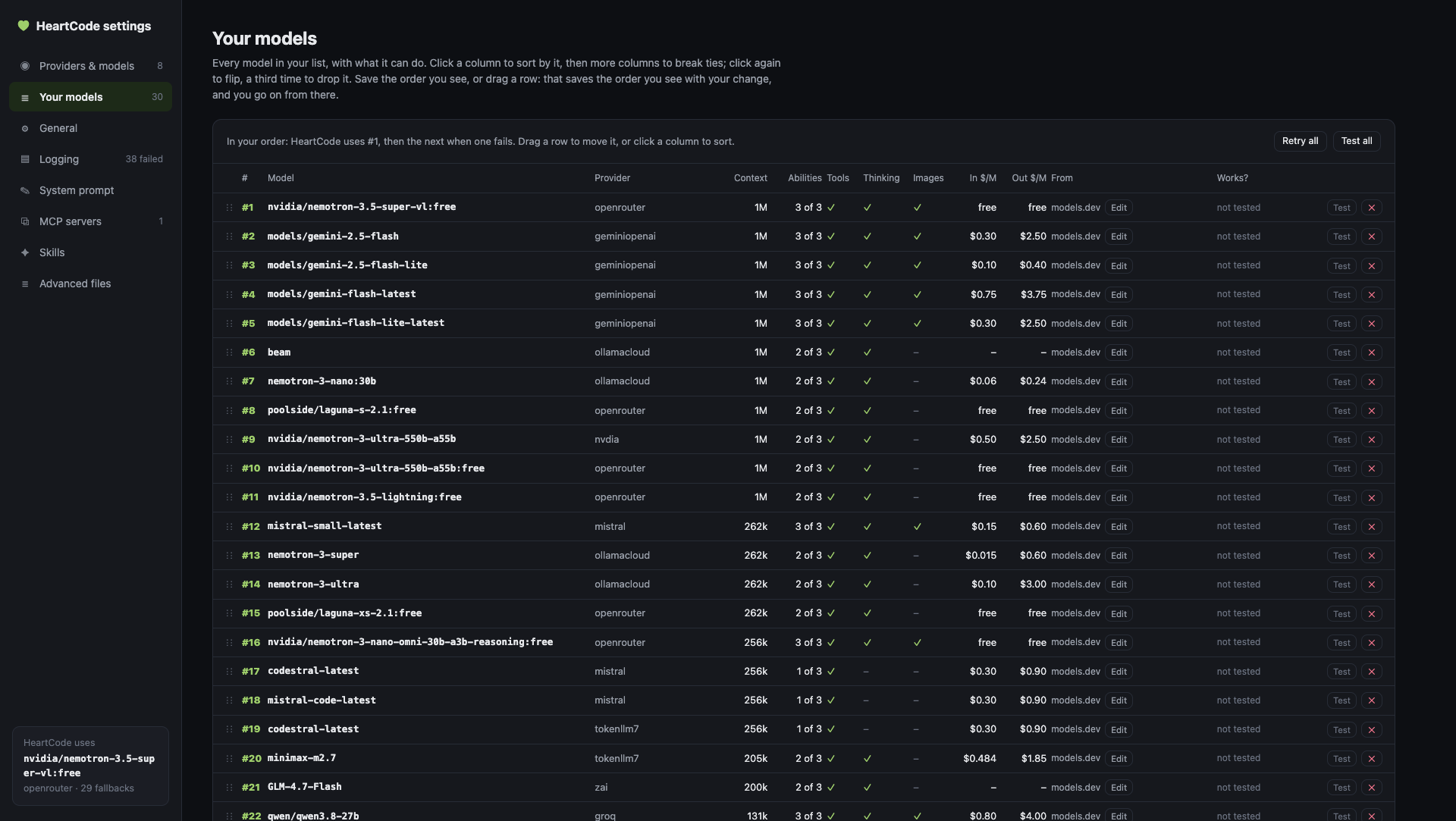
1. **Sort them by context and abilities.** Click the *Abilities* column, then *Context*: the
|
|
78
121
|
models that can do the most, with the biggest context window, come first. Click
|
|
79
|
-
**
|
|
122
|
+
**Save order** to keep it.
|
|
80
123
|
2. **Rearrange a bit more.** Drag a row to move it. #1 is the one HeartCode uses; the others are
|
|
81
124
|
its fallbacks, tried in order.
|
|
125
|
+
3. **Test them** (optional): **Test all** sends each a short message and shows which really answer.
|
|
82
126
|
|
|
83
127
|
If a model says *not found* in models.dev, **Retry** looks it up again, or **Set up** tells
|
|
84
128
|
HeartCode what it can do.
|
|
85
129
|
|
|
86
|
-
|
|
87
|
-
|
|
88
|
-
|
|
89
|
-
### 6. Turn on logging (optional)
|
|
130
|
+
### 6. Optional: notifications and logs
|
|
90
131
|
|
|
91
|
-
|
|
92
|
-
|
|
132
|
+
- **Notifications**: a Telegram message when a task finishes, fails or waits for you. Make a bot
|
|
133
|
+
with [@BotFather](https://t.me/BotFather), paste its token, press Start in the bot, and
|
|
134
|
+
HeartCode finds your chat.
|
|
135
|
+
- **Advanced → Logs**: a log of each run, and each request with its reply, in files of their own.
|
|
136
|
+
Logs older than 30 days are deleted (you can change that).
|
|
93
137
|
|
|
94
138
|
### 7. Back to HeartCode
|
|
95
139
|
|
|
@@ -101,7 +145,7 @@ Your changes are already in.
|
|
|
101
145
|
**Turn off** is selected: press Enter. The page stops and HeartCode is yours again.
|
|
102
146
|
|
|
103
147
|
<!-- image: the "settings page is on" dialog -->
|
|
104
|
-

|
|
105
149
|
|
|
106
150
|
### 9. Send "Hi" as a test
|
|
107
151
|
|
package/SKILL.md
CHANGED
|
@@ -71,9 +71,10 @@ all refused the request outright, else after `--max-retries` (10) whole rounds o
|
|
|
71
71
|
model (`-m <model>`) waits out rate limits and outages, up to `--max-retries` tries, and stops at
|
|
72
72
|
any other error. A provider that refuses a part of the request HeartCode can do without (the
|
|
73
73
|
model's thinking sent back, keys in the tools' schemas, images) gets it again without that part,
|
|
74
|
-
and that is remembered for the model for a day.
|
|
75
|
-
|
|
76
|
-
|
|
74
|
+
and that is remembered for the model for a day. When a conversation takes 85% of the window of the
|
|
75
|
+
model answering (room is kept for the reply), a model of the list with room for all of it takes
|
|
76
|
+
over (the first such one in the list's order); only when none has room is it summarized. When the
|
|
77
|
+
list moves on to a model with a smaller window, it's summarized for that model before it's sent.
|
|
77
78
|
Each request is fitted to the model it goes to: one that can't see gets a note in place of each
|
|
78
79
|
image, one that can't call tools gets the tool calls as text.
|
|
79
80
|
|
|
@@ -142,7 +143,8 @@ Tool names: HeartCode's own (`read_file`, `edit_file`, `write_file`, `run_comman
|
|
|
142
143
|
`list_files`, `web_fetch`, `web_search`…) or Claude Code's (`Read`, `Edit`, `Write`, `Bash`,
|
|
143
144
|
`Grep`, `Glob`, `WebFetch`, `WebSearch`). `--disallowedTools Bash` takes one away. MCP servers'
|
|
144
145
|
tools are named as in Claude Code: `mcp__<server>__<tool>`; `mcp__<server>` means all of one
|
|
145
|
-
server's tools, `mcp` all of them.
|
|
146
|
+
server's tools, `mcp` all of them. (The model itself reaches them through one `mcp` tool that lists
|
|
147
|
+
each by name; in the output they keep their own names, below.)
|
|
146
148
|
|
|
147
149
|
## Choose the model
|
|
148
150
|
|
|
@@ -163,8 +165,8 @@ The model in use knows the user's other models (what each can do, how often it f
|
|
|
163
165
|
session) and works with them through its `agent` tool: it asks a model that can for what it
|
|
164
166
|
can't do itself (a model that can't see asks one that can about a screenshot: "which tiles show a
|
|
165
167
|
chair?"), several at once when there are many images or parts, and a helper that fails is handed to
|
|
166
|
-
the next capable model until one does the job. A helper
|
|
167
|
-
|
|
168
|
+
the next capable model until one does the job. A helper works until its job is done (no step
|
|
169
|
+
limit; `--max-turns` applies to it too). Their tokens are in `usage`, and each model's in
|
|
168
170
|
`modelUsage`.
|
|
169
171
|
|
|
170
172
|
## Setting up a model
|
|
@@ -189,12 +191,28 @@ answers. A run that fails with a wrong key or an unknown model: ask the user to
|
|
|
189
191
|
| Flag | |
|
|
190
192
|
|---|---|
|
|
191
193
|
| `--append-system-prompt "<text>"` | your instructions for this run, at the end of the system prompt. HeartCode's own part then says less (no role of its own, no "stay in the project folder", no way of finishing of its own) and tells the model to follow yours where they differ; its `manage` tool is left out, and nothing from the run's messages is saved to its memory |
|
|
192
|
-
| `--mcp-config <file or JSON>` | more MCP servers (repeatable); `--strict-mcp-config`: only those.
|
|
194
|
+
| `--mcp-config <file or JSON>` | more MCP servers (repeatable); `--strict-mcp-config`: only those. The model sees every server's tools by name, one line each, and gets a tool's arguments when it uses it (a call that doesn't fit them comes back with what's wrong, not run). What a server says about using its tools goes in the system prompt |
|
|
193
195
|
| `--skills-dir <folder>` | more skills (repeatable) |
|
|
194
|
-
| `--no-memory` |
|
|
196
|
+
| `--no-memory` | nothing read or kept: no memory notes, no web pages saved in the project, no wrap-up at the end (see "What a run leaves") |
|
|
195
197
|
|
|
196
198
|
A project's own `HEARTCODE.md` (or `AGENTS.md`, `CLAUDE.md`) is read like instructions.
|
|
197
199
|
|
|
200
|
+
## What a run leaves, and the extra requests
|
|
201
|
+
|
|
202
|
+
Unless you pass `--no-memory`, a run keeps what it learns in the project it works in:
|
|
203
|
+
`.heartcode/research/` (every web page it read, whole, as Markdown; that folder ignores itself in
|
|
204
|
+
git) and `.heartcode/memory/` (notes). Notes and pages that match a task come with it next time,
|
|
205
|
+
so later runs research less. After a task that read the web, ran commands or made files, a
|
|
206
|
+
wrap-up request saves notes, keeps or deletes the pages it read, and removes throwaway files and
|
|
207
|
+
empty folders the task made (a test script, a debug log).
|
|
208
|
+
|
|
209
|
+
Before a task that changed files ends, another of the user's models (the same one when only one is
|
|
210
|
+
used) reviews the work against the request in a request of its own; a NO sends it back to fix.
|
|
211
|
+
The first file change of a task waits for the model's plan (its todo list). Changing files and
|
|
212
|
+
then saying it's done without running anything since sends it back to check. Nothing stops a
|
|
213
|
+
task but `--max-turns`, `--max-retries` or an interrupt: a model going round in circles hands the
|
|
214
|
+
work to the next model in the list. These requests are in `usage` and `modelUsage` too.
|
|
215
|
+
|
|
198
216
|
## Long tasks: a stream of events
|
|
199
217
|
|
|
200
218
|
```sh
|
|
@@ -204,9 +222,11 @@ heart -p --input-format stream-json --output-format stream-json
|
|
|
204
222
|
Stdin: one message per line, `{"type":"user","message":{"role":"user","content":"…"}}`.
|
|
205
223
|
Stop the running one with `{"type":"control_request","request_id":"1","request":{"subtype":"interrupt"}}`;
|
|
206
224
|
any other control request gets a `control_response` with `subtype: "error"` (not supported).
|
|
207
|
-
Stdout: one JSON event per line, `system`/`init` (its `tools` include the MCP servers' tools,
|
|
208
|
-
`mcp_servers` says which are `connected`), then `assistant` (text, thinking, `tool_use`),
|
|
209
|
-
`user` (`tool_result`), and a `result` after each message. It runs until stdin closes.
|
|
225
|
+
Stdout: one JSON event per line, `system`/`init` (its `tools` include the MCP servers' tools, each
|
|
226
|
+
`mcp__<server>__<tool>`, and `mcp_servers` says which are `connected`), then `assistant` (text, thinking, `tool_use`),
|
|
227
|
+
`user` (`tool_result`), and a `result` after each message. It runs until stdin closes. An MCP
|
|
228
|
+
call's `tool_use` is named as in Claude Code, `mcp__<server>__<tool>`, with the tool's own
|
|
229
|
+
arguments as `input`.
|
|
210
230
|
|
|
211
231
|
A helper's steps (the `agent` tool: another of the user's models, or the same one, doing a job;
|
|
212
232
|
several can run at once) come as `assistant` and `user` lines too, as Claude Code sends a
|