headreel 1.0.0 → 1.1.0
This diff represents the content of publicly available package versions that have been released to one of the supported registries. The information contained in this diff is provided for informational purposes only and reflects changes between package versions as they appear in their respective public registries.
- package/README.md +59 -117
- package/package.json +13 -4
package/README.md
CHANGED
|
@@ -1,53 +1,25 @@
|
|
|
1
1
|
# headreel
|
|
2
2
|
|
|
3
3
|
[](https://www.npmjs.com/package/headreel)
|
|
4
|
+
[](https://github.com/marketplace/actions/headreel)
|
|
4
5
|
[](https://github.com/arifszn/headreel/actions/workflows/ci.yml)
|
|
5
6
|
[](LICENSE)
|
|
6
7
|
|
|
7
|
-
An animated banner for your GitHub profile, made from your
|
|
8
|
+
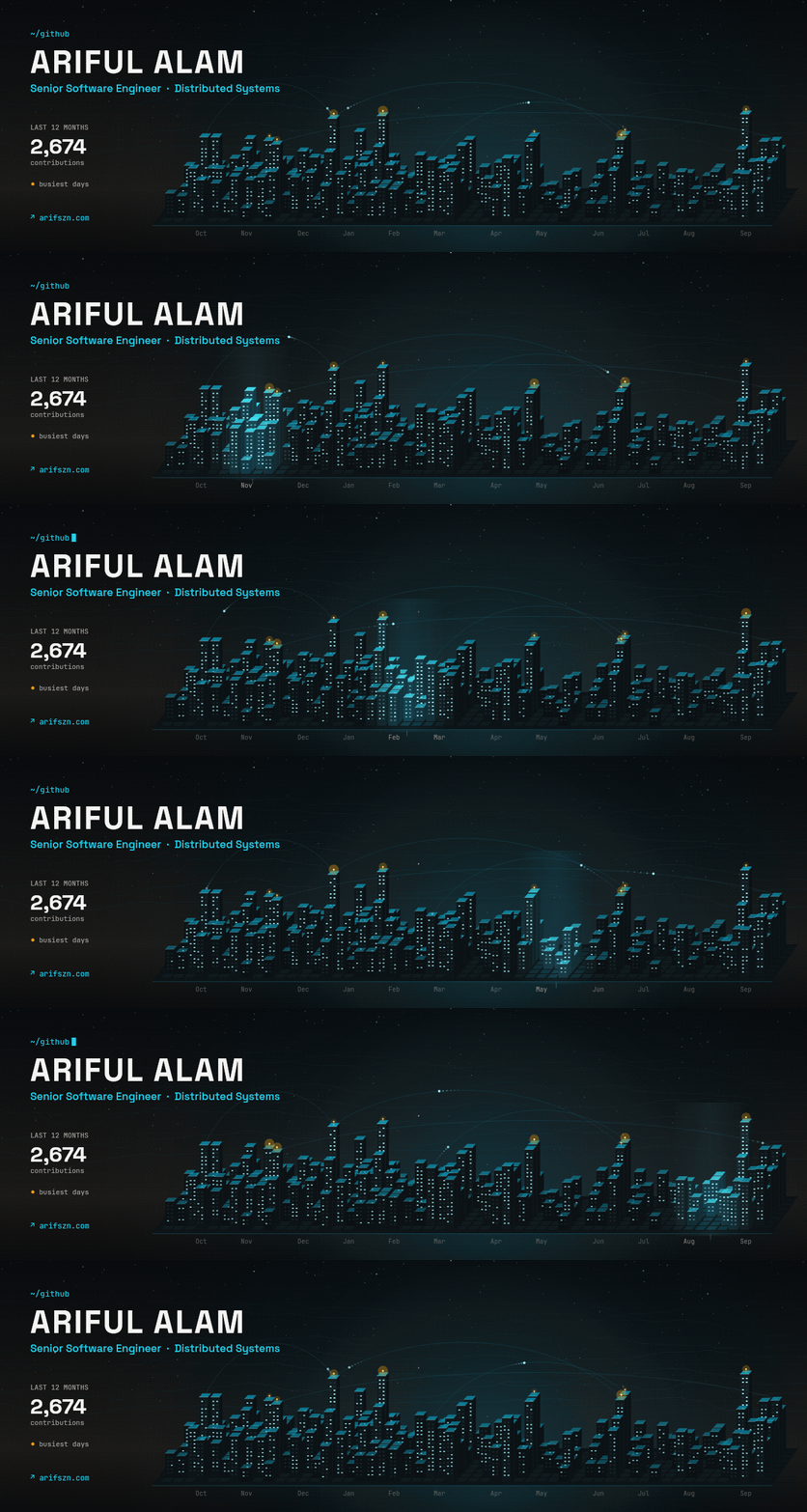
An animated banner for your GitHub profile, made from your GitHub activity.
|
|
8
9
|
|
|
9
10
|
|
|
10
11
|
|
|
11
|
-
|
|
12
|
+
Pick one way to make your banner:
|
|
12
13
|
|
|
13
|
-
-
|
|
14
|
-
-
|
|
14
|
+
- [GitHub Action](#github-action): updates the banner every day. No setup on your computer.
|
|
15
|
+
- [Command](#command): makes the banner once on your computer.
|
|
15
16
|
|
|
16
|
-
|
|
17
|
+
## GitHub Action
|
|
17
18
|
|
|
18
|
-
|
|
19
|
+
The Action is on the [GitHub Marketplace](https://github.com/marketplace/actions/headreel).
|
|
19
20
|
|
|
20
|
-
|
|
21
|
-
|
|
22
|
-
```bash
|
|
23
|
-
npx headreel --style contribution-city --user octocat
|
|
24
|
-
```
|
|
25
|
-
|
|
26
|
-
The command saves your banner as `headreel.gif` in the current folder. The first run downloads headreel. After that, a banner takes a few seconds.
|
|
27
|
-
|
|
28
|
-
Add your tagline and website:
|
|
29
|
-
|
|
30
|
-
```bash
|
|
31
|
-
npx headreel --style contribution-city --user octocat \
|
|
32
|
-
--tagline "Open source maintainer" \
|
|
33
|
-
--website https://example.com
|
|
34
|
-
```
|
|
35
|
-
|
|
36
|
-
You need [Node.js](https://nodejs.org) 22 (22.22.2 or later), 24 (24.15.0 or later), or 26 and later. You also need a GitHub token. If you use the [GitHub CLI](https://cli.github.com), log in with `gh auth login`, and headreel finds the token. For other ways, see [Command options](#command-options).
|
|
37
|
-
|
|
38
|
-
To put the banner on your profile, add `headreel.gif` to your profile repository. Then add this line to its `README.md`:
|
|
39
|
-
|
|
40
|
-
```markdown
|
|
41
|
-

|
|
42
|
-
```
|
|
43
|
-
|
|
44
|
-
## Keep it updated with the GitHub Action
|
|
45
|
-
|
|
46
|
-
A banner that you make on your computer does not change. The Action makes a new banner every day.
|
|
47
|
-
|
|
48
|
-
Your profile repository has the same name as your username, for example `octocat/octocat`. Do these steps in that repository.
|
|
49
|
-
|
|
50
|
-
1. Create the file `.github/workflows/headreel.yml` with this content:
|
|
21
|
+
1. Open your profile repository. This is the public repository with the same name as your username, for example `octocat/octocat`.
|
|
22
|
+
2. Add `.github/workflows/headreel.yml`:
|
|
51
23
|
|
|
52
24
|
```yaml
|
|
53
25
|
name: headreel
|
|
@@ -55,7 +27,7 @@ Your profile repository has the same name as your username, for example `octocat
|
|
|
55
27
|
on:
|
|
56
28
|
schedule:
|
|
57
29
|
- cron: '0 0 * * *' # every day at 00:00 UTC
|
|
58
|
-
workflow_dispatch:
|
|
30
|
+
workflow_dispatch:
|
|
59
31
|
|
|
60
32
|
permissions:
|
|
61
33
|
contents: write
|
|
@@ -68,107 +40,77 @@ Your profile repository has the same name as your username, for example `octocat
|
|
|
68
40
|
- uses: arifszn/headreel@v1
|
|
69
41
|
with:
|
|
70
42
|
style: contribution-city
|
|
71
|
-
|
|
43
|
+
publish_mode: branch
|
|
44
|
+
tagline: Open source maintainer
|
|
72
45
|
website: https://example.com
|
|
73
46
|
```
|
|
74
47
|
|
|
75
|
-
|
|
76
|
-
|
|
77
|
-
4. Add this line to your `README.md`:
|
|
48
|
+
3. Run the workflow once from the **Actions** tab. It adds `headreel.gif` to the `headreel` branch.
|
|
49
|
+
4. Add the image line to your `README.md`. The workflow run page shows it, ready to copy. It looks like this:
|
|
78
50
|
|
|
79
51
|
```markdown
|
|
80
|
-

|
|
52
|
+

|
|
81
53
|
```
|
|
82
54
|
|
|
83
|
-
|
|
84
|
-
> The workflow makes a commit only when the banner changes. Your contribution count changes most days, so expect about one commit each day.
|
|
55
|
+
The workflow updates the banner only when it changes. After an update, the new banner can take up to 5 minutes to show. See [Settings](#settings) for all inputs.
|
|
85
56
|
|
|
86
|
-
|
|
57
|
+
### Keep your repository small
|
|
87
58
|
|
|
88
|
-
|
|
89
|
-
| ---------------- | ------------------------------- | ------------------------------------------------------------------ |
|
|
90
|
-
| `style` | (required) | The banner style. See [Styles](#styles). |
|
|
91
|
-
| `username` | repository owner | The GitHub user to show. |
|
|
92
|
-
| `tagline` | empty | One line under your name. Empty means no tagline. |
|
|
93
|
-
| `website` | empty | Your website, for example `https://example.com`. Empty means none. |
|
|
94
|
-
| `handle` | empty | A handle, for styles that show one. |
|
|
95
|
-
| `options` | empty | Style settings, one `key: value` on each line. |
|
|
96
|
-
| `output` | `headreel.gif` | The path of the banner in your repository. |
|
|
97
|
-
| `commit_to` | the checked-out branch | The branch that gets the banner. |
|
|
98
|
-
| `commit_message` | `chore: update headreel banner` | The commit message for each update. |
|
|
99
|
-
| `token` | `github.token` | The token that reads your contribution data. |
|
|
59
|
+
The setup above uses `publish_mode: branch`. The banner lives on its own `headreel` branch, and each update replaces the old banner, so your repository does not grow.
|
|
100
60
|
|
|
101
|
-
|
|
61
|
+
If you remove `publish_mode: branch`, each update adds a new commit to your main branch. Old banners stay in your history, and each one is a few MB.
|
|
102
62
|
|
|
103
|
-
##
|
|
63
|
+
## Command
|
|
104
64
|
|
|
105
|
-
|
|
65
|
+
Run this command. Replace `octocat` with your GitHub username.
|
|
106
66
|
|
|
107
|
-
|
|
67
|
+
```bash
|
|
68
|
+
npx headreel --style contribution-city --user octocat --tagline "Open source maintainer" --website https://example.com
|
|
69
|
+
```
|
|
108
70
|
|
|
109
|
-
|
|
71
|
+
The command saves `headreel.gif` in the current folder. Add the file to your profile repository, and add `` to its `README.md`.
|
|
110
72
|
|
|
111
|
-
|
|
73
|
+
You need:
|
|
112
74
|
|
|
113
|
-
|
|
114
|
-
| --------- | ------- | -------------------------------------------------- |
|
|
115
|
-
| `beacons` | `8` | The number of busiest days with a beacon, 0 to 10. |
|
|
75
|
+
- A GitHub token. headreel uses `--token`, then `GITHUB_TOKEN`, then your [GitHub CLI](https://cli.github.com) login (`gh auth login`).
|
|
116
76
|
|
|
117
|
-
|
|
77
|
+
## Settings
|
|
118
78
|
|
|
119
|
-
|
|
120
|
-
- uses: arifszn/headreel@v1
|
|
121
|
-
with:
|
|
122
|
-
style: contribution-city
|
|
123
|
-
options: |
|
|
124
|
-
beacons: 5
|
|
125
|
-
```
|
|
79
|
+
The Action and the command use the same settings.
|
|
126
80
|
|
|
127
|
-
|
|
128
|
-
|
|
129
|
-
|
|
|
130
|
-
|
|
|
131
|
-
| `--
|
|
132
|
-
| `--
|
|
133
|
-
|
|
|
134
|
-
| `--
|
|
135
|
-
| `--
|
|
136
|
-
| `--
|
|
137
|
-
|
|
|
138
|
-
|
|
|
139
|
-
|
|
|
140
|
-
|
|
141
|
-
headreel needs a GitHub token to read your contributions. It looks for a token in this order:
|
|
142
|
-
|
|
143
|
-
1. The `--token` option.
|
|
144
|
-
2. The `GITHUB_TOKEN` environment variable.
|
|
145
|
-
3. The [GitHub CLI](https://cli.github.com), if you are logged in with `gh auth login`.
|
|
146
|
-
|
|
147
|
-
You can keep your settings in a JSON file:
|
|
148
|
-
|
|
149
|
-
```json
|
|
150
|
-
{
|
|
151
|
-
"style": "contribution-city",
|
|
152
|
-
"user": "octocat",
|
|
153
|
-
"tagline": "Open source maintainer",
|
|
154
|
-
"website": "https://example.com",
|
|
155
|
-
"options": { "beacons": 5 }
|
|
156
|
-
}
|
|
157
|
-
```
|
|
81
|
+
| Action input | Command flag | Default | Description |
|
|
82
|
+
| ---------------- | ---------------------- | ------------------------------- | ----------------------------------------------------------------------------------------------------------------- |
|
|
83
|
+
| `style` | `--style` | (required) | The banner style. See [Styles](#styles). |
|
|
84
|
+
| `username` | `--user` | repository owner | The GitHub user to show. The command requires it. |
|
|
85
|
+
| `tagline` | `--tagline` | empty | One line under your name. |
|
|
86
|
+
| `website` | `--website` | empty | Your website. |
|
|
87
|
+
| `handle` | `--handle` | empty | A handle, for styles that show one. |
|
|
88
|
+
| `options` | `--option <key=value>` | empty | Style options. Action: one `key: value` on each line. Command: repeat the flag, for example `--option beacons=5`. |
|
|
89
|
+
| `output` | `--out` | `headreel.gif` | The path of the banner. |
|
|
90
|
+
| `token` | `--token` | `github.token` | The token that reads your contribution data. |
|
|
91
|
+
| `publish_mode` | - | `commit` | `commit` adds a commit on every update. `branch` keeps one commit on its own branch, replaced on every update. |
|
|
92
|
+
| `commit_to` | - | checked-out branch / `headreel` | The branch that gets the banner. The default is `headreel` in `branch` mode. |
|
|
93
|
+
| `commit_message` | - | `chore: update headreel banner` | The commit message. |
|
|
94
|
+
| - | `--config <file>` | - | A JSON file with these settings. Flags replace its values. |
|
|
158
95
|
|
|
159
|
-
|
|
160
|
-
npx headreel --config headreel.json
|
|
161
|
-
```
|
|
96
|
+
Empty settings do not show on the banner. Your name comes from your GitHub profile. If your profile has no name, the banner shows your username.
|
|
162
97
|
|
|
163
|
-
|
|
98
|
+
## Styles
|
|
164
99
|
|
|
165
|
-
|
|
100
|
+
### Contribution City
|
|
166
101
|
|
|
167
|
-
|
|
168
|
-
Make sure that the workflow file contains `permissions: contents: write`.
|
|
102
|
+
`contribution-city`: each day of the last 12 months is one building. A taller building means more contributions. Beacons glow on your busiest days.
|
|
169
103
|
|
|
170
|
-
|
|
171
|
-
|
|
104
|
+
| Option | Default | Description |
|
|
105
|
+
| --------- | ------- | -------------------------------------------------- |
|
|
106
|
+
| `beacons` | `8` | The number of busiest days with a beacon, 0 to 10. |
|
|
107
|
+
|
|
108
|
+
Set an option with `options: 'beacons: 5'` in the Action, or `--option beacons=5` in the command.
|
|
109
|
+
|
|
110
|
+
## Troubleshooting
|
|
172
111
|
|
|
173
|
-
|
|
174
|
-
|
|
112
|
+
| Problem | Fix |
|
|
113
|
+
| -------------------------------- | -------------------------------------------------------- |
|
|
114
|
+
| "Permission denied" or 403 error | Add `permissions: contents: write` to the workflow file. |
|
|
115
|
+
| "Could not resolve to a User" | Set `username` to a valid GitHub username. |
|
|
116
|
+
| "No GitHub token found" | Run `gh auth login`, or set `GITHUB_TOKEN`. |
|
package/package.json
CHANGED
|
@@ -1,15 +1,24 @@
|
|
|
1
1
|
{
|
|
2
2
|
"name": "headreel",
|
|
3
|
-
"version": "1.
|
|
4
|
-
"description": "Animated GitHub profile banner
|
|
3
|
+
"version": "1.1.0",
|
|
4
|
+
"description": "Animated GitHub profile banner made from your GitHub activity, with a GitHub Action or CLI.",
|
|
5
5
|
"keywords": [
|
|
6
6
|
"github",
|
|
7
|
-
"profile",
|
|
7
|
+
"github-profile",
|
|
8
|
+
"github-profile-readme",
|
|
9
|
+
"profile-readme",
|
|
8
10
|
"readme",
|
|
9
11
|
"banner",
|
|
10
12
|
"gif",
|
|
13
|
+
"animation",
|
|
11
14
|
"github-action",
|
|
12
|
-
"
|
|
15
|
+
"github-actions",
|
|
16
|
+
"cli",
|
|
17
|
+
"npx",
|
|
18
|
+
"contributions",
|
|
19
|
+
"contribution-graph",
|
|
20
|
+
"generative-art",
|
|
21
|
+
"p5js"
|
|
13
22
|
],
|
|
14
23
|
"homepage": "https://github.com/arifszn/headreel#readme",
|
|
15
24
|
"bugs": {
|