goldsync 0.1.16 → 0.1.31
This diff represents the content of publicly available package versions that have been released to one of the supported registries. The information contained in this diff is provided for informational purposes only and reflects changes between package versions as they appear in their respective public registries.
- package/README.md +60 -79
- package/assets/GoldSync.rbxmx +1006 -194
- package/bin/install-companion.mjs +29 -3
- package/media/configuration-assets.png +0 -0
- package/media/file-boundaries.png +0 -0
- package/package.json +2 -2
- package/src/companion.mjs +1 -1
- package/src/config.mjs +39 -6
- package/src/git-conflicts.mjs +1 -1
- package/src/server.mjs +108 -13
- package/src/store.mjs +231 -5
package/README.md
CHANGED
|
@@ -1,85 +1,52 @@
|
|
|
1
1
|
# GoldSync
|
|
2
2
|
|
|
3
|
-
<p align="center"><img src="https://unpkg.com/goldsync@
|
|
3
|
+
<p align="center"><img src="https://unpkg.com/goldsync@0.1.31/media/icon.png" alt="GoldSync" width="128"></p>
|
|
4
4
|
|
|
5
|
-
GoldSync synchronizes
|
|
6
|
-
|
|
7
|
-
This is the standalone GoldSync source and build folder. It stays separate from game projects. Each game project contains its own `goldsync.project.json`, one Rojo session-marker mapping, and its synced RBXM files.
|
|
5
|
+
GoldSync synchronizes Roblox Studio assets with native `.rbxm` files. It saves complete models, UI, effects, and embedded scripts so your team can track them in Git. Rojo handles the separate source directories mapped in your project.
|
|
8
6
|
|
|
9
7
|
## Install
|
|
10
8
|
|
|
11
|
-
|
|
12
|
-
|
|
13
|
-
```powershell
|
|
14
|
-
npx goldsync install
|
|
15
|
-
```
|
|
16
|
-
|
|
17
|
-
It installs the background service, Roblox Studio plugin, project registration, and Windows startup entry. Cursor and Zed use the same editor-independent service; neither needs an editor extension.
|
|
18
|
-
|
|
19
|
-
If `npx` is unavailable, install Node.js and GoldSync together with:
|
|
20
|
-
|
|
21
|
-
```powershell
|
|
22
|
-
winget install --id OpenJS.NodeJS.LTS --exact --accept-package-agreements --accept-source-agreements; $env:Path="$env:ProgramFiles\nodejs;$env:Path"; npx --yes goldsync install
|
|
23
|
-
```
|
|
24
|
-
|
|
25
|
-
Restart Studio once after the first installation. Studio may ask for permission to access `127.0.0.1`.
|
|
26
|
-
|
|
27
|
-
For offline distribution, build the companion package from this folder:
|
|
28
|
-
|
|
29
|
-
```powershell
|
|
30
|
-
npm run package:companion
|
|
31
|
-
```
|
|
32
|
-
|
|
33
|
-
Send the ZIP from `dist` to the programmer and extract it anywhere. From the game repository terminal, run its installer as one command:
|
|
9
|
+
GoldSync runs on Windows with Node.js 20 or newer. From your game repository, run:
|
|
34
10
|
|
|
35
11
|
```powershell
|
|
36
|
-
|
|
12
|
+
npx --yes goldsync@latest install
|
|
37
13
|
```
|
|
38
14
|
|
|
39
|
-
|
|
15
|
+
The installer sets up the background service, Studio plugin, project registration, and Windows startup entry. Save and restart Studio after installation or an update. Allow localhost access if Studio asks.
|
|
40
16
|
|
|
41
|
-
|
|
17
|
+
Open the repository, run `rojo serve`, and connect Studio through Rojo. GoldSync selects the matching project automatically. Cursor, VS Code, and Zed use the same service; an editor extension is not required.
|
|
42
18
|
|
|
43
|
-
|
|
44
|
-
.\install.ps1
|
|
45
|
-
```
|
|
46
|
-
|
|
47
|
-
That installs dependencies, builds the Studio plugin and VS Code extension, creates the latest VSIX under `extension`, and installs it locally.
|
|
19
|
+
## Configure your roots
|
|
48
20
|
|
|
49
|
-
|
|
50
|
-
|
|
51
|
-
Place `goldsync.project.json` at the game repository root:
|
|
21
|
+
Create `goldsync.project.json` in the game repository:
|
|
52
22
|
|
|
53
23
|
```json
|
|
54
24
|
{
|
|
55
|
-
"version":
|
|
25
|
+
"version": 2,
|
|
56
26
|
"name": "My Game",
|
|
57
27
|
"projectId": "my-game",
|
|
58
28
|
"roots": [
|
|
59
29
|
{
|
|
60
|
-
"id": "
|
|
61
|
-
"
|
|
62
|
-
"
|
|
30
|
+
"id": "assets",
|
|
31
|
+
"mode": "tree",
|
|
32
|
+
"studioPath": ["ReplicatedStorage", "Assets"],
|
|
33
|
+
"directory": "assets/ReplicatedStorage/Assets"
|
|
63
34
|
},
|
|
64
35
|
{
|
|
65
|
-
"id": "main
|
|
66
|
-
"
|
|
67
|
-
"
|
|
68
|
-
"
|
|
36
|
+
"id": "main",
|
|
37
|
+
"mode": "tree",
|
|
38
|
+
"studioPath": ["StarterGui", "Main"],
|
|
39
|
+
"directory": "assets/StarterGui/Main"
|
|
69
40
|
}
|
|
70
41
|
]
|
|
71
42
|
}
|
|
72
43
|
```
|
|
73
44
|
|
|
74
|
-
|
|
75
|
-
|
|
76
|
-
Directory roots can contain more specific roots. Discovery skips branches owned by those roots, including existing files on disk. For example, split `ReplicatedStorage.Assets` at depth 1 and add another depth-1 directory root for `ReplicatedStorage.Assets.Effects`. New asset categories and individual effects are discovered automatically, without creating an overlapping `Effects.rbxm`. Existing explicit file roots can stay in place to preserve their sync history. File roots cannot contain other roots because their snapshots include the entire subtree.
|
|
45
|
+
List only the top roots. Do not map the same hierarchy through both Rojo and GoldSync.
|
|
77
46
|
|
|
78
|
-
|
|
47
|
+
GoldSync reads the Rojo project name and port from `default.project.json` and detects active port overrides. Set `rojo.projectFile` if you use a different project filename.
|
|
79
48
|
|
|
80
|
-
|
|
81
|
-
|
|
82
|
-
Map GoldSync's generated live-session marker in the Rojo project tree:
|
|
49
|
+
Include the generated session marker in your Rojo project tree:
|
|
83
50
|
|
|
84
51
|
```json
|
|
85
52
|
"ServerStorage": {
|
|
@@ -89,45 +56,59 @@ Map GoldSync's generated live-session marker in the Rojo project tree:
|
|
|
89
56
|
}
|
|
90
57
|
```
|
|
91
58
|
|
|
92
|
-
The
|
|
59
|
+
The service generates the marker. Keep `.goldsync/` ignored by Git. The marker binds the Studio window to its active Rojo session and repository.
|
|
60
|
+
|
|
61
|
+
## How files are grouped
|
|
62
|
+
|
|
63
|
+
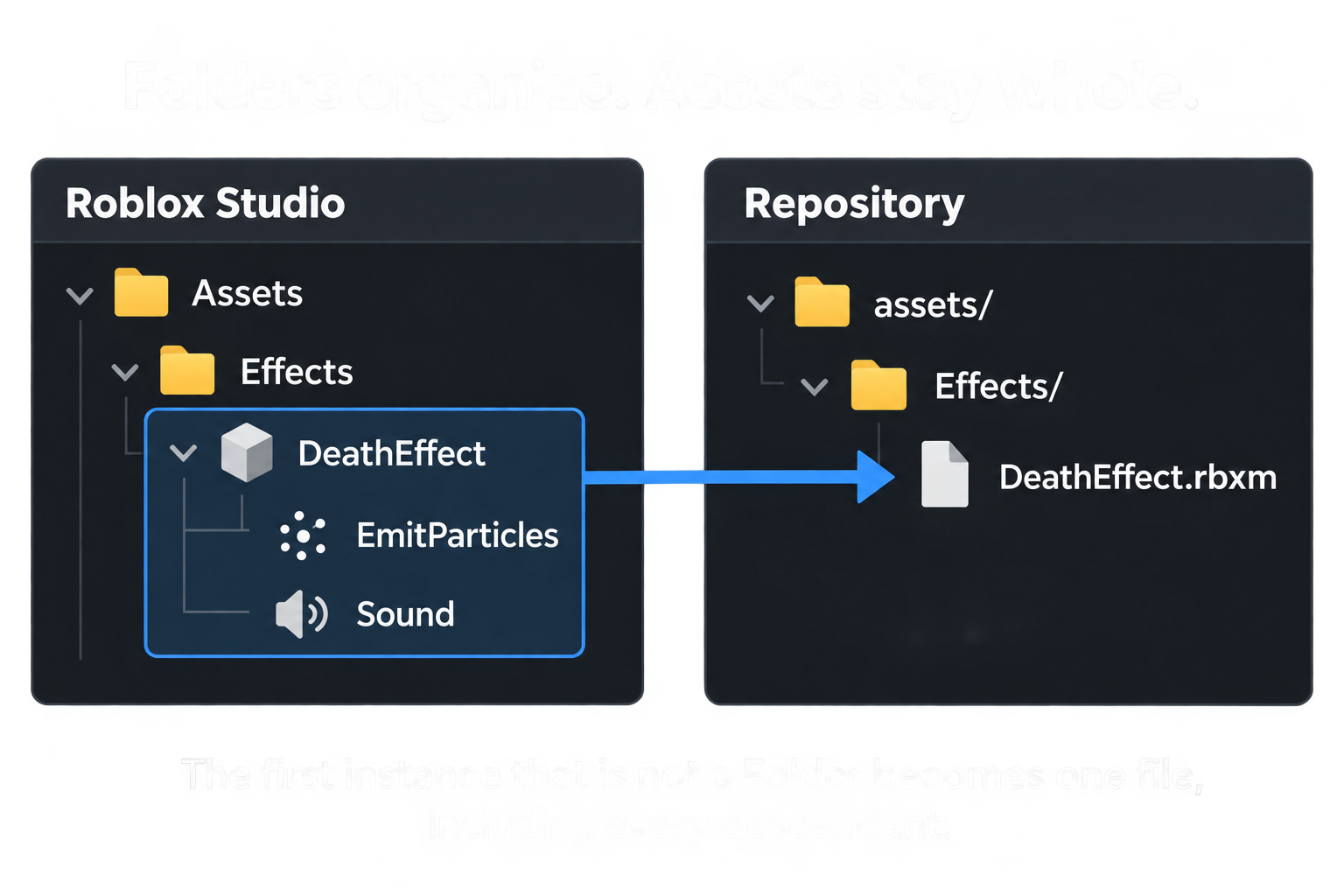
Below a configured root, each **Folder** becomes a directory. The **first descendant that is not a Folder becomes one file with its entire subtree**. Folders inside that asset remain inside its file.
|
|
64
|
+
|
|
65
|
+
|
|
66
|
+
|
|
67
|
+
For example, if `Effects` is a Folder and `DeathEffect` is a Model, edits anywhere inside DeathEffect change `Effects/DeathEffect.rbxm`. If DeathEffect is a Folder instead, GoldSync keeps walking until it reaches each child asset.
|
|
68
|
+
|
|
69
|
+
Configured top roots always act as containers, even for a ScreenGui such as Main. Plain, nonempty Folders need only a directory. Container properties, attributes, tags, empty Folders, and non-archivable Folders are preserved with `_root.rbxm` where needed.
|
|
70
|
+
|
|
71
|
+
## Configuration for larger assets
|
|
72
|
+
|
|
73
|
+
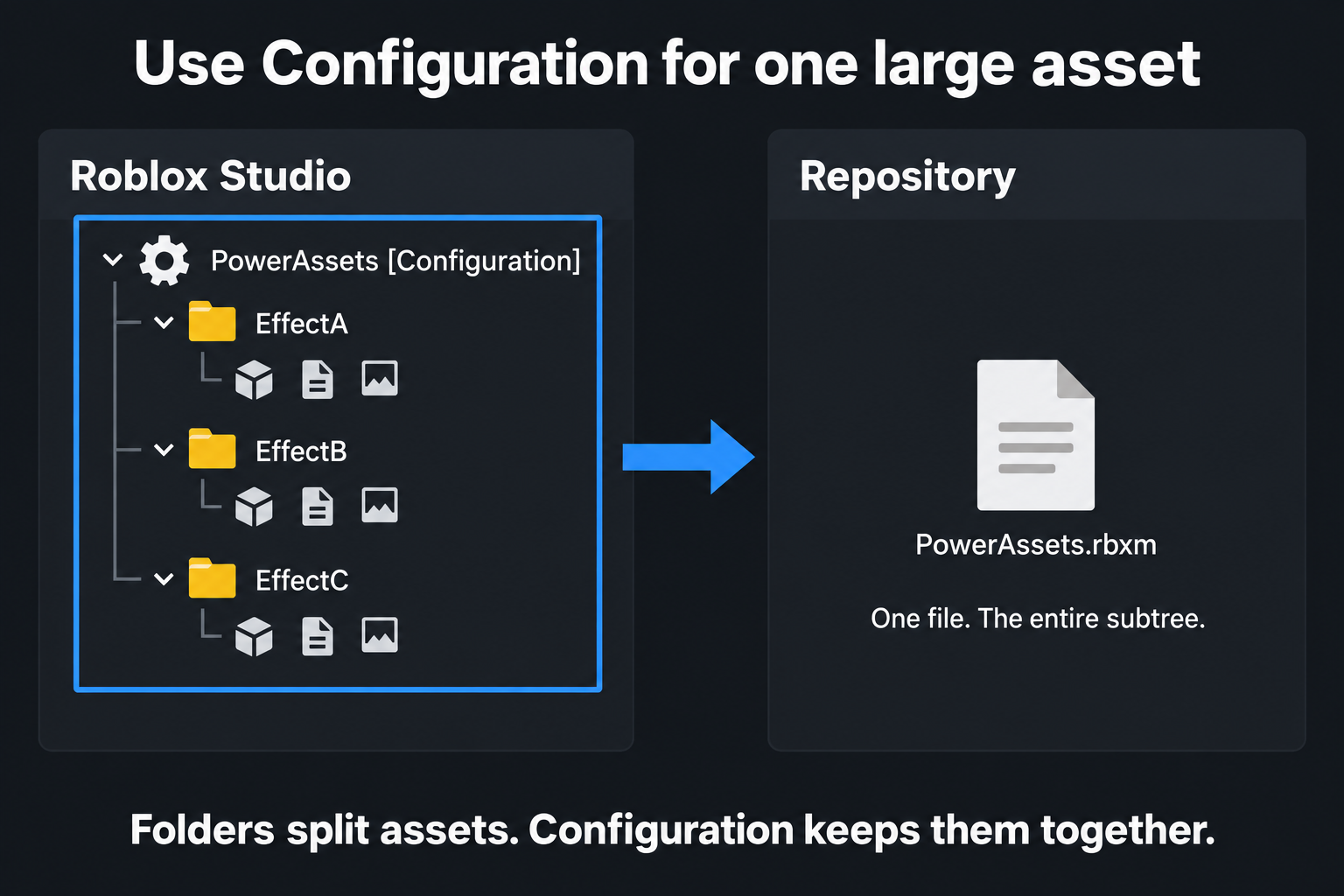
Use a Roblox **Configuration** instance in place of a Folder when a collection should stay in one file. Configuration has a gear icon in Studio.
|
|
74
|
+
|
|
75
|
+
|
|
76
|
+
|
|
77
|
+
A Configuration named `PowerAssets` becomes `PowerAssets.rbxm`, including all effects, folders, and scripts below it. Pull replaces that complete subtree. Camera keyframes and effects whose children reference each other are useful candidates for this grouping.
|
|
78
|
+
|
|
79
|
+
Folders let teammates edit separate files independently. Configuration groups the collection into one Git change and one conflict unit. Keep referenced instances together when they belong to the same asset.
|
|
80
|
+
|
|
81
|
+
When changing a Folder to another class, Push the changed parent. GoldSync verifies the exported subtree and backs up the previous files before replacing their layout.
|
|
93
82
|
|
|
94
83
|
## Daily use
|
|
95
84
|
|
|
96
|
-
|
|
97
|
-
2. Run `rojo serve`.
|
|
98
|
-
3. Open a configured place in Roblox Studio.
|
|
99
|
-
4. Confirm the GoldSync status bar and Studio widget are connected.
|
|
85
|
+
Matching assets synchronize automatically. When an entry needs attention, choose the copy you want to keep:
|
|
100
86
|
|
|
101
|
-
|
|
87
|
+
| Control | Direction |
|
|
88
|
+
| --- | --- |
|
|
89
|
+
| **Push →** | Studio to repository file |
|
|
90
|
+
| **← Pull** | Repository file to Studio |
|
|
102
91
|
|
|
103
|
-
|
|
92
|
+
Attention entries appear under collapsible parent paths with short child names. Use an individual arrow for one asset, or the attention section's Push All / Pull All controls for all unresolved entries.
|
|
104
93
|
|
|
105
|
-
|
|
94
|
+
Missing Studio assets require an explicit Pull to restore them. Push an intentionally removed Folder to remove its saved subtree with a backup and file-version checks. Configured roots cannot be deleted this way. Completed deletions do not need another Push.
|
|
106
95
|
|
|
107
|
-
|
|
96
|
+
GoldSync pauses normal syncing while Rojo is disconnected.
|
|
108
97
|
|
|
109
|
-
|
|
98
|
+
## Duplicate names and embedded scripts
|
|
110
99
|
|
|
111
|
-
|
|
100
|
+
Same-named siblings keep their Studio names. Their files use suffixes such as `Crack1.rbxm`, `Crack1 (1).rbxm`, and `Crack1 (2).rbxm`. A saved `GoldSyncId` attribute maintains each duplicate's identity. Do not edit it manually. Assigned suffixes remain stable when siblings are removed.
|
|
112
101
|
|
|
113
|
-
|
|
102
|
+
Scripts, LocalScripts, and ModuleScripts inside assets are saved with their source. Keep separately managed game code in Rojo's source directories.
|
|
114
103
|
|
|
115
|
-
|
|
104
|
+
## Git conflicts
|
|
116
105
|
|
|
117
|
-
|
|
118
|
-
npm test
|
|
119
|
-
```
|
|
106
|
+
GoldSync pauses conflicted files while other assets continue syncing. Expand an affected item and select **Open Merge Workspace**.
|
|
120
107
|
|
|
121
|
-
|
|
108
|
+
The workspace under `ServerStorage.GoldSync Conflicts` contains Base, Yours, Theirs, and an editable Result. Use **Property Diff**, copy selected properties with **Use Yours** or **Use Theirs**, or edit Result directly in Studio.
|
|
122
109
|
|
|
123
|
-
|
|
124
|
-
cd extension
|
|
125
|
-
npm install
|
|
126
|
-
npm run package
|
|
127
|
-
```
|
|
110
|
+
Check Result, then select **Resolve Result**. GoldSync writes the resulting RBXM, stages it in Git, and clears the conflict.
|
|
128
111
|
|
|
129
|
-
|
|
112
|
+
## Development
|
|
130
113
|
|
|
131
|
-
|
|
132
|
-
.\start.ps1 C:\path\to\goldsync.project.json
|
|
133
|
-
```
|
|
114
|
+
Run the automated tests with `npm test`. The source includes the companion service, Studio plugin, installer, and optional editor extension.
|