ghcr-cleanup-manager-visualizer 1.1.0
This diff represents the content of publicly available package versions that have been released to one of the supported registries. The information contained in this diff is provided for informational purposes only and reflects changes between package versions as they appear in their respective public registries.
- package/README.md +148 -0
- package/dist/public/app.js +855 -0
- package/dist/public/index.html +118 -0
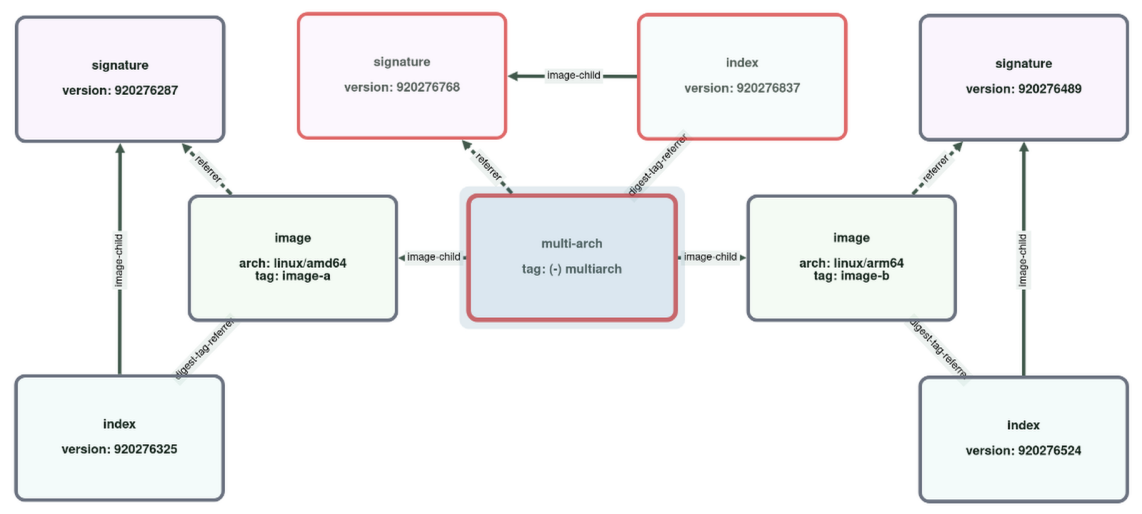
- package/dist/public/styles.css +257 -0
- package/dist/public/vendor/cytoscape.js +9 -0
- package/dist/src/_graph-repository.d.ts +18 -0
- package/dist/src/_graph-repository.js +400 -0
- package/dist/src/_server.d.ts +14 -0
- package/dist/src/_server.js +158 -0
- package/dist/src/_sql-placeholders.d.ts +1 -0
- package/dist/src/_sql-placeholders.js +6 -0
- package/dist/src/_types.d.ts +62 -0
- package/dist/src/_types.js +1 -0
- package/dist/src/index.d.ts +11 -0
- package/dist/src/index.js +67 -0
- package/package.json +59 -0
package/README.md
ADDED
|
@@ -0,0 +1,148 @@
|
|
|
1
|
+
# GHCR Cleanup Manager Visualizer
|
|
2
|
+
|
|
3
|
+
Local browser visualizer for GHCR Cleanup Manager SQLite scan databases.
|
|
4
|
+
|
|
5
|
+
Use it to inspect manifest graphs, compare two scans of the same package, and investigate cleanup edge cases.
|
|
6
|
+
|
|
7
|
+
[](https://github.com/ghcr-manager/ghcr-cleanup-manager/blob/main/docs/images/visualizer/graph-2images-cosign--wide.png)
|
|
8
|
+
|
|
9
|
+
_Example compare view: red-bordered manifests are present in the older scan and removed in the newer one._
|
|
10
|
+
|
|
11
|
+
## Quick Demo
|
|
12
|
+
|
|
13
|
+
Download the test scenario DB from the latest release and try the visualizer without first running your own workflow.
|
|
14
|
+
|
|
15
|
+
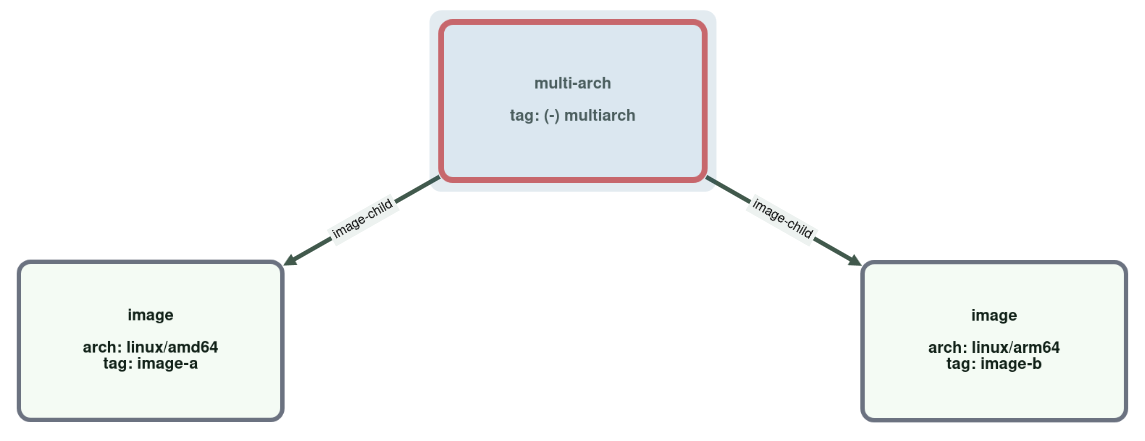
The DB contains dozens of scenario packages with different graphs and before/after views of cleanup operations on them.
|
|
16
|
+
|
|
17
|
+
```sh
|
|
18
|
+
curl -LO https://github.com/ghcr-manager/ghcr-cleanup-manager/releases/latest/download/ghcr-cleanup-manager([^/s]*.sqlite)
|
|
19
|
+
npx ghcr-cleanup-manager-visualizer --db ./ghcr-cleanup-manager([^/s]*.sqlite)
|
|
20
|
+
```
|
|
21
|
+
|
|
22
|
+
Or run the release image:
|
|
23
|
+
|
|
24
|
+
```sh
|
|
25
|
+
docker run --rm -p 8080:8080 \
|
|
26
|
+
-v "$PWD:/data:ro" \
|
|
27
|
+
ghcr.io/ghcr-manager/ghcr-manager-visualizer:latest \
|
|
28
|
+
--db /data/ghcr-cleanup-manager([^/s]*.sqlite)
|
|
29
|
+
```
|
|
30
|
+
|
|
31
|
+
Open the local URL printed by the command and select:
|
|
32
|
+
|
|
33
|
+
- owner: `ghcr-cleanup-manager-test`
|
|
34
|
+
- package: select one with `2images` or `2multiarch` in the name
|
|
35
|
+
- tag search: `image` or `multiarch`
|
|
36
|
+
|
|
37
|
+
Good search terms for tags in most scenarios are: `image`, `multiarch`, `keep`, or `delete`.
|
|
38
|
+
|
|
39
|
+
For an overview of the test scenario graphs and cleanup cases, see
|
|
40
|
+
[test-scenarios](https://github.com/ghcr-manager/ghcr-cleanup-manager/blob/main/docs/test/scenarios.md).
|
|
41
|
+
|
|
42
|
+
## Install
|
|
43
|
+
|
|
44
|
+
```sh
|
|
45
|
+
npm install --global ghcr-cleanup-manager-visualizer
|
|
46
|
+
```
|
|
47
|
+
|
|
48
|
+
> Requirement: Node.js `24` or newer.
|
|
49
|
+
|
|
50
|
+
## Run
|
|
51
|
+
|
|
52
|
+
```sh
|
|
53
|
+
ghcr-cleanup-manager-visualizer --db ./artifacts/acme__demo.sqlite
|
|
54
|
+
```
|
|
55
|
+
|
|
56
|
+
The command prints a local URL such as `http://127.0.0.1:43217`. Open that URL in your browser.
|
|
57
|
+
|
|
58
|
+
Optional flags:
|
|
59
|
+
|
|
60
|
+
- `--host <host>`: override the bind host. Default: `127.0.0.1`
|
|
61
|
+
- `--port <port>`: override the bind port. Default: `0`
|
|
62
|
+
|
|
63
|
+
Example:
|
|
64
|
+
|
|
65
|
+
```sh
|
|
66
|
+
ghcr-cleanup-manager-visualizer --db ./artifacts/acme__demo.sqlite --host 0.0.0.0 --port 4000
|
|
67
|
+
```
|
|
68
|
+
|
|
69
|
+
## Docker
|
|
70
|
+
|
|
71
|
+
Release images are published only from release tags and use these tags:
|
|
72
|
+
|
|
73
|
+
- `vX.Y.Z`
|
|
74
|
+
- `vX`
|
|
75
|
+
- `latest`
|
|
76
|
+
|
|
77
|
+
Example:
|
|
78
|
+
|
|
79
|
+
```sh
|
|
80
|
+
docker run --rm -p 8080:8080 \
|
|
81
|
+
-v "$PWD:/data:ro" \
|
|
82
|
+
ghcr.io/ghcr-manager/ghcr-manager-visualizer:v1.0.6 \
|
|
83
|
+
--db /data/acme__demo.sqlite
|
|
84
|
+
```
|
|
85
|
+
|
|
86
|
+
Container defaults:
|
|
87
|
+
|
|
88
|
+
- host: `0.0.0.0`
|
|
89
|
+
- port: `8080`
|
|
90
|
+
|
|
91
|
+
## DB Input
|
|
92
|
+
|
|
93
|
+
The visualizer reads the SQLite DB produced by GHCR Cleanup Manager as GitHub Action artifacts uploaded by `scan`,
|
|
94
|
+
`cleanup`.
|
|
95
|
+
|
|
96
|
+
Typical flow:
|
|
97
|
+
|
|
98
|
+
1. Run a `scan` or `cleanup` workflow and download the SQLite DB run artifact.
|
|
99
|
+
2. Start `ghcr-cleanup-manager-visualizer` with that DB.
|
|
100
|
+
3. Select owner and package, then enter a tag or digest to center the graph.
|
|
101
|
+
4. Optionally select a second scan to compare two recorded scans.
|
|
102
|
+
|
|
103
|
+
## Compare Mode
|
|
104
|
+
|
|
105
|
+
When a package has at least two completed scans, the visualizer defaults to comparing the newest two scans:
|
|
106
|
+
|
|
107
|
+
- main scan: the older of the newest two scans
|
|
108
|
+
- compare scan: the newest scan
|
|
109
|
+
|
|
110
|
+
In compare mode, the visualizer shows delta information in two places.
|
|
111
|
+
|
|
112
|
+
Manifest nodes:
|
|
113
|
+
|
|
114
|
+
- gray border: present in both scans
|
|
115
|
+
- green border: added in the newer scan
|
|
116
|
+
- red border: removed in the newer scan
|
|
117
|
+
|
|
118
|
+
Tags in the details panel:
|
|
119
|
+
|
|
120
|
+
- plain tag text: present in both scans
|
|
121
|
+
- `(+) tag-name`: tag added in the newer scan
|
|
122
|
+
- `(-) tag-name`: tag removed in the newer scan
|
|
123
|
+
|
|
124
|
+
This is the fastest way to inspect what changed between two scans of one package graph.
|
|
125
|
+
|
|
126
|
+
[](https://github.com/ghcr-manager/ghcr-cleanup-manager/blob/main/docs/images/visualizer/visualizer-show-compare-mode.png)
|
|
127
|
+
|
|
128
|
+
_Example compare view: red-bordered manifests are present in the older scan and removed in the newer one._
|
|
129
|
+
|
|
130
|
+
[](https://github.com/ghcr-manager/ghcr-cleanup-manager/blob/main/docs/images/visualizer/visualizer-show-compare-mode--tag-removed.png)
|
|
131
|
+
|
|
132
|
+
_Example compare view: tags with '(-)' were removed. Here the manifest with the other tag remained._
|
|
133
|
+
|
|
134
|
+
## Source Checkout
|
|
135
|
+
|
|
136
|
+
From this repository checkout, you can run the visualizer without publishing:
|
|
137
|
+
|
|
138
|
+
```sh
|
|
139
|
+
npm run build
|
|
140
|
+
npm run visualize -- --db ./artifacts/acme__demo.sqlite
|
|
141
|
+
```
|
|
142
|
+
|
|
143
|
+
## Project
|
|
144
|
+
|
|
145
|
+
Main project and issue tracker:
|
|
146
|
+
|
|
147
|
+
- Repository: <https://github.com/ghcr-manager/ghcr-cleanup-manager>
|
|
148
|
+
- Issues: <https://github.com/ghcr-manager/ghcr-cleanup-manager/issues>
|