gds-lens 1.0.3 → 1.2.0
This diff represents the content of publicly available package versions that have been released to one of the supported registries. The information contained in this diff is provided for informational purposes only and reflects changes between package versions as they appear in their respective public registries.
- package/CHANGELOG.md +106 -1
- package/README.md +46 -9
- package/dist/esm/gds-lens.js +244 -20
- package/dist/inline-wasm/gds-lens-engine.js +0 -0
- package/dist/inline-wasm/gds-lens-host.js +4 -1
- package/dist/inline-wasm/gds-lens-worker.js +4 -2
- package/dist/inline-wasm/gds-lens.js +238 -17
- package/dist/web/gds-lens-engine.js +1 -1
- package/dist/web/gds-lens-engine.wasm +0 -0
- package/dist/web/gds-lens-host.js +4 -1
- package/dist/web/gds-lens-worker.js +4 -2
- package/dist/web/gds-lens.js +238 -17
- package/docs/embedding.md +5 -0
- package/docs/react.md +19 -6
- package/package.json +1 -1
- package/src/gds-lens.js +34 -2
- package/src/hosts/browser.js +8 -1
- package/src/viewer.css +19 -1
- package/src/viewer.js +332 -14
- package/src/wasm-worker.js +12 -2
- package/types/gds-lens.d.ts +54 -1
package/CHANGELOG.md
CHANGED
|
@@ -7,6 +7,108 @@ follows [semantic versioning](https://semver.org/spec/v2.0.0.html).
|
|
|
7
7
|
From 1.0.0 on, a breaking change to the element's API waits for a major
|
|
8
8
|
version. Before that, `0.x` releases changed it freely.
|
|
9
9
|
|
|
10
|
+
## [1.2.0] - 2026-09-03
|
|
11
|
+
|
|
12
|
+
### Added
|
|
13
|
+
|
|
14
|
+
- `gds-load` and `gds-error` events on the element, dispatched however a load
|
|
15
|
+
was started -- the `src` attribute, `load()`, or a host pushing bytes through
|
|
16
|
+
its surface. Until now a load that came from `src` could fail only into the
|
|
17
|
+
viewer's own error panel, with nothing for the embedding page to observe.
|
|
18
|
+
`detail` carries `{ layerCount, cellCount }` and `{ message }` respectively.
|
|
19
|
+
Prefixed rather than `load` / `error`, which every HTML element already has
|
|
20
|
+
with other types attached.
|
|
21
|
+
- `showLoading(label?)` on the element. The surface had it; a page fetching its
|
|
22
|
+
own bytes and calling `load(bytes)` could not reach it without `ready`, so it
|
|
23
|
+
sat on "No layout loaded" for the length of the download.
|
|
24
|
+
- A message when WebGL2 cannot be had: unsupported, disabled, or the page over
|
|
25
|
+
its limit on live contexts. The renderer's `main()` returns quietly when its
|
|
26
|
+
context creation fails -- which is what lets the same module run in the parse
|
|
27
|
+
worker and under Node, where there is no canvas -- and nothing on the other
|
|
28
|
+
side ever asked, so the result was a canvas that never drew and a `load()`
|
|
29
|
+
that reported success. The viewer now asks (`isGlReady`) and says so, and a
|
|
30
|
+
lost context (`webglcontextlost`, after a GPU reset or the browser reclaiming
|
|
31
|
+
it) is reported the same way rather than left as a black canvas.
|
|
32
|
+
|
|
33
|
+
### Changed
|
|
34
|
+
|
|
35
|
+
- `load()` settles on the outcome. It used to resolve as soon as the file had
|
|
36
|
+
been handed to the parse worker, so it never rejected on a file the parser
|
|
37
|
+
refused -- contrary to what the React docs claimed of it. It now resolves
|
|
38
|
+
once the layout is on screen and rejects with the same message the viewer
|
|
39
|
+
shows. A load superseded by a newer one rejects with an error named
|
|
40
|
+
`AbortError`, the name `fetch()` uses for the same thing.
|
|
41
|
+
|
|
42
|
+
- The demo page's layout is served as gzipped OASIS rather than gzipped GDSII:
|
|
43
|
+
the same design, 4.4 MB down from 8.1 MB. `site/make-demo-assets.py` writes
|
|
44
|
+
OASIS now.
|
|
45
|
+
|
|
46
|
+
### Fixed
|
|
47
|
+
|
|
48
|
+
- The parse worker wrote a dozen lines to the console on every load, into the
|
|
49
|
+
embedding page's DevTools, whether or not tracing had been asked for. The
|
|
50
|
+
relay to the on-screen debug panel was always meant to be unconditional; the
|
|
51
|
+
copy to the real console was not. It is now gated on the same flag as the
|
|
52
|
+
main thread's breadcrumbs (the `debug` attribute or `?gdsDebug=1`). The test
|
|
53
|
+
meant to catch this filtered on `[GDS]`, and the worker's prefix is
|
|
54
|
+
`[GDS worker]`.
|
|
55
|
+
- `destroy()` did not release the viewer. Six listeners on `window` (the
|
|
56
|
+
keyboard shortcuts and the coordinate menu's dismissal) were never removed,
|
|
57
|
+
and a listener's closure holds the whole viewer, wasm instance included; the
|
|
58
|
+
renderer's own `mouseup` and `resize` callbacks on `window` did the same from
|
|
59
|
+
the other side, and the WebGL context waited on garbage collection. Every
|
|
60
|
+
listener now carries an abort signal that `dispose()` fires, and the renderer
|
|
61
|
+
exports a `destroyRenderer()` that unregisters its callbacks and destroys the
|
|
62
|
+
context outright -- so a page calling `destroy()` because it hit the per-page
|
|
63
|
+
context cap gets its slot back when it asks, not when the collector gets to
|
|
64
|
+
it.
|
|
65
|
+
- Two quick changes to `src` (or two `load(url)` calls) could show the older
|
|
66
|
+
layout: the viewer superseded an in-flight *parse*, but the fetch in front of
|
|
67
|
+
it was nobody's to cancel, so a slow first file landing after a small second
|
|
68
|
+
one won. Each `load()` now aborts the fetch before it, and a load parked on
|
|
69
|
+
gzip expansion notices it has been superseded when it wakes.
|
|
70
|
+
|
|
71
|
+
## [1.1.0] - 2026-08-31
|
|
72
|
+
|
|
73
|
+
### Added
|
|
74
|
+
|
|
75
|
+
- Touch: one finger pans the layout, two pinch to zoom about the point between
|
|
76
|
+
them and drag the view with it. Lifting one finger of a pinch hands the
|
|
77
|
+
gesture to the other rather than ending it, so a pinch that relaxes into a
|
|
78
|
+
drag does not jump.
|
|
79
|
+
|
|
80
|
+
### Changed
|
|
81
|
+
|
|
82
|
+
- On a touch-only device (a coarse pointer *and* no hover, so a touchscreen
|
|
83
|
+
laptop is not one) the control panel starts collapsed to its title bar, and
|
|
84
|
+
both it and the cell hierarchy are capped at 85% of the viewport width. A
|
|
85
|
+
panel sized for a window is most of a phone screen, and the layout is what
|
|
86
|
+
someone opening the viewer came for.
|
|
87
|
+
- Measure mode is offered greyed out where there is no hovering pointer. It is
|
|
88
|
+
placed by clicking two points, and without hover the snap indicator only
|
|
89
|
+
appears after the tap that already used it, under a fingertip.
|
|
90
|
+
- The demo page drops its tagline, its file button, its status line and its
|
|
91
|
+
what-this-is-built-from footer line below 620px. Two of those cannot work on
|
|
92
|
+
touch anyway: there is no drag-and-drop, and the file picker's extension
|
|
93
|
+
filter greys out `.gds`/`.oas` in the iOS Files app.
|
|
94
|
+
|
|
95
|
+
### Fixed
|
|
96
|
+
|
|
97
|
+
- Touch input did not work at all on iOS. The gestures were handled in the
|
|
98
|
+
renderer, through `emscripten_set_touchstart_callback`, and that callback
|
|
99
|
+
never runs on iOS Safari: the events reach the canvas and the handler behind
|
|
100
|
+
them does not fire. Emscripten resolves mouse and touch targets through the
|
|
101
|
+
same code path, so the mouse handlers next to them were fine, which is what
|
|
102
|
+
made this invisible from a desktop. The gestures are now ordinary listeners
|
|
103
|
+
on the element, driving the camera through the exported `getCamera` /
|
|
104
|
+
`setCamera` -- the same arithmetic, with nothing between the DOM event and
|
|
105
|
+
the state it changes. Covered by a test that spells out the touch lists.
|
|
106
|
+
- A two-finger pinch over the viewer zoomed the page on iOS instead of the
|
|
107
|
+
layout. Safari answers a pinch with its own page zoom, delivered as a
|
|
108
|
+
proprietary `GestureEvent`, and it does that over an element that has already
|
|
109
|
+
claimed the gesture with `touch-action: none`. Refused on the canvas alone,
|
|
110
|
+
so a pinch anywhere else in an embedding page still zooms it.
|
|
111
|
+
|
|
10
112
|
## [1.0.3] - 2026-08-31
|
|
11
113
|
|
|
12
114
|
### Fixed
|
|
@@ -348,7 +450,10 @@ web page rather than for a webview.
|
|
|
348
450
|
worker-loading route and shipped unsubstituted. The `createWorker` host hook
|
|
349
451
|
replaces it.
|
|
350
452
|
|
|
351
|
-
[Unreleased]: https://github.com/EthanLowenthal/GDS-Lens/compare/v1.0
|
|
453
|
+
[Unreleased]: https://github.com/EthanLowenthal/GDS-Lens/compare/v1.2.0...HEAD
|
|
454
|
+
[1.2.0]: https://github.com/EthanLowenthal/GDS-Lens/compare/v1.1.0...v1.2.0
|
|
455
|
+
[1.1.0]: https://github.com/EthanLowenthal/GDS-Lens/compare/v1.0.3...v1.1.0
|
|
456
|
+
[1.0.3]: https://github.com/EthanLowenthal/GDS-Lens/compare/v1.0.2...v1.0.3
|
|
352
457
|
[1.0.2]: https://github.com/EthanLowenthal/GDS-Lens/compare/v1.0.1...v1.0.2
|
|
353
458
|
[1.0.1]: https://github.com/EthanLowenthal/GDS-Lens/compare/v1.0.0...v1.0.1
|
|
354
459
|
[1.0.0]: https://github.com/EthanLowenthal/GDS-Lens/compare/v0.1.1...v1.0.0
|
package/README.md
CHANGED
|
@@ -15,9 +15,6 @@ a given release does.
|
|
|
15
15
|
|
|
16
16
|
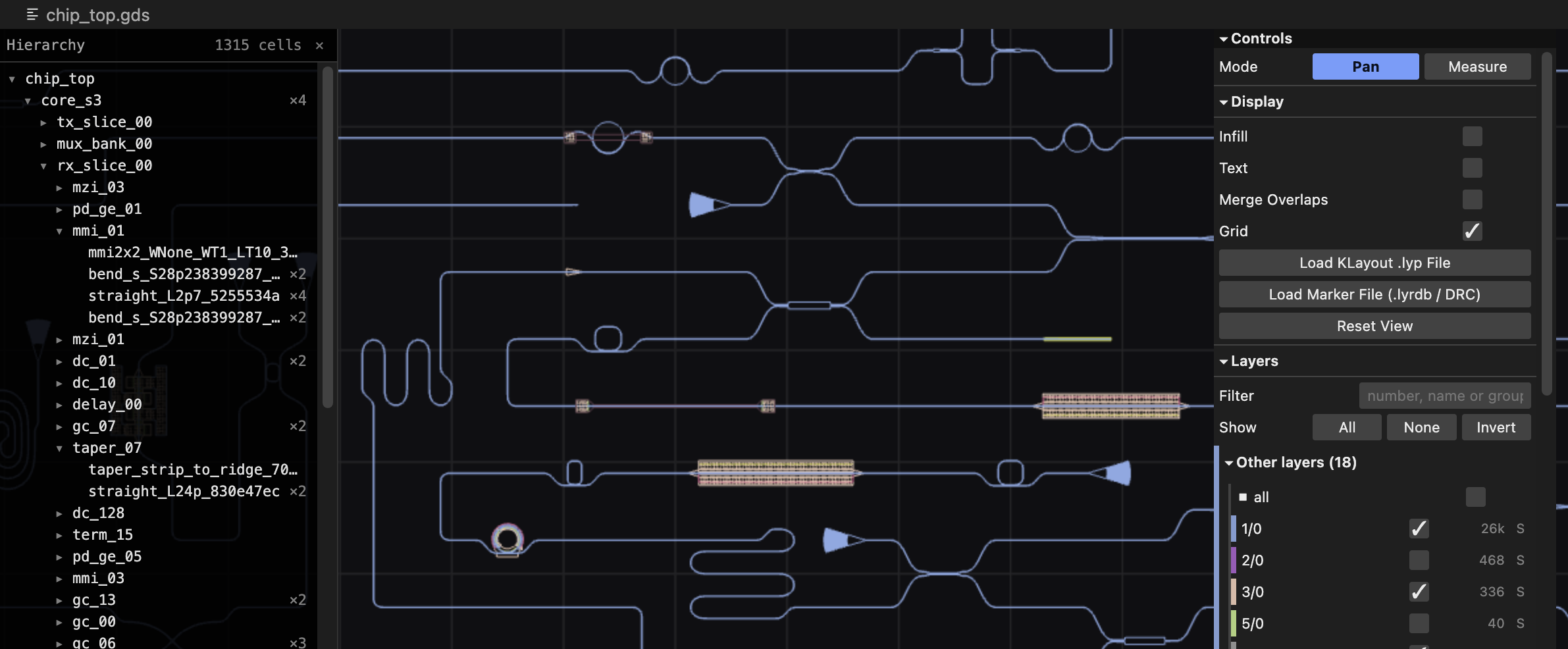
|
|
17
17
|
|
|
18
|
-
> **Status**: 1.0. The element's API is stable, and breaking changes wait
|
|
19
|
-
> for a major version. See [the changelog](CHANGELOG.md).
|
|
20
|
-
|
|
21
18
|
## Quick start
|
|
22
19
|
|
|
23
20
|
```sh
|
|
@@ -32,10 +29,10 @@ import "gds-lens"; // registers <gds-lens>
|
|
|
32
29
|
<gds-lens src="chip.gds" style="width: 100%; height: 600px"></gds-lens>
|
|
33
30
|
```
|
|
34
31
|
|
|
35
|
-
That's the whole thing. Pan with the mouse, zoom with the wheel
|
|
36
|
-
|
|
37
|
-
|
|
38
|
-
else to serve.
|
|
32
|
+
That's the whole thing. Pan with the mouse, zoom with the wheel; on a touch
|
|
33
|
+
screen, drag to pan and pinch to zoom. The import pulls in one self-contained
|
|
34
|
+
module — the parser, the renderer, the WebAssembly binary, and the control
|
|
35
|
+
panel — so there is nothing to copy and nothing else to serve.
|
|
39
36
|
|
|
40
37
|
Or drive it from JavaScript:
|
|
41
38
|
|
|
@@ -106,14 +103,54 @@ The element exposes the following members:
|
|
|
106
103
|
|
|
107
104
|
| Member | Returns | Description |
|
|
108
105
|
|---|---|---|
|
|
109
|
-
| `ready` | `Promise<
|
|
110
|
-
| `load(source, options?)` | `Promise<void>` | `source` is a URL string, a `Uint8Array`, or an `ArrayBuffer`. `options.reload` keeps the current camera and layer visibility instead of framing the design. |
|
|
106
|
+
| `ready` | `Promise<ViewerSurface>` | Resolves once the engine has mounted. Every method in the following table awaits this, so you rarely need it directly. |
|
|
107
|
+
| `load(source, options?)` | `Promise<void>` | `source` is a URL string, a `Uint8Array`, or an `ArrayBuffer`. `options.reload` keeps the current camera and layer visibility instead of framing the design. Resolves once the layout is on screen; rejects on a failed fetch, a file the parser refuses, or — with an error named `AbortError` — when a later load superseded this one. |
|
|
108
|
+
| `showLoading(label?)` | `Promise<void>` | Shows the loading overlay, for the wait before a `load()` of bytes the page is fetching itself. `load(url)` does this on its own. |
|
|
111
109
|
| `goToPoint(x, y)` | `Promise<boolean>` | Centers on a coordinate in microns and flashes a crosshair. Resolves `true` if the point is inside the layout. |
|
|
112
110
|
| `setLyp(name, text)` | `Promise<void>` | Applies a `.lyp` layer-properties file. Pass `""` to clear. |
|
|
113
111
|
| `setMarkers(name, text)` | `Promise<void>` | Applies a marker database. The viewer detects the format from the content. |
|
|
114
112
|
| `showError(message)` | `Promise<void>` | Replaces the view with an error message. |
|
|
115
113
|
| `destroy()` | `Promise<void>` | Releases the viewer's WebAssembly instance and WebGL context for good. Rarely needed — see [Removal parks the viewer](#removal-parks-the-viewer). |
|
|
116
114
|
|
|
115
|
+
Every `load()` cancels the one before it, so two quick changes to `src` show
|
|
116
|
+
the second layout even when the first is the slower download.
|
|
117
|
+
|
|
118
|
+
#### Events
|
|
119
|
+
|
|
120
|
+
The element dispatches two events on itself, whichever way a load was started
|
|
121
|
+
— the `src` attribute, `load()`, or a host pushing bytes through its surface.
|
|
122
|
+
Neither bubbles.
|
|
123
|
+
|
|
124
|
+
| Event | `detail` | When |
|
|
125
|
+
|---|---|---|
|
|
126
|
+
| `gds-load` | `{ layerCount, cellCount }` | A layout finished loading and is on screen. |
|
|
127
|
+
| `gds-error` | `{ message }` | A load failed, or `showError()` was called. `message` is the text the viewer shows. |
|
|
128
|
+
|
|
129
|
+
```js
|
|
130
|
+
viewer.addEventListener("gds-load", (event) => {
|
|
131
|
+
console.log(`${event.detail.layerCount} layers, ${event.detail.cellCount} cells`);
|
|
132
|
+
});
|
|
133
|
+
viewer.addEventListener("gds-error", (event) => {
|
|
134
|
+
reportProblem(event.detail.message);
|
|
135
|
+
});
|
|
136
|
+
```
|
|
137
|
+
|
|
138
|
+
The names carry a prefix because `load` and `error` already have meanings —
|
|
139
|
+
and types — on every HTML element.
|
|
140
|
+
|
|
141
|
+
#### Keyboard shortcuts
|
|
142
|
+
|
|
143
|
+
The keys act on the viewer that was last pointed at, so on a page with several
|
|
144
|
+
they go to the one under the mouse.
|
|
145
|
+
|
|
146
|
+
| Key | Action |
|
|
147
|
+
|---|---|
|
|
148
|
+
| `[` / `]` | Previous / next marker in the selected marker's category. |
|
|
149
|
+
| `m` | Toggle measure mode. Click two points to place a ruler. |
|
|
150
|
+
| `Esc` | Abandon a ruler being placed; with none in progress, clear the finished ones and return to pan mode. Also closes the coordinate menu. |
|
|
151
|
+
| `h` | Show or hide the cell hierarchy. |
|
|
152
|
+
| `/` | Focus the cell filter box. |
|
|
153
|
+
|
|
117
154
|
#### Several viewers on one page
|
|
118
155
|
|
|
119
156
|
Each `<gds-lens>` drives its own viewer, with its own shadow tree, its own
|