fs-alipay-ad-component 0.0.8 → 0.0.9
This diff represents the content of publicly available package versions that have been released to one of the supported registries. The information contained in this diff is provided for informational purposes only and reflects changes between package versions as they appear in their respective public registries.
- package/CHANGELOG.md +20 -16
- package/LICENSE +22 -22
- package/README.md +90 -90
- package/es/.DS_Store +0 -0
- package/es/api/generator/api.js +1518 -1518
- package/es/api/generator/base.js +18 -18
- package/es/api/generator/common.js +38 -38
- package/es/api/generator/configuration.js +54 -54
- package/es/api/generator/index.js +10 -10
- package/es/config/index.js +1 -1
- package/es/index/index.acss +0 -0
- package/es/index/index.axml +12 -12
- package/es/index/index.js +34 -29
- package/es/index/index.json +3 -3
- package/es/utils/aliApi.js +11 -11
- package/es/utils/constant.js +34 -30
- package/es/utils/logger.js +6 -6
- package/es/utils/utils.js +20 -20
- package/package.json +69 -69
package/CHANGELOG.md
CHANGED
|
@@ -1,16 +1,20 @@
|
|
|
1
|
-
## 0.0.
|
|
2
|
-
* **Feature**:
|
|
3
|
-
*
|
|
4
|
-
|
|
5
|
-
## 0.0.
|
|
6
|
-
* **Feature**:
|
|
7
|
-
*
|
|
8
|
-
|
|
9
|
-
|
|
10
|
-
|
|
11
|
-
|
|
12
|
-
|
|
13
|
-
|
|
14
|
-
|
|
15
|
-
|
|
16
|
-
|
|
1
|
+
## 0.0.9
|
|
2
|
+
* **Feature**:
|
|
3
|
+
* 新增埋点
|
|
4
|
+
|
|
5
|
+
## 0.0.8
|
|
6
|
+
* **Feature**:
|
|
7
|
+
* 新增参数showConfirm,传true的话展示支付成功弹窗
|
|
8
|
+
|
|
9
|
+
## 0.0.5
|
|
10
|
+
* **Feature**:
|
|
11
|
+
* 真实曝光优化
|
|
12
|
+
## 0.0.4
|
|
13
|
+
* **Feature**:
|
|
14
|
+
* 日志优化
|
|
15
|
+
## 0.0.3
|
|
16
|
+
* **Feature**:
|
|
17
|
+
* 支持支付宝小程序跳转H5广告
|
|
18
|
+
## 0.0.1
|
|
19
|
+
* **Feature**:
|
|
20
|
+
* 初版本
|
package/LICENSE
CHANGED
|
@@ -1,22 +1,22 @@
|
|
|
1
|
-
MIT LICENSE
|
|
2
|
-
|
|
3
|
-
Copyright (c) 2018-present Alipay.com, https://www.alipay.com/
|
|
4
|
-
|
|
5
|
-
Permission is hereby granted, free of charge, to any person obtaining
|
|
6
|
-
a copy of this software and associated documentation files (the
|
|
7
|
-
"Software"), to deal in the Software without restriction, including
|
|
8
|
-
without limitation the rights to use, copy, modify, merge, publish,
|
|
9
|
-
distribute, sublicense, and/or sell copies of the Software, and to
|
|
10
|
-
permit persons to whom the Software is furnished to do so, subject to
|
|
11
|
-
the following conditions:
|
|
12
|
-
|
|
13
|
-
The above copyright notice and this permission notice shall be
|
|
14
|
-
included in all copies or substantial portions of the Software.
|
|
15
|
-
|
|
16
|
-
THE SOFTWARE IS PROVIDED "AS IS", WITHOUT WARRANTY OF ANY KIND,
|
|
17
|
-
EXPRESS OR IMPLIED, INCLUDING BUT NOT LIMITED TO THE WARRANTIES OF
|
|
18
|
-
MERCHANTABILITY, FITNESS FOR A PARTICULAR PURPOSE AND
|
|
19
|
-
NONINFRINGEMENT. IN NO EVENT SHALL THE AUTHORS OR COPYRIGHT HOLDERS BE
|
|
20
|
-
LIABLE FOR ANY CLAIM, DAMAGES OR OTHER LIABILITY, WHETHER IN AN ACTION
|
|
21
|
-
OF CONTRACT, TORT OR OTHERWISE, ARISING FROM, OUT OF OR IN CONNECTION
|
|
22
|
-
WITH THE SOFTWARE OR THE USE OR OTHER DEALINGS IN THE SOFTWARE.
|
|
1
|
+
MIT LICENSE
|
|
2
|
+
|
|
3
|
+
Copyright (c) 2018-present Alipay.com, https://www.alipay.com/
|
|
4
|
+
|
|
5
|
+
Permission is hereby granted, free of charge, to any person obtaining
|
|
6
|
+
a copy of this software and associated documentation files (the
|
|
7
|
+
"Software"), to deal in the Software without restriction, including
|
|
8
|
+
without limitation the rights to use, copy, modify, merge, publish,
|
|
9
|
+
distribute, sublicense, and/or sell copies of the Software, and to
|
|
10
|
+
permit persons to whom the Software is furnished to do so, subject to
|
|
11
|
+
the following conditions:
|
|
12
|
+
|
|
13
|
+
The above copyright notice and this permission notice shall be
|
|
14
|
+
included in all copies or substantial portions of the Software.
|
|
15
|
+
|
|
16
|
+
THE SOFTWARE IS PROVIDED "AS IS", WITHOUT WARRANTY OF ANY KIND,
|
|
17
|
+
EXPRESS OR IMPLIED, INCLUDING BUT NOT LIMITED TO THE WARRANTIES OF
|
|
18
|
+
MERCHANTABILITY, FITNESS FOR A PARTICULAR PURPOSE AND
|
|
19
|
+
NONINFRINGEMENT. IN NO EVENT SHALL THE AUTHORS OR COPYRIGHT HOLDERS BE
|
|
20
|
+
LIABLE FOR ANY CLAIM, DAMAGES OR OTHER LIABILITY, WHETHER IN AN ACTION
|
|
21
|
+
OF CONTRACT, TORT OR OTHERWISE, ARISING FROM, OUT OF OR IN CONNECTION
|
|
22
|
+
WITH THE SOFTWARE OR THE USE OR OTHER DEALINGS IN THE SOFTWARE.
|
package/README.md
CHANGED
|
@@ -1,90 +1,90 @@
|
|
|
1
|
-
# fs-alipay-ad-component 支付宝广告组件
|
|
2
|
-
|
|
3
|
-
## 使用前准备
|
|
4
|
-
|
|
5
|
-
在 `request合法域名` 中增加如下配置
|
|
6
|
-
|
|
7
|
-
```text
|
|
8
|
-
https://advertising.adcomeon.com
|
|
9
|
-
https://fshows-ecs-pro.cn-hangzhou.log.aliyuncs.com
|
|
10
|
-
```
|
|
11
|
-
|
|
12
|
-
## 使用方法
|
|
13
|
-
|
|
14
|
-
### 一. npm 安装
|
|
15
|
-
|
|
16
|
-
```bash
|
|
17
|
-
npm install fs-alipay-ad-component --save
|
|
18
|
-
```
|
|
19
|
-
|
|
20
|
-
### 二. 使用
|
|
21
|
-
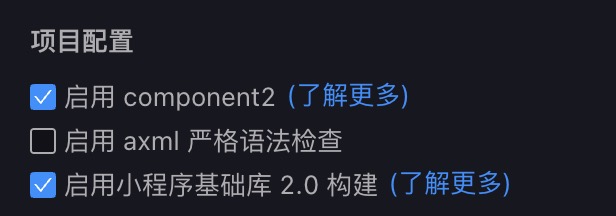
1. 开发者工具中启用component2
|
|
22
|
-
|
|
23
|
-
2. 引入组件,页面的 json 文件中做如下配置
|
|
24
|
-
```json
|
|
25
|
-
{
|
|
26
|
-
"usingComponents": {
|
|
27
|
-
"fs-ad": "fs-alipay-ad-component"
|
|
28
|
-
}
|
|
29
|
-
}
|
|
30
|
-
```
|
|
31
|
-
3. 页面的 axml 文件
|
|
32
|
-
```html
|
|
33
|
-
<fs-ad
|
|
34
|
-
a:if="{{showFsAd}}"
|
|
35
|
-
ref="fsAd"
|
|
36
|
-
flowMasterId="xxx"
|
|
37
|
-
openId="xxx"
|
|
38
|
-
onAdInfoReady="handleOpenAd"
|
|
39
|
-
/>
|
|
40
|
-
```
|
|
41
|
-
**注意**
|
|
42
|
-
- 如果在新开页面接入组件,需要添加onAdInfoReady属性,用于获取到广告后立即展示广告。
|
|
43
|
-
- 如果组件接在支付页,支付完成后不跳页面,那么不需要写onAdInfoReady,只需要在支付完成的回调中去调用handleOpenAd方法即可。
|
|
44
|
-
|
|
45
|
-
4. 页面的js文件,展示广告
|
|
46
|
-
|
|
47
|
-
**注意:showFsAd在data中的初始值应设置为false**
|
|
48
|
-
|
|
49
|
-
```js
|
|
50
|
-
Page({
|
|
51
|
-
data: {
|
|
52
|
-
showFsAd: false // showFsAd在data中的初始值应设置为false
|
|
53
|
-
},
|
|
54
|
-
onLoad () { // 获取广告
|
|
55
|
-
this.setData({
|
|
56
|
-
showFsAd: true
|
|
57
|
-
})
|
|
58
|
-
},
|
|
59
|
-
fsAd (ref) {
|
|
60
|
-
this.fsAdRef = ref // 通过ref获取广告方法
|
|
61
|
-
},
|
|
62
|
-
/**
|
|
63
|
-
* @function 展示广告
|
|
64
|
-
*/
|
|
65
|
-
handleOpenAd () {
|
|
66
|
-
this.fsAdRef.showAd()
|
|
67
|
-
}
|
|
68
|
-
})
|
|
69
|
-
```
|
|
70
|
-
|
|
71
|
-
### 三. 参数说明
|
|
72
|
-
|
|
73
|
-
| 变量 | 类型 | 必填 | 说明 |
|
|
74
|
-
|:----|:----:|:----:|:----|
|
|
75
|
-
| openId | String | 是 | 用户 openId |
|
|
76
|
-
| flowMasterId | String | 是 | 流量位标识, 运营提供的字段 |
|
|
77
|
-
|
|
78
|
-
### 四.事件
|
|
79
|
-
|
|
80
|
-
| 事件名称 | 参数 | 必填 | 说明 |
|
|
81
|
-
|:----|:----:|:----:|:----|
|
|
82
|
-
| onAdInfoReady | 无 | 否 | 广告数据获取成功的回调函数 |
|
|
83
|
-
|
|
84
|
-
|
|
85
|
-
### Tips
|
|
86
|
-
|
|
87
|
-
1. 如果你的必传参数中,有异步获取的,请通过a:if,在获取参数后再进行组件的一个显示,以防提示缺少必传参数
|
|
88
|
-
|
|
89
|
-
---
|
|
90
|
-
|
|
1
|
+
# fs-alipay-ad-component 支付宝广告组件
|
|
2
|
+
|
|
3
|
+
## 使用前准备
|
|
4
|
+
|
|
5
|
+
在 `request合法域名` 中增加如下配置
|
|
6
|
+
|
|
7
|
+
```text
|
|
8
|
+
https://advertising.adcomeon.com
|
|
9
|
+
https://fshows-ecs-pro.cn-hangzhou.log.aliyuncs.com
|
|
10
|
+
```
|
|
11
|
+
|
|
12
|
+
## 使用方法
|
|
13
|
+
|
|
14
|
+
### 一. npm 安装
|
|
15
|
+
|
|
16
|
+
```bash
|
|
17
|
+
npm install fs-alipay-ad-component --save
|
|
18
|
+
```
|
|
19
|
+
|
|
20
|
+
### 二. 使用
|
|
21
|
+
1. 开发者工具中启用component2
|
|
22
|
+

|
|
23
|
+
2. 引入组件,页面的 json 文件中做如下配置
|
|
24
|
+
```json
|
|
25
|
+
{
|
|
26
|
+
"usingComponents": {
|
|
27
|
+
"fs-ad": "fs-alipay-ad-component"
|
|
28
|
+
}
|
|
29
|
+
}
|
|
30
|
+
```
|
|
31
|
+
3. 页面的 axml 文件
|
|
32
|
+
```html
|
|
33
|
+
<fs-ad
|
|
34
|
+
a:if="{{showFsAd}}"
|
|
35
|
+
ref="fsAd"
|
|
36
|
+
flowMasterId="xxx"
|
|
37
|
+
openId="xxx"
|
|
38
|
+
onAdInfoReady="handleOpenAd"
|
|
39
|
+
/>
|
|
40
|
+
```
|
|
41
|
+
**注意**
|
|
42
|
+
- 如果在新开页面接入组件,需要添加onAdInfoReady属性,用于获取到广告后立即展示广告。
|
|
43
|
+
- 如果组件接在支付页,支付完成后不跳页面,那么不需要写onAdInfoReady,只需要在支付完成的回调中去调用handleOpenAd方法即可。
|
|
44
|
+
|
|
45
|
+
4. 页面的js文件,展示广告
|
|
46
|
+
|
|
47
|
+
**注意:showFsAd在data中的初始值应设置为false**
|
|
48
|
+
|
|
49
|
+
```js
|
|
50
|
+
Page({
|
|
51
|
+
data: {
|
|
52
|
+
showFsAd: false // showFsAd在data中的初始值应设置为false
|
|
53
|
+
},
|
|
54
|
+
onLoad () { // 获取广告
|
|
55
|
+
this.setData({
|
|
56
|
+
showFsAd: true
|
|
57
|
+
})
|
|
58
|
+
},
|
|
59
|
+
fsAd (ref) {
|
|
60
|
+
this.fsAdRef = ref // 通过ref获取广告方法
|
|
61
|
+
},
|
|
62
|
+
/**
|
|
63
|
+
* @function 展示广告
|
|
64
|
+
*/
|
|
65
|
+
handleOpenAd () {
|
|
66
|
+
this.fsAdRef.showAd()
|
|
67
|
+
}
|
|
68
|
+
})
|
|
69
|
+
```
|
|
70
|
+
|
|
71
|
+
### 三. 参数说明
|
|
72
|
+
|
|
73
|
+
| 变量 | 类型 | 必填 | 说明 |
|
|
74
|
+
|:----|:----:|:----:|:----|
|
|
75
|
+
| openId | String | 是 | 用户 openId |
|
|
76
|
+
| flowMasterId | String | 是 | 流量位标识, 运营提供的字段 |
|
|
77
|
+
|
|
78
|
+
### 四.事件
|
|
79
|
+
|
|
80
|
+
| 事件名称 | 参数 | 必填 | 说明 |
|
|
81
|
+
|:----|:----:|:----:|:----|
|
|
82
|
+
| onAdInfoReady | 无 | 否 | 广告数据获取成功的回调函数 |
|
|
83
|
+
|
|
84
|
+
|
|
85
|
+
### Tips
|
|
86
|
+
|
|
87
|
+
1. 如果你的必传参数中,有异步获取的,请通过a:if,在获取参数后再进行组件的一个显示,以防提示缺少必传参数
|
|
88
|
+
|
|
89
|
+
---
|
|
90
|
+
|
package/es/.DS_Store
ADDED
|
Binary file
|