flowsvg 0.1.1 → 0.2.0
This diff represents the content of publicly available package versions that have been released to one of the supported registries. The information contained in this diff is provided for informational purposes only and reflects changes between package versions as they appear in their respective public registries.
- package/CHANGELOG.md +28 -0
- package/PATTERNS.md +61 -5
- package/README.md +149 -461
- package/README.zh-CN.md +149 -461
- package/dist/adapters/react.d.ts +7 -0
- package/dist/adapters/react.js +14 -2
- package/dist/adapters/vue.d.ts +29 -3
- package/dist/adapters/vue.js +20 -4
- package/dist/adapters/web-component.d.ts +14 -2
- package/dist/adapters/web-component.js +32 -3
- package/dist/browser/controls.d.ts +7 -3
- package/dist/browser/controls.js +23 -31
- package/dist/browser/export-controls.d.ts +32 -0
- package/dist/browser/export-controls.js +151 -0
- package/dist/browser/player.d.ts +9 -1
- package/dist/browser/player.js +83 -24
- package/dist/browser/select-control.d.ts +33 -0
- package/dist/browser/select-control.js +171 -0
- package/dist/browser.d.ts +2 -1
- package/dist/browser.js +2 -1
- package/dist/core/diagram.d.ts +4 -2
- package/dist/core/diagram.js +111 -21
- package/dist/core/edge-geometry.d.ts +16 -3
- package/dist/core/edge-geometry.js +264 -37
- package/dist/core/model.d.ts +35 -9
- package/dist/core/node-content-measurement.d.ts +34 -0
- package/dist/core/node-content-measurement.js +66 -0
- package/dist/core/node-content.d.ts +17 -0
- package/dist/core/node-content.js +30 -6
- package/dist/core/timeline.d.ts +11 -3
- package/dist/core/timeline.js +29 -5
- package/dist/core/validation.d.ts +1 -1
- package/dist/core/validation.js +13 -3
- package/dist/export/browser.d.ts +9 -0
- package/dist/export/browser.js +172 -0
- package/dist/export/captions.d.ts +18 -0
- package/dist/export/captions.js +44 -0
- package/dist/export/plan.d.ts +25 -0
- package/dist/export/plan.js +94 -0
- package/dist/export/types.d.ts +64 -0
- package/dist/export/types.js +9 -0
- package/dist/export/worker-source.d.ts +1 -0
- package/dist/export/worker-source.js +1 -0
- package/dist/export.d.ts +3 -0
- package/dist/export.js +2 -0
- package/dist/index.d.ts +3 -1
- package/dist/index.js +1 -0
- package/dist/node/cli.d.ts +2 -0
- package/dist/node/cli.js +72 -0
- package/dist/node/gif.d.ts +16 -0
- package/dist/node/gif.js +184 -0
- package/dist/node/html.d.ts +19 -0
- package/dist/node/html.js +61 -0
- package/dist/node/output.d.ts +2 -0
- package/dist/node/output.js +22 -0
- package/dist/node.d.ts +6 -0
- package/dist/node.js +3 -0
- package/dist/portable/LICENSE.esbuild.txt +21 -0
- package/dist/portable/LICENSE.flowsvg.txt +21 -0
- package/dist/portable/LICENSE.gifenc.txt +21 -0
- package/dist/portable/export.js +5 -0
- package/dist/portable/manifest.json +36 -0
- package/dist/portable/player.js +2 -0
- package/dist/portable/styles.css +227 -0
- package/dist/styles.css +194 -14
- package/docs/images/flowsvg-wordmark.gif +0 -0
- package/package.json +37 -6
package/README.zh-CN.md
CHANGED
|
@@ -1,547 +1,235 @@
|
|
|
1
|
-
|
|
1
|
+
<p align="center">
|
|
2
|
+
<img src="https://cdn.jsdelivr.net/npm/flowsvg@0.2.0/docs/images/flowsvg-wordmark.gif" alt="FlowSVG" width="280">
|
|
3
|
+
</p>
|
|
2
4
|
|
|
3
|
-
|
|
5
|
+
<p align="center">声明式 SVG 图解,支持时间线播放与 SVG/GIF 导出。</p>
|
|
4
6
|
|
|
5
|
-
|
|
7
|
+
<p align="center"><a href="https://cdn.jsdelivr.net/npm/flowsvg@0.2.0/README.md">English</a> | 简体中文</p>
|
|
6
8
|
|
|
7
|
-
|
|
9
|
+
<p align="center">
|
|
10
|
+
<a href="#定义图解">快速开始</a> ·
|
|
11
|
+
<a href="#控制播放">播放 API</a> ·
|
|
12
|
+
<a href="#核心-api--flowsvg">核心 API</a> ·
|
|
13
|
+
<a href="#文档与动作">文档模型</a> ·
|
|
14
|
+
<a href="#导出-api">导出 API</a>
|
|
15
|
+
</p>
|
|
8
16
|
|
|
9
|
-
|
|
10
|
-
|
|
11
|
-
## 安装
|
|
12
|
-
|
|
13
|
-
从 npm 安装:
|
|
17
|
+
同一份图解数据可用于原生浏览器、Vue、React 和 Web Component。
|
|
14
18
|
|
|
15
19
|
```sh
|
|
16
|
-
|
|
20
|
+
npm install flowsvg
|
|
17
21
|
```
|
|
18
22
|
|
|
19
|
-
|
|
20
|
-
|
|
21
|
-
```sh
|
|
22
|
-
# Vue 应用
|
|
23
|
-
pnpm add vue
|
|
24
|
-
# React 应用
|
|
25
|
-
pnpm add react react-dom
|
|
26
|
-
# React TypeScript 应用
|
|
27
|
-
pnpm add -D @types/react @types/react-dom
|
|
28
|
-
```
|
|
29
|
-
|
|
30
|
-
核心与原生浏览器入口无需框架,类型声明随包提供。核心要求 Node.js 18+ 或 ES2022 ESM;浏览器要求 DOM、SVG 和 `requestAnimationFrame`;框架最低版本为 Vue 3.5、React 18。
|
|
31
|
-
|
|
32
|
-
| 导入路径 | 用途 |
|
|
33
|
-
| --- | --- |
|
|
34
|
-
| `flowsvg` | 无 DOM 的文档校验、编译、求值、命中与 SVG 导出 |
|
|
35
|
-
| `flowsvg/browser` | 原生浏览器播放器 |
|
|
36
|
-
| `flowsvg/vue` | Vue 组件与实例类型 |
|
|
37
|
-
| `flowsvg/react` | React 组件与 ref 类型 |
|
|
38
|
-
| `flowsvg/web-component` | 显式注册自定义元素;也可使用 `flowsvg/element` |
|
|
39
|
-
| `flowsvg/styles.css` | 控件布局与可见焦点样式 |
|
|
40
|
-
|
|
41
|
-
## 快速开始
|
|
42
|
-
|
|
43
|
-
### 1. 创建图解文档
|
|
44
|
-
|
|
45
|
-
将下面内容保存为 `diagram.ts`。这个 5.2 秒的示例包含六个节点、三个场景和五个节拍,依次展示身份校验、订单写库,以及异步事件与响应的并行传递。后续集成示例复用此文件:
|
|
23
|
+
## 定义图解
|
|
46
24
|
|
|
47
25
|
```ts
|
|
26
|
+
// diagram.ts
|
|
48
27
|
import type { DiagramDocument } from "flowsvg";
|
|
49
28
|
|
|
50
|
-
export const
|
|
29
|
+
export const diagram: DiagramDocument = {
|
|
51
30
|
version: 1,
|
|
52
|
-
|
|
53
|
-
viewport: { width: 960, height: 440 },
|
|
31
|
+
viewport: { width: 640, height: 240 },
|
|
54
32
|
nodes: [
|
|
55
|
-
{ id: "client", kind: "roundedRect", x: 40, y:
|
|
56
|
-
{ id: "
|
|
57
|
-
{ id: "auth", kind: "ellipse", x: 260, y: 40, width: 130, height: 72, label: "Auth" },
|
|
58
|
-
{ id: "orders", kind: "roundedRect", x: 500, y: 205, width: 150, height: 70, label: "Order service" },
|
|
59
|
-
{ id: "database", kind: "cylinder", x: 780, y: 65, width: 140, height: 90, label: "Orders" },
|
|
60
|
-
{ id: "events", kind: "rect", x: 780, y: 330, width: 140, height: 70, label: "Event queue" }
|
|
33
|
+
{ id: "client", kind: "roundedRect", x: 40, y: 90, width: 140, height: 64, label: "Client" },
|
|
34
|
+
{ id: "service", kind: "roundedRect", x: 400, y: 90, width: 180, height: 64, label: "Service" }
|
|
61
35
|
],
|
|
62
|
-
edges: [
|
|
63
|
-
|
|
64
|
-
|
|
65
|
-
|
|
66
|
-
|
|
67
|
-
|
|
68
|
-
|
|
69
|
-
],
|
|
70
|
-
scenes: [
|
|
71
|
-
{ id: "request", label: "接收与认证", beats: [
|
|
72
|
-
{ durationMs: 800, caption: "接收订单请求", actions: [
|
|
73
|
-
{ type: "flow", target: "request", direction: "forward", text: "POST" }
|
|
74
|
-
] },
|
|
75
|
-
{ durationMs: 800, caption: "校验访问令牌", actions: [
|
|
76
|
-
{ type: "flow", target: "authorize", direction: "forward", text: "Token" }
|
|
77
|
-
] }
|
|
78
|
-
] },
|
|
79
|
-
{ id: "create-order", label: "创建订单", beats: [
|
|
80
|
-
{ durationMs: 1000, caption: "将已认证请求交给订单服务", actions: [
|
|
81
|
-
{ type: "flow", target: "create", direction: "forward", text: "Create" }
|
|
36
|
+
edges: [{ id: "request", from: "client", to: "service", route: "orthogonal" }],
|
|
37
|
+
scenes: [{
|
|
38
|
+
id: "request-response",
|
|
39
|
+
label: "请求与响应",
|
|
40
|
+
beats: [
|
|
41
|
+
{ durationMs: 1000, caption: "发送请求", actions: [
|
|
42
|
+
{ type: "flow", target: "request", direction: "forward", text: "Request" }
|
|
82
43
|
] },
|
|
83
|
-
{ durationMs: 1000, caption: "
|
|
84
|
-
{ type: "flow", target: "
|
|
85
|
-
] }
|
|
86
|
-
] },
|
|
87
|
-
{ id: "response", label: "发布事件与响应", beats: [
|
|
88
|
-
{ durationMs: 1600, caption: "发布 OrderCreated 事件,同时返回订单号", actions: [
|
|
89
|
-
{ type: "flow", target: "publish", direction: "forward", text: "OrderCreated" },
|
|
90
|
-
{ type: "flow", target: "result", direction: "forward", text: "201 Created" },
|
|
91
|
-
{ type: "flow", target: "request", direction: "reverse", text: "Order ID" }
|
|
44
|
+
{ durationMs: 1000, caption: "返回响应", actions: [
|
|
45
|
+
{ type: "flow", target: "request", direction: "reverse" }
|
|
92
46
|
] }
|
|
93
|
-
]
|
|
94
|
-
]
|
|
47
|
+
]
|
|
48
|
+
}]
|
|
95
49
|
};
|
|
96
50
|
```
|
|
97
51
|
|
|
98
|
-
|
|
52
|
+
节点显式指定位置和尺寸。连线支持 `straight`、`orthogonal`(圆角折线)和 `curved`。传递设置 `text` 时显示文字胶囊,省略时显示移动实心圆点。
|
|
99
53
|
|
|
100
|
-
|
|
54
|
+
## 播放
|
|
101
55
|
|
|
102
|
-
|
|
56
|
+
```html
|
|
57
|
+
<div id="diagram"></div>
|
|
58
|
+
```
|
|
103
59
|
|
|
104
60
|
```ts
|
|
105
|
-
import {
|
|
106
|
-
import
|
|
61
|
+
import { createPlayer } from "flowsvg/browser";
|
|
62
|
+
import "flowsvg/styles.css";
|
|
63
|
+
import { diagram } from "./diagram.js";
|
|
107
64
|
|
|
108
|
-
const
|
|
109
|
-
|
|
110
|
-
|
|
65
|
+
const player = createPlayer(document.querySelector<HTMLElement>("#diagram")!, diagram, {
|
|
66
|
+
theme: "light",
|
|
67
|
+
loop: true,
|
|
68
|
+
gifExport: true
|
|
69
|
+
});
|
|
111
70
|
|
|
112
|
-
|
|
113
|
-
|
|
71
|
+
player.play();
|
|
72
|
+
// On disposal: player.destroy();
|
|
114
73
|
```
|
|
115
74
|
|
|
116
|
-
|
|
117
|
-
|
|
118
|
-
## Vue 集成
|
|
75
|
+
播放器默认暂停,内置播放控件。循环和 GIF 下载默认关闭。样式只需导入一次。原生播放器卸载时调用 `destroy()`;框架组件自动清理。
|
|
119
76
|
|
|
120
|
-
|
|
77
|
+
### Vue
|
|
121
78
|
|
|
122
79
|
```vue
|
|
123
80
|
<script setup lang="ts">
|
|
124
|
-
import {
|
|
125
|
-
import { FlowPlayer, type FlowPlayerHandle } from "flowsvg/vue";
|
|
126
|
-
import type { PlayerErrorDetail } from "flowsvg/browser";
|
|
81
|
+
import { FlowPlayer } from "flowsvg/vue";
|
|
127
82
|
import "flowsvg/styles.css";
|
|
128
|
-
import {
|
|
129
|
-
|
|
130
|
-
const player = ref<FlowPlayerHandle | null>(null);
|
|
131
|
-
const timeMs = ref(0);
|
|
132
|
-
|
|
133
|
-
function handleError({ error }: PlayerErrorDetail): void {
|
|
134
|
-
console.error(error);
|
|
135
|
-
}
|
|
83
|
+
import { diagram } from "./diagram.js";
|
|
136
84
|
</script>
|
|
137
85
|
|
|
138
86
|
<template>
|
|
139
|
-
<FlowPlayer
|
|
140
|
-
ref="player"
|
|
141
|
-
:document="diagramDocument"
|
|
142
|
-
:speed="1.25"
|
|
143
|
-
theme="dark"
|
|
144
|
-
@timeupdate="timeMs = $event.timeMs"
|
|
145
|
-
@error="handleError"
|
|
146
|
-
/>
|
|
147
|
-
<button type="button" @click="player?.play()">播放</button>
|
|
148
|
-
<button type="button" @click="player?.seek(0)">回到开头</button>
|
|
149
|
-
<output>{{ timeMs }} ms</output>
|
|
87
|
+
<FlowPlayer :document="diagram" loop gif-export />
|
|
150
88
|
</template>
|
|
151
89
|
```
|
|
152
90
|
|
|
153
|
-
|
|
154
|
-
|
|
155
|
-
## React 集成
|
|
91
|
+
### React
|
|
156
92
|
|
|
157
93
|
```tsx
|
|
158
|
-
import {
|
|
159
|
-
import { FlowPlayer, type FlowPlayerHandle } from "flowsvg/react";
|
|
94
|
+
import { FlowPlayer } from "flowsvg/react";
|
|
160
95
|
import "flowsvg/styles.css";
|
|
161
|
-
import {
|
|
162
|
-
|
|
163
|
-
export
|
|
164
|
-
|
|
165
|
-
|
|
166
|
-
return (
|
|
167
|
-
<section>
|
|
168
|
-
<FlowPlayer
|
|
169
|
-
ref={player}
|
|
170
|
-
document={diagramDocument}
|
|
171
|
-
speed={1.25}
|
|
172
|
-
theme="dark"
|
|
173
|
-
onError={({ error }) => console.error(error)}
|
|
174
|
-
/>
|
|
175
|
-
<button type="button" onClick={() => player.current?.play()}>播放</button>
|
|
176
|
-
<button type="button" onClick={() => player.current?.seek(0)}>回到开头</button>
|
|
177
|
-
</section>
|
|
178
|
-
);
|
|
96
|
+
import { diagram } from "./diagram.js";
|
|
97
|
+
|
|
98
|
+
export function Diagram() {
|
|
99
|
+
return <FlowPlayer document={diagram} loop gifExport />;
|
|
179
100
|
}
|
|
180
101
|
```
|
|
181
102
|
|
|
182
|
-
|
|
103
|
+
## 控制播放
|
|
183
104
|
|
|
184
|
-
|
|
105
|
+
`createPlayer(host: HTMLElement, document: DiagramDocument, options?: PlayerOptions): FlowPlayer` 挂载播放器并替换宿主子元素。初始文档非法时抛出 `DiagramValidationError`。
|
|
185
106
|
|
|
186
|
-
|
|
|
107
|
+
| 方法/属性 | 行为 |
|
|
187
108
|
| --- | --- |
|
|
188
|
-
| `
|
|
189
|
-
| `
|
|
190
|
-
| `
|
|
191
|
-
| `
|
|
192
|
-
| `
|
|
193
|
-
| `
|
|
194
|
-
| `
|
|
195
|
-
| `
|
|
196
|
-
|
|
197
|
-
修改 `theme`、`controls`、`reducedMotion` 或 `hoverFill` 会重建播放器,暂停在零时刻,不再应用 `initialTimeMs`。更新文档需提供新对象引用。实例暴露[播放器 API](#播放器-api)中的七个方法;挂载前或卸载后调用会抛出错误。
|
|
198
|
-
|
|
199
|
-
两种入口均支持服务端导入。SSR 输出容器,客户端挂载后创建播放器。服务端图解预览使用 `renderSvg`。
|
|
200
|
-
|
|
201
|
-
## 原生浏览器
|
|
109
|
+
| `play(): void` / `pause(): void` | 从当前位置继续/暂停。到达终点后,`play()` 仅在开启循环时重新开始;静态图解不能播放。 |
|
|
110
|
+
| `seek(timeMs: number): void` | 时间限制在时间线范围内;除终点外保留播放状态,非有限值按零处理。 |
|
|
111
|
+
| `step(direction: 1 \| -1): void` | 暂停并跳转节拍边界;从节拍内部后退时先回到当前节拍起点。 |
|
|
112
|
+
| `setSpeed(speed: number): void` | 设置有限正数倍率,忽略非法值;默认 `1`。 |
|
|
113
|
+
| `setLoop(loop: boolean): void` | 切换整条时间线循环,保留当前位置和播放状态。 |
|
|
114
|
+
| `load(document: DiagramDocument): void` | 成功后暂停在零时刻;失败时触发 `error` 并保留原文档与状态。 |
|
|
115
|
+
| `getState(): PlayerState` | 返回 `{ timeMs, totalDuration, playing, loop, speed, frame }`,时间单位为毫秒。 |
|
|
116
|
+
| `destroy(): void` | 释放 DOM、监听器和动画资源,可重复调用;Vue/React ref 不提供此方法。 |
|
|
117
|
+
| `element: HTMLElement` | 只读宿主元素,也是事件目标;Vue/React ref 不提供此属性。 |
|
|
202
118
|
|
|
203
|
-
|
|
119
|
+
Vue/React ref 提供上表八个播放与状态方法。替换 `document` 对象会重新加载组件;修改 `theme`、`controls`、`gifExport`、`reducedMotion` 或 `hoverFill` 会重建播放器并暂停在零时刻。
|
|
204
120
|
|
|
205
|
-
|
|
206
|
-
<div id="diagram" style="width: 100%; height: 360px;"></div>
|
|
207
|
-
```
|
|
121
|
+
### 选项与组件属性
|
|
208
122
|
|
|
209
|
-
|
|
210
|
-
|
|
211
|
-
```ts
|
|
212
|
-
import { createPlayer } from "flowsvg/browser";
|
|
213
|
-
import "flowsvg/styles.css";
|
|
214
|
-
import { diagramDocument } from "./diagram.js";
|
|
215
|
-
|
|
216
|
-
const host = document.querySelector<HTMLElement>("#diagram");
|
|
217
|
-
if (!host) throw new Error("Diagram host is missing");
|
|
218
|
-
|
|
219
|
-
const player = createPlayer(host, diagramDocument, { theme: "light" });
|
|
220
|
-
player.play();
|
|
221
|
-
```
|
|
222
|
-
|
|
223
|
-
`createPlayer` 替换容器子元素。卸载或复用容器前调用 `destroy()`。原生 HTML 使用包导入路径时,需配置 import map 或构建工具。
|
|
224
|
-
|
|
225
|
-
[原生示例](https://github.com/yokingma/FlowSVG/blob/HEAD/apps/native-example/README.md)演示请求与响应传递,同一文档也可用于其余三种接入方式。
|
|
226
|
-
|
|
227
|
-
## Web Component
|
|
228
|
-
|
|
229
|
-
先在 HTML 中放置元素,再从客户端模块显式注册:
|
|
230
|
-
|
|
231
|
-
```html
|
|
232
|
-
<flowsvg-player controls="false"></flowsvg-player>
|
|
233
|
-
```
|
|
234
|
-
|
|
235
|
-
```ts
|
|
236
|
-
import { defineFlowPlayer, type FlowPlayerElement } from "flowsvg/web-component";
|
|
237
|
-
import "flowsvg/styles.css";
|
|
238
|
-
import { diagramDocument } from "./diagram.js";
|
|
239
|
-
|
|
240
|
-
defineFlowPlayer();
|
|
241
|
-
const element = document.querySelector<FlowPlayerElement>("flowsvg-player");
|
|
242
|
-
if (element) element.document = diagramDocument;
|
|
243
|
-
```
|
|
244
|
-
|
|
245
|
-
默认注册 `<flowsvg-player>`,重复注册安全。对象赋给 `element.document`;JSON 字符串赋给 HTML `document` 属性;JSON URL 赋给 `src`。URL 相对页面解析,遵循浏览器 CORS 规则。
|
|
246
|
-
|
|
247
|
-
支持 `autoplay`、`controls`、`speed`、`theme`、`reduced-motion`、`hover-fill`。默认显示控件,关闭自动播放与悬停背景;`controls="false"` 隐藏控件。主题、控件及动画/悬停选项变化时保留时间和播放状态;`autoplay` 则直接控制播放或暂停。移除元素会取消请求并销毁播放器,重新连接时使用保留的文档。
|
|
248
|
-
|
|
249
|
-
方法:`play`、`pause`、`seek`、`step`、`setSpeed`、`getState`、`destroy`。更换文档使用 `element.document`。挂载前或销毁后,`getState()` 返回 `undefined`。播放与错误事件可冒泡并穿越 Shadow DOM 边界。
|
|
250
|
-
|
|
251
|
-
请在 DOM 环境注册。无 DOM 导入安全,但该模块实例不能在稍后补上 DOM 后用于注册。
|
|
252
|
-
|
|
253
|
-
## 文档与时间线
|
|
254
|
-
|
|
255
|
-
| 文档字段 | 约定 |
|
|
123
|
+
| `PlayerOptions` | 默认值/含义 |
|
|
256
124
|
| --- | --- |
|
|
257
|
-
| `
|
|
258
|
-
| `
|
|
259
|
-
| `
|
|
260
|
-
| `
|
|
261
|
-
| `
|
|
262
|
-
| `
|
|
263
|
-
|
|
264
|
-
节点与连线 ID 全局唯一。形状:`rect`、`roundedRect`、`ellipse`、`cylinder`、`group`。`parentId` 指向父分组,子节点坐标相对分组原点。标签为纯文本,`visible` 默认 `true`。节点样式:`fill`、`stroke`、`strokeWidth`、`textColor`、`dashed`(分组边框);连线样式:`stroke`、`strokeWidth`、`dashed`。颜色使用十六进制 RGB/RGBA,如 `#2563eb`、`#2563eb80`。
|
|
265
|
-
|
|
266
|
-
路由:`straight`(默认)、`orthogonal`、`curved`。曲线跟随端口切线,不避让其他节点;正交路径避开可见普通节点,受阻时固定回退,不保证最短路径或零交叉。`fromPort` / `toPort` 可设为 `top`、`right`、`bottom`、`left`。显式正交端口保留向外线段,曲线端口决定切线。省略时按中心连线主方向选择,椭圆端点位于轮廓。普通标签按估算宽度换行;高度溢出时仍显示全文,并报告 `text-overflow`。
|
|
267
|
-
|
|
268
|
-
连线可连接节点或分组边界。分组端点跟随当前几何和显式端口;祖先隐藏时遮蔽连线。传递仅高亮端点分组,不联动子节点。分组边框不作为布线障碍。
|
|
269
|
-
|
|
270
|
-
### 固定节点内的节点内容
|
|
271
|
-
|
|
272
|
-
`rect`、`roundedRect`、`cylinder` 支持 `content`;椭圆和分组仅支持普通标签。`content` 与 `label` 互斥,空标签也算声明。`content.blocks` 按顺序排列 `title`、`paragraph`、`list`、`graph` 内容块。段落角色为 `body`(默认)或 `auxiliary`(辅助文字);空数组只显示形状。
|
|
273
|
-
|
|
274
|
-
```ts
|
|
275
|
-
import type { DiagramNode } from "flowsvg";
|
|
276
|
-
|
|
277
|
-
const service = {
|
|
278
|
-
id: "service", kind: "rect", x: 24, y: 24, width: 260, height: 312,
|
|
279
|
-
content: {
|
|
280
|
-
style: { padding: 16, blockGap: 14 },
|
|
281
|
-
blocks: [
|
|
282
|
-
{ type: "title", text: "Order service" },
|
|
283
|
-
{ type: "paragraph", role: "auxiliary", text: "Core responsibilities" },
|
|
284
|
-
{ type: "paragraph", text: "Validate and persist incoming orders." },
|
|
285
|
-
{ type: "paragraph", text: "Return the order number.", style: { color: "#2563eb", align: "right" } }
|
|
286
|
-
]
|
|
287
|
-
}
|
|
288
|
-
} satisfies DiagramNode;
|
|
289
|
-
```
|
|
125
|
+
| `theme?: "light" \| "dark"` | 使用文档主题,未设置时为 `"light"`。 |
|
|
126
|
+
| `controls?: boolean` | `true`;显示播放控件。 |
|
|
127
|
+
| `loop?: boolean` | `false`;循环整条时间线。 |
|
|
128
|
+
| `gifExport?: boolean` | `false`;在 `controls` 开启时显示 GIF 下载控件。 |
|
|
129
|
+
| `hoverFill?: boolean` | `false`;悬停仅高亮边框,设为 `true` 时同时高亮背景。 |
|
|
130
|
+
| `reducedMotion?: boolean` | 跟随浏览器偏好;`true` 隐藏传递标记并立即完成视觉过渡,保留时间线时长。 |
|
|
290
131
|
|
|
291
|
-
`
|
|
132
|
+
Vue/React 的 `FlowPlayerProps` 另提供必填 `document: DiagramDocument`、`speed?: number`(默认 `1`)、`initialTimeMs?: number`(仅首次应用)、`className` 和 `style`。两个入口均导出 `FlowPlayerHandle` 与 `FlowPlayerProps` 类型。原生播放器通过 `play()` 启动,通过 `setSpeed()` 修改倍率。
|
|
292
133
|
|
|
293
|
-
|
|
294
|
-
|
|
295
|
-
文字字段接受字符串或 `ContentTextSpan[]`:`{ text, style?: { fontSize, fontWeight, color } }`。片段继承内容块样式并共用基线,对齐由内容块决定。每行使用最大字号;换行保留显式空行和完整 Unicode 字素,优先在英文空格处断行,必要时拆分长单词或 URL。跨片段的字素采用首字符样式。排版使用宽度估算,不测量 DOM。
|
|
296
|
-
|
|
297
|
-
文字样式:有限正数 `fontSize`、100–900 整数 `fontWeight`、十六进制 `color`、`align`(`left`、`center`、`right`)。内容的 `padding`、`blockGap` 为非负有限数。默认值按图解单位计:标题 20/700、正文 14/400、辅助文字 12/400、内边距 16、块间距 14;行高为 `max(20, fontSize × 1.35)`。显式颜色覆盖主题默认值。
|
|
298
|
-
|
|
299
|
-
列表接受 `marker`(默认 `none`,可选 `bullet`、`number`)、`items` 和 `style`。条目支持 `tags`、`status`、`body`、`auxiliary`、`style`、`auxiliaryStyle`、`statusStyle`。列表样式设置正文样式和非负有限数 `itemGap`(默认 12),条目正文样式可覆盖;辅助文字默认使用 12 单位弱化色。标记共用一列,与正文间隔 8 单位;正文续行与辅助文字对齐。标记对齐首个实际文字的基线。缺省条目/部分不占空间,显式空文字保留一行。
|
|
300
|
-
|
|
301
|
-
```ts
|
|
302
|
-
import type { ContentBlock } from "flowsvg";
|
|
303
|
-
|
|
304
|
-
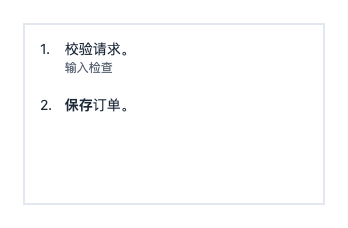
const steps: ContentBlock = { type: "list", marker: "number", style: { itemGap: 16 }, items: [
|
|
305
|
-
{ body: "校验请求。", auxiliary: "输入检查" },
|
|
306
|
-
{ body: [{ text: "保存", style: { fontWeight: 700 } }, { text: "订单。" }] }
|
|
307
|
-
] };
|
|
308
|
-
```
|
|
309
|
-
|
|
310
|
-
将 `steps` 放入 300 × 180 的矩形,设置 `content: { blocks: [steps] }`:
|
|
311
|
-
|
|
312
|
-
|
|
313
|
-
|
|
314
|
-
文字标签接受 `{ text, style?: { fontSize, fontWeight, color, fill } }`。默认字号 11,水平/垂直内边距 6/2,圆角 3。列表 `tagGap` 默认 6,须为非负有限数。状态靠右,默认使用 12 单位强调色;`statusStyle` 支持 `fontSize`、`fontWeight`、`color`。宽度足够时标签与状态共用基线;否则先换行标签,再将状态放到下方。正文、辅助文字随后排列。显式颜色和底色覆盖主题默认值。
|
|
315
|
-
|
|
316
|
-
```ts
|
|
317
|
-
import type { ContentBlock } from "flowsvg";
|
|
318
|
-
|
|
319
|
-
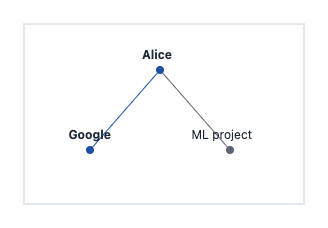
const records: ContentBlock = { type: "list", items: [{
|
|
320
|
-
tags: [{ text: "world" }, { text: "experience", style: { fill: "#eadfff", color: "#57319b" } }],
|
|
321
|
-
status: "new", body: "Alice joined Google", auxiliary: "Mar 2026"
|
|
322
|
-
}] };
|
|
323
|
-
```
|
|
324
|
-
|
|
325
|
-
将 `records` 放入 300 × 180 的矩形,设置 `content: { blocks: [records] }`:
|
|
326
|
-
|
|
327
|
-

|
|
134
|
+
### 事件
|
|
328
135
|
|
|
329
|
-
|
|
136
|
+
原生播放器在 `player.element` 派发 `CustomEvent`,数据位于 `event.detail`。Vue 处理函数与 React 回调直接接收事件数据。
|
|
330
137
|
|
|
331
|
-
|
|
138
|
+
| 原生/Vue 事件 | React 回调 | 数据 |
|
|
139
|
+
| --- | --- | --- |
|
|
140
|
+
| `stepchange` | `onStepChange` | `PlayerState`;场景/节拍选择变化。 |
|
|
141
|
+
| `timeupdate` | `onTimeUpdate` | `PlayerState`;画面更新。 |
|
|
142
|
+
| `playstatechange` | `onPlayStateChange` | `PlayerState`;播放状态变化。 |
|
|
143
|
+
| `loopchange` | `onLoopChange` | `PlayerState`;循环设置变化。 |
|
|
144
|
+
| `error` | `onError` | `PlayerErrorDetail`:播放器状态加 `error: Error`。 |
|
|
145
|
+
| `hover`、`click` | — | 原生/Web Component:`{ id, type, point, timeMs, sceneId, beatId }`;未命中时为 `null`。别名为 `objecthover`、`objectclick`。 |
|
|
332
146
|
|
|
333
|
-
|
|
147
|
+
交互数据中的 `point` 使用图解坐标,`type` 为 `"node"` 或 `"edge"`。画面更新时,如需派发 `stepchange`,该事件先于 `timeupdate`。Web Component 挂载前发生的错误可能不包含播放器状态字段。
|
|
334
148
|
|
|
335
|
-
|
|
149
|
+
## 导出
|
|
336
150
|
|
|
337
151
|
```ts
|
|
338
|
-
import
|
|
152
|
+
import { createDiagram } from "flowsvg";
|
|
153
|
+
import { exportGif } from "flowsvg/export";
|
|
154
|
+
import { diagram } from "./diagram.js";
|
|
339
155
|
|
|
340
|
-
const
|
|
341
|
-
|
|
342
|
-
|
|
343
|
-
|
|
344
|
-
{ id: "google", label: "Google", x: 50, y: 110, highlighted: true },
|
|
345
|
-
{ id: "ml", label: "ML project", x: 190, y: 110 }
|
|
346
|
-
],
|
|
347
|
-
edges: [{ from: "alice", to: "google" }, { from: "alice", to: "ml" }]
|
|
348
|
-
};
|
|
156
|
+
const compiled = createDiagram(diagram);
|
|
157
|
+
const frame = compiled.evaluateAt(1200);
|
|
158
|
+
const svg = compiled.renderSvg(1200, { theme: "dark" });
|
|
159
|
+
const gif = await exportGif(diagram, { width: 640, fps: 15 });
|
|
349
160
|
```
|
|
350
161
|
|
|
351
|
-
|
|
352
|
-
|
|
353
|
-
|
|
162
|
+
SVG 返回字符串,GIF 返回 `Uint8Array`。浏览器 GIF 支持 `signal` 与 `onProgress`;需要内置下载按钮时启用 `gifExport: true`。Node 20+ 可从 `flowsvg/node` 使用 `renderHtml` 和 `exportGif`,其中 Node GIF 须提前准备 Chromium。
|
|
354
163
|
|
|
355
|
-
|
|
164
|
+
## 核心 API — `flowsvg`
|
|
356
165
|
|
|
357
|
-
`
|
|
166
|
+
时间单位均为毫秒,位置与尺寸使用图解单位。`options?: EvaluateOptions` 包含 `theme?: "light" | "dark"` 与 `reducedMotion?: boolean`(默认 `false`)。
|
|
358
167
|
|
|
359
|
-
|
|
360
|
-
|
|
361
|
-
先确定尺寸,再排列内容块。记录用无标记列表,能力清单用圆点,步骤用编号。下例可用于全部四种接入方式:
|
|
362
|
-
|
|
363
|
-
```ts
|
|
364
|
-
import { createDiagram, type DiagramDocument, type NodeContent } from "flowsvg";
|
|
365
|
-
|
|
366
|
-
const facts: NodeContent = { blocks: [
|
|
367
|
-
{ type: "title", text: "Facts" },
|
|
368
|
-
{ type: "paragraph", role: "auxiliary", text: "已确认的信息记录" },
|
|
369
|
-
{ type: "list", marker: "none", items: [{
|
|
370
|
-
tags: [{ text: "world" }, { text: "订单", style: { fill: "#eadfff", color: "#57319b" } }],
|
|
371
|
-
status: "new",
|
|
372
|
-
body: [{ text: "订单已保存", style: { fontWeight: 700 } }, { text: " 2026-10-17", style: { fontSize: 11 } }],
|
|
373
|
-
auxiliary: "等待支付。"
|
|
374
|
-
}] }
|
|
375
|
-
] };
|
|
376
|
-
const updated: NodeContent = { blocks: [
|
|
377
|
-
{ type: "title", text: "Facts" },
|
|
378
|
-
{ type: "list", items: [{ tags: [{ text: "verified" }], status: "done", body: "支付已确认", auxiliary: "2026-10-18" }] }
|
|
379
|
-
] };
|
|
380
|
-
const document: DiagramDocument = {
|
|
381
|
-
version: 1, viewport: { width: 300, height: 480 },
|
|
382
|
-
nodes: [{ id: "facts", kind: "cylinder", x: 24, y: 20, width: 240, height: 440, content: facts }], edges: [],
|
|
383
|
-
scenes: [{ id: "records", label: "记录", beats: [
|
|
384
|
-
{ durationMs: 1000, actions: [] },
|
|
385
|
-
{ durationMs: 1000, actions: [{ type: "updateNode", target: "facts", value: { content: updated } }] },
|
|
386
|
-
{ durationMs: 1000, actions: [{ type: "updateNode", target: "facts", value: { label: "已归档" } }] },
|
|
387
|
-
{ durationMs: 1000, actions: [{ type: "updateNode", target: "facts", value: { content: facts } }] },
|
|
388
|
-
{ durationMs: 1000, actions: [{ type: "updateNode", target: "facts", value: { content: null } }] }
|
|
389
|
-
] }]
|
|
390
|
-
};
|
|
391
|
-
const diagram = createDiagram(document);
|
|
392
|
-
console.log(diagram.evaluateAt(1000).warnings);
|
|
393
|
-
const svg = diagram.renderSvg(1000, { theme: "dark", reducedMotion: true });
|
|
394
|
-
```
|
|
395
|
-
|
|
396
|
-
左图为 0 ms 的浅色主题初始画面,右图为 1000 ms 的深色主题替换后画面:
|
|
397
|
-
|
|
398
|
-

|
|
399
|
-
|
|
400
|
-
分享前检查 `frame.warnings`,按需增大节点或精简文字;SDK 不自动调整尺寸或缩小字号。优先使用默认颜色保持主题与高亮下的对比度。内容只有节点级交互,不支持内部链接、按钮、图片或 HTML。
|
|
401
|
-
|
|
402
|
-
[内容时间线](https://github.com/yokingma/FlowSVG/blob/HEAD/apps/native-example/content-story.html)组合 Facts、列表、节点更新、传递与聚焦。[共享文档](https://github.com/yokingma/FlowSVG/blob/HEAD/apps/native-example/content-story.js)也用于 Vue、React 示例。
|
|
403
|
-
|
|
404
|
-
每个节拍包含正数 `durationMs` 和 `actions`,可选 `transitionMs` 与 `caption`。过渡时长默认 `min(250, durationMs)`,取值范围为 `[0, durationMs]`;`caption` 省略时继承前文,空字符串可清空。
|
|
405
|
-
|
|
406
|
-
| 动作 | 示例或可更新字段 |
|
|
168
|
+
| 函数 | 返回值/行为 |
|
|
407
169
|
| --- | --- |
|
|
408
|
-
| `
|
|
409
|
-
| `
|
|
410
|
-
| `
|
|
411
|
-
| `
|
|
412
|
-
| `
|
|
413
|
-
| `focus` | `target` 为节点/分组 ID;`null` 恢复完整视口 |
|
|
414
|
-
|
|
415
|
-
`updateNode.value.content` 在节拍起点整体替换内容,不受过渡时长影响,结果继承到后续节拍与场景。`label` 切换到普通标签,`content` 切换到节点内容;`content: null` 清空任一模式,不恢复旧标签或改变尺寸。同一节拍同时赋值两种模式或重复赋值会报告字段路径错误。
|
|
170
|
+
| `createDiagram(document: DiagramDocument): Diagram` | 校验、复制、冻结并编译文档,供重复查询。 |
|
|
171
|
+
| `renderSvg(document: DiagramDocument, timeMs = 0, options?): string` | 编译并渲染一帧静态 SVG。 |
|
|
172
|
+
| `validateDocument(input: unknown): ValidationIssue[]` | 检查字段与引用,返回 `{ path, message }` 问题列表。空数组表示这些检查通过;编译阶段仍可能拒绝非有限的派生传递时长。 |
|
|
173
|
+
| `measureNodeContent({ kind, width, content }): NodeContentMeasurement` | 返回 `{ height, diagnostics }`。`kind` 为 `rect`、`roundedRect` 或 `cylinder`;`content` 为单个 `NodeContent` 或非空版本数组,多个版本取所需高度最大值。 |
|
|
174
|
+
| `wrapText(label: string, maxWidth: number, typography?): string[]` | 无 DOM 的估算换行;可选排版对象须包含 `fontSize`、`lineHeight`、`charWidth` 三个数值字段,省略时使用节点排版参数。 |
|
|
416
175
|
|
|
417
|
-
|
|
418
|
-
// 每个 value 分别用于不同节拍的 updateNode 动作。
|
|
419
|
-
import type { NodeVisualState } from "flowsvg";
|
|
420
|
-
|
|
421
|
-
const replacement: NodeVisualState = { content: { blocks: [{ type: "title", text: "Updated" }] } };
|
|
422
|
-
const simpleLabel: NodeVisualState = { label: "Summary" };
|
|
423
|
-
const clearText: NodeVisualState = { content: null };
|
|
424
|
-
```
|
|
425
|
-
|
|
426
|
-
场景共用毫秒时间线,继承前一场景的最终状态。文字在节拍起点切换,插值属性在过渡期变化。节拍左闭右开,最终时间返回完成画面。隐藏节点/分组会遮蔽关联连线,重新显示时恢复各连线保存的显隐状态。
|
|
427
|
-
|
|
428
|
-
每拍可在多条不同连线上各传递一次。标记共用 `durationMs` 内的线性进度,因此路径越长,移动越快。标记和端点临时高亮在拍末消失,下一拍提供新的一组传递;显式高亮和普通样式继续继承。
|
|
429
|
-
|
|
430
|
-
传递 `text` 按纯文本转义,始终水平,胶囊宽度按固定规则估算。文字不替换连线标签,也不产生独立交互目标;空字符串仍显示胶囊。
|
|
431
|
-
|
|
432
|
-
## API
|
|
433
|
-
|
|
434
|
-
### 核心 API
|
|
435
|
-
|
|
436
|
-
从 `flowsvg` 导入:
|
|
437
|
-
|
|
438
|
-
| API | 返回与行为 |
|
|
176
|
+
| 编译后的 `Diagram` | 返回值/行为 |
|
|
439
177
|
| --- | --- |
|
|
440
|
-
| `
|
|
441
|
-
| `
|
|
442
|
-
| `
|
|
443
|
-
| `
|
|
444
|
-
| `
|
|
445
|
-
| `diagram.renderSvg(timeMs = 0, options?)` | 导出相同求值结果的 SVG |
|
|
446
|
-
| `diagram.hitTest(timeMs, point, options?)` | 在文档坐标中返回 `{ id, type: "node" \| "edge" }` 或 `null` |
|
|
447
|
-
| `wrapText(label, maxWidth, typography?)` | 按固定字宽估算换行,返回文本行数组 |
|
|
448
|
-
|
|
449
|
-
`EvaluateOptions`:`{ theme?: "light" | "dark"; reducedMotion?: boolean }`。时间限制在 `[0, totalDuration]`,非有限值按零处理。命中跳过隐藏/零透明度对象,依次检查普通节点、连线、分组背景。
|
|
450
|
-
|
|
451
|
-
`DiagramFrameState` 包含时间、场景/节拍 ID、进度、求值后的节点/连线、镜头、说明文字及警告。坐标为绝对坐标。静态图的场景/节拍 ID 为 `null`;节拍 ID 为 `${scene.id}:${beatIndex}`,索引从零开始。活动连线的 `flow` 提供方向、进度、位置及可选文字;拍末、隐藏或减少动画时不显示标记。
|
|
452
|
-
|
|
453
|
-
类型及成员 JSDoc 随包提供:`DiagramDocument`、`DiagramNode`、`DiagramEdge`、`Scene`、`Beat`、`Action`、`Diagram`、`DiagramFrameState`、`EvaluateOptions`、`ValidationIssue`、`LayoutWarning`。
|
|
178
|
+
| `totalDuration: number` | 只读有效总时长;静态文档为 `0`。 |
|
|
179
|
+
| `beats: readonly DiagramBeat[]` | 编译后的 `{ sceneId, beatId, beatIndex, startMs, endMs, caption? }` 区间。 |
|
|
180
|
+
| `evaluateAt(timeMs: number, options?): DiagramFrameState` | 返回 `{ timeMs, sceneId, beatId, beatProgress, nodes, edges, camera, caption?, warnings }`。 |
|
|
181
|
+
| `renderSvg(timeMs = 0, options?): string` | 渲染 SVG,复用编译结果。 |
|
|
182
|
+
| `hitTest(timeMs: number, point: DiagramPoint, options?): HitObject \| null` | 用图解坐标 `{ x, y }` 命中检测,返回 `{ id, type }` 或 `null`。 |
|
|
454
183
|
|
|
455
|
-
|
|
184
|
+
查询时间限制在 `[0, totalDuration]` 内,非有限值按零处理。`DiagramValidationError.issues` 提供字段路径与原因。测量诊断包含 `{ versionIndex, path, dimension, message }`;增加节点高度不能修复宽度溢出或固定高度关系图块内部的溢出。
|
|
456
185
|
|
|
457
|
-
|
|
186
|
+
### 文档与动作
|
|
458
187
|
|
|
459
|
-
|
|
|
188
|
+
| 类型 | 核心字段 |
|
|
460
189
|
| --- | --- |
|
|
461
|
-
| `
|
|
462
|
-
| `
|
|
463
|
-
| `
|
|
464
|
-
| `
|
|
465
|
-
| `
|
|
466
|
-
| `
|
|
467
|
-
| `getState()` | 返回 `PlayerState`:`timeMs`、`totalDuration`、`playing`、`speed`、`frame` |
|
|
468
|
-
| `destroy()` | 幂等清理 DOM、监听器与调度;之后停止事件,状态仍可读取 |
|
|
190
|
+
| `Viewport` | 必填有限正数 `width`、`height`;可选 `fitHeight: { padding }`,底部留白 `padding` 为有限非负数。 |
|
|
191
|
+
| `DiagramDocument` | `version: 1`、`viewport`、`nodes`、`edges`、`scenes`;可选 `title`、`theme`。`scenes` 为空时是静态图解。 |
|
|
192
|
+
| `DiagramNode` | `id`、`kind`、`x`、`y`、`width`、`height`;可选互斥的 `label`/`content`,以及 `parentId`、`visible`、`style`。类型有 `rect`、`roundedRect`、`ellipse`、`cylinder`、`group`。 |
|
|
193
|
+
| `DiagramEdge` | `id`、`from`、`to`;可选 `route`(默认 `straight`)、`fromPort`、`toPort`、`label`、`visible`、`style`。连接方向为 `top`、`right`、`bottom`、`left`。 |
|
|
194
|
+
| `Scene` / `Beat` | 场景为 `{ id, label, beats }`;节拍为 `{ durationMs, actions, transitionMs?, caption? }`。`durationMs` 须为正数;`transitionMs` 须位于 `[0, durationMs]`,默认 `min(250, durationMs)`,并受有效节拍时长限制。 |
|
|
195
|
+
| `Action` | `{ type, target }`;`updateNode`/`updateEdge` 另需 `value`。`flow` 必填 `direction`(`forward`/`reverse`),可选 `text` 和 `highlightParticipants`(默认 `true`)。`focus` 的目标为节点/分组 ID,或用 `null` 恢复完整视图。 |
|
|
469
196
|
|
|
470
|
-
|
|
197
|
+
`updateNode.value` 支持 `x`、`y`、`width`、`height`、`label`、`content`(`null` 清空)、`fill`、`stroke`、`opacity`;`updateEdge.value` 支持 `label`、`stroke`、`strokeWidth`、`opacity`。节点与连线 ID 全局唯一,子节点位置相对父分组。`NodeContent` 及其内容块类型均从 `flowsvg` 导出。
|
|
471
198
|
|
|
472
|
-
|
|
473
|
-
|
|
474
|
-
默认内容颜色跟随主题与高亮底色,作者配色和标签底色保持原值。高亮不改变布局或命中范围。内容交互返回父节点,裁剪文字不增加命中区域。
|
|
475
|
-
|
|
476
|
-
`PlayerState.frame` 和静态 SVG 不含悬停;没有悬停时,浏览器输出与同时间导出一致。
|
|
477
|
-
|
|
478
|
-
### 事件
|
|
199
|
+
## 导出 API
|
|
479
200
|
|
|
480
|
-
|
|
481
|
-
|
|
482
|
-
| 事件 | `detail` |
|
|
201
|
+
| 入口/函数 | 返回值/要求 |
|
|
483
202
|
| --- | --- |
|
|
484
|
-
| `
|
|
485
|
-
| `
|
|
486
|
-
| `
|
|
487
|
-
| `error` | `PlayerErrorDetail`:保留的播放器状态与 `error` |
|
|
488
|
-
| `hover` / `click` | `PlayerInteractionDetail` 或 `null`;也提供 `objecthover` / `objectclick` 同义事件 |
|
|
489
|
-
|
|
490
|
-
交互 detail 包含 `id`、`type`、`point`(文档坐标)、`timeMs`、`sceneId`、`beatId`,未命中为 `null`。包装层转发四类播放/错误事件;Web Component 挂载前的错误可能没有播放器状态。
|
|
491
|
-
|
|
492
|
-
指针移动会发送 `hover`;画面更新导致未移动的指针命中其他对象时也发送。移出或取消时发送 `null`。
|
|
493
|
-
|
|
494
|
-
```ts
|
|
495
|
-
import type { PlayerEventMap } from "flowsvg/browser";
|
|
496
|
-
|
|
497
|
-
function handleTimeUpdate(event: Event): void {
|
|
498
|
-
const { detail } = event as PlayerEventMap["timeupdate"];
|
|
499
|
-
console.log(detail.timeMs, detail.frame.caption);
|
|
500
|
-
}
|
|
501
|
-
|
|
502
|
-
player.element.addEventListener("timeupdate", handleTimeUpdate);
|
|
503
|
-
```
|
|
504
|
-
|
|
505
|
-
上例沿用原生集成创建的 `player`。宿主自行添加的监听器由宿主移除。
|
|
506
|
-
|
|
507
|
-
## 主题与无障碍
|
|
508
|
-
|
|
509
|
-
主题:显式选项 → 文档主题 → 浅色,核心不读取系统偏好。浏览器动画默认跟随 `prefers-reduced-motion`,核心默认正常动画。减少动画会立即完成过渡并隐藏传递标记,保留总时长。
|
|
203
|
+
| `flowsvg/export` → `exportGif(document, options?: GifExportOptions)` | `Promise<Uint8Array>`;需要浏览器 canvas 与 worker 支持。 |
|
|
204
|
+
| `flowsvg/node` → `renderHtml(document, options?: HtmlRenderOptions)` | `Promise<string>`;生成包含播放器的独立离线 HTML,要求 Node 20+,无需浏览器。 |
|
|
205
|
+
| `flowsvg/node` → `exportGif(document, options?: NodeGifExportOptions)` | `Promise<Uint8Array>`;要求 Node 20+ 和预先准备的 Chromium。设置 `executablePath` 或传入 Playwright `browser`,二者互斥;传入的浏览器仍由调用方管理。 |
|
|
510
206
|
|
|
511
|
-
|
|
207
|
+
| `GifExportOptions` | 默认值/含义 |
|
|
208
|
+
| --- | --- |
|
|
209
|
+
| `theme`、`reducedMotion` | 文档主题,未设置时为 `light`;减少动态效果默认 `false`。 |
|
|
210
|
+
| `startMs`、`endMs`、`speed` | 默认导出完整时间线,倍率 `1`;区间含起点、不含终点,完整时间线终点包含完成状态。 |
|
|
211
|
+
| `width`、`fps` | 默认 `min(viewport.width, 1280)` 像素;每秒 `15` 次采样(整数 `1`–`30`)。 |
|
|
212
|
+
| `includeCaptions`、`captionHeight` | 默认 `true`,固定字幕区域高度为 `80` 像素。 |
|
|
213
|
+
| `loopCount`、`finalHoldMs` | `0` 为无限循环,`1`–`65536` 为总播放次数;默认追加 `1000` 毫秒结尾停留。与播放器循环独立。 |
|
|
214
|
+
| `signal`、`onProgress` | `AbortSignal`;回调接收 `{ phase, completed, total }`,阶段为 `preparing`、`sampling`、`encoding`、`complete`。 |
|
|
512
215
|
|
|
513
|
-
|
|
514
|
-
| --- | --- | --- |
|
|
515
|
-
| 背景 / 节点填充 | `#ffffff` / `#ffffff` | `#101828` / `#1d2939` |
|
|
516
|
-
| 节点边框 / 文字 | `#cfd8e3` / `#1d2939` | `#475467` / `#f2f4f7` |
|
|
517
|
-
| 连线 | `#8892a4` | `#98a2b3` |
|
|
518
|
-
| 高亮填充 / 边框 | `#eaf1ff` / `#2a63c8` | `#233b60` / `#8ab4f8` |
|
|
519
|
-
| 传递标记 / 标记文字 | `#2a63c8` / `#ffffff` | `#8ab4f8` / `#101828` |
|
|
520
|
-
|
|
521
|
-
默认节点边宽为 1.2 图解单位,连线边宽为 2,圆角矩形的圆角半径上限为 8。节点标签使用无描边文字;连线标签保留背景描边,隔开穿过文字的路径。图解文字使用系统字体,并提供中文字体回退。显式样式替换普通默认值;时间线和悬停高亮叠加在普通样式上,解除高亮后恢复当前普通颜色。
|
|
522
|
-
|
|
523
|
-
导入 `flowsvg/styles.css` 可获得控件布局与焦点样式。CSS 变量只定制控件,图解本身颜色由核心主题和文档样式决定:
|
|
524
|
-
|
|
525
|
-
```css
|
|
526
|
-
.flowsvg {
|
|
527
|
-
--flowsvg-control-background: #101828;
|
|
528
|
-
--flowsvg-control-color: #f4f7fb;
|
|
529
|
-
--flowsvg-control-border: #64748b;
|
|
530
|
-
--flowsvg-control-accent: #60a5fa;
|
|
531
|
-
--flowsvg-control-focus: #fbbf24;
|
|
532
|
-
}
|
|
533
|
-
```
|
|
216
|
+
GIF 限制:有效时长 120 秒,1800 个采样帧,1801 个编码帧,含字幕的最终长边不超过 1920 像素。`GifExportError.code` 为 `options`、`limit`、`document`、`caption-overflow`、`environment`、`rasterization`、`encoding` 或 `cancelled`。两个导出入口均提供 `GifExportError` 和各自选项/进度类型。
|
|
534
217
|
|
|
535
|
-
|
|
218
|
+
`HtmlRenderOptions` 包含 `theme`、`autoplay`(默认 `false`)、`loop`(`false`)、`controls`(`true`)、`gifExport`(`false`)。内置 GIF 下载按当前主题,以 `1×` 导出完整时间线。
|
|
536
219
|
|
|
537
|
-
##
|
|
220
|
+
## 其他浏览器 API
|
|
538
221
|
|
|
539
|
-
|
|
222
|
+
- `flowsvg/web-component`(别名 `flowsvg/element`):在浏览器调用 `defineFlowPlayer(tagName = "flowsvg-player")`,返回已注册的构造器;无自定义元素注册表时返回 `undefined`。可设置 `.document` 对象、`document` JSON 属性,或通过 `src` 加载 URL。播放选项使用 `loop`、`gif-export`、`reduced-motion` 等属性,`autoplay` 默认 `false`,`speed` 默认 `1`。播放方法不含 `load()`,重新赋值 `.document` 即可加载;挂载前或销毁后 `getState()` 可返回 `undefined`。事件支持冒泡并可穿过 Shadow DOM 边界。
|
|
223
|
+
- `flowsvg/browser`:`new SelectControl(owner: Document, label: string, onChange: (value: string) => void)` 创建选择控件。挂载 `.element`,调用 `render(choices: readonly SelectChoice[], value: string, disabled = false)` 同步状态,卸载时调用 `destroy()`。每个选项为 `{ value, label }`,调用方管理已提交的值。
|
|
540
224
|
|
|
541
|
-
|
|
225
|
+
## 编写规则
|
|
542
226
|
|
|
543
|
-
|
|
227
|
+
- `show`、`hide`、`highlight`、`unhighlight`、`updateNode`、`updateEdge`、`focus` 跨节拍继承;`flow` 仅在当前节拍生效。
|
|
228
|
+
- 单条传递按参考速度 180 图解单位/秒移动,最短 400ms,再执行含高亮渐变的 500ms 到达区间,替代作者的 `durationMs`。多条传递与无传递节拍保留作者时长。实际边界从 `compiled.beats` 读取;阅读停留使用独立无传递节拍。
|
|
229
|
+
- 矩形、圆角矩形和圆柱支持结构化 `content`,可包含标题、段落、列表、标签和实体关系小图。通过 `measureNodeContent({ kind, width, content })` 测量后写入固定尺寸,并检查 `diagnostics`;播放时不会自动调整节点尺寸。
|
|
230
|
+
- `viewport.fitHeight: { padding: 24 }` 让完整视图按当前内容调整高度;GIF 保留作者视口尺寸与比例。
|
|
231
|
+
- 非法文档抛出带字段路径的 `DiagramValidationError`;文字溢出记录在 `frame.warnings`。外部 JSON 可先调用 `validateDocument(input)`。
|
|
544
232
|
|
|
545
|
-
|
|
233
|
+
ESM,附 TypeScript 声明。无 DOM 核心支持 Node 18+,Node 工具要求 Node 20+;Vue 3.5+/React 18+。
|
|
546
234
|
|
|
547
|
-
[MIT](LICENSE)
|
|
235
|
+
[完整 SDK 手册](https://github.com/yokingma/FlowSVG/blob/main/docs/SDK-GUIDE.zh-CN.md) · [更新记录](https://cdn.jsdelivr.net/npm/flowsvg@0.2.0/CHANGELOG.md) · [MIT](https://cdn.jsdelivr.net/npm/flowsvg@0.2.0/LICENSE)
|