flowsvg 0.1.0 → 0.1.1
This diff represents the content of publicly available package versions that have been released to one of the supported registries. The information contained in this diff is provided for informational purposes only and reflects changes between package versions as they appear in their respective public registries.
- package/CHANGELOG.md +26 -1
- package/PATTERNS.md +12 -1
- package/README.md +139 -117
- package/README.zh-CN.md +139 -117
- package/dist/adapters/react.d.ts +48 -0
- package/dist/adapters/react.js +126 -0
- package/dist/adapters/vue.d.ts +132 -0
- package/dist/adapters/vue.js +161 -0
- package/dist/adapters/web-component.d.ts +99 -0
- package/dist/adapters/web-component.js +396 -0
- package/dist/browser/player.d.ts +69 -0
- package/dist/browser/player.js +353 -0
- package/dist/browser.d.ts +4 -69
- package/dist/browser.js +2 -353
- package/dist/core/color.d.ts +3 -0
- package/dist/core/color.js +18 -0
- package/dist/core/diagram.d.ts +38 -0
- package/dist/core/diagram.js +391 -0
- package/dist/core/edge-geometry.d.ts +32 -0
- package/dist/core/edge-geometry.js +382 -0
- package/dist/{core.d.ts → core/model.d.ts} +2 -52
- package/dist/core/model.js +1 -0
- package/dist/{node-content-paint.d.ts → core/node-content-paint.d.ts} +2 -2
- package/dist/{node-content-paint.js → core/node-content-paint.js} +11 -20
- package/dist/{node-content.d.ts → core/node-content.d.ts} +1 -1
- package/dist/core/svg-number.d.ts +5 -0
- package/dist/core/svg-number.js +7 -0
- package/dist/{theme.d.ts → core/theme.d.ts} +6 -0
- package/dist/core/theme.js +17 -0
- package/dist/{timeline.d.ts → core/timeline.d.ts} +1 -3
- package/dist/{timeline.js → core/timeline.js} +1 -17
- package/dist/core/validation.d.ts +11 -0
- package/dist/core/validation.js +389 -0
- package/dist/index.d.ts +5 -1
- package/dist/index.js +2 -1
- package/dist/react.d.ts +3 -48
- package/dist/react.js +2 -126
- package/dist/vue.d.ts +3 -132
- package/dist/vue.js +2 -161
- package/dist/web-component.d.ts +3 -103
- package/dist/web-component.js +2 -396
- package/docs/images/entity-graph.png +0 -0
- package/docs/images/facts-timeline.png +0 -0
- package/docs/images/facts-timeline.zh-CN.png +0 -0
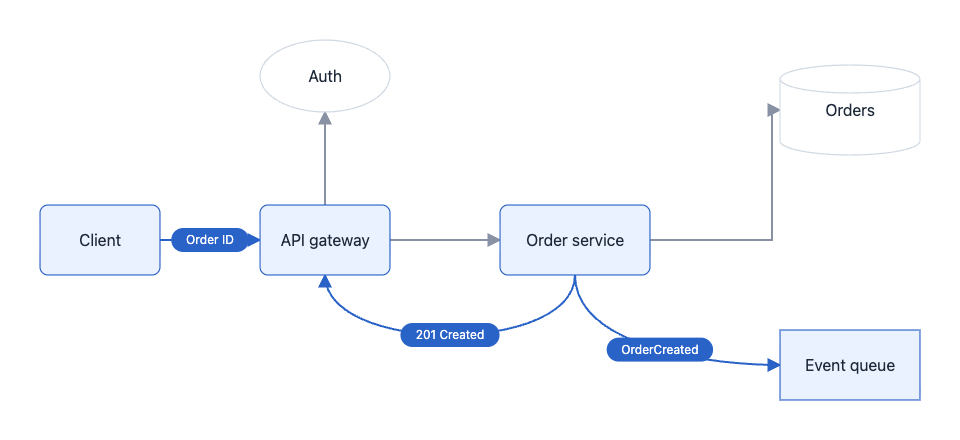
- package/docs/images/node-content.png +0 -0
- package/docs/images/numbered-list.png +0 -0
- package/docs/images/numbered-list.zh-CN.png +0 -0
- package/docs/images/quick-start.png +0 -0
- package/docs/images/record-tags.png +0 -0
- package/package.json +2 -1
- package/dist/core.js +0 -1149
- package/dist/theme.js +0 -6
- /package/dist/{player-accessibility.d.ts → browser/accessibility.d.ts} +0 -0
- /package/dist/{player-accessibility.js → browser/accessibility.js} +0 -0
- /package/dist/{player-controls.d.ts → browser/controls.d.ts} +0 -0
- /package/dist/{player-controls.js → browser/controls.js} +0 -0
- /package/dist/{player-lifecycle.d.ts → browser/lifecycle.d.ts} +0 -0
- /package/dist/{player-lifecycle.js → browser/lifecycle.js} +0 -0
- /package/dist/{svg-dom.d.ts → browser/svg-dom.d.ts} +0 -0
- /package/dist/{svg-dom.js → browser/svg-dom.js} +0 -0
- /package/dist/{node-content.js → core/node-content.js} +0 -0
package/CHANGELOG.md
CHANGED
|
@@ -1,5 +1,30 @@
|
|
|
1
1
|
# Changelog
|
|
2
2
|
|
|
3
|
+
## 0.1.1 - 2026-10-20
|
|
4
|
+
|
|
5
|
+
- Adopted thin neutral node borders, gray edges and blue emphasis in both themes. Separate highlight fills from borders and flow markers, remove the node-label halo, and refresh README previews.
|
|
6
|
+
|
|
7
|
+
- Expanded the quick-start document to a six-node order workflow with authorization, persistence, asynchronous events and reverse responses.
|
|
8
|
+
|
|
9
|
+
- Added SDK-rendered previews beside the quick-start, structured-content, list, entity-graph and Facts timeline examples in both package READMEs.
|
|
10
|
+
|
|
11
|
+
- Include the eight README preview images in the npm tarball. Source READMEs use relative image paths for local previews; the release verifier prepares staged README copies with versioned npm CDN URLs for public readers. Release verification requires every preview and rejects undeclared documentation assets.
|
|
12
|
+
|
|
13
|
+
- Removed local build, source-layout and release instructions from the package READMEs; repository documentation retains the contributor workflow.
|
|
14
|
+
|
|
15
|
+
- Completed bilingual module navigation, updated migrated test links, and consolidated architecture implementation and verification records.
|
|
16
|
+
|
|
17
|
+
- Grouped React, Vue, and Web Component implementations under `src/adapters/` while keeping explicit root entries, shared Web Component registration identity, SSR-safe imports, lifecycle behavior, and cross-host integration tests. Updated nested release artifacts and consumer references.
|
|
18
|
+
|
|
19
|
+
- Grouped the browser player implementation and its controls, accessibility, lifecycle, and SVG DOM modules under `src/browser/` while preserving the `flowsvg/browser` entry, lifecycle behavior, DOM-free imports, and public player contract. Updated browser tests and release allowlists for nested build output.
|
|
20
|
+
|
|
21
|
+
- Moved shared hexadecimal color interpolation to the pure `src/core/color.ts` module. Timeline evaluation and diagram paint share the same runtime helper; content painting checks contrast without a timeline dependency.
|
|
22
|
+
|
|
23
|
+
- Centralized edge routing, path sampling, distance queries, label anchors, hit testing, and SVG number formatting in `src/core/edge-geometry.ts` and `src/core/svg-number.ts` while preserving the existing public frames and SVG output.
|
|
24
|
+
|
|
25
|
+
- Organized the platform-independent core into shared model, document validation and diagram orchestration modules. Preserved all public values/types, error identity and evaluation behavior; grouped core tests with their implementation.
|
|
26
|
+
- Preserved nested JavaScript and declaration build output and replaced the release file pattern with an explicit module allowlist that rejects source, tests and unrelated files.
|
|
27
|
+
|
|
3
28
|
## 0.1.0 - 2026-10-17
|
|
4
29
|
|
|
5
30
|
- Added a release CLI that runs type checks, SDK and release-script tests, tarball consumer verification, example builds and npm publication preview. Default to preview; require `--publish` for upload, and publish the exact verified tarball retained in `dist/releases/`.
|
|
@@ -9,7 +34,7 @@
|
|
|
9
34
|
- Prepared the first npm release with repository metadata, public registry settings, bilingual package documentation, automatic prepack builds and prepublish type/test checks.
|
|
10
35
|
- Verify packaging from a missing `dist`, every exported JavaScript/type/CSS target, the file allowlist, framework-free imports, strict consumer types and all four host lifecycles.
|
|
11
36
|
|
|
12
|
-
- Renamed the package and SDK directory to `flowsvg
|
|
37
|
+
- Renamed the package and SDK directory to `flowsvg`. Player exports now use the `Flow` prefix: `FlowPlayer`, `FlowPlayerProps`, `FlowPlayerHandle`, `FlowPlayerElement`, `defineFlowPlayer()` and `FLOW_PLAYER_TAG`. The default element is `<flowsvg-player>`; CSS classes and control variables use `flowsvg-` and `--flowsvg-`. Imports, selectors and public API references must use the new names.
|
|
13
38
|
|
|
14
39
|
- Fixed cylinder SVG fills by rendering the top cap as a separate filled ellipse inside the same node interaction group, so the cap no longer appears hollow.
|
|
15
40
|
|
package/PATTERNS.md
CHANGED
|
@@ -1,12 +1,23 @@
|
|
|
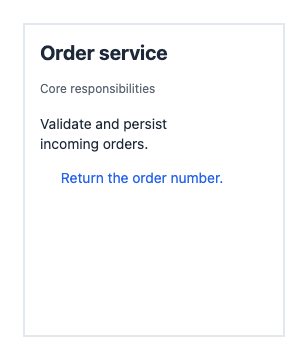
1
1
|
# Patterns
|
|
2
2
|
|
|
3
|
+
- Keep default diagram colors and line metrics in the core theme. Use separate highlight fill, border/marker and marker-text colors so active nodes retain readable text in both themes. Browser hover consumes the same theme values; preserve border-only hover by default. Node labels have no halo; edge labels retain background isolation where paths cross text.
|
|
4
|
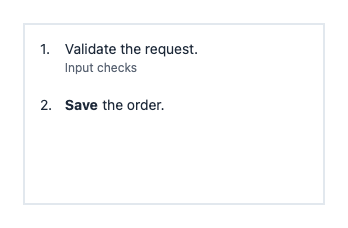
+
|
|
5
|
+
- Keep README previews in `docs/images/` inside the SDK package. Package only PNG assets and enumerate the expected images in the release verifier; require each image and reject undeclared files. Use relative image paths in source READMEs for local previews. The release verifier unpacks the built package into a temporary directory and converts only its README copies to npm CDN URLs with the package version. Repack without lifecycle scripts, require the packed file set to remain unchanged, then verify and retain that final tarball. Source READMEs must remain unchanged by release verification.
|
|
6
|
+
|
|
7
|
+
- Keep shared document/frame types in `src/core/model.ts`, document validation and its single error class in `validation.ts`, and compilation, cloning/freezing, evaluation, SVG and hit-test orchestration in `diagram.ts`. Node-content types and nested validation remain in `node-content.ts`. Import runtime owners directly; use type imports for shared model dependencies.
|
|
8
|
+
- Enumerate public values and types in the root entry, including `wrapText`, `Diagram` and all node-content types. Keep core contract tests in `src/core/` and consume public entries. Four entry-specific TypeScript builds preserve the internal directory hierarchy under `dist`; enumerate each emitted module in the release allowlist instead of accepting arbitrary files below `dist`.
|
|
9
|
+
- Keep the browser player implementation under `src/browser/player.ts`, with controls, accessibility, lifecycle, and SVG DOM synchronization beside it. Keep `src/browser.ts` as the explicit public entry; browser tests use that entry while core remains DOM-free.
|
|
10
|
+
- Keep React, Vue, and Web Component implementations under `src/adapters/`; root adapter files are explicit public entries that export the single implementation and preserve runtime identity. Adapter tests live beside their implementations and cross-host business scenarios live under `tests/integration/`; imports use public entries.
|
|
11
|
+
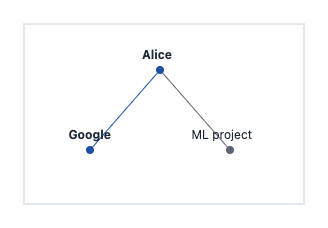
- Keep color interpolation in the pure `src/core/color.ts` module. Timeline and diagram painting import it directly so generic color rules do not depend on timeline semantics. Content highlight paint retains theme-specific semantic colors and adjusts default ink only when the evaluated fill requires more contrast.
|
|
12
|
+
- Keep route construction, path measurements, label anchors, and path hit testing in `src/core/edge-geometry.ts`; share integer and three-decimal formatting through `src/core/svg-number.ts`. Diagram orchestration consumes these internal results without exposing geometry.
|
|
13
|
+
|
|
3
14
|
- Run release gates sequentially through the root release CLI. Default to a preview without authentication; check authentication before the gates only for explicit publication. Copy the verified tarball after all consumer checks pass, then preview and publish that file without repacking. Stop on any command failure and keep npm stdio attached for authentication prompts.
|
|
4
15
|
|
|
5
16
|
- Build Vue declarations against the pinned minimum supported version, 3.5.0; newer Vue patch releases can add inferred `DefineComponent` type parameters that older consumers cannot read. Verify both minimum and current framework versions in the packed-package consumer.
|
|
6
17
|
|
|
7
18
|
- Build through `prepack` so `npm pack` and directory publishing cannot use missing or stale artifacts. Keep publish-only type/test checks separate from packaging to avoid recursive release verification. Verify the packed exports and strict consumer types before publishing.
|
|
8
19
|
|
|
9
|
-
- Publish the SDK as `flowsvg` from `packages/flowsvg`. Use the `Flow` prefix for player exports, `<flowsvg-player>` for the default custom element, and `flowsvg-` / `--flowsvg-` for CSS classes and control variables. Keep package imports, declarations, examples and release verification aligned with these names.
|
|
20
|
+
- Use FlowSVG as the display name. Publish the SDK as `flowsvg` from `packages/flowsvg`. Use the `Flow` prefix for player exports, `<flowsvg-player>` for the default custom element, and `flowsvg-` / `--flowsvg-` for CSS classes and control variables. Keep package imports, declarations, examples and release verification aligned with these names.
|
|
10
21
|
|
|
11
22
|
- Apply hover to stroke only by default for every node and group. Preserve core fill and content paint, including active flow or explicit highlights. With `hoverFill: true`, paint fill and readable content as well. Forward the same option through every adapter and restore the current core SVG when the pointer leaves.
|
|
12
23
|
|
package/README.md
CHANGED
|
@@ -1,12 +1,12 @@
|
|
|
1
|
-
#
|
|
1
|
+
# FlowSVG
|
|
2
2
|
|
|
3
3
|
English | [简体中文](README.zh-CN.md)
|
|
4
4
|
|
|
5
|
-
|
|
5
|
+
FlowSVG plays logic and architecture diagrams with SVG. Define nodes, edges, scenes, and beats in JSON or TypeScript, then play them in a browser or export a static SVG.
|
|
6
6
|
|
|
7
|
-
The
|
|
7
|
+
The ESM SDK includes a DOM-free core and native browser, Vue, React, and Web Component integrations. All integrations share the same document and timeline.
|
|
8
8
|
|
|
9
|
-
[Installation](#installation) · [Quick start](#quick-start) · [Vue](#vue-integration) · [React](#react-integration) · [Native browser](#native-browser) · [Web Component](#web-component) · [API](#api) · [
|
|
9
|
+
[Installation](#installation) · [Quick start](#quick-start) · [Vue](#vue-integration) · [React](#react-integration) · [Native browser](#native-browser) · [Web Component](#web-component) · [API](#api) · [License](#license)
|
|
10
10
|
|
|
11
11
|
## Installation
|
|
12
12
|
|
|
@@ -27,16 +27,7 @@ pnpm add react react-dom
|
|
|
27
27
|
pnpm add -D @types/react @types/react-dom
|
|
28
28
|
```
|
|
29
29
|
|
|
30
|
-
The core and native browser entries
|
|
31
|
-
|
|
32
|
-
```sh
|
|
33
|
-
pnpm install --frozen-lockfile
|
|
34
|
-
pnpm --filter flowsvg exec npm pack --pack-destination /tmp
|
|
35
|
-
```
|
|
36
|
-
|
|
37
|
-
The packaging hook builds the SDK. Install the resulting `0.1.0` tarball with `pnpm add /tmp/flowsvg-0.1.0.tgz`.
|
|
38
|
-
|
|
39
|
-
The core requires Node.js 18+ or an environment supporting ES2022 ESM. Browser playback requires a DOM, SVG, and `requestAnimationFrame`. Minimum framework versions are Vue 3.5 and React 18. TypeScript declarations are included; React TypeScript applications also need the matching `@types/react` and `@types/react-dom` packages.
|
|
30
|
+
The core and native browser entries need no framework. TypeScript declarations are included. Core: Node.js 18+ or ES2022 ESM. Browser: DOM, SVG, and `requestAnimationFrame`. Frameworks: Vue 3.5+ or React 18+.
|
|
40
31
|
|
|
41
32
|
| Import path | Purpose |
|
|
42
33
|
| --- | --- |
|
|
@@ -51,31 +42,63 @@ The core requires Node.js 18+ or an environment supporting ES2022 ESM. Browser p
|
|
|
51
42
|
|
|
52
43
|
### 1. Create a diagram document
|
|
53
44
|
|
|
54
|
-
Save this as `diagram.ts`. The integration examples below reuse this file:
|
|
45
|
+
Save this as `diagram.ts`. This 5.2-second example uses six nodes, three scenes and five beats. It separates authorization, order persistence, and the final response with an asynchronous event. The integration examples below reuse this file:
|
|
55
46
|
|
|
56
47
|
```ts
|
|
57
48
|
import type { DiagramDocument } from "flowsvg";
|
|
58
49
|
|
|
59
50
|
export const diagramDocument: DiagramDocument = {
|
|
60
51
|
version: 1,
|
|
61
|
-
title: "
|
|
62
|
-
viewport: { width:
|
|
52
|
+
title: "Order request lifecycle",
|
|
53
|
+
viewport: { width: 960, height: 440 },
|
|
63
54
|
nodes: [
|
|
64
|
-
{ id: "client", kind: "roundedRect", x: 40, y:
|
|
65
|
-
{ id: "
|
|
55
|
+
{ id: "client", kind: "roundedRect", x: 40, y: 205, width: 120, height: 70, label: "Client" },
|
|
56
|
+
{ id: "gateway", kind: "roundedRect", x: 260, y: 205, width: 130, height: 70, label: "API gateway" },
|
|
57
|
+
{ id: "auth", kind: "ellipse", x: 260, y: 40, width: 130, height: 72, label: "Auth" },
|
|
58
|
+
{ id: "orders", kind: "roundedRect", x: 500, y: 205, width: 150, height: 70, label: "Order service" },
|
|
59
|
+
{ id: "database", kind: "cylinder", x: 780, y: 65, width: 140, height: 90, label: "Orders" },
|
|
60
|
+
{ id: "events", kind: "rect", x: 780, y: 330, width: 140, height: 70, label: "Event queue" }
|
|
66
61
|
],
|
|
67
|
-
edges: [
|
|
68
|
-
|
|
69
|
-
id: "
|
|
70
|
-
|
|
71
|
-
|
|
72
|
-
|
|
73
|
-
|
|
74
|
-
|
|
75
|
-
|
|
62
|
+
edges: [
|
|
63
|
+
{ id: "request", from: "client", to: "gateway", route: "straight" },
|
|
64
|
+
{ id: "authorize", from: "gateway", to: "auth", route: "straight", fromPort: "top", toPort: "bottom" },
|
|
65
|
+
{ id: "create", from: "gateway", to: "orders", route: "straight" },
|
|
66
|
+
{ id: "persist", from: "orders", to: "database", route: "orthogonal", fromPort: "right", toPort: "left" },
|
|
67
|
+
{ id: "publish", from: "orders", to: "events", route: "curved", fromPort: "bottom", toPort: "left" },
|
|
68
|
+
{ id: "result", from: "orders", to: "gateway", route: "curved", fromPort: "bottom", toPort: "bottom" }
|
|
69
|
+
],
|
|
70
|
+
scenes: [
|
|
71
|
+
{ id: "request", label: "Receive and authorize", beats: [
|
|
72
|
+
{ durationMs: 800, caption: "Receive the order request", actions: [
|
|
73
|
+
{ type: "flow", target: "request", direction: "forward", text: "POST" }
|
|
74
|
+
] },
|
|
75
|
+
{ durationMs: 800, caption: "Validate the access token", actions: [
|
|
76
|
+
{ type: "flow", target: "authorize", direction: "forward", text: "Token" }
|
|
77
|
+
] }
|
|
78
|
+
] },
|
|
79
|
+
{ id: "create-order", label: "Create the order", beats: [
|
|
80
|
+
{ durationMs: 1000, caption: "Send the authorized request to the order service", actions: [
|
|
81
|
+
{ type: "flow", target: "create", direction: "forward", text: "Create" }
|
|
82
|
+
] },
|
|
83
|
+
{ durationMs: 1000, caption: "Persist the new order", actions: [
|
|
84
|
+
{ type: "flow", target: "persist", direction: "forward", text: "INSERT" }
|
|
85
|
+
] }
|
|
86
|
+
] },
|
|
87
|
+
{ id: "response", label: "Publish and respond", beats: [
|
|
88
|
+
{ durationMs: 1600, caption: "Publish OrderCreated and return the order number", actions: [
|
|
89
|
+
{ type: "flow", target: "publish", direction: "forward", text: "OrderCreated" },
|
|
90
|
+
{ type: "flow", target: "result", direction: "forward", text: "201 Created" },
|
|
91
|
+
{ type: "flow", target: "request", direction: "reverse", text: "Order ID" }
|
|
92
|
+
] }
|
|
93
|
+
] }
|
|
94
|
+
]
|
|
76
95
|
};
|
|
77
96
|
```
|
|
78
97
|
|
|
98
|
+
At 4400 ms with the light theme, the event and response messages move together. Only their participating nodes are highlighted.
|
|
99
|
+
|
|
100
|
+
|
|
101
|
+
|
|
79
102
|
### 2. Evaluate and export SVG
|
|
80
103
|
|
|
81
104
|
```ts
|
|
@@ -87,10 +110,10 @@ const frame = diagram.evaluateAt(125);
|
|
|
87
110
|
console.log(diagram.totalDuration, frame.sceneId, frame.warnings);
|
|
88
111
|
|
|
89
112
|
const svg = diagram.renderSvg(125, { theme: "dark" });
|
|
90
|
-
const finalSvg = renderSvg(diagramDocument,
|
|
113
|
+
const finalSvg = renderSvg(diagramDocument, 5200);
|
|
91
114
|
```
|
|
92
115
|
|
|
93
|
-
|
|
116
|
+
Both results are static SVG strings. Reuse `createDiagram` for repeated queries; use `renderSvg` for a single export.
|
|
94
117
|
|
|
95
118
|
## Vue integration
|
|
96
119
|
|
|
@@ -127,7 +150,7 @@ function handleError({ error }: PlayerErrorDetail): void {
|
|
|
127
150
|
</template>
|
|
128
151
|
```
|
|
129
152
|
|
|
130
|
-
|
|
153
|
+
Unmounting destroys the player. In scripts, call methods through `player.value`; templates unwrap the ref. Events pass their detail directly: `stepchange`, `timeupdate`, `playstatechange`, and `error`. Callback props are also supported.
|
|
131
154
|
|
|
132
155
|
## React integration
|
|
133
156
|
|
|
@@ -171,9 +194,9 @@ The component releases resources on unmount. Callbacks are `onStepChange`, `onTi
|
|
|
171
194
|
| `initialTimeMs` | Applied only on initial mount; use `seek` for later changes |
|
|
172
195
|
| `className` / `style` | Host container styles |
|
|
173
196
|
|
|
174
|
-
Changing `theme`, `controls`, `reducedMotion`, or `hoverFill` recreates the player, paused at zero
|
|
197
|
+
Changing `theme`, `controls`, `reducedMotion`, or `hoverFill` recreates the player, paused at zero, without reapplying `initialTimeMs`. Reload documents with a new object reference. Handles expose seven methods listed under [Player API](#player-api); calls before mount or after unmount throw.
|
|
175
198
|
|
|
176
|
-
Both
|
|
199
|
+
Both entries support server-side imports. SSR renders a container; the player is created on client mount. Use `renderSvg` for server-side diagram previews.
|
|
177
200
|
|
|
178
201
|
## Native browser
|
|
179
202
|
|
|
@@ -197,11 +220,9 @@ const player = createPlayer(host, diagramDocument, { theme: "light" });
|
|
|
197
220
|
player.play();
|
|
198
221
|
```
|
|
199
222
|
|
|
200
|
-
`createPlayer`
|
|
223
|
+
`createPlayer` replaces the container children. Call `destroy()` on disposal and before reusing the container. Plain HTML requires an import map or build tooling for package imports.
|
|
201
224
|
|
|
202
|
-
The
|
|
203
|
-
|
|
204
|
-
Reuse `apps/native-example/request-chain.js` as the `document` input for native, Web Component, React, or Vue integration. Each host uses the same `seek(timeMs)`, `setSpeed(speed)`, `play()`, and `pause()` behavior. `src/business-integration.test.ts` verifies this shared example through all four public entries, including both themes, reduced motion, beat boundaries, and core SVG equality.
|
|
225
|
+
The [native example](https://github.com/yokingma/FlowSVG/blob/HEAD/apps/native-example/README.md) demonstrates request/response flows. Its shared document also works with the other three integrations.
|
|
205
226
|
|
|
206
227
|
## Web Component
|
|
207
228
|
|
|
@@ -221,13 +242,13 @@ const element = document.querySelector<FlowPlayerElement>("flowsvg-player");
|
|
|
221
242
|
if (element) element.document = diagramDocument;
|
|
222
243
|
```
|
|
223
244
|
|
|
224
|
-
|
|
245
|
+
Registration defaults to `<flowsvg-player>` and is idempotent. Assign objects to `element.document`, JSON strings to the HTML `document` attribute, or a JSON URL to `src`. URLs resolve against the page and follow browser CORS rules.
|
|
225
246
|
|
|
226
|
-
|
|
247
|
+
Attributes: `autoplay`, `controls`, `speed`, `theme`, `reduced-motion`, and `hover-fill`. Controls default on; autoplay and hover fill default off. Use `controls="false"` to hide controls. Changes to theme, controls, or motion/hover options preserve time and playback state; `autoplay` explicitly starts or pauses playback. Removal cancels requests and destroys the player; reconnection uses the retained document.
|
|
227
248
|
|
|
228
|
-
|
|
249
|
+
Methods: `play`, `pause`, `seek`, `step`, `setSpeed`, `getState`, and `destroy`. Update documents through `element.document`. Before mount or after destruction, `getState()` returns `undefined`. Playback/error events bubble across Shadow DOM boundaries.
|
|
229
250
|
|
|
230
|
-
|
|
251
|
+
Register in a DOM environment. DOM-free imports are safe, but that module instance cannot register after a DOM is added later.
|
|
231
252
|
|
|
232
253
|
## Documents and timelines
|
|
233
254
|
|
|
@@ -240,17 +261,19 @@ Load this entry in a DOM environment for actual registration. Importing without
|
|
|
240
261
|
| `scenes` | `[]` creates a static diagram; each scene has a unique `id`, a `label`, and nonempty `beats` |
|
|
241
262
|
| `title` / `theme` | Optional title and `light` / `dark` document theme |
|
|
242
263
|
|
|
243
|
-
Node and edge IDs are globally unique.
|
|
264
|
+
Node and edge IDs are globally unique. Shapes: `rect`, `roundedRect`, `ellipse`, `cylinder`, `group`. `parentId` names a parent group; child coordinates are group-relative. Labels are plain text; `visible` defaults to `true`. Node styles: `fill`, `stroke`, `strokeWidth`, `textColor`, `dashed` (group borders). Edge styles: `stroke`, `strokeWidth`, `dashed`. Colors use hexadecimal RGB/RGBA, such as `#2563eb` or `#2563eb80`.
|
|
244
265
|
|
|
245
|
-
|
|
266
|
+
Routes: `straight` (default), `orthogonal`, or `curved`. Curves follow endpoint ports without avoiding other nodes. Orthogonal routes avoid visible ordinary nodes and use a fixed fallback if blocked; shortest paths and zero crossings are not guaranteed. Set `fromPort` / `toPort` to `top`, `right`, `bottom`, or `left`. Explicit orthogonal ports reserve outward endpoint segments; curved ports set tangents. Omitted ports follow the dominant center-to-center axis; ellipse endpoints lie on the contour. Simple labels wrap by estimated width and remain visible on height overflow, with a `text-overflow` warning.
|
|
246
267
|
|
|
247
|
-
Edges
|
|
268
|
+
Edges can connect nodes or group boundaries. Group endpoints follow evaluated geometry and explicit ports. Hidden ancestors mask connected edges. Transfers highlight the endpoint group, not its descendants. Group frames are excluded from routing obstacles.
|
|
248
269
|
|
|
249
270
|
### Fixed-size node content
|
|
250
271
|
|
|
251
|
-
|
|
272
|
+
`rect`, `roundedRect`, and `cylinder` support `content`; ellipses and groups support labels only. `content` and `label` are mutually exclusive, even with an empty label. `content.blocks` contains ordered `title`, `paragraph`, `list`, or `graph` blocks. Paragraph roles are `body` (default) and `auxiliary`. An empty block array displays only the shape.
|
|
252
273
|
|
|
253
274
|
```ts
|
|
275
|
+
import type { DiagramNode } from "flowsvg";
|
|
276
|
+
|
|
254
277
|
const service = {
|
|
255
278
|
id: "service", kind: "rect", x: 24, y: 24, width: 260, height: 312,
|
|
256
279
|
content: {
|
|
@@ -265,40 +288,55 @@ const service = {
|
|
|
265
288
|
} satisfies DiagramNode;
|
|
266
289
|
```
|
|
267
290
|
|
|
268
|
-
|
|
291
|
+
The `service` node rendered with the light theme:
|
|
269
292
|
|
|
270
|
-
|
|
293
|
+
|
|
271
294
|
|
|
272
|
-
|
|
295
|
+
Text fields accept strings or `ContentTextSpan[]`: `{ text, style?: { fontSize, fontWeight, color } }`. Spans inherit block styles and share a baseline; alignment belongs to the block. Each line uses its largest font. Wrapping preserves newlines and Unicode graphemes, prefers English spaces, and breaks long words/URLs as needed. A grapheme spanning source styles uses its first character’s style. Layout uses width estimates, without DOM measurement.
|
|
296
|
+
|
|
297
|
+
Text styles: positive finite `fontSize`, integer `fontWeight` from 100–900, hexadecimal `color`, and `align` (`left`, `center`, `right`). Content `padding` and `blockGap` are finite and nonnegative. Defaults in diagram units: title 20/700, body 14/400, auxiliary 12/400, padding 16, block gap 14. Line height is `max(20, fontSize × 1.35)`. Explicit colors override theme defaults.
|
|
298
|
+
|
|
299
|
+
Lists accept `marker` (`none` by default, `bullet`, or `number`), `items`, and `style`. Items support `tags`, `status`, `body`, `auxiliary`, `style`, `auxiliaryStyle`, and `statusStyle`. List style sets body typography and nonnegative finite `itemGap` (default 12); item body style overrides it. Auxiliary text defaults to muted 12-unit text. Markers share a column followed by an 8-unit gap; continuation and auxiliary lines align with the body. Markers use the first present text baseline. Omitted items/parts take no space; explicit blank text preserves a line.
|
|
273
300
|
|
|
274
301
|
```ts
|
|
275
|
-
|
|
302
|
+
import type { ContentBlock } from "flowsvg";
|
|
303
|
+
|
|
304
|
+
const steps: ContentBlock = { type: "list", marker: "number", style: { itemGap: 16 }, items: [
|
|
276
305
|
{ body: "Validate the request.", auxiliary: "Input checks" },
|
|
277
306
|
{ body: [{ text: "Save", style: { fontWeight: 700 } }, { text: " the order." }] }
|
|
278
|
-
] }
|
|
307
|
+
] };
|
|
279
308
|
```
|
|
280
309
|
|
|
281
|
-
|
|
310
|
+
The `steps` block rendered in a 300 × 180 rectangle with `content: { blocks: [steps] }`:
|
|
311
|
+
|
|
312
|
+
|
|
313
|
+
|
|
314
|
+
Tags accept `{ text, style?: { fontSize, fontWeight, color, fill } }`. Defaults: font size 11, padding 6 horizontal / 2 vertical, corner radius 3. List `tagGap` defaults to 6 and must be finite and nonnegative. Status is right-aligned, defaults to 12-unit accent text, and accepts `fontSize`, `fontWeight`, and `color` in `statusStyle`. Tags and status share a baseline when they fit; otherwise tags wrap first and status moves below. Body and auxiliary text follow. Explicit colors/fills override the theme.
|
|
282
315
|
|
|
283
316
|
```ts
|
|
284
|
-
|
|
317
|
+
import type { ContentBlock } from "flowsvg";
|
|
318
|
+
|
|
319
|
+
const records: ContentBlock = { type: "list", items: [{
|
|
285
320
|
tags: [{ text: "world" }, { text: "experience", style: { fill: "#eadfff", color: "#57319b" } }],
|
|
286
321
|
status: "new", body: "Alice joined Google", auxiliary: "Mar 2026"
|
|
287
|
-
}] }
|
|
322
|
+
}] };
|
|
288
323
|
```
|
|
289
324
|
|
|
290
|
-
|
|
325
|
+
The `records` block rendered in a 300 × 180 rectangle with `content: { blocks: [records] }`:
|
|
291
326
|
|
|
292
|
-
|
|
327
|
+

|
|
293
328
|
|
|
294
|
-
|
|
329
|
+
Content keeps authored node dimensions. Safe areas reserve padding plus 4 units per side for rounded rectangles, or twice the cylinder cap radius above/below (`min(14, height / 4)`). Dimensions clamp to zero. SVG clips content to this area; width/height overflow emits `text-overflow` with node ID, `nodes[index].content`, and direction. Clipped text adds no hit area. Simple labels retain their separate overflow behavior.
|
|
295
330
|
|
|
331
|
+
`EvaluatedNode.contentLayout` provides the safe area, lines/spans, tag backgrounds, optional graph primitives, and width/height overflow flags. Geometry is absolute and follows node resizing, parent movement, visibility, and opacity. Lines retain source block/item/tag indexes; `explicitColor` and `explicitFill` identify authored paint. Browser rendering and SVG export use the same layout. Content does not change ports, routes, transfer geometry, or parent relationships. See the [paragraph](https://github.com/yokingma/FlowSVG/blob/HEAD/apps/native-example/node-content.html) and [list](https://github.com/yokingma/FlowSVG/blob/HEAD/apps/native-example/list-content.html) examples.
|
|
296
332
|
|
|
297
333
|
### Entity graphs inside nodes
|
|
298
334
|
|
|
299
|
-
A `graph` block draws
|
|
335
|
+
A `graph` block draws an undirected entity graph with authored local coordinates:
|
|
300
336
|
|
|
301
337
|
```ts
|
|
338
|
+
import type { ContentGraphBlock } from "flowsvg";
|
|
339
|
+
|
|
302
340
|
const entities: ContentGraphBlock = {
|
|
303
341
|
type: "graph", height: 130,
|
|
304
342
|
nodes: [
|
|
@@ -310,13 +348,17 @@ const entities: ContentGraphBlock = {
|
|
|
310
348
|
};
|
|
311
349
|
```
|
|
312
350
|
|
|
313
|
-
`
|
|
351
|
+
The `entities` block rendered in a 280 × 180 rectangle with `content: { blocks: [entities] }`:
|
|
352
|
+
|
|
353
|
+
|
|
314
354
|
|
|
315
|
-
`
|
|
355
|
+
`height` reserves a positive fixed section. Entity centers use nonnegative finite `x`/`y` offsets from its top-left. IDs are local to each block; edges reference those IDs. Labels are 12-unit plain text above radius-4 dots. Highlighted entities use accent dots and bold labels; an edge uses accent paint when both endpoints are highlighted. Overflow reports its direction without shifting later blocks. Graphs share the parent clip and theme; interactions target the parent node.
|
|
356
|
+
|
|
357
|
+
`contentLayout.graphs` contains absolute primitives and highlight state by `blockIndex`; labels join `contentLayout.lines`. Replace `content` to change selections at a beat start. See the [Hindsight example](https://github.com/yokingma/FlowSVG/blob/HEAD/apps/native-example/hindsight.html).
|
|
316
358
|
|
|
317
359
|
### Author a complete Facts timeline
|
|
318
360
|
|
|
319
|
-
|
|
361
|
+
Choose fixed dimensions and ordered blocks. Use unmarked lists for records, bullets for capabilities, and numbers for steps. This document works with all four integrations:
|
|
320
362
|
|
|
321
363
|
```ts
|
|
322
364
|
import { createDiagram, type DiagramDocument, type NodeContent } from "flowsvg";
|
|
@@ -351,9 +393,13 @@ console.log(diagram.evaluateAt(1000).warnings);
|
|
|
351
393
|
const svg = diagram.renderSvg(1000, { theme: "dark", reducedMotion: true });
|
|
352
394
|
```
|
|
353
395
|
|
|
354
|
-
|
|
396
|
+
The initial light-theme frame at 0 ms and the updated dark-theme frame at 1000 ms:
|
|
397
|
+
|
|
398
|
+
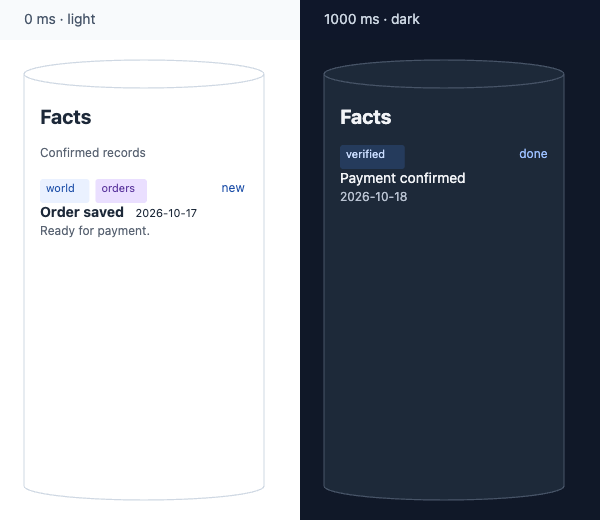
|
|
355
399
|
|
|
356
|
-
|
|
400
|
+
Check `frame.warnings` before sharing. Increase node dimensions or shorten overflowing text; the SDK does not resize nodes or shrink fonts. Prefer default colors for theme/highlight contrast. Content has one node-level interaction target, without internal links, buttons, images, or HTML.
|
|
401
|
+
|
|
402
|
+
The [content story](https://github.com/yokingma/FlowSVG/blob/HEAD/apps/native-example/content-story.html) combines Facts, lists, node updates, flows, and focus. Its [shared document](https://github.com/yokingma/FlowSVG/blob/HEAD/apps/native-example/content-story.js) also runs in the Vue and React examples.
|
|
357
403
|
|
|
358
404
|
Each beat has a positive `durationMs` and an `actions` array, with optional `transitionMs` and `caption`. Transition duration defaults to `min(250, durationMs)` and must be within `[0, durationMs]`. An omitted caption inherits the previous caption; an empty string clears it.
|
|
359
405
|
|
|
@@ -366,7 +412,7 @@ Each beat has a positive `durationMs` and an `actions` array, with optional `tra
|
|
|
366
412
|
| `updateEdge` | `value` supports `label`, `stroke`, `strokeWidth`, and `opacity` |
|
|
367
413
|
| `focus` | `target` is a node/group ID; `null` restores the full viewport |
|
|
368
414
|
|
|
369
|
-
`updateNode.value.content` replaces
|
|
415
|
+
`updateNode.value.content` replaces all content at beat start, regardless of transition duration, and persists across beats/scenes. `label` switches to simple-label mode; `content` switches to structured content. `content: null` clears either mode without restoring old labels or resizing. Assigning both modes, or assigning one repeatedly within a beat, produces a field-path error.
|
|
370
416
|
|
|
371
417
|
```ts
|
|
372
418
|
// Each value belongs to a separate beat's updateNode action.
|
|
@@ -377,13 +423,13 @@ const simpleLabel: NodeVisualState = { label: "Summary" };
|
|
|
377
423
|
const clearText: NodeVisualState = { content: null };
|
|
378
424
|
```
|
|
379
425
|
|
|
380
|
-
|
|
426
|
+
Scenes share a millisecond timeline and inherit the previous scene’s final state. Text changes at beat start; interpolated values change during the transition. Beats include their start and exclude their end; the final time returns the completed frame. Hidden nodes/groups mask connected edges; showing them restores each edge’s saved visibility.
|
|
381
427
|
|
|
382
|
-
A beat
|
|
428
|
+
A beat supports one transfer per distinct edge. Transfers share linear progress over `durationMs`, so longer paths move faster. Markers and endpoint highlights expire at beat end; the next beat supplies a new transfer group. Explicit highlights and ordinary styles persist.
|
|
383
429
|
|
|
384
|
-
|
|
430
|
+
Transfer `text` is escaped, stays horizontal, and uses estimated capsule widths without font measurement. It does not replace the edge label or create an interaction target. An empty string still produces a capsule.
|
|
385
431
|
|
|
386
|
-
|
|
432
|
+
## API
|
|
387
433
|
|
|
388
434
|
### Core API
|
|
389
435
|
|
|
@@ -400,11 +446,11 @@ Import from `flowsvg`:
|
|
|
400
446
|
| `diagram.hitTest(timeMs, point, options?)` | Returns `{ id, type: "node" \| "edge" }` or `null`, using document coordinates |
|
|
401
447
|
| `wrapText(label, maxWidth, typography?)` | Wraps text with fixed width estimates and returns an array of lines |
|
|
402
448
|
|
|
403
|
-
`EvaluateOptions
|
|
449
|
+
`EvaluateOptions`: `{ theme?: "light" | "dark"; reducedMotion?: boolean }`. Times clamp to `[0, totalDuration]`; non-finite values become zero. Hit testing skips hidden/zero-opacity objects, then checks ordinary nodes, edges, and group backgrounds in that order.
|
|
404
450
|
|
|
405
|
-
`DiagramFrameState` includes
|
|
451
|
+
`DiagramFrameState` includes time, scene/beat IDs, progress, evaluated nodes/edges, camera, caption, and warnings. Coordinates are absolute. Static documents have `null` scene/beat IDs; beat IDs use `${scene.id}:${beatIndex}` with zero-based indexes. Active edges expose `flow` direction, progress, point, and optional text. Markers are absent after the beat, on hidden edges, or with reduced motion.
|
|
406
452
|
|
|
407
|
-
|
|
453
|
+
Types and member JSDoc are included: `DiagramDocument`, `DiagramNode`, `DiagramEdge`, `Scene`, `Beat`, `Action`, `Diagram`, `DiagramFrameState`, `EvaluateOptions`, `ValidationIssue`, and `LayoutWarning`.
|
|
408
454
|
|
|
409
455
|
### Player API
|
|
410
456
|
|
|
@@ -421,13 +467,13 @@ Import `createPlayer(host, document, options?)` from `flowsvg/browser`. `PlayerO
|
|
|
421
467
|
| `getState()` | Returns `PlayerState`: `timeMs`, `totalDuration`, `playing`, `speed`, and `frame` |
|
|
422
468
|
| `destroy()` | Idempotently cleans up DOM, listeners, and scheduling; stops events, while state remains readable |
|
|
423
469
|
|
|
424
|
-
Players start paused at zero
|
|
470
|
+
Players start paused at zero with controls enabled. Page hiding pauses playback; returning leaves it paused. Playback stops at the end; static diagrams disable timeline controls. Framework handles expose these methods except `element` and `destroy`.
|
|
425
471
|
|
|
426
|
-
|
|
472
|
+
Hover highlights the current node’s border, including hits on labels or content. Set `hoverFill: true` to include background and content paint, including groups. Leaving removes only the hover highlight; active flow/explicit highlights remain. Frame updates recheck stationary pointers. Pointer cancellation, successful document replacement, and destruction clear hover.
|
|
427
473
|
|
|
428
|
-
Default
|
|
474
|
+
Default content colors adapt to the theme and highlight fill; authored colors and tag fills stay unchanged. Highlighting preserves layout and hit bounds. Content interactions report the parent node; clipped text adds no hit area.
|
|
429
475
|
|
|
430
|
-
`PlayerState.frame`
|
|
476
|
+
`PlayerState.frame` and static SVG exclude hover. Browser output matches the same-time export when no node is hovered.
|
|
431
477
|
|
|
432
478
|
### Events
|
|
433
479
|
|
|
@@ -441,9 +487,9 @@ Native players dispatch `CustomEvent` on the host element:
|
|
|
441
487
|
| `error` | `PlayerErrorDetail`: retained player state and `error` |
|
|
442
488
|
| `hover` / `click` | `PlayerInteractionDetail` or `null`; aliases are `objecthover` / `objectclick` |
|
|
443
489
|
|
|
444
|
-
Interaction
|
|
490
|
+
Interaction detail contains `id`, `type`, `point` (document coordinates), `timeMs`, `sceneId`, and `beatId`; misses return `null`. Adapters forward the four playback/error events. Web Component errors before mount may lack player state.
|
|
445
491
|
|
|
446
|
-
|
|
492
|
+
`hover` also updates when a frame change moves another object under a stationary pointer. Pointer leave/cancel emits `null`.
|
|
447
493
|
|
|
448
494
|
```ts
|
|
449
495
|
import type { PlayerEventMap } from "flowsvg/browser";
|
|
@@ -460,7 +506,19 @@ This example reuses `player` from the native integration. Remove any listeners y
|
|
|
460
506
|
|
|
461
507
|
## Themes and accessibility
|
|
462
508
|
|
|
463
|
-
Theme
|
|
509
|
+
Theme: explicit option → document theme → light. The core ignores system preferences. Browser motion follows `prefers-reduced-motion` unless overridden; the core defaults to full motion. Reduced motion completes transitions immediately and hides transfer markers, preserving duration.
|
|
510
|
+
|
|
511
|
+
Defaults use neutral borders and edges with blue emphasis:
|
|
512
|
+
|
|
513
|
+
| Paint | Light | Dark |
|
|
514
|
+
| --- | --- | --- |
|
|
515
|
+
| Background / node fill | `#ffffff` / `#ffffff` | `#101828` / `#1d2939` |
|
|
516
|
+
| Node border / text | `#cfd8e3` / `#1d2939` | `#475467` / `#f2f4f7` |
|
|
517
|
+
| Edge | `#8892a4` | `#98a2b3` |
|
|
518
|
+
| Highlight fill / border | `#eaf1ff` / `#2a63c8` | `#233b60` / `#8ab4f8` |
|
|
519
|
+
| Flow marker / marker text | `#2a63c8` / `#ffffff` | `#8ab4f8` / `#101828` |
|
|
520
|
+
|
|
521
|
+
Default node borders are 1.2 diagram units; edges are 2. Rounded rectangles use a radius of at most 8. Node labels use plain text; edge labels retain a background halo for readability across paths. Diagram text uses system fonts with Chinese fallbacks. Explicit styles replace ordinary defaults; timeline and hover highlights overlay those styles and restore the current ordinary paint when removed.
|
|
464
522
|
|
|
465
523
|
Import `flowsvg/styles.css` for control layout and focus styles. CSS variables customize controls only; core themes and document styles determine diagram colors:
|
|
466
524
|
|
|
@@ -474,52 +532,16 @@ Import `flowsvg/styles.css` for control layout and focus styles. CSS variables c
|
|
|
474
532
|
}
|
|
475
533
|
```
|
|
476
534
|
|
|
477
|
-
Add
|
|
535
|
+
Add `flowsvg` to a native host to apply these variables; framework components add it automatically. With canvas focus, Space toggles playback and arrow keys step through beats. Form controls keep native keys. Captions use a polite live region; SVGs have accessible names.
|
|
478
536
|
|
|
479
537
|
## Validation and errors
|
|
480
538
|
|
|
481
|
-
|
|
539
|
+
Validation rejects unknown fields, bad references, cyclic groups, duplicate beat assignments, invalid colors, and invalid dimensions/durations. Text is escaped. For external JSON, call `validateDocument` and inspect each issue’s `path` and `message`.
|
|
482
540
|
|
|
483
|
-
`createDiagram` and `createPlayer`
|
|
484
|
-
|
|
485
|
-
Each beat permits at most one `flow` per edge, even when directions or text differ. Repeating an edge reports `duplicate beat assignment` at the later action’s `target`, independently of other field errors. A flow can coexist with visibility, explicit highlight, and ordinary style actions on the same edge; those actions retain their own validation rules.
|
|
486
|
-
|
|
487
|
-
## Development and verification
|
|
488
|
-
|
|
489
|
-
Run these commands from the source repository root. Development uses Node.js 22.12+ and pnpm 10.12.1; Vue/React examples use Vite 7.
|
|
490
|
-
|
|
491
|
-
| Command | Purpose |
|
|
492
|
-
| --- | --- |
|
|
493
|
-
| `pnpm install` | Install workspace dependencies |
|
|
494
|
-
| `pnpm build` | Build SDK JavaScript, declarations, and styles |
|
|
495
|
-
| `pnpm typecheck` | Check core, browser, and framework entry types |
|
|
496
|
-
| `pnpm test` | Run Vitest behavior tests |
|
|
497
|
-
| `pnpm --filter flowsvg-vue-example dev` | Start the Vue example |
|
|
498
|
-
| `pnpm --filter flowsvg-react-example dev` | Start the React example |
|
|
499
|
-
| `pnpm release:verify` | Pack from a missing `dist`, verify the file allowlist and every export, then check framework-free imports, strict consumer types and all four host lifecycles |
|
|
500
|
-
| `pnpm release` | Run all release gates and npm preview; retain the verified tarball in `dist/releases/` without uploading |
|
|
501
|
-
| `pnpm release:publish` | Check npm authentication, repeat all release gates and preview, then upload the verified tarball |
|
|
541
|
+
`createDiagram` and initial `createPlayer` calls throw `DiagramValidationError` for invalid documents. Its `issues` contain field paths. Later `load` failures emit `error` and retain the old state. Text overflow is nonblocking; inspect `frame.warnings`.
|
|
502
542
|
|
|
503
|
-
|
|
504
|
-
|
|
505
|
-
After building, run the Node.js static server from the repository root:
|
|
506
|
-
|
|
507
|
-
```sh
|
|
508
|
-
pnpm dlx http-server@14.1.1 . -p 4175 -c-1
|
|
509
|
-
```
|
|
510
|
-
|
|
511
|
-
The first run downloads the CLI without adding a project dependency. Open <http://localhost:4175/apps/native-example/> for the native example. For browser acceptance checks, open the `/packages/flowsvg/tests/browser-*.html` pages: `controls`, `lifecycle`, `visual-updates`, `focus`, `accessibility`, `web-component`, `flow-text`, and `parallel-flows`. Inspect the corresponding `window.browserTestResults`, `window.browserFocusResults`, `window.browserAccessibilityResults`, `window.browserWebComponentResults`, or `window.browserFlowTextResults`; every result's `passed` must be `true`.
|
|
512
|
-
|
|
513
|
-
Open `/packages/flowsvg/tests/browser-hover.html` for real-pointer hover checks. Hover the source shape and overflowing label, use the flow/after-flow controls, and verify that leaving preserves active flow highlights and restores the latest ordinary style afterward. Check stationary-pointer updates, reload cleanup, and destroy cleanup with the remaining controls.
|
|
514
|
-
|
|
515
|
-
To verify automatic reduced motion, open the accessibility page, change the browser's reduced-motion media emulation, then call `window.verifyMotionPreference(true)` or `false`. Check that preference changes match SVG export with the same options.
|
|
516
|
-
|
|
517
|
-
Reuse compiled diagrams during playback and avoid recreating players on every render. Measure frame costs for large diagrams on target devices. See [CHANGELOG](CHANGELOG.md) for changes and [PATTERNS](PATTERNS.md) for implementation conventions.
|
|
518
|
-
|
|
519
|
-
Parallel transfer checks and a playable three-then-two transfer demo are in `tests/browser-parallel-flows.html`. The checks compare public frames and SVG output across scene boundaries, themes, and reduced motion.
|
|
543
|
+
Duplicate `flow` actions on one edge report `duplicate beat assignment` at the later `target`, regardless of direction, text, or other field errors. Flows may coexist with visibility, explicit highlight, and style actions.
|
|
520
544
|
|
|
521
545
|
## License
|
|
522
546
|
|
|
523
547
|
[MIT](LICENSE). Use, modify, and distribute with the license and copyright notice retained.
|
|
524
|
-
|
|
525
|
-
Open [the node-content pointer fixture](https://github.com/yokingma/FlowSVG/blob/HEAD/packages/flowsvg/tests/browser-node-content.html) (add `?theme=dark` for dark mode) to check all three shapes, tags, clipped long text, explicit/flow/hover layering, stationary-pointer content/text-mode/size updates, theme replacement and destruction.
|