flowsvg 0.0.0-stage → 0.1.1
This diff represents the content of publicly available package versions that have been released to one of the supported registries. The information contained in this diff is provided for informational purposes only and reflects changes between package versions as they appear in their respective public registries.
- package/CHANGELOG.md +121 -0
- package/LICENSE +21 -0
- package/PATTERNS.md +112 -0
- package/README.md +546 -2
- package/README.zh-CN.md +547 -0
- package/dist/adapters/react.d.ts +48 -0
- package/dist/adapters/react.js +126 -0
- package/dist/adapters/vue.d.ts +132 -0
- package/dist/adapters/vue.js +161 -0
- package/dist/adapters/web-component.d.ts +99 -0
- package/dist/adapters/web-component.js +396 -0
- package/dist/browser/accessibility.d.ts +16 -0
- package/dist/browser/accessibility.js +36 -0
- package/dist/browser/controls.d.ts +41 -0
- package/dist/browser/controls.js +80 -0
- package/dist/browser/lifecycle.d.ts +6 -0
- package/dist/browser/lifecycle.js +31 -0
- package/dist/browser/player.d.ts +69 -0
- package/dist/browser/player.js +353 -0
- package/dist/browser/svg-dom.d.ts +6 -0
- package/dist/browser/svg-dom.js +74 -0
- package/dist/browser.d.ts +4 -0
- package/dist/browser.js +2 -0
- package/dist/core/color.d.ts +3 -0
- package/dist/core/color.js +18 -0
- package/dist/core/diagram.d.ts +38 -0
- package/dist/core/diagram.js +391 -0
- package/dist/core/edge-geometry.d.ts +32 -0
- package/dist/core/edge-geometry.js +382 -0
- package/dist/core/model.d.ts +256 -0
- package/dist/core/model.js +1 -0
- package/dist/core/node-content-paint.d.ts +10 -0
- package/dist/core/node-content-paint.js +45 -0
- package/dist/core/node-content.d.ts +184 -0
- package/dist/core/node-content.js +554 -0
- package/dist/core/svg-number.d.ts +5 -0
- package/dist/core/svg-number.js +7 -0
- package/dist/core/theme.d.ts +21 -0
- package/dist/core/theme.js +17 -0
- package/dist/core/timeline.d.ts +56 -0
- package/dist/core/timeline.js +148 -0
- package/dist/core/validation.d.ts +11 -0
- package/dist/core/validation.js +389 -0
- package/dist/index.d.ts +5 -0
- package/dist/index.js +2 -0
- package/dist/react.d.ts +3 -0
- package/dist/react.js +2 -0
- package/dist/styles.css +47 -0
- package/dist/vue.d.ts +3 -0
- package/dist/vue.js +2 -0
- package/dist/web-component.d.ts +3 -0
- package/dist/web-component.js +2 -0
- package/docs/images/entity-graph.png +0 -0
- package/docs/images/facts-timeline.png +0 -0
- package/docs/images/facts-timeline.zh-CN.png +0 -0
- package/docs/images/node-content.png +0 -0
- package/docs/images/numbered-list.png +0 -0
- package/docs/images/numbered-list.zh-CN.png +0 -0
- package/docs/images/quick-start.png +0 -0
- package/docs/images/record-tags.png +0 -0
- package/package.json +88 -4
package/README.md
CHANGED
|
@@ -1,3 +1,547 @@
|
|
|
1
|
-
#
|
|
1
|
+
# FlowSVG
|
|
2
2
|
|
|
3
|
-
|
|
3
|
+
English | [简体中文](README.zh-CN.md)
|
|
4
|
+
|
|
5
|
+
FlowSVG plays logic and architecture diagrams with SVG. Define nodes, edges, scenes, and beats in JSON or TypeScript, then play them in a browser or export a static SVG.
|
|
6
|
+
|
|
7
|
+
The ESM SDK includes a DOM-free core and native browser, Vue, React, and Web Component integrations. All integrations share the same document and timeline.
|
|
8
|
+
|
|
9
|
+
[Installation](#installation) · [Quick start](#quick-start) · [Vue](#vue-integration) · [React](#react-integration) · [Native browser](#native-browser) · [Web Component](#web-component) · [API](#api) · [License](#license)
|
|
10
|
+
|
|
11
|
+
## Installation
|
|
12
|
+
|
|
13
|
+
Install from npm:
|
|
14
|
+
|
|
15
|
+
```sh
|
|
16
|
+
pnpm add flowsvg
|
|
17
|
+
```
|
|
18
|
+
|
|
19
|
+
Install only the framework for your chosen entry:
|
|
20
|
+
|
|
21
|
+
```sh
|
|
22
|
+
# Vue applications
|
|
23
|
+
pnpm add vue
|
|
24
|
+
# React applications
|
|
25
|
+
pnpm add react react-dom
|
|
26
|
+
# React TypeScript applications
|
|
27
|
+
pnpm add -D @types/react @types/react-dom
|
|
28
|
+
```
|
|
29
|
+
|
|
30
|
+
The core and native browser entries need no framework. TypeScript declarations are included. Core: Node.js 18+ or ES2022 ESM. Browser: DOM, SVG, and `requestAnimationFrame`. Frameworks: Vue 3.5+ or React 18+.
|
|
31
|
+
|
|
32
|
+
| Import path | Purpose |
|
|
33
|
+
| --- | --- |
|
|
34
|
+
| `flowsvg` | DOM-free document validation, compilation, evaluation, hit testing, and SVG export |
|
|
35
|
+
| `flowsvg/browser` | Native browser player |
|
|
36
|
+
| `flowsvg/vue` | Vue component and handle types |
|
|
37
|
+
| `flowsvg/react` | React component and ref types |
|
|
38
|
+
| `flowsvg/web-component` | Explicit custom element registration; also available as `flowsvg/element` |
|
|
39
|
+
| `flowsvg/styles.css` | Control layout and visible focus styles |
|
|
40
|
+
|
|
41
|
+
## Quick start
|
|
42
|
+
|
|
43
|
+
### 1. Create a diagram document
|
|
44
|
+
|
|
45
|
+
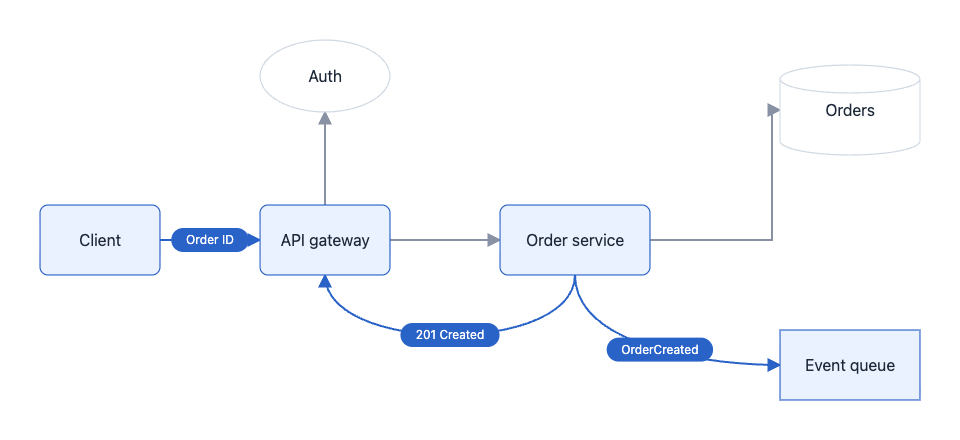
Save this as `diagram.ts`. This 5.2-second example uses six nodes, three scenes and five beats. It separates authorization, order persistence, and the final response with an asynchronous event. The integration examples below reuse this file:
|
|
46
|
+
|
|
47
|
+
```ts
|
|
48
|
+
import type { DiagramDocument } from "flowsvg";
|
|
49
|
+
|
|
50
|
+
export const diagramDocument: DiagramDocument = {
|
|
51
|
+
version: 1,
|
|
52
|
+
title: "Order request lifecycle",
|
|
53
|
+
viewport: { width: 960, height: 440 },
|
|
54
|
+
nodes: [
|
|
55
|
+
{ id: "client", kind: "roundedRect", x: 40, y: 205, width: 120, height: 70, label: "Client" },
|
|
56
|
+
{ id: "gateway", kind: "roundedRect", x: 260, y: 205, width: 130, height: 70, label: "API gateway" },
|
|
57
|
+
{ id: "auth", kind: "ellipse", x: 260, y: 40, width: 130, height: 72, label: "Auth" },
|
|
58
|
+
{ id: "orders", kind: "roundedRect", x: 500, y: 205, width: 150, height: 70, label: "Order service" },
|
|
59
|
+
{ id: "database", kind: "cylinder", x: 780, y: 65, width: 140, height: 90, label: "Orders" },
|
|
60
|
+
{ id: "events", kind: "rect", x: 780, y: 330, width: 140, height: 70, label: "Event queue" }
|
|
61
|
+
],
|
|
62
|
+
edges: [
|
|
63
|
+
{ id: "request", from: "client", to: "gateway", route: "straight" },
|
|
64
|
+
{ id: "authorize", from: "gateway", to: "auth", route: "straight", fromPort: "top", toPort: "bottom" },
|
|
65
|
+
{ id: "create", from: "gateway", to: "orders", route: "straight" },
|
|
66
|
+
{ id: "persist", from: "orders", to: "database", route: "orthogonal", fromPort: "right", toPort: "left" },
|
|
67
|
+
{ id: "publish", from: "orders", to: "events", route: "curved", fromPort: "bottom", toPort: "left" },
|
|
68
|
+
{ id: "result", from: "orders", to: "gateway", route: "curved", fromPort: "bottom", toPort: "bottom" }
|
|
69
|
+
],
|
|
70
|
+
scenes: [
|
|
71
|
+
{ id: "request", label: "Receive and authorize", beats: [
|
|
72
|
+
{ durationMs: 800, caption: "Receive the order request", actions: [
|
|
73
|
+
{ type: "flow", target: "request", direction: "forward", text: "POST" }
|
|
74
|
+
] },
|
|
75
|
+
{ durationMs: 800, caption: "Validate the access token", actions: [
|
|
76
|
+
{ type: "flow", target: "authorize", direction: "forward", text: "Token" }
|
|
77
|
+
] }
|
|
78
|
+
] },
|
|
79
|
+
{ id: "create-order", label: "Create the order", beats: [
|
|
80
|
+
{ durationMs: 1000, caption: "Send the authorized request to the order service", actions: [
|
|
81
|
+
{ type: "flow", target: "create", direction: "forward", text: "Create" }
|
|
82
|
+
] },
|
|
83
|
+
{ durationMs: 1000, caption: "Persist the new order", actions: [
|
|
84
|
+
{ type: "flow", target: "persist", direction: "forward", text: "INSERT" }
|
|
85
|
+
] }
|
|
86
|
+
] },
|
|
87
|
+
{ id: "response", label: "Publish and respond", beats: [
|
|
88
|
+
{ durationMs: 1600, caption: "Publish OrderCreated and return the order number", actions: [
|
|
89
|
+
{ type: "flow", target: "publish", direction: "forward", text: "OrderCreated" },
|
|
90
|
+
{ type: "flow", target: "result", direction: "forward", text: "201 Created" },
|
|
91
|
+
{ type: "flow", target: "request", direction: "reverse", text: "Order ID" }
|
|
92
|
+
] }
|
|
93
|
+
] }
|
|
94
|
+
]
|
|
95
|
+
};
|
|
96
|
+
```
|
|
97
|
+
|
|
98
|
+
At 4400 ms with the light theme, the event and response messages move together. Only their participating nodes are highlighted.
|
|
99
|
+
|
|
100
|
+
|
|
101
|
+
|
|
102
|
+
### 2. Evaluate and export SVG
|
|
103
|
+
|
|
104
|
+
```ts
|
|
105
|
+
import { createDiagram, renderSvg } from "flowsvg";
|
|
106
|
+
import { diagramDocument } from "./diagram.js";
|
|
107
|
+
|
|
108
|
+
const diagram = createDiagram(diagramDocument);
|
|
109
|
+
const frame = diagram.evaluateAt(125);
|
|
110
|
+
console.log(diagram.totalDuration, frame.sceneId, frame.warnings);
|
|
111
|
+
|
|
112
|
+
const svg = diagram.renderSvg(125, { theme: "dark" });
|
|
113
|
+
const finalSvg = renderSvg(diagramDocument, 5200);
|
|
114
|
+
```
|
|
115
|
+
|
|
116
|
+
Both results are static SVG strings. Reuse `createDiagram` for repeated queries; use `renderSvg` for a single export.
|
|
117
|
+
|
|
118
|
+
## Vue integration
|
|
119
|
+
|
|
120
|
+
Create a component in your Vue application, with `diagram.ts` in the same directory:
|
|
121
|
+
|
|
122
|
+
```vue
|
|
123
|
+
<script setup lang="ts">
|
|
124
|
+
import { ref } from "vue";
|
|
125
|
+
import { FlowPlayer, type FlowPlayerHandle } from "flowsvg/vue";
|
|
126
|
+
import type { PlayerErrorDetail } from "flowsvg/browser";
|
|
127
|
+
import "flowsvg/styles.css";
|
|
128
|
+
import { diagramDocument } from "./diagram.js";
|
|
129
|
+
|
|
130
|
+
const player = ref<FlowPlayerHandle | null>(null);
|
|
131
|
+
const timeMs = ref(0);
|
|
132
|
+
|
|
133
|
+
function handleError({ error }: PlayerErrorDetail): void {
|
|
134
|
+
console.error(error);
|
|
135
|
+
}
|
|
136
|
+
</script>
|
|
137
|
+
|
|
138
|
+
<template>
|
|
139
|
+
<FlowPlayer
|
|
140
|
+
ref="player"
|
|
141
|
+
:document="diagramDocument"
|
|
142
|
+
:speed="1.25"
|
|
143
|
+
theme="dark"
|
|
144
|
+
@timeupdate="timeMs = $event.timeMs"
|
|
145
|
+
@error="handleError"
|
|
146
|
+
/>
|
|
147
|
+
<button type="button" @click="player?.play()">Play</button>
|
|
148
|
+
<button type="button" @click="player?.seek(0)">Back to start</button>
|
|
149
|
+
<output>{{ timeMs }} ms</output>
|
|
150
|
+
</template>
|
|
151
|
+
```
|
|
152
|
+
|
|
153
|
+
Unmounting destroys the player. In scripts, call methods through `player.value`; templates unwrap the ref. Events pass their detail directly: `stepchange`, `timeupdate`, `playstatechange`, and `error`. Callback props are also supported.
|
|
154
|
+
|
|
155
|
+
## React integration
|
|
156
|
+
|
|
157
|
+
```tsx
|
|
158
|
+
import { useRef } from "react";
|
|
159
|
+
import { FlowPlayer, type FlowPlayerHandle } from "flowsvg/react";
|
|
160
|
+
import "flowsvg/styles.css";
|
|
161
|
+
import { diagramDocument } from "./diagram.js";
|
|
162
|
+
|
|
163
|
+
export default function DiagramExample() {
|
|
164
|
+
const player = useRef<FlowPlayerHandle | null>(null);
|
|
165
|
+
|
|
166
|
+
return (
|
|
167
|
+
<section>
|
|
168
|
+
<FlowPlayer
|
|
169
|
+
ref={player}
|
|
170
|
+
document={diagramDocument}
|
|
171
|
+
speed={1.25}
|
|
172
|
+
theme="dark"
|
|
173
|
+
onError={({ error }) => console.error(error)}
|
|
174
|
+
/>
|
|
175
|
+
<button type="button" onClick={() => player.current?.play()}>Play</button>
|
|
176
|
+
<button type="button" onClick={() => player.current?.seek(0)}>Back to start</button>
|
|
177
|
+
</section>
|
|
178
|
+
);
|
|
179
|
+
}
|
|
180
|
+
```
|
|
181
|
+
|
|
182
|
+
The component releases resources on unmount. Callbacks are `onStepChange`, `onTimeUpdate`, `onPlayStateChange`, and `onError`.
|
|
183
|
+
|
|
184
|
+
### Vue / React props and updates
|
|
185
|
+
|
|
186
|
+
| Prop | Default or behavior |
|
|
187
|
+
| --- | --- |
|
|
188
|
+
| `document` | Required diagram document; a new object reference triggers a reload, pausing at zero on success |
|
|
189
|
+
| `speed` | Positive playback multiplier, default `1`; changes update the speed |
|
|
190
|
+
| `theme` | `light` / `dark`; falls back to the document theme, then light |
|
|
191
|
+
| `controls` | Default `true`; set to `false` to hide built-in controls |
|
|
192
|
+
| `reducedMotion` | Follows the browser's reduced-motion preference when omitted |
|
|
193
|
+
| `hoverFill` | Default `false`: hover highlights the border only; set `true` to also highlight the background and content |
|
|
194
|
+
| `initialTimeMs` | Applied only on initial mount; use `seek` for later changes |
|
|
195
|
+
| `className` / `style` | Host container styles |
|
|
196
|
+
|
|
197
|
+
Changing `theme`, `controls`, `reducedMotion`, or `hoverFill` recreates the player, paused at zero, without reapplying `initialTimeMs`. Reload documents with a new object reference. Handles expose seven methods listed under [Player API](#player-api); calls before mount or after unmount throw.
|
|
198
|
+
|
|
199
|
+
Both entries support server-side imports. SSR renders a container; the player is created on client mount. Use `renderSvg` for server-side diagram previews.
|
|
200
|
+
|
|
201
|
+
## Native browser
|
|
202
|
+
|
|
203
|
+
Add a container to your page:
|
|
204
|
+
|
|
205
|
+
```html
|
|
206
|
+
<div id="diagram" style="width: 100%; height: 360px;"></div>
|
|
207
|
+
```
|
|
208
|
+
|
|
209
|
+
Create the player in a client-side application module:
|
|
210
|
+
|
|
211
|
+
```ts
|
|
212
|
+
import { createPlayer } from "flowsvg/browser";
|
|
213
|
+
import "flowsvg/styles.css";
|
|
214
|
+
import { diagramDocument } from "./diagram.js";
|
|
215
|
+
|
|
216
|
+
const host = document.querySelector<HTMLElement>("#diagram");
|
|
217
|
+
if (!host) throw new Error("Diagram host is missing");
|
|
218
|
+
|
|
219
|
+
const player = createPlayer(host, diagramDocument, { theme: "light" });
|
|
220
|
+
player.play();
|
|
221
|
+
```
|
|
222
|
+
|
|
223
|
+
`createPlayer` replaces the container children. Call `destroy()` on disposal and before reusing the container. Plain HTML requires an import map or build tooling for package imports.
|
|
224
|
+
|
|
225
|
+
The [native example](https://github.com/yokingma/FlowSVG/blob/HEAD/apps/native-example/README.md) demonstrates request/response flows. Its shared document also works with the other three integrations.
|
|
226
|
+
|
|
227
|
+
## Web Component
|
|
228
|
+
|
|
229
|
+
Place the element in HTML, then register it explicitly from a client-side module:
|
|
230
|
+
|
|
231
|
+
```html
|
|
232
|
+
<flowsvg-player controls="false"></flowsvg-player>
|
|
233
|
+
```
|
|
234
|
+
|
|
235
|
+
```ts
|
|
236
|
+
import { defineFlowPlayer, type FlowPlayerElement } from "flowsvg/web-component";
|
|
237
|
+
import "flowsvg/styles.css";
|
|
238
|
+
import { diagramDocument } from "./diagram.js";
|
|
239
|
+
|
|
240
|
+
defineFlowPlayer();
|
|
241
|
+
const element = document.querySelector<FlowPlayerElement>("flowsvg-player");
|
|
242
|
+
if (element) element.document = diagramDocument;
|
|
243
|
+
```
|
|
244
|
+
|
|
245
|
+
Registration defaults to `<flowsvg-player>` and is idempotent. Assign objects to `element.document`, JSON strings to the HTML `document` attribute, or a JSON URL to `src`. URLs resolve against the page and follow browser CORS rules.
|
|
246
|
+
|
|
247
|
+
Attributes: `autoplay`, `controls`, `speed`, `theme`, `reduced-motion`, and `hover-fill`. Controls default on; autoplay and hover fill default off. Use `controls="false"` to hide controls. Changes to theme, controls, or motion/hover options preserve time and playback state; `autoplay` explicitly starts or pauses playback. Removal cancels requests and destroys the player; reconnection uses the retained document.
|
|
248
|
+
|
|
249
|
+
Methods: `play`, `pause`, `seek`, `step`, `setSpeed`, `getState`, and `destroy`. Update documents through `element.document`. Before mount or after destruction, `getState()` returns `undefined`. Playback/error events bubble across Shadow DOM boundaries.
|
|
250
|
+
|
|
251
|
+
Register in a DOM environment. DOM-free imports are safe, but that module instance cannot register after a DOM is added later.
|
|
252
|
+
|
|
253
|
+
## Documents and timelines
|
|
254
|
+
|
|
255
|
+
| Document field | Contract |
|
|
256
|
+
| --- | --- |
|
|
257
|
+
| `version` | Currently `1` |
|
|
258
|
+
| `viewport` | Finite positive `width` and `height`, defining the initial viewport |
|
|
259
|
+
| `nodes` | Node array; `id`, `kind`, `x`, `y`, `width`, and `height` are required |
|
|
260
|
+
| `edges` | Edge array; `id`, `from`, and `to` are required; endpoints reference nodes or group boundaries |
|
|
261
|
+
| `scenes` | `[]` creates a static diagram; each scene has a unique `id`, a `label`, and nonempty `beats` |
|
|
262
|
+
| `title` / `theme` | Optional title and `light` / `dark` document theme |
|
|
263
|
+
|
|
264
|
+
Node and edge IDs are globally unique. Shapes: `rect`, `roundedRect`, `ellipse`, `cylinder`, `group`. `parentId` names a parent group; child coordinates are group-relative. Labels are plain text; `visible` defaults to `true`. Node styles: `fill`, `stroke`, `strokeWidth`, `textColor`, `dashed` (group borders). Edge styles: `stroke`, `strokeWidth`, `dashed`. Colors use hexadecimal RGB/RGBA, such as `#2563eb` or `#2563eb80`.
|
|
265
|
+
|
|
266
|
+
Routes: `straight` (default), `orthogonal`, or `curved`. Curves follow endpoint ports without avoiding other nodes. Orthogonal routes avoid visible ordinary nodes and use a fixed fallback if blocked; shortest paths and zero crossings are not guaranteed. Set `fromPort` / `toPort` to `top`, `right`, `bottom`, or `left`. Explicit orthogonal ports reserve outward endpoint segments; curved ports set tangents. Omitted ports follow the dominant center-to-center axis; ellipse endpoints lie on the contour. Simple labels wrap by estimated width and remain visible on height overflow, with a `text-overflow` warning.
|
|
267
|
+
|
|
268
|
+
Edges can connect nodes or group boundaries. Group endpoints follow evaluated geometry and explicit ports. Hidden ancestors mask connected edges. Transfers highlight the endpoint group, not its descendants. Group frames are excluded from routing obstacles.
|
|
269
|
+
|
|
270
|
+
### Fixed-size node content
|
|
271
|
+
|
|
272
|
+
`rect`, `roundedRect`, and `cylinder` support `content`; ellipses and groups support labels only. `content` and `label` are mutually exclusive, even with an empty label. `content.blocks` contains ordered `title`, `paragraph`, `list`, or `graph` blocks. Paragraph roles are `body` (default) and `auxiliary`. An empty block array displays only the shape.
|
|
273
|
+
|
|
274
|
+
```ts
|
|
275
|
+
import type { DiagramNode } from "flowsvg";
|
|
276
|
+
|
|
277
|
+
const service = {
|
|
278
|
+
id: "service", kind: "rect", x: 24, y: 24, width: 260, height: 312,
|
|
279
|
+
content: {
|
|
280
|
+
style: { padding: 16, blockGap: 14 },
|
|
281
|
+
blocks: [
|
|
282
|
+
{ type: "title", text: "Order service" },
|
|
283
|
+
{ type: "paragraph", role: "auxiliary", text: "Core responsibilities" },
|
|
284
|
+
{ type: "paragraph", text: "Validate and persist incoming orders." },
|
|
285
|
+
{ type: "paragraph", text: "Return the order number.", style: { color: "#2563eb", align: "right" } }
|
|
286
|
+
]
|
|
287
|
+
}
|
|
288
|
+
} satisfies DiagramNode;
|
|
289
|
+
```
|
|
290
|
+
|
|
291
|
+
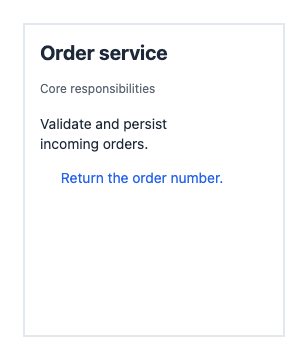
The `service` node rendered with the light theme:
|
|
292
|
+
|
|
293
|
+
|
|
294
|
+
|
|
295
|
+
Text fields accept strings or `ContentTextSpan[]`: `{ text, style?: { fontSize, fontWeight, color } }`. Spans inherit block styles and share a baseline; alignment belongs to the block. Each line uses its largest font. Wrapping preserves newlines and Unicode graphemes, prefers English spaces, and breaks long words/URLs as needed. A grapheme spanning source styles uses its first character’s style. Layout uses width estimates, without DOM measurement.
|
|
296
|
+
|
|
297
|
+
Text styles: positive finite `fontSize`, integer `fontWeight` from 100–900, hexadecimal `color`, and `align` (`left`, `center`, `right`). Content `padding` and `blockGap` are finite and nonnegative. Defaults in diagram units: title 20/700, body 14/400, auxiliary 12/400, padding 16, block gap 14. Line height is `max(20, fontSize × 1.35)`. Explicit colors override theme defaults.
|
|
298
|
+
|
|
299
|
+
Lists accept `marker` (`none` by default, `bullet`, or `number`), `items`, and `style`. Items support `tags`, `status`, `body`, `auxiliary`, `style`, `auxiliaryStyle`, and `statusStyle`. List style sets body typography and nonnegative finite `itemGap` (default 12); item body style overrides it. Auxiliary text defaults to muted 12-unit text. Markers share a column followed by an 8-unit gap; continuation and auxiliary lines align with the body. Markers use the first present text baseline. Omitted items/parts take no space; explicit blank text preserves a line.
|
|
300
|
+
|
|
301
|
+
```ts
|
|
302
|
+
import type { ContentBlock } from "flowsvg";
|
|
303
|
+
|
|
304
|
+
const steps: ContentBlock = { type: "list", marker: "number", style: { itemGap: 16 }, items: [
|
|
305
|
+
{ body: "Validate the request.", auxiliary: "Input checks" },
|
|
306
|
+
{ body: [{ text: "Save", style: { fontWeight: 700 } }, { text: " the order." }] }
|
|
307
|
+
] };
|
|
308
|
+
```
|
|
309
|
+
|
|
310
|
+
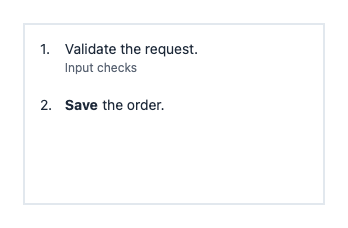
The `steps` block rendered in a 300 × 180 rectangle with `content: { blocks: [steps] }`:
|
|
311
|
+
|
|
312
|
+
|
|
313
|
+
|
|
314
|
+
Tags accept `{ text, style?: { fontSize, fontWeight, color, fill } }`. Defaults: font size 11, padding 6 horizontal / 2 vertical, corner radius 3. List `tagGap` defaults to 6 and must be finite and nonnegative. Status is right-aligned, defaults to 12-unit accent text, and accepts `fontSize`, `fontWeight`, and `color` in `statusStyle`. Tags and status share a baseline when they fit; otherwise tags wrap first and status moves below. Body and auxiliary text follow. Explicit colors/fills override the theme.
|
|
315
|
+
|
|
316
|
+
```ts
|
|
317
|
+
import type { ContentBlock } from "flowsvg";
|
|
318
|
+
|
|
319
|
+
const records: ContentBlock = { type: "list", items: [{
|
|
320
|
+
tags: [{ text: "world" }, { text: "experience", style: { fill: "#eadfff", color: "#57319b" } }],
|
|
321
|
+
status: "new", body: "Alice joined Google", auxiliary: "Mar 2026"
|
|
322
|
+
}] };
|
|
323
|
+
```
|
|
324
|
+
|
|
325
|
+
The `records` block rendered in a 300 × 180 rectangle with `content: { blocks: [records] }`:
|
|
326
|
+
|
|
327
|
+

|
|
328
|
+
|
|
329
|
+
Content keeps authored node dimensions. Safe areas reserve padding plus 4 units per side for rounded rectangles, or twice the cylinder cap radius above/below (`min(14, height / 4)`). Dimensions clamp to zero. SVG clips content to this area; width/height overflow emits `text-overflow` with node ID, `nodes[index].content`, and direction. Clipped text adds no hit area. Simple labels retain their separate overflow behavior.
|
|
330
|
+
|
|
331
|
+
`EvaluatedNode.contentLayout` provides the safe area, lines/spans, tag backgrounds, optional graph primitives, and width/height overflow flags. Geometry is absolute and follows node resizing, parent movement, visibility, and opacity. Lines retain source block/item/tag indexes; `explicitColor` and `explicitFill` identify authored paint. Browser rendering and SVG export use the same layout. Content does not change ports, routes, transfer geometry, or parent relationships. See the [paragraph](https://github.com/yokingma/FlowSVG/blob/HEAD/apps/native-example/node-content.html) and [list](https://github.com/yokingma/FlowSVG/blob/HEAD/apps/native-example/list-content.html) examples.
|
|
332
|
+
|
|
333
|
+
### Entity graphs inside nodes
|
|
334
|
+
|
|
335
|
+
A `graph` block draws an undirected entity graph with authored local coordinates:
|
|
336
|
+
|
|
337
|
+
```ts
|
|
338
|
+
import type { ContentGraphBlock } from "flowsvg";
|
|
339
|
+
|
|
340
|
+
const entities: ContentGraphBlock = {
|
|
341
|
+
type: "graph", height: 130,
|
|
342
|
+
nodes: [
|
|
343
|
+
{ id: "alice", label: "Alice", x: 120, y: 30, highlighted: true },
|
|
344
|
+
{ id: "google", label: "Google", x: 50, y: 110, highlighted: true },
|
|
345
|
+
{ id: "ml", label: "ML project", x: 190, y: 110 }
|
|
346
|
+
],
|
|
347
|
+
edges: [{ from: "alice", to: "google" }, { from: "alice", to: "ml" }]
|
|
348
|
+
};
|
|
349
|
+
```
|
|
350
|
+
|
|
351
|
+
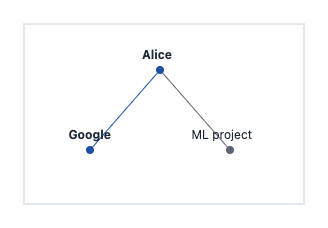
The `entities` block rendered in a 280 × 180 rectangle with `content: { blocks: [entities] }`:
|
|
352
|
+
|
|
353
|
+
|
|
354
|
+
|
|
355
|
+
`height` reserves a positive fixed section. Entity centers use nonnegative finite `x`/`y` offsets from its top-left. IDs are local to each block; edges reference those IDs. Labels are 12-unit plain text above radius-4 dots. Highlighted entities use accent dots and bold labels; an edge uses accent paint when both endpoints are highlighted. Overflow reports its direction without shifting later blocks. Graphs share the parent clip and theme; interactions target the parent node.
|
|
356
|
+
|
|
357
|
+
`contentLayout.graphs` contains absolute primitives and highlight state by `blockIndex`; labels join `contentLayout.lines`. Replace `content` to change selections at a beat start. See the [Hindsight example](https://github.com/yokingma/FlowSVG/blob/HEAD/apps/native-example/hindsight.html).
|
|
358
|
+
|
|
359
|
+
### Author a complete Facts timeline
|
|
360
|
+
|
|
361
|
+
Choose fixed dimensions and ordered blocks. Use unmarked lists for records, bullets for capabilities, and numbers for steps. This document works with all four integrations:
|
|
362
|
+
|
|
363
|
+
```ts
|
|
364
|
+
import { createDiagram, type DiagramDocument, type NodeContent } from "flowsvg";
|
|
365
|
+
|
|
366
|
+
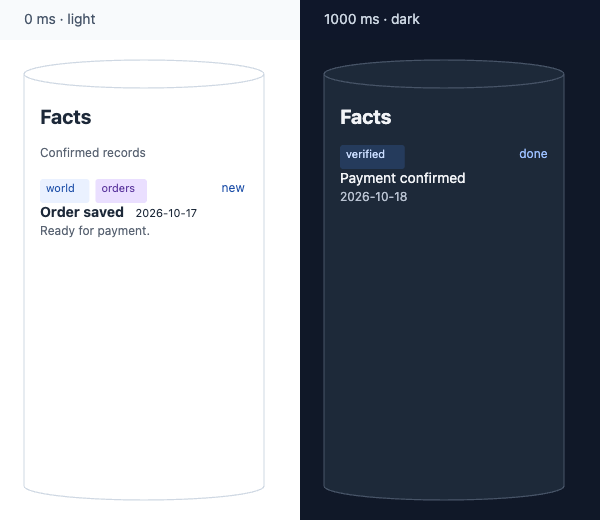
const facts: NodeContent = { blocks: [
|
|
367
|
+
{ type: "title", text: "Facts" },
|
|
368
|
+
{ type: "paragraph", role: "auxiliary", text: "Confirmed records" },
|
|
369
|
+
{ type: "list", marker: "none", items: [{
|
|
370
|
+
tags: [{ text: "world" }, { text: "orders", style: { fill: "#eadfff", color: "#57319b" } }],
|
|
371
|
+
status: "new",
|
|
372
|
+
body: [{ text: "Order saved", style: { fontWeight: 700 } }, { text: " 2026-10-17", style: { fontSize: 11 } }],
|
|
373
|
+
auxiliary: "Ready for payment."
|
|
374
|
+
}] }
|
|
375
|
+
] };
|
|
376
|
+
const updated: NodeContent = { blocks: [
|
|
377
|
+
{ type: "title", text: "Facts" },
|
|
378
|
+
{ type: "list", items: [{ tags: [{ text: "verified" }], status: "done", body: "Payment confirmed", auxiliary: "2026-10-18" }] }
|
|
379
|
+
] };
|
|
380
|
+
const document: DiagramDocument = {
|
|
381
|
+
version: 1, viewport: { width: 300, height: 480 },
|
|
382
|
+
nodes: [{ id: "facts", kind: "cylinder", x: 24, y: 20, width: 240, height: 440, content: facts }], edges: [],
|
|
383
|
+
scenes: [{ id: "records", label: "Records", beats: [
|
|
384
|
+
{ durationMs: 1000, actions: [] },
|
|
385
|
+
{ durationMs: 1000, actions: [{ type: "updateNode", target: "facts", value: { content: updated } }] },
|
|
386
|
+
{ durationMs: 1000, actions: [{ type: "updateNode", target: "facts", value: { label: "Archived" } }] },
|
|
387
|
+
{ durationMs: 1000, actions: [{ type: "updateNode", target: "facts", value: { content: facts } }] },
|
|
388
|
+
{ durationMs: 1000, actions: [{ type: "updateNode", target: "facts", value: { content: null } }] }
|
|
389
|
+
] }]
|
|
390
|
+
};
|
|
391
|
+
const diagram = createDiagram(document);
|
|
392
|
+
console.log(diagram.evaluateAt(1000).warnings);
|
|
393
|
+
const svg = diagram.renderSvg(1000, { theme: "dark", reducedMotion: true });
|
|
394
|
+
```
|
|
395
|
+
|
|
396
|
+
The initial light-theme frame at 0 ms and the updated dark-theme frame at 1000 ms:
|
|
397
|
+
|
|
398
|
+
|
|
399
|
+
|
|
400
|
+
Check `frame.warnings` before sharing. Increase node dimensions or shorten overflowing text; the SDK does not resize nodes or shrink fonts. Prefer default colors for theme/highlight contrast. Content has one node-level interaction target, without internal links, buttons, images, or HTML.
|
|
401
|
+
|
|
402
|
+
The [content story](https://github.com/yokingma/FlowSVG/blob/HEAD/apps/native-example/content-story.html) combines Facts, lists, node updates, flows, and focus. Its [shared document](https://github.com/yokingma/FlowSVG/blob/HEAD/apps/native-example/content-story.js) also runs in the Vue and React examples.
|
|
403
|
+
|
|
404
|
+
Each beat has a positive `durationMs` and an `actions` array, with optional `transitionMs` and `caption`. Transition duration defaults to `min(250, durationMs)` and must be within `[0, durationMs]`. An omitted caption inherits the previous caption; an empty string clears it.
|
|
405
|
+
|
|
406
|
+
| Action | Example or update fields |
|
|
407
|
+
| --- | --- |
|
|
408
|
+
| `show` / `hide` | `{ type: "show", target: "service" }`; targets a node, group, or edge |
|
|
409
|
+
| `highlight` / `unhighlight` | Changes the highlight layer; removing a highlight reveals the latest ordinary style |
|
|
410
|
+
| `flow` | `{ type: "flow", target: "request", direction: "forward" }`; moves a beat-local marker along an edge. `direction` is `forward` or `reverse`; the static edge arrow does not change. Add `text: "Request"` for a horizontal text capsule; omit `text` for a solid dot. |
|
|
411
|
+
| `updateNode` | `value` supports `x`, `y`, `width`, `height`, `label`, `content`, `fill`, `stroke`, and `opacity` |
|
|
412
|
+
| `updateEdge` | `value` supports `label`, `stroke`, `strokeWidth`, and `opacity` |
|
|
413
|
+
| `focus` | `target` is a node/group ID; `null` restores the full viewport |
|
|
414
|
+
|
|
415
|
+
`updateNode.value.content` replaces all content at beat start, regardless of transition duration, and persists across beats/scenes. `label` switches to simple-label mode; `content` switches to structured content. `content: null` clears either mode without restoring old labels or resizing. Assigning both modes, or assigning one repeatedly within a beat, produces a field-path error.
|
|
416
|
+
|
|
417
|
+
```ts
|
|
418
|
+
// Each value belongs to a separate beat's updateNode action.
|
|
419
|
+
import type { NodeVisualState } from "flowsvg";
|
|
420
|
+
|
|
421
|
+
const replacement: NodeVisualState = { content: { blocks: [{ type: "title", text: "Updated" }] } };
|
|
422
|
+
const simpleLabel: NodeVisualState = { label: "Summary" };
|
|
423
|
+
const clearText: NodeVisualState = { content: null };
|
|
424
|
+
```
|
|
425
|
+
|
|
426
|
+
Scenes share a millisecond timeline and inherit the previous scene’s final state. Text changes at beat start; interpolated values change during the transition. Beats include their start and exclude their end; the final time returns the completed frame. Hidden nodes/groups mask connected edges; showing them restores each edge’s saved visibility.
|
|
427
|
+
|
|
428
|
+
A beat supports one transfer per distinct edge. Transfers share linear progress over `durationMs`, so longer paths move faster. Markers and endpoint highlights expire at beat end; the next beat supplies a new transfer group. Explicit highlights and ordinary styles persist.
|
|
429
|
+
|
|
430
|
+
Transfer `text` is escaped, stays horizontal, and uses estimated capsule widths without font measurement. It does not replace the edge label or create an interaction target. An empty string still produces a capsule.
|
|
431
|
+
|
|
432
|
+
## API
|
|
433
|
+
|
|
434
|
+
### Core API
|
|
435
|
+
|
|
436
|
+
Import from `flowsvg`:
|
|
437
|
+
|
|
438
|
+
| API | Result and behavior |
|
|
439
|
+
| --- | --- |
|
|
440
|
+
| `validateDocument(input: unknown)` | Returns `{ path, message }[]`; an empty array means valid |
|
|
441
|
+
| `createDiagram(document)` | Validates, copies, and compiles into a `Diagram`; invalid documents throw `DiagramValidationError` |
|
|
442
|
+
| `renderSvg(document, timeMs = 0, options?)` | Compiles once and exports a static SVG string |
|
|
443
|
+
| `diagram.totalDuration` | Total timeline duration; `0` for a static document |
|
|
444
|
+
| `diagram.evaluateAt(timeMs, options?)` | Returns `DiagramFrameState` |
|
|
445
|
+
| `diagram.renderSvg(timeMs = 0, options?)` | Exports SVG from the same evaluation result |
|
|
446
|
+
| `diagram.hitTest(timeMs, point, options?)` | Returns `{ id, type: "node" \| "edge" }` or `null`, using document coordinates |
|
|
447
|
+
| `wrapText(label, maxWidth, typography?)` | Wraps text with fixed width estimates and returns an array of lines |
|
|
448
|
+
|
|
449
|
+
`EvaluateOptions`: `{ theme?: "light" | "dark"; reducedMotion?: boolean }`. Times clamp to `[0, totalDuration]`; non-finite values become zero. Hit testing skips hidden/zero-opacity objects, then checks ordinary nodes, edges, and group backgrounds in that order.
|
|
450
|
+
|
|
451
|
+
`DiagramFrameState` includes time, scene/beat IDs, progress, evaluated nodes/edges, camera, caption, and warnings. Coordinates are absolute. Static documents have `null` scene/beat IDs; beat IDs use `${scene.id}:${beatIndex}` with zero-based indexes. Active edges expose `flow` direction, progress, point, and optional text. Markers are absent after the beat, on hidden edges, or with reduced motion.
|
|
452
|
+
|
|
453
|
+
Types and member JSDoc are included: `DiagramDocument`, `DiagramNode`, `DiagramEdge`, `Scene`, `Beat`, `Action`, `Diagram`, `DiagramFrameState`, `EvaluateOptions`, `ValidationIssue`, and `LayoutWarning`.
|
|
454
|
+
|
|
455
|
+
### Player API
|
|
456
|
+
|
|
457
|
+
Import `createPlayer(host, document, options?)` from `flowsvg/browser`. `PlayerOptions` extends core visual options with `controls?: boolean` and `hoverFill?: boolean`.
|
|
458
|
+
|
|
459
|
+
| Method or property | Behavior |
|
|
460
|
+
| --- | --- |
|
|
461
|
+
| `element` | The original host element and event target |
|
|
462
|
+
| `play()` / `pause()` | Starts playback or pauses on the current frame; static diagrams and the timeline end cannot start playback |
|
|
463
|
+
| `seek(timeMs)` | Clamps to the timeline and retains playback state; reaching the end pauses |
|
|
464
|
+
| `step(1)` / `step(-1)` | Pauses and jumps to the adjacent beat start; stepping backward inside a beat goes to its start, and backward at a beat start goes to the previous beat |
|
|
465
|
+
| `setSpeed(speed)` | Sets a finite positive multiplier; ignores invalid values |
|
|
466
|
+
| `load(document)` | Pauses at zero on success; validation failure emits error and retains the document, time, and playback state |
|
|
467
|
+
| `getState()` | Returns `PlayerState`: `timeMs`, `totalDuration`, `playing`, `speed`, and `frame` |
|
|
468
|
+
| `destroy()` | Idempotently cleans up DOM, listeners, and scheduling; stops events, while state remains readable |
|
|
469
|
+
|
|
470
|
+
Players start paused at zero with controls enabled. Page hiding pauses playback; returning leaves it paused. Playback stops at the end; static diagrams disable timeline controls. Framework handles expose these methods except `element` and `destroy`.
|
|
471
|
+
|
|
472
|
+
Hover highlights the current node’s border, including hits on labels or content. Set `hoverFill: true` to include background and content paint, including groups. Leaving removes only the hover highlight; active flow/explicit highlights remain. Frame updates recheck stationary pointers. Pointer cancellation, successful document replacement, and destruction clear hover.
|
|
473
|
+
|
|
474
|
+
Default content colors adapt to the theme and highlight fill; authored colors and tag fills stay unchanged. Highlighting preserves layout and hit bounds. Content interactions report the parent node; clipped text adds no hit area.
|
|
475
|
+
|
|
476
|
+
`PlayerState.frame` and static SVG exclude hover. Browser output matches the same-time export when no node is hovered.
|
|
477
|
+
|
|
478
|
+
### Events
|
|
479
|
+
|
|
480
|
+
Native players dispatch `CustomEvent` on the host element:
|
|
481
|
+
|
|
482
|
+
| Event | `detail` |
|
|
483
|
+
| --- | --- |
|
|
484
|
+
| `timeupdate` | Current `PlayerState`, sent after the frame updates |
|
|
485
|
+
| `stepchange` | Current `PlayerState`, sent when the scene or beat changes, before that update's timeupdate |
|
|
486
|
+
| `playstatechange` | Current `PlayerState`, sent when playing/paused state changes |
|
|
487
|
+
| `error` | `PlayerErrorDetail`: retained player state and `error` |
|
|
488
|
+
| `hover` / `click` | `PlayerInteractionDetail` or `null`; aliases are `objecthover` / `objectclick` |
|
|
489
|
+
|
|
490
|
+
Interaction detail contains `id`, `type`, `point` (document coordinates), `timeMs`, `sceneId`, and `beatId`; misses return `null`. Adapters forward the four playback/error events. Web Component errors before mount may lack player state.
|
|
491
|
+
|
|
492
|
+
`hover` also updates when a frame change moves another object under a stationary pointer. Pointer leave/cancel emits `null`.
|
|
493
|
+
|
|
494
|
+
```ts
|
|
495
|
+
import type { PlayerEventMap } from "flowsvg/browser";
|
|
496
|
+
|
|
497
|
+
function handleTimeUpdate(event: Event): void {
|
|
498
|
+
const { detail } = event as PlayerEventMap["timeupdate"];
|
|
499
|
+
console.log(detail.timeMs, detail.frame.caption);
|
|
500
|
+
}
|
|
501
|
+
|
|
502
|
+
player.element.addEventListener("timeupdate", handleTimeUpdate);
|
|
503
|
+
```
|
|
504
|
+
|
|
505
|
+
This example reuses `player` from the native integration. Remove any listeners your application adds when disposing of the host.
|
|
506
|
+
|
|
507
|
+
## Themes and accessibility
|
|
508
|
+
|
|
509
|
+
Theme: explicit option → document theme → light. The core ignores system preferences. Browser motion follows `prefers-reduced-motion` unless overridden; the core defaults to full motion. Reduced motion completes transitions immediately and hides transfer markers, preserving duration.
|
|
510
|
+
|
|
511
|
+
Defaults use neutral borders and edges with blue emphasis:
|
|
512
|
+
|
|
513
|
+
| Paint | Light | Dark |
|
|
514
|
+
| --- | --- | --- |
|
|
515
|
+
| Background / node fill | `#ffffff` / `#ffffff` | `#101828` / `#1d2939` |
|
|
516
|
+
| Node border / text | `#cfd8e3` / `#1d2939` | `#475467` / `#f2f4f7` |
|
|
517
|
+
| Edge | `#8892a4` | `#98a2b3` |
|
|
518
|
+
| Highlight fill / border | `#eaf1ff` / `#2a63c8` | `#233b60` / `#8ab4f8` |
|
|
519
|
+
| Flow marker / marker text | `#2a63c8` / `#ffffff` | `#8ab4f8` / `#101828` |
|
|
520
|
+
|
|
521
|
+
Default node borders are 1.2 diagram units; edges are 2. Rounded rectangles use a radius of at most 8. Node labels use plain text; edge labels retain a background halo for readability across paths. Diagram text uses system fonts with Chinese fallbacks. Explicit styles replace ordinary defaults; timeline and hover highlights overlay those styles and restore the current ordinary paint when removed.
|
|
522
|
+
|
|
523
|
+
Import `flowsvg/styles.css` for control layout and focus styles. CSS variables customize controls only; core themes and document styles determine diagram colors:
|
|
524
|
+
|
|
525
|
+
```css
|
|
526
|
+
.flowsvg {
|
|
527
|
+
--flowsvg-control-background: #101828;
|
|
528
|
+
--flowsvg-control-color: #f4f7fb;
|
|
529
|
+
--flowsvg-control-border: #64748b;
|
|
530
|
+
--flowsvg-control-accent: #60a5fa;
|
|
531
|
+
--flowsvg-control-focus: #fbbf24;
|
|
532
|
+
}
|
|
533
|
+
```
|
|
534
|
+
|
|
535
|
+
Add `flowsvg` to a native host to apply these variables; framework components add it automatically. With canvas focus, Space toggles playback and arrow keys step through beats. Form controls keep native keys. Captions use a polite live region; SVGs have accessible names.
|
|
536
|
+
|
|
537
|
+
## Validation and errors
|
|
538
|
+
|
|
539
|
+
Validation rejects unknown fields, bad references, cyclic groups, duplicate beat assignments, invalid colors, and invalid dimensions/durations. Text is escaped. For external JSON, call `validateDocument` and inspect each issue’s `path` and `message`.
|
|
540
|
+
|
|
541
|
+
`createDiagram` and initial `createPlayer` calls throw `DiagramValidationError` for invalid documents. Its `issues` contain field paths. Later `load` failures emit `error` and retain the old state. Text overflow is nonblocking; inspect `frame.warnings`.
|
|
542
|
+
|
|
543
|
+
Duplicate `flow` actions on one edge report `duplicate beat assignment` at the later `target`, regardless of direction, text, or other field errors. Flows may coexist with visibility, explicit highlight, and style actions.
|
|
544
|
+
|
|
545
|
+
## License
|
|
546
|
+
|
|
547
|
+
[MIT](LICENSE). Use, modify, and distribute with the license and copyright notice retained.
|