flowmind 1.4.5 → 1.4.7
This diff represents the content of publicly available package versions that have been released to one of the supported registries. The information contained in this diff is provided for informational purposes only and reflects changes between package versions as they appear in their respective public registries.
- package/CHANGELOG.md +19 -0
- package/CONTRIBUTING.md +236 -0
- package/README.md +58 -22
- package/README_CN.md +55 -19
- package/demo/01-skills.sh +9 -0
- package/demo/02-log-audit.sh +9 -0
- package/demo/03-learn-format.sh +9 -0
- package/demo/04-show-learning.sh +8 -0
- package/demo/05-log-audit-json.sh +9 -0
- package/demo/DEMO.md +263 -0
- package/demo/DEMO_CN.md +263 -0
- package/demo/common.sh +25 -0
- package/demo/flowmind-demo.gif +0 -0
- package/demo/flowmind-demo.tape +38 -0
- package/demo/quickstart-demo.sh +35 -0
- package/demo/setup-vhs-demo.sh +35 -0
- package/docs/integration-guide.md +424 -0
- package/package.json +16 -8
package/CHANGELOG.md
CHANGED
|
@@ -1,5 +1,24 @@
|
|
|
1
1
|
# Changelog
|
|
2
2
|
|
|
3
|
+
## [1.4.7] - 2026-06-30
|
|
4
|
+
|
|
5
|
+
### Added
|
|
6
|
+
- npm package now ships the demo assets and integration guide referenced by the README
|
|
7
|
+
|
|
8
|
+
### Changed
|
|
9
|
+
- Release packaging now excludes local promotion copy so community post drafts do not get published to npm
|
|
10
|
+
- Demo setup now reads the package version dynamically instead of keeping a stale hardcoded value
|
|
11
|
+
|
|
12
|
+
## [1.4.6] - 2026-06-30
|
|
13
|
+
|
|
14
|
+
### Added
|
|
15
|
+
- Portable demo scripts for skill listing, log audit, learning feedback, and JSON output replay from the repository root
|
|
16
|
+
- Animated terminal walkthrough assets, including a VHS tape and generated demo GIF
|
|
17
|
+
|
|
18
|
+
### Changed
|
|
19
|
+
- Demo helpers now fall back to the local `node ./bin/flowmind.js` entrypoint when a global `flowmind` binary is unavailable
|
|
20
|
+
- README and demo docs now expose the terminal walkthrough directly for GitHub and npm readers
|
|
21
|
+
|
|
3
22
|
## [1.4.5] - 2026-06-29
|
|
4
23
|
|
|
5
24
|
### Fixed
|
package/CONTRIBUTING.md
ADDED
|
@@ -0,0 +1,236 @@
|
|
|
1
|
+
# Contributing to FlowMind
|
|
2
|
+
|
|
3
|
+
Thank you for your interest in contributing to FlowMind! 🎉
|
|
4
|
+
|
|
5
|
+
## 🤝 Ways to Contribute
|
|
6
|
+
|
|
7
|
+
- 🐛 **Report bugs** - Help us identify issues
|
|
8
|
+
- 💡 **Suggest features** - Share your ideas
|
|
9
|
+
- 📝 **Improve docs** - Make documentation better
|
|
10
|
+
- 🛠️ **Add skills** - Create new capabilities
|
|
11
|
+
- 🌍 **Translations** - Help localize
|
|
12
|
+
- 🧪 **Write tests** - Improve quality
|
|
13
|
+
|
|
14
|
+
## 🚀 Getting Started
|
|
15
|
+
|
|
16
|
+
### 1. Fork & Clone
|
|
17
|
+
|
|
18
|
+
```bash
|
|
19
|
+
git clone https://github.com/your-username/flowmind.git
|
|
20
|
+
cd flowmind
|
|
21
|
+
```
|
|
22
|
+
|
|
23
|
+
### 2. Install Dependencies
|
|
24
|
+
|
|
25
|
+
```bash
|
|
26
|
+
npm install
|
|
27
|
+
```
|
|
28
|
+
|
|
29
|
+
### 3. Create Branch
|
|
30
|
+
|
|
31
|
+
```bash
|
|
32
|
+
git checkout -b feature/your-feature-name
|
|
33
|
+
```
|
|
34
|
+
|
|
35
|
+
### 4. Make Changes
|
|
36
|
+
|
|
37
|
+
Make your changes, following our coding standards.
|
|
38
|
+
|
|
39
|
+
### 5. Test
|
|
40
|
+
|
|
41
|
+
```bash
|
|
42
|
+
npm test
|
|
43
|
+
```
|
|
44
|
+
|
|
45
|
+
### 6. Submit PR
|
|
46
|
+
|
|
47
|
+
Push your changes and create a pull request.
|
|
48
|
+
|
|
49
|
+
## 📝 Coding Standards
|
|
50
|
+
|
|
51
|
+
### Code Style
|
|
52
|
+
|
|
53
|
+
- Use ESLint for JavaScript
|
|
54
|
+
- Follow Prettier formatting
|
|
55
|
+
- Write meaningful commit messages
|
|
56
|
+
|
|
57
|
+
### Commit Messages
|
|
58
|
+
|
|
59
|
+
```
|
|
60
|
+
<type>(<scope>): <description>
|
|
61
|
+
|
|
62
|
+
[optional body]
|
|
63
|
+
|
|
64
|
+
[optional footer]
|
|
65
|
+
```
|
|
66
|
+
|
|
67
|
+
Types:
|
|
68
|
+
- `feat`: New feature
|
|
69
|
+
- `fix`: Bug fix
|
|
70
|
+
- `docs`: Documentation
|
|
71
|
+
- `style`: Formatting
|
|
72
|
+
- `refactor`: Code refactoring
|
|
73
|
+
- `test`: Adding tests
|
|
74
|
+
- `chore`: Maintenance
|
|
75
|
+
|
|
76
|
+
### Testing
|
|
77
|
+
|
|
78
|
+
- Write unit tests for new features
|
|
79
|
+
- Ensure all tests pass
|
|
80
|
+
- Aim for >80% coverage
|
|
81
|
+
|
|
82
|
+
```bash
|
|
83
|
+
npm test
|
|
84
|
+
npm run test:coverage
|
|
85
|
+
```
|
|
86
|
+
|
|
87
|
+
## 🛠️ Creating Skills
|
|
88
|
+
|
|
89
|
+
### Skill Structure
|
|
90
|
+
|
|
91
|
+
```
|
|
92
|
+
skills/
|
|
93
|
+
└── your-skill/
|
|
94
|
+
├── SKILL.md # Skill definition
|
|
95
|
+
├── index.js # Implementation
|
|
96
|
+
└── tests/ # Tests
|
|
97
|
+
```
|
|
98
|
+
|
|
99
|
+
### Skill Definition (SKILL.md)
|
|
100
|
+
|
|
101
|
+
```markdown
|
|
102
|
+
---
|
|
103
|
+
name: your-skill
|
|
104
|
+
description: What this skill does
|
|
105
|
+
metadata:
|
|
106
|
+
version: "1.0.0"
|
|
107
|
+
author: your-name
|
|
108
|
+
category: your-category
|
|
109
|
+
---
|
|
110
|
+
|
|
111
|
+
# Your Skill
|
|
112
|
+
|
|
113
|
+
## Trigger Conditions
|
|
114
|
+
When should this skill activate?
|
|
115
|
+
|
|
116
|
+
## Features
|
|
117
|
+
What does this skill do?
|
|
118
|
+
|
|
119
|
+
## Examples
|
|
120
|
+
How to use this skill?
|
|
121
|
+
```
|
|
122
|
+
|
|
123
|
+
### Skill Implementation (index.js)
|
|
124
|
+
|
|
125
|
+
```javascript
|
|
126
|
+
module.exports = {
|
|
127
|
+
name: 'your-skill',
|
|
128
|
+
version: '1.0.0',
|
|
129
|
+
|
|
130
|
+
canHandle(input, context) {
|
|
131
|
+
// Return true if this skill should handle the input
|
|
132
|
+
return input.includes('your-trigger');
|
|
133
|
+
},
|
|
134
|
+
|
|
135
|
+
async execute(input, context) {
|
|
136
|
+
// Implement skill logic
|
|
137
|
+
return {
|
|
138
|
+
success: true,
|
|
139
|
+
data: { /* results */ }
|
|
140
|
+
};
|
|
141
|
+
}
|
|
142
|
+
};
|
|
143
|
+
```
|
|
144
|
+
|
|
145
|
+
## 📚 Documentation
|
|
146
|
+
|
|
147
|
+
### Writing Guidelines
|
|
148
|
+
|
|
149
|
+
- Use clear, concise language
|
|
150
|
+
- Include code examples
|
|
151
|
+
- Add diagrams where helpful
|
|
152
|
+
- Keep documentation up-to-date
|
|
153
|
+
|
|
154
|
+
### Documentation Structure
|
|
155
|
+
|
|
156
|
+
```
|
|
157
|
+
docs/
|
|
158
|
+
├── getting-started.md
|
|
159
|
+
├── configuration.md
|
|
160
|
+
├── skills.md
|
|
161
|
+
├── learning.md
|
|
162
|
+
├── architecture.md
|
|
163
|
+
└── api-reference.md
|
|
164
|
+
```
|
|
165
|
+
|
|
166
|
+
## 🧪 Testing Guidelines
|
|
167
|
+
|
|
168
|
+
### Unit Tests
|
|
169
|
+
|
|
170
|
+
```javascript
|
|
171
|
+
describe('YourFeature', () => {
|
|
172
|
+
it('should do something', async () => {
|
|
173
|
+
const input = {};
|
|
174
|
+
const result = await yourFunction(input);
|
|
175
|
+
expect(result).toBeDefined();
|
|
176
|
+
});
|
|
177
|
+
});
|
|
178
|
+
```
|
|
179
|
+
|
|
180
|
+
### Integration Tests
|
|
181
|
+
|
|
182
|
+
```javascript
|
|
183
|
+
describe('Skill Integration', () => {
|
|
184
|
+
it('should work with learning system', async () => {
|
|
185
|
+
// Test skill + learning integration
|
|
186
|
+
});
|
|
187
|
+
});
|
|
188
|
+
```
|
|
189
|
+
|
|
190
|
+
## 🚀 Release Process
|
|
191
|
+
|
|
192
|
+
1. Update version in package.json
|
|
193
|
+
2. Update CHANGELOG.md
|
|
194
|
+
3. Create release branch
|
|
195
|
+
4. Run full test suite
|
|
196
|
+
5. Create GitHub release
|
|
197
|
+
6. Publish to npm
|
|
198
|
+
|
|
199
|
+
## 📋 PR Checklist
|
|
200
|
+
|
|
201
|
+
Before submitting:
|
|
202
|
+
|
|
203
|
+
- [ ] Code follows style guidelines
|
|
204
|
+
- [ ] Tests are written and passing
|
|
205
|
+
- [ ] Documentation is updated
|
|
206
|
+
- [ ] Commit messages are clear
|
|
207
|
+
- [ ] No breaking changes (or documented)
|
|
208
|
+
|
|
209
|
+
## 🏷️ Issue Labels
|
|
210
|
+
|
|
211
|
+
- `bug`: Something isn't working
|
|
212
|
+
- `enhancement`: New feature or request
|
|
213
|
+
- `documentation`: Documentation improvements
|
|
214
|
+
- `good first issue`: Good for newcomers
|
|
215
|
+
- `help wanted`: Extra attention needed
|
|
216
|
+
|
|
217
|
+
## 📞 Getting Help
|
|
218
|
+
|
|
219
|
+
- **GitHub Discussions**: Questions and discussions
|
|
220
|
+
- **GitHub Issues**: Bug reports and features
|
|
221
|
+
- **Discord**: Community chat
|
|
222
|
+
|
|
223
|
+
## 🎉 Recognition
|
|
224
|
+
|
|
225
|
+
Contributors will be:
|
|
226
|
+
- Listed in CONTRIBUTORS.md
|
|
227
|
+
- Mentioned in release notes
|
|
228
|
+
- Invited to maintainer team (significant contributions)
|
|
229
|
+
|
|
230
|
+
## 📄 License
|
|
231
|
+
|
|
232
|
+
By contributing, you agree your contributions will be licensed under MIT License.
|
|
233
|
+
|
|
234
|
+
---
|
|
235
|
+
|
|
236
|
+
Thank you for contributing to FlowMind! 🚀
|
package/README.md
CHANGED
|
@@ -4,34 +4,40 @@
|
|
|
4
4
|
|
|
5
5
|
### **The AI Agent That Learns How You Work**
|
|
6
6
|
|
|
7
|
-
*
|
|
7
|
+
*Memory and workflow automation for MCP, Codex, and Claude Code.*
|
|
8
8
|
|
|
9
9
|
[](LICENSE)
|
|
10
10
|
[](CONTRIBUTING.md)
|
|
11
|
-
[](https://www.npmjs.com/package/flowmind)
|
|
12
|
+
[](https://www.npmjs.com/package/flowmind)
|
|
12
13
|
|
|
13
|
-
[中文](README_CN.md) | [Quick Start](#-quick-start) | [How It Works](#-how-it-works) | [Use Cases](#-use-cases) | [Architecture](#-architecture)
|
|
14
|
+
[中文](README_CN.md) | [Quick Start](#-quick-start) | [Demo](demo/DEMO.md) | [Integration](docs/integration-guide.md) | [How It Works](#-how-it-works) | [Use Cases](#-use-cases) | [Architecture](#-architecture)
|
|
14
15
|
|
|
15
16
|
</div>
|
|
16
17
|
|
|
17
18
|
---
|
|
18
19
|
|
|
19
|
-
##
|
|
20
|
+
## Why Install It
|
|
20
21
|
|
|
21
|
-
FlowMind helps you **teach a developer workflow once and reuse it later**.
|
|
22
|
+
FlowMind helps you **teach a repeatable developer workflow once and reuse it later**.
|
|
22
23
|
|
|
23
|
-
|
|
24
|
+
It is built for engineers who already use `MCP`, `Codex`, `Claude Code`, or scriptable CLI workflows and want three things:
|
|
24
25
|
|
|
25
|
-
|
|
26
|
-
|
|
27
|
-
|
|
28
|
-
4. Re-apply that preference on the next similar run
|
|
26
|
+
- A stable way to route tasks to reusable skills
|
|
27
|
+
- A memory layer for explicit feedback and preferences
|
|
28
|
+
- A CLI/MCP entrypoint instead of retyping the same instructions every time
|
|
29
29
|
|
|
30
|
-
|
|
30
|
+
The shortest description is:
|
|
31
31
|
|
|
32
|
-
> FlowMind is a memory layer for
|
|
32
|
+
> FlowMind is a memory layer for repeatable developer operations.
|
|
33
33
|
|
|
34
|
-
##
|
|
34
|
+
## 30-Second Demo
|
|
35
|
+
|
|
36
|
+
For a longer walkthrough, see [demo/DEMO.md](demo/DEMO.md).
|
|
37
|
+
|
|
38
|
+
Animated terminal walkthrough:
|
|
39
|
+
|
|
40
|
+
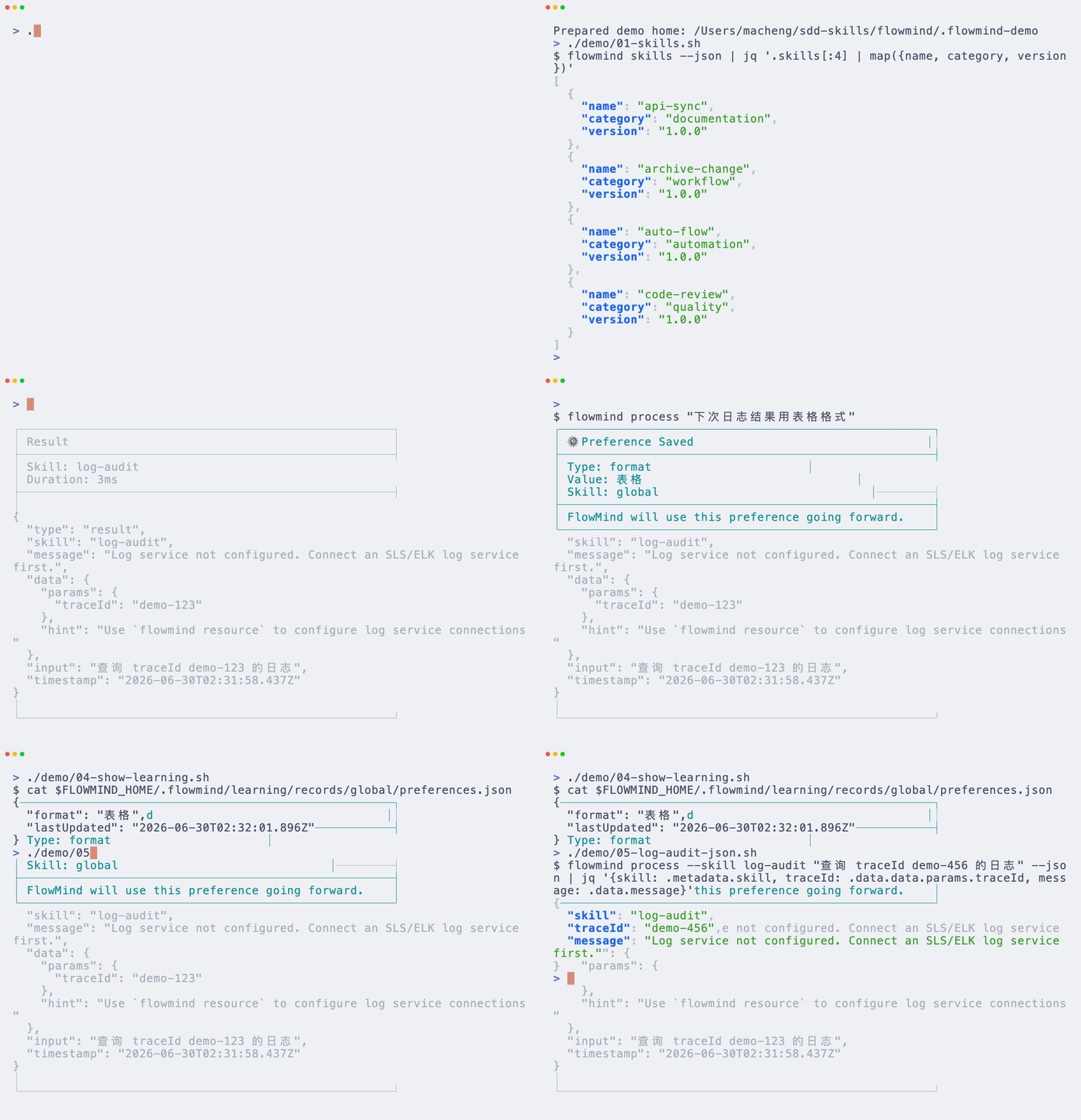
|
|
35
41
|
|
|
36
42
|
```bash
|
|
37
43
|
# 1. Install
|
|
@@ -50,16 +56,16 @@ flowmind "下次用表格格式"
|
|
|
50
56
|
flowmind-codex --skill log-audit "查询 traceId abc123 的日志"
|
|
51
57
|
```
|
|
52
58
|
|
|
53
|
-
What you get
|
|
54
|
-
-
|
|
55
|
-
- MCP/provider-aware execution contracts
|
|
59
|
+
What you get immediately:
|
|
60
|
+
- Reusable skill execution
|
|
56
61
|
- Explicit feedback capture
|
|
57
|
-
- Local
|
|
62
|
+
- Local learning and preference reuse
|
|
63
|
+
- Codex-friendly CLI access
|
|
58
64
|
|
|
59
|
-
|
|
60
|
-
-
|
|
61
|
-
-
|
|
62
|
-
-
|
|
65
|
+
Best-fit use cases today:
|
|
66
|
+
- Log and trace investigation
|
|
67
|
+
- Review workflows with fixed standards
|
|
68
|
+
- Internal tool orchestration through MCP-compatible adapters
|
|
63
69
|
|
|
64
70
|
## Quick Start
|
|
65
71
|
|
|
@@ -70,6 +76,21 @@ flowmind skills --json
|
|
|
70
76
|
flowmind process --skill log-audit "查询 traceId abc123 的日志"
|
|
71
77
|
```
|
|
72
78
|
|
|
79
|
+
If you want to try it without a global install:
|
|
80
|
+
|
|
81
|
+
```bash
|
|
82
|
+
npx flowmind@latest skills
|
|
83
|
+
npx flowmind@latest doctor
|
|
84
|
+
```
|
|
85
|
+
|
|
86
|
+
If you want the fastest first success, start here:
|
|
87
|
+
|
|
88
|
+
```bash
|
|
89
|
+
flowmind doctor
|
|
90
|
+
flowmind skills
|
|
91
|
+
flowmind process --skill log-audit "query the latest error logs"
|
|
92
|
+
```
|
|
93
|
+
|
|
73
94
|
If you are integrating with Codex or scripts:
|
|
74
95
|
|
|
75
96
|
```bash
|
|
@@ -77,7 +98,22 @@ flowmind-codex skills
|
|
|
77
98
|
flowmind-codex --skill log-audit "查询 traceId abc123 的日志"
|
|
78
99
|
```
|
|
79
100
|
|
|
80
|
-
FlowMind stores learning data locally and
|
|
101
|
+
FlowMind stores learning data locally and reuses explicit feedback on future runs.
|
|
102
|
+
|
|
103
|
+
Need integration examples for Claude Code, Codex, Cursor, or MCP clients? See [docs/integration-guide.md](docs/integration-guide.md).
|
|
104
|
+
|
|
105
|
+
## Who It Is For
|
|
106
|
+
|
|
107
|
+
- Teams using MCP-based internal tools
|
|
108
|
+
- Engineers repeatedly doing log analysis, review, validation, or doc sync work
|
|
109
|
+
- Codex or Claude Code users who want repeatable workflows instead of prompt repetition
|
|
110
|
+
|
|
111
|
+
## Why It Converts Better Than Raw Prompts
|
|
112
|
+
|
|
113
|
+
- Skills define a stable execution path
|
|
114
|
+
- Feedback becomes reusable state instead of chat history
|
|
115
|
+
- CLI and MCP entrypoints make the workflow scriptable
|
|
116
|
+
- Provider switching stays in config instead of in prompt text
|
|
81
117
|
|
|
82
118
|
---
|
|
83
119
|
|
package/README_CN.md
CHANGED
|
@@ -4,34 +4,40 @@
|
|
|
4
4
|
|
|
5
5
|
### **学习你工作方式的 AI 智能体**
|
|
6
6
|
|
|
7
|
-
|
|
7
|
+
*面向 MCP、Codex、Claude Code 的记忆层与工作流自动化工具。*
|
|
8
8
|
|
|
9
9
|
[](LICENSE)
|
|
10
10
|
[](CONTRIBUTING.md)
|
|
11
|
-
[](https://www.npmjs.com/package/flowmind)
|
|
12
|
+
[](https://www.npmjs.com/package/flowmind)
|
|
12
13
|
|
|
13
|
-
[English](README.md) | [快速开始](#-快速开始) | [工作原理](#-工作原理) | [使用场景](#-使用场景) | [架构](#-架构)
|
|
14
|
+
[English](README.md) | [快速开始](#-快速开始) | [演示](demo/DEMO_CN.md) | [集成指南](docs/integration-guide.md) | [工作原理](#-工作原理) | [使用场景](#-使用场景) | [架构](#-架构)
|
|
14
15
|
|
|
15
16
|
</div>
|
|
16
17
|
|
|
17
18
|
---
|
|
18
19
|
|
|
19
|
-
##
|
|
20
|
+
## 为什么值得安装
|
|
20
21
|
|
|
21
22
|
FlowMind 的目标不是“什么都做”,而是把**重复出现的开发工作流记住并复用**。
|
|
22
23
|
|
|
23
|
-
|
|
24
|
+
它更适合已经在使用 `MCP`、`Codex`、`Claude Code` 或脚本化 CLI 的开发者,核心价值有三点:
|
|
24
25
|
|
|
25
|
-
|
|
26
|
-
|
|
27
|
-
|
|
28
|
-
4. 在下次相似请求里复用这份偏好
|
|
26
|
+
- 用 skill 路由可复用任务
|
|
27
|
+
- 用显式反馈沉淀偏好和执行习惯
|
|
28
|
+
- 用 CLI / MCP 入口替代重复输 prompt
|
|
29
29
|
|
|
30
30
|
一句话概括:
|
|
31
31
|
|
|
32
|
-
> FlowMind
|
|
32
|
+
> FlowMind 是一个面向重复开发操作的记忆层。
|
|
33
33
|
|
|
34
|
-
##
|
|
34
|
+
## 30 秒跑通示例
|
|
35
|
+
|
|
36
|
+
更完整的演示见 [demo/DEMO_CN.md](demo/DEMO_CN.md)。
|
|
37
|
+
|
|
38
|
+
终端操作 GIF 演示:
|
|
39
|
+
|
|
40
|
+

|
|
35
41
|
|
|
36
42
|
```bash
|
|
37
43
|
# 1. 安装
|
|
@@ -50,16 +56,16 @@ flowmind "下次用表格格式"
|
|
|
50
56
|
flowmind-codex --skill log-audit "查询 traceId abc123 的日志"
|
|
51
57
|
```
|
|
52
58
|
|
|
53
|
-
|
|
54
|
-
- skill
|
|
55
|
-
- 面向 MCP/provider 的执行协议
|
|
59
|
+
你现在就能拿到的价值:
|
|
60
|
+
- 可复用的 skill 执行入口
|
|
56
61
|
- 显式反馈学习
|
|
57
|
-
-
|
|
62
|
+
- 本地持久化偏好
|
|
63
|
+
- 对 Codex 更友好的 CLI 接口
|
|
58
64
|
|
|
59
|
-
|
|
60
|
-
-
|
|
61
|
-
-
|
|
62
|
-
-
|
|
65
|
+
当前最适合的场景:
|
|
66
|
+
- 日志与 trace 排查
|
|
67
|
+
- 有固定标准的代码审查
|
|
68
|
+
- 通过 MCP 适配器串联内部工具
|
|
63
69
|
|
|
64
70
|
## 快速开始
|
|
65
71
|
|
|
@@ -70,6 +76,21 @@ flowmind skills --json
|
|
|
70
76
|
flowmind process --skill log-audit "查询 traceId abc123 的日志"
|
|
71
77
|
```
|
|
72
78
|
|
|
79
|
+
如果你想先试一下,不想全局安装:
|
|
80
|
+
|
|
81
|
+
```bash
|
|
82
|
+
npx flowmind@latest skills
|
|
83
|
+
npx flowmind@latest doctor
|
|
84
|
+
```
|
|
85
|
+
|
|
86
|
+
如果你想最快验证它是否适合你,先跑这组命令:
|
|
87
|
+
|
|
88
|
+
```bash
|
|
89
|
+
flowmind doctor
|
|
90
|
+
flowmind skills
|
|
91
|
+
flowmind process --skill log-audit "查询最近的错误日志"
|
|
92
|
+
```
|
|
93
|
+
|
|
73
94
|
如果你要集成到 Codex 或脚本:
|
|
74
95
|
|
|
75
96
|
```bash
|
|
@@ -79,6 +100,21 @@ flowmind-codex --skill log-audit "查询 traceId abc123 的日志"
|
|
|
79
100
|
|
|
80
101
|
FlowMind 会把学习数据保存在本地,并在后续运行中应用这些显式反馈。
|
|
81
102
|
|
|
103
|
+
如果你要接入 Claude Code、Codex、Cursor 或 MCP 客户端,可以直接看 [docs/integration-guide.md](docs/integration-guide.md)。
|
|
104
|
+
|
|
105
|
+
## 适合谁
|
|
106
|
+
|
|
107
|
+
- 已经接入 MCP 内部工具的团队
|
|
108
|
+
- 经常重复做日志排查、代码审查、数据校验、文档同步的工程师
|
|
109
|
+
- 希望把工作流沉淀给 Codex 或 Claude Code 复用的人
|
|
110
|
+
|
|
111
|
+
## 为什么比直接写 Prompt 更稳
|
|
112
|
+
|
|
113
|
+
- skill 提供稳定的执行路径
|
|
114
|
+
- 反馈会沉淀成状态,而不是停留在聊天记录里
|
|
115
|
+
- CLI 和 MCP 入口更容易脚本化
|
|
116
|
+
- 切换 provider 主要靠配置,不靠重新组织 prompt
|
|
117
|
+
|
|
82
118
|
---
|
|
83
119
|
|
|
84
120
|
## 📖 使用方式
|
|
@@ -0,0 +1,9 @@
|
|
|
1
|
+
#!/usr/bin/env bash
|
|
2
|
+
|
|
3
|
+
set -euo pipefail
|
|
4
|
+
|
|
5
|
+
source "$(cd "$(dirname "$0")" && pwd)/common.sh"
|
|
6
|
+
FLOWMIND_LABEL="$(flowmind_label)"
|
|
7
|
+
|
|
8
|
+
printf '$ %s skills --json | jq '\''.skills[:4] | map({name, category, version})'\''\n' "$FLOWMIND_LABEL"
|
|
9
|
+
run_flowmind skills --json | jq '.skills[:4] | map({name, category, version})'
|
|
@@ -0,0 +1,9 @@
|
|
|
1
|
+
#!/usr/bin/env bash
|
|
2
|
+
|
|
3
|
+
set -euo pipefail
|
|
4
|
+
|
|
5
|
+
source "$(cd "$(dirname "$0")" && pwd)/common.sh"
|
|
6
|
+
FLOWMIND_LABEL="$(flowmind_label)"
|
|
7
|
+
|
|
8
|
+
printf '$ %s process --skill log-audit "查询 traceId demo-123 的日志"\n' "$FLOWMIND_LABEL"
|
|
9
|
+
run_flowmind process --skill log-audit "查询 traceId demo-123 的日志"
|
|
@@ -0,0 +1,9 @@
|
|
|
1
|
+
#!/usr/bin/env bash
|
|
2
|
+
|
|
3
|
+
set -euo pipefail
|
|
4
|
+
|
|
5
|
+
source "$(cd "$(dirname "$0")" && pwd)/common.sh"
|
|
6
|
+
FLOWMIND_LABEL="$(flowmind_label)"
|
|
7
|
+
|
|
8
|
+
printf '$ %s process --skill log-audit "查询 traceId demo-456 的日志" --json | jq '\''{skill: .metadata.skill, traceId: .data.data.params.traceId, message: .data.message}'\''\n' "$FLOWMIND_LABEL"
|
|
9
|
+
run_flowmind process --skill log-audit "查询 traceId demo-456 的日志" --json | jq '{skill: .metadata.skill, traceId: .data.data.params.traceId, message: .data.message}'
|