flight-indicators 1.2.2 → 1.2.4
This diff represents the content of publicly available package versions that have been released to one of the supported registries. The information contained in this diff is provided for informational purposes only and reflects changes between package versions as they appear in their respective public registries.
- package/README.md +188 -4
- package/dist/index.cjs +1422 -262
- package/dist/index.cjs.map +1 -1
- package/dist/index.d.cts +302 -1
- package/dist/index.d.ts +302 -1
- package/dist/index.js +1396 -261
- package/dist/index.js.map +1 -1
- package/package.json +15 -2
package/README.md
CHANGED
|
@@ -4,12 +4,13 @@
|
|
|
4
4
|
|
|
5
5
|
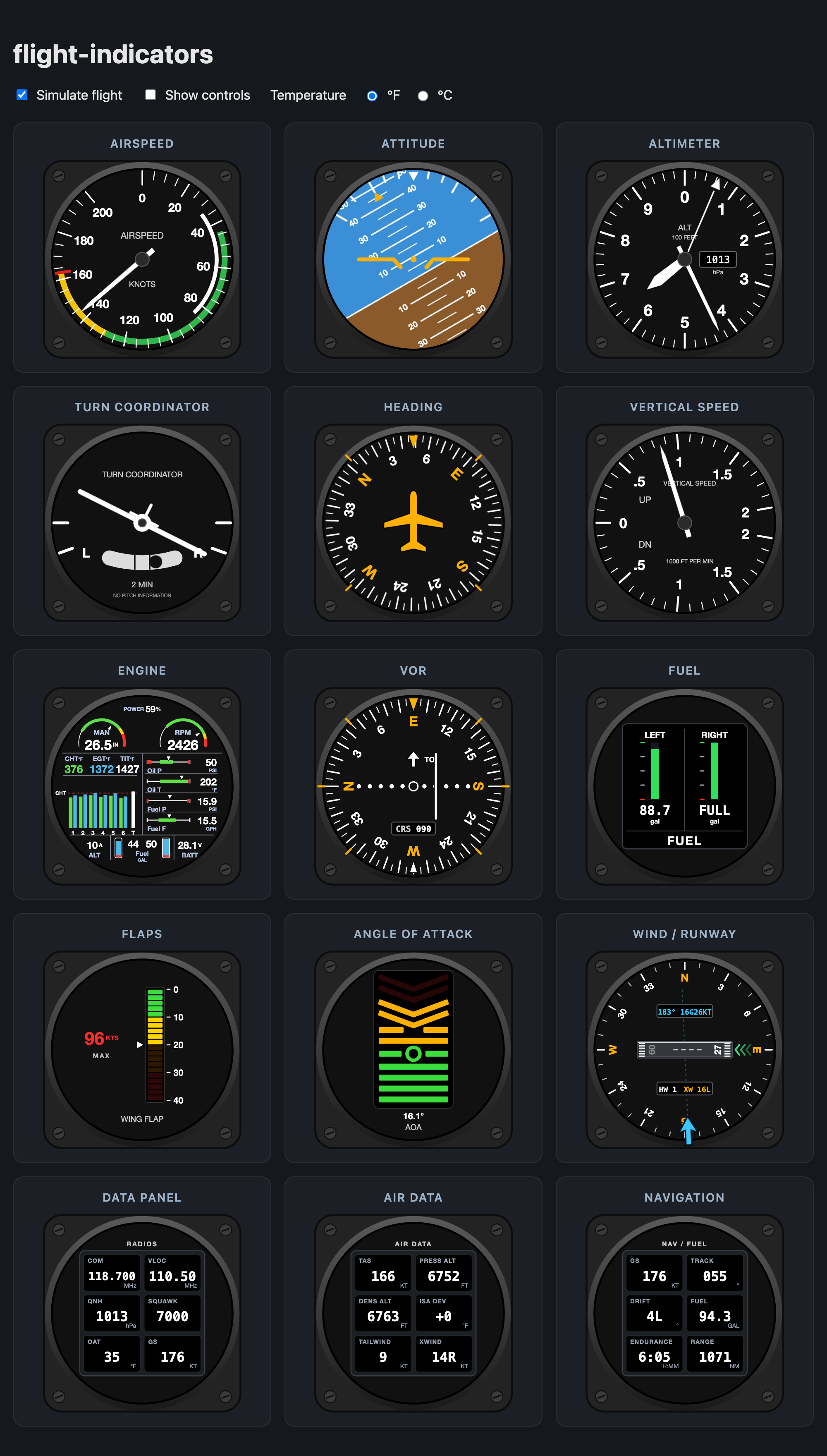
**[Live demo](https://flight-indicators.harvis.page)**: every instrument running on simulated flight data, with sliders to drive them by hand.
|
|
6
6
|
|
|
7
|
-
|
|
7
|
+

|
|
8
8
|
|
|
9
9
|
Modern SVG flight instruments for React, with no runtime dependencies.
|
|
10
10
|
|
|
11
|
-
-
|
|
12
|
-
-
|
|
11
|
+
- Seventeen instruments: **Attitude**, **Heading**, **HSI** (horizontal situation indicator), **Airspeed**, **Altimeter**, **Vertical speed**, **Turn coordinator**, **VOR / CDI**, **VOR / ILS** (crossed needles with glideslope), **ADF**, **Radio panel** (NAV / ADF / DME), **Wind / runway**, **Fuel**, **Flaps**, **Angle of attack**, **Engine monitor** and a custom **Data panel** for any readouts you like
|
|
12
|
+
- A classic Cessna 182T style steam-gauge set: **Tachometer** with hour meter, **Manifold pressure / fuel flow**, dual-needle **Fuel quantity**, **Oil temperature / pressure**, **Vacuum / ammeter** and **EGT / fuel flow** gauges (or build your own with **DualGauge**), a **Magnetic compass**, **Elevator trim**, a **Hobbs meter** and an **Annunciator** strip
|
|
13
|
+
- Plus **RadioStack**, an interactive NAV / ADF / DME radio with editable standby frequencies, and **DigitalClock**, an interactive panel clock with OAT and voltmeter, flight time, a stopwatch / count-down timer and alarms
|
|
13
14
|
- Pure SVG with no image files, so instruments stay sharp at any size and work with any bundler
|
|
14
15
|
- Written in TypeScript and ships its type declarations
|
|
15
16
|
- Ships ESM and CommonJS builds, works with server-side rendering, and is marked `"use client"` for the Next.js App Router
|
|
@@ -37,6 +38,7 @@ import {
|
|
|
37
38
|
TurnCoordinator,
|
|
38
39
|
VorIndicator,
|
|
39
40
|
IlsIndicator,
|
|
41
|
+
HsiIndicator,
|
|
40
42
|
AdfIndicator,
|
|
41
43
|
RadioPanel,
|
|
42
44
|
relativeBearing,
|
|
@@ -46,6 +48,16 @@ import {
|
|
|
46
48
|
AoaIndicator,
|
|
47
49
|
EngineIndicator,
|
|
48
50
|
DataPanel,
|
|
51
|
+
DigitalClock,
|
|
52
|
+
Tachometer,
|
|
53
|
+
ManifoldFuelFlowGauge,
|
|
54
|
+
FuelQuantityGauge,
|
|
55
|
+
OilGauge,
|
|
56
|
+
VacuumAmmeterGauge,
|
|
57
|
+
MagneticCompass,
|
|
58
|
+
TrimIndicator,
|
|
59
|
+
HobbsMeter,
|
|
60
|
+
AnnunciatorPanel,
|
|
49
61
|
} from 'flight-indicators';
|
|
50
62
|
|
|
51
63
|
export function Panel({ data }) {
|
|
@@ -60,11 +72,22 @@ export function Panel({ data }) {
|
|
|
60
72
|
<WindIndicator runway={90} windDirection={data.windDir} windSpeed={data.windSpeed} />
|
|
61
73
|
<VorIndicator course={data.obs} radial={data.navRadial} />
|
|
62
74
|
<IlsIndicator course={data.obs} radial={data.navRadial} glideslope={data.gsDeviation} />
|
|
75
|
+
<HsiIndicator heading={data.heading} headingBug={data.hdgBug} course={data.obs} radial={data.navRadial} glideslope={data.gsDeviation} />
|
|
63
76
|
<AdfIndicator heading={data.heading} bearing={relativeBearing(data.heading, data.ndbBearing)} />
|
|
64
77
|
<RadioPanel nav={{ active: data.nav1, standby: data.nav1Stby }} adf={{ active: data.adf }} dme={data.dme} />
|
|
78
|
+
<DigitalClock oat={data.oat} volts={data.busVolts} flightTimeRunning={data.ias > 50} />
|
|
65
79
|
<FuelIndicator capacity={26} tanks={[{ name: 'Left', quantity: data.fuelL }, { name: 'Right', quantity: data.fuelR }]} />
|
|
66
80
|
<FlapIndicator flaps={data.flaps} airspeed={data.ias} speedLimits={[{ flaps: 0, speed: 160 }, { flaps: 10, speed: 110 }]} />
|
|
67
81
|
<EngineIndicator manifold={{ value: data.map }} rpm={{ value: data.rpm }} cht={data.cht} egt={data.egt} fuelLeft={data.fuelL} fuelRight={data.fuelR} />
|
|
82
|
+
<Tachometer rpm={data.rpm} hours={data.tachHours} />
|
|
83
|
+
<ManifoldFuelFlowGauge manifold={data.map} fuelFlow={data.fuelFlow} />
|
|
84
|
+
<FuelQuantityGauge leftQuantity={data.fuelL} rightQuantity={data.fuelR} />
|
|
85
|
+
<OilGauge temperature={data.oilTemp} pressure={data.oilPress} />
|
|
86
|
+
<VacuumAmmeterGauge vacuum={data.suction} amps={data.amps} />
|
|
87
|
+
<MagneticCompass heading={data.heading} />
|
|
88
|
+
<TrimIndicator trim={data.elevatorTrim} />
|
|
89
|
+
<HobbsMeter hours={data.hobbs} running={data.oilPress > 20} />
|
|
90
|
+
<AnnunciatorPanel lights={{ fuel: data.fuelL < 5 ? 'left' : false, oil: data.oilPress < 20, volts: data.busVolts < 24.5 }} />
|
|
68
91
|
<DataPanel
|
|
69
92
|
heading="Radios"
|
|
70
93
|
fields={[
|
|
@@ -87,6 +110,7 @@ Every instrument accepts these props:
|
|
|
87
110
|
| ------------------- | ------------------ | ------- | --------------------------------------------------------- |
|
|
88
111
|
| `size` | `number \| string` | `200` | Width and height. A number means pixels; a string can be any CSS length, e.g. `"100%"`. |
|
|
89
112
|
| `showBox` | `boolean` | `true` | Draw the square mounting plate with screws. |
|
|
113
|
+
| `showKnobs` | `boolean` | `true` | Draw the setting knobs on instruments that have them: OBS on `VorIndicator` and `IlsIndicator`, CRS and HDG on `HsiIndicator`, baro on `Altimeter`, PUSH (gyro set) on `HeadingIndicator`, HDG on `AdfIndicator` and the adjustment knob on `AttitudeIndicator`. Each knob's rim turns with the value it sets. |
|
|
90
114
|
| `animationDuration` | `number` | `300` | Animation time in ms. `0` turns animation off. |
|
|
91
115
|
| `className` | `string` | | Class for the root `<svg>`. |
|
|
92
116
|
| `style` | `CSSProperties` | | Inline style for the root `<svg>`. |
|
|
@@ -169,7 +193,7 @@ A VOR / course deviation indicator with an OBS card. The card turns so the selec
|
|
|
169
193
|
|
|
170
194
|
### `<IlsIndicator />`
|
|
171
195
|
|
|
172
|
-
A crossed-needle VOR / ILS head with an OBS card, as found in many light aircraft. The vertical needle shows course (VOR or localizer) deviation and the horizontal needle glideslope deviation, each over a scale of 5 dots either side of the centre circle. Small windows show TO (upper right) or FR (lower left), and orange flags with arrows drop into the window at the bottom when the NAV signal is lost and into the window on the right when there is no glideslope.
|
|
196
|
+
A crossed-needle VOR / ILS head with an OBS card, as found in many light aircraft. The vertical needle shows course (VOR or localizer) deviation and the horizontal needle glideslope deviation, each over a scale of 5 dots either side of the centre circle. Small windows show TO (upper right) or FR (lower left), and orange flags with arrows drop into the window at the bottom when the NAV signal is lost and into the window on the right when there is no glideslope. Course inputs work just like `<VorIndicator />`: give `course` and `radial`, or pass `deviation` and `toFrom` directly.
|
|
173
197
|
|
|
174
198
|
| Prop | Type | Default | Description |
|
|
175
199
|
| --------------------- | ------------------------- | --------- | ------------------------------------------------------------------ |
|
|
@@ -191,6 +215,31 @@ A crossed-needle VOR / ILS head with an OBS card, as found in many light aircraf
|
|
|
191
215
|
<IlsIndicator course={265} deviation={-0.8} fullScale={2.5} glideslope={0.2} needles="swing" />
|
|
192
216
|
```
|
|
193
217
|
|
|
218
|
+
### `<HsiIndicator />`
|
|
219
|
+
|
|
220
|
+
A horizontal situation indicator: a heading indicator and a VOR / ILS head in one dial. The compass card turns with the `heading` under a fixed aircraft symbol, so the instrument shows the course line the way you would see it from above. The yellow course pointer turns with the selected `course`, and its middle section, the deviation bar, slides sideways to show where the course line lies relative to the aircraft (2 dots each side). A white triangle points TO or FROM the station, an orange heading bug marks `headingBug`, and green pointers on both sides show glideslope deviation. Red flags show NAV when the signal is lost and GS when there is no glideslope. Course inputs work just like `<VorIndicator />` and `<IlsIndicator />`: give `course` and `radial`, or pass `deviation` and `toFrom` directly. The CRS knob (lower left) turns with the course and the HDG knob (lower right) with the heading bug.
|
|
221
|
+
|
|
222
|
+
| Prop | Type | Default | Description |
|
|
223
|
+
| --------------------- | ------------------------- | ------- | ------------------------------------------------------------------ |
|
|
224
|
+
| `heading` | `number` | `0` | Aircraft heading in degrees. Any value is accepted and wrapped to 0–359. |
|
|
225
|
+
| `headingBug` | `number` | | Heading bug in degrees. Leave it out to hide the bug. |
|
|
226
|
+
| `course` | `number` | `0` | Selected course in degrees. |
|
|
227
|
+
| `radial` | `number` | | Radial from the station the aircraft is on, in degrees. Drives the deviation bar and the TO/FROM triangle. |
|
|
228
|
+
| `deviation` | `number` | | Course deviation in degrees, positive when the course is to the right. Overrides `radial`. |
|
|
229
|
+
| `fullScale` | `number` | `10` | Course deviation at full scale (2 dots). `10` suits a VOR; use `2.5` for a localizer. |
|
|
230
|
+
| `toFrom` | `"TO" \| "FROM" \| "OFF"` | | TO/FROM indication. Overrides `radial`. |
|
|
231
|
+
| `signal` | `boolean` | `true` | `false` shows the NAV flag, centres the deviation bar and hides TO/FROM. |
|
|
232
|
+
| `glideslope` | `number` | | Glideslope deviation in degrees, positive when the glidepath is above you (fly up). Leave it out when no glideslope is received. |
|
|
233
|
+
| `glideslopeFullScale` | `number` | `0.7` | Glideslope deviation at full scale (2 dots). |
|
|
234
|
+
| `glideslopeSignal` | `boolean` | | Whether the glideslope is received. Defaults to `true` when `glideslope` is a number; `false` shows the GS flag and hides the pointers. |
|
|
235
|
+
|
|
236
|
+
```tsx
|
|
237
|
+
// Tracking a VOR radial with the heading bug set to the intercept heading.
|
|
238
|
+
<HsiIndicator heading={60} headingBug={60} course={90} radial={262} />
|
|
239
|
+
// On an ILS approach: localizer sensitivity and glideslope.
|
|
240
|
+
<HsiIndicator heading={262} headingBug={265} course={265} deviation={-0.8} fullScale={2.5} glideslope={0.2} />
|
|
241
|
+
```
|
|
242
|
+
|
|
194
243
|
### `<AdfIndicator />`
|
|
195
244
|
|
|
196
245
|
An automatic direction finder. The needle points at the tuned NDB: give it the `bearing` of the station relative to the nose. With `heading` left at `0` it is a fixed-card ADF that reads relative bearing. Pass the aircraft `heading` and the card turns with it (a rotatable-card ADF or RMI), so the needle head reads the magnetic bearing to the station and the tail the bearing from it.
|
|
@@ -244,6 +293,61 @@ const [adf, setAdf] = useState({});
|
|
|
244
293
|
|
|
245
294
|
It also takes `className` and `style`, but not the other [common props](#common-props). `parseNav` and `parseAdf` are exported for validating frequencies yourself.
|
|
246
295
|
|
|
296
|
+
### `<DigitalClock />`
|
|
297
|
+
|
|
298
|
+
A two-window panel clock as fitted to many light aircraft, with working buttons. The upper display shows bus voltage or outside air temperature; the lower display shows universal time (UT), local time (LT), flight time (FT) or the elapsed timer (ET), with a triangle under the active mode. It keeps running on its own (from the system clock, or from `now` if you pass simulator time) and is an svg `role="group"` whose three buttons can be clicked, tapped or used from the keyboard (Tab, then Enter or Space).
|
|
299
|
+
|
|
300
|
+
```tsx
|
|
301
|
+
<DigitalClock oat={data.oat} volts={data.busVolts} flightTimeRunning={data.ias > 50} onAlarm={(a) => console.log(a)} />
|
|
302
|
+
```
|
|
303
|
+
|
|
304
|
+
| Button | Press | Hold (2 s) |
|
|
305
|
+
| ------------------------------ | ------------------------------------------------------------------------------------------- | ----------------------------------------------------- |
|
|
306
|
+
| **O.A.T / VOLTS** (top) | Upper display: volts → °F → °C | Display test: every segment lights while held |
|
|
307
|
+
| **SELECT** | Lower display: UT → LT → FT → ET. In set mode: next digit, and confirm after the last one | Enter set mode (same as SELECT + CONTROL together) |
|
|
308
|
+
| **CONTROL** | In ET: start → stop → reset. In set mode: step the flashing digit | In FT or ET: reset that timer to zero |
|
|
309
|
+
| **SELECT + CONTROL** together | Enter set mode for the mode shown, or confirm it | |
|
|
310
|
+
|
|
311
|
+
What set mode sets in each mode:
|
|
312
|
+
|
|
313
|
+
- **UT**: hours and minutes of universal time (`onTimeSet` reports the new time).
|
|
314
|
+
- **LT**: the hours of local time; its minutes always follow UT (`onLocalOffsetChange` reports the new offset).
|
|
315
|
+
- **FT**: the flight time alarm, HH:MM. `00:00` turns it off.
|
|
316
|
+
- **ET**: a count-down, MM:SS. CONTROL then starts it; at zero the alarm goes off and ET carries on counting up. `00:00` makes ET a plain stopwatch again.
|
|
317
|
+
|
|
318
|
+
FT and ET show `MM:SS` for the first hour and `HH:MM` after that. ET keeps running while another mode is shown.
|
|
319
|
+
|
|
320
|
+
Alarms flash their display until any button is pressed (that first press does nothing else) and call `onAlarm`:
|
|
321
|
+
|
|
322
|
+
- `"voltage"`: the bus voltage is below `lowVoltage` or above `highVoltage`. The upper display switches to volts while it flashes.
|
|
323
|
+
- `"countdown"`: the ET count-down reached zero. The lower display switches to ET.
|
|
324
|
+
- `"flightTime"`: flight time reached the alarm time. The lower display switches to FT.
|
|
325
|
+
|
|
326
|
+
| Prop | Type | Default | Description |
|
|
327
|
+
| ------------------------ | ---------------------------- | --------------- | -------------------------------------------------------------- |
|
|
328
|
+
| `oat` | `number` | | Outside air temperature in °C. Left out or `NaN` shows dashes. |
|
|
329
|
+
| `volts` | `number` | | Bus voltage. Left out or `NaN` shows dashes. |
|
|
330
|
+
| `upperDisplay` | `"volts" \| "F" \| "C"` | | Upper display reading. Pass it to control the component. |
|
|
331
|
+
| `defaultUpperDisplay` | `"volts" \| "F" \| "C"` | `"volts"` | Starting reading when `upperDisplay` is left out. |
|
|
332
|
+
| `onUpperDisplayChange` | `(next) => void` | | Called when O.A.T / VOLTS is pressed. |
|
|
333
|
+
| `mode` | `"UT" \| "LT" \| "FT" \| "ET"` | | Lower display mode. Pass it to control the component. |
|
|
334
|
+
| `defaultMode` | `"UT" \| "LT" \| "FT" \| "ET"` | `"UT"` | Starting mode when `mode` is left out. |
|
|
335
|
+
| `onModeChange` | `(next) => void` | | Called when SELECT is pressed or an alarm brings its mode up. |
|
|
336
|
+
| `now` | `number \| Date` | system clock | Current time (ms since the epoch or a `Date`). Pass simulator time to run the clock, FT and ET from it. |
|
|
337
|
+
| `localOffset` | `number` | | Local time offset from UT in minutes, e.g. `120` for UTC+2. Pass it to control the component. |
|
|
338
|
+
| `defaultLocalOffset` | `number` | browser time zone | Starting offset when `localOffset` is left out. |
|
|
339
|
+
| `onLocalOffsetChange` | `(minutes) => void` | | Called when LT is set with the buttons. |
|
|
340
|
+
| `onTimeSet` | `(utc: Date) => void` | | Called with the new universal time when UT is set with the buttons. |
|
|
341
|
+
| `flightTimeRunning` | `boolean` | `true` | Whether flight time is counting. Wire it to airspeed or the engine. |
|
|
342
|
+
| `defaultFlightTime` | `number` | `0` | Flight time already logged when the clock mounts, in seconds. |
|
|
343
|
+
| `defaultFlightTimeAlarm` | `number` | `0` (off) | Flight time alarm in seconds. |
|
|
344
|
+
| `defaultCountdown` | `number` | `0` (off) | ET count-down in seconds. |
|
|
345
|
+
| `lowVoltage` | `number` | `24.5` / `12.4` | Low voltage alarm. The default depends on whether `volts` looks like a 28 V or a 14 V system. |
|
|
346
|
+
| `highVoltage` | `number` | `32` / `16` | High voltage alarm. |
|
|
347
|
+
| `onAlarm` | `(alarm) => void` | | Called with `"voltage"`, `"countdown"` or `"flightTime"` when an alarm goes off. |
|
|
348
|
+
|
|
349
|
+
It also takes the [common props](#common-props) (`showKnobs` does nothing, since its buttons are always drawn). `formatTimer(seconds)` is exported to format a timer the way the clock shows it, and `HOLD_TIME` is the hold time in ms.
|
|
350
|
+
|
|
247
351
|
### `<FuelIndicator />`
|
|
248
352
|
|
|
249
353
|
A digital fuel quantity gauge: one vertical bar graph per tank with a numeric readout underneath, `FULL` when a tank is at capacity, and red when it drops to the low threshold.
|
|
@@ -311,6 +415,84 @@ Scaled gauges share one shape, `EngineGauge`: `{ value, min, max, green?, yellow
|
|
|
311
415
|
| `fuelCapacity` | `number` | `30` | Full quantity of each tank, used to fill the tank icons. |
|
|
312
416
|
| `fuelUnit` | `string` | `"GAL"` | Printed under the fuel quantities. |
|
|
313
417
|
|
|
418
|
+
### `<Tachometer />`
|
|
419
|
+
|
|
420
|
+
An analog tachometer marked in hundreds of RPM, with a green operating arc, a red line and an optional engine hour meter (rolling drums, tenths on the white drum) in the lower half of the dial.
|
|
421
|
+
|
|
422
|
+
| Prop | Type | Default | Description |
|
|
423
|
+
| --------- | -------------------------- | -------------- | --------------------------------------------------------- |
|
|
424
|
+
| `rpm` | `number` | `0` | Engine speed. Clamped to `0…max`. |
|
|
425
|
+
| `max` | `number` | `3500` | Top of the scale. |
|
|
426
|
+
| `green` | `[number, number] \| null` | `[2000, 2400]` | Green arc. `null` hides it. |
|
|
427
|
+
| `redline` | `number \| null` | `2400` | Red line. `null` hides it. |
|
|
428
|
+
| `hours` | `number` | | Engine hours on the hour meter. Leave it out to hide the meter. |
|
|
429
|
+
|
|
430
|
+
### `<DualGauge />` and the dual-needle engine gauges
|
|
431
|
+
|
|
432
|
+
The small round engine gauges of a Cessna 172 / 182 panel: two independent scales in one dial, each needle pivoting at its own edge so the two meet in the middle. Both scales read upwards. `DualGauge` is the generic version; five presets come with Cessna 182T style scales:
|
|
433
|
+
|
|
434
|
+
| Component | Props | Left needle | Right needle |
|
|
435
|
+
| ----------------------- | ---------------------------------- | ----------------------------------- | -------------------------------------- |
|
|
436
|
+
| `FuelQuantityGauge` | `leftQuantity`, `rightQuantity` | Left tank, 0–44 gal | Right tank, 0–44 gal |
|
|
437
|
+
| `OilGauge` | `temperature`, `pressure` | Oil temp 75–250 °F, green 100–245 | Oil pressure 0–115 PSI, green 50–90 |
|
|
438
|
+
| `VacuumAmmeterGauge` | `vacuum`, `amps` | Suction 3–7 inHg, green 4.5–5.5 | Centre-zero ammeter −60…+60 A |
|
|
439
|
+
| `EgtFuelFlowGauge` | `egt`, `fuelFlow` | EGT 1250–1650 °F, unnumbered | Fuel flow 0–20 GPH |
|
|
440
|
+
| `ManifoldFuelFlowGauge` | `manifold`, `fuelFlow` | Manifold pressure 10–35 inHg, green 15–23 | Fuel flow 0–20 GPH |
|
|
441
|
+
|
|
442
|
+
Every preset also takes `leftScale` and `rightScale` to override any part of its scales, e.g. `leftScale={{ min: 25, max: 120, unit: '°C' }}`. The default scales are exported as `FUEL_QUANTITY_SCALE`, `OIL_TEMPERATURE_SCALE`, `OIL_PRESSURE_SCALE`, `VACUUM_SCALE`, `AMMETER_SCALE`, `EGT_SCALE`, `FUEL_FLOW_SCALE` and `MANIFOLD_SCALE`. Check the limits against your own aircraft's POH.
|
|
443
|
+
|
|
444
|
+
`DualGauge` props:
|
|
445
|
+
|
|
446
|
+
| Prop | Type | Default | Description |
|
|
447
|
+
| ---------- | ---------------- | ------- | --------------------------------------------------- |
|
|
448
|
+
| `left` | `DualGaugeScale` | 0–100 | Left scale and needle. |
|
|
449
|
+
| `right` | `DualGaugeScale` | 0–100 | Right scale and needle. |
|
|
450
|
+
| `label` | `string` | | Caption across the top of the dial. |
|
|
451
|
+
| `sublabel` | `string` | | Caption across the bottom of the dial. |
|
|
452
|
+
|
|
453
|
+
Each `DualGaugeScale`: `{ value, min, max, label, unit, marks, ticks, green, yellow, low, high, decimals }`. `marks` are the numbered scale positions (a number, or `{ value, text }` to print text such as `"F"`); `ticks` is the number of minor tick intervals; `green` and `yellow` are `[from, to]` arcs; `low` and `high` are red limit lines. Values are clamped to the scale.
|
|
454
|
+
|
|
455
|
+
### `<MagneticCompass />`
|
|
456
|
+
|
|
457
|
+
The wet ("whiskey") compass on the glareshield: the card floats behind a window with a vertical lubber line. As on the real thing you read the back of the card, so the numbers grow to the left: heading north, the 3 and 6 are to the left of the lubber line.
|
|
458
|
+
|
|
459
|
+
| Prop | Type | Default | Description |
|
|
460
|
+
| --------------- | ------------------------------------- | ------- | ----------------------------------------------------------- |
|
|
461
|
+
| `heading` | `number` | `0` | Magnetic heading in degrees. Takes the shortest way round. |
|
|
462
|
+
| `deviationCard` | `Array<{ for: number; steer: number }>` | | Compass correction card printed under the window (up to six columns). |
|
|
463
|
+
|
|
464
|
+
### `<TrimIndicator />`
|
|
465
|
+
|
|
466
|
+
Elevator trim wheel and position indicator as on the pedestal: NOSE DOWN at the top, NOSE UP at the bottom, a white TAKE OFF band and a pointer. The wheel's ribs roll with the trim.
|
|
467
|
+
|
|
468
|
+
| Prop | Type | Default | Description |
|
|
469
|
+
| --------- | -------------------------- | -------------- | ------------------------------------------------------------ |
|
|
470
|
+
| `trim` | `number` | `0` | `-1` full nose down, `0` neutral, `1` full nose up. |
|
|
471
|
+
| `takeoff` | `[number, number] \| null` | `[0.05, 0.35]` | Take-off range on the same scale. `null` hides it. |
|
|
472
|
+
|
|
473
|
+
### `<HobbsMeter />`
|
|
474
|
+
|
|
475
|
+
A Hobbs (flight hour) meter: rolling drums with tenths on a white drum, and a small indicator wheel that turns while the meter runs. It is a rectangular panel item: `size` sets the width and the height follows. `drumPositions(value, digits)` is exported if you want to draw drums of your own.
|
|
476
|
+
|
|
477
|
+
| Prop | Type | Default | Description |
|
|
478
|
+
| --------- | --------- | --------- | -------------------------------------------- |
|
|
479
|
+
| `hours` | `number` | `0` | Hours run. |
|
|
480
|
+
| `digits` | `number` | `6` | Number of drums, tenths included. |
|
|
481
|
+
| `running` | `boolean` | `false` | Turns the running indicator. |
|
|
482
|
+
| `label` | `string` | `"HOURS"` | Caption above the counter. |
|
|
483
|
+
|
|
484
|
+
### `<AnnunciatorPanel />`
|
|
485
|
+
|
|
486
|
+
The annunciator strip above the panel: legends stay dark until lit in red (warning), amber (caution) or green (advisory). Split legends such as `L FUEL R` light only the side with the fault. The default set is the Cessna 182T's: `L FUEL R`, `OIL PRESS`, `PITCH TRIM`, `L VAC R` and `VOLTS` (exported as `DEFAULT_ANNUNCIATORS`, ids `fuel`, `oil`, `trim`, `vac`, `volts`). Like the Hobbs meter it is rectangular, so `size` sets the width.
|
|
487
|
+
|
|
488
|
+
| Prop | Type | Default | Description |
|
|
489
|
+
| -------------- | --------------------------------------- | ----------------------- | --------------------------------------------------- |
|
|
490
|
+
| `annunciators` | `Annunciator[]` | `DEFAULT_ANNUNCIATORS` | Legends `{ id, label, level?, split? }`, laid out in up to two rows. |
|
|
491
|
+
| `lights` | `Record<string, AnnunciatorState>` | `{}` | Which lights are on, by id: `true`, or `"left"` / `"right"` / `"both"` for split legends. |
|
|
492
|
+
| `test` | `boolean` | `false` | Lamp test: lights every legend. |
|
|
493
|
+
|
|
494
|
+
Example: `<AnnunciatorPanel lights={{ fuel: 'left', oil: true }} />`.
|
|
495
|
+
|
|
314
496
|
### `<DataPanel />`
|
|
315
497
|
|
|
316
498
|
A general-purpose instrument for readouts that have no dedicated gauge: temperatures, radio frequencies, transponder code, fuel, timers, anything. It draws a square panel inside the usual round bezel and fills it with a grid of up to six cells. Each cell shows a name, a value and an optional unit. One or two fields stack vertically; three or more use two columns. Long values shrink to fit.
|
|
@@ -335,6 +517,8 @@ Each `DataField`:
|
|
|
335
517
|
Examples live under [`examples/`](examples), one folder each:
|
|
336
518
|
|
|
337
519
|
- [`examples/instruments`](examples/instruments): the gallery behind the live demo, with every instrument on simulated flight data and sliders to drive each one by hand.
|
|
520
|
+
- [`examples/instruments/navigation.html`](examples/instruments/navigation.tsx) ([live](https://flight-indicators.harvis.page/navigation.html)): VOR, ILS and HSI in depth. Track a radial around a VOR station on a map, fly an ILS approach with plan and profile views and LOC / GS failures, and browse snapshots of every needle and flag state with the props behind each one.
|
|
521
|
+
- [`examples/instruments/panel182.html`](examples/instruments/panel182.tsx) ([live](https://flight-indicators.harvis.page/panel182.html)): a Cessna 182T steam-gauge panel laid out like the real one: six-pack with HSI, tachometer, MAP / FF and the small dual-needle engine gauges, NAV 2 and ADF, a radio stack, the annunciator and magnetic compass on the glareshield, Hobbs meter, and the elevator trim and flaps on the pedestal. It flies on simulated data, and buttons trigger low fuel, low oil pressure, vacuum and alternator failures.
|
|
338
522
|
- [IFR trainer](https://github.com/fordnox/ifr-trainer) (separate repository): a radio navigation simulator built with this library.
|
|
339
523
|
|
|
340
524
|
## Development
|