flight-indicators 1.1.0 → 1.2.1
This diff represents the content of publicly available package versions that have been released to one of the supported registries. The information contained in this diff is provided for informational purposes only and reflects changes between package versions as they appear in their respective public registries.
- package/README.md +77 -4
- package/dist/index.cjs +595 -160
- package/dist/index.cjs.map +1 -1
- package/dist/index.d.cts +91 -2
- package/dist/index.d.ts +91 -2
- package/dist/index.js +587 -161
- package/dist/index.js.map +1 -1
- package/package.json +8 -2
package/README.md
CHANGED
|
@@ -1,10 +1,15 @@
|
|
|
1
1
|
# flight-indicators
|
|
2
2
|
|
|
3
|
+
[](https://www.npmjs.com/package/flight-indicators)
|
|
4
|
+
|
|
5
|
+
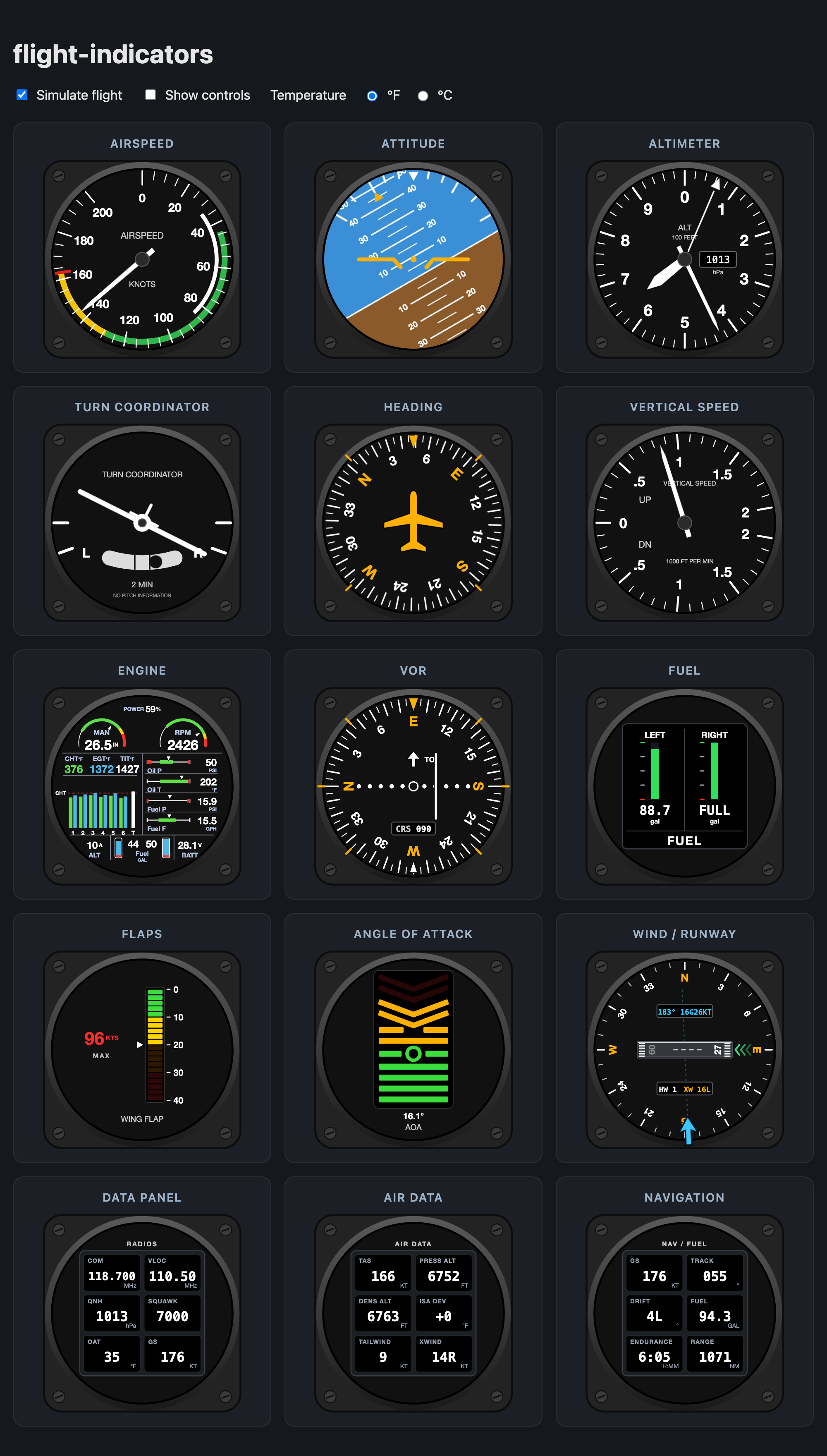
**[Live demo](https://flight-indicators.harvis.page)**: every instrument running on simulated flight data, with sliders to drive them by hand.
|
|
6
|
+
|
|
3
7
|
|
|
4
8
|
|
|
5
9
|
Modern SVG flight instruments for React, with no runtime dependencies.
|
|
6
10
|
|
|
7
|
-
-
|
|
11
|
+
- Fifteen instruments: **Attitude**, **Heading**, **Airspeed**, **Altimeter**, **Vertical speed**, **Turn coordinator**, **VOR / CDI**, **ADF**, **Radio panel** (NAV / ADF / DME), **Wind / runway**, **Fuel**, **Flaps**, **Angle of attack**, **Engine monitor** and a custom **Data panel** for any readouts you like
|
|
12
|
+
- Plus **RadioStack**, an interactive NAV / ADF / DME radio with editable standby frequencies
|
|
8
13
|
- Pure SVG with no image files, so instruments stay sharp at any size and work with any bundler
|
|
9
14
|
- Written in TypeScript and ships its type declarations
|
|
10
15
|
- Ships ESM and CommonJS builds, works with server-side rendering, and is marked `"use client"` for the Next.js App Router
|
|
@@ -31,6 +36,9 @@ import {
|
|
|
31
36
|
VerticalSpeed,
|
|
32
37
|
TurnCoordinator,
|
|
33
38
|
VorIndicator,
|
|
39
|
+
AdfIndicator,
|
|
40
|
+
RadioPanel,
|
|
41
|
+
relativeBearing,
|
|
34
42
|
WindIndicator,
|
|
35
43
|
FuelIndicator,
|
|
36
44
|
FlapIndicator,
|
|
@@ -50,6 +58,8 @@ export function Panel({ data }) {
|
|
|
50
58
|
<VerticalSpeed verticalSpeed={data.vs} />
|
|
51
59
|
<WindIndicator runway={90} windDirection={data.windDir} windSpeed={data.windSpeed} />
|
|
52
60
|
<VorIndicator course={data.obs} radial={data.navRadial} />
|
|
61
|
+
<AdfIndicator heading={data.heading} bearing={relativeBearing(data.heading, data.ndbBearing)} />
|
|
62
|
+
<RadioPanel nav={{ active: data.nav1, standby: data.nav1Stby }} adf={{ active: data.adf }} dme={data.dme} />
|
|
53
63
|
<FuelIndicator capacity={26} tanks={[{ name: 'Left', quantity: data.fuelL }, { name: 'Right', quantity: data.fuelR }]} />
|
|
54
64
|
<FlapIndicator flaps={data.flaps} airspeed={data.ias} speedLimits={[{ flaps: 0, speed: 160 }, { flaps: 10, speed: 110 }]} />
|
|
55
65
|
<EngineIndicator manifold={{ value: data.map }} rpm={{ value: data.rpm }} cht={data.cht} egt={data.egt} fuelLeft={data.fuelL} fuelRight={data.fuelR} />
|
|
@@ -151,9 +161,63 @@ A VOR / course deviation indicator with an OBS card. The card turns so the selec
|
|
|
151
161
|
| `deviation` | `number` | | Course deviation in degrees, positive when the course is to the right. Clamped to ±10. Overrides `radial`. |
|
|
152
162
|
| `toFrom` | `"TO" \| "FROM" \| "OFF"` | | TO/FROM flag. Overrides `radial`. `"OFF"` hides both triangles. |
|
|
153
163
|
| `signal` | `boolean` | `true` | `false` shows the red NAV flag, centres the needle and hides TO/FROM. |
|
|
164
|
+
| `needle` | `"slide" \| "swing"` | `"slide"` | How the needle moves. `"slide"` moves a vertical bar sideways over a straight row of dots. `"swing"` hinges the needle just below the top index so it swings like a pendulum over a curved row of dots, as on older VOR heads, with a TO/FR window on the right. |
|
|
154
165
|
|
|
155
166
|
`vorDeviation(course, radial)` is exported too and returns `{ deviation, toFrom }` if you want the same maths without the drawing.
|
|
156
167
|
|
|
168
|
+
### `<AdfIndicator />`
|
|
169
|
+
|
|
170
|
+
An automatic direction finder. The needle points at the tuned NDB: give it the `bearing` of the station relative to the nose. With `heading` left at `0` it is a fixed-card ADF that reads relative bearing. Pass the aircraft `heading` and the card turns with it (a rotatable-card ADF or RMI), so the needle head reads the magnetic bearing to the station and the tail the bearing from it.
|
|
171
|
+
|
|
172
|
+
| Prop | Type | Default | Description |
|
|
173
|
+
| --------- | --------- | ------- | ------------------------------------------------------------------ |
|
|
174
|
+
| `bearing` | `number` | `0` | Relative bearing to the station in degrees, clockwise from the nose. |
|
|
175
|
+
| `heading` | `number` | `0` | Heading set on the compass card. `0` gives a fixed card. |
|
|
176
|
+
| `signal` | `boolean` | `true` | `false` parks the needle at 90° and shows the red ADF flag. |
|
|
177
|
+
|
|
178
|
+
`relativeBearing(heading, bearingToStation)` is exported too, for when your data gives the magnetic bearing to the station rather than the relative one.
|
|
179
|
+
|
|
180
|
+
### `<RadioPanel />`
|
|
181
|
+
|
|
182
|
+
A navigation radio stack: NAV and ADF receivers, each with an active and a standby frequency, and a DME distance readout. Anything you leave out shows as dashes.
|
|
183
|
+
|
|
184
|
+
| Prop | Type | Default | Description |
|
|
185
|
+
| ------- | --------------------------------------- | ------- | ------------------------------------------------------- |
|
|
186
|
+
| `nav` | `{ active?: number; standby?: number }` | | NAV (VOR/LOC) frequencies in MHz, shown with two decimals. |
|
|
187
|
+
| `adf` | `{ active?: number; standby?: number }` | | ADF frequencies in kHz. |
|
|
188
|
+
| `dme` | `number` | | DME distance in nautical miles. |
|
|
189
|
+
| `color` | `string` | amber | Colour of the digits. |
|
|
190
|
+
|
|
191
|
+
`formatNav`, `formatAdf` and `formatDme` are exported if you want the same number formatting elsewhere.
|
|
192
|
+
|
|
193
|
+
### `<RadioStack />`
|
|
194
|
+
|
|
195
|
+
An interactive radio, for when the user tunes the frequencies themselves. Unlike the instruments it is an HTML control rather than an SVG dial: a faceplate with NAV and ADF receivers, each with an active display, an editable standby display and a transfer button, plus a DME readout. Type a frequency in a STBY box and press Enter to tune it (the old active frequency drops to standby), or leave the box to keep it in standby and press ⇄ later. Text that is not a tunable frequency (NAV 108.00–117.95 MHz, ADF 190–1750 kHz) is rejected.
|
|
196
|
+
|
|
197
|
+
```tsx
|
|
198
|
+
const [nav, setNav] = useState({ active: 113.4 });
|
|
199
|
+
const [adf, setAdf] = useState({});
|
|
200
|
+
|
|
201
|
+
<RadioStack nav={nav} adf={adf} onNavChange={setNav} onAdfChange={setAdf} navIdent="KNA" dme={12.4} />
|
|
202
|
+
```
|
|
203
|
+
|
|
204
|
+
| Prop | Type | Default | Description |
|
|
205
|
+
| -------------- | --------------------------------------- | --------------- | -------------------------------------------------------------- |
|
|
206
|
+
| `nav` | `{ active?: number; standby?: number }` | | NAV frequencies in MHz. Pass it to control the component. |
|
|
207
|
+
| `adf` | `{ active?: number; standby?: number }` | | ADF frequencies in kHz. Pass it to control the component. |
|
|
208
|
+
| `defaultNav` | `{ active?: number; standby?: number }` | | Starting NAV frequencies when `nav` is left out and the component keeps its own state. |
|
|
209
|
+
| `defaultAdf` | `{ active?: number; standby?: number }` | | Starting ADF frequencies when `adf` is left out. |
|
|
210
|
+
| `onNavChange` | `(next) => void` | | Called when the NAV standby is entered or the frequencies are swapped. |
|
|
211
|
+
| `onAdfChange` | `(next) => void` | | Called when the ADF standby is entered or the frequencies are swapped. |
|
|
212
|
+
| `navIdent` | `string` | | Identifier of the station being received, shown under the NAV label. |
|
|
213
|
+
| `adfIdent` | `string` | | Identifier of the station being received, shown under the ADF label. |
|
|
214
|
+
| `dme` | `number` | | DME distance in nautical miles. |
|
|
215
|
+
| `color` | `string` | amber | Colour of the digits. |
|
|
216
|
+
| `width` | `number \| string` | `320` | Rendered width in pixels or any CSS length. Everything scales with it. |
|
|
217
|
+
| `title` | `string` | `"Radio panel"` | Accessible name of the group. |
|
|
218
|
+
|
|
219
|
+
It also takes `className` and `style`, but not the other [common props](#common-props). `parseNav` and `parseAdf` are exported for validating frequencies yourself.
|
|
220
|
+
|
|
157
221
|
### `<FuelIndicator />`
|
|
158
222
|
|
|
159
223
|
A digital fuel quantity gauge: one vertical bar graph per tank with a numeric readout underneath, `FULL` when a tank is at capacity, and red when it drops to the low threshold.
|
|
@@ -240,14 +304,23 @@ Each `DataField`:
|
|
|
240
304
|
| `decimals` | `number` | `0` | Decimal places for numeric values. |
|
|
241
305
|
| `color` | `string` | white | Colour of the value text, e.g. amber for a caution. |
|
|
242
306
|
|
|
307
|
+
## Examples
|
|
308
|
+
|
|
309
|
+
Examples live under [`examples/`](examples), one folder each:
|
|
310
|
+
|
|
311
|
+
- [`examples/instruments`](examples/instruments): the gallery behind the live demo, with every instrument on simulated flight data and sliders to drive each one by hand.
|
|
312
|
+
- [IFR trainer](https://github.com/fordnox/ifr-trainer) (separate repository): a radio navigation simulator built with this library.
|
|
313
|
+
|
|
243
314
|
## Development
|
|
244
315
|
|
|
245
316
|
```bash
|
|
246
317
|
npm install
|
|
247
|
-
npm run dev
|
|
248
|
-
npm
|
|
318
|
+
npm run dev # interactive playground (Vite) at http://localhost:5173
|
|
319
|
+
npm run build:demo # static build of the playground in demo-dist/
|
|
320
|
+
npm run deploy:demo # build and deploy the playground to harvis.dev (the live demo)
|
|
321
|
+
npm test # unit tests (Vitest)
|
|
249
322
|
npm run typecheck
|
|
250
|
-
npm run build
|
|
323
|
+
npm run build # outputs dist/ (ESM + CJS + .d.ts)
|
|
251
324
|
```
|
|
252
325
|
|
|
253
326
|
## Releasing
|