flight-indicators 1.0.3 → 1.2.0
This diff represents the content of publicly available package versions that have been released to one of the supported registries. The information contained in this diff is provided for informational purposes only and reflects changes between package versions as they appear in their respective public registries.
- package/README.md +189 -5
- package/dist/index.cjs +1037 -8
- package/dist/index.cjs.map +1 -1
- package/dist/index.d.cts +268 -1
- package/dist/index.d.ts +268 -1
- package/dist/index.js +1012 -7
- package/dist/index.js.map +1 -1
- package/package.json +17 -2
package/README.md
CHANGED
|
@@ -1,10 +1,15 @@
|
|
|
1
1
|
# flight-indicators
|
|
2
2
|
|
|
3
|
-
![flight-indicators
|
|
3
|
+
[](https://www.npmjs.com/package/flight-indicators)
|
|
4
|
+
|
|
5
|
+
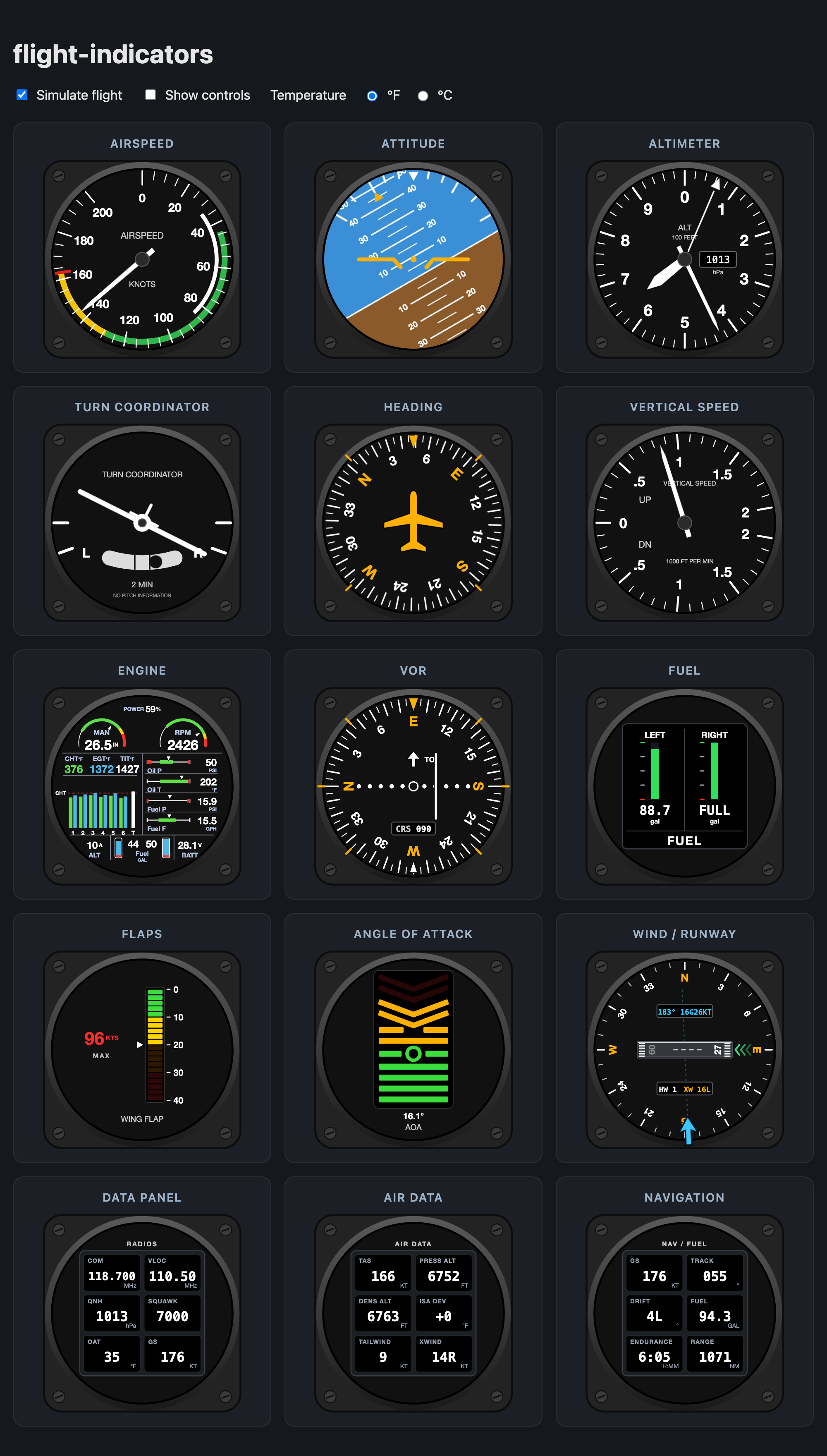
**[Live demo](https://flight-indicators.harvis.page)**: every instrument running on simulated flight data, with sliders to drive them by hand.
|
|
6
|
+
|
|
7
|
+
|
|
4
8
|
|
|
5
9
|
Modern SVG flight instruments for React, with no runtime dependencies.
|
|
6
10
|
|
|
7
|
-
-
|
|
11
|
+
- Fifteen instruments: **Attitude**, **Heading**, **Airspeed**, **Altimeter**, **Vertical speed**, **Turn coordinator**, **VOR / CDI**, **ADF**, **Radio panel** (NAV / ADF / DME), **Wind / runway**, **Fuel**, **Flaps**, **Angle of attack**, **Engine monitor** and a custom **Data panel** for any readouts you like
|
|
12
|
+
- Plus **RadioStack**, an interactive NAV / ADF / DME radio with editable standby frequencies
|
|
8
13
|
- Pure SVG with no image files, so instruments stay sharp at any size and work with any bundler
|
|
9
14
|
- Written in TypeScript and ships its type declarations
|
|
10
15
|
- Ships ESM and CommonJS builds, works with server-side rendering, and is marked `"use client"` for the Next.js App Router
|
|
@@ -30,7 +35,16 @@ import {
|
|
|
30
35
|
Altimeter,
|
|
31
36
|
VerticalSpeed,
|
|
32
37
|
TurnCoordinator,
|
|
38
|
+
VorIndicator,
|
|
39
|
+
AdfIndicator,
|
|
40
|
+
RadioPanel,
|
|
41
|
+
relativeBearing,
|
|
33
42
|
WindIndicator,
|
|
43
|
+
FuelIndicator,
|
|
44
|
+
FlapIndicator,
|
|
45
|
+
AoaIndicator,
|
|
46
|
+
EngineIndicator,
|
|
47
|
+
DataPanel,
|
|
34
48
|
} from 'flight-indicators';
|
|
35
49
|
|
|
36
50
|
export function Panel({ data }) {
|
|
@@ -43,6 +57,21 @@ export function Panel({ data }) {
|
|
|
43
57
|
<HeadingIndicator heading={data.heading} />
|
|
44
58
|
<VerticalSpeed verticalSpeed={data.vs} />
|
|
45
59
|
<WindIndicator runway={90} windDirection={data.windDir} windSpeed={data.windSpeed} />
|
|
60
|
+
<VorIndicator course={data.obs} radial={data.navRadial} />
|
|
61
|
+
<AdfIndicator heading={data.heading} bearing={relativeBearing(data.heading, data.ndbBearing)} />
|
|
62
|
+
<RadioPanel nav={{ active: data.nav1, standby: data.nav1Stby }} adf={{ active: data.adf }} dme={data.dme} />
|
|
63
|
+
<FuelIndicator capacity={26} tanks={[{ name: 'Left', quantity: data.fuelL }, { name: 'Right', quantity: data.fuelR }]} />
|
|
64
|
+
<FlapIndicator flaps={data.flaps} airspeed={data.ias} speedLimits={[{ flaps: 0, speed: 160 }, { flaps: 10, speed: 110 }]} />
|
|
65
|
+
<EngineIndicator manifold={{ value: data.map }} rpm={{ value: data.rpm }} cht={data.cht} egt={data.egt} fuelLeft={data.fuelL} fuelRight={data.fuelR} />
|
|
66
|
+
<DataPanel
|
|
67
|
+
heading="Radios"
|
|
68
|
+
fields={[
|
|
69
|
+
{ name: 'OAT', value: data.oat, unit: '°C' },
|
|
70
|
+
{ name: 'VLOC', value: data.nav1, unit: 'MHz', decimals: 2 },
|
|
71
|
+
{ name: 'COM', value: data.com1, unit: 'MHz', decimals: 3 },
|
|
72
|
+
{ name: 'Squawk', value: data.squawk },
|
|
73
|
+
]}
|
|
74
|
+
/>
|
|
46
75
|
</div>
|
|
47
76
|
);
|
|
48
77
|
}
|
|
@@ -121,14 +150,169 @@ A north-up compass rose with the runway drawn to scale on its heading and the wi
|
|
|
121
150
|
| `windGust` | `number` | | Gust speed in knots. Shown when higher than `windSpeed`. |
|
|
122
151
|
| `crosswindLimit` | `number` | `15` | Crosswind in knots (gusts included) above which the crosswind turns amber. |
|
|
123
152
|
|
|
153
|
+
### `<VorIndicator />`
|
|
154
|
+
|
|
155
|
+
A VOR / course deviation indicator with an OBS card. The card turns so the selected course sits under the top index, the needle shows how far the course line is to the left or right (5 dots each side, 2° per dot, ±10° full scale) and a triangle points TO or FROM the station. Give it the selected `course` and the `radial` the aircraft is on, and it works out the deflection and the TO/FROM flag. Alternatively pass `deviation` and `toFrom` straight from your avionics data.
|
|
156
|
+
|
|
157
|
+
| Prop | Type | Default | Description |
|
|
158
|
+
| ----------- | ------------------------ | ------- | ------------------------------------------------------------------ |
|
|
159
|
+
| `course` | `number` | `0` | Selected course (OBS) in degrees. |
|
|
160
|
+
| `radial` | `number` | | Radial from the station the aircraft is on, in degrees. Drives the needle and the TO/FROM flag. |
|
|
161
|
+
| `deviation` | `number` | | Course deviation in degrees, positive when the course is to the right. Clamped to ±10. Overrides `radial`. |
|
|
162
|
+
| `toFrom` | `"TO" \| "FROM" \| "OFF"` | | TO/FROM flag. Overrides `radial`. `"OFF"` hides both triangles. |
|
|
163
|
+
| `signal` | `boolean` | `true` | `false` shows the red NAV flag, centres the needle and hides TO/FROM. |
|
|
164
|
+
|
|
165
|
+
`vorDeviation(course, radial)` is exported too and returns `{ deviation, toFrom }` if you want the same maths without the drawing.
|
|
166
|
+
|
|
167
|
+
### `<AdfIndicator />`
|
|
168
|
+
|
|
169
|
+
An automatic direction finder. The needle points at the tuned NDB: give it the `bearing` of the station relative to the nose. With `heading` left at `0` it is a fixed-card ADF that reads relative bearing. Pass the aircraft `heading` and the card turns with it (a rotatable-card ADF or RMI), so the needle head reads the magnetic bearing to the station and the tail the bearing from it.
|
|
170
|
+
|
|
171
|
+
| Prop | Type | Default | Description |
|
|
172
|
+
| --------- | --------- | ------- | ------------------------------------------------------------------ |
|
|
173
|
+
| `bearing` | `number` | `0` | Relative bearing to the station in degrees, clockwise from the nose. |
|
|
174
|
+
| `heading` | `number` | `0` | Heading set on the compass card. `0` gives a fixed card. |
|
|
175
|
+
| `signal` | `boolean` | `true` | `false` parks the needle at 90° and shows the red ADF flag. |
|
|
176
|
+
|
|
177
|
+
`relativeBearing(heading, bearingToStation)` is exported too, for when your data gives the magnetic bearing to the station rather than the relative one.
|
|
178
|
+
|
|
179
|
+
### `<RadioPanel />`
|
|
180
|
+
|
|
181
|
+
A navigation radio stack: NAV and ADF receivers, each with an active and a standby frequency, and a DME distance readout. Anything you leave out shows as dashes.
|
|
182
|
+
|
|
183
|
+
| Prop | Type | Default | Description |
|
|
184
|
+
| ------- | --------------------------------------- | ------- | ------------------------------------------------------- |
|
|
185
|
+
| `nav` | `{ active?: number; standby?: number }` | | NAV (VOR/LOC) frequencies in MHz, shown with two decimals. |
|
|
186
|
+
| `adf` | `{ active?: number; standby?: number }` | | ADF frequencies in kHz. |
|
|
187
|
+
| `dme` | `number` | | DME distance in nautical miles. |
|
|
188
|
+
| `color` | `string` | amber | Colour of the digits. |
|
|
189
|
+
|
|
190
|
+
`formatNav`, `formatAdf` and `formatDme` are exported if you want the same number formatting elsewhere.
|
|
191
|
+
|
|
192
|
+
### `<RadioStack />`
|
|
193
|
+
|
|
194
|
+
An interactive radio, for when the user tunes the frequencies themselves. Unlike the instruments it is an HTML control rather than an SVG dial: a faceplate with NAV and ADF receivers, each with an active display, an editable standby display and a transfer button, plus a DME readout. Type a frequency in a STBY box and press Enter to tune it (the old active frequency drops to standby), or leave the box to keep it in standby and press ⇄ later. Text that is not a tunable frequency (NAV 108.00–117.95 MHz, ADF 190–1750 kHz) is rejected.
|
|
195
|
+
|
|
196
|
+
```tsx
|
|
197
|
+
const [nav, setNav] = useState({ active: 113.4 });
|
|
198
|
+
const [adf, setAdf] = useState({});
|
|
199
|
+
|
|
200
|
+
<RadioStack nav={nav} adf={adf} onNavChange={setNav} onAdfChange={setAdf} navIdent="KNA" dme={12.4} />
|
|
201
|
+
```
|
|
202
|
+
|
|
203
|
+
| Prop | Type | Default | Description |
|
|
204
|
+
| -------------- | --------------------------------------- | --------------- | -------------------------------------------------------------- |
|
|
205
|
+
| `nav` | `{ active?: number; standby?: number }` | | NAV frequencies in MHz. Pass it to control the component. |
|
|
206
|
+
| `adf` | `{ active?: number; standby?: number }` | | ADF frequencies in kHz. Pass it to control the component. |
|
|
207
|
+
| `defaultNav` | `{ active?: number; standby?: number }` | | Starting NAV frequencies when `nav` is left out and the component keeps its own state. |
|
|
208
|
+
| `defaultAdf` | `{ active?: number; standby?: number }` | | Starting ADF frequencies when `adf` is left out. |
|
|
209
|
+
| `onNavChange` | `(next) => void` | | Called when the NAV standby is entered or the frequencies are swapped. |
|
|
210
|
+
| `onAdfChange` | `(next) => void` | | Called when the ADF standby is entered or the frequencies are swapped. |
|
|
211
|
+
| `navIdent` | `string` | | Identifier of the station being received, shown under the NAV label. |
|
|
212
|
+
| `adfIdent` | `string` | | Identifier of the station being received, shown under the ADF label. |
|
|
213
|
+
| `dme` | `number` | | DME distance in nautical miles. |
|
|
214
|
+
| `color` | `string` | amber | Colour of the digits. |
|
|
215
|
+
| `width` | `number \| string` | `320` | Rendered width in pixels or any CSS length. Everything scales with it. |
|
|
216
|
+
| `title` | `string` | `"Radio panel"` | Accessible name of the group. |
|
|
217
|
+
|
|
218
|
+
It also takes `className` and `style`, but not the other [common props](#common-props). `parseNav` and `parseAdf` are exported for validating frequencies yourself.
|
|
219
|
+
|
|
220
|
+
### `<FuelIndicator />`
|
|
221
|
+
|
|
222
|
+
A digital fuel quantity gauge: one vertical bar graph per tank with a numeric readout underneath, `FULL` when a tank is at capacity, and red when it drops to the low threshold.
|
|
223
|
+
|
|
224
|
+
| Prop | Type | Default | Description |
|
|
225
|
+
| ---------- | ------------ | --------- | ------------------------------------------------------------------- |
|
|
226
|
+
| `tanks` | `FuelTank[]` | Left and Right, empty | Tanks shown left to right, each `{ name, quantity, capacity? }`. Up to four. |
|
|
227
|
+
| `capacity` | `number` | `50` | Full-tank quantity for tanks that don't set their own. |
|
|
228
|
+
| `unit` | `string` | `"gal"` | Unit printed under each readout. |
|
|
229
|
+
| `low` | `number` | 10% of capacity | Quantity at or below which a tank turns red. |
|
|
230
|
+
| `decimals` | `number` | `1` | Decimal places in the readouts. |
|
|
231
|
+
| `label` | `string` | `"FUEL"` | Caption along the bottom of the display. |
|
|
232
|
+
|
|
233
|
+
### `<FlapIndicator />`
|
|
234
|
+
|
|
235
|
+
A wing flap position indicator: a vertical LED bar graph that fills from the top as the flaps extend, green at the top through yellow and orange to red at full deflection, with a degree scale beside it and a pointer at the exact position. Optionally shows the maximum flap extension speed for the current setting, which turns red when `airspeed` exceeds it.
|
|
236
|
+
|
|
237
|
+
| Prop | Type | Default | Description |
|
|
238
|
+
| ------------- | ------------------ | -------------- | ----------------------------------------------------------------- |
|
|
239
|
+
| `flaps` | `number` | `0` | Flap position in degrees. Clamped to `0…max`. |
|
|
240
|
+
| `max` | `number` | `40` | Full flap deflection in degrees. |
|
|
241
|
+
| `detents` | `number[]` | every 10° | Scale labels in degrees. |
|
|
242
|
+
| `segments` | `number` | `20` | Number of LED segments in the bar. |
|
|
243
|
+
| `speedLimits` | `FlapSpeedLimit[]` | | `{ flaps, speed }` pairs in knots: the max speed once flaps are at or beyond `flaps`. The highest reached entry is shown. Omit to hide the readout. |
|
|
244
|
+
| `airspeed` | `number` | | Current airspeed in knots, used to flag an overspeed. |
|
|
245
|
+
| `showMph` | `boolean` | `true` | Also print the limit in mph. |
|
|
246
|
+
| `label` | `string` | `"WING FLAP"` | Caption at the bottom of the dial. |
|
|
247
|
+
|
|
248
|
+
### `<AoaIndicator />`
|
|
249
|
+
|
|
250
|
+
An angle of attack indicator modelled on panel-mount LED AoA displays. Eleven rows light from the bottom up as the AoA rises: four green bars, a green donut at the optimum AoA, an amber bar, an amber split bar, two amber chevrons and two red chevrons pointing down ("lower the nose"). Rows below the donut are spaced evenly from `min` to `optimum`, rows above it from `optimum` to `max`. At `max` every row is lit and the chevrons flash.
|
|
251
|
+
|
|
252
|
+
| Prop | Type | Default | Description |
|
|
253
|
+
| ----------- | --------- | ------------------- | -------------------------------------------------------- |
|
|
254
|
+
| `aoa` | `number` | `0` | Current angle of attack in degrees. |
|
|
255
|
+
| `min` | `number` | `0` | AoA at which the bottom bar lights. |
|
|
256
|
+
| `optimum` | `number` | halfway to `max` | AoA at which the green donut lights (approach / L/Dmax). |
|
|
257
|
+
| `max` | `number` | `20` | Critical AoA: all rows lit and the chevrons flash. |
|
|
258
|
+
| `showValue` | `boolean` | `false` | Print the AoA in degrees under the display. |
|
|
259
|
+
| `label` | `string` | `"AOA"` | Caption at the bottom of the dial. |
|
|
260
|
+
|
|
261
|
+
### `<EngineIndicator />`
|
|
262
|
+
|
|
263
|
+
An all-in-one engine monitor in the style of a JPI EDM. The top holds a percent-power readout and two arc gauges for manifold pressure and RPM. The left half shows the hottest CHT, EGT and TIT with a per-cylinder bar graph (green CHT, blue EGT, white TIT) and a dashed red CHT limit line. The right half has up to four horizontal bar gauges, and the bottom row shows alternator amps, the two fuel tanks and bus volts. Sections you pass no data for are left blank.
|
|
264
|
+
|
|
265
|
+
Scaled gauges share one shape, `EngineGauge`: `{ value, min, max, green?, yellow?, low?, high?, unit?, decimals? }`. `green` and `yellow` are `[from, to]` bands; `low` and `high` are red limits. A readout turns yellow inside the yellow band and red at or beyond a red limit.
|
|
266
|
+
|
|
267
|
+
| Prop | Type | Default | Description |
|
|
268
|
+
| ----------------- | ----------------- | -------------- | ------------------------------------------------------------------ |
|
|
269
|
+
| `power` | `number` | | Percent power printed at the top. |
|
|
270
|
+
| `manifold` | `EngineGauge` | 10–35 inHg | Manifold pressure arc. Only `value` is needed to use the default scale. |
|
|
271
|
+
| `rpm` | `EngineGauge` | 0–3000 | Engine speed arc. |
|
|
272
|
+
| `cht` | `number[]` | `[]` | CHT per cylinder, up to six. |
|
|
273
|
+
| `egt` | `number[]` | `[]` | EGT per cylinder, up to six. |
|
|
274
|
+
| `tit` | `number` | | Turbine inlet temperature, drawn as the `T` column. |
|
|
275
|
+
| `chtLimit` | `number` | `400` | CHT at which the dashed red line is drawn. |
|
|
276
|
+
| `chtScale` | `number` | `500` | CHT that fills a bar to the top. |
|
|
277
|
+
| `egtScale` | `number` | `1700` | EGT or TIT that fills a bar to the top. |
|
|
278
|
+
| `temperatureUnit` | `string` | `"°F"` | Printed after the CHT/EGT/TIT headings. |
|
|
279
|
+
| `gauges` | `EngineBarGauge[]`| oil P, oil T, fuel P, fuel F | Horizontal bar gauges, each an `EngineGauge` plus a `label`. Up to four. |
|
|
280
|
+
| `amps` | `number` | | Alternator current. |
|
|
281
|
+
| `volts` | `number` | | Bus voltage, shown with one decimal. |
|
|
282
|
+
| `fuelLeft` | `number` | | Left tank quantity. |
|
|
283
|
+
| `fuelRight` | `number` | | Right tank quantity. |
|
|
284
|
+
| `fuelCapacity` | `number` | `30` | Full quantity of each tank, used to fill the tank icons. |
|
|
285
|
+
| `fuelUnit` | `string` | `"GAL"` | Printed under the fuel quantities. |
|
|
286
|
+
|
|
287
|
+
### `<DataPanel />`
|
|
288
|
+
|
|
289
|
+
A general-purpose instrument for readouts that have no dedicated gauge: temperatures, radio frequencies, transponder code, fuel, timers, anything. It draws a square panel inside the usual round bezel and fills it with a grid of up to six cells. Each cell shows a name, a value and an optional unit. One or two fields stack vertically; three or more use two columns. Long values shrink to fit.
|
|
290
|
+
|
|
291
|
+
| Prop | Type | Default | Description |
|
|
292
|
+
| --------- | ------------- | ------- | ------------------------------------------------------------------------ |
|
|
293
|
+
| `fields` | `DataField[]` | `[]` | Readouts to show. Only the first six are drawn. |
|
|
294
|
+
| `heading` | `string` | | Caption printed above the panel, also used in the accessible label. |
|
|
295
|
+
|
|
296
|
+
Each `DataField`:
|
|
297
|
+
|
|
298
|
+
| Field | Type | Default | Description |
|
|
299
|
+
| ---------- | ------------------ | ------- | --------------------------------------------------------------- |
|
|
300
|
+
| `name` | `string` | | Caption above the value, e.g. `"COM1"`. |
|
|
301
|
+
| `value` | `string \| number` | | Strings are printed as given. Numbers are formatted with `decimals`; `NaN` shows as `---`. |
|
|
302
|
+
| `unit` | `string` | | Printed in the corner of the cell, e.g. `"MHz"`. |
|
|
303
|
+
| `decimals` | `number` | `0` | Decimal places for numeric values. |
|
|
304
|
+
| `color` | `string` | white | Colour of the value text, e.g. amber for a caution. |
|
|
305
|
+
|
|
124
306
|
## Development
|
|
125
307
|
|
|
126
308
|
```bash
|
|
127
309
|
npm install
|
|
128
|
-
npm run dev
|
|
129
|
-
npm
|
|
310
|
+
npm run dev # interactive playground (Vite) at http://localhost:5173
|
|
311
|
+
npm run build:demo # static build of the playground in demo-dist/
|
|
312
|
+
npm run deploy:demo # build and deploy the playground to harvis.dev (the live demo)
|
|
313
|
+
npm test # unit tests (Vitest)
|
|
130
314
|
npm run typecheck
|
|
131
|
-
npm run build
|
|
315
|
+
npm run build # outputs dist/ (ESM + CJS + .d.ts)
|
|
132
316
|
```
|
|
133
317
|
|
|
134
318
|
## Releasing
|