flashduty-knowledge-base 1.3.1 → 1.3.3
This diff represents the content of publicly available package versions that have been released to one of the supported registries. The information contained in this diff is provided for informational purposes only and reflects changes between package versions as they appear in their respective public registries.
- package/dist/en.d.ts +4 -0
- package/dist/esm/en.js +224 -34
- package/dist/esm/zh.js +221 -26
- package/dist/iife/en.js +197 -7
- package/dist/iife/zh.js +200 -5
- package/dist/zh.d.ts +4 -0
- package/package.json +1 -1
package/dist/esm/zh.js
CHANGED
|
@@ -318,7 +318,7 @@ attachment_stripped = true
|
|
|
318
318
|
## 严重程度映射关系
|
|
319
319
|
---
|
|
320
320
|
|
|
321
|
-
当前邮件集成推送到 Flashduty 的告警等级均为Warning
|
|
321
|
+
当前邮件集成推送到 Flashduty 的告警等级均为Warning,但您可以通过[告警处理 Pipeline](https://docs.flashcat.cloud/zh/flashduty/alert-pipelines) 来自定义严重程度。
|
|
322
322
|
|
|
323
323
|
`,e=`---
|
|
324
324
|
title: "夜莺/FlahCat集成"
|
|
@@ -3445,7 +3445,7 @@ url: "https://docs.flashcat.cloud/zh/flashduty/aws-eventbridge-integration-guide
|
|
|
3445
3445
|
### 步骤1:在 API destinations 中创建 Connerction
|
|
3446
3446
|
1. 登录您的 AWS 控制台,检索 \`Amazon Eventbridge\` 产品,并进入对应产品控制台。
|
|
3447
3447
|
2. 在左侧导航栏选择 \`Integration=>API destinations\`。
|
|
3448
|
-
3. 点击 \`
|
|
3448
|
+
3. 点击 \`connection\`,并点击 \`Create connection\` 创建链接。
|
|
3449
3449
|
|
|
3450
3450
|
<img alt="drawing" width="600" src="https://download.flashcat.cloud/flashduty/doc/aws-eb-3.png" />
|
|
3451
3451
|
|
|
@@ -4059,7 +4059,7 @@ url: "https://docs.flashcat.cloud/zh/flashduty/appdynamics-integration-guide"
|
|
|
4059
4059
|
|INFO|Info|提醒|
|
|
4060
4060
|
|
|
4061
4061
|
</div>
|
|
4062
|
-
`,
|
|
4062
|
+
`,M=`---
|
|
4063
4063
|
title: "SolarWinds 告警事件"
|
|
4064
4064
|
description: "通过 webhook 的方式同步 SolarWinds 告警事件到 Flashduty,实现告警事件自动化降噪处理"
|
|
4065
4065
|
date: "2024-08-20T10:00:00+08:00"
|
|
@@ -4164,7 +4164,7 @@ url: "https://docs.flashcat.cloud/zh/flashduty/solarwinds-integration-guide"
|
|
|
4164
4164
|
|Info|Info|提醒|
|
|
4165
4165
|
|
|
4166
4166
|
</div>
|
|
4167
|
-
`,
|
|
4167
|
+
`,N=`---
|
|
4168
4168
|
title: "火山引擎云监控告警事件"
|
|
4169
4169
|
description: "通过 webhook 的方式同步火山引擎云监控告警事件到 Flashduty,实现告警事件自动化降噪处理"
|
|
4170
4170
|
date: "2024-08-20T10:00:00+08:00"
|
|
@@ -4344,7 +4344,7 @@ url: "https://docs.flashcat.cloud/zh/flashduty/volcengine-event-integration-guid
|
|
|
4344
4344
|
|通知|Info|提醒|
|
|
4345
4345
|
|
|
4346
4346
|
</div>
|
|
4347
|
-
`,
|
|
4347
|
+
`,W=`---
|
|
4348
4348
|
title: "火山引擎日志服务 TLS 告警事件"
|
|
4349
4349
|
description: "通过 webhook 的方式同步火山引擎日志服务 TLS 告警事件到 Flashduty,实现告警事件自动化降噪处理"
|
|
4350
4350
|
date: "2024-07-05T10:00:00+08:00"
|
|
@@ -4481,7 +4481,7 @@ url: "https://docs.flashcat.cloud/zh/flashduty/volcengine-tls-integration-guide"
|
|
|
4481
4481
|
|通知|Info|提醒|
|
|
4482
4482
|
|
|
4483
4483
|
</div>
|
|
4484
|
-
`,
|
|
4484
|
+
`,E=`---
|
|
4485
4485
|
title: "Opmanager 告警事件"
|
|
4486
4486
|
description: "通过 webhook 的方式同步 Opmanager 告警事件到 Flashduty,实现告警事件自动化降噪处理"
|
|
4487
4487
|
date: "2024-07-05T10:00:00+08:00"
|
|
@@ -4616,7 +4616,7 @@ url: "https://docs.flashcat.cloud/zh/flashduty/opmanager-integration-guide"
|
|
|
4616
4616
|
| Attention | Info | 提醒 |
|
|
4617
4617
|
|
|
4618
4618
|
</div>
|
|
4619
|
-
`,
|
|
4619
|
+
`,z=`---
|
|
4620
4620
|
title: "Meraki 告警事件"
|
|
4621
4621
|
description: "通过 webhook 的方式同步 Meraki 告警事件到 Flashduty,实现告警事件自动化降噪处理"
|
|
4622
4622
|
date: "2024-07-05T10:00:00+08:00"
|
|
@@ -4692,7 +4692,7 @@ url: "https://docs.flashcat.cloud/zh/flashduty/meraki-integration-guide"
|
|
|
4692
4692
|
| informational | Info | 提醒 |
|
|
4693
4693
|
|
|
4694
4694
|
</div>
|
|
4695
|
-
|
|
4695
|
+
`,j=`---
|
|
4696
4696
|
title: "天翼云告警事件"
|
|
4697
4697
|
description: "通过 webhook 的方式同步天翼云告警事件到 Flashduty,实现告警事件自动化降噪处理"
|
|
4698
4698
|
date: "2024-07-05T10:00:00+08:00"
|
|
@@ -4780,7 +4780,7 @@ url: "https://docs.flashcat.cloud/zh/flashduty/statecloud-integration-guide"
|
|
|
4780
4780
|
|
|
4781
4781
|
|
|
4782
4782
|
</div>
|
|
4783
|
-
|
|
4783
|
+
`,$=`---
|
|
4784
4784
|
title: "观测云告警事件"
|
|
4785
4785
|
description: "通过 webhook 的方式同步观测云告警事件到 Flashduty,实现告警事件自动化降噪处理"
|
|
4786
4786
|
date: "2024-07-05T10:00:00+08:00"
|
|
@@ -5423,7 +5423,7 @@ url: "https://docs.flashcat.cloud/zh/flashduty/dingtalk-alert-integration-guide"
|
|
|
5423
5423
|
## 严重程度映射关系
|
|
5424
5424
|
---
|
|
5425
5425
|
|
|
5426
|
-
当前钉钉告警集成推送到 Flashduty 的严重程度均为Warning
|
|
5426
|
+
当前钉钉告警集成推送到 Flashduty 的严重程度均为Warning,但您可以通过[告警处理 Pipeline](https://docs.flashcat.cloud/zh/flashduty/alert-pipelines) 来自定义严重程度。
|
|
5427
5427
|
|
|
5428
5428
|
`,G=`---
|
|
5429
5429
|
title: "飞书告警集成"
|
|
@@ -5506,9 +5506,204 @@ url: "https://docs.flashcat.cloud/zh/flashduty/feishu-alert-integration-guide"
|
|
|
5506
5506
|
## 严重程度映射关系
|
|
5507
5507
|
---
|
|
5508
5508
|
|
|
5509
|
-
当前飞书告警集成推送到 Flashduty 的严重程度均为 Warning
|
|
5509
|
+
当前飞书告警集成推送到 Flashduty 的严重程度均为 Warning,但您可以通过[告警处理 Pipeline](https://docs.flashcat.cloud/zh/flashduty/alert-pipelines) 来自定义严重程度。
|
|
5510
5510
|
|
|
5511
5511
|
`,J=`---
|
|
5512
|
+
title: "火山引擎云拨测告警事件"
|
|
5513
|
+
description: "通过 webhook 的方式同步 火山引擎云拨测的告警事件到 Flashduty,实现告警事件自动化降噪处理"
|
|
5514
|
+
date: "2024-07-05T10:00:00+08:00"
|
|
5515
|
+
url: "https://docs.flashcat.cloud/zh/flashduty/volcengine-detect-integration-guide"
|
|
5516
|
+
---
|
|
5517
|
+
|
|
5518
|
+
通过 webhook 的方式同步 火山引擎云拨测的告警事件到 Flashduty,实现告警事件自动化降噪处理。
|
|
5519
|
+
|
|
5520
|
+
<div class="hide">
|
|
5521
|
+
|
|
5522
|
+
## 在 Flashduty
|
|
5523
|
+
---
|
|
5524
|
+
您可通过以下2种方式,获取一个集成推送地址,任选其一即可。
|
|
5525
|
+
|
|
5526
|
+
### 使用专属集成
|
|
5527
|
+
|
|
5528
|
+
当您不需要将告警事件路由到不同的协作空间,优先选择此方式,更简单。
|
|
5529
|
+
|
|
5530
|
+
<details>
|
|
5531
|
+
<summary>展开</summary>
|
|
5532
|
+
|
|
5533
|
+
1. 进入 Flashduty 控制台,选择 **协作空间**,进入某个空间的详情页面
|
|
5534
|
+
2. 选择 **集成数据** tab,点击 **添加一个集成**,进入添加集成页面
|
|
5535
|
+
3. 选择 **火山引擎云拨测** 集成,点击 **保存**,生成卡片。
|
|
5536
|
+
4. 点击生成的卡片,可以查看到 **推送地址**,复制备用,完成。
|
|
5537
|
+
|
|
5538
|
+
|
|
5539
|
+
</details>
|
|
5540
|
+
|
|
5541
|
+
### 使用共享集成
|
|
5542
|
+
|
|
5543
|
+
当您需要根据告警事件的 Payload 信息,将告警路由到不同的协作空间,优先选择此方式。
|
|
5544
|
+
|
|
5545
|
+
<details>
|
|
5546
|
+
<summary>展开</summary>
|
|
5547
|
+
|
|
5548
|
+
1. 进入 Flashduty 控制台,选择 **集成中心=>告警事件**,进入集成选择页面。
|
|
5549
|
+
2. 选择 **火山引擎云拨测** 集成:
|
|
5550
|
+
- **集成名称**:为当前集成定义一个名称。
|
|
5551
|
+
3. 配置默认路由,并选择对应的协作空间(集成创建后可以前往 \`路由\` 进行更多路由规则的配置)。
|
|
5552
|
+
4. 点击 **保存** 后,复制当前页面的新生成的 **推送地址** 备用。
|
|
5553
|
+
5. 完成。
|
|
5554
|
+
|
|
5555
|
+
</details>
|
|
5556
|
+
</div>
|
|
5557
|
+
|
|
5558
|
+
## 在 火山引擎
|
|
5559
|
+
---
|
|
5560
|
+
|
|
5561
|
+
<div class="md-block">
|
|
5562
|
+
|
|
5563
|
+
## 一、告警推送配置
|
|
5564
|
+
|
|
5565
|
+
### 步骤1:创建通知对象
|
|
5566
|
+
|
|
5567
|
+
1. 登录您的 \`火山引擎\` 控制台,在 \`告警管理\` 菜单中,找到 \`通知对象管理\`。
|
|
5568
|
+
2. 点击 \`系统集成\`,点击\`创建系统集成\`或编辑已有的通知对象。
|
|
5569
|
+
3. 在编辑页面中,名称填写 \`Flashduty\` ,\`回调 URL\` 处填写告警集成的<span class='integration_url'>推送地址</span>。
|
|
5570
|
+
4. 点击 \`确定\` 完成配置。
|
|
5571
|
+
|
|
5572
|
+
<img alt="drawing" width="600" src="https://download.flashcat.cloud/flashduty/doc/zh/fd/volcengine-1.png" />
|
|
5573
|
+
|
|
5574
|
+
### 步骤2:在告警策略中使用通知对象
|
|
5575
|
+
|
|
5576
|
+
1. 登录您的 \`火山引擎\` 控制台,在 \`告警管理\` 菜单中,找到 \`告警策略\`。
|
|
5577
|
+
2. 点击\`创建告警策略\`或编辑已有的报警器。
|
|
5578
|
+
3. 在编辑页面中,\`通知对象\` 处选择创建的 \`Flashduty\` 通知对象。
|
|
5579
|
+
4. 其他按需配置即可,点击 \`确定\` 完成配置。
|
|
5580
|
+
|
|
5581
|
+
<img alt="drawing" width="600" src="https://download.flashcat.cloud/flashduty/doc/zh/fd/volcengine-2.png" />
|
|
5582
|
+
|
|
5583
|
+
|
|
5584
|
+
|
|
5585
|
+
</dev>
|
|
5586
|
+
|
|
5587
|
+
## 二、状态对照
|
|
5588
|
+
|
|
5589
|
+
<div class="md-block">
|
|
5590
|
+
|
|
5591
|
+
| 火山引擎 | Flashduty | 状态 |
|
|
5592
|
+
| ---------- | -------- | ---- |
|
|
5593
|
+
| 严重告警 | Critical | 严重 |
|
|
5594
|
+
| 普通告警 | Warning | 警告 |
|
|
5595
|
+
|
|
5596
|
+
</div>
|
|
5597
|
+
|
|
5598
|
+
`,K=`---
|
|
5599
|
+
title: "Monit 告警集成"
|
|
5600
|
+
description: "Flashduty Monit 告警集成,Monit 服务通过此集成上报告警"
|
|
5601
|
+
date: "2025-05-19T10:00:00+08:00"
|
|
5602
|
+
url: "https://docs.flashcat.cloud/zh/flashduty/monit-alert-integration-guide"
|
|
5603
|
+
---
|
|
5604
|
+
|
|
5605
|
+
当您开通 Monit 服务时,系统会自动为您创建此集成。此集成用于收集 Monit 服务产生的告警事件。
|
|
5606
|
+
|
|
5607
|
+
:::tips
|
|
5608
|
+
您无法修改或删除此集成。但您可以管理集成下的标签增强、告警处理以及路由等规则。
|
|
5609
|
+
:::
|
|
5610
|
+
|
|
5611
|
+
## 如何开启 Monit 告警
|
|
5612
|
+
|
|
5613
|
+
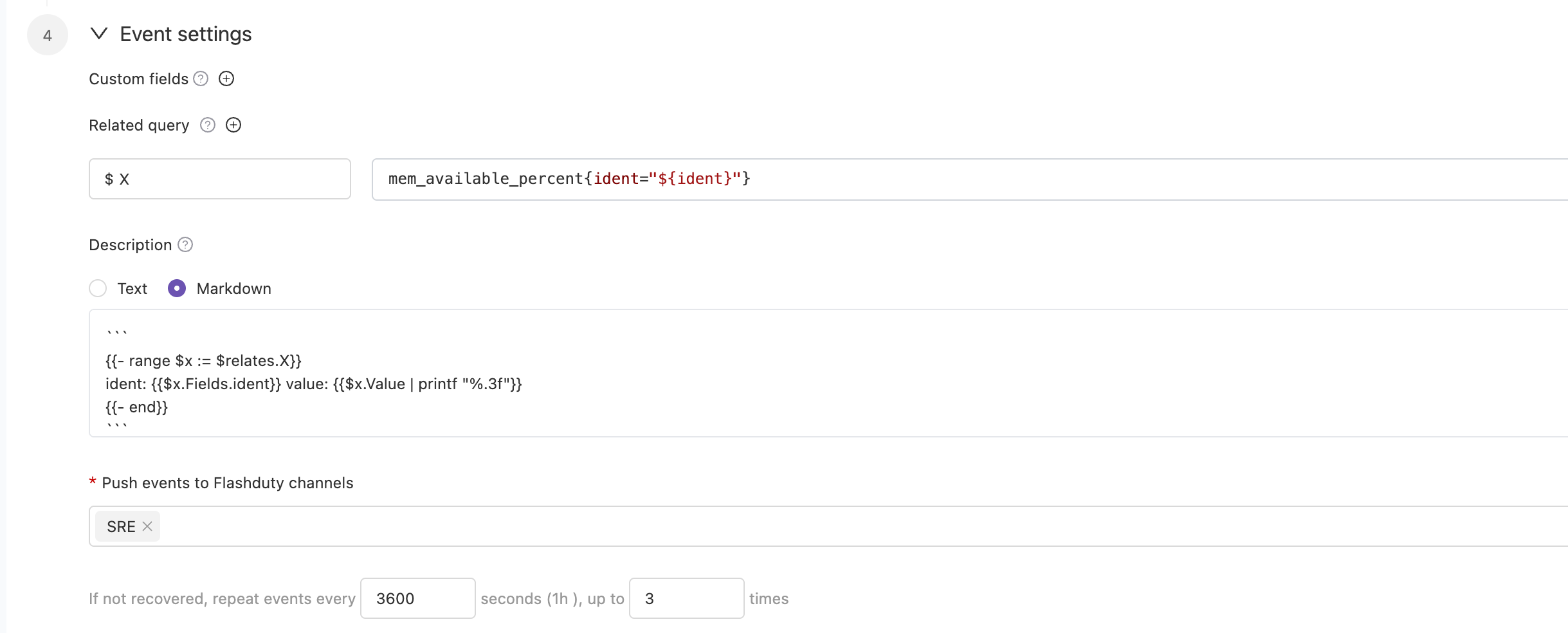
前往\`Monit\`-\`告警规则\`-\`规则详情\`页面,配置监控指标和阈值等条件,并开启告警。您可以选择将告警投递至多个协作空间。告警的通知规则遵循协作空间下的分派策略,您可以为团队设定值班人员,在告警发生时分派给值班人。
|
|
5614
|
+
|
|
5615
|
+
|
|
5616
|
+
|
|
5617
|
+
某些情况下,您可能希望将同一个告警规则产生的告警,按条件路由到不同的协作空间,这个时候您可以选择将告警直接投递到集成,而非协作空间列表。并在当前集成下,设置路由规则。`,Z=`---
|
|
5618
|
+
title: "RUM 告警集成"
|
|
5619
|
+
description: "Flashduty RUM 告警集成,RUM 服务通过此集成上报告警"
|
|
5620
|
+
date: "2025-05-19T10:00:00+08:00"
|
|
5621
|
+
url: "https://docs.flashcat.cloud/zh/flashduty/rum-alert-integration-guide"
|
|
5622
|
+
---
|
|
5623
|
+
|
|
5624
|
+
当您开通 RUM 服务时,系统会自动为您创建此集成。此集成用于收集 RUM 服务产生的告警事件。
|
|
5625
|
+
|
|
5626
|
+
:::tips
|
|
5627
|
+
您无法修改或删除此集成。但您可以管理集成下的标签增强、告警处理以及路由等规则。
|
|
5628
|
+
:::
|
|
5629
|
+
|
|
5630
|
+
## 如何开启 RUM 告警
|
|
5631
|
+
|
|
5632
|
+
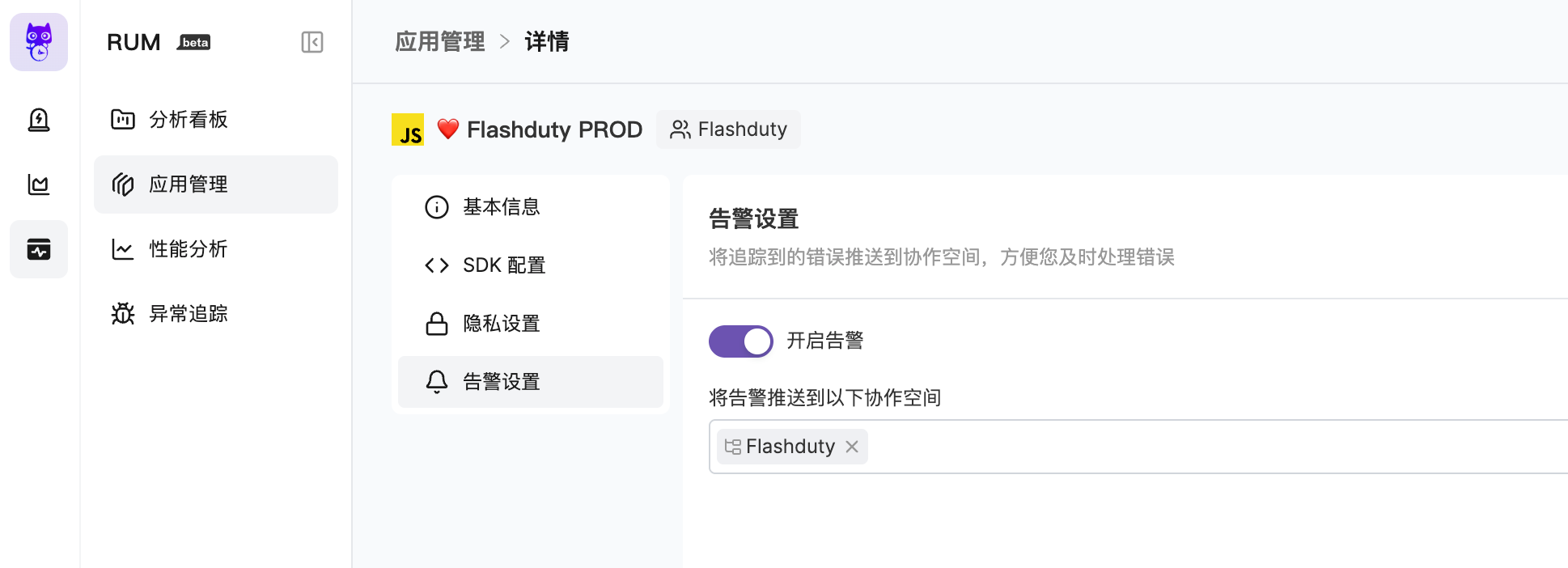
前往\`RUM\`-\`应用详情\`-\`告警设置\`页面,开启告警。您可以选择将告警投递至多个协作空间。告警的通知规则遵循协作空间下的分派策略,您可以为团队设定值班人员,在告警发生时分派给值班人。
|
|
5633
|
+
|
|
5634
|
+
|
|
5635
|
+
|
|
5636
|
+
更多内容,请您参考 [RUM Issue 告警](https://docs.flashcat.cloud/zh/flashduty/rum/issue-alerting)。`,Q=`---
|
|
5637
|
+
title: "Cloudflare 告警事件"
|
|
5638
|
+
description: "通过 webhook 的方式同步 Cloudflare 告警事件到 Flashduty,实现告警事件自动化降噪处理"
|
|
5639
|
+
date: "2024-07-05T10:00:00+08:00"
|
|
5640
|
+
url: "https://docs.flashcat.cloud/zh/flashduty/volcengine-detect-integration-guide"
|
|
5641
|
+
---
|
|
5642
|
+
|
|
5643
|
+
通过 webhook 的方式同步 Cloudflare 告警事件到 Flashduty,实现告警事件自动化降噪处理。
|
|
5644
|
+
|
|
5645
|
+
<div class="hide">
|
|
5646
|
+
|
|
5647
|
+
## 在 Flashduty
|
|
5648
|
+
---
|
|
5649
|
+
您可通过以下2种方式,获取一个集成推送地址,任选其一即可。
|
|
5650
|
+
|
|
5651
|
+
### 使用专属集成
|
|
5652
|
+
|
|
5653
|
+
当您不需要将告警事件路由到不同的协作空间,优先选择此方式,更简单。
|
|
5654
|
+
|
|
5655
|
+
<details>
|
|
5656
|
+
<summary>展开</summary>
|
|
5657
|
+
|
|
5658
|
+
1. 进入 Flashduty 控制台,选择 **协作空间**,进入某个空间的详情页面
|
|
5659
|
+
2. 选择 **集成数据** tab,点击 **添加一个集成**,进入添加集成页面
|
|
5660
|
+
3. 选择 **Cloudflare** 集成,点击 **保存**,生成卡片。
|
|
5661
|
+
4. 点击生成的卡片,可以查看到 **推送地址**,复制备用,完成。
|
|
5662
|
+
|
|
5663
|
+
|
|
5664
|
+
</details>
|
|
5665
|
+
|
|
5666
|
+
### 使用共享集成
|
|
5667
|
+
|
|
5668
|
+
当您需要根据告警事件的 Payload 信息,将告警路由到不同的协作空间,优先选择此方式。
|
|
5669
|
+
|
|
5670
|
+
<details>
|
|
5671
|
+
<summary>展开</summary>
|
|
5672
|
+
|
|
5673
|
+
1. 进入 Flashduty 控制台,选择 **集成中心=>告警事件**,进入集成选择页面。
|
|
5674
|
+
2. 选择 **Cloudflare** 集成:
|
|
5675
|
+
- **集成名称**:为当前集成定义一个名称。
|
|
5676
|
+
3. 配置默认路由,并选择对应的协作空间(集成创建后可以前往 \`路由\` 进行更多路由规则的配置)。
|
|
5677
|
+
4. 点击 **保存** 后,复制当前页面的新生成的 **推送地址** 备用。
|
|
5678
|
+
5. 完成。
|
|
5679
|
+
|
|
5680
|
+
</details>
|
|
5681
|
+
</div>
|
|
5682
|
+
|
|
5683
|
+
## 在 Cloudflare
|
|
5684
|
+
---
|
|
5685
|
+
|
|
5686
|
+
<div class="md-block">
|
|
5687
|
+
|
|
5688
|
+
## 一、告警推送配置
|
|
5689
|
+
|
|
5690
|
+
1. 登录您的 \`Cloudflare\` 控制台,转到 \`通知\` 菜单中,。
|
|
5691
|
+
2. 在\`Webhooks\` 中点击创建。
|
|
5692
|
+
3. 在编辑页面中,名称填写 \`Flashduty\` ,\`URL\` 处填写告警集成的<span class='integration_url'>推送地址</span>。
|
|
5693
|
+
4. 点击 \`保存和测试\` 完成配置。
|
|
5694
|
+
|
|
5695
|
+
配置 Webhook 通道后,即可在通知策略中使用。
|
|
5696
|
+
</dev>
|
|
5697
|
+
|
|
5698
|
+
## 二、状态对照
|
|
5699
|
+
|
|
5700
|
+
<div class="md-block">
|
|
5701
|
+
|
|
5702
|
+
当前 Cloudflare 集成推送到 Flashduty 的告警等级均为 Warning,但您可以通过[告警处理 Pipeline](https://docs.flashcat.cloud/zh/flashduty/alert-pipelines) 来自定义严重程度。
|
|
5703
|
+
|
|
5704
|
+
</div>
|
|
5705
|
+
|
|
5706
|
+
`,X=`---
|
|
5512
5707
|
title: "自定义变更事件集成指引"
|
|
5513
5708
|
description: "通过标准协议推送自有系统变更事件到 Flashduty,大部分故障由变更导致,变更和告警事件联动有助于快速定位故障原因。"
|
|
5514
5709
|
date: "2025-05-19T10:00:00+08:00"
|
|
@@ -5565,7 +5760,7 @@ Flashduty 已经适配部分常用工单、部署系统的 webhook 协议,对
|
|
|
5565
5760
|
|
|
5566
5761
|
</details>
|
|
5567
5762
|
|
|
5568
|
-
`,
|
|
5763
|
+
`,Y=`---
|
|
5569
5764
|
title: "Jira 事件集成指引"
|
|
5570
5765
|
description: "通过 webhook 的方式同步 Jira Issue 事件到 Flashduty,实现变更事件收集。"
|
|
5571
5766
|
date: "2025-05-19T10:00:00+08:00"
|
|
@@ -5639,7 +5834,7 @@ Flashduty 默认提取 webhook payload 中 status.name 信息,并按照下边
|
|
|
5639
5834
|
如您希望变更此映射关系,请联系 Flashduty。
|
|
5640
5835
|
|
|
5641
5836
|
</div>
|
|
5642
|
-
`,
|
|
5837
|
+
`,nn=`---
|
|
5643
5838
|
title: Contributing to our documentation — Meilisearch documentation
|
|
5644
5839
|
description: The Meilisearch documentation is open-source. Learn how to help make it even better.
|
|
5645
5840
|
sidebarDepth: 3
|
|
@@ -5776,7 +5971,7 @@ sidebarDepth: 3
|
|
|
5776
5971
|
|给同一个用户或同一个群发消息|最高频率 5 次/秒|
|
|
5777
5972
|
|
|
5778
5973
|
**注意:** 超出限制后将无法正常推送消息,建议合理使用通知渠道
|
|
5779
|
-
`,
|
|
5974
|
+
`,tn=`---
|
|
5780
5975
|
title: "钉钉集成"
|
|
5781
5976
|
description: "通过集成钉钉自建应用,实现在钉钉端内接收和响应告警的能力"
|
|
5782
5977
|
date: "2025-05-19T10:00:00+08:00"
|
|
@@ -5937,7 +6132,7 @@ url: "https://docs.flashcat.cloud/zh/flashduty/dingtalk-integration-guide"
|
|
|
5937
6132
|
|专属版|550万次|60| 每月1日 |
|
|
5938
6133
|
|
|
5939
6134
|
**注意:** 超出限制后将无法正常推送消息,建议合理使用通知渠道
|
|
5940
|
-
`,
|
|
6135
|
+
`,en=`---
|
|
5941
6136
|
title: "企业微信集成"
|
|
5942
6137
|
description: "通过集成企业微信第三方应用,实现在企业微信端内接收和响应告警的能力"
|
|
5943
6138
|
date: "2025-05-19T10:00:00+08:00"
|
|
@@ -6017,7 +6212,7 @@ url: "https://docs.flashcat.cloud/zh/flashduty/wecom-integration-guide"
|
|
|
6017
6212
|
7. **故障通知失败,提示\`未开通企微许可\`?**
|
|
6018
6213
|
|
|
6019
6214
|
- 联系 Flashduty 客服或专属支持,为您购买开通
|
|
6020
|
-
`,
|
|
6215
|
+
`,an=`---
|
|
6021
6216
|
title: "Slack 集成"
|
|
6022
6217
|
description: "通过集成Slack第三方应用,实现在Slack内接收和响应告警的能力"
|
|
6023
6218
|
date: "2025-05-19T10:00:00+08:00"
|
|
@@ -6071,7 +6266,7 @@ url: "https://docs.flashcat.cloud/zh/flashduty/slack-integration-guide"
|
|
|
6071
6266
|
|
|
6072
6267
|
8. **Slack App 内 Other questions,报错**
|
|
6073
6268
|
- 重新操作,遇到了还没被记录的问题
|
|
6074
|
-
- 重试后仍然报错,联系客服`,
|
|
6269
|
+
- 重试后仍然报错,联系客服`,sn=`---
|
|
6075
6270
|
title: "Microsoft Teams集成"
|
|
6076
6271
|
description: "通过集成 Microsoft Teams 第三方应用,实现在 Microsoft Teams 内接收和响应告警的能力"
|
|
6077
6272
|
date: "2025-05-19T10:00:00+08:00"
|
|
@@ -6202,7 +6397,7 @@ Microsoft Teams 集成现处于 Beta 阶段,在关联前您需要先完成以
|
|
|
6202
6397
|
暂不支持
|
|
6203
6398
|
</details>
|
|
6204
6399
|
|
|
6205
|
-
`,
|
|
6400
|
+
`,ln=`配置告警 Webhook,当告警发生特定操作(如触发、关闭)时,系统通过 HTTP 回调您配置的地址。回调内容将包含告警最新关键信息,您可以与自研工具进行集成。
|
|
6206
6401
|
|
|
6207
6402
|
<span id="EventTypes"></span>
|
|
6208
6403
|
|
|
@@ -6370,7 +6565,7 @@ curl -X POST 'https://example.com/alert/webhook?a=a' \\
|
|
|
6370
6565
|
4. **推送来源可信 IP 白名单?**
|
|
6371
6566
|
- {ip_whitelist}
|
|
6372
6567
|
- 未来可能会更新,请定期查验
|
|
6373
|
-
`,
|
|
6568
|
+
`,dn=`配置故障 Webhook,当故障发生特定操作(如触发、关闭)时,系统通过 HTTP 回调您配置的地址。回调内容将包含故障最新关键信息,您可以与自研工具进行集成。
|
|
6374
6569
|
|
|
6375
6570
|
<span id="EventTypes"></span>
|
|
6376
6571
|
|
|
@@ -6470,7 +6665,7 @@ acknowledged_at | int64| 否 | 认领时间
|
|
|
6470
6665
|
| fields | map[string]interface{} | 否 | 自定义字段 KV,Key 为字符串,Value 可能为任意类型,取决于字段类型|
|
|
6471
6666
|
| creator | [Person](#Person) | 否 | 创建人员信息,仅手动创建故障时存在 |
|
|
6472
6667
|
| closer | [Person](#Person) | 否 | 关闭人员信息,仅手动关闭故障时存在 |
|
|
6473
|
-
| responders | [][Responder](#Responder) | 否 |
|
|
6668
|
+
| responders | [][Responder](#Responder) | 否 | 处理人员信息列表,仅故障被分派后存在。对于i_new事件,此值可能为空 |
|
|
6474
6669
|
| alert_cnt | int64 | 否 | 关联告警个数 |
|
|
6475
6670
|
| channel_id | int64 | 否 | 协作空间ID,为0代表不属于任何空间 |
|
|
6476
6671
|
| channel_name | string | 否 | 协作空间名称 |
|
|
@@ -6578,7 +6773,7 @@ curl -X POST 'https://example.com/incident/webhook?a=a' \\
|
|
|
6578
6773
|
|
|
6579
6774
|
4. **推送来源可信 IP 白名单?**
|
|
6580
6775
|
- {ip_whitelist}
|
|
6581
|
-
- 未来可能会更新,请定期查验`,
|
|
6776
|
+
- 未来可能会更新,请定期查验`,on=`配置故障 自定义操作,允许您在故障排查期间,快速调用外部接口,实现故障自愈、信息丰富等任何自定义操作。
|
|
6582
6777
|
|
|
6583
6778
|
## 一、创建操作
|
|
6584
6779
|
|
|
@@ -6837,7 +7032,7 @@ curl -X POST 'https://example.com/incident/action?a=a' \\
|
|
|
6837
7032
|
|
|
6838
7033
|
2. **推送来源可信 IP 白名单?**
|
|
6839
7034
|
- {ip_whitelist}
|
|
6840
|
-
- 未来可能会更新,请定期查验`,
|
|
7035
|
+
- 未来可能会更新,请定期查验`,rn=`---
|
|
6841
7036
|
title: "Jira 同步"
|
|
6842
7037
|
description: "通过 Jira 同步 Webhook,实现故障与 Jira Issue 的关联。"
|
|
6843
7038
|
date: "2025-05-19T10:00:00+08:00"
|
|
@@ -6922,7 +7117,7 @@ url: "https://docs.flashcat.cloud/zh/flashduty/jira-sync"
|
|
|
6922
7117
|
|
|
6923
7118
|
- Flashduty 会按照默认的字段映射以及您配置的自定义字段映射进行同步信息,如果您的 Jira 事务类型中有必选的字段且没有配置映射关系,则会遇到创建 Jira Issue 失败的情况。
|
|
6924
7119
|
- Jira 的 Issue 详情是基于项目 KEY + 编号的格式进行访问的,如果您修改了项目 KEY,可能无法通过 Flashduty 中保存的 Issue 地址进行访问,请谨慎修改项目 KEY。
|
|
6925
|
-
`,
|
|
7120
|
+
`,cn=`---
|
|
6926
7121
|
title: "ServiceNow 同步"
|
|
6927
7122
|
description: "通过 ServiceNow 同步 Webhook,实现故障与 ServiceNow Incident 的关联。"
|
|
6928
7123
|
date: "2025-05-19T10:00:00+08:00"
|
|
@@ -7204,7 +7399,7 @@ IncidentWebhookHelper.prototype = {
|
|
|
7204
7399
|
| Low | Info | |
|
|
7205
7400
|
| Medium | Warning | |
|
|
7206
7401
|
| High | Critical | |
|
|
7207
|
-
`,
|
|
7402
|
+
`,un=`---
|
|
7208
7403
|
title: "配置通知模版"
|
|
7209
7404
|
description: "通过自定义配置模版,可以实现个性化通知内容的需求"
|
|
7210
7405
|
date: "2024-05-10T10:00:00+08:00"
|
|
@@ -8331,7 +8526,7 @@ msg_type 必填,值为 post
|
|
|
8331
8526
|
<img src="https://download.flashcat.cloud/flashduty/changelog/20230720/email_render.png" alt="drawing" style="display: block; margin: 0 auto;" width="500"/>
|
|
8332
8527
|
|
|
8333
8528
|
</div>
|
|
8334
|
-
`,
|
|
8529
|
+
`,hn=`---
|
|
8335
8530
|
title: "Link 集成"
|
|
8336
8531
|
description: "通过 Link 集成,可直接从故障属性、标签等信息中获取访问外部链接所需的关键参数,实现快速访问"
|
|
8337
8532
|
date: "2025-05-19T10:00:00+08:00"
|
|
@@ -8388,4 +8583,4 @@ https://cmdb.com/vm?sn=VM123456
|
|
|
8388
8583
|
1. 当引用的内容不存在时,Link 集成会正常生成对应的链接,但无法获取到值
|
|
8389
8584
|
2. 同一个协作空间至多绑定三个 Link 集成
|
|
8390
8585
|
3. 注意引用语法,如未按照要求进行书写引用变量,会导致无法正常获取对应值
|
|
8391
|
-
`,
|
|
8586
|
+
`,pn={CustomAlert:n,Email:t,N9e:e,Prometheus:a,Grafana:s,Zabbix:i,UptimeKuma:l,AliyunARMS:d,AliyunCmEvent:o,AliyunCm:r,AliyunSLS:c,AWSCW:u,AzureMonitor:h,BaiDuBCM:p,HuaWeiCES:m,InfluxDB:g,OpenFalcon:y,PagerDuty:f,TencentBK:b,TencentCLS:v,TencentCm:w,TencentEb:_,OceanBase:k,Graylog:F,Skywalking:x,Sentry:S,Jiankongbao:T,AWSEventBridge:A,Dynatrace:I,HuaweiyunLTS:C,GoogleCM:L,Splunk:D,AppDynamics:P,SolarWinds:M,VolcEngineMetric:N,VolcEngineEvent:R,VolcEngineTLS:W,OpManager:E,Meraki:z,Zilliz:U,StateCloud:j,Guance:$,CustomChange:X,Jira:Y,Lark:nn,Dingtalk:tn,Wecom:en,Slack:an,MicrosoftTeams:sn,AlertWebhook:ln,IncidentWebhook:dn,CustomAction:on,Templates:un,HuaweiyunAPM:O,JiraSync:rn,ZStack:H,Keep:q,ElastAlert2:B,DingtalkAlert:V,FeishuAlert:G,VolcEngineDetect:J,Link:hn,ServiceNowSync:cn,Monit:K,Rum:Z,Cloudflare:Q};module.exports=pn;
|
package/dist/iife/en.js
CHANGED
|
@@ -309,8 +309,7 @@ attachment_stripped = true
|
|
|
309
309
|
## Severity Mapping
|
|
310
310
|
---
|
|
311
311
|
|
|
312
|
-
Currently, all alerts pushed to Flashduty through email integration are set to Warning severity.
|
|
313
|
-
|
|
312
|
+
Currently, all alerts pushed to Flashduty through the email integration are set to Warning severity. However, you can customize the severity using the [alert pipeline](https://docs.flashcat.cloud/en/flashduty/alert-pipelines).
|
|
314
313
|
`,i=`---
|
|
315
314
|
title: "Nightingale/Flashcat Integration"
|
|
316
315
|
description: "Push alert events from Nightingale (n9e) or Flashcat to Flashduty via webhook. When an alert is triggered, send a trigger event to Flashduty; when an alert recovers, send a recovery event to Flashduty"
|
|
@@ -4708,7 +4707,7 @@ Flashduty has already adapted webhook protocols for several commonly used ticket
|
|
|
4708
4707
|
## Implementation Protocol
|
|
4709
4708
|
---
|
|
4710
4709
|
|
|
4711
|
-
Please refer to the [Developer Documentation](https://developer.flashcat.cloud/en/flashduty/event-api/change-event) to complete the protocol development.
|
|
4710
|
+
Please refer to the [Developer Documentation](https://developer-en.flashcat.cloud/en/flashduty/event-api/change-event) to complete the protocol development.
|
|
4712
4711
|
|
|
4713
4712
|
## Best Practices
|
|
4714
4713
|
---
|
|
@@ -5631,7 +5630,7 @@ acknowledged_at | int64| No | Acknowledgment time
|
|
|
5631
5630
|
| fields | map[string]interface{} | No | Custom field key-value pairs, Key is string, Value can be any type depending on field type |
|
|
5632
5631
|
| creator | [Person](#Person) | No | Creator information, exists only for manually created incidents |
|
|
5633
5632
|
| closer | [Person](#Person) | No | Closer information, exists only for manually closed incidents |
|
|
5634
|
-
| responders | [][Responder](#Responder) | No | List of responder information |
|
|
5633
|
+
| responders | [][Responder](#Responder) | No | List of responder information, only exists after the incident is assigned. For i_new events, this value may be empty |
|
|
5635
5634
|
| alert_cnt | int64 | No | Number of associated alerts |
|
|
5636
5635
|
| channel_id | int64 | No | Channel ID, 0 means not belonging to any channel |
|
|
5637
5636
|
| channel_name | string | No | Channel name |
|
|
@@ -7664,8 +7663,7 @@ By default, the system always creates new alerts for each message, but you can s
|
|
|
7664
7663
|
## Severity Mapping
|
|
7665
7664
|
---
|
|
7666
7665
|
|
|
7667
|
-
Currently, all alerts pushed to Flashduty through
|
|
7668
|
-
|
|
7666
|
+
Currently, all alerts pushed to Flashduty through the Dingtalk integration are set to Warning severity. However, you can customize the severity using the [alert pipeline](https://docs.flashcat.cloud/en/flashduty/alert-pipelines).
|
|
7669
7667
|
`,FeishuAlert:`---
|
|
7670
7668
|
title: "Feishu Alert Integration"
|
|
7671
7669
|
description: "Generate a unique Feishu robot address in Flashduty, and synchronize the occurrence and recovery of alerts through Feishu"
|
|
@@ -7747,7 +7745,88 @@ By default, the system always creates new alerts for each message, but you can s
|
|
|
7747
7745
|
## Severity Mapping
|
|
7748
7746
|
---
|
|
7749
7747
|
|
|
7750
|
-
Currently, all alerts pushed to Flashduty through Feishu
|
|
7748
|
+
Currently, all alerts pushed to Flashduty through the Feishu(lark) integration are set to Warning severity. However, you can customize the severity using the [alert pipeline](https://docs.flashcat.cloud/en/flashduty/alert-pipelines).
|
|
7749
|
+
`,VolcEngineDetect:`---
|
|
7750
|
+
title: "Volcengine Cloud-Detect Alert Events"
|
|
7751
|
+
description: "Sync Volcengine Cloud-Detect alert events to Flashduty via webhook for automated alert noise reduction"
|
|
7752
|
+
date: "2024-07-05T10:00:00+08:00"
|
|
7753
|
+
url: "https://docs.flashcat.cloud/en/flashduty/volcengine-tls-integration-guide"
|
|
7754
|
+
---
|
|
7755
|
+
|
|
7756
|
+
Sync Volcengine Cloud-Detect alert events to Flashduty via webhook for automated alert noise reduction.
|
|
7757
|
+
|
|
7758
|
+
<div class="hide">
|
|
7759
|
+
|
|
7760
|
+
## In Flashduty
|
|
7761
|
+
---
|
|
7762
|
+
You can obtain an integration push URL through either of these two methods:
|
|
7763
|
+
|
|
7764
|
+
### Using Private Integration
|
|
7765
|
+
|
|
7766
|
+
Choose this method when you don't need to route alert events to different channels - it's simpler.
|
|
7767
|
+
|
|
7768
|
+
<details>
|
|
7769
|
+
<summary>Expand</summary>
|
|
7770
|
+
|
|
7771
|
+
1. Go to the Flashduty console, select **Channel**, and enter a channel's details page
|
|
7772
|
+
2. Select the **Integrations** tab, click **Add Integration** to enter the integration page
|
|
7773
|
+
3. Choose **Volcengine Detect** integration and click **Save** to generate a card
|
|
7774
|
+
4. Click the generated card to view the **Push URL**, copy it for later use, and you're done
|
|
7775
|
+
|
|
7776
|
+
</details>
|
|
7777
|
+
|
|
7778
|
+
### Using Shared Integration
|
|
7779
|
+
|
|
7780
|
+
Choose this method when you need to route alerts to different channels based on the alert event payload.
|
|
7781
|
+
|
|
7782
|
+
<details>
|
|
7783
|
+
<summary>Expand</summary>
|
|
7784
|
+
|
|
7785
|
+
1. Go to the Flashduty console, select **Integration Center=>Alert Events** to enter the integration selection page
|
|
7786
|
+
2. Select **Volcengine Detect** integration:
|
|
7787
|
+
- **Integration Name**: Define a name for this integration
|
|
7788
|
+
3. Configure the default route and select the corresponding channel (after the integration is created, you can go to \`Route\` to configure more routing rules)
|
|
7789
|
+
4. Click **Save** and copy the newly generated **push URL** for later use
|
|
7790
|
+
5. Done
|
|
7791
|
+
|
|
7792
|
+
</details>
|
|
7793
|
+
</div>
|
|
7794
|
+
|
|
7795
|
+
## In Volcengine
|
|
7796
|
+
---
|
|
7797
|
+
|
|
7798
|
+
<div class="md-block">
|
|
7799
|
+
|
|
7800
|
+
## 一、Create Notification Object
|
|
7801
|
+
|
|
7802
|
+
### Step 1: Create Notification Object
|
|
7803
|
+
1. Login to your \`Volcengine\` console, find \`Alert Manager\` in the \`Notify Object\` menu
|
|
7804
|
+
2. Click \`System Integration\`, click \`Create System Integration\` or edit the existing endpoint
|
|
7805
|
+
3. In the edit page, enter Flashduty as the name and fill in the <span class='integration_url'>push URL</span> for the alert integration in the URL field.
|
|
7806
|
+
5. Click \`OK\` to complete the configuration
|
|
7807
|
+
|
|
7808
|
+
<img alt="drawing" width="600" src="https://download.flashcat.cloud/flashduty/doc/zh/fd/volcengine-1.png" />
|
|
7809
|
+
|
|
7810
|
+
### Step 2: Use Notification Object in Alert Policy
|
|
7811
|
+
1. Login to your \`Volcengine\` console, find \`Alert Manager\` in the \`Alert Policy\` menu
|
|
7812
|
+
2. Click \`Create Alert Policy\` or edit the existing alert policy
|
|
7813
|
+
3. In the edit page, select the created \`Flashduty\` Endpoint
|
|
7814
|
+
4. Configure other settings as needed, and click \`OK\` to complete the configuration
|
|
7815
|
+
|
|
7816
|
+
<img alt="drawing" width="600" src="https://download.flashcat.cloud/flashduty/doc/zh/fd/volcengine-2.png" />
|
|
7817
|
+
|
|
7818
|
+
</dev>
|
|
7819
|
+
|
|
7820
|
+
## 二、Status Mapping
|
|
7821
|
+
|
|
7822
|
+
<div class="md-block">
|
|
7823
|
+
|
|
7824
|
+
| Detect | Flashduty | Status |
|
|
7825
|
+
| ---------- | -------- | ---- |
|
|
7826
|
+
| P0 | Critical | Critical|
|
|
7827
|
+
| P2 | Warning | Warning|
|
|
7828
|
+
|
|
7829
|
+
</div>
|
|
7751
7830
|
|
|
7752
7831
|
`,Link:`---
|
|
7753
7832
|
title: "Link Integration"
|
|
@@ -8090,4 +8169,115 @@ Only when ServiceNow's Urgency value changes will it affect Flashduty's Severity
|
|
|
8090
8169
|
| Low | Info | |
|
|
8091
8170
|
| Medium | Warning | |
|
|
8092
8171
|
| High | Critical | |
|
|
8172
|
+
`,Monit:`---
|
|
8173
|
+
title: "Monit Alert Integration"
|
|
8174
|
+
description: "Flashduty Monit alert integration, Monit service reports alerts through this integration"
|
|
8175
|
+
date: "2025-05-19T10:00:00+08:00"
|
|
8176
|
+
url: "https://docs.flashcat.cloud/en/flashduty/monit-alert-integration-guide?nav=01JCQ7A4N4WRWNXW8EWEHXCMF5"
|
|
8177
|
+
---
|
|
8178
|
+
|
|
8179
|
+
When you enable the Monit service, the system will automatically create this integration for you. This integration is used to collect alert events generated by the Monit service.
|
|
8180
|
+
|
|
8181
|
+
:::tips
|
|
8182
|
+
You cannot modify or delete this integration. However, you can manage the label enrichment, alert pipeline, and routing rules under the integration.
|
|
8183
|
+
:::
|
|
8184
|
+
|
|
8185
|
+
## How to Enable Monit Alerts
|
|
8186
|
+
|
|
8187
|
+
Go to the \`Monit\` - \`Alert Rules\` - \`Rule Details\` page to configure monitoring metrics and threshold conditions, and enable alerts. You can choose to deliver alerts to multiple channels. Alert notification rules follow the escalation rules under the channel, and you can set responders for the team to assign to responders when alerts occur.
|
|
8188
|
+
|
|
8189
|
+

|
|
8190
|
+
|
|
8191
|
+
In some cases, you may want to route alerts generated by the same alert rule to different channels based on conditions. In this case, you can choose to deliver alerts directly to the integration rather than to the channels, and set routing rules under the current integration.
|
|
8192
|
+
`,Rum:`---
|
|
8193
|
+
title: "RUM Alert Integration"
|
|
8194
|
+
description: "Flashduty RUM alert integration, RUM service reports alerts through this integration"
|
|
8195
|
+
date: "2025-05-19T10:00:00+08:00"
|
|
8196
|
+
url: "https://docs.flashcat.cloud/en/flashduty/rum-alert-integration-guide?nav=01JCQ7A4N4WRWNXW8EWEHXCMF5"
|
|
8197
|
+
---
|
|
8198
|
+
|
|
8199
|
+
When you enable the RUM service, the system will automatically create this integration for you. This integration is used to collect alert events generated by the RUM service.
|
|
8200
|
+
|
|
8201
|
+
:::tips
|
|
8202
|
+
You cannot modify or delete this integration. However, you can manage the label enrichment, alert pipeline, and routing rules under the integration.
|
|
8203
|
+
:::
|
|
8204
|
+
|
|
8205
|
+
## How to Enable RUM Alerts
|
|
8206
|
+
|
|
8207
|
+
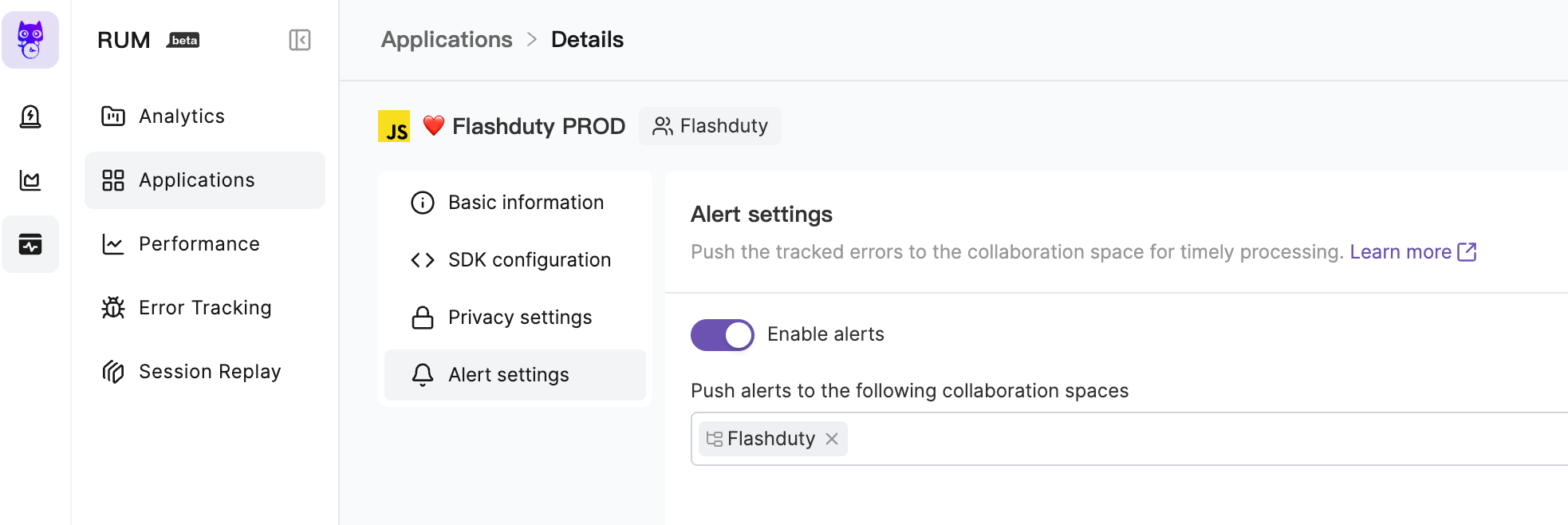
Go to the \`RUM\` - \`Application Details\` - \`Alert Settings\` page to enable alerts. You can choose to deliver alerts to multiple channels. Alert notification rules follow the escalation rules under the channel, and you can set responders for the team to assign to responders when alerts occur.
|
|
8208
|
+
|
|
8209
|
+
|
|
8210
|
+
|
|
8211
|
+
For more information, please refer to [RUM Issue Alerting](https://docs.flashcat.cloud/en/flashduty/rum/issue-alerting?nav=01JCQ7A4N4WRWNXW8EWEHXCMF5).
|
|
8212
|
+
`,Cloudflare:`---
|
|
8213
|
+
title: "Cloudflare Alert Events"
|
|
8214
|
+
description: "Sync Cloudflaret alert events to Flashduty via webhook for automated alert noise reduction"
|
|
8215
|
+
date: "2024-07-05T10:00:00+08:00"
|
|
8216
|
+
url: "https://docs.flashcat.cloud/en/flashduty/Cloudflare-integration-guide"
|
|
8217
|
+
---
|
|
8218
|
+
|
|
8219
|
+
Sync Cloudflare alert events to Flashduty via webhook for automated alert noise reduction.
|
|
8220
|
+
|
|
8221
|
+
<div class="hide">
|
|
8222
|
+
|
|
8223
|
+
## In Flashduty
|
|
8224
|
+
---
|
|
8225
|
+
You can obtain an integration push URL through either of these two methods:
|
|
8226
|
+
|
|
8227
|
+
### Using Private Integration
|
|
8228
|
+
|
|
8229
|
+
Choose this method when you don't need to route alert events to different channels - it's simpler.
|
|
8230
|
+
|
|
8231
|
+
<details>
|
|
8232
|
+
<summary>Expand</summary>
|
|
8233
|
+
|
|
8234
|
+
1. Go to the Flashduty console, select **Channel**, and enter a channel's details page
|
|
8235
|
+
2. Select the **Integrations** tab, click **Add Integration** to enter the integration page
|
|
8236
|
+
3. Choose **Cloudflare** integration and click **Save** to generate a card
|
|
8237
|
+
4. Click the generated card to view the **Push URL**, copy it for later use, and you're done
|
|
8238
|
+
|
|
8239
|
+
</details>
|
|
8240
|
+
|
|
8241
|
+
### Using Shared Integration
|
|
8242
|
+
|
|
8243
|
+
Choose this method when you need to route alerts to different channels based on the alert event payload.
|
|
8244
|
+
|
|
8245
|
+
<details>
|
|
8246
|
+
<summary>Expand</summary>
|
|
8247
|
+
|
|
8248
|
+
1. Go to the Flashduty console, select **Integration Center=>Alert Events** to enter the integration selection page
|
|
8249
|
+
2. Select **Cloudflare** integration:
|
|
8250
|
+
- **Integration Name**: Define a name for this integration
|
|
8251
|
+
3. Configure the default route and select the corresponding channel (after the integration is created, you can go to \`Route\` to configure more routing rules)
|
|
8252
|
+
4. Click **Save** and copy the newly generated **push URL** for later use
|
|
8253
|
+
5. Done
|
|
8254
|
+
|
|
8255
|
+
</details>
|
|
8256
|
+
</div>
|
|
8257
|
+
|
|
8258
|
+
|
|
8259
|
+
## In Cloudflare
|
|
8260
|
+
---
|
|
8261
|
+
|
|
8262
|
+
<div class="md-block">
|
|
8263
|
+
|
|
8264
|
+
## 一、Create Notification Object
|
|
8265
|
+
1. Log in to the \`Cloudflare dashboard\` and select your account.
|
|
8266
|
+
2. Go to \`Notifications\` > \`Destinations\`.
|
|
8267
|
+
3. In the \`Webhooks\` card, select Create.
|
|
8268
|
+
4. In the edit page, enter Flashduty as the name and fill in the <span class='integration_url'>push URL</span> for the alert integration in the URL field.
|
|
8269
|
+
5. Select \`Save and Test\` to finish setting up your webhook.
|
|
8270
|
+
|
|
8271
|
+
After configuring the Webhook channel, you can use it in notification policies.
|
|
8272
|
+
|
|
8273
|
+
</dev>
|
|
8274
|
+
|
|
8275
|
+
## 二、Status Mapping
|
|
8276
|
+
|
|
8277
|
+
<div class="md-block">
|
|
8278
|
+
|
|
8279
|
+
Currently, all alerts pushed to Flashduty through the Cloudflare integration are set to Warning severity. However, you can customize the severity using the [alert pipeline](https://docs.flashcat.cloud/en/flashduty/alert-pipelines).
|
|
8280
|
+
|
|
8281
|
+
</div>
|
|
8282
|
+
|
|
8093
8283
|
`};n.FlashDocsEn=h})(window);
|