flashduty-knowledge-base 1.3.1 → 1.3.2
This diff represents the content of publicly available package versions that have been released to one of the supported registries. The information contained in this diff is provided for informational purposes only and reflects changes between package versions as they appear in their respective public registries.
- package/dist/en.d.ts +3 -0
- package/dist/esm/en.js +147 -25
- package/dist/esm/zh.js +143 -18
- package/dist/iife/en.js +123 -1
- package/dist/iife/zh.js +128 -3
- package/dist/zh.d.ts +3 -0
- package/package.json +1 -1
package/dist/en.d.ts
CHANGED
package/dist/esm/en.js
CHANGED
|
@@ -3813,7 +3813,7 @@ If you need to configure \`Custom Templating Variables\`, you can refer to the f
|
|
|
3813
3813
|
|INFO|Info|Info|
|
|
3814
3814
|
|
|
3815
3815
|
</div>
|
|
3816
|
-
`,
|
|
3816
|
+
`,U=`---
|
|
3817
3817
|
title: "SolarWinds Alert Events"
|
|
3818
3818
|
description: "Sync SolarWinds alert events to Flashduty via webhook for automated alert noise reduction"
|
|
3819
3819
|
date: "2024-08-20T10:00:00+08:00"
|
|
@@ -3916,7 +3916,7 @@ Choose this option when you need to route alerts to different channels based on
|
|
|
3916
3916
|
|Info|Info|Info|
|
|
3917
3917
|
|
|
3918
3918
|
</div>
|
|
3919
|
-
`,
|
|
3919
|
+
`,D=`---
|
|
3920
3920
|
title: "Volcengine Cloud Monitor Alert Events"
|
|
3921
3921
|
description: "Sync Volcengine Cloud Monitor alert events to Flashduty via webhook for automated alert noise reduction"
|
|
3922
3922
|
date: "2024-08-20T10:00:00+08:00"
|
|
@@ -4005,7 +4005,7 @@ Choose this method when you need to route alerts to different channels based on
|
|
|
4005
4005
|
|Notice|Info|Info|
|
|
4006
4006
|
|
|
4007
4007
|
</div>
|
|
4008
|
-
`,
|
|
4008
|
+
`,E=`---
|
|
4009
4009
|
title: "Volcengine Cloud Monitor Event Center Alert Events"
|
|
4010
4010
|
description: "Sync Volcengine Cloud Monitor Event Center alert events to Flashduty via webhook for automated alert noise reduction"
|
|
4011
4011
|
date: "2024-07-05T10:00:00+08:00"
|
|
@@ -4092,7 +4092,7 @@ Choose this method when you need to route alerts to different channels based on
|
|
|
4092
4092
|
|Notice|Info|Info|
|
|
4093
4093
|
|
|
4094
4094
|
</div>
|
|
4095
|
-
`,
|
|
4095
|
+
`,N=`---
|
|
4096
4096
|
title: "Volcengine Log Service (TLS) Alert Events"
|
|
4097
4097
|
description: "Sync Volcengine Log Service (TLS) alert events to Flashduty via webhook for automated alert noise reduction"
|
|
4098
4098
|
date: "2024-07-05T10:00:00+08:00"
|
|
@@ -4229,7 +4229,7 @@ Choose this method when you need to route alerts to different channels based on
|
|
|
4229
4229
|
</div>
|
|
4230
4230
|
|
|
4231
4231
|
</div>
|
|
4232
|
-
`,
|
|
4232
|
+
`,M=`---
|
|
4233
4233
|
title: "OpManager Alert Events"
|
|
4234
4234
|
description: "Sync OpManager alert events to Flashduty via webhook for automated alert noise reduction"
|
|
4235
4235
|
date: "2024-07-05T10:00:00+08:00"
|
|
@@ -4363,7 +4363,7 @@ Choose this method when you need to route alerts to different channels based on
|
|
|
4363
4363
|
| Attention | Info | Info |
|
|
4364
4364
|
|
|
4365
4365
|
</div>
|
|
4366
|
-
`,
|
|
4366
|
+
`,P=`---
|
|
4367
4367
|
title: "Meraki Alert Events"
|
|
4368
4368
|
description: "Sync Meraki alert events to Flashduty via webhook for automated alert noise reduction"
|
|
4369
4369
|
date: "2024-07-05T10:00:00+08:00"
|
|
@@ -4874,7 +4874,7 @@ Choose this method when you need to route alerts to different channels based on
|
|
|
4874
4874
|
|
|
4875
4875
|
</div>
|
|
4876
4876
|
|
|
4877
|
-
`,
|
|
4877
|
+
`,H=`---
|
|
4878
4878
|
title: "Keep Alert Integration Guide"
|
|
4879
4879
|
description: "Push alert events to Flashduty through Keep's Provider to achieve automated alert noise reduction."
|
|
4880
4880
|
date: "2025-05-19T10:00:00+08:00"
|
|
@@ -4955,7 +4955,7 @@ Field|Required|Type|Definition
|
|
|
4955
4955
|
|
|
4956
4956
|
<img alt="drawing" width="600" src="https://download.flashcat.cloud/flashduty/doc/en/fd/keep-2.png" />
|
|
4957
4957
|
|
|
4958
|
-
`,
|
|
4958
|
+
`,Y=`---
|
|
4959
4959
|
title: "ElastAlert2 Alert Integration Guide"
|
|
4960
4960
|
description: "Push alert events to Flashduty through ElastAlert2's Provider to achieve automated alert noise reduction."
|
|
4961
4961
|
date: "2025-05-19T10:00:00+08:00"
|
|
@@ -5159,7 +5159,7 @@ By default, the system always creates new alerts for each message, but you can s
|
|
|
5159
5159
|
|
|
5160
5160
|
Currently, all alerts pushed to Flashduty through email integration are set to Warning severity.
|
|
5161
5161
|
|
|
5162
|
-
`,
|
|
5162
|
+
`,V=`---
|
|
5163
5163
|
title: "Feishu Alert Integration"
|
|
5164
5164
|
description: "Generate a unique Feishu robot address in Flashduty, and synchronize the occurrence and recovery of alerts through Feishu"
|
|
5165
5165
|
date: "2025-05-19T10:00:00+08:00"
|
|
@@ -5242,7 +5242,129 @@ By default, the system always creates new alerts for each message, but you can s
|
|
|
5242
5242
|
|
|
5243
5243
|
Currently, all alerts pushed to Flashduty through Feishu Alert integration are set to Warning severity.
|
|
5244
5244
|
|
|
5245
|
-
`,
|
|
5245
|
+
`,B=`---
|
|
5246
|
+
title: "Volcengine Cloud-Detect Alert Events"
|
|
5247
|
+
description: "Sync Volcengine Cloud-Detect alert events to Flashduty via webhook for automated alert noise reduction"
|
|
5248
|
+
date: "2024-07-05T10:00:00+08:00"
|
|
5249
|
+
url: "https://docs.flashcat.cloud/en/flashduty/volcengine-tls-integration-guide"
|
|
5250
|
+
---
|
|
5251
|
+
|
|
5252
|
+
Sync Volcengine Cloud-Detect alert events to Flashduty via webhook for automated alert noise reduction.
|
|
5253
|
+
|
|
5254
|
+
<div class="hide">
|
|
5255
|
+
|
|
5256
|
+
## In Flashduty
|
|
5257
|
+
---
|
|
5258
|
+
You can obtain an integration push URL through either of these two methods:
|
|
5259
|
+
|
|
5260
|
+
### Using Private Integration
|
|
5261
|
+
|
|
5262
|
+
Choose this method when you don't need to route alert events to different channels - it's simpler.
|
|
5263
|
+
|
|
5264
|
+
<details>
|
|
5265
|
+
<summary>Expand</summary>
|
|
5266
|
+
|
|
5267
|
+
1. Go to the Flashduty console, select **Channel**, and enter a channel's details page
|
|
5268
|
+
2. Select the **Integrations** tab, click **Add Integration** to enter the integration page
|
|
5269
|
+
3. Choose **Volcengine Detect** integration and click **Save** to generate a card
|
|
5270
|
+
4. Click the generated card to view the **Push URL**, copy it for later use, and you're done
|
|
5271
|
+
|
|
5272
|
+
</details>
|
|
5273
|
+
|
|
5274
|
+
### Using Shared Integration
|
|
5275
|
+
|
|
5276
|
+
Choose this method when you need to route alerts to different channels based on the alert event payload.
|
|
5277
|
+
|
|
5278
|
+
<details>
|
|
5279
|
+
<summary>Expand</summary>
|
|
5280
|
+
|
|
5281
|
+
1. Go to the Flashduty console, select **Integration Center=>Alert Events** to enter the integration selection page
|
|
5282
|
+
2. Select **Volcengine Detect** integration:
|
|
5283
|
+
- **Integration Name**: Define a name for this integration
|
|
5284
|
+
3. Configure the default route and select the corresponding channel (after the integration is created, you can go to \`Route\` to configure more routing rules)
|
|
5285
|
+
4. Click **Save** and copy the newly generated **push URL** for later use
|
|
5286
|
+
5. Done
|
|
5287
|
+
|
|
5288
|
+
</details>
|
|
5289
|
+
</div>
|
|
5290
|
+
|
|
5291
|
+
## In Volcengine
|
|
5292
|
+
---
|
|
5293
|
+
|
|
5294
|
+
<div class="md-block">
|
|
5295
|
+
|
|
5296
|
+
## 一、Create Notification Object
|
|
5297
|
+
|
|
5298
|
+
### Step 1: Create Notification Object
|
|
5299
|
+
1. Login to your \`Volcengine\` console, find \`Alert Manager\` in the \`Notify Object\` menu
|
|
5300
|
+
2. Click \`System Integration\`, click \`Create System Integration\` or edit the existing endpoint
|
|
5301
|
+
3. 在编辑页面中,名称填写 \`Flashduty\` ,\`回调 URL\` 处填写告警集成的<span class='integration_url'>推送地址</span>。
|
|
5302
|
+
5. Click \`OK\` to complete the configuration
|
|
5303
|
+
|
|
5304
|
+
<img alt="drawing" width="600" src="https://download.flashcat.cloud/flashduty/doc/zh/fd/volcengine-1.png" />
|
|
5305
|
+
|
|
5306
|
+
### Step 2: Use Notification Object in Alert Policy
|
|
5307
|
+
1. Login to your \`Volcengine\` console, find \`Alert Manager\` in the \`Alert Policy\` menu
|
|
5308
|
+
2. Click \`Create Alert Policy\` or edit the existing alert policy
|
|
5309
|
+
3. In the edit page, select the created \`Flashduty\` Endpoint
|
|
5310
|
+
4. Configure other settings as needed, and click \`OK\` to complete the configuration
|
|
5311
|
+
|
|
5312
|
+
<img alt="drawing" width="600" src="https://download.flashcat.cloud/flashduty/doc/zh/fd/volcengine-2.png" />
|
|
5313
|
+
|
|
5314
|
+
</dev>
|
|
5315
|
+
|
|
5316
|
+
## 二、Status Mapping
|
|
5317
|
+
|
|
5318
|
+
<div class="md-block">
|
|
5319
|
+
|
|
5320
|
+
| Detect | Flashduty | Status |
|
|
5321
|
+
| ---------- | -------- | ---- |
|
|
5322
|
+
| P0 | Critical | Critical|
|
|
5323
|
+
| P2 | Warning | Warning|
|
|
5324
|
+
|
|
5325
|
+
</div>
|
|
5326
|
+
|
|
5327
|
+
`,z=`---
|
|
5328
|
+
title: "Monit Alert Integration"
|
|
5329
|
+
description: "Flashduty Monit alert integration, Monit service reports alerts through this integration"
|
|
5330
|
+
date: "2025-05-19T10:00:00+08:00"
|
|
5331
|
+
url: "https://docs.flashcat.cloud/en/flashduty/monit-alert-integration-guide?nav=01JCQ7A4N4WRWNXW8EWEHXCMF5"
|
|
5332
|
+
---
|
|
5333
|
+
|
|
5334
|
+
When you enable the Monit service, the system will automatically create this integration for you. This integration is used to collect alert events generated by the Monit service.
|
|
5335
|
+
|
|
5336
|
+
:::tips
|
|
5337
|
+
You cannot modify or delete this integration. However, you can manage the label enrichment, alert pipeline, and routing rules under the integration.
|
|
5338
|
+
:::
|
|
5339
|
+
|
|
5340
|
+
## How to Enable Monit Alerts
|
|
5341
|
+
|
|
5342
|
+
Go to the \`Monit\` - \`Alert Rules\` - \`Rule Details\` page to configure monitoring metrics and threshold conditions, and enable alerts. You can choose to deliver alerts to multiple channels. Alert notification rules follow the escalation rules under the channel, and you can set responders for the team to assign to responders when alerts occur.
|
|
5343
|
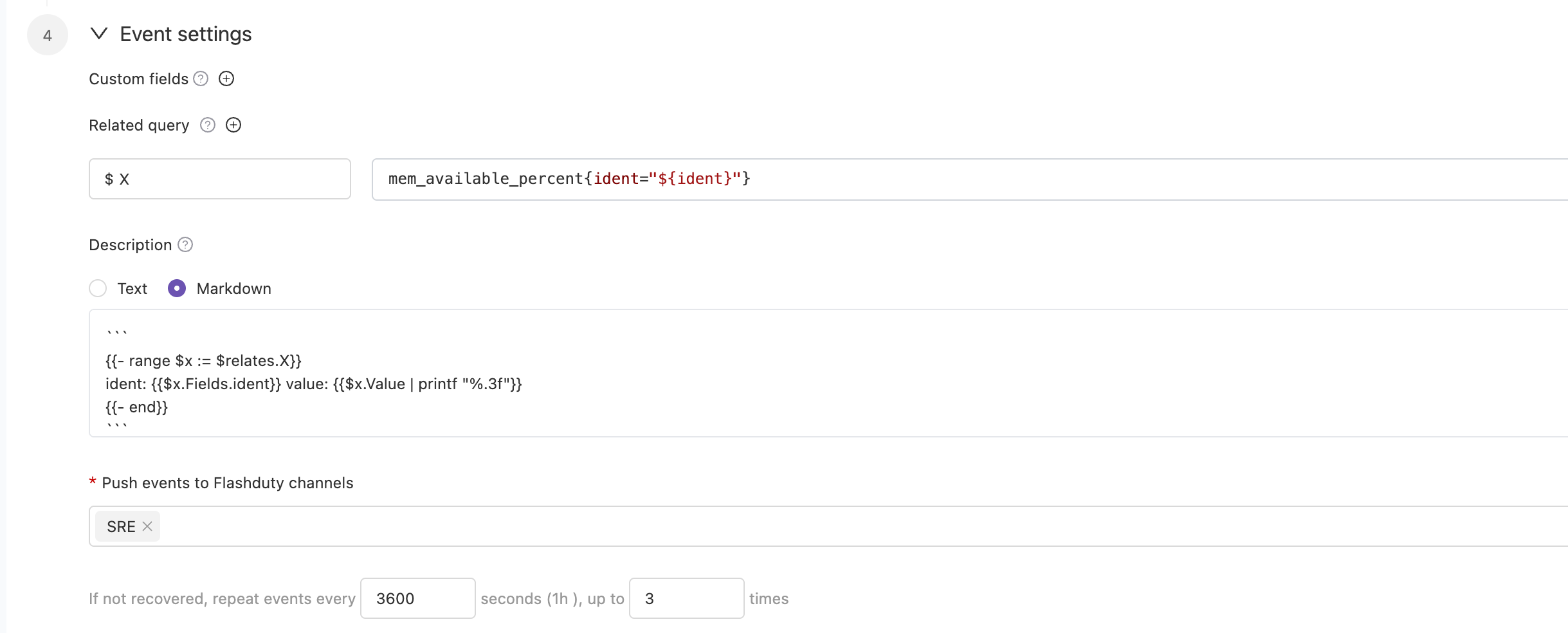
+
|
|
5344
|
+
|
|
5345
|
+
|
|
5346
|
+
In some cases, you may want to route alerts generated by the same alert rule to different channels based on conditions. In this case, you can choose to deliver alerts directly to the integration rather than to the channels, and set routing rules under the current integration.
|
|
5347
|
+
`,K=`---
|
|
5348
|
+
title: "RUM Alert Integration"
|
|
5349
|
+
description: "Flashduty RUM alert integration, RUM service reports alerts through this integration"
|
|
5350
|
+
date: "2025-05-19T10:00:00+08:00"
|
|
5351
|
+
url: "https://docs.flashcat.cloud/en/flashduty/rum-alert-integration-guide?nav=01JCQ7A4N4WRWNXW8EWEHXCMF5"
|
|
5352
|
+
---
|
|
5353
|
+
|
|
5354
|
+
When you enable the RUM service, the system will automatically create this integration for you. This integration is used to collect alert events generated by the RUM service.
|
|
5355
|
+
|
|
5356
|
+
:::tips
|
|
5357
|
+
You cannot modify or delete this integration. However, you can manage the label enrichment, alert pipeline, and routing rules under the integration.
|
|
5358
|
+
:::
|
|
5359
|
+
|
|
5360
|
+
## How to Enable RUM Alerts
|
|
5361
|
+
|
|
5362
|
+
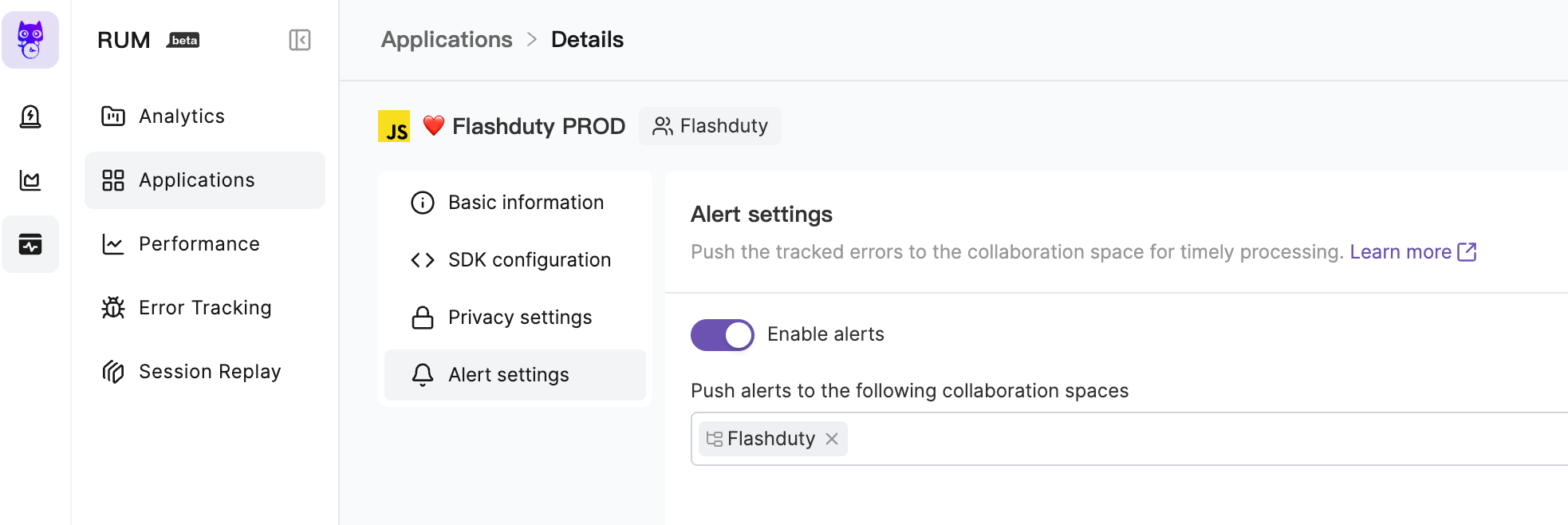
Go to the \`RUM\` - \`Application Details\` - \`Alert Settings\` page to enable alerts. You can choose to deliver alerts to multiple channels. Alert notification rules follow the escalation rules under the channel, and you can set responders for the team to assign to responders when alerts occur.
|
|
5363
|
+
|
|
5364
|
+
|
|
5365
|
+
|
|
5366
|
+
For more information, please refer to [RUM Issue Alerting](https://docs.flashcat.cloud/en/flashduty/rum/issue-alerting?nav=01JCQ7A4N4WRWNXW8EWEHXCMF5).
|
|
5367
|
+
`,J=`---
|
|
5246
5368
|
title: "Custom Change Event Integration Guide"
|
|
5247
5369
|
description: "Push change events from your own systems to Flashduty using standard protocols. Most incidents are caused by changes, and the correlation between changes and alerts helps quickly identify incident causes."
|
|
5248
5370
|
date: "2025-05-19T10:00:00+08:00"
|
|
@@ -5299,7 +5421,7 @@ Labels are descriptions of events. You should enrich label content as much as po
|
|
|
5299
5421
|
|
|
5300
5422
|
</details>
|
|
5301
5423
|
|
|
5302
|
-
`,
|
|
5424
|
+
`,Z=`---
|
|
5303
5425
|
title: "Jira Issue Events"
|
|
5304
5426
|
description: "Sync Jira Issue events to Flashduty via webhooks to collect change events."
|
|
5305
5427
|
date: "2025-05-19T10:00:00+08:00"
|
|
@@ -5373,7 +5495,7 @@ Flashduty extracts the status.name information from the webhook payload by defau
|
|
|
5373
5495
|
Please contact Flashduty if you wish to modify this mapping.
|
|
5374
5496
|
|
|
5375
5497
|
</div>
|
|
5376
|
-
`,
|
|
5498
|
+
`,Q=`---
|
|
5377
5499
|
title: Contributing to our documentation — Meilisearch documentation
|
|
5378
5500
|
description: The Meilisearch documentation is open-source. Learn how to help make it even better.
|
|
5379
5501
|
sidebarDepth: 3
|
|
@@ -5508,7 +5630,7 @@ Once published, you can access the application via mobile/PC client. First-time
|
|
|
5508
5630
|
|Group Bot Webhook|Maximum 100 calls/minute|
|
|
5509
5631
|
|Sending messages to the same user or group|Maximum 5 calls/second|
|
|
5510
5632
|
|
|
5511
|
-
**Note:** Messages cannot be pushed normally when exceeding limits, please use notification channels reasonably`,
|
|
5633
|
+
**Note:** Messages cannot be pushed normally when exceeding limits, please use notification channels reasonably`,X=`---
|
|
5512
5634
|
title: "Dingtalk Integration"
|
|
5513
5635
|
description: "Integrate with Dingtalk custom application to receive and respond to alerts within Dingtalk"
|
|
5514
5636
|
date: "2025-05-19T10:00:00+08:00"
|
|
@@ -5664,7 +5786,7 @@ After the application is released, you can access it via mobile/PC client. First
|
|
|
5664
5786
|
|Enterprise|5,500,000|60|1st of each month|
|
|
5665
5787
|
|
|
5666
5788
|
**Note:** Messages cannot be pushed normally after exceeding limits, please use notification channels reasonably
|
|
5667
|
-
`,
|
|
5789
|
+
`,ee=`---
|
|
5668
5790
|
title: "WeCom Integration"
|
|
5669
5791
|
description: "Integrate WeCom third-party application to receive and respond to alerts within WeCom"
|
|
5670
5792
|
date: "2025-05-19T10:00:00+08:00"
|
|
@@ -5743,7 +5865,7 @@ Integrate WeCom third-party application to receive and respond to alerts within
|
|
|
5743
5865
|
7. **Incident notification fails with \`WeCom License Not Activated\`?**
|
|
5744
5866
|
|
|
5745
5867
|
- Contact Flashduty customer service or dedicated support for license purchase and activation
|
|
5746
|
-
`,
|
|
5868
|
+
`,ne=`---
|
|
5747
5869
|
title: "Slack Integration"
|
|
5748
5870
|
description: "Integrate with Slack to receive and respond to alerts within Slack"
|
|
5749
5871
|
date: "2025-05-19T10:00:00+08:00"
|
|
@@ -5797,7 +5919,7 @@ Integrate with Slack to receive and respond to alerts within Slack.
|
|
|
5797
5919
|
|
|
5798
5920
|
8. **Slack App shows Other questions error**
|
|
5799
5921
|
- Try again, as this might be an unrecorded issue
|
|
5800
|
-
- If the error persists, contact customer support`,
|
|
5922
|
+
- If the error persists, contact customer support`,te=`---
|
|
5801
5923
|
title: "Microsoft Teams Integration"
|
|
5802
5924
|
description: "Integrate Microsoft Teams as a third-party application to receive and respond to alerts within Microsoft Teams"
|
|
5803
5925
|
date: "2025-05-19T10:00:00+08:00"
|
|
@@ -5925,7 +6047,7 @@ Please check in Integration Center => Instant Messaging => Microsoft Teams under
|
|
|
5925
6047
|
Currently not supported
|
|
5926
6048
|
</details>
|
|
5927
6049
|
|
|
5928
|
-
`,
|
|
6050
|
+
`,ae=`Configure alert webhooks to receive HTTP callbacks at your specified URL when alerts have specific actions (such as triggering or closing). The callback content includes the latest key information about the alert, allowing integration with your custom tools.
|
|
5929
6051
|
|
|
5930
6052
|
<span id="EventTypes"></span>
|
|
5931
6053
|
|
|
@@ -6093,7 +6215,7 @@ curl -X POST 'https://example.com/alert/webhook?a=a' \\
|
|
|
6093
6215
|
4. **Trusted IP whitelist for push sources?**
|
|
6094
6216
|
- {ip_whitelist}
|
|
6095
6217
|
- May be updated in the future, please check periodically
|
|
6096
|
-
`,
|
|
6218
|
+
`,ie=`Configure incident webhooks to receive HTTP callbacks at your specified URL when incidents have specific actions (such as triggering or closing). The callback content includes the latest key information about the incident, allowing integration with your custom tools.
|
|
6097
6219
|
|
|
6098
6220
|
<span id="EventTypes"></span>
|
|
6099
6221
|
|
|
@@ -6193,7 +6315,7 @@ acknowledged_at | int64| No | Acknowledgment time
|
|
|
6193
6315
|
| fields | map[string]interface{} | No | Custom field key-value pairs, Key is string, Value can be any type depending on field type |
|
|
6194
6316
|
| creator | [Person](#Person) | No | Creator information, exists only for manually created incidents |
|
|
6195
6317
|
| closer | [Person](#Person) | No | Closer information, exists only for manually closed incidents |
|
|
6196
|
-
| responders | [][Responder](#Responder) | No | List of responder information |
|
|
6318
|
+
| responders | [][Responder](#Responder) | No | List of responder information, only exists after the incident is assigned. For i_new events, this value may be empty |
|
|
6197
6319
|
| alert_cnt | int64 | No | Number of associated alerts |
|
|
6198
6320
|
| channel_id | int64 | No | Channel ID, 0 means not belonging to any channel |
|
|
6199
6321
|
| channel_name | string | No | Channel name |
|
|
@@ -6300,7 +6422,7 @@ curl -X POST 'https://example.com/incident/webhook?a=a' \\
|
|
|
6300
6422
|
|
|
6301
6423
|
4. **Trusted IP whitelist for push sources?**
|
|
6302
6424
|
- {ip_whitelist}
|
|
6303
|
-
- May be updated in the future, please check periodically`,
|
|
6425
|
+
- May be updated in the future, please check periodically`,oe=`Custom incident actions allow you to quickly invoke external interfaces during incident troubleshooting for incident self-healing, information enrichment, and other custom operations.
|
|
6304
6426
|
|
|
6305
6427
|
## I. Creating Actions
|
|
6306
6428
|
|
|
@@ -6547,7 +6669,7 @@ When an incident occurs and is confirmed to be caused by a change, directly trig
|
|
|
6547
6669
|
|
|
6548
6670
|
### Update Status Page
|
|
6549
6671
|
|
|
6550
|
-
When an incident is confirmed to affect online services, trigger external status page updates to prompt`,
|
|
6672
|
+
When an incident is confirmed to affect online services, trigger external status page updates to prompt`,se=`---
|
|
6551
6673
|
title: "Jira Sync"
|
|
6552
6674
|
description: "Sync incidents with Jira issues through Jira Sync Webhook."
|
|
6553
6675
|
date: "2025-05-19T10:00:00+08:00"
|
|
@@ -6629,7 +6751,7 @@ In the Integration Center, select **Webhook**, choose **Jira Sync** integration,
|
|
|
6629
6751
|
|
|
6630
6752
|
- Flashduty syncs information according to default field mappings and your custom field configurations. If your Jira issue type has required fields without mapping relationships, Jira issue creation may fail.
|
|
6631
6753
|
- Jira issue details are accessed using project KEY + number format. If you modify the project KEY, saved issue URLs in Flashduty may become inaccessible, so please modify project KEYs with caution.
|
|
6632
|
-
`,
|
|
6754
|
+
`,re=`---
|
|
6633
6755
|
title: "ServiceNow Sync"
|
|
6634
6756
|
description: "Sync incidents with ServiceNow Incidents through ServiceNow sync webhook."
|
|
6635
6757
|
date: "2025-05-19T10:00:00+08:00"
|
|
@@ -6913,7 +7035,7 @@ Only when ServiceNow's Urgency value changes will it affect Flashduty's Severity
|
|
|
6913
7035
|
| Low | Info | |
|
|
6914
7036
|
| Medium | Warning | |
|
|
6915
7037
|
| High | Critical | |
|
|
6916
|
-
`,
|
|
7038
|
+
`,le=`---
|
|
6917
7039
|
title: "Configure Notification Templates"
|
|
6918
7040
|
description: "Customize notification content through template configuration"
|
|
6919
7041
|
date: "2024-05-10T10:00:00+08:00"
|
|
@@ -8033,7 +8155,7 @@ As shown in the image below:
|
|
|
8033
8155
|
|
|
8034
8156
|
<img src="https://download.flashcat.cloud/flashduty/changelog/20230720/email_render.png" alt="drawing" style="display: block; margin: 0 auto;" width="500"/>
|
|
8035
8157
|
|
|
8036
|
-
</div>`,
|
|
8158
|
+
</div>`,de=`---
|
|
8037
8159
|
title: "Link Integration"
|
|
8038
8160
|
description: "Through Link integration, you can quickly access external links by obtaining key parameters from incident attributes, labels, and other information"
|
|
8039
8161
|
date: "2025-05-19T10:00:00+08:00"
|
|
@@ -8090,4 +8212,4 @@ https://cmdb.com/vm?sn=VM123456
|
|
|
8090
8212
|
1. When referenced content does not exist, Link integration will still generate the corresponding link but will not be able to retrieve the value
|
|
8091
8213
|
2. Each channel can bind up to three Link integrations
|
|
8092
8214
|
3. Pay attention to reference syntax; improper variable reference formatting will result in failure to retrieve corresponding values
|
|
8093
|
-
`,
|
|
8215
|
+
`,ce={CustomAlert:n,Email:t,N9e:a,Prometheus:i,Grafana:o,Zabbix:s,UptimeKuma:r,AliyunARMS:l,AliyunCmEvent:d,AliyunCm:c,AliyunSLS:e,AWSCW:e,AzureMonitor:u,BaiDuBCM:h,HuaWeiCES:g,InfluxDB:p,OpenFalcon:m,PagerDuty:f,TencentBK:y,TencentCLS:v,TencentCm:b,TencentEb:w,OceanBase:C,Graylog:k,Skywalking:I,Sentry:S,Jiankongbao:A,AWSEventBridge:x,Dynatrace:_,HuaweiyunLTS:L,GoogleCM:F,Zilliz:G,Splunk:R,AppDynamics:T,SolarWinds:U,VolcEngineMetric:D,VolcEngineEvent:E,VolcEngineTLS:N,OpManager:M,Meraki:P,StateCloud:W,Guance:q,CustomChange:J,Jira:Z,Lark:Q,Dingtalk:X,Wecom:ee,Slack:ne,MicrosoftTeams:te,AlertWebhook:ae,IncidentWebhook:ie,CustomAction:oe,Templates:le,HuaweiyunAPM:O,JiraSync:se,ZStack:j,Keep:H,ElastAlert2:Y,DingtalkAlert:$,FeishuAlert:V,VolcEngineDetect:B,Link:de,ServiceNowSync:re,Monit:z,Rum:K};module.exports=ce;
|
package/dist/esm/zh.js
CHANGED
|
@@ -3445,7 +3445,7 @@ url: "https://docs.flashcat.cloud/zh/flashduty/aws-eventbridge-integration-guide
|
|
|
3445
3445
|
### 步骤1:在 API destinations 中创建 Connerction
|
|
3446
3446
|
1. 登录您的 AWS 控制台,检索 \`Amazon Eventbridge\` 产品,并进入对应产品控制台。
|
|
3447
3447
|
2. 在左侧导航栏选择 \`Integration=>API destinations\`。
|
|
3448
|
-
3. 点击 \`
|
|
3448
|
+
3. 点击 \`connection\`,并点击 \`Create connection\` 创建链接。
|
|
3449
3449
|
|
|
3450
3450
|
<img alt="drawing" width="600" src="https://download.flashcat.cloud/flashduty/doc/aws-eb-3.png" />
|
|
3451
3451
|
|
|
@@ -4059,7 +4059,7 @@ url: "https://docs.flashcat.cloud/zh/flashduty/appdynamics-integration-guide"
|
|
|
4059
4059
|
|INFO|Info|提醒|
|
|
4060
4060
|
|
|
4061
4061
|
</div>
|
|
4062
|
-
`,
|
|
4062
|
+
`,M=`---
|
|
4063
4063
|
title: "SolarWinds 告警事件"
|
|
4064
4064
|
description: "通过 webhook 的方式同步 SolarWinds 告警事件到 Flashduty,实现告警事件自动化降噪处理"
|
|
4065
4065
|
date: "2024-08-20T10:00:00+08:00"
|
|
@@ -4164,7 +4164,7 @@ url: "https://docs.flashcat.cloud/zh/flashduty/solarwinds-integration-guide"
|
|
|
4164
4164
|
|Info|Info|提醒|
|
|
4165
4165
|
|
|
4166
4166
|
</div>
|
|
4167
|
-
`,
|
|
4167
|
+
`,N=`---
|
|
4168
4168
|
title: "火山引擎云监控告警事件"
|
|
4169
4169
|
description: "通过 webhook 的方式同步火山引擎云监控告警事件到 Flashduty,实现告警事件自动化降噪处理"
|
|
4170
4170
|
date: "2024-08-20T10:00:00+08:00"
|
|
@@ -5509,6 +5509,131 @@ url: "https://docs.flashcat.cloud/zh/flashduty/feishu-alert-integration-guide"
|
|
|
5509
5509
|
当前飞书告警集成推送到 Flashduty 的严重程度均为 Warning。
|
|
5510
5510
|
|
|
5511
5511
|
`,J=`---
|
|
5512
|
+
title: "火山引擎云拨测告警事件"
|
|
5513
|
+
description: "通过 webhook 的方式同步 火山引擎云拨测的告警事件到 Flashduty,实现告警事件自动化降噪处理"
|
|
5514
|
+
date: "2024-07-05T10:00:00+08:00"
|
|
5515
|
+
url: "https://docs.flashcat.cloud/zh/flashduty/volcengine-detect-integration-guide"
|
|
5516
|
+
---
|
|
5517
|
+
|
|
5518
|
+
通过 webhook 的方式同步 火山引擎云拨测的告警事件到 Flashduty,实现告警事件自动化降噪处理。
|
|
5519
|
+
|
|
5520
|
+
<div class="hide">
|
|
5521
|
+
|
|
5522
|
+
## 在 Flashduty
|
|
5523
|
+
---
|
|
5524
|
+
您可通过以下2种方式,获取一个集成推送地址,任选其一即可。
|
|
5525
|
+
|
|
5526
|
+
### 使用专属集成
|
|
5527
|
+
|
|
5528
|
+
当您不需要将告警事件路由到不同的协作空间,优先选择此方式,更简单。
|
|
5529
|
+
|
|
5530
|
+
<details>
|
|
5531
|
+
<summary>展开</summary>
|
|
5532
|
+
|
|
5533
|
+
1. 进入 Flashduty 控制台,选择 **协作空间**,进入某个空间的详情页面
|
|
5534
|
+
2. 选择 **集成数据** tab,点击 **添加一个集成**,进入添加集成页面
|
|
5535
|
+
3. 选择 **火山引擎云拨测** 集成,点击 **保存**,生成卡片。
|
|
5536
|
+
4. 点击生成的卡片,可以查看到 **推送地址**,复制备用,完成。
|
|
5537
|
+
|
|
5538
|
+
|
|
5539
|
+
</details>
|
|
5540
|
+
|
|
5541
|
+
### 使用共享集成
|
|
5542
|
+
|
|
5543
|
+
当您需要根据告警事件的 Payload 信息,将告警路由到不同的协作空间,优先选择此方式。
|
|
5544
|
+
|
|
5545
|
+
<details>
|
|
5546
|
+
<summary>展开</summary>
|
|
5547
|
+
|
|
5548
|
+
1. 进入 Flashduty 控制台,选择 **集成中心=>告警事件**,进入集成选择页面。
|
|
5549
|
+
2. 选择 **火山引擎云拨测** 集成:
|
|
5550
|
+
- **集成名称**:为当前集成定义一个名称。
|
|
5551
|
+
3. 配置默认路由,并选择对应的协作空间(集成创建后可以前往 \`路由\` 进行更多路由规则的配置)。
|
|
5552
|
+
4. 点击 **保存** 后,复制当前页面的新生成的 **推送地址** 备用。
|
|
5553
|
+
5. 完成。
|
|
5554
|
+
|
|
5555
|
+
</details>
|
|
5556
|
+
</div>
|
|
5557
|
+
|
|
5558
|
+
## 在 火山引擎
|
|
5559
|
+
---
|
|
5560
|
+
|
|
5561
|
+
<div class="md-block">
|
|
5562
|
+
|
|
5563
|
+
## 一、告警推送配置
|
|
5564
|
+
|
|
5565
|
+
### 步骤1:创建通知对象
|
|
5566
|
+
|
|
5567
|
+
1. 登录您的 \`火山引擎\` 控制台,在 \`告警管理\` 菜单中,找到 \`通知对象管理\`。
|
|
5568
|
+
2. 点击 \`系统集成\`,点击\`创建系统集成\`或编辑已有的通知对象。
|
|
5569
|
+
3. 在编辑页面中,名称填写 \`Flashduty\` ,\`回调 URL\` 处填写告警集成的<span class='integration_url'>推送地址</span>。
|
|
5570
|
+
4. 点击 \`确定\` 完成配置。
|
|
5571
|
+
|
|
5572
|
+
<img alt="drawing" width="600" src="https://download.flashcat.cloud/flashduty/doc/zh/fd/volcengine-1.png" />
|
|
5573
|
+
|
|
5574
|
+
### 步骤2:在告警策略中使用通知对象
|
|
5575
|
+
|
|
5576
|
+
1. 登录您的 \`火山引擎\` 控制台,在 \`告警管理\` 菜单中,找到 \`告警策略\`。
|
|
5577
|
+
2. 点击\`创建告警策略\`或编辑已有的报警器。
|
|
5578
|
+
3. 在编辑页面中,\`通知对象\` 处选择创建的 \`Flashduty\` 通知对象。
|
|
5579
|
+
4. 其他按需配置即可,点击 \`确定\` 完成配置。
|
|
5580
|
+
|
|
5581
|
+
<img alt="drawing" width="600" src="https://download.flashcat.cloud/flashduty/doc/zh/fd/volcengine-2.png" />
|
|
5582
|
+
|
|
5583
|
+
|
|
5584
|
+
|
|
5585
|
+
</dev>
|
|
5586
|
+
|
|
5587
|
+
## 二、状态对照
|
|
5588
|
+
|
|
5589
|
+
<div class="md-block">
|
|
5590
|
+
|
|
5591
|
+
| 火山引擎 | Flashduty | 状态 |
|
|
5592
|
+
| ---------- | -------- | ---- |
|
|
5593
|
+
| 严重告警 | Critical | 严重 |
|
|
5594
|
+
| 普通告警 | Warning | 警告 |
|
|
5595
|
+
|
|
5596
|
+
</div>
|
|
5597
|
+
|
|
5598
|
+
`,K=`---
|
|
5599
|
+
title: "Monit 告警集成"
|
|
5600
|
+
description: "Flashduty Monit 告警集成,Monit 服务通过此集成上报告警"
|
|
5601
|
+
date: "2025-05-19T10:00:00+08:00"
|
|
5602
|
+
url: "https://docs.flashcat.cloud/zh/flashduty/monit-alert-integration-guide"
|
|
5603
|
+
---
|
|
5604
|
+
|
|
5605
|
+
当您开通 Monit 服务时,系统会自动为您创建此集成。此集成用于收集 Monit 服务产生的告警事件。
|
|
5606
|
+
|
|
5607
|
+
:::tips
|
|
5608
|
+
您无法修改或删除此集成。但您可以管理集成下的标签增强、告警处理以及路由等规则。
|
|
5609
|
+
:::
|
|
5610
|
+
|
|
5611
|
+
## 如何开启 Monit 告警
|
|
5612
|
+
|
|
5613
|
+
前往\`Monit\`-\`告警规则\`-\`规则详情\`页面,配置监控指标和阈值等条件,并开启告警。您可以选择将告警投递至多个协作空间。告警的通知规则遵循协作空间下的分派策略,您可以为团队设定值班人员,在告警发生时分派给值班人。
|
|
5614
|
+
|
|
5615
|
+

|
|
5616
|
+
|
|
5617
|
+
某些情况下,您可能希望将同一个告警规则产生的告警,按条件路由到不同的协作空间,这个时候您可以选择将告警直接投递到集成,而非协作空间列表。并在当前集成下,设置路由规则。`,Z=`---
|
|
5618
|
+
title: "RUM 告警集成"
|
|
5619
|
+
description: "Flashduty RUM 告警集成,RUM 服务通过此集成上报告警"
|
|
5620
|
+
date: "2025-05-19T10:00:00+08:00"
|
|
5621
|
+
url: "https://docs.flashcat.cloud/zh/flashduty/rum-alert-integration-guide"
|
|
5622
|
+
---
|
|
5623
|
+
|
|
5624
|
+
当您开通 RUM 服务时,系统会自动为您创建此集成。此集成用于收集 RUM 服务产生的告警事件。
|
|
5625
|
+
|
|
5626
|
+
:::tips
|
|
5627
|
+
您无法修改或删除此集成。但您可以管理集成下的标签增强、告警处理以及路由等规则。
|
|
5628
|
+
:::
|
|
5629
|
+
|
|
5630
|
+
## 如何开启 RUM 告警
|
|
5631
|
+
|
|
5632
|
+
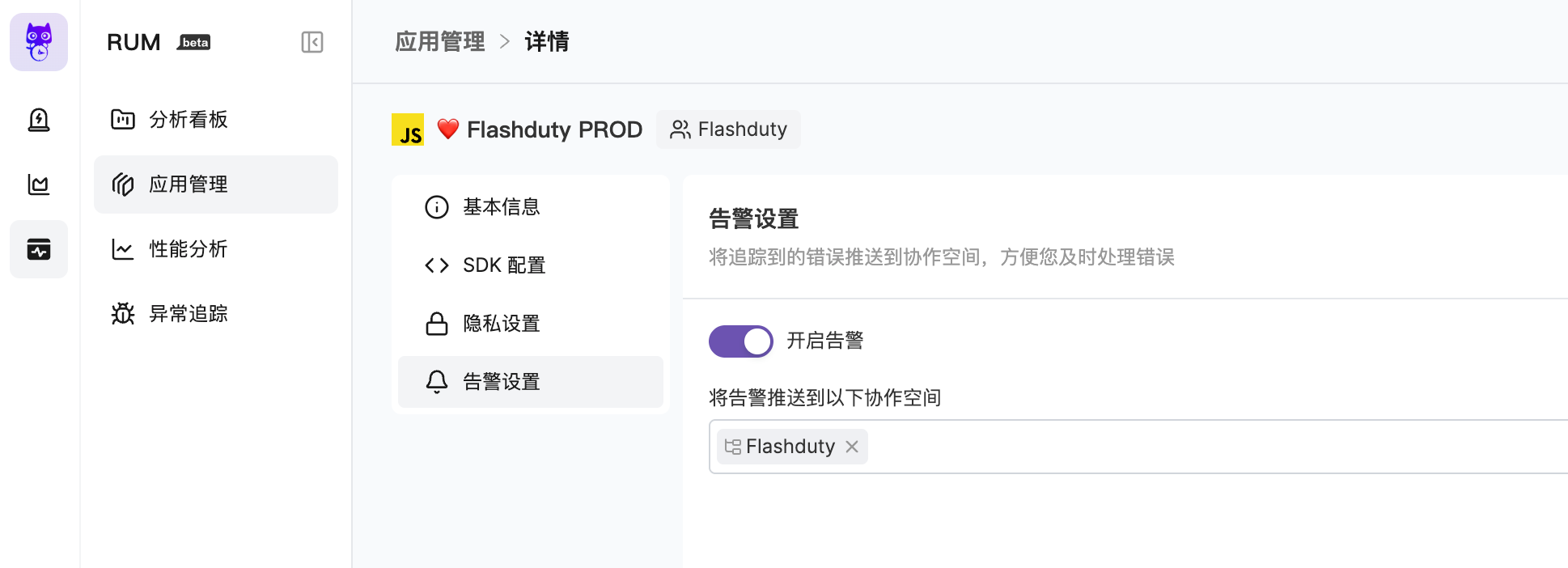
前往\`RUM\`-\`应用详情\`-\`告警设置\`页面,开启告警。您可以选择将告警投递至多个协作空间。告警的通知规则遵循协作空间下的分派策略,您可以为团队设定值班人员,在告警发生时分派给值班人。
|
|
5633
|
+
|
|
5634
|
+
|
|
5635
|
+
|
|
5636
|
+
更多内容,请您参考 [RUM Issue 告警](https://docs.flashcat.cloud/zh/flashduty/rum/issue-alerting)。`,Q=`---
|
|
5512
5637
|
title: "自定义变更事件集成指引"
|
|
5513
5638
|
description: "通过标准协议推送自有系统变更事件到 Flashduty,大部分故障由变更导致,变更和告警事件联动有助于快速定位故障原因。"
|
|
5514
5639
|
date: "2025-05-19T10:00:00+08:00"
|
|
@@ -5565,7 +5690,7 @@ Flashduty 已经适配部分常用工单、部署系统的 webhook 协议,对
|
|
|
5565
5690
|
|
|
5566
5691
|
</details>
|
|
5567
5692
|
|
|
5568
|
-
`,
|
|
5693
|
+
`,X=`---
|
|
5569
5694
|
title: "Jira 事件集成指引"
|
|
5570
5695
|
description: "通过 webhook 的方式同步 Jira Issue 事件到 Flashduty,实现变更事件收集。"
|
|
5571
5696
|
date: "2025-05-19T10:00:00+08:00"
|
|
@@ -5639,7 +5764,7 @@ Flashduty 默认提取 webhook payload 中 status.name 信息,并按照下边
|
|
|
5639
5764
|
如您希望变更此映射关系,请联系 Flashduty。
|
|
5640
5765
|
|
|
5641
5766
|
</div>
|
|
5642
|
-
`,
|
|
5767
|
+
`,Y=`---
|
|
5643
5768
|
title: Contributing to our documentation — Meilisearch documentation
|
|
5644
5769
|
description: The Meilisearch documentation is open-source. Learn how to help make it even better.
|
|
5645
5770
|
sidebarDepth: 3
|
|
@@ -5776,7 +5901,7 @@ sidebarDepth: 3
|
|
|
5776
5901
|
|给同一个用户或同一个群发消息|最高频率 5 次/秒|
|
|
5777
5902
|
|
|
5778
5903
|
**注意:** 超出限制后将无法正常推送消息,建议合理使用通知渠道
|
|
5779
|
-
`,
|
|
5904
|
+
`,nn=`---
|
|
5780
5905
|
title: "钉钉集成"
|
|
5781
5906
|
description: "通过集成钉钉自建应用,实现在钉钉端内接收和响应告警的能力"
|
|
5782
5907
|
date: "2025-05-19T10:00:00+08:00"
|
|
@@ -5937,7 +6062,7 @@ url: "https://docs.flashcat.cloud/zh/flashduty/dingtalk-integration-guide"
|
|
|
5937
6062
|
|专属版|550万次|60| 每月1日 |
|
|
5938
6063
|
|
|
5939
6064
|
**注意:** 超出限制后将无法正常推送消息,建议合理使用通知渠道
|
|
5940
|
-
`,
|
|
6065
|
+
`,tn=`---
|
|
5941
6066
|
title: "企业微信集成"
|
|
5942
6067
|
description: "通过集成企业微信第三方应用,实现在企业微信端内接收和响应告警的能力"
|
|
5943
6068
|
date: "2025-05-19T10:00:00+08:00"
|
|
@@ -6017,7 +6142,7 @@ url: "https://docs.flashcat.cloud/zh/flashduty/wecom-integration-guide"
|
|
|
6017
6142
|
7. **故障通知失败,提示\`未开通企微许可\`?**
|
|
6018
6143
|
|
|
6019
6144
|
- 联系 Flashduty 客服或专属支持,为您购买开通
|
|
6020
|
-
`,
|
|
6145
|
+
`,en=`---
|
|
6021
6146
|
title: "Slack 集成"
|
|
6022
6147
|
description: "通过集成Slack第三方应用,实现在Slack内接收和响应告警的能力"
|
|
6023
6148
|
date: "2025-05-19T10:00:00+08:00"
|
|
@@ -6071,7 +6196,7 @@ url: "https://docs.flashcat.cloud/zh/flashduty/slack-integration-guide"
|
|
|
6071
6196
|
|
|
6072
6197
|
8. **Slack App 内 Other questions,报错**
|
|
6073
6198
|
- 重新操作,遇到了还没被记录的问题
|
|
6074
|
-
- 重试后仍然报错,联系客服`,
|
|
6199
|
+
- 重试后仍然报错,联系客服`,an=`---
|
|
6075
6200
|
title: "Microsoft Teams集成"
|
|
6076
6201
|
description: "通过集成 Microsoft Teams 第三方应用,实现在 Microsoft Teams 内接收和响应告警的能力"
|
|
6077
6202
|
date: "2025-05-19T10:00:00+08:00"
|
|
@@ -6202,7 +6327,7 @@ Microsoft Teams 集成现处于 Beta 阶段,在关联前您需要先完成以
|
|
|
6202
6327
|
暂不支持
|
|
6203
6328
|
</details>
|
|
6204
6329
|
|
|
6205
|
-
`,
|
|
6330
|
+
`,sn=`配置告警 Webhook,当告警发生特定操作(如触发、关闭)时,系统通过 HTTP 回调您配置的地址。回调内容将包含告警最新关键信息,您可以与自研工具进行集成。
|
|
6206
6331
|
|
|
6207
6332
|
<span id="EventTypes"></span>
|
|
6208
6333
|
|
|
@@ -6370,7 +6495,7 @@ curl -X POST 'https://example.com/alert/webhook?a=a' \\
|
|
|
6370
6495
|
4. **推送来源可信 IP 白名单?**
|
|
6371
6496
|
- {ip_whitelist}
|
|
6372
6497
|
- 未来可能会更新,请定期查验
|
|
6373
|
-
`,
|
|
6498
|
+
`,ln=`配置故障 Webhook,当故障发生特定操作(如触发、关闭)时,系统通过 HTTP 回调您配置的地址。回调内容将包含故障最新关键信息,您可以与自研工具进行集成。
|
|
6374
6499
|
|
|
6375
6500
|
<span id="EventTypes"></span>
|
|
6376
6501
|
|
|
@@ -6470,7 +6595,7 @@ acknowledged_at | int64| 否 | 认领时间
|
|
|
6470
6595
|
| fields | map[string]interface{} | 否 | 自定义字段 KV,Key 为字符串,Value 可能为任意类型,取决于字段类型|
|
|
6471
6596
|
| creator | [Person](#Person) | 否 | 创建人员信息,仅手动创建故障时存在 |
|
|
6472
6597
|
| closer | [Person](#Person) | 否 | 关闭人员信息,仅手动关闭故障时存在 |
|
|
6473
|
-
| responders | [][Responder](#Responder) | 否 |
|
|
6598
|
+
| responders | [][Responder](#Responder) | 否 | 处理人员信息列表,仅故障被分派后存在。对于i_new事件,此值可能为空 |
|
|
6474
6599
|
| alert_cnt | int64 | 否 | 关联告警个数 |
|
|
6475
6600
|
| channel_id | int64 | 否 | 协作空间ID,为0代表不属于任何空间 |
|
|
6476
6601
|
| channel_name | string | 否 | 协作空间名称 |
|
|
@@ -6578,7 +6703,7 @@ curl -X POST 'https://example.com/incident/webhook?a=a' \\
|
|
|
6578
6703
|
|
|
6579
6704
|
4. **推送来源可信 IP 白名单?**
|
|
6580
6705
|
- {ip_whitelist}
|
|
6581
|
-
- 未来可能会更新,请定期查验`,
|
|
6706
|
+
- 未来可能会更新,请定期查验`,dn=`配置故障 自定义操作,允许您在故障排查期间,快速调用外部接口,实现故障自愈、信息丰富等任何自定义操作。
|
|
6582
6707
|
|
|
6583
6708
|
## 一、创建操作
|
|
6584
6709
|
|
|
@@ -6837,7 +6962,7 @@ curl -X POST 'https://example.com/incident/action?a=a' \\
|
|
|
6837
6962
|
|
|
6838
6963
|
2. **推送来源可信 IP 白名单?**
|
|
6839
6964
|
- {ip_whitelist}
|
|
6840
|
-
- 未来可能会更新,请定期查验`,
|
|
6965
|
+
- 未来可能会更新,请定期查验`,on=`---
|
|
6841
6966
|
title: "Jira 同步"
|
|
6842
6967
|
description: "通过 Jira 同步 Webhook,实现故障与 Jira Issue 的关联。"
|
|
6843
6968
|
date: "2025-05-19T10:00:00+08:00"
|
|
@@ -6922,7 +7047,7 @@ url: "https://docs.flashcat.cloud/zh/flashduty/jira-sync"
|
|
|
6922
7047
|
|
|
6923
7048
|
- Flashduty 会按照默认的字段映射以及您配置的自定义字段映射进行同步信息,如果您的 Jira 事务类型中有必选的字段且没有配置映射关系,则会遇到创建 Jira Issue 失败的情况。
|
|
6924
7049
|
- Jira 的 Issue 详情是基于项目 KEY + 编号的格式进行访问的,如果您修改了项目 KEY,可能无法通过 Flashduty 中保存的 Issue 地址进行访问,请谨慎修改项目 KEY。
|
|
6925
|
-
`,
|
|
7050
|
+
`,rn=`---
|
|
6926
7051
|
title: "ServiceNow 同步"
|
|
6927
7052
|
description: "通过 ServiceNow 同步 Webhook,实现故障与 ServiceNow Incident 的关联。"
|
|
6928
7053
|
date: "2025-05-19T10:00:00+08:00"
|
|
@@ -7204,7 +7329,7 @@ IncidentWebhookHelper.prototype = {
|
|
|
7204
7329
|
| Low | Info | |
|
|
7205
7330
|
| Medium | Warning | |
|
|
7206
7331
|
| High | Critical | |
|
|
7207
|
-
`,
|
|
7332
|
+
`,cn=`---
|
|
7208
7333
|
title: "配置通知模版"
|
|
7209
7334
|
description: "通过自定义配置模版,可以实现个性化通知内容的需求"
|
|
7210
7335
|
date: "2024-05-10T10:00:00+08:00"
|
|
@@ -8331,7 +8456,7 @@ msg_type 必填,值为 post
|
|
|
8331
8456
|
<img src="https://download.flashcat.cloud/flashduty/changelog/20230720/email_render.png" alt="drawing" style="display: block; margin: 0 auto;" width="500"/>
|
|
8332
8457
|
|
|
8333
8458
|
</div>
|
|
8334
|
-
`,
|
|
8459
|
+
`,un=`---
|
|
8335
8460
|
title: "Link 集成"
|
|
8336
8461
|
description: "通过 Link 集成,可直接从故障属性、标签等信息中获取访问外部链接所需的关键参数,实现快速访问"
|
|
8337
8462
|
date: "2025-05-19T10:00:00+08:00"
|
|
@@ -8388,4 +8513,4 @@ https://cmdb.com/vm?sn=VM123456
|
|
|
8388
8513
|
1. 当引用的内容不存在时,Link 集成会正常生成对应的链接,但无法获取到值
|
|
8389
8514
|
2. 同一个协作空间至多绑定三个 Link 集成
|
|
8390
8515
|
3. 注意引用语法,如未按照要求进行书写引用变量,会导致无法正常获取对应值
|
|
8391
|
-
`,
|
|
8516
|
+
`,hn={CustomAlert:n,Email:t,N9e:e,Prometheus:a,Grafana:s,Zabbix:i,UptimeKuma:l,AliyunARMS:d,AliyunCmEvent:o,AliyunCm:r,AliyunSLS:c,AWSCW:u,AzureMonitor:h,BaiDuBCM:p,HuaWeiCES:m,InfluxDB:g,OpenFalcon:y,PagerDuty:f,TencentBK:b,TencentCLS:v,TencentCm:w,TencentEb:_,OceanBase:k,Graylog:F,Skywalking:x,Sentry:S,Jiankongbao:T,AWSEventBridge:A,Dynatrace:I,HuaweiyunLTS:C,GoogleCM:L,Splunk:D,AppDynamics:P,SolarWinds:M,VolcEngineMetric:N,VolcEngineEvent:R,VolcEngineTLS:E,OpManager:W,Meraki:j,Zilliz:U,StateCloud:$,Guance:z,CustomChange:Q,Jira:X,Lark:Y,Dingtalk:nn,Wecom:tn,Slack:en,MicrosoftTeams:an,AlertWebhook:sn,IncidentWebhook:ln,CustomAction:dn,Templates:cn,HuaweiyunAPM:O,JiraSync:on,ZStack:H,Keep:q,ElastAlert2:B,DingtalkAlert:V,FeishuAlert:G,VolcEngineDetect:J,Link:un,ServiceNowSync:rn,Monit:K,Rum:Z};module.exports=hn;
|
package/dist/iife/en.js
CHANGED
|
@@ -5631,7 +5631,7 @@ acknowledged_at | int64| No | Acknowledgment time
|
|
|
5631
5631
|
| fields | map[string]interface{} | No | Custom field key-value pairs, Key is string, Value can be any type depending on field type |
|
|
5632
5632
|
| creator | [Person](#Person) | No | Creator information, exists only for manually created incidents |
|
|
5633
5633
|
| closer | [Person](#Person) | No | Closer information, exists only for manually closed incidents |
|
|
5634
|
-
| responders | [][Responder](#Responder) | No | List of responder information |
|
|
5634
|
+
| responders | [][Responder](#Responder) | No | List of responder information, only exists after the incident is assigned. For i_new events, this value may be empty |
|
|
5635
5635
|
| alert_cnt | int64 | No | Number of associated alerts |
|
|
5636
5636
|
| channel_id | int64 | No | Channel ID, 0 means not belonging to any channel |
|
|
5637
5637
|
| channel_name | string | No | Channel name |
|
|
@@ -7749,6 +7749,88 @@ By default, the system always creates new alerts for each message, but you can s
|
|
|
7749
7749
|
|
|
7750
7750
|
Currently, all alerts pushed to Flashduty through Feishu Alert integration are set to Warning severity.
|
|
7751
7751
|
|
|
7752
|
+
`,VolcEngineDetect:`---
|
|
7753
|
+
title: "Volcengine Cloud-Detect Alert Events"
|
|
7754
|
+
description: "Sync Volcengine Cloud-Detect alert events to Flashduty via webhook for automated alert noise reduction"
|
|
7755
|
+
date: "2024-07-05T10:00:00+08:00"
|
|
7756
|
+
url: "https://docs.flashcat.cloud/en/flashduty/volcengine-tls-integration-guide"
|
|
7757
|
+
---
|
|
7758
|
+
|
|
7759
|
+
Sync Volcengine Cloud-Detect alert events to Flashduty via webhook for automated alert noise reduction.
|
|
7760
|
+
|
|
7761
|
+
<div class="hide">
|
|
7762
|
+
|
|
7763
|
+
## In Flashduty
|
|
7764
|
+
---
|
|
7765
|
+
You can obtain an integration push URL through either of these two methods:
|
|
7766
|
+
|
|
7767
|
+
### Using Private Integration
|
|
7768
|
+
|
|
7769
|
+
Choose this method when you don't need to route alert events to different channels - it's simpler.
|
|
7770
|
+
|
|
7771
|
+
<details>
|
|
7772
|
+
<summary>Expand</summary>
|
|
7773
|
+
|
|
7774
|
+
1. Go to the Flashduty console, select **Channel**, and enter a channel's details page
|
|
7775
|
+
2. Select the **Integrations** tab, click **Add Integration** to enter the integration page
|
|
7776
|
+
3. Choose **Volcengine Detect** integration and click **Save** to generate a card
|
|
7777
|
+
4. Click the generated card to view the **Push URL**, copy it for later use, and you're done
|
|
7778
|
+
|
|
7779
|
+
</details>
|
|
7780
|
+
|
|
7781
|
+
### Using Shared Integration
|
|
7782
|
+
|
|
7783
|
+
Choose this method when you need to route alerts to different channels based on the alert event payload.
|
|
7784
|
+
|
|
7785
|
+
<details>
|
|
7786
|
+
<summary>Expand</summary>
|
|
7787
|
+
|
|
7788
|
+
1. Go to the Flashduty console, select **Integration Center=>Alert Events** to enter the integration selection page
|
|
7789
|
+
2. Select **Volcengine Detect** integration:
|
|
7790
|
+
- **Integration Name**: Define a name for this integration
|
|
7791
|
+
3. Configure the default route and select the corresponding channel (after the integration is created, you can go to \`Route\` to configure more routing rules)
|
|
7792
|
+
4. Click **Save** and copy the newly generated **push URL** for later use
|
|
7793
|
+
5. Done
|
|
7794
|
+
|
|
7795
|
+
</details>
|
|
7796
|
+
</div>
|
|
7797
|
+
|
|
7798
|
+
## In Volcengine
|
|
7799
|
+
---
|
|
7800
|
+
|
|
7801
|
+
<div class="md-block">
|
|
7802
|
+
|
|
7803
|
+
## 一、Create Notification Object
|
|
7804
|
+
|
|
7805
|
+
### Step 1: Create Notification Object
|
|
7806
|
+
1. Login to your \`Volcengine\` console, find \`Alert Manager\` in the \`Notify Object\` menu
|
|
7807
|
+
2. Click \`System Integration\`, click \`Create System Integration\` or edit the existing endpoint
|
|
7808
|
+
3. 在编辑页面中,名称填写 \`Flashduty\` ,\`回调 URL\` 处填写告警集成的<span class='integration_url'>推送地址</span>。
|
|
7809
|
+
5. Click \`OK\` to complete the configuration
|
|
7810
|
+
|
|
7811
|
+
<img alt="drawing" width="600" src="https://download.flashcat.cloud/flashduty/doc/zh/fd/volcengine-1.png" />
|
|
7812
|
+
|
|
7813
|
+
### Step 2: Use Notification Object in Alert Policy
|
|
7814
|
+
1. Login to your \`Volcengine\` console, find \`Alert Manager\` in the \`Alert Policy\` menu
|
|
7815
|
+
2. Click \`Create Alert Policy\` or edit the existing alert policy
|
|
7816
|
+
3. In the edit page, select the created \`Flashduty\` Endpoint
|
|
7817
|
+
4. Configure other settings as needed, and click \`OK\` to complete the configuration
|
|
7818
|
+
|
|
7819
|
+
<img alt="drawing" width="600" src="https://download.flashcat.cloud/flashduty/doc/zh/fd/volcengine-2.png" />
|
|
7820
|
+
|
|
7821
|
+
</dev>
|
|
7822
|
+
|
|
7823
|
+
## 二、Status Mapping
|
|
7824
|
+
|
|
7825
|
+
<div class="md-block">
|
|
7826
|
+
|
|
7827
|
+
| Detect | Flashduty | Status |
|
|
7828
|
+
| ---------- | -------- | ---- |
|
|
7829
|
+
| P0 | Critical | Critical|
|
|
7830
|
+
| P2 | Warning | Warning|
|
|
7831
|
+
|
|
7832
|
+
</div>
|
|
7833
|
+
|
|
7752
7834
|
`,Link:`---
|
|
7753
7835
|
title: "Link Integration"
|
|
7754
7836
|
description: "Through Link integration, you can quickly access external links by obtaining key parameters from incident attributes, labels, and other information"
|
|
@@ -8090,4 +8172,44 @@ Only when ServiceNow's Urgency value changes will it affect Flashduty's Severity
|
|
|
8090
8172
|
| Low | Info | |
|
|
8091
8173
|
| Medium | Warning | |
|
|
8092
8174
|
| High | Critical | |
|
|
8175
|
+
`,Monit:`---
|
|
8176
|
+
title: "Monit Alert Integration"
|
|
8177
|
+
description: "Flashduty Monit alert integration, Monit service reports alerts through this integration"
|
|
8178
|
+
date: "2025-05-19T10:00:00+08:00"
|
|
8179
|
+
url: "https://docs.flashcat.cloud/en/flashduty/monit-alert-integration-guide?nav=01JCQ7A4N4WRWNXW8EWEHXCMF5"
|
|
8180
|
+
---
|
|
8181
|
+
|
|
8182
|
+
When you enable the Monit service, the system will automatically create this integration for you. This integration is used to collect alert events generated by the Monit service.
|
|
8183
|
+
|
|
8184
|
+
:::tips
|
|
8185
|
+
You cannot modify or delete this integration. However, you can manage the label enrichment, alert pipeline, and routing rules under the integration.
|
|
8186
|
+
:::
|
|
8187
|
+
|
|
8188
|
+
## How to Enable Monit Alerts
|
|
8189
|
+
|
|
8190
|
+
Go to the \`Monit\` - \`Alert Rules\` - \`Rule Details\` page to configure monitoring metrics and threshold conditions, and enable alerts. You can choose to deliver alerts to multiple channels. Alert notification rules follow the escalation rules under the channel, and you can set responders for the team to assign to responders when alerts occur.
|
|
8191
|
+
|
|
8192
|
+

|
|
8193
|
+
|
|
8194
|
+
In some cases, you may want to route alerts generated by the same alert rule to different channels based on conditions. In this case, you can choose to deliver alerts directly to the integration rather than to the channels, and set routing rules under the current integration.
|
|
8195
|
+
`,Rum:`---
|
|
8196
|
+
title: "RUM Alert Integration"
|
|
8197
|
+
description: "Flashduty RUM alert integration, RUM service reports alerts through this integration"
|
|
8198
|
+
date: "2025-05-19T10:00:00+08:00"
|
|
8199
|
+
url: "https://docs.flashcat.cloud/en/flashduty/rum-alert-integration-guide?nav=01JCQ7A4N4WRWNXW8EWEHXCMF5"
|
|
8200
|
+
---
|
|
8201
|
+
|
|
8202
|
+
When you enable the RUM service, the system will automatically create this integration for you. This integration is used to collect alert events generated by the RUM service.
|
|
8203
|
+
|
|
8204
|
+
:::tips
|
|
8205
|
+
You cannot modify or delete this integration. However, you can manage the label enrichment, alert pipeline, and routing rules under the integration.
|
|
8206
|
+
:::
|
|
8207
|
+
|
|
8208
|
+
## How to Enable RUM Alerts
|
|
8209
|
+
|
|
8210
|
+
Go to the \`RUM\` - \`Application Details\` - \`Alert Settings\` page to enable alerts. You can choose to deliver alerts to multiple channels. Alert notification rules follow the escalation rules under the channel, and you can set responders for the team to assign to responders when alerts occur.
|
|
8211
|
+
|
|
8212
|
+

|
|
8213
|
+
|
|
8214
|
+
For more information, please refer to [RUM Issue Alerting](https://docs.flashcat.cloud/en/flashduty/rum/issue-alerting?nav=01JCQ7A4N4WRWNXW8EWEHXCMF5).
|
|
8093
8215
|
`};n.FlashDocsEn=h})(window);
|
package/dist/iife/zh.js
CHANGED
|
@@ -3445,7 +3445,7 @@ url: "https://docs.flashcat.cloud/zh/flashduty/aws-eventbridge-integration-guide
|
|
|
3445
3445
|
### 步骤1:在 API destinations 中创建 Connerction
|
|
3446
3446
|
1. 登录您的 AWS 控制台,检索 \`Amazon Eventbridge\` 产品,并进入对应产品控制台。
|
|
3447
3447
|
2. 在左侧导航栏选择 \`Integration=>API destinations\`。
|
|
3448
|
-
3. 点击 \`
|
|
3448
|
+
3. 点击 \`connection\`,并点击 \`Create connection\` 创建链接。
|
|
3449
3449
|
|
|
3450
3450
|
<img alt="drawing" width="600" src="https://download.flashcat.cloud/flashduty/doc/aws-eb-3.png" />
|
|
3451
3451
|
|
|
@@ -5905,7 +5905,7 @@ acknowledged_at | int64| 否 | 认领时间
|
|
|
5905
5905
|
| fields | map[string]interface{} | 否 | 自定义字段 KV,Key 为字符串,Value 可能为任意类型,取决于字段类型|
|
|
5906
5906
|
| creator | [Person](#Person) | 否 | 创建人员信息,仅手动创建故障时存在 |
|
|
5907
5907
|
| closer | [Person](#Person) | 否 | 关闭人员信息,仅手动关闭故障时存在 |
|
|
5908
|
-
| responders | [][Responder](#Responder) | 否 |
|
|
5908
|
+
| responders | [][Responder](#Responder) | 否 | 处理人员信息列表,仅故障被分派后存在。对于i_new事件,此值可能为空 |
|
|
5909
5909
|
| alert_cnt | int64 | 否 | 关联告警个数 |
|
|
5910
5910
|
| channel_id | int64 | 否 | 协作空间ID,为0代表不属于任何空间 |
|
|
5911
5911
|
| channel_name | string | 否 | 协作空间名称 |
|
|
@@ -8049,6 +8049,93 @@ url: "https://docs.flashcat.cloud/zh/flashduty/feishu-alert-integration-guide"
|
|
|
8049
8049
|
|
|
8050
8050
|
当前飞书告警集成推送到 Flashduty 的严重程度均为 Warning。
|
|
8051
8051
|
|
|
8052
|
+
`,VolcEngineDetect:`---
|
|
8053
|
+
title: "火山引擎云拨测告警事件"
|
|
8054
|
+
description: "通过 webhook 的方式同步 火山引擎云拨测的告警事件到 Flashduty,实现告警事件自动化降噪处理"
|
|
8055
|
+
date: "2024-07-05T10:00:00+08:00"
|
|
8056
|
+
url: "https://docs.flashcat.cloud/zh/flashduty/volcengine-detect-integration-guide"
|
|
8057
|
+
---
|
|
8058
|
+
|
|
8059
|
+
通过 webhook 的方式同步 火山引擎云拨测的告警事件到 Flashduty,实现告警事件自动化降噪处理。
|
|
8060
|
+
|
|
8061
|
+
<div class="hide">
|
|
8062
|
+
|
|
8063
|
+
## 在 Flashduty
|
|
8064
|
+
---
|
|
8065
|
+
您可通过以下2种方式,获取一个集成推送地址,任选其一即可。
|
|
8066
|
+
|
|
8067
|
+
### 使用专属集成
|
|
8068
|
+
|
|
8069
|
+
当您不需要将告警事件路由到不同的协作空间,优先选择此方式,更简单。
|
|
8070
|
+
|
|
8071
|
+
<details>
|
|
8072
|
+
<summary>展开</summary>
|
|
8073
|
+
|
|
8074
|
+
1. 进入 Flashduty 控制台,选择 **协作空间**,进入某个空间的详情页面
|
|
8075
|
+
2. 选择 **集成数据** tab,点击 **添加一个集成**,进入添加集成页面
|
|
8076
|
+
3. 选择 **火山引擎云拨测** 集成,点击 **保存**,生成卡片。
|
|
8077
|
+
4. 点击生成的卡片,可以查看到 **推送地址**,复制备用,完成。
|
|
8078
|
+
|
|
8079
|
+
|
|
8080
|
+
</details>
|
|
8081
|
+
|
|
8082
|
+
### 使用共享集成
|
|
8083
|
+
|
|
8084
|
+
当您需要根据告警事件的 Payload 信息,将告警路由到不同的协作空间,优先选择此方式。
|
|
8085
|
+
|
|
8086
|
+
<details>
|
|
8087
|
+
<summary>展开</summary>
|
|
8088
|
+
|
|
8089
|
+
1. 进入 Flashduty 控制台,选择 **集成中心=>告警事件**,进入集成选择页面。
|
|
8090
|
+
2. 选择 **火山引擎云拨测** 集成:
|
|
8091
|
+
- **集成名称**:为当前集成定义一个名称。
|
|
8092
|
+
3. 配置默认路由,并选择对应的协作空间(集成创建后可以前往 \`路由\` 进行更多路由规则的配置)。
|
|
8093
|
+
4. 点击 **保存** 后,复制当前页面的新生成的 **推送地址** 备用。
|
|
8094
|
+
5. 完成。
|
|
8095
|
+
|
|
8096
|
+
</details>
|
|
8097
|
+
</div>
|
|
8098
|
+
|
|
8099
|
+
## 在 火山引擎
|
|
8100
|
+
---
|
|
8101
|
+
|
|
8102
|
+
<div class="md-block">
|
|
8103
|
+
|
|
8104
|
+
## 一、告警推送配置
|
|
8105
|
+
|
|
8106
|
+
### 步骤1:创建通知对象
|
|
8107
|
+
|
|
8108
|
+
1. 登录您的 \`火山引擎\` 控制台,在 \`告警管理\` 菜单中,找到 \`通知对象管理\`。
|
|
8109
|
+
2. 点击 \`系统集成\`,点击\`创建系统集成\`或编辑已有的通知对象。
|
|
8110
|
+
3. 在编辑页面中,名称填写 \`Flashduty\` ,\`回调 URL\` 处填写告警集成的<span class='integration_url'>推送地址</span>。
|
|
8111
|
+
4. 点击 \`确定\` 完成配置。
|
|
8112
|
+
|
|
8113
|
+
<img alt="drawing" width="600" src="https://download.flashcat.cloud/flashduty/doc/zh/fd/volcengine-1.png" />
|
|
8114
|
+
|
|
8115
|
+
### 步骤2:在告警策略中使用通知对象
|
|
8116
|
+
|
|
8117
|
+
1. 登录您的 \`火山引擎\` 控制台,在 \`告警管理\` 菜单中,找到 \`告警策略\`。
|
|
8118
|
+
2. 点击\`创建告警策略\`或编辑已有的报警器。
|
|
8119
|
+
3. 在编辑页面中,\`通知对象\` 处选择创建的 \`Flashduty\` 通知对象。
|
|
8120
|
+
4. 其他按需配置即可,点击 \`确定\` 完成配置。
|
|
8121
|
+
|
|
8122
|
+
<img alt="drawing" width="600" src="https://download.flashcat.cloud/flashduty/doc/zh/fd/volcengine-2.png" />
|
|
8123
|
+
|
|
8124
|
+
|
|
8125
|
+
|
|
8126
|
+
</dev>
|
|
8127
|
+
|
|
8128
|
+
## 二、状态对照
|
|
8129
|
+
|
|
8130
|
+
<div class="md-block">
|
|
8131
|
+
|
|
8132
|
+
| 火山引擎 | Flashduty | 状态 |
|
|
8133
|
+
| ---------- | -------- | ---- |
|
|
8134
|
+
| 严重告警 | Critical | 严重 |
|
|
8135
|
+
| 普通告警 | Warning | 警告 |
|
|
8136
|
+
|
|
8137
|
+
</div>
|
|
8138
|
+
|
|
8052
8139
|
`,Link:`---
|
|
8053
8140
|
title: "Link 集成"
|
|
8054
8141
|
description: "通过 Link 集成,可直接从故障属性、标签等信息中获取访问外部链接所需的关键参数,实现快速访问"
|
|
@@ -8388,4 +8475,42 @@ IncidentWebhookHelper.prototype = {
|
|
|
8388
8475
|
| Low | Info | |
|
|
8389
8476
|
| Medium | Warning | |
|
|
8390
8477
|
| High | Critical | |
|
|
8391
|
-
|
|
8478
|
+
`,Monit:`---
|
|
8479
|
+
title: "Monit 告警集成"
|
|
8480
|
+
description: "Flashduty Monit 告警集成,Monit 服务通过此集成上报告警"
|
|
8481
|
+
date: "2025-05-19T10:00:00+08:00"
|
|
8482
|
+
url: "https://docs.flashcat.cloud/zh/flashduty/monit-alert-integration-guide"
|
|
8483
|
+
---
|
|
8484
|
+
|
|
8485
|
+
当您开通 Monit 服务时,系统会自动为您创建此集成。此集成用于收集 Monit 服务产生的告警事件。
|
|
8486
|
+
|
|
8487
|
+
:::tips
|
|
8488
|
+
您无法修改或删除此集成。但您可以管理集成下的标签增强、告警处理以及路由等规则。
|
|
8489
|
+
:::
|
|
8490
|
+
|
|
8491
|
+
## 如何开启 Monit 告警
|
|
8492
|
+
|
|
8493
|
+
前往\`Monit\`-\`告警规则\`-\`规则详情\`页面,配置监控指标和阈值等条件,并开启告警。您可以选择将告警投递至多个协作空间。告警的通知规则遵循协作空间下的分派策略,您可以为团队设定值班人员,在告警发生时分派给值班人。
|
|
8494
|
+
|
|
8495
|
+

|
|
8496
|
+
|
|
8497
|
+
某些情况下,您可能希望将同一个告警规则产生的告警,按条件路由到不同的协作空间,这个时候您可以选择将告警直接投递到集成,而非协作空间列表。并在当前集成下,设置路由规则。`,Rum:`---
|
|
8498
|
+
title: "RUM 告警集成"
|
|
8499
|
+
description: "Flashduty RUM 告警集成,RUM 服务通过此集成上报告警"
|
|
8500
|
+
date: "2025-05-19T10:00:00+08:00"
|
|
8501
|
+
url: "https://docs.flashcat.cloud/zh/flashduty/rum-alert-integration-guide"
|
|
8502
|
+
---
|
|
8503
|
+
|
|
8504
|
+
当您开通 RUM 服务时,系统会自动为您创建此集成。此集成用于收集 RUM 服务产生的告警事件。
|
|
8505
|
+
|
|
8506
|
+
:::tips
|
|
8507
|
+
您无法修改或删除此集成。但您可以管理集成下的标签增强、告警处理以及路由等规则。
|
|
8508
|
+
:::
|
|
8509
|
+
|
|
8510
|
+
## 如何开启 RUM 告警
|
|
8511
|
+
|
|
8512
|
+
前往\`RUM\`-\`应用详情\`-\`告警设置\`页面,开启告警。您可以选择将告警投递至多个协作空间。告警的通知规则遵循协作空间下的分派策略,您可以为团队设定值班人员,在告警发生时分派给值班人。
|
|
8513
|
+
|
|
8514
|
+

|
|
8515
|
+
|
|
8516
|
+
更多内容,请您参考 [RUM Issue 告警](https://docs.flashcat.cloud/zh/flashduty/rum/issue-alerting)。`};n.FlashDocsZh=t})(window);
|
package/dist/zh.d.ts
CHANGED