finch-remote-host 1.0.0 → 1.0.1
This diff represents the content of publicly available package versions that have been released to one of the supported registries. The information contained in this diff is provided for informational purposes only and reflects changes between package versions as they appear in their respective public registries.
- package/README.md +54 -137
- package/dist/index.js +9 -9
- package/docs/demo.svg +89 -0
- package/docs/safety.svg +89 -0
- package/package.json +2 -1
- package/skills/{remote-host → remoteHost}/SKILL.md +1 -1
- package/ui/panel.html +2 -12
package/README.md
CHANGED
|
@@ -1,176 +1,93 @@
|
|
|
1
1
|
# 远程主机
|
|
2
2
|
|
|
3
|
-
在 Finch
|
|
3
|
+
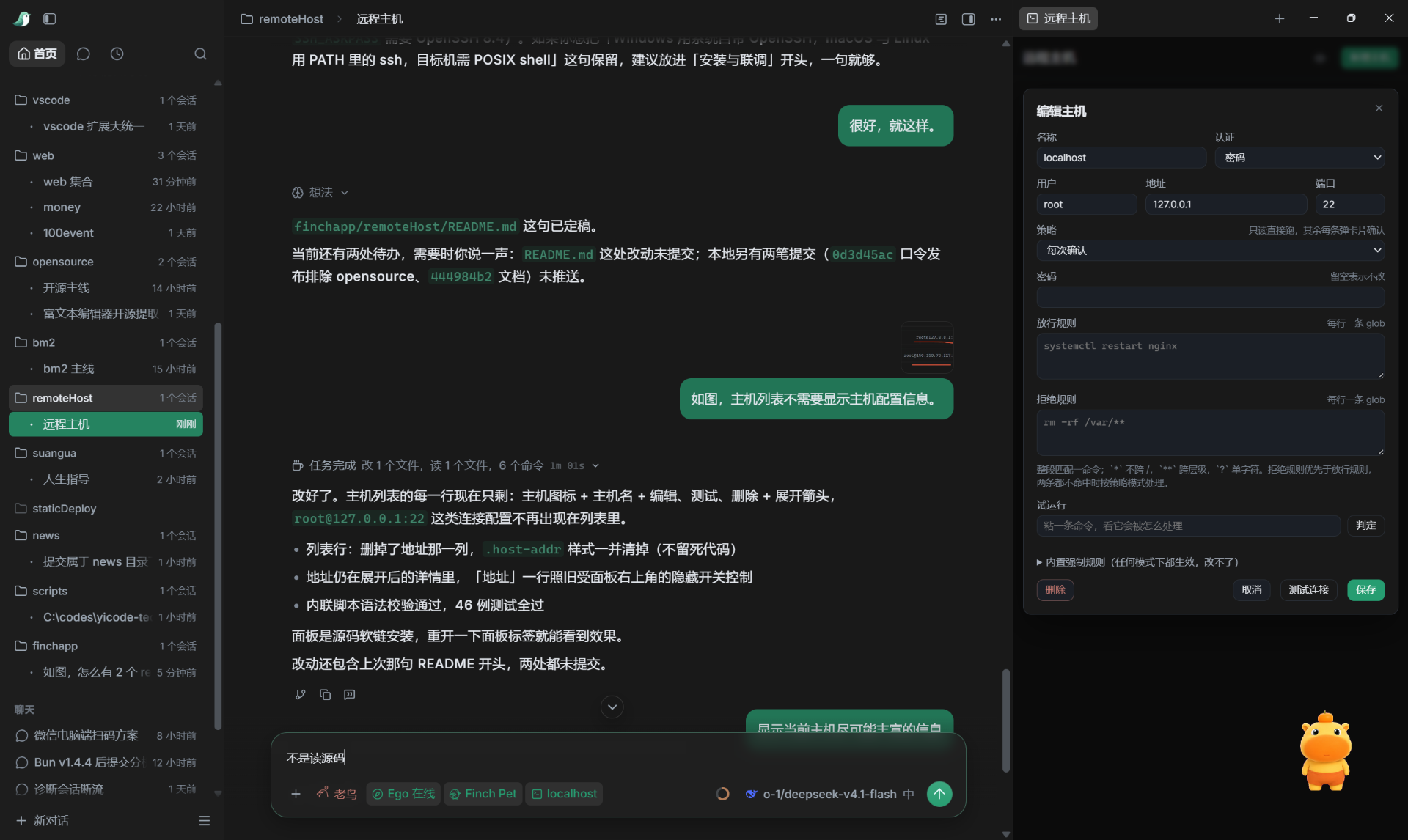
在 Finch 里管理自己的远程 Linux 主机,让 Agent 通过 SSH 执行命令、查日志、看服务状态,危险操作先经确认,全部动作留审计。
|
|
4
4
|
|
|
5
|
-
|
|
5
|
+
|
|
6
6
|
|
|
7
|
-
|
|
7
|
+
## 怎么用?
|
|
8
8
|
|
|
9
|
-
|
|
9
|
+

|
|
10
10
|
|
|
11
|
-
|
|
12
|
-
| ------- | ------------------------------------------------------ |
|
|
13
|
-
| `hosts` | 列已配置的主机、策略模式、最近一次执行结果,只读 |
|
|
14
|
-
| `exec` | 在指定主机上执行一条命令,按策略决定放行、确认还是拒绝 |
|
|
15
|
-
| `audit` | 查最近的执行记录:命令、判定、退出码、耗时 |
|
|
11
|
+
你说「看下这台机器磁盘还剩多少」,Agent 在远端跑一条 `df -h`,结果直接贴回来。
|
|
16
12
|
|
|
17
|
-
|
|
13
|
+
你说「把 nginx 重启一下」,它不直接动手,先弹一张卡片,把目标机与完整命令写清楚,你点亮确认它才执行。
|
|
18
14
|
|
|
19
|
-
|
|
15
|
+
命令跑完、审计写完、退出码留着,事后能查。
|
|
20
16
|
|
|
21
|
-
|
|
17
|
+
## 操作对比
|
|
22
18
|
|
|
23
|
-
|
|
19
|
+
| | 手动 SSH | 自己写脚本 | 远程主机 |
|
|
20
|
+
| -------------- | ------------------------- | ---------------- | ---------------------- |
|
|
21
|
+
| 记住主机与端口 | 靠 ssh config,换机器要翻 | 自己维护一份清单 | 配一次,所有会话共用 |
|
|
22
|
+
| 危险命令 | 全靠自己把关 | 全靠自己把关 | 先确认,删根目录直接拒 |
|
|
23
|
+
| 操作留痕 | 终端一滚就没了 | 自己打日志 | 自动写本机审计 |
|
|
24
|
+
| 长任务 | 挂着终端不敢关 | 自己接 nohup | 后台跑,能查退出码 |
|
|
24
25
|
|
|
25
|
-
##
|
|
26
|
+
## 安全策略
|
|
26
27
|
|
|
27
|
-
|
|
28
|
+

|
|
28
29
|
|
|
29
|
-
|
|
30
|
-
| -------- | --------------------------------------------------------------- |
|
|
31
|
-
| `start` | 远端 `setsid` 脱离会话启动,立刻返回任务 id、pid 与日志路径 |
|
|
32
|
-
| `status` | 探活、输出行数、日志尾巴、退出码;不带 taskId 就列最近任务 |
|
|
33
|
-
| `stop` | 先 TERM 整个进程组,1 秒后按 PGID 逐个 KILL;`clean` 顺手删日志 |
|
|
30
|
+
有些命令不该有「点一下就好」的机会,删根目录、清空一级目录、格式化文件系统、写裸盘、关机重启,这些在任何模式下都直接拒绝,连确认按钮都不给。
|
|
34
31
|
|
|
35
|
-
|
|
32
|
+
系统目录与密钥目录整棵子树受保护,删除、清空、截断、重定向写入都拦得住。
|
|
36
33
|
|
|
37
|
-
|
|
34
|
+
`/home`、`/opt`、`/srv`、`/var/lib` 只保护到直属子目录,给缓存和日志留了正常的清理路子。
|
|
38
35
|
|
|
39
|
-
|
|
36
|
+
其余命令按每台主机的策略走,四档从严到松。
|
|
40
37
|
|
|
41
|
-
|
|
38
|
+
| 模式 | 只读命令 | 写操作 | 读凭据文件 |
|
|
39
|
+
| ----------------- | -------- | ------ | ---------- |
|
|
40
|
+
| `query` | 直接跑 | 拒绝 | 拒绝 |
|
|
41
|
+
| `readonly` | 直接跑 | 拒绝 | 确认 |
|
|
42
|
+
| `confirm`(默认) | 直接跑 | 确认 | 确认 |
|
|
43
|
+
| `trusted` | 直接跑 | 直接跑 | 直接跑 |
|
|
42
44
|
|
|
43
|
-
|
|
45
|
+
密码与私钥只存在系统安全区,不进配置文件、不进审计,也不会回给 Agent。
|
|
44
46
|
|
|
45
|
-
|
|
47
|
+
每次判定与执行都写一条本地审计,命令、目标机、判定理由、退出码、耗时都在里面,只有本机用户能看。
|
|
46
48
|
|
|
47
|
-
##
|
|
49
|
+
## 常见场景
|
|
48
50
|
|
|
49
|
-
|
|
51
|
+
**排查线上故障**
|
|
50
52
|
|
|
51
|
-
|
|
53
|
+
线上 502,先说「看下 nginx 最近五十行错误日志」,Agent 把日志取回来贴着错往下查,不用切终端,也不用回忆日志路径。
|
|
52
54
|
|
|
53
|
-
|
|
55
|
+
**部署与发版**
|
|
54
56
|
|
|
55
|
-
|
|
57
|
+
拉代码、装依赖、重启服务、清缓存,一句话说清楚,要动服务器的那几步会先问你。
|
|
56
58
|
|
|
57
|
-
|
|
59
|
+
**日常巡检**
|
|
58
60
|
|
|
59
|
-
|
|
61
|
+
磁盘占用、内存余量、服务状态、证书到期,随口问一句就有答案。
|
|
60
62
|
|
|
61
|
-
|
|
63
|
+
**多机来回切**
|
|
62
64
|
|
|
63
|
-
|
|
65
|
+
开发机、测试机、生产机同时配好,会话里换个下拉就是另一台机器。
|
|
64
66
|
|
|
65
|
-
|
|
67
|
+
## 安装与使用
|
|
66
68
|
|
|
67
|
-
|
|
69
|
+
|
|
68
70
|
|
|
69
|
-
|
|
71
|
+
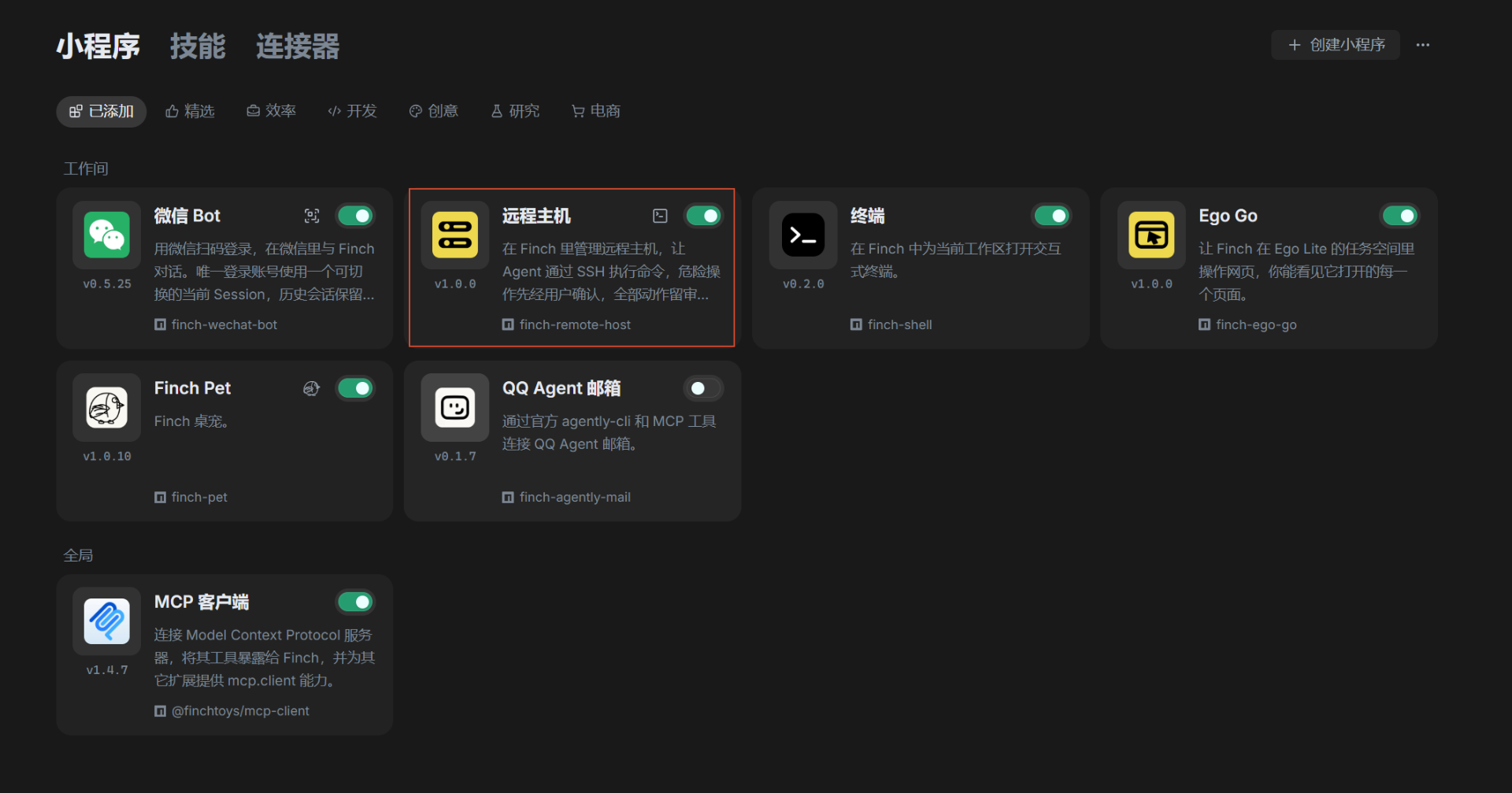
在 Finch 安装 「远程主机」小程序。
|
|
70
72
|
|
|
71
|
-
|
|
73
|
+
|
|
72
74
|
|
|
73
|
-
|
|
75
|
+
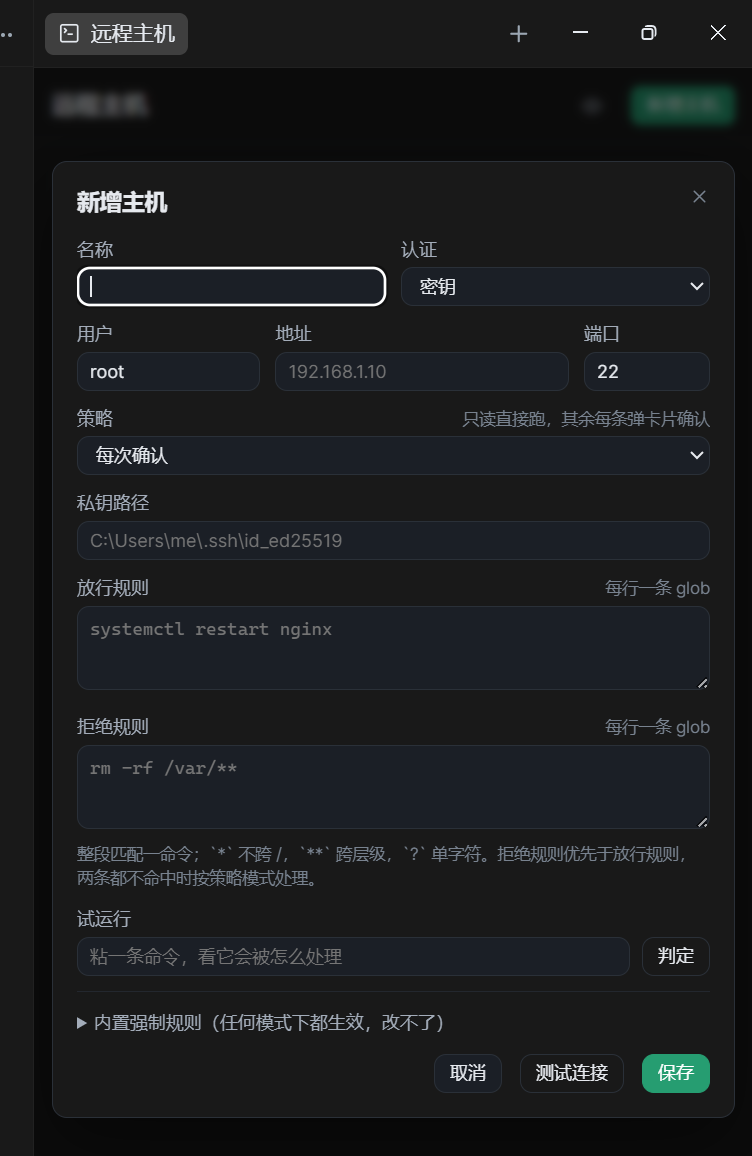
装完在 Finch 右侧面板的「远程主机」里添机器,密钥填绝对路径,密码填一次保存进系统安全区。
|
|
74
76
|
|
|
75
|
-
|
|
77
|
+
密码认证要求 OpenSSH 8.4 以上,Windows 10 1809 之后自带的版本都满足。
|
|
76
78
|
|
|
77
|
-
|
|
79
|
+
主机策略默认是 `confirm`,要放宽就在面板里改,改完当场生效。
|
|
78
80
|
|
|
79
|
-
|
|
81
|
+
|
|
80
82
|
|
|
81
|
-
|
|
82
|
-
| ---------- | -------- | ------ | ------------ |
|
|
83
|
-
| `query` | 直接跑 | 拒绝 | 拒绝 |
|
|
84
|
-
| `readonly` | 直接跑 | 拒绝 | 确认 |
|
|
85
|
-
| `confirm` | 直接跑 | 确认 | 确认(默认) |
|
|
86
|
-
| `trusted` | 直接跑 | 直接跑 | 直接跑 |
|
|
83
|
+
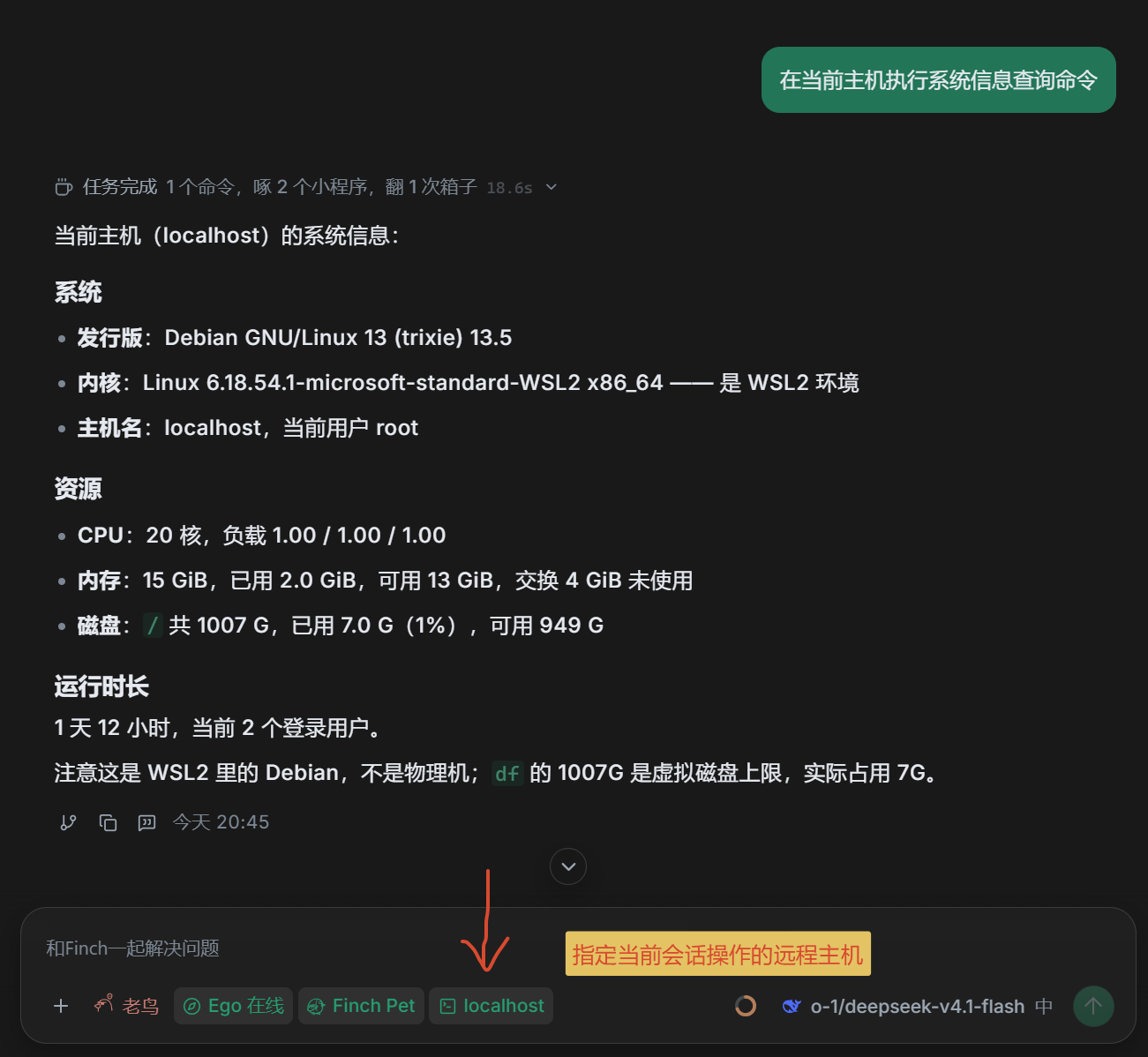
在会话中选择要操作的主机,然后触发 `当前主机` 关键词即可,比如:`查看当前主机信息`。
|
|
87
84
|
|
|
88
|
-
|
|
85
|
+
## 关于开发者
|
|
89
86
|
|
|
90
|
-
|
|
91
|
-
|
|
92
|
-
|
|
93
|
-
|
|
94
|
-
|
|
95
|
-
|
|
96
|
-
|
|
97
|
-
|
|
98
|
-
| 范围 | 路径 | 粒度 |
|
|
99
|
-
| ------------------ | ---------------------------------------------------------- | -------------- |
|
|
100
|
-
| 系统与启动 | `/etc`、`/boot`、`/bin`、`/sbin`、`/lib*`、`/usr`、`/root` | 整棵子树 |
|
|
101
|
-
| 站点与定时任务 | `/var/www`、`/var/spool` | 整棵子树 |
|
|
102
|
-
| 服务数据与用户目录 | `/home`、`/opt`、`/srv`、`/var/lib` | 只到直属子目录 |
|
|
103
|
-
| 密钥目录 | 任何位置下名为 `.ssh` 的目录 | 整棵子树 |
|
|
104
|
-
|
|
105
|
-
拦截的命令:`rm`、`rmdir`、`unlink`、`shred`、`truncate`、`dd of=`、`>`/`>>` 重定向、`find -delete`。
|
|
106
|
-
|
|
107
|
-
不拦 `cp`、`mv`、`sed -i`、`tee`:这些是改配置与部署的正常手段,它们依旧走模式判定。
|
|
108
|
-
|
|
109
|
-
只保护直属子目录的那档,是给缓存与日志留路:`rm -rf /var/lib/mysql` 拒绝,`rm -rf /var/lib/apt/lists/*` 只要求确认。
|
|
110
|
-
|
|
111
|
-
名单只收 Linux 通用路径。业务目录(如 `/wwwroot`)的子树不进保护名单,删里面的东西只要求确认;但 `/wwwroot` 自身是一级目录,`rm -rf /wwwroot` 与 `rm -rf /wwwroot/*` 照样硬拒。
|
|
112
|
-
|
|
113
|
-
### 规则
|
|
114
|
-
|
|
115
|
-
规则是 glob,一行一条,匹配单位是命令拆开后的每一段(`;` `&&` `||` `|` `&` 换行都是分隔符)。
|
|
116
|
-
|
|
117
|
-
整段匹配,不做子串:规则 `systemctl restart nginx` 不放过 `systemctl restart nginx-backup`。
|
|
118
|
-
|
|
119
|
-
`*` 不跨 `/`,跨层级用 `**`,`?` 匹配单个字符。
|
|
120
|
-
|
|
121
|
-
优先级:硬拒 > 拒绝规则 > 放行规则 > 模式。一段命中拒绝规则就整条拒绝;只有等所有段都过了才放行。
|
|
122
|
-
|
|
123
|
-
规则会逐段判断,所以拼接骗不过去:「放行 `systemctl restart nginx`」不会让 `systemctl restart nginx && rm -rf /tmp/x` 免确认。
|
|
124
|
-
|
|
125
|
-
### 只读判定
|
|
126
|
-
|
|
127
|
-
只读看的是整条命令,任何一处可疑就按写操作处理:
|
|
128
|
-
|
|
129
|
-
- 不在白名单里的命令一律不算只读
|
|
130
|
-
- 命令替换 `$(…)`、反引号、`${…}`、重定向、heredoc 都不算只读
|
|
131
|
-
- 白名单命令带上写参数也不算:`sort -o`、`uniq 输入 输出`、`date -s`、`hostname 新名`、`find -delete`/`-exec`、`ping -f`
|
|
132
|
-
- 交互式程序(`less`/`vim`/`man`)不在白名单里,没有 tty 也用不上
|
|
133
|
-
|
|
134
|
-
## 凭据
|
|
135
|
-
|
|
136
|
-
两种认证都支持,按机器自选。
|
|
137
|
-
|
|
138
|
-
- **密钥**:ed25519 私钥的绝对路径,口令版先 `ssh-add` 到 Windows 的 OpenSSH 认证代理
|
|
139
|
-
- **密码**:存进系统安全存储(DPAPI),`permissions.secrets` 只声明 `host.*` 前缀
|
|
140
|
-
|
|
141
|
-
密码不进配置文件、不进面板数据、不进审计,也不会回给模型。
|
|
142
|
-
|
|
143
|
-
密码认证靠 `SSH_ASKPASS` 非交互地交给 ssh:助手脚本只回显环境变量,密码随进程结束消失。
|
|
144
|
-
|
|
145
|
-
注意:`SSH_ASKPASS_REQUIRE` 需要 OpenSSH 8.4 以上,Windows 10 1809 之后自带版本都满足。
|
|
146
|
-
|
|
147
|
-
## 审计
|
|
148
|
-
|
|
149
|
-
每次判定与执行都写一条 JSONL,落在小程序的私有目录 `audit/<日期>.jsonl`。
|
|
150
|
-
|
|
151
|
-
记录含时间、主机、会话 id、工具调用 id、完整命令、判定结果与逐段理由、退出码、耗时和输出前 4 KB。
|
|
152
|
-
|
|
153
|
-
日志只追加,工具本身没有任何删除或改写记录的入口。
|
|
154
|
-
|
|
155
|
-
## 安装与联调
|
|
156
|
-
|
|
157
|
-
```bash
|
|
158
|
-
bun run fafinch dev remote-host # 构建 + 软链安装 + 监听
|
|
159
|
-
bun run fafinch build remote-host # 只构建
|
|
160
|
-
bun run fafinch doctor remote-host # 构建 + 官方体检
|
|
161
|
-
bun run synctpl finchapp # 契约校验
|
|
162
|
-
```
|
|
163
|
-
|
|
164
|
-
`bun run fafinch install remote-host` 是复制安装,改代码后要重新执行。
|
|
165
|
-
|
|
166
|
-
## 文件
|
|
167
|
-
|
|
168
|
-
- `src/index.js` —— 注册工具与设置菜单,串起判定、确认、执行、审计,并接面板消息
|
|
169
|
-
- `src/hosts.js` —— 主机清单、执行状态与密码的持久化与校验
|
|
170
|
-
- `src/policy.js` —— 命令分级:拆段、glob 规则、只读判定、四档模式
|
|
171
|
-
- `tests/policy.test.js` —— 命令分级的回归用例(vitest)
|
|
172
|
-
- `src/ssh.js` —— 调系统 OpenSSH 客户端,密钥与密码两种认证,按主机串行,输出截断
|
|
173
|
-
- `src/audit.js` —— 审计日志的追加与读取
|
|
174
|
-
- `ui/panel.html` —— 面板页面:列表、表单弹框、审计视图
|
|
175
|
-
- `dist/index.js` —— rolldown 产物(target node24),勿手改
|
|
176
|
-
- `icon.png` —— 由 `bun run fafinch icon remote-host` 从图案源 `scripts/genLogo/output/remote-host/icon.svg` 生成
|
|
87
|
+
- 农村程序员(`2020年回农村,至今未出村`)
|
|
88
|
+
- 独立开发者(`致力于开发 1000 个小产品`)
|
|
89
|
+
- 技术观察者(`分享编程技术,行业资讯等`)
|
|
90
|
+
- 前端之虎陈随易(`自封的`)
|
|
91
|
+
- 我的官网是:`https://yicode.tech`
|
|
92
|
+
- 微信:`chensuiyime`(备注「finch」进交流群)
|
|
93
|
+
- 公众号:陈随易
|
package/dist/index.js
CHANGED
|
@@ -2,7 +2,7 @@ import { randomUUID } from "node:crypto";
|
|
|
2
2
|
import { appendFileSync, chmodSync, existsSync, mkdirSync, readFileSync, readdirSync, rmSync, writeFileSync } from "node:fs";
|
|
3
3
|
import { isAbsolute, join, posix } from "node:path";
|
|
4
4
|
import { spawn } from "node:child_process";
|
|
5
|
-
// finchapp/
|
|
5
|
+
// finchapp/remoteHost/src/audit.js
|
|
6
6
|
const OUTPUT_CHARS = 4e3;
|
|
7
7
|
const FILE_SCAN = 7;
|
|
8
8
|
/** 审计目录,按需创建。 */
|
|
@@ -58,7 +58,7 @@ function recent(ctx, { hostId, limit = 20 } = {}) {
|
|
|
58
58
|
}
|
|
59
59
|
return rows;
|
|
60
60
|
}
|
|
61
|
-
// finchapp/
|
|
61
|
+
// finchapp/remoteHost/src/policy.js
|
|
62
62
|
const MODES = [
|
|
63
63
|
"query",
|
|
64
64
|
"readonly",
|
|
@@ -553,7 +553,7 @@ function classify(command, policy = {}) {
|
|
|
553
553
|
pending
|
|
554
554
|
};
|
|
555
555
|
}
|
|
556
|
-
// finchapp/
|
|
556
|
+
// finchapp/remoteHost/src/hosts.js
|
|
557
557
|
const HOSTS_KEY = "hosts";
|
|
558
558
|
const RUNS_KEY = "runs";
|
|
559
559
|
const AUTH_MODES = ["key", "password"];
|
|
@@ -661,7 +661,7 @@ async function listRuns(ctx) {
|
|
|
661
661
|
const runs = await ctx.storage.get(RUNS_KEY);
|
|
662
662
|
return runs && typeof runs === "object" && !Array.isArray(runs) ? runs : {};
|
|
663
663
|
}
|
|
664
|
-
// finchapp/
|
|
664
|
+
// finchapp/remoteHost/src/ssh.js
|
|
665
665
|
const queues = /* @__PURE__ */ new Map();
|
|
666
666
|
const HEAD_CHARS = 6e3;
|
|
667
667
|
const TAIL_CHARS = 3e3;
|
|
@@ -845,7 +845,7 @@ function clip(text) {
|
|
|
845
845
|
const cut = value.length - HEAD_CHARS - TAIL_CHARS;
|
|
846
846
|
return `${value.slice(0, HEAD_CHARS)}\n…(截断 ${cut} 字符)…\n${value.slice(-3e3)}`;
|
|
847
847
|
}
|
|
848
|
-
// finchapp/
|
|
848
|
+
// finchapp/remoteHost/src/tasks.js
|
|
849
849
|
const TASKS_KEY = "tasks";
|
|
850
850
|
const MAX_TASKS = 50;
|
|
851
851
|
/** 读全部任务,最新的在前。 */
|
|
@@ -878,7 +878,7 @@ async function updateTask(ctx, id, patch) {
|
|
|
878
878
|
await ctx.storage.set(TASKS_KEY, next);
|
|
879
879
|
return next.find((item) => item.id === id);
|
|
880
880
|
}
|
|
881
|
-
// finchapp/
|
|
881
|
+
// finchapp/remoteHost/src/index.js
|
|
882
882
|
const ACTIONS = [
|
|
883
883
|
"hosts",
|
|
884
884
|
"exec",
|
|
@@ -1478,8 +1478,8 @@ function activate(ctx) {
|
|
|
1478
1478
|
const run = runs[host.id];
|
|
1479
1479
|
items.push({
|
|
1480
1480
|
id: `open:${host.id}`,
|
|
1481
|
-
label:
|
|
1482
|
-
description: run ?
|
|
1481
|
+
label: host.name,
|
|
1482
|
+
description: run ? run.exitCode === 0 ? t("menu.ok") : t("menu.failed", { code: run.exitCode }) : void 0,
|
|
1483
1483
|
iconName: "square-terminal"
|
|
1484
1484
|
});
|
|
1485
1485
|
}
|
|
@@ -1590,7 +1590,7 @@ function activate(ctx) {
|
|
|
1590
1590
|
const items = hosts.map((host) => ({
|
|
1591
1591
|
id: `host:${host.id}`,
|
|
1592
1592
|
label: host.name,
|
|
1593
|
-
description:
|
|
1593
|
+
description: modeLabel(host.policy.mode),
|
|
1594
1594
|
iconName: "square-terminal",
|
|
1595
1595
|
current: host.id === current
|
|
1596
1596
|
}));
|
package/docs/demo.svg
ADDED
|
@@ -0,0 +1,89 @@
|
|
|
1
|
+
<svg xmlns="http://www.w3.org/2000/svg" viewBox="0 0 760 476" width="760" height="476" role="img" aria-label="在 Finch 里让 Agent 操作远程主机的对话示例">
|
|
2
|
+
<title>远程主机:一句吩咐,危险命令先过审</title>
|
|
3
|
+
<style>
|
|
4
|
+
text {
|
|
5
|
+
font-family: -apple-system, BlinkMacSystemFont, "PingFang SC", "Microsoft YaHei", "Noto Sans CJK SC", sans-serif;
|
|
6
|
+
fill: #1f2328;
|
|
7
|
+
}
|
|
8
|
+
.mono {
|
|
9
|
+
font-family: "SFMono-Regular", Consolas, "Liberation Mono", Menlo, monospace;
|
|
10
|
+
font-size: 12.5px;
|
|
11
|
+
fill: #3d444d;
|
|
12
|
+
}
|
|
13
|
+
.bubble-user { animation: pop 15s infinite both; }
|
|
14
|
+
.agent { animation: pop 15s infinite both; }
|
|
15
|
+
.confirm { animation: pop 15s infinite both; }
|
|
16
|
+
.result { animation: pop 15s infinite both; }
|
|
17
|
+
.d1 { animation-delay: 0.4s; }
|
|
18
|
+
.d2 { animation-delay: 2.0s; }
|
|
19
|
+
.d3 { animation-delay: 3.0s; }
|
|
20
|
+
.d4 { animation-delay: 5.2s; }
|
|
21
|
+
.d5 { animation-delay: 7.0s; }
|
|
22
|
+
.d6 { animation-delay: 10.4s; }
|
|
23
|
+
@keyframes pop {
|
|
24
|
+
0% { opacity: 0; transform: translateY(6px); }
|
|
25
|
+
6% { opacity: 1; transform: translateY(0); }
|
|
26
|
+
92% { opacity: 1; transform: translateY(0); }
|
|
27
|
+
97% { opacity: 1; transform: translateY(0); }
|
|
28
|
+
100% { opacity: 1; transform: translateY(0); }
|
|
29
|
+
}
|
|
30
|
+
.btn-pulse { animation: press 15s infinite both; animation-delay: 9.2s; }
|
|
31
|
+
@keyframes press {
|
|
32
|
+
0% { opacity: 1; }
|
|
33
|
+
38% { opacity: 1; }
|
|
34
|
+
46% { opacity: 0.55; }
|
|
35
|
+
54% { opacity: 1; }
|
|
36
|
+
100% { opacity: 1; }
|
|
37
|
+
}
|
|
38
|
+
</style>
|
|
39
|
+
|
|
40
|
+
<rect x="0" y="0" width="760" height="476" rx="14" fill="#f6f7f9"/>
|
|
41
|
+
<rect x="0.5" y="0.5" width="759" height="475" rx="14" fill="none" stroke="#e3e6ea"/>
|
|
42
|
+
|
|
43
|
+
<!-- 用户提问 -->
|
|
44
|
+
<g class="bubble-user d1">
|
|
45
|
+
<rect x="380" y="22" width="356" height="42" rx="12" fill="#e8f0fe"/>
|
|
46
|
+
<text x="400" y="48" font-size="14">看下这台机器磁盘还剩多少</text>
|
|
47
|
+
</g>
|
|
48
|
+
|
|
49
|
+
<!-- Agent 执行 -->
|
|
50
|
+
<g class="agent d2">
|
|
51
|
+
<rect x="24" y="80" width="470" height="58" rx="12" fill="#ffffff" stroke="#e3e6ea"/>
|
|
52
|
+
<text x="42" y="103" font-size="12.5" fill="#8a9199">remote_host · exec · localhost</text>
|
|
53
|
+
<text class="mono" x="42" y="124">df -h</text>
|
|
54
|
+
</g>
|
|
55
|
+
|
|
56
|
+
<!-- 输出 -->
|
|
57
|
+
<g class="agent d3">
|
|
58
|
+
<rect x="24" y="148" width="470" height="60" rx="12" fill="#fbfbfc" stroke="#e3e6ea"/>
|
|
59
|
+
<text class="mono" x="42" y="171" xml:space="preserve">Filesystem Size Used Avail Use% Mounted on</text>
|
|
60
|
+
<text class="mono" x="42" y="191" xml:space="preserve">/dev/vda1 99G 78G 21G 79% /</text>
|
|
61
|
+
</g>
|
|
62
|
+
|
|
63
|
+
<!-- 用户第二句 -->
|
|
64
|
+
<g class="bubble-user d4">
|
|
65
|
+
<rect x="428" y="222" width="308" height="42" rx="12" fill="#e8f0fe"/>
|
|
66
|
+
<text x="448" y="248" font-size="14">把 nginx 重启一下</text>
|
|
67
|
+
</g>
|
|
68
|
+
|
|
69
|
+
<!-- 确认卡片 -->
|
|
70
|
+
<g class="confirm d5">
|
|
71
|
+
<rect x="24" y="278" width="560" height="118" rx="12" fill="#fff8ec" stroke="#f0d9b0"/>
|
|
72
|
+
<text x="44" y="303" font-size="13" font-weight="600" fill="#8a5a00">需要你确认</text>
|
|
73
|
+
<text x="44" y="326" font-size="12.5" fill="#6b7076">目标机</text>
|
|
74
|
+
<text x="106" y="326" font-size="12.5">localhost root@127.0.0.1:22</text>
|
|
75
|
+
<text x="44" y="348" font-size="12.5" fill="#6b7076">命令</text>
|
|
76
|
+
<text class="mono" x="106" y="348">systemctl restart nginx</text>
|
|
77
|
+
<g class="btn-pulse">
|
|
78
|
+
<rect x="44" y="360" width="192" height="26" rx="7" fill="#1f6feb"/>
|
|
79
|
+
<text x="60" y="378" font-size="12" fill="#ffffff">我已看清命令与目标机</text>
|
|
80
|
+
</g>
|
|
81
|
+
</g>
|
|
82
|
+
|
|
83
|
+
<!-- 结果 -->
|
|
84
|
+
<g class="result d6">
|
|
85
|
+
<rect x="24" y="410" width="470" height="44" rx="12" fill="#ffffff" stroke="#e3e6ea"/>
|
|
86
|
+
<circle cx="44" cy="432" r="5" fill="#2da44e"/>
|
|
87
|
+
<text x="60" y="437" font-size="13">nginx 已重启,active (running)</text>
|
|
88
|
+
</g>
|
|
89
|
+
</svg>
|
package/docs/safety.svg
ADDED
|
@@ -0,0 +1,89 @@
|
|
|
1
|
+
<svg xmlns="http://www.w3.org/2000/svg" viewBox="0 0 760 250" width="760" height="250" role="img" aria-label="安全策略示意:危险命令红线、主机策略、人工确认三道关口">
|
|
2
|
+
<title>远程主机:一条命令要过三道关</title>
|
|
3
|
+
<defs>
|
|
4
|
+
<marker id="tip" viewBox="0 0 10 10" refX="9" refY="5" markerWidth="6" markerHeight="6" orient="auto-start-reverse">
|
|
5
|
+
<path d="M0 0 L10 5 L0 10 z" fill="#c2c8d0"/>
|
|
6
|
+
</marker>
|
|
7
|
+
</defs>
|
|
8
|
+
<style>
|
|
9
|
+
text {
|
|
10
|
+
font-family: -apple-system, BlinkMacSystemFont, "PingFang SC", "Microsoft YaHei", "Noto Sans CJK SC", sans-serif;
|
|
11
|
+
fill: #1f2328;
|
|
12
|
+
}
|
|
13
|
+
.gate { animation: pop 12s infinite both; }
|
|
14
|
+
.out { animation: pop 12s infinite both; }
|
|
15
|
+
.d1 { animation-delay: 0.3s; }
|
|
16
|
+
.d2 { animation-delay: 1.1s; }
|
|
17
|
+
.d3 { animation-delay: 1.9s; }
|
|
18
|
+
.d4 { animation-delay: 2.7s; }
|
|
19
|
+
.d5 { animation-delay: 2.9s; }
|
|
20
|
+
.d6 { animation-delay: 3.1s; }
|
|
21
|
+
.arrow { animation: fade 12s infinite both; }
|
|
22
|
+
@keyframes pop {
|
|
23
|
+
0% { opacity: 0; transform: translateY(6px); }
|
|
24
|
+
5% { opacity: 1; transform: translateY(0); }
|
|
25
|
+
92% { opacity: 1; transform: translateY(0); }
|
|
26
|
+
100% { opacity: 1; transform: translateY(0); }
|
|
27
|
+
}
|
|
28
|
+
@keyframes fade {
|
|
29
|
+
0% { opacity: 0; }
|
|
30
|
+
6% { opacity: 1; }
|
|
31
|
+
100% { opacity: 1; }
|
|
32
|
+
}
|
|
33
|
+
</style>
|
|
34
|
+
|
|
35
|
+
<rect x="0" y="0" width="760" height="250" rx="14" fill="#f6f7f9"/>
|
|
36
|
+
<rect x="0.5" y="0.5" width="759" height="249" rx="14" fill="none" stroke="#e3e6ea"/>
|
|
37
|
+
|
|
38
|
+
<text x="24" y="34" font-size="13" fill="#6b7076">一条命令要过三道关</text>
|
|
39
|
+
|
|
40
|
+
<!-- ① 危险命令红线 -->
|
|
41
|
+
<g class="gate d1">
|
|
42
|
+
<rect x="24" y="52" width="224" height="92" rx="12" fill="#ffffff" stroke="#e3e6ea"/>
|
|
43
|
+
<circle cx="46" cy="76" r="5" fill="#cf222e"/>
|
|
44
|
+
<text x="62" y="81" font-size="14" font-weight="600">危险命令红线</text>
|
|
45
|
+
<text x="44" y="106" font-size="12.5" fill="#6b7076">删根目录 / 格式化 / 写裸盘</text>
|
|
46
|
+
<text x="44" y="126" font-size="12.5" fill="#6b7076">任何设置都放不开</text>
|
|
47
|
+
</g>
|
|
48
|
+
|
|
49
|
+
<!-- ② 主机策略 -->
|
|
50
|
+
<g class="gate d2">
|
|
51
|
+
<rect x="268" y="52" width="224" height="92" rx="12" fill="#ffffff" stroke="#e3e6ea"/>
|
|
52
|
+
<circle cx="290" cy="76" r="5" fill="#1f6feb"/>
|
|
53
|
+
<text x="306" y="81" font-size="14" font-weight="600">每台主机各自定档</text>
|
|
54
|
+
<text x="288" y="106" font-size="12.5" fill="#6b7076">仅查询 · 只读 · 每次确认</text>
|
|
55
|
+
<text x="288" y="126" font-size="12.5" fill="#6b7076">生产机可以只看不改</text>
|
|
56
|
+
</g>
|
|
57
|
+
|
|
58
|
+
<!-- ③ 人工确认 -->
|
|
59
|
+
<g class="gate d3">
|
|
60
|
+
<rect x="512" y="52" width="224" height="92" rx="12" fill="#ffffff" stroke="#e3e6ea"/>
|
|
61
|
+
<circle cx="534" cy="76" r="5" fill="#bf8700"/>
|
|
62
|
+
<text x="550" y="81" font-size="14" font-weight="600">要动服务器先问你</text>
|
|
63
|
+
<text x="532" y="106" font-size="12.5" fill="#6b7076">卡片写清命令与目标机</text>
|
|
64
|
+
<text x="532" y="126" font-size="12.5" fill="#6b7076">你点了才执行</text>
|
|
65
|
+
</g>
|
|
66
|
+
|
|
67
|
+
<g class="arrow d1">
|
|
68
|
+
<path d="M248 98 H 264" stroke="#c2c8d0" stroke-width="1.5" marker-end="url(#tip)"/>
|
|
69
|
+
</g>
|
|
70
|
+
<g class="arrow d2">
|
|
71
|
+
<path d="M492 98 H 508" stroke="#c2c8d0" stroke-width="1.5" marker-end="url(#tip)"/>
|
|
72
|
+
</g>
|
|
73
|
+
|
|
74
|
+
<!-- 三个结果 -->
|
|
75
|
+
<g class="out d4">
|
|
76
|
+
<rect x="24" y="168" width="224" height="50" rx="12" fill="#ffebe9" stroke="#ffcecb"/>
|
|
77
|
+
<text x="136" y="198" font-size="12.5" font-weight="600" fill="#cf222e" text-anchor="middle">直接拒绝,不给确认入口</text>
|
|
78
|
+
</g>
|
|
79
|
+
|
|
80
|
+
<g class="out d5">
|
|
81
|
+
<rect x="268" y="168" width="224" height="50" rx="12" fill="#ffffff" stroke="#d8dee4" stroke-dasharray="5 5"/>
|
|
82
|
+
<text x="380" y="198" font-size="12.5" fill="#6b7076" text-anchor="middle">密码与密钥只存本机安全区</text>
|
|
83
|
+
</g>
|
|
84
|
+
|
|
85
|
+
<g class="out d6">
|
|
86
|
+
<rect x="512" y="168" width="224" height="50" rx="12" fill="#e9f7ee" stroke="#b7e0c4"/>
|
|
87
|
+
<text x="624" y="198" font-size="12.5" font-weight="600" fill="#1a7f37" text-anchor="middle">远端执行,本地写审计</text>
|
|
88
|
+
</g>
|
|
89
|
+
</svg>
|
package/package.json
CHANGED
|
@@ -1,6 +1,6 @@
|
|
|
1
1
|
{
|
|
2
2
|
"name": "finch-remote-host",
|
|
3
|
-
"version": "1.0.
|
|
3
|
+
"version": "1.0.1",
|
|
4
4
|
"description": "在 Finch 里管理远程主机,让 Agent 通过 SSH 执行命令,危险操作先经用户确认,全部动作留审计。",
|
|
5
5
|
"keywords": [
|
|
6
6
|
"devops",
|
|
@@ -17,6 +17,7 @@
|
|
|
17
17
|
"i18n/",
|
|
18
18
|
"skills/",
|
|
19
19
|
"ui/",
|
|
20
|
+
"docs/",
|
|
20
21
|
"icon.png",
|
|
21
22
|
"README.md"
|
|
22
23
|
],
|
package/ui/panel.html
CHANGED
|
@@ -213,16 +213,6 @@
|
|
|
213
213
|
text-overflow: ellipsis;
|
|
214
214
|
white-space: nowrap;
|
|
215
215
|
}
|
|
216
|
-
.host-addr {
|
|
217
|
-
flex: 0 0 auto;
|
|
218
|
-
max-width: 42%;
|
|
219
|
-
font-family: var(--mono);
|
|
220
|
-
font-size: 12px;
|
|
221
|
-
color: var(--faint);
|
|
222
|
-
overflow: hidden;
|
|
223
|
-
text-overflow: ellipsis;
|
|
224
|
-
white-space: nowrap;
|
|
225
|
-
}
|
|
226
216
|
.chevron {
|
|
227
217
|
display: flex;
|
|
228
218
|
flex: 0 0 auto;
|
|
@@ -914,8 +904,8 @@
|
|
|
914
904
|
toggleBtn.type = "button";
|
|
915
905
|
toggleBtn.title = open ? "收起" : "展开看详情与操作记录";
|
|
916
906
|
toggleBtn.append(hostIcon(), el("span", "host-name", host.name));
|
|
917
|
-
|
|
918
|
-
head.append(
|
|
907
|
+
// 列表行只留主机名与动作,连接配置展开后才看(受隐私开关控制)。
|
|
908
|
+
head.append(toggleBtn, hostActions(host), chevronIcon());
|
|
919
909
|
// 整行都能展开;右侧动作按钮自己拦一下,别连带收起。
|
|
920
910
|
head.addEventListener("click", () => toggle(host.id));
|
|
921
911
|
section.append(head);
|