fidel-react-native 2.0.0 → 2.1.1
This diff represents the content of publicly available package versions that have been released to one of the supported registries. The information contained in this diff is provided for informational purposes only and reflects changes between package versions as they appear in their respective public registries.
- package/CHANGELOG.md +1 -61
- package/README.md +4 -377
- package/android/build.gradle +2 -1
- package/android/jacoco.gradle +2 -2
- package/android/src/main/java/com/fidelreactlibrary/FidelModule.java +9 -0
- package/index.js +7 -0
- package/ios/NativeFidelBridge.m +2 -0
- package/ios/NativeFidelBridge.swift +7 -0
- package/package.json +1 -1
package/CHANGELOG.md
CHANGED
|
@@ -1,63 +1,3 @@
|
|
|
1
1
|
# Fidel React Native bridge library change log
|
|
2
2
|
|
|
3
|
-
|
|
4
|
-
- Updated the consent text for United States and Canadian issued cards.
|
|
5
|
-
|
|
6
|
-
## 1.6.3
|
|
7
|
-
- Replace "Fidel" with "Fidel API" in the consent text.
|
|
8
|
-
- Allow expiration date editing on Android without switching to country selection.
|
|
9
|
-
|
|
10
|
-
## 1.6.2
|
|
11
|
-
- Update Fidel API logo
|
|
12
|
-
|
|
13
|
-
## 1.6.2
|
|
14
|
-
- Update Fidel API logo
|
|
15
|
-
|
|
16
|
-
## 1.6.1
|
|
17
|
-
- Always provide the `scheme` field in Android, after successful card enrollments.
|
|
18
|
-
- Provide support for `resConfigs` optimization parameter in Android.
|
|
19
|
-
|
|
20
|
-
## 1.6.0
|
|
21
|
-
- Added the `defaultSelectedCountry` property which sets the country that will be selected by default, when opening the card enrollment screen.
|
|
22
|
-
|
|
23
|
-
## 1.5.0
|
|
24
|
-
- Remove card scanning confirmation screen.
|
|
25
|
-
|
|
26
|
-
## 1.4.3
|
|
27
|
-
- Add United Arab Emirates option as a country of issuance.
|
|
28
|
-
- Country label shrinks its font size, to fit longer country names, on smaller devices.
|
|
29
|
-
|
|
30
|
-
## 1.4.2
|
|
31
|
-
- Update Fidel Android SDK version to allow French & Swedish translations be available in more countries.
|
|
32
|
-
|
|
33
|
-
## 1.4.1
|
|
34
|
-
- Update Fidel & Android SDK versions.
|
|
35
|
-
- Prepare for the newest React Native versions.
|
|
36
|
-
- Fix some unit tests.
|
|
37
|
-
- Made it easier to automate testing this React Native bridge library.
|
|
38
|
-
|
|
39
|
-
## 1.4.0
|
|
40
|
-
|
|
41
|
-
- Now the SDK allows you to select multiple allowed countries from which the user can pick. Please check the docs for information about the new `allowedCountries` option.
|
|
42
|
-
- Removed the `country` option. To set a default country and not allow the user to pick the country, set a single country in the new `allowedCountries` option. Check the example project or the README docs to see how to do that.
|
|
43
|
-
- If available, the linking result object now includes the `firstNumbers` field. So, if in the Fidel Dashboard, under your security settings, you allow showing the first numbers of the linked card numbers, the information will be available in the linking result object too. If you do not allow showing the first numbers in the linking result, the `firstNumbers` field will return `"******"` (just like the object which the Fidel API returns).
|
|
44
|
-
|
|
45
|
-
## 1.3.1
|
|
46
|
-
|
|
47
|
-
- Fixes an Android issue in the latest React Native versions, when specifying the banner image in release environment.
|
|
48
|
-
- Checking for `null` values, in mandatory SDK fields, to prevent unclear bugs.
|
|
49
|
-
|
|
50
|
-
## 1.3.0
|
|
51
|
-
|
|
52
|
-
- Localised the SDK for French and Swedish users.
|
|
53
|
-
- The terms & conditions text now adjusts to the card scheme name that the user inputs (Visa, MasterCard or Amex).
|
|
54
|
-
- If you set the default country of the SDK to USA or Canada (with `country` option) or, if you do not set a default country, the terms and conditions text will adjust depending on the country you have set. For USA & Canada, the following would be an example Terms & Conditions text, for Cashback Inc (an example company):
|
|
55
|
-
|
|
56
|
-
*By submitting your card information and checking this box, you authorize Visa to monitor and share transaction data with Fidel (our service provider) to participate in program. You also acknowledge and agree that Fidel may share certain details of your qualifying transactions with Cashback Inc to enable your participation in program and for other purposes in accordance with the Cashback Inc Terms and Conditions, Cashback Inc privacy policy and Fidel’s Privacy Policy. You may opt-out of transaction monitoring on the linked card at any time by contacting support.*
|
|
57
|
-
|
|
58
|
-
For the rest of the world:
|
|
59
|
-
|
|
60
|
-
*I authorise Visa to monitor my payment card to identify transactions that qualify for a reward and for Visa to share such information with Cashback Inc, to enable my card linked offers and target offers that may be of interest to me. For information about Cashback Inc privacy practices, please see the privacy policy. You may opt-out of transaction monitoring on the payment card you entered at any time by contacting support.*
|
|
61
|
-
|
|
62
|
-
- Added the `programName` and `termsConditionsUrl` options. They are used when building the new USA / Canada specific terms and conditions text that the user must agree with, before linking a card. If you set the `country` option to a USA or Canada, it's mandatory for you to provide your terms and conditions URL via `termsConditionsUrl`. If you do not provide it, you will receive an error when you try to open Fidel's linking screen.
|
|
63
|
-
- Fixed bug that returned an empty link result in Android, when linking is successful.
|
|
3
|
+
Please check our website for the latest information about our [React Native SDK releases](https://fidelapi.com/docs/select/sdks/react-native/releases).
|
package/README.md
CHANGED
|
@@ -1,143 +1,12 @@
|
|
|
1
|
-
# Fidel React Native
|
|
1
|
+
# Fidel React Native SDK
|
|
2
2
|
|
|
3
3
|
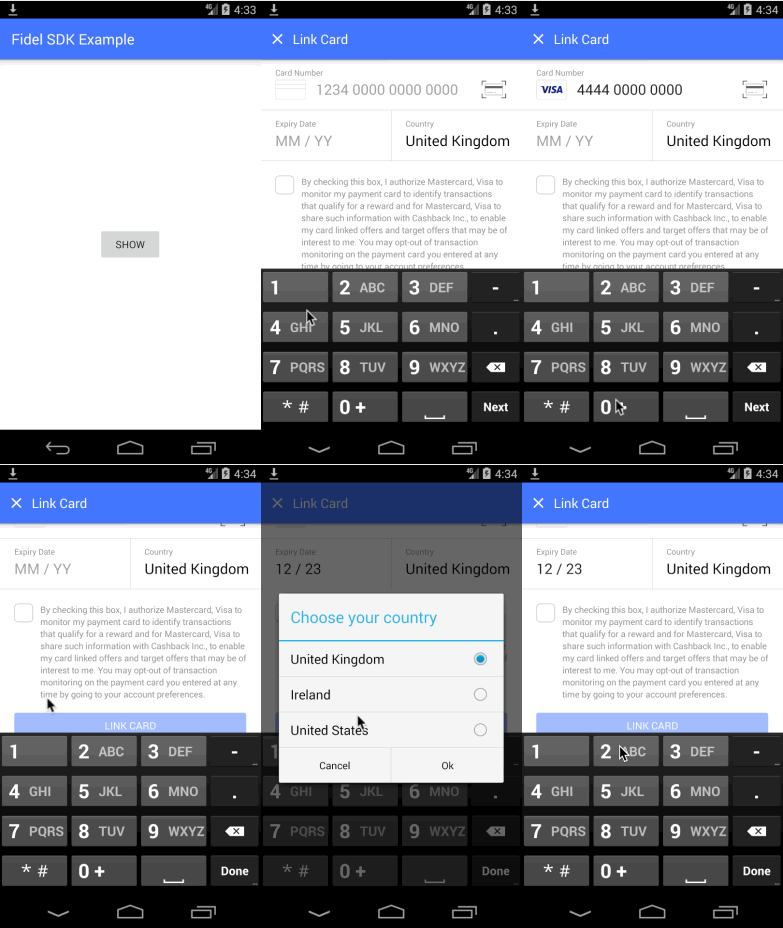
This SDK is a bridge between React Native and Fidel's native iOS and Android SDKs. It helps you to add card linking technology to your React Native apps in minutes. It captures credit/debit card numbers securely and links them to your programs.
|
|
4
4
|
|
|
5
5
|
|
|
6
6
|
|
|
7
|
-
##
|
|
7
|
+
## Documentation
|
|
8
8
|
|
|
9
|
-
|
|
10
|
-
|
|
11
|
-
or
|
|
12
|
-
|
|
13
|
-
`$ yarn add fidel-react-native`
|
|
14
|
-
|
|
15
|
-
### iOS
|
|
16
|
-
|
|
17
|
-
**1.** Please make sure that the minimum platform is set to 9.1 in your Podfile: `platform :ios, '9.1'`.
|
|
18
|
-
|
|
19
|
-
**2.** Run `pod install`.
|
|
20
|
-
|
|
21
|
-
### Android
|
|
22
|
-
|
|
23
|
-
**1.** Append Jitpack to `android/build.gradle`:
|
|
24
|
-
|
|
25
|
-
```java
|
|
26
|
-
allprojects {
|
|
27
|
-
repositories {
|
|
28
|
-
...
|
|
29
|
-
maven { url "https://jitpack.io" }
|
|
30
|
-
}
|
|
31
|
-
}
|
|
32
|
-
```
|
|
33
|
-
|
|
34
|
-
**2.** Make sure that the `minSdkVersion` is the same or higher than the `minSdkVersion` of our native Android SDK:
|
|
35
|
-
|
|
36
|
-
```java
|
|
37
|
-
buildscript {
|
|
38
|
-
ext {
|
|
39
|
-
...
|
|
40
|
-
minSdkVersion = 19
|
|
41
|
-
...
|
|
42
|
-
}
|
|
43
|
-
}
|
|
44
|
-
```
|
|
45
|
-
|
|
46
|
-
## How to use Fidel's React Native SDK
|
|
47
|
-
|
|
48
|
-
Import Fidel in your RN project:
|
|
49
|
-
|
|
50
|
-
```javascript
|
|
51
|
-
import Fidel from "fidel-react-native";
|
|
52
|
-
```
|
|
53
|
-
|
|
54
|
-
Set up Fidel with your API key and your program ID. Without them you can't open the Fidel card linking UI:
|
|
55
|
-
|
|
56
|
-
```javascript
|
|
57
|
-
Fidel.setup({
|
|
58
|
-
apiKey: "your api key",
|
|
59
|
-
programId: "your program id",
|
|
60
|
-
});
|
|
61
|
-
```
|
|
62
|
-
|
|
63
|
-
Set the options that create the experience of linking a card with Fidel:
|
|
64
|
-
|
|
65
|
-
```javascript
|
|
66
|
-
const myImage = require("./images/fdl_test_banner.png");
|
|
67
|
-
const resolveAssetSource = require("react-native/Libraries/Image/resolveAssetSource");
|
|
68
|
-
const resolvedImage = resolveAssetSource(myImage);
|
|
69
|
-
|
|
70
|
-
//this is the default value for supported card schemes,
|
|
71
|
-
//but you can remove the support for some of the card schemes if you want to
|
|
72
|
-
const cardSchemes = new Set([
|
|
73
|
-
Fidel.CardScheme.visa,
|
|
74
|
-
Fidel.CardScheme.mastercard,
|
|
75
|
-
Fidel.CardScheme.americanExpress,
|
|
76
|
-
]);
|
|
77
|
-
|
|
78
|
-
const countries = [Fidel.Country.ireland, Fidel.Country.unitedStates];
|
|
79
|
-
|
|
80
|
-
Fidel.setOptions({
|
|
81
|
-
bannerImage: resolvedImage,
|
|
82
|
-
allowedCountries: countries,
|
|
83
|
-
defaultSelectedCountry: Fidel.Country.unitedStates,
|
|
84
|
-
supportedCardSchemes: Array.from(cardSchemes),
|
|
85
|
-
autoScan: false,
|
|
86
|
-
metaData: { "meta-data-1": "value1" }, // additional data to pass with the card
|
|
87
|
-
companyName: "My RN Company", // the company name displayed in the checkbox text
|
|
88
|
-
deleteInstructions: "Your custom delete instructions!",
|
|
89
|
-
privacyUrl: "https://fidel.uk",
|
|
90
|
-
termsConditionsUrl: "https://fidel.uk/privacy", // mandatory when you include USA/Canada in the list of allowed countries or when the user can select USA/Canada from the country selection UI
|
|
91
|
-
programName: "My program name", // optional, is used when you include USA/Canada in the list of allowed countries or when the user can select USA/Canada from the country selection UI
|
|
92
|
-
});
|
|
93
|
-
```
|
|
94
|
-
|
|
95
|
-
Open the card linking view by calling:
|
|
96
|
-
|
|
97
|
-
```javascript
|
|
98
|
-
Fidel.openForm((error, result) => {
|
|
99
|
-
if (error) {
|
|
100
|
-
console.error(error);
|
|
101
|
-
} else {
|
|
102
|
-
console.info(result);
|
|
103
|
-
}
|
|
104
|
-
});
|
|
105
|
-
```
|
|
106
|
-
|
|
107
|
-
Both `result` and `error` are objects that look like in the following examples:
|
|
108
|
-
|
|
109
|
-
### Result
|
|
110
|
-
|
|
111
|
-
```javascript
|
|
112
|
-
{
|
|
113
|
-
accountId: "the-account-id"
|
|
114
|
-
countryCode: "GBR" // the country selected by the user, in the Fidel SDK form
|
|
115
|
-
created: "2019-04-22T05:26:45.611Z"
|
|
116
|
-
expDate: "2023-12-31T23:59:59.999Z" // the card expiration date
|
|
117
|
-
expMonth: 12 // for your convenience, this is the card expiration month
|
|
118
|
-
expYear: 2023 // for your convenience, this is the card expiration year
|
|
119
|
-
id: "card-id" // the card ID as registered on the Fidel platform
|
|
120
|
-
firstNumbers: "444400" //first numbers of the card
|
|
121
|
-
lastNumbers: "4001" //last numbers of the card
|
|
122
|
-
live: false
|
|
123
|
-
mapped: false
|
|
124
|
-
metaData: {meta-data-1: "value1"} //the meta data that you specified for the Fidel SDK
|
|
125
|
-
programId: "your program ID, as specified for the Fidel SDK"
|
|
126
|
-
scheme: "visa"
|
|
127
|
-
type: "visa"
|
|
128
|
-
updated: "2019-04-22T05:26:45.611Z"
|
|
129
|
-
}
|
|
130
|
-
```
|
|
131
|
-
|
|
132
|
-
### Error
|
|
133
|
-
|
|
134
|
-
```javascript
|
|
135
|
-
{
|
|
136
|
-
code: "item-save"; // the code of the error
|
|
137
|
-
date: "2019-04-22T05:34:04.621Z"; // the date of the card link request
|
|
138
|
-
message: "Item already exists"; // the message of the error
|
|
139
|
-
}
|
|
140
|
-
```
|
|
9
|
+
Our website includes all the [React Native SDK documentation](https://fidelapi.com/docs/select/sdks/react-native/guide-v2).
|
|
141
10
|
|
|
142
11
|
## How to run the example application
|
|
143
12
|
|
|
@@ -155,251 +24,9 @@ Both `result` and `error` are objects that look like in the following examples:
|
|
|
155
24
|
3. Run the following command to start Metro: `npx react-native start`
|
|
156
25
|
4. Run the project on your preferred emulator/device.
|
|
157
26
|
|
|
158
|
-
## Options documentation
|
|
159
|
-
|
|
160
|
-
### bannerImage
|
|
161
|
-
|
|
162
|
-
Use this option to customize the topmost banner image with the Fidel UI. Your custom asset needs to be resolved in order to be passed to our native module:
|
|
163
|
-
|
|
164
|
-
```javascript
|
|
165
|
-
const myImage = require('./images/fdl_test_banner.png');
|
|
166
|
-
const resolveAssetSource = require('react-native/Libraries/Image/resolveAssetSource');
|
|
167
|
-
const resolvedImage = resolveAssetSource(myImage);
|
|
168
|
-
Fidel.setOptions({
|
|
169
|
-
bannerImage: resolvedImage
|
|
170
|
-
}
|
|
171
|
-
```
|
|
172
|
-
|
|
173
|
-
### allowedCountries
|
|
174
|
-
|
|
175
|
-
To set the countries that the users can select, use
|
|
176
|
-
|
|
177
|
-
```javascript
|
|
178
|
-
const countries = [Fidel.Country.ireland, Fidel.Country.unitedStates];
|
|
179
|
-
Fidel.setOptions({
|
|
180
|
-
allowedCountries: countries,
|
|
181
|
-
});
|
|
182
|
-
```
|
|
183
|
-
|
|
184
|
-
The possible options are: `.canada`, `.ireland`, `.japan`, `.sweden`, `.unitedArabEmirates`, `.unitedKingdom`, `.unitedStates`. You can set one or multiple of these countries. If you don't set any allowed countries, the user will be able to choose any of the countries above. If you set only one country, the card linking screen will not show the country picker UI. Note that, when you set multiple countries, they will be displayed in the country picker UI in the order that you set them.
|
|
185
|
-
|
|
186
|
-
### defaultSelectedCountry
|
|
187
|
-
|
|
188
|
-
Use this parameter to set the country that will be selected by default when opening the card enrollment screen.
|
|
189
|
-
|
|
190
|
-
```javascript
|
|
191
|
-
Fidel.setOptions({
|
|
192
|
-
defaultSelectedCountry: Fidel.Country.unitedKingdom,
|
|
193
|
-
});
|
|
194
|
-
```
|
|
195
|
-
|
|
196
|
-
The possible options are: `.canada`, `.ireland`, `.japan`, `.sweden`, `.unitedArabEmirates`, `.unitedKingdom`, `.unitedStates`. The `defaultSelectedCountry` has to be part of the `allowedCountries` list. The default value of this option is `.unitedKingdom`.
|
|
197
|
-
|
|
198
|
-
### supportedCardSchemes
|
|
199
|
-
|
|
200
|
-
We currently support _Visa_, _Mastercard_ and _AmericanExpress_, but you can choose to support only one, two or all three. By default the SDK is configured to support all three.
|
|
201
|
-
|
|
202
|
-
If you set this option to an empty array or to `null`, of course, you will not be able to open the Fidel UI. You must support at least one our supported card schemes.
|
|
203
|
-
|
|
204
|
-
Please check the example below:
|
|
205
|
-
|
|
206
|
-
```javascript
|
|
207
|
-
//this is the default value for supported card schemes,
|
|
208
|
-
//but you can remove the support for some of the card schemes if you want to
|
|
209
|
-
const cardSchemes = new Set([
|
|
210
|
-
Fidel.CardScheme.visa,
|
|
211
|
-
Fidel.CardScheme.mastercard,
|
|
212
|
-
Fidel.CardScheme.americanExpress,
|
|
213
|
-
]);
|
|
214
|
-
Fidel.setOptions({
|
|
215
|
-
supportedCardSchemes: Array.from(cardSchemes),
|
|
216
|
-
});
|
|
217
|
-
```
|
|
218
|
-
|
|
219
|
-
### autoScan
|
|
220
|
-
|
|
221
|
-
Set this property to `true`, if you want to open the card scanning UI immediately after executing `Fidel.openForm`. The default value is `false`.
|
|
222
|
-
|
|
223
|
-
```javascript
|
|
224
|
-
Fidel.setOptions({
|
|
225
|
-
autoScan: true,
|
|
226
|
-
});
|
|
227
|
-
```
|
|
228
|
-
|
|
229
|
-
### metaData
|
|
230
|
-
|
|
231
|
-
Use this option to pass any other data with the card data:
|
|
232
|
-
|
|
233
|
-
```javascript
|
|
234
|
-
Fidel.setOptions({
|
|
235
|
-
metaData: { "meta-data-key-1": "value1" },
|
|
236
|
-
});
|
|
237
|
-
```
|
|
238
|
-
|
|
239
|
-
### companyName
|
|
240
|
-
|
|
241
|
-
Set your company name as it will appear in our consent checkbox text. Please set it to a maximum of 60 characters.
|
|
242
|
-
|
|
243
|
-
```javascript
|
|
244
|
-
Fidel.setOptions({
|
|
245
|
-
companyName: "Your Company Name",
|
|
246
|
-
});
|
|
247
|
-
```
|
|
248
|
-
|
|
249
|
-
### deleteInstructions
|
|
250
|
-
|
|
251
|
-
Write your custom opt-out instructions for your users. They will be displayed in the consent checkbox text as well.
|
|
252
|
-
|
|
253
|
-
```javascript
|
|
254
|
-
Fidel.setOptions({
|
|
255
|
-
deleteInstructions: "Your custom card delete instructions!",
|
|
256
|
-
});
|
|
257
|
-
```
|
|
258
|
-
|
|
259
|
-
### privacyUrl
|
|
260
|
-
|
|
261
|
-
This is the privacy policy URL that you can set for the consent checkbox text.
|
|
262
|
-
|
|
263
|
-
```javascript
|
|
264
|
-
Fidel.setOptions({
|
|
265
|
-
privacyUrl: "https://fidel.uk",
|
|
266
|
-
});
|
|
267
|
-
```
|
|
268
|
-
|
|
269
|
-
### programName (applied to the consent text only for USA and Canada)
|
|
270
|
-
|
|
271
|
-
Set your program name as it will appear in the consent text. Note that **this parameter is optional** and used when you set United States or Canada as allowed countries or don't set any allowed countries (meaning that the user is free to select United States or Canada as their country). Please set it to a maximum of 60 characters.
|
|
272
|
-
|
|
273
|
-
```javascript
|
|
274
|
-
Fidel.setOptions({
|
|
275
|
-
programName: "Your Program Name",
|
|
276
|
-
});
|
|
277
|
-
```
|
|
278
|
-
|
|
279
|
-
### termsConditionsUrl (applied to the consent text only for USA and Canada)
|
|
280
|
-
|
|
281
|
-
This is the terms & conditions URL that you can set for the consent text. Note that **this parameter is mandatory** when you set United States or Canada as allowed countries or don't set any allowed countries (meaning that the user is free to select United States or Canada as their country).
|
|
282
|
-
|
|
283
|
-
```javascript
|
|
284
|
-
Fidel.setOptions({
|
|
285
|
-
termsConditionsUrl: "https://fidel.uk",
|
|
286
|
-
});
|
|
287
|
-
```
|
|
288
|
-
|
|
289
|
-
## Customizing the consent text
|
|
290
|
-
|
|
291
|
-
In order to properly set the consent text, please follow these steps:
|
|
292
|
-
|
|
293
|
-
1. **Set the company name**
|
|
294
|
-
|
|
295
|
-
This parameter is optional, but we recommended setting it. If you don't set a company name, we'll show the default value in the consent text: `Your Company Name`
|
|
296
|
-
|
|
297
|
-
2. **Set the privacy policy URL**
|
|
298
|
-
|
|
299
|
-
This is an optional parameter. It is added as a hyperlink to the `privacy policy` text. Please see the full behaviour below.
|
|
300
|
-
|
|
301
|
-
3. **Set the delete instructions**
|
|
302
|
-
|
|
303
|
-
Optional parameter whose default value is `going to your account settings`. This default value is applied for both consent texts - for the USA & Canada as well as for the rest of the world.
|
|
304
|
-
|
|
305
|
-
4. **Set the card scheme name**
|
|
306
|
-
|
|
307
|
-
By default, we allow the user to input card numbers from either Visa, Mastercard or American Express, but you can control which card networks you accept. The consent text changes based on what you define or based on what the user inputs. Please see the full behaviour below.
|
|
308
|
-
|
|
309
|
-
5. **Set the program name (applied to the consent text only for USA and Canada)**
|
|
310
|
-
|
|
311
|
-
This parameter is taken into account only for USA and Canada. The default value for program name is `our`.
|
|
312
|
-
|
|
313
|
-
6. **Set the terms and conditions URL (applied to the consent text only for USA and Canada)**
|
|
314
|
-
|
|
315
|
-
This parameter is mandatory for USA and Canada. Once set, it will be applied as a hyperlink on the `Terms and Conditions` text.
|
|
316
|
-
|
|
317
|
-
Note that the consent text has a different form depending on the allowed countries you set or the country the user can select. Below you can find the specifics for each case.
|
|
318
|
-
|
|
319
|
-
### Consent text for United States and Canada
|
|
320
|
-
|
|
321
|
-
When you set United States and/or Canada as allowed countries or don't set any countries (meaning that the user is free to select United States or Canada as their country), a different consent text will be applied.
|
|
322
|
-
|
|
323
|
-
For USA & Canada, the following would be an example Terms & Conditions text for `Cashback Inc` (an example company) that uses `Awesome Bonus` as their program name:
|
|
324
|
-
|
|
325
|
-
_By submitting your card information and checking this box, you authorize `card_scheme_name` to monitor and share transaction data with Fidel (our service provider) to participate in `Awesome Bonus` program. You also acknowledge and agree that Fidel may share certain details of your qualifying transactions with `Cashback Inc` to enable your participation in `Awesome Bonus` program and for other purposes in accordance with the `Cashback Inc` Terms and Conditions, `Cashback Inc` privacy policy and Fidel’s Privacy Policy. You may opt-out of transaction monitoring on the linked card at any time by `deleteInstructions`._
|
|
326
|
-
|
|
327
|
-
There are two specific parameters that you can set for this consent text:
|
|
328
|
-
|
|
329
|
-
#### 1. termsConditionsUrl
|
|
330
|
-
|
|
331
|
-
This parameter is mandatory when you set United States and/or Canada as allowed countries or don't set any countries (meaning that the user is free to select United States or Canada as their country). When you set this parameter, the `Terms and Conditions` from the consent text will get a hyperlink with the URL you set.
|
|
332
|
-
|
|
333
|
-
```javascript
|
|
334
|
-
Fidel.setOptions({
|
|
335
|
-
termsConditionsUrl: "https://fidel.uk",
|
|
336
|
-
});
|
|
337
|
-
```
|
|
338
|
-
|
|
339
|
-
If you don't set this parameter, you'll get an error when trying to open the card linking interface: `You have included a North American country in the list of allowed countries or you allow the user to select a North American country. For North American countries it is mandatory for you to provide the Terms and Conditions URL.`
|
|
340
|
-
|
|
341
|
-
#### 2. programName
|
|
342
|
-
|
|
343
|
-
This parameter is optional when you set United States or Canada as allowed countries or don't set any allowed countries. If you don't set a program name, we'll use `our` as the default value (for example, in the text above, you would see _...to monitor and share transaction data with Fidel (our service provider) to participate in `our` program..._)
|
|
344
|
-
|
|
345
|
-
```javascript
|
|
346
|
-
Fidel.setOptions({
|
|
347
|
-
programName: "Your Program Name",
|
|
348
|
-
});
|
|
349
|
-
```
|
|
350
|
-
|
|
351
|
-
#### Consent text behaviour for card scheme name
|
|
352
|
-
|
|
353
|
-
If you don't set a card scheme (meaning the user can input either Visa, Mastercard or American Express cards) _OR_ set 2 or 3 card scheme names, the default value used will be `your payment card network` (e.g. _you authorize `your payment card network` to monitor and share transaction data with Fidel (our service provider)_). When the user starts typing in a card number, `your payment card network` will be replaced with the scheme name of the card that they typed in (e.g. Visa).
|
|
354
|
-
|
|
355
|
-
If you set one card scheme name, it will be displayed in the consent text (e.g. for Mastercard it would be _you authorize `Mastercard` to monitor and share transaction data with Fidel (our service provider)_) This value - `Mastercard` - will not change when the user starts typing in a card number.
|
|
356
|
-
|
|
357
|
-
#### Consent text behaviour for privacy policy
|
|
358
|
-
|
|
359
|
-
Notice the following excerpt from the consent text above: _in accordance with the `Cashback Inc` Terms and Conditions, `Cashback Inc` privacy policy and Fidel’s Privacy Policy_. If you set a `privacyUrl`, this is the text that will be displayed, along with a hyperlink set on _privacy policy_.
|
|
360
|
-
If you do not set a `privacyUrl`, the text will become _in accordance with the `Cashback Inc` Terms and Conditions and Fidel’s Privacy Policy._
|
|
361
|
-
|
|
362
|
-
### Consent text for the rest of the world
|
|
363
|
-
|
|
364
|
-
When you set Ireland, Japan , Sweden, United Arab Emirates or United Kingdom as allowed countries or the user selects one of these countries from the list, a consent text specific for these countries will be applied.
|
|
365
|
-
|
|
366
|
-
The following would be an example Terms & Conditions text for `Cashback Inc` (an example company):
|
|
367
|
-
|
|
368
|
-
_I authorise `card_scheme_name` to monitor my payment card to identify transactions that qualify for a reward and for `card_scheme_name` to share such information with `Cashback Inc`, to enable my card linked offers and target offers that may be of interest to me. For information about `Cashback Inc` privacy practices, please see the privacy policy. You may opt-out of transaction monitoring on the payment card you entered at any time by `deleteInstructions`._
|
|
369
|
-
|
|
370
|
-
#### Consent text behaviour for card scheme name
|
|
371
|
-
|
|
372
|
-
If you don't set a card scheme (meaning the user can input either Visa, Mastercard or American Express cards) _OR_ set 2 or 3 card scheme names, the default value used will be `my card network` (e.g. _I authorise `my card network` to monitor my payment card_). When the user starts typing in a card number, `my card network` will be replaced with the scheme name of the card that they typed in (e.g. Visa).
|
|
373
|
-
|
|
374
|
-
If you set one card scheme name, it will be displayed in the consent text (e.g. for Mastercard it would be _I authorise `Mastercard` to monitor my payment card_) This value - `Mastercard` - will not change when the user starts typing in a card number.
|
|
375
|
-
|
|
376
|
-
#### Consent text behaviour for privacy policy
|
|
377
|
-
|
|
378
|
-
If you do not set a privacy policy URL, the privacy policy related phrase will be removed from the text.
|
|
379
|
-
|
|
380
|
-
Notice the following excerpt from the consent text above: _...may be of interest to me. For information about `Cashback Inc` privacy practices, please see the privacy policy. You may opt-out of..._ If you set a `privacyUrl`, this is the text that will be displayed, along with a hyperlink set on _privacy policy_.
|
|
381
|
-
|
|
382
|
-
If you do not set a `privacyUrl`, the text will become _...may be of interest to me. You may opt-out of..._
|
|
383
|
-
|
|
384
|
-
## Localisation
|
|
385
|
-
|
|
386
|
-
The SDK's default language is English, but it's also localised for French and Swedish languages. When the device has either `Français (Canada)` or `Svenska (Sverige)` as its language, the appropriate texts will be displayed. Please note that developer error messages are in English only and they will not be displayed to the user.
|
|
387
|
-
|
|
388
|
-
Please make sure that your project also supports localisation for the languages that you want to support.
|
|
389
|
-
|
|
390
|
-
## Test card numbers
|
|
391
|
-
|
|
392
|
-
In the test environment please use our VISA, Mastercard or American Express test card numbers. You must use a test API Key for them to work.
|
|
393
|
-
|
|
394
|
-
VISA: _4444000000004\*\*\*_ (the last 3 numbers can be anything)
|
|
395
|
-
|
|
396
|
-
Mastercard: _5555000000005\*\*\*_ (the last 3 numbers can be anything)
|
|
397
|
-
|
|
398
|
-
American Express: _3400000000003\*\*_ or _3700000000003\*\*_ (the last 2 numbers can be anything)
|
|
399
|
-
|
|
400
27
|
## Feedback
|
|
401
28
|
|
|
402
|
-
The Fidel
|
|
29
|
+
The Fidel API SDKs is in active development, so we welcome your feedback!
|
|
403
30
|
|
|
404
31
|
Get in touch:
|
|
405
32
|
|
package/android/build.gradle
CHANGED
|
@@ -44,7 +44,8 @@ repositories {
|
|
|
44
44
|
|
|
45
45
|
dependencies {
|
|
46
46
|
implementation 'com.facebook.react:react-native:+'
|
|
47
|
-
implementation 'com.github.FidelLimited:android-sdk:2.
|
|
47
|
+
implementation 'com.github.FidelLimited:android-sdk:2.1.2'
|
|
48
|
+
implementation 'com.github.FidelLimited:kotlin-multiplatform-analytics:1.3.0'
|
|
48
49
|
testImplementation 'junit:junit:4.13.2'
|
|
49
50
|
testImplementation 'androidx.test.ext:junit:1.1.5'
|
|
50
51
|
testImplementation 'org.assertj:assertj-core:3.13.2'
|
package/android/jacoco.gradle
CHANGED
|
@@ -10,6 +10,8 @@ import com.facebook.react.bridge.ReactContextBaseJavaModule;
|
|
|
10
10
|
import com.facebook.react.bridge.ReactMethod;
|
|
11
11
|
import com.facebook.react.bridge.ReadableMap;
|
|
12
12
|
import com.fidelapi.Fidel;
|
|
13
|
+
import com.fidelapi.analytics.Analytics;
|
|
14
|
+
import com.fidelapi.analytics.domain.SdkDetails;
|
|
13
15
|
import com.fidelapi.entities.CardVerificationConfiguration;
|
|
14
16
|
import com.fidelapi.entities.abstraction.OnCardVerificationChoiceSelectedObserver;
|
|
15
17
|
import com.fidelapi.entities.abstraction.OnCardVerificationStartedObserver;
|
|
@@ -98,6 +100,13 @@ public class FidelModule extends ReactContextBaseJavaModule {
|
|
|
98
100
|
}
|
|
99
101
|
}
|
|
100
102
|
|
|
103
|
+
@ReactMethod
|
|
104
|
+
public void identifyMetricsDataSource(String name, String version) {
|
|
105
|
+
SdkDetails reactNativeSdkDetails = new SdkDetails(name, version);
|
|
106
|
+
Analytics analytics = new Analytics();
|
|
107
|
+
analytics.identifyMultiplatformDataSource(reactNativeSdkDetails);
|
|
108
|
+
}
|
|
109
|
+
|
|
101
110
|
@Nullable
|
|
102
111
|
@Override
|
|
103
112
|
public Map<String, Object> getConstants() {
|
package/index.js
CHANGED
|
@@ -1,4 +1,5 @@
|
|
|
1
1
|
import { NativeEventEmitter, NativeModules } from "react-native";
|
|
2
|
+
import { version } from "./package.json";
|
|
2
3
|
|
|
3
4
|
const { NativeFidelBridge } = NativeModules;
|
|
4
5
|
|
|
@@ -64,12 +65,18 @@ export default class Fidel {
|
|
|
64
65
|
}
|
|
65
66
|
|
|
66
67
|
static start() {
|
|
68
|
+
Fidel.identifyMetricsDataSource()
|
|
67
69
|
NativeFidelBridge.start();
|
|
68
70
|
}
|
|
69
71
|
|
|
70
72
|
static verifyCard(params) {
|
|
73
|
+
Fidel.identifyMetricsDataSource()
|
|
71
74
|
NativeFidelBridge.verifyCard(params);
|
|
72
75
|
}
|
|
76
|
+
|
|
77
|
+
static identifyMetricsDataSource() {
|
|
78
|
+
NativeFidelBridge.identifyMetricsDataSource("rn", version);
|
|
79
|
+
}
|
|
73
80
|
}
|
|
74
81
|
|
|
75
82
|
export const ENROLLMENT_RESULT = NativeFidelBridge.ResultType.EnrollmentResult;
|
package/ios/NativeFidelBridge.m
CHANGED
|
@@ -8,6 +8,7 @@
|
|
|
8
8
|
import Foundation
|
|
9
9
|
import React
|
|
10
10
|
import Fidel
|
|
11
|
+
import analytics
|
|
11
12
|
|
|
12
13
|
@objc(NativeFidelBridge)
|
|
13
14
|
class NativeFidelBridge: RCTEventEmitter {
|
|
@@ -44,6 +45,12 @@ class NativeFidelBridge: RCTEventEmitter {
|
|
|
44
45
|
let cardVerificationConfig = verificationConfigAdapter.adapt(parameters)
|
|
45
46
|
Fidel.verifyCard(from: startViewController, cardVerificationConfiguration: cardVerificationConfig)
|
|
46
47
|
}
|
|
48
|
+
|
|
49
|
+
@objc(identifyMetricsDataSource:version:)
|
|
50
|
+
func identifyMetricsDataSource(name: String, version: String) {
|
|
51
|
+
let reactNativeSdkDetails = SdkDetails(name: name, version: version)
|
|
52
|
+
Analytics().identifyMultiplatformDataSource(sdkDetails: reactNativeSdkDetails)
|
|
53
|
+
}
|
|
47
54
|
|
|
48
55
|
override func supportedEvents() -> [String]! {
|
|
49
56
|
return BridgeLibraryEvent.allCases.map { $0.rawValue }
|