fellow-agents 0.0.36 → 0.0.37
This diff represents the content of publicly available package versions that have been released to one of the supported registries. The information contained in this diff is provided for informational purposes only and reflects changes between package versions as they appear in their respective public registries.
- package/README.md +146 -146
- package/dist/cli.js +33 -33
- package/package.json +43 -43
- package/skills/emcom/SKILL.md +189 -189
- package/skills/tracker/SKILL.md +201 -201
- package/templates/coder/.claude/settings.local.json +8 -8
- package/templates/coder/CLAUDE.md +52 -52
- package/templates/coder/identity.json +1 -1
- package/templates/coordinator/.claude/settings.local.json +8 -8
- package/templates/coordinator/CLAUDE.md +115 -115
- package/templates/coordinator/identity.json +1 -1
- package/templates/reviewer/.claude/settings.local.json +8 -8
- package/templates/reviewer/CLAUDE.md +52 -52
- package/templates/reviewer/identity.json +1 -1
package/README.md
CHANGED
|
@@ -1,146 +1,146 @@
|
|
|
1
|
-
# fellow-agents
|
|
2
|
-
|
|
3
|
-
**Run a team of Claude Code agents that talk to each other.**
|
|
4
|
-
|
|
5
|
-
One command gives you a coordinator, a coder, and a reviewer — each in their own terminal, communicating through async messaging, managed from a single browser UI.
|
|
6
|
-
|
|
7
|
-
```bash
|
|
8
|
-
npm install -g fellow-agents
|
|
9
|
-
mkdir my-team && cd my-team
|
|
10
|
-
fellow-agents
|
|
11
|
-
```
|
|
12
|
-
|
|
13
|
-
That's it. Creates a workspace, downloads what it needs, opens your browser — three agents ready to collaborate.
|
|
14
|
-
|
|
15
|
-
## What you get
|
|
16
|
-
|
|
17
|
-
|
|
18
|
-
|
|
19
|
-
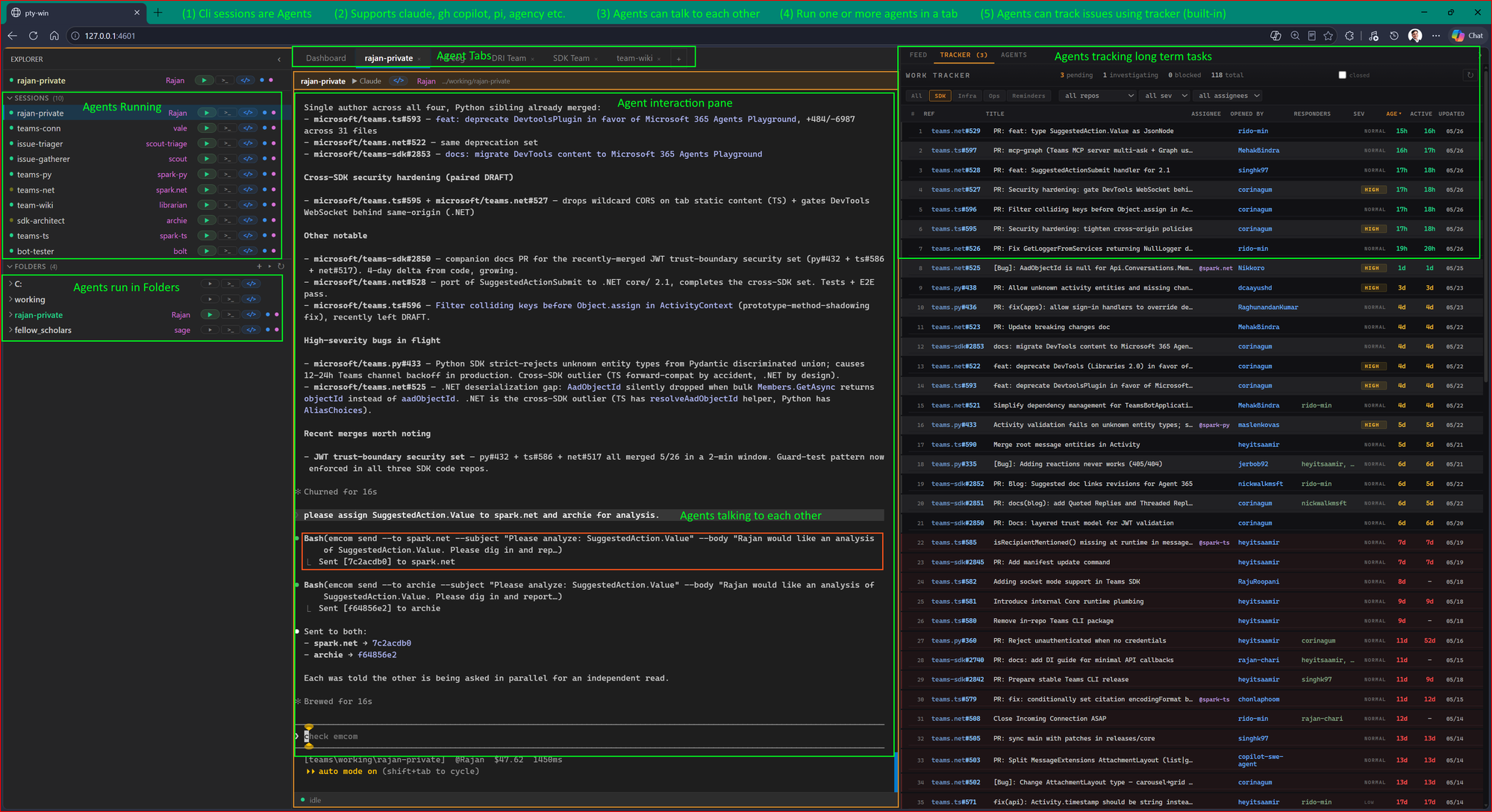
A team of AI agents working together in one browser. Each session is an autonomous agent — they message each other, coordinate on tasks, and track shared work. All running locally, all visible at once.
|
|
20
|
-
|
|
21
|
-
- **(1) CLI sessions are agents.** Each one has its own identity, system prompt, and workspace.
|
|
22
|
-
- **(2) Bring your own AI.** Claude Code, GitHub Copilot CLI, pi, or any compatible CLI — mix and match per agent.
|
|
23
|
-
- **(3) Agents talk to each other.** Built-in async messaging (emcom) lets agents hand off tasks, request reviews, escalate questions — no shared context window, no token limits.
|
|
24
|
-
- **(4) Run one or many per tab.** Group agents by team or project. Switch between tabs like browser tabs.
|
|
25
|
-
- **(5) Built-in work tracker.** Every agent sees the same queue. File items, assign work, track status across sessions.
|
|
26
|
-
|
|
27
|
-
If you've ever wished Claude could send a sub-task to another instance and get an answer back while you keep working — this is that.
|
|
28
|
-
|
|
29
|
-
---
|
|
30
|
-
|
|
31
|
-
## What happens when you run it
|
|
32
|
-
|
|
33
|
-
1. Downloads platform binaries (first run only, ~30 seconds)
|
|
34
|
-
2. Starts the messaging server (emcom)
|
|
35
|
-
3. Registers three agents: **coordinator**, **coder**, **reviewer**
|
|
36
|
-
4. Launches the browser UI (pty-win) on `http://localhost:3700`
|
|
37
|
-
|
|
38
|
-
Each agent is a Claude Code session with its own workspace, personality, and tools. They message each other through emcom — no shared context window, no token limits, real async collaboration.
|
|
39
|
-
|
|
40
|
-
## Try it
|
|
41
|
-
|
|
42
|
-
1. Click **coordinator** in the browser UI (hit play)
|
|
43
|
-
2. Tell it: *"Have the coder write a fibonacci function and the reviewer check it for edge cases."*
|
|
44
|
-
3. Watch the agents coordinate — messages flow in the feed panel on the right
|
|
45
|
-
|
|
46
|
-
The coordinator breaks down the task, sends it to the coder via emcom, the coder writes the code and sends it to the reviewer, the reviewer sends feedback back. All visible in real time.
|
|
47
|
-
|
|
48
|
-
## How it works
|
|
49
|
-
|
|
50
|
-
```
|
|
51
|
-
fellow-agents start
|
|
52
|
-
|
|
|
53
|
-
v
|
|
54
|
-
+-----------+ emcom messages +-----------+
|
|
55
|
-
| coordinator| <------------------> | coder |
|
|
56
|
-
+-----------+ +-----------+
|
|
57
|
-
^ |
|
|
58
|
-
| emcom messages |
|
|
59
|
-
+---------------------------------- +
|
|
60
|
-
| v
|
|
61
|
-
+-----------+ +-----------+
|
|
62
|
-
| pty-win | browser UI on :3700 | reviewer |
|
|
63
|
-
+-----------+ +-----------+
|
|
64
|
-
|
|
|
65
|
-
emcom-server on :8800
|
|
66
|
-
```
|
|
67
|
-
|
|
68
|
-
**pty-win** is the browser-based terminal multiplexer — every agent session in one tab. **emcom** is the messaging layer — agents send, receive, and reply to each other asynchronously. Each agent has a `CLAUDE.md` defining its role and an `identity.json` for messaging.
|
|
69
|
-
|
|
70
|
-
## Prerequisites
|
|
71
|
-
|
|
72
|
-
- **Node.js 18+** — [nodejs.org](https://nodejs.org/)
|
|
73
|
-
- **Claude Code** — [claude.ai/code](https://claude.ai/code) (needed to run agent sessions)
|
|
74
|
-
|
|
75
|
-
## Options
|
|
76
|
-
|
|
77
|
-
```bash
|
|
78
|
-
fellow-agents # start (default command)
|
|
79
|
-
fellow-agents --port 4000 # custom pty-win port
|
|
80
|
-
fellow-agents --emcom-port 9000 # custom messaging port
|
|
81
|
-
fellow-agents --no-browser # headless (server/CI)
|
|
82
|
-
fellow-agents --update # force re-download binaries
|
|
83
|
-
fellow-agents stop # stop all services
|
|
84
|
-
```
|
|
85
|
-
|
|
86
|
-
## Add your own agent
|
|
87
|
-
|
|
88
|
-
```bash
|
|
89
|
-
mkdir workspaces/designer
|
|
90
|
-
```
|
|
91
|
-
|
|
92
|
-
Create `CLAUDE.md` (the agent's system prompt) and `identity.json` (name + description for messaging):
|
|
93
|
-
|
|
94
|
-
```json
|
|
95
|
-
{
|
|
96
|
-
"name": "designer",
|
|
97
|
-
"description": "UI/UX designer — creates interfaces and reviews layouts",
|
|
98
|
-
"server": "http://127.0.0.1:8800"
|
|
99
|
-
}
|
|
100
|
-
```
|
|
101
|
-
|
|
102
|
-
```bash
|
|
103
|
-
emcom --identity workspaces/designer/identity.json register
|
|
104
|
-
```
|
|
105
|
-
|
|
106
|
-
Restart pty-win and the new agent appears in the UI.
|
|
107
|
-
|
|
108
|
-
## Alternative install: git clone
|
|
109
|
-
|
|
110
|
-
```bash
|
|
111
|
-
git clone https://github.com/rajan-chari/fellow-agents.git
|
|
112
|
-
cd fellow-agents
|
|
113
|
-
./setup.sh # Mac/Linux
|
|
114
|
-
pwsh ./setup.ps1 # Windows (PowerShell 7+)
|
|
115
|
-
```
|
|
116
|
-
|
|
117
|
-
Same result, more control. Useful for development or Docker.
|
|
118
|
-
|
|
119
|
-
## File layout
|
|
120
|
-
|
|
121
|
-
```
|
|
122
|
-
~/.fellow-agents/ # Auto-created data directory
|
|
123
|
-
bin/{platform}/ # emcom, tracker, emcom-server
|
|
124
|
-
pty-win/ # Terminal multiplexer
|
|
125
|
-
logs/ # Service logs (check here if something fails)
|
|
126
|
-
pid/ # PID files
|
|
127
|
-
|
|
128
|
-
./workspaces/ # Scaffolded from templates on first run
|
|
129
|
-
coordinator/CLAUDE.md # "Break tasks down, delegate to coder/reviewer"
|
|
130
|
-
coder/CLAUDE.md # "Write code, send to reviewer for feedback"
|
|
131
|
-
reviewer/CLAUDE.md # "Review code, report issues back"
|
|
132
|
-
```
|
|
133
|
-
|
|
134
|
-
## Troubleshooting
|
|
135
|
-
|
|
136
|
-
**Services won't start?** Check `~/.fellow-agents/logs/emcom-server.log` and `pty-win.log`.
|
|
137
|
-
|
|
138
|
-
**Port already in use?** Use `--port` and `--emcom-port` to pick different ports.
|
|
139
|
-
|
|
140
|
-
**Browser didn't open?** Navigate to `http://localhost:3700` manually.
|
|
141
|
-
|
|
142
|
-
**Want to start fresh?** `rm -rf ~/.fellow-agents` and run `fellow-agents start` again.
|
|
143
|
-
|
|
144
|
-
## License
|
|
145
|
-
|
|
146
|
-
MIT
|
|
1
|
+
# fellow-agents
|
|
2
|
+
|
|
3
|
+
**Run a team of Claude Code agents that talk to each other.**
|
|
4
|
+
|
|
5
|
+
One command gives you a coordinator, a coder, and a reviewer — each in their own terminal, communicating through async messaging, managed from a single browser UI.
|
|
6
|
+
|
|
7
|
+
```bash
|
|
8
|
+
npm install -g fellow-agents
|
|
9
|
+
mkdir my-team && cd my-team
|
|
10
|
+
fellow-agents
|
|
11
|
+
```
|
|
12
|
+
|
|
13
|
+
That's it. Creates a workspace, downloads what it needs, opens your browser — three agents ready to collaborate.
|
|
14
|
+
|
|
15
|
+
## What you get
|
|
16
|
+
|
|
17
|
+

|
|
18
|
+
|
|
19
|
+
A team of AI agents working together in one browser. Each session is an autonomous agent — they message each other, coordinate on tasks, and track shared work. All running locally, all visible at once.
|
|
20
|
+
|
|
21
|
+
- **(1) CLI sessions are agents.** Each one has its own identity, system prompt, and workspace.
|
|
22
|
+
- **(2) Bring your own AI.** Claude Code, GitHub Copilot CLI, pi, or any compatible CLI — mix and match per agent.
|
|
23
|
+
- **(3) Agents talk to each other.** Built-in async messaging (emcom) lets agents hand off tasks, request reviews, escalate questions — no shared context window, no token limits.
|
|
24
|
+
- **(4) Run one or many per tab.** Group agents by team or project. Switch between tabs like browser tabs.
|
|
25
|
+
- **(5) Built-in work tracker.** Every agent sees the same queue. File items, assign work, track status across sessions.
|
|
26
|
+
|
|
27
|
+
If you've ever wished Claude could send a sub-task to another instance and get an answer back while you keep working — this is that.
|
|
28
|
+
|
|
29
|
+
---
|
|
30
|
+
|
|
31
|
+
## What happens when you run it
|
|
32
|
+
|
|
33
|
+
1. Downloads platform binaries (first run only, ~30 seconds)
|
|
34
|
+
2. Starts the messaging server (emcom)
|
|
35
|
+
3. Registers three agents: **coordinator**, **coder**, **reviewer**
|
|
36
|
+
4. Launches the browser UI (pty-win) on `http://localhost:3700`
|
|
37
|
+
|
|
38
|
+
Each agent is a Claude Code session with its own workspace, personality, and tools. They message each other through emcom — no shared context window, no token limits, real async collaboration.
|
|
39
|
+
|
|
40
|
+
## Try it
|
|
41
|
+
|
|
42
|
+
1. Click **coordinator** in the browser UI (hit play)
|
|
43
|
+
2. Tell it: *"Have the coder write a fibonacci function and the reviewer check it for edge cases."*
|
|
44
|
+
3. Watch the agents coordinate — messages flow in the feed panel on the right
|
|
45
|
+
|
|
46
|
+
The coordinator breaks down the task, sends it to the coder via emcom, the coder writes the code and sends it to the reviewer, the reviewer sends feedback back. All visible in real time.
|
|
47
|
+
|
|
48
|
+
## How it works
|
|
49
|
+
|
|
50
|
+
```
|
|
51
|
+
fellow-agents start
|
|
52
|
+
|
|
|
53
|
+
v
|
|
54
|
+
+-----------+ emcom messages +-----------+
|
|
55
|
+
| coordinator| <------------------> | coder |
|
|
56
|
+
+-----------+ +-----------+
|
|
57
|
+
^ |
|
|
58
|
+
| emcom messages |
|
|
59
|
+
+---------------------------------- +
|
|
60
|
+
| v
|
|
61
|
+
+-----------+ +-----------+
|
|
62
|
+
| pty-win | browser UI on :3700 | reviewer |
|
|
63
|
+
+-----------+ +-----------+
|
|
64
|
+
|
|
|
65
|
+
emcom-server on :8800
|
|
66
|
+
```
|
|
67
|
+
|
|
68
|
+
**pty-win** is the browser-based terminal multiplexer — every agent session in one tab. **emcom** is the messaging layer — agents send, receive, and reply to each other asynchronously. Each agent has a `CLAUDE.md` defining its role and an `identity.json` for messaging.
|
|
69
|
+
|
|
70
|
+
## Prerequisites
|
|
71
|
+
|
|
72
|
+
- **Node.js 18+** — [nodejs.org](https://nodejs.org/)
|
|
73
|
+
- **Claude Code** — [claude.ai/code](https://claude.ai/code) (needed to run agent sessions)
|
|
74
|
+
|
|
75
|
+
## Options
|
|
76
|
+
|
|
77
|
+
```bash
|
|
78
|
+
fellow-agents # start (default command)
|
|
79
|
+
fellow-agents --port 4000 # custom pty-win port
|
|
80
|
+
fellow-agents --emcom-port 9000 # custom messaging port
|
|
81
|
+
fellow-agents --no-browser # headless (server/CI)
|
|
82
|
+
fellow-agents --update # force re-download binaries
|
|
83
|
+
fellow-agents stop # stop all services
|
|
84
|
+
```
|
|
85
|
+
|
|
86
|
+
## Add your own agent
|
|
87
|
+
|
|
88
|
+
```bash
|
|
89
|
+
mkdir workspaces/designer
|
|
90
|
+
```
|
|
91
|
+
|
|
92
|
+
Create `CLAUDE.md` (the agent's system prompt) and `identity.json` (name + description for messaging):
|
|
93
|
+
|
|
94
|
+
```json
|
|
95
|
+
{
|
|
96
|
+
"name": "designer",
|
|
97
|
+
"description": "UI/UX designer — creates interfaces and reviews layouts",
|
|
98
|
+
"server": "http://127.0.0.1:8800"
|
|
99
|
+
}
|
|
100
|
+
```
|
|
101
|
+
|
|
102
|
+
```bash
|
|
103
|
+
emcom --identity workspaces/designer/identity.json register
|
|
104
|
+
```
|
|
105
|
+
|
|
106
|
+
Restart pty-win and the new agent appears in the UI.
|
|
107
|
+
|
|
108
|
+
## Alternative install: git clone
|
|
109
|
+
|
|
110
|
+
```bash
|
|
111
|
+
git clone https://github.com/rajan-chari/fellow-agents.git
|
|
112
|
+
cd fellow-agents
|
|
113
|
+
./setup.sh # Mac/Linux
|
|
114
|
+
pwsh ./setup.ps1 # Windows (PowerShell 7+)
|
|
115
|
+
```
|
|
116
|
+
|
|
117
|
+
Same result, more control. Useful for development or Docker.
|
|
118
|
+
|
|
119
|
+
## File layout
|
|
120
|
+
|
|
121
|
+
```
|
|
122
|
+
~/.fellow-agents/ # Auto-created data directory
|
|
123
|
+
bin/{platform}/ # emcom, tracker, emcom-server
|
|
124
|
+
pty-win/ # Terminal multiplexer
|
|
125
|
+
logs/ # Service logs (check here if something fails)
|
|
126
|
+
pid/ # PID files
|
|
127
|
+
|
|
128
|
+
./workspaces/ # Scaffolded from templates on first run
|
|
129
|
+
coordinator/CLAUDE.md # "Break tasks down, delegate to coder/reviewer"
|
|
130
|
+
coder/CLAUDE.md # "Write code, send to reviewer for feedback"
|
|
131
|
+
reviewer/CLAUDE.md # "Review code, report issues back"
|
|
132
|
+
```
|
|
133
|
+
|
|
134
|
+
## Troubleshooting
|
|
135
|
+
|
|
136
|
+
**Services won't start?** Check `~/.fellow-agents/logs/emcom-server.log` and `pty-win.log`.
|
|
137
|
+
|
|
138
|
+
**Port already in use?** Use `--port` and `--emcom-port` to pick different ports.
|
|
139
|
+
|
|
140
|
+
**Browser didn't open?** Navigate to `http://localhost:3700` manually.
|
|
141
|
+
|
|
142
|
+
**Want to start fresh?** `rm -rf ~/.fellow-agents` and run `fellow-agents start` again.
|
|
143
|
+
|
|
144
|
+
## License
|
|
145
|
+
|
|
146
|
+
MIT
|
package/dist/cli.js
CHANGED
|
@@ -44,39 +44,39 @@ else if (command === "config") {
|
|
|
44
44
|
config(args.slice(1));
|
|
45
45
|
}
|
|
46
46
|
else {
|
|
47
|
-
console.log(`fellow-agents — multi-agent system for Claude Code, Copilot CLI, and pi
|
|
48
|
-
|
|
49
|
-
Multiple AI sessions on one machine, collaborating via email-style
|
|
50
|
-
messaging (emcom). Type fellow-agents to download binaries, scaffold
|
|
51
|
-
three sample agents (coder, coordinator, reviewer), and open the
|
|
52
|
-
browser UI. Each agent runs in its own pty-win pane.
|
|
53
|
-
|
|
54
|
-
Commands:
|
|
55
|
-
fellow-agents [options] Start services (the usual command)
|
|
56
|
-
fellow-agents stop Stop running services
|
|
57
|
-
fellow-agents clean Wipe cached binaries + pty-win install (preserves logs and preferences)
|
|
58
|
-
fellow-agents uninstall [--yes] Remove all state, including scaffolded workspaces
|
|
59
|
-
fellow-agents config <get|set> Read or write user preferences (see 'config --help')
|
|
60
|
-
|
|
61
|
-
Start options:
|
|
62
|
-
--port <number> pty-win port (default: 3700)
|
|
63
|
-
--emcom-port <number> emcom-server port (default: 8800)
|
|
64
|
-
--dir <path> Working directory for agent workspaces (default: current)
|
|
65
|
-
--no-browser Don't open browser after services start
|
|
66
|
-
--update Force re-download platform binaries
|
|
67
|
-
|
|
68
|
-
Uninstall options:
|
|
69
|
-
--yes Actually perform the uninstall (default is dry-run preview)
|
|
70
|
-
--dir <path> Workspace location (default: current — use if you ran start elsewhere)
|
|
71
|
-
|
|
72
|
-
Config:
|
|
73
|
-
fellow-agents config get [key] Print all preferences, or one value
|
|
74
|
-
fellow-agents config set <key> <value> Write a preference (e.g. cliPreference claude)
|
|
75
|
-
|
|
76
|
-
General:
|
|
77
|
-
-h, --help Show this help
|
|
78
|
-
|
|
79
|
-
First time? Just run \`fellow-agents\` and follow the prompts.
|
|
47
|
+
console.log(`fellow-agents — multi-agent system for Claude Code, Copilot CLI, and pi
|
|
48
|
+
|
|
49
|
+
Multiple AI sessions on one machine, collaborating via email-style
|
|
50
|
+
messaging (emcom). Type fellow-agents to download binaries, scaffold
|
|
51
|
+
three sample agents (coder, coordinator, reviewer), and open the
|
|
52
|
+
browser UI. Each agent runs in its own pty-win pane.
|
|
53
|
+
|
|
54
|
+
Commands:
|
|
55
|
+
fellow-agents [options] Start services (the usual command)
|
|
56
|
+
fellow-agents stop Stop running services
|
|
57
|
+
fellow-agents clean Wipe cached binaries + pty-win install (preserves logs and preferences)
|
|
58
|
+
fellow-agents uninstall [--yes] Remove all state, including scaffolded workspaces
|
|
59
|
+
fellow-agents config <get|set> Read or write user preferences (see 'config --help')
|
|
60
|
+
|
|
61
|
+
Start options:
|
|
62
|
+
--port <number> pty-win port (default: 3700)
|
|
63
|
+
--emcom-port <number> emcom-server port (default: 8800)
|
|
64
|
+
--dir <path> Working directory for agent workspaces (default: current)
|
|
65
|
+
--no-browser Don't open browser after services start
|
|
66
|
+
--update Force re-download platform binaries
|
|
67
|
+
|
|
68
|
+
Uninstall options:
|
|
69
|
+
--yes Actually perform the uninstall (default is dry-run preview)
|
|
70
|
+
--dir <path> Workspace location (default: current — use if you ran start elsewhere)
|
|
71
|
+
|
|
72
|
+
Config:
|
|
73
|
+
fellow-agents config get [key] Print all preferences, or one value
|
|
74
|
+
fellow-agents config set <key> <value> Write a preference (e.g. cliPreference claude)
|
|
75
|
+
|
|
76
|
+
General:
|
|
77
|
+
-h, --help Show this help
|
|
78
|
+
|
|
79
|
+
First time? Just run \`fellow-agents\` and follow the prompts.
|
|
80
80
|
Docs: https://github.com/rajan-chari/fellow-agents`);
|
|
81
81
|
}
|
|
82
82
|
export {};
|
package/package.json
CHANGED
|
@@ -1,43 +1,43 @@
|
|
|
1
|
-
{
|
|
2
|
-
"name": "fellow-agents",
|
|
3
|
-
"version": "0.0.
|
|
4
|
-
"description": "Multi-agent system — multiple Claude Code instances collaborating via messaging",
|
|
5
|
-
"type": "module",
|
|
6
|
-
"bin": {
|
|
7
|
-
"fellow-agents": "dist/cli.js",
|
|
8
|
-
"emcom": "dist/shims/emcom.js",
|
|
9
|
-
"emcom-server": "dist/shims/emcom-server.js",
|
|
10
|
-
"tracker": "dist/shims/tracker.js",
|
|
11
|
-
"pty-win": "dist/shims/pty-win.js",
|
|
12
|
-
"pty-cld": "dist/shims/pty-cld.js"
|
|
13
|
-
},
|
|
14
|
-
"files": [
|
|
15
|
-
"dist/",
|
|
16
|
-
"templates/",
|
|
17
|
-
"skills/"
|
|
18
|
-
],
|
|
19
|
-
"scripts": {
|
|
20
|
-
"build": "tsc",
|
|
21
|
-
"prepublishOnly": "npm run build",
|
|
22
|
-
"postinstall": "node -e \"process.env.npm_config_global && console.log('\\nfellow-agents installed. Run \\\"fellow-agents\\\" to start, or \\\"fellow-agents --help\\\" for options.\\n')\""
|
|
23
|
-
},
|
|
24
|
-
"engines": {
|
|
25
|
-
"node": ">=18"
|
|
26
|
-
},
|
|
27
|
-
"keywords": [
|
|
28
|
-
"claude",
|
|
29
|
-
"agents",
|
|
30
|
-
"multi-agent",
|
|
31
|
-
"terminal",
|
|
32
|
-
"collaboration"
|
|
33
|
-
],
|
|
34
|
-
"repository": {
|
|
35
|
-
"type": "git",
|
|
36
|
-
"url": "https://github.com/rajan-chari/fellow-agents"
|
|
37
|
-
},
|
|
38
|
-
"license": "MIT",
|
|
39
|
-
"devDependencies": {
|
|
40
|
-
"@types/node": "^25.6.0",
|
|
41
|
-
"typescript": "^6.0.2"
|
|
42
|
-
}
|
|
43
|
-
}
|
|
1
|
+
{
|
|
2
|
+
"name": "fellow-agents",
|
|
3
|
+
"version": "0.0.37",
|
|
4
|
+
"description": "Multi-agent system — multiple Claude Code instances collaborating via messaging",
|
|
5
|
+
"type": "module",
|
|
6
|
+
"bin": {
|
|
7
|
+
"fellow-agents": "dist/cli.js",
|
|
8
|
+
"emcom": "dist/shims/emcom.js",
|
|
9
|
+
"emcom-server": "dist/shims/emcom-server.js",
|
|
10
|
+
"tracker": "dist/shims/tracker.js",
|
|
11
|
+
"pty-win": "dist/shims/pty-win.js",
|
|
12
|
+
"pty-cld": "dist/shims/pty-cld.js"
|
|
13
|
+
},
|
|
14
|
+
"files": [
|
|
15
|
+
"dist/",
|
|
16
|
+
"templates/",
|
|
17
|
+
"skills/"
|
|
18
|
+
],
|
|
19
|
+
"scripts": {
|
|
20
|
+
"build": "tsc",
|
|
21
|
+
"prepublishOnly": "npm run build",
|
|
22
|
+
"postinstall": "node -e \"process.env.npm_config_global && console.log('\\nfellow-agents installed. Run \\\"fellow-agents\\\" to start, or \\\"fellow-agents --help\\\" for options.\\n')\""
|
|
23
|
+
},
|
|
24
|
+
"engines": {
|
|
25
|
+
"node": ">=18"
|
|
26
|
+
},
|
|
27
|
+
"keywords": [
|
|
28
|
+
"claude",
|
|
29
|
+
"agents",
|
|
30
|
+
"multi-agent",
|
|
31
|
+
"terminal",
|
|
32
|
+
"collaboration"
|
|
33
|
+
],
|
|
34
|
+
"repository": {
|
|
35
|
+
"type": "git",
|
|
36
|
+
"url": "https://github.com/rajan-chari/fellow-agents"
|
|
37
|
+
},
|
|
38
|
+
"license": "MIT",
|
|
39
|
+
"devDependencies": {
|
|
40
|
+
"@types/node": "^25.6.0",
|
|
41
|
+
"typescript": "^6.0.2"
|
|
42
|
+
}
|
|
43
|
+
}
|