feishu-mcp 0.1.9 → 0.2.0
This diff represents the content of publicly available package versions that have been released to one of the supported registries. The information contained in this diff is provided for informational purposes only and reflects changes between package versions as they appear in their respective public registries.
- package/LICENSE +21 -21
- package/README.md +263 -261
- package/dist/mcp/feishuMcp.js +2 -2
- package/dist/services/feishuApiService.js +11 -2
- package/dist/utils/config.js +20 -0
- package/dist/utils/document.js +114 -114
- package/package.json +1 -1
package/LICENSE
CHANGED
|
@@ -1,21 +1,21 @@
|
|
|
1
|
-
MIT License
|
|
2
|
-
|
|
3
|
-
Copyright (c) 2025 cso1z
|
|
4
|
-
|
|
5
|
-
Permission is hereby granted, free of charge, to any person obtaining a copy
|
|
6
|
-
of this software and associated documentation files (the "Software"), to deal
|
|
7
|
-
in the Software without restriction, including without limitation the rights
|
|
8
|
-
to use, copy, modify, merge, publish, distribute, sublicense, and/or sell
|
|
9
|
-
copies of the Software, and to permit persons to whom the Software is
|
|
10
|
-
furnished to do so, subject to the following conditions:
|
|
11
|
-
|
|
12
|
-
The above copyright notice and this permission notice shall be included in all
|
|
13
|
-
copies or substantial portions of the Software.
|
|
14
|
-
|
|
15
|
-
THE SOFTWARE IS PROVIDED "AS IS", WITHOUT WARRANTY OF ANY KIND, EXPRESS OR
|
|
16
|
-
IMPLIED, INCLUDING BUT NOT LIMITED TO THE WARRANTIES OF MERCHANTABILITY,
|
|
17
|
-
FITNESS FOR A PARTICULAR PURPOSE AND NONINFRINGEMENT. IN NO EVENT SHALL THE
|
|
18
|
-
AUTHORS OR COPYRIGHT HOLDERS BE LIABLE FOR ANY CLAIM, DAMAGES OR OTHER
|
|
19
|
-
LIABILITY, WHETHER IN AN ACTION OF CONTRACT, TORT OR OTHERWISE, ARISING FROM,
|
|
20
|
-
OUT OF OR IN CONNECTION WITH THE SOFTWARE OR THE USE OR OTHER DEALINGS IN THE
|
|
21
|
-
SOFTWARE.
|
|
1
|
+
MIT License
|
|
2
|
+
|
|
3
|
+
Copyright (c) 2025 cso1z
|
|
4
|
+
|
|
5
|
+
Permission is hereby granted, free of charge, to any person obtaining a copy
|
|
6
|
+
of this software and associated documentation files (the "Software"), to deal
|
|
7
|
+
in the Software without restriction, including without limitation the rights
|
|
8
|
+
to use, copy, modify, merge, publish, distribute, sublicense, and/or sell
|
|
9
|
+
copies of the Software, and to permit persons to whom the Software is
|
|
10
|
+
furnished to do so, subject to the following conditions:
|
|
11
|
+
|
|
12
|
+
The above copyright notice and this permission notice shall be included in all
|
|
13
|
+
copies or substantial portions of the Software.
|
|
14
|
+
|
|
15
|
+
THE SOFTWARE IS PROVIDED "AS IS", WITHOUT WARRANTY OF ANY KIND, EXPRESS OR
|
|
16
|
+
IMPLIED, INCLUDING BUT NOT LIMITED TO THE WARRANTIES OF MERCHANTABILITY,
|
|
17
|
+
FITNESS FOR A PARTICULAR PURPOSE AND NONINFRINGEMENT. IN NO EVENT SHALL THE
|
|
18
|
+
AUTHORS OR COPYRIGHT HOLDERS BE LIABLE FOR ANY CLAIM, DAMAGES OR OTHER
|
|
19
|
+
LIABILITY, WHETHER IN AN ACTION OF CONTRACT, TORT OR OTHERWISE, ARISING FROM,
|
|
20
|
+
OUT OF OR IN CONNECTION WITH THE SOFTWARE OR THE USE OR OTHER DEALINGS IN THE
|
|
21
|
+
SOFTWARE.
|
package/README.md
CHANGED
|
@@ -1,261 +1,263 @@
|
|
|
1
|
-
# 飞书 MCP 服务器
|
|
2
|
-
|
|
3
|
-
|
|
4
|
-
[](https://www.npmjs.com/package/feishu-mcp)
|
|
5
|
-
[](./LICENSE)
|
|
6
|
-
|
|
7
|
-
为 [Cursor](https://cursor.sh/)、[Windsurf](https://codeium.com/windsurf)、[Cline](https://cline.bot/) 和其他 AI 驱动的编码工具提供访问、编辑和结构化处理飞书文档的能力,基于 [Model Context Protocol](https://modelcontextprotocol.io/introduction) 服务器实现。
|
|
8
|
-
|
|
9
|
-
本项目让 AI 编码工具能够直接获取和理解飞书文档的结构化内容,显著提升文档处理的智能化和效率。
|
|
10
|
-
|
|
11
|
-
**完整覆盖飞书文档的真实使用流程,助你高效利用文档资源:**
|
|
12
|
-
1. **文件夹目录获取**:快速获取和浏览飞书文档文件夹下的所有文档,便于整体管理和查找。
|
|
13
|
-
2. **内容获取与理解**:支持结构化、分块、富文本等多维度内容读取,AI 能精准理解文档上下文。
|
|
14
|
-
3. **智能创建与编辑**:可自动创建新文档、批量生成和编辑内容,满足多样化写作需求。
|
|
15
|
-
4. **高效检索与搜索**:内置关键字搜索,帮助你在大量文档中迅速找到目标信息。
|
|
16
|
-
|
|
17
|
-
本项目让你在飞书文档的日常使用流程中实现智能获取、编辑和搜索,提升内容处理效率和体验。
|
|
18
|
-
|
|
19
|
-
### 🎬 使用演示视频
|
|
20
|
-
|
|
21
|
-
你可以通过以下视频了解 MCP 的实际使用效果和操作流程:
|
|
22
|
-
|
|
23
|
-
<a href="https://www.bilibili.com/video/BV1z7MdzoEfu/?vd_source=94c14da5a71aeb01f665f159dd3d89c8">
|
|
24
|
-
<img src="image/demo.png" alt="飞书 MCP 使用演示" width="300"/>
|
|
25
|
-
</a>
|
|
26
|
-
|
|
27
|
-
<a href="https://www.bilibili.com/video/BV18z3gzdE1w/?vd_source=94c14da5a71aeb01f665f159dd3d89c8">
|
|
28
|
-
<img src="image/demo_1.png" alt="飞书 MCP 使用演示" width="300"/>
|
|
29
|
-
</a>
|
|
30
|
-
|
|
31
|
-
> ⭐ **Star 本项目,第一时间获取最新功能和重要更新!** 关注项目可以让你不错过任何新特性、修复和优化,助你持续高效使用。你的支持也将帮助我们更好地完善和发展项目。⭐
|
|
32
|
-
|
|
33
|
-
---
|
|
34
|
-
|
|
35
|
-
## 🛠️ 工具功能详情
|
|
36
|
-
|
|
37
|
-
| 功能类别 | 工具名称 | 描述 | 使用场景 | 状态 |
|
|
38
|
-
|---------|--------------------------------------|-------------|--------------------------|-------|
|
|
39
|
-
| **文档管理** | `create_feishu_document` | 创建新的飞书文档 | 从零开始创建文档 | ✅ 已完成 |
|
|
40
|
-
| | `get_feishu_document_info` | 获取文档基本信息 | 验证文档存在性和权限 | ✅ 已完成 |
|
|
41
|
-
| | `get_feishu_document_blocks` | 获取文档块结构 | 了解文档层级结构 | ✅ 已完成 |
|
|
42
|
-
| **内容编辑** | `batch_create_feishu_blocks` | 批量创建多个块 | 高效创建连续内容 | ✅ 已完成 |
|
|
43
|
-
| | `update_feishu_block_text` | 更新块文本内容 | 修改现有内容 | ✅ 已完成 |
|
|
44
|
-
| | `delete_feishu_document_blocks` | 删除文档块 | 清理和重构文档内容 | ✅ 已完成 |
|
|
45
|
-
| **文件夹管理** | `get_feishu_folder_files` | 获取文件夹文件列表 | 浏览文件夹内容 | ✅ 已完成 |
|
|
46
|
-
| | `create_feishu_folder` | 创建新文件夹 | 组织文档结构 | ✅ 已完成 |
|
|
47
|
-
| **搜索功能** | `search_feishu_documents` | 搜索文档 | 查找特定内容 | ✅ 已完成 |
|
|
48
|
-
| **工具功能** | `get_feishu_document_info` | 获取wiki文档信息 | 将Wiki链接转为文档ID、创建wiki子节点 | ✅ 已完成 |
|
|
49
|
-
| | `get_feishu_image_resource` | 获取图片资源 | 下载文档中的图片 | ✅ 已完成 |
|
|
50
|
-
| | `get_feishu_whiteboard_content` | 获取画板内容 | 获取画板中的图形元素和结构(流程图、思维导图等) | ✅ 已完成 |
|
|
51
|
-
| **高级功能** | `create_feishu_table` | 创建和编辑表格 | 结构化数据展示 | ✅ 已完成 |
|
|
52
|
-
| | 流程图插入 | 支持流程图和思维导图 | 流程梳理和可视化 | ✅ 已完成 |
|
|
53
|
-
| | 流程图插入(画板形式) | 支持流程图和思维导图 | 流程梳理和可视化 | ✅ 已完成 |
|
|
54
|
-
| 图片插入 | `upload_and_bind_image_to_block` | 支持插入本地和远程图片 | 修改文档内容 | ✅ 已完成 |
|
|
55
|
-
| | 公式支持 | 支持数学公式 | 学术和技术文档 | ✅ 已完成 |
|
|
56
|
-
|
|
57
|
-
### 🎨 支持的样式功能(基本支持md所有格式)
|
|
58
|
-
|
|
59
|
-
- **文本样式**:粗体、斜体、下划线、删除线、行内代码
|
|
60
|
-
- **文本颜色**:灰色、棕色、橙色、黄色、绿色、蓝色、紫色
|
|
61
|
-
- **对齐方式**:左对齐、居中、右对齐
|
|
62
|
-
- **标题级别**:支持1-9级标题
|
|
63
|
-
- **代码块**:支持多种编程语言语法高亮
|
|
64
|
-
- **列表**:有序列表(编号)、无序列表(项目符号)
|
|
65
|
-
- **图片**:支持本地图片和网络图片
|
|
66
|
-
- **公式**:在文本块中插入数学公式,支持LaTeX语法
|
|
67
|
-
- **mermaid图表**:支持流程图、时序图、思维导图、类图、饼图等等
|
|
68
|
-
- **表格**:支持创建多行列表格,单元格可包含文本、标题、列表、代码块等多种内容类型
|
|
69
|
-
- **飞书文档画板**:支持飞书文档的画板创建,提供更加更为丰富和多样化的内容。
|
|
70
|
-
|
|
71
|
-
---
|
|
72
|
-
|
|
73
|
-
## 📈 一周计划:提升工具效率
|
|
74
|
-
|
|
75
|
-
- ~~**精简工具集**:21个工具 → 13个工具,移除冗余,聚焦核心功能~~ 0.0.15 ✅
|
|
76
|
-
- ~~**优化描述**:7000+ tokens → 3000+ tokens,简化提示,节省请求token~~ 0.0.15 ✅
|
|
77
|
-
- ~~**批量增强**:新增批量更新、批量图片上传,单次操作效率提升50%~~ 0.0.15 ✅
|
|
78
|
-
- **流程优化**:减少多步调用,实现一键完成复杂任务
|
|
79
|
-
- ~~**支持多种凭证类型**:包括 tenant_access_token和 user_access_token,满足不同场景下的认证需求~~ (飞书应用配置发生变更) 0.0.16 ✅。
|
|
80
|
-
- ~~**支持cursor用户登录**:方便在cursor平台用户认证 不做了,没必要 ❌~~
|
|
81
|
-
- ~~**支持mermaid图表**:流程图、时序图等等,丰富文档内容~~ 0.1.11 ✅
|
|
82
|
-
- ~~**支持表格创建**:创建包含各种块类型的复杂表格,支持样式控制~~ 0.1.2 ✅
|
|
83
|
-
- ~~**支持飞书多用户user认证**:一人部署,可以多人使用~~ 0.1.3 ✅
|
|
84
|
-
- ~~**支持user_access_token自动刷新**:无需频繁授权,提高使用体验~~ 0.1.6 ✅
|
|
85
|
-
- ~~**支持授权范围校验**:对应用授权进行验证,以确保其符合当前工具的要求。如未满足条件,将提供友好的指引,以便用户更顺畅地使用~~ 0.1.7 ✅
|
|
86
|
-
- ~~**支持创建画板内容**:与Mermaid图表相比,画板能够展示更为丰富和多样化的内容,提供更为友好和愉悦的视觉体验~~ (飞书应用配置发生变更) 0.1.7 ✅
|
|
87
|
-
- **提取环境变量中的 feishuAppId 和 feishuAppSecret**:将飞书配置从环境变量中分离出来,以便在诸如 cursor 等客户端中进行设置,从而支持一个服务共享给多个团队使用。
|
|
88
|
-
- ~~**支持知识库和我的文档库**:实现知识库、我的文档库 节点遍历、节点创建、文件创建、搜索等功能~~ (飞书应用配置发生变更) 0.1.8 ✅
|
|
89
|
-
- **版本更新通知**:在发布新版本时,及时向用户提供相关提示与说明。
|
|
90
|
-
- ~~**stdio模式user认证问题**:修复stdio模式下飞书user认证失败问题~~ 0.1.9 ✅
|
|
91
|
-
|
|
92
|
-
|
|
93
|
-
|
|
94
|
-
|
|
95
|
-
|
|
96
|
-
|
|
97
|
-
|
|
98
|
-
|
|
99
|
-
|
|
100
|
-
|
|
101
|
-
|
|
102
|
-
|
|
103
|
-
|
|
104
|
-
|
|
105
|
-
|
|
106
|
-
|
|
107
|
-
|
|
108
|
-
|
|
109
|
-
|
|
110
|
-
|
|
111
|
-
|
|
112
|
-
|
|
113
|
-
|
|
114
|
-
|
|
115
|
-
|
|
116
|
-
|
|
117
|
-
|
|
118
|
-
|
|
119
|
-
|
|
120
|
-
|
|
121
|
-
|
|
122
|
-
|
|
123
|
-
|
|
124
|
-
|
|
125
|
-
|
|
126
|
-
|
|
127
|
-
|
|
128
|
-
|
|
129
|
-
|
|
130
|
-
|
|
131
|
-
|
|
132
|
-
|
|
133
|
-
|
|
134
|
-
|
|
135
|
-
|
|
136
|
-
|
|
137
|
-
|
|
138
|
-
|
|
139
|
-
|
|
140
|
-
|
|
141
|
-
|
|
142
|
-
|
|
143
|
-
|
|
144
|
-
|
|
145
|
-
|
|
146
|
-
|
|
147
|
-
|
|
148
|
-
|
|
149
|
-
|
|
150
|
-
|
|
151
|
-
|
|
152
|
-
|
|
153
|
-
|
|
154
|
-
|
|
155
|
-
|
|
156
|
-
|
|
157
|
-
|
|
158
|
-
| `
|
|
159
|
-
| `
|
|
160
|
-
| `
|
|
161
|
-
|
|
162
|
-
|
|
163
|
-
|
|
164
|
-
|
|
165
|
-
|
|
166
|
-
|
|
167
|
-
|
|
168
|
-
|
|
169
|
-
|
|
170
|
-
"
|
|
171
|
-
|
|
172
|
-
|
|
173
|
-
"
|
|
174
|
-
|
|
175
|
-
|
|
176
|
-
|
|
177
|
-
|
|
178
|
-
|
|
179
|
-
|
|
180
|
-
}
|
|
181
|
-
|
|
182
|
-
|
|
183
|
-
|
|
184
|
-
|
|
185
|
-
|
|
186
|
-
|
|
187
|
-
|
|
188
|
-
|
|
189
|
-
|
|
190
|
-
|
|
191
|
-
|
|
192
|
-
|
|
193
|
-
|
|
194
|
-
|
|
195
|
-
|
|
196
|
-
|
|
197
|
-
|
|
198
|
-
|
|
199
|
-
|
|
200
|
-
|
|
201
|
-
|
|
202
|
-
|
|
203
|
-
|
|
204
|
-
|
|
205
|
-
|
|
206
|
-
|
|
207
|
-
|
|
208
|
-
|
|
209
|
-
|
|
210
|
-
|
|
211
|
-
|
|
212
|
-
|
|
213
|
-
|
|
214
|
-
|
|
215
|
-
|
|
216
|
-
|
|
217
|
-
|
|
218
|
-
|
|
219
|
-
|
|
220
|
-
|
|
221
|
-
|
|
222
|
-
|
|
223
|
-
|
|
224
|
-
|
|
225
|
-
|
|
226
|
-
|
|
227
|
-
-
|
|
228
|
-
|
|
229
|
-
|
|
230
|
-
|
|
231
|
-
|
|
232
|
-
|
|
233
|
-
|
|
234
|
-
|
|
235
|
-
|
|
236
|
-
|
|
237
|
-
- **[
|
|
238
|
-
- **[
|
|
239
|
-
- **[
|
|
240
|
-
- **[
|
|
241
|
-
- **[
|
|
242
|
-
- **[
|
|
243
|
-
|
|
244
|
-
|
|
245
|
-
|
|
246
|
-
|
|
247
|
-
|
|
248
|
-
|
|
249
|
-
|
|
250
|
-
|
|
251
|
-
|
|
252
|
-
-
|
|
253
|
-
-
|
|
254
|
-
-
|
|
255
|
-
|
|
256
|
-
|
|
257
|
-
|
|
258
|
-
|
|
259
|
-
|
|
260
|
-
|
|
261
|
-
|
|
1
|
+
# 飞书 MCP 服务器
|
|
2
|
+
|
|
3
|
+
|
|
4
|
+
[](https://www.npmjs.com/package/feishu-mcp)
|
|
5
|
+
[](./LICENSE)
|
|
6
|
+
|
|
7
|
+
为 [Cursor](https://cursor.sh/)、[Windsurf](https://codeium.com/windsurf)、[Cline](https://cline.bot/) 和其他 AI 驱动的编码工具提供访问、编辑和结构化处理飞书文档的能力,基于 [Model Context Protocol](https://modelcontextprotocol.io/introduction) 服务器实现。
|
|
8
|
+
|
|
9
|
+
本项目让 AI 编码工具能够直接获取和理解飞书文档的结构化内容,显著提升文档处理的智能化和效率。
|
|
10
|
+
|
|
11
|
+
**完整覆盖飞书文档的真实使用流程,助你高效利用文档资源:**
|
|
12
|
+
1. **文件夹目录获取**:快速获取和浏览飞书文档文件夹下的所有文档,便于整体管理和查找。
|
|
13
|
+
2. **内容获取与理解**:支持结构化、分块、富文本等多维度内容读取,AI 能精准理解文档上下文。
|
|
14
|
+
3. **智能创建与编辑**:可自动创建新文档、批量生成和编辑内容,满足多样化写作需求。
|
|
15
|
+
4. **高效检索与搜索**:内置关键字搜索,帮助你在大量文档中迅速找到目标信息。
|
|
16
|
+
|
|
17
|
+
本项目让你在飞书文档的日常使用流程中实现智能获取、编辑和搜索,提升内容处理效率和体验。
|
|
18
|
+
|
|
19
|
+
### 🎬 使用演示视频
|
|
20
|
+
|
|
21
|
+
你可以通过以下视频了解 MCP 的实际使用效果和操作流程:
|
|
22
|
+
|
|
23
|
+
<a href="https://www.bilibili.com/video/BV1z7MdzoEfu/?vd_source=94c14da5a71aeb01f665f159dd3d89c8">
|
|
24
|
+
<img src="image/demo.png" alt="飞书 MCP 使用演示" width="300"/>
|
|
25
|
+
</a>
|
|
26
|
+
|
|
27
|
+
<a href="https://www.bilibili.com/video/BV18z3gzdE1w/?vd_source=94c14da5a71aeb01f665f159dd3d89c8">
|
|
28
|
+
<img src="image/demo_1.png" alt="飞书 MCP 使用演示" width="300"/>
|
|
29
|
+
</a>
|
|
30
|
+
|
|
31
|
+
> ⭐ **Star 本项目,第一时间获取最新功能和重要更新!** 关注项目可以让你不错过任何新特性、修复和优化,助你持续高效使用。你的支持也将帮助我们更好地完善和发展项目。⭐
|
|
32
|
+
|
|
33
|
+
---
|
|
34
|
+
|
|
35
|
+
## 🛠️ 工具功能详情
|
|
36
|
+
|
|
37
|
+
| 功能类别 | 工具名称 | 描述 | 使用场景 | 状态 |
|
|
38
|
+
|---------|--------------------------------------|-------------|--------------------------|-------|
|
|
39
|
+
| **文档管理** | `create_feishu_document` | 创建新的飞书文档 | 从零开始创建文档 | ✅ 已完成 |
|
|
40
|
+
| | `get_feishu_document_info` | 获取文档基本信息 | 验证文档存在性和权限 | ✅ 已完成 |
|
|
41
|
+
| | `get_feishu_document_blocks` | 获取文档块结构 | 了解文档层级结构 | ✅ 已完成 |
|
|
42
|
+
| **内容编辑** | `batch_create_feishu_blocks` | 批量创建多个块 | 高效创建连续内容 | ✅ 已完成 |
|
|
43
|
+
| | `update_feishu_block_text` | 更新块文本内容 | 修改现有内容 | ✅ 已完成 |
|
|
44
|
+
| | `delete_feishu_document_blocks` | 删除文档块 | 清理和重构文档内容 | ✅ 已完成 |
|
|
45
|
+
| **文件夹管理** | `get_feishu_folder_files` | 获取文件夹文件列表 | 浏览文件夹内容 | ✅ 已完成 |
|
|
46
|
+
| | `create_feishu_folder` | 创建新文件夹 | 组织文档结构 | ✅ 已完成 |
|
|
47
|
+
| **搜索功能** | `search_feishu_documents` | 搜索文档 | 查找特定内容 | ✅ 已完成 |
|
|
48
|
+
| **工具功能** | `get_feishu_document_info` | 获取wiki文档信息 | 将Wiki链接转为文档ID、创建wiki子节点 | ✅ 已完成 |
|
|
49
|
+
| | `get_feishu_image_resource` | 获取图片资源 | 下载文档中的图片 | ✅ 已完成 |
|
|
50
|
+
| | `get_feishu_whiteboard_content` | 获取画板内容 | 获取画板中的图形元素和结构(流程图、思维导图等) | ✅ 已完成 |
|
|
51
|
+
| **高级功能** | `create_feishu_table` | 创建和编辑表格 | 结构化数据展示 | ✅ 已完成 |
|
|
52
|
+
| | 流程图插入 | 支持流程图和思维导图 | 流程梳理和可视化 | ✅ 已完成 |
|
|
53
|
+
| | 流程图插入(画板形式) | 支持流程图和思维导图 | 流程梳理和可视化 | ✅ 已完成 |
|
|
54
|
+
| 图片插入 | `upload_and_bind_image_to_block` | 支持插入本地和远程图片 | 修改文档内容 | ✅ 已完成 |
|
|
55
|
+
| | 公式支持 | 支持数学公式 | 学术和技术文档 | ✅ 已完成 |
|
|
56
|
+
|
|
57
|
+
### 🎨 支持的样式功能(基本支持md所有格式)
|
|
58
|
+
|
|
59
|
+
- **文本样式**:粗体、斜体、下划线、删除线、行内代码
|
|
60
|
+
- **文本颜色**:灰色、棕色、橙色、黄色、绿色、蓝色、紫色
|
|
61
|
+
- **对齐方式**:左对齐、居中、右对齐
|
|
62
|
+
- **标题级别**:支持1-9级标题
|
|
63
|
+
- **代码块**:支持多种编程语言语法高亮
|
|
64
|
+
- **列表**:有序列表(编号)、无序列表(项目符号)
|
|
65
|
+
- **图片**:支持本地图片和网络图片
|
|
66
|
+
- **公式**:在文本块中插入数学公式,支持LaTeX语法
|
|
67
|
+
- **mermaid图表**:支持流程图、时序图、思维导图、类图、饼图等等
|
|
68
|
+
- **表格**:支持创建多行列表格,单元格可包含文本、标题、列表、代码块等多种内容类型
|
|
69
|
+
- **飞书文档画板**:支持飞书文档的画板创建,提供更加更为丰富和多样化的内容。
|
|
70
|
+
|
|
71
|
+
---
|
|
72
|
+
|
|
73
|
+
## 📈 一周计划:提升工具效率
|
|
74
|
+
|
|
75
|
+
- ~~**精简工具集**:21个工具 → 13个工具,移除冗余,聚焦核心功能~~ 0.0.15 ✅
|
|
76
|
+
- ~~**优化描述**:7000+ tokens → 3000+ tokens,简化提示,节省请求token~~ 0.0.15 ✅
|
|
77
|
+
- ~~**批量增强**:新增批量更新、批量图片上传,单次操作效率提升50%~~ 0.0.15 ✅
|
|
78
|
+
- **流程优化**:减少多步调用,实现一键完成复杂任务
|
|
79
|
+
- ~~**支持多种凭证类型**:包括 tenant_access_token和 user_access_token,满足不同场景下的认证需求~~ (飞书应用配置发生变更) 0.0.16 ✅。
|
|
80
|
+
- ~~**支持cursor用户登录**:方便在cursor平台用户认证 不做了,没必要 ❌~~
|
|
81
|
+
- ~~**支持mermaid图表**:流程图、时序图等等,丰富文档内容~~ 0.1.11 ✅
|
|
82
|
+
- ~~**支持表格创建**:创建包含各种块类型的复杂表格,支持样式控制~~ 0.1.2 ✅
|
|
83
|
+
- ~~**支持飞书多用户user认证**:一人部署,可以多人使用~~ 0.1.3 ✅
|
|
84
|
+
- ~~**支持user_access_token自动刷新**:无需频繁授权,提高使用体验~~ 0.1.6 ✅
|
|
85
|
+
- ~~**支持授权范围校验**:对应用授权进行验证,以确保其符合当前工具的要求。如未满足条件,将提供友好的指引,以便用户更顺畅地使用~~ 0.1.7 ✅
|
|
86
|
+
- ~~**支持创建画板内容**:与Mermaid图表相比,画板能够展示更为丰富和多样化的内容,提供更为友好和愉悦的视觉体验~~ (飞书应用配置发生变更) 0.1.7 ✅
|
|
87
|
+
- **提取环境变量中的 feishuAppId 和 feishuAppSecret**:将飞书配置从环境变量中分离出来,以便在诸如 cursor 等客户端中进行设置,从而支持一个服务共享给多个团队使用。
|
|
88
|
+
- ~~**支持知识库和我的文档库**:实现知识库、我的文档库 节点遍历、节点创建、文件创建、搜索等功能~~ (飞书应用配置发生变更) 0.1.8 ✅
|
|
89
|
+
- **版本更新通知**:在发布新版本时,及时向用户提供相关提示与说明。
|
|
90
|
+
- ~~**stdio模式user认证问题**:修复stdio模式下飞书user认证失败问题~~ 0.1.9 ✅
|
|
91
|
+
- ~~**权限检查功能可配置化**:将权限检查功能作为可配置选项,支持通过环境变量 `FEISHU_SCOPE_VALIDATION` 或命令行参数 `--feishu-scope-validation` 控制,默认启用,满足不同用户的使用场景~~ 0.2.0 ✅
|
|
92
|
+
---
|
|
93
|
+
|
|
94
|
+
## 🔧 飞书配置教程
|
|
95
|
+
|
|
96
|
+
**⚠️ 重要提示:在开始使用之前,必须先完成飞书应用配置,否则无法正常使用本工具。**
|
|
97
|
+
|
|
98
|
+
关于如何创建飞书应用和获取应用凭证的说明可以在[官方教程](https://open.feishu.cn/document/home/develop-a-bot-in-5-minutes/create-an-app)找到。
|
|
99
|
+
|
|
100
|
+
**详细的飞书应用配置步骤**:有关注册飞书应用、配置权限、添加文档访问权限的详细指南,请参阅 [手把手教程 FEISHU_CONFIG.md](FEISHU_CONFIG.md)。
|
|
101
|
+
|
|
102
|
+
---
|
|
103
|
+
|
|
104
|
+
## 🏃♂️ 快速开始
|
|
105
|
+
|
|
106
|
+
### 方式一:使用 NPM 快速运行
|
|
107
|
+
|
|
108
|
+
```bash
|
|
109
|
+
npx feishu-mcp@latest --feishu-app-id=<你的飞书应用ID> --feishu-app-secret=<你的飞书应用密钥> --feishu-auth-type=<tenant/user>
|
|
110
|
+
```
|
|
111
|
+
|
|
112
|
+
### 方式二:本地运行
|
|
113
|
+
1. **克隆仓库**
|
|
114
|
+
```bash
|
|
115
|
+
git clone https://github.com/cso1z/Feishu-MCP.git
|
|
116
|
+
cd Feishu-MCP
|
|
117
|
+
```
|
|
118
|
+
|
|
119
|
+
2. **配置环境变量(复制一份.env.example保存为.env文件)**
|
|
120
|
+
|
|
121
|
+
3. **编辑 .env 文件**
|
|
122
|
+
在项目根目录下找到并用任意文本编辑器打开 `.env` 文件,填写你的飞书应用凭证:
|
|
123
|
+
```env
|
|
124
|
+
FEISHU_APP_ID=cli_xxxxx
|
|
125
|
+
FEISHU_APP_SECRET=xxxxx
|
|
126
|
+
PORT=3333
|
|
127
|
+
FEISHU_AUTH_TYPE=tenant/user
|
|
128
|
+
```
|
|
129
|
+
|
|
130
|
+
4. **运行服务器**
|
|
131
|
+
|
|
132
|
+
方式一:本地运行
|
|
133
|
+
- **安装依赖**
|
|
134
|
+
```bash
|
|
135
|
+
pnpm install
|
|
136
|
+
```
|
|
137
|
+
- **启动服务**
|
|
138
|
+
```bash
|
|
139
|
+
pnpm run dev
|
|
140
|
+
```
|
|
141
|
+
|
|
142
|
+
方式二:使用 Docker Compose
|
|
143
|
+
- **启动服务**
|
|
144
|
+
```bash
|
|
145
|
+
docker-compose up -d
|
|
146
|
+
```
|
|
147
|
+
- **查看日志**
|
|
148
|
+
```bash
|
|
149
|
+
docker-compose logs -f
|
|
150
|
+
```
|
|
151
|
+
|
|
152
|
+
## ⚙️ 项目配置
|
|
153
|
+
|
|
154
|
+
### 环境变量配置
|
|
155
|
+
|
|
156
|
+
| 变量名 | 必需 | 描述 | 默认值 |
|
|
157
|
+
|--------|------|--------------------------------------------------------------------|-------|
|
|
158
|
+
| `FEISHU_APP_ID` | ✅ | 飞书应用 ID | - |
|
|
159
|
+
| `FEISHU_APP_SECRET` | ✅ | 飞书应用密钥 | - |
|
|
160
|
+
| `PORT` | ❌ | 服务器端口 | `3333` |
|
|
161
|
+
| `FEISHU_AUTH_TYPE` | ❌ | 认证凭证类型,使用 `user`(用户级,使用时是用户的身份操作飞书文档,需OAuth授权),使用 `tenant`(应用级,默认) | `tenant` |
|
|
162
|
+
| `FEISHU_SCOPE_VALIDATION` | ❌ | 是否启用权限检查,设置为 `false` 可关闭权限检查(适用于仅使用部分功能的场景) | `true` |
|
|
163
|
+
|
|
164
|
+
### 配置文件方式(适用于 Cursor、Cline 等)
|
|
165
|
+
|
|
166
|
+
```
|
|
167
|
+
{
|
|
168
|
+
"mcpServers": {
|
|
169
|
+
"feishu-mcp": {
|
|
170
|
+
"command": "npx",
|
|
171
|
+
"args": ["-y", "feishu@latest", "--stdio"],
|
|
172
|
+
"env": {
|
|
173
|
+
"FEISHU_APP_ID": "<你的飞书应用ID>",
|
|
174
|
+
"FEISHU_APP_SECRET": "<你的飞书应用密钥>",
|
|
175
|
+
"FEISHU_AUTH_TYPE": "<tenant/user>"
|
|
176
|
+
}
|
|
177
|
+
},
|
|
178
|
+
"feishu_local": {
|
|
179
|
+
"url": "http://localhost:3333/sse?userKey=123456"
|
|
180
|
+
}
|
|
181
|
+
}
|
|
182
|
+
}
|
|
183
|
+
```
|
|
184
|
+
|
|
185
|
+
**⚠️ 重要提示** : `http://localhost:3333/sse?userKey=123456` 中userKey表示连接用户的标识,是非常重要的配置,请填写并尽可能随机
|
|
186
|
+
|
|
187
|
+
---
|
|
188
|
+
|
|
189
|
+
## 📝 使用贴士(重要)
|
|
190
|
+
|
|
191
|
+
1. ### **推荐指定文件夹**:
|
|
192
|
+
新建文档时,建议主动提供飞书文件夹 token(可为具体文件夹或根文件夹),这样可以更高效地定位和管理文档。如果不确定具体的子文件夹,可以让LLM自动在你指定的文件夹下查找最合适的子目录来新建文档。
|
|
193
|
+
|
|
194
|
+
> **如何获取文件夹 token?**
|
|
195
|
+
> 打开飞书文件夹页面,复制链接(如 `https://.../drive/folder/xxxxxxxxxxxxxxxxxxxxxx`),token 就是链接最后的那一串字符(如 `xxxxxxxxxxxxxxxxxxxxxx`,请勿泄露真实 token)。
|
|
196
|
+
|
|
197
|
+
2. ### **图片上传路径说明**:
|
|
198
|
+
本地运行 MCP 时,图片路径既支持本地绝对路径,也支持 http/https 网络图片;如在服务器环境,仅支持网络图片链接(由于cursor调用mcp时参数长度限制,暂不支持直接上传图片文件本体,请使用图片路径或链接方式上传)。
|
|
199
|
+
|
|
200
|
+
3. ### **公式使用说明**:
|
|
201
|
+
在文本块中可以混合使用普通文本和公式元素。公式使用LaTeX语法,如:`1+2=3`、`\frac{a}{b}`、`\sqrt{x}`等。支持在同一文本块中包含多个公式和普通文本。
|
|
202
|
+
|
|
203
|
+
4. ### **使用飞书user认证**:
|
|
204
|
+
user认证与tenant认证在增加权限时是有区分的,所以**在初次由tenant切换到user时需要注意配置的权限**;为了区分不同的用户需要在配置mcp server服务的url增加query参数:userKey,**该值是用户的唯一标识 所以最好在设置时越随机越好**
|
|
205
|
+
|
|
206
|
+
5. ### **强烈建议使用user认证**:
|
|
207
|
+
tenant认证有诸多限制,比如文件访问权限、飞书openapi兼容(不支持搜索wiki文档)、文档创建编辑记录等方面都不如user认证。
|
|
208
|
+
|
|
209
|
+
---
|
|
210
|
+
## 🚨 故障排查
|
|
211
|
+
|
|
212
|
+
### 权限问题排查
|
|
213
|
+
先对照配置问题查看: [手把手教程 FEISHU_CONFIG.md](FEISHU_CONFIG.md)。
|
|
214
|
+
|
|
215
|
+
#### 问题确认
|
|
216
|
+
1. **检查应用权限**:确保应用已获得必要的文档访问权限
|
|
217
|
+
2. **验证文档授权**:确认目标文档已授权给应用或应用所在的群组
|
|
218
|
+
3. **检查可用范围**:确保应用发布版本的可用范围包含文档所有者
|
|
219
|
+
|
|
220
|
+
#### 权限验证与排查
|
|
221
|
+
1. 获取token:[自建应用获取 app_access_token](https://open.feishu.cn/api-explorer?apiName=app_access_token_internal&project=auth&resource=auth&version=v3)
|
|
222
|
+
2. 使用第1步获取的token,验证是否有权限访问该文档:[获取文档基本信息](https://open.feishu.cn/api-explorer?apiName=get&project=docx&resource=document&version=v1)
|
|
223
|
+
|
|
224
|
+
|
|
225
|
+
### 常见问题
|
|
226
|
+
|
|
227
|
+
- **找不到应用**:检查应用是否已发布且可用范围配置正确
|
|
228
|
+
- **权限不足**:参考[云文档常见问题](https://open.feishu.cn/document/ukTMukTMukTM/uczNzUjL3czM14yN3MTN)
|
|
229
|
+
- **知识库访问问题**:参考[知识库常见问题](https://open.feishu.cn/document/server-docs/docs/wiki-v2/wiki-qa)
|
|
230
|
+
|
|
231
|
+
---
|
|
232
|
+
|
|
233
|
+
## 📚 开发者 Wiki
|
|
234
|
+
|
|
235
|
+
详细的开发文档和技术指南,为学习者和贡献者提供全面的指导:
|
|
236
|
+
|
|
237
|
+
- **[Wiki 首页](https://github.com/cso1z/Feishu-MCP/wiki)** - 完整的文档索引和快速导航
|
|
238
|
+
- **[架构设计](https://github.com/cso1z/Feishu-MCP/wiki/架构设计)** - 整体架构和技术栈说明
|
|
239
|
+
- **[核心模块详解](https://github.com/cso1z/Feishu-MCP/wiki/核心模块详解)** - 各模块的实现细节和代码示例
|
|
240
|
+
- **[认证与授权](https://github.com/cso1z/Feishu-MCP/wiki/认证与授权机制)** - Token 管理和多用户支持机制
|
|
241
|
+
- **[开发者指南](https://github.com/cso1z/Feishu-MCP/wiki/开发者指南)** - 环境搭建、开发流程、调试技巧
|
|
242
|
+
- **[API 参考](https://github.com/cso1z/Feishu-MCP/wiki/API-参考文档)** - 所有工具函数的详细文档
|
|
243
|
+
- **[最佳实践](https://github.com/cso1z/Feishu-MCP/wiki/最佳实践)** - 代码规范、性能优化、安全实践
|
|
244
|
+
- **[MCP 协议实现](https://github.com/cso1z/Feishu-MCP/wiki/MCP-协议实现)** - MCP 协议详解和传输层实现
|
|
245
|
+
|
|
246
|
+
---
|
|
247
|
+
|
|
248
|
+
## 💖 支持项目
|
|
249
|
+
|
|
250
|
+
如果这个项目帮助到了你,请考虑:
|
|
251
|
+
|
|
252
|
+
- ⭐ 给项目一个 Star
|
|
253
|
+
- 🐛 报告 Bug 和问题
|
|
254
|
+
- 💡 提出新功能建议
|
|
255
|
+
- 📖 改进文档
|
|
256
|
+
- 🔀 提交 Pull Request
|
|
257
|
+
|
|
258
|
+
你的支持是我们前进的动力!
|
|
259
|
+
|
|
260
|
+
|
|
261
|
+
## Star History
|
|
262
|
+
|
|
263
|
+
[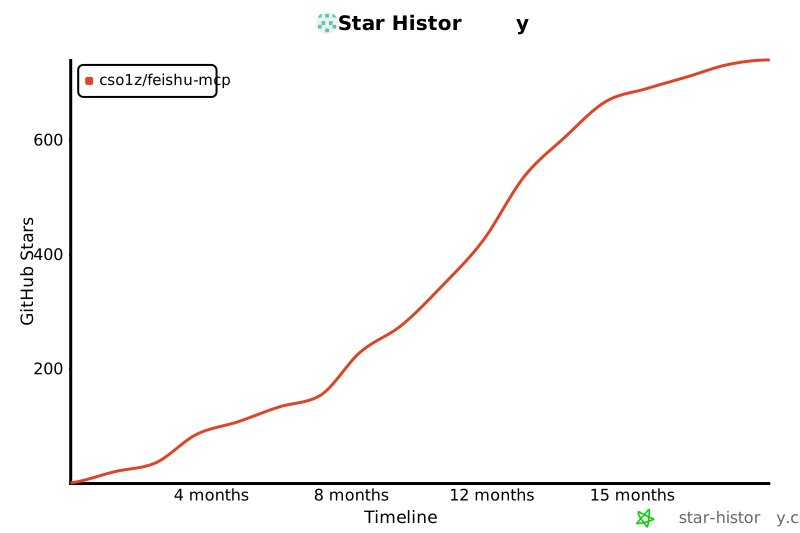](https://www.star-history.com/#cso1z/feishu-mcp&Timeline)
|
package/dist/mcp/feishuMcp.js
CHANGED
|
@@ -4,9 +4,9 @@ import { Logger } from '../utils/logger.js';
|
|
|
4
4
|
import { registerFeishuTools } from './tools/feishuTools.js';
|
|
5
5
|
import { registerFeishuBlockTools } from './tools/feishuBlockTools.js';
|
|
6
6
|
import { registerFeishuFolderTools } from './tools/feishuFolderTools.js';
|
|
7
|
-
const serverInfo = {
|
|
7
|
+
export const serverInfo = {
|
|
8
8
|
name: "Feishu MCP Server",
|
|
9
|
-
version: "0.
|
|
9
|
+
version: "0.2.0",
|
|
10
10
|
};
|
|
11
11
|
const serverOptions = {
|
|
12
12
|
capabilities: { logging: {}, tools: {} },
|
|
@@ -78,7 +78,13 @@ export class FeishuApiService extends BaseApiService {
|
|
|
78
78
|
const clientKey = AuthUtils.generateClientKey(userKey);
|
|
79
79
|
Logger.debug(`[FeishuApiService] 获取访问令牌,userKey: ${userKey}, clientKey: ${clientKey}, authType: ${authType}`);
|
|
80
80
|
// 在使用token之前先校验scope(使用appId+appSecret获取临时tenant token来调用scope接口)
|
|
81
|
-
|
|
81
|
+
// 根据配置决定是否执行权限检查
|
|
82
|
+
if (this.config.feishu.enableScopeValidation) {
|
|
83
|
+
await this.validateScopeWithVersion(appId, appSecret, authType);
|
|
84
|
+
}
|
|
85
|
+
else {
|
|
86
|
+
Logger.debug('权限检查已禁用,跳过scope校验');
|
|
87
|
+
}
|
|
82
88
|
// 校验通过后,获取实际的token
|
|
83
89
|
if (authType === 'tenant') {
|
|
84
90
|
// 租户模式:获取租户访问令牌
|
|
@@ -208,7 +214,10 @@ export class FeishuApiService extends BaseApiService {
|
|
|
208
214
|
`4. 选择权限管理-批量导入/导出权限\n` +
|
|
209
215
|
`5. 复制以下权限配置并导入:\n\n` +
|
|
210
216
|
`\`\`\`json\n${JSON.stringify(permissionsConfig, null, 2)}\n\`\`\`\n\n` +
|
|
211
|
-
`6. 选择**版本管理与发布** 点击创建版本,发布后通知管理员审核\n
|
|
217
|
+
`6. 选择**版本管理与发布** 点击创建版本,发布后通知管理员审核\n\n` +
|
|
218
|
+
`**提示**:如果您仅使用部分mcp功能,可以通过以下方式关闭权限检查以确保正常使用该mcp:\n` +
|
|
219
|
+
`- 设置环境变量:\`FEISHU_SCOPE_VALIDATION=false\`\n` +
|
|
220
|
+
`- 或使用命令行参数:\`--feishu-scope-validation=false\`\n`;
|
|
212
221
|
Logger.error(errorMessage);
|
|
213
222
|
throw new ScopeInsufficientError(missingScopes, errorMessage);
|
|
214
223
|
}
|
package/dist/utils/config.js
CHANGED
|
@@ -2,6 +2,7 @@ import { config as loadDotEnv } from 'dotenv';
|
|
|
2
2
|
import { hideBin } from 'yargs/helpers';
|
|
3
3
|
import yargs from 'yargs';
|
|
4
4
|
import { Logger, LogLevel } from './logger.js';
|
|
5
|
+
import { serverInfo } from '../mcp/feishuMcp.js';
|
|
5
6
|
/**
|
|
6
7
|
* 配置来源枚举
|
|
7
8
|
*/
|
|
@@ -118,6 +119,10 @@ export class Config {
|
|
|
118
119
|
'feishu-token-endpoint': {
|
|
119
120
|
type: 'string',
|
|
120
121
|
description: '获取token的接口地址,默认 http://localhost:3333/getToken'
|
|
122
|
+
},
|
|
123
|
+
'feishu-scope-validation': {
|
|
124
|
+
type: 'boolean',
|
|
125
|
+
description: '是否启用权限检查,默认 true'
|
|
121
126
|
}
|
|
122
127
|
})
|
|
123
128
|
.help()
|
|
@@ -160,6 +165,7 @@ export class Config {
|
|
|
160
165
|
baseUrl: 'https://open.feishu.cn/open-apis',
|
|
161
166
|
authType: 'tenant', // 默认
|
|
162
167
|
tokenEndpoint: `http://127.0.0.1:${serverConfig.port}/getToken`, // 默认动态端口
|
|
168
|
+
enableScopeValidation: true, // 默认启用权限检查
|
|
163
169
|
};
|
|
164
170
|
// 处理App ID
|
|
165
171
|
if (argv['feishu-app-id']) {
|
|
@@ -215,6 +221,18 @@ export class Config {
|
|
|
215
221
|
else {
|
|
216
222
|
this.configSources['feishu.tokenEndpoint'] = ConfigSource.DEFAULT;
|
|
217
223
|
}
|
|
224
|
+
// 处理enableScopeValidation
|
|
225
|
+
if (argv['feishu-scope-validation'] !== undefined) {
|
|
226
|
+
feishuConfig.enableScopeValidation = argv['feishu-scope-validation'];
|
|
227
|
+
this.configSources['feishu.enableScopeValidation'] = ConfigSource.CLI;
|
|
228
|
+
}
|
|
229
|
+
else if (process.env.FEISHU_SCOPE_VALIDATION !== undefined) {
|
|
230
|
+
feishuConfig.enableScopeValidation = process.env.FEISHU_SCOPE_VALIDATION.toLowerCase() === 'true';
|
|
231
|
+
this.configSources['feishu.enableScopeValidation'] = ConfigSource.ENV;
|
|
232
|
+
}
|
|
233
|
+
else {
|
|
234
|
+
this.configSources['feishu.enableScopeValidation'] = ConfigSource.DEFAULT;
|
|
235
|
+
}
|
|
218
236
|
return feishuConfig;
|
|
219
237
|
}
|
|
220
238
|
/**
|
|
@@ -335,6 +353,7 @@ export class Config {
|
|
|
335
353
|
printConfig(isStdioMode = false) {
|
|
336
354
|
if (isStdioMode)
|
|
337
355
|
return;
|
|
356
|
+
Logger.info(`应用版本: ${serverInfo.version}`);
|
|
338
357
|
Logger.info('当前配置:');
|
|
339
358
|
Logger.info('服务器配置:');
|
|
340
359
|
Logger.info(`- 端口: ${this.server.port} (来源: ${this.configSources['server.port']})`);
|
|
@@ -347,6 +366,7 @@ export class Config {
|
|
|
347
366
|
}
|
|
348
367
|
Logger.info(`- API URL: ${this.feishu.baseUrl} (来源: ${this.configSources['feishu.baseUrl']})`);
|
|
349
368
|
Logger.info(`- 认证类型: ${this.feishu.authType} (来源: ${this.configSources['feishu.authType']})`);
|
|
369
|
+
Logger.info(`- 启用权限检查: ${this.feishu.enableScopeValidation} (来源: ${this.configSources['feishu.enableScopeValidation']})`);
|
|
350
370
|
Logger.info('日志配置:');
|
|
351
371
|
Logger.info(`- 日志级别: ${LogLevel[this.log.level]} (来源: ${this.configSources['log.level']})`);
|
|
352
372
|
Logger.info(`- 显示时间戳: ${this.log.showTimestamp} (来源: ${this.configSources['log.showTimestamp']})`);
|
package/dist/utils/document.js
CHANGED
|
@@ -136,127 +136,127 @@ export function renderFeishuAuthResultHtml(data) {
|
|
|
136
136
|
expiresIn = expiresIn - now;
|
|
137
137
|
if (refreshExpiresIn && refreshExpiresIn > 1000000000)
|
|
138
138
|
refreshExpiresIn = refreshExpiresIn - now;
|
|
139
|
-
const tokenBlock = data && !isError ? `
|
|
140
|
-
<div class="card">
|
|
141
|
-
<h3>Token 信息</h3>
|
|
142
|
-
<ul class="kv-list">
|
|
143
|
-
<li><b>token_type:</b> <span>${data.token_type || ''}</span></li>
|
|
144
|
-
<li><b>access_token:</b> <span class="foldable" onclick="toggleFold(this)">点击展开/收起</span><pre class="fold scrollable">${data.access_token || ''}</pre></li>
|
|
145
|
-
<li><b>expires_in:</b> <span>${formatExpire(expiresIn)}</span></li>
|
|
146
|
-
<li><b>refresh_token:</b> <span class="foldable" onclick="toggleFold(this)">点击展开/收起</span><pre class="fold scrollable">${data.refresh_token || ''}</pre></li>
|
|
147
|
-
<li><b>refresh_token_expires_in:</b> <span>${formatExpire(refreshExpiresIn)}</span></li>
|
|
148
|
-
<li><b>scope:</b> <pre class="scope">${(data.scope || '').replace(/ /g, '\n')}</pre></li>
|
|
149
|
-
</ul>
|
|
150
|
-
<div class="success-action">
|
|
151
|
-
<span class="success-msg">授权成功,继续完成任务</span>
|
|
152
|
-
<button class="copy-btn" onclick="copySuccessMsg(this)">点击复制到粘贴板</button>
|
|
153
|
-
</div>
|
|
154
|
-
</div>
|
|
139
|
+
const tokenBlock = data && !isError ? `
|
|
140
|
+
<div class="card">
|
|
141
|
+
<h3>Token 信息</h3>
|
|
142
|
+
<ul class="kv-list">
|
|
143
|
+
<li><b>token_type:</b> <span>${data.token_type || ''}</span></li>
|
|
144
|
+
<li><b>access_token:</b> <span class="foldable" onclick="toggleFold(this)">点击展开/收起</span><pre class="fold scrollable">${data.access_token || ''}</pre></li>
|
|
145
|
+
<li><b>expires_in:</b> <span>${formatExpire(expiresIn)}</span></li>
|
|
146
|
+
<li><b>refresh_token:</b> <span class="foldable" onclick="toggleFold(this)">点击展开/收起</span><pre class="fold scrollable">${data.refresh_token || ''}</pre></li>
|
|
147
|
+
<li><b>refresh_token_expires_in:</b> <span>${formatExpire(refreshExpiresIn)}</span></li>
|
|
148
|
+
<li><b>scope:</b> <pre class="scope">${(data.scope || '').replace(/ /g, '\n')}</pre></li>
|
|
149
|
+
</ul>
|
|
150
|
+
<div class="success-action">
|
|
151
|
+
<span class="success-msg">授权成功,继续完成任务</span>
|
|
152
|
+
<button class="copy-btn" onclick="copySuccessMsg(this)">点击复制到粘贴板</button>
|
|
153
|
+
</div>
|
|
154
|
+
</div>
|
|
155
155
|
` : '';
|
|
156
156
|
let userBlock = '';
|
|
157
157
|
const userInfo = data && data.userInfo && data.userInfo.data;
|
|
158
158
|
if (userInfo) {
|
|
159
|
-
userBlock = `
|
|
160
|
-
<div class="card user-card">
|
|
161
|
-
<div class="avatar-wrap">
|
|
162
|
-
<img src="${userInfo.avatar_big || userInfo.avatar_thumb || userInfo.avatar_url || ''}" class="avatar" />
|
|
163
|
-
</div>
|
|
164
|
-
<div class="user-info">
|
|
165
|
-
<div class="user-name">${userInfo.name || ''}</div>
|
|
166
|
-
<div class="user-en">${userInfo.en_name || ''}</div>
|
|
167
|
-
</div>
|
|
168
|
-
</div>
|
|
159
|
+
userBlock = `
|
|
160
|
+
<div class="card user-card">
|
|
161
|
+
<div class="avatar-wrap">
|
|
162
|
+
<img src="${userInfo.avatar_big || userInfo.avatar_thumb || userInfo.avatar_url || ''}" class="avatar" />
|
|
163
|
+
</div>
|
|
164
|
+
<div class="user-info">
|
|
165
|
+
<div class="user-name">${userInfo.name || ''}</div>
|
|
166
|
+
<div class="user-en">${userInfo.en_name || ''}</div>
|
|
167
|
+
</div>
|
|
168
|
+
</div>
|
|
169
169
|
`;
|
|
170
170
|
}
|
|
171
|
-
const errorBlock = isError ? `
|
|
172
|
-
<div class="card error-card">
|
|
173
|
-
<h3>授权失败</h3>
|
|
174
|
-
<div class="error-msg">${escapeHtml(data.error || '')}</div>
|
|
175
|
-
<div class="error-code">错误码: ${data.code || ''}</div>
|
|
176
|
-
</div>
|
|
171
|
+
const errorBlock = isError ? `
|
|
172
|
+
<div class="card error-card">
|
|
173
|
+
<h3>授权失败</h3>
|
|
174
|
+
<div class="error-msg">${escapeHtml(data.error || '')}</div>
|
|
175
|
+
<div class="error-code">错误码: ${data.code || ''}</div>
|
|
176
|
+
</div>
|
|
177
177
|
` : '';
|
|
178
|
-
return `
|
|
179
|
-
<html>
|
|
180
|
-
<head>
|
|
181
|
-
<title>飞书授权结果</title>
|
|
182
|
-
<meta charset="utf-8"/>
|
|
183
|
-
<meta name="viewport" content="width=device-width,initial-scale=1"/>
|
|
184
|
-
<style>
|
|
185
|
-
body { background: #f7f8fa; font-family: 'Segoe UI', Arial, sans-serif; margin:0; padding:0; }
|
|
186
|
-
.container { max-width: 600px; margin: 40px auto; padding: 16px; }
|
|
187
|
-
.card { background: #fff; border-radius: 12px; box-shadow: 0 2px 12px #0001; margin-bottom: 24px; padding: 24px 20px; }
|
|
188
|
-
.user-card { display: flex; align-items: center; gap: 24px; }
|
|
189
|
-
.avatar-wrap { flex-shrink: 0; }
|
|
190
|
-
.avatar { width: 96px; height: 96px; border-radius: 50%; box-shadow: 0 2px 8px #0002; display: block; margin: 0 auto; }
|
|
191
|
-
.user-info { flex: 1; }
|
|
192
|
-
.user-name { font-size: 1.5em; font-weight: bold; margin-bottom: 4px; }
|
|
193
|
-
.user-en { color: #888; margin-bottom: 10px; }
|
|
194
|
-
.kv-list { list-style: none; padding: 0; margin: 0; }
|
|
195
|
-
.kv-list li { margin-bottom: 6px; word-break: break-all; }
|
|
196
|
-
.kv-list b { color: #1976d2; }
|
|
197
|
-
.scope { background: #f0f4f8; border-radius: 4px; padding: 6px; font-size: 0.95em; white-space: pre-line; }
|
|
198
|
-
.foldable { color: #1976d2; cursor: pointer; text-decoration: underline; margin-left: 8px; }
|
|
199
|
-
.fold { display: none; background: #f6f6f6; border-radius: 4px; padding: 6px; margin: 4px 0; font-size: 0.92em; max-width: 100%; overflow-x: auto; word-break: break-all; }
|
|
200
|
-
.scrollable { max-width: 100%; overflow-x: auto; font-family: 'Fira Mono', 'Consolas', 'Menlo', monospace; font-size: 0.93em; }
|
|
201
|
-
.success-action { margin-top: 18px; display: flex; align-items: center; gap: 16px; }
|
|
202
|
-
.success-msg { color: #388e3c; font-weight: bold; }
|
|
203
|
-
.copy-btn { background: #1976d2; color: #fff; border: none; border-radius: 4px; padding: 6px 16px; font-size: 1em; cursor: pointer; transition: background 0.2s; }
|
|
204
|
-
.copy-btn:hover { background: #125ea2; }
|
|
205
|
-
.error-card { border-left: 6px solid #e53935; background: #fff0f0; color: #b71c1c; }
|
|
206
|
-
.error-msg { font-size: 1.1em; margin-bottom: 8px; }
|
|
207
|
-
.error-code { color: #b71c1c; font-size: 0.95em; }
|
|
208
|
-
.raw-block { margin-top: 24px; }
|
|
209
|
-
.raw-toggle { color: #1976d2; cursor: pointer; text-decoration: underline; margin-bottom: 8px; display: inline-block; }
|
|
210
|
-
.raw-pre { display: none; background: #23272e; color: #fff; border-radius: 6px; padding: 12px; font-size: 0.95em; overflow-x: auto; max-width: 100%; }
|
|
211
|
-
@media (max-width: 700px) {
|
|
212
|
-
.container { max-width: 98vw; padding: 4vw; }
|
|
213
|
-
.card { padding: 4vw 3vw; }
|
|
214
|
-
.avatar { width: 64px; height: 64px; }
|
|
215
|
-
}
|
|
216
|
-
</style>
|
|
217
|
-
<script>
|
|
218
|
-
function toggleFold(el) {
|
|
219
|
-
var pre = el.nextElementSibling;
|
|
220
|
-
if (pre.style.display === 'block') {
|
|
221
|
-
pre.style.display = 'none';
|
|
222
|
-
} else {
|
|
223
|
-
pre.style.display = 'block';
|
|
224
|
-
}
|
|
225
|
-
}
|
|
226
|
-
function toggleRaw() {
|
|
227
|
-
var pre = document.getElementById('raw-pre');
|
|
228
|
-
if (pre.style.display === 'block') {
|
|
229
|
-
pre.style.display = 'none';
|
|
230
|
-
} else {
|
|
231
|
-
pre.style.display = 'block';
|
|
232
|
-
}
|
|
233
|
-
}
|
|
234
|
-
function copySuccessMsg(btn) {
|
|
235
|
-
var text = '授权成功,继续完成任务';
|
|
236
|
-
navigator.clipboard.writeText(text).then(function() {
|
|
237
|
-
btn.innerText = '已复制';
|
|
238
|
-
btn.disabled = true;
|
|
239
|
-
setTimeout(function() {
|
|
240
|
-
btn.innerText = '点击复制到粘贴板';
|
|
241
|
-
btn.disabled = false;
|
|
242
|
-
}, 2000);
|
|
243
|
-
});
|
|
244
|
-
}
|
|
245
|
-
</script>
|
|
246
|
-
</head>
|
|
247
|
-
<body>
|
|
248
|
-
<div class="container">
|
|
249
|
-
<h2 style="margin-bottom:24px;">飞书授权结果</h2>
|
|
250
|
-
${errorBlock}
|
|
251
|
-
${tokenBlock}
|
|
252
|
-
${userBlock}
|
|
253
|
-
<div class="card raw-block">
|
|
254
|
-
<span class="raw-toggle" onclick="toggleRaw()">点击展开/收起原始数据</span>
|
|
255
|
-
<pre id="raw-pre" class="raw-pre">${escapeHtml(JSON.stringify(data, null, 2))}</pre>
|
|
256
|
-
</div>
|
|
257
|
-
</div>
|
|
258
|
-
</body>
|
|
259
|
-
</html>
|
|
178
|
+
return `
|
|
179
|
+
<html>
|
|
180
|
+
<head>
|
|
181
|
+
<title>飞书授权结果</title>
|
|
182
|
+
<meta charset="utf-8"/>
|
|
183
|
+
<meta name="viewport" content="width=device-width,initial-scale=1"/>
|
|
184
|
+
<style>
|
|
185
|
+
body { background: #f7f8fa; font-family: 'Segoe UI', Arial, sans-serif; margin:0; padding:0; }
|
|
186
|
+
.container { max-width: 600px; margin: 40px auto; padding: 16px; }
|
|
187
|
+
.card { background: #fff; border-radius: 12px; box-shadow: 0 2px 12px #0001; margin-bottom: 24px; padding: 24px 20px; }
|
|
188
|
+
.user-card { display: flex; align-items: center; gap: 24px; }
|
|
189
|
+
.avatar-wrap { flex-shrink: 0; }
|
|
190
|
+
.avatar { width: 96px; height: 96px; border-radius: 50%; box-shadow: 0 2px 8px #0002; display: block; margin: 0 auto; }
|
|
191
|
+
.user-info { flex: 1; }
|
|
192
|
+
.user-name { font-size: 1.5em; font-weight: bold; margin-bottom: 4px; }
|
|
193
|
+
.user-en { color: #888; margin-bottom: 10px; }
|
|
194
|
+
.kv-list { list-style: none; padding: 0; margin: 0; }
|
|
195
|
+
.kv-list li { margin-bottom: 6px; word-break: break-all; }
|
|
196
|
+
.kv-list b { color: #1976d2; }
|
|
197
|
+
.scope { background: #f0f4f8; border-radius: 4px; padding: 6px; font-size: 0.95em; white-space: pre-line; }
|
|
198
|
+
.foldable { color: #1976d2; cursor: pointer; text-decoration: underline; margin-left: 8px; }
|
|
199
|
+
.fold { display: none; background: #f6f6f6; border-radius: 4px; padding: 6px; margin: 4px 0; font-size: 0.92em; max-width: 100%; overflow-x: auto; word-break: break-all; }
|
|
200
|
+
.scrollable { max-width: 100%; overflow-x: auto; font-family: 'Fira Mono', 'Consolas', 'Menlo', monospace; font-size: 0.93em; }
|
|
201
|
+
.success-action { margin-top: 18px; display: flex; align-items: center; gap: 16px; }
|
|
202
|
+
.success-msg { color: #388e3c; font-weight: bold; }
|
|
203
|
+
.copy-btn { background: #1976d2; color: #fff; border: none; border-radius: 4px; padding: 6px 16px; font-size: 1em; cursor: pointer; transition: background 0.2s; }
|
|
204
|
+
.copy-btn:hover { background: #125ea2; }
|
|
205
|
+
.error-card { border-left: 6px solid #e53935; background: #fff0f0; color: #b71c1c; }
|
|
206
|
+
.error-msg { font-size: 1.1em; margin-bottom: 8px; }
|
|
207
|
+
.error-code { color: #b71c1c; font-size: 0.95em; }
|
|
208
|
+
.raw-block { margin-top: 24px; }
|
|
209
|
+
.raw-toggle { color: #1976d2; cursor: pointer; text-decoration: underline; margin-bottom: 8px; display: inline-block; }
|
|
210
|
+
.raw-pre { display: none; background: #23272e; color: #fff; border-radius: 6px; padding: 12px; font-size: 0.95em; overflow-x: auto; max-width: 100%; }
|
|
211
|
+
@media (max-width: 700px) {
|
|
212
|
+
.container { max-width: 98vw; padding: 4vw; }
|
|
213
|
+
.card { padding: 4vw 3vw; }
|
|
214
|
+
.avatar { width: 64px; height: 64px; }
|
|
215
|
+
}
|
|
216
|
+
</style>
|
|
217
|
+
<script>
|
|
218
|
+
function toggleFold(el) {
|
|
219
|
+
var pre = el.nextElementSibling;
|
|
220
|
+
if (pre.style.display === 'block') {
|
|
221
|
+
pre.style.display = 'none';
|
|
222
|
+
} else {
|
|
223
|
+
pre.style.display = 'block';
|
|
224
|
+
}
|
|
225
|
+
}
|
|
226
|
+
function toggleRaw() {
|
|
227
|
+
var pre = document.getElementById('raw-pre');
|
|
228
|
+
if (pre.style.display === 'block') {
|
|
229
|
+
pre.style.display = 'none';
|
|
230
|
+
} else {
|
|
231
|
+
pre.style.display = 'block';
|
|
232
|
+
}
|
|
233
|
+
}
|
|
234
|
+
function copySuccessMsg(btn) {
|
|
235
|
+
var text = '授权成功,继续完成任务';
|
|
236
|
+
navigator.clipboard.writeText(text).then(function() {
|
|
237
|
+
btn.innerText = '已复制';
|
|
238
|
+
btn.disabled = true;
|
|
239
|
+
setTimeout(function() {
|
|
240
|
+
btn.innerText = '点击复制到粘贴板';
|
|
241
|
+
btn.disabled = false;
|
|
242
|
+
}, 2000);
|
|
243
|
+
});
|
|
244
|
+
}
|
|
245
|
+
</script>
|
|
246
|
+
</head>
|
|
247
|
+
<body>
|
|
248
|
+
<div class="container">
|
|
249
|
+
<h2 style="margin-bottom:24px;">飞书授权结果</h2>
|
|
250
|
+
${errorBlock}
|
|
251
|
+
${tokenBlock}
|
|
252
|
+
${userBlock}
|
|
253
|
+
<div class="card raw-block">
|
|
254
|
+
<span class="raw-toggle" onclick="toggleRaw()">点击展开/收起原始数据</span>
|
|
255
|
+
<pre id="raw-pre" class="raw-pre">${escapeHtml(JSON.stringify(data, null, 2))}</pre>
|
|
256
|
+
</div>
|
|
257
|
+
</div>
|
|
258
|
+
</body>
|
|
259
|
+
</html>
|
|
260
260
|
`;
|
|
261
261
|
}
|
|
262
262
|
function escapeHtml(str) {
|