feishu-mcp 0.0.14 → 0.0.15
This diff represents the content of publicly available package versions that have been released to one of the supported registries. The information contained in this diff is provided for informational purposes only and reflects changes between package versions as they appear in their respective public registries.
- package/README.md +46 -61
- package/dist/mcp/tools/feishuBlockTools.js +252 -202
- package/dist/mcp/tools/feishuFolderTools.js +28 -22
- package/dist/mcp/tools/feishuTools.js +66 -52
- package/dist/types/feishuSchema.js +12 -6
- package/package.json +1 -1
package/README.md
CHANGED
|
@@ -3,10 +3,9 @@
|
|
|
3
3
|
|
|
4
4
|
[](https://www.npmjs.com/package/feishu-mcp)
|
|
5
5
|
[](https://smithery.ai/server/@cso1z/feishu-mcp)
|
|
6
|
-
[](#group-qr)
|
|
7
6
|
[](./LICENSE)
|
|
8
7
|
|
|
9
|
-
为 [Cursor](https://cursor.sh/)、[Windsurf](https://codeium.com/windsurf)、[Cline](https://cline.bot/) 和其他 AI
|
|
8
|
+
为 [Cursor](https://cursor.sh/)、[Windsurf](https://codeium.com/windsurf)、[Cline](https://cline.bot/) 和其他 AI 驱动的编码工具提供访问、编辑和结构化处理飞书文档的能力,基于 [Model Context Protocol](https://modelcontextprotocol.io/introduction) 服务器实现。
|
|
10
9
|
|
|
11
10
|
本项目让 AI 编码工具能够直接获取和理解飞书文档的结构化内容,显著提升文档处理的智能化和效率。
|
|
12
11
|
|
|
@@ -18,38 +17,39 @@
|
|
|
18
17
|
|
|
19
18
|
本项目让你在飞书文档的日常使用流程中实现智能获取、编辑和搜索,提升内容处理效率和体验。
|
|
20
19
|
|
|
20
|
+
### 🎬 使用演示视频
|
|
21
|
+
|
|
22
|
+
你可以通过以下视频了解 MCP 的实际使用效果和操作流程:
|
|
23
|
+
|
|
24
|
+
<a href="https://www.bilibili.com/video/BV18z3gzdE1w/?spm_id_from=333.337.search-card.all.click&vd_source=94c14da5a71aeb01f665f159dd3d89c8">
|
|
25
|
+
<img src="image/demo.png" alt="飞书 MCP 使用演示" width="800"/>
|
|
26
|
+
</a>
|
|
27
|
+
|
|
21
28
|
> ⭐ **Star 本项目,第一时间获取最新功能和重要更新!** 关注项目可以让你不错过任何新特性、修复和优化,助你持续高效使用。你的支持也将帮助我们更好地完善和发展项目。⭐
|
|
22
29
|
|
|
23
30
|
---
|
|
24
31
|
|
|
25
32
|
## 🛠️ 工具功能详情
|
|
26
33
|
|
|
27
|
-
| 功能类别 | 工具名称 | 描述
|
|
28
|
-
|
|
29
|
-
| **文档管理** | `create_feishu_document` | 创建新的飞书文档
|
|
30
|
-
| | `get_feishu_document_info` | 获取文档基本信息
|
|
31
|
-
| | `
|
|
32
|
-
| | `
|
|
33
|
-
| | `
|
|
34
|
-
|
|
|
35
|
-
| | `
|
|
36
|
-
| | `
|
|
37
|
-
| | `
|
|
38
|
-
| | `
|
|
39
|
-
| | `
|
|
40
|
-
| | `
|
|
41
|
-
|
|
|
42
|
-
| |
|
|
43
|
-
| |
|
|
44
|
-
|
|
|
45
|
-
|
|
|
46
|
-
| | `get_feishu_image_resource` | 获取图片资源 | 下载文档中的图片 | ✅ 已完成 |
|
|
47
|
-
| | `get_feishu_whiteboard_content` | 获取画板内容 | 获取画板中的图形元素和结构 | ✅ 已完成 |
|
|
48
|
-
| **高级功能** | 表格操作 | 创建和编辑表格 | 结构化数据展示 | 🚧 计划中 |
|
|
49
|
-
| | 图表插入 | 支持各类数据可视化图表 | 数据展示和分析 | 🚧 计划中 |
|
|
50
|
-
| | 流程图插入 | 支持流程图和思维导图 | 流程梳理和可视化 | 🚧 计划中 |
|
|
51
|
-
| 图片插入 | `create_feishu_image_block`、`upload_and_bind_image_to_block` | 支持插入本地和远程图片 | 修改文档内容 | ✅ 已完成 |
|
|
52
|
-
| | 公式支持 | 支持数学公式 | 学术和技术文档 | ✅ 已完成 |
|
|
34
|
+
| 功能类别 | 工具名称 | 描述 | 使用场景 | 状态 |
|
|
35
|
+
|---------|--------------------------------------------------------------|-------------------|---------------|------|
|
|
36
|
+
| **文档管理** | `create_feishu_document` | 创建新的飞书文档 | 从零开始创建文档 | ✅ 已完成 |
|
|
37
|
+
| | `get_feishu_document_info` | 获取文档基本信息 | 验证文档存在性和权限 | ✅ 已完成 |
|
|
38
|
+
| | `get_feishu_document_blocks` | 获取文档块结构 | 了解文档层级结构 | ✅ 已完成 |
|
|
39
|
+
| **内容编辑** | `batch_create_feishu_blocks` | 批量创建多个块 | 高效创建连续内容 | ✅ 已完成 |
|
|
40
|
+
| | `update_feishu_block_text` | 更新块文本内容 | 修改现有内容 | ✅ 已完成 |
|
|
41
|
+
| | `delete_feishu_document_blocks` | 删除文档块 | 清理和重构文档内容 | ✅ 已完成 |
|
|
42
|
+
| **文件夹管理** | `get_feishu_folder_files` | 获取文件夹文件列表 | 浏览文件夹内容 | ✅ 已完成 |
|
|
43
|
+
| | `create_feishu_folder` | 创建新文件夹 | 组织文档结构 | ✅ 已完成 |
|
|
44
|
+
| **搜索功能** | `search_feishu_documents` | 搜索文档 | 查找特定内容 | ✅ 已完成 |
|
|
45
|
+
| **工具功能** | `convert_feishu_wiki_to_document_id` | Wiki链接转换 | 将Wiki链接转为文档ID | ✅ 已完成 |
|
|
46
|
+
| | `get_feishu_image_resource` | 获取图片资源 | 下载文档中的图片 | ✅ 已完成 |
|
|
47
|
+
| | `get_feishu_whiteboard_content` | 获取画板内容 | 获取画板中的图形元素和结构(流程图、思维导图等) | ✅ 已完成 |
|
|
48
|
+
| **高级功能** | 表格操作 | 创建和编辑表格 | 结构化数据展示 | 🚧 计划中 |
|
|
49
|
+
| | 图表插入 | 支持各类数据可视化图表 | 数据展示和分析 | 🚧 计划中 |
|
|
50
|
+
| | 流程图插入 | 支持流程图和思维导图 | 流程梳理和可视化 | 🚧 计划中 |
|
|
51
|
+
| 图片插入 | `upload_and_bind_image_to_block` | 支持插入本地和远程图片 | 修改文档内容 | ✅ 已完成 |
|
|
52
|
+
| | 公式支持 | 支持数学公式 | 学术和技术文档 | ✅ 已完成 |
|
|
53
53
|
|
|
54
54
|
### 🎨 支持的样式功能
|
|
55
55
|
|
|
@@ -64,6 +64,16 @@
|
|
|
64
64
|
|
|
65
65
|
---
|
|
66
66
|
|
|
67
|
+
## 📈 一周计划:提升工具效率
|
|
68
|
+
|
|
69
|
+
- ~~**精简工具集**:21个工具 → 13个工具,移除冗余,聚焦核心功能~~ 0.0.15 ✅
|
|
70
|
+
- ~~**优化描述**:7000+ tokens → 3000+ tokens,简化提示,节省请求token~~ 0.0.15 ✅
|
|
71
|
+
- ~~**批量增强**:新增批量更新、批量图片上传,单次操作效率提升50%~~ 0.0.15 ✅
|
|
72
|
+
- **流程优化**:减少多步调用,实现一键完成复杂任务
|
|
73
|
+
- **支持多种凭证类型**:包括 tenant_access_token、app_access_token 和 user_access_token,满足不同场景下的认证需求。
|
|
74
|
+
|
|
75
|
+
---
|
|
76
|
+
|
|
67
77
|
## 🔧 飞书配置教程
|
|
68
78
|
|
|
69
79
|
**⚠️ 重要提示:在开始使用之前,必须先完成飞书应用配置,否则无法正常使用本工具。**
|
|
@@ -113,7 +123,7 @@ npx feishu-mcp@latest --feishu-app-id=<你的飞书应用ID> --feishu-app-secret
|
|
|
113
123
|
pnpm install
|
|
114
124
|
```
|
|
115
125
|
|
|
116
|
-
3.
|
|
126
|
+
3. **配置环境变量(复制一份.env.example保存为.env文件)**
|
|
117
127
|
|
|
118
128
|
**macOS/Linux:**
|
|
119
129
|
```bash
|
|
@@ -126,29 +136,7 @@ npx feishu-mcp@latest --feishu-app-id=<你的飞书应用ID> --feishu-app-secret
|
|
|
126
136
|
```
|
|
127
137
|
|
|
128
138
|
4. **编辑 .env 文件**
|
|
129
|
-
|
|
130
|
-
你可以通过以下任一方式编辑 .env 文件:
|
|
131
|
-
|
|
132
|
-
**方式一:使用文件管理器**
|
|
133
|
-
- 在项目文件夹中找到 `.env` 文件
|
|
134
|
-
- 双击打开(系统会自动选择文本编辑器)
|
|
135
|
-
- 或右键选择"打开方式" → 选择文本编辑器
|
|
136
|
-
|
|
137
|
-
**方式二:使用 VS Code**
|
|
138
|
-
```bash
|
|
139
|
-
code .env
|
|
140
|
-
```
|
|
141
|
-
|
|
142
|
-
**方式三:使用命令行编辑器**
|
|
143
|
-
```bash
|
|
144
|
-
# macOS/Linux
|
|
145
|
-
nano .env
|
|
146
|
-
|
|
147
|
-
# Windows
|
|
148
|
-
notepad .env
|
|
149
|
-
```
|
|
150
|
-
|
|
151
|
-
填入你的飞书应用凭证:
|
|
139
|
+
在项目根目录下找到并用任意文本编辑器打开 `.env` 文件,填写你的飞书应用凭证:
|
|
152
140
|
```env
|
|
153
141
|
FEISHU_APP_ID=cli_xxxxx
|
|
154
142
|
FEISHU_APP_SECRET=xxxxx
|
|
@@ -197,11 +185,11 @@ npx feishu-mcp@latest --feishu-app-id=<你的飞书应用ID> --feishu-app-secret
|
|
|
197
185
|
"FEISHU_APP_ID": "<你的飞书应用ID>",
|
|
198
186
|
"FEISHU_APP_SECRET": "<你的飞书应用密钥>"
|
|
199
187
|
}
|
|
200
|
-
}
|
|
201
|
-
|
|
202
|
-
"feishu_local": {
|
|
188
|
+
},
|
|
189
|
+
"feishu_local": {
|
|
203
190
|
"url": "http://localhost:3333/sse"
|
|
204
|
-
|
|
191
|
+
}
|
|
192
|
+
}
|
|
205
193
|
}
|
|
206
194
|
```
|
|
207
195
|
---
|
|
@@ -257,10 +245,7 @@ npx feishu-mcp@latest --feishu-app-id=<你的飞书应用ID> --feishu-app-secret
|
|
|
257
245
|
|
|
258
246
|
你的支持是我们前进的动力!
|
|
259
247
|
|
|
260
|
-
**<span id="group-qr">欢迎加入我们的交流群,与更多小伙伴一起交流:</span>**
|
|
261
|
-
|
|
262
|
-
<img src="./image/group_qr.jpg" alt="飞书MCP交流群二维码" width="300" />
|
|
263
248
|
|
|
264
|
-
##
|
|
249
|
+
## Star History
|
|
265
250
|
|
|
266
|
-
|
|
251
|
+
[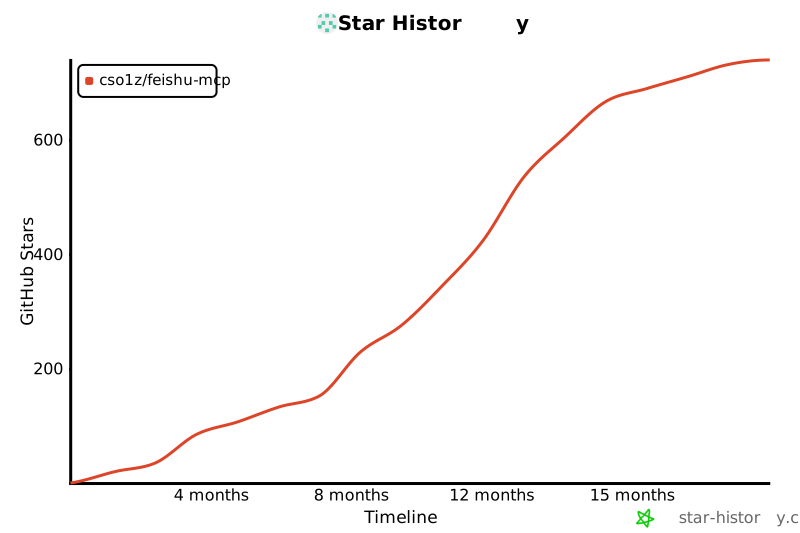](https://www.star-history.com/#cso1z/feishu-mcp&Timeline)
|
|
@@ -2,7 +2,16 @@ import { z } from 'zod';
|
|
|
2
2
|
import { formatErrorMessage } from '../../utils/error.js';
|
|
3
3
|
import { Logger } from '../../utils/logger.js';
|
|
4
4
|
import { detectMimeType } from '../../utils/document.js';
|
|
5
|
-
import { DocumentIdSchema, ParentBlockIdSchema, BlockIdSchema, IndexSchema, StartIndexSchema, EndIndexSchema,
|
|
5
|
+
import { DocumentIdSchema, ParentBlockIdSchema, BlockIdSchema, IndexSchema, StartIndexSchema, EndIndexSchema,
|
|
6
|
+
// AlignSchema,
|
|
7
|
+
// AlignSchemaWithValidation,
|
|
8
|
+
TextElementsArraySchema,
|
|
9
|
+
// CodeLanguageSchema,
|
|
10
|
+
// CodeWrapSchema,
|
|
11
|
+
BlockConfigSchema, MediaIdSchema, MediaExtraSchema, ImagesArraySchema,
|
|
12
|
+
// ImageWidthSchema,
|
|
13
|
+
// ImageHeightSchema
|
|
14
|
+
} from '../../types/feishuSchema.js';
|
|
6
15
|
/**
|
|
7
16
|
* 注册飞书块相关的MCP工具
|
|
8
17
|
* @param server MCP服务器实例
|
|
@@ -227,137 +236,166 @@ export function registerFeishuBlockTools(server, feishuService) {
|
|
|
227
236
|
}
|
|
228
237
|
});
|
|
229
238
|
// 添加创建飞书文本块工具
|
|
230
|
-
server.tool(
|
|
231
|
-
|
|
232
|
-
|
|
233
|
-
|
|
234
|
-
|
|
235
|
-
|
|
236
|
-
|
|
237
|
-
|
|
238
|
-
|
|
239
|
-
|
|
240
|
-
|
|
241
|
-
|
|
242
|
-
|
|
243
|
-
|
|
244
|
-
|
|
245
|
-
|
|
246
|
-
|
|
247
|
-
|
|
248
|
-
|
|
249
|
-
|
|
250
|
-
|
|
251
|
-
|
|
252
|
-
|
|
253
|
-
|
|
254
|
-
|
|
255
|
-
|
|
256
|
-
|
|
257
|
-
|
|
258
|
-
//
|
|
259
|
-
|
|
260
|
-
|
|
261
|
-
|
|
262
|
-
|
|
263
|
-
|
|
264
|
-
|
|
265
|
-
|
|
266
|
-
|
|
267
|
-
|
|
268
|
-
|
|
269
|
-
|
|
270
|
-
|
|
271
|
-
|
|
272
|
-
|
|
273
|
-
|
|
274
|
-
|
|
275
|
-
|
|
276
|
-
|
|
277
|
-
|
|
278
|
-
|
|
279
|
-
|
|
280
|
-
|
|
281
|
-
|
|
282
|
-
|
|
283
|
-
|
|
284
|
-
|
|
285
|
-
|
|
286
|
-
|
|
287
|
-
|
|
288
|
-
//
|
|
289
|
-
|
|
290
|
-
|
|
291
|
-
|
|
292
|
-
|
|
293
|
-
|
|
294
|
-
|
|
295
|
-
|
|
296
|
-
|
|
297
|
-
|
|
298
|
-
|
|
299
|
-
|
|
300
|
-
|
|
301
|
-
|
|
302
|
-
|
|
303
|
-
|
|
304
|
-
|
|
305
|
-
|
|
306
|
-
|
|
307
|
-
|
|
308
|
-
|
|
309
|
-
|
|
310
|
-
|
|
311
|
-
|
|
312
|
-
|
|
313
|
-
|
|
314
|
-
|
|
315
|
-
|
|
316
|
-
|
|
317
|
-
|
|
318
|
-
|
|
319
|
-
|
|
320
|
-
|
|
321
|
-
|
|
322
|
-
|
|
323
|
-
|
|
324
|
-
//
|
|
325
|
-
|
|
326
|
-
|
|
327
|
-
|
|
328
|
-
|
|
329
|
-
|
|
330
|
-
|
|
331
|
-
|
|
332
|
-
|
|
333
|
-
|
|
334
|
-
|
|
335
|
-
|
|
336
|
-
|
|
337
|
-
|
|
338
|
-
|
|
339
|
-
|
|
340
|
-
|
|
341
|
-
|
|
342
|
-
|
|
343
|
-
|
|
344
|
-
|
|
345
|
-
|
|
346
|
-
|
|
347
|
-
|
|
348
|
-
|
|
349
|
-
|
|
350
|
-
|
|
351
|
-
|
|
352
|
-
|
|
353
|
-
|
|
354
|
-
|
|
355
|
-
|
|
356
|
-
|
|
357
|
-
|
|
358
|
-
|
|
359
|
-
|
|
360
|
-
|
|
239
|
+
// server.tool(
|
|
240
|
+
// "create_feishu_text_block",
|
|
241
|
+
// "Creates a new text block with precise style control. Unlike markdown-based formatting, this tool lets you explicitly set text styles for each text segment. Ideal for formatted documents where exact styling control is needed. NOTE: If creating multiple blocks at once, use batch_create_feishu_blocks tool instead for better efficiency. Note: For Feishu wiki links (https://xxx.feishu.cn/wiki/xxx) you must first use convert_feishu_wiki_to_document_id tool to obtain a compatible document ID.",
|
|
242
|
+
// {
|
|
243
|
+
// documentId: DocumentIdSchema,
|
|
244
|
+
// parentBlockId: ParentBlockIdSchema,
|
|
245
|
+
// textContents: TextElementsArraySchema,
|
|
246
|
+
// align: AlignSchema,
|
|
247
|
+
// index: IndexSchema
|
|
248
|
+
// },
|
|
249
|
+
// async ({ documentId, parentBlockId, textContents, align = 1, index }) => {
|
|
250
|
+
// try {
|
|
251
|
+
// if (!feishuService) {
|
|
252
|
+
// return {
|
|
253
|
+
// content: [{ type: "text", text: "Feishu service is not initialized. Please check the configuration" }],
|
|
254
|
+
// };
|
|
255
|
+
// }
|
|
256
|
+
//
|
|
257
|
+
// Logger.info(`开始创建飞书文本块,文档ID: ${documentId},父块ID: ${parentBlockId},对齐方式: ${align},插入位置: ${index}`);
|
|
258
|
+
// const result = await feishuService.createTextBlock(documentId, parentBlockId, textContents, align, index);
|
|
259
|
+
// Logger.info(`飞书文本块创建成功`);
|
|
260
|
+
//
|
|
261
|
+
// return {
|
|
262
|
+
// content: [{ type: "text", text: JSON.stringify(result, null, 2) }],
|
|
263
|
+
// };
|
|
264
|
+
// } catch (error) {
|
|
265
|
+
// Logger.error(`创建飞书文本块失败:`, error);
|
|
266
|
+
// const errorMessage = formatErrorMessage(error);
|
|
267
|
+
// return {
|
|
268
|
+
// content: [{ type: "text", text: `创建飞书文本块失败: ${errorMessage}` }],
|
|
269
|
+
// };
|
|
270
|
+
// }
|
|
271
|
+
// },
|
|
272
|
+
// );
|
|
273
|
+
//
|
|
274
|
+
// // 添加创建飞书代码块工具
|
|
275
|
+
// server.tool(
|
|
276
|
+
// "create_feishu_code_block",
|
|
277
|
+
// "Creates a new code block with syntax highlighting and formatting options. Ideal for technical documentation, tutorials, or displaying code examples with proper formatting and language-specific highlighting. NOTE: If creating multiple blocks at once, use batch_create_feishu_blocks tool instead for better efficiency. Note: For Feishu wiki links (https://xxx.feishu.cn/wiki/xxx) you must first use convert_feishu_wiki_to_document_id tool to obtain a compatible document ID.",
|
|
278
|
+
// {
|
|
279
|
+
// documentId: DocumentIdSchema,
|
|
280
|
+
// parentBlockId: ParentBlockIdSchema,
|
|
281
|
+
// code: z.string().describe("Code content (required). The complete code text to display."),
|
|
282
|
+
// language: CodeLanguageSchema,
|
|
283
|
+
// wrap: CodeWrapSchema,
|
|
284
|
+
// index: IndexSchema
|
|
285
|
+
// },
|
|
286
|
+
// async ({ documentId, parentBlockId, code, language = 1, wrap = false, index = 0 }) => {
|
|
287
|
+
// try {
|
|
288
|
+
// if (!feishuService) {
|
|
289
|
+
// return {
|
|
290
|
+
// content: [{ type: "text", text: "Feishu service is not initialized. Please check the configuration" }],
|
|
291
|
+
// };
|
|
292
|
+
// }
|
|
293
|
+
//
|
|
294
|
+
// Logger.info(`开始创建飞书代码块,文档ID: ${documentId},父块ID: ${parentBlockId},语言: ${language},自动换行: ${wrap},插入位置: ${index}`);
|
|
295
|
+
// const result = await feishuService.createCodeBlock(documentId, parentBlockId, code, language, wrap, index);
|
|
296
|
+
// Logger.info(`飞书代码块创建成功`);
|
|
297
|
+
//
|
|
298
|
+
// return {
|
|
299
|
+
// content: [{ type: "text", text: JSON.stringify(result, null, 2) }],
|
|
300
|
+
// };
|
|
301
|
+
// } catch (error) {
|
|
302
|
+
// Logger.error(`创建飞书代码块失败:`, error);
|
|
303
|
+
// const errorMessage = formatErrorMessage(error);
|
|
304
|
+
// return {
|
|
305
|
+
// content: [{ type: "text", text: `创建飞书代码块失败: ${errorMessage}` }],
|
|
306
|
+
// };
|
|
307
|
+
// }
|
|
308
|
+
// },
|
|
309
|
+
// );
|
|
310
|
+
//
|
|
311
|
+
// // 添加创建飞书标题块工具
|
|
312
|
+
// server.tool(
|
|
313
|
+
// "create_feishu_heading_block",
|
|
314
|
+
// "Creates a heading block with customizable level and alignment. Use this tool to add section titles, chapter headings, or any hierarchical structure elements to your document. Supports nine heading levels for different emphasis needs. NOTE: If creating multiple blocks at once, use batch_create_feishu_blocks tool instead for better efficiency. Note: For Feishu wiki links (https://xxx.feishu.cn/wiki/xxx) you must first use convert_feishu_wiki_to_document_id tool to obtain a compatible document ID.",
|
|
315
|
+
// {
|
|
316
|
+
// documentId: DocumentIdSchema,
|
|
317
|
+
// parentBlockId: ParentBlockIdSchema,
|
|
318
|
+
// level: z.number().min(1).max(9).describe("Heading level (required). Integer between 1 and 9, where 1 is the largest heading (h1) and 9 is the smallest (h9)."),
|
|
319
|
+
// content: z.string().describe("Heading text content (required). The actual text of the heading."),
|
|
320
|
+
// align: AlignSchemaWithValidation,
|
|
321
|
+
// index: IndexSchema
|
|
322
|
+
// },
|
|
323
|
+
// async ({ documentId, parentBlockId, level, content, align = 1, index = 0 }) => {
|
|
324
|
+
// try {
|
|
325
|
+
// if (!feishuService) {
|
|
326
|
+
// return {
|
|
327
|
+
// content: [{ type: "text", text: "Feishu service is not initialized. Please check the configuration" }],
|
|
328
|
+
// };
|
|
329
|
+
// }
|
|
330
|
+
//
|
|
331
|
+
// // 确保align值在合法范围内(1-3)
|
|
332
|
+
// if (align !== 1 && align !== 2 && align !== 3) {
|
|
333
|
+
// return {
|
|
334
|
+
// content: [{ type: "text", text: "错误: 对齐方式(align)参数必须是1(居左)、2(居中)或3(居右)中的一个值。" }],
|
|
335
|
+
// };
|
|
336
|
+
// }
|
|
337
|
+
//
|
|
338
|
+
// Logger.info(`开始创建飞书标题块,文档ID: ${documentId},父块ID: ${parentBlockId},标题级别: ${level},对齐方式: ${align},插入位置: ${index}`);
|
|
339
|
+
// const result = await feishuService.createHeadingBlock(documentId, parentBlockId, content, level, index, align);
|
|
340
|
+
// Logger.info(`飞书标题块创建成功`);
|
|
341
|
+
//
|
|
342
|
+
// return {
|
|
343
|
+
// content: [{ type: "text", text: JSON.stringify(result, null, 2) }],
|
|
344
|
+
// };
|
|
345
|
+
// } catch (error) {
|
|
346
|
+
// Logger.error(`创建飞书标题块失败:`, error);
|
|
347
|
+
// const errorMessage = formatErrorMessage(error);
|
|
348
|
+
// return {
|
|
349
|
+
// content: [{ type: "text", text: `创建飞书标题块失败: ${errorMessage}` }],
|
|
350
|
+
// };
|
|
351
|
+
// }
|
|
352
|
+
// },
|
|
353
|
+
// );
|
|
354
|
+
//
|
|
355
|
+
// // 添加创建飞书列表块工具
|
|
356
|
+
// server.tool(
|
|
357
|
+
// "create_feishu_list_block",
|
|
358
|
+
// "Creates a list item block (either ordered or unordered). Perfect for creating hierarchical and structured content with bullet points or numbered lists. NOTE: If creating multiple blocks at once, use batch_create_feishu_blocks tool instead for better efficiency. Note: For Feishu wiki links (https://xxx.feishu.cn/wiki/xxx) you must first use convert_feishu_wiki_to_document_id tool to obtain a compatible document ID.",
|
|
359
|
+
// {
|
|
360
|
+
// documentId: DocumentIdSchema,
|
|
361
|
+
// parentBlockId: ParentBlockIdSchema,
|
|
362
|
+
// content: z.string().describe("List item content (required). The actual text of the list item."),
|
|
363
|
+
// isOrdered: z.boolean().optional().default(false).describe("Whether this is an ordered (numbered) list item. Default is false (bullet point/unordered)."),
|
|
364
|
+
// align: AlignSchemaWithValidation,
|
|
365
|
+
// index: IndexSchema
|
|
366
|
+
// },
|
|
367
|
+
// async ({ documentId, parentBlockId, content, isOrdered = false, align = 1, index = 0 }) => {
|
|
368
|
+
// try {
|
|
369
|
+
// if (!feishuService) {
|
|
370
|
+
// return {
|
|
371
|
+
// content: [{ type: "text", text: "Feishu service is not initialized. Please check the configuration" }],
|
|
372
|
+
// };
|
|
373
|
+
// }
|
|
374
|
+
//
|
|
375
|
+
// // 确保align值在合法范围内(1-3)
|
|
376
|
+
// if (align !== 1 && align !== 2 && align !== 3) {
|
|
377
|
+
// return {
|
|
378
|
+
// content: [{ type: "text", text: "错误: 对齐方式(align)参数必须是1(居左)、2(居中)或3(居右)中的一个值。" }],
|
|
379
|
+
// };
|
|
380
|
+
// }
|
|
381
|
+
//
|
|
382
|
+
// const listType = isOrdered ? "有序" : "无序";
|
|
383
|
+
// Logger.info(`开始创建飞书${listType}列表块,文档ID: ${documentId},父块ID: ${parentBlockId},对齐方式: ${align},插入位置: ${index}`);
|
|
384
|
+
// const result = await feishuService.createListBlock(documentId, parentBlockId, content, isOrdered, index, align);
|
|
385
|
+
// Logger.info(`飞书${listType}列表块创建成功`);
|
|
386
|
+
//
|
|
387
|
+
// return {
|
|
388
|
+
// content: [{ type: "text", text: JSON.stringify(result, null, 2) }],
|
|
389
|
+
// };
|
|
390
|
+
// } catch (error) {
|
|
391
|
+
// Logger.error(`创建飞书列表块失败:`, error);
|
|
392
|
+
// const errorMessage = formatErrorMessage(error);
|
|
393
|
+
// return {
|
|
394
|
+
// content: [{ type: "text", text: `创建飞书列表块失败: ${errorMessage}` }],
|
|
395
|
+
// };
|
|
396
|
+
// }
|
|
397
|
+
// },
|
|
398
|
+
// );
|
|
361
399
|
// 添加飞书Wiki文档ID转换工具
|
|
362
400
|
server.tool('convert_feishu_wiki_to_document_id', 'Converts a Feishu Wiki document link to a compatible document ID. This conversion is required before using wiki links with any other Feishu document tools.', {
|
|
363
401
|
wikiUrl: z.string().describe('Wiki URL or Token (required). Supports complete URL formats like https://xxx.feishu.cn/wiki/xxxxx or direct use of the Token portion'),
|
|
@@ -447,91 +485,103 @@ export function registerFeishuBlockTools(server, feishuService) {
|
|
|
447
485
|
}
|
|
448
486
|
});
|
|
449
487
|
// 添加创建飞书图片块工具
|
|
450
|
-
server.tool(
|
|
451
|
-
|
|
452
|
-
|
|
453
|
-
|
|
454
|
-
|
|
455
|
-
|
|
456
|
-
|
|
457
|
-
|
|
458
|
-
|
|
459
|
-
|
|
460
|
-
|
|
461
|
-
|
|
462
|
-
|
|
463
|
-
|
|
464
|
-
|
|
465
|
-
|
|
466
|
-
|
|
467
|
-
|
|
468
|
-
|
|
469
|
-
|
|
470
|
-
|
|
471
|
-
|
|
472
|
-
|
|
473
|
-
|
|
474
|
-
|
|
475
|
-
|
|
476
|
-
|
|
477
|
-
|
|
478
|
-
|
|
479
|
-
|
|
480
|
-
|
|
481
|
-
|
|
482
|
-
|
|
483
|
-
|
|
484
|
-
|
|
485
|
-
|
|
486
|
-
|
|
487
|
-
})
|
|
488
|
+
// server.tool(
|
|
489
|
+
// 'create_feishu_image_block',
|
|
490
|
+
// 'Creates a complete image block in a Feishu document by uploading an image from a local path or URL and setting it to the block. This tool handles the entire 3-step process: (1) Creates an empty image block, (2) Downloads/reads the image and uploads it as media resource, (3) Sets the image content to the block. Supports local file paths and HTTP/HTTPS URLs. Use this when you want to insert images into Feishu documents. Note: For Feishu wiki links (https://xxx.feishu.cn/wiki/xxx) you must first use convert_feishu_wiki_to_document_id tool to obtain a compatible document ID.',
|
|
491
|
+
// {
|
|
492
|
+
// documentId: DocumentIdSchema,
|
|
493
|
+
// parentBlockId: ParentBlockIdSchema,
|
|
494
|
+
// imagePathOrUrl: ImagePathOrUrlSchema,
|
|
495
|
+
// fileName: ImageFileNameSchema,
|
|
496
|
+
// width: ImageWidthSchema,
|
|
497
|
+
// height: ImageHeightSchema,
|
|
498
|
+
// index: IndexSchema
|
|
499
|
+
// },
|
|
500
|
+
// async ({ documentId, parentBlockId, imagePathOrUrl, fileName, width, height, index = 0 }) => {
|
|
501
|
+
// try {
|
|
502
|
+
// if (!feishuService) {
|
|
503
|
+
// return {
|
|
504
|
+
// content: [{ type: 'text', text: 'Feishu service is not initialized. Please check the configuration' }],
|
|
505
|
+
// };
|
|
506
|
+
// }
|
|
507
|
+
//
|
|
508
|
+
// Logger.info(`开始创建飞书图片块,文档ID: ${documentId},父块ID: ${parentBlockId},图片源: ${imagePathOrUrl},插入位置: ${index}`);
|
|
509
|
+
//
|
|
510
|
+
// const result = await feishuService.createImageBlock(documentId, parentBlockId, imagePathOrUrl, {
|
|
511
|
+
// fileName,
|
|
512
|
+
// width,
|
|
513
|
+
// height,
|
|
514
|
+
// index
|
|
515
|
+
// });
|
|
516
|
+
//
|
|
517
|
+
// Logger.info(`飞书图片块创建成功,块ID: ${result.imageBlockId}`);
|
|
518
|
+
//
|
|
519
|
+
// return {
|
|
520
|
+
// content: [{
|
|
521
|
+
// type: 'text',
|
|
522
|
+
// text: `图片块创建成功!\n\n块ID: ${result.imageBlockId}\n文件Token: ${result.fileToken}\n文档修订ID: ${result.documentRevisionId}\n\n完整结果:\n${JSON.stringify(result, null, 2)}`
|
|
523
|
+
// }],
|
|
524
|
+
// };
|
|
525
|
+
// } catch (error) {
|
|
526
|
+
// Logger.error(`创建飞书图片块失败:`, error);
|
|
527
|
+
// const errorMessage = formatErrorMessage(error);
|
|
528
|
+
// return {
|
|
529
|
+
// content: [{ type: 'text', text: `创建飞书图片块失败: ${errorMessage}` }],
|
|
530
|
+
// };
|
|
531
|
+
// }
|
|
532
|
+
// },
|
|
533
|
+
// );
|
|
488
534
|
// 添加图片上传绑定工具
|
|
489
|
-
server.tool('upload_and_bind_image_to_block', 'Uploads
|
|
535
|
+
server.tool('upload_and_bind_image_to_block', 'Uploads images from local paths or URLs and binds them to existing empty image blocks. This tool is used after creating image blocks with batch_create_feishu_blocks tool. It handles uploading the image media and setting the image content to the specified block IDs. Supports local file paths and HTTP/HTTPS URLs. Each image upload and binding is processed independently, and all results are returned in order.', {
|
|
490
536
|
documentId: DocumentIdSchema,
|
|
491
|
-
|
|
492
|
-
|
|
493
|
-
fileName: ImageFileNameSchema,
|
|
494
|
-
}, async ({ documentId, blockId, imagePathOrUrl, fileName }) => {
|
|
537
|
+
images: ImagesArraySchema,
|
|
538
|
+
}, async ({ documentId, images }) => {
|
|
495
539
|
try {
|
|
496
540
|
if (!feishuService) {
|
|
497
541
|
return {
|
|
498
542
|
content: [{ type: 'text', text: 'Feishu service is not initialized. Please check the configuration' }],
|
|
499
543
|
};
|
|
500
544
|
}
|
|
501
|
-
|
|
502
|
-
|
|
503
|
-
|
|
504
|
-
|
|
505
|
-
|
|
506
|
-
|
|
507
|
-
|
|
508
|
-
|
|
509
|
-
|
|
510
|
-
|
|
545
|
+
const results = [];
|
|
546
|
+
for (const { blockId, imagePathOrUrl, fileName } of images) {
|
|
547
|
+
Logger.info(`开始上传图片并绑定到块,文档ID: ${documentId},块ID: ${blockId},图片源: ${imagePathOrUrl}`);
|
|
548
|
+
try {
|
|
549
|
+
const { base64: imageBase64, fileName: detectedFileName } = await feishuService.getImageBase64FromPathOrUrl(imagePathOrUrl);
|
|
550
|
+
const finalFileName = fileName || detectedFileName;
|
|
551
|
+
Logger.info('第1步:上传图片素材');
|
|
552
|
+
const uploadResult = await feishuService.uploadImageMedia(imageBase64, finalFileName, blockId);
|
|
553
|
+
if (!uploadResult?.file_token) {
|
|
554
|
+
throw new Error('上传图片素材失败:无法获取file_token');
|
|
555
|
+
}
|
|
556
|
+
Logger.info(`图片素材上传成功,file_token: ${uploadResult.file_token}`);
|
|
557
|
+
Logger.info('第2步:设置图片块内容');
|
|
558
|
+
const setContentResult = await feishuService.setImageBlockContent(documentId, blockId, uploadResult.file_token);
|
|
559
|
+
Logger.info('图片上传并绑定完成');
|
|
560
|
+
results.push({
|
|
561
|
+
blockId,
|
|
562
|
+
fileToken: uploadResult.file_token,
|
|
563
|
+
uploadResult,
|
|
564
|
+
setContentResult,
|
|
565
|
+
documentRevisionId: setContentResult.document_revision_id
|
|
566
|
+
});
|
|
567
|
+
}
|
|
568
|
+
catch (err) {
|
|
569
|
+
Logger.error(`上传图片并绑定到块失败:`, err);
|
|
570
|
+
results.push({
|
|
571
|
+
blockId,
|
|
572
|
+
error: err instanceof Error ? err.message : String(err)
|
|
573
|
+
});
|
|
574
|
+
}
|
|
511
575
|
}
|
|
512
|
-
Logger.info(`图片素材上传成功,file_token: ${uploadResult.file_token}`);
|
|
513
|
-
// 第2步:设置图片块内容
|
|
514
|
-
Logger.info('第2步:设置图片块内容');
|
|
515
|
-
const setContentResult = await feishuService.setImageBlockContent(documentId, blockId, uploadResult.file_token);
|
|
516
|
-
Logger.info('图片上传并绑定完成');
|
|
517
576
|
return {
|
|
518
|
-
content: [{
|
|
519
|
-
type: 'text',
|
|
520
|
-
text: `图片上传并绑定成功!\n\n块ID: ${blockId}\n文件Token: ${uploadResult.file_token}\n文档修订ID: ${setContentResult.document_revision_id}\n\n完整结果:\n${JSON.stringify({
|
|
521
|
-
blockId: blockId,
|
|
522
|
-
fileToken: uploadResult.file_token,
|
|
523
|
-
uploadResult: uploadResult,
|
|
524
|
-
setContentResult: setContentResult,
|
|
525
|
-
documentRevisionId: setContentResult.document_revision_id
|
|
526
|
-
}, null, 2)}`
|
|
527
|
-
}],
|
|
577
|
+
content: [{ type: 'text', text: `批量图片上传绑定结果:\n${JSON.stringify(results, null, 2)}` }],
|
|
528
578
|
};
|
|
529
579
|
}
|
|
530
580
|
catch (error) {
|
|
531
|
-
Logger.error(
|
|
581
|
+
Logger.error(`批量上传图片并绑定到块失败:`, error);
|
|
532
582
|
const errorMessage = formatErrorMessage(error);
|
|
533
583
|
return {
|
|
534
|
-
content: [{ type: 'text', text:
|
|
584
|
+
content: [{ type: 'text', text: `批量上传图片并绑定到块失败: ${errorMessage}` }],
|
|
535
585
|
};
|
|
536
586
|
}
|
|
537
587
|
});
|
|
@@ -8,28 +8,34 @@ import { FolderTokenSchema, FolderNameSchema, } from '../../types/feishuSchema.j
|
|
|
8
8
|
*/
|
|
9
9
|
export function registerFeishuFolderTools(server, feishuService) {
|
|
10
10
|
// 添加获取根文件夹信息工具
|
|
11
|
-
server.tool(
|
|
12
|
-
|
|
13
|
-
|
|
14
|
-
|
|
15
|
-
|
|
16
|
-
|
|
17
|
-
|
|
18
|
-
|
|
19
|
-
|
|
20
|
-
|
|
21
|
-
|
|
22
|
-
|
|
23
|
-
|
|
24
|
-
|
|
25
|
-
|
|
26
|
-
|
|
27
|
-
|
|
28
|
-
|
|
29
|
-
|
|
30
|
-
|
|
31
|
-
|
|
32
|
-
|
|
11
|
+
// server.tool(
|
|
12
|
+
// 'get_feishu_root_folder_info',
|
|
13
|
+
// 'Retrieves basic information about the root folder in Feishu Drive. Returns the token, ID and user ID of the root folder, which can be used for subsequent folder operations.',
|
|
14
|
+
// {},
|
|
15
|
+
// async () => {
|
|
16
|
+
// try {
|
|
17
|
+
// if (!feishuService) {
|
|
18
|
+
// return {
|
|
19
|
+
// content: [{ type: 'text', text: '飞书服务未初始化,请检查配置' }],
|
|
20
|
+
// };
|
|
21
|
+
// }
|
|
22
|
+
//
|
|
23
|
+
// Logger.info(`开始获取飞书根文件夹信息`);
|
|
24
|
+
// const folderInfo = await feishuService.getRootFolderInfo();
|
|
25
|
+
// Logger.info(`飞书根文件夹信息获取成功,token: ${folderInfo.token}`);
|
|
26
|
+
//
|
|
27
|
+
// return {
|
|
28
|
+
// content: [{ type: 'text', text: JSON.stringify(folderInfo, null, 2) }],
|
|
29
|
+
// };
|
|
30
|
+
// } catch (error) {
|
|
31
|
+
// Logger.error(`获取飞书根文件夹信息失败:`, error);
|
|
32
|
+
// const errorMessage = formatErrorMessage(error, '获取飞书根文件夹信息失败');
|
|
33
|
+
// return {
|
|
34
|
+
// content: [{ type: 'text', text: errorMessage }],
|
|
35
|
+
// };
|
|
36
|
+
// }
|
|
37
|
+
// },
|
|
38
|
+
// );
|
|
33
39
|
// 添加获取文件夹中的文件清单工具
|
|
34
40
|
server.tool('get_feishu_folder_files', 'Retrieves a list of files and subfolders in a specified folder. Use this to explore folder contents, view file metadata, and get URLs and tokens for further operations.', {
|
|
35
41
|
folderToken: FolderTokenSchema,
|
|
@@ -1,7 +1,9 @@
|
|
|
1
|
-
import { z } from 'zod';
|
|
1
|
+
// import { z } from 'zod';
|
|
2
2
|
import { formatErrorMessage } from '../../utils/error.js';
|
|
3
3
|
import { Logger } from '../../utils/logger.js';
|
|
4
|
-
import { DocumentIdSchema,
|
|
4
|
+
import { DocumentIdSchema,
|
|
5
|
+
// BlockIdSchema,
|
|
6
|
+
SearchKeySchema, WhiteboardIdSchema, DocumentTitleSchema, FolderTokenSchema, } from '../../types/feishuSchema.js';
|
|
5
7
|
/**
|
|
6
8
|
* 注册飞书相关的MCP工具
|
|
7
9
|
* @param server MCP服务器实例
|
|
@@ -58,31 +60,37 @@ export function registerFeishuTools(server, feishuService) {
|
|
|
58
60
|
}
|
|
59
61
|
});
|
|
60
62
|
// 添加获取飞书文档内容工具
|
|
61
|
-
server.tool(
|
|
62
|
-
|
|
63
|
-
|
|
64
|
-
|
|
65
|
-
|
|
66
|
-
|
|
67
|
-
|
|
68
|
-
|
|
69
|
-
|
|
70
|
-
|
|
71
|
-
|
|
72
|
-
|
|
73
|
-
|
|
74
|
-
|
|
75
|
-
|
|
76
|
-
|
|
77
|
-
|
|
78
|
-
|
|
79
|
-
|
|
80
|
-
|
|
81
|
-
|
|
82
|
-
|
|
83
|
-
|
|
84
|
-
|
|
85
|
-
|
|
63
|
+
// server.tool(
|
|
64
|
+
// 'get_feishu_document_content',
|
|
65
|
+
// 'Retrieves the plain text content of a Feishu document. Ideal for content analysis, processing, or when you need to extract text without formatting. The content maintains the document structure but without styling. Note: For Feishu wiki links (https://xxx.feishu.cn/wiki/xxx) you must first use convert_feishu_wiki_to_document_id tool to obtain a compatible document ID.',
|
|
66
|
+
// {
|
|
67
|
+
// documentId: DocumentIdSchema,
|
|
68
|
+
// lang: z.number().optional().default(0).describe('Language code (optional). Default is 0 (Chinese). Use 1 for English if available.'),
|
|
69
|
+
// },
|
|
70
|
+
// async ({ documentId, lang }) => {
|
|
71
|
+
// try {
|
|
72
|
+
// if (!feishuService) {
|
|
73
|
+
// return {
|
|
74
|
+
// content: [{ type: 'text', text: 'Feishu service is not initialized. Please check the configuration' }],
|
|
75
|
+
// };
|
|
76
|
+
// }
|
|
77
|
+
//
|
|
78
|
+
// Logger.info(`开始获取飞书文档内容,文档ID: ${documentId},语言: ${lang}`);
|
|
79
|
+
// const content = await feishuService.getDocumentContent(documentId, lang);
|
|
80
|
+
// Logger.info(`飞书文档内容获取成功,内容长度: ${content.length}字符`);
|
|
81
|
+
//
|
|
82
|
+
// return {
|
|
83
|
+
// content: [{ type: 'text', text: content }],
|
|
84
|
+
// };
|
|
85
|
+
// } catch (error) {
|
|
86
|
+
// Logger.error(`获取飞书文档内容失败:`, error);
|
|
87
|
+
// const errorMessage = formatErrorMessage(error);
|
|
88
|
+
// return {
|
|
89
|
+
// content: [{ type: 'text', text: `获取飞书文档内容失败: ${errorMessage}` }],
|
|
90
|
+
// };
|
|
91
|
+
// }
|
|
92
|
+
// },
|
|
93
|
+
// );
|
|
86
94
|
// 添加获取飞书文档块工具
|
|
87
95
|
server.tool('get_feishu_document_blocks', 'Retrieves the block structure information of a Feishu document. Essential to use before inserting content to understand document structure and determine correct insertion positions. Returns a detailed hierarchy of blocks with their IDs, types, and content. Note: For Feishu wiki links (https://xxx.feishu.cn/wiki/xxx) you must first use convert_feishu_wiki_to_document_id tool to obtain a compatible document ID.', {
|
|
88
96
|
documentId: DocumentIdSchema,
|
|
@@ -127,31 +135,37 @@ export function registerFeishuTools(server, feishuService) {
|
|
|
127
135
|
}
|
|
128
136
|
});
|
|
129
137
|
// 添加获取块内容工具
|
|
130
|
-
server.tool(
|
|
131
|
-
|
|
132
|
-
|
|
133
|
-
|
|
134
|
-
|
|
135
|
-
|
|
136
|
-
|
|
137
|
-
|
|
138
|
-
|
|
139
|
-
|
|
140
|
-
|
|
141
|
-
|
|
142
|
-
|
|
143
|
-
|
|
144
|
-
|
|
145
|
-
|
|
146
|
-
|
|
147
|
-
|
|
148
|
-
|
|
149
|
-
|
|
150
|
-
|
|
151
|
-
|
|
152
|
-
|
|
153
|
-
|
|
154
|
-
|
|
138
|
+
// server.tool(
|
|
139
|
+
// 'get_feishu_block_content',
|
|
140
|
+
// 'Retrieves the detailed content and structure of a specific block in a Feishu document. Useful for inspecting block properties, formatting, and content, especially before making updates or for debugging purposes. Note: For Feishu wiki links (https://xxx.feishu.cn/wiki/xxx) you must first use convert_feishu_wiki_to_document_id tool to obtain a compatible document ID.',
|
|
141
|
+
// {
|
|
142
|
+
// documentId: DocumentIdSchema,
|
|
143
|
+
// blockId: BlockIdSchema,
|
|
144
|
+
// },
|
|
145
|
+
// async ({ documentId, blockId }) => {
|
|
146
|
+
// try {
|
|
147
|
+
// if (!feishuService) {
|
|
148
|
+
// return {
|
|
149
|
+
// content: [{ type: 'text', text: '飞书服务未初始化,请检查配置' }],
|
|
150
|
+
// };
|
|
151
|
+
// }
|
|
152
|
+
//
|
|
153
|
+
// Logger.info(`开始获取飞书块内容,文档ID: ${documentId},块ID: ${blockId}`);
|
|
154
|
+
// const blockContent = await feishuService.getBlockContent(documentId, blockId);
|
|
155
|
+
// Logger.info(`飞书块内容获取成功,块类型: ${blockContent.block_type}`);
|
|
156
|
+
//
|
|
157
|
+
// return {
|
|
158
|
+
// content: [{ type: 'text', text: JSON.stringify(blockContent, null, 2) }],
|
|
159
|
+
// };
|
|
160
|
+
// } catch (error) {
|
|
161
|
+
// Logger.error(`获取飞书块内容失败:`, error);
|
|
162
|
+
// const errorMessage = formatErrorMessage(error);
|
|
163
|
+
// return {
|
|
164
|
+
// content: [{ type: 'text', text: `获取飞书块内容失败: ${errorMessage}` }],
|
|
165
|
+
// };
|
|
166
|
+
// }
|
|
167
|
+
// },
|
|
168
|
+
// );
|
|
155
169
|
// 添加搜索文档工具
|
|
156
170
|
server.tool('search_feishu_documents', 'Searches for documents in Feishu. Supports keyword-based search and returns document information including title, type, and owner. Use this tool to find specific content or related documents in your document library.', {
|
|
157
171
|
searchKey: SearchKeySchema,
|
|
@@ -107,10 +107,14 @@ export const BlockTypeEnum = z.string().describe("Block type (required). Support
|
|
|
107
107
|
"For headings, we recommend using 'heading' with level property, but 'heading1'-'heading9' are also supported. " +
|
|
108
108
|
"For images, use 'image' to create empty image blocks that can be filled later. " +
|
|
109
109
|
"For text blocks, you can include both regular text and equation elements in the same block.");
|
|
110
|
+
// 图片宽度参数定义
|
|
111
|
+
export const ImageWidthSchema = z.number().optional().describe('Image width in pixels (optional). If not provided, the original image width will be used.');
|
|
112
|
+
// 图片高度参数定义
|
|
113
|
+
export const ImageHeightSchema = z.number().optional().describe('Image height in pixels (optional). If not provided, the original image height will be used.');
|
|
110
114
|
// 图片块内容定义 - 用于批量创建块工具
|
|
111
115
|
export const ImageBlockSchema = z.object({
|
|
112
|
-
width:
|
|
113
|
-
height:
|
|
116
|
+
width: ImageWidthSchema,
|
|
117
|
+
height: ImageHeightSchema
|
|
114
118
|
});
|
|
115
119
|
// 块配置定义 - 用于批量创建块工具
|
|
116
120
|
export const BlockConfigSchema = z.object({
|
|
@@ -146,10 +150,12 @@ export const ImagePathOrUrlSchema = z.string().describe('Image path or URL (requ
|
|
|
146
150
|
// 图片文件名参数定义
|
|
147
151
|
export const ImageFileNameSchema = z.string().optional().describe('Image file name (optional). If not provided, a default name will be generated based on the source. ' +
|
|
148
152
|
'Should include the file extension, e.g., "image.png" or "photo.jpg".');
|
|
149
|
-
//
|
|
150
|
-
export const
|
|
151
|
-
|
|
152
|
-
|
|
153
|
+
// 批量图片上传绑定参数定义
|
|
154
|
+
export const ImagesArraySchema = z.array(z.object({
|
|
155
|
+
blockId: BlockIdSchema,
|
|
156
|
+
imagePathOrUrl: ImagePathOrUrlSchema,
|
|
157
|
+
fileName: ImageFileNameSchema.optional(),
|
|
158
|
+
})).describe('Array of image binding objects (required). Each object must include: blockId (target image block ID), imagePathOrUrl (local path or URL of the image), and optionally fileName (image file name, e.g., "image.png").');
|
|
153
159
|
// 画板ID参数定义
|
|
154
160
|
export const WhiteboardIdSchema = z.string().describe('Whiteboard ID (required). This is the token value from the board.token field when getting document blocks.\n' +
|
|
155
161
|
'When you find a block with block_type: 43, the whiteboard ID is located in board.token field.\n' +
|