fedipod 0.19.0 → 1.0.0
This diff represents the content of publicly available package versions that have been released to one of the supported registries. The information contained in this diff is provided for informational purposes only and reflects changes between package versions as they appear in their respective public registries.
- package/README.md +105 -135
- package/architecture.md +41 -0
- package/browser.svg +72 -0
- package/cli.md +0 -4
- package/gateway.md +160 -0
- package/groups.md +0 -6
- package/gui.md +7 -11
- package/installed-agent.md +97 -0
- package/package.json +6 -2
package/README.md
CHANGED
|
@@ -2,141 +2,110 @@
|
|
|
2
2
|
|
|
3
3
|
- access the Fediverse from a Solid pod
|
|
4
4
|
|
|
5
|
-
|
|
6
|
-
|
|
7
|
-
|
|
8
|
-
|
|
9
|
-
|
|
10
|
-
|
|
11
|
-
|
|
12
|
-
|
|
13
|
-
|
|
14
|
-
|
|
15
|
-
|
|
16
|
-
|
|
17
|
-
|
|
18
|
-
|
|
19
|
-
|
|
20
|
-
|
|
21
|
-
|
|
22
|
-
|
|
23
|
-
|
|
24
|
-
|
|
25
|
-
|
|
26
|
-
|
|
27
|
-
|
|
28
|
-
|
|
29
|
-
|
|
30
|
-
|
|
31
|
-
|
|
32
|
-
|
|
33
|
-
|
|
34
|
-
|
|
35
|
-
|
|
36
|
-
|
|
37
|
-
|
|
38
|
-
|
|
39
|
-
|
|
40
|
-
|
|
41
|
-
|
|
42
|
-
|
|
43
|
-
|
|
44
|
-
|
|
45
|
-
|
|
46
|
-
|
|
47
|
-
|
|
48
|
-
|
|
49
|
-
|
|
50
|
-
|
|
51
|
-
|
|
52
|
-
|
|
53
|
-
|
|
54
|
-
|
|
55
|
-
|
|
56
|
-
|
|
57
|
-
|
|
58
|
-
|
|
59
|
-
|
|
60
|
-
|
|
61
|
-
|
|
62
|
-
|
|
63
|
-
|
|
64
|
-
|
|
65
|
-
|
|
66
|
-
|
|
67
|
-
|
|
68
|
-
|
|
69
|
-
|
|
70
|
-
|
|
71
|
-
|
|
72
|
-
|
|
73
|
-
|
|
74
|
-
|
|
75
|
-
|
|
76
|
-
|
|
77
|
-
|
|
78
|
-
|
|
79
|
-
|
|
80
|
-
|
|
81
|
-
|
|
82
|
-
|
|
83
|
-
|
|
84
|
-
|
|
85
|
-
|
|
86
|
-
|
|
87
|
-
|
|
88
|
-
|
|
89
|
-
|
|
90
|
-
|
|
91
|
-
|
|
92
|
-
|
|
93
|
-
|
|
94
|
-
|
|
95
|
-
|
|
96
|
-
|
|
97
|
-
|
|
98
|
-
|
|
99
|
-
|
|
100
|
-
-
|
|
101
|
-
|
|
102
|
-
|
|
103
|
-
|
|
104
|
-
|
|
105
|
-
|
|
106
|
-
|
|
107
|
-
|
|
108
|
-
|
|
109
|
-
## Bluesky and ATProto
|
|
110
|
-
|
|
111
|
-
`FediPod` includes experimental support for ATProto. A Bluesky connection lets your `FediPod` agent drive an existing Bluesky (or other ATProto) account alongside your Fediverse identity. When you post a public post from `FediPod`, it will be cross-posted to Bluesky as a mirror (a toggle you can turn off). Private DMs from `FediPod` to Bluesky are not currently supported. Bluesky replies and activity flow into your timeline so you see, for example, a combined Bluesky and Mastodon feed. You can like, boost, and reply to Bluesky posts from within `FediPod`. None of these features require `Bridgy Fed`, however, fully joining a `FediPod` group from a Bluesky client other than `FediPod` does require a bridge.
|
|
112
|
-
|
|
113
|
-
## Your other Fediverse accounts
|
|
114
|
-
|
|
115
|
-
If you also hold an account on Mastodon — or on any other server speaking the Mastodon API, such as GoToSocial, Pleroma, Akkoma, Pixelfed or Friendica — you can connect it and read it here. Its home timeline and notifications join the feed you already read, interleaved by time, and a post both accounts see appears once rather than twice. Favouriting, boosting and replying act as the account the post came through, on its own server. Connect one from the **Other identities** row of the admin page: you sign in at that server, and the token it hands back stays on this machine.
|
|
116
|
-
|
|
117
|
-
|
|
118
|
-
## Architecture
|
|
119
|
-
|
|
120
|
-
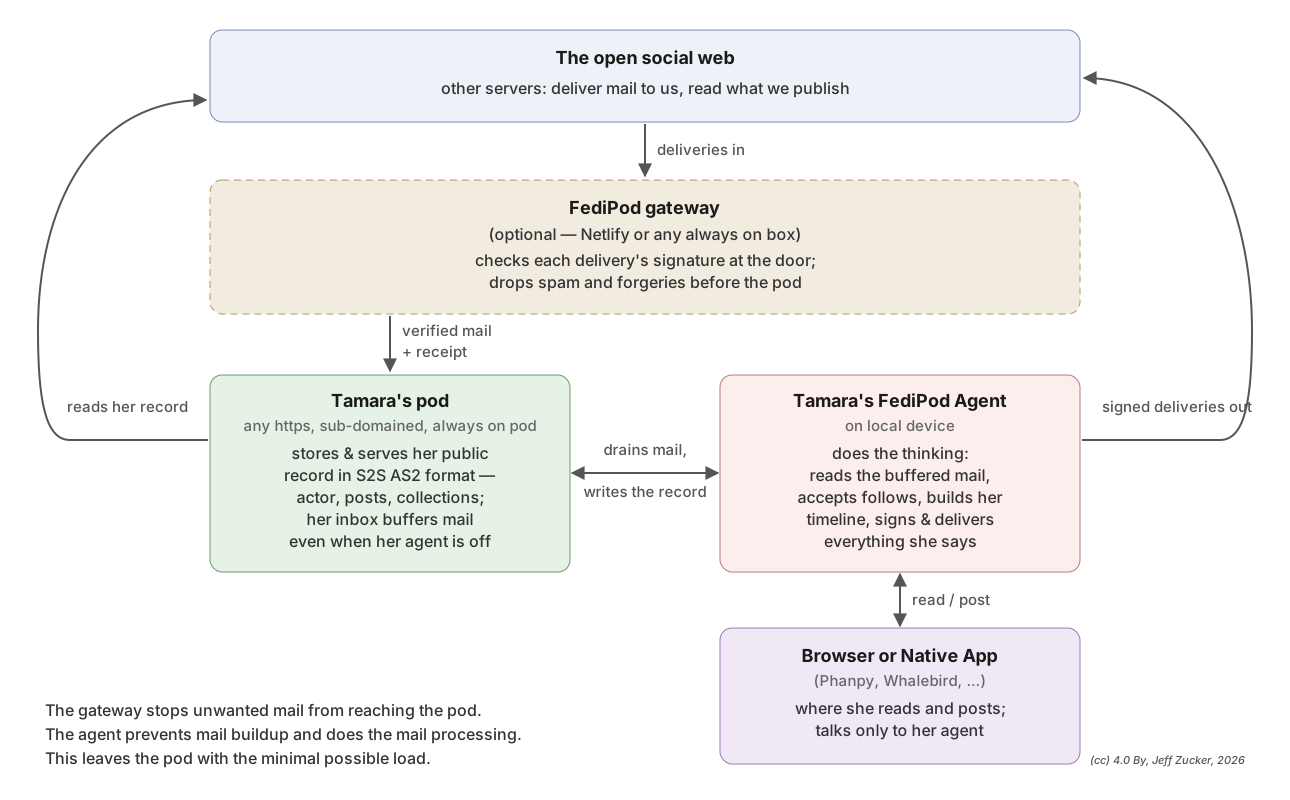
`Activitypods` requires a server which provides both an ActivityPub server and a Solid server and thus requires a specific server setup. `FediPod Solo & FediPod Group`, can be installed on any subdomained https-served pod without any modification to the server. It does this by splitting the ActivityPub server into two parts. The pod part provides discovery (webfinger) and stores mostly public data while the local agent provides the ActivityPub actions and storage for most private data. The exception is private direct messages which are stored on the pod protected by ACL resources. The same protected area also holds followers-only posts, and the pending-follow
|
|
121
|
-
and blocked collections. [`FediPod Gateway`](https://github.com/jeff-zucker/FediPod/blob/main/gateway.md) can be supported from any lightweight Internet-facing box including Netlify, it does not require a full server and can work with any FediPod-capable pod. [`FediPod Server`](https://github.com/jeff-zucker/FediPod/blob/main/packages/fedipod-server/README.md) works as a CSS server component. If the pod host installs it, anyone with a pod on that server can opt-in to using their pod as a FediPod account fed by the server itself.
|
|
122
|
-
|
|
123
|
-
|
|
124
|
-
|
|
125
|
-
### Protocol conformance
|
|
126
|
-
|
|
127
|
-
FediPod is a full ActivityPub server, on both of the spec's profiles:
|
|
128
|
-
server-to-server (§7) and client-to-server (§6) — `POST /ap/outbox` on the
|
|
129
|
-
agent takes an activity (or a bare Note) and does the id-minting,
|
|
130
|
-
side-effects and delivery, authenticated by a Solid-OIDC token whose WebID is
|
|
131
|
-
the owner's. The Mastodon REST API is the everyday client interface; C2S is
|
|
132
|
-
the spec's own.
|
|
133
|
-
|
|
134
|
-
Group actors follow FEP-1b12: a carried post names the group as its
|
|
135
|
-
`audience`, the moderator roster is published as the actor's `attributedTo`,
|
|
136
|
-
a followed group's announced `Delete` of a post it carried is honoured, and
|
|
137
|
-
the group's own moderation is announced to the membership. The FEP-4ccd
|
|
138
|
-
pending-follow collections and the FEP-c648 blocked collection are published
|
|
139
|
-
as owner-only documents. See [Groups](https://github.com/jeff-zucker/FediPod/blob/main/groups.md).
|
|
5
|
+
FediPod gives you a Fediverse account whose data lives on a Solid pod. You
|
|
6
|
+
follow people on Mastodon, Bluesky, and other Fediverse or ATProto servers in
|
|
7
|
+
one timeline. Your posts, followers and settings stay on your pod.
|
|
8
|
+
|
|
9
|
+
The easiest way to run FediPod is to use it in any browser at https://fedipod.net. Nothing to install. A wizard will walk you through getting a pod (you can also bring your own) and creating a Fediverse identity attached to the pod. There are also a number of [other ways to run FediPod](#other-ways-to-run-fedipod) which offer a variety of scenarios.
|
|
10
|
+
|
|
11
|
+
## Requirements
|
|
12
|
+
|
|
13
|
+
- A current browser, on a desktop or a phone.
|
|
14
|
+
- A Solid pod with a host name of its own, such as
|
|
15
|
+
`https://alice.solidcommunity.net/`. Sign-up can create one for you at
|
|
16
|
+
solidcommunity.net or another provider, or use a pod you already have. A
|
|
17
|
+
pod that lives on a path of a shared host, like `https://server.example/alice/`,
|
|
18
|
+
cannot be a Fediverse address.
|
|
19
|
+
- Followers-only and direct posts need a pod that enforces WAC access control.
|
|
20
|
+
On one that does not, the composer refuses those two and says why. Public
|
|
21
|
+
and unlisted posts work on any pod.
|
|
22
|
+
|
|
23
|
+
## Getting an account
|
|
24
|
+
|
|
25
|
+
1. Open https://fedipod.net and choose **create an account**.
|
|
26
|
+
2. Choose a pod: a new one at the provider you name, or a pod you already have.
|
|
27
|
+
3. Choose your handle. Your address is `@handle@yourpod`. Both parts are
|
|
28
|
+
permanent; display name, bio and pictures are set later in the client.
|
|
29
|
+
4. Enter your pod password once. It creates the account and locks your
|
|
30
|
+
signing key. The password is not stored.
|
|
31
|
+
|
|
32
|
+
Your account then opens in the client. To use it from another browser, go to
|
|
33
|
+
https://fedipod.net, enter your address, sign in at your pod, and unlock your
|
|
34
|
+
key with your password once on that browser.
|
|
35
|
+
|
|
36
|
+
## What you can do
|
|
37
|
+
|
|
38
|
+
The client is [Phanpy](https://github.com/cheeaun/phanpy) (MIT, by Chee Aun),
|
|
39
|
+
served by fedipod.net. Through it you follow and unfollow, post, reply,
|
|
40
|
+
favourite, boost, attach media, edit and delete. Content warnings, polls with
|
|
41
|
+
up to four options and one or several answers, all four visibility levels, a
|
|
42
|
+
conversations view for direct messages, bookmarks, lists, keyword filters,
|
|
43
|
+
pinned posts that other servers can see, blocking and muting, and the custom
|
|
44
|
+
emojis other servers send.
|
|
45
|
+
|
|
46
|
+
**Bluesky.** Connect a Bluesky account, or any other ATProto account, from the
|
|
47
|
+
manage page. Your public posts are mirrored to it, Bluesky replies and
|
|
48
|
+
activity flow into your timeline, and you can like, repost and reply to
|
|
49
|
+
Bluesky posts. Direct messages to Bluesky are not supported. None of this
|
|
50
|
+
needs Bridgy Fed.
|
|
51
|
+
|
|
52
|
+
**Your other Fediverse accounts.** If you also hold an account on Mastodon,
|
|
53
|
+
or on any other server speaking the Mastodon API such as GoToSocial, Pleroma,
|
|
54
|
+
Akkoma, Pixelfed or Friendica, connect it from the manage page and read it
|
|
55
|
+
here. Its home timeline and notifications join the feed you already read,
|
|
56
|
+
interleaved by time, and a post both accounts see appears once. Favouriting,
|
|
57
|
+
boosting and replying act as the account the post came through. The token it
|
|
58
|
+
hands back stays in your browser unless you choose to keep it on your pod.
|
|
59
|
+
|
|
60
|
+
**Moving in.** Mastodon-format exports of follows, blocks, mutes, lists and
|
|
61
|
+
domain blocks import from the manage page. Your old account can be listed as
|
|
62
|
+
an alias, so a Move from it lands here.
|
|
63
|
+
|
|
64
|
+
**The manage page.** `manage account` in the bar opens it: your profile,
|
|
65
|
+
aliases, the gateway, key rotation, recovering posts, parking, moving to
|
|
66
|
+
another server, retiring, and clearing a backlog. It is the same interface
|
|
67
|
+
the installed agent has, described in [the admin interface](gui.md).
|
|
68
|
+
|
|
69
|
+
**More than one browser.** One browser runs your account at a time. Opening
|
|
70
|
+
it in a second browser shows your timeline read-only, and the moment you act
|
|
71
|
+
there it takes over; the first drops back to reading.
|
|
72
|
+
|
|
73
|
+
## What the browser version does not do
|
|
74
|
+
|
|
75
|
+
- **Scheduled posts.** Nothing runs between now and the time you picked, so
|
|
76
|
+
the composer refuses one rather than dropping it later.
|
|
77
|
+
- **Notifications while the client is closed.** There is no push service.
|
|
78
|
+
Open the tab and they are there.
|
|
79
|
+
- **Live updates.** The client refreshes by polling.
|
|
80
|
+
- **Hosting a group.** Joining one works.
|
|
81
|
+
- **Other clients.** A phone app or desktop client has nothing on the network
|
|
82
|
+
to connect to.
|
|
83
|
+
|
|
84
|
+
For these, see [Other ways to run FediPod](#other-ways-to-run-fedipod).
|
|
85
|
+
|
|
86
|
+
## Your data and your keys
|
|
87
|
+
|
|
88
|
+
Everything you publish and everything you read is stored on your pod. Your
|
|
89
|
+
signing key is stored there too, encrypted under your password, so nobody who
|
|
90
|
+
can read your pod, its host included, can post as you. fedipod.net holds no
|
|
91
|
+
key: it verifies incoming mail, drops the junk, forwards the rest to your pod,
|
|
92
|
+
and hands your browser the app. You can detach from it at any time and attach
|
|
93
|
+
to a gateway of your own. Your address and your data do not change.
|
|
94
|
+
|
|
95
|
+
## Other ways to run FediPod
|
|
96
|
+
|
|
97
|
+
- [The installed agent](installed-agent.md) runs on your own machine and
|
|
98
|
+
adds scheduled posts, push notifications, live updates, group hosting and
|
|
99
|
+
the use of any Mastodon client.
|
|
100
|
+
- [Groups](groups.md): hosting a discussion group of Fediverse and Bluesky
|
|
101
|
+
users from a pod.
|
|
102
|
+
- [The gateway](gateway.md): running an always-on door of your own, on
|
|
103
|
+
Netlify or any small host.
|
|
104
|
+
- [FediPod Server](packages/fedipod-server/README.md): a full ActivityPub
|
|
105
|
+
server as a Community Solid Server component, giving every pod on the server
|
|
106
|
+
the option of a Fediverse account.
|
|
107
|
+
- [Architecture](architecture.md): how the pieces fit, and which protocols
|
|
108
|
+
FediPod speaks.
|
|
140
109
|
|
|
141
110
|
## Acknowledgements
|
|
142
111
|
|
|
@@ -149,3 +118,4 @@ This package was created using a heavily hectored claude.
|
|
|
149
118
|
## License
|
|
150
119
|
|
|
151
120
|
(c) Jeff Zucker, 2026; may be freely used with an MIT license.
|
|
121
|
+
p
|
package/architecture.md
ADDED
|
@@ -0,0 +1,41 @@
|
|
|
1
|
+
# Architecture
|
|
2
|
+
|
|
3
|
+
FediPod splits an ActivityPub server into two parts. The pod provides
|
|
4
|
+
discovery and stores the public record: the actor, its outbox, followers and
|
|
5
|
+
posts, and the inbox that receives deliveries. The agent provides the
|
|
6
|
+
ActivityPub actions: it drains the inbox, builds the timeline, signs and
|
|
7
|
+
delivers, and answers the Mastodon client. The agent runs either in your
|
|
8
|
+
browser, served by fedipod.net, or as [the installed agent](installed-agent.md)
|
|
9
|
+
on your own machine. Private direct messages, followers-only posts and the
|
|
10
|
+
pending-follow and blocked collections live on the pod in an area protected by
|
|
11
|
+
access control.
|
|
12
|
+
|
|
13
|
+
A [gateway](gateway.md) can stand in front of the pod: an always-on door that
|
|
14
|
+
verifies each delivery where the signature can still be checked, drops spam,
|
|
15
|
+
and forwards the rest to the pod inbox with a receipt. It holds no key. The
|
|
16
|
+
browser version always has one; the installed agent may use one. Any
|
|
17
|
+
lightweight host will do, Netlify included.
|
|
18
|
+
|
|
19
|
+
[FediPod Server](packages/fedipod-server/README.md) puts the agent inside a
|
|
20
|
+
Community Solid Server, so anyone with a pod on that server can opt in to a
|
|
21
|
+
Fediverse account fed by the server itself.
|
|
22
|
+
|
|
23
|
+

|
|
24
|
+
|
|
25
|
+

|
|
26
|
+
|
|
27
|
+
## Protocol conformance
|
|
28
|
+
|
|
29
|
+
FediPod is a full ActivityPub server, on both of the spec's profiles:
|
|
30
|
+
server-to-server (§7) and client-to-server (§6). `POST /ap/outbox` on the
|
|
31
|
+
installed agent takes an activity, or a bare Note, and does the id-minting,
|
|
32
|
+
side-effects and delivery, authenticated by a Solid-OIDC token whose WebID is
|
|
33
|
+
the owner's. The Mastodon REST API is the everyday client interface; C2S is
|
|
34
|
+
the spec's own.
|
|
35
|
+
|
|
36
|
+
Group actors follow FEP-1b12: a carried post names the group as its
|
|
37
|
+
`audience`, the moderator roster is published as the actor's `attributedTo`,
|
|
38
|
+
a followed group's announced `Delete` of a post it carried is honoured, and
|
|
39
|
+
the group's own moderation is announced to the membership. The FEP-4ccd
|
|
40
|
+
pending-follow collections and the FEP-c648 blocked collection are published
|
|
41
|
+
as owner-only documents. See [Groups](groups.md).
|
package/browser.svg
ADDED
|
@@ -0,0 +1,72 @@
|
|
|
1
|
+
<svg xmlns="http://www.w3.org/2000/svg" viewBox="0 0 860 486" font-family="Helvetica, Arial, sans-serif">
|
|
2
|
+
<defs>
|
|
3
|
+
<marker id="arrow" viewBox="0 0 10 10" refX="9" refY="5" markerWidth="8" markerHeight="8" orient="auto-start-reverse">
|
|
4
|
+
<path d="M0,0 L10,5 L0,10 z" fill="#333"/>
|
|
5
|
+
</marker>
|
|
6
|
+
</defs>
|
|
7
|
+
<rect x="0" y="0" width="860" height="486" fill="#ffffff"/>
|
|
8
|
+
|
|
9
|
+
<!-- boxes (draw.io palette) -->
|
|
10
|
+
<g stroke-width="1.5">
|
|
11
|
+
<rect x="315" y="24" width="230" height="72" rx="6" fill="#dae8fc" stroke="#6c8ebf"/>
|
|
12
|
+
<rect x="315" y="190" width="230" height="68" rx="6" fill="#e1d5e7" stroke="#9673a6"/>
|
|
13
|
+
<rect x="40" y="372" width="210" height="70" rx="6" fill="#f8cecc" stroke="#b85450"/>
|
|
14
|
+
<rect x="580" y="360" width="250" height="88" rx="6" fill="#d5e8d4" stroke="#82b366"/>
|
|
15
|
+
</g>
|
|
16
|
+
|
|
17
|
+
<!-- box labels -->
|
|
18
|
+
<g fill="#111" text-anchor="middle">
|
|
19
|
+
<text x="430" y="56" font-size="17" font-weight="bold">Open Social Web</text>
|
|
20
|
+
<text x="430" y="80" font-size="13">Mastodon · Pixelfed · Bluesky …</text>
|
|
21
|
+
|
|
22
|
+
<text x="430" y="220" font-size="17" font-weight="bold">FediPod Gateway</text>
|
|
23
|
+
<text x="430" y="242" font-size="13">the mail door & the relay</text>
|
|
24
|
+
|
|
25
|
+
<text x="145" y="391" font-size="17" font-weight="bold">Your Pod</text>
|
|
26
|
+
<text x="145" y="409" font-size="13">AP S2S formatted data</text>
|
|
27
|
+
<text x="145" y="426" font-size="13">in addition to other pod data</text>
|
|
28
|
+
|
|
29
|
+
<text x="705" y="392" font-size="17" font-weight="bold">Any Browser</text>
|
|
30
|
+
<text x="705" y="414" font-size="13">runs your FediPod Agent,</text>
|
|
31
|
+
<text x="705" y="431" font-size="13">a Mastodon API client</text>
|
|
32
|
+
</g>
|
|
33
|
+
|
|
34
|
+
<!-- arrows -->
|
|
35
|
+
<g stroke="#333" stroke-width="1.6" fill="none">
|
|
36
|
+
<!-- 1: Open Social Web <-> Gateway (AP S2S mail) -->
|
|
37
|
+
<line x1="430" y1="96" x2="430" y2="190" marker-start="url(#arrow)" marker-end="url(#arrow)"/>
|
|
38
|
+
<!-- 2: Your Pod -> Open Social Web (UNCHANGED, pod answers lookups) -->
|
|
39
|
+
<path d="M110,372 C46,300 46,150 322,92" marker-end="url(#arrow)"/>
|
|
40
|
+
<!-- 3: Gateway -> Your Pod (one way now) -->
|
|
41
|
+
<path d="M338,258 C300,300 250,330 205,372" marker-end="url(#arrow)"/>
|
|
42
|
+
<!-- 4: Gateway <-> Any Browser (agent loaded; signed posts sent) -->
|
|
43
|
+
<path d="M632,360 C560,320 522,300 472,258" marker-start="url(#arrow)" marker-end="url(#arrow)"/>
|
|
44
|
+
<!-- 5: Your Pod <-> Any Browser (Solid) -->
|
|
45
|
+
<line x1="250" y1="408" x2="580" y2="408" marker-start="url(#arrow)" marker-end="url(#arrow)"/>
|
|
46
|
+
<!-- 6: Any Browser <-> Open Social Web (ATProto client — Bluesky) -->
|
|
47
|
+
<path d="M760,360 C824,300 824,150 538,92" marker-start="url(#arrow)" marker-end="url(#arrow)"/>
|
|
48
|
+
</g>
|
|
49
|
+
|
|
50
|
+
<!-- arrow labels -->
|
|
51
|
+
<g fill="#333" font-size="13">
|
|
52
|
+
<text x="418" y="134" text-anchor="end">raw mail in</text>
|
|
53
|
+
<text x="418" y="150" text-anchor="end">relayed posts out</text>
|
|
54
|
+
<text x="442" y="142" text-anchor="start">AP S2S Protocol</text>
|
|
55
|
+
|
|
56
|
+
<text x="96" y="250" text-anchor="start">Pod responds to requests for</text>
|
|
57
|
+
<text x="96" y="266" text-anchor="start">webfinger, actor, public posts</text>
|
|
58
|
+
|
|
59
|
+
<text x="300" y="322" text-anchor="start">verified mail in</text>
|
|
60
|
+
|
|
61
|
+
<text x="588" y="302" text-anchor="middle">FediPod Agent loaded in browser;</text>
|
|
62
|
+
<text x="588" y="318" text-anchor="middle">signed posts sent to gateway</text>
|
|
63
|
+
|
|
64
|
+
<text x="430" y="400" text-anchor="middle" font-weight="bold" fill="#111">Solid Protocol</text>
|
|
65
|
+
<text x="430" y="428" text-anchor="middle">reads & writes your pod</text>
|
|
66
|
+
|
|
67
|
+
<text x="780" y="238" text-anchor="end">ATProto</text>
|
|
68
|
+
<text x="780" y="254" text-anchor="end">client protocol</text>
|
|
69
|
+
</g>
|
|
70
|
+
|
|
71
|
+
<text x="830" y="474" text-anchor="end" font-size="11" fill="#888">© 2026 Jeff Zucker · CC BY-SA 4.0</text>
|
|
72
|
+
</svg>
|
package/cli.md
CHANGED
|
@@ -70,9 +70,6 @@ fedipod revoke-credential --email EMAIL # cut this machine off from the pod acc
|
|
|
70
70
|
```
|
|
71
71
|
A new password takes effect when a running agent restarts.
|
|
72
72
|
|
|
73
|
-
<!-- CLAUDE 2026-09-09 — `passwd` stopped being optional for one case, and a
|
|
74
|
-
user who hits it will want to know why here. First draft in your voice;
|
|
75
|
-
delete these markers when done. -->
|
|
76
73
|
**A client hosted somewhere else now needs one.** A client running on its own
|
|
77
74
|
site (Elk, Phanpy on someone's own domain) asks the agent to send the sign-in
|
|
78
75
|
result back to that site. Without a password there is nothing to approve that
|
|
@@ -81,7 +78,6 @@ to have open could ask for the same thing and be given a key to your account.
|
|
|
81
78
|
So: no password, no sending credentials off this machine. Clients that live on
|
|
82
79
|
the agent itself (the bundled one, a dist in `ui/`, anything on
|
|
83
80
|
`https://localhost:<port>`) are unaffected and need no password.
|
|
84
|
-
<!-- /CLAUDE -->
|
|
85
81
|
|
|
86
82
|
## Bluesky
|
|
87
83
|
|
package/gateway.md
ADDED
|
@@ -0,0 +1,160 @@
|
|
|
1
|
+
# The gateway
|
|
2
|
+
|
|
3
|
+
Most of what a Fediverse inbox receives is broadcast noise. A gateway is an
|
|
4
|
+
always-on, internet-facing door that stands in front of your pod: it checks
|
|
5
|
+
each delivery's signature where the headers still exist, drops forgeries and
|
|
6
|
+
junk before they ever touch your pod, and passes the rest on with a receipt
|
|
7
|
+
saying it checked.
|
|
8
|
+
|
|
9
|
+
Your name, your signing key and your data stay on your own pod. The gateway is
|
|
10
|
+
**keyless** — it never holds the key you sign with, so it cannot post as you,
|
|
11
|
+
read your private things, or be you anywhere. The worst a broken one can do is
|
|
12
|
+
push items into your inbox, and those still face your agent's own checks.
|
|
13
|
+
|
|
14
|
+
A FediPod install works without any gateway at all. Deliveries go straight to
|
|
15
|
+
your pod inbox, which holds them whether your agent is running or not.
|
|
16
|
+
|
|
17
|
+
## Attaching your pod to one
|
|
18
|
+
|
|
19
|
+
There is a gateway at [fedipod.net](https://fedipod.net/). Attaching happens
|
|
20
|
+
from your own agent, which proves the pod with its own credential — no
|
|
21
|
+
password is typed anywhere:
|
|
22
|
+
|
|
23
|
+
1. Open your agent's admin page and, in the **Gateway** panel, give the
|
|
24
|
+
gateway's address and the name you want there. The panel checks the name
|
|
25
|
+
is free as you type.
|
|
26
|
+
2. Choose a pod-based name (`@you@your.pod`) or a gateway-based name
|
|
27
|
+
(`@you@the-gateway`). The gateway account is created automatically either
|
|
28
|
+
way. A pod-based attach applies immediately; taking a gateway-based name
|
|
29
|
+
restarts the agent itself to publish under it.
|
|
30
|
+
|
|
31
|
+
The same attach from the command line, against the running agent:
|
|
32
|
+
|
|
33
|
+
```
|
|
34
|
+
fedipod gateway --attach https://fedipod.net --name yourname
|
|
35
|
+
```
|
|
36
|
+
|
|
37
|
+
`--name` defaults to your handle; add `--fronted` for a gateway-based name.
|
|
38
|
+
|
|
39
|
+
To undo it:
|
|
40
|
+
|
|
41
|
+
```
|
|
42
|
+
fedipod gateway --detach
|
|
43
|
+
```
|
|
44
|
+
|
|
45
|
+
That republishes your actor with your pod's own inbox. Nothing else moves.
|
|
46
|
+
Detach talks to the running agent, so start it first. For a fronted identity,
|
|
47
|
+
detaching also moves every published id back to the pod — a rename other
|
|
48
|
+
servers see, not just a mail change.
|
|
49
|
+
|
|
50
|
+
## Easing into it
|
|
51
|
+
|
|
52
|
+
Attaching does not have to change how deliveries are treated on day one. The
|
|
53
|
+
mode says how far you trust the door, and every step is reversible:
|
|
54
|
+
|
|
55
|
+
- **off** — configured but not advertised; nothing changes on the wire. This
|
|
56
|
+
is where a by-hand configure starts, and the step back short of forgetting
|
|
57
|
+
the gateway entirely.
|
|
58
|
+
- **shadow** — your actor advertises the gateway and the agent measures how
|
|
59
|
+
much real traffic verifies.
|
|
60
|
+
- **trust** — verified follows are accepted without review.
|
|
61
|
+
- **locked** — your inbox accepts writes only from the gateway.
|
|
62
|
+
|
|
63
|
+
In every mode past **off**, the door itself is already filtering: blocked
|
|
64
|
+
actors, content that does not concern you, and forged signatures are dropped
|
|
65
|
+
at the door and never reach the pod. The mode says only how far the agent
|
|
66
|
+
believes the door's receipts.
|
|
67
|
+
|
|
68
|
+
The shadow numbers come from the agent:
|
|
69
|
+
|
|
70
|
+
```
|
|
71
|
+
curl -k https://localhost:8030/gateway
|
|
72
|
+
```
|
|
73
|
+
|
|
74
|
+
which reports the mode and the verified and unverified counts.
|
|
75
|
+
|
|
76
|
+
Set it from the agent's own API:
|
|
77
|
+
|
|
78
|
+
```
|
|
79
|
+
curl -k -X POST https://localhost:8030/gateway -H 'content-type: application/json' \
|
|
80
|
+
-d '{"action":"mode","mode":"shadow"}'
|
|
81
|
+
```
|
|
82
|
+
|
|
83
|
+
8030 is the default identity's port; `fedipod status`
|
|
84
|
+
prints the right one for each identity.
|
|
85
|
+
|
|
86
|
+
## The receipt secret
|
|
87
|
+
|
|
88
|
+
The gateway stamps each verification receipt with a secret shared between it
|
|
89
|
+
and your agent, and your agent believes a receipt only when the stamp checks
|
|
90
|
+
out. That is what stops somebody dropping a forged "verified" receipt beside a
|
|
91
|
+
forged delivery.
|
|
92
|
+
|
|
93
|
+
You never fetch this secret from anywhere. When you run your own gateway,
|
|
94
|
+
your agent mints it and shows it to you once; you carry it to the gateway
|
|
95
|
+
yourself. When you attach to a multi-user gateway, the direction is reversed:
|
|
96
|
+
the gateway mints the secret and answers the attach with it, and your agent
|
|
97
|
+
records it.
|
|
98
|
+
|
|
99
|
+
## What the gateway can see
|
|
100
|
+
|
|
101
|
+
It reads only public data to decide what concerns you: your published
|
|
102
|
+
followers and following, and a small public policy document your agent writes
|
|
103
|
+
with a mirror of your blocklist. Nothing private leaves your pod. Publishing
|
|
104
|
+
that mirror does make your blocklist public, which is part of the bargain of
|
|
105
|
+
running behind a door.
|
|
106
|
+
|
|
107
|
+
## Running a gateway
|
|
108
|
+
|
|
109
|
+
Any always-on box will do — a VPS, a home server behind a tunnel, a serverless
|
|
110
|
+
host. The logic is plain Node in `lib/gateway-core.mjs`, and a host needs only
|
|
111
|
+
a thin adapter that calls `handleDelivery`.
|
|
112
|
+
|
|
113
|
+
Two ways are ready to use:
|
|
114
|
+
|
|
115
|
+
- **On Netlify**, with the adapter in `netlify/functions/inbox.mjs`. See
|
|
116
|
+
[netlify/README.md](netlify/README.md) for the deployment specifics.
|
|
117
|
+
- **On any box of your own**, with your own adapter around the same core.
|
|
118
|
+
- **Inside a Community Solid Server**, as the same door run in-process by the
|
|
119
|
+
CSS component — see [packages/fedipod-server](packages/fedipod-server/README.md).
|
|
120
|
+
|
|
121
|
+
### Offering accounts to other people
|
|
122
|
+
|
|
123
|
+
A gateway can also be a front for many people, so a host can offer
|
|
124
|
+
`@name@their-host` addresses. Each user keeps their own pod, their own agent
|
|
125
|
+
and their own signing key; the front answers WebFinger for all of them, serves
|
|
126
|
+
each public face by rewriting that user's pod ids onto the shared domain, and
|
|
127
|
+
routes every verified delivery into the right pod.
|
|
128
|
+
|
|
129
|
+
A fronted identity is the gateway-based name choice in the admin page's
|
|
130
|
+
Gateway panel, or:
|
|
131
|
+
|
|
132
|
+
```
|
|
133
|
+
fedipod gateway --attach <front-origin> --name <name> --fronted
|
|
134
|
+
```
|
|
135
|
+
|
|
136
|
+
Choose at attach time: changing an existing identity's front later renames
|
|
137
|
+
every published id, and the attach refuses it.
|
|
138
|
+
|
|
139
|
+
**A front is only a doorway.** It never hosts pods and never dictates where
|
|
140
|
+
they live. A host who also wants to offer pods to people who have none runs a
|
|
141
|
+
pod server separately, with the duties that carries — and users may always
|
|
142
|
+
bring a pod of their own instead.
|
|
143
|
+
|
|
144
|
+
## Setting one up by hand
|
|
145
|
+
|
|
146
|
+
If you are not using a signup page:
|
|
147
|
+
|
|
148
|
+
1. Deploy the door to your box.
|
|
149
|
+
2. Give it Append on your inbox, using a dedicated low-privilege pod account —
|
|
150
|
+
never your owner credential. FediPod's default inbox is public-Append, so
|
|
151
|
+
this is optional: with no credential the door writes with a plain PUT.
|
|
152
|
+
3. Point your agent at it, which mints the shared secret and returns it once:
|
|
153
|
+
|
|
154
|
+
```
|
|
155
|
+
curl -k -X POST https://localhost:8030/gateway -H 'content-type: application/json' \
|
|
156
|
+
-d '{"action":"configure","url":"<door-inbox-url>","webId":"<door-webid>"}'
|
|
157
|
+
```
|
|
158
|
+
|
|
159
|
+
Copy that secret into the door's environment.
|
|
160
|
+
4. Walk the modes above, starting at shadow.
|
package/groups.md
CHANGED
|
@@ -14,16 +14,12 @@ and pick group rather than person, or take the group path on a signup page.
|
|
|
14
14
|
You can turn on join review as you create it. The group's pod must be the root
|
|
15
15
|
of its own host, so its handle resolves.
|
|
16
16
|
|
|
17
|
-
<!-- CLAUDE 2026-09-09 — nothing anywhere said this, and a browser user who
|
|
18
|
-
went looking for the group option would just not have found it. First
|
|
19
|
-
draft in your voice; move or reword as you like. Delete markers when done. -->
|
|
20
17
|
**Running a group needs the installed agent.** The in-browser build makes
|
|
21
18
|
personal identities only — the sign-up wizard has no group option, and the
|
|
22
19
|
moderation surface (join review, members, muting, the moderation queue) is not
|
|
23
20
|
part of that build. You can *join* a group from the browser exactly as from
|
|
24
21
|
anywhere else: joining is following, and that works everywhere. It is hosting
|
|
25
22
|
one that needs an install.
|
|
26
|
-
<!-- /CLAUDE -->
|
|
27
23
|
|
|
28
24
|
Being in a group also connects you to the people in it: posts from fellow
|
|
29
25
|
members reach your timeline even when you do not follow them individually,
|
|
@@ -73,8 +69,6 @@ boosting the author.
|
|
|
73
69
|
|
|
74
70
|
A group can be handed on rather than abandoned using the `Transfer this account away` button. This tells every follower to migrate, so the membership survives a change of host.
|
|
75
71
|
|
|
76
|
-
|
|
77
|
-
|
|
78
72
|
## Bluesky members
|
|
79
73
|
|
|
80
74
|
A group with a connected Bluesky account is joinable from Bluesky: following
|
package/gui.md
CHANGED
|
@@ -1,5 +1,10 @@
|
|
|
1
1
|
# The Admin interface
|
|
2
2
|
|
|
3
|
+
In the browser version at fedipod.net, `manage account` in the bar opens this
|
|
4
|
+
same page for your account. The rest of this page describes it as the
|
|
5
|
+
installed agent serves it; the controls are the same, minus the manual inbox
|
|
6
|
+
drain and the local log, which a browser does not have.
|
|
7
|
+
|
|
3
8
|
Open `https://localhost:8030/` while any agent is running — it forwards you to the agent — then choose `manage account` and select the actor you want from the local actors dropdown.
|
|
4
9
|
Picking an actor marked "(stopped)" starts its agent, then opens its page.
|
|
5
10
|
|
|
@@ -92,14 +97,9 @@ is marked **sign in again** rather than quietly dropped.
|
|
|
92
97
|
|
|
93
98
|
New followers appear under **Follow requests** with **Accept** and **Refuse**
|
|
94
99
|
beside them; nothing is accepted without you.
|
|
95
|
-
<!-- CLAUDE 2026-09-09 — these were visible on this page and NOWHERE else
|
|
96
|
-
until today: the client API stubbed the list empty and offered no way to
|
|
97
|
-
answer one, so no Mastodon client could show them. Delete markers when
|
|
98
|
-
read. -->
|
|
99
100
|
They show in any Mastodon client as well, now that the client API serves the
|
|
100
|
-
queue and takes both answers
|
|
101
|
-
|
|
102
|
-
<!-- /CLAUDE --> Groups are different — joining
|
|
101
|
+
queue and takes both answers.
|
|
102
|
+
Groups are different — joining
|
|
103
103
|
follows the group's own moderation settings; see [Groups](groups.md).
|
|
104
104
|
|
|
105
105
|
**Accept all** answers the whole queue at once, and the identity pane's
|
|
@@ -131,12 +131,8 @@ account*); your followers arrive by themselves. Removing an alias asks
|
|
|
131
131
|
twice — servers still processing the move check it while they retry. The CSV
|
|
132
132
|
files from the old server's export are imported with the CLI; see
|
|
133
133
|
[CLI admin](cli.md).
|
|
134
|
-
<!-- CLAUDE 2026-09-09 — the browser build runs the same importer now, so
|
|
135
|
-
"with the CLI" is no longer the whole story. Reword as you like; delete
|
|
136
|
-
these markers when done. -->
|
|
137
134
|
The in-browser build runs the same importer, so a CSV can be handed to it
|
|
138
135
|
there too.
|
|
139
|
-
<!-- /CLAUDE -->
|
|
140
136
|
|
|
141
137
|
## Protecting & recovering your data
|
|
142
138
|
|
|
@@ -0,0 +1,97 @@
|
|
|
1
|
+
# The installed agent
|
|
2
|
+
|
|
3
|
+
FediPod can also run as a program on your own machine, in front of the same
|
|
4
|
+
kind of pod. It does everything the browser version at fedipod.net does, plus
|
|
5
|
+
what a browser tab cannot: it keeps running while no tab is open, so scheduled
|
|
6
|
+
posts go out and push notifications reach you; it serves the Mastodon streaming
|
|
7
|
+
API, so clients update live; any Mastodon client, phone app or desktop, can
|
|
8
|
+
connect to it; and it can host a [group](groups.md).
|
|
9
|
+
|
|
10
|
+
## Requirements
|
|
11
|
+
|
|
12
|
+
- Node 20 or newer.
|
|
13
|
+
- A Solid pod with a host name of its own, such as
|
|
14
|
+
`https://alice.solidcommunity.net/`. A pod on a path of a shared host cannot
|
|
15
|
+
be a Fediverse address.
|
|
16
|
+
- Followers-only and direct posts need a pod that enforces WAC access control;
|
|
17
|
+
on one that does not, the composer refuses those two and says why.
|
|
18
|
+
- While the agent is off, your mail waits on your pod's host. Run it as a
|
|
19
|
+
service, or attach to a gateway, so it does not pile up there.
|
|
20
|
+
|
|
21
|
+
## Installing
|
|
22
|
+
|
|
23
|
+
```
|
|
24
|
+
npm install -g fedipod
|
|
25
|
+
```
|
|
26
|
+
|
|
27
|
+
## Running
|
|
28
|
+
|
|
29
|
+
Run `fedipod start`. Add a port to change the local agent's port, for example
|
|
30
|
+
`fedipod start --port 8081`; the default is 8030. Then point any browser at
|
|
31
|
+
`https://localhost:8030`, or the port you chose, and the setup pages take it
|
|
32
|
+
from there.
|
|
33
|
+
|
|
34
|
+
## Running as a service
|
|
35
|
+
|
|
36
|
+
```
|
|
37
|
+
fedipod install-service
|
|
38
|
+
```
|
|
39
|
+
|
|
40
|
+
It registers every identity on this machine, one service each, so all of your
|
|
41
|
+
actors start at boot. An identity running in a terminal is stopped and taken
|
|
42
|
+
over by its service. `fedipod uninstall-service` reverses it.
|
|
43
|
+
|
|
44
|
+
## Managing
|
|
45
|
+
|
|
46
|
+
Posts, logs, parking, moving, transferring and the rest are on the
|
|
47
|
+
[admin interface](gui.md); starting, stopping and what a page cannot do are in
|
|
48
|
+
[CLI admin](cli.md). The admin tools also create other actors, groups or
|
|
49
|
+
persons. You may have as many as you want on one machine, each with a pod of
|
|
50
|
+
its own.
|
|
51
|
+
|
|
52
|
+
Every agent checks once a day whether a newer FediPod is published. When one
|
|
53
|
+
exists, the record page offers **Update**, and `fedipod update` does the same
|
|
54
|
+
from the terminal. `AP_UPDATE_CHECK=0` turns the check off.
|
|
55
|
+
|
|
56
|
+
## A gateway account
|
|
57
|
+
|
|
58
|
+
Most of what a Fediverse inbox receives is broadcast noise. A
|
|
59
|
+
[gateway](gateway.md) is a shared, always-on door that verifies each delivery,
|
|
60
|
+
drops the junk, and passes the rest to your pod, while your key and data stay
|
|
61
|
+
on your pod. There is a free one at [fedipod.net](https://fedipod.net/).
|
|
62
|
+
Attaching or detaching is a few wizard-guided clicks from your agent, and it
|
|
63
|
+
takes the mail load off your pod's host.
|
|
64
|
+
|
|
65
|
+
## Clients
|
|
66
|
+
|
|
67
|
+
The bundled client is [Phanpy](https://github.com/cheeaun/phanpy) (MIT, by
|
|
68
|
+
Chee Aun), served by the agent itself, and logging in is one click. If you
|
|
69
|
+
ever enter the instance by hand, use the address on the record's **local
|
|
70
|
+
host** row.
|
|
71
|
+
|
|
72
|
+
- **Other web clients**: drop any static Mastodon client dist into
|
|
73
|
+
`ui/<name>/` and it is served at `/<name>/`; see `ui/README.md`.
|
|
74
|
+
- **Desktop and phone clients** (Tuba, Whalebird, and the like): add
|
|
75
|
+
`https://localhost:8030`, or your agent's port, as a custom instance.
|
|
76
|
+
- **Streaming**: the agent serves the Mastodon streaming API at
|
|
77
|
+
`/api/v1/streaming`, so clients update live instead of polling.
|
|
78
|
+
- **Web push**: notifications reach you while the client is closed.
|
|
79
|
+
- **Scheduled posts** go out at the time you picked.
|
|
80
|
+
|
|
81
|
+
Polls, content warnings, editing, all four visibility levels, direct
|
|
82
|
+
messages, bookmarks, favourites, lists, keyword filters, pinned posts,
|
|
83
|
+
blocking and muting, and custom emojis work as in the browser version.
|
|
84
|
+
|
|
85
|
+
## Bluesky, and your other Fediverse accounts
|
|
86
|
+
|
|
87
|
+
A Bluesky connection lets the agent drive an existing Bluesky, or other
|
|
88
|
+
ATProto, account alongside your Fediverse identity: public posts are
|
|
89
|
+
cross-posted as a mirror, with a toggle to turn it off; Bluesky replies and
|
|
90
|
+
activity flow into your timeline; you can like, boost and reply to Bluesky
|
|
91
|
+
posts. Direct messages to Bluesky are not supported.
|
|
92
|
+
|
|
93
|
+
An account on Mastodon or any server speaking the Mastodon API can be
|
|
94
|
+
connected from the **Other identities** row of the admin page. Its home
|
|
95
|
+
timeline and notifications join your feed, a post both accounts see appears
|
|
96
|
+
once, and favouriting, boosting and replying act as the account the post came
|
|
97
|
+
through. The token it hands back stays on this machine.
|
package/package.json
CHANGED
|
@@ -1,6 +1,6 @@
|
|
|
1
1
|
{
|
|
2
2
|
"name": "fedipod",
|
|
3
|
-
"version": "0.
|
|
3
|
+
"version": "1.0.0",
|
|
4
4
|
"description": "Standalone single-actor ActivityPub agent whose wire face, RDF truth and state all live on a Solid pod (CSS). Bundles a Phanpy UI and a Mastodon client-API facade.",
|
|
5
5
|
"type": "module",
|
|
6
6
|
"license": "MIT",
|
|
@@ -26,7 +26,11 @@
|
|
|
26
26
|
"gui.md",
|
|
27
27
|
"cli.md",
|
|
28
28
|
"groups.md",
|
|
29
|
-
"architecture.svg"
|
|
29
|
+
"architecture.svg",
|
|
30
|
+
"installed-agent.md",
|
|
31
|
+
"architecture.md",
|
|
32
|
+
"gateway.md",
|
|
33
|
+
"browser.svg"
|
|
30
34
|
],
|
|
31
35
|
"scripts": {
|
|
32
36
|
"start": "node bin/fedipod.mjs up",
|