fable-editor 1.2.1 → 1.2.2
This diff represents the content of publicly available package versions that have been released to one of the supported registries. The information contained in this diff is provided for informational purposes only and reflects changes between package versions as they appear in their respective public registries.
- package/LICENSE +20 -18
- package/README.md +226 -226
- package/dist/angular/README.md +226 -224
- package/dist/angular/core/editor.d.ts +6 -0
- package/dist/angular/core/i18n.d.ts +1 -0
- package/dist/angular/esm2022/core/editor.mjs +98 -81
- package/dist/angular/esm2022/core/i18n.mjs +3 -1
- package/dist/angular/fesm2022/fable-editor.mjs +99 -80
- package/dist/angular/fesm2022/fable-editor.mjs.map +1 -1
- package/dist/core/editor.d.ts +6 -0
- package/dist/core/editor.d.ts.map +1 -1
- package/dist/core/i18n.d.ts +1 -0
- package/dist/core/i18n.d.ts.map +1 -1
- package/dist/core/index.cjs +3 -3
- package/dist/core/index.mjs +420 -411
- package/dist/react/index.cjs +12 -12
- package/dist/react/index.mjs +645 -636
- package/package.json +113 -113
package/LICENSE
CHANGED
|
@@ -1,21 +1,23 @@
|
|
|
1
|
-
|
|
1
|
+
|
|
2
|
+
# Fable Editor License
|
|
2
3
|
|
|
3
4
|
Copyright (c) 2026 Sajin Satheesan
|
|
4
5
|
|
|
5
|
-
Permission is hereby granted, free of charge, to any person obtaining a copy
|
|
6
|
-
|
|
7
|
-
|
|
8
|
-
|
|
9
|
-
|
|
10
|
-
|
|
11
|
-
|
|
12
|
-
|
|
13
|
-
|
|
14
|
-
|
|
15
|
-
|
|
16
|
-
|
|
17
|
-
|
|
18
|
-
|
|
19
|
-
|
|
20
|
-
|
|
21
|
-
|
|
6
|
+
Permission is hereby granted, free of charge, to any person obtaining a copy of this software and its associated documentation files (the "Software"), to use the Software in personal, educational, and commercial projects.
|
|
7
|
+
|
|
8
|
+
You may:
|
|
9
|
+
|
|
10
|
+
* Use the Software in your own applications and websites.
|
|
11
|
+
* Modify the Software for your own internal use.
|
|
12
|
+
* Include the Software as part of a project or product you develop.
|
|
13
|
+
|
|
14
|
+
You may NOT:
|
|
15
|
+
|
|
16
|
+
* Sell, sublicense, rent, lease, or redistribute the Software, in whole or in part, as a standalone product.
|
|
17
|
+
* Publish modified or unmodified versions of the Software for others to download or use.
|
|
18
|
+
* Repackage or rebrand the Software under another name.
|
|
19
|
+
* Remove or modify this copyright notice.
|
|
20
|
+
|
|
21
|
+
This license does not grant ownership of the Software. All intellectual property rights remain with the copyright holder.
|
|
22
|
+
|
|
23
|
+
THE SOFTWARE IS PROVIDED "AS IS", WITHOUT WARRANTY OF ANY KIND, EXPRESS OR IMPLIED, INCLUDING BUT NOT LIMITED TO THE WARRANTIES OF MERCHANTABILITY, FITNESS FOR A PARTICULAR PURPOSE, AND NONINFRINGEMENT. IN NO EVENT SHALL THE AUTHOR BE LIABLE FOR ANY CLAIM, DAMAGES, OR OTHER LIABILITY, WHETHER IN AN ACTION OF CONTRACT, TORT, OR OTHERWISE, ARISING FROM, OUT OF, OR IN CONNECTION WITH THE SOFTWARE OR THE USE OR OTHER DEALINGS IN THE SOFTWARE.
|
package/README.md
CHANGED
|
@@ -1,226 +1,226 @@
|
|
|
1
|
-
# FableEditor
|
|
2
|
-
|
|
3
|
-
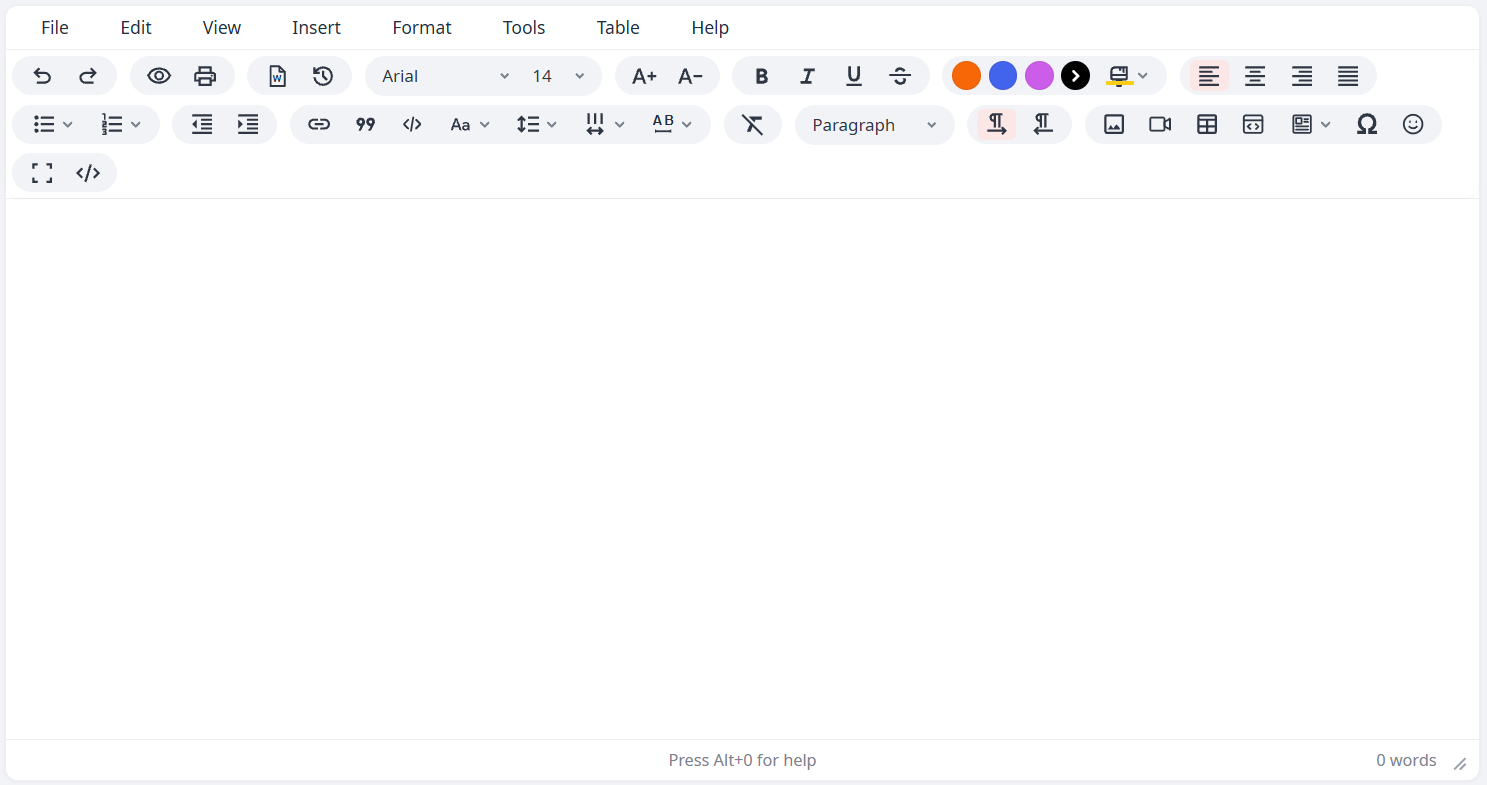
A rich text editor packaged as an npm library with first-class React and Angular wrappers. Built from the original standalone `fable-editor.html`/`fable-editor.js` demo, preserving the full feature set.
|
|
4
|
-
|
|
5
|
-
|
|
6
|
-
|
|
7
|
-
## Features
|
|
8
|
-
|
|
9
|
-
| Feature | Details |
|
|
10
|
-
|---|---|
|
|
11
|
-
| Toolbar & menubar | Configurable via `toolbar`/`menubar` strings (`\|`-separated groups), or use the built-in defaults. Menus: File, Edit, View, Insert, Format, Tools, Table, Help |
|
|
12
|
-
| Responsive toolbar | On narrow screens (mobile/tablet) — or in a narrow host container — the toolbar collapses to a single row with a trailing `…` button that expands/collapses the full set. Automatic, width-driven, no configuration needed |
|
|
13
|
-
| Tables | Resize handles, row/column insert & delete, row/column reordering (move a row up/down or a column left/right from the context toolbar or Table menu), cell background color picker (build header rows in one click), cell/row/column/table properties, context toolbar |
|
|
14
|
-
| Paste handling | PowerPaste-style clean paste from Word / Google Docs / Excel |
|
|
15
|
-
| Internationalization | English / Arabic, automatic RTL/LTR switching |
|
|
16
|
-
| Fonts & formatting | Configurable font list (`fontFamilyFormats`), sizes, line-height, word-spacing, letter-spacing, text/background color, change case |
|
|
17
|
-
| Theming | `primaryColor` (accent, default `#df3c2b`), `toolbarGroupBackground` and `uiFontFamily` (default Noto Sans stack) options restyle the editor chrome via CSS variables |
|
|
18
|
-
| Custom content styling | `contentStyle` injects scoped CSS into the editable area (e.g. default font/size) |
|
|
19
|
-
| Images | Placeholder upload UI, drag-and-drop, configurable accepted file types (`imageFileTypes`), pluggable async upload handler |
|
|
20
|
-
| Video | Insert/edit dialog with **General** (source URL / upload / width / height), **Embed** (paste embed code) and **Advanced** (alternative source, poster image) tabs. YouTube / Vimeo / Dailymotion page URLs become embedded players — including when pasted directly into the editor. Template media slots can host a video instead of an image. |
|
|
21
|
-
| Code | Inline `code` (toolbar button, or type `` `snippet` `` — converts on the closing backtick) and code sample blocks: a dialog with language dropdown + paste-in textarea inserts a styled block with a language header; click a block to edit, copy or delete it. No dependencies, no highlighting engine |
|
|
22
|
-
| Documents | Import `.docx` files, source-code view, print preview |
|
|
23
|
-
| Productivity | Undo/redo, revision history, autosave draft restore, word count, special characters & emoji pickers (category tabs + glyph grid), page breaks |
|
|
24
|
-
| Fullscreen | Toggle fullscreen editing |
|
|
25
|
-
| Help | Built-in shortcuts/help dialog |
|
|
26
|
-
|
|
27
|
-
## Install
|
|
28
|
-
|
|
29
|
-
```bash
|
|
30
|
-
npm install fable-editor
|
|
31
|
-
```
|
|
32
|
-
|
|
33
|
-
> **Note:** the package ships framework wrappers as optional peer dependencies. Install React or Angular dependencies only if you use those wrappers.
|
|
34
|
-
|
|
35
|
-
## Vanilla / Core
|
|
36
|
-
|
|
37
|
-
Import the CSS once in your app, then create an editor instance:
|
|
38
|
-
|
|
39
|
-
```ts
|
|
40
|
-
import 'fable-editor/style.css';
|
|
41
|
-
import { FableEditor } from 'fable-editor';
|
|
42
|
-
|
|
43
|
-
const editor = new FableEditor({
|
|
44
|
-
target: document.getElementById('editor')!,
|
|
45
|
-
language: 'en', // 'en' | 'ar'
|
|
46
|
-
height: 400,
|
|
47
|
-
initialContent: '<p><br></p>',
|
|
48
|
-
onChange: (html) => console.log(html)
|
|
49
|
-
});
|
|
50
|
-
|
|
51
|
-
// API
|
|
52
|
-
editor.getContent();
|
|
53
|
-
editor.setContent('<p>Hello</p>');
|
|
54
|
-
editor.insertContent('<strong>bold</strong>');
|
|
55
|
-
editor.setLanguage('ar');
|
|
56
|
-
editor.focus();
|
|
57
|
-
editor.destroy();
|
|
58
|
-
```
|
|
59
|
-
|
|
60
|
-
### `init` options
|
|
61
|
-
|
|
62
|
-
| Option | Type | Default | Description |
|
|
63
|
-
|---|---|---|---|
|
|
64
|
-
| `target` | `HTMLElement` | — | Required. Element to mount the editor into. |
|
|
65
|
-
| `language` | `'en' \| 'ar'` | `'en'` | UI language; also switches text direction. |
|
|
66
|
-
| `height` | `number` | `302` | Editable area height in px. |
|
|
67
|
-
| `initialContent` | `string` | `'<p><br></p>'` | Starting HTML content. |
|
|
68
|
-
| `menubar` | `boolean \| string` | `true` | `true`/omitted = default menu set. `false` = hidden. A string is a space-separated subset/reorder, e.g. `'file edit view insert format tools table help'`. |
|
|
69
|
-
| `toolbar` | `boolean \| string` | `true` | `true`/omitted = default toolbar. `false` = hidden. A string lays out the toolbar: `\|` separates groups, spaces separate items, e.g. `'undo redo \| bold italic'`. |
|
|
70
|
-
| `statusbar` | `boolean` | `true` | Show/hide the status bar. |
|
|
71
|
-
| `readonly` | `boolean` | `false` | Disable editing. |
|
|
72
|
-
| `fontFamilyFormats` | `[string, string][]` | built-in list | Overrides the font dropdown. Tuples of `[displayName, cssFontFamilyValue]`. |
|
|
73
|
-
| `contentStyle` | `string` | — | Custom CSS for the editable area. The literal word `body` is scoped to this editor instance; other selectors are used verbatim (your responsibility to scope). |
|
|
74
|
-
| `imageFileTypes` | `string[]` | common image MIME types | `accept` list for the native image file picker. |
|
|
75
|
-
| `imageUploadHandler` | `(file: File) => Promise<string>` | — | Resolve with a URL after uploading; omit to inline images as base64. |
|
|
76
|
-
| `onImageUploadError` | `(error, file) => void` | — | Called when `imageUploadHandler` rejects. |
|
|
77
|
-
| `videoFileTypes` | `string[]` | `['video/mp4','video/webm','video/ogg']` | `accept` list for the native video file picker. |
|
|
78
|
-
| `videoUploadHandler` | `(file: File) => Promise<string>` | — | Resolve with a URL after uploading; omit to inline videos as base64. |
|
|
79
|
-
| `onVideoUploadError` | `(error, file) => void` | — | Called when `videoUploadHandler` rejects. |
|
|
80
|
-
| `primaryColor` | `string` | `'#df3c2b'` | Accent color for active states, primary buttons and selection outlines. Any CSS color. Applied as the `--fable-primary` CSS variable. |
|
|
81
|
-
| `toolbarGroupBackground` | `string` | `'#f1f3f6'` | Background of each toolbar button group (the rounded pills). Applied as `--fable-tgrp-bg`. |
|
|
82
|
-
| `uiFontFamily` | `string` | Noto Sans stack | Font family for the editor UI (menubar, toolbar, dialogs). Load the Noto Sans webfont in your app to use the default, or pass your own family. Applied as `--fable-ui-font`. |
|
|
83
|
-
| `draftKey` | `string` | current page path | Storage key suffix for autosaved drafts. |
|
|
84
|
-
| `onChange` / `onReady` | functions | — | Content-change and ready callbacks (usually set by the React/Angular wrapper instead). |
|
|
85
|
-
|
|
86
|
-
### Theming
|
|
87
|
-
|
|
88
|
-
The editor's accent color, toolbar group background and UI font are driven by CSS variables, so they can be set per instance:
|
|
89
|
-
|
|
90
|
-
```ts
|
|
91
|
-
new FableEditor({
|
|
92
|
-
target: el,
|
|
93
|
-
primaryColor: '#df3c2b', // accent (default)
|
|
94
|
-
toolbarGroupBackground: '#f1f3f6', // toolbar pill background (default)
|
|
95
|
-
uiFontFamily: "'Noto Sans', sans-serif" // UI font (default stack)
|
|
96
|
-
});
|
|
97
|
-
```
|
|
98
|
-
|
|
99
|
-
The same values are available as React props / Angular inputs. The UI font defaults to a **Noto Sans** stack — load the webfont in your app (e.g. from Google Fonts) or pass any family you've already loaded. Alternatively, set the variables yourself in CSS: `--fable-primary`, `--fable-tgrp-bg`, `--fable-ui-font`.
|
|
100
|
-
|
|
101
|
-
### Toolbar & menubar configuration
|
|
102
|
-
|
|
103
|
-
The `toolbar`/`menubar` options accept the same style of layout string as TinyMCE — `|` separates visual groups, spaces separate items:
|
|
104
|
-
|
|
105
|
-
```ts
|
|
106
|
-
new FableEditor({
|
|
107
|
-
target: document.querySelector('#default-editor')!,
|
|
108
|
-
toolbar:
|
|
109
|
-
'undo redo | styles | bold italic underline strikethrough | ' +
|
|
110
|
-
'alignleft aligncenter alignright alignjustify | bullist numlist outdent indent | link image',
|
|
111
|
-
menubar: 'file edit insert format'
|
|
112
|
-
});
|
|
113
|
-
```
|
|
114
|
-
|
|
115
|
-
Available toolbar items: `undo redo preview print importword revhistory fontfamily fontsize fontsizeincrease fontsizedecrease bold italic underline strikethrough forecolor backcolor alignleft aligncenter alignright alignjustify bullist numlist outdent indent link blockquote code changecase lineheight wordspacing letterspacing removeformat blocks ltr rtl quickimage quickvideo quicktable codesample template charmap emoji fullscreen sourcecode`. The TinyMCE names `styles` (→ `blocks`), `image` (→ `quickimage`), `media` (→ `quickvideo`) and `table` (→ `quicktable`) are accepted as aliases, so a typical TinyMCE toolbar string works unchanged. Unknown tokens are skipped with a console warning. Menubar keys: `file edit view insert format tools table help`.
|
|
116
|
-
|
|
117
|
-
## React
|
|
118
|
-
|
|
119
|
-
```tsx
|
|
120
|
-
import 'fable-editor/style.css';
|
|
121
|
-
import { FableEditor } from 'fable-editor/react';
|
|
122
|
-
|
|
123
|
-
function App() {
|
|
124
|
-
const [value, setValue] = useState('<p><br></p>');
|
|
125
|
-
|
|
126
|
-
return (
|
|
127
|
-
<FableEditor
|
|
128
|
-
value={value}
|
|
129
|
-
onChange={setValue}
|
|
130
|
-
language="en"
|
|
131
|
-
height={400}
|
|
132
|
-
toolbar="undo redo | styles | bold italic underline strikethrough | alignleft aligncenter alignright alignjustify | bullist numlist outdent indent | link image"
|
|
133
|
-
/>
|
|
134
|
-
);
|
|
135
|
-
}
|
|
136
|
-
```
|
|
137
|
-
|
|
138
|
-
`toolbar`/`menubar` accept the same layout strings as the core option (see [Toolbar & menubar configuration](#toolbar--menubar-configuration)), so each app can show exactly the controls it needs.
|
|
139
|
-
|
|
140
|
-
Props: `value`, `defaultValue`, `onChange`, `language`, `height`, `menubar`, `toolbar`, `statusbar`, `readonly`, `primaryColor`, `toolbarGroupBackground`, `uiFontFamily`, `fontFamilyFormats`, `contentStyle`, `imageFileTypes`, `imageUploadHandler`, `onImageUploadError`, `videoFileTypes`, `videoUploadHandler`, `onVideoUploadError`, `init`, `className`, `style` (see the [`init` options](#init-options) table above — every option is also a top-level prop). A ref exposes `getContent`, `setContent`, `insertContent`, `setLanguage`, `focus`, `destroy`.
|
|
141
|
-
|
|
142
|
-
## Angular
|
|
143
|
-
|
|
144
|
-
Add to `angular.json` styles:
|
|
145
|
-
|
|
146
|
-
```json
|
|
147
|
-
"styles": [
|
|
148
|
-
"src/styles.css",
|
|
149
|
-
"node_modules/fable-editor/style.css"
|
|
150
|
-
]
|
|
151
|
-
```
|
|
152
|
-
|
|
153
|
-
Import the module:
|
|
154
|
-
|
|
155
|
-
```ts
|
|
156
|
-
import { FableEditorModule } from 'fable-editor/angular';
|
|
157
|
-
|
|
158
|
-
@NgModule({
|
|
159
|
-
imports: [FableEditorModule]
|
|
160
|
-
})
|
|
161
|
-
export class AppModule {}
|
|
162
|
-
```
|
|
163
|
-
|
|
164
|
-
Use in a template:
|
|
165
|
-
|
|
166
|
-
```html
|
|
167
|
-
<fable-editor
|
|
168
|
-
[(ngModel)]="content"
|
|
169
|
-
language="en"
|
|
170
|
-
[height]="400"
|
|
171
|
-
toolbar="undo redo | styles | bold italic underline strikethrough | alignleft aligncenter alignright alignjustify | bullist numlist outdent indent | link image">
|
|
172
|
-
</fable-editor>
|
|
173
|
-
```
|
|
174
|
-
|
|
175
|
-
Inputs: `language`, `height`, `menubar`, `toolbar`, `statusbar`, `readonly`, `primaryColor`, `toolbarGroupBackground`, `uiFontFamily`, `init`. `menubar`/`toolbar` accept a string directly (e.g. `[toolbar]="'undo redo | bold italic'"`); `fontFamilyFormats`, `contentStyle`, `imageFileTypes`, `imageUploadHandler`, `onImageUploadError`, `videoFileTypes`, `videoUploadHandler`, and `onVideoUploadError` aren't top-level inputs — pass them via `[init]="{ contentStyle: '...' }"` (see the [`init` options](#init-options) table above). Outputs: `editorChange`, `editorReady`. Works with `ngModel` and `formControlName`.
|
|
176
|
-
|
|
177
|
-
## Development & testing
|
|
178
|
-
|
|
179
|
-
```bash
|
|
180
|
-
npm install
|
|
181
|
-
npm run build # builds core, react, and angular
|
|
182
|
-
npm test # automated core tests (Vitest + jsdom)
|
|
183
|
-
```
|
|
184
|
-
|
|
185
|
-
### Manual smoke tests
|
|
186
|
-
|
|
187
|
-
```bash
|
|
188
|
-
# Vanilla demo
|
|
189
|
-
npm run demo
|
|
190
|
-
# open http://localhost:5173/demo/index.html
|
|
191
|
-
|
|
192
|
-
# React example
|
|
193
|
-
npm run demo:react
|
|
194
|
-
# open http://localhost:5173
|
|
195
|
-
|
|
196
|
-
# Angular example
|
|
197
|
-
npm run demo:angular
|
|
198
|
-
# open http://localhost:4200
|
|
199
|
-
```
|
|
200
|
-
|
|
201
|
-
> Run `npm run build` before the Angular demo so the library files are up to date.
|
|
202
|
-
|
|
203
|
-
## Project layout
|
|
204
|
-
|
|
205
|
-
```
|
|
206
|
-
src/
|
|
207
|
-
core/ # framework-agnostic editor engine
|
|
208
|
-
react/ # React wrapper
|
|
209
|
-
angular/ # Angular wrapper + module
|
|
210
|
-
index.ts # Angular library entry point
|
|
211
|
-
examples/
|
|
212
|
-
react/ # runnable React test app
|
|
213
|
-
angular/ # runnable Angular CLI test app
|
|
214
|
-
demo/
|
|
215
|
-
index.html # manual vanilla test page
|
|
216
|
-
test/
|
|
217
|
-
core.test.ts # automated core tests
|
|
218
|
-
```
|
|
219
|
-
|
|
220
|
-
## Author
|
|
221
|
-
|
|
222
|
-
Sajin Satheesan <an.sajinsatheesan@gmail.com>
|
|
223
|
-
|
|
224
|
-
## License
|
|
225
|
-
|
|
226
|
-
MIT
|
|
1
|
+
# FableEditor
|
|
2
|
+
|
|
3
|
+
A rich text editor packaged as an npm library with first-class React and Angular wrappers. Built from the original standalone `fable-editor.html`/`fable-editor.js` demo, preserving the full feature set.
|
|
4
|
+
|
|
5
|
+

|
|
6
|
+
|
|
7
|
+
## Features
|
|
8
|
+
|
|
9
|
+
| Feature | Details |
|
|
10
|
+
|---|---|
|
|
11
|
+
| Toolbar & menubar | Configurable via `toolbar`/`menubar` strings (`\|`-separated groups), or use the built-in defaults. Menus: File, Edit, View, Insert, Format, Tools, Table, Help |
|
|
12
|
+
| Responsive toolbar | On narrow screens (mobile/tablet) — or in a narrow host container — the toolbar collapses to a single row with a trailing `…` button that expands/collapses the full set. Automatic, width-driven, no configuration needed |
|
|
13
|
+
| Tables | Resize handles, row/column insert & delete, row/column reordering (move a row up/down or a column left/right from the context toolbar or Table menu), cell background color picker (build header rows in one click), cell/row/column/table properties, context toolbar |
|
|
14
|
+
| Paste handling | PowerPaste-style clean paste from Word / Google Docs / Excel |
|
|
15
|
+
| Internationalization | English / Arabic, automatic RTL/LTR switching |
|
|
16
|
+
| Fonts & formatting | Configurable font list (`fontFamilyFormats`), sizes, line-height, word-spacing, letter-spacing, text/background color, change case |
|
|
17
|
+
| Theming | `primaryColor` (accent, default `#df3c2b`), `toolbarGroupBackground` and `uiFontFamily` (default Noto Sans stack) options restyle the editor chrome via CSS variables |
|
|
18
|
+
| Custom content styling | `contentStyle` injects scoped CSS into the editable area (e.g. default font/size) |
|
|
19
|
+
| Images | Placeholder upload UI, drag-and-drop, configurable accepted file types (`imageFileTypes`), pluggable async upload handler |
|
|
20
|
+
| Video | Insert/edit dialog with **General** (source URL / upload / width / height), **Embed** (paste embed code) and **Advanced** (alternative source, poster image) tabs. YouTube / Vimeo / Dailymotion page URLs become embedded players — including when pasted directly into the editor. Template media slots can host a video instead of an image. |
|
|
21
|
+
| Code | Inline `code` (toolbar button, or type `` `snippet` `` — converts on the closing backtick) and code sample blocks: a dialog with language dropdown + paste-in textarea inserts a styled block with a language header; click a block to edit, copy or delete it. No dependencies, no highlighting engine |
|
|
22
|
+
| Documents | Import `.docx` files, source-code view, print preview |
|
|
23
|
+
| Productivity | Undo/redo, revision history, autosave draft restore, word count, special characters & emoji pickers (category tabs + glyph grid), page breaks |
|
|
24
|
+
| Fullscreen | Toggle fullscreen editing |
|
|
25
|
+
| Help | Built-in shortcuts/help dialog |
|
|
26
|
+
|
|
27
|
+
## Install
|
|
28
|
+
|
|
29
|
+
```bash
|
|
30
|
+
npm install fable-editor
|
|
31
|
+
```
|
|
32
|
+
|
|
33
|
+
> **Note:** the package ships framework wrappers as optional peer dependencies. Install React or Angular dependencies only if you use those wrappers.
|
|
34
|
+
|
|
35
|
+
## Vanilla / Core
|
|
36
|
+
|
|
37
|
+
Import the CSS once in your app, then create an editor instance:
|
|
38
|
+
|
|
39
|
+
```ts
|
|
40
|
+
import 'fable-editor/style.css';
|
|
41
|
+
import { FableEditor } from 'fable-editor';
|
|
42
|
+
|
|
43
|
+
const editor = new FableEditor({
|
|
44
|
+
target: document.getElementById('editor')!,
|
|
45
|
+
language: 'en', // 'en' | 'ar'
|
|
46
|
+
height: 400,
|
|
47
|
+
initialContent: '<p><br></p>',
|
|
48
|
+
onChange: (html) => console.log(html)
|
|
49
|
+
});
|
|
50
|
+
|
|
51
|
+
// API
|
|
52
|
+
editor.getContent();
|
|
53
|
+
editor.setContent('<p>Hello</p>');
|
|
54
|
+
editor.insertContent('<strong>bold</strong>');
|
|
55
|
+
editor.setLanguage('ar');
|
|
56
|
+
editor.focus();
|
|
57
|
+
editor.destroy();
|
|
58
|
+
```
|
|
59
|
+
|
|
60
|
+
### `init` options
|
|
61
|
+
|
|
62
|
+
| Option | Type | Default | Description |
|
|
63
|
+
|---|---|---|---|
|
|
64
|
+
| `target` | `HTMLElement` | — | Required. Element to mount the editor into. |
|
|
65
|
+
| `language` | `'en' \| 'ar'` | `'en'` | UI language; also switches text direction. |
|
|
66
|
+
| `height` | `number` | `302` | Editable area height in px. |
|
|
67
|
+
| `initialContent` | `string` | `'<p><br></p>'` | Starting HTML content. |
|
|
68
|
+
| `menubar` | `boolean \| string` | `true` | `true`/omitted = default menu set. `false` = hidden. A string is a space-separated subset/reorder, e.g. `'file edit view insert format tools table help'`. |
|
|
69
|
+
| `toolbar` | `boolean \| string` | `true` | `true`/omitted = default toolbar. `false` = hidden. A string lays out the toolbar: `\|` separates groups, spaces separate items, e.g. `'undo redo \| bold italic'`. |
|
|
70
|
+
| `statusbar` | `boolean` | `true` | Show/hide the status bar. |
|
|
71
|
+
| `readonly` | `boolean` | `false` | Disable editing. |
|
|
72
|
+
| `fontFamilyFormats` | `[string, string][]` | built-in list | Overrides the font dropdown. Tuples of `[displayName, cssFontFamilyValue]`. |
|
|
73
|
+
| `contentStyle` | `string` | — | Custom CSS for the editable area. The literal word `body` is scoped to this editor instance; other selectors are used verbatim (your responsibility to scope). |
|
|
74
|
+
| `imageFileTypes` | `string[]` | common image MIME types | `accept` list for the native image file picker. |
|
|
75
|
+
| `imageUploadHandler` | `(file: File) => Promise<string>` | — | Resolve with a URL after uploading; omit to inline images as base64. |
|
|
76
|
+
| `onImageUploadError` | `(error, file) => void` | — | Called when `imageUploadHandler` rejects. |
|
|
77
|
+
| `videoFileTypes` | `string[]` | `['video/mp4','video/webm','video/ogg']` | `accept` list for the native video file picker. |
|
|
78
|
+
| `videoUploadHandler` | `(file: File) => Promise<string>` | — | Resolve with a URL after uploading; omit to inline videos as base64. |
|
|
79
|
+
| `onVideoUploadError` | `(error, file) => void` | — | Called when `videoUploadHandler` rejects. |
|
|
80
|
+
| `primaryColor` | `string` | `'#df3c2b'` | Accent color for active states, primary buttons and selection outlines. Any CSS color. Applied as the `--fable-primary` CSS variable. |
|
|
81
|
+
| `toolbarGroupBackground` | `string` | `'#f1f3f6'` | Background of each toolbar button group (the rounded pills). Applied as `--fable-tgrp-bg`. |
|
|
82
|
+
| `uiFontFamily` | `string` | Noto Sans stack | Font family for the editor UI (menubar, toolbar, dialogs). Load the Noto Sans webfont in your app to use the default, or pass your own family. Applied as `--fable-ui-font`. |
|
|
83
|
+
| `draftKey` | `string` | current page path | Storage key suffix for autosaved drafts. |
|
|
84
|
+
| `onChange` / `onReady` | functions | — | Content-change and ready callbacks (usually set by the React/Angular wrapper instead). |
|
|
85
|
+
|
|
86
|
+
### Theming
|
|
87
|
+
|
|
88
|
+
The editor's accent color, toolbar group background and UI font are driven by CSS variables, so they can be set per instance:
|
|
89
|
+
|
|
90
|
+
```ts
|
|
91
|
+
new FableEditor({
|
|
92
|
+
target: el,
|
|
93
|
+
primaryColor: '#df3c2b', // accent (default)
|
|
94
|
+
toolbarGroupBackground: '#f1f3f6', // toolbar pill background (default)
|
|
95
|
+
uiFontFamily: "'Noto Sans', sans-serif" // UI font (default stack)
|
|
96
|
+
});
|
|
97
|
+
```
|
|
98
|
+
|
|
99
|
+
The same values are available as React props / Angular inputs. The UI font defaults to a **Noto Sans** stack — load the webfont in your app (e.g. from Google Fonts) or pass any family you've already loaded. Alternatively, set the variables yourself in CSS: `--fable-primary`, `--fable-tgrp-bg`, `--fable-ui-font`.
|
|
100
|
+
|
|
101
|
+
### Toolbar & menubar configuration
|
|
102
|
+
|
|
103
|
+
The `toolbar`/`menubar` options accept the same style of layout string as TinyMCE — `|` separates visual groups, spaces separate items:
|
|
104
|
+
|
|
105
|
+
```ts
|
|
106
|
+
new FableEditor({
|
|
107
|
+
target: document.querySelector('#default-editor')!,
|
|
108
|
+
toolbar:
|
|
109
|
+
'undo redo | styles | bold italic underline strikethrough | ' +
|
|
110
|
+
'alignleft aligncenter alignright alignjustify | bullist numlist outdent indent | link image',
|
|
111
|
+
menubar: 'file edit insert format'
|
|
112
|
+
});
|
|
113
|
+
```
|
|
114
|
+
|
|
115
|
+
Available toolbar items: `undo redo preview print importword revhistory fontfamily fontsize fontsizeincrease fontsizedecrease bold italic underline strikethrough forecolor backcolor alignleft aligncenter alignright alignjustify bullist numlist outdent indent link blockquote code changecase lineheight wordspacing letterspacing removeformat blocks ltr rtl quickimage quickvideo quicktable codesample template charmap emoji fullscreen sourcecode`. The TinyMCE names `styles` (→ `blocks`), `image` (→ `quickimage`), `media` (→ `quickvideo`) and `table` (→ `quicktable`) are accepted as aliases, so a typical TinyMCE toolbar string works unchanged. Unknown tokens are skipped with a console warning. Menubar keys: `file edit view insert format tools table help`.
|
|
116
|
+
|
|
117
|
+
## React
|
|
118
|
+
|
|
119
|
+
```tsx
|
|
120
|
+
import 'fable-editor/style.css';
|
|
121
|
+
import { FableEditor } from 'fable-editor/react';
|
|
122
|
+
|
|
123
|
+
function App() {
|
|
124
|
+
const [value, setValue] = useState('<p><br></p>');
|
|
125
|
+
|
|
126
|
+
return (
|
|
127
|
+
<FableEditor
|
|
128
|
+
value={value}
|
|
129
|
+
onChange={setValue}
|
|
130
|
+
language="en"
|
|
131
|
+
height={400}
|
|
132
|
+
toolbar="undo redo | styles | bold italic underline strikethrough | alignleft aligncenter alignright alignjustify | bullist numlist outdent indent | link image"
|
|
133
|
+
/>
|
|
134
|
+
);
|
|
135
|
+
}
|
|
136
|
+
```
|
|
137
|
+
|
|
138
|
+
`toolbar`/`menubar` accept the same layout strings as the core option (see [Toolbar & menubar configuration](#toolbar--menubar-configuration)), so each app can show exactly the controls it needs.
|
|
139
|
+
|
|
140
|
+
Props: `value`, `defaultValue`, `onChange`, `language`, `height`, `menubar`, `toolbar`, `statusbar`, `readonly`, `primaryColor`, `toolbarGroupBackground`, `uiFontFamily`, `fontFamilyFormats`, `contentStyle`, `imageFileTypes`, `imageUploadHandler`, `onImageUploadError`, `videoFileTypes`, `videoUploadHandler`, `onVideoUploadError`, `init`, `className`, `style` (see the [`init` options](#init-options) table above — every option is also a top-level prop). A ref exposes `getContent`, `setContent`, `insertContent`, `setLanguage`, `focus`, `destroy`.
|
|
141
|
+
|
|
142
|
+
## Angular
|
|
143
|
+
|
|
144
|
+
Add to `angular.json` styles:
|
|
145
|
+
|
|
146
|
+
```json
|
|
147
|
+
"styles": [
|
|
148
|
+
"src/styles.css",
|
|
149
|
+
"node_modules/fable-editor/style.css"
|
|
150
|
+
]
|
|
151
|
+
```
|
|
152
|
+
|
|
153
|
+
Import the module:
|
|
154
|
+
|
|
155
|
+
```ts
|
|
156
|
+
import { FableEditorModule } from 'fable-editor/angular';
|
|
157
|
+
|
|
158
|
+
@NgModule({
|
|
159
|
+
imports: [FableEditorModule]
|
|
160
|
+
})
|
|
161
|
+
export class AppModule {}
|
|
162
|
+
```
|
|
163
|
+
|
|
164
|
+
Use in a template:
|
|
165
|
+
|
|
166
|
+
```html
|
|
167
|
+
<fable-editor
|
|
168
|
+
[(ngModel)]="content"
|
|
169
|
+
language="en"
|
|
170
|
+
[height]="400"
|
|
171
|
+
toolbar="undo redo | styles | bold italic underline strikethrough | alignleft aligncenter alignright alignjustify | bullist numlist outdent indent | link image">
|
|
172
|
+
</fable-editor>
|
|
173
|
+
```
|
|
174
|
+
|
|
175
|
+
Inputs: `language`, `height`, `menubar`, `toolbar`, `statusbar`, `readonly`, `primaryColor`, `toolbarGroupBackground`, `uiFontFamily`, `init`. `menubar`/`toolbar` accept a string directly (e.g. `[toolbar]="'undo redo | bold italic'"`); `fontFamilyFormats`, `contentStyle`, `imageFileTypes`, `imageUploadHandler`, `onImageUploadError`, `videoFileTypes`, `videoUploadHandler`, and `onVideoUploadError` aren't top-level inputs — pass them via `[init]="{ contentStyle: '...' }"` (see the [`init` options](#init-options) table above). Outputs: `editorChange`, `editorReady`. Works with `ngModel` and `formControlName`.
|
|
176
|
+
|
|
177
|
+
## Development & testing
|
|
178
|
+
|
|
179
|
+
```bash
|
|
180
|
+
npm install
|
|
181
|
+
npm run build # builds core, react, and angular
|
|
182
|
+
npm test # automated core tests (Vitest + jsdom)
|
|
183
|
+
```
|
|
184
|
+
|
|
185
|
+
### Manual smoke tests
|
|
186
|
+
|
|
187
|
+
```bash
|
|
188
|
+
# Vanilla demo
|
|
189
|
+
npm run demo
|
|
190
|
+
# open http://localhost:5173/demo/index.html
|
|
191
|
+
|
|
192
|
+
# React example
|
|
193
|
+
npm run demo:react
|
|
194
|
+
# open http://localhost:5173
|
|
195
|
+
|
|
196
|
+
# Angular example
|
|
197
|
+
npm run demo:angular
|
|
198
|
+
# open http://localhost:4200
|
|
199
|
+
```
|
|
200
|
+
|
|
201
|
+
> Run `npm run build` before the Angular demo so the library files are up to date.
|
|
202
|
+
|
|
203
|
+
## Project layout
|
|
204
|
+
|
|
205
|
+
```
|
|
206
|
+
src/
|
|
207
|
+
core/ # framework-agnostic editor engine
|
|
208
|
+
react/ # React wrapper
|
|
209
|
+
angular/ # Angular wrapper + module
|
|
210
|
+
index.ts # Angular library entry point
|
|
211
|
+
examples/
|
|
212
|
+
react/ # runnable React test app
|
|
213
|
+
angular/ # runnable Angular CLI test app
|
|
214
|
+
demo/
|
|
215
|
+
index.html # manual vanilla test page
|
|
216
|
+
test/
|
|
217
|
+
core.test.ts # automated core tests
|
|
218
|
+
```
|
|
219
|
+
|
|
220
|
+
## Author
|
|
221
|
+
|
|
222
|
+
Sajin Satheesan <an.sajinsatheesan@gmail.com> — [LinkedIn](https://www.linkedin.com/in/sajin-satheesan-b5759a126/)
|
|
223
|
+
|
|
224
|
+
## License
|
|
225
|
+
|
|
226
|
+
MIT
|