epiq 1.10.0 → 1.12.0
This diff represents the content of publicly available package versions that have been released to one of the supported registries. The information contained in this diff is provided for informational purposes only and reflects changes between package versions as they appear in their respective public registries.
- package/dist/gui/main.js +113 -113
- package/dist/index.js +100 -100
- package/dist/mcp.js +114 -86
- package/package.json +1 -1
- package/readme.md +18 -143
package/package.json
CHANGED
package/readme.md
CHANGED
|
@@ -6,7 +6,7 @@ _Issue tracking as code. Open source, distributed, local-first, and code-native.
|
|
|
6
6
|
|
|
7
7
|
Epiq provides issue tracking as a portable, integrated part of the development environment, with access to all the powerful tooling developers are used to.
|
|
8
8
|
|
|
9
|
-
>
|
|
9
|
+
> Kanban to review workflows in your terminal or in your browser - while keeping all state local, Git-backed, and versioned.
|
|
10
10
|
|
|
11
11
|
With great attention to user ergonomics and developer experience, epiq strives to make project management painless and friction free.
|
|
12
12
|
|
|
@@ -18,21 +18,20 @@ Agents now run whole sprints unattended. Because state is a full event log, you
|
|
|
18
18
|
|
|
19
19
|
## Code, linked to tickets
|
|
20
20
|
|
|
21
|
-
Prefix a commit's subject with the ticket's ref
|
|
21
|
+
Prefix a commit's subject with the ticket's ref to link the two:
|
|
22
22
|
|
|
23
23
|
```
|
|
24
|
-
git commit -m "1YRTG8T
|
|
24
|
+
git commit -m "1YRTG8T ...<some message>"
|
|
25
25
|
```
|
|
26
26
|
|
|
27
|
-
|
|
27
|
+
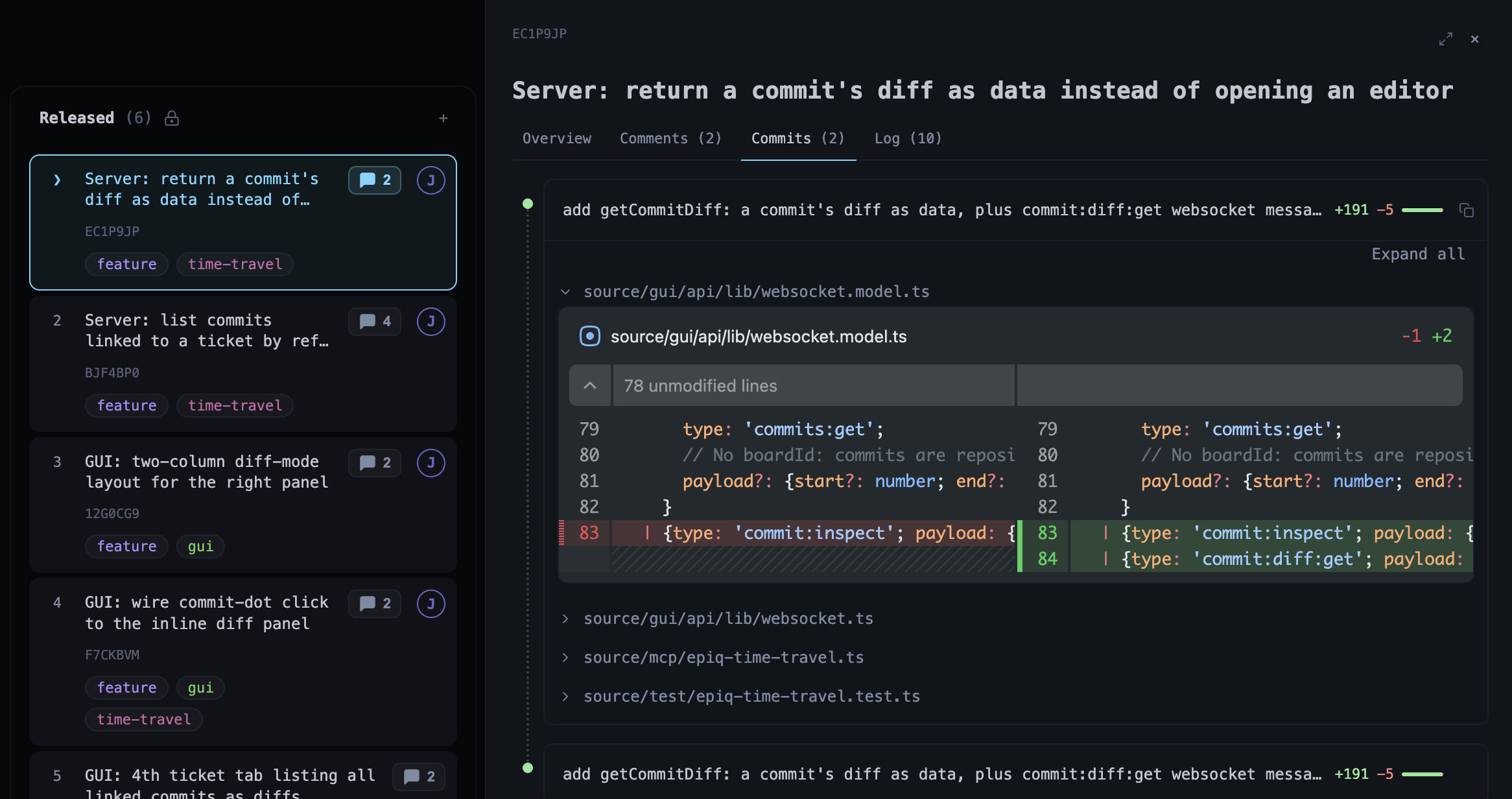
Linking makes a commit show up in the ticket code-diff tab. You can comment on selected lines, and also file a new ticket straight from the selection. The MCP exploses this reference as a `ref` property agents can refer to.
|
|
28
28
|
|
|
29
29
|
|
|
30
30
|
|
|
31
|
-
|
|
31
|
+
Preserve the linking post-merge via conventions:
|
|
32
32
|
|
|
33
|
-
- **
|
|
34
|
-
-
|
|
35
|
-
- Squashing _within_ one ticket's commits is fine as long as the result keeps the prefix. Never squash commits carrying different refs into one.
|
|
33
|
+
- **Rebase-merge** It is advised to rebase-merge so the ref-prefixed commits land on `main` as they are, preserving linking post-merge.
|
|
34
|
+
- Squashing _within_ one ticket's commits is fine as long as the result keeps the prefix. Do not squash commits carrying different refs into one.
|
|
36
35
|
|
|
37
36
|
## Terminal + Browser
|
|
38
37
|
|
|
@@ -42,36 +41,19 @@ Epiq originated from the command line and offers a first-class terminal experien
|
|
|
42
41
|
|
|
43
42
|
## What is epiq?
|
|
44
43
|
|
|
45
|
-
Epiq is a self hosted
|
|
46
|
-
|
|
47
|
-
## Why Epiq?
|
|
44
|
+
Epiq is a self hosted issue tracker that allows you to review workflows in real time or after the fact via replay. It persists state as an immutable event log, versioned and synchronized via Git.
|
|
48
45
|
|
|
49
46
|
Most issue trackers live outside your workflow. Instead of a centralized, managed service, Epiq keeps project state alongside your repository, where it travels with your code.
|
|
50
47
|
|
|
51
|
-
These design choices result in a system that
|
|
48
|
+
These design choices result in a system that offers:
|
|
52
49
|
|
|
50
|
+
- **Workflow replay**, - inspect what happened while you were away, as if it happens now
|
|
53
51
|
- **Simple setup** — no accounts, SaaS, or external services required
|
|
54
52
|
- **Repo-native** — your issues can live where your code lives
|
|
55
53
|
- **Offline-friendly** — works anywhere, with eventual consistency
|
|
56
|
-
- **
|
|
57
|
-
- **Portable** —
|
|
54
|
+
- **Fast** — local first, and eventual consistency makes Epiq edits instant
|
|
55
|
+
- **Portable** — runs on your local machine, on a remote Linux server or your grandma’s connected toaster
|
|
58
56
|
- **Command driven** — scriptable and automation-friendly, ready for the agentic era
|
|
59
|
-
- **Versioned** — changes are tracked and recoverable through Git
|
|
60
|
-
|
|
61
|
-
## A Features
|
|
62
|
-
|
|
63
|
-
- Issue tracking — track work in tickets with name, description, tags, assignees, history log, etc.
|
|
64
|
-
- Ergonomics — fast keyboard-driven UX, command line with history, syntax highlighting etc.
|
|
65
|
-
- Command palette — press `?` to open a scrollable overview of all available commands and descriptions
|
|
66
|
-
- Time travel — inspect the board as it was 1h, 1 week or 1 year ago, or replay its history as an animation
|
|
67
|
-
- Linked commits — prefix commits with a ticket ref to browse their diffs from the ticket, quote lines into comments, and see them on the timeline
|
|
68
|
-
- Filtering — query issues by description, tags, assignees, etc.
|
|
69
|
-
- Autocompletion — minimize typing, stay in flow, reuse previous commands
|
|
70
|
-
- Multi-user — collaborative synchronization via Git
|
|
71
|
-
- Traceable event log — state is a full history of every change ever made
|
|
72
|
-
- Export — write the current board layout to markdown
|
|
73
|
-
- Browser GUI — graphical interface powered by the same Git-backed state
|
|
74
|
-
- MCP integration — Model Context Protocol support for agent interaction
|
|
75
57
|
|
|
76
58
|
---
|
|
77
59
|
|
|
@@ -138,59 +120,6 @@ epiq gui
|
|
|
138
120
|
> Epiq manages a dedicated Git state branch and worktree automatically as the source of truth for synchronization.
|
|
139
121
|
> - A local debug log at `.epiq/log/epiq.log` — check it first if sync, boot, or a Git operation is misbehaving.
|
|
140
122
|
|
|
141
|
-
## Usage Guide (TUI)
|
|
142
|
-
|
|
143
|
-
### Help
|
|
144
|
-
|
|
145
|
-
- The first thing to know is that you always can access help with `:help`.
|
|
146
|
-
- Press `?` anytime to open the command palette with all available commands and descriptions.
|
|
147
|
-
|
|
148
|
-
### Navigation
|
|
149
|
-
|
|
150
|
-
- The second thing to know is that you can navigate with the keyboard using arrow keys or `h` `j` `k` `l`.
|
|
151
|
-
- Hold `shift` to move five at a time — `shift` with an arrow, or the shifted vim key (`J` / `K` down a lane, `H` / `L` across the board). A jump stops at the first and last item rather than wrapping, so holding it takes you to the end.
|
|
152
|
-
- You can enter nodes with `enter`, and navigate out of a context with `q` or `esc`
|
|
153
|
-
|
|
154
|
-
### Commands
|
|
155
|
-
|
|
156
|
-
- If you type `:` you are put in command line mode and can now insert commands.
|
|
157
|
-
- Commands are context-aware, so for instance `:close` only exists for issues.
|
|
158
|
-
|
|
159
|
-
### Create nodes: issue | swimlane | board
|
|
160
|
-
|
|
161
|
-
- Create nodes with `:new issue|swimlane|board <Name of new node>`.
|
|
162
|
-
|
|
163
|
-
### Comment
|
|
164
|
-
|
|
165
|
-
- Comment on issues with `:comment <your-input>`. Comments can be edited or deleted with the regular ':edit ...' or ':delete' commands.
|
|
166
|
-
|
|
167
|
-
### Move nodes
|
|
168
|
-
|
|
169
|
-
- Move nodes by pressing `m`. This sets you in a move state, after which you can navigate as normal, navigate to the target location, then press m again to confirm new location. `shift`+arrow carries the node five places at a time, and nothing is written until you confirm.
|
|
170
|
-
|
|
171
|
-
### Filtering
|
|
172
|
-
|
|
173
|
-
- Apply filters with the `filter` command followed by a target, and a qualifier. So in order to filter all issues with a `prio` tag you can write `:filter tag prio` and hit `enter`. You can build a combination of filters by running several filter commands in succession.
|
|
174
|
-
|
|
175
|
-
Clear all filters with `:filter clear`
|
|
176
|
-
|
|
177
|
-
### Time travel
|
|
178
|
-
|
|
179
|
-
- Inspect the board as it was with `:peek <offset>`, where offset is `<n>h`, `d`, `w`, `mo` or `y` — so `:peek 3d` is the board three days ago. An absolute `YYYY-MM-DD` date works too. Step with `:peek prev|next`, and return with `:peek now`.
|
|
180
|
-
- Where `:peek` shows a frozen snapshot, `:replay 1mo` plays history forward from that point as an animation. An optional second argument sets the playback duration, e.g. `:replay 1mo 30s`.
|
|
181
|
-
- While peeking or replaying, the board is read-only.
|
|
182
|
-
|
|
183
|
-
### Close issue
|
|
184
|
-
|
|
185
|
-
- Close issues with `:close`. This moves the issue to a special board named `Closed` which you can find if you navigate up (press `q`) a few times.
|
|
186
|
-
|
|
187
|
-
### Reopen
|
|
188
|
-
|
|
189
|
-
- You can reopen a task by visiting the `Closed` board, selecting an issue and typing command `:reopen`. This will restore the issue to its last previous location.
|
|
190
|
-
|
|
191
|
-
### Reuse command
|
|
192
|
-
|
|
193
|
-
- Pro tip: just like in any terminal - if you need to do repeating tasks over and over again, you can just put yourself in the command mode, and then press arrow up, in order to access the last executed command. This helps a lot when you create tasks with similar names, or add the same tag to many tickets and so on.
|
|
194
123
|
|
|
195
124
|
---
|
|
196
125
|
|
|
@@ -204,25 +133,13 @@ The reliable way to register the server is with the `claude mcp add` command —
|
|
|
204
133
|
|
|
205
134
|
```bash
|
|
206
135
|
# Available everywhere (recommended)
|
|
207
|
-
claude mcp add --scope user epiq -- npx -y
|
|
136
|
+
claude mcp add --scope user epiq -- npx -y --package=epiq epiq-mcp
|
|
208
137
|
|
|
209
138
|
# Or only in the current project
|
|
210
|
-
claude mcp add epiq -- npx -y
|
|
139
|
+
claude mcp add epiq -- npx -y --package=epiq epiq-mcp
|
|
211
140
|
```
|
|
212
141
|
|
|
213
|
-
|
|
214
|
-
|
|
215
|
-
### Setting up a board from an agent
|
|
216
|
-
|
|
217
|
-
An agent can initialize a repository without anyone opening the TUI. `epiq_project_init` runs the same steps as `:init` — state branch, default board, `.epiq/project.json` — in the repository at `repoRoot` (default: the current directory), which must have no uncommitted changes. It tries to push both branches and reports a push that fails as a warning rather than an error, so a repository without a remote still works.
|
|
218
|
-
|
|
219
|
-
On a machine with no `~/.epiq-global/config.json` yet, the tool also records the user's setup. Called without the answers it fails, naming what it still needs, so the agent asks the user and calls again:
|
|
220
|
-
|
|
221
|
-
- `userName` — how the user wants to appear on the board
|
|
222
|
-
- `preferredEditor` — the command that opens a file, e.g. `vim` or `code --wait`
|
|
223
|
-
- `autoSync` — whether the TUI and GUI sync with the remote on their own
|
|
224
|
-
|
|
225
|
-
Whatever was given is kept between calls. On a machine that is already set up the tool fills in nothing and changes nothing: a different answer is refused, since renaming the configured user would rename them on every board. The name recorded is the user's, not the agent's: an agent running under its own identity (see below) is refused if it passes that name here.
|
|
142
|
+
Verify the connection with `claude mcp list` (it should report `epiq … ✔ Connected`). MCP servers are loaded at startup, so **restart Claude Code** after adding the server before its tools become available.
|
|
226
143
|
|
|
227
144
|
### Skills
|
|
228
145
|
|
|
@@ -230,49 +147,9 @@ Find skill at `.claude/skills/epiq/SKILL.md` that documents a recommended workfl
|
|
|
230
147
|
|
|
231
148
|
### Agent identity
|
|
232
149
|
|
|
233
|
-
Every process — your TUI, your GUI, each agent's MCP server
|
|
234
|
-
|
|
235
|
-
```bash
|
|
236
|
-
claude mcp add --scope user epiq -- npx -y -p epiq epiq-mcp claude
|
|
237
|
-
```
|
|
238
|
-
|
|
239
|
-
Or, in a hand-written config, as the argument after the command:
|
|
240
|
-
|
|
241
|
-
```json
|
|
242
|
-
{
|
|
243
|
-
"mcpServers": {
|
|
244
|
-
"epiq": {
|
|
245
|
-
"command": "npx",
|
|
246
|
-
"args": ["-y", "-p", "epiq", "epiq-mcp", "claude"]
|
|
247
|
-
}
|
|
248
|
-
}
|
|
249
|
-
}
|
|
250
|
-
```
|
|
251
|
-
|
|
252
|
-
That agent then shows up in the contributor list, assigns itself rather than you, and authors its own events. The id is derived from the name, so one name is one contributor on every machine — reuse names instead of inventing one per session, or the registry fills with single-run identities. Naming yourself changes nothing.
|
|
253
|
-
|
|
254
|
-
`EPIQ_USER_NAME` does the same thing through the environment, for a client whose config sets variables more readily than arguments:
|
|
150
|
+
Every process — your TUI, your GUI, each agent's MCP server - writes as your user, so by default the board cannot tell one agent from another. The MCP allows agents to assume an identity, so at the start of a session, tell your agent which name it should assume.
|
|
255
151
|
|
|
256
|
-
|
|
257
|
-
{
|
|
258
|
-
"mcpServers": {
|
|
259
|
-
"epiq": {
|
|
260
|
-
"command": "npx",
|
|
261
|
-
"args": ["-y", "-p", "epiq", "epiq-mcp"],
|
|
262
|
-
"env": {"EPIQ_USER_NAME": "claude"}
|
|
263
|
-
}
|
|
264
|
-
}
|
|
265
|
-
}
|
|
266
|
-
```
|
|
267
|
-
|
|
268
|
-
Setting both is an error unless they agree, rather than one quietly winning. `EPIQ_USER_ID` pins the id explicitly (26 characters of Crockford base32) if you would rather choose it, and stays environment-only.
|
|
269
|
-
|
|
270
|
-
The TUI and GUI take the same name as `--as`, since their first argument is already the command:
|
|
271
|
-
|
|
272
|
-
```bash
|
|
273
|
-
epiq --as claude
|
|
274
|
-
epiq gui --as claude
|
|
275
|
-
```
|
|
152
|
+
That agent then shows up in the contributor list, assigns itself rather than you, and authors its own events. This can be useful when tracing many agents at the same time. Consider reusing names instead of inventing one per session, or the registry fills with single-run identities.
|
|
276
153
|
|
|
277
154
|
### Other MCP clients
|
|
278
155
|
|
|
@@ -293,9 +170,7 @@ Once registered, agents can interact with your local Epiq instance through the M
|
|
|
293
170
|
|
|
294
171
|
### Sandboxed or network-restricted environments
|
|
295
172
|
|
|
296
|
-
`npx -y -p epiq epiq-mcp` resolves the package against the npm registry **every time it starts**, even if it's already cached locally. In agent sandboxes with restricted network access, this can make the MCP server appear to hang
|
|
297
|
-
|
|
298
|
-
If you're running Epiq's MCP server in such an environment, install it globally once and point your MCP config at the resolved executable directly, bypassing `npx` (and the registry lookup) entirely on every subsequent start:
|
|
173
|
+
`npx -y -p epiq epiq-mcp` resolves the package against the npm registry **every time it starts**, even if it's already cached locally. In agent sandboxes with restricted network access, this can make the MCP server appear to hang. If you're running Epiq's MCP server in such an environment, install it globally once and point your MCP config at the resolved executable directly, bypassing `npx` (and the registry lookup) entirely on every subsequent start:
|
|
299
174
|
|
|
300
175
|
```bash
|
|
301
176
|
npm install --global epiq
|