emoji-picker-react 4.17.0 → 4.17.1
This diff represents the content of publicly available package versions that have been released to one of the supported registries. The information contained in this diff is provided for informational purposes only and reflects changes between package versions as they appear in their respective public registries.
- package/README.md +163 -368
- package/package.json +1 -1
package/README.md
CHANGED
|
@@ -1,30 +1,36 @@
|
|
|
1
|
-
# Emoji Picker React (v4)
|
|
1
|
+
# 🥒 Emoji Picker React (v4)
|
|
2
2
|
|
|
3
|
-
|
|
3
|
+
**The most popular, fully customizable emoji picker for React apps.**
|
|
4
4
|
|
|
5
|
-
|
|
5
|
+
**[🔴 Live Demo](https://ealush.com/emoji-picker-react)** | **[🐛 Report a Bug](https://github.com/ealush/emoji-picker-react/issues)**
|
|
6
6
|
|
|
7
|
-
|
|
7
|
+
---
|
|
8
8
|
|
|
9
|
-
##
|
|
9
|
+
## ✨ Features
|
|
10
10
|
|
|
11
|
-
|
|
12
|
-
|
|
13
|
-
|
|
11
|
+
- 🎨 **Fully Customizable**: Control styles via CSS variables.
|
|
12
|
+
- 🌗 **Dark Mode**: Native support for light, dark, and auto themes.
|
|
13
|
+
- 🖱️ **Interactivity**: Custom click handlers and reactions picker mode.
|
|
14
|
+
- 🌍 **Multi-Language**: Built-in support for dozens of languages.
|
|
15
|
+
- 🦄 **Custom Emojis**: seamless support for custom image-based emojis.
|
|
16
|
+
- 📦 **Zero-Config**: Works out of the box with sensible defaults.
|
|
17
|
+
- 📱 **Responsive**: Mobile-friendly design.
|
|
18
|
+
- 🍎 **Multiple Styles**: Support for Apple, Google, Facebook, Twitter, and Native system emojis.
|
|
14
19
|
|
|
15
20
|
---
|
|
16
21
|
|
|
17
|
-
##
|
|
18
|
-
|
|
19
|
-
- This package assumes it runs in the browser. I have taken many steps to prevent it from failing on the server, but still, it is recommended to only render the component on the client. See troubleshooting section for more information.
|
|
22
|
+
## 🚀 Getting Started
|
|
20
23
|
|
|
21
|
-
|
|
24
|
+
### Installation
|
|
22
25
|
|
|
23
|
-
```
|
|
26
|
+
```bash
|
|
24
27
|
npm install emoji-picker-react
|
|
28
|
+
|
|
25
29
|
```
|
|
26
30
|
|
|
27
|
-
|
|
31
|
+
### Basic Usage
|
|
32
|
+
|
|
33
|
+
Render the component in your app. It works immediately with no required props.
|
|
28
34
|
|
|
29
35
|
```jsx
|
|
30
36
|
import EmojiPicker from 'emoji-picker-react';
|
|
@@ -32,408 +38,197 @@ import EmojiPicker from 'emoji-picker-react';
|
|
|
32
38
|
function App() {
|
|
33
39
|
return (
|
|
34
40
|
<div>
|
|
35
|
-
<EmojiPicker />
|
|
41
|
+
<EmojiPicker onEmojiClick={(emojiObject) => console.log(emojiObject)} />
|
|
36
42
|
</div>
|
|
37
43
|
);
|
|
38
44
|
}
|
|
39
45
|
```
|
|
40
46
|
|
|
41
|
-
|
|
42
|
-
|
|
43
|
-
| Component Design 🎨 |
|
|
44
|
-
| :-----------------------------------------------------------------------------------------------------------------------------------------------------------------------------------------------------------------: |
|
|
45
|
-
| <a href="https://pavelbolo.com" target="_blank"></a> |
|
|
46
|
-
| <a href="https://pavelbolo.com" target="_blank">Pavel Bolo</a> |
|
|
47
|
-
|
|
48
|
-
## Features
|
|
49
|
-
|
|
50
|
-
- Custom click handler
|
|
51
|
-
- Custom Emojis Support
|
|
52
|
-
- Dark mode
|
|
53
|
-
- Customizable styles via css variables
|
|
54
|
-
- Default skin tone selection
|
|
55
|
-
- Skin tone change
|
|
56
|
-
- Different emoji sets (Google, Apple, Facebook, Twitter)
|
|
57
|
-
- Native Emoji support
|
|
58
|
-
- Emoji Component To Render Emojis in your app
|
|
59
|
-
- Reactions Picker
|
|
60
|
-
- Internationalization / Language Support (via )
|
|
61
|
-
|
|
62
|
-
## Internationalization / Localization
|
|
63
|
-
|
|
64
|
-
The emoji picker supports multiple languages (originally via `emojibase-data`). Import the desired language file and pass it to the `EmojiPicker` component via the `emojiData` prop to translate category names and other UI elements.
|
|
65
|
-
|
|
66
|
-
**Keywords**: translation, localization, internationalization, languages, i18n, l10n.
|
|
67
|
-
|
|
68
|
-
### Supported Languages
|
|
69
|
-
|
|
70
|
-
We support a wide range of languages. All data files are available in `dist/data` in the following formats:
|
|
71
|
-
|
|
72
|
-
- **JS (ESM)**: `emojis-en.js` (Export default object)
|
|
73
|
-
- **JSON**: `emojis-en.json`
|
|
74
|
-
- **TypeScript**: `emojis-en.ts`
|
|
75
|
-
|
|
76
|
-
**Available Files:**
|
|
77
|
-
|
|
78
|
-
- `emojis-bn` (Bengali)
|
|
79
|
-
- `emojis-da` (Danish)
|
|
80
|
-
- `emojis-de` (German)
|
|
81
|
-
- `emojis-en-gb` (English, Great Britain)
|
|
82
|
-
- `emojis-en` (English)
|
|
83
|
-
- `emojis-es-mx` (Spanish, Mexico)
|
|
84
|
-
- `emojis-es` (Spanish)
|
|
85
|
-
- `emojis-et` (Estonian)
|
|
86
|
-
- `emojis-fi` (Finnish)
|
|
87
|
-
- `emojis-fr` (French)
|
|
88
|
-
- `emojis-hi` (Hindi)
|
|
89
|
-
- `emojis-hu` (Hungarian)
|
|
90
|
-
- `emojis-it` (Italian)
|
|
91
|
-
- `emojis-ja` (Japanese)
|
|
92
|
-
- `emojis-ko` (Korean)
|
|
93
|
-
- `emojis-lt` (Lithuanian)
|
|
94
|
-
- `emojis-ms` (Malay)
|
|
95
|
-
- `emojis-nb` (Norwegian Bokmål)
|
|
96
|
-
- `emojis-nl` (Dutch)
|
|
97
|
-
- `emojis-pl` (Polish)
|
|
98
|
-
- `emojis-pt` (Portuguese)
|
|
99
|
-
- `emojis-ru` (Russian)
|
|
100
|
-
- `emojis-sv` (Swedish)
|
|
101
|
-
- `emojis-th` (Thai)
|
|
102
|
-
- `emojis-uk` (Ukrainian)
|
|
103
|
-
- `emojis-zh-hant` (Traditional Chinese)
|
|
104
|
-
- `emojis-zh` (Simplified Chinese)
|
|
105
|
-
|
|
106
|
-
### Usage
|
|
107
|
-
|
|
108
|
-
1. Import the emoji data for your language (e.g., Spanish):
|
|
47
|
+
---
|
|
109
48
|
|
|
110
|
-
|
|
111
|
-
|
|
112
|
-
|
|
113
|
-
|
|
49
|
+
## 📚 Props Reference
|
|
50
|
+
|
|
51
|
+
The following is a complete list of all props accepted by `EmojiPicker`.
|
|
52
|
+
|
|
53
|
+
### 🎛️ General Configuration
|
|
54
|
+
|
|
55
|
+
| Prop | Type | Default | Description |
|
|
56
|
+
| ----------------- | ------------ | ------------------ | -------------------------------------------------------------------------------------------- |
|
|
57
|
+
| `open` | `boolean` | `true` | Controls the visibility of the picker. |
|
|
58
|
+
| `theme` | `Theme` | `Theme.LIGHT` | The visual theme. Options: `'light'`, `'dark'`, `'auto'`. |
|
|
59
|
+
| `emojiStyle` | `EmojiStyle` | `EmojiStyle.APPLE` | The emoji set to use. Options: `'apple'`, `'google'`, `'facebook'`, `'twitter'`, `'native'`. |
|
|
60
|
+
| `emojiVersion` | `string` | `null` | Limit emojis to a specific unicode version (e.g., `"14.0"`). |
|
|
61
|
+
| `lazyLoadEmojis` | `boolean` | `false` | If true, emoji images are loaded only when they scroll into view. |
|
|
62
|
+
| `autoFocusSearch` | `boolean` | `true` | Focuses the search input automatically when the picker mounts. |
|
|
63
|
+
| `emojiData` | `object` | `undefined` | Pass imported locale data here for internationalization. |
|
|
64
|
+
|
|
65
|
+
### 📐 Dimensions & Styling
|
|
66
|
+
|
|
67
|
+
| Prop | Type | Default | Description |
|
|
68
|
+
| ----------- | --------------- | -------- | ------------------------------------------ |
|
|
69
|
+
| `width` | `string` | `number` | `350` |
|
|
70
|
+
| `height` | `string` | `number` | `450` |
|
|
71
|
+
| `style` | `CSSProperties` | `{}` | Inline styles applied to the root element. |
|
|
72
|
+
| `className` | `string` | `""` | CSS class applied to the root element. |
|
|
73
|
+
|
|
74
|
+
### 🖱️ Events & Interaction
|
|
75
|
+
|
|
76
|
+
| Prop | Type | Description |
|
|
77
|
+
| ------------------ | -------------------------------------------------------- | -------------------------------------------------------------------- |
|
|
78
|
+
| `onEmojiClick` | `(emojiData: EmojiClickData, event: MouseEvent) => void` | Callback triggered when a user clicks an emoji. |
|
|
79
|
+
| `onReactionClick` | `(emojiData: EmojiClickData, event: MouseEvent) => void` | Callback triggered when a user clicks a reaction (in reaction mode). |
|
|
80
|
+
| `onSkinToneChange` | `(skinTone: SkinTones) => void` | Callback triggered when the user selects a new skin tone. |
|
|
81
|
+
|
|
82
|
+
### 🔎 Search & Categories
|
|
83
|
+
|
|
84
|
+
| Prop | Type | Default | Description |
|
|
85
|
+
| ------------------------ | ------------------------ | ------------------------- | -------------------------------------------------------------------- |
|
|
86
|
+
| `searchDisabled` | `boolean` | `false` | If true, the search bar is completely removed. |
|
|
87
|
+
| `searchPlaceholder` | `string` | `"Search"` | Placeholder text for the search input. |
|
|
88
|
+
| `searchClearButtonLabel` | `string` | `"Clear"` | Aria label for the search clear button. |
|
|
89
|
+
| `categories` | `CategoryConfig[]` | _(All)_ | Array of category objects to customize order or visibility. |
|
|
90
|
+
| `suggestedEmojisMode` | `SuggestionMode` | `SuggestionMode.FREQUENT` | Logic for "Suggested" category. Options: `'recent'`, `'frequent'`. |
|
|
91
|
+
| `defaultSkinTone` | `SkinTones` | `SkinTones.NEUTRAL` | The initial skin tone. |
|
|
92
|
+
| `skinTonesDisabled` | `boolean` | `false` | If true, users cannot change the skin tone. |
|
|
93
|
+
| `skinTonePickerLocation` | `SkinTonePickerLocation` | `SEARCH` | Location of the skin tone trigger. Options: `'SEARCH'`, `'PREVIEW'`. |
|
|
94
|
+
|
|
95
|
+
### 🦄 Customization & Advanced
|
|
96
|
+
|
|
97
|
+
| Prop | Type | Default | Description |
|
|
98
|
+
| --------------- | ------------------------------------------------ | ----------------------- | --------------------------------------------------------------- |
|
|
99
|
+
| `customEmojis` | `CustomEmoji[]` | `[]` | Array of custom image-based emojis to inject. |
|
|
100
|
+
| `hiddenEmojis` | `string[]` | `[]` | Array of unified IDs (e.g., `'1f921'`) to hide from the picker. |
|
|
101
|
+
| `previewConfig` | `PreviewConfig` | `{ showPreview: true }` | configuration for the bottom preview bar. |
|
|
102
|
+
| `getEmojiUrl` | `(unified: string, style: EmojiStyle) => string` | - | Function to override the default CDN URL for emoji images. |
|
|
103
|
+
|
|
104
|
+
### ❤️ Reactions Picker Mode
|
|
105
|
+
|
|
106
|
+
| Prop | Type | Default | Description |
|
|
107
|
+
| ---------------------- | ---------- | --------------- | ------------------------------------------------------------------------ |
|
|
108
|
+
| `reactionsDefaultOpen` | `boolean` | `false` | If true, mounts in "Reactions" mode (single row) instead of full picker. |
|
|
109
|
+
| `reactions` | `string[]` | _(Default Set)_ | Array of unified IDs to display in the reactions bar. |
|
|
110
|
+
| `allowExpandReactions` | `boolean` | `true` | If true, shows a `+` button to switch from reactions to full picker. |
|
|
114
111
|
|
|
115
|
-
|
|
116
|
-
return <EmojiPicker emojiData={es} />;
|
|
117
|
-
}
|
|
118
|
-
```
|
|
112
|
+
---
|
|
119
113
|
|
|
120
|
-
|
|
121
|
-
|
|
122
|
-
The following props are accepted by the picker:
|
|
123
|
-
|
|
124
|
-
| Prop | Type | Default | Description |
|
|
125
|
-
| ---------------------- | ---------------------------------------------------- | ---------- | ---------------------------------------------------------------------------------------------------------------------------------------------------------- |
|
|
126
|
-
| open | boolean | `true` | Controls whether the picker is open or not. |
|
|
127
|
-
| onEmojiClick | function | | Callback function that is called when an emoji is clicked. The function receives the emoji object as a parameter. |
|
|
128
|
-
| autoFocusSearch | boolean | `true` | Controls the auto focus of the search input. |
|
|
129
|
-
| theme | string | `light` | Controls the theme of the picker. Possible values are `light`, `dark` and `auto`. |
|
|
130
|
-
| emojiStyle | string | `apple` | Controls the emoji style. Possible values are `google`, `apple`, `facebook`, `twitter` and `native`. |
|
|
131
|
-
| defaultSkinTone | string | `neutral` | Controls the default skin tone. |
|
|
132
|
-
| lazyLoadEmojis | boolean | `false` | Controls whether the emojis are loaded lazily or not. |
|
|
133
|
-
| previewConfig | object | `{}` | Controls the preview of the emoji. See below for more information. |
|
|
134
|
-
| searchPlaceholder | string | `Search` | Controls the placeholder of the search input. |
|
|
135
|
-
| searchClearButtonLabel | string | 'Clear' | Controls the `aria-label` and `title` of the Clear button of the search input. |
|
|
136
|
-
| suggestedEmojisMode | string | `frequent` | Controls the suggested emojis mode. Possible values are `frequent` and `recent`. |
|
|
137
|
-
| skinTonesDisabled | boolean | `false` | Controls whether the skin tones are disabled or not. |
|
|
138
|
-
| searchDisabled | boolean | `false` | Controls whether the search is disabled or not. When disabled, the skin tone picker will be shown in the preview component. |
|
|
139
|
-
| skinTonePickerLocation | string | `SEARCH` | Controls the location of the skin tone picker. Possible values are `SEARCH` and `PREVIEW`. |
|
|
140
|
-
| emojiVersion | string | - | Allows displaying emojis up to a certain version for compatibility. |
|
|
141
|
-
| className | string | - | Adds a class name to the root element of the picker. |
|
|
142
|
-
| width | number/string | `350` | Controls the width of the picker. You can provide a number that will be treated as pixel size, or your any accepted css width as string. |
|
|
143
|
-
| height | number/string | `450` | Controls the height of the picker. You can provide a number that will be treated as pixel size, or your any accepted css height as string. |
|
|
144
|
-
| style | React.CSSProperties | `{}` | Adds inline style to the root element of the picker. |
|
|
145
|
-
| getEmojiUrl | Function | - | Allows to customize the emoji url and provide your own image host. |
|
|
146
|
-
| categories | Array | - | Allows full config over ordering, naming and display of categories. |
|
|
147
|
-
| customEmojis | Array<{names: string[], imgUrl: string, id: string}> | - | Allows adding custom emojis to the picker. |
|
|
148
|
-
| hiddenEmojis | string[] | - | Controls the emojis that are hidden from the picker. |
|
|
149
|
-
| reactionsDefaultOpen | boolean | `false` | Controls whether the reactions picker is on the initial mount instead of the main picker component. |
|
|
150
|
-
| reactions | string[] | - | Controls the reactions to display in the reactions picker. Takes unified emoji ids |
|
|
151
|
-
| onReactionClick | Function | - | Callback function that is called when a reaction is clicked. The function receives the emoji object as a parameter. If not passed, onEmojiClicked is used. |
|
|
152
|
-
| allowExpandReactions | boolean | `true` | Controls whether the reactions picker can be expanded to the main picker. |
|
|
153
|
-
| onSkinToneChange | Function | - | Callback function that is called when a skin tone is changed. The function receives new picked skin tone as a parameter. |
|
|
154
|
-
| emojiData | object | - | Allows passing a language-specific emoji data object imported from `emoji-picker-react/dist/data/emojis-<lang>`. |
|
|
155
|
-
|
|
156
|
-
## Full details
|
|
157
|
-
|
|
158
|
-
- `onEmojiClick`: `(emojiData: EmojiClickData, event: MouseEvent) => void` - Callback function when an emoji is clicked. The callback receives the event and the emoji data. The emoji data is comprised of the following properties:
|
|
159
|
-
|
|
160
|
-
```ts
|
|
161
|
-
{
|
|
162
|
-
activeSkinTone: SkinTones;
|
|
163
|
-
unified: string;
|
|
164
|
-
unifiedWithoutSkinTone: string;
|
|
165
|
-
emoji: string; // the emoji character, for example: '😀'. Emoji ID in custom emojis
|
|
166
|
-
isCustom: boolean; // whether the emoji is a custom emoji or not
|
|
167
|
-
names: string[];
|
|
168
|
-
imageUrl: string; // the url of the emoji image with the current emoji style applied
|
|
169
|
-
getImageUrl: (emojiStyle: EmojiStyle) => string; // a function that receives an emoji style and returns the url of the emoji image with the provided style applied
|
|
170
|
-
}
|
|
171
|
-
```
|
|
172
|
-
|
|
173
|
-
- `theme`: `Theme` - The theme of the picker. Can be `light`, `dark` or auto. Default is `light`.
|
|
174
|
-
The `Theme` enum can be imported from the package.
|
|
175
|
-
|
|
176
|
-
```ts
|
|
177
|
-
import { Theme } from 'emoji-picker-react';
|
|
178
|
-
```
|
|
179
|
-
|
|
180
|
-
- `emojiStyle`: `EmojiStyle` - The emoji style to use. Can be either `apple`, `google`, `facebook`, `twitter` or `native`. Default is `apple`.
|
|
181
|
-
The `EmojiStyle` enum can be imported from the package.
|
|
182
|
-
|
|
183
|
-
```ts
|
|
184
|
-
import { EmojiStyle } from 'emoji-picker-react';
|
|
185
|
-
```
|
|
186
|
-
|
|
187
|
-
- `autoFocusSearch`: `boolean` - Whether to focus the search input on mount. Defaults to `true`.
|
|
188
|
-
|
|
189
|
-
- `lazyLoadEmojis`: `boolean` - Whether to lazy load the emojis. Defaults to `false`.
|
|
190
|
-
|
|
191
|
-
- `defaultSkinTone`: `SkinTones` - The default skin tone to use when an emoji is clicked. Defaults to `SkinTones.Neutral`. Possible skin tones are:
|
|
192
|
-
- ✋ 'neutral'
|
|
193
|
-
- ✋🏻 '1f3fb'
|
|
194
|
-
- ✋🏼 '1f3fc'
|
|
195
|
-
- ✋🏽 '1f3fd'
|
|
196
|
-
- ✋🏾 '1f3fe'
|
|
197
|
-
- ✋🏿 '1f3ff'
|
|
198
|
-
|
|
199
|
-
The skin tones typescript enum can be imported directly from the package:
|
|
114
|
+
## 🛠️ Detailed Configuration
|
|
200
115
|
|
|
201
|
-
|
|
202
|
-
import { SkinTones } from 'emoji-picker-react';
|
|
203
|
-
```
|
|
116
|
+
### CSS Variables
|
|
204
117
|
|
|
205
|
-
|
|
118
|
+
Override default variables by targeting `.EmojiPickerReact`.
|
|
206
119
|
|
|
207
|
-
|
|
120
|
+
### CSS Variables
|
|
208
121
|
|
|
209
|
-
|
|
122
|
+
You can customize the picker by overriding CSS variables.
|
|
210
123
|
|
|
211
|
-
|
|
124
|
+
**[🎨 View Full List of CSS Variables](CSS_VARIABLES.md)**
|
|
212
125
|
|
|
213
|
-
|
|
214
|
-
import { SkinTonePickerLocation } from 'emoji-picker-react';
|
|
215
|
-
```
|
|
126
|
+
### Custom Emojis Data Structure
|
|
216
127
|
|
|
217
|
-
|
|
128
|
+
When passing `customEmojis`, use this format:
|
|
218
129
|
|
|
219
130
|
```ts
|
|
220
131
|
{
|
|
221
|
-
|
|
222
|
-
|
|
223
|
-
|
|
132
|
+
id: string; // Unique ID
|
|
133
|
+
names: string[]; // Search keywords
|
|
134
|
+
imgUrl: string; // Image source
|
|
224
135
|
}
|
|
225
|
-
```
|
|
226
|
-
|
|
227
|
-
- `searchPlaceholder`: `string` - The placeholder text for the search input. Defaults to `Search`.
|
|
228
|
-
|
|
229
|
-
- `searchClearButtonLabel`: `string` - The `aria-label` and `title` text for the search input clear button. Defaults to `Clear`.
|
|
230
|
-
|
|
231
|
-
- categories: Allows full config over ordering, naming and display of categories.
|
|
232
|
-
To only sort/omit categories, you can simply pass an array of category names to display:
|
|
233
|
-
- 'suggested',
|
|
234
|
-
- 'custom', - Hidden by default
|
|
235
|
-
- 'smileys_people',
|
|
236
|
-
- 'animals_nature',
|
|
237
|
-
- 'food_drink',
|
|
238
|
-
- 'travel_places',
|
|
239
|
-
- 'activities',
|
|
240
|
-
- 'objects',
|
|
241
|
-
- 'symbols',
|
|
242
|
-
- 'flags'
|
|
243
|
-
|
|
244
|
-
For a more in-depth configuration, you can pass an array with category config:
|
|
245
|
-
|
|
246
|
-
```ts
|
|
247
|
-
[
|
|
248
|
-
{
|
|
249
|
-
category: 'suggested',
|
|
250
|
-
name: 'Recently Used',
|
|
251
|
-
},
|
|
252
|
-
{
|
|
253
|
-
category: 'smileys_people',
|
|
254
|
-
name: 'Faces...',
|
|
255
|
-
},
|
|
256
|
-
];
|
|
257
|
-
```
|
|
258
|
-
|
|
259
|
-
- `suggestedEmojisMode`: `SuggestedEmojisMode` - The mode to use for the suggested emojis. Can be either `recent` or `frequent`. Defaults to `recent`.
|
|
260
|
-
The `SuggestionMode` enum can be imported from the package.
|
|
261
|
-
|
|
262
|
-
```ts
|
|
263
|
-
import { SuggestionMode } from 'emoji-picker-react';
|
|
264
|
-
```
|
|
265
|
-
|
|
266
|
-
- `emojiVersion`: `string` - Allows displaying emojis up to a certain version for compatibility. The passed version will be parsed as a float and each emoji will be tested against it. Common values are:
|
|
267
|
-
- `"0.6"`
|
|
268
|
-
- `"1.0"`
|
|
269
|
-
- `"2.0"`
|
|
270
|
-
- `"3.0"`
|
|
271
|
-
- `"4.0"`
|
|
272
|
-
- `"5.0"`
|
|
273
|
-
|
|
274
|
-
- `getEmojiUrl`: `(unified: string, emojiStyle: EmojiStyle) => string` - Allows to customize the emoji url and provide your own image host. The function receives the emoji unified and the emoji style as parameters. The function should return the url of the emoji image.
|
|
275
|
-
|
|
276
|
-
## customEmojis - Custom Emojis
|
|
277
|
-
|
|
278
|
-
The customEmojis prop allows you to add custom emojis to the picker. The custom emojis prop takes an array of custom emojis, each custom emoji has three keys:
|
|
279
|
-
|
|
280
|
-
- _id_: Unique identifier for each of the custom emojis
|
|
281
|
-
- _names_: an array of string identifiers, will be used both for display, search and indexing.
|
|
282
|
-
- _imgUrl_: URL for the emoji image
|
|
283
|
-
|
|
284
|
-
## hiddenEmojis - Excluding certain emojis
|
|
285
|
-
|
|
286
|
-
The hiddenEmojis prop allows you to hide emojis from the picker. The hidden emojis prop takes an array of emoji unicode names to hide.
|
|
287
|
-
|
|
288
|
-
For example:
|
|
289
|
-
|
|
290
|
-
```js
|
|
291
|
-
['1f600', '1f601', '1f602']; // will remove: 😀, 😁, 😂
|
|
292
|
-
```
|
|
293
|
-
|
|
294
|
-
### Usage Example
|
|
295
|
-
|
|
296
|
-
```jsx
|
|
297
|
-
<Picker
|
|
298
|
-
customEmojis={[
|
|
299
|
-
{
|
|
300
|
-
names: ['Alice', 'alice in wonderland'],
|
|
301
|
-
imgUrl:
|
|
302
|
-
'https://cdn.jsdelivr.net/gh/ealush/emoji-picker-react@custom_emojis_assets/alice.png',
|
|
303
|
-
id: 'alice',
|
|
304
|
-
},
|
|
305
|
-
{
|
|
306
|
-
names: ['Dog'],
|
|
307
|
-
imgUrl:
|
|
308
|
-
'https://cdn.jsdelivr.net/gh/ealush/emoji-picker-react@custom_emojis_assets/dog.png',
|
|
309
|
-
id: 'dog',
|
|
310
|
-
},
|
|
311
|
-
{
|
|
312
|
-
names: ['Hat'],
|
|
313
|
-
imgUrl:
|
|
314
|
-
'https://cdn.jsdelivr.net/gh/ealush/emoji-picker-react@custom_emojis_assets/hat.png',
|
|
315
|
-
id: 'hat',
|
|
316
|
-
},
|
|
317
|
-
{
|
|
318
|
-
names: ['Vest'],
|
|
319
|
-
imgUrl:
|
|
320
|
-
'https://cdn.jsdelivr.net/gh/ealush/emoji-picker-react@custom_emojis_assets/vest.png',
|
|
321
|
-
id: 'vest',
|
|
322
|
-
},
|
|
323
|
-
]}
|
|
324
|
-
/>
|
|
325
|
-
```
|
|
326
|
-
|
|
327
|
-
Here are some additional things to keep in mind about custom emojis:
|
|
328
136
|
|
|
329
|
-
- The custom emojis will be added to the Custom category.
|
|
330
|
-
- The location or name of the Custom category can be controlled via the categories prop.
|
|
331
|
-
- The custom emojis will be indexed by their id property. This means that you can search for custom emojis by their id or names.
|
|
332
|
-
|
|
333
|
-
## Reactions Picker
|
|
334
|
-
|
|
335
|
-
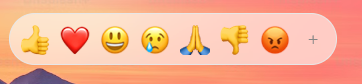
|
|
336
|
-
|
|
337
|
-

|
|
338
|
-
|
|
339
|
-
The picker can be used as a reactions picker. To use it as a reactions picker, you should set the reactionsDefaultOpen prop to true. This will cause the picker to the reactions picker on the initial mount instead of the main picker component.
|
|
340
|
-
|
|
341
|
-
To customize the reactions, you should pass an array of unified emoji ids to the reactions prop.
|
|
342
|
-
|
|
343
|
-
The reactions picker uses the same event handlers, and the same css variables for customizations.
|
|
344
|
-
|
|
345
|
-
```jsx
|
|
346
|
-
<Picker reactionsDefaultOpen={true} onReactionClick={handleReaction} />
|
|
347
137
|
```
|
|
348
138
|
|
|
349
|
-
|
|
139
|
+
### Preview Config
|
|
350
140
|
|
|
351
|
-
|
|
141
|
+
Control the footer preview area using `previewConfig`:
|
|
352
142
|
|
|
353
|
-
|
|
354
|
-
|
|
355
|
-
|
|
356
|
-
|
|
357
|
-
|
|
358
|
-
|
|
359
|
-
```jsx
|
|
360
|
-
<EmojiPicker height="100%" width="15em" />
|
|
143
|
+
```ts
|
|
144
|
+
{
|
|
145
|
+
defaultEmoji: string; // Default: "1f60a"
|
|
146
|
+
defaultCaption: string; // Default: "What's your mood?"
|
|
147
|
+
showPreview: boolean; // Default: true
|
|
148
|
+
}
|
|
361
149
|
```
|
|
362
150
|
|
|
363
|
-
|
|
364
|
-
|
|
365
|
-
The picker can be customized via css variables. The root selector for the picker is `.EmojiPickerReact`, when overriding, make sure to provide a more specific selector.
|
|
366
|
-
|
|
367
|
-
In dark mode, the specific selector is `.EmojiPickerReact.epr-dark-theme`.
|
|
368
|
-
|
|
369
|
-
The list of possible variables is quite extensive, but the main ones you may want to override are:
|
|
370
|
-
|
|
371
|
-
- `--epr-emoji-size`: The size of the emojis.
|
|
372
|
-
- `--epr-emoji-gap`: The space between emojis.
|
|
373
|
-
|
|
374
|
-
- `--epr-hover-bg-color` Hovered emoji background color.
|
|
375
|
-
- `--epr-bg-color`: The background color of the picker. When changing it, you should also change `--epr-category-label-bg-color` as they are usually the same color.
|
|
376
|
-
- `--epr-text-color`: The text color in the picker.
|
|
377
|
-
|
|
378
|
-
# Rendering Output Emojis in Your App
|
|
379
|
-
|
|
380
|
-
The picker exports an `Emoji` component. The emoji component is the same used within the picker, so it will render the same way as the emojis in the picker. You can choose to render emojis either as native, or as images.
|
|
151
|
+
---
|
|
381
152
|
|
|
382
|
-
##
|
|
153
|
+
## 🌍 Internationalization (i18n)
|
|
383
154
|
|
|
384
|
-
|
|
385
|
-
| ------------- | ------------ | ------------------ | ------------------------------------------------------------------------------------------- |
|
|
386
|
-
| `unified` | string | "" | The unified code of the emoji. |
|
|
387
|
-
| `size` | number | 32 | The size of the emoji. |
|
|
388
|
-
| `emojiStyle` | `EmojiStyle` | `EmojiStyle.APPLE` | The emoji style to use. Can be either `apple`, `google`, `facebook`, `twitter` or `native`. |
|
|
389
|
-
| `lazyLoad` | boolean | `false` | Whether to lazy load the emoji. image |
|
|
390
|
-
| `emojiUrl` | string | - | The url of the emoji image to render. Useful for custom emojis. |
|
|
391
|
-
| `getEmojiUrl` | Function | - | Allows to customize the emoji url and provide your own image host for dynamic resolution. |
|
|
155
|
+
Import the dictionary you need and pass it to the `emojiData` prop.
|
|
392
156
|
|
|
393
|
-
```
|
|
394
|
-
import
|
|
157
|
+
```javascript
|
|
158
|
+
import EmojiPicker from 'emoji-picker-react';
|
|
159
|
+
import es from 'emoji-picker-react/dist/data/emojis-es'; // Spanish
|
|
395
160
|
|
|
396
|
-
|
|
397
|
-
return
|
|
398
|
-
<p>
|
|
399
|
-
My Favorite emoji is:
|
|
400
|
-
<Emoji unified="1f423" size="25" />
|
|
401
|
-
</p>
|
|
402
|
-
);
|
|
161
|
+
function App() {
|
|
162
|
+
return <EmojiPicker emojiData={es} />;
|
|
403
163
|
}
|
|
404
164
|
```
|
|
405
165
|
|
|
406
|
-
|
|
407
|
-
|
|
408
|
-
|
|
166
|
+
<details>
|
|
167
|
+
<summary><strong>View Supported Languages</strong></summary>
|
|
168
|
+
|
|
169
|
+
- `emojis-bn` (Bengali 🇧🇩)
|
|
170
|
+
- `emojis-da` (Danish 🇩🇰)
|
|
171
|
+
- `emojis-de` (German 🇩🇪)
|
|
172
|
+
- `emojis-en-gb` (English, GB 🇬🇧)
|
|
173
|
+
- `emojis-en` (English, US 🇺🇸)
|
|
174
|
+
- `emojis-es-mx` (Spanish, Mexico 🇲🇽)
|
|
175
|
+
- `emojis-es` (Spanish 🇪🇸)
|
|
176
|
+
- `emojis-et` (Estonian 🇪🇪)
|
|
177
|
+
- `emojis-fi` (Finnish 🇫🇮)
|
|
178
|
+
- `emojis-fr` (French 🇫🇷)
|
|
179
|
+
- `emojis-hi` (Hindi 🇮🇳)
|
|
180
|
+
- `emojis-hu` (Hungarian 🇭🇺)
|
|
181
|
+
- `emojis-it` (Italian 🇮🇹)
|
|
182
|
+
- `emojis-ja` (Japanese 🇯🇵)
|
|
183
|
+
- `emojis-ko` (Korean 🇰🇷)
|
|
184
|
+
- `emojis-lt` (Lithuanian 🇱🇹)
|
|
185
|
+
- `emojis-ms` (Malay 🇲🇾)
|
|
186
|
+
- `emojis-nb` (Norwegian Bokmål 🇳🇴)
|
|
187
|
+
- `emojis-nl` (Dutch 🇳🇱)
|
|
188
|
+
- `emojis-pl` (Polish 🇵🇱)
|
|
189
|
+
- `emojis-pt` (Portuguese 🇵🇹)
|
|
190
|
+
- `emojis-ru` (Russian 🇷🇺)
|
|
191
|
+
- `emojis-sv` (Swedish 🇸🇪)
|
|
192
|
+
- `emojis-th` (Thai 🇹🇭)
|
|
193
|
+
- `emojis-uk` (Ukrainian 🇺🇦)
|
|
194
|
+
- `emojis-zh-hant` (Traditional Chinese 🇹🇼)
|
|
195
|
+
- `emojis-zh` (Simplified Chinese 🇨🇳)
|
|
196
|
+
|
|
197
|
+
</details>
|
|
409
198
|
|
|
410
|
-
|
|
199
|
+
---
|
|
411
200
|
|
|
412
|
-
##
|
|
201
|
+
## ⚠️ Troubleshooting
|
|
413
202
|
|
|
414
|
-
|
|
203
|
+
### Server-Side Rendering (Next.js / Remix)
|
|
415
204
|
|
|
416
|
-
|
|
205
|
+
This package relies on the `window` object and must be rendered on the client.
|
|
417
206
|
|
|
418
|
-
|
|
207
|
+
**Next.js Example:**
|
|
419
208
|
|
|
420
209
|
```javascript
|
|
421
210
|
import dynamic from 'next/dynamic';
|
|
422
211
|
|
|
423
|
-
const Picker = dynamic(
|
|
424
|
-
() => {
|
|
425
|
-
return import('emoji-picker-react');
|
|
426
|
-
},
|
|
427
|
-
{ ssr: false },
|
|
428
|
-
);
|
|
212
|
+
const Picker = dynamic(() => import('emoji-picker-react'), { ssr: false });
|
|
429
213
|
```
|
|
430
214
|
|
|
431
|
-
|
|
215
|
+
### Vite
|
|
432
216
|
|
|
433
|
-
|
|
217
|
+
If you encounter `global is not defined`, add this to your HTML:
|
|
434
218
|
|
|
435
219
|
```html
|
|
436
220
|
<script>
|
|
437
221
|
window.global = window;
|
|
438
222
|
</script>
|
|
439
223
|
```
|
|
224
|
+
|
|
225
|
+
---
|
|
226
|
+
|
|
227
|
+
## 🤝 Contributing
|
|
228
|
+
|
|
229
|
+
We welcome contributions! Please check out the [Contributing Guide](https://github.com/ealush/emoji-picker-react/blob/master/CONTRIBUTING.md) for how to run the project locally.
|
|
230
|
+
|
|
231
|
+
**Shout Outs:**
|
|
232
|
+
Design inspiration by [Pavel Bolo](https://pavelbolo.com).
|
|
233
|
+
|
|
234
|
+
_If you enjoy using `emoji-picker-react`, check out [Vest validation framework](https://vestjs.dev)._
|
package/package.json
CHANGED