effective-prompt 0.1.0 → 0.1.2
This diff represents the content of publicly available package versions that have been released to one of the supported registries. The information contained in this diff is provided for informational purposes only and reflects changes between package versions as they appear in their respective public registries.
- package/README.md +91 -55
- package/package.json +9 -6
package/README.md
CHANGED
|
@@ -1,102 +1,138 @@
|
|
|
1
1
|
# Effective Prompt
|
|
2
2
|
|
|
3
|
-
|
|
3
|
+
Turn rough prompts into clear, agent-ready prompts.
|
|
4
4
|
|
|
5
|
-
|
|
5
|
+
```bash
|
|
6
|
+
npx effective-prompt@latest
|
|
7
|
+
```
|
|
6
8
|
|
|
7
|
-
|
|
8
|
-
- **Interactive**: asks only the questions whose answers would materially change the prompt, then returns the final version.
|
|
9
|
+
|
|
9
10
|
|
|
10
|
-
|
|
11
|
+
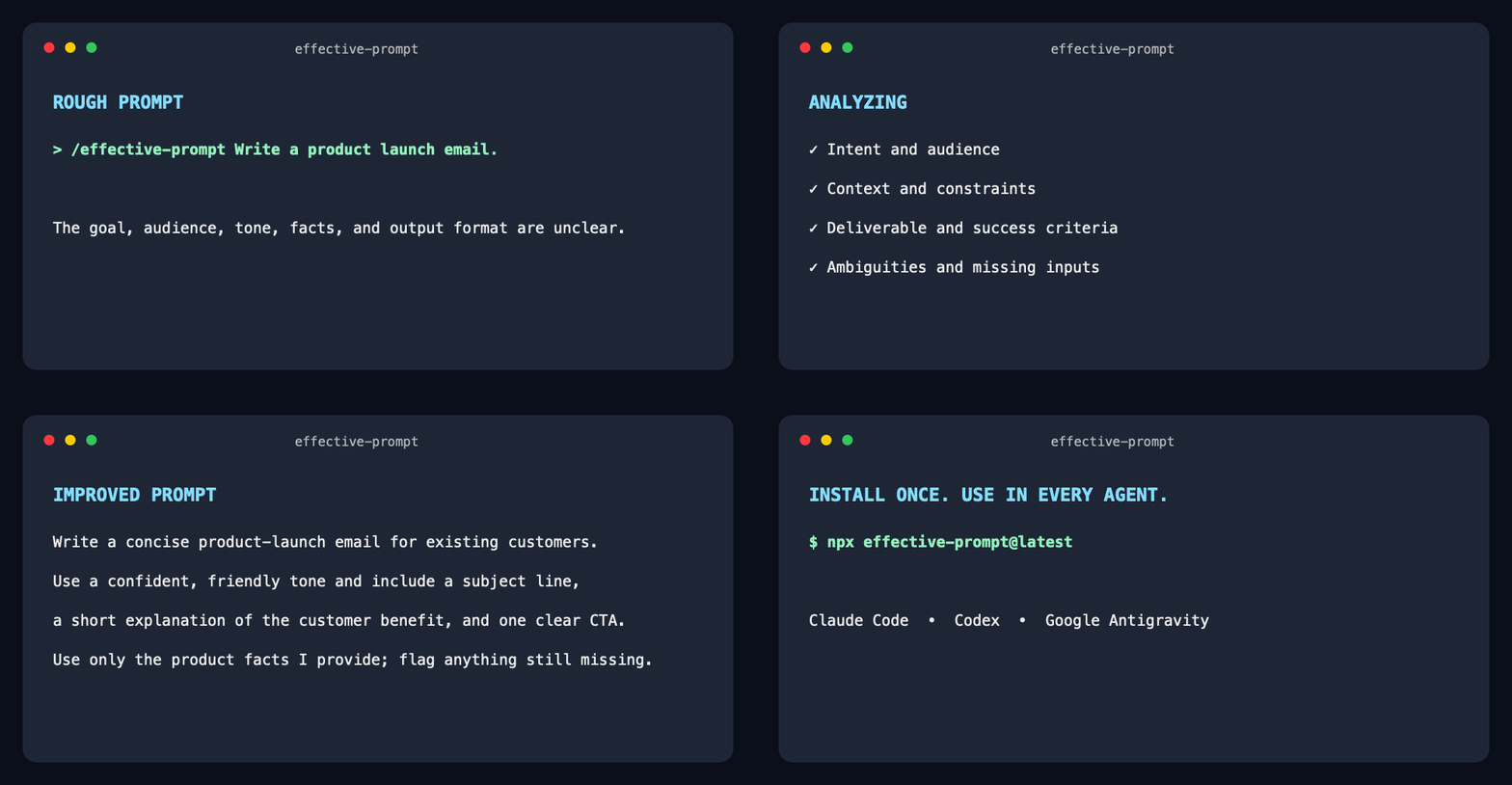
`effective-prompt` preserves your intent, finds missing requirements and contradictions, and returns a clearer prompt for Claude Code, Codex, and Google Antigravity.
|
|
11
12
|
|
|
12
|
-
|
|
13
|
+
## Before and after
|
|
13
14
|
|
|
14
|
-
|
|
15
|
-
|
|
16
|
-
|
|
17
|
-
|
|
15
|
+
### Coding
|
|
16
|
+
|
|
17
|
+
**Before:** `Fix the login bug.`
|
|
18
|
+
|
|
19
|
+
**After:**
|
|
20
|
+
|
|
21
|
+
> Reproduce and diagnose the login failure before changing code. Fix the root cause while preserving existing behavior, add a regression test, run the relevant checks, and summarize the cause and solution. If reproduction details or logs are missing, ask for them first.
|
|
22
|
+
|
|
23
|
+
### Writing
|
|
24
|
+
|
|
25
|
+
**Before:** `Write a launch email.`
|
|
26
|
+
|
|
27
|
+
**After:**
|
|
28
|
+
|
|
29
|
+
> Write a concise product-launch email for existing customers. Use a confident, friendly tone and include a subject line, the primary customer benefit, and one clear call to action. Use only the product facts provided and identify any essential information that is still missing.
|
|
18
30
|
|
|
19
|
-
|
|
31
|
+
### Research
|
|
20
32
|
|
|
21
|
-
|
|
33
|
+
**Before:** `Compare Notion and Obsidian.`
|
|
22
34
|
|
|
23
|
-
|
|
35
|
+
**After:**
|
|
24
36
|
|
|
25
|
-
|
|
37
|
+
> Compare Notion and Obsidian for an individual building a long-term personal knowledge base. Evaluate offline access, data ownership, linking, extensibility, collaboration, learning curve, and current pricing using authoritative sources. Finish with a recommendation and explain which user profile should choose each product.
|
|
38
|
+
|
|
39
|
+
### Business
|
|
40
|
+
|
|
41
|
+
**Before:** `Make a marketing plan for my app.`
|
|
42
|
+
|
|
43
|
+
**After:**
|
|
44
|
+
|
|
45
|
+
> Create a practical 90-day marketing plan for my app using the product, audience, budget, and traction details I provide. Prioritize channels by expected impact and effort, define weekly actions and measurable success metrics, and separate assumptions from known facts. Ask for any missing information that would materially change the plan.
|
|
46
|
+
|
|
47
|
+
## Install
|
|
48
|
+
|
|
49
|
+
Install the latest version globally with one command:
|
|
26
50
|
|
|
27
51
|
```bash
|
|
28
|
-
npx effective-prompt
|
|
52
|
+
npx effective-prompt@latest
|
|
29
53
|
```
|
|
30
54
|
|
|
31
|
-
No repository clone or GitHub URL is required. The
|
|
55
|
+
No repository clone or GitHub URL is required. The installer adds the skill to:
|
|
32
56
|
|
|
33
|
-
|
|
57
|
+
- Claude Code
|
|
58
|
+
- OpenAI Codex
|
|
59
|
+
- Google Antigravity
|
|
60
|
+
- Google Antigravity CLI
|
|
34
61
|
|
|
35
|
-
|
|
36
|
-
|
|
62
|
+
Requires Node.js 22.20 or later.
|
|
63
|
+
|
|
64
|
+
After installation, start a new agent session. In Antigravity CLI, you can instead run:
|
|
65
|
+
|
|
66
|
+
```text
|
|
67
|
+
/skills reload
|
|
37
68
|
```
|
|
38
69
|
|
|
39
|
-
|
|
70
|
+
## Use
|
|
40
71
|
|
|
41
|
-
|
|
42
|
-
|
|
72
|
+
### Claude Code and Antigravity
|
|
73
|
+
|
|
74
|
+
Quick mode improves the prompt immediately:
|
|
75
|
+
|
|
76
|
+
```text
|
|
77
|
+
/effective-prompt Write an email announcing our new product.
|
|
43
78
|
```
|
|
44
79
|
|
|
45
|
-
|
|
80
|
+
Interactive mode asks focused questions before rewriting it:
|
|
46
81
|
|
|
47
|
-
```
|
|
48
|
-
|
|
82
|
+
```text
|
|
83
|
+
/effective-prompt interactive Write an email announcing our new product.
|
|
49
84
|
```
|
|
50
85
|
|
|
51
|
-
|
|
86
|
+
### Codex
|
|
52
87
|
|
|
53
|
-
|
|
54
|
-
|
|
88
|
+
Use the Codex skill mention syntax:
|
|
89
|
+
|
|
90
|
+
```text
|
|
91
|
+
$effective-prompt Write an email announcing our new product.
|
|
55
92
|
```
|
|
56
93
|
|
|
57
|
-
|
|
94
|
+
For interactive mode:
|
|
58
95
|
|
|
59
|
-
|
|
96
|
+
```text
|
|
97
|
+
$effective-prompt interactive Write an email announcing our new product.
|
|
98
|
+
```
|
|
60
99
|
|
|
61
|
-
|
|
62
|
-
| --- | --- | --- |
|
|
63
|
-
| Claude Code | `~/.claude/skills/effective-prompt` | `.claude/skills/effective-prompt` |
|
|
64
|
-
| Codex | `~/.codex/skills/effective-prompt` | `.agents/skills/effective-prompt` |
|
|
65
|
-
| Antigravity App/IDE | `~/.gemini/config/skills/effective-prompt` | `.agents/skills/effective-prompt` |
|
|
66
|
-
| Antigravity CLI | `~/.gemini/antigravity-cli/skills/effective-prompt` | `.agents/skills/effective-prompt` |
|
|
100
|
+
You can also invoke the skill without including a draft. It will improve the most recent user-authored prompt candidate in the conversation. Passing the draft with the command is more reliable because the agent cannot act on it before improving it.
|
|
67
101
|
|
|
68
|
-
|
|
102
|
+
## Modes
|
|
69
103
|
|
|
70
|
-
|
|
104
|
+
- **Quick**: audits silently and returns a ready-to-copy prompt.
|
|
105
|
+
- **Interactive**: asks only questions whose answers would materially change the prompt, then returns the final version.
|
|
71
106
|
|
|
72
|
-
|
|
107
|
+
The skill checks relevant details such as the intended outcome, context, inputs, deliverable, audience, constraints, acceptance criteria, ambiguities, tools, and safety concerns. It avoids inventing requirements or making a good prompt unnecessarily longer.
|
|
73
108
|
|
|
74
|
-
|
|
109
|
+
## Verify the installation
|
|
75
110
|
|
|
76
111
|
```bash
|
|
77
|
-
|
|
78
|
-
npm publish --access public
|
|
112
|
+
npx skills list --global --agent claude-code --agent codex --agent antigravity --agent antigravity-cli
|
|
79
113
|
```
|
|
80
114
|
|
|
81
|
-
|
|
115
|
+
The output should include `effective-prompt`.
|
|
116
|
+
|
|
117
|
+
## Uninstall
|
|
82
118
|
|
|
83
119
|
```bash
|
|
84
|
-
npx effective-prompt --
|
|
120
|
+
npx skills remove effective-prompt --global --agent '*' --yes
|
|
85
121
|
```
|
|
86
122
|
|
|
87
|
-
|
|
88
|
-
|
|
89
|
-
### Marketplaces
|
|
90
|
-
|
|
91
|
-
The simplest marketplace is [skills.sh](https://skills.sh):
|
|
123
|
+
## Alternative GitHub installation
|
|
92
124
|
|
|
93
|
-
|
|
94
|
-
2. Verify discovery with `npx skills add noeljabraham/The-Effective-Prompt --list`.
|
|
95
|
-
3. Share the one-command installer above. Public GitHub skills become eligible for skills.sh discovery through installer usage.
|
|
125
|
+
If npm is unavailable, install directly from GitHub:
|
|
96
126
|
|
|
97
|
-
|
|
127
|
+
```bash
|
|
128
|
+
npx skills add noeljabraham/The-Effective-Prompt --skill effective-prompt --global --copy --yes --agent claude-code --agent codex --agent antigravity --agent antigravity-cli
|
|
129
|
+
```
|
|
98
130
|
|
|
99
|
-
|
|
131
|
+
## Development
|
|
100
132
|
|
|
101
|
-
|
|
133
|
+
```bash
|
|
134
|
+
npm install
|
|
135
|
+
npm test
|
|
136
|
+
```
|
|
102
137
|
|
|
138
|
+
The portable skill source is [`skills/effective-prompt/SKILL.md`](skills/effective-prompt/SKILL.md).
|
package/package.json
CHANGED
|
@@ -1,7 +1,7 @@
|
|
|
1
1
|
{
|
|
2
2
|
"name": "effective-prompt",
|
|
3
|
-
"version": "0.1.
|
|
4
|
-
"description": "
|
|
3
|
+
"version": "0.1.2",
|
|
4
|
+
"description": "Improve AI prompts with quick and interactive modes for Claude Code, Codex, and Antigravity.",
|
|
5
5
|
"type": "module",
|
|
6
6
|
"bin": {
|
|
7
7
|
"effective-prompt": "bin/install.mjs"
|
|
@@ -23,12 +23,15 @@
|
|
|
23
23
|
"url": "https://github.com/noeljabraham/The-Effective-Prompt/issues"
|
|
24
24
|
},
|
|
25
25
|
"keywords": [
|
|
26
|
-
"
|
|
27
|
-
"
|
|
26
|
+
"prompt-optimizer",
|
|
27
|
+
"prompt-engineering",
|
|
28
|
+
"agent-skill",
|
|
29
|
+
"ai-agents",
|
|
30
|
+
"claude",
|
|
31
|
+
"codex",
|
|
28
32
|
"antigravity",
|
|
29
33
|
"claude-code",
|
|
30
|
-
"
|
|
31
|
-
"prompt-engineering"
|
|
34
|
+
"gemini"
|
|
32
35
|
],
|
|
33
36
|
"engines": {
|
|
34
37
|
"node": ">=22.20.0"
|