dydo 1.2.50 → 1.2.51
This diff represents the content of publicly available package versions that have been released to one of the supported registries. The information contained in this diff is provided for informational purposes only and reflects changes between package versions as they appear in their respective public registries.
- package/README.md +119 -116
- package/package.json +1 -1
package/README.md
CHANGED
|
@@ -4,39 +4,36 @@ Documentation-driven context and agent orchestration for AI coding assistants.
|
|
|
4
4
|
|
|
5
5
|
100% local, 100% under your control.
|
|
6
6
|
|
|
7
|
-
|
|
7
|
+
**Built for Claude Code.** DynaDocs uses Claude Code's `PreToolUse` hook system for guard enforcement. Support for other AI coding tools may come in the future, but right now this is designed for and tested with Claude Code.
|
|
8
8
|
|
|
9
|
-
|
|
9
|
+
## Stop Doing Agent Work Yourself
|
|
10
10
|
|
|
11
|
-
|
|
11
|
+
Your time is the most precious resource in the equation. You should focus on your comparative advantage: deciding **what** should be done and **why** — articulating intent, making value choices, choosing direction. Everything that *can* be done by an agent *should* be.
|
|
12
12
|
|
|
13
|
-
|
|
13
|
+
Agents write code. Agents review code. Agents write tests. Agents write documentation. Agents coordinate other agents. The human is the last step, not the first reviewer. If it can be done by an agent, why waste your time on it?
|
|
14
14
|
|
|
15
|
-
|
|
15
|
+
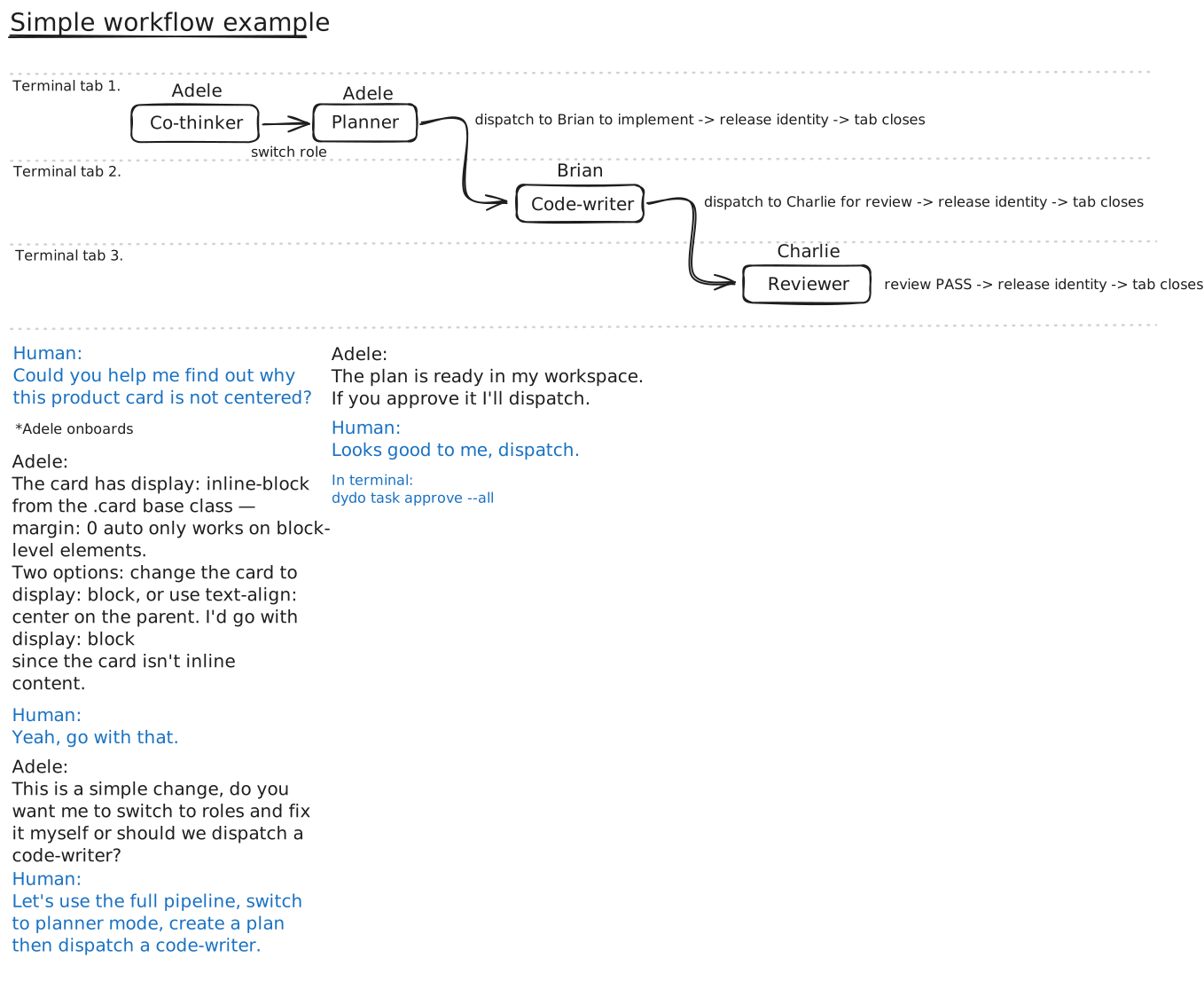
DynaDocs makes this possible. It gives AI coding agents persistent memory (through documentation), enforced identity and permissions (through a guard hook), and multi-agent coordination (through dispatch, messaging, and orchestration). You describe what you want. Agents figure out the rest.
|
|
16
16
|
|
|
17
|
-
|
|
17
|
+
|
|
18
18
|
|
|
19
|
-
|
|
19
|
+
### The context problem
|
|
20
20
|
|
|
21
|
-
|
|
21
|
+
AI coding tools have memory features — Claude Code has CLAUDE.md and persistent memory, others are adding similar capabilities. But this memory is unstructured, opaque, and not under your control. You can't organize it, version it, or enforce who reads what.
|
|
22
22
|
|
|
23
|
-
|
|
24
|
-
|
|
25
|
-
|
|
23
|
+
DynaDocs gives you explicit, structured control over project context. Your documentation is the versioned, human-readable source of truth. Agents onboard themselves each session by reading it. You decide what's documented, how it's organized, and what each role needs to know.
|
|
26
24
|
|
|
27
25
|
### What you get
|
|
28
26
|
|
|
29
27
|
- **Documentation as memory** — Your docs are the source of truth; AI re-reads them each session
|
|
30
|
-
- **Self-
|
|
31
|
-
- **
|
|
32
|
-
- **Role-based permissions** — Reviewer can't edit code, code-writer can't touch docs
|
|
28
|
+
- **Self-onboarding** — Agents follow a documentation funnel, no manual context-setting
|
|
29
|
+
- **Role-based permissions** — Reviewer can't edit code, code-writer can't touch docs — enforced, not suggested
|
|
33
30
|
- **No self-review** — The agent that wrote the code cannot review it
|
|
34
|
-
- **Multi-agent
|
|
31
|
+
- **Multi-agent orchestration** — Orchestrators coordinate swarms of agents across parallel tasks
|
|
32
|
+
- **Dispatch and messaging** — Agents hand off work, communicate results, and wait for responses
|
|
33
|
+
- **Worktree isolation** — Parallel agents work on separate git branches without conflicts
|
|
34
|
+
- **Issue tracking** — Lightweight issue management tied to inquisitions and reviews
|
|
35
35
|
- **Team support** — Each team member gets their own pool of agents
|
|
36
|
-
- **Platform-agnostic** — Works across AI tools (Claude, Cursor, etc.) and operating systems
|
|
37
36
|
- **Your process, your rules** — Modify templates, roles, and workflows to match how you work
|
|
38
|
-
- **Useful history** — Need fixing a bug caused by a change three days ago?
|
|
39
|
-
- No problem, the agent will have a record of each finished task and the files touched.
|
|
40
37
|
|
|
41
38
|
---
|
|
42
39
|
|
|
@@ -52,148 +49,116 @@ dotnet tool install -g dydo
|
|
|
52
49
|
|
|
53
50
|
**Note:** The setup will prompt you to set the `DYDO_HUMAN` environment variable. Agents use this to know which human they belong to.
|
|
54
51
|
|
|
55
|
-
## Quick Start
|
|
52
|
+
## Quick Start
|
|
56
53
|
|
|
57
54
|
### 1. Set up dydo in your project
|
|
58
55
|
|
|
59
56
|
Run from your project's root directory:
|
|
60
57
|
|
|
61
58
|
```bash
|
|
62
|
-
# If you use Claude Code
|
|
63
59
|
dydo init claude
|
|
64
|
-
|
|
65
|
-
# If you use something else
|
|
66
|
-
dydo init none
|
|
67
60
|
```
|
|
68
61
|
|
|
69
62
|
This creates the `dydo/` folder structure, templates, and configures Claude Code hooks automatically.
|
|
70
63
|
|
|
71
64
|
### 2. Link your AI entry point
|
|
72
65
|
|
|
73
|
-
Add this to your `CLAUDE.md
|
|
66
|
+
Add this to your `CLAUDE.md`:
|
|
74
67
|
|
|
75
68
|
```markdown
|
|
76
69
|
This project uses an agent orchestration framework (dydo).
|
|
77
70
|
Before starting any task, read [dydo/index.md](dydo/index.md) and follow the onboarding process.
|
|
78
71
|
```
|
|
79
72
|
|
|
80
|
-
### 3.
|
|
81
|
-
|
|
82
|
-
If you're using a different AI tool, wire up a hook that calls `dydo guard` before file edits:
|
|
83
|
-
|
|
84
|
-
```bash
|
|
85
|
-
# CLI mode (simpler)
|
|
86
|
-
dydo guard --action edit --path src/file.cs
|
|
87
|
-
|
|
88
|
-
# Or pipe JSON via stdin (for tools that send structured data)
|
|
89
|
-
echo '{"tool_name":"Edit","tool_input":{"file_path":"src/file.cs"}}' | dydo guard
|
|
90
|
-
```
|
|
91
|
-
|
|
92
|
-
Exit code `0` = allowed, `2` = blocked (reason in stderr).
|
|
93
|
-
|
|
94
|
-
### 4. Validate your documentation
|
|
95
|
-
|
|
96
|
-
Dydo expects a certain format — relative links, frontmatter, consistent structure. Run these periodically:
|
|
73
|
+
### 3. Validate your documentation
|
|
97
74
|
|
|
98
75
|
```bash
|
|
99
76
|
dydo check # Find issues
|
|
100
77
|
dydo fix # Auto-fix what's possible
|
|
101
78
|
```
|
|
102
79
|
|
|
103
|
-
**Tip:** [Obsidian](https://obsidian.md) makes navigating the docs easier, but it converts links when you move files. Run `dydo fix` afterward.
|
|
104
|
-
|
|
105
|
-
### 5. Customize the templates
|
|
80
|
+
**Tip:** [Obsidian](https://obsidian.md) makes navigating the docs easier, but it converts links when you move files. Run `dydo fix` afterward.
|
|
106
81
|
|
|
107
|
-
|
|
82
|
+
### 4. Customize the templates
|
|
108
83
|
|
|
109
|
-
Fill out the `about.md` and modify the `coding-standards.md` to your taste.
|
|
84
|
+
Edit templates in `dydo/_system/templates/` to fit your project. Fill out the `about.md` and modify the `coding-standards.md` to your taste.
|
|
110
85
|
|
|
111
|
-
You're ready to go. For best results, keep docs up to date and accurate to match your intent.
|
|
86
|
+
You're ready to go. For best results, keep docs up to date and accurate to match your intent.
|
|
112
87
|
|
|
113
88
|
---
|
|
114
89
|
|
|
115
90
|
## How It Works
|
|
116
91
|
|
|
117
|
-
**Example prompt:** `Hey Adele, help me
|
|
92
|
+
**Example prompt:** `Hey Adele, help me fix this bug in the auth service`
|
|
118
93
|
|
|
119
94
|
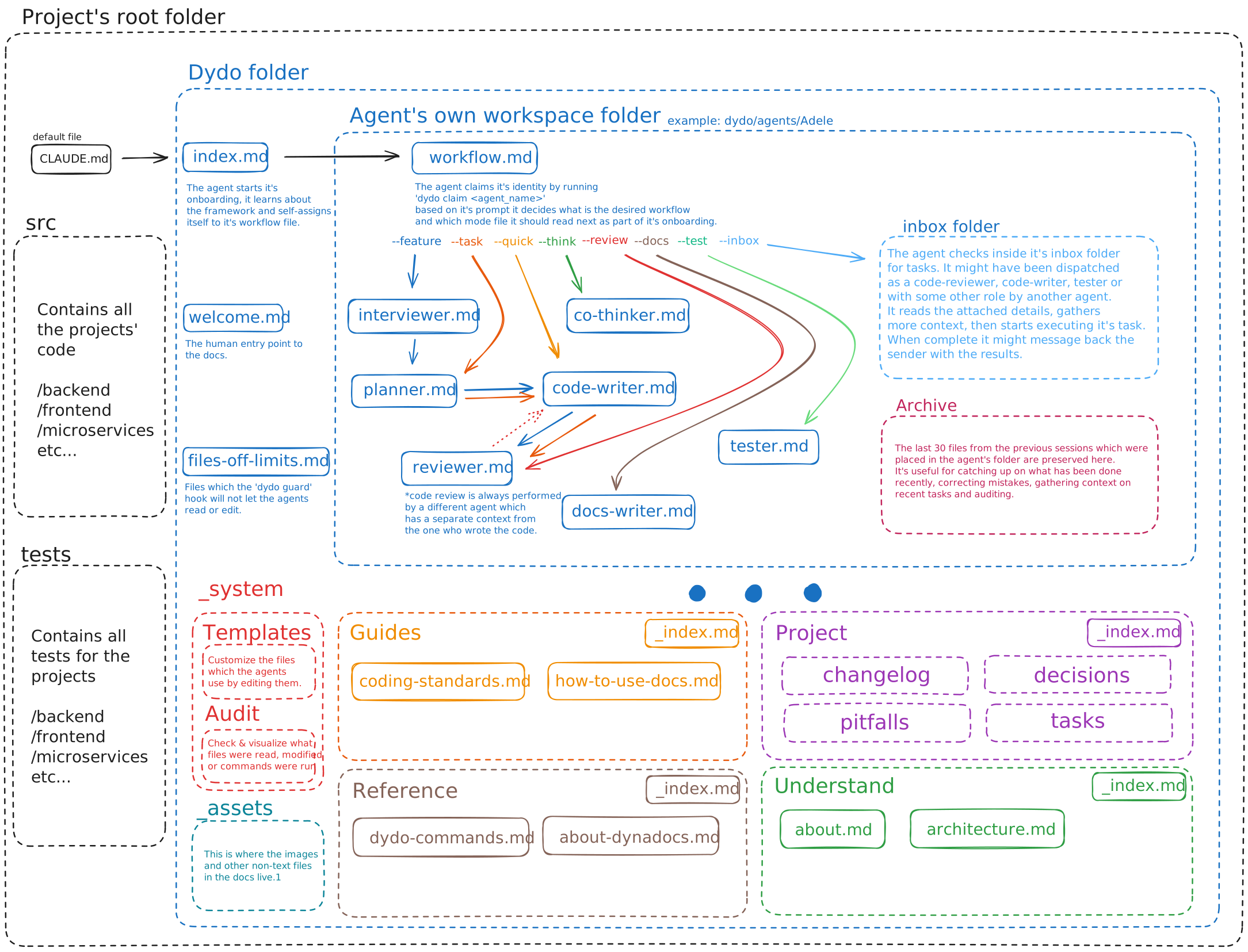
1. The agent reads `CLAUDE.md`, gets redirected to `dydo/index.md`
|
|
120
95
|
2. From `index.md`, it navigates to its workspace: `dydo/agents/Adele/workflow.md`
|
|
121
96
|
3. It claims its identity: `dydo agent claim Adele`
|
|
122
|
-
4.
|
|
123
|
-
5.
|
|
124
|
-
6.
|
|
97
|
+
4. It reads the prompt, infers the appropriate role, and sets it: `dydo agent role code-writer --task auth-fix`
|
|
98
|
+
5. On every file operation, the `dydo guard` hook enforces permissions based on the current role
|
|
99
|
+
6. When done, it dispatches to a *different* agent for review — fresh eyes, enforced
|
|
125
100
|
|
|
126
|
-
|
|
101
|
+
The AI onboards itself by following the documentation funnel — you don't have to re-explain what's already documented. Permissions aren't suggestions; the hook blocks unauthorized edits.
|
|
102
|
+
|
|
103
|
+
For orchestrated work, the prompt includes `--inbox`, telling the agent to check its inbox for dispatched work items.
|
|
127
104
|
|
|
128
105
|
---
|
|
129
106
|
|
|
130
|
-
##
|
|
107
|
+
## Multi-Agent Orchestration
|
|
108
|
+
|
|
109
|
+
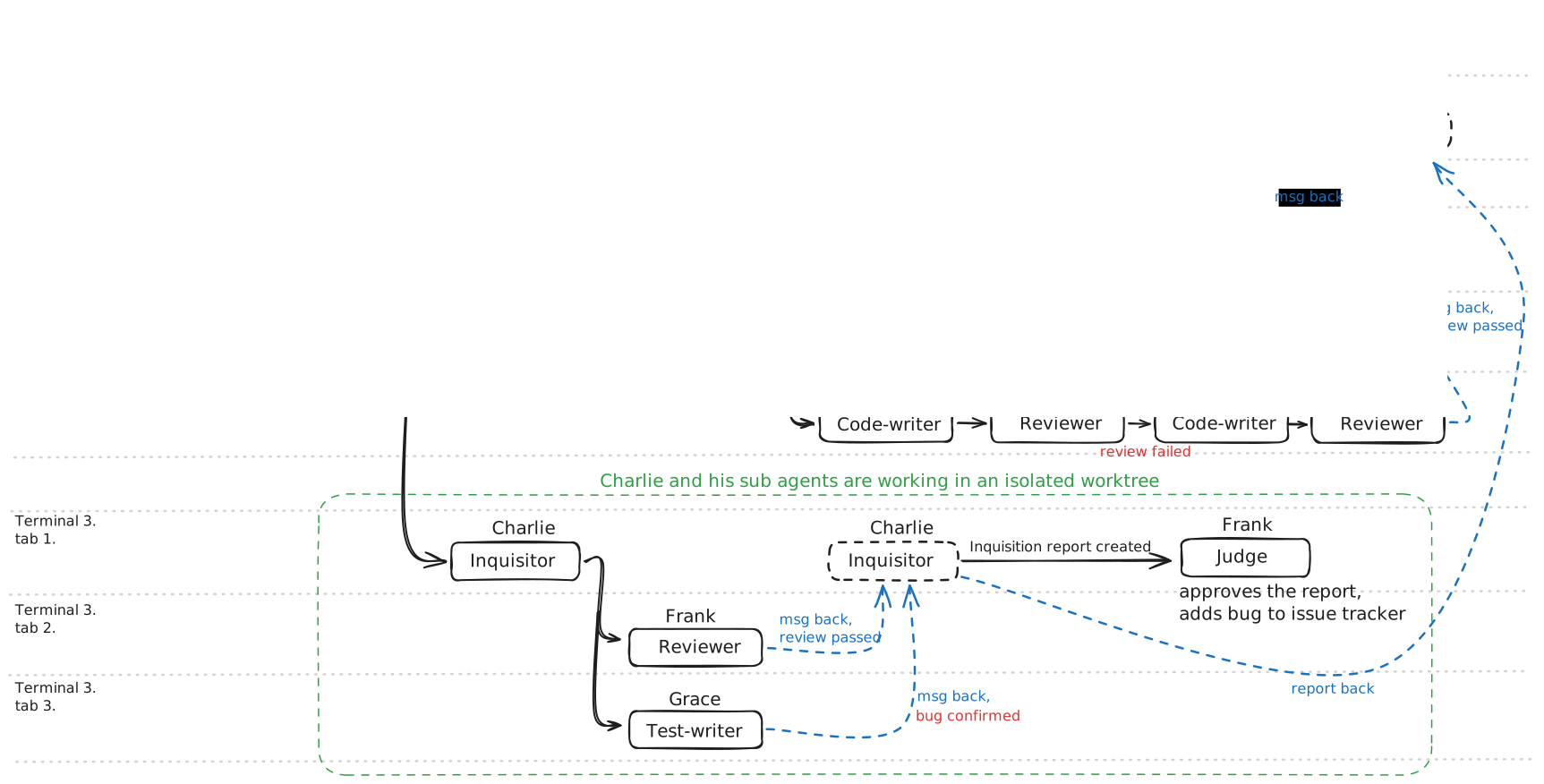
For complex work, an orchestrator agent coordinates multiple agents working in parallel:
|
|
110
|
+
|
|
111
|
+
|
|
131
112
|
|
|
132
|
-
|
|
133
|
-
|
|
134
|
-
|
|
135
|
-
|
|
136
|
-
|
|
137
|
-
|
|
138
|
-
|
|
139
|
-
| `--docs` | Docs-writer mode |
|
|
140
|
-
| `--test` | Tester mode |
|
|
113
|
+
Key capabilities:
|
|
114
|
+
|
|
115
|
+
- **Dispatch chains** — orchestrator dispatches code-writer, code-writer dispatches reviewer, reviewer reports back
|
|
116
|
+
- **Worktree isolation** — `dispatch --worktree` gives each agent an isolated git branch
|
|
117
|
+
- **Dispatch queues** — `--queue` serializes terminal launches to avoid resource contention
|
|
118
|
+
- **Inquisition** — adversarial QA agents audit code quality and documentation coverage
|
|
119
|
+
- **Dispute resolution** — judge agents arbitrate when agents disagree
|
|
141
120
|
|
|
142
121
|
---
|
|
143
122
|
|
|
144
123
|
## Agent Roles
|
|
145
124
|
|
|
146
|
-
|
|
147
|
-
|
|
148
|
-
|
|
|
149
|
-
|
|
150
|
-
|
|
|
151
|
-
|
|
|
152
|
-
|
|
|
153
|
-
|
|
|
154
|
-
|
|
|
125
|
+
Nine roles, each with enforced permissions:
|
|
126
|
+
|
|
127
|
+
| Role | Purpose | Can Edit |
|
|
128
|
+
|------|---------|----------|
|
|
129
|
+
| **code-writer** | Implements features and fixes bugs | Source code, tests |
|
|
130
|
+
| **reviewer** | Reviews code for quality and correctness | Own workspace (read-only access to code) |
|
|
131
|
+
| **co-thinker** | Collaborates on design decisions and architecture | Decisions, own workspace |
|
|
132
|
+
| **planner** | Creates implementation plans and task breakdowns | Tasks, own workspace |
|
|
133
|
+
| **docs-writer** | Creates and maintains documentation | Documentation tree |
|
|
134
|
+
| **test-writer** | Writes and maintains test suites | Tests, pitfalls |
|
|
135
|
+
| **orchestrator** | Coordinates multi-agent workflows | Tasks, decisions, own workspace |
|
|
136
|
+
| **inquisitor** | Conducts adversarial QA and knowledge audits | Inquisition reports |
|
|
137
|
+
| **judge** | Evaluates inquisition reports and arbitrates disputes | Issues, own workspace |
|
|
138
|
+
|
|
139
|
+
Roles are data-driven — defined in `.role.json` files. Projects can add custom roles with `dydo roles create <name>`.
|
|
155
140
|
|
|
156
141
|
---
|
|
157
142
|
|
|
158
143
|
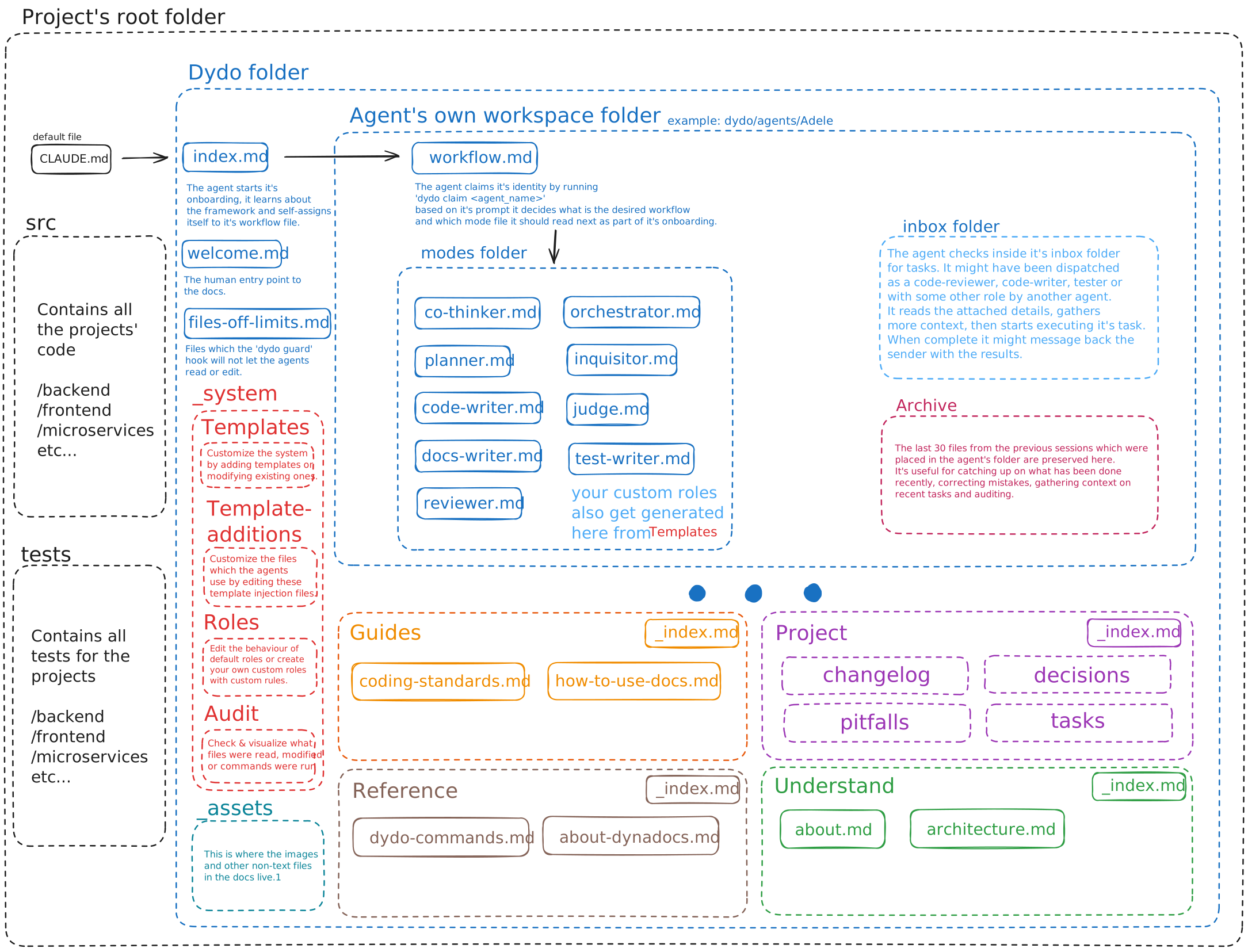
## Folder Structure
|
|
159
144
|
|
|
145
|
+
|
|
146
|
+
|
|
160
147
|
```
|
|
161
148
|
project/
|
|
162
149
|
├── dydo.json # Configuration
|
|
163
150
|
├── CLAUDE.md # AI entry point
|
|
164
151
|
└── dydo/
|
|
165
152
|
├── index.md # Documentation root
|
|
166
|
-
├── welcome.md # Human entry point
|
|
167
|
-
├── glossary.md # Project glossary
|
|
168
|
-
├── files-off-limits.md # Security boundaries
|
|
169
|
-
│
|
|
170
153
|
├── understand/ # Domain concepts, architecture
|
|
171
|
-
│ ├── _index.md # Hub file (auto-generated)
|
|
172
|
-
│ ├── about.md # Project context
|
|
173
|
-
│ └── architecture.md # Architecture overview
|
|
174
|
-
│
|
|
175
154
|
├── guides/ # How-to guides
|
|
176
|
-
│ ├── _index.md # Hub file (auto-generated)
|
|
177
|
-
│ ├── coding-standards.md # Development standards
|
|
178
|
-
│ └── how-to-use-docs.md # Documentation usage
|
|
179
|
-
│
|
|
180
155
|
├── reference/ # API docs, specs
|
|
181
|
-
|
|
182
|
-
│ ├── writing-docs.md # Documentation guide
|
|
183
|
-
│ └── about-dynadocs.md # About DynaDocs
|
|
184
|
-
│
|
|
185
|
-
├── project/ # Decisions, pitfalls, changelog
|
|
186
|
-
│ ├── _index.md # Hub file (auto-generated)
|
|
187
|
-
│ ├── tasks/ # Task tracking
|
|
188
|
-
│ ├── decisions/ # Decision records
|
|
189
|
-
│ ├── changelog/ # Change history
|
|
190
|
-
│ └── pitfalls/ # Known issues
|
|
191
|
-
│
|
|
156
|
+
├── project/ # Decisions, issues, changelog
|
|
192
157
|
├── _system/templates/ # Customizable templates
|
|
158
|
+
├── _system/template-additions/ # Template extension points
|
|
159
|
+
├── _system/roles/ # Role definitions (.role.json)
|
|
193
160
|
├── _assets/ # Images, diagrams
|
|
194
|
-
│ └── dydo-diagram.svg
|
|
195
161
|
└── agents/ # Agent workspaces (gitignored)
|
|
196
|
-
└── [Adele, Brian, ...] # Per-agent folders
|
|
197
162
|
```
|
|
198
163
|
|
|
199
164
|
---
|
|
@@ -208,21 +173,16 @@ dydo init claude --join
|
|
|
208
173
|
|
|
209
174
|
---
|
|
210
175
|
|
|
211
|
-
##
|
|
176
|
+
## Self-Documentation
|
|
212
177
|
|
|
213
|
-
|
|
214
|
-
npm install -g dydo
|
|
215
|
-
cd your-project
|
|
216
|
-
dydo init claude
|
|
217
|
-
```
|
|
218
|
-
|
|
219
|
-
Then tell your AI to read `dydo/index.md`. That's it.
|
|
178
|
+
DynaDocs documents itself using its own system. Agents can learn about dydo by reading the `dydo/` folder in the [dydo GitHub repo](https://github.com/bodnarbalazs/dydo) — it's a living example of documentation-driven orchestration in action.
|
|
220
179
|
|
|
221
180
|
---
|
|
222
181
|
|
|
223
182
|
## Command Reference
|
|
224
183
|
|
|
225
184
|
**Note:** Agents call most of these commands themselves.
|
|
185
|
+
Commands frequently used by humans are **bold**.
|
|
226
186
|
|
|
227
187
|
### Setup
|
|
228
188
|
| Command | Description |
|
|
@@ -234,20 +194,20 @@ Then tell your AI to read `dydo/index.md`. That's it.
|
|
|
234
194
|
### Documentation
|
|
235
195
|
| Command | Description |
|
|
236
196
|
|---------|-------------|
|
|
237
|
-
|
|
|
238
|
-
|
|
|
197
|
+
| **`dydo check [path]`** | Validate documentation |
|
|
198
|
+
| **`dydo fix [path]`** | Auto-fix issues |
|
|
239
199
|
| `dydo index [path]` | Regenerate index.md from structure |
|
|
240
200
|
| `dydo graph <file>` | Show graph connections for a file |
|
|
241
201
|
| `dydo graph stats [--top N]` | Show top docs by incoming links |
|
|
242
202
|
|
|
243
203
|
### Agent Lifecycle
|
|
244
|
-
|
|
245
204
|
| Command | Description |
|
|
246
205
|
|---------|-------------|
|
|
247
206
|
| `dydo agent claim <name\|auto>` | Claim an agent identity |
|
|
248
207
|
| `dydo agent release` | Release current agent |
|
|
249
208
|
| `dydo agent status [name]` | Show agent status |
|
|
250
|
-
|
|
|
209
|
+
| **`dydo agent list [--free] [--all]`** | List agents (default: current human's) |
|
|
210
|
+
| **`dydo agent tree`** | Show dispatch hierarchy of active agents |
|
|
251
211
|
| `dydo agent role <role> [--task X]` | Set role and permissions |
|
|
252
212
|
|
|
253
213
|
### Agent Management
|
|
@@ -261,40 +221,83 @@ Then tell your AI to read `dydo/index.md`. That's it.
|
|
|
261
221
|
### Workflow
|
|
262
222
|
| Command | Description |
|
|
263
223
|
|---------|-------------|
|
|
264
|
-
| `dydo dispatch --role <role> --task <name>` | Hand off work
|
|
224
|
+
| `dydo dispatch --wait/--no-wait --role <role> --task <name>` | Hand off work to another agent |
|
|
225
|
+
| `dydo dispatch --worktree ...` | Dispatch into an isolated git worktree |
|
|
226
|
+
| `dydo dispatch --queue <name> ...` | Serialize launches via named queue |
|
|
265
227
|
| `dydo inbox list` | List agents with inbox items |
|
|
266
228
|
| `dydo inbox show` | Show current agent's inbox |
|
|
267
|
-
| `dydo inbox clear` |
|
|
229
|
+
| `dydo inbox clear --all` | Archive processed items |
|
|
230
|
+
|
|
231
|
+
### Messaging
|
|
232
|
+
| Command | Description |
|
|
233
|
+
|---------|-------------|
|
|
234
|
+
| `dydo msg --to <agent> --body "..."` | Send message to another agent |
|
|
235
|
+
| `dydo msg --to <agent> --subject <task> --body "..."` | Message with task context |
|
|
236
|
+
| `dydo wait --task <name>` | Wait for task-specific message |
|
|
237
|
+
| `dydo wait --cancel` | Cancel active waits |
|
|
268
238
|
|
|
269
239
|
### Tasks
|
|
270
240
|
| Command | Description |
|
|
271
241
|
|---------|-------------|
|
|
272
242
|
| `dydo task create <name>` | Create a new task |
|
|
273
243
|
| `dydo task ready-for-review <name> --summary "..."` | Mark task ready for review |
|
|
274
|
-
|
|
|
244
|
+
| **`dydo task approve <name>`** / **`--all`** | Approve task(s) (human only) |
|
|
275
245
|
| `dydo task reject <name>` | Reject task (human only) |
|
|
276
246
|
| `dydo task list` | List tasks |
|
|
247
|
+
| `dydo task compact` | Compact audit snapshots |
|
|
277
248
|
| `dydo review complete <task>` | Complete a code review |
|
|
278
249
|
|
|
250
|
+
### Issues
|
|
251
|
+
| Command | Description |
|
|
252
|
+
|---------|-------------|
|
|
253
|
+
| `dydo issue create --title "..." --area <area> --severity <level>` | Create an issue |
|
|
254
|
+
| `dydo issue list [--area <area>] [--all]` | List issues |
|
|
255
|
+
| `dydo issue resolve <id> --summary "..."` | Resolve an issue |
|
|
256
|
+
|
|
257
|
+
### Inquisition
|
|
258
|
+
| Command | Description |
|
|
259
|
+
|---------|-------------|
|
|
260
|
+
| `dydo inquisition coverage` | Show inquisition coverage across areas |
|
|
261
|
+
|
|
262
|
+
### Roles
|
|
263
|
+
| Command | Description |
|
|
264
|
+
|---------|-------------|
|
|
265
|
+
| `dydo roles list` | List all role definitions |
|
|
266
|
+
| `dydo roles create <name>` | Scaffold a custom role |
|
|
267
|
+
| `dydo roles reset` | Regenerate base role files |
|
|
268
|
+
| `dydo validate` | Validate configuration and roles |
|
|
269
|
+
|
|
279
270
|
### Workspace
|
|
280
271
|
| Command | Description |
|
|
281
272
|
|---------|-------------|
|
|
282
273
|
| `dydo guard` | Check permissions (for hooks) |
|
|
283
|
-
|
|
|
274
|
+
| **`dydo guard lift <agent> [minutes]`** | Temporarily lift guard restrictions |
|
|
275
|
+
| `dydo guard restore <agent>` | Restore guard restrictions |
|
|
276
|
+
| **`dydo clean <agent>`** | Clean agent workspace |
|
|
284
277
|
| `dydo workspace init` | Initialize agent workspaces |
|
|
285
278
|
| `dydo workspace check` | Verify workflow before session end |
|
|
286
279
|
|
|
287
280
|
### Audit
|
|
288
281
|
| Command | Description |
|
|
289
282
|
|---------|-------------|
|
|
290
|
-
|
|
|
283
|
+
| **`dydo audit`** | Generate activity replay visualization |
|
|
291
284
|
| `dydo audit --list` | List available sessions |
|
|
292
285
|
| `dydo audit --session <id>` | Show details for a session |
|
|
286
|
+
| `dydo audit compact [year]` | Compact audit snapshots |
|
|
293
287
|
|
|
294
|
-
|
|
288
|
+
### Template
|
|
289
|
+
| Command | Description |
|
|
290
|
+
|---------|-------------|
|
|
291
|
+
| **`dydo template update`** | Update framework templates and docs |
|
|
292
|
+
| `dydo template update --diff` | Preview changes without writing |
|
|
295
293
|
|
|
296
|
-
###
|
|
297
|
-
|
|
294
|
+
### Utility
|
|
295
|
+
| Command | Description |
|
|
296
|
+
|---------|-------------|
|
|
297
|
+
| `dydo completions <shell>` | Generate shell completions |
|
|
298
|
+
| `dydo version` | Display version |
|
|
299
|
+
|
|
300
|
+
---
|
|
298
301
|
|
|
299
302
|
## License
|
|
300
303
|
|