dydo 1.0.2 → 1.0.6
This diff represents the content of publicly available package versions that have been released to one of the supported registries. The information contained in this diff is provided for informational purposes only and reflects changes between package versions as they appear in their respective public registries.
- package/README.md +269 -5
- package/package.json +1 -1
package/README.md
CHANGED
|
@@ -1,4 +1,4 @@
|
|
|
1
|
-
# dydo
|
|
1
|
+
# DynaDocs (dydo)
|
|
2
2
|
|
|
3
3
|
Context management and agent orchestration for AI coding assistants.
|
|
4
4
|
|
|
@@ -10,18 +10,282 @@ AI code editors forget everything between sessions. Every time you start, the ag
|
|
|
10
10
|
|
|
11
11
|
So you explain the same things. Again. And again.
|
|
12
12
|
|
|
13
|
+
Claude Code and Cursor don't have memory built in. Tools like Windsurf and Antigravity have some form of it, but you don't control it.
|
|
14
|
+
|
|
13
15
|
## The Solution
|
|
14
16
|
|
|
15
17
|
DynaDocs is a documentation-based approach. Your docs **ARE** the memory.
|
|
16
18
|
|
|
17
19
|
Think of it like Groundhog Day: the AI wakes up fresh each session, but you've left it a note explaining everything it needs to know. It reads the note, onboards itself, and gets to work.
|
|
18
20
|
|
|
19
|
-
|
|
21
|
+
You maintain your project's intent, architecture, and conventions in structured documentation. Each session, the AI follows an onboarding funnel — reading just what it needs for the current task. A CLI tool enforces roles and permissions, so the AI stays in its lane.
|
|
22
|
+
|
|
23
|
+
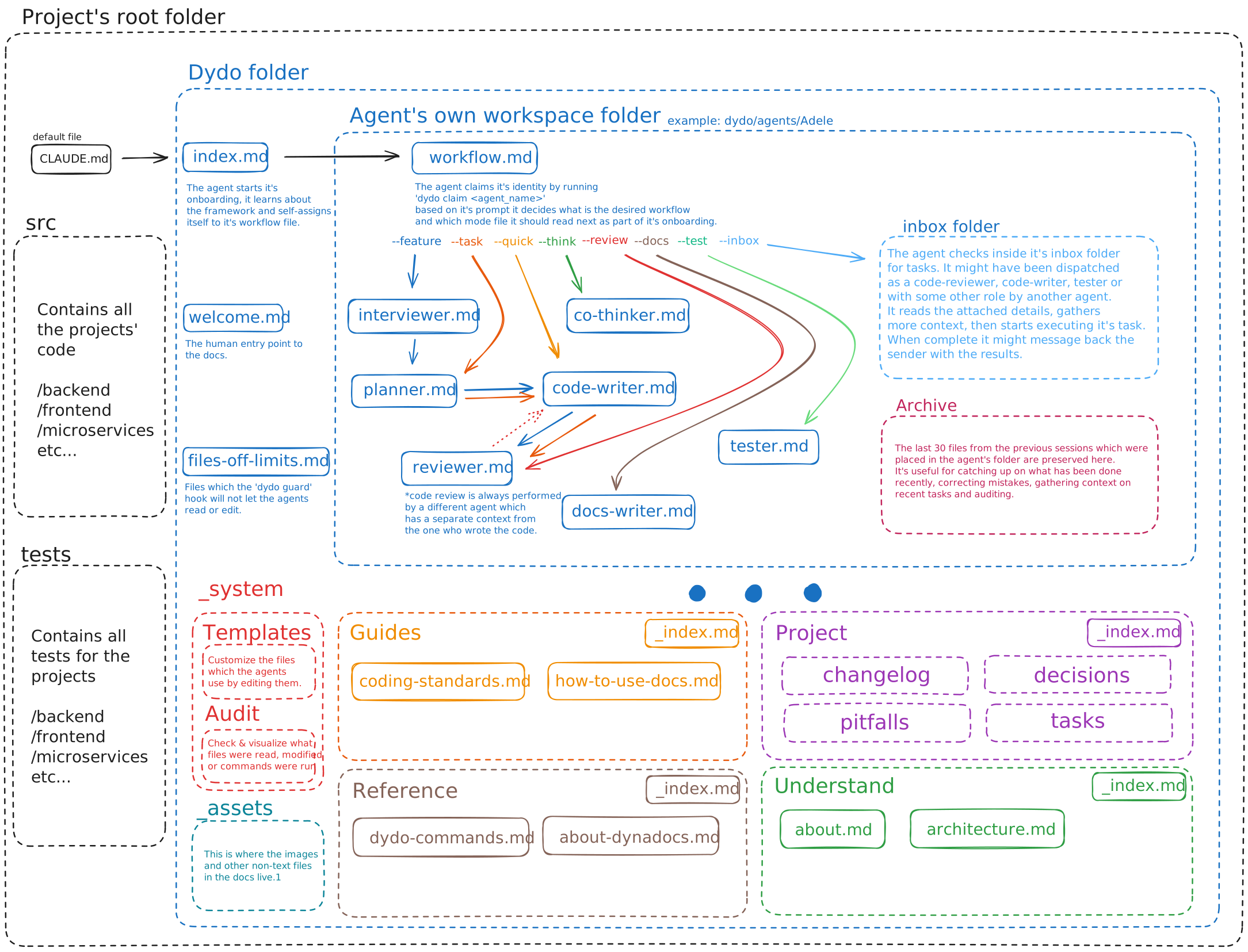
|
|
24
|
+
|
|
25
|
+
### What you get
|
|
26
|
+
|
|
27
|
+
- **Documentation as memory** — Your docs are the source of truth; AI re-reads them each session
|
|
28
|
+
- **Self-documenting folders** — Meta files describe folder purposes; summaries appear in hub links
|
|
29
|
+
- **Self-onboarding** — AI follows the funnel, no manual context-setting
|
|
30
|
+
- **Role-based permissions** — Reviewer can't edit code, code-writer can't touch docs
|
|
31
|
+
- **No self-review** — The agent that wrote the code cannot review it
|
|
32
|
+
- **Multi-agent workflows** — Run parallel agents on different tasks
|
|
33
|
+
- **Team support** — Each team member gets their own pool of agents
|
|
34
|
+
- **Platform-agnostic** — Works across AI tools (Claude, Cursor, etc.) and operating systems
|
|
35
|
+
- **Useful history** — Need fixing a bug caused by a change three days ago?
|
|
36
|
+
- No problem, the agent will have a record of each finished task and the files touched.
|
|
20
37
|
|
|
21
|
-
For installation and details go to the project's github page
|
|
22
38
|
---
|
|
23
|
-
|
|
39
|
+
|
|
40
|
+
## Installation
|
|
41
|
+
|
|
42
|
+
```bash
|
|
43
|
+
# npm (recommended)
|
|
44
|
+
npm install -g dydo
|
|
45
|
+
|
|
46
|
+
# if you have .NET installed
|
|
47
|
+
dotnet tool install -g DynaDocs
|
|
48
|
+
```
|
|
49
|
+
|
|
50
|
+
**Note:** The setup will prompt you to set the `DYDO_HUMAN` environment variable. Agents use this to know which human they belong to.
|
|
51
|
+
|
|
52
|
+
## Quick Start (2 min)
|
|
53
|
+
|
|
54
|
+
### 1. Set up dydo in your project
|
|
55
|
+
|
|
56
|
+
Run from your project's root directory:
|
|
57
|
+
|
|
58
|
+
```bash
|
|
59
|
+
# If you use Claude Code
|
|
60
|
+
dydo init claude
|
|
61
|
+
|
|
62
|
+
# If you use something else
|
|
63
|
+
dydo init none
|
|
64
|
+
```
|
|
65
|
+
|
|
66
|
+
This creates the `dydo/` folder structure, templates, and configures Claude Code hooks automatically.
|
|
67
|
+
|
|
68
|
+
### 2. Link your AI entry point
|
|
69
|
+
|
|
70
|
+
Add this to your `CLAUDE.md` (or equivalent for other AI tools):
|
|
71
|
+
|
|
72
|
+
```markdown
|
|
73
|
+
This project uses an agent orchestration framework (dydo).
|
|
74
|
+
Before starting any task, read [dydo/index.md](dydo/index.md) and follow the onboarding process.
|
|
75
|
+
```
|
|
76
|
+
|
|
77
|
+
### 3. For non-Claude Code users
|
|
78
|
+
|
|
79
|
+
If you're using a different AI tool, wire up a hook that calls `dydo guard` before file edits:
|
|
80
|
+
|
|
81
|
+
```bash
|
|
82
|
+
# CLI mode (simpler)
|
|
83
|
+
dydo guard --action edit --path src/file.cs
|
|
84
|
+
|
|
85
|
+
# Or pipe JSON via stdin (for tools that send structured data)
|
|
86
|
+
echo '{"tool_name":"Edit","tool_input":{"file_path":"src/file.cs"}}' | dydo guard
|
|
87
|
+
```
|
|
88
|
+
|
|
89
|
+
Exit code `0` = allowed, `2` = blocked (reason in stderr).
|
|
90
|
+
|
|
91
|
+
### 4. Validate your documentation
|
|
92
|
+
|
|
93
|
+
Dydo expects a certain format — relative links, frontmatter, consistent structure. Run these periodically:
|
|
94
|
+
|
|
95
|
+
```bash
|
|
96
|
+
dydo check # Find issues
|
|
97
|
+
dydo fix # Auto-fix what's possible
|
|
98
|
+
```
|
|
99
|
+
|
|
100
|
+
**Tip:** [Obsidian](https://obsidian.md) makes navigating the docs easier, but it converts links when you move files. Run `dydo fix` afterward. The fix command also generates missing hub files and folder meta files.
|
|
101
|
+
|
|
102
|
+
### 5. Customize the templates
|
|
103
|
+
|
|
104
|
+
Edit templates in `dydo/_system/templates/` to fit your project. Changes take effect when agents are claimed.
|
|
105
|
+
|
|
106
|
+
Fill out the `about.md` and modify the `coding-standards.md` to your taste.
|
|
107
|
+
|
|
108
|
+
You're ready to go. For best results, keep docs up to date and accurate to match your intent. Not everything needs documenting—just what you wouldn't know from reading the code.
|
|
109
|
+
|
|
110
|
+
---
|
|
111
|
+
|
|
112
|
+
## How It Works
|
|
113
|
+
|
|
114
|
+
**Example prompt:** `Hey Adele, help me implement authentication --feature`
|
|
115
|
+
|
|
116
|
+
1. The agent reads `CLAUDE.md`, gets redirected to `dydo/index.md`
|
|
117
|
+
2. From `index.md`, it navigates to its workspace: `dydo/agents/Adele/workflow.md`
|
|
118
|
+
3. It claims its identity: `dydo agent claim Adele`
|
|
119
|
+
4. The `--feature` flag tells it to follow: **interview → plan → code → review**
|
|
120
|
+
5. It sets its role: `dydo agent role interviewer --task auth`
|
|
121
|
+
6. On every file operation, the `dydo guard` hook enforces permissions based on the current role
|
|
122
|
+
|
|
123
|
+
**What's happening:** The AI onboards itself by following the documentation funnel — you don't have to re-explain what's already documented. Permissions aren't suggestions; the hook blocks unauthorized edits. When the code-writer finishes, it dispatches to a *different* agent for review. Fresh eyes, enforced.
|
|
124
|
+
|
|
125
|
+
---
|
|
126
|
+
|
|
127
|
+
## Workflow Flags
|
|
128
|
+
|
|
129
|
+
| Flag | Workflow |
|
|
130
|
+
|------|----------|
|
|
131
|
+
| `--feature` | Interview → Plan → Code → Review |
|
|
132
|
+
| `--task` | Plan → Code → Review |
|
|
133
|
+
| `--quick` | Code only (simple changes) |
|
|
134
|
+
| `--think` | Co-thinker mode |
|
|
135
|
+
| `--review` | Reviewer mode |
|
|
136
|
+
| `--docs` | Docs-writer mode |
|
|
137
|
+
| `--test` | Tester mode |
|
|
138
|
+
|
|
139
|
+
---
|
|
140
|
+
|
|
141
|
+
## Agent Roles
|
|
142
|
+
|
|
143
|
+
| Role | Can Edit | Purpose |
|
|
144
|
+
|------|----------|---------|
|
|
145
|
+
| `code-writer` | `src/**`, `tests/**` | Implement features |
|
|
146
|
+
| `reviewer` | agent workspace | Review code |
|
|
147
|
+
| `planner` | `tasks/**`, agent workspace | Design implementation |
|
|
148
|
+
| `tester` | `tests/**`, `pitfalls/**`, agent workspace | Write tests, report bugs |
|
|
149
|
+
| `docs-writer` | `dydo/**` (except agents/) | Write documentation |
|
|
150
|
+
| `co-thinker` | `decisions/**`, agent workspace | Explore ideas |
|
|
151
|
+
| `interviewer` | agent workspace | Gather requirements |
|
|
152
|
+
|
|
153
|
+
---
|
|
154
|
+
|
|
155
|
+
## Folder Structure
|
|
156
|
+
|
|
157
|
+
```
|
|
158
|
+
project/
|
|
159
|
+
├── dydo.json # Configuration
|
|
160
|
+
├── CLAUDE.md # AI entry point
|
|
161
|
+
└── dydo/
|
|
162
|
+
├── index.md # Documentation root
|
|
163
|
+
├── welcome.md # Human entry point
|
|
164
|
+
├── glossary.md # Project glossary
|
|
165
|
+
├── files-off-limits.md # Security boundaries
|
|
166
|
+
│
|
|
167
|
+
├── understand/ # Domain concepts, architecture
|
|
168
|
+
│ ├── _index.md # Hub file (auto-generated)
|
|
169
|
+
│ ├── about.md # Project context
|
|
170
|
+
│ └── architecture.md # Architecture overview
|
|
171
|
+
│
|
|
172
|
+
├── guides/ # How-to guides
|
|
173
|
+
│ ├── _index.md # Hub file (auto-generated)
|
|
174
|
+
│ ├── coding-standards.md # Development standards
|
|
175
|
+
│ └── how-to-use-docs.md # Documentation usage
|
|
176
|
+
│
|
|
177
|
+
├── reference/ # API docs, specs
|
|
178
|
+
│ ├── _index.md # Hub file (auto-generated)
|
|
179
|
+
│ ├── writing-docs.md # Documentation guide
|
|
180
|
+
│ └── about-dynadocs.md # About DynaDocs
|
|
181
|
+
│
|
|
182
|
+
├── project/ # Decisions, pitfalls, changelog
|
|
183
|
+
│ ├── _index.md # Hub file (auto-generated)
|
|
184
|
+
│ ├── tasks/ # Task tracking
|
|
185
|
+
│ ├── decisions/ # ADRs
|
|
186
|
+
│ ├── changelog/ # Change history
|
|
187
|
+
│ └── pitfalls/ # Known issues
|
|
188
|
+
│
|
|
189
|
+
├── _system/templates/ # Customizable templates
|
|
190
|
+
├── _assets/ # Images, diagrams
|
|
191
|
+
│ └── dydo-diagram.svg
|
|
192
|
+
└── agents/ # Agent workspaces (gitignored)
|
|
193
|
+
└── [Adele, Brian, ...] # Per-agent folders
|
|
194
|
+
```
|
|
195
|
+
|
|
196
|
+
---
|
|
197
|
+
|
|
198
|
+
## For Teams
|
|
199
|
+
|
|
200
|
+
Each team member gets their own pool of agents — no conflicts. Join an existing project with:
|
|
201
|
+
|
|
202
|
+
```bash
|
|
203
|
+
dydo init claude --join
|
|
204
|
+
```
|
|
205
|
+
|
|
206
|
+
---
|
|
207
|
+
|
|
208
|
+
## Get Started
|
|
209
|
+
|
|
210
|
+
```bash
|
|
211
|
+
npm install -g dydo
|
|
212
|
+
cd your-project
|
|
213
|
+
dydo init claude
|
|
214
|
+
```
|
|
215
|
+
|
|
216
|
+
Then tell your AI to read `dydo/index.md`. That's it.
|
|
217
|
+
|
|
218
|
+
---
|
|
219
|
+
|
|
220
|
+
## Command Reference
|
|
221
|
+
|
|
222
|
+
**Note:** Agents call most of these commands themselves.
|
|
223
|
+
|
|
224
|
+
### Setup
|
|
225
|
+
| Command | Description |
|
|
226
|
+
|---------|-------------|
|
|
227
|
+
| `dydo init <integration>` | Initialize project (`claude`, `none`) |
|
|
228
|
+
| `dydo init <integration> --join` | Join existing project as new team member |
|
|
229
|
+
| `dydo whoami` | Show current agent identity |
|
|
230
|
+
|
|
231
|
+
### Documentation
|
|
232
|
+
| Command | Description |
|
|
233
|
+
|---------|-------------|
|
|
234
|
+
| `dydo check [path]` | Validate documentation |
|
|
235
|
+
| `dydo fix [path]` | Auto-fix issues |
|
|
236
|
+
| `dydo index [path]` | Regenerate index.md from structure |
|
|
237
|
+
| `dydo graph <file>` | Show graph connections for a file |
|
|
238
|
+
| `dydo graph stats [--top N]` | Show top docs by incoming links |
|
|
239
|
+
|
|
240
|
+
### Agent Lifecycle
|
|
241
|
+
|
|
242
|
+
| Command | Description |
|
|
243
|
+
|---------|-------------|
|
|
244
|
+
| `dydo agent claim <name\|auto>` | Claim an agent identity |
|
|
245
|
+
| `dydo agent release` | Release current agent |
|
|
246
|
+
| `dydo agent status [name]` | Show agent status |
|
|
247
|
+
| `dydo agent list [--free]` | List all agents |
|
|
248
|
+
| `dydo agent role <role> [--task X]` | Set role and permissions |
|
|
249
|
+
|
|
250
|
+
### Agent Management
|
|
251
|
+
| Command | Description |
|
|
252
|
+
|---------|-------------|
|
|
253
|
+
| `dydo agent new <name> <human>` | Create new agent |
|
|
254
|
+
| `dydo agent rename <old> <new>` | Rename an agent |
|
|
255
|
+
| `dydo agent remove <name>` | Remove agent from pool |
|
|
256
|
+
| `dydo agent reassign <name> <human>` | Reassign to different human |
|
|
257
|
+
|
|
258
|
+
### Workflow
|
|
259
|
+
| Command | Description |
|
|
260
|
+
|---------|-------------|
|
|
261
|
+
| `dydo dispatch --role <role> --task <name>` | Hand off work |
|
|
262
|
+
| `dydo inbox list` | List agents with inbox items |
|
|
263
|
+
| `dydo inbox show` | Show current agent's inbox |
|
|
264
|
+
| `dydo inbox clear` | Clear processed items |
|
|
265
|
+
|
|
266
|
+
### Tasks
|
|
267
|
+
| Command | Description |
|
|
268
|
+
|---------|-------------|
|
|
269
|
+
| `dydo task create <name>` | Create a new task |
|
|
270
|
+
| `dydo task ready-for-review <name>` | Mark task ready for review |
|
|
271
|
+
| `dydo task approve <name>` | Approve task (human only) |
|
|
272
|
+
| `dydo task reject <name>` | Reject task (human only) |
|
|
273
|
+
| `dydo task list` | List tasks |
|
|
274
|
+
| `dydo review complete <task>` | Complete a code review |
|
|
275
|
+
|
|
276
|
+
### Workspace
|
|
277
|
+
| Command | Description |
|
|
278
|
+
|---------|-------------|
|
|
279
|
+
| `dydo guard` | Check permissions (for hooks) |
|
|
280
|
+
| `dydo clean <agent>` | Clean agent workspace |
|
|
281
|
+
| `dydo workspace init` | Initialize agent workspaces |
|
|
282
|
+
| `dydo workspace check` | Verify workflow before session end |
|
|
283
|
+
|
|
284
|
+
---
|
|
285
|
+
|
|
286
|
+
### Limitations
|
|
287
|
+
Currently it's tested to work with Claude Code (hooks setup), but the principle should be the same for all coding agents.
|
|
24
288
|
|
|
25
289
|
## License
|
|
26
290
|
|
|
27
|
-
MIT
|
|
291
|
+
MIT — [github.com/bodnarbalazs/dydo](https://github.com/bodnarbalazs/dydo)
|