dsh-workspace-curator 1.0.0 → 2.0.0
This diff represents the content of publicly available package versions that have been released to one of the supported registries. The information contained in this diff is provided for informational purposes only and reflects changes between package versions as they appear in their respective public registries.
- package/README.md +112 -54
- package/client.js +407 -90
- package/docs/DETAIL.md +1 -1
- package/docs/DETAIL.zh.md +1 -1
- package/docs/demo-poster.png +0 -0
- package/docs/demo.gif +0 -0
- package/index.js +47 -15
- package/locale/en.json +1 -1
- package/locale/zh.json +1 -1
- package/package.json +8 -4
- package/pending-deletions.js +143 -0
- package/workspace-delete.js +189 -0
- package/docs/preview.svg +0 -44
package/README.md
CHANGED
|
@@ -1,76 +1,134 @@
|
|
|
1
|
-
#
|
|
1
|
+
# 工作区管家(dsh-workspace-curator)
|
|
2
2
|
|
|
3
|
-
|
|
4
|
-
page for workspace and session housekeeping.
|
|
3
|
+
一个用于 **DeepSeek Harness(DSH)** 的工作区 / 会话管理插件:在会话和工作区的 `…` / 右键菜单里直接删除,也可以在设置页里集中管理。
|
|
5
4
|
|
|
6
|
-
##
|
|
5
|
+
## 操作演示
|
|
7
6
|
|
|
8
|
-
-
|
|
9
|
-
and session count.
|
|
10
|
-
- Adds a workspace from an existing folder (system folder picker or typed path).
|
|
11
|
-
- Renames a workspace and moves it up or down in the registry order.
|
|
12
|
-
- Removes a workspace registration; its folder and sessions stay, and the
|
|
13
|
-
sessions move to **Ungrouped**.
|
|
14
|
-
- Opens a session, archives or restores it, and permanently deletes it.
|
|
15
|
-
- Archiving a running session asks first, then stops its work and archives it.
|
|
16
|
-
- Shows archived, pinned, and running badges, and disables Delete with a
|
|
17
|
-
visible reason when the Host cannot accept it.
|
|
7
|
+
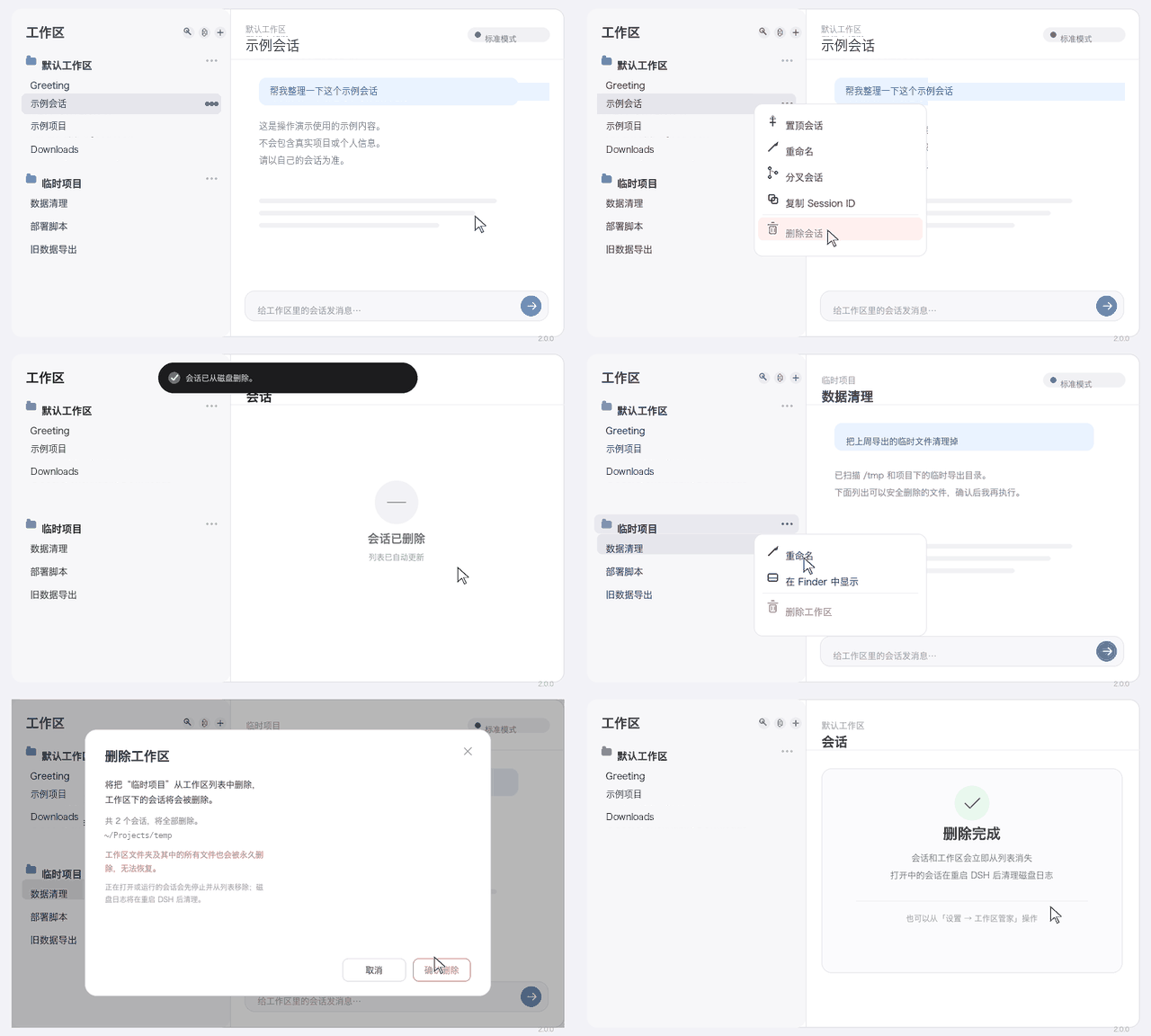
|
|
18
8
|
|
|
19
|
-
|
|
9
|
+
> 上图为操作示意:① 会话行 `…` →「删除会话」;② 工作区行 `…` →「删除工作区」。实际界面以当前 DSH 版本为准。
|
|
10
|
+
>
|
|
11
|
+
> 动画中的会话、项目名称与路径均为虚构示例。
|
|
20
12
|
|
|
21
|
-
|
|
13
|
+
## 2.0.0 更新内容
|
|
22
14
|
|
|
23
|
-
|
|
24
|
-
|
|
25
|
-
|
|
15
|
+
### 新增
|
|
16
|
+
|
|
17
|
+
- **会话菜单删除**:会话行右侧 `…` 或右键 →「删除会话」,不需要再进设置页;不注册快捷键。
|
|
18
|
+
- **工作区菜单删除**:工作区行右侧 `…` 或右键 →「删除工作区」。
|
|
19
|
+
- **工作区级联删除**:确认后删除该工作区的**全部会话**、**工作区文件夹**和**工作区注册**,不保留文件夹。
|
|
20
|
+
- **单一删除项**:隐藏 DSH 原生的「删除工作区」项,并对真实菜单做启动自检;如果 DSH 升级导致隐藏失效,插件会自动撤下自己的删除项,菜单中**最多只有一个**删除工作区入口,不会出现两个。
|
|
21
|
+
- **打开中的会话**:不再拒绝删除。会话会先归档、停止工作并从列表消失,磁盘日志在**下次启动 DSH** 时清理;界面会提示重启。
|
|
22
|
+
- **最后一个工作区保护**:只剩一个工作区时无法删除,弹窗会禁用「确认删除」,Host 也会拒绝请求;请先添加另一个工作区。
|
|
23
|
+
- **避免空白「新会话」**:删除当前会话所在的工作区前,会先切换到另一个可用会话,避免 DSH 因选中项消失而露出或新建空白会话。
|
|
24
|
+
- **更明确的工作区确认框**:
|
|
25
|
+
- 标题:删除工作区
|
|
26
|
+
- 文案:将把「XXX」从工作区列表中删除,工作区下的会话将会被删除。
|
|
27
|
+
- 显示会话数量、文件夹路径
|
|
28
|
+
- 红色警告:工作区文件夹及其中的所有文件也会被永久删除,无法恢复。
|
|
29
|
+
- 按钮:取消 / 确认删除
|
|
30
|
+
- **提示更准确**:打开中的会话会计入删除总数,显示「已删除 N 个会话……其中 M 个打开中的会话将在重启后清理」。
|
|
31
|
+
- **安全与可靠性**:
|
|
32
|
+
- 受保护路径拒绝删除:当前工作目录、home、文件系统根目录、`~/.dsh`、profile、DSH 安装目录、符号链接变化等。
|
|
33
|
+
- 待删除队列原子写入;写入失败可重试,不会留下“假排队”状态。
|
|
34
|
+
- 会话 / 工作区部分引用清理失败时会显示警告。
|
|
35
|
+
- **设置页保留**:**设置 → 工作区管家** 仍可添加、重命名、排序工作区、查看会话总览,并使用同一套删除确认。
|
|
36
|
+
|
|
37
|
+
### 行为变化(相比 1.0.0)
|
|
38
|
+
|
|
39
|
+
- 移除了“打开中的会话不能删除,请改用归档”的红色拒绝提示。
|
|
40
|
+
- 工作区删除从“只移除注册、保留文件和会话”改为“删除全部会话 + 删除文件夹 + 移除注册”。
|
|
41
|
+
- 工作区确认框不再使用复选框,改为明确的红色文件夹警告 +「取消 / 确认删除」。
|
|
42
|
+
- 工作区删除菜单不绑定快捷键。
|
|
43
|
+
- 只有一个工作区时不能删除。
|
|
44
|
+
|
|
45
|
+
## 使用说明
|
|
46
|
+
|
|
47
|
+
### 删除单个会话
|
|
48
|
+
|
|
49
|
+
1. 在左侧找到要删除的会话。
|
|
50
|
+
2. 点击行尾的 `…`,或右键打开菜单。
|
|
51
|
+
3. 选择「删除会话」。
|
|
52
|
+
4. 在确认框里点击「删除」。
|
|
53
|
+
|
|
54
|
+
结果:
|
|
55
|
+
|
|
56
|
+
- 没有打开、没有运行中工作的会话:日志、子代理会话、归档 / 置顶引用立即删除。
|
|
57
|
+
- 正在打开或运行的会话:先归档并停止工作,日志在下次启动 DSH 后清理;会有重启提示。
|
|
58
|
+
|
|
59
|
+
### 删除工作区
|
|
26
60
|
|
|
27
|
-
|
|
28
|
-
|
|
61
|
+
1. 在工作区标题行点击 `…`,或右键打开菜单。
|
|
62
|
+
2. 选择「删除工作区」。
|
|
63
|
+
3. 确认框会显示:
|
|
64
|
+
- 该工作区下的会话数量;
|
|
65
|
+
- 工作区文件夹路径;
|
|
66
|
+
- 文件夹及其中所有文件会被永久删除的警告。
|
|
67
|
+
4. 点击「确认删除」。
|
|
29
68
|
|
|
30
|
-
|
|
69
|
+
确认后会:
|
|
70
|
+
|
|
71
|
+
1. 删除或排队该工作区的全部会话;
|
|
72
|
+
2. 递归删除工作区文件夹;
|
|
73
|
+
3. 移除工作区注册。
|
|
74
|
+
|
|
75
|
+
> ⚠️ 文件夹删除不可恢复,且文件夹里可能包含与 DSH 无关的文件。请先用一次性目录测试。
|
|
76
|
+
>
|
|
77
|
+
> 如果这是唯一的工作区,弹窗会提示先添加另一个工作区,无法直接删除。
|
|
78
|
+
>
|
|
79
|
+
> 正在打开中的会话会在重启 DSH 后完成磁盘日志清理。
|
|
80
|
+
|
|
81
|
+
### 设置页
|
|
82
|
+
|
|
83
|
+
打开 **设置 → 工作区管家**:
|
|
84
|
+
|
|
85
|
+
- 添加、重命名、排序工作区;
|
|
86
|
+
- 查看每个工作区的会话;
|
|
87
|
+
- 对会话或工作区执行同样的删除流程。
|
|
88
|
+
|
|
89
|
+
## 安装
|
|
90
|
+
|
|
91
|
+
从插件市场安装,或执行:
|
|
92
|
+
|
|
93
|
+
```sh
|
|
94
|
+
dsh plugin --profile web add dsh-workspace-curator@2.0.0
|
|
95
|
+
```
|
|
31
96
|
|
|
32
|
-
|
|
97
|
+
桌面端可以在 **设置 → 插件** 中安装。请把 `web` 换成你实际运行的 profile 名称。
|
|
33
98
|
|
|
34
|
-
DSH
|
|
35
|
-
Host endpoint. Before removing anything it:
|
|
99
|
+
要求 DSH `0.2.2-rc.5` 或更新版本。
|
|
36
100
|
|
|
37
|
-
|
|
38
|
-
2. refuses while any member is live in this Host process;
|
|
39
|
-
3. refuses while a composed activity provider reports running work (a turn,
|
|
40
|
-
subagent, background job, or reminder);
|
|
41
|
-
4. validates every log directory against the persistence-reported layout;
|
|
42
|
-
5. removes the session log directories;
|
|
43
|
-
6. detaches the ids from workspace accounts, the archive set, and the pin set;
|
|
44
|
-
7. announces removal so open pages drop the rows.
|
|
101
|
+
## 删除行为与限制
|
|
45
102
|
|
|
46
|
-
|
|
47
|
-
usage statistics are not reclaimed. Deletion is permanent; use **Archive** when
|
|
48
|
-
you only want to hide a session.
|
|
103
|
+
DSH 的会话持久化接口没有删除动作,因此本插件直接移除会话日志目录。
|
|
49
104
|
|
|
50
|
-
|
|
51
|
-
|
|
105
|
+
- **冷会话**:日志、子代理后代、工作区引用、归档记录、置顶记录立即移除。
|
|
106
|
+
- **打开中的会话**:归档并停止工作;id 写入持久化待删除队列,下次 Host 启动时删除日志。
|
|
107
|
+
- **工作区**:所有会话删除或排队后,删除文件夹,再移除注册。
|
|
108
|
+
- **附件和投影缓存**:只删除会话日志和选中的工作区文件夹;位于其他位置的附件、缓存可能继续占用磁盘。
|
|
109
|
+
- **受保护路径**:不会删除当前工作目录、home、根目录、`~/.dsh`、profile、DSH 安装目录;路径变成符号链接或解析到别处时也会拒绝。
|
|
110
|
+
- **单一删除入口**:如果 DSH 升级后原生工作区删除项无法隐藏,插件会撤下自己的菜单项,只保留原生项;此时级联删除仍可在设置页使用。
|
|
111
|
+
- **待删除队列**:写入采用临时文件 + 原子替换;重启清理失败时会保留记录,下次继续尝试。
|
|
52
112
|
|
|
53
|
-
##
|
|
113
|
+
## 从 1.0.0 升级
|
|
54
114
|
|
|
55
|
-
|
|
56
|
-
The connection layer authenticates the browser cookie and applies its
|
|
57
|
-
Host/Origin fence before the handler runs. The handler additionally requires
|
|
58
|
-
`x-workspace-curator: 1` and `content-type: application/json` on `POST`, which a
|
|
59
|
-
cross-site form or simple fetch cannot send. A request without a valid browser
|
|
60
|
-
session receives the connection layer's `401` and never reaches deletion.
|
|
115
|
+
2.0.0 的菜单和删除行为变化较大:
|
|
61
116
|
|
|
62
|
-
|
|
63
|
-
|
|
64
|
-
|
|
117
|
+
- 会话删除从设置页搬到会话行菜单;
|
|
118
|
+
- 删除打开中的会话不再被拒绝,而是归档 + 重启清理;
|
|
119
|
+
- 工作区删除现在会删除文件夹和全部会话;
|
|
120
|
+
- 最后一个工作区不能删除;
|
|
121
|
+
- 不注册任何键盘快捷键。
|
|
65
122
|
|
|
66
|
-
|
|
123
|
+
升级后建议先在一个一次性工作区 / 测试会话上验证菜单和确认框。
|
|
67
124
|
|
|
68
|
-
|
|
125
|
+
## 开发
|
|
69
126
|
|
|
70
|
-
- `index.js` — Host
|
|
71
|
-
- `session-delete.js` —
|
|
72
|
-
- `
|
|
73
|
-
- `
|
|
127
|
+
- `index.js` — Host 路由。
|
|
128
|
+
- `session-delete.js` — 单个会话的删除树、存储格式校验。
|
|
129
|
+
- `pending-deletions.js` — 打开中会话的持久化待删除队列。
|
|
130
|
+
- `workspace-delete.js` — 工作区级联、文件夹删除、路径保护。
|
|
131
|
+
- `client.js` — 设置页、菜单贡献、确认弹窗、重复菜单自检。
|
|
74
132
|
|
|
75
133
|
## License
|
|
76
134
|
|