dsh-visualization 0.1.3 → 0.1.5
This diff represents the content of publicly available package versions that have been released to one of the supported registries. The information contained in this diff is provided for informational purposes only and reflects changes between package versions as they appear in their respective public registries.
- package/AGENTS.md +240 -0
- package/FAQ.md +48 -61
- package/GUIDE.md +270 -0
- package/README.md +37 -293
- package/package.json +10 -2
- package/screenshots.json +5 -0
- package/wallpaper/hybrid.html +221 -0
- package/wallpaper/live.html +33 -0
- package/wallpaper/lively/LivelyInfo.json +17 -0
- package/wallpaper/lively/index.html +65 -0
- package/wallpaper/lively/preview.jpg +0 -0
- package/wallpaper/lively-package.zip +0 -0
- package/wallpaper/index.html +0 -62
package/README.md
CHANGED
|
@@ -1,321 +1,65 @@
|
|
|
1
|
-
#
|
|
1
|
+
# dsh-visualization
|
|
2
2
|
|
|
3
|
-
A
|
|
4
|
-
rings,
|
|
3
|
+
A **session instrument** for DeepSeek Harness: a sidebar icon that opens a live panel showing the
|
|
4
|
+
current session as seven rings, a turn timeline, per-step ladders, background jobs, approvals and
|
|
5
|
+
file changes — read straight from the session log, updated while the conversation runs.
|
|
5
6
|
|
|
6
|
-
|
|
7
|
+
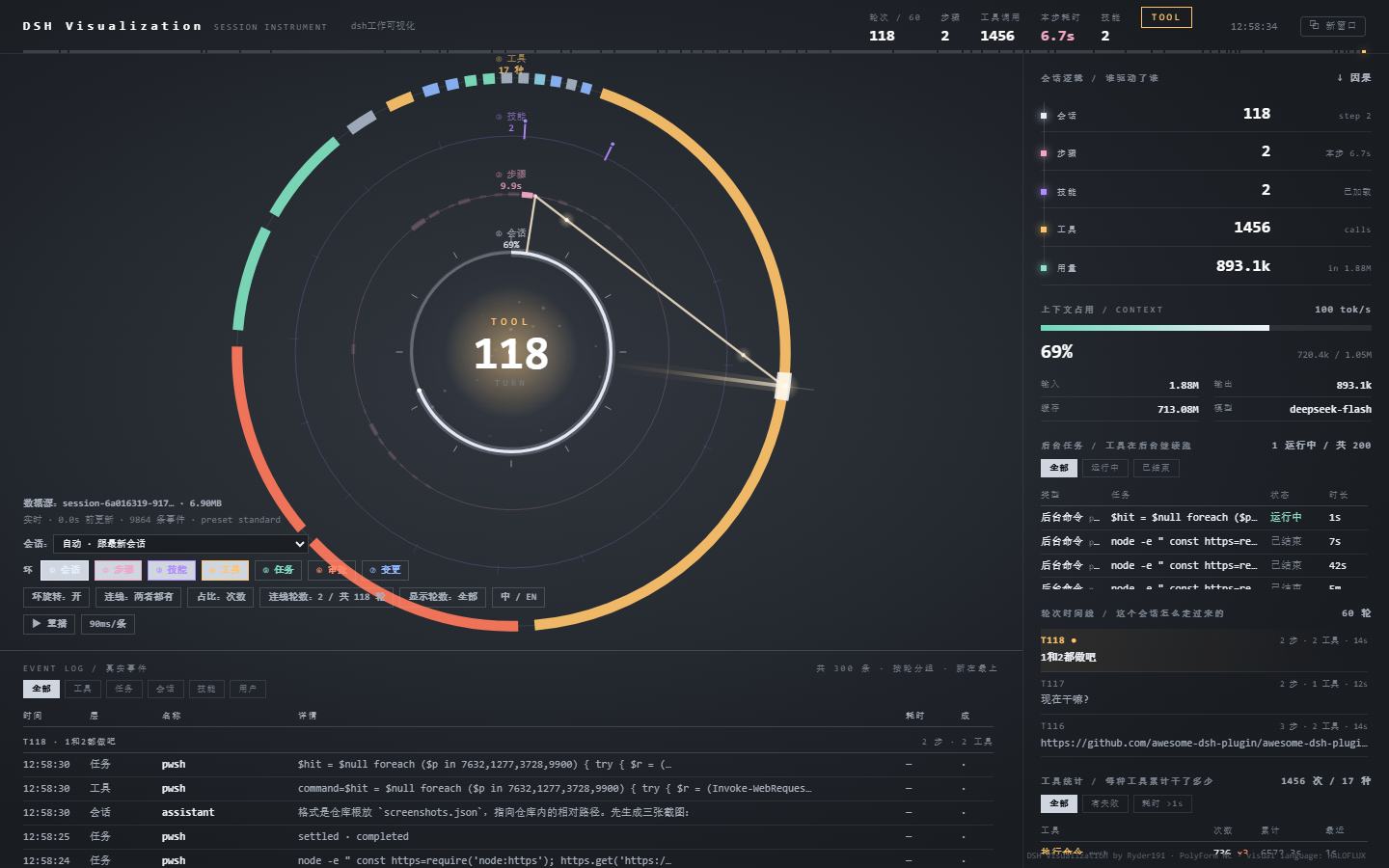
|
|
7
8
|
|
|
8
|
-
|
|
9
|
-
|
|
10
|
-
- **Seven rings**: ① session · ② steps · ③ skills · ④ tools · ⑤ jobs · ⑥ approvals · ⑦ changes — each one toggleable
|
|
11
|
-
- **Turn timeline**: two lines per turn — number + steps/tools/duration, then the prompt you typed
|
|
12
|
-
- **Connections**: per-step ladders (①→②→③→④) with dots running along them, or beams from the core
|
|
13
|
-
- **Hover / click**: every node on every ring answers — hover for its name, click for details (tools list the last six actual commands)
|
|
14
|
-
- **Turn scoping**: `show turns` / `line turns` knobs narrow the view to the last N turns
|
|
15
|
-
- Every display option is remembered in `localStorage`
|
|
16
|
-
|
|
17
|
-
---
|
|
18
|
-
|
|
19
|
-
# For users
|
|
20
|
-
|
|
21
|
-
## Requirements
|
|
22
|
-
|
|
23
|
-
- **Node ≥ 22.15** in the host: session logs are zstd-compressed. Without support the panel says so
|
|
24
|
-
explicitly instead of rendering blank.
|
|
25
|
-
- Session directory defaults to `~/.dsh/sessions`; if DSH stores data elsewhere, set `DSH_HOME`
|
|
26
|
-
or `DSHVIZ_SESSIONS_ROOT`.
|
|
9
|
+
**English** · **[中文](#中文)** below.
|
|
27
10
|
|
|
28
11
|
## Install
|
|
29
12
|
|
|
30
13
|
```powershell
|
|
31
|
-
#
|
|
32
|
-
#
|
|
33
|
-
|
|
34
|
-
# search "dsh-visualization" on the Plugins page
|
|
14
|
+
# from the plugin market / Plugins page: search "dsh-visualization"
|
|
15
|
+
# or from npm:
|
|
16
|
+
npm i dsh-visualization
|
|
35
17
|
```
|
|
36
18
|
|
|
37
|
-
A ring icon appears in the left rail
|
|
38
|
-
|
|
39
|
-
Or from npm: pm i dsh-visualization (package: https://www.npmjs.com/package/dsh-visualization).
|
|
40
|
-
|
|
41
|
-
## Reading the panel
|
|
42
|
-
|
|
43
|
-
| Area | What it tells you |
|
|
44
|
-
|---|---|
|
|
45
|
-
| Centre number | current turn; `TOOL` / `THINKING` / `IDLE` above it |
|
|
46
|
-
| ① session ring | context-window usage + the last 12 turn ticks |
|
|
47
|
-
| ② step ring | time buckets; thicker = more time spent in that slice |
|
|
48
|
-
| ③ skill ring | 16 slots; one lights up per loaded skill |
|
|
49
|
-
| ④ tool ring | composition by call count (or by time — see `share`) |
|
|
50
|
-
| ⑤ job ring | one arc per background job, length ∝ runtime |
|
|
51
|
-
| ⑥ approval ring | one tick per approval, colour = outcome |
|
|
52
|
-
| ⑦ change ring | one tick per file change; deliverables are taller |
|
|
53
|
-
| Right column | session flow, context, jobs, turn timeline, tool totals |
|
|
54
|
-
| Bottom | event log, grouped by turn |
|
|
55
|
-
|
|
56
|
-
Direction matters: on ②–⑦ the newest data sits at 12 o'clock and older data goes clockwise.
|
|
57
|
-
|
|
58
|
-
## The controls (bottom left)
|
|
59
|
-
|
|
60
|
-
| Control | Options |
|
|
61
|
-
|---|---|
|
|
62
|
-
| rings `①…⑦` | show/hide each layer; radii re-spread to fill the space |
|
|
63
|
-
| `spin` | slow rotation of ②③④ |
|
|
64
|
-
| `lines` | `ladders` / `beams` / `both` |
|
|
65
|
-
| `share` | tool ring sized by `count` or by `time` |
|
|
66
|
-
| `line turns` | how many turns get connectors (`2` by default) |
|
|
67
|
-
| `show turns` | how many turns every panel covers |
|
|
68
|
-
| `⧉ window` | open a separate window you can drag to another monitor |
|
|
69
|
-
| `中 / EN` | switch language |
|
|
70
|
-
|
|
71
|
-
`line turns` can never exceed `show turns` — the connector count is clamped automatically.
|
|
72
|
-
|
|
73
|
-
## Language
|
|
74
|
-
|
|
75
|
-
The UI ships in Chinese and English. It starts from `navigator.language`, remembers your choice,
|
|
76
|
-
and can be forced per page with `?lang=en` / `?lang=zh`.
|
|
77
|
-
|
|
78
|
-
## Using it as a desktop wallpaper
|
|
79
|
-
|
|
80
|
-
The panel can also run inside **Wallpaper Engine** (Steam). The plugin opens a small fixed-port
|
|
81
|
-
endpoint — `http://127.0.0.1:8799/` — because the DSH Web port changes on every launch and a
|
|
82
|
-
wallpaper cannot guess it.
|
|
19
|
+
A ring icon appears in the left rail — click it to open the panel.
|
|
83
20
|
|
|
84
|
-
|
|
85
|
-
and retries every 5 seconds; when DSH comes back on a different port the wallpaper finds it again.
|
|
21
|
+
## Learn more
|
|
86
22
|
|
|
87
|
-
|
|
88
|
-
|
|
89
|
-
1. In Wallpaper Engine: **Create Wallpaper** → pick **Web** as the type
|
|
90
|
-
2. When it asks for a file, choose the `wallpaper/index.html` from this repository (or
|
|
91
|
-
`wallpaper/project.json` if your version of WE asks for a project)
|
|
92
|
-
3. Save the project somewhere permanent and preview it. It connects to `127.0.0.1:8799` by itself.
|
|
93
|
-
|
|
94
|
-
**Changing the port**: the plugin tries 8799, then 8798, 8797, 8796, 8795. To use a different base
|
|
95
|
-
port, set `wallpaperPort` in the plugin config; set it to `0` to turn the endpoint off.
|
|
96
|
-
|
|
97
|
-
**If it stays on the "not connected" screen**
|
|
98
|
-
|
|
99
|
-
| Cause | Fix |
|
|
23
|
+
| Document | For |
|
|
100
24
|
|---|---|
|
|
101
|
-
|
|
|
102
|
-
|
|
|
103
|
-
|
|
|
104
|
-
| CPU spikes while gaming | in Wallpaper Engine, enable "pause when a fullscreen app runs" |
|
|
25
|
+
| **[GUIDE.md](GUIDE.md)** | Using it: reading the rings, every control, wallpapers, troubleshooting |
|
|
26
|
+
| **[AGENTS.md](AGENTS.md)** | Changing it: file map, build rules, data flow, release flow, known traps |
|
|
27
|
+
| **[FAQ.md](FAQ.md)** | Why the license is non-OSI, privacy, limits |
|
|
105
28
|
|
|
106
|
-
|
|
29
|
+
**Requirements**: Node ≥ 22.15 in the host (the session log is zstd-compressed).
|
|
107
30
|
|
|
108
|
-
|
|
109
|
-
|
|
110
|
-
|
|
111
|
-
| Panel says the session directory is empty | no session has run in this profile yet |
|
|
112
|
-
| Panel is empty with 403 in the network tab | you are not on loopback; set `allowRemote: true` (only on trusted machines) |
|
|
113
|
-
| A step ring segment is dim and has no line | that step is outside `line turns` — raise it, or lower `show turns` |
|
|
114
|
-
| A bright segment has no line | that step made no tool calls (a text-only step) |
|
|
31
|
+
**License**: [PolyForm Noncommercial 1.0.0](LICENSE) — free for personal use, study, research and
|
|
32
|
+
teaching; commercial use is not granted. The visual language derives from
|
|
33
|
+
[HALOFLUX](https://github.com/Ryder191/haloflux), and that attribution stays.
|
|
115
34
|
|
|
116
35
|
---
|
|
117
36
|
|
|
118
|
-
|
|
37
|
+
## 中文
|
|
119
38
|
|
|
120
|
-
|
|
39
|
+
DeepSeek Harness 的**会话仪表盘**:侧栏一个环图标,打开后把当前会话画成七层环 + 轮次时间线 +
|
|
40
|
+
逐步阶梯连线,工具调用、后台任务、审批、文件变更都在上面,数据直接读会话日志,对话进行中实时更新。
|
|
121
41
|
|
|
122
|
-
|
|
123
|
-
index.js host entry: registers the /<basePath> route, injects origin + policy
|
|
124
|
-
fold.cjs the whole host brain: session discovery, zstd frames, incremental fold, HTTP/SSE routes
|
|
125
|
-
client.js client half: sidebar icon + a main-panel iframe pointing at the page
|
|
126
|
-
web/index.html the instrument page (GENERATED — do not edit by hand)
|
|
127
|
-
build.cjs regenerates web/index.html from ../instrument.html
|
|
128
|
-
cordis.patch.yml / locale/*.json / icon.svg metadata
|
|
129
|
-
```
|
|
130
|
-
|
|
131
|
-
## Editing rules (the part that bites)
|
|
42
|
+

|
|
132
43
|
|
|
133
|
-
|
|
134
|
-
`node build.cjs`. The build only rewrites absolute endpoints (`/state` → `state`) so the page works
|
|
135
|
-
under a path prefix. Editing `web/index.html` directly will be overwritten.
|
|
136
|
-
2. **Host changes need a DSH restart.** `fold.cjs` and `index.js` are ESM modules; toggling the plugin
|
|
137
|
-
only remounts the route — the loaded module is not re-evaluated. `client.js` and `web/*` pick up on
|
|
138
|
-
a page refresh.
|
|
139
|
-
3. **Debug globals are gated**: `window.__M` / `__HIT` / `__CHAIN` only exist with `?debug=1`
|
|
140
|
-
(or `#debug`, or `localStorage.dshviz.debug=1`).
|
|
141
|
-
4. **Never rewrite the page with a one-line shell command.** It has been destroyed that way once.
|
|
142
|
-
Use edits, or author a small `.cjs` patch script and run it.
|
|
44
|
+
## 安装
|
|
143
45
|
|
|
144
|
-
|
|
145
|
-
|
|
146
|
-
|
|
147
|
-
|
|
148
|
-
└─ zstdFrames() parse RFC 8878 headers+blocks → exact frame boundaries
|
|
149
|
-
└─ unzstdAll() decode only the frames appended since last read
|
|
150
|
-
└─ makeFolder() reducer: push(newEvents) → result() (never re-scans history)
|
|
151
|
-
└─ /dsh-visualization/state (one-shot) /dsh-visualization/events (SSE, pushes only on change)
|
|
152
|
-
└─ page: applyState() → render() (DOM) + draw() (canvas)
|
|
46
|
+
```powershell
|
|
47
|
+
# 插件市场 / 插件页搜索 "dsh-visualization"
|
|
48
|
+
# 或者从 npm 装:
|
|
49
|
+
npm i dsh-visualization
|
|
153
50
|
```
|
|
154
51
|
|
|
155
|
-
|
|
156
|
-
partially-written tail frame simply stops the walk and is picked up next time.
|
|
157
|
-
|
|
158
|
-
## Adding things
|
|
159
|
-
|
|
160
|
-
**A new ring** — three places, all inside `instrument.html`:
|
|
161
|
-
`RINGVIS` / `RING_NAME` / `RING_COL` (state + labels), the `if (RINGVIS[n])` drawing block in `draw()`,
|
|
162
|
-
and `hitReg({ kind, r, a0, a1, label, data })` so hover/click works. Add a detail renderer branch in
|
|
163
|
-
`showDetail()` if the card needs fields.
|
|
164
|
-
|
|
165
|
-
**A new language** — `EN` map (whole-string matches), `EN_RULES` (templated phrases), `EN_FN`
|
|
166
|
-
(replacements that need logic). `LANG` currently accepts `zh` | `en`; to add a third, turn it into a
|
|
167
|
-
list and key the dictionaries by code.
|
|
168
|
-
|
|
169
|
-
**A new tool kind colour** — `toolColor(name)` in `instrument.html`.
|
|
170
|
-
|
|
171
|
-
## Config
|
|
172
|
-
|
|
173
|
-
| Field | Default | Meaning |
|
|
174
|
-
|---|---|---|
|
|
175
|
-
| `basePath` | `/dsh-visualization` | route prefix |
|
|
176
|
-
| `allowRemote` | `false` | allow non-loopback peers. **This exposes session logs to anyone who can reach the port.** |
|
|
177
|
-
| `wallpaperPort` | `8799` | fixed local port for the wallpaper entry; tries 8799 down to 8795. `0` disables it |
|
|
178
|
-
|
|
179
|
-
## Routes
|
|
180
|
-
|
|
181
|
-
| Path | Purpose |
|
|
182
|
-
|---|---|
|
|
183
|
-
| `/dsh-visualization/` | the page |
|
|
184
|
-
| `/dsh-visualization/state` | folded state, one-shot (`?session=<id>` to pin a session) |
|
|
185
|
-
| `/dsh-visualization/events` | same payload over SSE; pushed only when something changed (250 ms check) |
|
|
186
|
-
| `/dsh-visualization/sessions` | session list |
|
|
187
|
-
| `/dsh-visualization/select?session=` | switch the pinned session |
|
|
188
|
-
| `/dsh-visualization/calls?tool=&limit=` | recent calls of one tool, fetched on demand |
|
|
189
|
-
| `/dsh-visualization/replay?action=` | replay a session's history |
|
|
190
|
-
|
|
191
|
-
Limits: loopback-only by default, gzip on state, SSE capped at 8 concurrent clients.
|
|
192
|
-
|
|
193
|
-
## Performance notes
|
|
194
|
-
|
|
195
|
-
| Stage | Before | Now |
|
|
196
|
-
|---|---|---|
|
|
197
|
-
| Transport | 566 KB every 900 ms | 51 KB gzip, only on change |
|
|
198
|
-
| Decompression | whole log each time | only appended zstd frames |
|
|
199
|
-
| Fold | every event each time | only new events |
|
|
200
|
-
| Idle traffic | continuous polling | zero (15 s heartbeat only) |
|
|
201
|
-
|
|
202
|
-
## Known limitations
|
|
203
|
-
|
|
204
|
-
- **Memory grows with the session**: the reducer keeps derived state for every event. Steps/tools/log are
|
|
205
|
-
capped; counters are cumulative. At ~100k events `result()` still sorts 1.2k steps and 1.5k tools,
|
|
206
|
-
roughly 10–20 ms per frame.
|
|
207
|
-
- **Two UI languages only** (zh/en).
|
|
208
|
-
- **Read-only**: the instrument never writes session files.
|
|
209
|
-
|
|
210
|
-
## License
|
|
211
|
-
|
|
212
|
-
**[PolyForm Noncommercial License 1.0.0](./LICENSE)** — Copyright (c) 2026 Ryder191 (RYDER CODE / Ms MAIKEBAIs CAT).
|
|
213
|
-
|
|
214
|
-
- **Noncommercial only.** Personal use, study, research, teaching and hobby projects are free.
|
|
215
|
-
Selling it, bundling it into a paid product, using it inside a company, or paid support is **not** permitted.
|
|
216
|
-
- **This is a derivative of HALOFLUX** (visual language, layout, rings, palette —
|
|
217
|
-
https://github.com/Ryder191/haloflux). Per HALOFLUX's terms, derivatives must stay noncommercial and keep
|
|
218
|
-
the attribution.
|
|
219
|
-
- **Keep the notices.** If you redistribute, pass along this LICENSE and its two `Required Notice:` lines.
|
|
220
|
-
- The page's bottom-right credit line (`DSH Visualization by Ryder191 · PolyForm NC · visual language: HALOFLUX`)
|
|
221
|
-
must stay.
|
|
222
|
-
|
|
223
|
-
---
|
|
224
|
-
|
|
225
|
-
# 中文
|
|
226
|
-
|
|
227
|
-
把 DeepSeek Harness 的会话画成一台**分层仪表**:侧栏点一下,中间面板显示当前会话的环、轮次、工具和后台任务。
|
|
228
|
-
|
|
229
|
-
## 使用说明
|
|
230
|
-
|
|
231
|
-
**环境要求**:宿主 Node ≥ 22.15(会话日志是 zstd)。会话目录默认 `~/.dsh/sessions`,
|
|
232
|
-
DSH 装在别处时用环境变量 `DSH_HOME` 或 `DSHVIZ_SESSIONS_ROOT` 指过去。
|
|
233
|
-
|
|
234
|
-
**安装**:本地目录用 `plugin_manager install_bundle` 指向本目录;发布后可在插件页搜索 `dsh-visualization`。
|
|
235
|
-
安装后左侧栏出现环图标,点开即是仪表盘。
|
|
236
|
-
|
|
237
|
-
**怎么读**:中心数字是当前轮次,上方是状态(`TOOL`/`THINKING`/`IDLE`)。① 会话环是上下文占用 + 最近
|
|
238
|
-
12 轮刻度;② 步骤环按时间分格,格子越粗表示那段时间花得越久;③ 技能环 16 格,加载一个亮一个;
|
|
239
|
-
④ 工具环按调用次数(或耗时)分扇区;⑤ 任务环每个后台任务一段弧,弧长 = 运行时长;⑥ 审批环每次审批一根
|
|
240
|
-
刻度;⑦ 变更环每次文件改动一根刻度。**12 点方向是最新的,越旧越顺时针**。
|
|
241
|
-
|
|
242
|
-
**控件**(左下角):七个环开关、环旋转、连线模式(阶梯/光束/两者)、占比口径、连线轮数、显示轮数、
|
|
243
|
-
`⧉ 新窗口`(拖到副屏)、`中 / EN`。`连线轮数` 不会超过 `显示轮数`,超了会自动钳制。
|
|
244
|
-
|
|
245
|
-
**语言**:默认跟随 `navigator.language`,选了就记住;也可以 `?lang=en` / `?lang=zh` 临时指定。
|
|
52
|
+
装好后左侧栏出现环图标,点开就是面板。
|
|
246
53
|
|
|
247
|
-
|
|
54
|
+
## 更多文档
|
|
248
55
|
|
|
249
|
-
|
|
|
56
|
+
| 文档 | 给谁看 |
|
|
250
57
|
|---|---|
|
|
251
|
-
|
|
|
252
|
-
|
|
|
253
|
-
|
|
|
254
|
-
| 某个格子暗、没有线 | 它不在「连线轮数」范围内 |
|
|
255
|
-
| 格子亮、没有线 | 这一步没有工具调用(纯文字步) |
|
|
256
|
-
|
|
257
|
-
## 当桌面壁纸用(Wallpaper Engine)
|
|
258
|
-
|
|
259
|
-
这个面板也能放进 **Wallpaper Engine**(Steam)当桌面壁纸。插件会在本机开一个**固定端口**——
|
|
260
|
-
`http://127.0.0.1:8799/`——因为 DSH 的 Web 端口每次启动都会变,壁纸没法猜。
|
|
261
|
-
|
|
262
|
-
**前提**:装了插件,且 DSH 正在运行。DSH 关掉时壁纸显示提示并每 5 秒重试;DSH 换了端口重启,
|
|
263
|
-
壁纸会自己重新找到。
|
|
264
|
-
|
|
265
|
-
**导入步骤**
|
|
266
|
-
|
|
267
|
-
1. Wallpaper Engine 里点 **创建壁纸(Create Wallpaper)** → 类型选 **网页(Web)**
|
|
268
|
-
2. 选文件时指向本仓库的 `wallpaper/index.html`(如果你的版本要选工程,就选 `wallpaper/project.json`)
|
|
269
|
-
3. 存到固定位置,应用即可。它会自己连上 `127.0.0.1:8799`
|
|
270
|
-
|
|
271
|
-
**改端口**:插件会依次尝试 8799 → 8798 → 8797 → 8796 → 8795。想换起始端口,在插件配置里写
|
|
272
|
-
`wallpaperPort`;写 `0` 就是关掉这个入口。
|
|
273
|
-
|
|
274
|
-
**一直显示"没有连上"怎么办**
|
|
275
|
-
|
|
276
|
-
| 原因 | 处理 |
|
|
277
|
-
|---|---|
|
|
278
|
-
| DSH 没开 | 启动 DSH |
|
|
279
|
-
| 插件被禁用了 | 在插件页启用 `dsh-visualization` |
|
|
280
|
-
| 8795–8799 都被占用 | 配置里换个端口,同时改 `wallpaper/index.html` 里的 `PORTS` 数组 |
|
|
281
|
-
| 玩游戏时卡顿 | 在 Wallpaper Engine 里打开"其他应用全屏时暂停" |
|
|
282
|
-
|
|
283
|
-
## 给 agent / 开发者的编辑说明
|
|
284
|
-
|
|
285
|
-
**文件**:`index.js`(宿主入口,注册路由 + 注入 origin/策略)、`fold.cjs`(会话发现、zstd 帧解析、
|
|
286
|
-
增量折叠、HTTP/SSE 路由)、`client.js`(侧栏图标 + 面板 iframe)、`web/index.html`(**生成物**)、
|
|
287
|
-
`build.cjs`(从主仓库 `instrument.html` 重新生成)。
|
|
288
|
-
|
|
289
|
-
**四条规矩**:
|
|
290
|
-
|
|
291
|
-
1. **页面只有一个源**:改 `../instrument.html`,再跑 `node build.cjs`。直接改 `web/index.html` 会被覆盖。
|
|
292
|
-
2. **改宿主必须重启 DSH**:`fold.cjs` / `index.js` 是 ESM,插件开关只会重挂路由,不会重新求值。
|
|
293
|
-
`client.js` 和 `web/*` 刷新页面即可。
|
|
294
|
-
3. **调试全局是门控的**:`window.__M` / `__HIT` / `__CHAIN` 只在 `?debug=1` 时存在。
|
|
295
|
-
4. **绝不用单行命令整篇覆盖页面**——它被这样毁过一次。用编辑工具,或写一个 `.cjs` 补丁脚本再执行。
|
|
296
|
-
|
|
297
|
-
**数据流**:`张日志 → zstdFrames()(按 RFC 8878 精确切帧)→ 只解新帧 → makeFolder().push(新事件) →
|
|
298
|
-
/dsh-visualization/state(一次性)或 /dsh-visualization/events(SSE,变化才推)→ applyState() → render() + draw()`。
|
|
299
|
-
|
|
300
|
-
**8.7k 事件的开销**:首次 240~260ms,之后每次变化 7~12ms。
|
|
301
|
-
|
|
302
|
-
**加东西**:新环 = `RINGVIS`/`RING_NAME`/`RING_COL` + `draw()` 里的绘制块 + `hitReg(...)` 登记 +
|
|
303
|
-
`showDetail()` 的详情分支;新语言 = `EN` 词典 + `EN_RULES` 正则 + `EN_FN` 逻辑替换,并把 `LANG`
|
|
304
|
-
从 `'zh'|'en'` 改成列表;新工具配色 = `toolColor()`。
|
|
305
|
-
|
|
306
|
-
**配置**:`basePath`(默认 `/dsh-visualization`)、`allowRemote`(默认 `false`,打开等于把会话日志暴露给能访问该端口的人)、
|
|
307
|
-
`wallpaperPort`(默认 `8799`,壁纸用的固定端口,写 0 关闭)。
|
|
308
|
-
|
|
309
|
-
**已知限制**:内存随会话线性增长(十万条时每帧 `result()` 约 10~20ms);界面只有中英两门语言;
|
|
310
|
-
仪表只读,从不写会话文件。
|
|
311
|
-
|
|
312
|
-
## 许可证
|
|
58
|
+
| **[GUIDE.md](GUIDE.md)** | 怎么用:怎么读环、每个控件、桌面壁纸、排错 |
|
|
59
|
+
| **[AGENTS.md](AGENTS.md)** | 怎么改:文件地图、构建规则、数据流、发布流程、踩过的坑 |
|
|
60
|
+
| **[FAQ.md](FAQ.md)** | 为什么不用 OSI 许可、隐私、限制 |
|
|
313
61
|
|
|
314
|
-
|
|
62
|
+
**环境要求**:宿主 Node ≥ 22.15(会话日志是 zstd 压缩的)。
|
|
315
63
|
|
|
316
|
-
|
|
317
|
-
|
|
318
|
-
- **本项目是 HALOFLUX 的衍生作品**(视觉语言、布局、环与配色均来自
|
|
319
|
-
https://github.com/Ryder191/haloflux)。按 HALOFLUX 的条款,衍生作品必须同为非商业并保留署名。
|
|
320
|
-
- **保留声明**:转发时附带本 LICENSE 与其中的两行 `Required Notice:`。
|
|
321
|
-
- 页面右下角署名(`DSH Visualization by Ryder191 · PolyForm NC · visual language: HALOFLUX`)不得删除。
|
|
64
|
+
**许可**:[PolyForm Noncommercial 1.0.0](LICENSE) —— 个人使用、学习、研究、教学免费,不授予商业用途。
|
|
65
|
+
视觉语言来自 [HALOFLUX](https://github.com/Ryder191/haloflux),该署名保留。
|
package/package.json
CHANGED
|
@@ -1,6 +1,6 @@
|
|
|
1
1
|
{
|
|
2
2
|
"name": "dsh-visualization",
|
|
3
|
-
"version": "0.1.
|
|
3
|
+
"version": "0.1.5",
|
|
4
4
|
"description": "DSH Visualization — a session instrument: rings, turns, tools and background jobs of a live DeepSeek Harness session.",
|
|
5
5
|
"type": "module",
|
|
6
6
|
"main": "index.js",
|
|
@@ -28,7 +28,15 @@
|
|
|
28
28
|
"LICENSE",
|
|
29
29
|
"README.md",
|
|
30
30
|
"FAQ.md",
|
|
31
|
-
"
|
|
31
|
+
"GUIDE.md",
|
|
32
|
+
"AGENTS.md",
|
|
33
|
+
"screenshots.json",
|
|
34
|
+
"wallpaper/live.html",
|
|
35
|
+
"wallpaper/hybrid.html",
|
|
36
|
+
"wallpaper/project.json",
|
|
37
|
+
"wallpaper/preview.jpg",
|
|
38
|
+
"wallpaper/lively",
|
|
39
|
+
"wallpaper/lively-package.zip"
|
|
32
40
|
],
|
|
33
41
|
"keywords": [
|
|
34
42
|
"dsh",
|
package/screenshots.json
ADDED
|
@@ -0,0 +1,221 @@
|
|
|
1
|
+
<!doctype html>
|
|
2
|
+
<html lang="zh">
|
|
3
|
+
<head>
|
|
4
|
+
<meta charset="utf-8">
|
|
5
|
+
<title>DSH Visualization</title>
|
|
6
|
+
<style>
|
|
7
|
+
/* 设计分辨率 2560×1440,整块按比例缩放适配任意屏幕 */
|
|
8
|
+
html, body { margin: 0; height: 100%; background: #0b0d11; overflow: hidden }
|
|
9
|
+
#stage {
|
|
10
|
+
position: absolute; left: 0; top: 0; width: 2560px; height: 1440px;
|
|
11
|
+
transform-origin: 0 0;
|
|
12
|
+
background: radial-gradient(ellipse 64% 60% at 38% 44%, #31363e 0%, #282d34 40%, #1f2329 72%, #191c21 100%);
|
|
13
|
+
}
|
|
14
|
+
#stage > * { position: absolute; display: block }
|
|
15
|
+
/* 左区:原生 canvas(环 + 动画) */
|
|
16
|
+
#c { left: 0; top: 56px; width: 2130px; height: 1158px }
|
|
17
|
+
/* 三块截图条 */
|
|
18
|
+
#sTop { left: 0; top: 0; width: 2560px; height: 56px }
|
|
19
|
+
#sRight { left: 2130px; top: 56px; width: 430px; height: 1158px }
|
|
20
|
+
#sBottom { left: 0; top: 1214px; width: 2560px; height: 226px }
|
|
21
|
+
#hint {
|
|
22
|
+
position: absolute; left: 50%; top: 50%; transform: translate(-50%, -50%);
|
|
23
|
+
color: #8d97ab; font: 15px/1.8 "Segoe UI", "Microsoft YaHei", sans-serif;
|
|
24
|
+
text-align: center; display: none; z-index: 20
|
|
25
|
+
}
|
|
26
|
+
#hint b { display: block; color: #e6edfa; font-size: 19px; margin-bottom: 8px }
|
|
27
|
+
</style>
|
|
28
|
+
</head>
|
|
29
|
+
<body>
|
|
30
|
+
<div id="stage">
|
|
31
|
+
<canvas id="c"></canvas>
|
|
32
|
+
<img id="sTop" alt="">
|
|
33
|
+
<img id="sRight" alt="">
|
|
34
|
+
<img id="sBottom" alt="">
|
|
35
|
+
<div id="hint"><b>DSH Visualization</b><div>等待画面…</div></div>
|
|
36
|
+
</div>
|
|
37
|
+
<script>
|
|
38
|
+
/* ---- 缩放适配 ---- */
|
|
39
|
+
var stage = document.getElementById('stage');
|
|
40
|
+
function fit() {
|
|
41
|
+
var s = Math.min(innerWidth / 2560, innerHeight / 1440);
|
|
42
|
+
stage.style.transform = 'scale(' + s + ')';
|
|
43
|
+
stage.style.left = ((innerWidth - 2560 * s) / 2) + 'px';
|
|
44
|
+
stage.style.top = ((innerHeight - 1440 * s) / 2) + 'px';
|
|
45
|
+
}
|
|
46
|
+
fit(); addEventListener('resize', fit);
|
|
47
|
+
|
|
48
|
+
/* ---- 截图条:定时换查询串,坏图就藏起来 ---- */
|
|
49
|
+
var strips = ['sTop', 'sRight', 'sBottom'].map(function (id) { return document.getElementById(id) });
|
|
50
|
+
var hint = document.getElementById('hint');
|
|
51
|
+
var loaded = 0;
|
|
52
|
+
strips.forEach(function (img) {
|
|
53
|
+
img.onload = function () { loaded++; if (loaded >= 1) hint.style.display = 'none' };
|
|
54
|
+
img.onerror = function () { if (loaded === 0) hint.style.display = 'block' };
|
|
55
|
+
});
|
|
56
|
+
var names = ['strip-top.png', 'strip-right.png', 'strip-bottom.png'];
|
|
57
|
+
var n = 0;
|
|
58
|
+
function refreshStrips() {
|
|
59
|
+
var q = '?t=' + Date.now() + '-' + (n++);
|
|
60
|
+
strips.forEach(function (img, i) { img.src = names[i] + q });
|
|
61
|
+
}
|
|
62
|
+
refreshStrips();
|
|
63
|
+
setInterval(refreshStrips, 8000);
|
|
64
|
+
|
|
65
|
+
/* ---- 左区原生 canvas:环 + 光点(数据每 3 秒拉一次) ---- */
|
|
66
|
+
var cv = document.getElementById('c'), ctx = cv.getContext('2d');
|
|
67
|
+
var CW = 2130, CH = 1158;
|
|
68
|
+
function sizeCanvas() {
|
|
69
|
+
var d = Math.min(devicePixelRatio || 1, 1.5);
|
|
70
|
+
cv.width = Math.round(CW * d); cv.height = Math.round(CH * d);
|
|
71
|
+
ctx.setTransform(d, 0, 0, d, 0, 0);
|
|
72
|
+
}
|
|
73
|
+
sizeCanvas();
|
|
74
|
+
|
|
75
|
+
var PORTS = [8799, 8798, 8797, 8796, 8795], port = 0, S = null, t0 = Date.now();
|
|
76
|
+
function probe() {
|
|
77
|
+
var i = 0;
|
|
78
|
+
(function next() {
|
|
79
|
+
if (i >= PORTS.length) { setTimeout(probe, 5000); return }
|
|
80
|
+
var p = PORTS[i++], ctl = new AbortController(), tm = setTimeout(function () { ctl.abort() }, 1500);
|
|
81
|
+
fetch('http://127.0.0.1:' + p + '/state', { signal: ctl.signal, cache: 'no-store' })
|
|
82
|
+
.then(function (r) { return r.ok ? r.json() : null })
|
|
83
|
+
.then(function (j) { clearTimeout(tm); if (!j) return next(); port = p; S = j })
|
|
84
|
+
.catch(function () { clearTimeout(tm); next() });
|
|
85
|
+
})();
|
|
86
|
+
}
|
|
87
|
+
probe();
|
|
88
|
+
setInterval(function () {
|
|
89
|
+
if (!port) { probe(); return }
|
|
90
|
+
fetch('http://127.0.0.1:' + port + '/state', { cache: 'no-store' })
|
|
91
|
+
.then(function (r) { return r.json() })
|
|
92
|
+
.then(function (j) { S = j })
|
|
93
|
+
.catch(function () { port = 0 });
|
|
94
|
+
}, 3000);
|
|
95
|
+
|
|
96
|
+
var COL = { tool: '#ffc46b', step: '#f0a6c6', skill: '#b28cff', job: '#8fe0c8' };
|
|
97
|
+
function arc(x, y, r, a, b, col, w) {
|
|
98
|
+
ctx.beginPath(); ctx.arc(x, y, r, a, b); ctx.strokeStyle = col; ctx.lineWidth = w; ctx.stroke();
|
|
99
|
+
}
|
|
100
|
+
|
|
101
|
+
(function loop() {
|
|
102
|
+
var t = (Date.now() - t0) / 1000;
|
|
103
|
+
ctx.clearRect(0, 0, CW, CH);
|
|
104
|
+
/* 背景:与插件一致的深色渐变 */
|
|
105
|
+
|
|
106
|
+
|
|
107
|
+
var cx = CW * 0.46, cy = CH * 0.5, base = Math.min(CW, CH) * 0.33;
|
|
108
|
+
var turn = (S && S.turn) || 0;
|
|
109
|
+
var steps = (S && S.steps) || [];
|
|
110
|
+
var stats = (S && S.toolStats) || [];
|
|
111
|
+
var jobs = (S && S.jobs) || [];
|
|
112
|
+
var skills = (S && S.skills) || [];
|
|
113
|
+
|
|
114
|
+
for (var i = 1; i <= 6; i++) arc(cx, cy, base * i / 6, 0, 6.283, 'rgba(140,160,190,0.07)', 1);
|
|
115
|
+
|
|
116
|
+
var total = 0, k;
|
|
117
|
+
for (k = 0; k < stats.length; k++) total += stats[k].count || 0;
|
|
118
|
+
var a = -Math.PI / 2, rT = base * 0.95;
|
|
119
|
+
if (total > 0) {
|
|
120
|
+
for (k = 0; k < Math.min(stats.length, 14); k++) {
|
|
121
|
+
var len = (stats[k].count || 0) / total * 6.283;
|
|
122
|
+
arc(cx, cy, rT, a, a + len - 0.01, COL.tool, 10);
|
|
123
|
+
a += len;
|
|
124
|
+
}
|
|
125
|
+
}
|
|
126
|
+
|
|
127
|
+
var n2 = Math.min(steps.length, 90), rS = base * 0.74;
|
|
128
|
+
for (k = 0; k < n2; k++) {
|
|
129
|
+
var aa = -Math.PI / 2 + (k / n2) * 6.283;
|
|
130
|
+
arc(cx, cy, rS, aa, aa + Math.max(0.012, 6.283 / n2 * 0.62), COL.step, 3);
|
|
131
|
+
}
|
|
132
|
+
|
|
133
|
+
for (k = 0; k < 16; k++) {
|
|
134
|
+
var sa = -Math.PI / 2 + k * 6.283 / 16, on = k < skills.length, r0 = base * 0.56, r1 = r0 + (on ? 15 : 6);
|
|
135
|
+
ctx.beginPath();
|
|
136
|
+
ctx.moveTo(cx + Math.cos(sa) * r0, cy + Math.sin(sa) * r0);
|
|
137
|
+
ctx.lineTo(cx + Math.cos(sa) * r1, cy + Math.sin(sa) * r1);
|
|
138
|
+
ctx.strokeStyle = on ? COL.skill : 'rgba(178,140,255,0.16)';
|
|
139
|
+
ctx.lineWidth = on ? 2.2 : 1; ctx.stroke();
|
|
140
|
+
}
|
|
141
|
+
|
|
142
|
+
for (k = 0; k < Math.min(jobs.length, 24); k++) {
|
|
143
|
+
var ja = -Math.PI / 2 + (k / 24) * 6.283, jl = jobs[k].state === 'RUN' ? 0.16 : 0.09;
|
|
144
|
+
arc(cx, cy, base * 0.42, ja, ja + jl, jobs[k].state === 'RUN' ? COL.job : 'rgba(143,224,200,0.45)', 4);
|
|
145
|
+
}
|
|
146
|
+
|
|
147
|
+
/* 核心 */
|
|
148
|
+
var core = ctx.createRadialGradient(cx, cy, 0, cx, cy, base * 0.34);
|
|
149
|
+
core.addColorStop(0, 'rgba(255,214,150,0.20)');
|
|
150
|
+
core.addColorStop(1, 'rgba(255,214,150,0)');
|
|
151
|
+
ctx.fillStyle = core; ctx.beginPath(); ctx.arc(cx, cy, base * 0.34, 0, 6.283); ctx.fill();
|
|
152
|
+
arc(cx, cy, base * 0.30, 0, 6.283, 'rgba(200,215,240,0.22)', 1.5);
|
|
153
|
+
|
|
154
|
+
ctx.textAlign = 'center';
|
|
155
|
+
ctx.fillStyle = 'rgba(255,196,107,0.55)'; ctx.font = '600 13px "Segoe UI",sans-serif';
|
|
156
|
+
ctx.fillText('TURN', cx, cy - base * 0.10);
|
|
157
|
+
ctx.fillStyle = '#e6edfa'; ctx.font = '600 ' + Math.round(base * 0.26) + 'px "Segoe UI",sans-serif';
|
|
158
|
+
ctx.fillText(String(turn || '—'), cx, cy + base * 0.09);
|
|
159
|
+
|
|
160
|
+
/* 最近一步的连线 + 沿环跑的光点 */
|
|
161
|
+
if (steps.length > 1) {
|
|
162
|
+
var la = -Math.PI / 2 + ((steps.length - 1) % 90) / 90 * 6.283;
|
|
163
|
+
ctx.beginPath();
|
|
164
|
+
ctx.moveTo(cx + Math.cos(la) * base * 0.30, cy + Math.sin(la) * base * 0.30);
|
|
165
|
+
ctx.lineTo(cx + Math.cos(la) * rS, cy + Math.sin(la) * rS);
|
|
166
|
+
ctx.strokeStyle = 'rgba(240,166,198,0.7)'; ctx.lineWidth = 2; ctx.stroke();
|
|
167
|
+
}
|
|
168
|
+
var da = -Math.PI / 2 + (t * 0.6 % 6.283);
|
|
169
|
+
ctx.beginPath(); ctx.arc(cx + Math.cos(da) * rT, cy + Math.sin(da) * rT, 4, 0, 6.283);
|
|
170
|
+
ctx.fillStyle = '#fffaf0'; ctx.fill();
|
|
171
|
+
|
|
172
|
+
|
|
173
|
+
/* ---- 阶梯连线:最近 12 步,从核心射向 ② / ④ ---- */
|
|
174
|
+
var K = Math.min(steps.length, 12), rS2 = base * 0.74;
|
|
175
|
+
for (k = 0; k < K; k++) {
|
|
176
|
+
var idx = steps.length - K + k;
|
|
177
|
+
var ang = -Math.PI / 2 + ((idx % 90) / 90) * 6.283;
|
|
178
|
+
var fr = (k + 1) / K;
|
|
179
|
+
ctx.beginPath();
|
|
180
|
+
ctx.moveTo(cx + Math.cos(ang) * base * 0.30, cy + Math.sin(ang) * base * 0.30);
|
|
181
|
+
ctx.lineTo(cx + Math.cos(ang) * rS2, cy + Math.sin(ang) * rS2);
|
|
182
|
+
ctx.strokeStyle = 'rgba(255,236,205,' + (0.10 + 0.42 * fr).toFixed(3) + ')';
|
|
183
|
+
ctx.lineWidth = 1 + 1.2 * fr; ctx.stroke();
|
|
184
|
+
ctx.beginPath();
|
|
185
|
+
ctx.arc(cx + Math.cos(ang) * rS2, cy + Math.sin(ang) * rS2, 1.6, 0, 6.283);
|
|
186
|
+
ctx.fillStyle = 'rgba(255,246,230,' + (0.3 + 0.5 * fr).toFixed(3) + ')'; ctx.fill();
|
|
187
|
+
}
|
|
188
|
+
|
|
189
|
+
/* ---- 七层标签 + 数字(和插件里一致)---- */
|
|
190
|
+
var RH = [0.30, 0.74, 0.56, 0.95, 0.42, 0.86, 0.90];
|
|
191
|
+
var lastStep = steps.length ? steps[steps.length - 1] : null;
|
|
192
|
+
var lastSec = lastStep ? Math.max(0, ((lastStep.end || Date.now()) - lastStep.t) / 1000) : 0;
|
|
193
|
+
var runJobs = jobs.filter(function (j) { return j.state === 'RUN' }).length;
|
|
194
|
+
var pct = (S && S.ctxUsed && S.ctxWin) ? Math.round(S.ctxUsed / S.ctxWin * 100) : 0;
|
|
195
|
+
var names = ['① 会话', '② 步骤', '③ 技能', '④ 工具', '⑤ 任务', '⑥ 审批', '⑦ 变更'];
|
|
196
|
+
var cols = ['#e6edfa', '#f0a6c6', '#b28cff', '#ffc46b', '#7fd8c4', '#ff8a6b', '#8fb8ff'];
|
|
197
|
+
var cnt = [
|
|
198
|
+
pct + '%',
|
|
199
|
+
lastSec.toFixed(1) + 's',
|
|
200
|
+
skills.length + '',
|
|
201
|
+
stats.filter(function (s) { return s.count > 0 }).length + ' 种',
|
|
202
|
+
'运行 ' + runJobs + ' · 共 ' + jobs.length,
|
|
203
|
+
((S && S.approvals) || 0) + ' 次',
|
|
204
|
+
((S && S.changes || []).length || 0) + ' 处'
|
|
205
|
+
];
|
|
206
|
+
ctx.textAlign = 'center';
|
|
207
|
+
for (k = 0; k < 7; k++) {
|
|
208
|
+
var rr = base * RH[k];
|
|
209
|
+
ctx.font = '10px Consolas,monospace';
|
|
210
|
+
ctx.fillStyle = cols[k]; ctx.globalAlpha = 0.55;
|
|
211
|
+
ctx.fillText(names[k], cx, cy - rr - 16);
|
|
212
|
+
ctx.globalAlpha = 0.35;
|
|
213
|
+
ctx.fillText(String(cnt[k]), cx, cy - rr - 4);
|
|
214
|
+
ctx.globalAlpha = 1;
|
|
215
|
+
}
|
|
216
|
+
|
|
217
|
+
requestAnimationFrame(loop);
|
|
218
|
+
})();
|
|
219
|
+
</script>
|
|
220
|
+
</body>
|
|
221
|
+
</html>
|
|
@@ -0,0 +1,33 @@
|
|
|
1
|
+
<!doctype html>
|
|
2
|
+
<html lang="zh">
|
|
3
|
+
<head>
|
|
4
|
+
<meta charset="utf-8"><title>DSH Visualization</title>
|
|
5
|
+
<style>
|
|
6
|
+
html, body { margin: 0; height: 100%; background: #0b0d11; overflow: hidden }
|
|
7
|
+
img { display: block; width: 100vw; height: 100vh; object-fit: contain }
|
|
8
|
+
#hint {
|
|
9
|
+
position: fixed; left: 50%; top: 50%; transform: translate(-50%, -50%);
|
|
10
|
+
color: #8d97ab; font: 15px/1.8 "Segoe UI", "Microsoft YaHei", sans-serif; text-align: center
|
|
11
|
+
}
|
|
12
|
+
#hint b { display: block; color: #e6edfa; font-size: 19px; margin-bottom: 8px }
|
|
13
|
+
</style>
|
|
14
|
+
</head>
|
|
15
|
+
<body>
|
|
16
|
+
<img id="shot" alt="">
|
|
17
|
+
<div id="hint"><b>DSH Visualization</b><div>等待画面…</div></div>
|
|
18
|
+
<script>
|
|
19
|
+
var img = document.getElementById('shot');
|
|
20
|
+
var hint = document.getElementById('hint');
|
|
21
|
+
var ok = false, n = 0;
|
|
22
|
+
img.onload = function () { ok = true; hint.style.display = 'none' };
|
|
23
|
+
img.onerror = function () { if (!ok) hint.style.display = 'block' };
|
|
24
|
+
|
|
25
|
+
/* 5 fps:截图流水线以 200ms 一轮在后台产出 frame.jpg */
|
|
26
|
+
function tick() {
|
|
27
|
+
img.src = 'frame.jpg?t=' + (n++);
|
|
28
|
+
}
|
|
29
|
+
tick();
|
|
30
|
+
setInterval(tick, 200);
|
|
31
|
+
</script>
|
|
32
|
+
</body>
|
|
33
|
+
</html>
|
|
@@ -0,0 +1,17 @@
|
|
|
1
|
+
{
|
|
2
|
+
"AppVersion": "2.0.0.0",
|
|
3
|
+
"Title": "DSH Visualization",
|
|
4
|
+
"Thumbnail": "preview.jpg",
|
|
5
|
+
"Preview": "preview.jpg",
|
|
6
|
+
"Desc": "A live session instrument for DeepSeek Harness: seven rings, a turn timeline, per-step ladders and job/approval/change layers, read straight from the session log. Requires the dsh-visualization plugin to be installed and DSH to be running — the wallpaper connects to the plugin's fixed local port.",
|
|
7
|
+
"Author": "peilopielo",
|
|
8
|
+
"License": "PolyForm Noncommercial 1.0.0",
|
|
9
|
+
"Contact": "https://github.com/peilopielo/dsh-Visualization",
|
|
10
|
+
"Type": 1,
|
|
11
|
+
"FileName": "index.html",
|
|
12
|
+
"IsAbsolutePath": false,
|
|
13
|
+
"Arguments": null,
|
|
14
|
+
"Id": null,
|
|
15
|
+
"Tags": ["dsh", "visualization", "dashboard"],
|
|
16
|
+
"Version": 1
|
|
17
|
+
}
|