dsh-visualization 0.1.2 → 0.1.4
This diff represents the content of publicly available package versions that have been released to one of the supported registries. The information contained in this diff is provided for informational purposes only and reflects changes between package versions as they appear in their respective public registries.
- package/README.md +61 -1
- package/fold.cjs +44 -2
- package/index.js +7 -0
- package/package.json +3 -2
- package/wallpaper/howto.html +97 -0
- package/wallpaper/index.html +62 -0
- package/wallpaper/preview.jpg +0 -0
- package/wallpaper/project.json +13 -0
package/README.md
CHANGED
|
@@ -75,6 +75,36 @@ Direction matters: on ②–⑦ the newest data sits at 12 o'clock and older dat
|
|
|
75
75
|
The UI ships in Chinese and English. It starts from `navigator.language`, remembers your choice,
|
|
76
76
|
and can be forced per page with `?lang=en` / `?lang=zh`.
|
|
77
77
|
|
|
78
|
+
## Using it as a desktop wallpaper
|
|
79
|
+
|
|
80
|
+
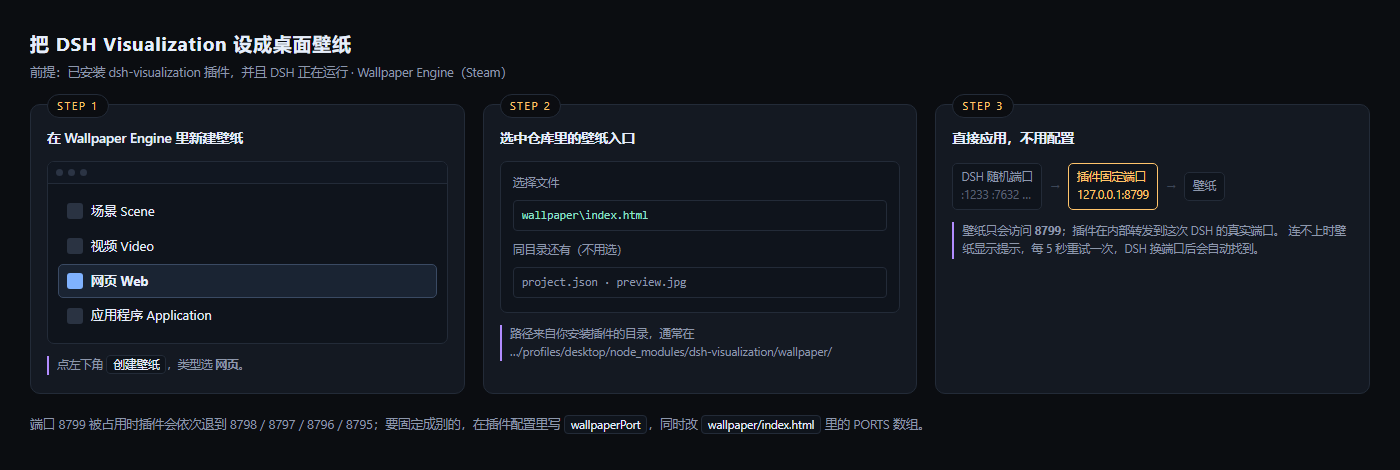
The panel can also run inside **Wallpaper Engine** (Steam). The plugin opens a small fixed-port
|
|
81
|
+
endpoint — `http://127.0.0.1:8799/` — because the DSH Web port changes on every launch and a
|
|
82
|
+
wallpaper cannot guess it.
|
|
83
|
+
|
|
84
|
+
**Requirements**: the plugin installed, and DSH running. If DSH is off the wallpaper shows a hint
|
|
85
|
+
and retries every 5 seconds; when DSH comes back on a different port the wallpaper finds it again.
|
|
86
|
+
|
|
87
|
+
|
|
88
|
+
|
|
89
|
+
**Install the wallpaper**
|
|
90
|
+
|
|
91
|
+
1. In Wallpaper Engine: **Create Wallpaper** → pick **Web** as the type
|
|
92
|
+
2. When it asks for a file, choose the `wallpaper/index.html` from this repository (or
|
|
93
|
+
`wallpaper/project.json` if your version of WE asks for a project)
|
|
94
|
+
3. Save the project somewhere permanent and preview it. It connects to `127.0.0.1:8799` by itself.
|
|
95
|
+
|
|
96
|
+
**Changing the port**: the plugin tries 8799, then 8798, 8797, 8796, 8795. To use a different base
|
|
97
|
+
port, set `wallpaperPort` in the plugin config; set it to `0` to turn the endpoint off.
|
|
98
|
+
|
|
99
|
+
**If it stays on the "not connected" screen**
|
|
100
|
+
|
|
101
|
+
| Cause | Fix |
|
|
102
|
+
|---|---|
|
|
103
|
+
| DSH is not running | start it |
|
|
104
|
+
| the plugin is disabled | enable `dsh-visualization` on the Plugins page |
|
|
105
|
+
| 8799–8795 are all taken | set `wallpaperPort` to a free port and edit `PORTS` in `wallpaper/index.html` |
|
|
106
|
+
| CPU spikes while gaming | in Wallpaper Engine, enable "pause when a fullscreen app runs" |
|
|
107
|
+
|
|
78
108
|
## When something looks wrong
|
|
79
109
|
|
|
80
110
|
| Symptom | Cause |
|
|
@@ -146,6 +176,7 @@ list and key the dictionaries by code.
|
|
|
146
176
|
|---|---|---|
|
|
147
177
|
| `basePath` | `/dsh-visualization` | route prefix |
|
|
148
178
|
| `allowRemote` | `false` | allow non-loopback peers. **This exposes session logs to anyone who can reach the port.** |
|
|
179
|
+
| `wallpaperPort` | `8799` | fixed local port for the wallpaper entry; tries 8799 down to 8795. `0` disables it |
|
|
149
180
|
|
|
150
181
|
## Routes
|
|
151
182
|
|
|
@@ -225,6 +256,34 @@ DSH 装在别处时用环境变量 `DSH_HOME` 或 `DSHVIZ_SESSIONS_ROOT` 指过
|
|
|
225
256
|
| 某个格子暗、没有线 | 它不在「连线轮数」范围内 |
|
|
226
257
|
| 格子亮、没有线 | 这一步没有工具调用(纯文字步) |
|
|
227
258
|
|
|
259
|
+
## 当桌面壁纸用(Wallpaper Engine)
|
|
260
|
+
|
|
261
|
+
这个面板也能放进 **Wallpaper Engine**(Steam)当桌面壁纸。插件会在本机开一个**固定端口**——
|
|
262
|
+
`http://127.0.0.1:8799/`——因为 DSH 的 Web 端口每次启动都会变,壁纸没法猜。
|
|
263
|
+
|
|
264
|
+
**前提**:装了插件,且 DSH 正在运行。DSH 关掉时壁纸显示提示并每 5 秒重试;DSH 换了端口重启,
|
|
265
|
+
壁纸会自己重新找到。
|
|
266
|
+
|
|
267
|
+

|
|
268
|
+
|
|
269
|
+
**导入步骤**
|
|
270
|
+
|
|
271
|
+
1. Wallpaper Engine 里点 **创建壁纸(Create Wallpaper)** → 类型选 **网页(Web)**
|
|
272
|
+
2. 选文件时指向本仓库的 `wallpaper/index.html`(如果你的版本要选工程,就选 `wallpaper/project.json`)
|
|
273
|
+
3. 存到固定位置,应用即可。它会自己连上 `127.0.0.1:8799`
|
|
274
|
+
|
|
275
|
+
**改端口**:插件会依次尝试 8799 → 8798 → 8797 → 8796 → 8795。想换起始端口,在插件配置里写
|
|
276
|
+
`wallpaperPort`;写 `0` 就是关掉这个入口。
|
|
277
|
+
|
|
278
|
+
**一直显示"没有连上"怎么办**
|
|
279
|
+
|
|
280
|
+
| 原因 | 处理 |
|
|
281
|
+
|---|---|
|
|
282
|
+
| DSH 没开 | 启动 DSH |
|
|
283
|
+
| 插件被禁用了 | 在插件页启用 `dsh-visualization` |
|
|
284
|
+
| 8795–8799 都被占用 | 配置里换个端口,同时改 `wallpaper/index.html` 里的 `PORTS` 数组 |
|
|
285
|
+
| 玩游戏时卡顿 | 在 Wallpaper Engine 里打开"其他应用全屏时暂停" |
|
|
286
|
+
|
|
228
287
|
## 给 agent / 开发者的编辑说明
|
|
229
288
|
|
|
230
289
|
**文件**:`index.js`(宿主入口,注册路由 + 注入 origin/策略)、`fold.cjs`(会话发现、zstd 帧解析、
|
|
@@ -248,7 +307,8 @@ DSH 装在别处时用环境变量 `DSH_HOME` 或 `DSHVIZ_SESSIONS_ROOT` 指过
|
|
|
248
307
|
`showDetail()` 的详情分支;新语言 = `EN` 词典 + `EN_RULES` 正则 + `EN_FN` 逻辑替换,并把 `LANG`
|
|
249
308
|
从 `'zh'|'en'` 改成列表;新工具配色 = `toolColor()`。
|
|
250
309
|
|
|
251
|
-
**配置**:`basePath`(默认 `/dsh-visualization`)、`allowRemote`(默认 `false
|
|
310
|
+
**配置**:`basePath`(默认 `/dsh-visualization`)、`allowRemote`(默认 `false`,打开等于把会话日志暴露给能访问该端口的人)、
|
|
311
|
+
`wallpaperPort`(默认 `8799`,壁纸用的固定端口,写 0 关闭)。
|
|
252
312
|
|
|
253
313
|
**已知限制**:内存随会话线性增长(十万条时每帧 `result()` 约 10~20ms);界面只有中英两门语言;
|
|
254
314
|
仪表只读,从不写会话文件。
|
package/fold.cjs
CHANGED
|
@@ -658,6 +658,40 @@ function setPolicy(policy) {
|
|
|
658
658
|
if (policy && typeof policy.allowRemote === 'boolean') ALLOW_REMOTE = policy.allowRemote
|
|
659
659
|
}
|
|
660
660
|
|
|
661
|
+
|
|
662
|
+
/* ---------------- 固定端口的"壁纸入口" ----------------
|
|
663
|
+
DSH 的 Web 端口每次启动都会变,壁纸里写死端口就必然失效。
|
|
664
|
+
这里在 127.0.0.1 上开一个固定端口(默认 8799,被占用就依次退),
|
|
665
|
+
只转发到本进程的 handle(),所以壁纸永远访问同一个地址。 */
|
|
666
|
+
let HELPER = null
|
|
667
|
+
|
|
668
|
+
function startHelper(preferredPort) {
|
|
669
|
+
if (HELPER) return HELPER
|
|
670
|
+
const http = require('node:http')
|
|
671
|
+
const base = Number(preferredPort) || 8799
|
|
672
|
+
let attempt = 0
|
|
673
|
+
const tryListen = () => {
|
|
674
|
+
if (attempt > 4) return null
|
|
675
|
+
const port = base - attempt
|
|
676
|
+
attempt++
|
|
677
|
+
const srv = http.createServer((rq, rs) => {
|
|
678
|
+
/* 把根路径映射成插件前缀,handle() 内部按 /dsh-visualization 路由 */
|
|
679
|
+
rq.url = '/dsh-visualization' + (rq.url || '/')
|
|
680
|
+
handle(rq, rs)
|
|
681
|
+
})
|
|
682
|
+
srv.on('error', () => { try { srv.close() } catch (e) { } tryListen() })
|
|
683
|
+
srv.listen(port, '127.0.0.1', () => {
|
|
684
|
+
HELPER = { port: port, server: srv }
|
|
685
|
+
try { console.log('[dsh-visualization] wallpaper entry: http://127.0.0.1:' + port + '/') } catch (e) { }
|
|
686
|
+
})
|
|
687
|
+
return srv
|
|
688
|
+
}
|
|
689
|
+
tryListen()
|
|
690
|
+
return HELPER
|
|
691
|
+
}
|
|
692
|
+
|
|
693
|
+
function helperPort() { return HELPER ? HELPER.port : 0 }
|
|
694
|
+
|
|
661
695
|
function handle(req, res) {
|
|
662
696
|
if (!ALLOW_REMOTE && !isLoopback(req)) {
|
|
663
697
|
res.writeHead(403, { 'content-type': 'text/plain; charset=utf-8' })
|
|
@@ -677,11 +711,16 @@ function handle(req, res) {
|
|
|
677
711
|
'cache-control': 'no-store',
|
|
678
712
|
'content-encoding': 'gzip',
|
|
679
713
|
vary: 'accept-encoding',
|
|
714
|
+
'access-control-allow-origin': '*',
|
|
680
715
|
})
|
|
681
716
|
res.end(zlib.gzipSync(body))
|
|
682
717
|
return
|
|
683
718
|
}
|
|
684
|
-
res.writeHead(200, {
|
|
719
|
+
res.writeHead(200, {
|
|
720
|
+
'content-type': 'application/json; charset=utf-8',
|
|
721
|
+
'cache-control': 'no-store',
|
|
722
|
+
'access-control-allow-origin': '*',
|
|
723
|
+
})
|
|
685
724
|
res.end(body)
|
|
686
725
|
}
|
|
687
726
|
/* 救急:把浏览器里还开着的那一页 DOM 存回磁盘(instrument.html 被误覆盖时用) */
|
|
@@ -832,4 +871,7 @@ function handle(req, res) {
|
|
|
832
871
|
res.writeHead(404); res.end('not found')
|
|
833
872
|
}
|
|
834
873
|
|
|
835
|
-
module.exports = {
|
|
874
|
+
module.exports = {
|
|
875
|
+
handle, listSessions, pickSession, refresh, fold, makeFolder,
|
|
876
|
+
setOrigin, setPolicy, startHelper, helperPort, hasZstd: HAS_ZSTD,
|
|
877
|
+
}
|
package/index.js
CHANGED
|
@@ -27,4 +27,11 @@ export function apply(ctx, config = {}) {
|
|
|
27
27
|
path: prefix,
|
|
28
28
|
handler: (req2, res) => core.handle(req2, res),
|
|
29
29
|
}))
|
|
30
|
+
|
|
31
|
+
/* 固定端口的壁纸入口(默认 8799):桌面壁纸没法知道 DSH 每次随机分配的端口。
|
|
32
|
+
config.wallpaperPort 可以改,写 0 关闭。 */
|
|
33
|
+
try {
|
|
34
|
+
const port = config && config.wallpaperPort !== undefined ? Number(config.wallpaperPort) : 8799
|
|
35
|
+
if (port > 0) ctx.effect(() => (core.startHelper(port), () => { }))
|
|
36
|
+
} catch (e) { /* 端口被占之类的情况不影响主路由 */ }
|
|
30
37
|
}
|
package/package.json
CHANGED
|
@@ -1,6 +1,6 @@
|
|
|
1
1
|
{
|
|
2
2
|
"name": "dsh-visualization",
|
|
3
|
-
"version": "0.1.
|
|
3
|
+
"version": "0.1.4",
|
|
4
4
|
"description": "DSH Visualization — a session instrument: rings, turns, tools and background jobs of a live DeepSeek Harness session.",
|
|
5
5
|
"type": "module",
|
|
6
6
|
"main": "index.js",
|
|
@@ -27,7 +27,8 @@
|
|
|
27
27
|
"icon.svg",
|
|
28
28
|
"LICENSE",
|
|
29
29
|
"README.md",
|
|
30
|
-
"FAQ.md"
|
|
30
|
+
"FAQ.md",
|
|
31
|
+
"wallpaper"
|
|
31
32
|
],
|
|
32
33
|
"keywords": [
|
|
33
34
|
"dsh",
|
|
@@ -0,0 +1,97 @@
|
|
|
1
|
+
<!doctype html>
|
|
2
|
+
<html lang="zh">
|
|
3
|
+
<head>
|
|
4
|
+
<meta charset="utf-8">
|
|
5
|
+
<style>
|
|
6
|
+
:root{
|
|
7
|
+
--bg:#0b0d11; --panel:#141922; --line:#232b38; --txt:#e6edfa; --dim:#8d97ab;
|
|
8
|
+
--amber:#ffc46b; --mint:#8fe0c8; --coral:#ff7a5c; --violet:#b28cff; --sky:#7fb2ff;
|
|
9
|
+
}
|
|
10
|
+
*{box-sizing:border-box}
|
|
11
|
+
html,body{margin:0;background:var(--bg);font:13px/1.6 "Segoe UI","Microsoft YaHei",sans-serif;color:var(--txt)}
|
|
12
|
+
.wrap{width:1400px;padding:28px 30px 30px}
|
|
13
|
+
h1{margin:0 0 4px;font-size:19px;letter-spacing:.04em}
|
|
14
|
+
.sub{color:var(--dim);font-size:12.5px;margin-bottom:22px}
|
|
15
|
+
.row{display:flex;gap:18px}
|
|
16
|
+
.card{flex:1;background:var(--panel);border:1px solid var(--line);border-radius:10px;padding:16px 16px 18px;position:relative}
|
|
17
|
+
.n{position:absolute;top:-11px;left:16px;background:var(--bg);border:1px solid var(--line);color:var(--amber);
|
|
18
|
+
font-size:11px;letter-spacing:.14em;padding:2px 9px;border-radius:20px}
|
|
19
|
+
.t{font-size:13.5px;margin:6px 0 12px;font-weight:600}
|
|
20
|
+
.muted{color:var(--dim)}
|
|
21
|
+
.kbd{border:1px solid var(--line);background:#0f141c;border-radius:4px;padding:1px 6px;font-size:11.5px;color:var(--txt)}
|
|
22
|
+
.mock{border:1px solid var(--line);border-radius:7px;overflow:hidden;background:#0f141c}
|
|
23
|
+
.mock .bar{height:22px;background:#111721;border-bottom:1px solid var(--line);display:flex;align-items:center;padding:0 8px;gap:5px}
|
|
24
|
+
.dot{width:7px;height:7px;border-radius:50%;background:#2b3444}
|
|
25
|
+
.mock .body{padding:10px}
|
|
26
|
+
.opt{display:flex;align-items:center;gap:8px;padding:6px 8px;border-radius:5px;border:1px solid transparent}
|
|
27
|
+
.opt.sel{background:#1a2433;border-color:#2f4straight}
|
|
28
|
+
.opt.sel{border-color:#3a4a63}
|
|
29
|
+
.opt .ico{width:16px;height:16px;border-radius:3px;background:#2a3342}
|
|
30
|
+
.opt.sel .ico{background:var(--sky)}
|
|
31
|
+
.foot{margin-top:14px;display:flex;justify-content:space-between;align-items:center}
|
|
32
|
+
.btn{background:#1d2634;border:1px solid var(--line);border-radius:5px;padding:5px 12px;font-size:12px;color:var(--dim)}
|
|
33
|
+
.btn.on{background:var(--amber);border-color:var(--amber);color:#1a1206;font-weight:600}
|
|
34
|
+
.path{font-family:Consolas,monospace;font-size:11.5px;color:var(--mint);background:#0f141c;border:1px solid var(--line);
|
|
35
|
+
border-radius:4px;padding:5px 8px;display:block;margin-top:8px;word-break:break-all}
|
|
36
|
+
.flow{margin-top:14px;display:flex;align-items:center;gap:8px;flex-wrap:wrap;font-size:11.5px}
|
|
37
|
+
.node{border:1px solid var(--line);border-radius:5px;padding:4px 8px;background:#0f141c;color:var(--dim)}
|
|
38
|
+
.node.hot{border-color:var(--amber);color:var(--amber)}
|
|
39
|
+
.arw{color:#3d4757}
|
|
40
|
+
.note{margin-top:12px;font-size:11.5px;color:var(--dim);border-left:2px solid var(--violet);padding-left:8px}
|
|
41
|
+
</style>
|
|
42
|
+
</head>
|
|
43
|
+
<body>
|
|
44
|
+
<div class="wrap">
|
|
45
|
+
<h1>把 DSH Visualization 设成桌面壁纸</h1>
|
|
46
|
+
<div class="sub">前提:已安装 dsh-visualization 插件,并且 DSH 正在运行 · Wallpaper Engine(Steam)</div>
|
|
47
|
+
|
|
48
|
+
<div class="row">
|
|
49
|
+
<div class="card">
|
|
50
|
+
<div class="n">STEP 1</div>
|
|
51
|
+
<div class="t">在 Wallpaper Engine 里新建壁纸</div>
|
|
52
|
+
<div class="mock">
|
|
53
|
+
<div class="bar"><span class="dot"></span><span class="dot"></span><span class="dot"></span></div>
|
|
54
|
+
<div class="body">
|
|
55
|
+
<div class="opt"><span class="ico"></span>场景 Scene</div>
|
|
56
|
+
<div class="opt"><span class="ico"></span>视频 Video</div>
|
|
57
|
+
<div class="opt sel"><span class="ico"></span><b>网页 Web</b></div>
|
|
58
|
+
<div class="opt"><span class="ico"></span>应用程序 Application</div>
|
|
59
|
+
</div>
|
|
60
|
+
</div>
|
|
61
|
+
<div class="note">点左下角 <span class="kbd">创建壁纸</span>,类型选 <b>网页</b>。</div>
|
|
62
|
+
</div>
|
|
63
|
+
|
|
64
|
+
<div class="card">
|
|
65
|
+
<div class="n">STEP 2</div>
|
|
66
|
+
<div class="t">选中仓库里的壁纸入口</div>
|
|
67
|
+
<div class="mock" style="padding:12px 12px 14px">
|
|
68
|
+
<div class="muted" style="font-size:11.5px">选择文件</div>
|
|
69
|
+
<span class="path">wallpaper\index.html</span>
|
|
70
|
+
<div class="muted" style="font-size:11.5px;margin-top:10px">同目录还有(不用选)</div>
|
|
71
|
+
<span class="path" style="color:var(--dim)">project.json · preview.jpg</span>
|
|
72
|
+
</div>
|
|
73
|
+
<div class="note">路径来自你安装插件的目录,通常在<br><span style="color:var(--dim)">…/profiles/desktop/node_modules/dsh-visualization/wallpaper/</span></div>
|
|
74
|
+
</div>
|
|
75
|
+
|
|
76
|
+
<div class="card">
|
|
77
|
+
<div class="n">STEP 3</div>
|
|
78
|
+
<div class="t">直接应用,不用配置</div>
|
|
79
|
+
<div class="flow">
|
|
80
|
+
<span class="node">DSH 随机端口<br><span style="opacity:.6">:1233 :7632 …</span></span>
|
|
81
|
+
<span class="arw">→</span>
|
|
82
|
+
<span class="node hot">插件固定端口<br>127.0.0.1:8799</span>
|
|
83
|
+
<span class="arw">→</span>
|
|
84
|
+
<span class="node">壁纸</span>
|
|
85
|
+
</div>
|
|
86
|
+
<div class="note">壁纸只会访问 <b>8799</b>;插件在内部转发到这次 DSH 的真实端口。
|
|
87
|
+
连不上时壁纸显示提示,每 5 秒重试一次,DSH 换端口后会自动找到。</div>
|
|
88
|
+
</div>
|
|
89
|
+
</div>
|
|
90
|
+
|
|
91
|
+
<div class="sub" style="margin-top:20px;margin-bottom:0">
|
|
92
|
+
端口 8799 被占用时插件会依次退到 8798 / 8797 / 8796 / 8795;要固定成别的,在插件配置里写
|
|
93
|
+
<span class="kbd">wallpaperPort</span>,同时改 <span class="kbd">wallpaper/index.html</span> 里的 PORTS 数组。
|
|
94
|
+
</div>
|
|
95
|
+
</div>
|
|
96
|
+
</body>
|
|
97
|
+
</html>
|
|
@@ -0,0 +1,62 @@
|
|
|
1
|
+
<!doctype html>
|
|
2
|
+
<html lang="zh">
|
|
3
|
+
<head>
|
|
4
|
+
<meta charset="utf-8">
|
|
5
|
+
<title>DSH Visualization</title>
|
|
6
|
+
<style>
|
|
7
|
+
html, body { margin: 0; height: 100%; background: #0b0d11; overflow: hidden; }
|
|
8
|
+
iframe { width: 100vw; height: 100vh; border: 0; display: block; }
|
|
9
|
+
#off {
|
|
10
|
+
position: fixed; inset: 0; display: none; flex-direction: column;
|
|
11
|
+
align-items: center; justify-content: center; gap: 14px;
|
|
12
|
+
color: #8d97ab; font: 15px/1.7 "Segoe UI", "Microsoft YaHei", sans-serif;
|
|
13
|
+
background: radial-gradient(circle at 50% 45%, #141a24, #0b0d11 70%);
|
|
14
|
+
text-align: center;
|
|
15
|
+
}
|
|
16
|
+
#off b { color: #e6edfa; font-size: 19px; font-weight: 600; letter-spacing: .04em; }
|
|
17
|
+
#off code { color: #ffc46b; background: #1a1f29; padding: 2px 7px; border-radius: 4px; font-size: 13px; }
|
|
18
|
+
</style>
|
|
19
|
+
</head>
|
|
20
|
+
<body>
|
|
21
|
+
<iframe id="frame" allow="cross-origin-isolated"></iframe>
|
|
22
|
+
<div id="off">
|
|
23
|
+
<b>DSH Visualization</b>
|
|
24
|
+
<div>没有连上 DeepSeek Harness。</div>
|
|
25
|
+
<div>请确认:装了 <code>dsh-visualization</code> 插件,并且 DSH 正在运行。</div>
|
|
26
|
+
<div style="opacity:.65">每 5 秒自动重试</div>
|
|
27
|
+
</div>
|
|
28
|
+
<script>
|
|
29
|
+
/* 插件的壁纸入口固定在这个区间(8799 起,被占用依次往下) */
|
|
30
|
+
var PORTS = [8799, 8798, 8797, 8796, 8795];
|
|
31
|
+
var frame = document.getElementById('frame');
|
|
32
|
+
var off = document.getElementById('off');
|
|
33
|
+
var chosen = 0;
|
|
34
|
+
|
|
35
|
+
function probe() {
|
|
36
|
+
var i = 0;
|
|
37
|
+
function next() {
|
|
38
|
+
if (i >= PORTS.length) { frame.style.display = 'none'; off.style.display = 'flex'; chosen = 0; return; }
|
|
39
|
+
var p = PORTS[i++];
|
|
40
|
+
var ctl = new AbortController();
|
|
41
|
+
var timer = setTimeout(function () { ctl.abort() }, 1200);
|
|
42
|
+
fetch('http://127.0.0.1:' + p + '/state', { signal: ctl.signal, cache: 'no-store' })
|
|
43
|
+
.then(function (r) { return r.ok ? r.json() : null })
|
|
44
|
+
.then(function (j) {
|
|
45
|
+
clearTimeout(timer);
|
|
46
|
+
if (!j) return next();
|
|
47
|
+
chosen = p;
|
|
48
|
+
off.style.display = 'none';
|
|
49
|
+
frame.style.display = 'block';
|
|
50
|
+
if (frame.src.indexOf(':' + p + '/') < 0) frame.src = 'http://127.0.0.1:' + p + '/';
|
|
51
|
+
})
|
|
52
|
+
.catch(function () { clearTimeout(timer); next(); });
|
|
53
|
+
}
|
|
54
|
+
next();
|
|
55
|
+
}
|
|
56
|
+
|
|
57
|
+
probe();
|
|
58
|
+
/* 断线后自动重连:DSH 重启会换端口,所以每次都重新探测 */
|
|
59
|
+
setInterval(function () { if (!chosen) probe(); }, 5000);
|
|
60
|
+
</script>
|
|
61
|
+
</body>
|
|
62
|
+
</html>
|
|
Binary file
|
|
@@ -0,0 +1,13 @@
|
|
|
1
|
+
{
|
|
2
|
+
"contentrating": "Everyone",
|
|
3
|
+
"description": "A live session instrument for DeepSeek Harness: seven rings, a turn timeline, per-step ladders. Needs the dsh-visualization plugin installed and DSH running — the wallpaper talks to http://127.0.0.1:8799/, which the plugin opens on a fixed port. Noncommercial; visual language derived from HALOFLUX by Ryder191.",
|
|
4
|
+
"file": "index.html",
|
|
5
|
+
"preview": "preview.jpg",
|
|
6
|
+
"tags": [
|
|
7
|
+
"Abstract",
|
|
8
|
+
"Technology"
|
|
9
|
+
],
|
|
10
|
+
"title": "DSH Visualization",
|
|
11
|
+
"type": "web",
|
|
12
|
+
"version": 1
|
|
13
|
+
}
|