dsh-todo-board 0.4.1
This diff represents the content of publicly available package versions that have been released to one of the supported registries. The information contained in this diff is provided for informational purposes only and reflects changes between package versions as they appear in their respective public registries.
- package/CHANGELOG.md +56 -0
- package/LICENSE +21 -0
- package/README.md +177 -0
- package/client/client.js +1261 -0
- package/cordis.patch.yml +15 -0
- package/lib/index.js +1253 -0
- package/package.json +74 -0
- package/tools/capture-screenshots.mjs +254 -0
- package/tools/smoke.mjs +561 -0
package/CHANGELOG.md
ADDED
|
@@ -0,0 +1,56 @@
|
|
|
1
|
+
# Changelog
|
|
2
|
+
|
|
3
|
+
## 0.4.1
|
|
4
|
+
|
|
5
|
+
- 市场素材:`assets/screenshot-1.png`(整体界面)与 `assets/screenshot-2.png`(面板特写)由 `tools/capture-screenshots.mjs` 从真实运行中的 UI 渲染生成,配 `screenshots.json` 声明;README 顶部展示面板截图。
|
|
6
|
+
|
|
7
|
+
## 0.4.0
|
|
8
|
+
|
|
9
|
+
- **待办可以带图片**:图片存进 DSH 的附件库(走和聊天上传同一条 `attachments.saveImage` 通路,限制、媒体类型、归一化都用 harness 自己的),派发时作为**真正的 image 块**和提示词一起发给模型——不再是"文件名写在文字里"。
|
|
10
|
+
- 面板:新增框有「📎 图片」按钮(最多 4 张,PNG/JPG/WebP/GIF),带缩略图预览、逐张移除;行上显示缩略图,点击放大,✕ 单张移除。
|
|
11
|
+
- 图片字节由插件自己的 `GET /dsh-todo-board/image?id=…` 提供:harness 自带的图片读取是**会话作用域**的,只认会话日志里引用过的附件,而待办的附件存在板上——所以板自己当权威,未被任何待办引用的 id 一律 404。
|
|
12
|
+
- `todo_board`:`add` 支持 `images`(主机上图片文件的绝对路径,host 侧读盘并入库),`list` 标注图片张数,输出 schema 增加 `imageCount`。
|
|
13
|
+
- 派发前会检查目标模型是否声明了 image:文本模型(比如 `deepseek-v4-flash`)会直接给出「目标会话的模型不接受图片输入」,而不是等适配器抛 `UNSUPPORTED_CONTENT`。
|
|
14
|
+
- 附件不阻塞会话:`attachments` 服务缺失、格式不支持、超过 4 张都会得到明确错误,会话照常创建。
|
|
15
|
+
- 修复:`sendTo` 改成同步写 `dispatchedAt` + `nextDue` 跳过在途派发——图片能力探测引入了 await,否则定时器会在派发完成前把同一条待办再挑一次,导致 `fireDue` ⇄ `armTimer` 无限递归。
|
|
16
|
+
|
|
17
|
+
## 0.3.1
|
|
18
|
+
|
|
19
|
+
- **新会话归入工作区**:`自动新会话` 创建的会话现在会被登记到所属工作区(`workspaceRegistry.resolveByPath(dirPath)` + `attachSession`),侧栏不再把它列为「未分组」。分组是工作区记录上的 `sessionIds`,不是会话头字段——DSH 自己开会话时会 attach,而 `agents.create` 不会。
|
|
20
|
+
- 分组失败不影响会话:目录为空、没有 workspaceRegistry 服务、或 attach 被拒(比如 cwd 校验不通过)时只记一条 warn,会话照常创建并派发。
|
|
21
|
+
- 测试新增:断言新会话被 attach 到待办目录对应的工作区。
|
|
22
|
+
|
|
23
|
+
## 0.3.0
|
|
24
|
+
|
|
25
|
+
- **新会话绑定**:`自动新会话` 的待办在第一次派发后把创建的会话 id 记到自己身上(`runSessionId`),之后 ▶ 或回合结束自动接续都**复用这个会话**,不再一次运行开一个会话;只有绑定失效(会话已不在)或用户手动解绑,才会再开一个新的。
|
|
26
|
+
- 面板:`自动新会话` 行显示绑定的会话标签(点 ✕ 解绑);`runSessionId` 可通过 `patch` 接口清除或改写。
|
|
27
|
+
- 面板:每行标题下多一行等宽只读信息 `目录 … · 定时 …`,窄面板里也一定能看到工作目录与执行时间,不再只靠小标签。
|
|
28
|
+
- 面板:页脚加构建标记 `v0.3.0`,用于确认浏览器加载的是哪一版客户端。
|
|
29
|
+
- 面板:工作目录标签的悬浮提示给出完整路径(或明确说明「未绑定目录」)。
|
|
30
|
+
|
|
31
|
+
## 0.2.0
|
|
32
|
+
|
|
33
|
+
- **定时执行**:每条待办可带一个本地时间(`YYYY-MM-DDTHH:mm`),到点前不派发,到点后按自身模式执行。
|
|
34
|
+
- Host 侧一个自我重排的定时器 + 30s 兜底 tick(笔记本休眠丢掉的 timeout 靠它补上),两者都靠 `dispatchedAt` / `remindedAt` 幂等。
|
|
35
|
+
- 回合结束钩子会跳过**未到点**的待办,不再把定时任务当成普通下一条提前跑掉。
|
|
36
|
+
- 面板新增「定时」时间选择器、行内定时标签(已到点变黄,点击取消)、到点桌面通知(提醒模式)。
|
|
37
|
+
- `todo_board` 工具新增 `schedule` action,`add` 支持 `schedule` 参数,`list` 输出标注「未到点 / 已到点」。
|
|
38
|
+
- 修复:面板新建的待办没有 `runSessionId`,定时派发会落到「没有可接续的活动会话」;现在会回退到 `sourceSessionId`。
|
|
39
|
+
- 修复:`newSession` 模式先于会话查找判定,不会再被来源会话抢先接续。
|
|
40
|
+
- 所有板写入都经由 `afterChange()`(save + 重新定时),避免定时目标被改动后计时器还指着旧时间。
|
|
41
|
+
|
|
42
|
+
## 0.1.0
|
|
43
|
+
|
|
44
|
+
首个版本。
|
|
45
|
+
|
|
46
|
+
- 右上角浮窗(`shell.overlay`):按工作目录分组,分段筛选(当前目录 / 当前会话 / 全部,带计数)。
|
|
47
|
+
- 每条待办三档执行模式:提醒 / 自动续跑(注入当前会话)/ 自动新会话(新建同目录会话)。
|
|
48
|
+
- 双勾选:左勾「AI 已完成」由模型调用 `todo_board action=done` 自动勾选,右勾「已验收」只有用户能勾。
|
|
49
|
+
- 模型工具 `todo_board`:`list / add / done / reopen / note`,配合系统提示段落让模型干完一项就查下一条。
|
|
50
|
+
- 回合结束钩子 `agent/turn-stopping`:按列表从上到下的顺序派发同目录下一条未派发的自动模式待办。
|
|
51
|
+
- 面板可拖动、可缩放,位置与尺寸持久化到 `localStorage`;双击标题栏还原。
|
|
52
|
+
- 多行输入框(自动增高),`Enter` 添加、`Shift+Enter` 换行。
|
|
53
|
+
- 行内编辑:双击标题改名,点模式标签循环切换。
|
|
54
|
+
- 防重复派发:一条待办派发过一次即标记「已派发」,每回合最多派发一条。
|
|
55
|
+
- 「自动新会话」通过 `ctx.root` + `agentPresets.mount()` 创建,会话归属应用根上下文,与插件生命周期解耦。
|
|
56
|
+
- 侧边栏底部的 `Cordis Plugin` 入口折起,入口移到本面板底部;打开的 Cordis 面板显示在本面板正下方(右对齐、不重叠),并随本面板的拖动/缩放移动。
|
package/LICENSE
ADDED
|
@@ -0,0 +1,21 @@
|
|
|
1
|
+
MIT License
|
|
2
|
+
|
|
3
|
+
Copyright (c) 2026 sueqet
|
|
4
|
+
|
|
5
|
+
Permission is hereby granted, free of charge, to any person obtaining a copy
|
|
6
|
+
of this software and associated documentation files (the "Software"), to deal
|
|
7
|
+
in the Software without restriction, including without limitation the rights
|
|
8
|
+
to use, copy, modify, merge, publish, distribute, sublicense, and/or sell
|
|
9
|
+
copies of the Software, and to permit persons to whom the Software is
|
|
10
|
+
furnished to do so, subject to the following conditions:
|
|
11
|
+
|
|
12
|
+
The above copyright notice and this permission notice shall be included in all
|
|
13
|
+
copies or substantial portions of the Software.
|
|
14
|
+
|
|
15
|
+
THE SOFTWARE IS PROVIDED "AS IS", WITHOUT WARRANTY OF ANY KIND, EXPRESS OR
|
|
16
|
+
IMPLIED, INCLUDING BUT NOT LIMITED TO THE WARRANTIES OF MERCHANTABILITY,
|
|
17
|
+
FITNESS FOR A PARTICULAR PURPOSE AND NONINFRINGEMENT. IN NO EVENT SHALL THE
|
|
18
|
+
AUTHORS OR COPYRIGHT HOLDERS BE LIABLE FOR ANY CLAIM, DAMAGES OR OTHER
|
|
19
|
+
LIABILITY, WHETHER IN AN ACTION OF CONTRACT, TORT OR OTHERWISE, ARISING FROM,
|
|
20
|
+
OUT OF OR IN CONNECTION WITH THE SOFTWARE OR THE USE OR OTHER DEALINGS IN THE
|
|
21
|
+
SOFTWARE.
|
package/README.md
ADDED
|
@@ -0,0 +1,177 @@
|
|
|
1
|
+
# dsh-todo-board
|
|
2
|
+
|
|
3
|
+
**A cross-session TODO board for DeepSeek Harness — hand the agent one task at a time, and it picks up the next one by itself.**
|
|
4
|
+
|
|
5
|
+
**DeepSeek Harness(DSH)的跨会话 TODO 板 —— 一次只派一件事,干完它自己去拿下一件。**
|
|
6
|
+
|
|
7
|
+
[](https://github.com/topics/dsh-plugin)
|
|
8
|
+
[](LICENSE)
|
|
9
|
+
[](package.json)
|
|
10
|
+
|
|
11
|
+
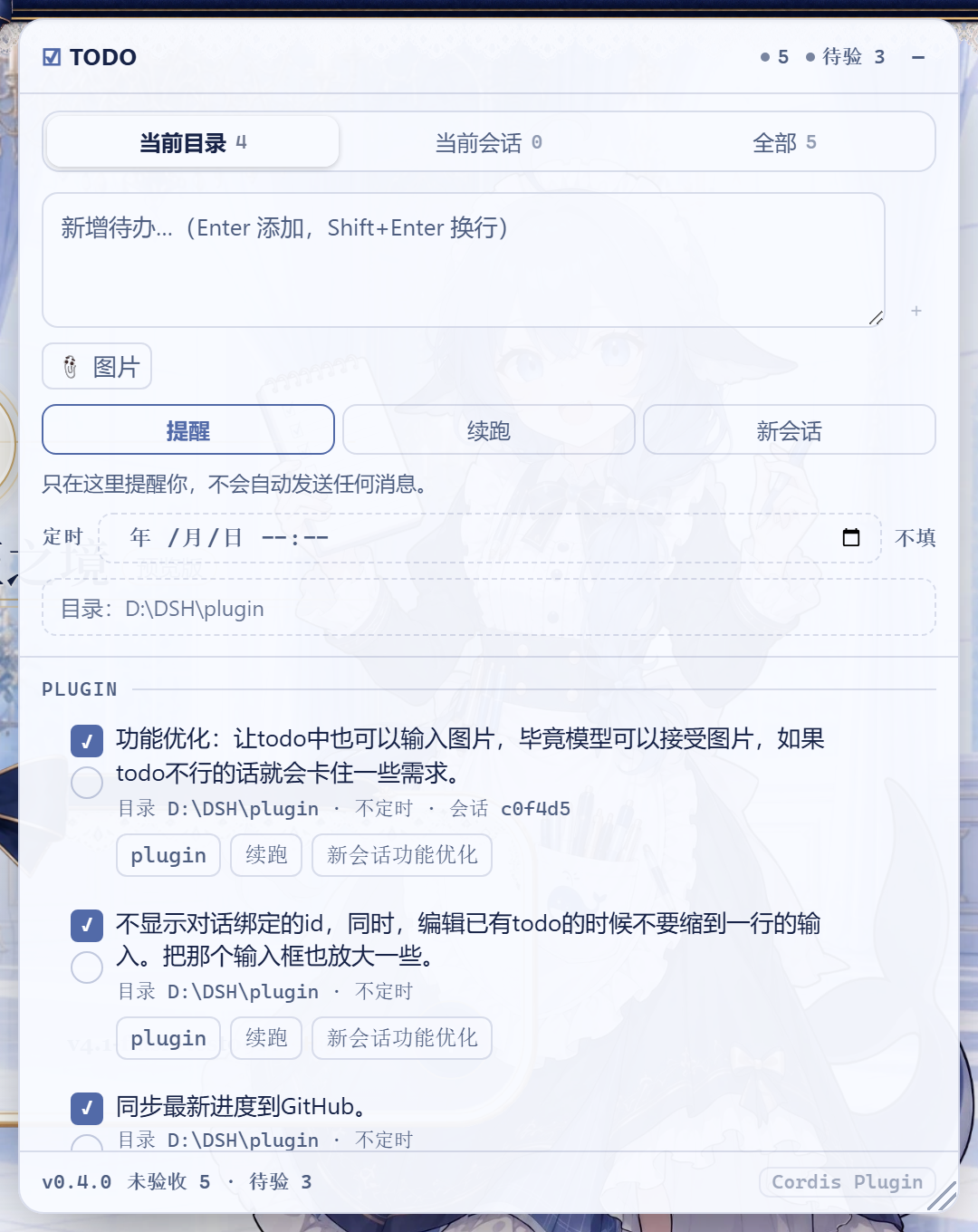
|
|
12
|
+
|
|
13
|
+
---
|
|
14
|
+
|
|
15
|
+
## 它解决什么 / Why
|
|
16
|
+
|
|
17
|
+
让 AI 干完一件事之后,自己去待办板里找同一目录下还没做完的下一件继续干 —— 不用你盯着逐个验收,也不用一次性把一堆任务塞给它、结果每件都做得半吊子。
|
|
18
|
+
|
|
19
|
+
Let the agent finish one thing, then look up the next unfinished task **in the same working directory** and keep going. No babysitting each step, no dumping a pile of tasks on it at once and getting five half-done jobs back.
|
|
20
|
+
|
|
21
|
+
## 安装 / Install
|
|
22
|
+
|
|
23
|
+
```sh
|
|
24
|
+
dsh plugin --profile web add dsh-todo-board # 发布到 npm 之后 / once published to npm
|
|
25
|
+
dsh plugin --profile web add <git-url-or-path> # 或直接从仓库/目录安装 / or from a repo or local path
|
|
26
|
+
```
|
|
27
|
+
|
|
28
|
+
安装后**重启 Profile**(重新执行 `dsh web`)才会装载 —— 本插件是 host 组合里的一行,不是运行时热加载。
|
|
29
|
+
|
|
30
|
+
Restart the profile afterwards (`dsh web` again): the plugin is a row in the host composition, not a runtime hot-load.
|
|
31
|
+
|
|
32
|
+
卸载 / Uninstall:
|
|
33
|
+
|
|
34
|
+
```sh
|
|
35
|
+
dsh plugin --profile web remove dsh-todo-board
|
|
36
|
+
```
|
|
37
|
+
|
|
38
|
+
## 快速上手 / Quick start
|
|
39
|
+
|
|
40
|
+
1. 右上角出现浮窗,输入一条待办,选执行模式,点「添加」。
|
|
41
|
+
2. 让 AI 去做这件事。它做完会调用 `todo_board action=done` 给自己打左勾,然后查同目录下一条。
|
|
42
|
+
3. 你验收后点右勾;底部「清理已验收」批量清掉。
|
|
43
|
+
|
|
44
|
+
1. Type a task into the floating panel, pick a run mode, hit add.
|
|
45
|
+
2. Let the agent work. When it finishes it calls `todo_board action=done` to tick its own box, then looks for the next task in the same directory.
|
|
46
|
+
3. After you verify, tick the right-hand box; "清理已验收" clears the verified ones.
|
|
47
|
+
|
|
48
|
+
## 三档执行模式 / Run modes
|
|
49
|
+
|
|
50
|
+
每条待办在新增时必须选一档(默认「提醒」)。Each task carries exactly one mode, chosen when you add it.
|
|
51
|
+
|
|
52
|
+
| 模式 | 行为 | Behaviour |
|
|
53
|
+
| --- | --- | --- |
|
|
54
|
+
| 提醒 | 不自动做任何事,等你在浮窗里点 ▶ | Nothing automatic; you press ▶ when you want it |
|
|
55
|
+
| 自动续跑 | AI 回合结束时,把同目录下一条待办注入**当前会话**继续跑 | At turn end, inject the next task in the same directory into the **current session** |
|
|
56
|
+
| 自动新会话 | AI 回合结束时,新建一个同目录会话并执行该待办 | At turn end, create a **new session** in the same directory and run the task there |
|
|
57
|
+
|
|
58
|
+
派发顺序 = 面板里**从上到下**的顺序。拖动行首 `⠿` 调整,顺序持久化。
|
|
59
|
+
|
|
60
|
+
Dispatch order is the panel's **top-to-bottom** order. Drag the `⠿` handle to change it; the order is persisted.
|
|
61
|
+
|
|
62
|
+
「自动新会话」第一次派发时创建会话,并把它**绑定**到这条待办上:之后 ▶ 或回合结束自动接续都复用同一个会话,不会一次运行开一个会话。绑定会话已不在(比如你把它删了)时,下一次派发才会再开一个新的;想手动换一个新会话,点行上的 `会话 … ✕` 解绑即可。
|
|
63
|
+
|
|
64
|
+
A `自动新会话` task opens its session once and **binds** it to the row: later ▶ presses and turn-end handoffs reuse that same session instead of opening another. Only a dead binding (the session was removed) — or clicking the `会话 … ✕` chip to unbind — makes the next dispatch open a fresh one.
|
|
65
|
+
|
|
66
|
+
新会话会被登记进待办目录所属的**工作区**,侧栏里和手动开的会话一样归组(不是「未分组」)。
|
|
67
|
+
|
|
68
|
+
## 图片附件 / Attached images
|
|
69
|
+
|
|
70
|
+
待办可以带图片(最多 4 张,PNG / JPG / WebP / GIF)。图片存进 DSH 的**附件库**,派发时作为**真正的图片**和提示词一起发给模型——不是把文件名写进文字里。
|
|
71
|
+
|
|
72
|
+
A task may carry images (up to 4; PNG / JPG / WebP / GIF). They are stored in DSH's **attachment store** and dispatched as **real images** alongside the prompt — not as filenames written into text.
|
|
73
|
+
|
|
74
|
+
- 新增框里点「📎 图片」选图,带缩略图预览,可逐张移除;行上显示缩略图,点击放大,✕ 移除单张。
|
|
75
|
+
- 上限、媒体类型与归一化都用 harness 自己那套(同一条 `attachments.saveImage` 通路),不是本插件自己定的规则。
|
|
76
|
+
- 图片字节由本插件自己的 `GET /dsh-todo-board/image?id=…` 提供:harness 自带的图片读取是**会话作用域**的(只认会话日志里引用过的附件),而待办的附件存在板上,所以板自己当权威——没被任何待办引用的 id 一律 404。
|
|
77
|
+
- **目标模型必须支持图片**:派发前会查模型是否声明了 `image`。文本模型(如 `deepseek-v4-flash`)会直接提示「目标会话的模型不接受图片输入」,而不是让适配器抛 `UNSUPPORTED_CONTENT`。这是 DSH 的模型声明问题,不是插件的限制。
|
|
78
|
+
|
|
79
|
+
- Pick images with the composer's 📎 button; the row shows thumbnails, click to enlarge, ✕ to drop one.
|
|
80
|
+
- Limits, media types and normalization come from the harness' own attachment admission.
|
|
81
|
+
- Bytes are served by this plugin's `GET /dsh-todo-board/image?id=…`, because the shipped image route is **session-scoped** and would refuse an attachment no session log references. The board is the authority instead: an unreferenced id is a 404.
|
|
82
|
+
- **The target model must accept images.** Dispatch checks the model's declared modalities first and reports a clear message for a text-only model. That is a DSH model-declaration matter, not a plugin limit.
|
|
83
|
+
|
|
84
|
+
## 定时执行 / Scheduled execution
|
|
85
|
+
|
|
86
|
+
每条待办都可以带一个**本地时间**(`YYYY-MM-DDTHH:mm`,分钟精度)。到点之前这条待办不会被派发;到点之后 DSH 按它自己的模式执行它 —— 就像你此刻按了 ▶ 一样。
|
|
87
|
+
|
|
88
|
+
Any task may carry a **local time** (`YYYY-MM-DDTHH:mm`, minute precision). Before that minute the task is not dispatched; when it arrives, DSH runs it in its own mode, exactly as if you had pressed ▶ at that moment.
|
|
89
|
+
|
|
90
|
+
- 新增框里的「定时」一行用浏览器的时间选择器挑时间;留空 = 立即可执行。
|
|
91
|
+
- 行上的定时标签显示时间,**已到点**会变黄;点它即取消定时。
|
|
92
|
+
- `提醒` 模式到点只弹一条桌面通知(需要浏览器通知权限),不会自动给模型发消息;`自动续跑` / `自动新会话` 到点才真正派发。
|
|
93
|
+
- 定时只判一次:派发过(或被提醒过)就不再重复触发。错过的时间(DSH 当时没运行)会在下次启动后立刻补上。
|
|
94
|
+
- 时间用**主机本地时区**解释;面板存的就是你选的那一刻。
|
|
95
|
+
|
|
96
|
+
- The composer's 定时 row uses the browser's own picker; empty means "runnable now".
|
|
97
|
+
- The row chip shows the time and turns yellow once due; click it to clear the schedule.
|
|
98
|
+
- `提醒` mode only raises a desktop notification at that minute (browser permission required); `自动续跑` / `自动新会话` dispatch for real.
|
|
99
|
+
- A time fires once: a dispatched or reminded row never fires again. A time missed while DSH was not running fires on the next start.
|
|
100
|
+
- Times are interpreted in the **host machine's local zone** — the board stores the instant you picked.
|
|
101
|
+
|
|
102
|
+
## 双勾选 / Two checkboxes
|
|
103
|
+
|
|
104
|
+
| 勾 | 谁勾 | 含义 |
|
|
105
|
+
| --- | --- | --- |
|
|
106
|
+
| 左(方框) | 模型自己调 `todo_board action=done`,也可手点 | AI 已完成,等你验收 |
|
|
107
|
+
| 右(圆框) | 只有用户 | 已验收,真正了结 |
|
|
108
|
+
|
|
109
|
+
只有**右勾**才把待办从未完成列表里移除。系统提示段落明确禁止模型代勾右勾。
|
|
110
|
+
|
|
111
|
+
Only the right-hand box closes a task. The prompt section explicitly forbids the model from ticking it.
|
|
112
|
+
|
|
113
|
+
## 面板操作 / Panel
|
|
114
|
+
|
|
115
|
+
- **拖动 / 缩放**:拖标题栏移动,右下角 `◢` 缩放;位置与尺寸存进 `localStorage`,刷新保留;双击标题栏或拖柄还原。
|
|
116
|
+
- **筛选**:当前目录 / 当前会话 / 全部,每段带未完成计数。
|
|
117
|
+
- **行内编辑**:双击标题改名;点模式标签在 提醒 → 续跑 → 新会话 之间循环切换。
|
|
118
|
+
- **多行输入**:新增框自动增高(3 行起步,最高 180px),`Enter` 添加、`Shift+Enter` 换行。
|
|
119
|
+
- **Cordis 入口**:侧边栏底部的 `Cordis Plugin` 按钮折起,入口移到本面板底部;点它打开原面板,面板出现在**本面板正下方**(右对齐、互不覆盖),拖动或缩放本面板时它会跟着走。找不到入口时按钮会变灰并给出提示。
|
|
120
|
+
|
|
121
|
+
## 模型工具 / The `todo_board` tool
|
|
122
|
+
|
|
123
|
+
| action | 作用 |
|
|
124
|
+
| --- | --- |
|
|
125
|
+
| `list` | 列出当前工作目录下未验收的待办(`all: true` 列全部目录),带 id、执行顺序与定时时间 |
|
|
126
|
+
| `add` | 新增一条(追加到列表底部),可带 `schedule` |
|
|
127
|
+
| `done` | 打左勾「AI 已完成」 |
|
|
128
|
+
| `reopen` | 撤销左勾 |
|
|
129
|
+
| `note` | 追加备注 |
|
|
130
|
+
| `schedule` | 设置或取消某条待办的定时时间(`schedule` 传空字符串即取消) |
|
|
131
|
+
|
|
132
|
+
工具输出 schema 是 `additionalProperties: false` 的严格 JSON Schema,返回值只含声明过的字段。
|
|
133
|
+
|
|
134
|
+
## 数据 / Data
|
|
135
|
+
|
|
136
|
+
`${DSH_HOME}/todo-board/board.json`(默认 `~/.dsh/todo-board/board.json`),原子写入(临时文件 + rename)。文件缺失时自动创建;读坏或写失败会在浮窗底部红字提示。待办板是全局的,面板内按目录分组。
|
|
137
|
+
|
|
138
|
+
## 会话生命周期 / Session lifecycle
|
|
139
|
+
|
|
140
|
+
「自动新会话」创建的会话走 `ctx.root` + `agentPresets.mount()`:
|
|
141
|
+
|
|
142
|
+
- 归属**应用根上下文**而不是本插件行,因此停用 / 更新 / 卸载本插件不会连带拆掉这些会话;
|
|
143
|
+
- `setup` 里挂载 agent preset,与 api-proxy 创建会话的方式一致 —— 少了这一步新会话会没有工具和提示词;
|
|
144
|
+
- 模型优先沿用来源会话的 provider/model,否则取 `agentDefaultModel` 的当前选择。
|
|
145
|
+
|
|
146
|
+
## 结构 / Layout
|
|
147
|
+
|
|
148
|
+
```
|
|
149
|
+
package.json dsh.bundle.patch → cordis.patch.yml;dsh.client.platform = web
|
|
150
|
+
cordis.patch.yml 向 profile 树 insert 一行 todo-board
|
|
151
|
+
lib/index.js Host:板文件、todo_board 工具、回合结束钩子、提示词段落、/dsh-todo-board/api
|
|
152
|
+
client/client.js Browser:shell.overlay 浮窗,走 fetch 访问上面的路由
|
|
153
|
+
tools/smoke.mjs Host 半边自检(stub ctx + 临时 DSH_HOME)
|
|
154
|
+
```
|
|
155
|
+
|
|
156
|
+
Host 半刻意不 import 任何 `@deepseek-ai/*`:profile 安装的插件从自身目录解析模块,harness 包在那里不可达,一切通过 `ctx`。
|
|
157
|
+
|
|
158
|
+
## 开发 / Development
|
|
159
|
+
|
|
160
|
+
```sh
|
|
161
|
+
npm run check # node --check 两个入口
|
|
162
|
+
npm test # host 半边 smoke 自检
|
|
163
|
+
```
|
|
164
|
+
|
|
165
|
+
改完客户端只需刷新页面;改 Host 半边需要重启 Profile。
|
|
166
|
+
|
|
167
|
+
## 已知限制 / Limitations
|
|
168
|
+
|
|
169
|
+
- 浮窗每 2.5s 轮询一次 `/dsh-todo-board/api`,不是推送。
|
|
170
|
+
- 待办板是全局单文件,不按目录分文件。
|
|
171
|
+
- 「自动新会话」需要待办上的目录路径可创建。
|
|
172
|
+
- 定时只支持**单次**的绝对时间,没有 cron / 周期规则;到点后「自动续跑」需要来源会话当时还在运行,否则按「没有可接续的活动会话」处理(改「自动新会话」可脱离会话存活)。
|
|
173
|
+
- Cordis 入口是 DOM 桥接:按该插件自己渲染的 `data-cordis-badge` 属性定位,用带 `!important` 的规则覆盖它计算出的位置。DSH 升级若改了这套实现,桥接会失效——那时按钮会变灰并提示,不会静默失灵。
|
|
174
|
+
|
|
175
|
+
## License
|
|
176
|
+
|
|
177
|
+
[MIT](LICENSE)
|