dsh-theone 0.3.9 → 0.3.12
This diff represents the content of publicly available package versions that have been released to one of the supported registries. The information contained in this diff is provided for informational purposes only and reflects changes between package versions as they appear in their respective public registries.
- package/README.md +77 -53
- package/README.zh.md +82 -58
- package/cordis.patch.yml +0 -0
- package/dist/catalog-types.d.ts +0 -0
- package/dist/catalog-types.js +0 -0
- package/dist/client-locales.d.ts +11 -0
- package/dist/client-locales.js +22 -0
- package/dist/client-navigation.d.ts +0 -0
- package/dist/client-navigation.js +0 -0
- package/dist/client.d.ts +0 -0
- package/dist/client.js +130 -10
- package/dist/gateway-compaction.d.ts +0 -0
- package/dist/gateway-compaction.js +0 -0
- package/dist/history-catalog.d.ts +0 -0
- package/dist/history-catalog.js +0 -0
- package/dist/index.d.ts +13 -3
- package/dist/index.js +102 -22
- package/dist/linkage.d.ts +0 -0
- package/dist/linkage.js +0 -0
- package/dist/llm-router.d.ts +0 -0
- package/dist/llm-router.js +0 -0
- package/dist/model-json.d.ts +0 -0
- package/dist/model-json.js +0 -0
- package/dist/router.d.ts +0 -0
- package/dist/router.js +0 -0
- package/dist/routing-policy.d.ts +0 -0
- package/dist/routing-policy.js +0 -0
- package/dist/run.d.ts +0 -0
- package/dist/run.js +0 -0
- package/dist/settings-types.d.ts +0 -0
- package/dist/settings-types.js +0 -0
- package/dist/settings.d.ts +0 -0
- package/dist/settings.js +0 -0
- package/dist/store.d.ts +0 -0
- package/dist/store.js +0 -0
- package/dist/types.d.ts +0 -0
- package/dist/types.js +0 -0
- package/dist/update.d.ts +55 -0
- package/dist/update.js +121 -0
- package/docs/plugin-v0.1.md +0 -0
- package/docs/plugin-v0.1.zh.md +0 -0
- package/docs/plugin-v0.2.md +0 -0
- package/docs/plugin-v0.2.zh.md +0 -0
- package/package.json +1 -1
package/README.md
CHANGED
|
@@ -1,75 +1,87 @@
|
|
|
1
|
-
|
|
1
|
+
<h1 align="center">TheOne</h1>
|
|
2
2
|
|
|
3
|
-
|
|
3
|
+
<p align="center"><b>One chat for everything you're working on.</b><br>It knows which project each message belongs to, and keeps every project's context separate.</p>
|
|
4
4
|
|
|
5
|
-
>
|
|
6
|
-
|
|
7
|
-
<
|
|
5
|
+
<p align="center">
|
|
6
|
+
<img alt="DSH 0.2.0-rc.2" src="https://img.shields.io/badge/DSH-0.2.0--rc.2-a75b1e">
|
|
7
|
+
<img alt="Node.js 24" src="https://img.shields.io/badge/Node.js-24-3c873a">
|
|
8
|
+
<img alt="English / 中文" src="https://img.shields.io/badge/UI-English%20%2F%20中文-4a7fb5">
|
|
9
|
+
</p>
|
|
8
10
|
|
|
9
|
-
|
|
11
|
+
<p align="center">English | <a href="./README.zh.md">简体中文</a></p>
|
|
10
12
|
|
|
11
|
-
|
|
13
|
+
<p align="center"><img src="docs/images/theone-film-preview.webp" alt="TheOne promo film: the One button turns into a 3D key that routes each message to its session" width="100%"></p>
|
|
12
14
|
|
|
13
|
-
|
|
15
|
+
---
|
|
14
16
|
|
|
15
|
-
|
|
17
|
+
How many sessions are sitting in your DSH sidebar? Getting back to last week's work means digging through them. Skip creating a new one and everything piles into a single session, where topics bleed into each other and the details vanish at the next compaction.
|
|
16
18
|
|
|
17
|
-
|
|
19
|
+
**TheOne takes care of that.** You just talk in one main chat:
|
|
18
20
|
|
|
19
|
-
|
|
21
|
+
```text
|
|
22
|
+
You: FP8 still crashes for Qwen on the 9070 XT
|
|
23
|
+
→ Qwen / RX 9070 XT
|
|
24
|
+
You: also fill in the ablation table in chapter 3 of the paper
|
|
25
|
+
→ Video Attention Thesis
|
|
26
|
+
You: and add the Qwen speed numbers from earlier
|
|
27
|
+
→ Video Attention Thesis · reference: Qwen / RX 9070 XT
|
|
28
|
+
You: wrong topic, that was the GPU one
|
|
29
|
+
→ Qwen / RX 9070 XT (the previous message is redone there, and remembered)
|
|
30
|
+
```
|
|
20
31
|
|
|
21
|
-
|
|
22
|
-
2. Open **Plugins → Add plugin**, paste `https://github.com/YunongDai2005/dsh-theone`, and install.
|
|
23
|
-
3. Click **TheOne · Main chat** in the sidebar and start chatting.
|
|
32
|
+
<sub>Illustration. By default, a one-line notice appears only when the topic changes.</sub>
|
|
24
33
|
|
|
25
|
-
|
|
34
|
+
Each project gets its own background session that reasons, runs tools and compacts on its own. What you see is always one ordinary conversation.
|
|
26
35
|
|
|
27
|
-
##
|
|
36
|
+
## Why try it
|
|
28
37
|
|
|
29
|
-
|
|
30
|
-
|
|
31
|
-
|
|
32
|
-
|
|
33
|
-
|
|
38
|
+
| | Usual workflow | With TheOne |
|
|
39
|
+
| --- | --- | --- |
|
|
40
|
+
| Start something new | Create a session, name it | Just say it |
|
|
41
|
+
| Go back to earlier work | Dig through the sidebar | Mention it; TheOne finds it |
|
|
42
|
+
| One session gets cluttered | Topics interfere; compaction drops details | Every project has its own context |
|
|
43
|
+
| Two projects need each other | Copy and paste | The other project's progress comes along |
|
|
44
|
+
| Wrong project | Move it by hand | Say "wrong topic" |
|
|
34
45
|
|
|
35
|
-
|
|
46
|
+
- **Feels native.** Thinking streams in its usual place from the first token, and tool cards, approvals, questions, todo lists, retries and mid-reply steering all work as usual.
|
|
47
|
+
- **Related work connects; unrelated work stays out.** Related topics share progress automatically and TheOne learns which ones belong together from how you use them. A topic's constraints (say, "budget figures stay out of the paper") are attached verbatim every time, so compaction never drops them.
|
|
48
|
+
- **Gets better with use.** Say "wrong topic" or click **Move to…** in the directory, and similar messages go to the right place from then on.
|
|
49
|
+
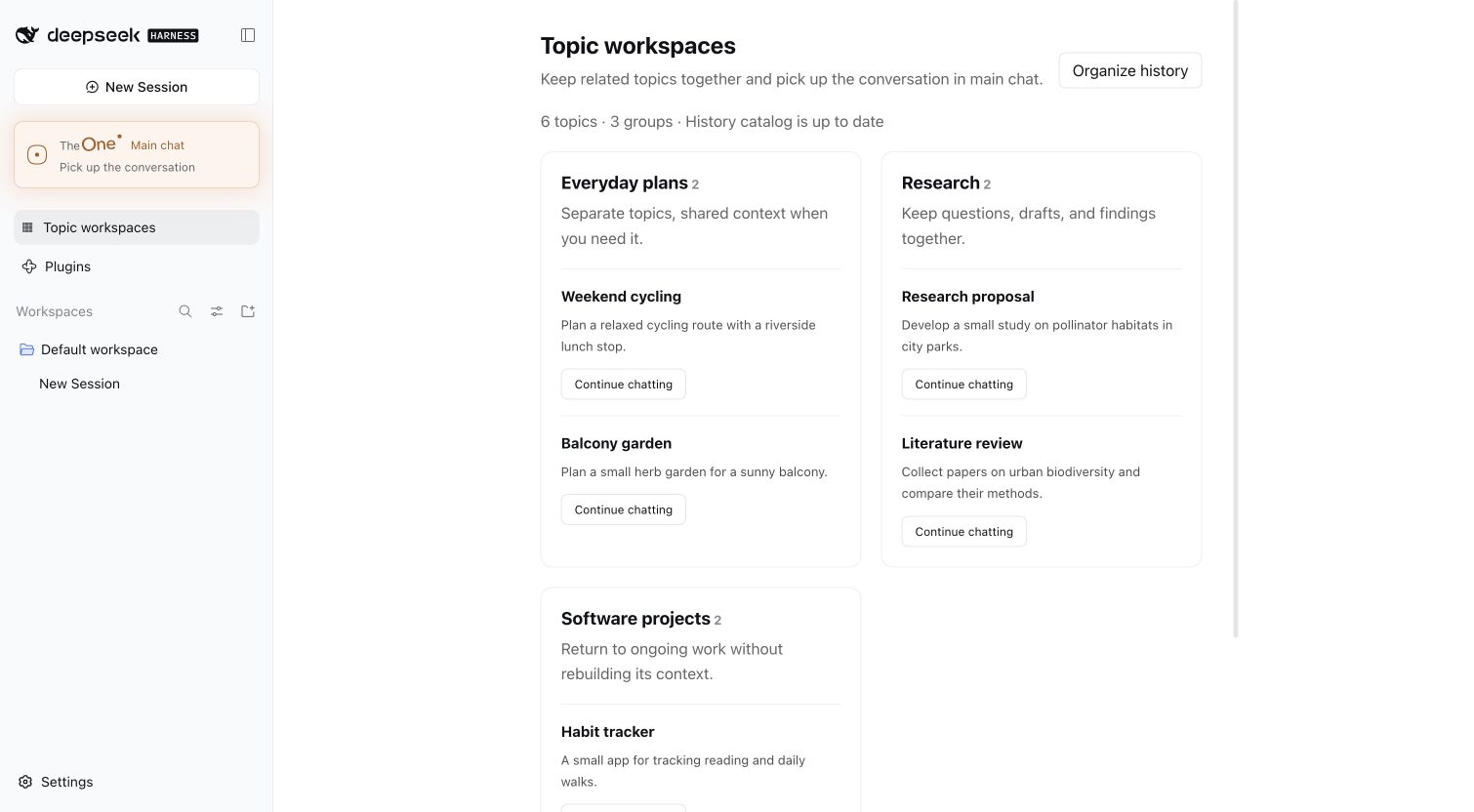
- **Your old sessions become a topic directory.** After install it reads your existing sessions in the background, turns them into topics grouped into workspaces, and you pick up where you left off.
|
|
50
|
+
- **Nothing extra to configure.** No separate API key: routing and the background sessions use the model you chose in DSH. To switch, pick **TheOne · <model>** in main chat's model menu; it still routes through TheOne, with that model doing the work.
|
|
36
51
|
|
|
37
|
-
|
|
52
|
+
|
|
38
53
|
|
|
39
|
-
|
|
40
|
-
- When one message draws on several topics ("put the Qwen benchmark into the paper"), the topic doing the work gets it and the others come along as reference, instead of a question back.
|
|
41
|
-
- It only asks when you refer to an earlier chat it cannot find, or it truly cannot tell which one you mean.
|
|
42
|
-
- A picture or file sent without words stays with the current topic. If the classification call fails, rules decide, and when they are unsure the conversation stays in the current topic.
|
|
43
|
-
- Landed in the wrong topic? Say "wrong topic, it's the paper one" and the previous message is redone there, or move it under **Recent topic routing** in the topic directory. TheOne remembers the correction and routes similar messages there from then on.
|
|
44
|
-
- Rule-based routing (`THEONE_ROUTER_MODE=rules`) makes no model calls.
|
|
54
|
+
## Install in 30 seconds
|
|
45
55
|
|
|
46
|
-
|
|
56
|
+
1. Configure an API in DSH and select a model that can chat.
|
|
57
|
+
2. Open **Plugins → Add plugin**, paste `https://github.com/YunongDai2005/dsh-theone`, and install.
|
|
58
|
+
3. Click **TheOne · Main chat** in the sidebar and start talking.
|
|
47
59
|
|
|
48
|
-
|
|
60
|
+
From the command line: `dsh plugin --profile web add github:YunongDai2005/dsh-theone --ignore-scripts`. Works with DSH `0.2.0-rc.2` and Node.js 24; the interface follows DSH's language (English / Simplified Chinese).
|
|
49
61
|
|
|
50
|
-
|
|
51
|
-
| --- | --- |
|
|
52
|
-
| Learn automatically (default) | Starts from the same topic workspace, the same project folder and shared subjects, then learns from use: switching back and forth, mentioning topics together, and a Worker looking another topic up all strengthen a link; unused links fade. |
|
|
53
|
-
| Same workspace only | Only topics in the same automatic topic workspace share. |
|
|
54
|
-
| Off | Topics share nothing. |
|
|
62
|
+
> Unofficial community project, maintained independently. It is not affiliated with or endorsed by DeepSeek.
|
|
55
63
|
|
|
56
|
-
|
|
64
|
+
## How it works
|
|
57
65
|
|
|
58
|
-
|
|
59
|
-
- what changed in related topics since it last heard: their latest compaction summary (dated) and the progress recorded after it;
|
|
60
|
-
- each topic's constraints (for example "budget figures are for purchasing only"), verbatim and re-attached every time, so compaction cannot drop them.
|
|
66
|
+
**Choosing a topic.** Each message is matched to the current topic, an earlier one, or a new one. By default the model you selected makes one short classification (thinking off, at most 2,048 tokens), with candidates recalled through DSH full-text search.
|
|
61
67
|
|
|
62
|
-
|
|
68
|
+
- With no credible match it starts a new topic instead of asking whether it is new. It only asks when you refer to an earlier chat it cannot find, or it truly cannot tell which one you mean.
|
|
69
|
+
- When one message draws on several topics, the one doing the work gets it and the others come along as reference.
|
|
70
|
+
- "ok" or "go on" continues the current topic without waiting for a decision, and so does a picture or file sent without words.
|
|
71
|
+
- If the classification call fails, rules decide, staying in the current topic when unsure. Rule-based routing (`THEONE_ROUTER_MODE=rules`) makes no model calls at all.
|
|
63
72
|
|
|
64
|
-
|
|
73
|
+
**Linking topics.** A background session starting work receives a reference briefing, and none when there is nothing new:
|
|
65
74
|
|
|
66
|
-
|
|
75
|
+
- right after a topic switch, the last few turns of main chat, so "use what we just said" carries over;
|
|
76
|
+
- what changed in related topics since it last heard: their latest compaction summary (dated) and the progress after it;
|
|
77
|
+
- each topic's constraints, verbatim, every time.
|
|
67
78
|
|
|
68
|
-
|
|
79
|
+
The briefing is marked as reference, not instructions. For details, the background session can use `theone_read_topic` and `theone_search_history`. Linking scope is **Learn automatically** (default), **Same workspace only** or **Off**. In the directory you can link or unlink topics and mark a topic **Do not share**; your choices always win.
|
|
69
80
|
|
|
70
|
-
Each topic card shows its latest progress and constraints. Under **Manage** you can rename
|
|
81
|
+
**Topic directory.** Each topic card shows its latest progress and constraints. Under **Manage** you can rename, edit the summary and constraints, move to another workspace, merge, delete, or attach an existing DSH session as searchable history; **+ New topic** starts one by hand. **Recent topic routing** lists where each message went, why, with which model and how long it took. With a long history, the first pass takes some time and API quota; set `THEONE_HISTORY_CATALOG=false` to turn it off.
|
|
71
82
|
|
|
72
|
-
|
|
83
|
+
<details>
|
|
84
|
+
<summary><b>Settings</b></summary>
|
|
73
85
|
|
|
74
86
|
Right-click the TheOne button in the sidebar and choose **Settings**. Changes apply when saved; only the history catalog settings wait for a DSH restart.
|
|
75
87
|
|
|
@@ -77,31 +89,38 @@ Right-click the TheOne button in the sidebar and choose **Settings**. Changes ap
|
|
|
77
89
|
| --- | --- |
|
|
78
90
|
| Topic notices | How main chat shows topic changes: hidden, one line only when the topic changes (default), or on every message with the reason |
|
|
79
91
|
| Linking scope | Learn automatically (default), same workspace only, or off |
|
|
80
|
-
| Model | Follow DSH (default) or pin the
|
|
92
|
+
| Model | Follow DSH (default) or pin the background model from any model configured in DSH; a pinned model takes precedence over main chat's selector |
|
|
81
93
|
| Routing | LLM decision (default) or rule-based |
|
|
82
94
|
| History catalog | On/off and rescan interval |
|
|
83
|
-
| Limits | Topic descriptor length; reply length per
|
|
95
|
+
| Limits | Topic descriptor length; reply length per background step, thinking included |
|
|
84
96
|
| Manual catalog file | Optional JSON file of hand-written topics, imported when saved |
|
|
85
97
|
|
|
86
98
|
The database location and entry identifier switch TheOne to different data, so they are set only through environment variables: `THEONE_DATABASE_PATH` and `THEONE_GATEWAY_KEY`. Also optional: `THEONE_CONTEXTS_PATH` and `THEONE_WORKER_PROVIDER` / `THEONE_WORKER_MODEL` (set both).
|
|
99
|
+
</details>
|
|
87
100
|
|
|
88
|
-
|
|
101
|
+
<details>
|
|
102
|
+
<summary><b>Data and privacy</b></summary>
|
|
89
103
|
|
|
90
|
-
- DSH keeps the original conversations and tool results; TheOne keeps only its catalog, summaries, links and routing records in its own SQLite database.
|
|
104
|
+
- DSH keeps the original conversations and tool results; TheOne keeps only its catalog, summaries, links and routing records in its own SQLite database (`$DSH_HOME/theone/contexts.db`, `~/.dsh/theone/` by default).
|
|
91
105
|
- Text sent to the router or written into briefings has API keys, passwords and similar secrets removed.
|
|
92
106
|
- A topic marked **Do not share** never appears in other topics' briefings, recent-chat excerpts or lookups.
|
|
93
107
|
- When main chat grows long, DSH compacts it through TheOne: frequently used topics keep longer summaries and their latest turns, rarely used ones keep a short status. This makes no model call.
|
|
108
|
+
- When a new version is out, an **Update** button appears on the right of the TheOne entry in the sidebar: one click installs it through DSH's plugin manager and reloads TheOne in place, without restarting DSH (a DSH without plugin hot reload applies it at the next restart). Your topics stay in the database.
|
|
109
|
+
</details>
|
|
94
110
|
|
|
95
|
-
|
|
111
|
+
<details>
|
|
112
|
+
<summary><b>Known limitations</b></summary>
|
|
96
113
|
|
|
97
114
|
- One request runs at a time; messages queued during a reply wait for it to finish.
|
|
98
115
|
- New topics write files under `~/.dsh/theone/gateway`; you cannot yet choose a project folder for a new topic.
|
|
99
116
|
- Main chat stores copies of tool calls, so its log grows with use; entry-log rotation is not implemented yet.
|
|
100
117
|
- The main chat is remembered per browser: another browser or the desktop app gets its own main chat, sharing the same topics. Only one DSH process should use a database at a time.
|
|
101
|
-
- Image output is not forwarded yet; there is no vector search
|
|
118
|
+
- Image output is not forwarded yet; there is no vector search; topics cannot be split yet.
|
|
102
119
|
- Main chat shows tool cards without running them because TheOne sits first in DSH's tool pipeline. If another plugin also places itself first, it may see these mirrored calls, but no tool runs twice.
|
|
120
|
+
</details>
|
|
103
121
|
|
|
104
|
-
|
|
122
|
+
<details>
|
|
123
|
+
<summary><b>Development</b></summary>
|
|
105
124
|
|
|
106
125
|
```sh
|
|
107
126
|
git clone https://github.com/YunongDai2005/dsh-theone.git
|
|
@@ -114,3 +133,8 @@ npm test
|
|
|
114
133
|
Tests use the real DSH runtime (AgentLoop, Session, SQLite, JSONL persistence, compaction) with a simulated model, and call no external API. `npm run pack:plugin` builds the install package; `npm run install:local` and `npm run start:local` run a separate DSH profile in `~/.dsh-theone`.
|
|
115
134
|
|
|
116
135
|
Service API: `ctx.theone.searchHistoryDetailed(contextId, query, limit)` searches a topic's reviewed history; `store.addSource(contextId, sessionId, { startSeq, endSeq })` attaches part of a session. Earlier acceptance records: [v0.1](./docs/plugin-v0.1.md) and [v0.2](./docs/plugin-v0.2.md).
|
|
136
|
+
</details>
|
|
137
|
+
|
|
138
|
+
---
|
|
139
|
+
|
|
140
|
+
<p align="center">If TheOne helps, a ⭐ helps others find it. Questions or ideas? <a href="https://github.com/YunongDai2005/dsh-theone/issues">Open an issue</a>.</p>
|
package/README.zh.md
CHANGED
|
@@ -1,75 +1,87 @@
|
|
|
1
|
-
|
|
1
|
+
<h1 align="center">TheOne</h1>
|
|
2
2
|
|
|
3
|
-
|
|
3
|
+
<p align="center"><b>只开一个对话框,聊你所有的事。</b><br>它自己分清每句话属于哪件事,每件事的上下文互不干扰。</p>
|
|
4
4
|
|
|
5
|
-
>
|
|
6
|
-
|
|
7
|
-
<
|
|
5
|
+
<p align="center">
|
|
6
|
+
<img alt="DSH 0.2.0-rc.2" src="https://img.shields.io/badge/DSH-0.2.0--rc.2-a75b1e">
|
|
7
|
+
<img alt="Node.js 24" src="https://img.shields.io/badge/Node.js-24-3c873a">
|
|
8
|
+
<img alt="中文 / English" src="https://img.shields.io/badge/界面-中文%20%2F%20English-4a7fb5">
|
|
9
|
+
</p>
|
|
8
10
|
|
|
9
|
-
|
|
11
|
+
<p align="center"><a href="./README.md">English</a> | 简体中文</p>
|
|
10
12
|
|
|
11
|
-
|
|
13
|
+
<p align="center"><img src="docs/images/theone-film-preview.webp" alt="TheOne 宣传片:One 按钮化作 3D 钥匙,把每条消息路由到对应的会话" width="100%"></p>
|
|
12
14
|
|
|
13
|
-
|
|
15
|
+
---
|
|
14
16
|
|
|
15
|
-
|
|
17
|
+
你的 DSH 侧边栏里是不是躺着几十个会话?想回到上周那件事,得一个个翻;懒得新建,就在一个会话里什么都聊,结果上下文越聊越乱,压缩一次细节就没了。
|
|
16
18
|
|
|
17
|
-
|
|
19
|
+
**TheOne 把这些都交给它。** 你只管在一个主聊天里说话:
|
|
18
20
|
|
|
19
|
-
|
|
21
|
+
```text
|
|
22
|
+
你:Qwen 在 9070 XT 上跑 FP8 还是报错
|
|
23
|
+
→ Qwen / RX 9070 XT
|
|
24
|
+
你:顺便把论文第三章的消融表补上
|
|
25
|
+
→ 视频注意力论文
|
|
26
|
+
你:把刚才 Qwen 的测速结果也放进去
|
|
27
|
+
→ 视频注意力论文 · 参考:Qwen / RX 9070 XT
|
|
28
|
+
你:分错了,是显卡那个的
|
|
29
|
+
→ Qwen / RX 9070 XT (上一条交给它重新处理,以后也记住了)
|
|
30
|
+
```
|
|
20
31
|
|
|
21
|
-
|
|
22
|
-
2. 打开 **插件 → 添加插件**,粘贴 `https://github.com/YunongDai2005/dsh-theone`,点击安装。
|
|
23
|
-
3. 点击左侧 **TheOne · 主聊天**,开始聊天。
|
|
32
|
+
<sub>示意。默认只在切换话题时显示一行提示。</sub>
|
|
24
33
|
|
|
25
|
-
|
|
34
|
+
每件事都有自己的后台会话,在里面推理、调用工具、压缩上下文;你看到的始终是一个普通的对话。
|
|
26
35
|
|
|
27
|
-
##
|
|
36
|
+
## 为什么值得一试
|
|
28
37
|
|
|
29
|
-
|
|
30
|
-
|
|
31
|
-
|
|
32
|
-
|
|
33
|
-
|
|
38
|
+
| | 平时的用法 | 装了 TheOne |
|
|
39
|
+
| --- | --- | --- |
|
|
40
|
+
| 开始一件新事 | 新建会话、起名字 | 直接说 |
|
|
41
|
+
| 回到之前的事 | 在侧边栏里翻 | 直接提,它自己找回来 |
|
|
42
|
+
| 一个会话聊杂了 | 上下文互相干扰,压缩后丢细节 | 每件事一份独立上下文 |
|
|
43
|
+
| 两件事要结合 | 来回复制粘贴 | 自动把另一件事的进展带过来 |
|
|
44
|
+
| 分错了 | 手动挪 | 说一句「分错了」 |
|
|
34
45
|
|
|
35
|
-
|
|
46
|
+
- **和原生会话一模一样**:思考从第一个字起就在原位置,工具卡片、授权、提问、待办、重试、回答中途插话,全都照常。
|
|
47
|
+
- **相关的事会互通,无关的事互不打扰**:相关话题自动共享进展,并从你的使用中学习哪些话题有关联;话题的约束(比如「预算数字不能写进论文」)每次都原样带上,压缩不会把它丢掉。
|
|
48
|
+
- **越用越准**:说「分错了」或在目录里点「改到…」,TheOne 会记住,类似的消息以后直接分对。
|
|
49
|
+
- **旧会话自动变成话题目录**:装上后它会在后台读取你已有的会话,整理成话题并按工作区分组,直接接着聊。
|
|
50
|
+
- **零额外配置**:不用另填 API Key,路由和后台都用你在 DSH 里选好的模型。想换模型,在主聊天的模型菜单里选 **TheOne · 某个模型**,仍然由 TheOne 分配话题,干活的换成那个模型。
|
|
36
51
|
|
|
37
|
-
|
|
52
|
+

|
|
38
53
|
|
|
39
|
-
|
|
40
|
-
- 一句话同时用到几个话题(比如「把 Qwen 的测试结果写进论文」)时,交给实际做事的话题,其余作为参考一起带上,不再反问。
|
|
41
|
-
- 只有明确引用了找不到的旧聊天,或确实分不清你指的是哪一个时才会追问。
|
|
42
|
-
- 只发图片或文件、没有文字时,接着当前话题。分类调用失败时改用规则判断,拿不准就留在当前话题。
|
|
43
|
-
- 分错了?直接说「分错了,是论文的」,上一条会交给正确的话题重新处理;也可以在话题目录的**最近的话题分配**里改。TheOne 会记住这次更正,之后类似的消息分到那里。
|
|
44
|
-
- 规则模式(`THEONE_ROUTER_MODE=rules`)不调用模型。
|
|
54
|
+
## 30 秒装好
|
|
45
55
|
|
|
46
|
-
|
|
56
|
+
1. 在 DSH 中配置好 API,选一个能正常聊天的模型。
|
|
57
|
+
2. 打开 **插件 → 添加插件**,粘贴 `https://github.com/YunongDai2005/dsh-theone`,点击安装。
|
|
58
|
+
3. 点击左侧 **TheOne · 主聊天**,开始说话。
|
|
47
59
|
|
|
48
|
-
|
|
60
|
+
命令行安装:`dsh plugin --profile web add github:YunongDai2005/dsh-theone --ignore-scripts`。兼容 DSH `0.2.0-rc.2` 与 Node.js 24;界面跟随 DSH 的语言(简体中文 / English)。
|
|
49
61
|
|
|
50
|
-
|
|
51
|
-
| --- | --- |
|
|
52
|
-
| 自动学习(默认) | 先根据同一话题工作区、同一项目目录、提到相同的事物判断相关;之后从使用中学习:短时间内来回切换、同时被提到、后台主动查阅都会增强关联,长期不用会逐渐减弱。 |
|
|
53
|
-
| 仅同一工作区 | 只在自动分组的话题工作区内联动。 |
|
|
54
|
-
| 关闭 | 话题之间不共享任何内容。 |
|
|
62
|
+
> 非官方社区项目,由社区成员独立维护,与 DeepSeek 不存在隶属或背书关系。
|
|
55
63
|
|
|
56
|
-
|
|
64
|
+
## 它是怎么工作的
|
|
57
65
|
|
|
58
|
-
|
|
59
|
-
- 相关话题自上次以来的变化:最近一次压缩摘要(注明截至时间),以及之后记录的进度;
|
|
60
|
-
- 各话题的约束(例如「预算数字只用于采购」)原样附上,并且每次都重新附带,不会因为压缩而丢失。
|
|
66
|
+
**分配话题。** 每条消息先判断:接着当前话题、回到某个旧话题,还是开个新的。默认用你选的模型做一次简短分类(关闭深度思考,最多 2048 token),候选话题由 DSH 全文搜索召回。
|
|
61
67
|
|
|
62
|
-
|
|
68
|
+
- 没有匹配就直接开新话题,不会问你「是不是新话题」;只有你明确提到一段找不到的旧聊天,或者确实分不清是哪一件时才追问。
|
|
69
|
+
- 一句话同时用到几件事时,交给真正做事的那件,其余作为参考带上。
|
|
70
|
+
- 「好的」「继续」直接接着当前话题,不等判断;只发图片或文件也接着当前话题。
|
|
71
|
+
- 分类调用失败时改用规则判断,拿不准就留在当前话题。规则模式(`THEONE_ROUTER_MODE=rules`)完全不调用模型。
|
|
63
72
|
|
|
64
|
-
|
|
73
|
+
**话题联动。** 后台开始工作时会收到一份参考简报,没有新内容就不发:
|
|
65
74
|
|
|
66
|
-
|
|
75
|
+
- 刚切换话题时,附上主聊天最近几轮,「把刚才那个……」能接上;
|
|
76
|
+
- 相关话题自上次以来的变化:最近一次压缩摘要(注明截至时间)和之后的进展;
|
|
77
|
+
- 各话题的约束,原样附上,每次都带。
|
|
67
78
|
|
|
68
|
-
|
|
79
|
+
简报标注为参考资料而非指令;需要细节时,后台可以用 `theone_read_topic`、`theone_search_history` 去查。联动范围可选「自动学习」(默认)、「仅同一工作区」或「关闭」。在目录里可以手动关联或解除关联、把话题标记为「不共享」,你的设置永远优先。
|
|
69
80
|
|
|
70
|
-
|
|
81
|
+
**话题目录。** 每个话题卡片显示最新进展和约束。点 **管理** 可以重命名、改摘要和约束、移到别的工作区、合并、删除,或把已有的 DSH 会话关联为可检索的历史;**+ 新话题** 手动新建。**最近的话题分配** 列出每条消息去了哪里、原因、所用模型和耗时。历史较多时,第一次整理需要一些时间和 API 额度;设置 `THEONE_HISTORY_CATALOG=false` 可关闭。
|
|
71
82
|
|
|
72
|
-
|
|
83
|
+
<details>
|
|
84
|
+
<summary><b>设置</b></summary>
|
|
73
85
|
|
|
74
86
|
右键左侧的 TheOne 按钮,选择 **设置**。保存后立即生效,只有历史整理相关的设置需要重启 DSH。
|
|
75
87
|
|
|
@@ -77,31 +89,38 @@ TheOne 会在后台读取你已有的 DSH 会话,整理出话题目录,并
|
|
|
77
89
|
| --- | --- |
|
|
78
90
|
| 话题提示 | 主聊天里怎样显示话题切换:隐藏、仅切换时显示一行(默认)、每条都显示并注明原因 |
|
|
79
91
|
| 联动范围 | 自动学习(默认)、仅同一工作区、关闭 |
|
|
80
|
-
| 模型 | 跟随 DSH(默认),或从 DSH
|
|
92
|
+
| 模型 | 跟随 DSH(默认),或从 DSH 已配置的模型中固定后台模型;固定的设置优先于主聊天里的选择 |
|
|
81
93
|
| 路由方式 | LLM 判断(默认)或规则判断 |
|
|
82
94
|
| 历史整理 | 开关与补扫间隔 |
|
|
83
95
|
| 内容限制 | 话题资料长度;后台每一步回复的长度(含思考) |
|
|
84
96
|
| 人工话题目录文件 | 可选的 JSON 话题目录,保存时导入 |
|
|
85
97
|
|
|
86
|
-
数据库位置和主入口标识会让 TheOne
|
|
98
|
+
数据库位置和主入口标识会让 TheOne 换用另一份数据,只能用环境变量 `THEONE_DATABASE_PATH`、`THEONE_GATEWAY_KEY` 设置。另外可选:`THEONE_CONTEXTS_PATH`,以及须一起设置的 `THEONE_WORKER_PROVIDER` / `THEONE_WORKER_MODEL`。
|
|
99
|
+
</details>
|
|
87
100
|
|
|
88
|
-
|
|
101
|
+
<details>
|
|
102
|
+
<summary><b>数据与隐私</b></summary>
|
|
89
103
|
|
|
90
|
-
- 原始对话和工具结果由 DSH 保存;TheOne 只在自己的 SQLite
|
|
104
|
+
- 原始对话和工具结果由 DSH 保存;TheOne 只在自己的 SQLite 数据库(`$DSH_HOME/theone/contexts.db`,默认 `~/.dsh/theone/`)里保存目录、摘要、关联和路由记录。
|
|
91
105
|
- 发给路由和写进参考简报的内容会去掉 API Key、密码等敏感信息。
|
|
92
106
|
- 标记为「不共享」的话题,不会出现在其他话题的简报、最近对话和查阅结果里。
|
|
93
|
-
- 主聊天变长时,DSH 通过 TheOne
|
|
107
|
+
- 主聊天变长时,DSH 通过 TheOne 压缩它:常用话题保留较长摘要和最近几轮,不常用的只保留简短状态,不额外调用模型。
|
|
108
|
+
- 有新版本时,左侧 TheOne 入口右边会出现 **更新** 按钮,点一下由 DSH 的插件管理器安装,并就地重新加载 TheOne,不用重启 DSH(不支持插件热加载的 DSH 会在下次启动时生效);话题都保存在数据库里,不受影响。
|
|
109
|
+
</details>
|
|
94
110
|
|
|
95
|
-
|
|
111
|
+
<details>
|
|
112
|
+
<summary><b>已知限制</b></summary>
|
|
96
113
|
|
|
97
|
-
-
|
|
98
|
-
- 新话题的文件默认写在 `~/.dsh/theone/gateway
|
|
99
|
-
-
|
|
100
|
-
-
|
|
114
|
+
- 同一时间只处理一个请求;回答期间排队的消息要等本轮结束。
|
|
115
|
+
- 新话题的文件默认写在 `~/.dsh/theone/gateway`,暂时不能指定项目目录。
|
|
116
|
+
- 主聊天保存了工具调用的副本,长期使用记录会变大;入口日志轮换尚未实现。
|
|
117
|
+
- 主聊天身份按浏览器保存:换浏览器或桌面端会出现另一个主聊天,话题仍然共用。同一数据库同时只应由一个 DSH 进程使用。
|
|
101
118
|
- 图片输出尚未转发;没有向量检索;暂不支持拆分话题。
|
|
102
|
-
- 主聊天里的工具卡片只显示、不执行,这依赖 TheOne 位于 DSH
|
|
119
|
+
- 主聊天里的工具卡片只显示、不执行,这依赖 TheOne 位于 DSH 工具流程的最前面;其他插件也抢到最前面时可能看到这些镜像调用,但工具不会执行两次。
|
|
120
|
+
</details>
|
|
103
121
|
|
|
104
|
-
|
|
122
|
+
<details>
|
|
123
|
+
<summary><b>开发</b></summary>
|
|
105
124
|
|
|
106
125
|
```sh
|
|
107
126
|
git clone https://github.com/YunongDai2005/dsh-theone.git
|
|
@@ -114,3 +133,8 @@ npm test
|
|
|
114
133
|
测试使用真实的 DSH 运行时(AgentLoop、Session、SQLite、JSONL 持久化、压缩),只模拟模型,不调用外部 API。`npm run pack:plugin` 生成安装包;`npm run install:local` 和 `npm run start:local` 会在 `~/.dsh-theone` 启动一个独立的 DSH profile。
|
|
115
134
|
|
|
116
135
|
服务接口:`ctx.theone.searchHistoryDetailed(contextId, query, limit)` 检索话题的已审核历史;`store.addSource(contextId, sessionId, { startSeq, endSeq })` 关联会话的一部分。旧版本验收记录见 [v0.1](./docs/plugin-v0.1.zh.md) 和 [v0.2](./docs/plugin-v0.2.zh.md)。
|
|
136
|
+
</details>
|
|
137
|
+
|
|
138
|
+
---
|
|
139
|
+
|
|
140
|
+
<p align="center">觉得有用的话,点个 ⭐ 让更多人看到。遇到问题或有想法,欢迎 <a href="https://github.com/YunongDai2005/dsh-theone/issues">提 Issue</a>。</p>
|
package/cordis.patch.yml
CHANGED
|
File without changes
|
package/dist/catalog-types.d.ts
CHANGED
|
File without changes
|
package/dist/catalog-types.js
CHANGED
|
File without changes
|
package/dist/client-locales.d.ts
CHANGED
|
@@ -5,6 +5,17 @@ export declare const zh: {
|
|
|
5
5
|
readonly 'gateway.opening': "正在打开 TheOne 主聊天…";
|
|
6
6
|
readonly 'gateway.error': "主聊天暂时无法打开,请检查 DSH 连接和 TheOne 插件状态。";
|
|
7
7
|
readonly retry: "重试";
|
|
8
|
+
readonly 'update.available': "更新";
|
|
9
|
+
readonly 'update.installing': "更新中…";
|
|
10
|
+
readonly 'update.restart': "重启生效";
|
|
11
|
+
readonly 'update.reloading': "正在重新加载…";
|
|
12
|
+
readonly 'update.reloadingHint': "TheOne 正在用新版本重新加载,DSH 不需要重启;完成后页面会自动刷新。";
|
|
13
|
+
readonly 'update.busy': "有回复正在进行,等它结束后再点更新。";
|
|
14
|
+
readonly 'update.failed': "更新失败";
|
|
15
|
+
readonly 'update.hint': "当前 {current},可更新到 {latest}。点击一键更新,不用重启 DSH。";
|
|
16
|
+
readonly 'update.manualHint': "当前 {current},最新 {latest}。这份插件不是从 GitHub 或 npm 安装的,请在「插件」页面重新安装。";
|
|
17
|
+
readonly 'update.restartHint': "已更新,重启 DSH 后生效。";
|
|
18
|
+
readonly 'update.failedHint': "更新没有完成({error})。点击重试,或在「插件」页面重新安装。";
|
|
8
19
|
readonly 'settings.title': "TheOne 设置";
|
|
9
20
|
readonly 'settings.menu': "设置";
|
|
10
21
|
readonly 'settings.subtitle': "查看当前生效的配置和各项用途。";
|
package/dist/client-locales.js
CHANGED
|
@@ -5,6 +5,17 @@ export const zh = {
|
|
|
5
5
|
'gateway.opening': '正在打开 TheOne 主聊天…',
|
|
6
6
|
'gateway.error': '主聊天暂时无法打开,请检查 DSH 连接和 TheOne 插件状态。',
|
|
7
7
|
'retry': '重试',
|
|
8
|
+
'update.available': '更新',
|
|
9
|
+
'update.installing': '更新中…',
|
|
10
|
+
'update.restart': '重启生效',
|
|
11
|
+
'update.reloading': '正在重新加载…',
|
|
12
|
+
'update.reloadingHint': 'TheOne 正在用新版本重新加载,DSH 不需要重启;完成后页面会自动刷新。',
|
|
13
|
+
'update.busy': '有回复正在进行,等它结束后再点更新。',
|
|
14
|
+
'update.failed': '更新失败',
|
|
15
|
+
'update.hint': '当前 {current},可更新到 {latest}。点击一键更新,不用重启 DSH。',
|
|
16
|
+
'update.manualHint': '当前 {current},最新 {latest}。这份插件不是从 GitHub 或 npm 安装的,请在「插件」页面重新安装。',
|
|
17
|
+
'update.restartHint': '已更新,重启 DSH 后生效。',
|
|
18
|
+
'update.failedHint': '更新没有完成({error})。点击重试,或在「插件」页面重新安装。',
|
|
8
19
|
'settings.title': 'TheOne 设置',
|
|
9
20
|
'settings.menu': '设置',
|
|
10
21
|
'settings.subtitle': '查看当前生效的配置和各项用途。',
|
|
@@ -174,6 +185,17 @@ export const en = {
|
|
|
174
185
|
'gateway.opening': 'Opening TheOne main chat…',
|
|
175
186
|
'gateway.error': 'Main chat could not open. Check your DSH connection and TheOne plugin status.',
|
|
176
187
|
'retry': 'Retry',
|
|
188
|
+
'update.available': 'Update',
|
|
189
|
+
'update.installing': 'Updating…',
|
|
190
|
+
'update.restart': 'Restart to apply',
|
|
191
|
+
'update.reloading': 'Reloading…',
|
|
192
|
+
'update.reloadingHint': 'TheOne is reloading with the new version; DSH keeps running, and the page refreshes when it is done.',
|
|
193
|
+
'update.busy': 'A reply is in progress. Update once it finishes.',
|
|
194
|
+
'update.failed': 'Update failed',
|
|
195
|
+
'update.hint': 'You have {current}; {latest} is available. Click to update without restarting DSH.',
|
|
196
|
+
'update.manualHint': 'You have {current}; {latest} is available. This copy was not installed from GitHub or npm, so reinstall it from the Plugins page.',
|
|
197
|
+
'update.restartHint': 'Updated. Restart DSH to apply it.',
|
|
198
|
+
'update.failedHint': 'The update did not finish ({error}). Click to retry, or reinstall from the Plugins page.',
|
|
177
199
|
'settings.title': 'TheOne settings',
|
|
178
200
|
'settings.menu': 'Settings',
|
|
179
201
|
'settings.subtitle': 'Review active configuration and what each option does.',
|
|
File without changes
|
|
File without changes
|
package/dist/client.d.ts
CHANGED
|
File without changes
|