dsh-taskflow 0.1.1 → 0.1.3
This diff represents the content of publicly available package versions that have been released to one of the supported registries. The information contained in this diff is provided for informational purposes only and reflects changes between package versions as they appear in their respective public registries.
- package/CHANGELOG.md +79 -35
- package/LICENSE +201 -201
- package/NOTICE +6 -1
- package/README.md +335 -139
- package/README_en.md +102 -139
- package/client.js +816 -71
- package/docs/DETAIL.md +32 -5
- package/docs/DETAIL.zh-CN.md +13 -3
- package/licenses/Marked-MIT.txt +44 -0
- package/locale/en.json +1 -1
- package/locale/zh.json +1 -1
- package/package.json +6 -3
- package/src/application/task-runtime.mjs +123 -114
- package/src/domain/task-service.mjs +247 -178
- package/src/domain/tool-view.mjs +11 -0
- package/src/server/config.mjs +1 -1
- package/src/server/index.mjs +18 -8
- package/src/server/inline-sessions.mjs +154 -0
- package/src/server/planning-check.mjs +105 -0
- package/src/server/prompts.mjs +12 -8
- package/src/server/quick-replies.mjs +88 -0
- package/src/server/rpc.mjs +45 -22
- package/src/server/session-context.mjs +11 -5
- package/src/server/task-actions.mjs +63 -0
- package/src/server/tool-schemas.mjs +33 -0
- package/src/server/tool-views.mjs +36 -8
- package/src/server/tools.mjs +20 -14
package/README_en.md
CHANGED
|
@@ -1,139 +1,102 @@
|
|
|
1
|
-
# dsh-taskflow
|
|
2
|
-
|
|
3
|
-
[简体中文](https://github.com/Oak-liuhj/dsh-taskflow/blob/main/README.md) · [English](https://github.com/Oak-liuhj/dsh-taskflow/blob/main/README_en.md)
|
|
4
|
-
|
|
5
|
-
[](https://www.npmjs.com/package/dsh-taskflow)
|
|
6
|
-
[](https://github.com/Oak-liuhj/dsh-taskflow)
|
|
7
|
-
|
|
8
|
-
**A [DeepSeek Harness](https://www.deepseek.com/harness/) plugin for persistent task planning and nested session orchestration.**
|
|
9
|
-
|
|
10
|
-
[`dsh-taskflow`](https://www.npmjs.com/package/dsh-taskflow) turns a goal in the main conversation into a lasting task tree, showing what needs doing, which session owns each task, and what has finished.
|
|
11
|
-
|
|
12
|
-
- **Persistent checklist** — The model plans tasks according to request complexity. A separate ledger preserves the plan across conversation turns, page refreshes and host restarts.
|
|
13
|
-
- **Selective nested delegation** — Simple tasks stay in their owner session. Independent complex tasks can spawn children, which may delegate further within depth and concurrency limits.
|
|
14
|
-
- **Completion notifications** — Valid child results check off the task and notify its direct parent, without adding a parent review step.
|
|
15
|
-
- **Incremental conversation updates** — Add work beneath the current task or explicitly name a parent in the main conversation; edit requirements, cancel work and reorder siblings.
|
|
16
|
-
- **Hierarchical task navigation** — Inspect the task tree, progress, status and details in the right sidebar, then jump to the execution session.
|
|
17
|
-
- **On-demand tool views** — Actual host tool calls can show a page or output to the left of the conversation. The tool area starts closed.
|
|
18
|
-
|
|
19
|
-
|
|
20
|
-
|
|
21
|
-
|
|
22
|
-
|
|
23
|
-
|
|
24
|
-
|
|
25
|
-
|
|
26
|
-
|
|
27
|
-
|
|
28
|
-
|
|
29
|
-
|
|
30
|
-
|
|
31
|
-
|
|
32
|
-
|
|
33
|
-
|
|
34
|
-
|
|
35
|
-
|
|
36
|
-
|
|
37
|
-
|
|
38
|
-
|
|
39
|
-
|
|
40
|
-
|
|
41
|
-
|
|
42
|
-
|
|
43
|
-
|
|
44
|
-
|
|
45
|
-
|
|
46
|
-
|
|
47
|
-
|
|
48
|
-
|
|
49
|
-
|
|
50
|
-
|
|
51
|
-
|
|
52
|
-
|
|
53
|
-
|
|
54
|
-
|
|
55
|
-
|
|
56
|
-
|
|
57
|
-
|
|
58
|
-
|
|
59
|
-
|
|
60
|
-
|
|
61
|
-
|
|
62
|
-
|
|
63
|
-
|
|
64
|
-
|
|
65
|
-
|
|
66
|
-
|
|
67
|
-
|
|
68
|
-
|
|
69
|
-
|
|
70
|
-
|
|
71
|
-
|
|
72
|
-
|
|
73
|
-
|
|
74
|
-
|
|
75
|
-
|
|
76
|
-
|
|
77
|
-
|
|
78
|
-
|
|
79
|
-
|
|
80
|
-
|
|
81
|
-
|
|
82
|
-
|
|
83
|
-
|
|
84
|
-
|
|
85
|
-
|
|
86
|
-
|
|
87
|
-
|
|
88
|
-
|
|
89
|
-
|
|
90
|
-
|
|
91
|
-
|
|
92
|
-
|
|
93
|
-
|
|
94
|
-
|
|
95
|
-
|
|
96
|
-
|
|
97
|
-
|
|
98
|
-
|
|
99
|
-
|
|
100
|
-
|
|
101
|
-
|
|
102
|
-
|
|
103
|
-
|
|
104
|
-
|
|
105
|
-
|
|
106
|
-
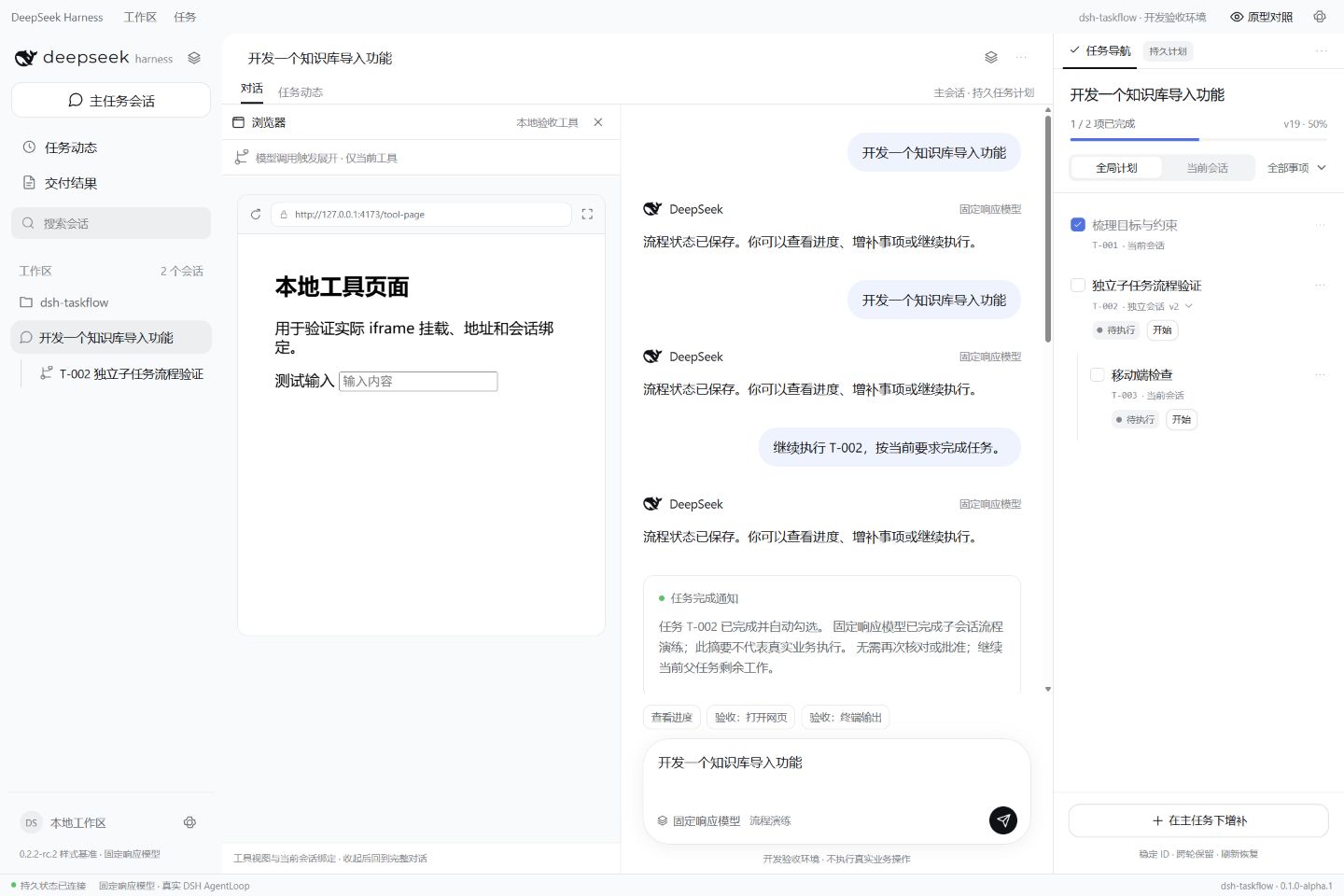
The tool area starts closed. Actual browser, file, command or plugin tool calls can show their real address or output to the left of the conversation. Close the view when finished.
|
|
107
|
-
|
|
108
|
-
Execution remains with host tools or their plugins. The default page view is a restricted iframe; CSP, authentication or cross-origin rules may prevent embedding. Other client plugins can register dedicated renderers through `taskflowViews.register(kind, Component)`; see the [architecture guide](https://github.com/Oak-liuhj/dsh-taskflow/blob/main/docs/architecture.md).
|
|
109
|
-
|
|
110
|
-
## ⚙️ Settings
|
|
111
|
-
|
|
112
|
-
Adjust the plugin configuration in the profile you use. Defaults are in [cordis.patch.yml](https://github.com/Oak-liuhj/dsh-taskflow/blob/main/cordis.patch.yml).
|
|
113
|
-
|
|
114
|
-
| Setting | Default | Meaning |
|
|
115
|
-
| --- | --- | --- |
|
|
116
|
-
| `autoPlan` | `true` | Prompt the model to plan complex requests automatically; when disabled, request a plan explicitly. |
|
|
117
|
-
| `maxDepth` | `2` | Maximum delegation depth, with the root at 0; range 0–8. |
|
|
118
|
-
| `maxConcurrent` | `2` | Active delegation slots across the tree. Parents release their slot while waiting for children; range 1–16. |
|
|
119
|
-
| `maxTasks` | `200` | Task limit per plan; range 1–2000. |
|
|
120
|
-
| `provider` | `spawn` | Name of a registered host subagent provider. |
|
|
121
|
-
| `dataDir` | `${DSH_HOME}/taskflow` | Ledger directory; falls back to `~/.dsh/taskflow` when the environment variable is unset. |
|
|
122
|
-
|
|
123
|
-
## Notes
|
|
124
|
-
|
|
125
|
-
- **Compatibility** — Current version **0.1.1**, Node.js **≥24.9.0**. The declared DSH range is `>=0.2.1-rc.3 <1.0.0-0 || >=0.2.2-0 <1.0.0-0 || >=0.2.3-0 <1.0.0-0 || >=0.3.0-0 <1.0.0-0`. Enable `tools`, `agents`, `sessions`, `systemPrompt`, `subagents` and the corresponding client services.
|
|
126
|
-
- **Planning and execution** — Automatic planning is model-guided. Task decomposition and tool choices depend on the host model. The ledger is independent of `todo_write`; later messages update the same plan incrementally.
|
|
127
|
-
- **Data and recovery** — Use one active writer per `dataDir`. Back up the whole directory while the host is stopped, together with native DSH sessions for a complete migration. Interrupted tasks recover as paused and can be resumed in their owner conversation. Uninstalling the plugin preserves the ledger.
|
|
128
|
-
- **Validation** — 30 automated tests, 12 version boundaries and deterministic-model integrations with exact hosts `0.2.1-rc.3`, `0.2.2-rc.2` and `0.2.2-rc.3` have passed. Full native profiles, production models and third-party tools still need acceptance; see the [acceptance record](https://github.com/Oak-liuhj/dsh-taskflow/blob/main/docs/acceptance.md).
|
|
129
|
-
- **Language** — Plugin documentation is available in Simplified Chinese and English. The task navigation interface currently uses Chinese labels.
|
|
130
|
-
|
|
131
|
-
## Like it?
|
|
132
|
-
|
|
133
|
-
Star the project on [GitHub](https://github.com/Oak-liuhj/dsh-taskflow), or open an [Issue](https://github.com/Oak-liuhj/dsh-taskflow/issues) / PR. Include plugin and DSH versions, profile type, reproduction steps and redacted logs when reporting a problem.
|
|
134
|
-
|
|
135
|
-
See the [development guide](https://github.com/Oak-liuhj/dsh-taskflow/blob/main/docs/DEVELOPMENT.md) and [publishing guide](https://github.com/Oak-liuhj/dsh-taskflow/blob/main/docs/PUBLISHING.md) for contributions.
|
|
136
|
-
|
|
137
|
-
## License
|
|
138
|
-
|
|
139
|
-
Original code is [Apache-2.0](https://github.com/Oak-liuhj/dsh-taskflow/blob/main/LICENSE). Imported DeepSeek styles and icons retain their MIT license; see [NOTICE](https://github.com/Oak-liuhj/dsh-taskflow/blob/main/NOTICE) and [DeepSeek-MIT.txt](https://github.com/Oak-liuhj/dsh-taskflow/blob/main/licenses/DeepSeek-MIT.txt). The source PRD embeds an OFL-1.1 font; the font and complete PRD are excluded from the npm runtime package. This is a community plugin.
|
|
1
|
+
# dsh-taskflow
|
|
2
|
+
|
|
3
|
+
[简体中文](https://github.com/Oak-liuhj/dsh-taskflow/blob/main/README.md) · [English](https://github.com/Oak-liuhj/dsh-taskflow/blob/main/README_en.md)
|
|
4
|
+
|
|
5
|
+
[](https://www.npmjs.com/package/dsh-taskflow)
|
|
6
|
+
[](https://github.com/Oak-liuhj/dsh-taskflow)
|
|
7
|
+
|
|
8
|
+
**A [DeepSeek Harness](https://www.deepseek.com/harness/) plugin for persistent task planning and nested session orchestration.**
|
|
9
|
+
|
|
10
|
+
[`dsh-taskflow`](https://www.npmjs.com/package/dsh-taskflow) turns a goal in the main conversation into a lasting task tree, showing what needs doing, which session owns each task, and what has finished.
|
|
11
|
+
|
|
12
|
+
- **Persistent checklist** — The model plans tasks according to request complexity. A separate ledger preserves the plan across conversation turns, page refreshes and host restarts.
|
|
13
|
+
- **Selective nested delegation** — Simple tasks stay in their owner session. Independent complex tasks can spawn children, which may delegate further within depth and concurrency limits.
|
|
14
|
+
- **Completion notifications** — Valid child results check off the task and notify its direct parent, without adding a parent review step.
|
|
15
|
+
- **Incremental conversation updates** — Add work beneath the current task or explicitly name a parent in the main conversation; edit requirements, cancel work and reorder siblings.
|
|
16
|
+
- **Hierarchical task navigation** — Inspect the task tree, progress, status and details in the right sidebar, then jump to the execution session.
|
|
17
|
+
- **On-demand tool views** — Actual host tool calls can show a page or output to the left of the conversation. The tool area starts closed.
|
|
18
|
+
|
|
19
|
+
Markdown, Excel, Word, PowerPoint and PDF outputs automatically open through the
|
|
20
|
+
host's document preview plugins inside the tool view. Multiple files open without
|
|
21
|
+
a file or viewer selector. Taskflow does not read document content directly; the
|
|
22
|
+
host preview owns file access, rendering and authorization. Enable the host document
|
|
23
|
+
preview plugin to use this feature. Missing plugins offer a retry action. Automatic
|
|
24
|
+
opening is limited to the foreground task session and does not repeat on polling.
|
|
25
|
+
Terminal-generated files without structured output paths require
|
|
26
|
+
`taskflow_open_view` with the actual `filePath` or `files`.
|
|
27
|
+
|
|
28
|
+
Previews follow tool-panel resizing, floating and scrolling. Closing the tool view
|
|
29
|
+
releases its own previews and preserves documents opened by the user. The header's
|
|
30
|
+
Tasks button toggles the checklist; another active sidebar page switches to Tasks.
|
|
31
|
+
Execution progress and key findings stay in the current task's child session via
|
|
32
|
+
`taskflow_progress`. Inline work writes to its record session; delegated work writes
|
|
33
|
+
to its execution session. Final results are saved before notifying the direct parent.
|
|
34
|
+
|
|
35
|
+
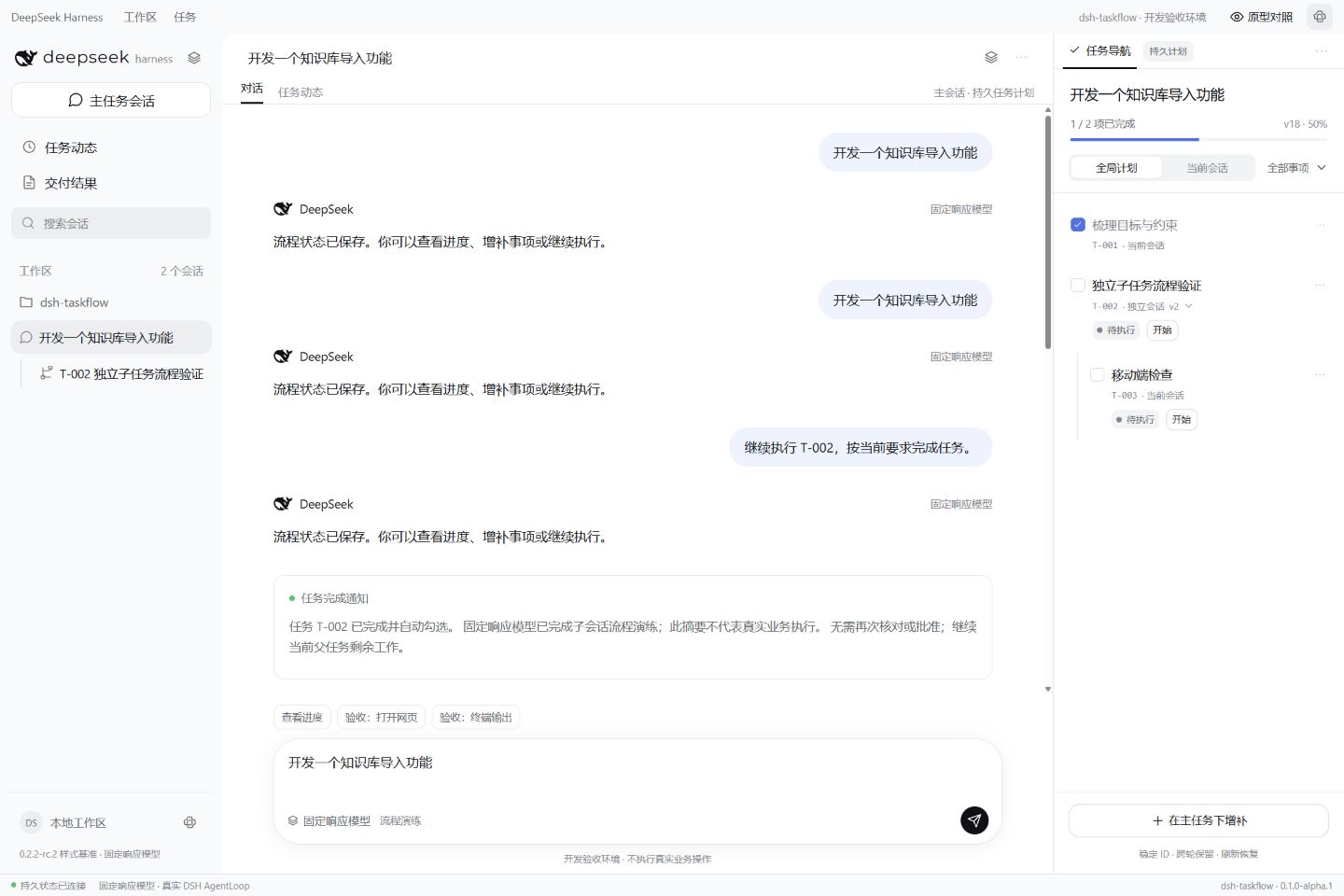
The tool view keeps a compact header and fills its remaining height with document previews, without visible paths, reopen controls or success notices. Multiple documents scroll vertically; failures retain a retry action. The docked checklist starts at 300px; drag its left edge to resize, and the preference is remembered. Narrow windows temporarily constrain the width. Fullscreen, floating tabs and other plugin pages retain the host layout. Suggested replies show a small spinner and a left-aligned loading label while waiting for the current response or generating suggestions, until ready or failed. Waiting does not start another model call.
|
|
36
|
+
|
|
37
|
+
|
|
38
|
+
|
|
39
|
+
*Screenshots show the development acceptance shell with a deterministic model.*
|
|
40
|
+
|
|
41
|
+
## Install / Update
|
|
42
|
+
|
|
43
|
+
### In DeepSeek Harness Web or Desktop
|
|
44
|
+
|
|
45
|
+
Open **Plugins** → **Add plugin** and search for `dsh-taskflow`. If a result points to `Oak-liuhj/dsh-taskflow`, install that entry. If it is not listed, use the CLI below to install by npm package name.
|
|
46
|
+
|
|
47
|
+
Reload the profile when the host requests it. The plugin uses the host's model, tools and `spawn` subagent provider. Desktop installations need the same Web renderer services.
|
|
48
|
+
|
|
49
|
+
### Using the `dsh` CLI
|
|
50
|
+
|
|
51
|
+
```sh
|
|
52
|
+
dsh plugin --profile web add dsh-taskflow@latest
|
|
53
|
+
```
|
|
54
|
+
|
|
55
|
+
To pin the current version:
|
|
56
|
+
|
|
57
|
+
```sh
|
|
58
|
+
dsh plugin --profile web add dsh-taskflow@0.1.3
|
|
59
|
+
```
|
|
60
|
+
|
|
61
|
+
Replace `web` with your profile name. For an npm-based installation, you can also recheck versions in the plugin details, choose a compatible update and follow the host's reload or restart instructions.
|
|
62
|
+
|
|
63
|
+
## Usage
|
|
64
|
+
|
|
65
|
+
Describe your goal in the main conversation. The model plans requests that need several steps, tool operations or independent execution; short questions do not need a plan.
|
|
66
|
+
|
|
67
|
+
With automatic planning enabled, the model assesses whether a checklist is needed and saves it before executing work. If an answer or document is returned without a saved plan, the plugin sends at most two reminders. Planning stops after four unsuccessful steps and the panel shows the reason. Missing information can be clarified first; short questions may explicitly skip planning. Existing plans are updated incrementally.
|
|
68
|
+
|
|
69
|
+
| Entry point | What you can do |
|
|
70
|
+
| --- | --- |
|
|
71
|
+
| **Task navigation** | Inspect progress and status; switch between the global plan and current session, filter, collapse and navigate tasks. |
|
|
72
|
+
| **Main conversation** | Create a plan, adjust the overall requirements or identify the parent task for new work. |
|
|
73
|
+
| **Child conversation** | Complete assigned work, create subtasks when needed and report to the direct parent. |
|
|
74
|
+
| **Task details** | Read requirements, completion criteria and results; add, edit, resume, cancel and reorder tasks. |
|
|
75
|
+
| **Tool area to the left** | Show actual tool pages or output when needed. Close it or switch between tools and chat on narrow screens. |
|
|
76
|
+
|
|
77
|
+
## ✅ Task navigation — one checklist across turns
|
|
78
|
+
|
|
79
|
+
Click **Checklist icon + 任务 (Tasks)** in the session header to open the **待办任务清单 (To-do checklist)** panel on the right. Tasks appear directly in their parent-child hierarchy, without extra planning or review categories.
|
|
80
|
+
|
|
81
|
+
| Item | What it tells you |
|
|
82
|
+
| --- | --- |
|
|
83
|
+
| **Progress** | How much of the plan is complete. |
|
|
84
|
+
| **Global plan / Current session** | The whole tree or the part owned by the current session. |
|
|
85
|
+
| **Task status** | Pending, running, completed, paused, failed or cancelled work. |
|
|
86
|
+
| **Stable task ID** | A precise reference to the same task in later messages. |
|
|
87
|
+
| **Execution session** | Whether work stays in the owner session or runs in a child. |
|
|
88
|
+
| **Details and activity** | Requirements, completion criteria, results and change history. |
|
|
89
|
+
|
|
90
|
+
Click a task title to focus it or open its execution session. Collapse branches and filter longer plans.
|
|
91
|
+
|
|
92
|
+
## 🧩 Child sessions — delegate according to complexity
|
|
93
|
+
|
|
94
|
+
For example, ask the main conversation:
|
|
95
|
+
|
|
96
|
+
```text
|
|
97
|
+
Build a knowledge-base import module. Plan the work first and delegate independent complex parts to child sessions.
|
|
98
|
+
```
|
|
99
|
+
|
|
100
|
+
The model considers complexity and independence. Simple tasks or work requiring shared context stay in the owner session; suitable complex work can spawn a child. Children may split their work again, with inline execution used at the depth limit.
|
|
101
|
+
|
|
102
|
+
High-complexity independent work (`high` + `independent: true`) automatically delegates, subject to depth limits. Planning only creates the checklist. Inline records appear when their task starts; delegated execution sessions appear when admitted by the scheduler. Unstarted tasks do not create sidebar sessions. Existing prematurely created records are preserved but hidden until execution. Nested inline items attach to their parent task's record. Every running medium/high-complexity item, including child items, requires a model decision to split or execute directly; decisions persist per task version. Completed results and original attempt history are preserved.
|