dsh-taskflow 0.1.0 → 0.1.1
This diff represents the content of publicly available package versions that have been released to one of the supported registries. The information contained in this diff is provided for informational purposes only and reflects changes between package versions as they appear in their respective public registries.
- package/CHANGELOG.md +35 -26
- package/LICENSE +201 -201
- package/NOTICE +1 -1
- package/README.md +139 -169
- package/README_en.md +139 -0
- package/docs/DETAIL.md +1 -1
- package/docs/DETAIL.zh-CN.md +1 -1
- package/locale/en.json +3 -3
- package/locale/zh.json +3 -3
- package/package.json +134 -133
- package/src/server/index.mjs +38 -38
package/README.md
CHANGED
|
@@ -1,169 +1,139 @@
|
|
|
1
|
-
# dsh-taskflow
|
|
2
|
-
|
|
3
|
-
|
|
4
|
-
|
|
5
|
-
[
|
|
6
|
-
|
|
7
|
-
|
|
8
|
-
|
|
9
|
-
|
|
10
|
-
-
|
|
11
|
-
|
|
12
|
-
-
|
|
13
|
-
-
|
|
14
|
-
-
|
|
15
|
-
|
|
16
|
-
|
|
17
|
-
|
|
18
|
-
|
|
19
|
-
|
|
20
|
-
|
|
21
|
-
|
|
22
|
-
|
|
23
|
-
|
|
24
|
-
|
|
25
|
-
|
|
26
|
-
|
|
27
|
-
|
|
28
|
-
|
|
29
|
-
|
|
30
|
-
|
|
31
|
-
|
|
32
|
-
|
|
33
|
-
|
|
34
|
-
|
|
35
|
-
|
|
36
|
-
|
|
37
|
-
|
|
38
|
-
|
|
39
|
-
```
|
|
40
|
-
|
|
41
|
-
|
|
42
|
-
|
|
43
|
-
|
|
44
|
-
|
|
45
|
-
##
|
|
46
|
-
|
|
47
|
-
|
|
48
|
-
|
|
49
|
-
|
|
50
|
-
|
|
51
|
-
|
|
52
|
-
|
|
53
|
-
|
|
54
|
-
|
|
55
|
-
|
|
56
|
-
|
|
57
|
-
|
|
58
|
-
|
|
59
|
-
|
|
60
|
-
|
|
61
|
-
|
|
62
|
-
|
|
63
|
-
|
|
64
|
-
|
|
65
|
-
|
|
66
|
-
|
|
67
|
-
|
|
68
|
-
|
|
69
|
-
|
|
70
|
-
|
|
71
|
-
|
|
72
|
-
|
|
73
|
-
|
|
74
|
-
|
|
75
|
-
|
|
76
|
-
|
|
77
|
-
|
|
78
|
-
|
|
79
|
-
|
|
80
|
-
|
|
81
|
-
|
|
82
|
-
|
|
83
|
-
|
|
84
|
-
|
|
85
|
-
|
|
86
|
-
|
|
87
|
-
|
|
88
|
-
|
|
89
|
-
|
|
90
|
-
|
|
91
|
-
|
|
92
|
-
|
|
93
|
-
|
|
94
|
-
|
|
95
|
-
|
|
96
|
-
|
|
97
|
-
|
|
98
|
-
|
|
99
|
-
|
|
100
|
-
|
|
101
|
-
|
|
102
|
-
|
|
103
|
-
|
|
104
|
-
|
|
105
|
-
|
|
106
|
-
|
|
107
|
-
|
|
108
|
-
|
|
109
|
-
|
|
110
|
-
|
|
111
|
-
|
|
112
|
-
|
|
113
|
-
|
|
114
|
-
|
|
|
115
|
-
|
|
|
116
|
-
| `
|
|
117
|
-
|
|
118
|
-
`
|
|
119
|
-
|
|
120
|
-
|
|
121
|
-
|
|
122
|
-
|
|
123
|
-
|
|
124
|
-
|
|
125
|
-
-
|
|
126
|
-
-
|
|
127
|
-
-
|
|
128
|
-
|
|
129
|
-
|
|
130
|
-
|
|
131
|
-
|
|
132
|
-
|
|
133
|
-
|
|
134
|
-
|
|
135
|
-
|
|
136
|
-
|
|
137
|
-
|
|
138
|
-
|
|
139
|
-
|
|
140
|
-
|
|
141
|
-
上述结果不代表完整目标版本范围均已运行验证。正式版发布前,仍需完成目标宿主的独立 profile 安装、原生界面、真实模型规划与第三方工具验收;截图中的开发环境不能替代这些检查。
|
|
142
|
-
|
|
143
|
-
## 开发
|
|
144
|
-
|
|
145
|
-
```sh
|
|
146
|
-
git clone https://github.com/Oak-liuhj/dsh-taskflow.git
|
|
147
|
-
cd dsh-taskflow
|
|
148
|
-
npm ci --ignore-scripts
|
|
149
|
-
npm run build
|
|
150
|
-
npm run check
|
|
151
|
-
npm run check:package
|
|
152
|
-
npm run dev
|
|
153
|
-
```
|
|
154
|
-
|
|
155
|
-
开发预览地址为 `http://127.0.0.1:4173`,`/prototype` 可查看原型对照。设置 `TASKFLOW_DEV_PORT` 可修改端口。预览使用真实 DSH AgentLoop 与固定响应模型,数据存于 `.local/dev`。
|
|
156
|
-
|
|
157
|
-
服务端按 `domain`、`application`、`storage`、`server` 分层,界面位于 `src/client`。npm 包仅包含生产入口、运行模块、必要资源和用户文档;完整源码、原型与测试保留在 GitHub。
|
|
158
|
-
|
|
159
|
-
[开发说明](https://github.com/Oak-liuhj/dsh-taskflow/blob/main/docs/DEVELOPMENT.md) · [发布说明](https://github.com/Oak-liuhj/dsh-taskflow/blob/main/docs/PUBLISHING.md) · [更新记录](https://github.com/Oak-liuhj/dsh-taskflow/blob/main/CHANGELOG.md)
|
|
160
|
-
|
|
161
|
-
## 问题反馈
|
|
162
|
-
|
|
163
|
-
请通过 [GitHub Issues](https://github.com/Oak-liuhj/dsh-taskflow/issues) 提供插件版本、DSH 版本、profile 类型、复现步骤及脱敏后的日志。涉及工具显示时,请同时说明工具提供者与页面表现。请勿提交 API 密钥、认证令牌或完整私密会话。
|
|
164
|
-
|
|
165
|
-
## 许可
|
|
166
|
-
|
|
167
|
-
原创代码采用 [Apache-2.0](https://github.com/Oak-liuhj/dsh-taskflow/blob/main/LICENSE)。复用的 DeepSeek 界面样式与图标保留 MIT 许可,详见 [NOTICE](https://github.com/Oak-liuhj/dsh-taskflow/blob/main/NOTICE) 与 [DeepSeek-MIT.txt](https://github.com/Oak-liuhj/dsh-taskflow/blob/main/licenses/DeepSeek-MIT.txt)。仓库原型内嵌的 Montserrat 字体按 OFL-1.1 分发,完整原型与字体不进入 npm 运行包。
|
|
168
|
-
|
|
169
|
-
本项目为社区插件。
|
|
1
|
+
# dsh-taskflow
|
|
2
|
+
|
|
3
|
+
[简体中文](https://github.com/Oak-liuhj/dsh-taskflow/blob/main/README.md) · [English](https://github.com/Oak-liuhj/dsh-taskflow/blob/main/README_en.md)
|
|
4
|
+
|
|
5
|
+
[](https://www.npmjs.com/package/dsh-taskflow)
|
|
6
|
+
[](https://github.com/Oak-liuhj/dsh-taskflow)
|
|
7
|
+
|
|
8
|
+
**面向持久任务计划与多层子会话协作的 [DeepSeek Harness](https://www.deepseek.com/harness/) 智能任务编排插件。**
|
|
9
|
+
|
|
10
|
+
[`dsh-taskflow`](https://www.npmjs.com/package/dsh-taskflow) 将主会话的目标组织为持续保留的任务树,让你看到要做什么、由哪个会话执行,以及哪些事项已经完成。
|
|
11
|
+
|
|
12
|
+
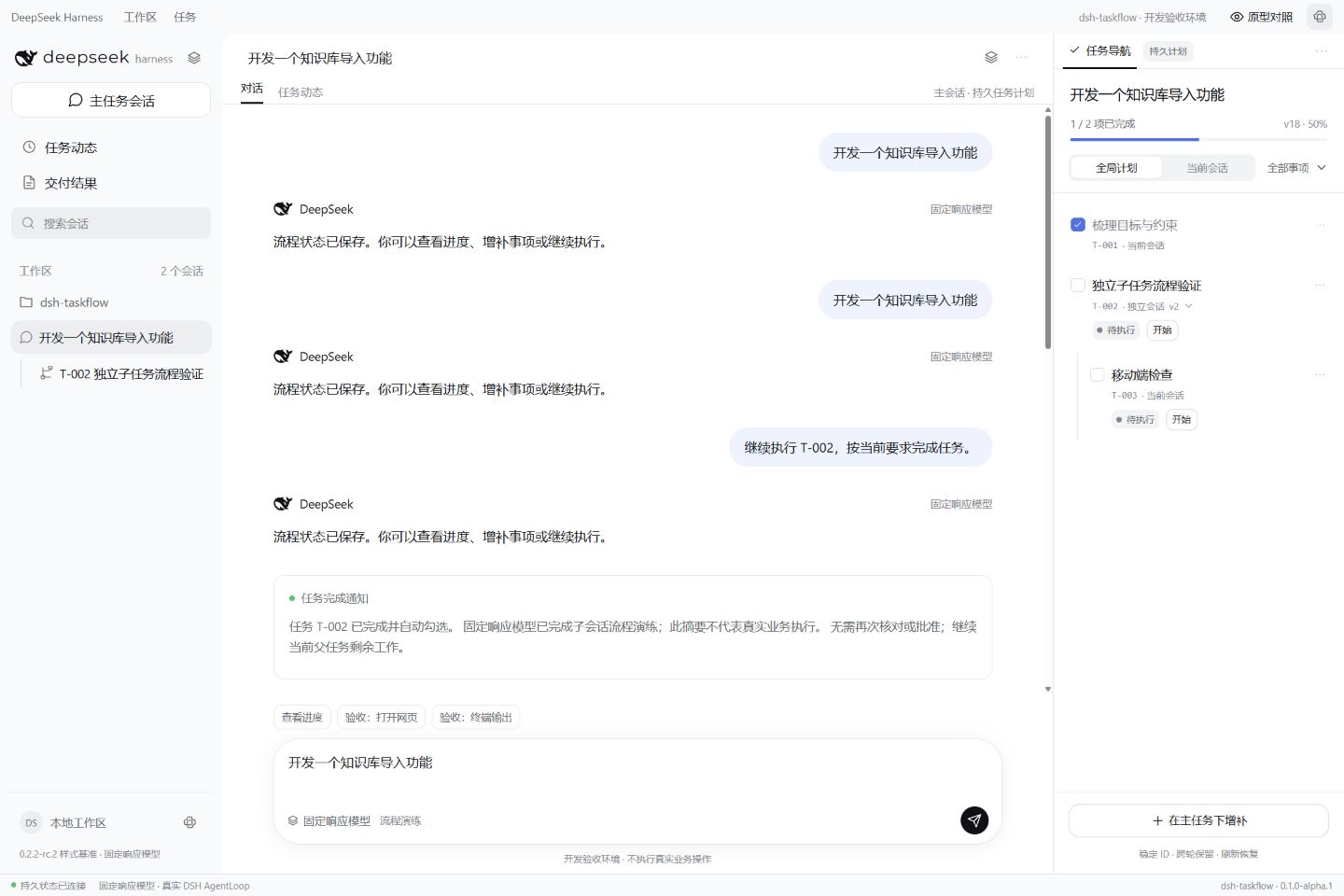
- **持久任务清单** — 模型根据请求复杂度规划事项,使用独立任务账本保存;对话换轮、页面刷新和宿主重启不会自动清空计划。
|
|
13
|
+
- **按需递归委派** — 简单事项在负责会话完成,复杂且独立的事项创建子会话;子会话可在深度与并发限制内继续拆分。
|
|
14
|
+
- **完成自动通知** — 子会话返回有效完成结果后,自动勾选对应事项并通知直接父会话,无需主会话再次核对。
|
|
15
|
+
- **对话增量维护** — 在当前执行或选中的任务下增补事项,也可在主会话明确指定目标父任务;支持修改要求、取消和调整顺序。
|
|
16
|
+
- **层级任务导航** — 在右侧按层级查看清单、进度、执行状态和任务详情,跳转到对应执行会话。
|
|
17
|
+
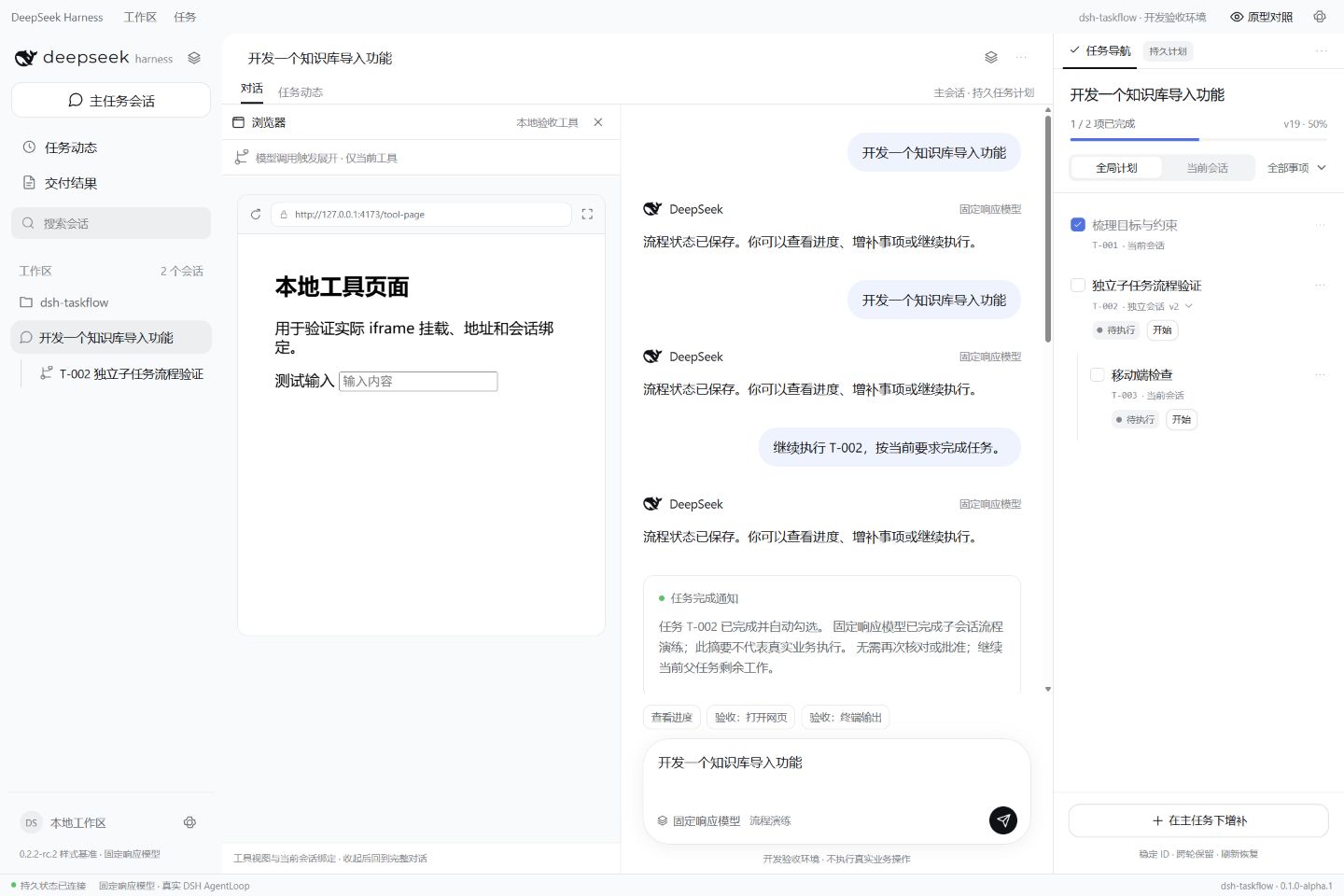
- **按需工具视图** — 浏览器、文件、命令或插件工具实际调用后,可在会话左侧展示对应页面或输出;工具区默认关闭。
|
|
18
|
+
|
|
19
|
+
|
|
20
|
+
|
|
21
|
+
*截图来自固定响应模型的开发验收环境。*
|
|
22
|
+
|
|
23
|
+
## 安装 / 更新
|
|
24
|
+
|
|
25
|
+
### 在 DeepSeek Harness 网页版或桌面版中安装
|
|
26
|
+
|
|
27
|
+
打开 **Plugins / 插件** → **Add plugin / 添加插件**,搜索 `dsh-taskflow`。如果结果中出现仓库 `Oak-liuhj/dsh-taskflow`,选择对应条目安装;尚未检索到时,可使用下方 CLI 按 npm 包名安装。
|
|
28
|
+
|
|
29
|
+
安装后按宿主提示重载对应 profile。插件需要宿主提供模型、工具与 `spawn` 子会话能力;桌面端需提供相同的 Web 渲染层服务。
|
|
30
|
+
|
|
31
|
+
### 使用 `dsh` CLI 安装或更新
|
|
32
|
+
|
|
33
|
+
```sh
|
|
34
|
+
dsh plugin --profile web add dsh-taskflow@latest
|
|
35
|
+
```
|
|
36
|
+
|
|
37
|
+
需要固定当前版本时:
|
|
38
|
+
|
|
39
|
+
```sh
|
|
40
|
+
dsh plugin --profile web add dsh-taskflow@0.1.1
|
|
41
|
+
```
|
|
42
|
+
|
|
43
|
+
将 `web` 替换为实际 profile 名称。已通过 npm 包名安装的用户,也可在插件详情点击 **重新检查**,选择兼容版本后点击 **更新**,按宿主提示重启或重载。
|
|
44
|
+
|
|
45
|
+
## 使用方法
|
|
46
|
+
|
|
47
|
+
在主会话描述目标,模型会为需要多个步骤、工具或独立执行的请求规划任务;短问答无需建立计划。
|
|
48
|
+
|
|
49
|
+
| 入口 | 可以做什么 |
|
|
50
|
+
| --- | --- |
|
|
51
|
+
| **任务导航** | 查看持久任务树、完成进度与执行状态;在全局计划和当前会话之间切换,筛选、折叠及跳转任务。 |
|
|
52
|
+
| **主会话** | 创建计划、调整整体要求,或明确指定在哪个子任务下增补事项。 |
|
|
53
|
+
| **子任务会话** | 执行负责的事项;必要时拆分下级任务,完成后向直接父会话报告。 |
|
|
54
|
+
| **任务详情** | 查看要求、完成标准和结果;增补、修改、继续执行、取消及调整同级顺序。 |
|
|
55
|
+
| **会话左侧工具区** | 按需展示实际工具页面或输出,支持关闭;窄屏可切换对话与工具。 |
|
|
56
|
+
|
|
57
|
+
## ✅ 任务导航 — 一份跨轮保留的清单
|
|
58
|
+
|
|
59
|
+
在会话顶部点击 **任务导航**,或在右侧栏选择对应入口。已有计划时,面板按父子层级展示事项,不额外划分规划、决策或核对分类。
|
|
60
|
+
|
|
61
|
+
| 内容 | 解答的问题 |
|
|
62
|
+
| --- | --- |
|
|
63
|
+
| **完成进度** | 整份计划完成了多少事项。 |
|
|
64
|
+
| **全局计划 / 当前会话** | 查看完整任务树,或聚焦当前会话负责的部分。 |
|
|
65
|
+
| **事项状态** | 哪些事项待执行、执行中、已完成、暂停、失败或已取消。 |
|
|
66
|
+
| **稳定任务 ID** | 在对话中准确引用同一事项,避免同名任务混淆。 |
|
|
67
|
+
| **执行会话** | 当前事项在本会话完成,还是交由独立子会话处理。 |
|
|
68
|
+
| **任务详情与动态** | 查看要求、完成标准、执行结果及历史变更。 |
|
|
69
|
+
|
|
70
|
+
点击任务标题可聚焦事项或打开对应执行会话;通过折叠和筛选查看较长的计划。
|
|
71
|
+
|
|
72
|
+
## 🧩 子会话协作 — 按任务复杂度拆分
|
|
73
|
+
|
|
74
|
+
例如,在主会话输入:
|
|
75
|
+
|
|
76
|
+
```text
|
|
77
|
+
开发知识库导入模块,先规划任务,复杂且独立的部分分配子会话。
|
|
78
|
+
```
|
|
79
|
+
|
|
80
|
+
模型结合复杂度与独立性选择执行方式:简单或需要共享上下文的事项留在负责会话;适合独立处理的复杂事项创建子会话。子会话可以继续拆分下级,达到深度上限后在负责会话内完成。
|
|
81
|
+
|
|
82
|
+
子会话返回有效的结构化完成结果后,插件更新对应事项,并通知它的直接父会话。任务要求和本次执行 ID 会参与校验,旧结果不能覆盖修改后的要求;父会话可据此继续剩余工作。
|
|
83
|
+
|
|
84
|
+
## ✏️ 增补与修改 — 在原计划上继续推进
|
|
85
|
+
|
|
86
|
+
通过对话明确要调整的任务:
|
|
87
|
+
|
|
88
|
+
```text
|
|
89
|
+
在当前任务下新增一个移动端检查。
|
|
90
|
+
在 T-005 下新增一个 PDF 导入检查。
|
|
91
|
+
修改 T-003 的要求,增加失败重试和错误提示。
|
|
92
|
+
取消 T-006,保留历史。
|
|
93
|
+
继续执行 T-003。
|
|
94
|
+
```
|
|
95
|
+
|
|
96
|
+
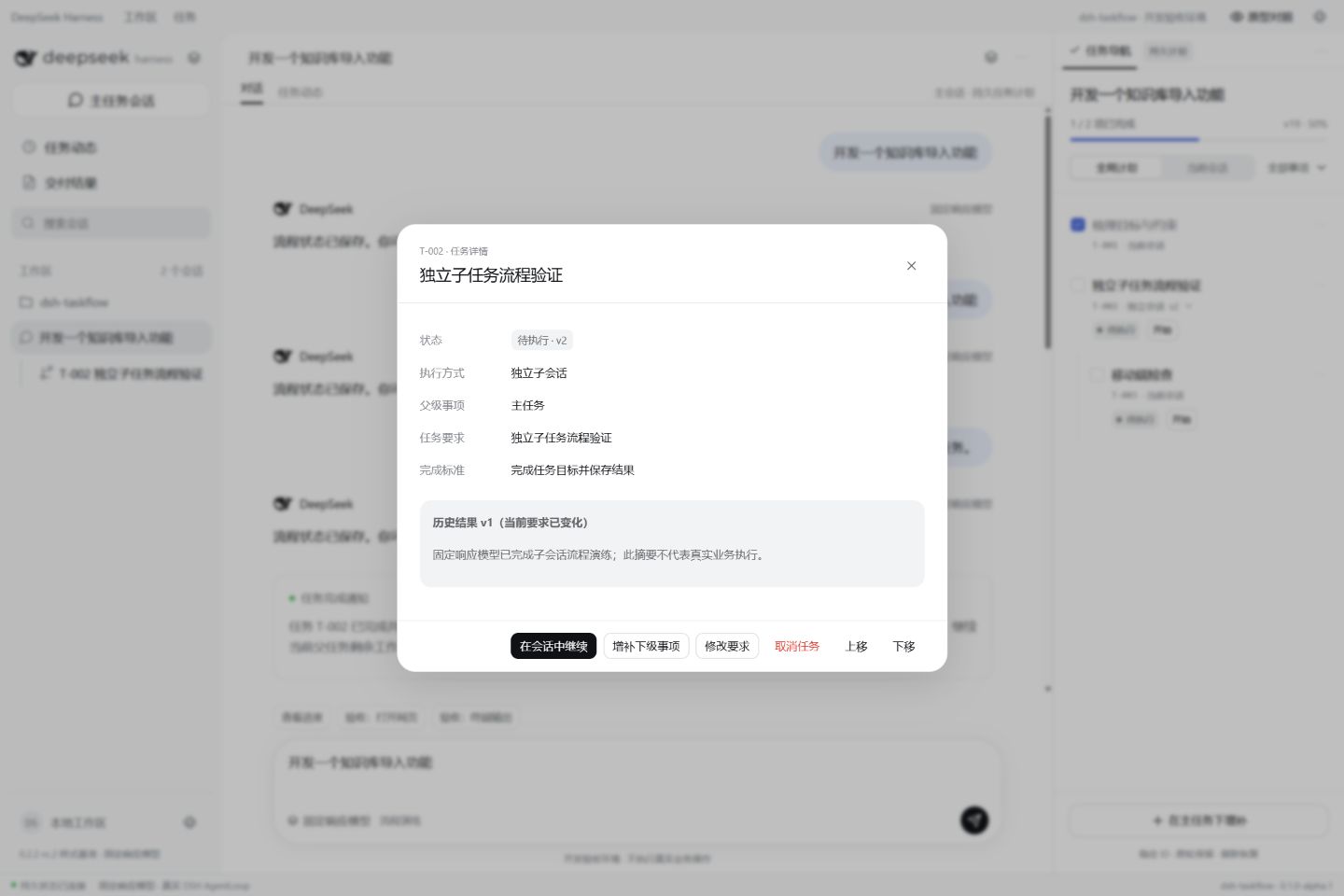
默认增补到当前执行或选中的事项;主会话也可指定父任务 ID 或唯一完整名称。未定位当前事项时,新增到根计划;名称存在歧义时需要进一步定位。
|
|
97
|
+
|
|
98
|
+
|
|
99
|
+
|
|
100
|
+
详情中的 **增补下级事项**、**修改要求** 和 **在会话中继续** 会预填当前会话输入框,发送后由模型执行。**取消任务** 和 **上移 / 下移** 可直接操作。向已完成任务增补下级时,会重新打开该任务及已完成祖先,并保留历史报告。
|
|
101
|
+
|
|
102
|
+
## 🖥️ 工具视图 — 需要操作时再展示
|
|
103
|
+
|
|
104
|
+
|
|
105
|
+
|
|
106
|
+
工具区默认关闭。模型实际调用宿主的浏览器、文件、命令或其他插件工具时,可在会话左侧显示本次实际地址或输出;不再需要时可关闭。
|
|
107
|
+
|
|
108
|
+
浏览器自动化、终端和编辑能力由宿主或相应插件提供。默认网页视图使用受限 iframe,部分网站会因 CSP、登录或跨域策略无法嵌入。其他客户端插件可通过 `taskflowViews.register(kind, Component)` 注册专用渲染器,见[架构说明](https://github.com/Oak-liuhj/dsh-taskflow/blob/main/docs/architecture.md)。
|
|
109
|
+
|
|
110
|
+
## ⚙️ 设置
|
|
111
|
+
|
|
112
|
+
在所用 profile 的插件配置中调整,默认配置见 [cordis.patch.yml](https://github.com/Oak-liuhj/dsh-taskflow/blob/main/cordis.patch.yml)。
|
|
113
|
+
|
|
114
|
+
| 配置项 | 默认值 | 说明 |
|
|
115
|
+
| --- | --- | --- |
|
|
116
|
+
| `autoPlan` | `true` | 引导模型为复杂请求自动规划;关闭后需明确要求创建计划。 |
|
|
117
|
+
| `maxDepth` | `2` | 最大委派深度,根会话为 0;可设 0–8。 |
|
|
118
|
+
| `maxConcurrent` | `2` | 全树同时执行的委派名额;父任务等待下级时释放名额;可设 1–16。 |
|
|
119
|
+
| `maxTasks` | `200` | 每份计划的事项上限;可设 1–2000。 |
|
|
120
|
+
| `provider` | `spawn` | 宿主已注册的子会话提供者。 |
|
|
121
|
+
| `dataDir` | `${DSH_HOME}/taskflow` | 任务账本目录;未设置环境变量时为 `~/.dsh/taskflow`。 |
|
|
122
|
+
|
|
123
|
+
## 注意事项
|
|
124
|
+
|
|
125
|
+
- **兼容性** — 当前版本 **0.1.1**,要求 Node.js **≥24.9.0**;DSH 兼容声明为 `>=0.2.1-rc.3 <1.0.0-0 || >=0.2.2-0 <1.0.0-0 || >=0.2.3-0 <1.0.0-0 || >=0.3.0-0 <1.0.0-0`。宿主需启用 `tools`、`agents`、`sessions`、`systemPrompt`、`subagents` 及相应客户端服务。
|
|
126
|
+
- **规划与执行** — 自动规划由模型提示引导,具体拆解和工具选择取决于宿主模型。任务账本独立于 `todo_write`,后续对话通过增量操作维护原计划。
|
|
127
|
+
- **数据与恢复** — 同一 `dataDir` 只允许一个活跃写入者。停止宿主后备份整个目录;完整迁移还需备份原生 DSH 会话。中断时仍在执行的任务恢复为暂停,从负责会话继续;卸载插件保留账本数据。
|
|
128
|
+
- **验证范围** — 已通过 30 项自动化测试、12 个版本边界检查,以及 `0.2.1-rc.3`、`0.2.2-rc.2`、`0.2.2-rc.3` 的固定响应模型集成测试。完整原生 profile、真实模型与第三方工具仍需验收,详见[验收记录](https://github.com/Oak-liuhj/dsh-taskflow/blob/main/docs/acceptance.md)。
|
|
129
|
+
- **语言** — 插件说明提供简体中文和英文;任务导航界面当前以中文显示。
|
|
130
|
+
|
|
131
|
+
## 喜欢它?
|
|
132
|
+
|
|
133
|
+
欢迎在 [GitHub](https://github.com/Oak-liuhj/dsh-taskflow) 点亮 ⭐,或提交 [Issue](https://github.com/Oak-liuhj/dsh-taskflow/issues) / PR。反馈时请附插件与 DSH 版本、profile 类型、复现步骤及脱敏日志。
|
|
134
|
+
|
|
135
|
+
开发与贡献请参阅[开发说明](https://github.com/Oak-liuhj/dsh-taskflow/blob/main/docs/DEVELOPMENT.md)和[发布说明](https://github.com/Oak-liuhj/dsh-taskflow/blob/main/docs/PUBLISHING.md)。
|
|
136
|
+
|
|
137
|
+
## 许可证
|
|
138
|
+
|
|
139
|
+
原创代码采用 [Apache-2.0](https://github.com/Oak-liuhj/dsh-taskflow/blob/main/LICENSE),复用的 DeepSeek 界面样式和图标保留 MIT 许可,详见 [NOTICE](https://github.com/Oak-liuhj/dsh-taskflow/blob/main/NOTICE) 与 [DeepSeek-MIT.txt](https://github.com/Oak-liuhj/dsh-taskflow/blob/main/licenses/DeepSeek-MIT.txt)。仓库 PRD 内嵌字体按 OFL-1.1 分发,字体与完整 PRD 不进入 npm 运行包。本项目为社区插件。
|
package/README_en.md
ADDED
|
@@ -0,0 +1,139 @@
|
|
|
1
|
+
# dsh-taskflow
|
|
2
|
+
|
|
3
|
+
[简体中文](https://github.com/Oak-liuhj/dsh-taskflow/blob/main/README.md) · [English](https://github.com/Oak-liuhj/dsh-taskflow/blob/main/README_en.md)
|
|
4
|
+
|
|
5
|
+
[](https://www.npmjs.com/package/dsh-taskflow)
|
|
6
|
+
[](https://github.com/Oak-liuhj/dsh-taskflow)
|
|
7
|
+
|
|
8
|
+
**A [DeepSeek Harness](https://www.deepseek.com/harness/) plugin for persistent task planning and nested session orchestration.**
|
|
9
|
+
|
|
10
|
+
[`dsh-taskflow`](https://www.npmjs.com/package/dsh-taskflow) turns a goal in the main conversation into a lasting task tree, showing what needs doing, which session owns each task, and what has finished.
|
|
11
|
+
|
|
12
|
+
- **Persistent checklist** — The model plans tasks according to request complexity. A separate ledger preserves the plan across conversation turns, page refreshes and host restarts.
|
|
13
|
+
- **Selective nested delegation** — Simple tasks stay in their owner session. Independent complex tasks can spawn children, which may delegate further within depth and concurrency limits.
|
|
14
|
+
- **Completion notifications** — Valid child results check off the task and notify its direct parent, without adding a parent review step.
|
|
15
|
+
- **Incremental conversation updates** — Add work beneath the current task or explicitly name a parent in the main conversation; edit requirements, cancel work and reorder siblings.
|
|
16
|
+
- **Hierarchical task navigation** — Inspect the task tree, progress, status and details in the right sidebar, then jump to the execution session.
|
|
17
|
+
- **On-demand tool views** — Actual host tool calls can show a page or output to the left of the conversation. The tool area starts closed.
|
|
18
|
+
|
|
19
|
+

|
|
20
|
+
|
|
21
|
+
*Screenshots show the development acceptance shell with a deterministic model.*
|
|
22
|
+
|
|
23
|
+
## Install / Update
|
|
24
|
+
|
|
25
|
+
### In DeepSeek Harness Web or Desktop
|
|
26
|
+
|
|
27
|
+
Open **Plugins** → **Add plugin** and search for `dsh-taskflow`. If a result points to `Oak-liuhj/dsh-taskflow`, install that entry. If it is not listed, use the CLI below to install by npm package name.
|
|
28
|
+
|
|
29
|
+
Reload the profile when the host requests it. The plugin uses the host's model, tools and `spawn` subagent provider. Desktop installations need the same Web renderer services.
|
|
30
|
+
|
|
31
|
+
### Using the `dsh` CLI
|
|
32
|
+
|
|
33
|
+
```sh
|
|
34
|
+
dsh plugin --profile web add dsh-taskflow@latest
|
|
35
|
+
```
|
|
36
|
+
|
|
37
|
+
To pin the current version:
|
|
38
|
+
|
|
39
|
+
```sh
|
|
40
|
+
dsh plugin --profile web add dsh-taskflow@0.1.1
|
|
41
|
+
```
|
|
42
|
+
|
|
43
|
+
Replace `web` with your profile name. For an npm-based installation, you can also recheck versions in the plugin details, choose a compatible update and follow the host's reload or restart instructions.
|
|
44
|
+
|
|
45
|
+
## Usage
|
|
46
|
+
|
|
47
|
+
Describe your goal in the main conversation. The model plans requests that need several steps, tool operations or independent execution; short questions do not need a plan.
|
|
48
|
+
|
|
49
|
+
| Entry point | What you can do |
|
|
50
|
+
| --- | --- |
|
|
51
|
+
| **Task navigation** | Inspect progress and status; switch between the global plan and current session, filter, collapse and navigate tasks. |
|
|
52
|
+
| **Main conversation** | Create a plan, adjust the overall requirements or identify the parent task for new work. |
|
|
53
|
+
| **Child conversation** | Complete assigned work, create subtasks when needed and report to the direct parent. |
|
|
54
|
+
| **Task details** | Read requirements, completion criteria and results; add, edit, resume, cancel and reorder tasks. |
|
|
55
|
+
| **Tool area to the left** | Show actual tool pages or output when needed. Close it or switch between tools and chat on narrow screens. |
|
|
56
|
+
|
|
57
|
+
## ✅ Task navigation — one checklist across turns
|
|
58
|
+
|
|
59
|
+
Click **任务导航 / Task navigation** in the session header, or select its right-sidebar entry. Tasks appear directly in their parent-child hierarchy, without extra planning or review categories.
|
|
60
|
+
|
|
61
|
+
| Item | What it tells you |
|
|
62
|
+
| --- | --- |
|
|
63
|
+
| **Progress** | How much of the plan is complete. |
|
|
64
|
+
| **Global plan / Current session** | The whole tree or the part owned by the current session. |
|
|
65
|
+
| **Task status** | Pending, running, completed, paused, failed or cancelled work. |
|
|
66
|
+
| **Stable task ID** | A precise reference to the same task in later messages. |
|
|
67
|
+
| **Execution session** | Whether work stays in the owner session or runs in a child. |
|
|
68
|
+
| **Details and activity** | Requirements, completion criteria, results and change history. |
|
|
69
|
+
|
|
70
|
+
Click a task title to focus it or open its execution session. Collapse branches and filter longer plans.
|
|
71
|
+
|
|
72
|
+
## 🧩 Child sessions — delegate according to complexity
|
|
73
|
+
|
|
74
|
+
For example, ask the main conversation:
|
|
75
|
+
|
|
76
|
+
```text
|
|
77
|
+
Build a knowledge-base import module. Plan the work first and delegate independent complex parts to child sessions.
|
|
78
|
+
```
|
|
79
|
+
|
|
80
|
+
The model considers complexity and independence. Simple tasks or work requiring shared context stay in the owner session; suitable complex work can spawn a child. Children may split their work again, with inline execution used at the depth limit.
|
|
81
|
+
|
|
82
|
+
A valid structured child result updates the task and notifies its direct parent. Requirement versions and execution IDs are checked so old results cannot overwrite changed requirements. The parent can then continue its remaining work.
|
|
83
|
+
|
|
84
|
+
## ✏️ Add and edit — keep working on the same plan
|
|
85
|
+
|
|
86
|
+
Identify the task to change in your message:
|
|
87
|
+
|
|
88
|
+
```text
|
|
89
|
+
Add a mobile check under the current task.
|
|
90
|
+
Add a PDF import check under T-005.
|
|
91
|
+
Update T-003 to require retries and clear error messages.
|
|
92
|
+
Cancel T-006 and retain its history.
|
|
93
|
+
Continue T-003.
|
|
94
|
+
```
|
|
95
|
+
|
|
96
|
+
New work defaults to the currently running or selected task. The main conversation may name a parent ID or unique full title. If no current task is identified, work attaches to the root plan; ambiguous names need clarification.
|
|
97
|
+
|
|
98
|
+

|
|
99
|
+
|
|
100
|
+
**Add child**, **Edit requirements** and **Continue in conversation** prefill the conversation input; send the message for the model to act. Cancellation and sibling reordering are direct interface actions. Adding children to completed work reopens the task and completed ancestors while preserving historical reports.
|
|
101
|
+
|
|
102
|
+
## 🖥️ Tool views — show them when needed
|
|
103
|
+
|
|
104
|
+

|
|
105
|
+
|
|
106
|
+
The tool area starts closed. Actual browser, file, command or plugin tool calls can show their real address or output to the left of the conversation. Close the view when finished.
|
|
107
|
+
|
|
108
|
+
Execution remains with host tools or their plugins. The default page view is a restricted iframe; CSP, authentication or cross-origin rules may prevent embedding. Other client plugins can register dedicated renderers through `taskflowViews.register(kind, Component)`; see the [architecture guide](https://github.com/Oak-liuhj/dsh-taskflow/blob/main/docs/architecture.md).
|
|
109
|
+
|
|
110
|
+
## ⚙️ Settings
|
|
111
|
+
|
|
112
|
+
Adjust the plugin configuration in the profile you use. Defaults are in [cordis.patch.yml](https://github.com/Oak-liuhj/dsh-taskflow/blob/main/cordis.patch.yml).
|
|
113
|
+
|
|
114
|
+
| Setting | Default | Meaning |
|
|
115
|
+
| --- | --- | --- |
|
|
116
|
+
| `autoPlan` | `true` | Prompt the model to plan complex requests automatically; when disabled, request a plan explicitly. |
|
|
117
|
+
| `maxDepth` | `2` | Maximum delegation depth, with the root at 0; range 0–8. |
|
|
118
|
+
| `maxConcurrent` | `2` | Active delegation slots across the tree. Parents release their slot while waiting for children; range 1–16. |
|
|
119
|
+
| `maxTasks` | `200` | Task limit per plan; range 1–2000. |
|
|
120
|
+
| `provider` | `spawn` | Name of a registered host subagent provider. |
|
|
121
|
+
| `dataDir` | `${DSH_HOME}/taskflow` | Ledger directory; falls back to `~/.dsh/taskflow` when the environment variable is unset. |
|
|
122
|
+
|
|
123
|
+
## Notes
|
|
124
|
+
|
|
125
|
+
- **Compatibility** — Current version **0.1.1**, Node.js **≥24.9.0**. The declared DSH range is `>=0.2.1-rc.3 <1.0.0-0 || >=0.2.2-0 <1.0.0-0 || >=0.2.3-0 <1.0.0-0 || >=0.3.0-0 <1.0.0-0`. Enable `tools`, `agents`, `sessions`, `systemPrompt`, `subagents` and the corresponding client services.
|
|
126
|
+
- **Planning and execution** — Automatic planning is model-guided. Task decomposition and tool choices depend on the host model. The ledger is independent of `todo_write`; later messages update the same plan incrementally.
|
|
127
|
+
- **Data and recovery** — Use one active writer per `dataDir`. Back up the whole directory while the host is stopped, together with native DSH sessions for a complete migration. Interrupted tasks recover as paused and can be resumed in their owner conversation. Uninstalling the plugin preserves the ledger.
|
|
128
|
+
- **Validation** — 30 automated tests, 12 version boundaries and deterministic-model integrations with exact hosts `0.2.1-rc.3`, `0.2.2-rc.2` and `0.2.2-rc.3` have passed. Full native profiles, production models and third-party tools still need acceptance; see the [acceptance record](https://github.com/Oak-liuhj/dsh-taskflow/blob/main/docs/acceptance.md).
|
|
129
|
+
- **Language** — Plugin documentation is available in Simplified Chinese and English. The task navigation interface currently uses Chinese labels.
|
|
130
|
+
|
|
131
|
+
## Like it?
|
|
132
|
+
|
|
133
|
+
Star the project on [GitHub](https://github.com/Oak-liuhj/dsh-taskflow), or open an [Issue](https://github.com/Oak-liuhj/dsh-taskflow/issues) / PR. Include plugin and DSH versions, profile type, reproduction steps and redacted logs when reporting a problem.
|
|
134
|
+
|
|
135
|
+
See the [development guide](https://github.com/Oak-liuhj/dsh-taskflow/blob/main/docs/DEVELOPMENT.md) and [publishing guide](https://github.com/Oak-liuhj/dsh-taskflow/blob/main/docs/PUBLISHING.md) for contributions.
|
|
136
|
+
|
|
137
|
+
## License
|
|
138
|
+
|
|
139
|
+
Original code is [Apache-2.0](https://github.com/Oak-liuhj/dsh-taskflow/blob/main/LICENSE). Imported DeepSeek styles and icons retain their MIT license; see [NOTICE](https://github.com/Oak-liuhj/dsh-taskflow/blob/main/NOTICE) and [DeepSeek-MIT.txt](https://github.com/Oak-liuhj/dsh-taskflow/blob/main/licenses/DeepSeek-MIT.txt). The source PRD embeds an OFL-1.1 font; the font and complete PRD are excluded from the npm runtime package. This is a community plugin.
|
package/docs/DETAIL.md
CHANGED
package/docs/DETAIL.zh-CN.md
CHANGED
package/locale/en.json
CHANGED
|
@@ -1,7 +1,7 @@
|
|
|
1
1
|
{
|
|
2
2
|
"meta": {
|
|
3
|
-
"title": "Taskflow",
|
|
4
|
-
"description": "Persistent task
|
|
5
|
-
"detail": "
|
|
3
|
+
"title": "Taskflow (dsh-taskflow)",
|
|
4
|
+
"description": "Persistent task planning with selective nested sessions, incremental updates and direct-parent completion notifications.",
|
|
5
|
+
"detail": "README_en.md"
|
|
6
6
|
}
|
|
7
7
|
}
|
package/locale/zh.json
CHANGED