dsh-taskbridge 1.5.1 → 1.5.3
This diff represents the content of publicly available package versions that have been released to one of the supported registries. The information contained in this diff is provided for informational purposes only and reflects changes between package versions as they appear in their respective public registries.
- package/CHANGELOG.md +34 -0
- package/README.md +281 -28
- package/codex/dsh-taskbridge.toml +38 -1
- package/docs/INTRODUCTION.md +262 -9
- package/docs/INTRODUCTION.zh.md +255 -21
- package/docs/assets/taskbridge-workflow.en.png +0 -0
- package/docs/assets/taskbridge-workflow.zh.png +0 -0
- package/docs/claude-code.md +14 -22
- package/docs/codex-integration.md +2 -2
- package/docs/plugin-market.md +1 -1
- package/docs/releases/1.5.2.zh.md +30 -0
- package/docs/releases/1.5.3-test.1.zh.md +28 -0
- package/docs/releases/1.5.3-test.2.zh.md +24 -0
- package/docs/releases/1.5.3.zh.md +33 -0
- package/docs/runtime-compatibility.md +4 -4
- package/docs/taskbridge-upgrade.md +1 -1
- package/docs/worker-permissions.md +1 -1
- package/lib/client.js +42 -6
- package/locale/en.json +1 -1
- package/locale/zh.json +1 -1
- package/package.json +8 -3
- package/src/client/api.js +23 -9
- package/src/client/styles.js +35 -2
- package/src/codex/installer.js +157 -47
- package/src/mcp/server.js +6 -2
package/docs/INTRODUCTION.md
CHANGED
|
@@ -1,19 +1,272 @@
|
|
|
1
1
|
# DSH TaskBridge
|
|
2
2
|
|
|
3
|
-
|
|
3
|
+
**Let Codex direct DSH. Choose the execution API, model and reasoning effort in the DSH plugin.**
|
|
4
4
|
|
|
5
|
-
|
|
5
|
+
> **Codex is the currently supported client. Claude Code and Claude Desktop integration is planned for version 2.0.**
|
|
6
6
|
|
|
7
|
-
|
|
7
|
+
[简体中文](INTRODUCTION.zh.md) · [Get started](#get-started) · [Settings](#settings) · [FAQ](#faq) · [Changelog](../CHANGELOG.md)
|
|
8
8
|
|
|
9
|
-
|
|
9
|
+
TaskBridge is a task delegation plugin for **DeepSeek Harness (DSH)**. Keep describing your goals in Codex: the commander plans the work, handles requests that need a decision and reviews delivery. The model running in DSH implements changes, runs tools and tests, and returns its results.
|
|
10
10
|
|
|
11
|
-
|
|
11
|
+
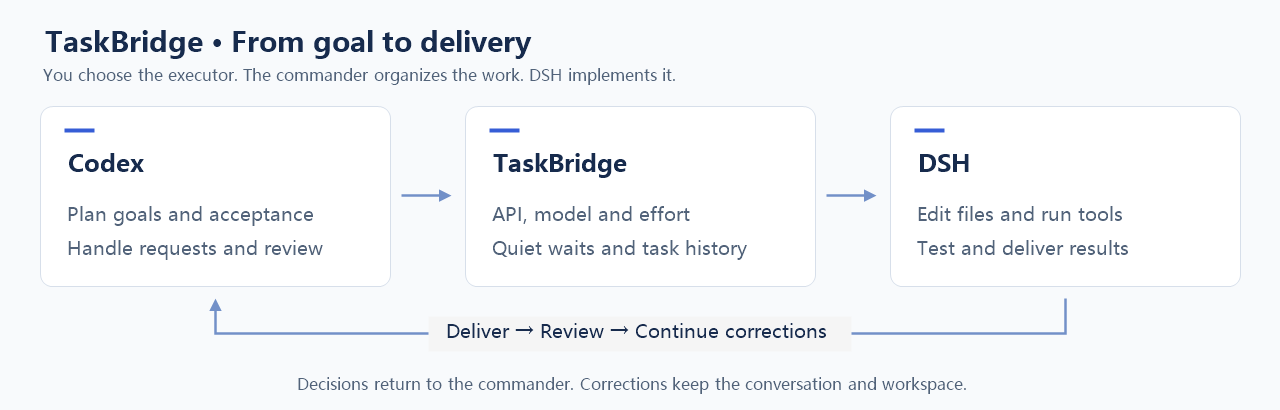
**You choose the model. The commander organizes and reviews the work. DSH executes.** TaskBridge connects dispatch, waiting, review and follow-up corrections in one workflow.
|
|
12
12
|
|
|
13
|
-
|
|
13
|
+
|
|
14
14
|
|
|
15
|
-
|
|
15
|
+
*Workflow diagram. The program waits during normal execution; decisions return to the commander, and corrections continue the original task.*
|
|
16
16
|
|
|
17
|
-
|
|
17
|
+
## Why TaskBridge?
|
|
18
18
|
|
|
19
|
-
|
|
19
|
+
Use TaskBridge when you want Codex to understand the project and check the result, while a model already connected to DSH does the implementation.
|
|
20
|
+
|
|
21
|
+
- **Keep tasks and results connected.** The commander dispatches through MCP and reads the delivered changes and verification evidence.
|
|
22
|
+
- **Choose execution settings once.** Select the provider, model and reasoning effort in DSH; tasks use the effective plugin configuration.
|
|
23
|
+
- **Reduce repetitive progress checks.** The program observes execution and returns when there is something to decide or review.
|
|
24
|
+
- **Keep context for corrections.** Send a consolidated correction list back to the original conversation and execution workspace.
|
|
25
|
+
- **Distinguish delivery from acceptance.** Execution status, optional model review and the commander's final conclusion have separate records.
|
|
26
|
+
|
|
27
|
+
Typical tasks include feature development, bug fixes, test coverage, code cleanup and project documentation. Both the commander and executor still incur their own model usage; quiet waiting reduces repetitive queries and transfers of intermediate results.
|
|
28
|
+
|
|
29
|
+
## Features at a glance
|
|
30
|
+
|
|
31
|
+
| Feature | What it gives you |
|
|
32
|
+
| --- | --- |
|
|
33
|
+
| **Existing API connections** | Select providers enabled in DSH without copying endpoints or API keys. |
|
|
34
|
+
| **Worker model and reasoning effort** | Choose the executor and its supported effort, plus timeout, concurrency and isolation. |
|
|
35
|
+
| **Codex integration controls** | Install or update the TaskBridge agent, MCP connection and dispatch rules; repair MCP separately. |
|
|
36
|
+
| **One delegation switch** | Control whether local task submission is allowed. |
|
|
37
|
+
| **Quiet waiting** | Let the program wait and return for approvals, questions, exceptions and delivery. |
|
|
38
|
+
| **Per-operation permissions** | Decide a specific request, then continue waiting for the same task. |
|
|
39
|
+
| **Task workspaces and continuation** | Name workspaces after the work; start independent tasks separately and explicitly continue corrections. |
|
|
40
|
+
| **Review after delivery** | Inspect changes and evidence together, then record acceptance or request changes. |
|
|
41
|
+
| **Optional additional model review** | Configure a separate model and effort for a read-only second opinion. |
|
|
42
|
+
| **Automatic settings saving** | Save selections promptly and text edits after a short pause, with visible save status. |
|
|
43
|
+
| **Presets and project overrides** | Reuse worker/reviewer combinations and give projects their own settings. |
|
|
44
|
+
| **Task history and details** | Inspect phases, actual routing, activity, permission decisions, changes and complete review notes. |
|
|
45
|
+
|
|
46
|
+
## Get started
|
|
47
|
+
|
|
48
|
+
### 1. Install in DSH
|
|
49
|
+
|
|
50
|
+
Open **Plugins → Add plugin** and enter:
|
|
51
|
+
|
|
52
|
+
```text
|
|
53
|
+
dsh-taskbridge
|
|
54
|
+
```
|
|
55
|
+
|
|
56
|
+
To install this specific release:
|
|
57
|
+
|
|
58
|
+
```text
|
|
59
|
+
dsh-taskbridge@1.5.3
|
|
60
|
+
```
|
|
61
|
+
|
|
62
|
+
Enable **DSH TaskBridge** and open its settings. Use the official npm registry if a regional mirror has not synchronized yet. GitHub Releases also provide `.tgz` packages.
|
|
63
|
+
|
|
64
|
+
**dsh-crew is not required.** DSH supplies the execution environment. The local MCP entry requires Node.js 24 or newer; the Codex installer checks for an available runtime.
|
|
65
|
+
|
|
66
|
+
### 2. Select an API, model and effort
|
|
67
|
+
|
|
68
|
+
In **API management**, add a provider from DSH's enabled connections. Then open **Execution settings** and choose the provider, worker model and supported reasoning effort.
|
|
69
|
+
|
|
70
|
+
Credentials remain managed by DSH. If the connection is missing, configure and enable it in DSH's own model/API settings first, then refresh the plugin's catalog.
|
|
71
|
+
|
|
72
|
+
Settings save automatically. Check for a saved status before dispatching; an invalid or unsaved draft is not the active configuration.
|
|
73
|
+
|
|
74
|
+
### 3. Connect the commander
|
|
75
|
+
|
|
76
|
+
Open **Codex integration** and click **Install / update TaskBridge agent**. The button configures:
|
|
77
|
+
|
|
78
|
+
- **The TaskBridge agent:** writes `agents/dsh-taskbridge.toml`.
|
|
79
|
+
- **The MCP connection:** registers the plugin's tool entry.
|
|
80
|
+
- **Commander rules:** explicit dispatch, quiet waiting, permission decisions, review and continuation.
|
|
81
|
+
|
|
82
|
+
Reload Codex afterward. Clients with agent mentions can select `@dsh-taskbridge` and describe a task; availability of the `@` picker depends on the client.
|
|
83
|
+
|
|
84
|
+
Initial setup requires a button click. Later updates can refresh recognized plugin-managed entries while preserving custom edits. **Claude Code and Claude Desktop are not supported integration clients in this release; their integration is planned for 2.0.**
|
|
85
|
+
|
|
86
|
+
### 4. Enable delegation and assign a task
|
|
87
|
+
|
|
88
|
+
Turn on **Allow local MCP calls to DSH delegation** at the top of the page. Tell the commander the goal, the project it may change and the acceptance criteria. For example:
|
|
89
|
+
|
|
90
|
+
> Use TaskBridge to fix settings changes not taking effect in this project. Plan and review the work; let DSH implement it using the model selected in the plugin. Limit changes to settings persistence, preserve the existing interaction and add regression verification. Review delivery and continue the original task if corrections are needed.
|
|
91
|
+
|
|
92
|
+
The commander checks the connection and workspace before submission. Follow execution in the DSH workspace conversation and inspect delivery in **Task history**.
|
|
93
|
+
|
|
94
|
+
## How a task gets completed
|
|
95
|
+
|
|
96
|
+
| Stage | Commander | DSH / TaskBridge |
|
|
97
|
+
| --- | --- | --- |
|
|
98
|
+
| **Plan** | Define the scope and acceptance criteria; split work if needed. | Provide connection status and workspace preflight information. |
|
|
99
|
+
| **Dispatch** | Submit a clear goal, project path and task title. | Start the task with the effective configuration and create its record and conversation. |
|
|
100
|
+
| **Execute** | Wait. | Modify files, run tools and tests, record activity and keep waiting internally. |
|
|
101
|
+
| **Request or question** | Decide specific permissions and answer questions needed for execution. | Pause the relevant operation, provide evidence and resume the same task after a decision. |
|
|
102
|
+
| **Deliver** | Review actual changes, verification and unresolved issues together. | Return results and evidence, including optional additional model review. |
|
|
103
|
+
| **Accept or correct** | Record a review conclusion or prepare one correction list. | Save the conclusion or continue the original conversation and execution workspace. |
|
|
104
|
+
|
|
105
|
+
Execution completion means the executor has returned its work. Acceptance means the commander has reviewed it. Task history distinguishes the two.
|
|
106
|
+
|
|
107
|
+
## Settings
|
|
108
|
+
|
|
109
|
+
The page has **API management, Execution settings, Additional review, Task history and Codex integration** tabs, with the local delegation switch above them.
|
|
110
|
+
|
|
111
|
+
### API, model and execution options
|
|
112
|
+
|
|
113
|
+
| Setting | Purpose |
|
|
114
|
+
| --- | --- |
|
|
115
|
+
| **Provider** | Select an enabled DSH API connection added to the plugin. |
|
|
116
|
+
| **Worker model** | Choose the implementation model; task details record the actual provider and model used. |
|
|
117
|
+
| **Reasoning effort** | Choose from the selected model's declared capabilities. |
|
|
118
|
+
| **Timeout** | Total time budget for a task, 1800 seconds by default; inactivity checks do not extend it. |
|
|
119
|
+
| **Maximum concurrency** | Limit simultaneous tasks, 1 by default; the commander decides whether to split work. |
|
|
120
|
+
| **Workspace isolation** | Use an independent Git worktree or the authorized shared project directory. |
|
|
121
|
+
| **Presets** | Save commonly used worker/reviewer combinations. |
|
|
122
|
+
| **Project overrides** | Apply project-specific settings instead of the global selection. |
|
|
123
|
+
|
|
124
|
+
**You choose the executor.** Managed commander rules preserve the configured provider, model and reasoning effort. An unavailable combination is reported instead of silently switching to another model.
|
|
125
|
+
|
|
126
|
+
Settings affect subsequent dispatches. A running task keeps its submission-time configuration snapshot.
|
|
127
|
+
|
|
128
|
+
### Worktree or shared workspace
|
|
129
|
+
|
|
130
|
+
| Mode | Where files change | When to use it |
|
|
131
|
+
| --- | --- | --- |
|
|
132
|
+
| **Independent worktree (default)** | An isolated Git worktree created from the source repository's committed baseline. | Keep candidate changes separate from the current checkout and review before integrating. |
|
|
133
|
+
| **Shared workspace** | The authorized project directory itself. | Explicitly work in the current directory, including its existing uncommitted content. |
|
|
134
|
+
|
|
135
|
+
Worktree mode requires a usable Git repository and committed baseline. Preflight blocks a dirty source checkout to avoid handing the executor an older version of the project. Commit the intended baseline first, or explicitly choose shared mode with its implications understood.
|
|
136
|
+
|
|
137
|
+
**Accepting a review does not merge a worktree, create a commit or push.** Integration into the project remains part of the work you authorize the commander to perform.
|
|
138
|
+
|
|
139
|
+
### One switch controls local delegation
|
|
140
|
+
|
|
141
|
+
The switch starts disabled. Installing the plugin or merely mentioning DSH does not start a task. Even with the switch enabled, the commander needs an explicit assignment.
|
|
142
|
+
|
|
143
|
+
Disabling the switch rejects new tasks and requests that running tasks stop. Local use does not require manually issuing signed connections.
|
|
144
|
+
|
|
145
|
+
### Optional additional model review
|
|
146
|
+
|
|
147
|
+
Enable additional model review and select its API connection, model and effort independently.
|
|
148
|
+
|
|
149
|
+
The reviewer reads delivered changes and evidence and provides another assessment. This is **read-only** and adds reviewer model usage and cost. It cannot edit files or replace final commander acceptance. With this option off, the commander still reviews the result.
|
|
150
|
+
|
|
151
|
+
## Quiet waiting
|
|
152
|
+
|
|
153
|
+
Quiet waiting reduces repeated status checks and intermediate-code reads while the executor is still working.
|
|
154
|
+
|
|
155
|
+
| Situation | Response |
|
|
156
|
+
| --- | --- |
|
|
157
|
+
| New output, reasoning activity or tool events | Update the activity timestamp and keep waiting internally. |
|
|
158
|
+
| **5 minutes** without new activity | Program-level execution and connection checks; no commander model call just for the check. |
|
|
159
|
+
| **10 minutes** without new activity | Return a brief diagnosis for the commander to assess. |
|
|
160
|
+
| Permission request or question | Return the information needed for a decision, then continue the same task. |
|
|
161
|
+
| Repeated identical operation failures reach the threshold | Send an acknowledged reminder; the default threshold is 3 and is adjustable. |
|
|
162
|
+
| Completion, failure, cancellation or interruption | Return for review or exception handling. |
|
|
163
|
+
|
|
164
|
+
The 5/10-minute values measure **continuous inactivity**. They are not intervals for periodically asking GPT to inspect the work. UI refreshes and connection heartbeats do not count as execution activity, and a lack of file changes alone does not mean the task has stalled.
|
|
165
|
+
|
|
166
|
+
Advanced settings control inactivity thresholds and repeated-failure reminders. If a waiting limit or client timeout ends a call, continue the same task; that does not automatically cancel, redispatch or switch its model. See [quiet waiting](silent-wait.md) for the detailed contract.
|
|
167
|
+
|
|
168
|
+
## Conversations and task organization
|
|
169
|
+
|
|
170
|
+
### Separate independent work
|
|
171
|
+
|
|
172
|
+
A new task starts a new conversation in the corresponding DSH Workspace, named after the work, such as “Fix settings persistence” or “Add login regression tests.” In worktree mode, independent tasks normally have separate execution directories. A shared directory can map to the same DSH Workspace, while independent tasks still get separate conversations.
|
|
173
|
+
|
|
174
|
+
### Continue corrections with the original context
|
|
175
|
+
|
|
176
|
+
After review, tell the commander:
|
|
177
|
+
|
|
178
|
+
> Continue the previous task. Send the three review findings together to the original executor, keep its conversation and workspace, and review again after the corrections are delivered.
|
|
179
|
+
|
|
180
|
+
The commander uses `continueFromTaskId` to identify that task explicitly. The original conversation and candidate changes stay available; matching project paths alone do not make unrelated tasks share one chat.
|
|
181
|
+
|
|
182
|
+
After a DSH restart, the plugin checks the original task and workspace identities before attempting continuation. A missing directory or unverifiable identity is reported.
|
|
183
|
+
|
|
184
|
+
### Use DSH teams when appropriate
|
|
185
|
+
|
|
186
|
+
The commander can decide per task whether to enable DSH's native agent teams. A small fix can use a single executor; larger work may benefit from a team. This decision does not change your configured API, model or effort. Additional permissions needed by team members currently have to be handled through the main executor.
|
|
187
|
+
|
|
188
|
+
## Task history: progress and acceptance
|
|
189
|
+
|
|
190
|
+
Open **Task history → Details** to inspect:
|
|
191
|
+
|
|
192
|
+
- **Execution:** phase, recent activity, current tool and inactivity diagnosis.
|
|
193
|
+
- **Effective settings:** actual provider, model, effort and isolation.
|
|
194
|
+
- **Task relationships:** execution workspace, conversation and continuation links.
|
|
195
|
+
- **Decisions:** permission requests and their per-operation allow/deny records.
|
|
196
|
+
- **Delivery evidence:** changed files, diffs, verification and results.
|
|
197
|
+
- **Review:** additional model feedback, commander acceptance and complete review notes.
|
|
198
|
+
|
|
199
|
+
| Status | Meaning |
|
|
200
|
+
| --- | --- |
|
|
201
|
+
| **Running / waiting for a tool** | Execution is active; the program keeps waiting. |
|
|
202
|
+
| **Awaiting a permission decision** | A specific operation needs commander judgment. |
|
|
203
|
+
| **Awaiting host review** | Delivery exists, but final commander acceptance is not yet recorded. |
|
|
204
|
+
| **Accepted** | The commander has recorded acceptance. |
|
|
205
|
+
| **Changes requested** | Findings are recorded and can be handled by continuing the task. |
|
|
206
|
+
| **Review persistence unconfirmed** | Saving has not been confirmed; do not treat the conclusion as durably recorded. |
|
|
207
|
+
|
|
208
|
+
Background list refreshes are program operations, not model calls. Full review notes can be expanded from task details.
|
|
209
|
+
|
|
210
|
+
## FAQ
|
|
211
|
+
|
|
212
|
+
### Will Codex delegate everything after installation?
|
|
213
|
+
|
|
214
|
+
No. Enable the local switch and explicitly assign work to TaskBridge. Managed rules distinguish discussion from delegation; you can still ask Codex to perform work itself.
|
|
215
|
+
|
|
216
|
+
### Does dispatch use the model I selected in DSH?
|
|
217
|
+
|
|
218
|
+
It uses the effective TaskBridge execution configuration. A matching project override can replace the global selection, and running tasks retain their submission-time snapshot. Check the actual routing in task details.
|
|
219
|
+
|
|
220
|
+
### Do I have to approve every operation manually?
|
|
221
|
+
|
|
222
|
+
Requests return to the commander using TaskBridge. It assesses the specific operation against your authorized scope and asks you when a new decision is required. A single approval applies only to that operation.
|
|
223
|
+
|
|
224
|
+
### Does quiet waiting guarantee zero Codex token use?
|
|
225
|
+
|
|
226
|
+
No. Planning, approvals, answers, exception handling and review still use model calls. Savings depend on the task, client waiting behavior and context size. See the [historical waiting-stage comparison](releases/1.5.0-token-benchmark.zh.md) for measurements and their limits.
|
|
227
|
+
|
|
228
|
+
### Why does a finished task still say “awaiting host review”?
|
|
229
|
+
|
|
230
|
+
Reading the result does not record acceptance. The commander must review it, call `delegate_review` and confirm persistence. Managed rules include this step.
|
|
231
|
+
|
|
232
|
+
### Why is the old introduction or integration still visible after an update?
|
|
233
|
+
|
|
234
|
+
Check the installed DSH plugin version and refresh the page. Registry mirrors and discovery indexes may be cached; online updates for a local `.tgz` installation depend on DSH's source management.
|
|
235
|
+
|
|
236
|
+
For Codex, use the install/update button and reload the client. Use the MCP-only repair control when that is the affected entry. Custom edits remain protected and require separate handling.
|
|
237
|
+
|
|
238
|
+
### Does TaskBridge install every dependency and client integration?
|
|
239
|
+
|
|
240
|
+
It does not require dsh-crew. Project dependencies still follow the task environment; initial Codex setup uses the plugin button. Claude Code and Claude Desktop integration is planned for 2.0. Keep DSH running with the plugin enabled.
|
|
241
|
+
|
|
242
|
+
## Client support and the 2.0 plan
|
|
243
|
+
|
|
244
|
+
| Client | Current status | Plan |
|
|
245
|
+
| --- | --- | --- |
|
|
246
|
+
| **Codex** | Supported, with agent and MCP installation, update and repair controls. | Continue improving delegation and review. |
|
|
247
|
+
| **Claude Code** | Not yet available. | Integration planned for **2.0**. |
|
|
248
|
+
| **Claude Desktop** | Not yet available. | Integration planned for **2.0**. |
|
|
249
|
+
|
|
250
|
+
The goal for 2.0 is to let more commanders use the execution models configured in DSH. Setup details and delivery scope will be documented in the 2.0 release notes. Use Codex with the current release.
|
|
251
|
+
|
|
252
|
+
## Documentation and feedback
|
|
253
|
+
|
|
254
|
+
| Guide | Covers |
|
|
255
|
+
| --- | --- |
|
|
256
|
+
| [Codex integration](codex-integration.md) | Installation, updates, repairs, configuration locations and managed rules. |
|
|
257
|
+
| [Claude integration plans](claude-code.md) | Planned 2.0 support for Claude Code and Claude Desktop. |
|
|
258
|
+
| [Quiet waiting](silent-wait.md) | Activity timing, continuation, reminders and validation scope. |
|
|
259
|
+
| [Workspaces and isolation](workspace-contract.md) | Preflight, worktrees, shared mode and task identity. |
|
|
260
|
+
| [Conversation placement](conversation-placement.md) | Workspace naming, conversation creation and explicit continuation. |
|
|
261
|
+
| [Plugin discovery and updates](plugin-market.md) | Custom indexes, npm and GitHub installation sources. |
|
|
262
|
+
| [Migration](taskbridge-upgrade.md) | Upgrading from DSH Delegate / TaskDispatch. |
|
|
263
|
+
| [1.5.3 release notes](releases/1.5.3.zh.md) | Review summaries, full-note layout, mixed line endings, and commander planning rules. |
|
|
264
|
+
| [1.5.2 release notes](releases/1.5.2.zh.md) | The introduction update and its validation scope. |
|
|
265
|
+
|
|
266
|
+
TaskBridge uses runtime capability checks rather than a DSH version whitelist; see [runtime notes](runtime-compatibility.md). A separate CLI execution channel and validation of every runtime environment are not complete. Existing limits are documented in the [1.5.1 notes](releases/1.5.1.zh.md).
|
|
267
|
+
|
|
268
|
+
Report issues and suggestions on [GitHub Issues](https://github.com/ranranyya/dsh-taskbridge/issues). Include the plugin version, reproduction steps and relevant redacted errors; leave out API keys.
|
|
269
|
+
|
|
270
|
+
## License
|
|
271
|
+
|
|
272
|
+
[MIT](../LICENSE)
|
package/docs/INTRODUCTION.zh.md
CHANGED
|
@@ -1,38 +1,272 @@
|
|
|
1
1
|
# DSH TaskBridge
|
|
2
2
|
|
|
3
|
-
|
|
3
|
+
**让 Codex 指挥 DSH 工作,在 DSH 插件里选择执行所用的 API、模型和思考强度。**
|
|
4
4
|
|
|
5
|
-
|
|
5
|
+
> **当前支持 Codex 端。Claude Code 与 Claude Desktop 接入预计在 2.0 版本上线。**
|
|
6
6
|
|
|
7
|
-
|
|
7
|
+
[English](INTRODUCTION.md) · [安装与接入](#安装与接入) · [设置说明](#设置说明) · [常见问题](#常见问题) · [更新日志](../CHANGELOG.md)
|
|
8
8
|
|
|
9
|
-
|
|
9
|
+
TaskBridge 是安装在 **DeepSeek Harness(DSH)** 中的任务委派插件。你继续在熟悉的 Codex 中描述需求,由指挥端理解目标、规划任务、处理执行中的申请并审查交付;DSH 中的执行模型负责修改文件、运行命令、测试和提交工作结果。
|
|
10
10
|
|
|
11
|
-
|
|
12
|
-
- 选择执行模型及其支持的思考强度;也可设置任务超时、并发数量和工作区隔离方式。
|
|
13
|
-
- 用一个本机调用总开关控制是否允许派工。新安装默认关闭;安装插件不会自动授权执行。
|
|
14
|
-
- 可选开启额外模型审查,为审查单独选择 API、模型和思考强度;最终是否接收结果仍由指挥端决定。
|
|
15
|
-
- 保存项目级覆盖和非敏感配置预设。具体选项以运行时及模型实际支持能力为准。
|
|
11
|
+
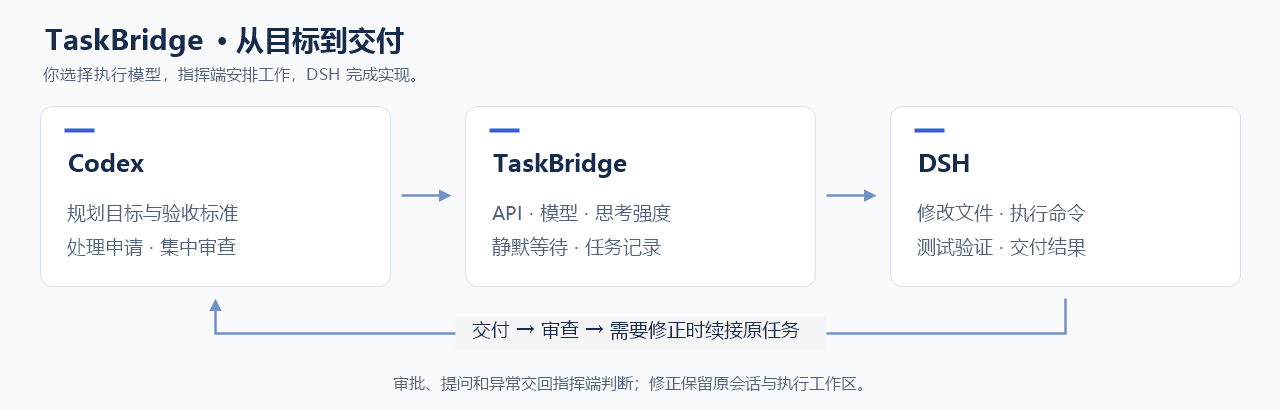
**你决定用哪个模型,指挥端决定如何安排工作,DSH 负责把任务做出来。** 从派工、等待到审查和返工,TaskBridge 把两端接在同一条任务流程里。
|
|
16
12
|
|
|
17
|
-
|
|
13
|
+
|
|
18
14
|
|
|
19
|
-
|
|
15
|
+
*任务流程示意图。正常执行期间由程序等待,需要判断时回到指挥端;审查后的修正沿用原任务会话。*
|
|
20
16
|
|
|
21
|
-
|
|
17
|
+
## 为什么使用 TaskBridge
|
|
22
18
|
|
|
23
|
-
|
|
19
|
+
如果你习惯让 Codex 理解项目、制定方案和检查质量,同时又希望使用 DSH 中已经接入的模型完成实现,TaskBridge 可以让这个分工直接落地。
|
|
24
20
|
|
|
25
|
-
|
|
21
|
+
- **不用来回复制任务和结果**:指挥端通过 MCP 派工,交付后读取改动与验证证据,继续完成审查。
|
|
22
|
+
- **不用反复告诉指挥端选哪个 API**:在 DSH 插件里选好提供方、模型和思考强度,任务按有效配置执行。
|
|
23
|
+
- **不用靠模型频繁“查看进度”维持等待**:程序持续观察执行活动,只在需要判断的节点返回。
|
|
24
|
+
- **返工不用重新开一个毫无上下文的任务**:将问题集中成修正清单,续接原来的 DSH 会话和执行工作区。
|
|
25
|
+
- **执行与验收各有记录**:任务完成、附加模型意见、指挥端审查结论分别展示,方便判断工作究竟进行到哪一步。
|
|
26
26
|
|
|
27
|
-
|
|
27
|
+
适合功能开发、缺陷修复、测试补充、代码整理和项目文档等任务。使用成本仍包括指挥端和执行端各自的模型调用;静默等待减少的是重复查询与搬运中间结果产生的开销。
|
|
28
28
|
|
|
29
|
-
|
|
30
|
-
- **Claude Code**:通过标准 stdio MCP 连接,参见 [接入说明](claude-code.md)。目前没有一键安装 Claude Code 的按钮,也未进行真实 Claude Code 客户端验收。
|
|
29
|
+
## 功能概览
|
|
31
30
|
|
|
32
|
-
|
|
31
|
+
| 功能 | 你可以做什么 |
|
|
32
|
+
| --- | --- |
|
|
33
|
+
| **已有 API 连接** | 选择 DSH 已启用的接口,无需重复填写地址与密钥。 |
|
|
34
|
+
| **执行模型与思考强度** | 自行选择执行模型和它支持的强度,配置任务超时、并发和隔离方式。 |
|
|
35
|
+
| **Codex 集成按钮** | 安装/更新 TaskBridge 智能体、MCP 连接和派工规则,也可单独修复 MCP。 |
|
|
36
|
+
| **一个委派总开关** | 控制本机是否允许派工,随时关闭新的委派入口。 |
|
|
37
|
+
| **静默等待** | 执行期间由程序等待,审批、提问、异常和交付时交回指挥端。 |
|
|
38
|
+
| **逐次权限判断** | 根据具体操作决定是否允许,处理后继续等待原任务。 |
|
|
39
|
+
| **任务工作区与会话续接** | 按工作内容命名工作区;独立任务新建会话,修正任务明确续接。 |
|
|
40
|
+
| **集中审查** | 交付后统一查看改动、测试和证据,写回通过或需要修正的结论。 |
|
|
41
|
+
| **可选附加模型审查** | 单独选择审查模型与思考强度,增加一份只读复审意见。 |
|
|
42
|
+
| **设置自动保存** | 开关与选择及时保存,文本输入停顿后合并保存,页面显示保存结果。 |
|
|
43
|
+
| **预设与项目覆盖** | 保存常用执行/审查组合,让不同项目使用各自的配置。 |
|
|
44
|
+
| **任务记录与详情** | 查看阶段、实际模型、最近活动、权限决定、变更与完整审查意见。 |
|
|
33
45
|
|
|
34
|
-
|
|
46
|
+
## 安装与接入
|
|
35
47
|
|
|
36
|
-
|
|
48
|
+
### 1. 在 DSH 中安装
|
|
37
49
|
|
|
38
|
-
|
|
50
|
+
打开 **插件 → 添加插件**,输入:
|
|
51
|
+
|
|
52
|
+
```text
|
|
53
|
+
dsh-taskbridge
|
|
54
|
+
```
|
|
55
|
+
|
|
56
|
+
也可以指定本次版本:
|
|
57
|
+
|
|
58
|
+
```text
|
|
59
|
+
dsh-taskbridge@1.5.3
|
|
60
|
+
```
|
|
61
|
+
|
|
62
|
+
安装后启用 **DSH TaskBridge**,进入该插件的设置页面。若使用的区域镜像尚未同步新版本,可切换到 npm 官方源;本项目 GitHub Release 也提供 `.tgz` 安装包。
|
|
63
|
+
|
|
64
|
+
TaskBridge 可独立使用,**不需要先安装 dsh-crew**。DSH 负责提供执行环境;本机 MCP 入口需要 Node.js 24 或更高版本,Codex 安装器会检查可用运行时。
|
|
65
|
+
|
|
66
|
+
### 2. 选择 API、模型与思考强度
|
|
67
|
+
|
|
68
|
+
在 **接口管理** 中,从“DSH 已启用的接口”选择你已配置的提供方并添加。然后进入 **执行设置**,选择提供方、模型及它支持的思考强度。
|
|
69
|
+
|
|
70
|
+
这里复用 DSH 的模型连接,密钥仍由 DSH 管理。若接口不在列表中,先到 DSH 自身的模型/API 设置中配置并启用,再刷新插件目录。
|
|
71
|
+
|
|
72
|
+
修改会自动保存。确认页面显示“已保存”或“所有修改已保存”后,再开始派工。
|
|
73
|
+
|
|
74
|
+
### 3. 接入指挥端
|
|
75
|
+
|
|
76
|
+
打开 **Codex 集成**,点击 **安装 / 更新 TaskBridge 智能体**。按钮会配置:
|
|
77
|
+
|
|
78
|
+
- **TaskBridge 智能体**:写入 `agents/dsh-taskbridge.toml`。
|
|
79
|
+
- **MCP 连接**:登记本插件的工具入口。
|
|
80
|
+
- **指挥规则**:包含明确派工、静默等待、权限判断、集中审查与原任务续接。
|
|
81
|
+
|
|
82
|
+
安装后重新加载 Codex。在支持智能体提及的客户端中,可选择 `@dsh-taskbridge` 并说明任务;输入框是否提供 `@` 选择由客户端决定。
|
|
83
|
+
|
|
84
|
+
首次集成由你点击安装触发;后续可更新本插件管理且未被自行修改的条目。**Claude Code 和 Claude Desktop 尚未作为当前版本的接入端提供,预计在 2.0 上线。**
|
|
85
|
+
|
|
86
|
+
### 4. 开启委派并给出第一项任务
|
|
87
|
+
|
|
88
|
+
开启页面顶部 **允许本机 MCP 调用 DSH 委派**,然后在指挥端给出目标、允许修改的项目和验收标准。例如:
|
|
89
|
+
|
|
90
|
+
> 通过 TaskBridge 修复当前项目中设置修改后不生效的问题。你负责规划和最终审查,让 DSH 按插件选定的模型执行。只修改设置保存相关代码,保留现有交互;补充回归验证。交付后检查修改与测试,有问题就续接原任务修正。
|
|
91
|
+
|
|
92
|
+
指挥端会先检查连接与工作区,再提交任务。你可以在 DSH 的工作区会话中查看执行过程,在插件的 **任务记录** 中查看阶段与交付情况。
|
|
93
|
+
|
|
94
|
+
## 一项任务如何完成
|
|
95
|
+
|
|
96
|
+
| 阶段 | 指挥端负责 | DSH / TaskBridge 负责 |
|
|
97
|
+
| --- | --- | --- |
|
|
98
|
+
| **规划** | 理解需求,明确范围和验收标准,必要时拆分任务。 | 提供连接状态和工作区预检信息。 |
|
|
99
|
+
| **派工** | 提交清晰的目标、项目路径和任务标题。 | 按有效配置启动执行,建立任务记录与会话。 |
|
|
100
|
+
| **执行** | 进入等待。 | 修改文件、运行工具与测试;程序记录活动并持续等待。 |
|
|
101
|
+
| **申请或提问** | 判断具体权限申请,回答执行所需问题。 | 暂停相应操作,提供依据,接收决定后继续原任务。 |
|
|
102
|
+
| **交付** | 集中检查实际改动、测试结果和未解决问题。 | 提供结果与证据;启用附加审查时提供复审意见。 |
|
|
103
|
+
| **验收或修正** | 写回审查结论;有问题时整理一轮修正清单。 | 保存结论,或续接原会话与执行工作区。 |
|
|
104
|
+
|
|
105
|
+
“执行完成”表示执行者交回了结果;“审查通过”表示指挥端已经验收。两者在任务记录中分别呈现。
|
|
106
|
+
|
|
107
|
+
## 设置说明
|
|
108
|
+
|
|
109
|
+
插件设置包含 **接口管理、执行设置、附加审查、任务记录、Codex 集成** 五个页签;本机调用总开关位于页签上方。
|
|
110
|
+
|
|
111
|
+
### API、模型与执行参数
|
|
112
|
+
|
|
113
|
+
| 设置 | 作用与使用方式 |
|
|
114
|
+
| --- | --- |
|
|
115
|
+
| **提供方** | 选择 DSH 已启用、且已加入插件的 API 连接。 |
|
|
116
|
+
| **执行模型** | 选择负责实现任务的模型。实际使用的提供方与模型会写入任务详情。 |
|
|
117
|
+
| **思考强度** | 使用所选模型声明支持的档位;可用选项随模型变化。 |
|
|
118
|
+
| **超时** | 单项任务的总时间预算,默认 1800 秒;停滞检查不会自动延长预算。 |
|
|
119
|
+
| **最大并发** | 限制同时执行的任务数,默认 1;是否拆分多个任务由指挥端结合任务决定。 |
|
|
120
|
+
| **工作区隔离** | 选择独立 Git 工作树或共享项目目录,决定执行者在哪里修改文件。 |
|
|
121
|
+
| **预设** | 保存常用的执行/审查组合,便于切换。 |
|
|
122
|
+
| **项目覆盖** | 为匹配的项目设置专用组合,优先于全局配置。 |
|
|
123
|
+
|
|
124
|
+
**执行模型由你选择。** 指挥端的托管规则要求尊重插件配置,不自行替换 API、模型或思考强度。选中的组合不可用时会报告原因,不会悄悄换成另一个模型。
|
|
125
|
+
|
|
126
|
+
设置修改用于后续派工;已运行的任务保留提交时的配置快照。页面显示的“未保存”或保存错误需要修正,不能将未保存的草稿当作已生效配置。
|
|
127
|
+
|
|
128
|
+
### 独立工作树与共享工作区
|
|
129
|
+
|
|
130
|
+
| 模式 | 文件在哪里修改 | 适用情况 |
|
|
131
|
+
| --- | --- | --- |
|
|
132
|
+
| **独立工作树(默认)** | 从源仓库已提交的版本创建独立 Git 工作树。 | 希望候选修改与当前开发目录隔离,交付后统一审查与整合。 |
|
|
133
|
+
| **共享工作区** | 直接修改授权的项目目录。 | 你明确希望执行者处理当前目录,包括现有未提交内容。 |
|
|
134
|
+
|
|
135
|
+
独立工作树需要可用的 Git 仓库和提交基线;源目录有未提交修改时会被预检拦截,避免执行者拿到旧版本。先整理提交,或在理解影响后明确选择共享模式。
|
|
136
|
+
|
|
137
|
+
**审查通过不会自动合并工作树、创建提交或推送。** 如何将候选改动整合回项目,仍按你给指挥端的任务范围处理。
|
|
138
|
+
|
|
139
|
+
### 一个开关控制调用
|
|
140
|
+
|
|
141
|
+
新安装默认关闭本机调用开关;安装插件或仅提到 DSH 不会自动启动任务。打开开关后,指挥端仍需收到明确的委派要求。
|
|
142
|
+
|
|
143
|
+
关闭开关会拒绝新任务,并请求停止正在运行的任务。本机使用无需手动签发连接或复制授权签名。
|
|
144
|
+
|
|
145
|
+
### 可选附加模型审查
|
|
146
|
+
|
|
147
|
+
在 **附加审查** 中开启“启用附加模型审查”,并单独选择审查所用的 API、模型与思考强度。
|
|
148
|
+
|
|
149
|
+
它会读取交付的改动与证据,提出检查意见,适合为重要修改增加一道复核。该审查是**只读**的,会增加一次审查模型的工作与相应费用;它不修改文件,也不代替指挥端最终验收。关闭后仍由指挥端完成审查。
|
|
150
|
+
|
|
151
|
+
## 静默等待:执行时程序等待,判断时模型介入
|
|
152
|
+
|
|
153
|
+
静默等待的目标是减少“执行者还在干活,指挥模型却反复读状态和中间代码”的重复工作。
|
|
154
|
+
|
|
155
|
+
| 发生的情况 | 处理方式 |
|
|
156
|
+
| --- | --- |
|
|
157
|
+
| 有新的输出、思考活动或工具事件 | 更新活动时间,程序继续等待。 |
|
|
158
|
+
| 连续 **5 分钟**没有新活动 | 程序检查执行状态与连接,不因此调用指挥模型。 |
|
|
159
|
+
| 连续 **10 分钟**仍无新活动 | 返回简短诊断,请指挥端决定是否继续等待。 |
|
|
160
|
+
| 需要权限决定或回答问题 | 返回处理所需的信息;决定或回答后继续等待原任务。 |
|
|
161
|
+
| 同一操作连续重复失败达到阈值 | 发出需确认的提醒,避免相同错误不断重试;默认阈值为 3,可调整。 |
|
|
162
|
+
| 完成、失败、取消或中断 | 及时交回结果或异常,进入审查或处理。 |
|
|
163
|
+
|
|
164
|
+
5/10 分钟是**连续无活动的阈值**,不是“每隔 5/10 分钟让 GPT 查看一次”。界面刷新和连接心跳不会伪装成执行进度;没有文件改动也不直接等于卡住。
|
|
165
|
+
|
|
166
|
+
高级设置可调整无活动阈值和重复失败提醒。单次等待到达上限或被客户端提前结束时,应续等同一任务;不会因此自动取消、重复派工或切换模型。具体规则见 [静默等待说明](silent-wait.md)。
|
|
167
|
+
|
|
168
|
+
## 会话续接与任务组织
|
|
169
|
+
|
|
170
|
+
### 每项独立工作有自己的会话
|
|
171
|
+
|
|
172
|
+
新任务在对应的 DSH 工作区中新建会话,工作区使用任务内容命名,例如“修复设置自动保存”或“补充登录回归测试”。在独立工作树模式下,新任务通常对应各自的执行目录;同一共享目录可能对应同一个 DSH 工作区,但独立任务仍新开会话。
|
|
173
|
+
|
|
174
|
+
### 同一任务的改进继续原来的对话
|
|
175
|
+
|
|
176
|
+
如果交付后发现问题,可以这样告诉指挥端:
|
|
177
|
+
|
|
178
|
+
> 继续刚才那项任务。把审查发现的三个问题一起交给原执行者,在原来的会话和工作区里修正,完成后再集中审查。
|
|
179
|
+
|
|
180
|
+
指挥端通过 `continueFromTaskId` 明确指定续接任务,保留原会话与候选修改。单纯“项目路径一样”不会让所有任务混用一条聊天。
|
|
181
|
+
|
|
182
|
+
DSH 重启后,插件会核验原任务与工作区身份再尝试恢复续接;原目录缺失或身份无法确认时会报告原因,不假装已经恢复。
|
|
183
|
+
|
|
184
|
+
### 复杂任务可按需使用 DSH 团队
|
|
185
|
+
|
|
186
|
+
指挥端可根据任务复杂度逐任务决定是否启用 DSH 原生智能体团队。简单修复可以交给单个执行者,多模块工作再考虑团队;这项决定不改变你选定的执行 API、模型和思考强度。团队成员的额外权限申请目前仍需回到主执行者处理。
|
|
187
|
+
|
|
188
|
+
## 任务记录:看进度,也看验收结果
|
|
189
|
+
|
|
190
|
+
打开 **任务记录 → 详情**,可以查看:
|
|
191
|
+
|
|
192
|
+
- **执行情况**:当前阶段、最近活动时间、当前工具与无活动诊断。
|
|
193
|
+
- **实际配置**:本次生效的提供方、模型、思考强度与隔离方式。
|
|
194
|
+
- **任务关系**:执行工作区、会话以及是否续接已有任务。
|
|
195
|
+
- **操作依据**:权限申请、单次允许/拒绝决定和相关记录。
|
|
196
|
+
- **交付证据**:变更文件、差异、验证结果与执行结果。
|
|
197
|
+
- **审查结论**:附加模型意见、指挥端验收状态,以及可展开的完整审查意见。
|
|
198
|
+
|
|
199
|
+
| 你看到的状态 | 含义 |
|
|
200
|
+
| --- | --- |
|
|
201
|
+
| **执行中 / 等待工具** | 执行者仍在工作,由程序等待。 |
|
|
202
|
+
| **等待本次调用授权决定** | 某项具体操作需要指挥端判断。 |
|
|
203
|
+
| **等待宿主审查** | 已交付,尚未记录指挥端的最终验收结论。 |
|
|
204
|
+
| **审查通过** | 指挥端已经记录接受结果的结论。 |
|
|
205
|
+
| **需要修正** | 指挥端已列出问题,可以续接原任务处理。 |
|
|
206
|
+
| **审查结论保存未确认** | 保存结果尚未确认,不能按已经验收落盘处理。 |
|
|
207
|
+
|
|
208
|
+
页面的后台状态刷新由程序完成,不会为了刷新列表调用指挥模型。长审查意见可通过“查看完整审查意见”展开。
|
|
209
|
+
|
|
210
|
+
## 常见问题
|
|
211
|
+
|
|
212
|
+
### 安装 TaskBridge 后,Codex 会自动把所有工作交给 DSH 吗?
|
|
213
|
+
|
|
214
|
+
不会。需要你开启本机调用开关,并明确把任务交给 TaskBridge。托管规则区分普通讨论和实际委派;你仍可让 Codex 自己完成指定工作。
|
|
215
|
+
|
|
216
|
+
### 我在 DSH 中选什么,派工就用什么吗?
|
|
217
|
+
|
|
218
|
+
使用 TaskBridge 的有效执行配置:全局选择可能被匹配的项目覆盖项替代,运行任务保留提交时的快照。任务详情中的实际提供方、模型和思考强度用于核对本次路由。
|
|
219
|
+
|
|
220
|
+
### “指挥端审批”是每次都让我手动点允许吗?
|
|
221
|
+
|
|
222
|
+
权限请求会交给使用 TaskBridge 的指挥端,由它依据你的授权范围和具体操作判断。请求超出已有授权、需要你决定时,指挥端再向你询问。一次批准只适用于对应操作,不等于长期放开权限。
|
|
223
|
+
|
|
224
|
+
### 静默等待能保证 Codex 完全不消耗 token 吗?
|
|
225
|
+
|
|
226
|
+
不能。规划、审批、回答、异常处理和最终审查仍需要模型调用;额外模型复审也有成本。TaskBridge 减少正常执行中的重复查询,实际节省取决于任务、客户端等待机制和上下文大小。历史测量及其适用范围见 [等待阶段用量对照](releases/1.5.0-token-benchmark.zh.md)。
|
|
227
|
+
|
|
228
|
+
### 为什么任务做完后还显示“等待宿主审查”?
|
|
229
|
+
|
|
230
|
+
执行者交付后,指挥端需要检查结果并写回审查结论。如果只读取结果却没有记录验收,任务仍会待审。托管规则要求通过 `delegate_review` 写回并确认保存。
|
|
231
|
+
|
|
232
|
+
### 更新后没有看到新版介绍或 Codex 集成没有刷新怎么办?
|
|
233
|
+
|
|
234
|
+
先确认 DSH 中实际安装的版本,再刷新插件页面。区域镜像和发现索引可能存在缓存;本地 `.tgz` 安装是否显示在线更新取决于 DSH 的来源管理。
|
|
235
|
+
|
|
236
|
+
Codex 可在 **Codex 集成** 中点击“安装 / 更新 TaskBridge 智能体”后重新加载。若只是 MCP 条目需要调整,可用“仅修复 MCP 配置”;你自行修改过的配置会被保留并提示处理。
|
|
237
|
+
|
|
238
|
+
### TaskBridge 会替我安装所有依赖、接好所有客户端吗?
|
|
239
|
+
|
|
240
|
+
TaskBridge 自身无需 dsh-crew。执行任务使用的项目依赖仍按任务环境准备;首次 Codex 集成由按钮配置。Claude Code 和 Claude Desktop 接入属于预计 2.0 上线的计划。需要 DSH 保持运行,并在其中启用插件。
|
|
241
|
+
|
|
242
|
+
## 客户端支持与 2.0 计划
|
|
243
|
+
|
|
244
|
+
| 客户端 | 当前状态 | 计划 |
|
|
245
|
+
| --- | --- | --- |
|
|
246
|
+
| **Codex** | 当前支持,提供智能体与 MCP 安装/更新/修复入口。 | 继续完善现有委派与审查体验。 |
|
|
247
|
+
| **Claude Code** | 尚未上线。 | 预计在 **2.0** 提供接入。 |
|
|
248
|
+
| **Claude Desktop** | 尚未上线。 | 预计在 **2.0** 提供接入。 |
|
|
249
|
+
|
|
250
|
+
2.0 的目标是让更多指挥端使用 DSH 中配置的执行模型。具体接入方式与交付范围以 2.0 发布说明为准;当前版本请使用 Codex。
|
|
251
|
+
|
|
252
|
+
## 更多文档与反馈
|
|
253
|
+
|
|
254
|
+
| 文档 | 内容 |
|
|
255
|
+
| --- | --- |
|
|
256
|
+
| [Codex 集成](codex-integration.md) | 安装、更新、修复、配置目录与托管规则。 |
|
|
257
|
+
| [Claude 接入规划](claude-code.md) | Claude Code / Claude Desktop 预计 2.0 上线,目前不属于已支持端。 |
|
|
258
|
+
| [静默等待](silent-wait.md) | 活动计时、等待续接、提醒与验证范围。 |
|
|
259
|
+
| [工作区与隔离](workspace-contract.md) | 预检、独立工作树、共享模式与任务身份。 |
|
|
260
|
+
| [会话放置与续接](conversation-placement.md) | DSH 工作区命名、会话创建和同任务续接。 |
|
|
261
|
+
| [插件发现与更新](plugin-market.md) | 自定义索引、npm 与 GitHub 安装来源。 |
|
|
262
|
+
| [旧名称迁移](taskbridge-upgrade.md) | 从 DSH Delegate / TaskDispatch 升级。 |
|
|
263
|
+
| [1.5.3 更新说明](releases/1.5.3.zh.md) | 验收展示、全文排版、混合换行修复与指挥规则更新。 |
|
|
264
|
+
| [1.5.2 更新说明](releases/1.5.2.zh.md) | 产品介绍更新及验证范围。 |
|
|
265
|
+
|
|
266
|
+
本插件不按 DSH 版本白名单筛选,所需接口按运行时实际能力检查;具体说明见 [运行时说明](runtime-compatibility.md)。CLI 独立执行通道及所有运行环境组合尚未完成,已知限制见 [1.5.1 说明](releases/1.5.1.zh.md)。
|
|
267
|
+
|
|
268
|
+
发现问题或希望改进使用体验,欢迎在 [GitHub Issues](https://github.com/ranranyya/dsh-taskbridge/issues) 提交反馈。请附上插件版本、出现问题的步骤和必要的脱敏错误信息,避免附带 API 密钥。
|
|
269
|
+
|
|
270
|
+
## 许可证
|
|
271
|
+
|
|
272
|
+
[MIT](../LICENSE)
|
|
Binary file
|
|
Binary file
|