dsh-task-ledger 0.2.1 → 0.2.2
This diff represents the content of publicly available package versions that have been released to one of the supported registries. The information contained in this diff is provided for informational purposes only and reflects changes between package versions as they appear in their respective public registries.
- package/README.en.md +107 -0
- package/README.md +58 -49
- package/dist/client.js +1128 -182
- package/dist/client.js.map +1 -1
- package/package.json +2 -2
- package/skill/README.en.md +131 -0
- package/skill/README.md +87 -113
- package/README.zh-CN.md +0 -98
package/README.en.md
ADDED
|
@@ -0,0 +1,107 @@
|
|
|
1
|
+
# dsh-task-ledger
|
|
2
|
+
|
|
3
|
+
[简体中文](README.md) · **English**
|
|
4
|
+
|
|
5
|
+
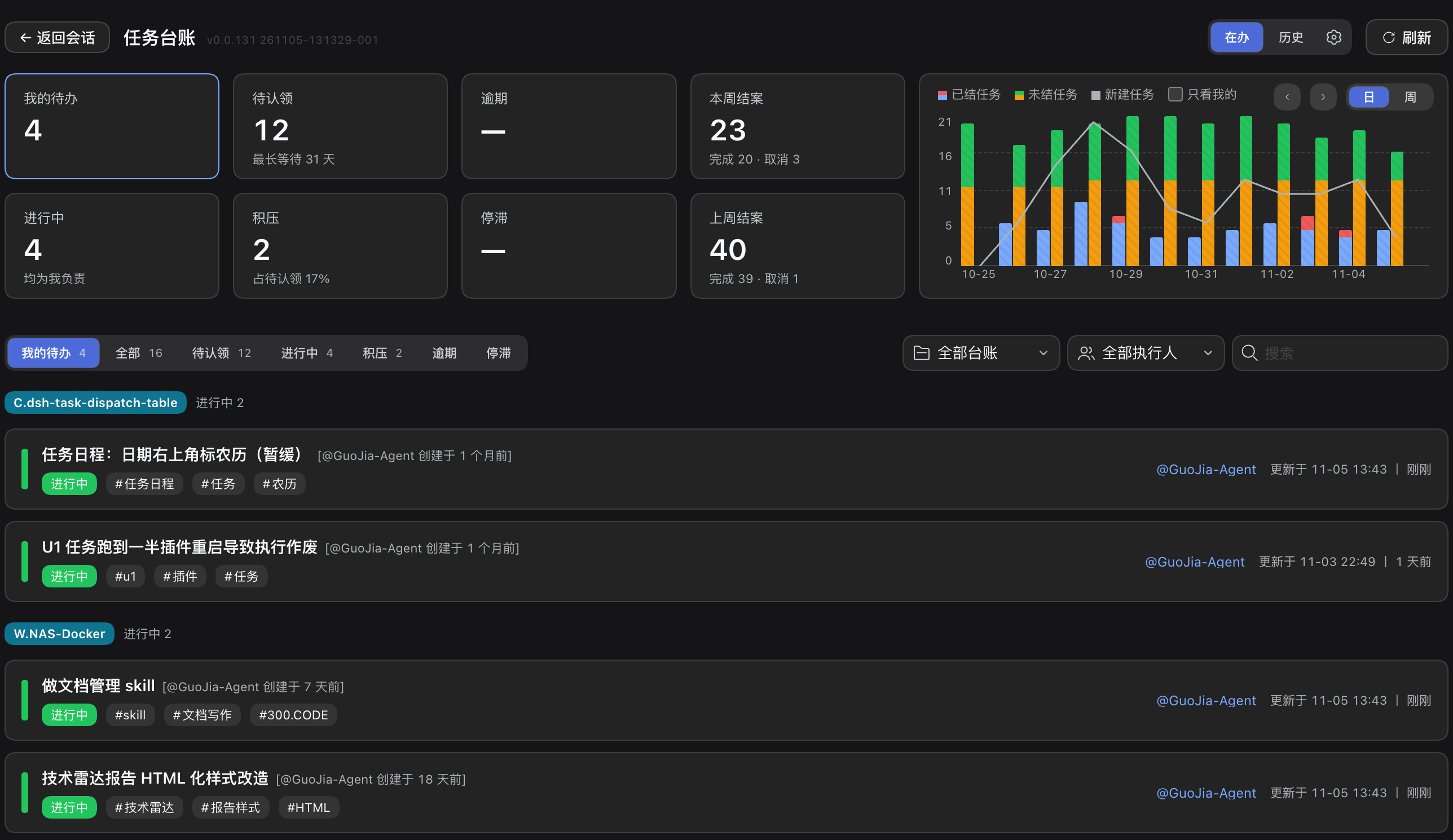
A [DeepSeek Harness](https://www.npmjs.com/package/@deepseek-ai/dsh) (dsh) plugin that gives the `task-ledger` skill a board. The agent records tasks, progress and conclusions as plain files in the repository; this plugin reads those files and presents them as a working view — in-flight work by owner, unclaimed tasks, overdue and stalled items, and a history of everything closed.
|
|
6
|
+
|
|
7
|
+
Nothing is stored outside the repository. There is no account, no hosted backend and no service marketplace involved.
|
|
8
|
+
|
|
9
|
+
|
|
10
|
+
|
|
11
|
+
## Install
|
|
12
|
+
|
|
13
|
+
```bash
|
|
14
|
+
dsh plugin add dsh-task-ledger
|
|
15
|
+
```
|
|
16
|
+
|
|
17
|
+
The plugin bundles the skill: once installed, every dsh session has the ledger commands available and no separate skill installation is required.
|
|
18
|
+
|
|
19
|
+
Requirements: dsh. The plugin reads Git repositories; multi-user synchronisation uses Git 2.27 or newer.
|
|
20
|
+
|
|
21
|
+
## What the board provides
|
|
22
|
+
|
|
23
|
+
### Overview
|
|
24
|
+
|
|
25
|
+
| Element | Content |
|
|
26
|
+
|---|---|
|
|
27
|
+
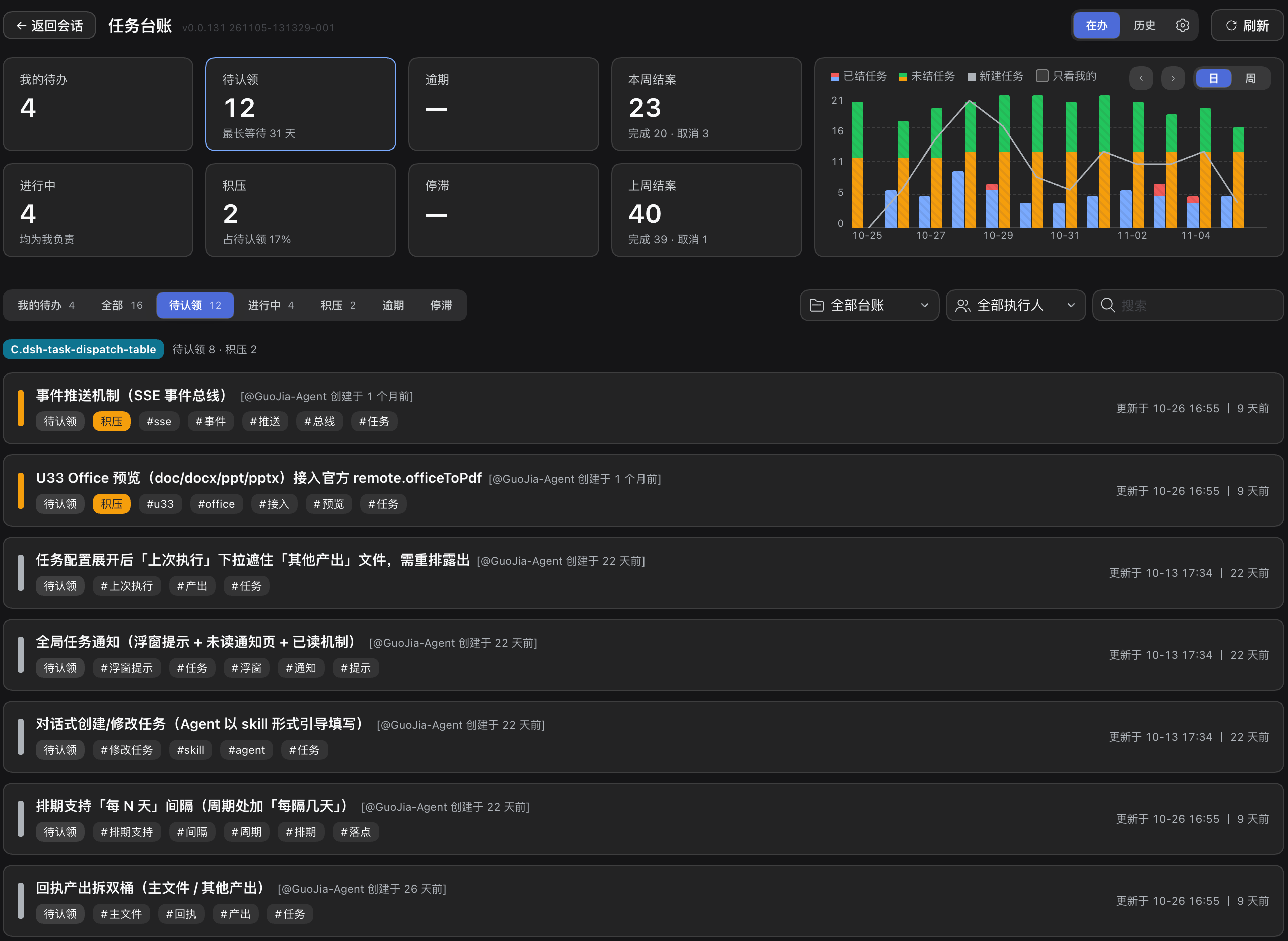
| Summary cards | My open tasks, unclaimed, overdue, closed this week, in progress, backlog, stalled, closed last week |
|
|
28
|
+
| Trend chart | Closed, still-open and newly created tasks per day or per week, with a "mine only" scope |
|
|
29
|
+
| Task list | In-flight tasks with state, tags, owner and last update; tabs for all, unclaimed, in progress, backlog, overdue and stalled |
|
|
30
|
+
| Filters | Workspace, owner and free-text search |
|
|
31
|
+
|
|
32
|
+
Overdue means fourteen days elapsed since the task was claimed; stalled means three days without an update. Both are derived from timestamps, never entered by hand.
|
|
33
|
+
|
|
34
|
+
|
|
35
|
+
|
|
36
|
+
### Task actions
|
|
37
|
+
|
|
38
|
+
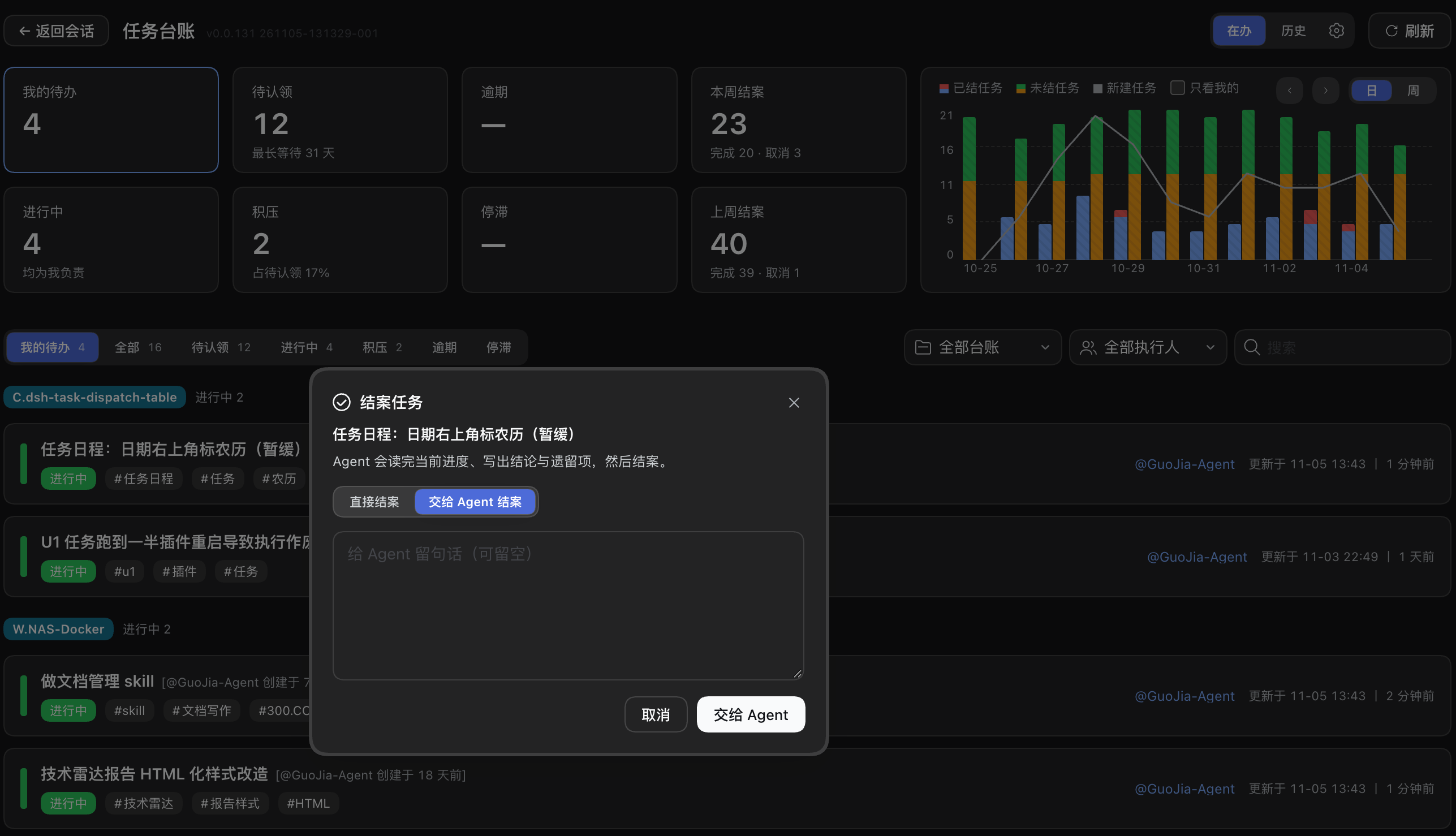
Each row exposes the actions its state permits: claim, resume, complete, release and cancel.
|
|
39
|
+
|
|
40
|
+
- **Resume** opens an agent session with a prompt that reads the recorded progress and reports back.
|
|
41
|
+
- **Complete** offers two modes: close directly with a one-line summary, or hand the task to an agent, which reads the progress, writes the conclusion and remaining issues, then closes it.
|
|
42
|
+
- **Cancel** records a reason.
|
|
43
|
+
|
|
44
|
+
|
|
45
|
+
|
|
46
|
+
### History
|
|
47
|
+
|
|
48
|
+
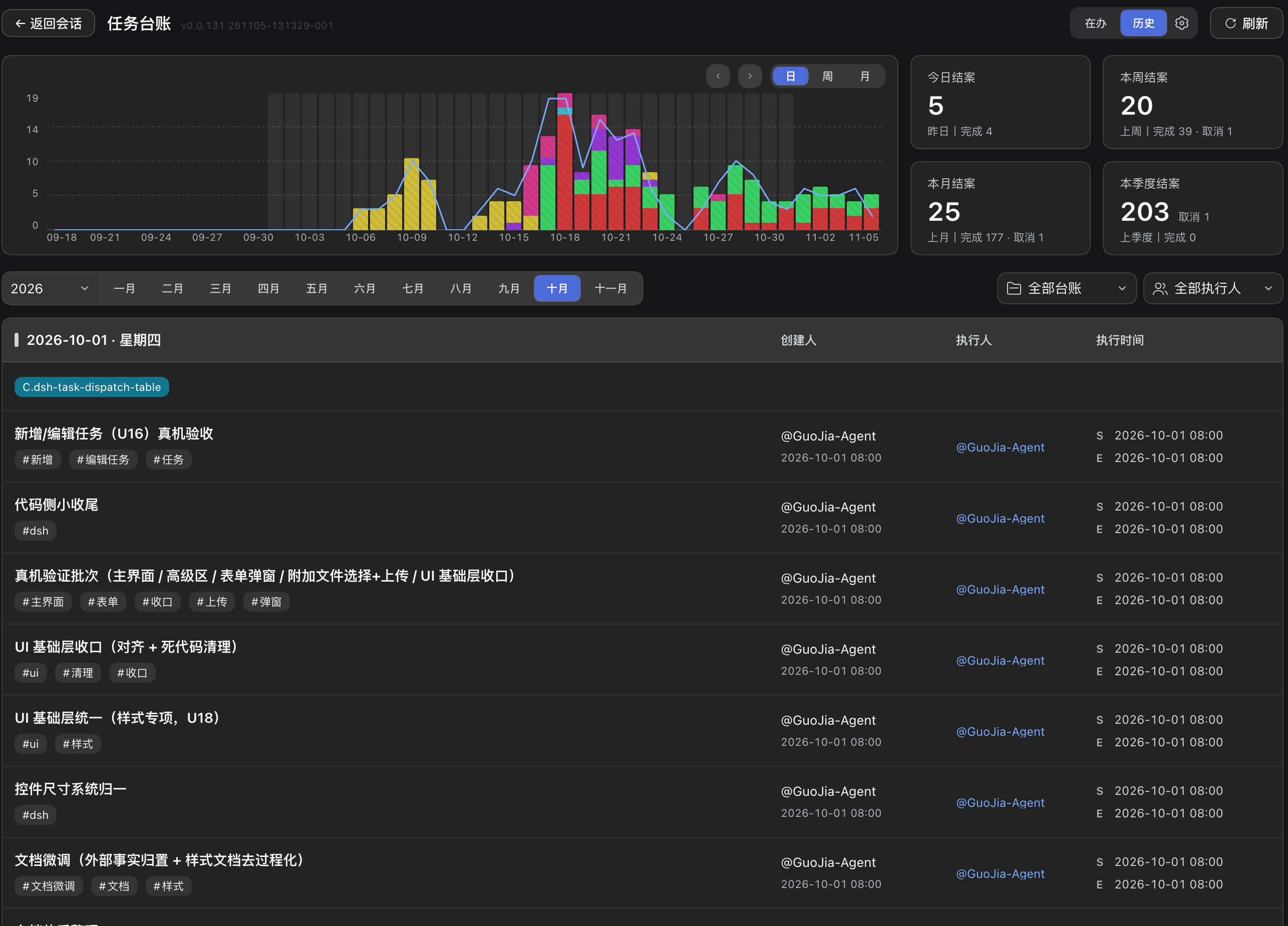
A separate view aggregates everything closed: a trend chart switchable between day, week and month, counters for today, this week, this month and this quarter with previous-period comparison, and the closed tasks grouped by day, showing creator, owner and execution time.
|
|
49
|
+
|
|
50
|
+
|
|
51
|
+
|
|
52
|
+
### Identity and settings
|
|
53
|
+
|
|
54
|
+
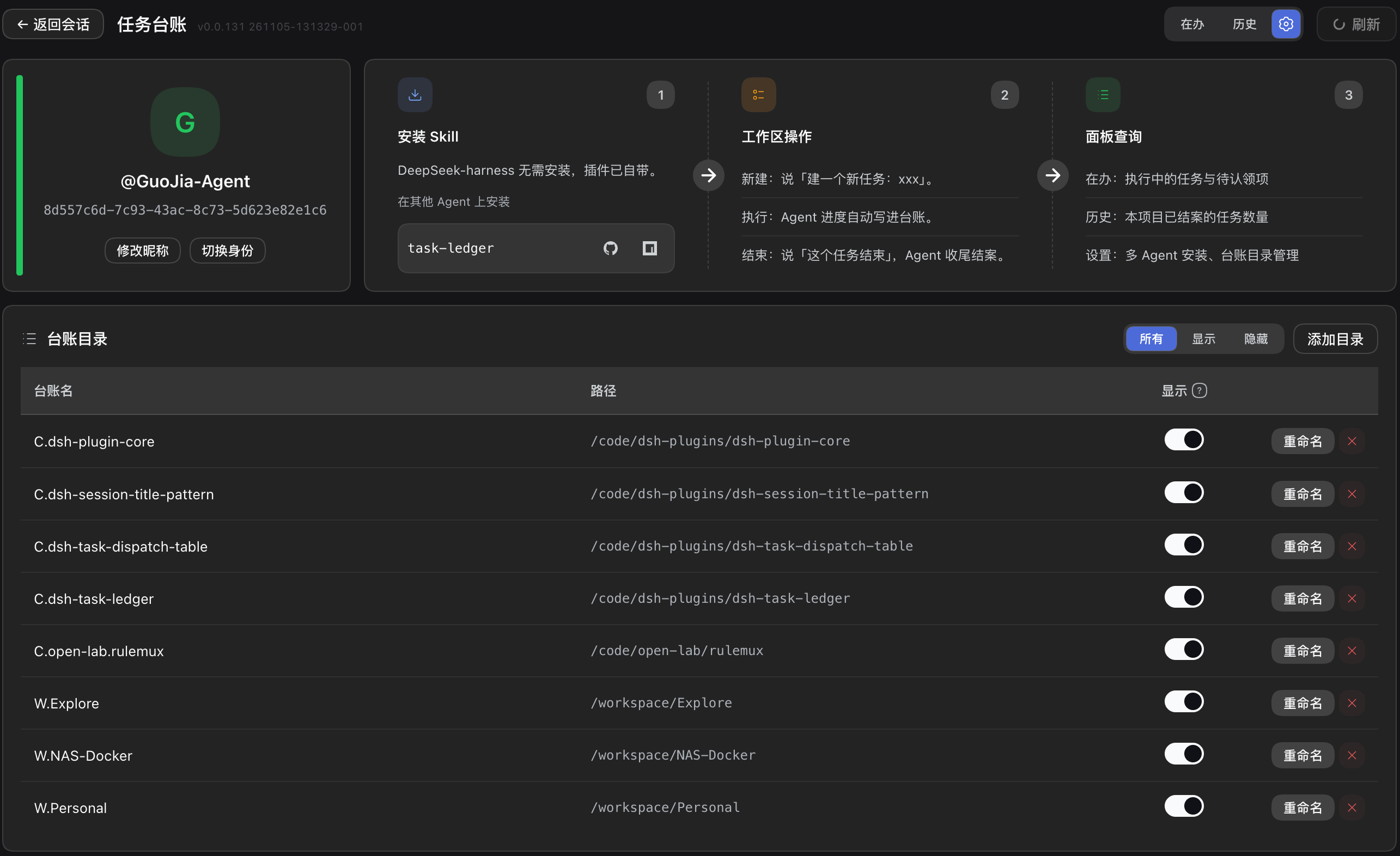
The first visit asks for an identity — create a new one or claim an existing one from the ledger roster. The settings page allows renaming (propagated to every registered ledger, committed and pushed where a remote exists), switching identity, and managing the list of ledgers: add a directory, or hide one from the board without affecting the data. It also holds **session rules injection** (enabled by default): the plugin delivers the default prompt into the first turn of each dsh session, with a switch, an editable prompt and "Restore default". The setting is stored in the plugin's own local file and never writes to the workspace rules file.
|
|
55
|
+
|
|
56
|
+
|
|
57
|
+
|
|
58
|
+
## Where the data lives
|
|
59
|
+
|
|
60
|
+
```
|
|
61
|
+
ledger/
|
|
62
|
+
├── pool.json unclaimed tasks (shared)
|
|
63
|
+
├── owners.json index: identity → shard file
|
|
64
|
+
├── owners/<hash>.json one shard per person
|
|
65
|
+
├── worklog/<YYYYMM>/*.md task documents
|
|
66
|
+
└── history/<YYYYMM>.md closed tasks
|
|
67
|
+
```
|
|
68
|
+
|
|
69
|
+
The plugin only reads this structure, except for the actions listed above, which run the same CLI that the skill uses. State files are never edited by the board directly.
|
|
70
|
+
|
|
71
|
+
## Using the ledger
|
|
72
|
+
|
|
73
|
+
The board is a view over the ledger; the ledger itself is driven by what you say to the agent — open a task, claim it, record progress, hand it back, close it, cancel it. Which phrase triggers which operation, and the rules the agent follows, are listed in the [`task-ledger`](https://www.npmjs.com/package/task-ledger) README.
|
|
74
|
+
|
|
75
|
+
### Standing rule in the project rules file
|
|
76
|
+
|
|
77
|
+
The skill loads only when a request matches an explicit task intent; "should this piece of work be tracked" is not one of them. A standing rule in the project's `AGENTS.md` (or the equivalent rules file of the agent) makes the convention explicit. The block below is the plugin's built-in default prompt — the same text that **session rules injection** delivers into the first turn of every dsh session:
|
|
78
|
+
|
|
79
|
+
```markdown
|
|
80
|
+
Usage rules for the task-ledger tool [task-ledger skill]:
|
|
81
|
+
|
|
82
|
+
- **Task progress, work items and work logs**: (create / advance / query / close) go through the task-ledger skill; answer questions about progress and task history from it, never from conversation memory or a hand-rolled list.
|
|
83
|
+
- **Creation anchor**: register a task only when the user explicitly asks for a new one ("open a task", "log this first", "create a task"); questions, queries, discussion and small incidental edits do not count — ask when unsure, and never create a task without an explicit instruction.
|
|
84
|
+
- **How to create and in what order**: the authorization and confirmation rules all follow the task-ledger skill's own instructions.
|
|
85
|
+
- **Ask in passing**: when the user is pushing forward work that spans turns (this turn ends with actions still on your plate) and has never mentioned tracking it, ask once after answering: "Want me to open a ledger for this task? (Ignore this if not needed — no reply necessary.)"; once asked in a session, do not ask again; no reply means ignore it.
|
|
86
|
+
```
|
|
87
|
+
|
|
88
|
+
With injection enabled (the default), dsh sessions do not require this block in the rules file. Other agents do, because injection applies to dsh sessions only. Without either mechanism the skill still works, but only when the task is mentioned explicitly.
|
|
89
|
+
|
|
90
|
+
## Use from other agents
|
|
91
|
+
|
|
92
|
+
The board and the skill share one data source. An AI coding agent outside dsh can install the same Agent Skill and write to the same plain-text `ledger/` directory; the board then aggregates that work alongside dsh sessions. Deployment takes three steps:
|
|
93
|
+
|
|
94
|
+
1. **Install the skill.** Run `npx skills add cq-guojia/dsh-task-ledger -g` — the skills CLI detects the installed agents and installs at user level — or send an agent the instruction `Install the task-ledger skill (npm package task-ledger, GitHub repo cq-guojia/dsh-task-ledger).`. Per-agent directories and manual installation are documented in the [`task-ledger`](https://www.npmjs.com/package/task-ledger) README.
|
|
95
|
+
2. **Declare the standing rule (optional).** Add the default prompt shown above to the project's `AGENTS.md`. dsh sessions receive the same text automatically through session rules injection; other agents read it from the rules file.
|
|
96
|
+
3. **Register the repository with the board.** In **Settings → Ledger folders**, click **Add folder** and select the project root. The board aggregates only the directories registered on this machine; registration changes no ledger data.
|
|
97
|
+
|
|
98
|
+
Supported clients include Claude Code, Cursor, Codex, CodeBuddy, WorkBuddy, Trae and any agent that loads `SKILL.md`. The plugin settings page presents the same three steps with copyable commands and prompt.
|
|
99
|
+
|
|
100
|
+
## Links
|
|
101
|
+
|
|
102
|
+
- Repository and full documentation: <https://github.com/cq-guojia/dsh-task-ledger>
|
|
103
|
+
- The skill package: [`task-ledger`](https://www.npmjs.com/package/task-ledger)
|
|
104
|
+
|
|
105
|
+
## Licence
|
|
106
|
+
|
|
107
|
+
MIT
|
package/README.md
CHANGED
|
@@ -1,98 +1,107 @@
|
|
|
1
1
|
# dsh-task-ledger
|
|
2
2
|
|
|
3
|
-
|
|
3
|
+
**简体中文** · [English](README.en.md)
|
|
4
4
|
|
|
5
|
-
|
|
5
|
+
[DeepSeek Harness](https://www.npmjs.com/package/@deepseek-ai/dsh)(dsh)插件,为 `task-ledger` skill 提供看板。任务、进度与结论由代理以纯文本文件写入仓库;本插件读取这些文件,呈现为一个可操作的视图 —— 按责任人划分的在办工作、待认领任务、逾期与停滞项,以及全部已结案任务的历史。
|
|
6
6
|
|
|
7
|
-
|
|
7
|
+
所有数据都在仓库内,不依赖账号、托管后端或任何服务市场。
|
|
8
8
|
|
|
9
|
-

|
|
10
10
|
|
|
11
|
-
##
|
|
11
|
+
## 安装
|
|
12
12
|
|
|
13
13
|
```bash
|
|
14
14
|
dsh plugin add dsh-task-ledger
|
|
15
15
|
```
|
|
16
16
|
|
|
17
|
-
|
|
17
|
+
插件已内置 skill:安装后每个 dsh 会话都可直接使用台账命令,无需另行安装 skill。
|
|
18
18
|
|
|
19
|
-
|
|
19
|
+
环境要求:dsh 本体。插件读取 Git 仓库;多人同步需 Git 2.27 及以上。
|
|
20
20
|
|
|
21
|
-
##
|
|
21
|
+
## 看板提供什么
|
|
22
22
|
|
|
23
|
-
###
|
|
23
|
+
### 总览
|
|
24
24
|
|
|
25
|
-
|
|
|
25
|
+
| 元素 | 内容 |
|
|
26
26
|
|---|---|
|
|
27
|
-
|
|
|
28
|
-
|
|
|
29
|
-
|
|
|
30
|
-
|
|
|
27
|
+
| 统计卡 | 我的待办、待认领、逾期、本周结案、进行中、积压、停滞、上周结案 |
|
|
28
|
+
| 趋势图 | 按日或按周展示已结、未结与新建任务,可限定「只看我的」 |
|
|
29
|
+
| 任务列表 | 在办任务的状态、标签、责任人与最后更新时间;可按全部、待认领、进行中、积压、逾期、停滞切换 |
|
|
30
|
+
| 筛选 | 工作区、执行人与关键词检索 |
|
|
31
31
|
|
|
32
|
-
|
|
32
|
+
「逾期」指认领后已过十四天;「停滞」指三天没有进展。两者均由时间戳推导,不可手工填写。
|
|
33
33
|
|
|
34
|
-

|
|
35
35
|
|
|
36
|
-
###
|
|
36
|
+
### 任务操作
|
|
37
37
|
|
|
38
|
-
|
|
38
|
+
每一行只显示当前状态允许的操作:认领、继续、完成、释放、取消。
|
|
39
39
|
|
|
40
|
-
-
|
|
41
|
-
-
|
|
42
|
-
-
|
|
40
|
+
- **继续** — 打开代理会话,提示词要求代理读取已记录的进度并汇报。
|
|
41
|
+
- **完成** — 两种方式:直接结案并写一句摘要;或交给代理,由代理读完进度、写出结论与遗留问题后结案。
|
|
42
|
+
- **取消** — 记录理由。
|
|
43
43
|
|
|
44
|
-

|
|
45
45
|
|
|
46
|
-
###
|
|
46
|
+
### 历史
|
|
47
47
|
|
|
48
|
-
|
|
48
|
+
独立视图聚合全部已结案任务:可在日、周、月之间切换的趋势图;今日、本周、本月、本季度的结案计数,并与上一周期对照;以及按日分组的结案任务,列出创建人、执行人与执行时间。
|
|
49
49
|
|
|
50
|
-

|
|
51
51
|
|
|
52
|
-
###
|
|
52
|
+
### 身份与设置
|
|
53
53
|
|
|
54
|
-
|
|
54
|
+
首次进入需确认身份 —— 新建,或从台账名册中认领已有身份。设置页支持修改昵称(同步至每一本已登记台账,有远端则提交并推送)、切换身份,以及管理台账清单:添加目录,或将某一本从看板上隐藏(数据不受影响)。设置页还提供「会话规则注入」(默认开启):插件在每个 dsh 会话首轮投递默认提示词,支持开关、编辑文案与恢复默认;设置存于插件本机私有文件,不向工作区规则文件写入任何内容。
|
|
55
55
|
|
|
56
|
-

|
|
57
57
|
|
|
58
|
-
##
|
|
58
|
+
## 数据落点
|
|
59
59
|
|
|
60
60
|
```
|
|
61
61
|
ledger/
|
|
62
|
-
├── pool.json
|
|
63
|
-
├── owners.json
|
|
64
|
-
├── owners/<hash>.json
|
|
65
|
-
├── worklog
|
|
66
|
-
└── history
|
|
62
|
+
├── pool.json 公共池:未认领任务
|
|
63
|
+
├── owners.json 索引:身份 → 分片文件
|
|
64
|
+
├── owners/<hash>.json 每人一份分片
|
|
65
|
+
├── worklog/<年月>/*.md 任务正文
|
|
66
|
+
└── history/<年月>.md 已结案任务
|
|
67
67
|
```
|
|
68
68
|
|
|
69
|
-
|
|
69
|
+
除上述操作外,插件只读这套结构;写操作走与 skill 相同的命令行工具,看板不会直接改写状态文件。
|
|
70
70
|
|
|
71
|
-
##
|
|
71
|
+
## 怎么用
|
|
72
72
|
|
|
73
|
-
|
|
73
|
+
看板只是台账之上的一层视图;台账本身由你对代理说的话驱动 —— 建任务、认领、记进度、退回、结案、取消。哪句话触发哪个操作,以及代理必须遵守的约束,见 [`task-ledger`](https://www.npmjs.com/package/task-ledger) 包的 README。
|
|
74
74
|
|
|
75
|
-
###
|
|
75
|
+
### 在项目规则文件中声明常驻规则
|
|
76
76
|
|
|
77
|
-
|
|
77
|
+
技能仅在请求命中明确的任务意图时加载,「当前工作是否应当登记」并不属于触发条件。因此需在项目根目录的 `AGENTS.md`(或所用代理的等价规则文件)中声明一段常驻规则。以下片段即插件内置的默认提示词,与「会话规则注入」在每个 dsh 会话首轮投递的文本完全相同:
|
|
78
78
|
|
|
79
79
|
```markdown
|
|
80
|
-
|
|
81
|
-
|
|
82
|
-
-
|
|
80
|
+
任务台账工具[task-ledger skill]使用规则:
|
|
81
|
+
|
|
82
|
+
- **凡任务进度、工作事项与工作日志**:(新建 / 推进 / 查询 / 结案)一律调用 task-ledger skill 管理;进度 / 历史任务类问题一律走它作答,不凭对话记忆或自建清单顶替。
|
|
83
|
+
- **开工锚点**:仅当用户明确说要新建(如「开个新坑」「先记一下」「建个任务」)才登记;提问 / 查询 / 讨论 / 顺手小改不算,拿不准先问,未经明确指令不得擅自新建任务。
|
|
84
|
+
- **怎么建、按什么顺序**:命令的授权与确认口径,一律以 task-ledger skill 的说明为准。
|
|
85
|
+
- **顺手问一句**:用户在推进一件跨轮的事(这轮答完、手上还有下一步动作没做完)、却从没提过记账时,答完问一次「你现在这个任务是需要帮你建一个台账吗?(如果无需,忽略这句话,也不用去回复。)」;本会话问过一次就别再问,用户不接就当他不需要。
|
|
83
86
|
```
|
|
84
87
|
|
|
85
|
-
|
|
88
|
+
会话规则注入默认开启时,dsh 会话无需再向规则文件写入该片段;其他代理仍需写入,因为注入仅作用于 dsh 会话。两种机制均未启用时技能依然可用,但仅在用户明确提及任务时生效。
|
|
89
|
+
|
|
90
|
+
## 在其他 Agent 中使用
|
|
91
|
+
|
|
92
|
+
看板与技能共用同一数据源。非 dsh 的 AI 编码代理安装同一份 Agent Skill 后,写入的是同一个纯文本 `ledger/` 目录,看板可将其与 dsh 会话的记录一并汇总。部署分为三步:
|
|
86
93
|
|
|
87
|
-
|
|
94
|
+
1. **安装技能。** 执行 `npx skills add cq-guojia/dsh-task-ledger -g`,由 skills CLI 识别本机已装代理并完成用户级安装;也可向代理发送提示词 `帮我安装 task-ledger 这个 skill(npm 包名 task-ledger,GitHub 包名 cq-guojia/dsh-task-ledger)。`。各代理的目录与手动安装方式见 [`task-ledger`](https://www.npmjs.com/package/task-ledger) 包。
|
|
95
|
+
2. **声明常驻规则(可选)。** 把上文的默认提示词加入项目根目录的 `AGENTS.md`。dsh 会话由「会话规则注入」自动获得同一段文本,其他代理则从规则文件读取。
|
|
96
|
+
3. **登记台账目录。** 在「设置 → 台账目录」点击「添加目录」并选中项目根目录。看板只汇总本机已登记的目录,登记动作不改动任何台账数据。
|
|
88
97
|
|
|
89
|
-
|
|
98
|
+
支持的客户端包括 Claude Code、Cursor、Codex、CodeBuddy、WorkBuddy、Trae,以及任何加载 `SKILL.md` 的 AI 编码代理。插件设置页提供同样的三步说明,并支持一键复制命令与提示词。
|
|
90
99
|
|
|
91
|
-
##
|
|
100
|
+
## 链接
|
|
92
101
|
|
|
93
|
-
-
|
|
94
|
-
-
|
|
102
|
+
- 仓库与完整文档:<https://github.com/cq-guojia/dsh-task-ledger>
|
|
103
|
+
- skill 包:[`task-ledger`](https://www.npmjs.com/package/task-ledger)
|
|
95
104
|
|
|
96
|
-
##
|
|
105
|
+
## 许可
|
|
97
106
|
|
|
98
107
|
MIT
|